display BMW 525I 2004 Repair Manual
[x] Cancel search | Manufacturer: BMW, Model Year: 2004, Model line: 525I, Model: BMW 525I 2004Pages: 220, PDF Size: 7.12 MB
Page 125 of 220
Navigation
Driving tips
123Reference
At a glance
Controls
Communications
Entertainment
Mobility
Destination guidance
Starting the destination
guidance
Control Center, for principle details, refer to
page 16:
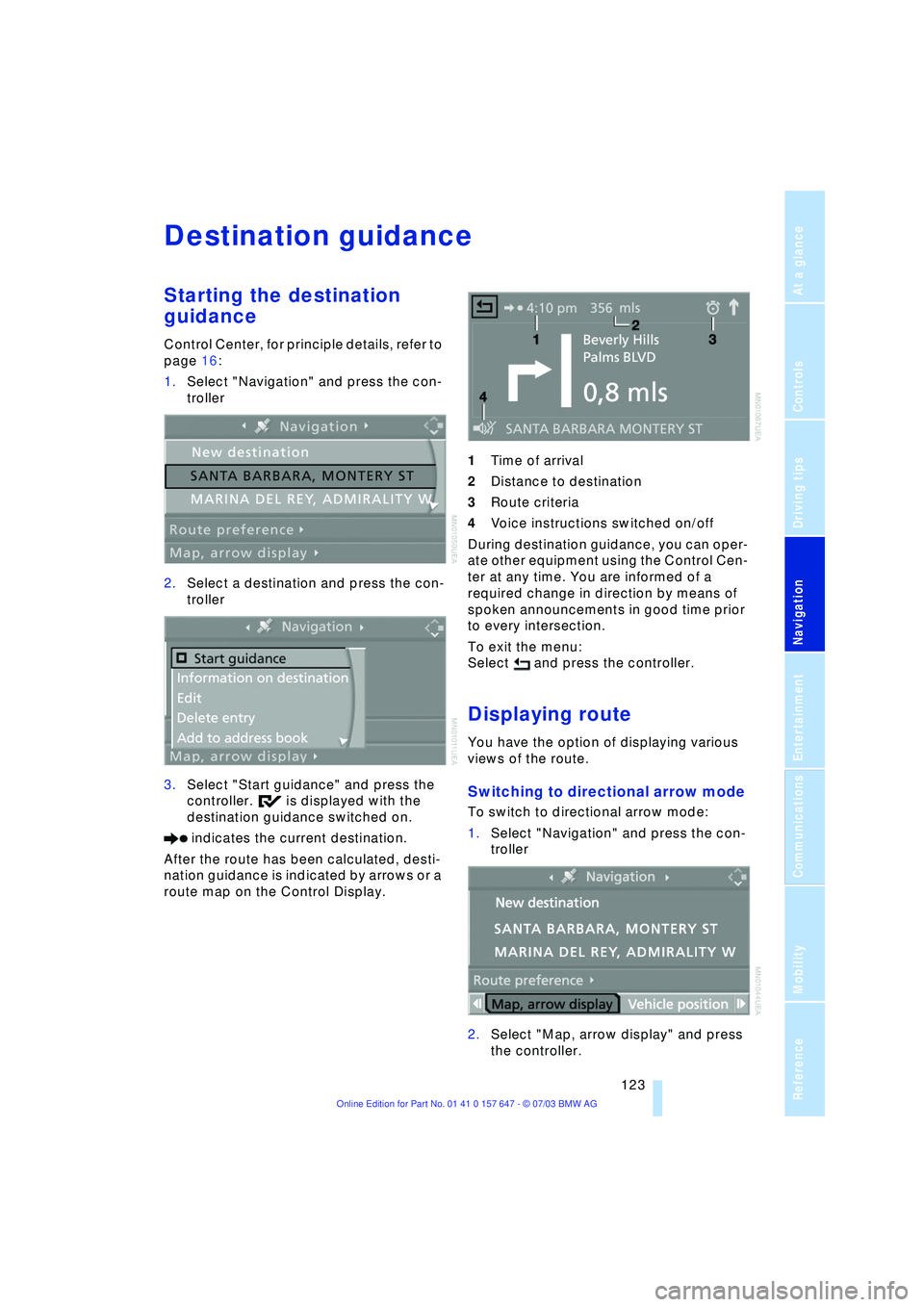
1.Select "Navigation" and press the con-
troller
2.Select a destination and press the con-
troller
3.Select "Start guidance" and press the
controller. is displayed with the
destination guidance switched on.
indicates the current destination.
After the route has been calculated, desti-
nation guidance is indicated by arrows or a
route map on the Control Display. 1Time of arrival
2Distance to destination
3Route criteria
4Voice instructions switched on/off
During destination guidance, you can oper-
ate other equipment using the Control Cen-
ter at any time. You are informed of a
required change in direction by means of
spoken announcements in good time prior
to every intersection.
To exit the menu:
Select and press the controller.
Displaying route
You have the option of displaying various
views of the route.
Switching to directional arrow mode
To switch to directional arrow mode:
1.Select "Navigation" and press the con-
troller
2.Select "Map, arrow display" and press
the controller.
Page 126 of 220
Destination guidance
124
Selecting display of route map
You can also select a map showing your
travel route while the system is guiding you
to your destination.
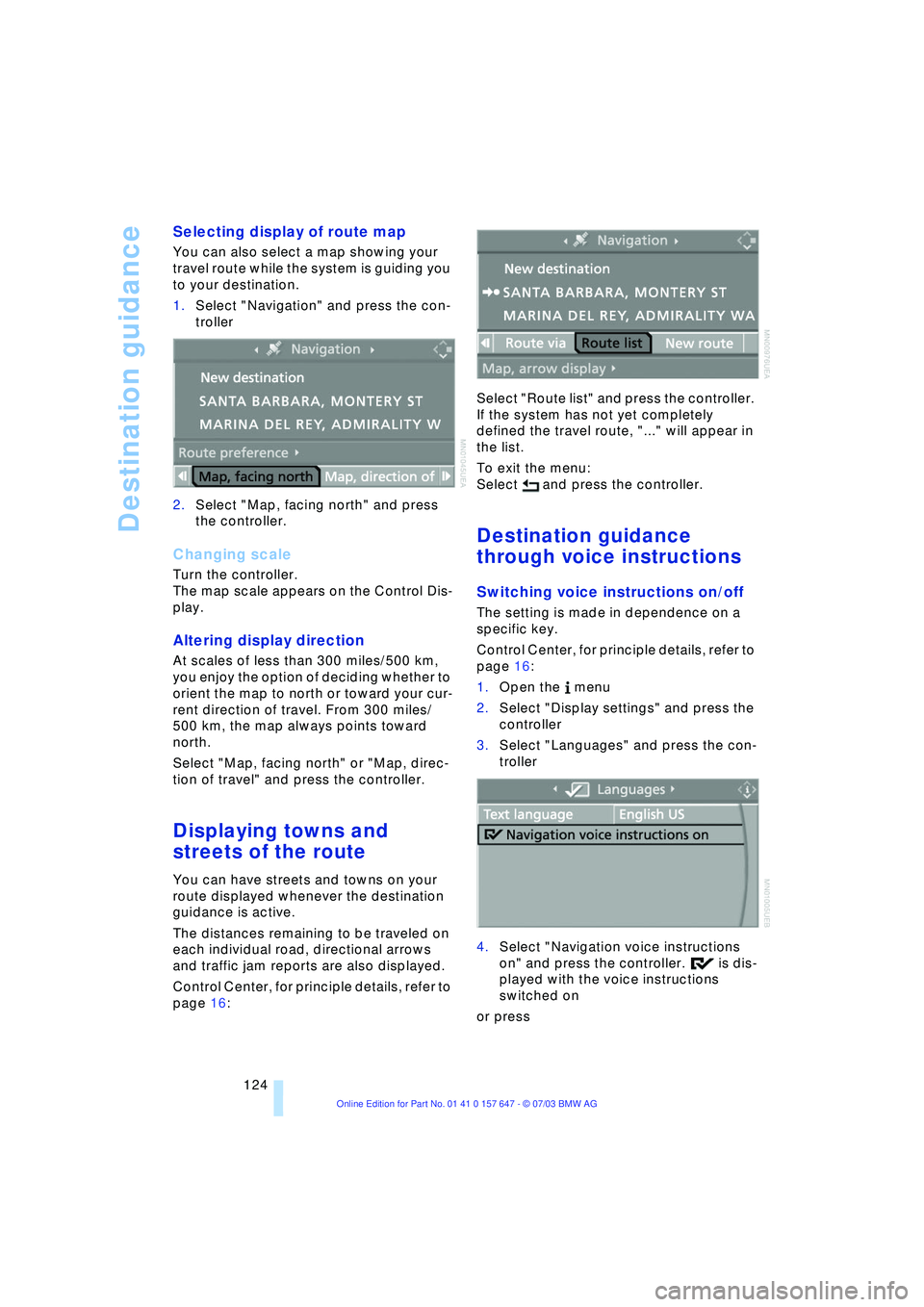
1.Select "Navigation" and press the con-
troller
2.Select "Map, facing north" and press
the controller.
Changing scale
Turn the controller.
The map scale appears on the Control Dis-
play.
Altering display direction
At scales of less than 300 miles/500 km,
you enjoy the option of deciding whether to
orient the map to north or toward your cur-
rent direction of travel. From 300 miles/
500 km, the map always points toward
north.
Select "Map, facing north" or "Map, direc-
tion of travel" and press the controller.
Displaying towns and
streets of the route
You can have streets and towns on your
route displayed whenever the destination
guidance is active.
The distances remaining to be traveled on
each individual road, directional arrows
and traffic jam reports are also displayed.
Control Center, for principle details, refer to
page 16: Select "Route list" and press the controller.
If the system has not yet completely
defined the travel route, "..." will appear in
the list.
To exit the menu:
Select and press the controller.
Destination guidance
through voice instructions
Switching voice instructions on/off
The setting is made in dependence on a
specific key.
Control Center, for principle details, refer to
page 16:
1.Open the menu
2.Select "Display settings" and press the
controller
3.Select "Languages" and press the con-
troller
4.Select "Navigation voice instructions
on" and press the controller. is dis-
played with the voice instructions
switched on
or press
Page 128 of 220
Destination guidance
126
Traffic information
Calling up traffic information
Control Center, for principle details, refer to
page 16:
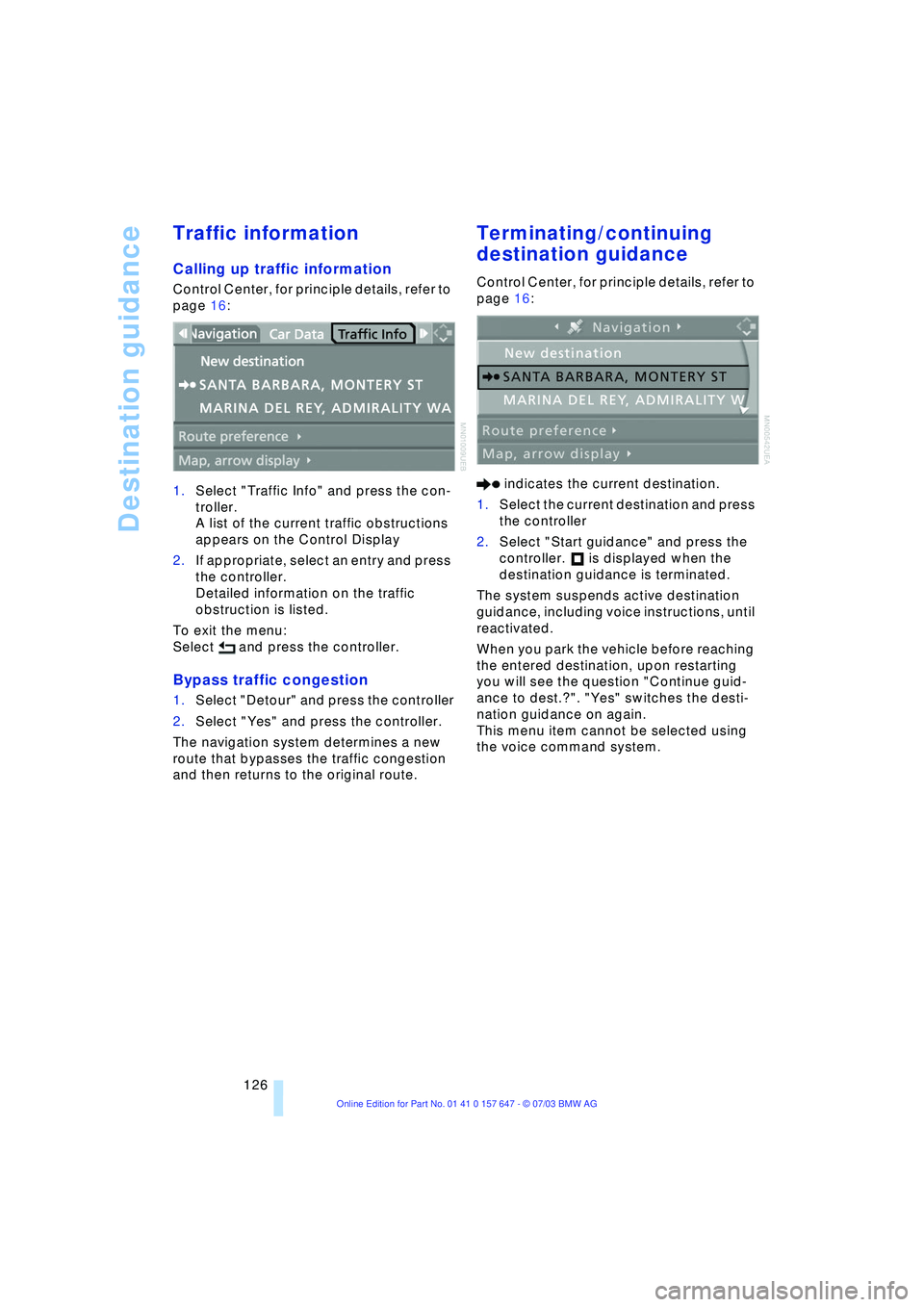
1.Select "Traffic Info" and press the con-
troller.
A list of the current traffic obstructions
appears on the Control Display
2.If appropriate, select an entry and press
the controller.
Detailed information on the traffic
obstruction is listed.
To exit the menu:
Select and press the controller.
Bypass traffic congestion
1.Select "Detour" and press the controller
2.Select "Yes" and press the controller.
The navigation system determines a new
route that bypasses the traffic congestion
and then returns to the original route.
Terminating/continuing
destination guidance
Control Center, for principle details, refer to
page 16:
indicates the current destination.
1.Select the current destination and press
the controller
2.Select "Start guidance" and press the
controller. is displayed when the
destination guidance is terminated.
The system suspends active destination
guidance, including voice instructions, until
reactivated.
When you park the vehicle before reaching
the entered destination, upon restarting
you will see the question "Continue guid-
ance to dest.?". "Yes" switches the desti-
nation guidance on again.
This menu item cannot be selected using
the voice command system.
Page 129 of 220
Navigation
Driving tips
127Reference
At a glance
Controls
Communications
Entertainment
Mobility
What to do if É
What to do if É
>you request the current position of your
vehicle, but do not receive a precise
display?
The system is unable to receive enough
GPS signals at your current position
owing to obstructions, your position is
not yet available on your navigation CD/
DVD, or the system is in the process of
calculating your position. As a rule, por-
table communications GSM / GPS
reception is guaranteed under a clear
sky
>the destination guidance does not
adopt a destination?
The data of the destination is not stored
on the navigation CD/DVD that is
loaded. Select a destination that is as
close as possible to the original
>the destination guidance does not
adopt an address without the street
name?
On the navigation CD/DVD, no down-
town area can be determined for the
city or town entered. Enter any street,
or a destination such as the railway sta-
tion etc., then start the destination guid-
ance
>you want to enter a destination for the
destination guidance system, but it is
not possible to select the letters for
your desired entry?
The destination data is not recorded on
the navigation CD/DVD that is loaded.
In this case, the system will not offer
you any letters to choose from. Select a
destination that is as close as possible
to the original
>the system stops furnishing directions
on which way to turn as you approach
intersections?
You are driving in an area that has not
yet been completely recorded on the
navigation CD/DVD. Instead of an arrow
indicating a turn, you will see an arrow
which indicates the general direction of your planned route. Or you have left the
recommended route and the system
requires a few seconds to calculate a
new recommended route
>the battery has been disconnected?
It will take approx. 15 minutes for the
system to resume operation.
Page 136 of 220
Radio
134
Radio
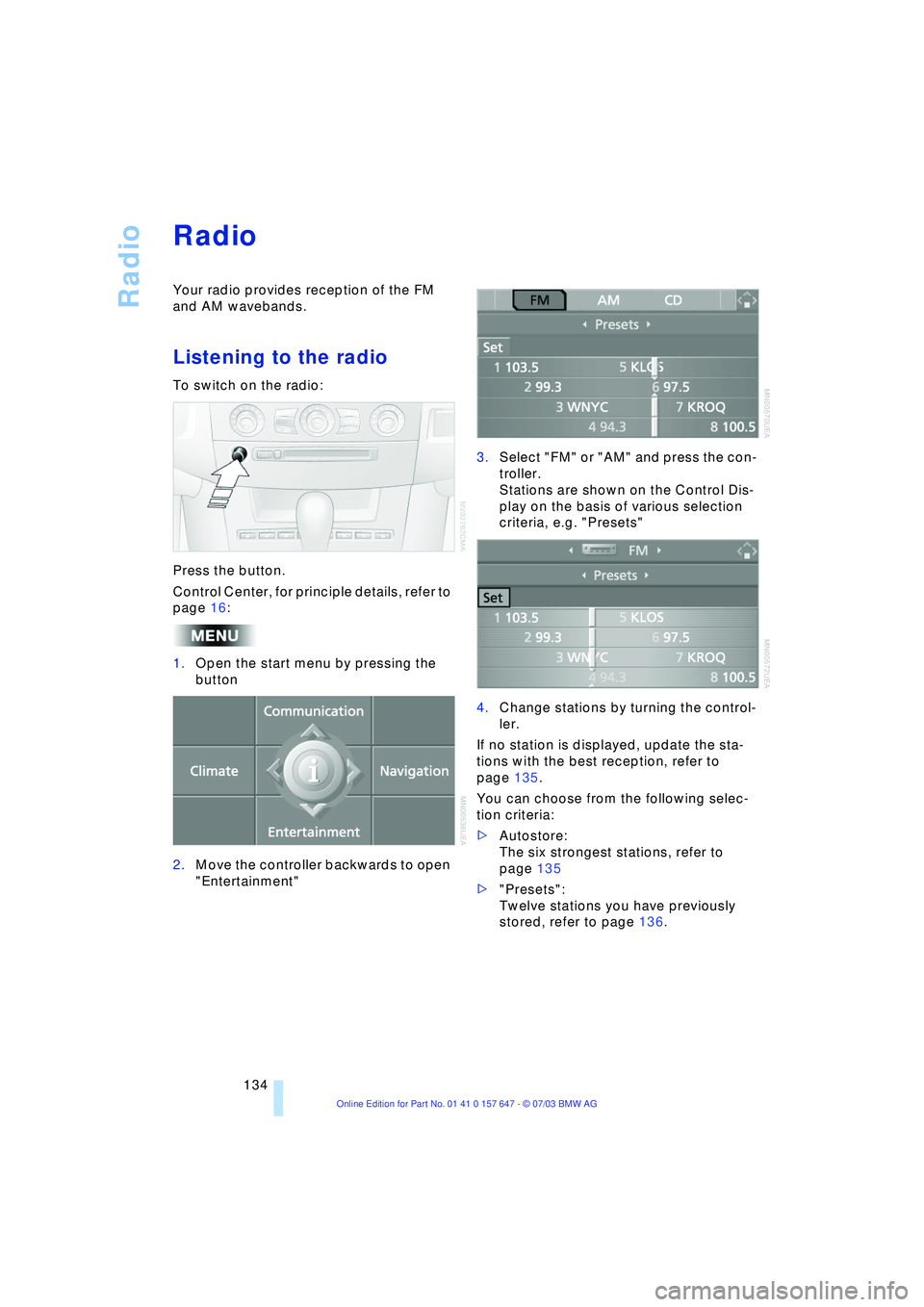
Your radio provides reception of the FM
and AM wavebands.
Listening to the radio
To switch on the radio:
Press the button.
Control Center, for principle details, refer to
page 16:
1.Open the start menu by pressing the
button
2.Move the controller backwards to open
"Entertainment"3.Select "FM" or "AM" and press the con-
troller.
Stations are shown on the Control Dis-
play on the basis of various selection
criteria, e.g. "Presets"
4.Change stations by turning the control-
ler.
If no station is displayed, update the sta-
tions with the best reception, refer to
page 135.
You can choose from the following selec-
tion criteria:
>Autostore:
The six strongest stations, refer to
page 135
>"Presets":
Twelve stations you have previously
stored, refer to page 136.
Page 137 of 220
Navigation
Entertainment
Driving tips
135Reference
At a glance
Controls
Communications
Mobility
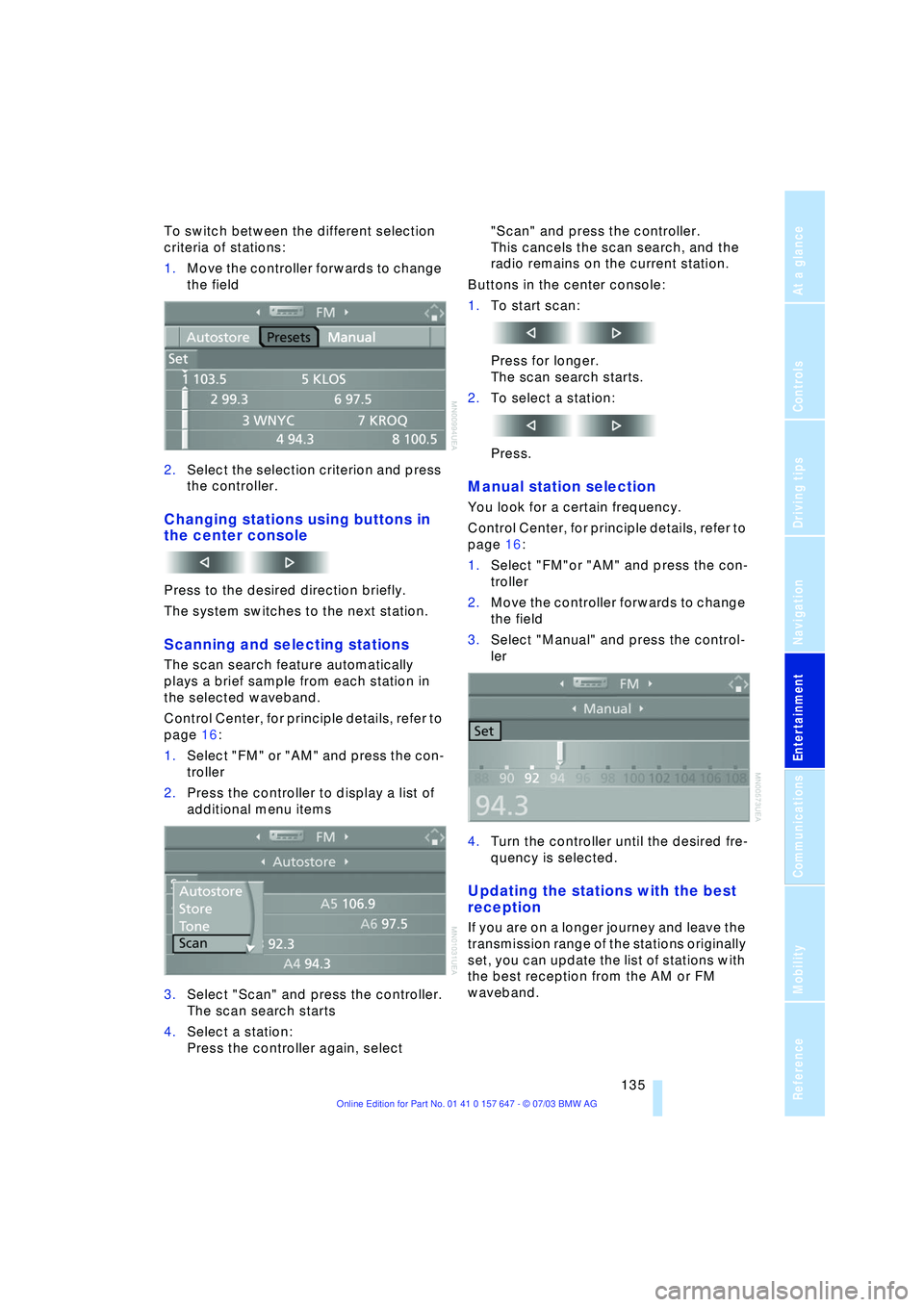
To switch between the different selection
criteria of stations:
1.Move the controller forwards to change
the field
2.Select the selection criterion and press
the controller.
Changing stations using buttons in
the center console
Press to the desired direction briefly.
The system switches to the next station.
Scanning and selecting stations
The scan search feature automatically
plays a brief sample from each station in
the selected waveband.
Control Center, for principle details, refer to
page 16:
1.Select "FM" or "AM" and press the con-
troller
2.Press the controller to display a list of
additional menu items
3.Select "Scan" and press the controller.
The scan search starts
4.Select a station:
Press the controller again, select "Scan" and press the controller.
This cancels the scan search, and the
radio remains on the current station.
Buttons in the center console:
1.To start scan:
Press for longer.
The scan search starts.
2.To select a station:
Press.
Manual station selection
You look for a certain frequency.
Control Center, for principle details, refer to
page 16:
1.Select "FM"or "AM" and press the con-
troller
2.Move the controller forwards to change
the field
3.Select "Manual" and press the control-
ler
4.Turn the controller until the desired fre-
quency is selected.
Updating the stations with the best
reception
If you are on a longer journey and leave the
transmission range of the stations originally
set, you can update the list of stations with
the best reception from the AM or FM
waveband.
Page 138 of 220
Radio
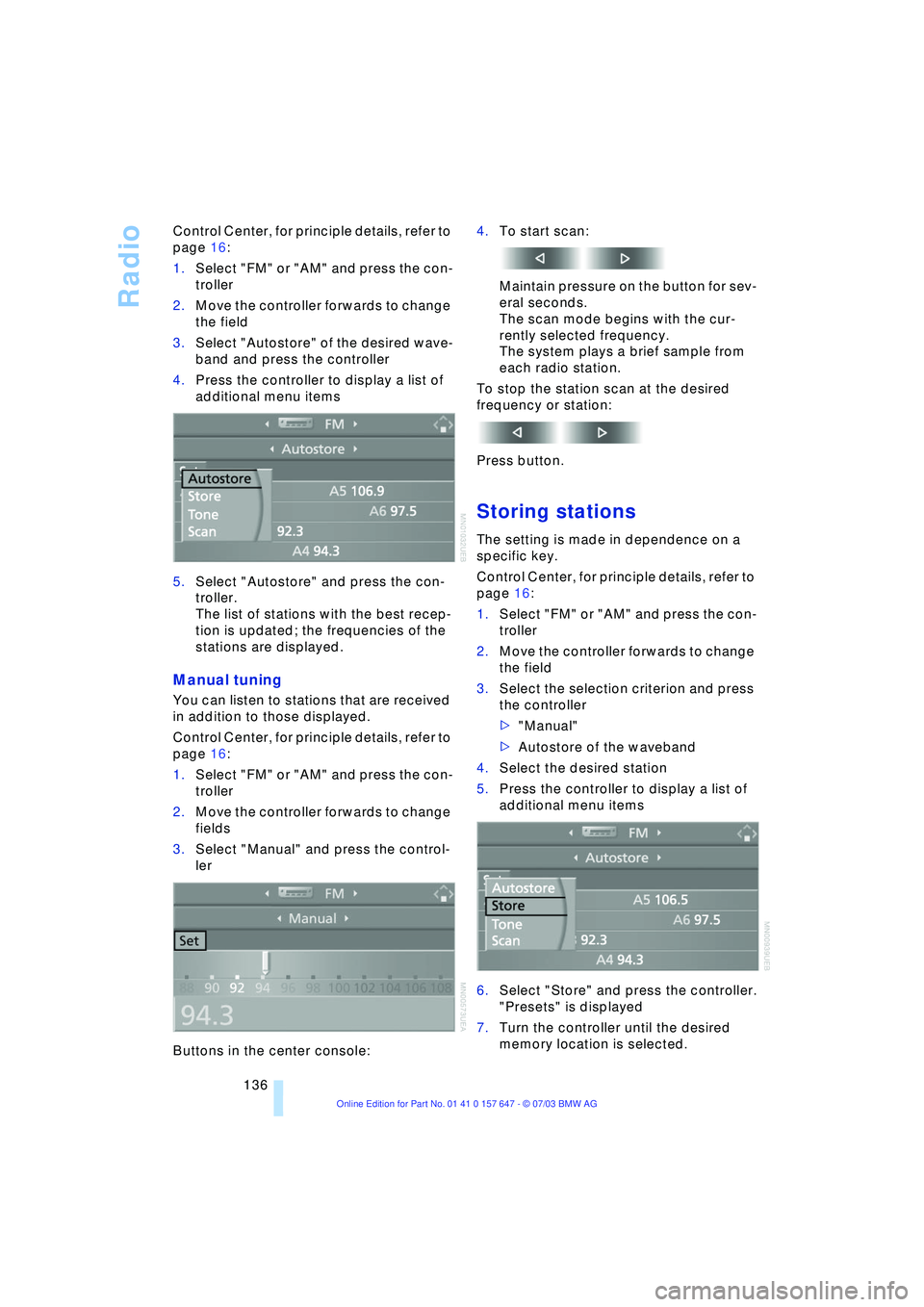
136 Control Center, for principle details, refer to
page 16:
1.Select "FM" or "AM" and press the con-
troller
2.Move the controller forwards to change
the field
3.Select "Autostore" of the desired wave-
band and press the controller
4.Press the controller to display a list of
additional menu items
5.Select "Autostore" and press the con-
troller.
The list of stations with the best recep-
tion is updated; the frequencies of the
stations are displayed.
Manual tuning
You can listen to stations that are received
in addition to those displayed.
Control Center, for principle details, refer to
page 16:
1.Select "FM" or "AM" and press the con-
troller
2.Move the controller forwards to change
fields
3.Select "Manual" and press the control-
ler
Buttons in the center console:4.To start scan:
Maintain pressure on the button for sev-
eral seconds.
The scan mode begins with the cur-
rently selected frequency.
The system plays a brief sample from
each radio station.
To stop the station scan at the desired
frequency or station:
Press button.
Storing stations
The setting is made in dependence on a
specific key.
Control Center, for principle details, refer to
page 16:
1.Select "FM" or "AM" and press the con-
troller
2.Move the controller forwards to change
the field
3.Select the selection criterion and press
the controller
>"Manual"
>Autostore of the waveband
4.Select the desired station
5.Press the controller to display a list of
additional menu items
6.Select "Store" and press the controller.
"Presets" is displayed
7.Turn the controller until the desired
memory location is selected.
Page 139 of 220
Navigation
Entertainment
Driving tips
137Reference
At a glance
Controls
Communications
Mobility
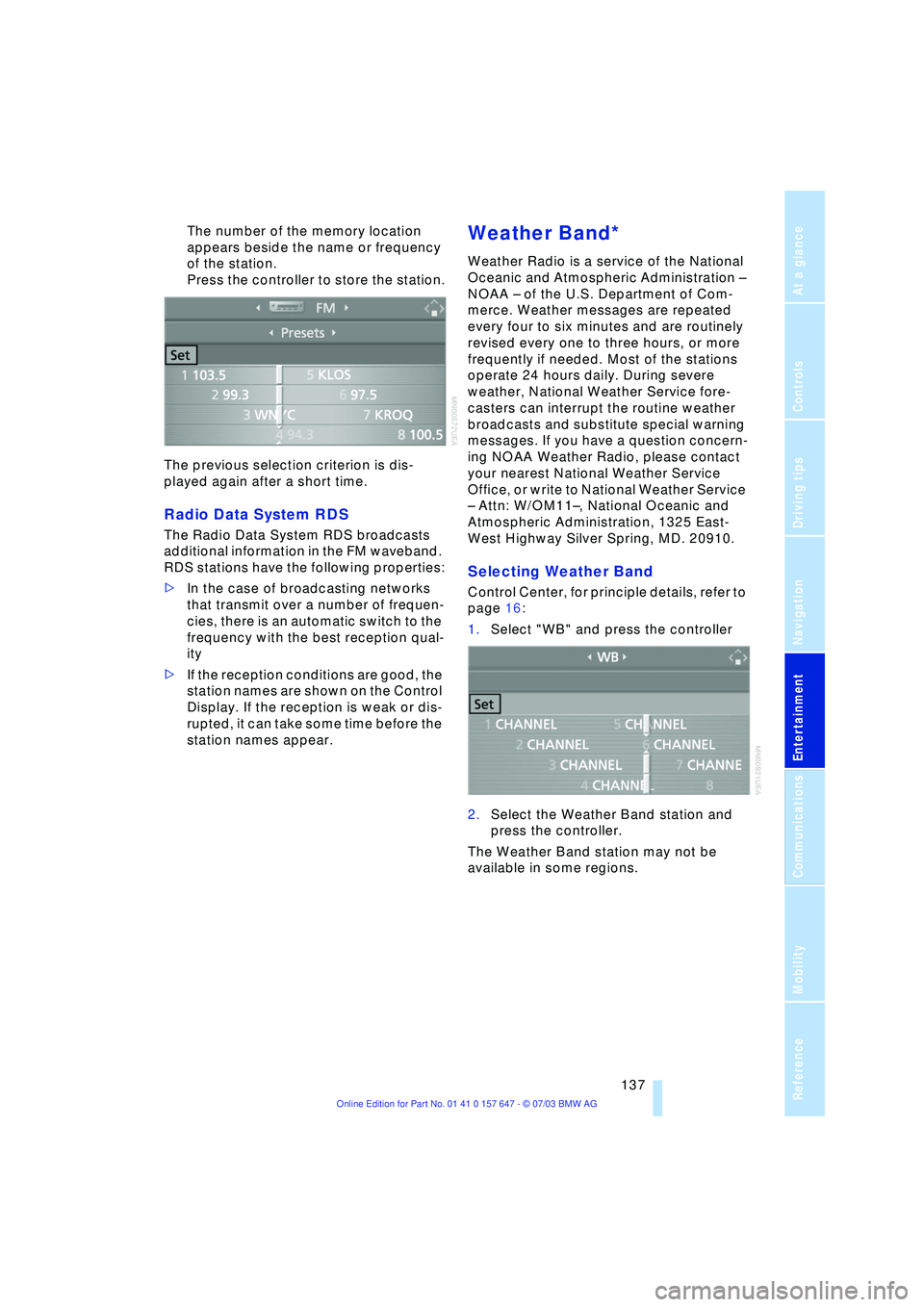
The number of the memory location
appears beside the name or frequency
of the station.
Press the controller to store the station.
The previous selection criterion is dis-
played again after a short time.
Radio Data System RDS
The Radio Data System RDS broadcasts
additional information in the FM waveband.
RDS stations have the following properties:
>In the case of broadcasting networks
that transmit over a number of frequen-
cies, there is an automatic switch to the
frequency with the best reception qual-
ity
>If the reception conditions are good, the
station names are shown on the Control
Display. If the reception is weak or dis-
rupted, it can take some time before the
station names appear.
Weather Band*
Weather Radio is a service of the National
Oceanic and Atmospheric Administration Ð
NOAA Ð of the U.S. Department of Com-
merce. Weather messages are repeated
every four to six minutes and are routinely
revised every one to three hours, or more
frequently if needed. Most of the stations
operate 24 hours daily. During severe
weather, National Weather Service fore-
casters can interrupt the routine weather
broadcasts and substitute special warning
messages. If you have a question concern-
ing NOAA Weather Radio, please contact
your nearest National Weather Service
Office, or write to National Weather Service
Ð Attn: W/OM11Ð, National Oceanic and
Atmospheric Administration, 1325 East-
West Highway Silver Spring, MD. 20910.
Selecting Weather Band
Control Center, for principle details, refer to
page 16:
1.Select "WB" and press the controller
2.Select the Weather Band station and
press the controller.
The Weather Band station may not be
available in some regions.
Page 141 of 220
Navigation
Entertainment
Driving tips
139Reference
At a glance
Controls
Communications
Mobility
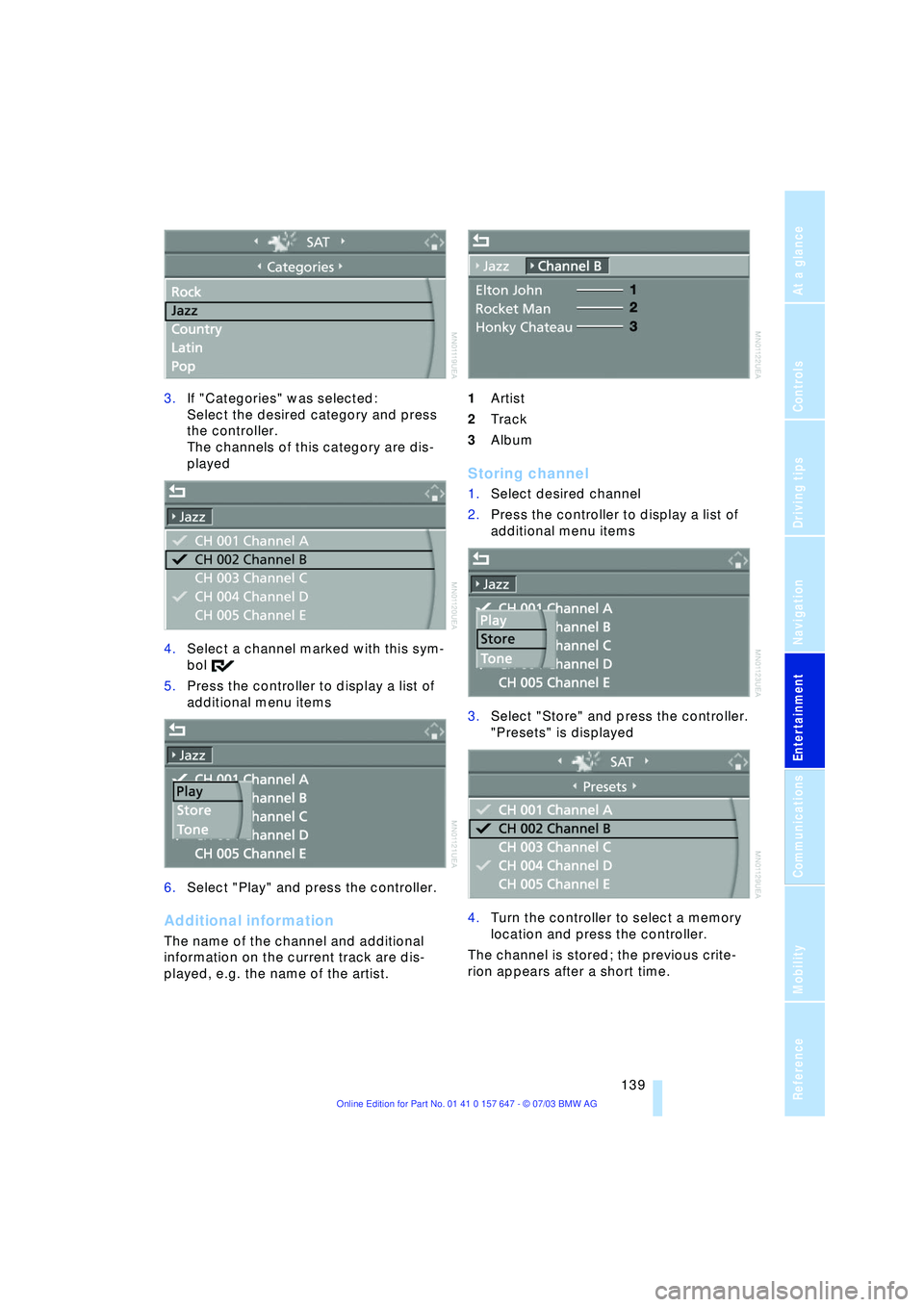
3.If "Categories" was selected:
Select the desired category and press
the controller.
The channels of this category are dis-
played
4.Select a channel marked with this sym-
bol
5.Press the controller to display a list of
additional menu items
6.Select "Play" and press the controller.
Additional information
The name of the channel and additional
information on the current track are dis-
played, e.g. the name of the artist.1Artist
2Track
3Album
Storing channel
1.Select desired channel
2.Press the controller to display a list of
additional menu items
3.Select "Store" and press the controller.
"Presets" is displayed
4.Turn the controller to select a memory
location and press the controller.
The channel is stored; the previous crite-
rion appears after a short time.
Page 142 of 220
Radio
140
Changing channel using buttons in
the center console
Press to the desired direction briefly.
The system switches to the next channel.
Notes
When there is a signal blockage or the
transmission is suspended momentarily for
more than 4 seconds, a message appears
on the Control Display.
Service may be interrupted or
unavailable for specific reasons such
as environmental or topographic condi-
tions and others that Satellite Radio cannot
directly control.
Signal may not be available under tunnels,
in parking garages, next to tall buildings,
nearby trees with dense foliage, nearby
mountains or other possible strong sources
of radio interference.
Service should resume normally after the
source of signal unavailability has been
cleared.<