change time BMW 525I 2005 User Guide
[x] Cancel search | Manufacturer: BMW, Model Year: 2005, Model line: 525I, Model: BMW 525I 2005Pages: 221, PDF Size: 8.19 MB
Page 75 of 221
Everything under control
74
Language on Control Display
Control Center, for principle details, refer to
page16.
1.Open the menu.
2.Select "Display settings" and press the
controller.
3.Select "Languages" and press the control-
ler.
4.Select "Text language" and press the con-
troller. You can change the language of the
text displays.
5.Select and activate the desired language by
pressing the controller.
The setting is stored for the remote control cur-
rently in use.
Setting time
Control Center, for principle details, refer to
page16.
1.Open the menu.
2.Select "Display settings" and press the
controller.
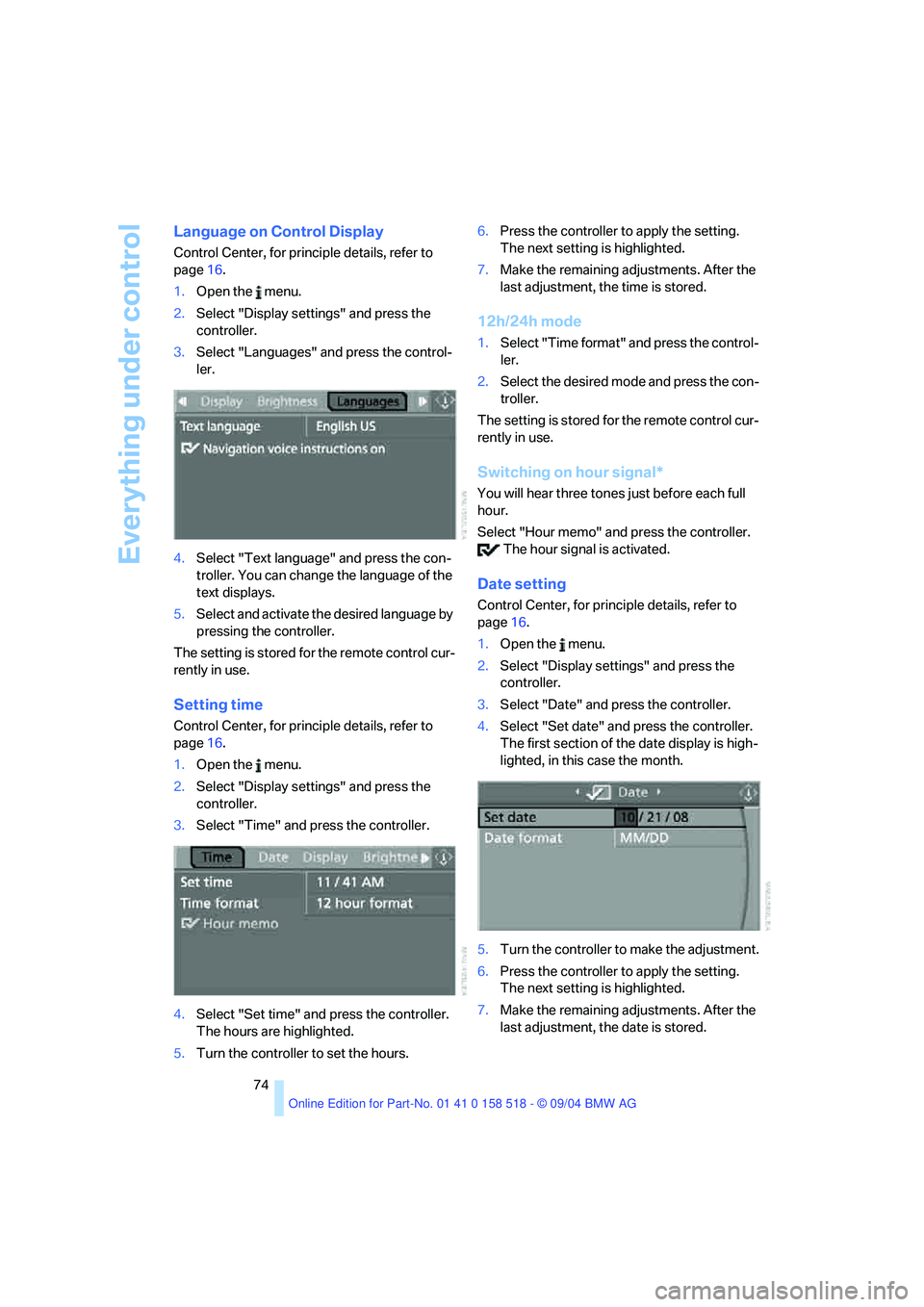
3.Select "Time" and press the controller.
4.Select "Set time" and press the controller.
The hours are highlighted.
5.Turn the controller to set the hours.6.Press the controller to apply the setting.
The next setting is highlighted.
7.Make the remaining adjustments. After the
last adjustment, the time is stored.
12h/24h mode
1.Select "Time format" and press the control-
ler.
2.Select the desired mode and press the con-
troller.
The setting is stored for the remote control cur-
rently in use.
Switching on hour signal*
You will hear three tones just before each full
hour.
Select "Hour memo" and press the controller.
The hour signal is activated.
Date setting
Control Center, for principle details, refer to
page16.
1.Open the menu.
2.Select "Display settings" and press the
controller.
3.Select "Date" and press the controller.
4.Select "Set date" and press the controller.
The first section of the date display is high-
lighted, in this case the month.
5.Turn the controller to make the adjustment.
6.Press the controller to apply the setting.
The next setting is highlighted.
7.Make the remaining adjustments. After the
last adjustment, the date is stored.
Page 78 of 221
Controls
77Reference
At a glance
Driving tips
Communication
Navigation
Entertainment
Mobility
Control Center, for principle details, refer to
page16.
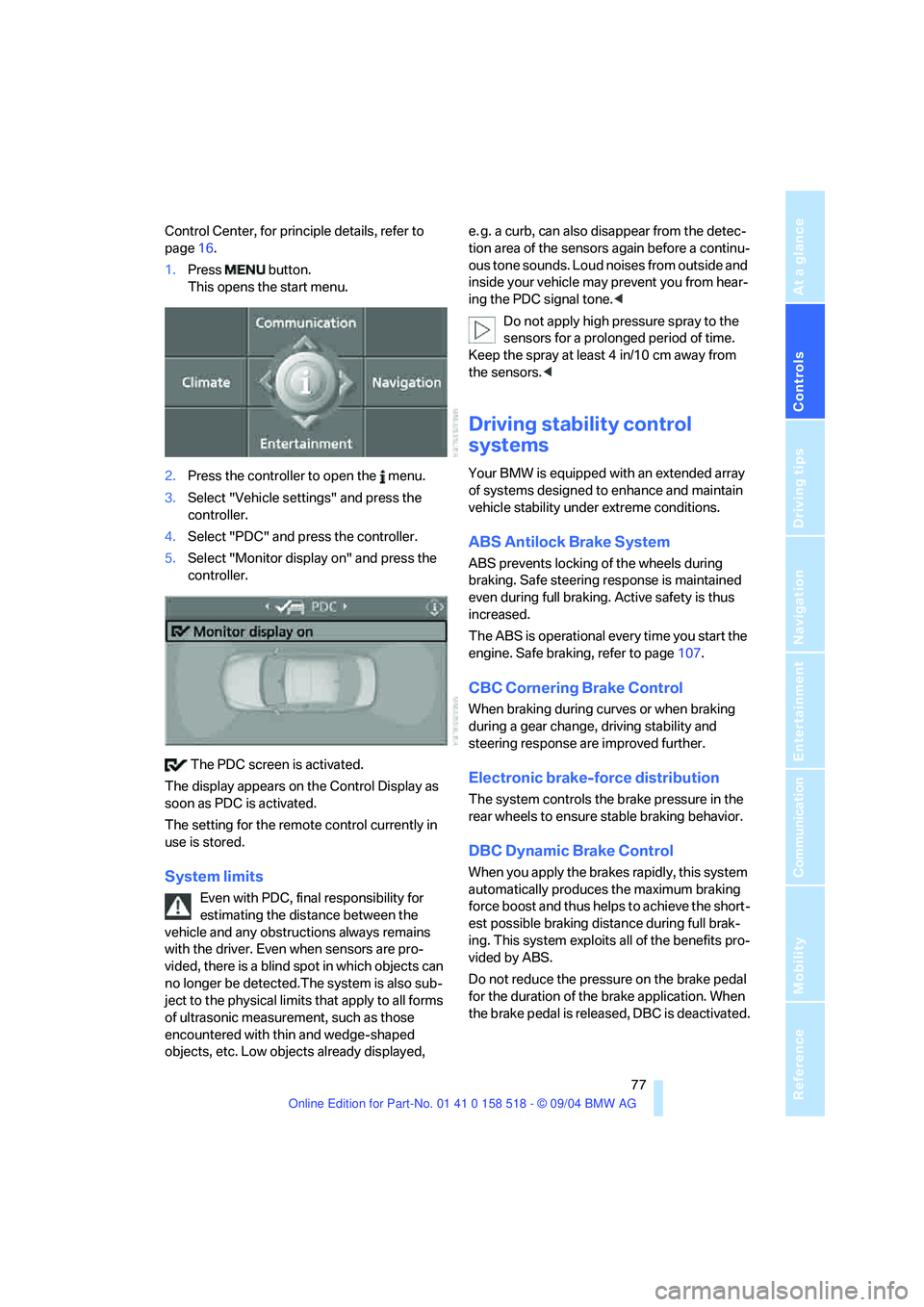
1.Press button.
This opens the start menu.
2.Press the controller to open the menu.
3.Select "Vehicle settings" and press the
controller.
4.Select "PDC" and press the controller.
5.Select "Monitor display on" and press the
controller.
The PDC screen is activated.
The display appears on the Control Display as
soon as PDC is activated.
The setting for the remote control currently in
use is stored.
System limits
Even with PDC, final responsibility for
estimating the distance between the
vehicle and any obstructions always remains
with the driver. Even when sensors are pro-
vided, there is a blind spot in which objects can
no longer be detected.The system is also sub-
ject to the physical limits that apply to all forms
of ultrasonic measurement, such as those
encountered with thin and wedge-shaped
objects, etc. Low objects already displayed, e. g. a curb, can also disappear from the detec-
tion area of the sensors again before a continu-
ous tone sounds. Loud noises from outside and
inside your vehicle may prevent you from hear-
ing the PDC signal tone.<
Do not apply high pressure spray to the
sensors for a prolonged period of time.
Keep the spray at least 4 in/10 cm away from
the sensors.<
Driving stability control
systems
Your BMW is equipped with an extended array
of systems designed to enhance and maintain
vehicle stability under extreme conditions.
ABS Antilock Brake System
ABS prevents locking of the wheels during
braking. Safe steering response is maintained
even during full braking. Active safety is thus
increased.
The ABS is operational every time you start the
engine. Safe braking, refer to page107.
CBC Cornering Brake Control
When braking during curves or when braking
during a gear change, driving stability and
steering response are improved further.
Electronic brake-force distribution
The system controls the brake pressure in the
rear wheels to ensure stable braking behavior.
DBC Dynamic Brake Control
When you apply the brakes rapidly, this system
automatically produces the maximum braking
force boost and thus helps to achieve the short-
est possible braking distance during full brak-
ing. This system exploits all of the benefits pro-
vided by ABS.
Do not reduce the pressure on the brake pedal
for the duration of the brake application. When
the brake pedal is released, DBC is deactivated.
Page 80 of 221
Controls
79Reference
At a glance
Driving tips
Communication
Navigation
Entertainment
Mobility
Malfunction in vehicle stability-control
systems
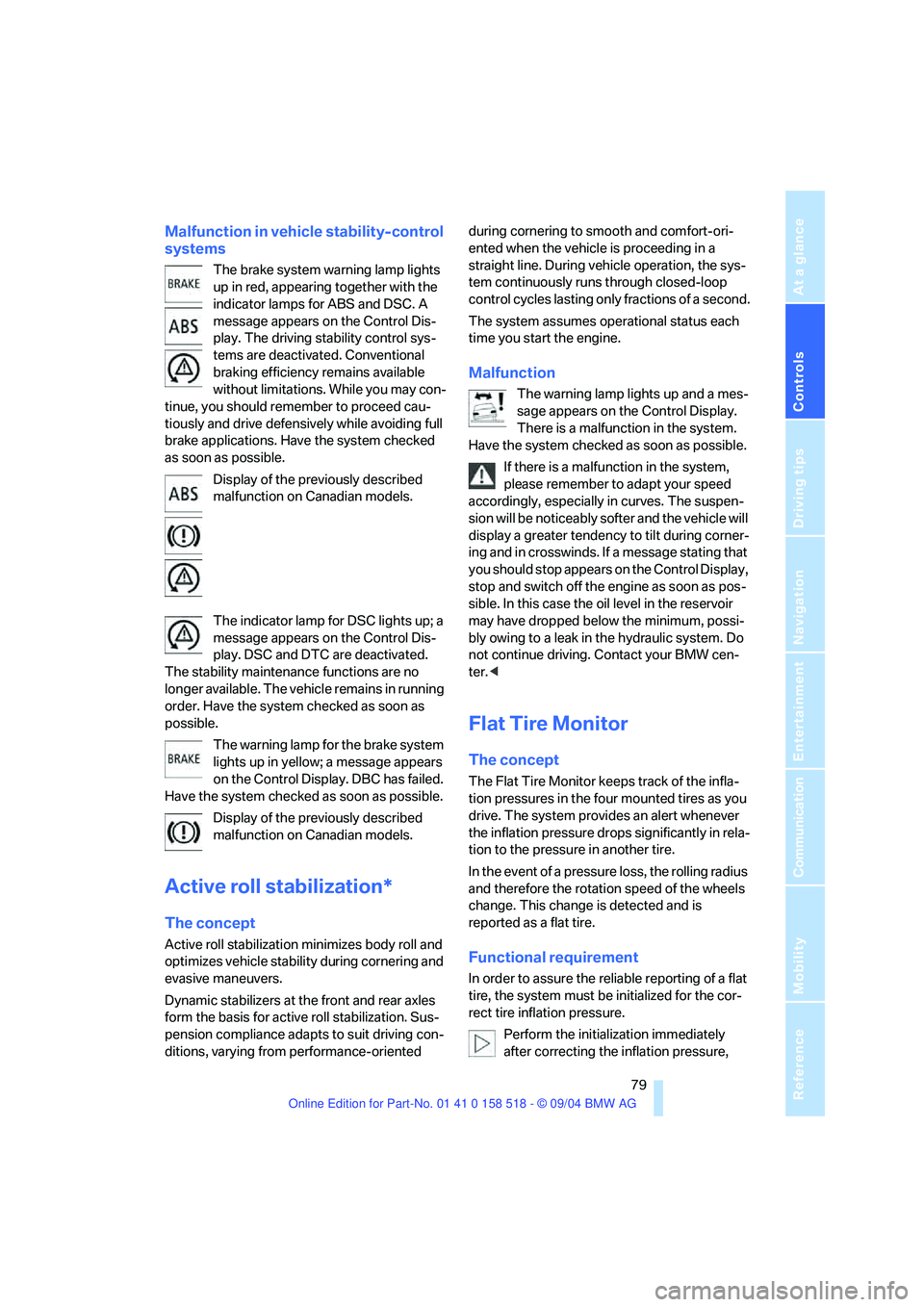
The brake system warning lamp lights
up in red, appearing together with the
indicator lamps for ABS and DSC. A
message appears on the Control Dis-
play. The driving stability control sys-
tems are deactivated. Conventional
braking efficiency remains available
without limitations. While you may con-
tinue, you should remember to proceed cau-
tiously and drive defensively while avoiding full
brake applications. Have the system checked
as soon as possible.
Display of the previously described
malfunction on Canadian models.
The indicator lamp for DSC lights up; a
message appears on the Control Dis-
play. DSC and DTC are deactivated.
The stability maintenance functions are no
longer available. The vehicle remains in running
order. Have the system checked as soon as
possible.
The warning lamp for the brake system
lights up in yellow; a message appears
on the Control Display. DBC has failed.
Have the system checked as soon as possible.
Display of the previously described
malfunction on Canadian models.
Active roll stabilization*
The concept
Active roll stabilization minimizes body roll and
optimizes vehicle stability during cornering and
evasive maneuvers.
Dynamic stabilizers at the front and rear axles
form the basis for active roll stabilization. Sus-
pension compliance adapts to suit driving con-
ditions, varying from performance-oriented during cornering to smooth and comfort-ori-
ented when the vehicle is proceeding in a
straight line. During vehicle operation, the sys-
tem continuously runs through closed-loop
control cycles lasting only fractions of a second.
The system assumes operational status each
time you start the engine.
Malfunction
The warning lamp lights up and a mes-
sage appears on the Control Display.
There is a malfunction in the system.
Have the system checked as soon as possible.
If there is a malfunction in the system,
please remember to adapt your speed
accordingly, especially in curves. The suspen-
s i o n w il l b e n o t i c ea b ly s o f t e r a n d t h e v e h i cl e w il l
display a greater tendency to tilt during corner-
ing and in crosswinds. If a message stating that
you should stop appears on the Control Display,
stop and switch off the engine as soon as pos-
sible. In this case the oil level in the reservoir
may have dropped below the minimum, possi-
bly owing to a leak in the hydraulic system. Do
not continue driving. Contact your BMW cen-
ter.<
Flat Tire Monitor
The concept
The Flat Tire Monitor keeps track of the infla-
tion pressures in the four mounted tires as you
drive. The system provides an alert whenever
the inflation pressure drops significantly in rela-
tion to the pressure in another tire.
In the event of a pressure loss, the rolling radius
and therefore the rotation speed of the wheels
change. This change is detected and is
reported as a flat tire.
Functional requirement
In order to assure the reliable reporting of a flat
tire, the system must be initialized for the cor-
rect tire inflation pressure.
Perform the initialization immediately
after correcting the inflation pressure,
Page 88 of 221
Controls
87Reference
At a glance
Driving tips
Communication
Navigation
Entertainment
Mobility
Lamps
Parking lamps/low beams
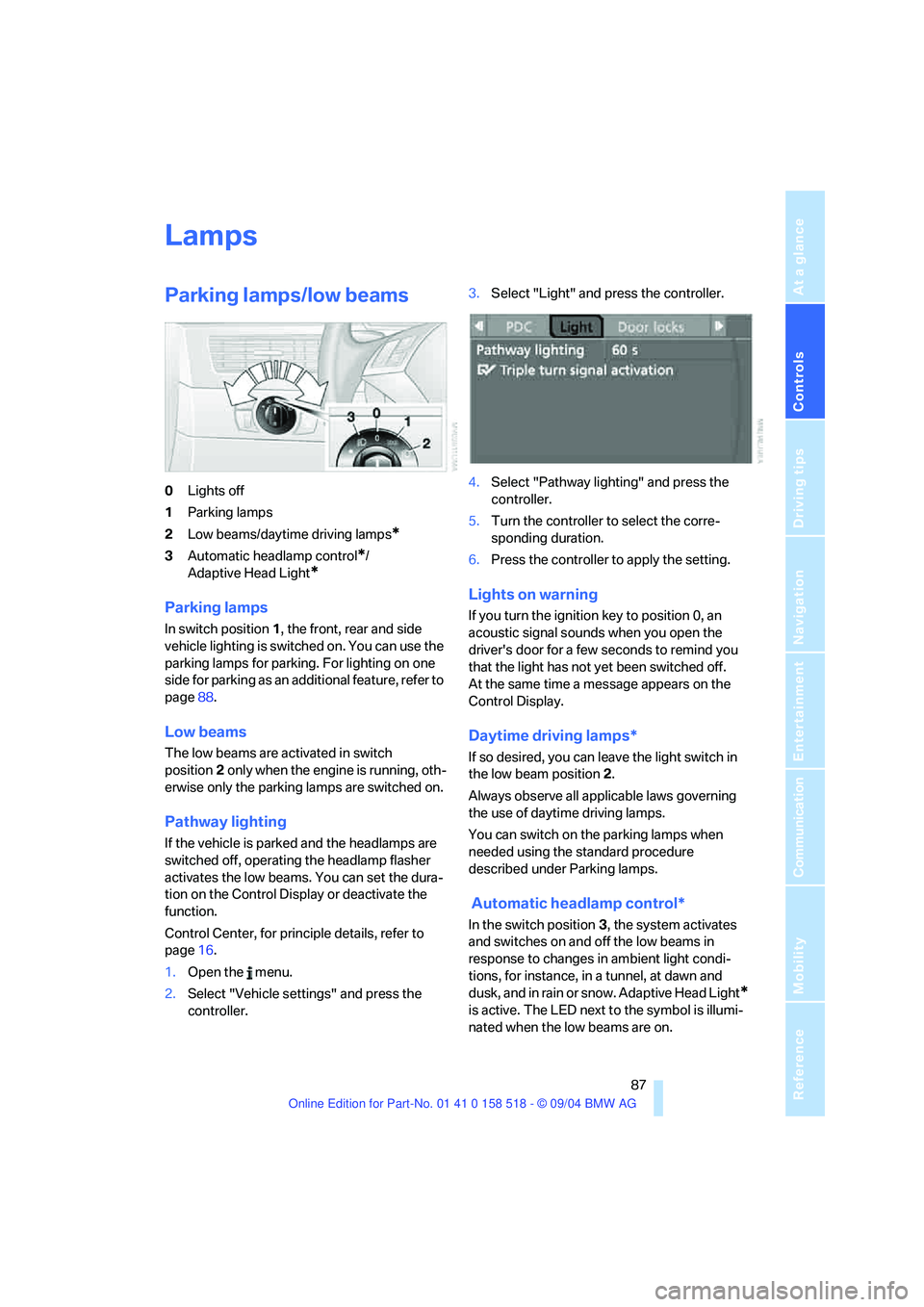
0Lights off
1Parking lamps
2Low beams/daytime driving lamps
*
3Automatic headlamp control*/
Adaptive Head Light
*
Parking lamps
In switch position1, the front, rear and side
vehicle lighting is switched on. You can use the
parking lamps for parking. For lighting on one
side for parking as an additional feature, refer to
page88.
Low beams
The low beams are activated in switch
position2 only when the engine is running, oth-
erwise only the parking lamps are switched on.
Pathway lighting
If the vehicle is parked and the headlamps are
switched off, operating the headlamp flasher
activates the low beams. You can set the dura-
tion on the Control Display or deactivate the
function.
Control Center, for principle details, refer to
page16.
1.Open the menu.
2.Select "Vehicle settings" and press the
controller.3.Select "Light" and press the controller.
4.Select "Pathway lighting" and press the
controller.
5.Turn the controller to select the corre-
sponding duration.
6.Press the controller to apply the setting.
Lights on warning
If you turn the ignition key to position 0, an
acoustic signal sounds when you open the
driver's door for a few seconds to remind you
that the light has not yet been switched off.
At the same time a message appears on the
Control Display.
Daytime driving lamps*
If so desired, you can leave the light switch in
the low beam position2.
Always observe all applicable laws governing
the use of daytime driving lamps.
You can switch on the parking lamps when
needed using the standard procedure
described under Parking lamps.
Automatic headlamp control*
In the switch position3, the system activates
and switches on and off the low beams in
response to changes in ambient light condi-
tions, for instance, in a tunnel, at dawn and
d u s k , a n d in r a i n o r s n o w . A d a p t iv e H e a d L ig h t
*
is active. The LED next to the symbol is illumi-
nated when the low beams are on.
Page 123 of 221
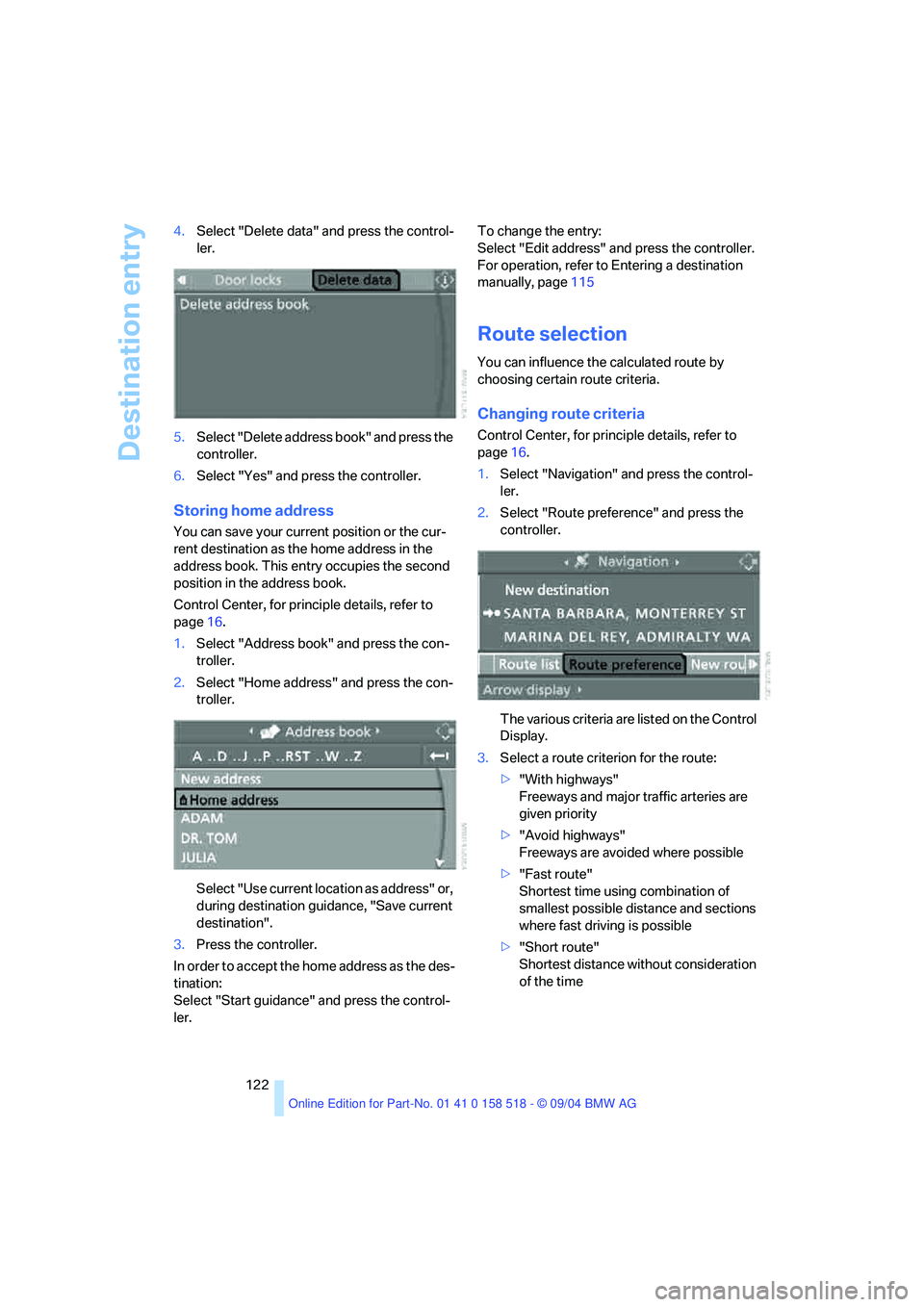
Destination entry
122 4.Select "Delete data" and press the control-
ler.
5.Select "Delete address book" and press the
controller.
6.Select "Yes" and press the controller.
Storing home address
You can save your current position or the cur-
rent destination as the home address in the
address book. This entry occupies the second
position in the address book.
Control Center, for principle details, refer to
page16.
1.Select "Address book" and press the con-
troller.
2.Select "Home address" and press the con-
troller.
Select "Use current location as address" or,
during destination guidance, "Save current
destination".
3.Press the controller.
In order to accept the home address as the des-
tination:
Select "Start guidance" and press the control-
ler.To change the entry:
Select "Edit address" and press the controller.
For operation, refer to Entering a destination
manually, page115
Route selection
You can influence the calculated route by
choosing certain route criteria.
Changing route criteria
Control Center, for principle details, refer to
page16.
1.Select "Navigation" and press the control-
ler.
2.Select "Route preference" and press the
controller.
The various criteria are listed on the Control
Display.
3.Select a route criterion for the route:
>"With highways"
Freeways and major traffic arteries are
given priority
>"Avoid highways"
Freeways are avoided where possible
>"Fast route"
Shortest time using combination of
smallest possible distance and sections
where fast driving is possible
>"Short route"
Shortest distance without consideration
of the time
Page 125 of 221
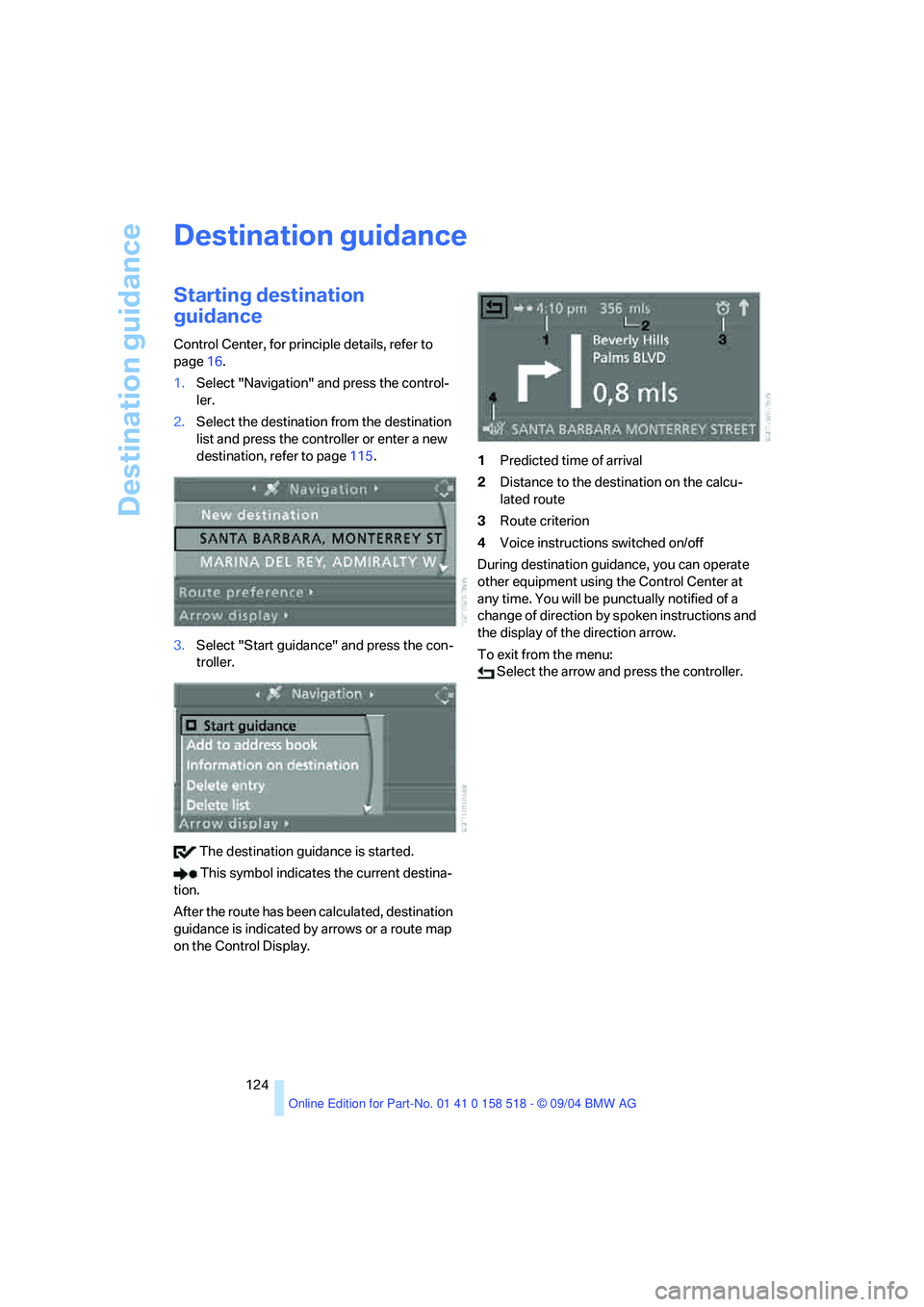
Destination guidance
124
Destination guidance
Starting destination
guidance
Control Center, for principle details, refer to
page16.
1.Select "Navigation" and press the control-
ler.
2.Select the destination from the destination
list and press the controller or enter a new
destination, refer to page115.
3.Select "Start guidance" and press the con-
troller.
The destination guidance is started.
This symbol indicates the current destina-
tion.
After the route has been calculated, destination
guidance is indicated by arrows or a route map
on the Control Display.1Predicted time of arrival
2Distance to the destination on the calcu-
lated route
3Route criterion
4Voice instructions switched on/off
During destination guidance, you can operate
other equipment using the Control Center at
any time. You will be punctually notified of a
change of direction by spoken instructions and
the display of the direction arrow.
To exit from the menu:
Select the arrow and press the controller.
Page 188 of 221
Mobility
187Reference
At a glance
Controls
Driving tips
Communication
Navigation
Entertainment
3.Check and correct the tire inflation pressure
at the earliest opportunity.
Protect valve stems and valve stem
seal caps against dirt and contamina-
tion. Dirt in valve stems is a frequent source
of gradual air loss.<
4.Reinitialize the Flat Tire Monitor, refer to
page80.
5.Replace the damaged tire with a new one as
soon as possible and have the new wheel
balanced.
Driving with compact wheel
Drive reservedly and do not exceed a speed of
50 mph/80 km/h.
The driving characteristics change, for example
reduced track stability on braking, extended
braking distance, and altered self-steering
characteristics in the limit range. In conjunction
with winter tires, these characteristics are more
pronounced.
Only one compact wheel may be
mounted. You should re-equip with
wheels and tires of the original size as quickly as
possible.<
Vehicle battery
Battery care
The battery is 100 % maintenance-free, i.e., the
electrolyte will last for the life of the battery
when the vehicle is operated in a temperate cli-
mate . Your BMW center will be glad to advise in
all matters concerning the battery.
Charging battery
Only charge the battery in the vehicle via the
terminals in the engine compartment with the
engine off. Connections, refer to Jump starting
on page190.
Disposal
Have old batteries disposed of by your
BMW center or hand them in to a recy-
cling center. Maintain the battery in an upright
position for transport and storage. Always
restrain the battery to prevent it from tipping
over during transport.<
Power failure
After a temporary power loss, the functioning of
some equipment may be limited and require
reinitialization. Individual settings are also lost
and must be updated again:
>Active steering
The system is deactivated and must be ini-
tialized, refer to page81. Until then, the
steering will react differently than usual.
>Seat, mirror and steering wheel memory
The positions must be stored again, refer to
page40.
>Time and Date
The settings must be updated, refer to
page74.
>Radio
Stations must be stored again, refer to
page140.
>Navigation system
You must wait until it becomes operational
again, refer to page128.
Fuses
Never attempt to repair a blown fuse and
do not replace a defective fuse with a sub-
stitute of another color or amperage rating, as
this could lead to a circuit overload, ultimately
resulting in a fire in the vehicle.<
Spare fuses, plastic tweezers and fuse alloca-
tion diagram are located in the compartment for
the onboard tool kit, refer to page182.
Page 206 of 221
Reference 205
At a glance
Controls
Driving tips
Communica-
Navigation
Entertainment
Mobility
"Check Control
messages"69
Check Gas Cap168
Checking the air pressure,
refer to Tire inflation
pressure170
Child-restraint fixing system
LATCH49
Child restraints47
Child restraint systems47
Child-safety lock50
Child seats47
Chime, refer to Check
Control67
Chock185
Chrome parts, care, refer to
Caring for your vehicle
brochure
Cigarette lighter99
Cleaning, refer to Caring for
your vehicle brochure
Cleaning the windshield, refer
to Wiper system57
"Climate"44
Clock65
– 12h/24h mode74
– time setting74
Closing
– from inside31
– from outside29
Clothes hooks99
Cockpit10
Cold start, refer to Starting
engine51
"Comfort", active backrest
width adjustment40
Comfort area, refer to All
about the center console14
Comfort seat39
"Communication"154
"Communication
settings"161
Compact Disc
– refer to CD changer145
– refer to CD player145
Compact wheel
– changing wheels186
– inflation pressure171Computer69
– clock, 12h/24h mode74
– displays on Control
Display70
– hour signal74
"Concert hall"135
Condition Based Service
CBS180
"Confirmation"30
Confirmation signals for
locking and unlocking30
Consumption, refer to
Average consumption70
Consumption indicator
– Energy Control66
"Continue guidance to
destination?"125
Control Center16
– adjusting brightness73
– assistance window20
– automatic climate control92
– changing settings19,73
– changing the menu page19
– confirming selection or
entry19
– controller16
– displays, menus16
– language selection74
– lists19
– menu item selection19
– menu navigation17
– operating elements16
– selecting units of
measurement and display
format73
– setting time and date74
– start menu17
– status information20
– symbols17
Control Display, refer to
Control Center16
Controller, refer to Control
Center16
Controls, refer to Cockpit10
Convenience operation
– glass sunroof30
– windows30
Convenience start, refer to
Starting engine51Coolant178
– level178
Cooling, maximum91
Cornering Brake Control
CBC77
Country of destination for
navigation116
Courtesy lamps89
Cradle for telephone or
portable phone98
Cruise control58,59
– active cruise control59
Cruising range70
Cup holders99
Curb weight, refer to
Weights198
Current fuel consumption66
"Current position"125
Current position
– displaying125
– entering120
– storing120
"Customer Relations"164
Cylinders, refer to Engine
data196
D
Dashboard, refer to
Cockpit10
Data196
– capacities198
– dimensions197
– engine196
– technical data196
– weights198
"Date"74
Date65
– display format75
– retrieval65
– setting74
"Date format"75
Daytime driving lamps87
DBC Dynamic Brake
Control77
– warning lamp79
"Deactivated"41
Deactivating front passenger
airbags47,83
Page 209 of 221
Everything from A to Z
208 Fuel consumption display
– computer, average fuel
consumption70
Fuel display, refer to Fuel
gage66
Fuel filler door168
– releasing in the event of
electrical malfunction168
Fuel gage66
Fuses187
G
Garage door opener, refer to
Integrated universal remote
control96
Gasoline, refer to Required
fuel169
Gasoline display, refer to Fuel
gage66
Gear changes
– SMG Sequential manual
transmission54
Gear display
– automatic transmission with
Steptronic55
– SMG Sequential manual
transmission53
Gearshift lever
– automatic transmission with
Steptronic55
– manual transmission53
– SMG Sequential manual
transmission53
General driving notes106
Glass sunroof, electric35
– auto-remote operation from
outside31
– opening and closing
manually37
– remote control30
Glove compartment97
– lighting97
– rechargeable flashlight98
GPS navigation, refer to
Navigation system114Grills, refer to Ventilation93
Grills of the automatic climate
control90
Gross vehicle weight, refer to
Weights198
H
Halogen lamps183
Handbrake52
– indicator lamp13,52
Hands-free system153
– refer to Microphone14
Hazard warning flashers15
Head airbags83
Headlamp control,
automatic87
Headlamp flasher56
Headlamps87
– care, refer to Caring for your
vehicle brochure
– cleaning, refer to Wiper
system57
– replacing bulbs183
Head Light, refer to Adaptive
Head Light88
"Headphone operation
only"137
"Headphones"137
Head restraints41
– front head restraints,
active42
Head-Up Display84
Heated mirrors45
Heated rear window90
Heated seats43
Heated steering wheel46
Heating90
– exterior mirrors45
– interior90
– rear window90
– residual heat utilization92
– seats43
– steering wheel46
Heating while stationary92Heating with engine switched
off, refer to Residual heat
utilization92
Heavy cargo, refer to Securing
cargo109
Height, refer to
Dimensions197
Height adjustment
– seats39
– steering wheel45
High beams88
– headlamp flasher88
– indicator lamp13
– replacing bulbs183
High water, refer to Driving
through water107
Hills108
Holder for cups99
"Home address"122
Hood176
Horn10
Hot exhaust system106
"Hour memo"74
"House number" for desti-
nation entry117
Hydraulic brake assistant,
refer to DBC Dynamic Brake
Control77
Hydroplaning107
I
Ice warning65
iDrive, refer to Control
Center16
Ignition key28
Ignition key positions, refer to
Ignition lock51
Ignition lock51
Independent ventilation94
– activating the activation
time95
– preselecting activation
times94
– switching on and off
directly94
Page 210 of 221
Reference 209
At a glance
Controls
Driving tips
Communica-
Navigation
Entertainment
Mobility
Indicator/warning lamps13
– ABS Antilock Brake
System79
– active steering81
– airbags84
– brake fluid179
– brake pads179
– brake system13,79
– DSC Dynamic Stability
Control13,78
– DTC Dynamic Traction
Control13,78
– Flat Tire Monitor80
– front fog lamps13
– overview13
– safety belt warning42
Individual air distribution92
Individually assignable
buttons on the steering
wheel46
Individual settings, refer to
Key Memory28
Inflation pressure, refer to Tire
inflation pressure170
Inflation pressure monitoring,
refer to Flat Tire Monitor79
Information
– on another location118
– on current position118
– on destination location118
"Information" for
navigation119
"Information on
destination"119
Initializing, refer to Power
loss187
"Input map"118
Installation location
– CD changer147
– portable phone98
Instructions for navigation
system, refer to Voice
instructions125
Instrument cluster12
Instrument illumination, refer
to Instrument lighting89
Instrument lighting89Instrument panel
– refer to Cockpit10
– refer to Instrument
cluster12
Integrated universal remote
control96
"Interim time"73
Interior lamps89
– remote control30
Interior motion sensor34
– switching off34
Interior rearview mirror45
– automatic dimming
feature107
Interlock on automatic
transmission51
Intermittent mode of the
wipers57
J
Jacking points186
Joystick, refer to Control
Center16
Jumpering, refer to Jump
starting190
Jump starting190
K
Key Memory28
"Keypad"157
Keys28
Kick-down
– automatic transmission with
Steptronic56
– SMG Sequential manual
transmission54
Knock control169
L
Lamps, refer to Parking lamps/
low beams87
Lamps and bulbs182
"Languages"74
– for navigation126
Lashing down cargo, refer to
Securing cargo109
Lashing eyes, refer to
Securing cargo109
Last destinations, refer to
Destination list119
"Last seat pos."41
LATCH child-restraint fixing
system49
LEDs light-emitting
diodes185
Length, refer to
Dimensions197
Letter symbol with portable
phone157
License plate lamp, replacing
bulbs184
"Light"56,87
Light-emitting diodes
LEDs185
Lighter99
Lighter socket100
Lighting
– instruments89
– of the vehicle, refer to
Lamps87
Lights on warning87
Light switch87
"Limit"72
Loading
– securing cargo109
– stowing cargo109
– vehicle108
Location, navigation drive114
"Lock after driving off"32
Lock buttons in the doors,
refer to Locking32
Locking
– from inside32
– from outside30
– setting confirmation
signals30