phone BMW 525I 2005 User Guide
[x] Cancel search | Manufacturer: BMW, Model Year: 2005, Model line: 525I, Model: BMW 525I 2005Pages: 221, PDF Size: 8.19 MB
Page 36 of 221
Controls
35Reference
At a glance
Driving tips
Communication
Navigation
Entertainment
Mobility
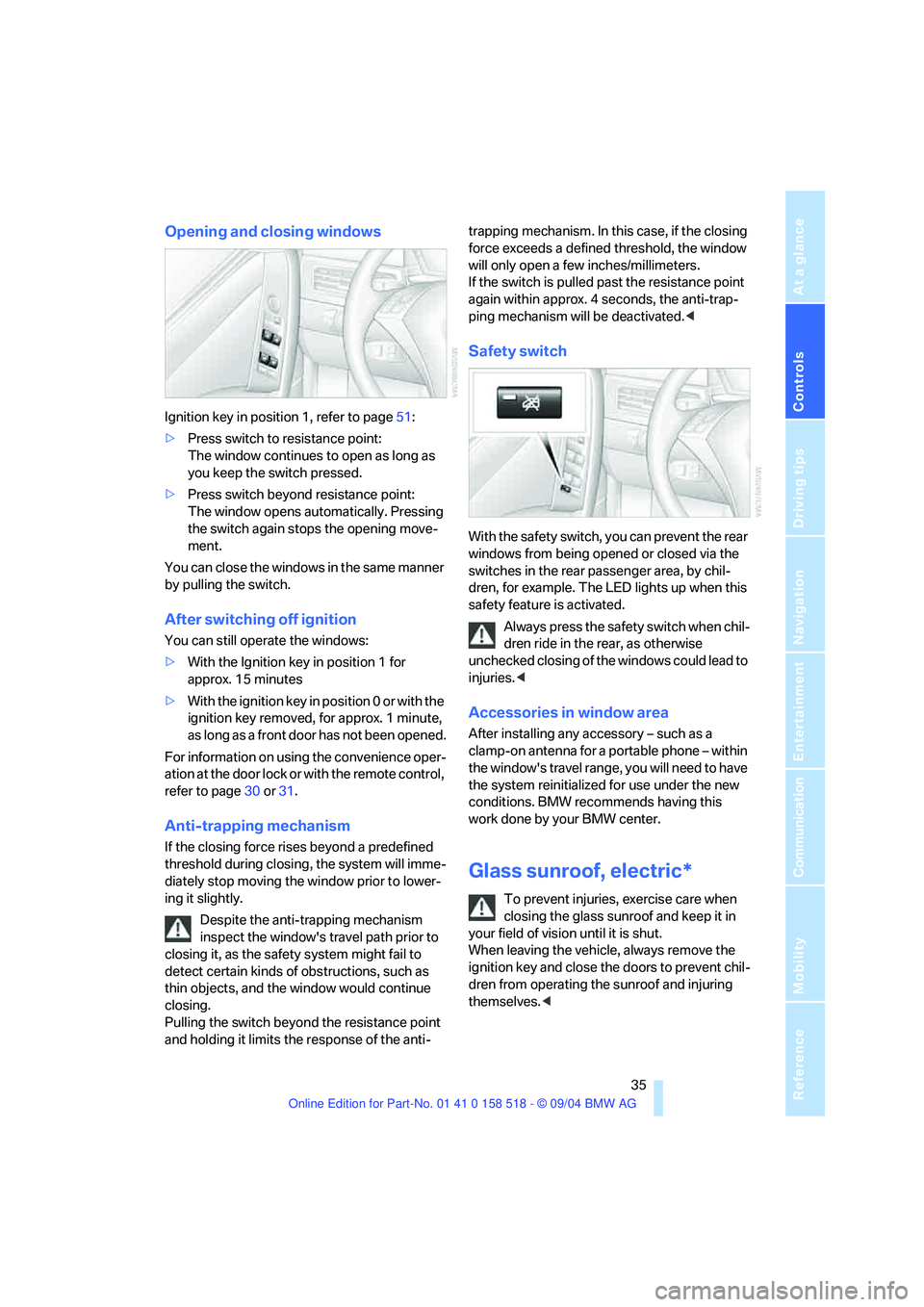
Opening and closing windows
Ignition key in position 1, refer to page51:
>Press switch to resistance point:
The window continues to open as long as
you keep the switch pressed.
>Press switch beyond resistance point:
The window opens automatically. Pressing
the switch again stops the opening move-
ment.
You can close the windows in the same manner
by pulling the switch.
After switching off ignition
You can still operate the windows:
>With the Ignition key in position 1 for
approx. 15 minutes
>With the ignition key in position 0 or with the
ignition key removed, for approx. 1 minute,
as long as a front door has not been opened.
For information on using the convenience oper-
ation at the door lock or with the remote control,
refer to page30 or31.
Anti-trapping mechanism
If the closing force rises beyond a predefined
threshold during closing, the system will imme-
diately stop moving the window prior to lower-
ing it slightly.
Despite the anti-trapping mechanism
inspect the window's travel path prior to
closing it, as the safety system might fail to
detect certain kinds of obstructions, such as
thin objects, and the window would continue
closing.
Pulling the switch beyond the resistance point
and holding it limits the response of the anti-trapping mechanism. In this case, if the closing
force exceeds a defined threshold, the window
will only open a few inches/millimeters.
If the switch is pulled past the resistance point
again within approx. 4 seconds, the anti-trap-
ping mechanism will be deactivated.<
Safety switch
With the safety switch, you can prevent the rear
windows from being opened or closed via the
switches in the rear passenger area, by chil-
dren, for example. The LED lights up when this
safety feature is activated.
Always press the safety switch when chil-
dren ride in the rear, as otherwise
unchecked closing of the windows could lead to
injuries.<
Accessories in window area
After installing any accessory – such as a
clamp-on antenna for a portable phone – within
the window's travel range, you will need to have
the system reinitialized for use under the new
conditions. BMW recommends having this
work done by your BMW center.
Glass sunroof, electric*
To prevent injuries, exercise care when
closing the glass sunroof and keep it in
your field of vision until it is shut.
When leaving the vehicle, always remove the
ignition key and close the doors to prevent chil-
dren from operating the sunroof and injuring
themselves.<
Page 47 of 221
Adjustments
46
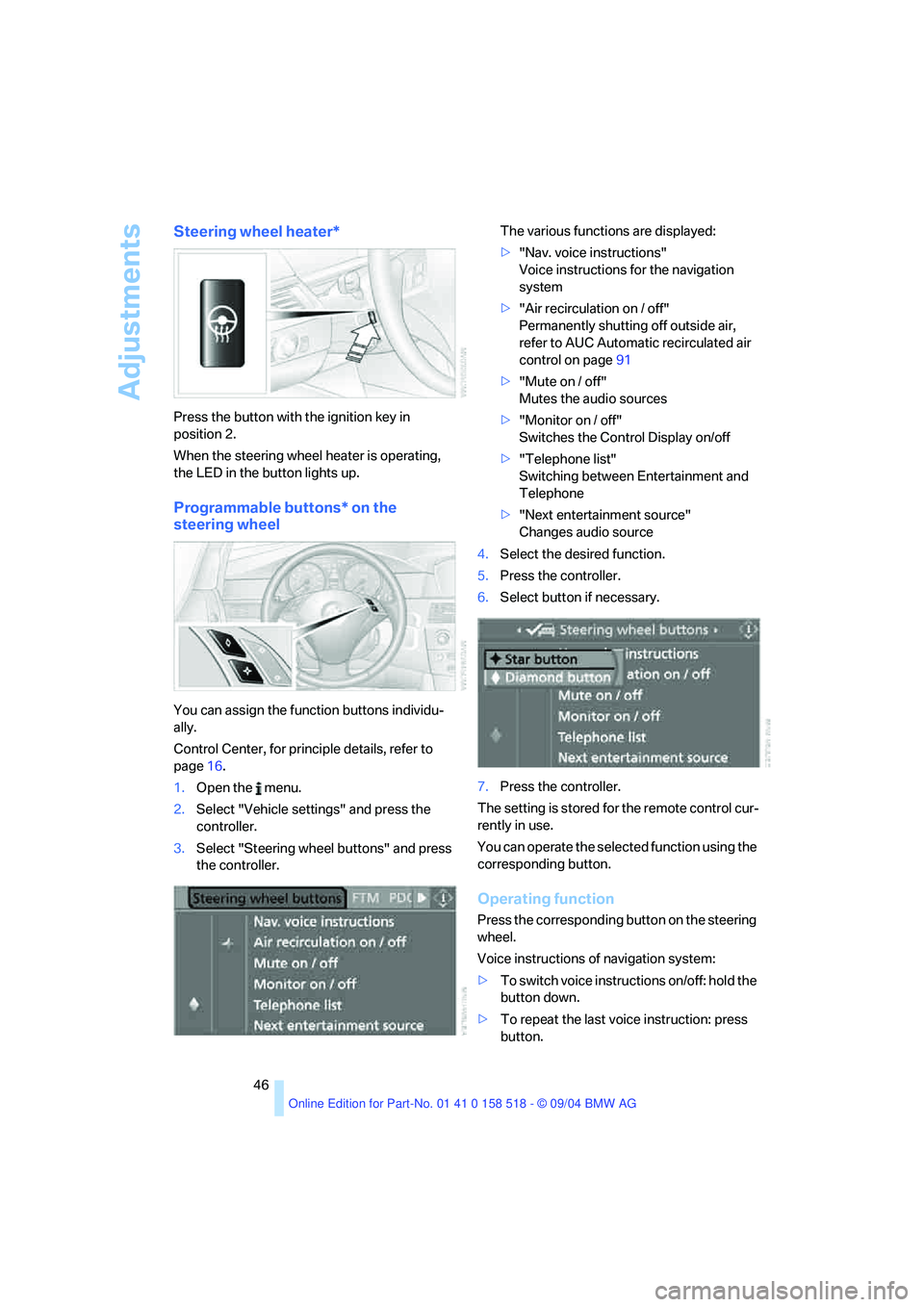
Steering wheel heater*
Press the button with the ignition key in
position 2.
When the steering wheel heater is operating,
the LED in the button lights up.
Programmable buttons* on the
steering wheel
You can assign the function buttons individu-
ally.
Control Center, for principle details, refer to
page16.
1.Open the menu.
2.Select "Vehicle settings" and press the
controller.
3.Select "Steering wheel buttons" and press
the controller.The various functions are displayed:
>"Nav. voice instructions"
Voice instructions for the navigation
system
>"Air recirculation on / off"
Permanently shutting off outside air,
refer to AUC Automatic recirculated air
control on page91
>"Mute on / off"
Mutes the audio sources
>"Monitor on / off"
Switches the Control Display on/off
>"Telephone list"
Switching between Entertainment and
Telephone
>"Next entertainment source"
Changes audio source
4.Select the desired function.
5.Press the controller.
6.Select button if necessary.
7.Press the controller.
The setting is stored for the remote control cur-
rently in use.
You can operate the selected function using the
corresponding button.
Operating function
Press the corresponding button on the steering
wheel.
Voice instructions of navigation system:
>To switch voice instructions on/off: hold the
button down.
>To repeat the last voice instruction: press
button.
Page 99 of 221
Practical interior accessories
98
Closing
Fold the cover up.
To prevent injury in the event of an acci-
dent while the vehicle is being driven,
close the glove compartment immediately after
use.<
Locking
Lock with a master key. Unlocking is also only
possible with a master key.
If you only hand over the spare key, e. g.
for valet parking, refer to page28, the
glove compartment cannot be unlocked.<
Rechargeable flashlight
The flashlight is located on the left side of the
glove compartment.
The flashlight can remain plugged in continu-
ously.
Be sure that the flashlight is switched off
when it is inserted into its holder. Failure
to comply with this precaution could lead to
overcharging and damage.<
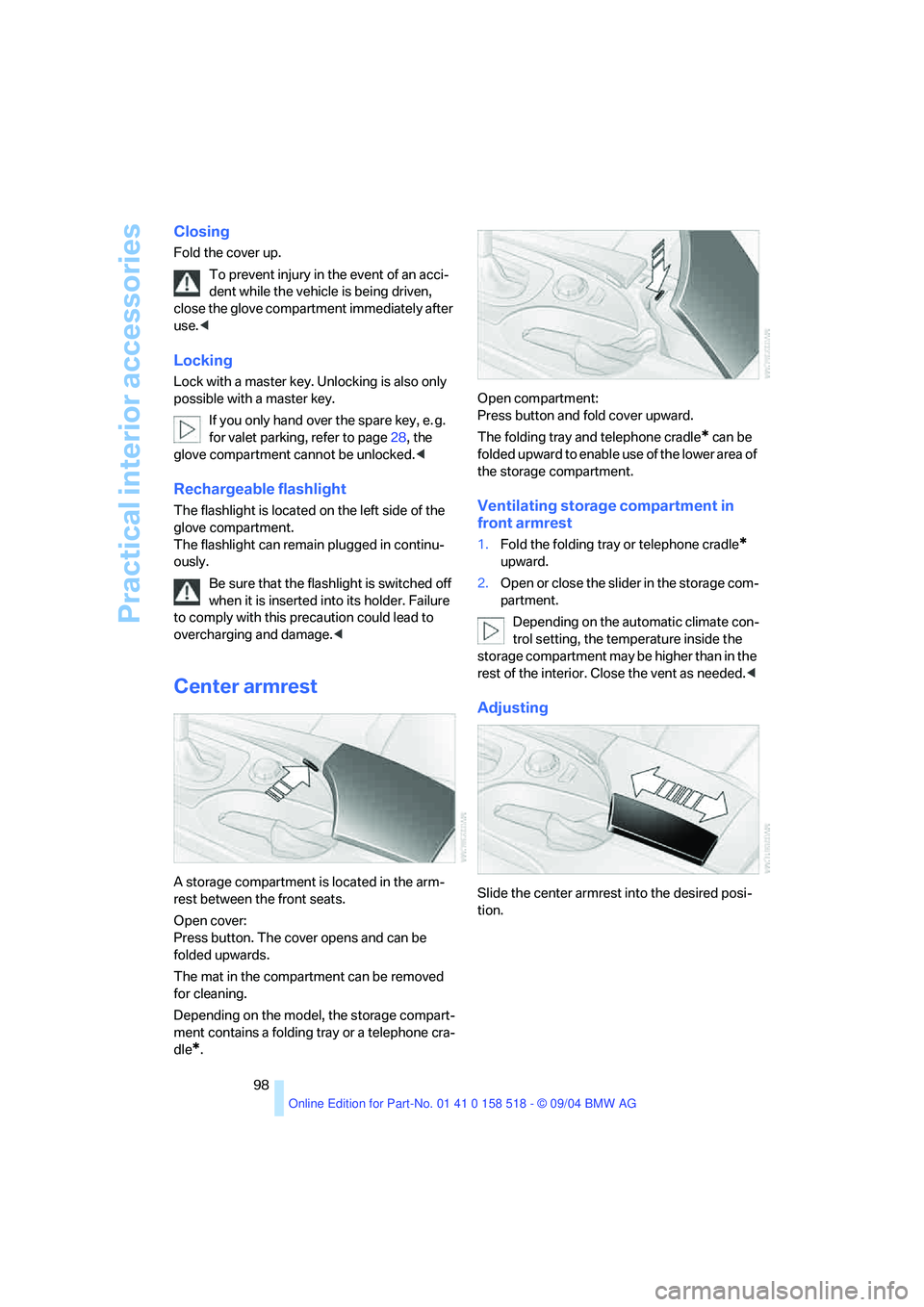
Center armrest
A storage compartment is located in the arm-
rest between the front seats.
Open cover:
Press button. The cover opens and can be
folded upwards.
The mat in the compartment can be removed
for cleaning.
Depending on the model, the storage compart-
ment contains a folding tray or a telephone cra-
dle
*.Open compartment:
Press button and fold cover upward.
The folding tray and telephone cradle
* can be
folded upward to enable use of the lower area of
the storage compartment.
Ventilating storage compartment in
front armrest
1.Fold the folding tray or telephone cradle*
upward.
2.Open or close the slider in the storage com-
partment.
Depending on the automatic climate con-
trol setting, the temperature inside the
storage compartment may be higher than in the
rest of the interior. Close the vent as needed.<
Adjusting
Slide the center armrest into the desired posi-
tion.
Page 108 of 221
Driving tips
107Reference
At a glance
Controls
Communication
Navigation
Entertainment
Mobility
Portable phone in the vehicle
BMW discourages the use of mobile
communications devices, e. g. portable
phones, inside the vehicle without a direct con-
nection to an outside antenna. Otherwise, the
vehicle electronics and mobile communication
device can influence one another. In addition,
there is no assurance that the radiation which
results from transmission will be dissipated
from the vehicle interior.<
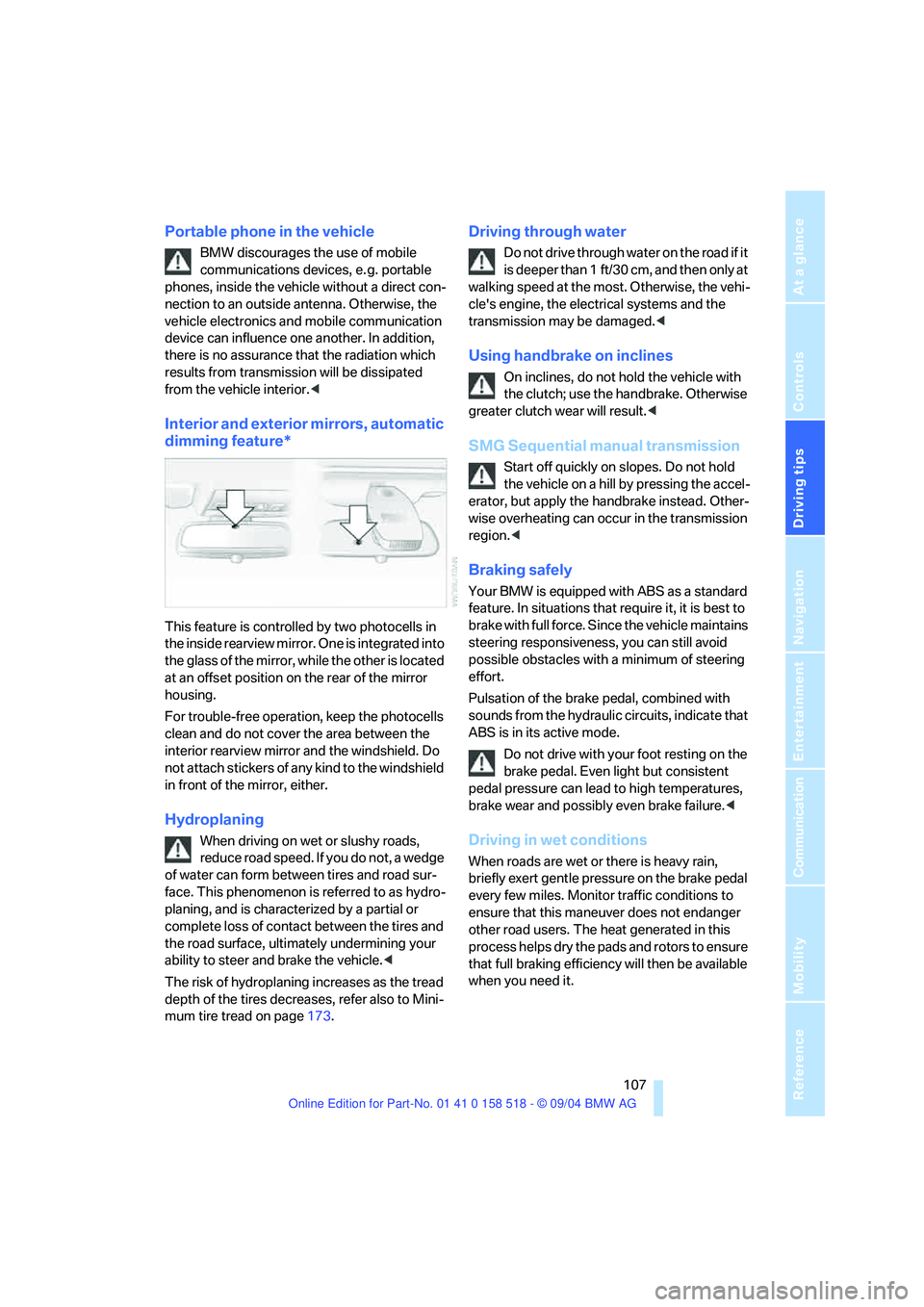
Interior and exterior mirrors, automatic
dimming feature*
This feature is controlled by two photocells in
the inside rearview mirror. One is integrated into
the glass of the mirror, while the other is located
at an offset position on the rear of the mirror
housing.
For trouble-free operation, keep the photocells
clean and do not cover the area between the
interior rearview mirror and the windshield. Do
not attach stickers of any kind to the windshield
in front of the mirror, either.
Hydroplaning
When driving on wet or slushy roads,
reduce road speed. If you do not, a wedge
of water can form between tires and road sur-
face. This phenomenon is referred to as hydro-
planing, and is characterized by a partial or
complete loss of contact between the tires and
the road surface, ultimately undermining your
ability to steer and brake the vehicle.<
The risk of hydroplaning increases as the tread
depth of the tires decreases, refer also to Mini-
mum tire tread on page173.
Driving through water
Do not drive through water on the road if it
is deeper than 1 ft/30 cm, and then only at
walking speed at the most. Otherwise, the vehi-
cle's engine, the electrical systems and the
transmission may be damaged.<
Using handbrake on inclines
On inclines, do not hold the vehicle with
the clutch; use the handbrake. Otherwise
greater clutch wear will result.<
SMG Sequential manual transmission
Start off quickly on slopes. Do not hold
the vehicle on a hill by pressing the accel-
erator, but apply the handbrake instead. Other-
wise overheating can occur in the transmission
region.<
Braking safely
Your BMW is equipped with ABS as a standard
feature. In situations that require it, it is best to
brake with full force. Since the vehicle maintains
steering responsiveness, you can still avoid
possible obstacles with a minimum of steering
effort.
Pulsation of the brake pedal, combined with
sounds from the hydraulic circuits, indicate that
ABS is in its active mode.
Do not drive with your foot resting on the
brake pedal. Even light but consistent
pedal pressure can lead to high temperatures,
brake wear and possibly even brake failure.<
Driving in wet conditions
When roads are wet or there is heavy rain,
briefly exert gentle pressure on the brake pedal
every few miles. Monitor traffic conditions to
ensure that this maneuver does not endanger
other road users. The heat generated in this
process helps dry the pads and rotors to ensure
that full braking efficiency will then be available
when you need it.
Page 120 of 221
Navigation
Driving tips
119Reference
At a glance
Controls
Communication
Entertainment
Mobility
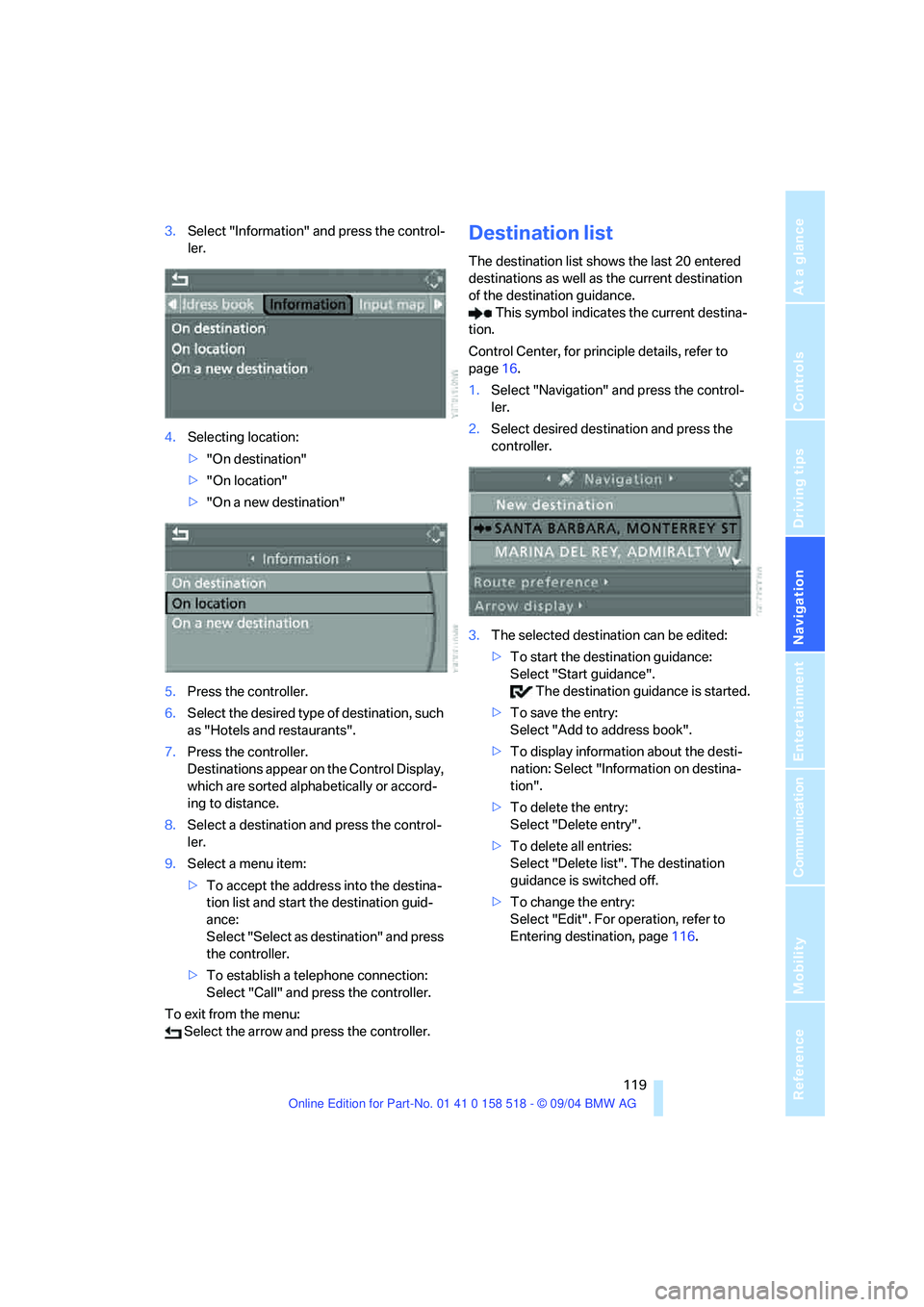
3.Select "Information" and press the control-
ler.
4.Selecting location:
>"On destination"
>"On location"
>"On a new destination"
5.Press the controller.
6.Select the desired type of destination, such
as "Hotels and restaurants".
7.Press the controller.
Destinations appear on the Control Display,
which are sorted alphabetically or accord-
ing to distance.
8.Select a destination and press the control-
ler.
9.Select a menu item:
>To accept the address into the destina-
tion list and start the destination guid-
ance:
Select "Select as destination" and press
the controller.
>To establish a telephone connection:
Select "Call" and press the controller.
To exit from the menu:
Select the arrow and press the controller.Destination list
The destination list shows the last 20 entered
destinations as well as the current destination
of the destination guidance.
This symbol indicates the current destina-
tion.
Control Center, for principle details, refer to
page16.
1.Select "Navigation" and press the control-
ler.
2.Select desired destination and press the
controller.
3.The selected destination can be edited:
>To start the destination guidance:
Select "Start guidance".
The destination guidance is started.
>To save the entry:
Select "Add to address book".
>To display information about the desti-
nation: Select "Information on destina-
tion".
>To delete the entry:
Select "Delete entry".
>To delete all entries:
Select "Delete list". The destination
guidance is switched off.
>To change the entry:
Select "Edit". For operation, refer to
Entering destination, page116.
Page 137 of 221
On/off and tone
136
Controls in the back seat*
You can also use a remote control to select
Business radio as the audio source and listen to
it through the headphones or speakers.
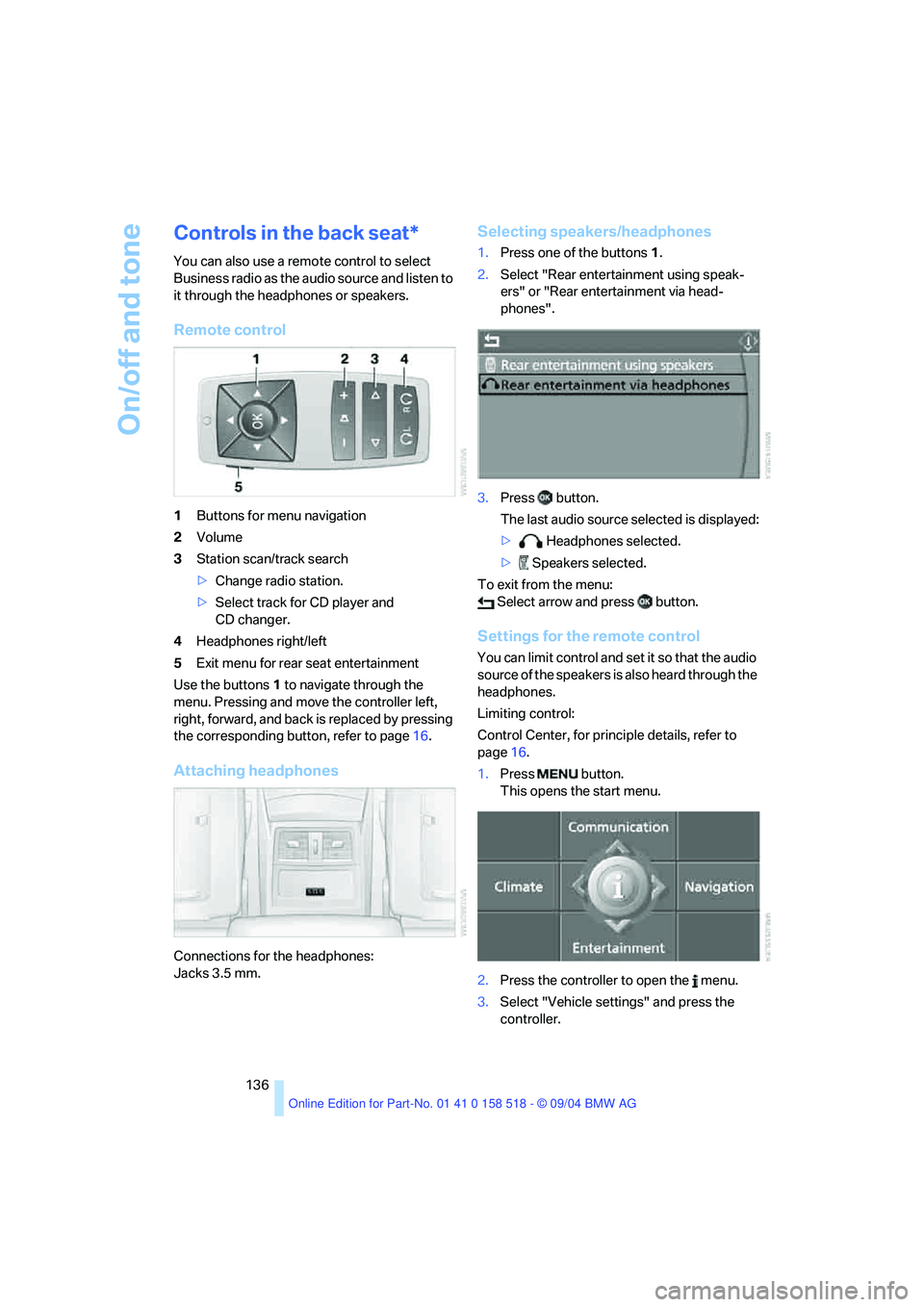
Remote control
1Buttons for menu navigation
2Volume
3Station scan/track search
>Change radio station.
>Select track for CD player and
CD changer.
4Headphones right/left
5Exit menu for rear seat entertainment
Use the buttons1 to navigate through the
menu. Pressing and move the controller left,
right, forward, and back is replaced by pressing
the corresponding button, refer to page16.
Attaching headphones
Connections for the headphones:
Jacks 3.5 mm.
Selecting speakers/headphones
1.Press one of the buttons1.
2.Select "Rear entertainment using speak-
ers" or "Rear entertainment via head-
phones".
3.Press button.
The last audio source selected is displayed:
> Headphones selected.
> Speakers selected.
To exit from the menu:
Select arrow and press button.
Settings for the remote control
You can limit control and set it so that the audio
source of the speakers is also heard through the
headphones.
Limiting control:
Control Center, for principle details, refer to
page16.
1.Press button.
This opens the start menu.
2.Press the controller to open the menu.
3.Select "Vehicle settings" and press the
controller.
Page 138 of 221
Navigation
Entertainment
Driving tips
137Reference
At a glance
Controls
Communication
Mobility
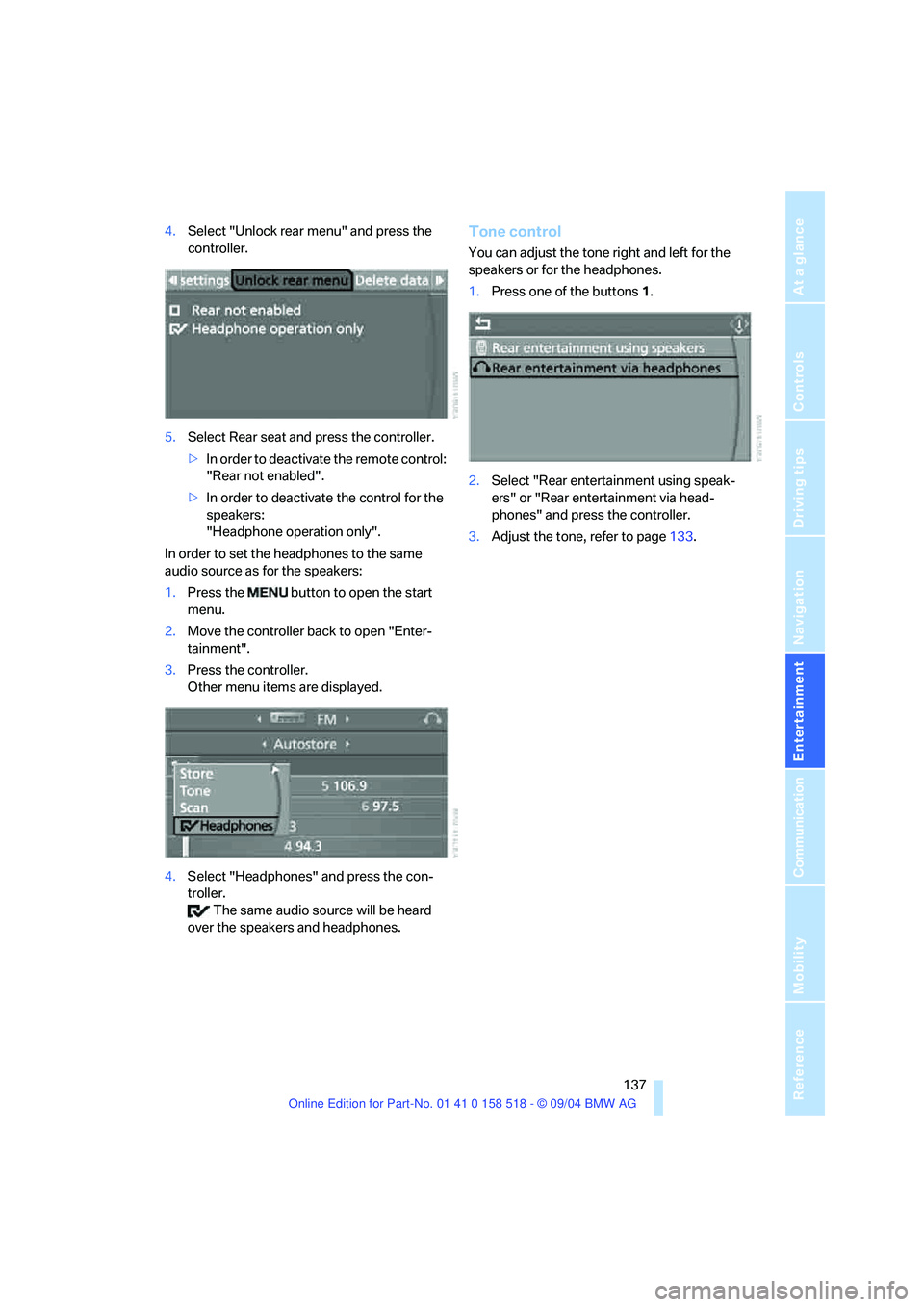
4.Select "Unlock rear menu" and press the
controller.
5.Select Rear seat and press the controller.
>In order to deactivate the remote control:
"Rear not enabled".
>In order to deactivate the control for the
speakers:
"Headphone operation only".
In order to set the headphones to the same
audio source as for the speakers:
1.Press the button to open the start
menu.
2.Move the controller back to open "Enter-
tainment".
3.Press the controller.
Other menu items are displayed.
4.Select "Headphones" and press the con-
troller.
The same audio source will be heard
over the speakers and headphones.Tone control
You can adjust the tone right and left for the
speakers or for the headphones.
1.Press one of the buttons1.
2.Select "Rear entertainment using speak-
ers" or "Rear entertainment via head-
phones" and press the controller.
3.Adjust the tone, refer to page133.
Page 143 of 221
Radio
142 You may experience signal drops and
muting events related to this new tech-
nology.<
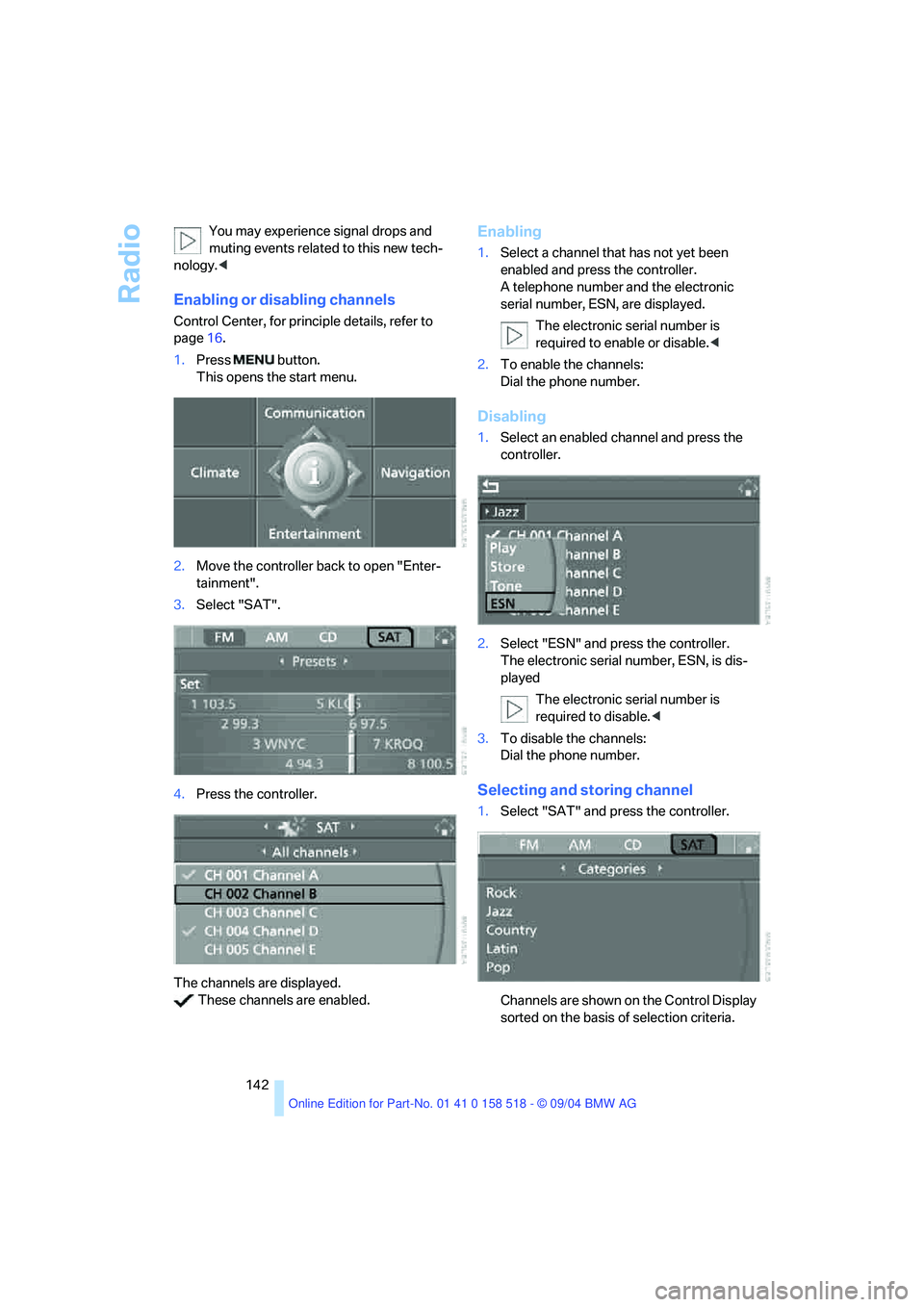
Enabling or disabling channels
Control Center, for principle details, refer to
page16.
1.Press button.
This opens the start menu.
2.Move the controller back to open "Enter-
tainment".
3.Select "SAT".
4.Press the controller.
The channels are displayed.
These channels are enabled.
Enabling
1.Select a channel that has not yet been
enabled and press the controller.
A telephone number and the electronic
serial number, ESN, are displayed.
The electronic serial number is
required to enable or disable.<
2.To enable the channels:
Dial the phone number.
Disabling
1.Select an enabled channel and press the
controller.
2.Select "ESN" and press the controller.
The electronic serial number, ESN, is dis-
played
The electronic serial number is
required to disable.<
3.To disable the channels:
Dial the phone number.
Selecting and storing channel
1.Select "SAT" and press the controller.
Channels are shown on the Control Display
sorted on the basis of selection criteria.
Page 152 of 221
Communications
This chapter summarizes how to
operate your portable phone using the
Control Center or voice control and how
to use BMW Assist or TeleService.
Communications
Page 153 of 221
Telephoning
152
Telephoning
Safety notes
For your own safety
A car phone makes life more convenient in
many ways, and can even save lives in an emer-
gency. While you should consult your portable
phone's separate Owner's Manual for a detailed
description of safety precautions and informa-
tion, we request that you direct your particular
attention to the following:
Adjustments
To avoid posing a danger to yourself and
other road users, never adjust the system
settings unless your vehicle is stationary.<
Using the phone in your vehicle
Using a portable phone to make and
receive calls while driving is already illegal
in many countries in the world. Always use your
hands-free system, or stop your vehicle in an
area where you will not pose a safety hazard to
other road users.<
Vehicles and portable phones
Do not use your portable phone from
within a garage, or near an open hood.
The air in these areas could contain fuel vapors,
and the portable phone might generate sparks
that could cause fires.
This same precaution applies to open luggage
compartment lids on vehicles equipped for
operation using natural gas or hydrogen, and to
all vehicles with luggage compartment-
mounted batteries.<
Antenna
When using the portable phone, ensure
that all persons in the area are at least
20 in/50 cm from the antenna. Do not use the
portable phone when the antenna is damaged.
Contact between your skin and a damaged
antenna can result in minor burns.If the antenna is damaged, have it replaced
immediately.<
Special environmental conditions
Always switch off your portable phone in
areas where blasting work is being con-
ducted with explosives. The phone signals
could potentially act as a high-frequency trans-
mitter and set off explosions.
Always switch off your portable phone in areas
where an increased explosion danger is
present. This category includes service stations
along with fuel and chemical storage depots,
etc., and all areas in which the air can contain
fuel, chemicals or metal particles. Under these
conditions, your portable phone could conceiv-
ably generate sparks that could lead to a fire or
explosion. Always observe all legal regulations
governing the use of portable phones in the
vicinity of service stations, chemical factories
and other areas where an explosion potential
exists. Never use your portable phone in air-
craft; do not use this portable phone in hospi-
tals, care centers or at other locations where
medical equipment may be in operation, such
as accident sites.
Your service provider can furnish you with more
detailed information on legal regulations gov-
erning the use of your phone.<
Medical equipment
Portable phones can generate interfer-
ence capable of preventing hearing aids
and cardiac pacemakers from operating cor-
rectly. If you or any occupant of the vehicle will
be using such equipment, consult a physician
or the manufacturer of the equipment to deter-
mine whether it is adequately shielded against
high-frequency energy.<
Batteries
Never attempt to dismantle your portable
phone or its battery. Use only approved
battery types – the wrong battery can destroy