radio controls BMW 525I 2007 Owner's Manual
[x] Cancel search | Manufacturer: BMW, Model Year: 2007, Model line: 525I, Model: BMW 525I 2007Pages: 273, PDF Size: 8.96 MB
Page 177 of 273
Navigation
Entertainment
Driving tips
175Reference
At a glance
Controls
Communications
Mobility
To exit from the menu:
Select the arrow and press the controller.
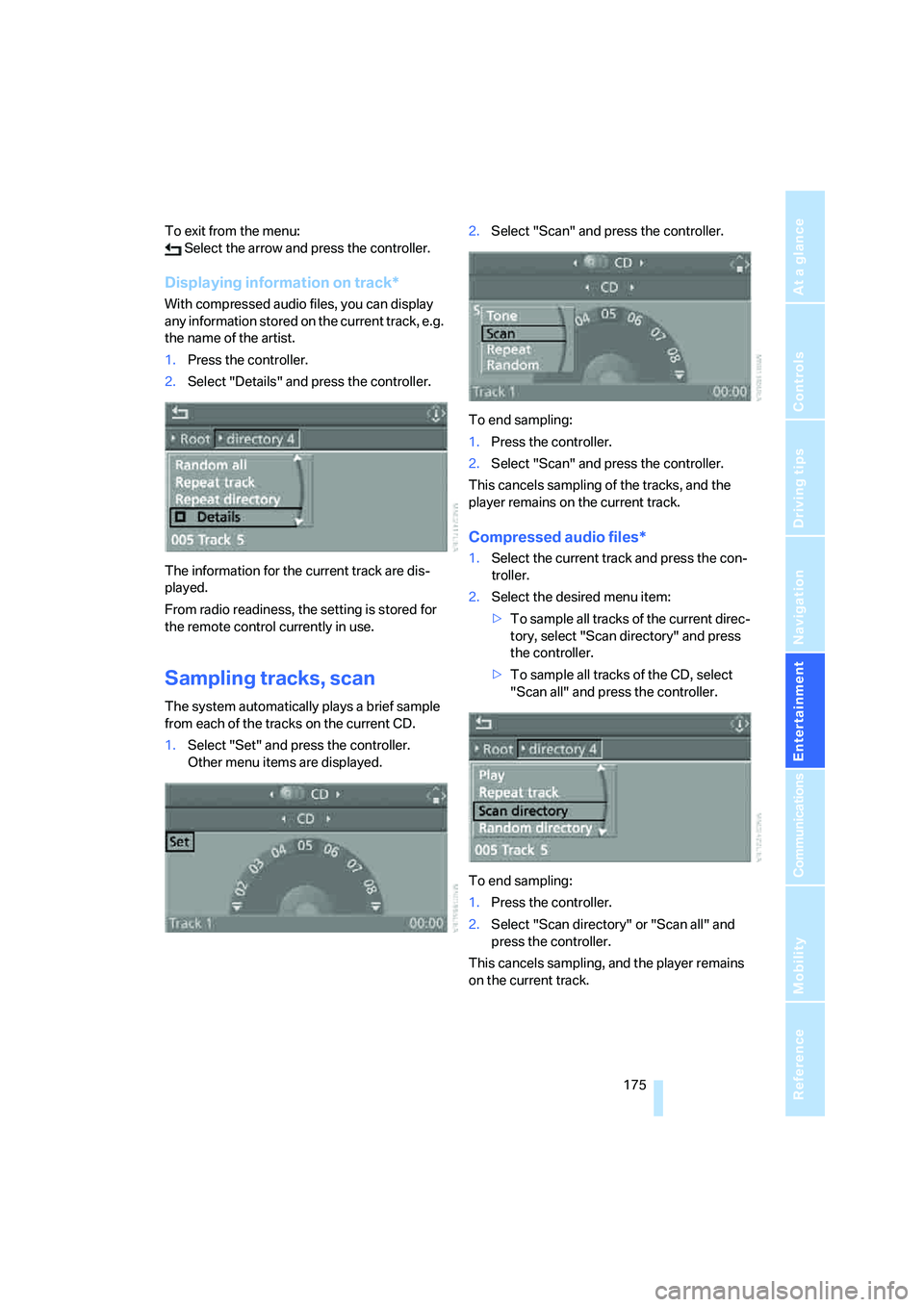
Displaying information on track*
With compressed audio files, you can display
any information stored on the current track, e.g.
the name of the artist.
1.Press the controller.
2.Select "Details" and press the controller.
The information for the current track are dis-
played.
From radio readiness, the setting is stored for
the remote control currently in use.
Sampling tracks, scan
The system automatically plays a brief sample
from each of the tracks on the current CD.
1.Select "Set" and press the controller.
Other menu items are displayed.2.Select "Scan" and press the controller.
To end sampling:
1.Press the controller.
2.Select "Scan" and press the controller.
This cancels sampling of the tracks, and the
player remains on the current track.
Compressed audio files*
1.Select the current track and press the con-
troller.
2.Select the desired menu item:
>To sample all tracks of the current direc-
tory, select "Scan directory" and press
the controller.
>To sample all tracks of the CD, select
"Scan all" and press the controller.
To end sampling:
1.Press the controller.
2.Select "Scan directory" or "Scan all" and
press the controller.
This cancels sampling, and the player remains
on the current track.
Page 189 of 273
187
Entertainment
Reference
At a glance
Controls
Driving tips Communications
Navigation
Mobility
When the ignition and radio readiness are
switched off, e.g. after removing the remote
control from the ignition lock, you can continue
an ongoing call via the hands-free system for no
more than 25 minutes.
Speech quality
If the person you are talking to cannot under-
stand you well, this may be due to excessively
loud background noises. The full mobile phone
preparation package can compensate for these
noises to a certain degree. To optimize the
speech quality during a call, we recommend
that you:
>Reduce background noises, e.g. by closing
the windows, reducing the air volume of the
automatic climate control or pointing the
front vent outlets downward
>Reduce volume of hands-free system
Requirements
The logon data of the mobile phone are stored
in the vehicle and the mobile phone is ready to
operate.
The engine is running or the ignition is switched
on.
The mobile phone is detected by the vehicle.
iDrive, for explanation of principle, refer to
page16.
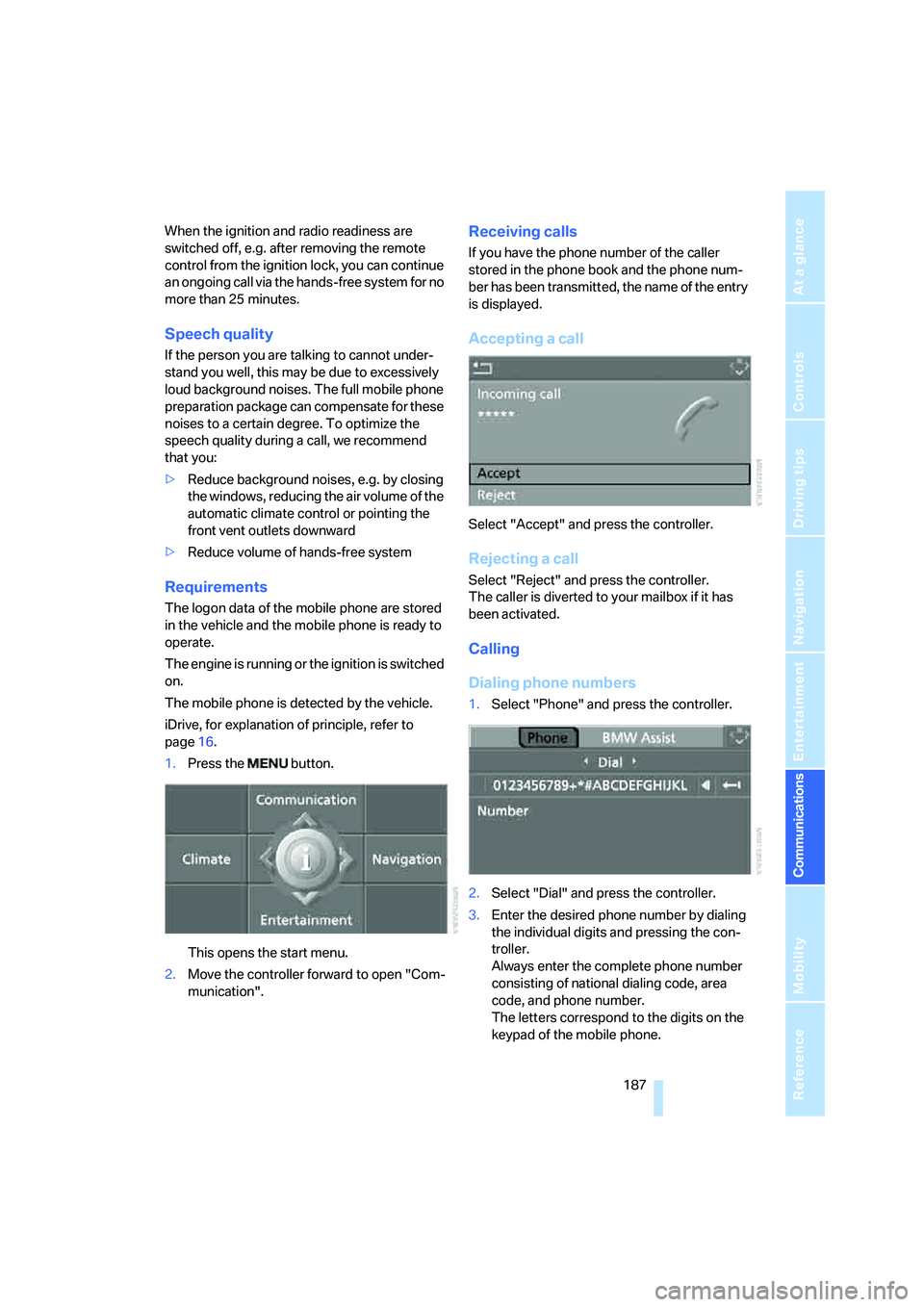
1.Press the button.
This opens the start menu.
2.Move the controller forward to open "Com-
munication".
Receiving calls
If you have the phone number of the caller
stored in the phone book and the phone num-
ber has been transmitted, the name of the entry
is displayed.
Accepting a call
Select "Accept" and press the controller.
Rejecting a call
Select "Reject" and press the controller.
The caller is diverted to your mailbox if it has
been activated.
Calling
Dialing phone numbers
1.Select "Phone" and press the controller.
2.Select "Dial" and press the controller.
3.Enter the desired phone number by dialing
the individual digits and pressing the con-
troller.
Always enter the complete phone number
consisting of national dialing code, area
code, and phone number.
The letters correspond to the digits on the
keypad of the mobile phone.
Page 197 of 273
195
Entertainment
Reference
At a glance
Controls
Driving tips Communications
Navigation
Mobility
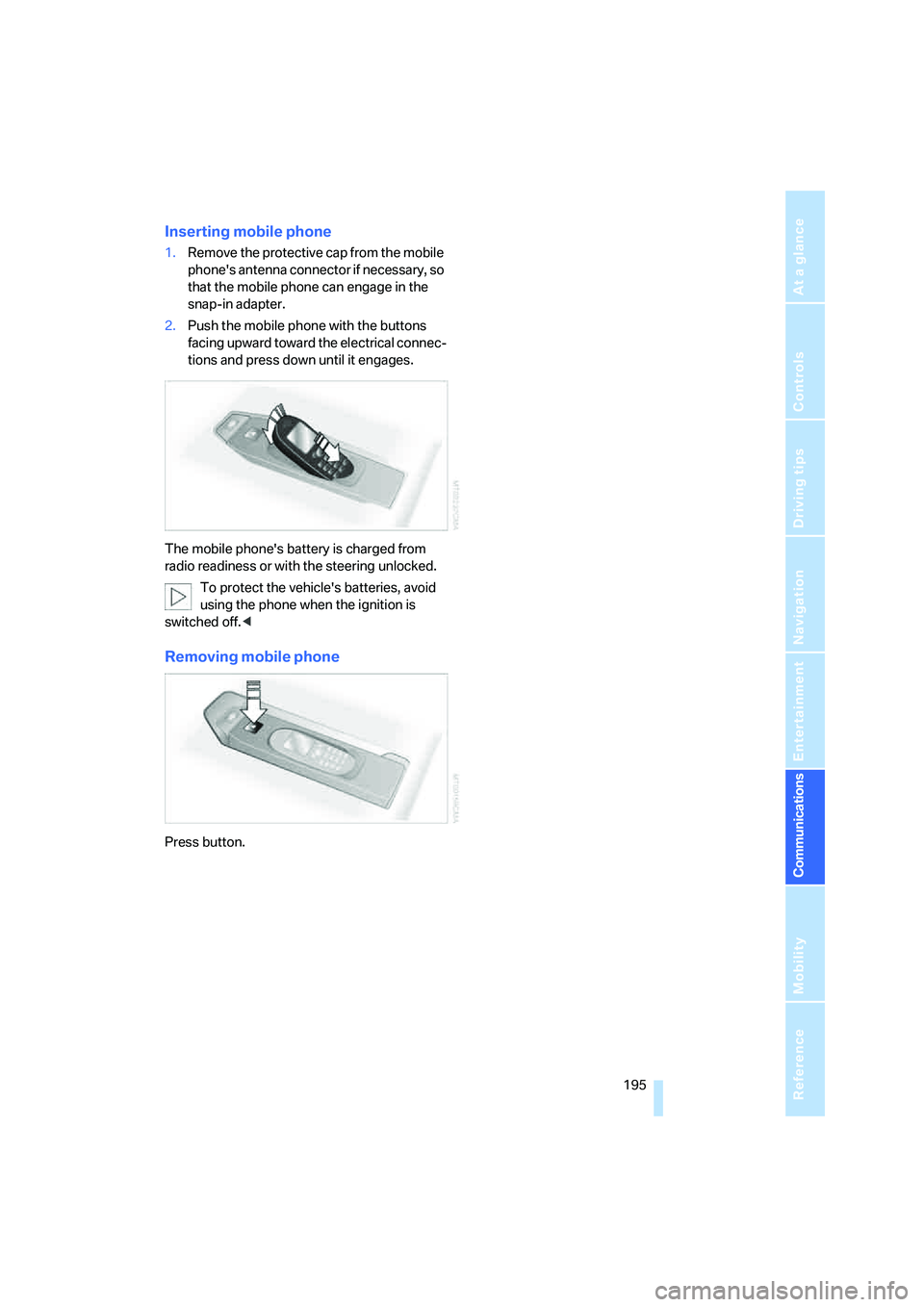
Inserting mobile phone
1.Remove the protective cap from the mobile
phone's antenna connector if necessary, so
that the mobile phone can engage in the
snap-in adapter.
2.Push the mobile phone with the buttons
facing upward toward the electrical connec-
tions and press down until it engages.
The mobile phone's battery is charged from
radio readiness or with the steering unlocked.
To protect the vehicle's batteries, avoid
using the phone when the ignition is
switched off.<
Removing mobile phone
Press button.
Page 203 of 273
201
Entertainment
Reference
At a glance
Controls
Driving tips Communications
Navigation
Mobility
Blocking services*
If you block the services, the connection to
BMW Assist is deactivated.
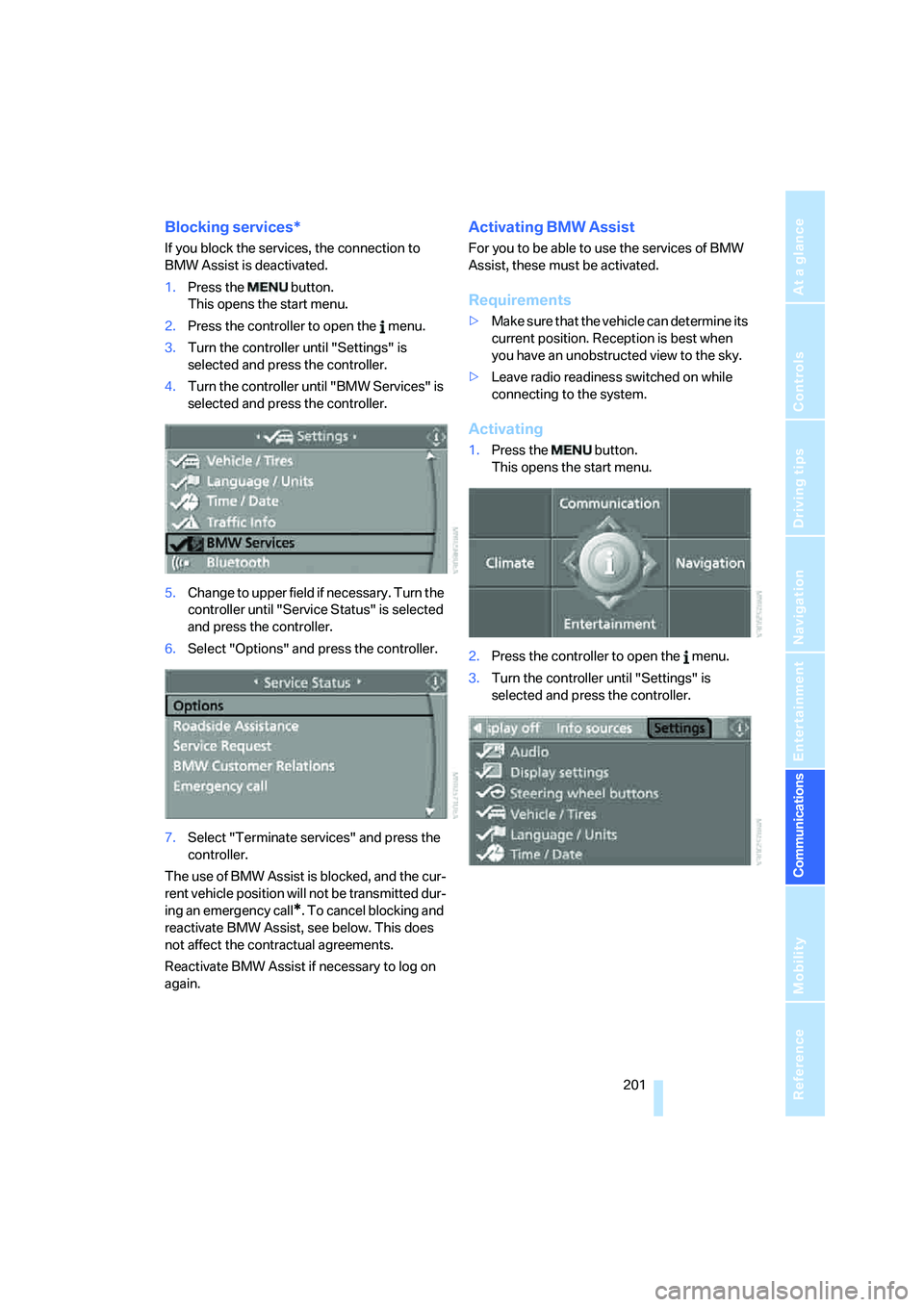
1.Press the button.
This opens the start menu.
2.Press the controller to open the menu.
3.Turn the controller until "Settings" is
selected and press the controller.
4.Turn the controller until "BMW Services" is
selected and press the controller.
5.Change to upper field if necessary. Turn the
controller until "Service Status" is selected
and press the controller.
6.Select "Options" and press the controller.
7.Select "Terminate services" and press the
controller.
The use of BMW Assist is blocked, and the cur-
rent vehicle position will not be transmitted dur-
ing an emergency call
*. To cancel blocking and
reactivate BMW Assist, see below. This does
not affect the contractual agreements.
Reactivate BMW Assist if necessary to log on
again.
Activating BMW Assist
For you to be able to use the services of BMW
Assist, these must be activated.
Requirements
>Make sure that the vehicle can determine its
current position. Reception is best when
you have an unobstructed view to the sky.
>Leave radio readiness switched on while
connecting to the system.
Activating
1.Press the button.
This opens the start menu.
2.Press the controller to open the menu.
3.Turn the controller until "Settings" is
selected and press the controller.
Page 231 of 273
Mobility
229Reference
At a glance
Controls
Driving tips
Communications
Navigation
Entertainment
tion. Dirt in valve stems is a frequent source
of gradual air loss.<
4.Initialize the Flat Tire Monitor, refer to
page91, or reset the Tire Pressure Monitor,
refer to page93.
5.Replace the damaged tire as soon as possi-
ble and have the new wheel/tire balanced.
Driving with compact wheel
Drive reservedly and do not exceed a speed of
50 mph/80 km/h.
The driving characteristics change, for example
reduced track stability on braking, extended
braking distance, and altered self-steering
characteristics in the limit range. In conjunction
with winter tires, these characteristics are more
pronounced.
Only one compact wheel may be
mounted. You should re-equip with
wheels and tires of the original size as quickly as
possible.<
Vehicle battery
Battery care
The battery is 100 % maintenance-free, i.e., the
electrolyte will last for the life of the battery
when the vehicle is operated in a temperate cli-
mate. Your BMW center will be glad to advise in
all matters concerning the battery.
Charging battery
Only charge the battery in the vehicle via the
terminals in the engine compartment with the
engine switched off. Connections, refer to
Jump starting on page232.
Disposal
Have old batteries disposed of by your
BMW center or hand them in to a recy-
cling center. Maintain the battery in an upright
position for transport and storage. Always
restrain the battery to prevent it from tipping
over during transport.<
Power failure
After a temporary power loss, the functioning of
some equipment may be limited and require
reinitialization. Individual settings are also lost
and must be updated:
>Seat, mirror and steering wheel memory
The positions must be stored again, refer to
page47.
>Time and Date
The values must be updated, refer to
page83.
>Radio
Stations must be stored again if necessary,
refer to page166.
>Navigation system
Wait until the system starts, refer to
page134.
Fuses
Never attempt to repair a blown fuse and
do not replace a defective fuse with a sub-
stitute of another color or amperage rating, as
this could lead to a circuit overload, ultimately
resulting in a fire in the vehicle.<
Sedan
Spare fuses, plastic tweezers and fuse alloca-
tion diagram are located in the compartment for
the onboard tool kit, refer to page222.
Sports Wagon
Spare fuses and a pair of plastic tweezers are
contained in the onboard tool kit, refer to
page222. A fuse allocation diagram is located
in the cargo bay behind the right-hand side
panel.
Page 233 of 273
Mobility
231Reference
At a glance
Controls
Driving tips
Communications
Navigation
Entertainment
Giving and receiving assistance
Emergency call
Conditions for an emergency call:
>Full preparation package mobile phone.
With this equipment, an emergency call is
still possible when no mobile phone is
logged on in the vehicle.
>BMW Assist is activated. Activating
BMW Assist, refer to page201.
>Radio readiness is activated.
>The BMW Assist system is logged on to a
mobile phone network.
>The emergency call system is operable.
Once your service contract for BMW Assist
expires, the BMW Assist system can be deacti-
vated by a BMW center without you having to
visit a workshop. Once the BMW Assist system
has been deactivated, emergency calls are not
possible. The BMW Assist system be reacti-
vated by a BMW center after signing a new con-
tract.
Initiating an emergency call
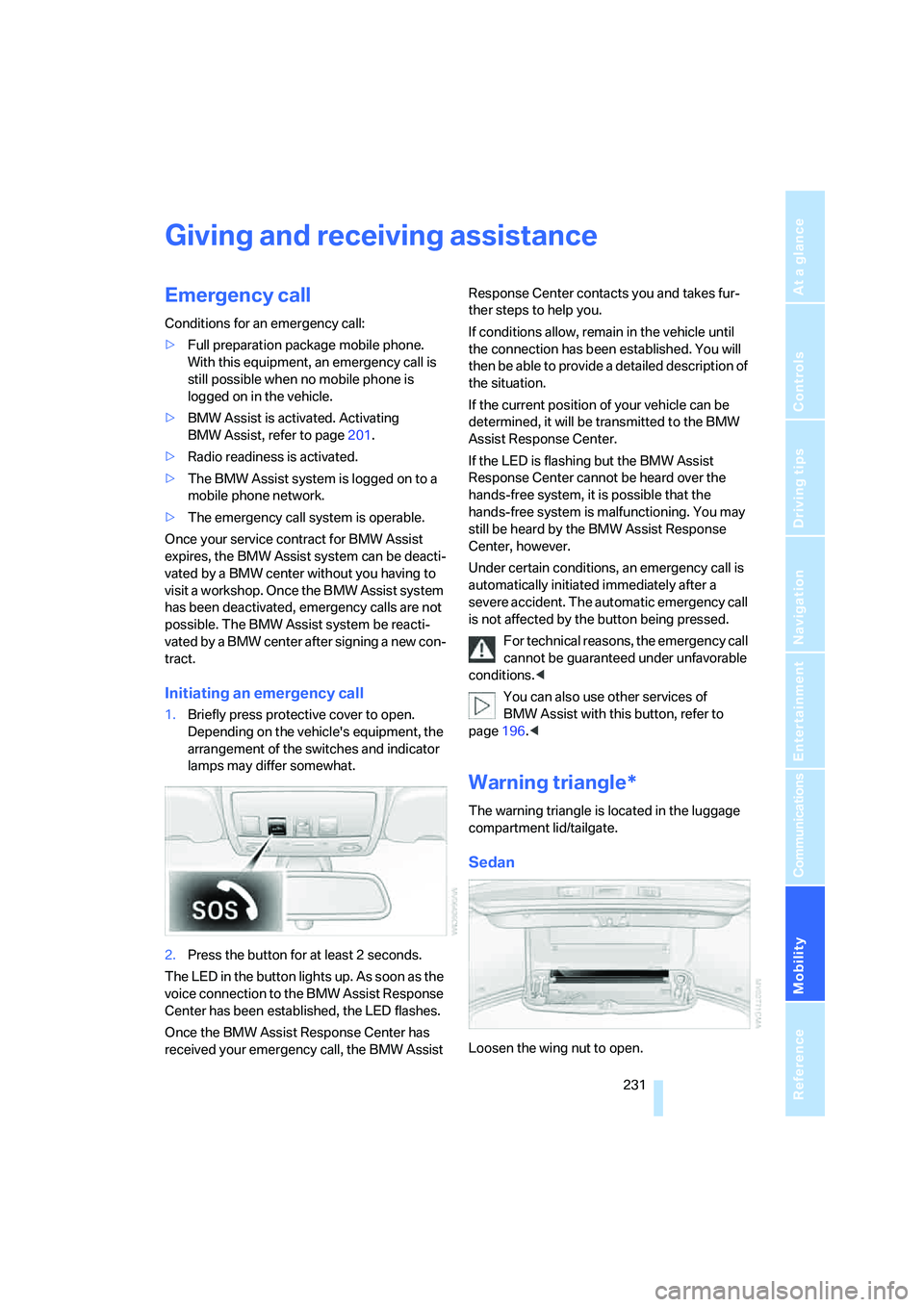
1.Briefly press protective cover to open.
Depending on the vehicle's equipment, the
arrangement of the switches and indicator
lamps may differ somewhat.
2.Press the button for at least 2 seconds.
The LED in the button lights up. As soon as the
voice connection to the BMW Assist Response
Center has been established, the LED flashes.
Once the BMW Assist Response Center has
received your emergency call, the BMW Assist Response Center contacts you and takes fur-
ther steps to help you.
If conditions allow, remain in the vehicle until
the connection has been established. You will
then be able to provide a detailed description of
the situation.
If the current position of your vehicle can be
determined, it will be transmitted to the BMW
Assist Response Center.
If the LED is flashing but the BMW Assist
Response Center cannot be heard over the
hands-free system, it is possible that the
hands-free system is malfunctioning. You may
still be heard by the BMW Assist Response
Center, however.
Under certain conditions, an emergency call is
automatically initiated immediately after a
severe accident. The automatic emergency call
is not affected by the button being pressed.
For technical reasons, the emergency call
cannot be guaranteed under unfavorable
conditions.<
You can also use other services of
BMW Assist with this button, refer to
page196.<
Warning triangle*
The warning triangle is located in the luggage
compartment lid/tailgate.
Sedan
Loosen the wing nut to open.
Page 247 of 273

Reference 245
At a glance
Controls
Driving tips
Communications
Navigation
Entertainment
Mobility
Entertainment
FunctionCommand
Tone control161{Audio}
To switch on radio164{Radio on},
{FM} or
{AM}
To open "FM"164{FM menu}
To open "AM"164{AM menu}
To open "All stations"164{FM All stations}
To select radio station164{Station ...}, e.g. {Station WNYC}, or
{Choose station}
To open "Presets"164{FM presets} or
{AM presets}
To select preset radio station164{Preset ...}, e.g. {Preset 1}
To open "Manual"165{FM manual},
{AM manual} or
{Choose frequency},
{Frequency ... Megahertz}
To open strongest radio stations165{AM Autostore}
To open "WB"168{Weatherband menu}
To switch on weatherband 168{Weatherband on}
To select a weatherband station168{Choose weatherband station}
To open "SAT"170{SAT radio menu}
To switch on satellite radio170{SAT radio}
To open "Presets" of satellite radio171{SAT radio presets}
To open "All channels" of satellite radio170{SAT radio all channels}
To open "Categories" of satellite radio170{SAT radio categories}
To open CD player173{CD menu}
To switch on CD player173{CD}
To open CD changer173{CD changer menu}
To switch on CD changer173{CD changer}
To select a CD in the CD changer173{CD 1...6}
To select music track174{CD track ...}
To select a CD and music track in the CD
changer174{CD 1...6 track ...}
To switch on audio playback with external audio
device179{Audio Aux}
Page 251 of 273
Reference 249
At a glance
Controls
Driving tips
Communications
Navigation
Entertainment
Mobility
Anti-theft system, refer to
Central locking system30
Approved axle loads, refer to
Weights241
Approved engine oils218
Approved gross vehicle
weight, refer to Weights241
Armrest, refer to Center
armrest, rear118
Around the center console14
Around the steering wheel10
Arrival time
– refer to Computer77
– refer to Starting destination
guidance147
"Arrow display" for
navigation148
Artificial leather, refer to
Caring for your vehicle
brochure
Ashtray
– front117
– rear117
Assist, refer to
BMW Assist196
Assistance systems, refer to
Driving stability control
systems87
Assistance window20
"Assist. window off"21
AUC Automatic recirculated-
air control110
"Audio"161,163,168
Audio160
– controls160
– switching on/off160
– tone control161
– volume161
Audio device, external116
Automatic
– air distribution108
– air volume108
– garage door opener113
– headlamp control103
– service notification198
– steering wheel
adjustment47
– storing stations165
– tailgate operation36Automatic car washes128
– also refer to Caring for your
vehicle brochure
Automatic climate control107
– automatic air
distribution108
– parked car ventilation111
– switching on and off110
– ventilation in rear111
Automatic closing of doors,
refer to Automatic soft
closing33
Automatic curb monitor52
Automatic lighting
– refer to Automatic headlamp
control103
– refer to Daytime running
lamps104
– refer to Interior lamps105
– refer to Pathway lighting103
"Automatic programs"108
Automatic roll-up cover,
Sports Wagon119
Automatic soft closing33
Automatic speed reduction for
descents, refer to HDC Hill
Descent Control89
Automatic station search165
Automatic transmission with
Steptronic64
– deactivating selector lever
interlock65
– interlock64
– kick-down65
– selector lever interlock64
– shiftlock64
– sport program65
– tow-starting234,235
– with comfort access40
"Automatic ventilation"111
AUTO program for automatic
climate control108
"Autostore" on the
radio164,166
"AUX"161
AUX-In
– connection116
– refer to External audio
device179"AUX" with external audio
device179
Average fuel consumption77
– setting units85
Average speed, refer to
Computer76
"Avoid ferries" for
navigation145
"Avoid highways" for
navigation145
Avoiding freeways for
navigation145
Avoiding unintentional
alarms38
"Avoid tollroads" for
navigation145
Axle loads, refer to
Weights241
"A - Z"188,189
B
Backrest contour, refer to
Lumbar support47
Backrests, refer to Seats46
Backrest width adjustment46
Back seats, refer to Rear seats
Backup lamps, replacing
bulbs225
"Balance", refer to Tone
control162
Band-aids, refer to First-aid
kit232
"Bass", refer to Tone
control162
Bass, refer to Tone
control161,162
Battery, refer to Vehicle
battery229
– jump starting232
Battery replacement
– remote control for comfort
access40
BC button, refer to
Computer76
Being towed234
Belts, refer to Safety belts50
Page 253 of 273
Reference 251
At a glance
Controls
Driving tips
Communications
Navigation
Entertainment
Mobility
Cargo bay
– capacity241
– emergency operation, refer
to Opening manually, Sports
Wagon36
– emergency release35
– expanding, Sports
Wagon120
– floor panel flap, refer to
Compartment in floor,
Sports Wagon121
– locking separately34
– opening/closing, refer to
Luggage compartment lid/
tailgate34
– opening from inside34
– opening from inside, Sports
Wagon35
– opening from outside34
– opening from outside,
Sports Wagon35
– opening with remote
control31
Cargo bay cover, refer to Roll-
up cover119
Caring for artificial leather,
refer to Caring for your
vehicle brochure
Caring for leather, refer to
Caring for your vehicle
brochure
Caring for light-alloy wheels,
refer to Caring for your
vehicle brochure
Caring for plastic, refer to the
Caring for your vehicle
brochure
Caring for the carpet, refer to
Caring for your vehicle
brochure
Caring for the vehicle finish,
refer to Caring for your
vehicle brochure
Car key, refer to Keys/remote
control28Car phone182
– installation location, refer to
Center armrest115
– refer to Mobile phone182
– refer to separate operating
instructions
Car radio, refer to Radio164
Car wash128
– also refer to Caring for your
vehicle brochure
– with comfort access40
Catalytic converter, refer to
Hot exhaust system126
"Categories"170
CBC Cornering Brake
Control87
CBS Condition Based
Service220
"CD"161,173
CD changer173
– controls160
– fast forward/reverse177
– installation location177
– random order176
– repeating a track
176
– sampling tracks175
– selecting a CD173
– selecting a track174
– switching on/off160
– tone control161
– volume161
CD player173
– controls160
– fast forward/reverse177
– random order176
– repeating a track176
– sampling a track175
– selecting a track174
– switching on/off160
– tone control161
– volume161
Center armrest
– front115
– rear118
Center brake lamp225
Center console14
"Central locking"30Central locking
– from inside33
– from outside30
Central locking system30
– comfort access38
Change "Route
preference"145
Changes, technical, refer to
For your own safety5
Changes, technical, refer to
Parts and accessories6
Changing language on
Control Display85
Changing scale for
navigation149
Changing units of measure on
Control Display85
Changing wheels214,226
CHECK button80
Check Control80
"Check Control
messages"81
Check Gas Cap207
Checking the air pressure,
refer to Tire inflation
pressure208
Child restraint fixing system
LATCH57
Child restraints55
Child restraint systems55
Child-safety lock58
Child seats, refer to
Transporting children
safely55
Chime, refer to Check
Control80
Chock226
Chrome parts, refer to Caring
for your vehicle brochure
Cigarette lighter117
Cigarette lighter socket, refer
to Connecting electrical
devices117
Cleaning, refer to Caring for
your vehicle brochure
"Climate"51,108
Page 255 of 273
Reference 253
At a glance
Controls
Driving tips
Communications
Navigation
Entertainment
Mobility
Decommissioning the vehicle
– refer to Caring for your
vehicle brochure
Decommissioning the vehicle,
refer to Caring for your
vehicle brochure
Defect
– door lock32
– fuel filler door206
– glass sunroof43
– luggage compartment lid34
– panorama glass roof44
– tailgate36
Defrosting windows109
Defrosting windows and
removing condensation109
Defrosting windshield, refer to
Defrosting windows109
Defrost position, refer to
Defrosting windows109
"Delete address book" for
navigation144
"Delete all numbers" on the
mobile phone190
"Delete data" for
navigation144
"Delete" for mobile
phone190
Destination address
– deleting144
– entering135,138
Destination for navigation
– destination list141
– entering via voice138
– entry135
– selecting from address
book143
– selecting using
information141
– storing142Destination guidance147
– bypassing route
sections151
– canceling voice
instructions54
– changing specified
route145
– displaying route148
– distance and arrival147
– interrupting147
– starting147
– terminating/continuing147
– voice instructions150
– volume of voice
instructions150
Destination list for
navigation141
Destinations recently driven
to141
"Details" in audio mode175
"Detour" for navigation154
"Dial" for mobile phone187
"Dial number"188
"Diamond button"54
Diamond button53
Digital clock75
Digital radio, refer to High
Definition Radio168
Dimensions239
Directional indicators, refer to
Turn signals65
Direction announcements,
refer to Voice
instructions150
Direction instructions, refer to
Voice instructions150
Directory, refer to Phone
book188
Directory for navigation, refer
to Address book142
Displacement, refer to Engine
data238
"Display"85
Display, refer to iDrive
controls16
Display elements, refer to
Instrument cluster12
Displaying vehicle data202Display lighting, refer to
Instrument lighting105
"Display off"21
Displays
– on Control Display, refer to
iDrive16
– refer to Instrument
cluster12
"Display settings"84,99
Displays on the windshield,
refer to Head-Up Display98
Disposal
– battery of remote control
with comfort access40
– coolant219
– vehicle battery229
Distance, refer to
Computer77
Distance cruise control, refer
to Active cruise control69
"Distance to dest."77
Distance to destination, refer
to Computer77
Distance warning, refer to
PDC Park Distance
Control86
Divided rear backrest, refer to
Through-loading
system119
Door entry lighting105
Door key, refer to Keys/
remote control28
Door lock32
Door locking, confirmation
signals31
"Door locks"30
Doors
– manual operation
32
– remote control30
DOT Quality Grades212
Draft-free ventilation110
Drinks holder, refer to Cup
holders116
Drive mode63
"Driver's door only"30
Driving lamps, refer to Parking
lamps/low beams103
Driving route, refer to
Displaying route148