navigation system BMW 525I SEDAN 2004 E60 Workshop Manual
[x] Cancel search | Manufacturer: BMW, Model Year: 2004, Model line: 525I SEDAN, Model: BMW 525I SEDAN 2004 E60Pages: 220, PDF Size: 7.12 MB
Page 139 of 220
Navigation
Entertainment
Driving tips
137Reference
At a glance
Controls
Communications
Mobility
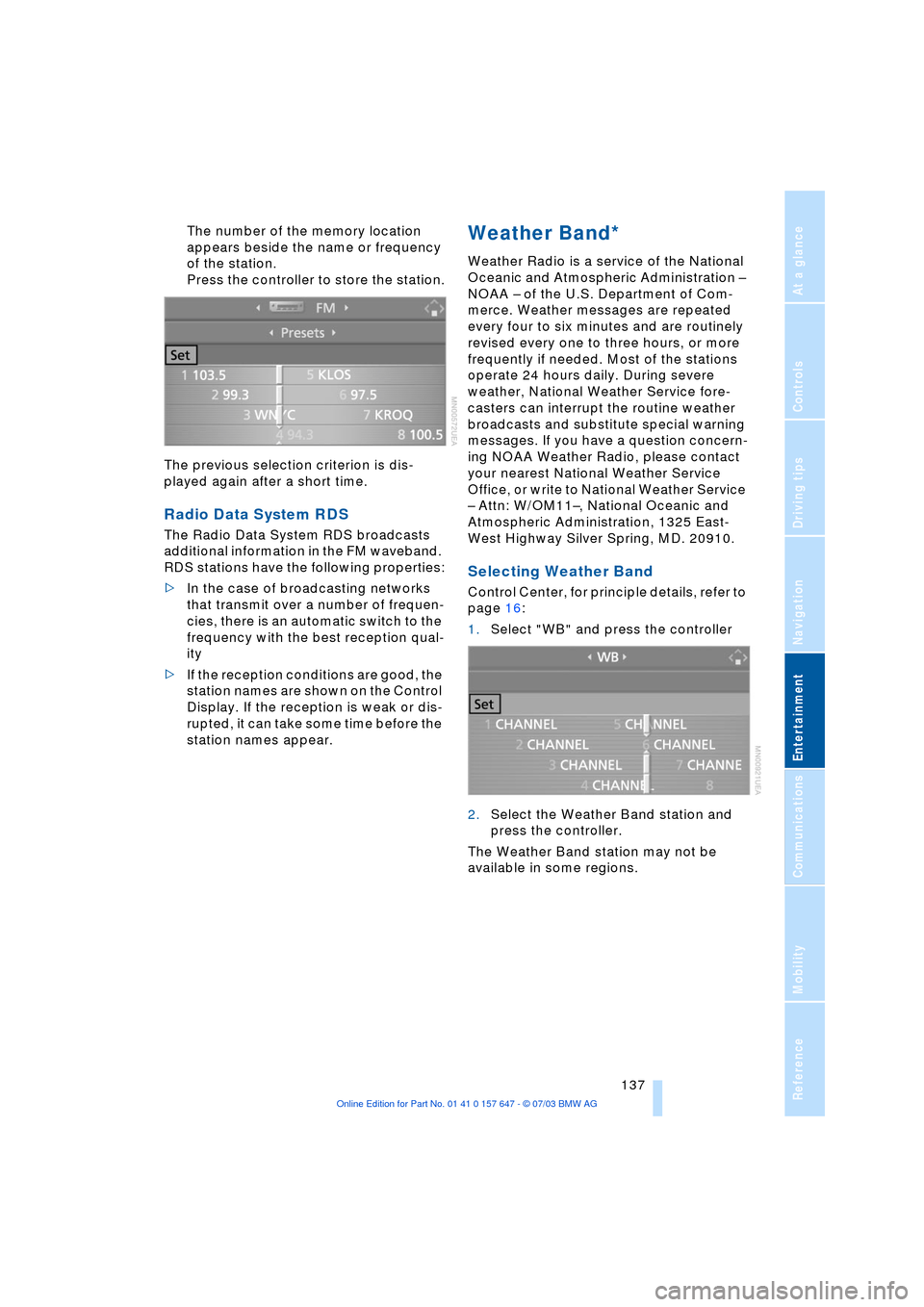
The number of the memory location
appears beside the name or frequency
of the station.
Press the controller to store the station.
The previous selection criterion is dis-
played again after a short time.
Radio Data System RDS
The Radio Data System RDS broadcasts
additional information in the FM waveband.
RDS stations have the following properties:
>In the case of broadcasting networks
that transmit over a number of frequen-
cies, there is an automatic switch to the
frequency with the best reception qual-
ity
>If the reception conditions are good, the
station names are shown on the Control
Display. If the reception is weak or dis-
rupted, it can take some time before the
station names appear.
Weather Band*
Weather Radio is a service of the National
Oceanic and Atmospheric Administration Ð
NOAA Ð of the U.S. Department of Com-
merce. Weather messages are repeated
every four to six minutes and are routinely
revised every one to three hours, or more
frequently if needed. Most of the stations
operate 24 hours daily. During severe
weather, National Weather Service fore-
casters can interrupt the routine weather
broadcasts and substitute special warning
messages. If you have a question concern-
ing NOAA Weather Radio, please contact
your nearest National Weather Service
Office, or write to National Weather Service
Ð Attn: W/OM11Ð, National Oceanic and
Atmospheric Administration, 1325 East-
West Highway Silver Spring, MD. 20910.
Selecting Weather Band
Control Center, for principle details, refer to
page 16:
1.Select "WB" and press the controller
2.Select the Weather Band station and
press the controller.
The Weather Band station may not be
available in some regions.
Page 145 of 220
Navigation
Entertainment
Driving tips
143Reference
At a glance
Controls
Communications
Mobility
Malfunctions
The BMW CD player is a Class 1 laser
product. Do not operate the system if
the cover is damaged, otherwise severe
eye damage can result.
Always refer repair and maintenance oper-
ations to qualified technicians.
With self-recorded CDs, labels applied
later can become detached during play-
back due to the development of heat and
cause irreparable damage to the device.<
CDs with copy protection devices
cannot be played on your CD player
or only with certain restrictions. These CDs
differ from the CD Audio Standard Red
Book, on the basis of which all CD players
and changers are designed. In this case,
please contact the CD dealer or manufac-
turer.
You may experience playback problems,
such as skips, when using CDs that you
have copied at home.
If the display fails to detect a CD that you
have loaded in the drive, check to ensure
that the CD has been inserted correctly and
inspect it for signs of defects.
High levels of humidity inside the system
can condense on the laser's scan lens and
temporarily prevent it from reading the
CD.<
Page 147 of 220
Navigation
Entertainment
Driving tips
145Reference
At a glance
Controls
Communications
Mobility
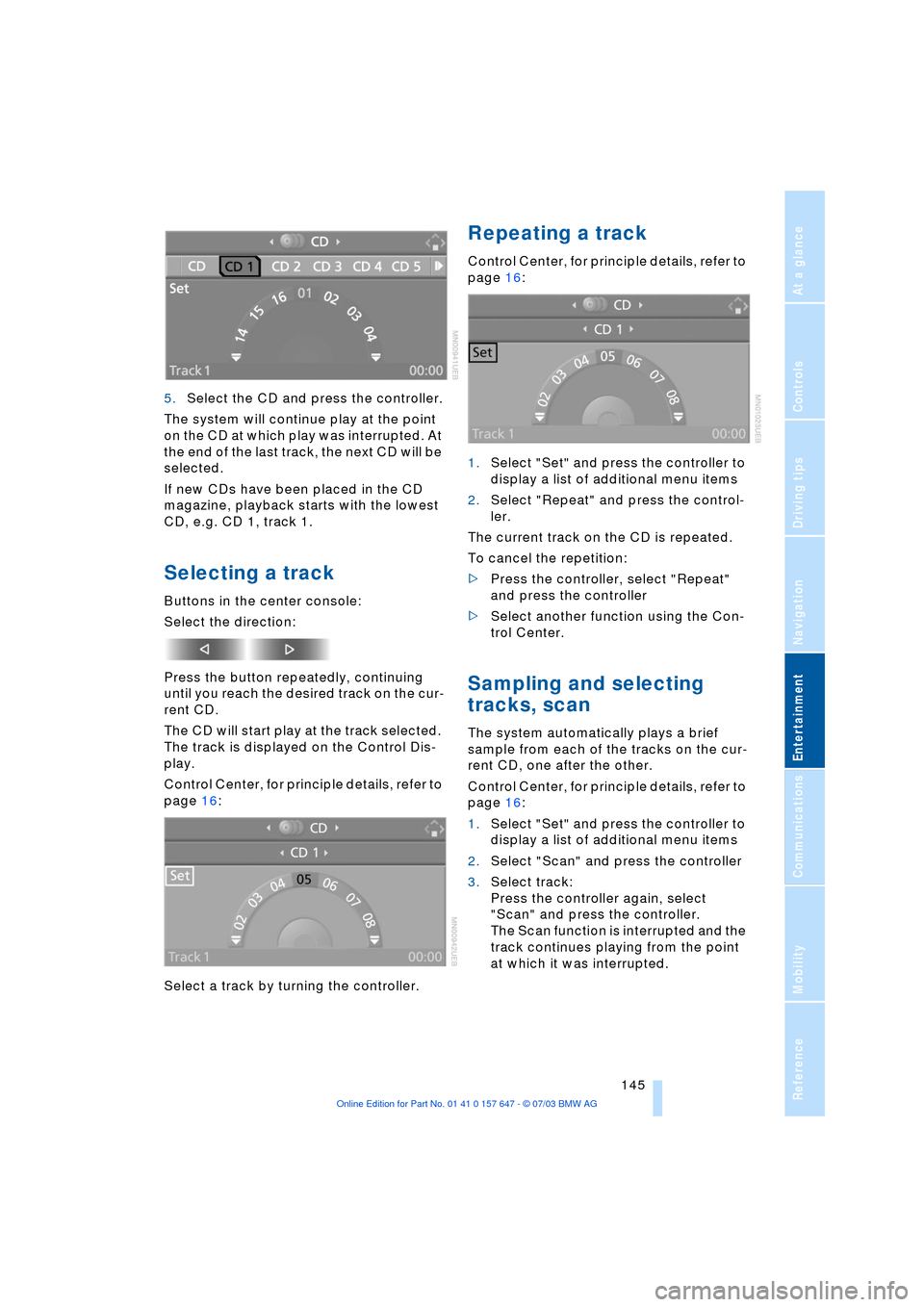
5.Select the CD and press the controller.
The system will continue play at the point
on the CD at which play was interrupted. At
the end of the last track, the next CD will be
selected.
If new CDs have been placed in the CD
magazine, playback starts with the lowest
CD, e.g. CD 1, track 1.
Selecting a track
Buttons in the center console:
Select the direction:
Press the button repeatedly, continuing
until you reach the desired track on the cur-
rent CD.
The CD will start play at the track selected.
The track is displayed on the Control Dis-
play.
Control Center, for principle details, refer to
page 16:
Select a track by turning the controller.
Repeating a track
Control Center, for principle details, refer to
page 16:
1.Select "Set" and press the controller to
display a list of additional menu items
2.Select "Repeat" and press the control-
ler.
The current track on the CD is repeated.
To cancel the repetition:
>Press the controller, select "Repeat"
and press the controller
>Select another function using the Con-
trol Center.
Sampling and selecting
tracks, scan
The system automatically plays a brief
sample from each of the tracks on the cur-
rent CD, one after the other.
Control Center, for principle details, refer to
page 16:
1.Select "Set" and press the controller to
display a list of additional menu items
2.Select "Scan" and press the controller
3.Select track:
Press the controller again, select
"Scan" and press the controller.
The Scan function is interrupted and the
track continues playing from the point
at which it was interrupted.
Page 157 of 220
155
Entertainment
Reference
At a glance
Controls
Driving tips Communications
Navigation
Mobility
Four lists are available:
>"Top 8".
The eight numbers that you call most
frequently from the list "A - Z" are auto-
matically stored in the "Top 8" list. The
number called most often appears at
the top of the list
>"Redial".
The last eight phone numbers you have
dialed are automatically stored. The last
number dialed is at the top of the list
>"Received calls".
The phone numbers of the eight calls
last accepted are stored if the phone
number of the caller is transmitted
>"Missed calls".
The phone numbers of the last eight
calls not accepted are stored if the
phone number of the caller is transmit-
ted.
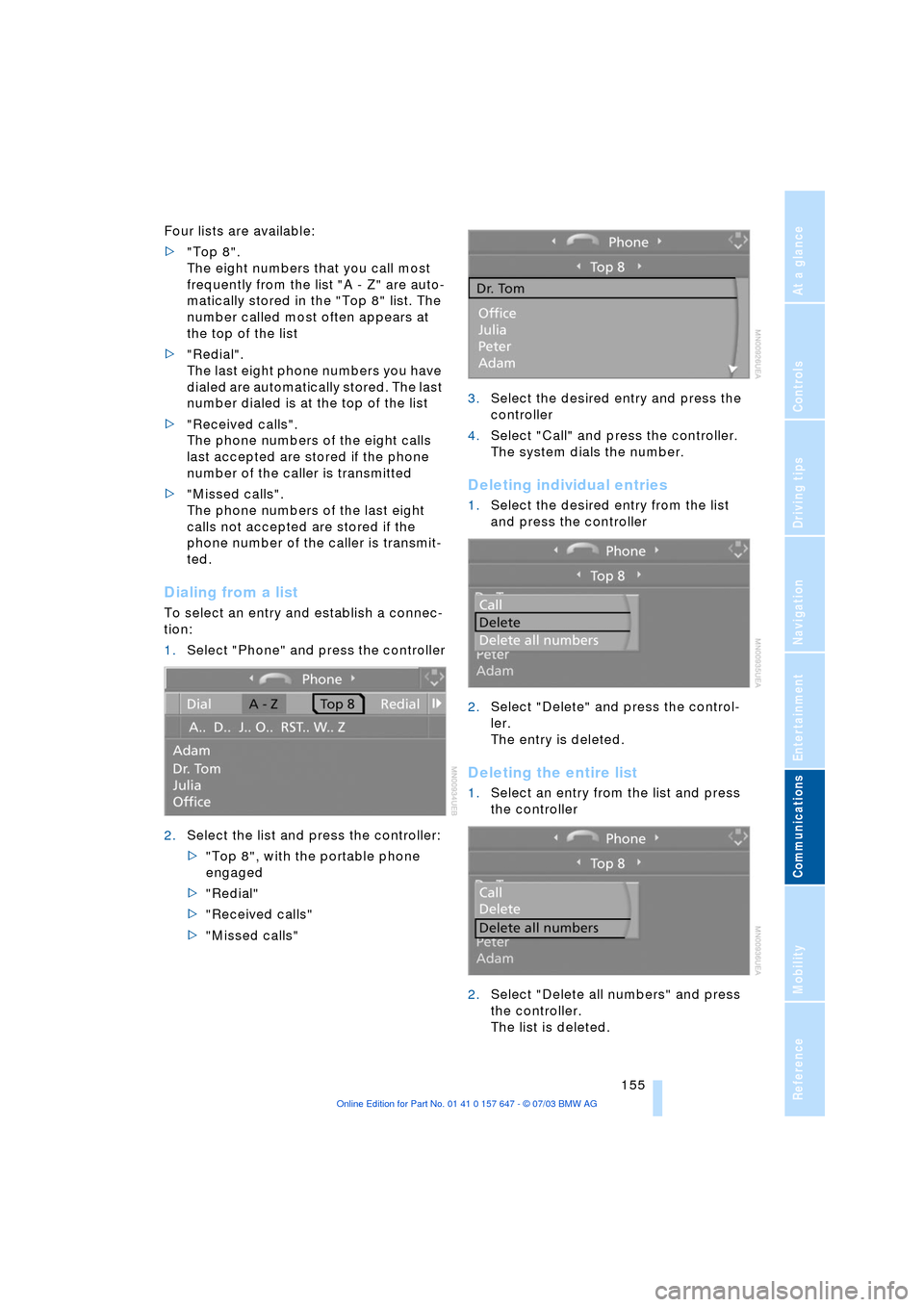
Dialing from a list
To select an entry and establish a connec-
tion:
1.Select "Phone" and press the controller
2.Select the list and press the controller:
>"Top 8", with the portable phone
engaged
>"Redial"
>"Received calls"
>"Missed calls"3.Select the desired entry and press the
controller
4.Select "Call" and press the controller.
The system dials the number.
Deleting individual entries
1.Select the desired entry from the list
and press the controller
2.Select "Delete" and press the control-
ler.
The entry is deleted.
Deleting the entire list
1.Select an entry from the list and press
the controller
2.Select "Delete all numbers" and press
the controller.
The list is deleted.
Page 159 of 220
157
Entertainment
Reference
At a glance
Controls
Driving tips Communications
Navigation
Mobility
Operation by voice control*
The concept
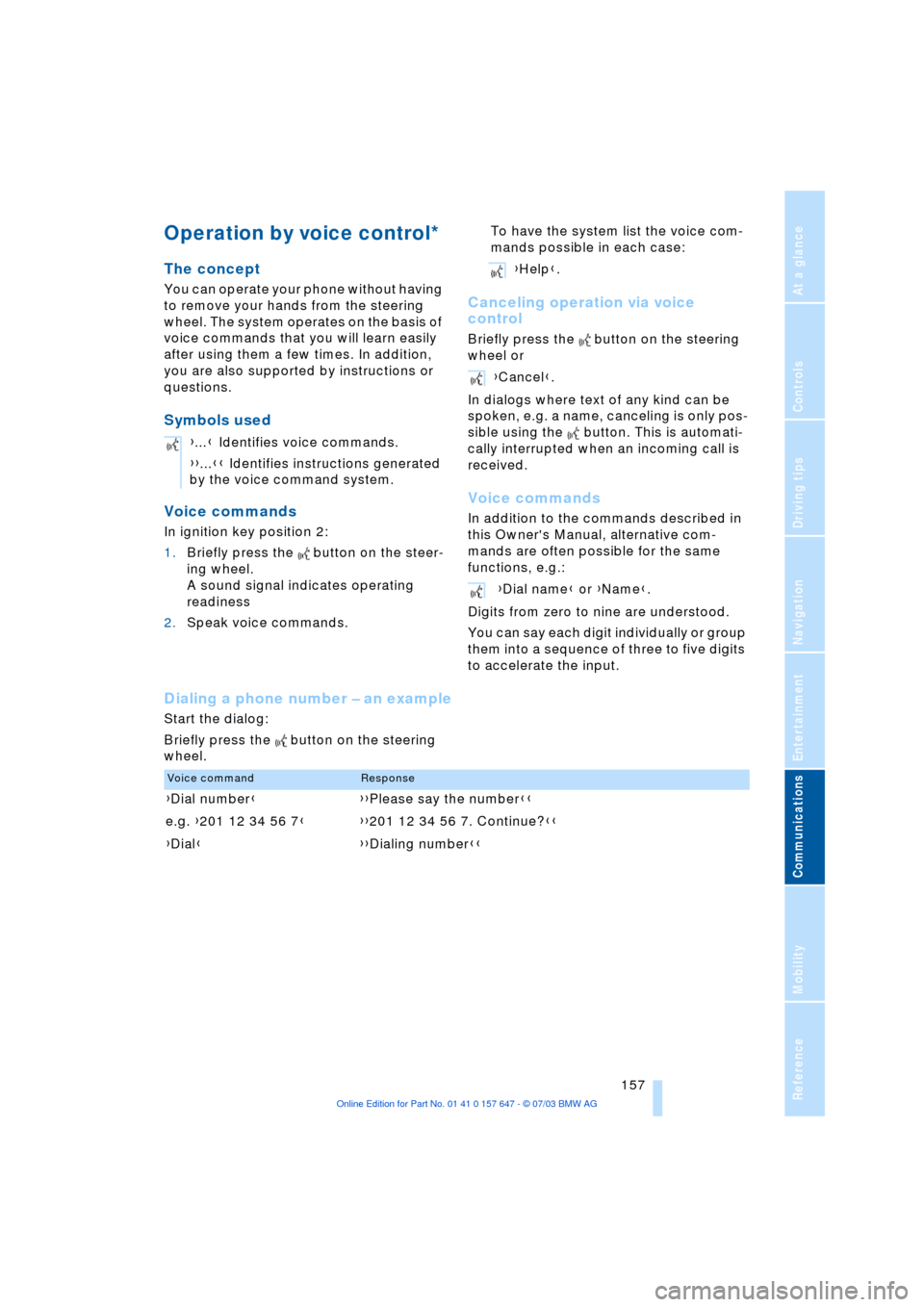
You can operate your phone without having
to remove your hands from the steering
wheel. The system operates on the basis of
voice commands that you will learn easily
after using them a few times. In addition,
you are also supported by instructions or
questions.
Symbols used
Voice commands
In ignition key position 2:
1.Briefly press the button on the steer-
ing wheel.
A sound signal indicates operating
readiness
2.Speak voice commands.To have the system list the voice com-
mands possible in each case:
Canceling operation via voice
control
Briefly press the button on the steering
wheel or
In dialogs where text of any kind can be
spoken, e.g. a name, canceling is only pos-
sible using the button. This is automati-
cally interrupted when an incoming call is
received.
Voice commands
In addition to the commands described in
this Owner's Manual, alternative com-
mands are often possible for the same
functions, e.g.:
Digits from zero to nine are understood.
You can say each digit individually or group
them into a sequence of three to five digits
to accelerate the input.
Dialing a phone number Ð an example
Start the dialog:
Briefly press the button on the steering
wheel.{...} Identifies voice commands.
{{...}} Identifies instructions generated
by the voice command system.
{Help}.
{Cancel}.
{Dial name} or {Name}.
Voice commandResponse
{Dial number}{{Please say the number}}
e.g. {201 12 34 56 7}{{201 12 34 56 7. Continue?}}
{Dial}{{Dialing number}}
Page 163 of 220
161
Entertainment
Reference
At a glance
Controls
Driving tips Communications
Navigation
Mobility
TeleService , BMW Assist
TeleService
TeleService opens up a new dimension for
communication with BMW Service. The car
phone can be used to transmit data on the
service status of your vehicle or on legally
prescribed inspections directly to your
BMW center. This is the same data that is
stored for CBS Condition Based Service in
the ignition key. Your BMW center can then
contact you, and you can make an appoint-
ment that suits you while you are still on the
road. Your advantage here is that your
BMW center can prepare in advance for the
required maintenance work. The TeleSer-
vice functions are country-specific. The
data on the service status of your vehicle or
on legally required inspections is transmit-
ted on a country-specific basis either auto-
matically before they fall due or simulta-
neously when you call any service partner
you have chosen. Your BMW center will be
glad to provide more detailed information.
BMW Assist
BMW Assist is available to you if you have
ordered this option at your BMW center or
BMW customer information. This provides
you with other services in addition to
TeleService.
Many functions of BMW Assist depend on
the individually agreed contract.
The subscriber agreement must be com-
pleted successfully before using the BMW
Assist services.
Requirements
The telephone is registered in a portable
phone network that can transmit the ser-
vices.
To transmit position data, the navigation
system must be able to determine the posi-
tion. In order to enable and update TeleServices or BMW Assist, a GPS signal
must be present.
To avoid posing an unnecessary haz-
ard, both to your own vehicle's occu-
pants and to other road users: never
attempt to make adjustments while operat-
ing the vehicle.<
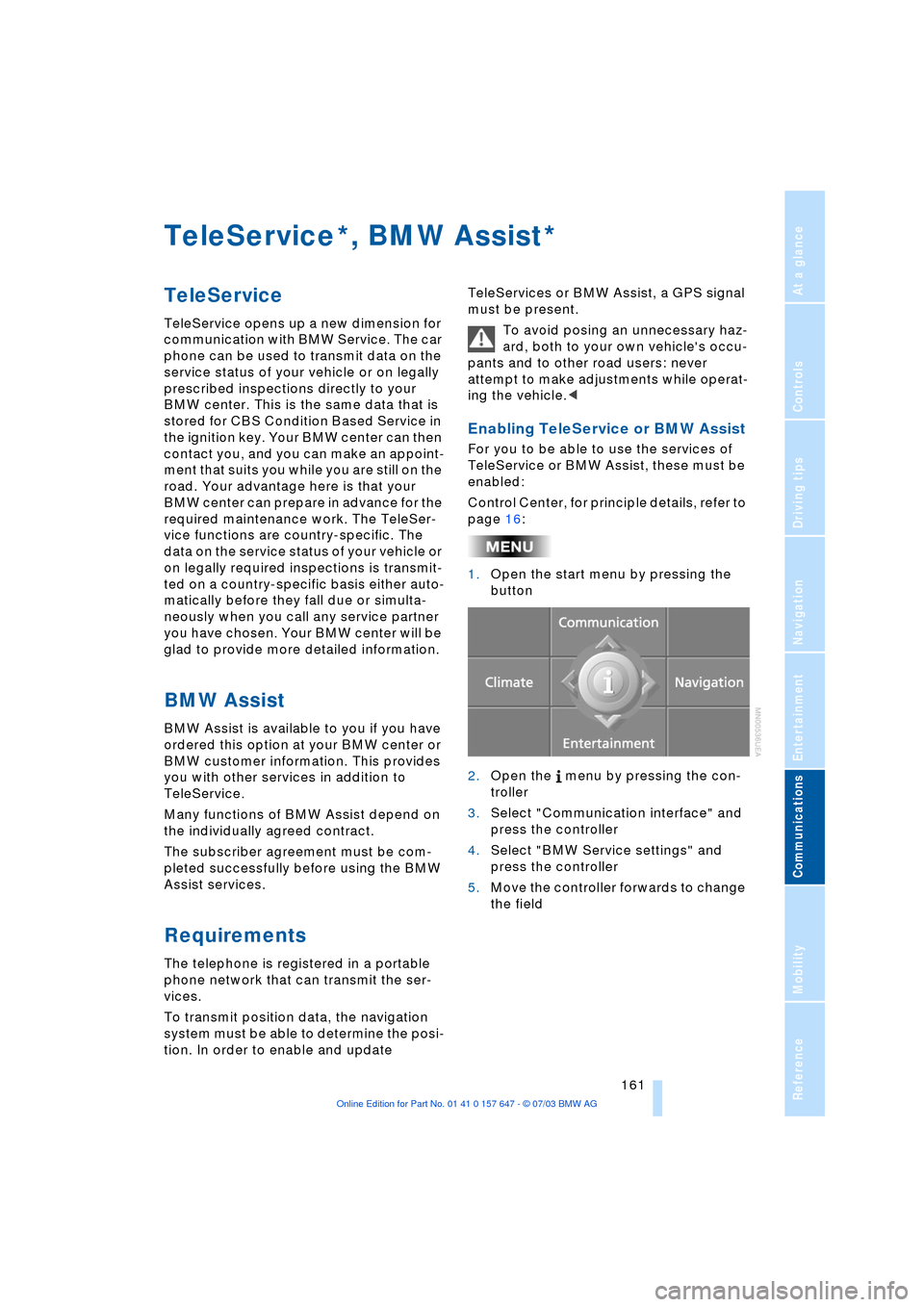
Enabling TeleService or BMW Assist
For you to be able to use the services of
TeleService or BMW Assist, these must be
enabled:
Control Center, for principle details, refer to
page 16:
1.Open the start menu by pressing the
button
2.Open the menu by pressing the con-
troller
3.Select "Communication interface" and
press the controller
4.Select "BMW Service settings" and
press the controller
5.Move the controller forwards to change
the field
**
Page 166 of 220
TeleService, BMW Assist
164 If you have received a message with a tele-
phone number or an address, you can for-
ward this to your portable phone or naviga-
tion system.
New messages are announced via SMS.
For more detailed information, refer to
page 156.
Info Plus*
This information service supplies you with a
whole range of current, interesting informa-
tion on request.
You can have telephone numbers and
addresses transferred and directly dial the
telephone number or copy the address to
the destination guidance of the navigation
system.
This option provides you with a current
information service, e.g. in the following
areas:
>Information on businesses
e.g. florist, doctor
>Accommodations
e.g. hotels, motels
>Mobility
e.g. filling stations, airports, car rental,
BMW dealers
>Eating and drinking
e.g. restaurants, cafŽs, bars
>Current information
e.g. movies playing, events.
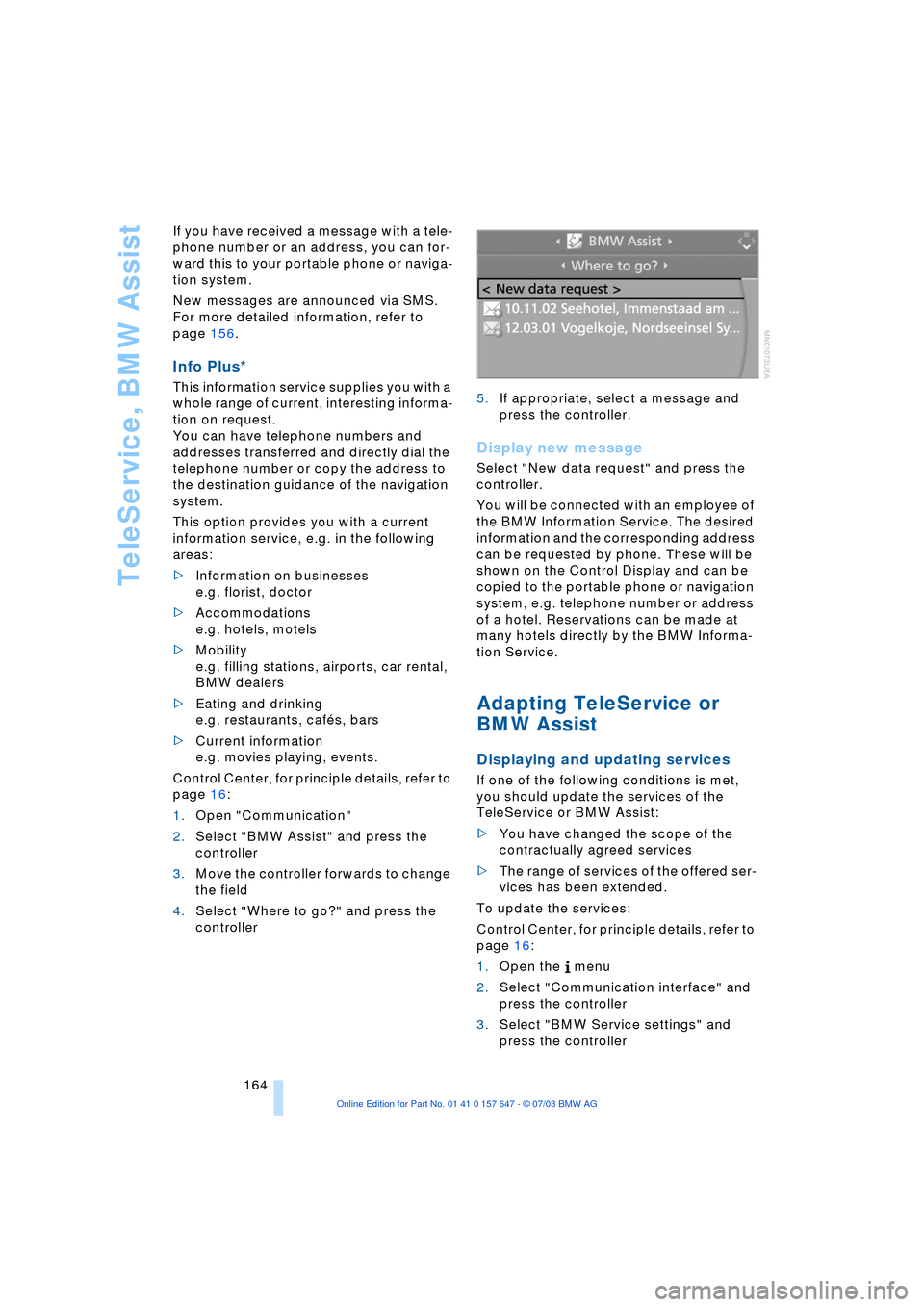
Control Center, for principle details, refer to
page 16:
1.Open "Communication"
2.Select "BMW Assist" and press the
controller
3.Move the controller forwards to change
the field
4.Select "Where to go?" and press the
controller 5.If appropriate, select a message and
press the controller.
Display new message
Select "New data request" and press the
controller.
You will be connected with an employee of
the BMW Information Service. The desired
information and the corresponding address
can be requested by phone. These will be
shown on the Control Display and can be
copied to the portable phone or navigation
system, e.g. telephone number or address
of a hotel. Reservations can be made at
many hotels directly by the BMW Informa-
tion Service.
Adapting TeleService or
BMW Assist
Displaying and updating services
If one of the following conditions is met,
you should update the services of the
TeleService or BMW Assist:
>You have changed the scope of the
contractually agreed services
>The range of services of the offered ser-
vices has been extended.
To update the services:
Control Center, for principle details, refer to
page 16:
1.Open the menu
2.Select "Communication interface" and
press the controller
3.Select "BMW Service settings" and
press the controller
Page 171 of 220
Mobility
169Reference
At a glance
Controls
Driving tips
Communications
Navigation
Entertainment
Fuel specifications
The engine uses lead-free gasoline only.
Required fuel:
Premium Unleaded Gasoline,
min. 91 AKI.
AKI = Anti Knock Index.
Do not use leaded fuels. The use of
leaded fuels will cause permanent
damage to the system's oxygen sensor and
the catalytic converter.<
Page 181 of 220
Mobility
179Reference
At a glance
Controls
Driving tips
Communications
Navigation
Entertainment
Adding engine oil
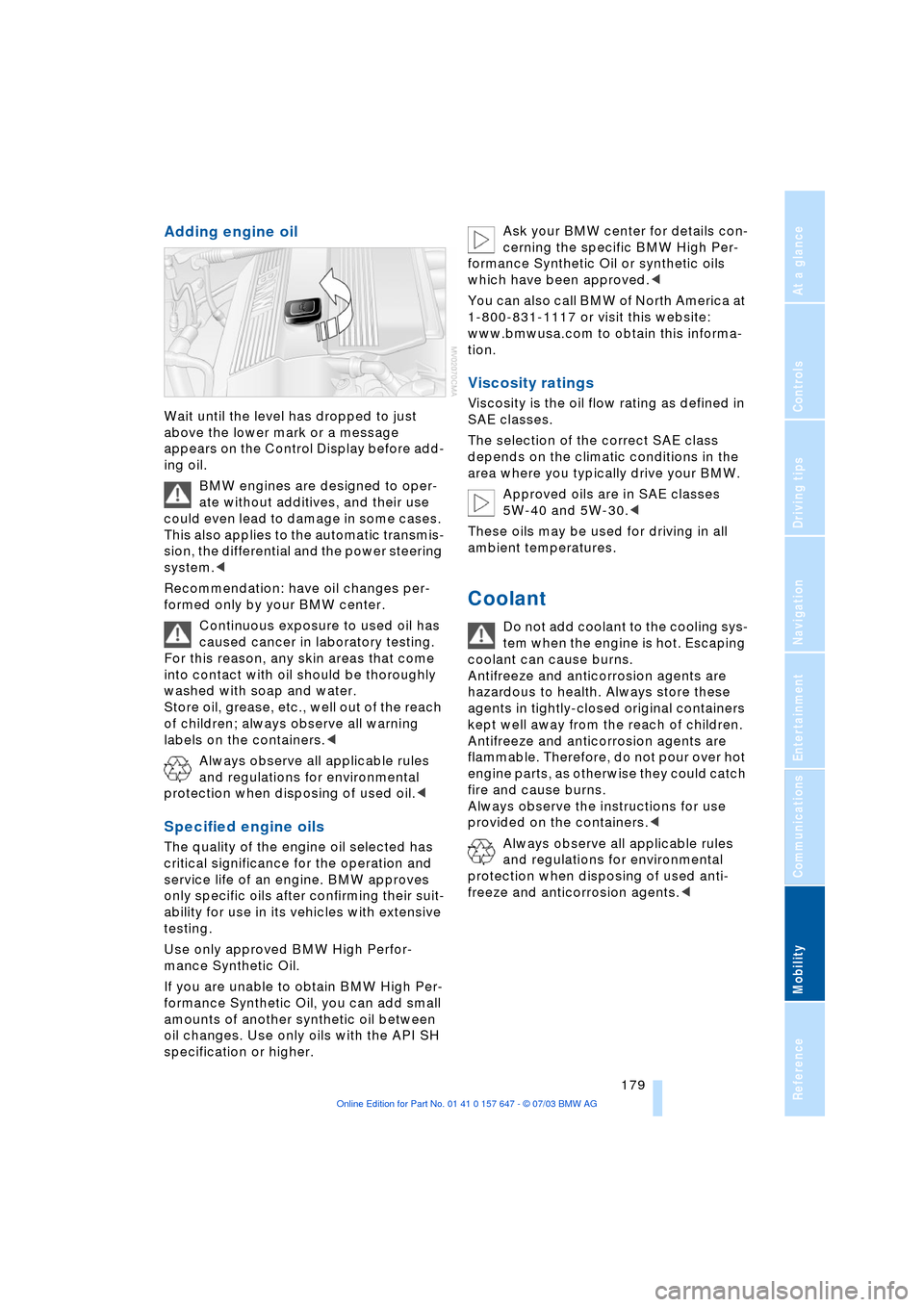
Wait until the level has dropped to just
above the lower mark or a message
appears on the Control Display before add-
ing oil.
BMW engines are designed to oper-
ate without additives, and their use
could even lead to damage in some cases.
This also applies to the automatic transmis-
sion, the differential and the power steering
system.<
Recommendation: have oil changes per-
formed only by your BMW center.
Continuous exposure to used oil has
caused cancer in laboratory testing.
For this reason, any skin areas that come
into contact with oil should be thoroughly
washed with soap and water.
Store oil, grease, etc., well out of the reach
of children; always observe all warning
labels on the containers.<
Always observe all applicable rules
and regulations for environmental
protection when disposing of used oil.<
Specified engine oils
The quality of the engine oil selected has
critical significance for the operation and
service life of an engine. BMW approves
only specific oils after confirming their suit-
ability for use in its vehicles with extensive
testing.
Use only approved BMW High Perfor-
mance Synthetic Oil.
If you are unable to obtain BMW High Per-
formance Synthetic Oil, you can add small
amounts of another synthetic oil between
oil changes. Use only oils with the API SH
specification or higher. Ask your BMW center for details con-
cerning the specific BMW High Per-
formance Synthetic Oil or synthetic oils
which have been approved.<
You can also call BMW of North America at
1-800-831-1117 or visit this website:
www.bmwusa.com to obtain this informa-
tion.
Viscosity ratings
Viscosity is the oil flow rating as defined in
SAE classes.
The selection of the correct SAE class
depends on the climatic conditions in the
area where you typically drive your BMW.
Approved oils are in SAE classes
5W-40 and 5W-30.<
These oils may be used for driving in all
ambient temperatures.
Coolant
Do not add coolant to the cooling sys-
tem when the engine is hot. Escaping
coolant can cause burns.
Antifreeze and anticorrosion agents are
hazardous to health. Always store these
agents in tightly-closed original containers
kept well away from the reach of children.
Antifreeze and anticorrosion agents are
flammable. Therefore, do not pour over hot
engine parts, as otherwise they could catch
fire and cause burns.
Always observe the instructions for use
provided on the containers.<
Always observe all applicable rules
and regulations for environmental
protection when disposing of used anti-
freeze and anticorrosion agents.<
Page 183 of 220
Mobility
181Reference
At a glance
Controls
Driving tips
Communications
Navigation
Entertainment
Maintenance
The BMW Maintenance
System
The BMW Maintenance System is
designed to ensure that your vehicle will
continue to furnish consistent reliability
combined with optimal safety. The service
schedule also includes operations related
to the vehicle's comfort and convenience
features, such as replacement of the filters
for the inside air. The ultimate objective is
to ensure economical maintenance by pro-
viding the ideal service for your vehicle.
Should the day come when you decide to
sell your BMW, you will find that a complete
dealer service history is an asset of inesti-
mable value.
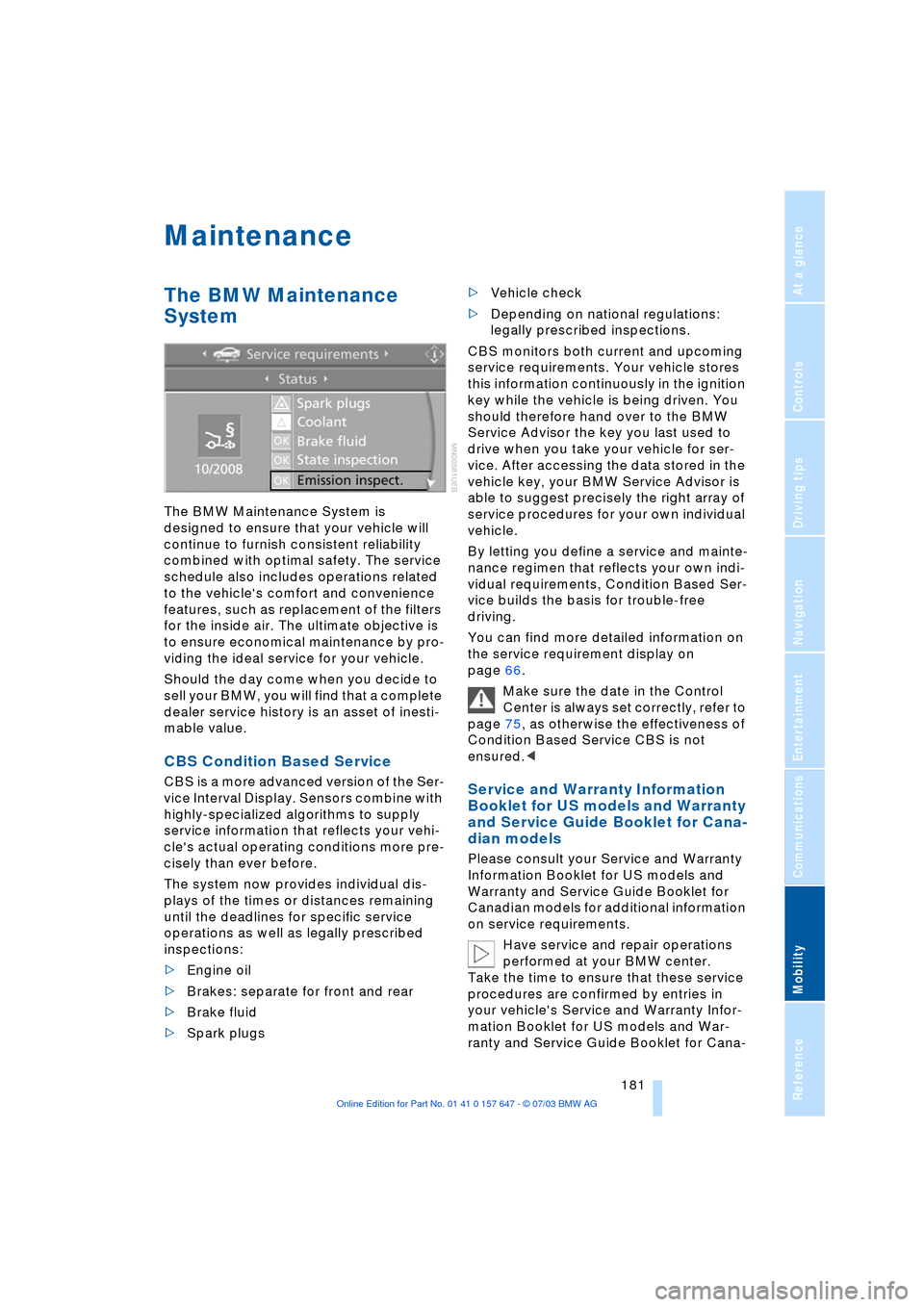
CBS Condition Based Service
CBS is a more advanced version of the Ser-
vice Interval Display. Sensors combine with
highly-specialized algorithms to supply
service information that reflects your vehi-
cle's actual operating conditions more pre-
cisely than ever before.
The system now provides individual dis-
plays of the times or distances remaining
until the deadlines for specific service
operations as well as legally prescribed
inspections:
>Engine oil
>Brakes: separate for front and rear
>Brake fluid
>Spark plugs >Vehicle check
>Depending on national regulations:
legally prescribed inspections.
CBS monitors both current and upcoming
service requirements. Your vehicle stores
this information continuously in the ignition
key while the vehicle is being driven. You
should therefore hand over to the BMW
Service Advisor the key you last used to
drive when you take your vehicle for ser-
vice. After accessing the data stored in the
vehicle key, your BMW Service Advisor is
able to suggest precisely the right array of
service procedures for your own individual
vehicle.
By letting you define a service and mainte-
nance regimen that reflects your own indi-
vidual requirements, Condition Based Ser-
vice builds the basis for trouble-free
driving.
You can find more detailed information on
the service requirement display on
page 66.
Make sure the date in the Control
Center is always set correctly, refer to
page 75, as otherwise the effectiveness of
Condition Based Service CBS is not
ensured.
and Service Guide Booklet for Cana-
dian models
Please consult your Service and Warranty
Information Booklet for US models and
Warranty and Service Guide Booklet for
Canadian models for additional information
on service requirements.
Have service and repair operations
performed at your BMW center.
Take the time to ensure that these service
procedures are confirmed by entries in
your vehicle's Service and Warranty Infor-
mation Booklet for US models and War-
ranty and Service Guide Booklet for Cana-