turn signal BMW 525I TOURING 2008 E61 Owner's Guide
[x] Cancel search | Manufacturer: BMW, Model Year: 2008, Model line: 525I TOURING, Model: BMW 525I TOURING 2008 E61Pages: 292, PDF Size: 9.33 MB
Page 182 of 292
Satellite radio
180
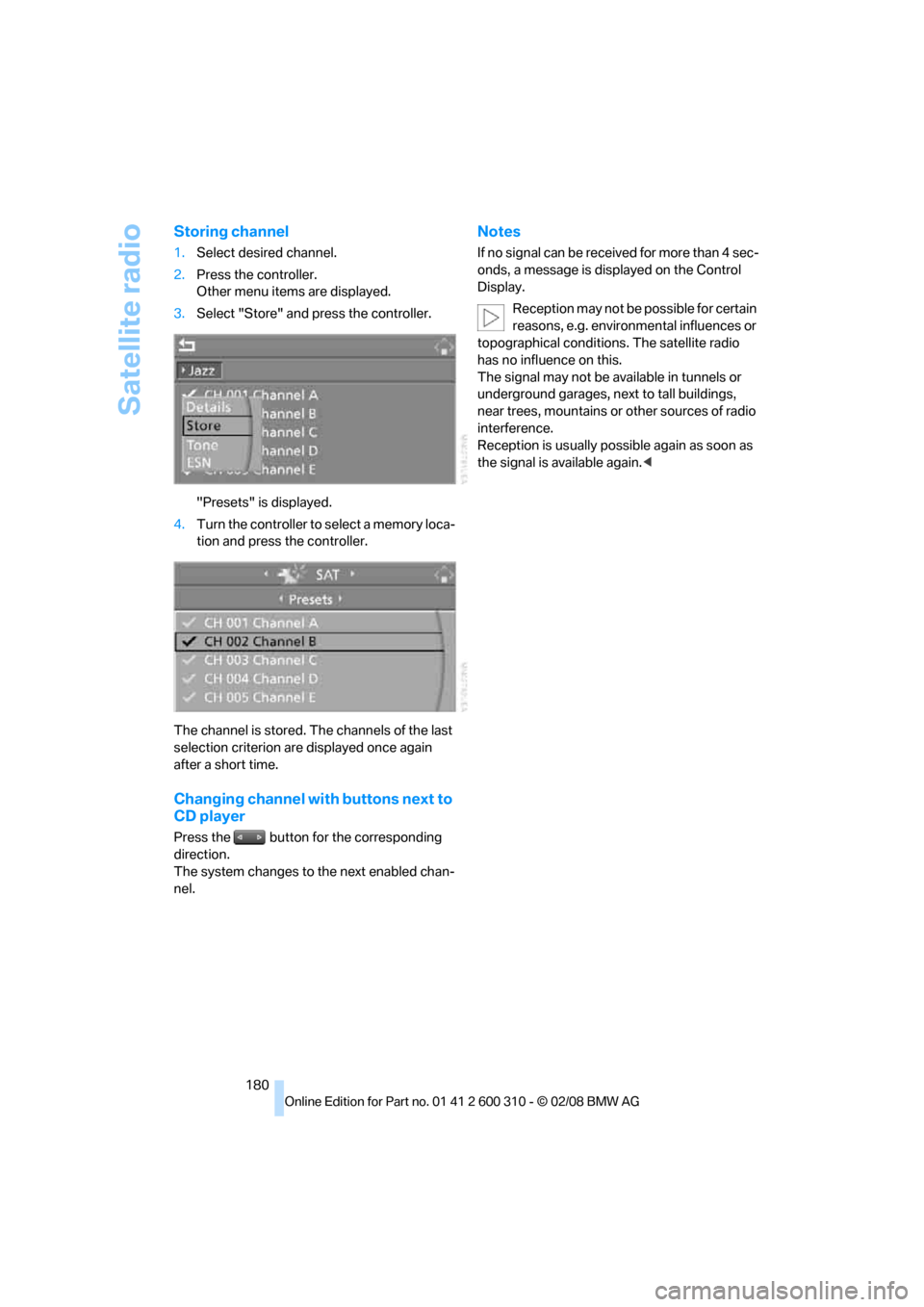
Storing channel
1.Select desired channel.
2.Press the controller.
Other menu items are displayed.
3.Select "Store" and press the controller.
"Presets" is displayed.
4.Turn the controller to select a memory loca-
tion and press the controller.
The channel is stored. The channels of the last
selection criterion are displayed once again
after a short time.
Changing channel with buttons next to
CD player
Press the button for the corresponding
direction.
The system changes to the next enabled chan-
nel.
Notes
If no signal can be received for more than 4 sec-
onds, a message is displayed on the Control
Display.
Reception may not be possible for certain
reasons, e.g. environmental influences or
topographical conditions. The satellite radio
has no influence on this.
The signal may not be available in tunnels or
underground garages, next to tall buildings,
near trees, mountains or other sources of radio
interference.
Reception is usually possible again as soon as
the signal is available again.<
Page 248 of 292
Replacing components
246
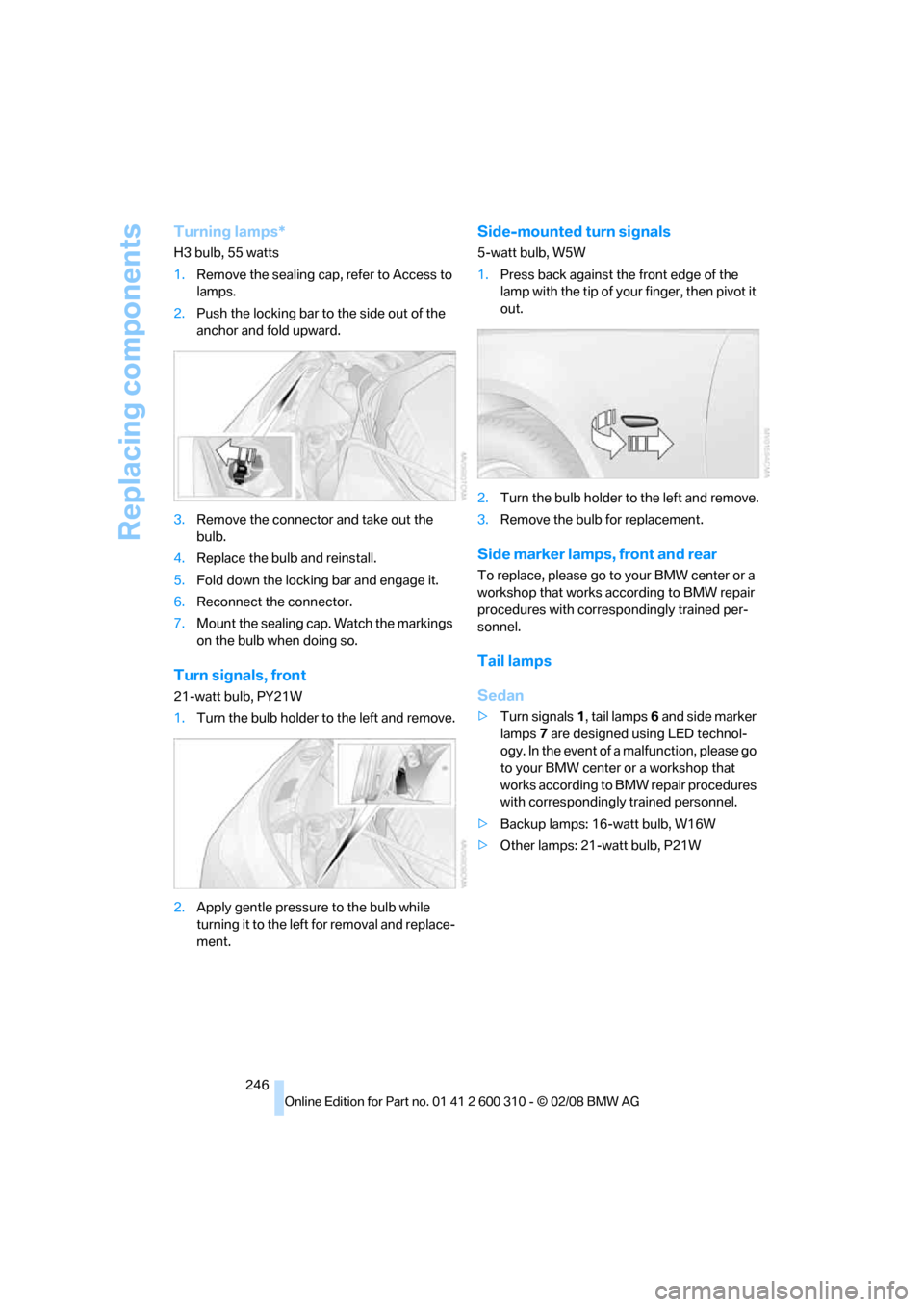
Turning lamps*
H3 bulb, 55 watts
1.Remove the sealing cap, refer to Access to
lamps.
2.Push the locking bar to the side out of the
anchor and fold upward.
3.Remove the connector and take out the
bulb.
4.Replace the bulb and reinstall.
5.Fold down the locking bar and engage it.
6.Reconnect the connector.
7.Mount the sealing cap. Watch the markings
on the bulb when doing so.
Turn signals, front
21-watt bulb, PY21W
1.Turn the bulb holder to the left and remove.
2.Apply gentle pressure to the bulb while
turning it to the left for removal and replace-
ment.
Side-mounted turn signals
5-watt bulb, W5W
1.Press back against the front edge of the
lamp with the tip of your finger, then pivot it
out.
2.Turn the bulb holder to the left and remove.
3.Remove the bulb for replacement.
Side marker lamps, front and rear
To replace, please go to your BMW center or a
workshop that works according to BMW repair
procedures with correspondingly trained per-
sonnel.
Tail lamps
Sedan
>Turn signals1, tail lamps6 and side marker
lamps7 are designed using LED technol-
ogy. In the event of a malfunction, please go
to your BMW center or a workshop that
works according to BMW repair procedures
with correspondingly trained personnel.
>Backup lamps: 16-watt bulb, W16W
>Other lamps: 21-watt bulb, P21W
Page 249 of 292
Mobility
247Reference
At a glance
Controls
Driving tips
Communications
Navigation
Entertainment
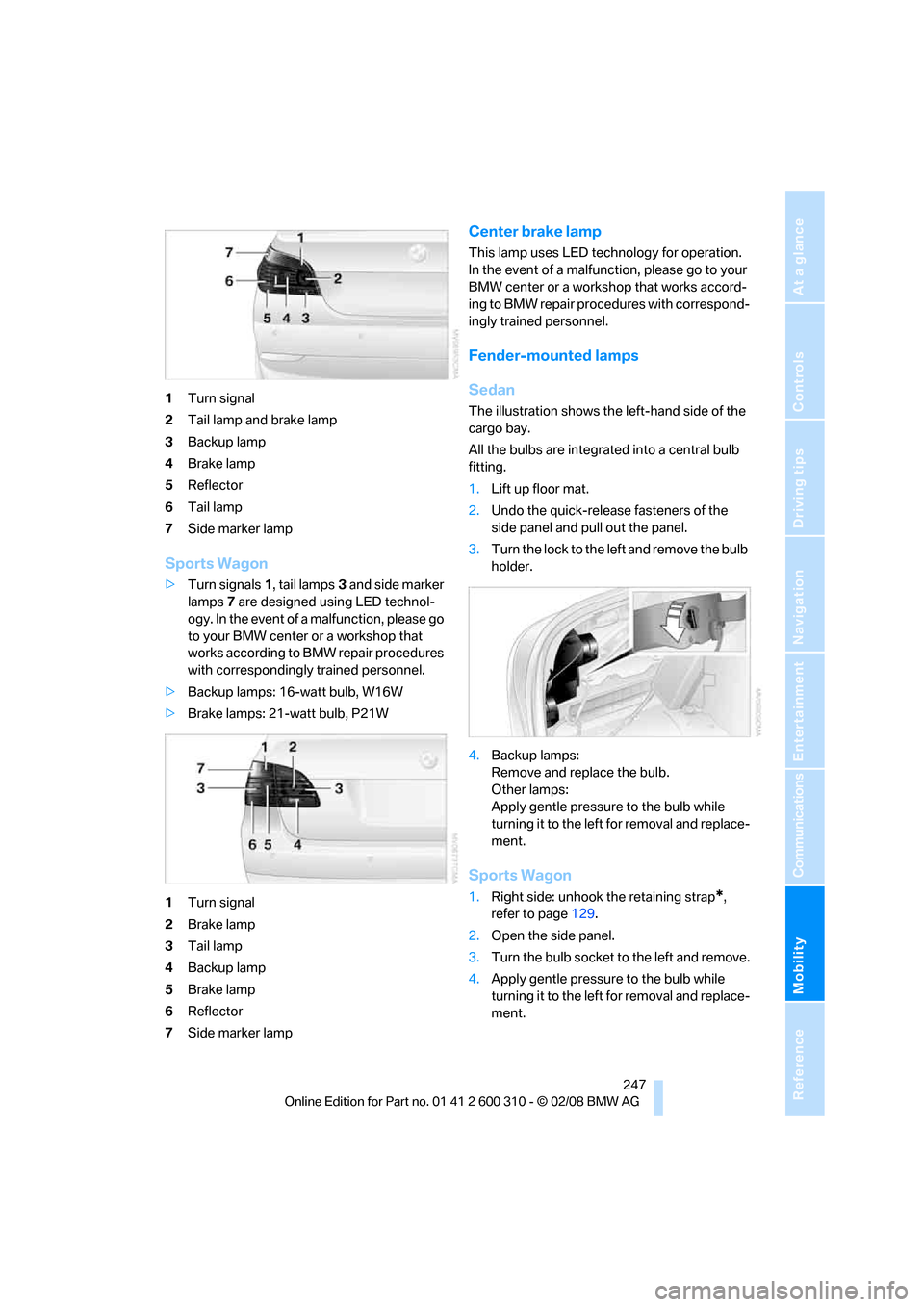
1Turn signal
2Tail lamp and brake lamp
3Backup lamp
4Brake lamp
5Reflector
6Tail lamp
7Side marker lamp
Sports Wagon
>Turn signals1, tail lamps3 and side marker
lamps7 are designed using LED technol-
ogy. In the event of a malfunction, please go
to your BMW center or a workshop that
works according to BMW repair procedures
with correspondingly trained personnel.
>Backup lamps: 16-watt bulb, W16W
>Brake lamps: 21-watt bulb, P21W
1Turn signal
2Brake lamp
3Tail lamp
4Backup lamp
5Brake lamp
6Reflector
7Side marker lamp
Center brake lamp
This lamp uses LED technology for operation.
In the event of a malfunction, please go to your
BMW center or a workshop that works accord-
ing to BMW repair procedures with correspond-
ingly trained personnel.
Fender-mounted lamps
Sedan
The illustration shows the left-hand side of the
cargo bay.
All the bulbs are integrated into a central bulb
fitting.
1.Lift up floor mat.
2.Undo the quick-release fasteners of the
side panel and pull out the panel.
3.Turn the lock to the left and remove the bulb
holder.
4.Backup lamps:
Remove and replace the bulb.
Other lamps:
Apply gentle pressure to the bulb while
turning it to the left for removal and replace-
ment.
Sports Wagon
1.Right side: unhook the retaining strap*,
refer to page129.
2.Open the side panel.
3.Turn the bulb socket to the left and remove.
4.Apply gentle pressure to the bulb while
turning it to the left for removal and replace-
ment.
Page 258 of 292
Giving and receiving assistance
256 Sedan:
It is located in the toolkit in the luggage com-
partment lid, refer to page243.
Sports Wagon:
It is located in the toolkit behind the left side
panel in the cargo bay, refer to page243.
Use only the tow fitting provided with the
vehicle and screw it all the way in. Use the
tow fitting for towing only on roads. Avoid lateral
loading of the tow fitting, e.g. do not lift the vehi-
cle by the tow fitting. Otherwise damage to the
tow fitting and the vehicle can occur.<
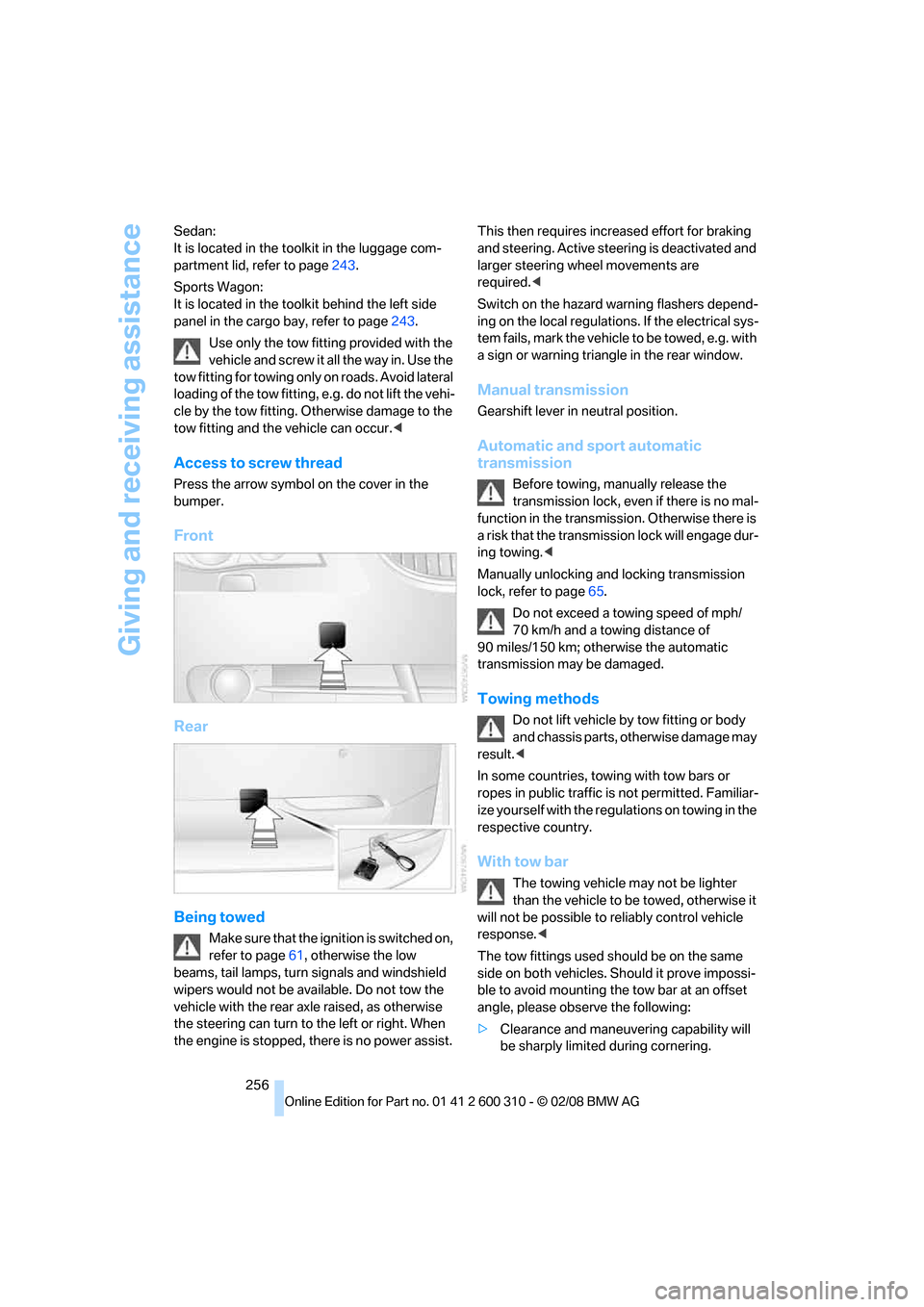
Access to screw thread
Press the arrow symbol on the cover in the
bumper.
Front
Rear
Being towed
Make sure that the ignition is switched on,
refer to page61, otherwise the low
beams, tail lamps, turn signals and windshield
wipers would not be available. Do not tow the
vehicle with the rear axle raised, as otherwise
the steering can turn to the left or right. When
the engine is stopped, there is no power assist. This then requires increased effort for braking
and steering. Active steering is deactivated and
larger steering wheel movements are
required.<
Switch on the hazard warning flashers depend-
ing on the local regulations. If the electrical sys-
tem fails, mark the vehicle to be towed, e.g. with
a sign or warning triangle in the rear window.
Manual transmission
Gearshift lever in neutral position.
Automatic and sport automatic
transmission
Before towing, manually release the
transmission lock, even if there is no mal-
function in the transmission. Otherwise there is
a risk that the transmission lock will engage dur-
ing towing.<
Manually unlocking and locking transmission
lock, refer to page65.
Do not exceed a towing speed of mph/
70 km/h and a towing distance of
90 miles/150 km; otherwise the automatic
transmission may be damaged.
Towing methods
Do not lift vehicle by tow fitting or body
and chassis parts, otherwise damage may
result.<
In some countries, towing with tow bars or
ropes in public traffic is not permitted. Familiar-
ize yourself with the regulations on towing in the
respective country.
With tow bar
The towing vehicle may not be lighter
than the vehicle to be towed, otherwise it
will not be possible to reliably control vehicle
response.<
The tow fittings used should be on the same
side on both vehicles. Should it prove impossi-
ble to avoid mounting the tow bar at an offset
angle, please observe the following:
>Clearance and maneuvering capability will
be sharply limited during cornering.
Page 277 of 292
Reference 275
At a glance
Controls
Driving tips
Communications
Navigation
Entertainment
Mobility
Destination for navigation
– destination list150
– entering via voice147
– entry144
– selecting from address
book152
– selecting using
information149
– storing151
Destination guidance156
– bypassing route
sections160
– canceling voice
instructions55
– changing specified
route154
– displaying route157
– distance and arrival156
– interrupting156
– starting156
– terminating/continuing156
– voice instructions159
– volume of voice
instructions160
Destination list for
navigation150
Destinations recently driven
to150
"Details"
– in audio mode183,189
– in radio mode179
"Detour" in navigation163
"Dial" in mobile phone
mode201
"Dial number"201
"Diamond button"55
Diamond button54
Digital clock78
Digital radio, refer to High
Definition Radio176
Dimensions261
Directional indicators, refer to
Turn signals67
Direction announcements,
refer to Voice
instructions159
Direction instructions, refer to
Voice instructions159Directory, refer to Phone
book202
Directory for navigation, refer
to Address book151
Displacement, refer to Engine
data260
"Display"88
Display, refer to iDrive
controls16
Display elements, refer to
Instrument cluster12
Displaying vehicle data216
Display lighting, refer to
Instrument lighting111
"Display off"21
Displays
– on Control Display, refer to
iDrive16
– refer to Instrument
cluster12
"Display settings"87,102
Displays on the windshield,
refer to Head-Up
Display101
Disposal
– battery of remote control
with comfort access40
– coolant235
– vehicle battery251
Distance, refer to
Computer80
Distance control, refer to
Active cruise control71
"Distance to dest."80
Distance to destination, refer
to Computer80
Distance warning, refer to
PDC Park Distance
Control89
Divided rear backrest, refer to
Through-loading
system126
Door entry lighting111
Door key, refer to Keys/
remote control28
Door lock32
Door locking, confirmation
signals31
"Door locks"30Doors
– manual operation32
– remote control30
DOT Quality Grades228
Draft-free ventilation117
Drinks holder, refer to Cup
holders124
"Driver's door only"30
Driving lamps, refer to Parking
lamps/low beams107
Driving route, refer to
Displaying route157
Driving stability control
systems90
Driving through water136
Driving tips, refer to General
driving notes134
Dry air, refer to Cooling
function116
Drying the air, refer to Cooling
function116
DSC Dynamic Stability
Control91
– indicator lamp13,91
– malfunction93
DTC Dynamic Traction
Control91
– activating91
– indicator lamp13,92
DVD for navigation142
Dynamic Drive93
Dynamic Driving Control66
"Dynamic route" in
navigation154
Dynamic Stability Control
DSC91
Dynamic Traction Control
DTC91
E
Easy entry/exit54
– backrest width47
Eject button, refer to Buttons
in area of CD player168
Page 279 of 292
Reference 277
At a glance
Controls
Driving tips
Communications
Navigation
Entertainment
Mobility
Flashing
– during locking/unlocking,
refer to Setting confirmation
signals31
– triple turn signal
activation67
Flashlight122
Flat tire
– changing wheels248
– compact wheel250
– Flat Tire Monitor94,95
– refer to Tire condition229
– run-flat tires95,97,229
– TPM Tire Pressure
Monitor96
– warning lamp95,97
Flat Tire Monitor94
– false alarms94
– initializing system94
– snow chains231
– system limits94
– warning lamp95
Fluid reservoir, refer to Filler
neck for washer fluid69
"FM", reception
range168,172
FM, waveband172
Fog lamps111
– indicator lamp13,111
Folding rear backrest126
– Sports Wagon127
Fold-over rear backrest126
Footbrake, refer to Braking
safely136
Footwell lamps, refer to
Interior lamps111
Forward, fast
– CD changer185
– CD player185
For your own safety5
4-wheel drive system, refer to
xDrive92
Freeway, refer to Route
criteria154
Front airbags99
Front armrest, refer to Center
armrest, front122Front passenger airbags,
deactivating100
Front seat adjustment46
"FTM"95
FTM, refer to Flat Tire
Monitor94
Fuel221
– average consumption80
– display79
– high-quality brands221
– quality221
– specifications221
– tank contents, refer to
Capacities264
Fuel clock, refer to Fuel
gauge79
Fuel consumption display,
computer, average fuel
consumption80
Fuel display, refer to Fuel
gauge79
Fuel-efficient driving
– refer to Energy control79
– refer to Saving fuel134
Fuel filler door220
– releasing in the event of
electrical malfunction220
Full mobile phone preparation
package194
Full screen display, refer to
Switching assistance
window off21
"Full screen" with BMW Night
Vision105
Fuses252
G
Garage door opener, refer to
Integrated universal remote
control120
Gasoline, refer to Required
fuel221
Gasoline display, refer to Fuel
gauge79
Gearshift lever, manual
transmission63General driving
notes134,135
Glass sunroof, electric41
– convenient operation from
outside32
– convenient operation with
comfort access39
– moving manually42
– remote control30
Glove compartment122
– flashlight122
– lighting122
GPS navigation, refer to
Navigation system142
Grills, refer to Ventilation117
Gross vehicle weight, refer to
Weights263
H
Halogen lamps245
Handbrake63
– indicator lamp13,63
Hands-free system, refer to
Microphone14
Hand washing240
Hazard warning flashers15
"HDC"92
HDC Hill Descent Control92
"HDC on"92
"HDC on / off"55
"HD radio"176
HD radio, refer to High
Definition Radio176
Head airbags99
Headlamp control,
automatic107
Headlamp flasher67
Headlamps107
– cleaning, refer to Wiper
system68
– cleaning tank, refer to
Capacities264
– filler neck for washer
fluid233
– replacing bulbs245
Head Light, refer to Adaptive
Head Light109
Page 282 of 292
Everything from A to Z
280 Luggage compartment lid/
tailgate, comfort access39
Luggage net, refer to Partition
net128
Luggage rack, refer to Roof-
mounted luggage rack139
Lumbar support47
LW, waveband172
M
M+S tires, refer to Winter
tires230
Maintenance237
– refer to Service and
Warranty Information
Booklet for US models237
– refer to Service
requirements81
– refer to Warranty and
Service Guide Booklet for
Canadian models237
Maintenance system237
Malfunction warnings, refer to
Check Control83
Manual air distribution115
"Manual" in radio mode173
Manual operation
– door lock32
– driver's door32
– fuel filler door220
– glass sunroof42
– luggage compartment lid34
– panorama glass sunroof44
– transmission lock, automatic
transmission65
Manual transmission63
"Map direction of travel"158
Map display158
"Map facing north"158
Map for navigation
– changing scale158
– destination entry148
Map view facing north158
Master key, refer to Keys/
remote control28
Maximum cooling116Maximum speed
– with compact wheel251
– with winter tires230
Measurements, refer to
Dimensions261
Memory, refer to Seat, mirror
and steering wheel
memory47
MENU, button refer to Start
menu17
Menus, refer to iDrive16
Message list for traffic
information161
Microfilter117
Microphone
– for mobile phone14
– for voice command
system14
Mirror dimming feature54
Mirrors53
– automatic curb monitor53
– folding in and out53
– heating53
– memory, refer to Seat, mirror
and steering wheel
memory
47
"Missed calls"202
Missed calls203
Mobile phone
– accepted calls203
– adjusting volume200
– calling201
– ending call201
– installation location, refer to
Center armrest122
– missed calls203
– operation by voice205
– operation via iDrive200
– redialing203
– refer to separate operating
instructions
– Top 8203
– touch tone dialing, refer to
Tone dialing method204
Mobile phone battery208
Monitor, refer to iDrive16
Monitoring pressure of tires,
refer to Flat Tire Monitor94"Monitor on / off"55
Most recent mobile phone
numbers203
MP3
– compressed audio files181
– USB audio interface188
Multi-function steering wheel,
refer to Buttons on steering
wheel11
Multifunction switch
– refer to Turn signals/
headlamp flasher67
– refer to Wiper system68
Music tracks
– finding183
– random play sequence184
– sampling, scan183
"Mute on / off"55
MW, waveband172
"My Info"214
My Info, refer to BMW Assist
My Info213
N
"Navigation"80,144
Navigation destination
– entering manually144
– home address153
– selecting via map148
Navigation drive, installation
location142
Navigation DVD142
Navigation instructions, refer
to Switching voice
instructions on/off159
Page 286 of 292
Everything from A to Z
284 Scan
– CD changer183
– CD player183
– radio173
"Scan all" in audio mode183
"Scan directory" in audio
mode183
Screen, refer to iDrive16
Screw thread for tow
fitting256
SDARS, refer to Satellite
radio178
"Seat heater distribution"51
Seats46
– active backrest width
adjustment47
– adjusting the seats46
– comfort seat46
– easy entry/exit47
– heating51
– lumbar support47
– memory, refer to Seat, mirror
and steering wheel
memory47
– shoulder support46
– sitting safely45
– storing the setting47
– thigh support46
– ventilation, refer to Active
seat ventilation52
Securing load
– refer to Securing cargo138
– with ski bag, refer to
Securing cargo130
"Select as
destination"150,213
"Select current speed"85
Selecting audio sources, refer
to Operation via iDrive168
Selecting distance with active
cruise control73
Selecting frequency
manually173
Selecting menu items19
Selecting route154
Selection options with
navigation system154Selector lever, automatic
transmission with
Steptronic63,64
Selector lever lock, refer to
Selecting transmission
positions64
Self-leveling suspension94
Service, refer to Roadside
Assistance254
Service and Warranty
Information Booklet for
US models237
"Service Info"81,211
,234
Service Interval Display
– refer to CBS Condition
Based Service237
– refer to Service
requirements81
"Service Request"204,211
"Service
requirements"82,211,234
Service requirements81
– refer to CBS Condition
Based Service237
"Set"
– in audio mode168
– on trip computer81
"Set date"87
"Set service date"82
"Set time"87
Setting button, refer to
Controls, controller16
"Settings"216
– in unlocking30
– with BMW Assist214
Settings
– BMW Night Vision104
– changing on Control
Display86
– clock, 12h/24h mode87
– configuring, refer to
Personal Profile28
– date87
– language88
– units of measure88
Settings menu, refer to
imenu17Setting time, refer to
Preselecting activation
times118
Shifting gears, Automatic
transmission with
Steptronic64
Shift paddles on steering
wheel66
Short commands of voice
command system265
"Short route" in
navigation154
Short route in navigation, refer
to Selecting route154
Shoulder support46
"Show current position"149
"Show destination
position"149
Shuffled, refer to Random
– CD changer184
– CD player184
Side airbags99
Side marker lamps, replacing
bulbs246
Side-mounted turn signals,
replacing bulbs
246
Side window blinds, refer to
Sun blinds121
Signal horn, refer to Horn10
Sitting safely45
– with airbags45
– with head restraint45
– with safety belts45
Ski bag129
Sliding/tilt sunroof
– refer to Glass sunroof,
electric41
– refer to Panorama glass
sunroof42
Slope assistant, refer to
Starting assistant93
Snap-in adapter
– mounting/removing207
– using194
Snow chains231
Socket for Onboard
Diagnostics interface238
Page 289 of 292
Reference 287
At a glance
Controls
Driving tips
Communications
Navigation
Entertainment
Mobility
Torch122
Torque
– lug bolts, refer to After
mounting250
– refer to Engine data260
Touch tone dialing, refer to
Tone dialing method204
Tow bar256
Tow fitting255
Towing255
– methods256
– tow fittings255
– with automatic and sport
automatic transmission256
– with manual
transmission256
"Town / City" in destination
entry145
Tow rope257
Tow-starting255
"TPM"96
TPM Tire Pressure
Monitor96
– resetting system96
– system limits96
– warning lamp97
Tracks
– random sequence184
– sampling on CD183
– selecting with CD182
Traction-assist feature, refer
to DSC Dynamic Stability
Control91
Traction control, refer to DSC
Dynamic Stability
Control91
Traffic information for
navigation160
– depiction in route map162
– displaying161
– during destination
guidance163
– symbols162
"Traffic Info settings"161
Traffic jam
– displaying traffic
information160
– refer to Bypassing route
sections160Transmission
– automatic transmission with
Steptronic63
– manually unlocking and
locking transmission lock65
– manual transmission63
– sport automatic
transmission66
– starting assistant93
– towing256
Transporting children
safely56
Transport securing device,
refer to Securing cargo138
Tread depth, refer to Minimum
tire tread229
Treble, refer to Tone
control169
"Treble", Tone control170
"Trip computer"81
Trip computer80
Trip-distance counter
– refer to Trip computer80
– refer to Trip meter78
"Triple turn signal"67
Trip meter78
– also refer to Trip
computer80
Trip odometer, refer to Trip
meter78
Trunk, refer to Cargo bay
Trunk lid, refer to Tailgate35
Turning circle, refer to
Dimensions261
Turning lamps109
– replacing bulbs246
Turn signals67
– indicator lamp12
– replacing bulbs246
U
Uniform Tire Quality Grading/
UTQR228
"Units"88
Units
– average fuel
consumption88
– temperature88Universal garage-door
opener, refer to Integrated
universal remote
control120
Universal remote control120
"Unlock button"30
Unlocking
– from inside33
– from outside30
– setting unlocking
behavior30
– without key, refer to Comfort
access38
Unlocking without key, refer to
Comfort access38
"Update services"215
USB audio interface188
"USB" in audio mode189
"Use current location as
address"152,153
Used batteries
– refer to Disposal251
– refer to Replacing battery40
Using turn signals67
V
Valve screw caps, refer to
After mounting250
Vehicle
– battery251
– breaking-in134
– loading137
– measurements, refer to
Dimensions261
– parking62
– weights263
"Vehicle / Tires" in
unlocking30
Vehicle care, refer to Care239
Vehicle jack249
– jacking points250
Vehicle position, refer to
Displaying current
position163
Ventilation117
– draft-free117
– in rear117
– while stationary117