roof BMW 525XI 2007 User Guide
[x] Cancel search | Manufacturer: BMW, Model Year: 2007, Model line: 525XI, Model: BMW 525XI 2007Pages: 273, PDF Size: 8.96 MB
Page 98 of 273
Technology for comfort, convenience and safety
96
Malfunction
The warning lamp lights up yellow and
a message is shown on the Control Dis-
play. The active steering is no longer
operational. At low speeds, greater steering
wheel movements are required, whereas at
higher speeds, the vehicle reacts more sensi-
tively to steering wheel movements. The stabil-
ity-promoting intervention can also be deacti-
vated. Proceed cautiously and drive
defensively. Have the system checked.
Brake force display
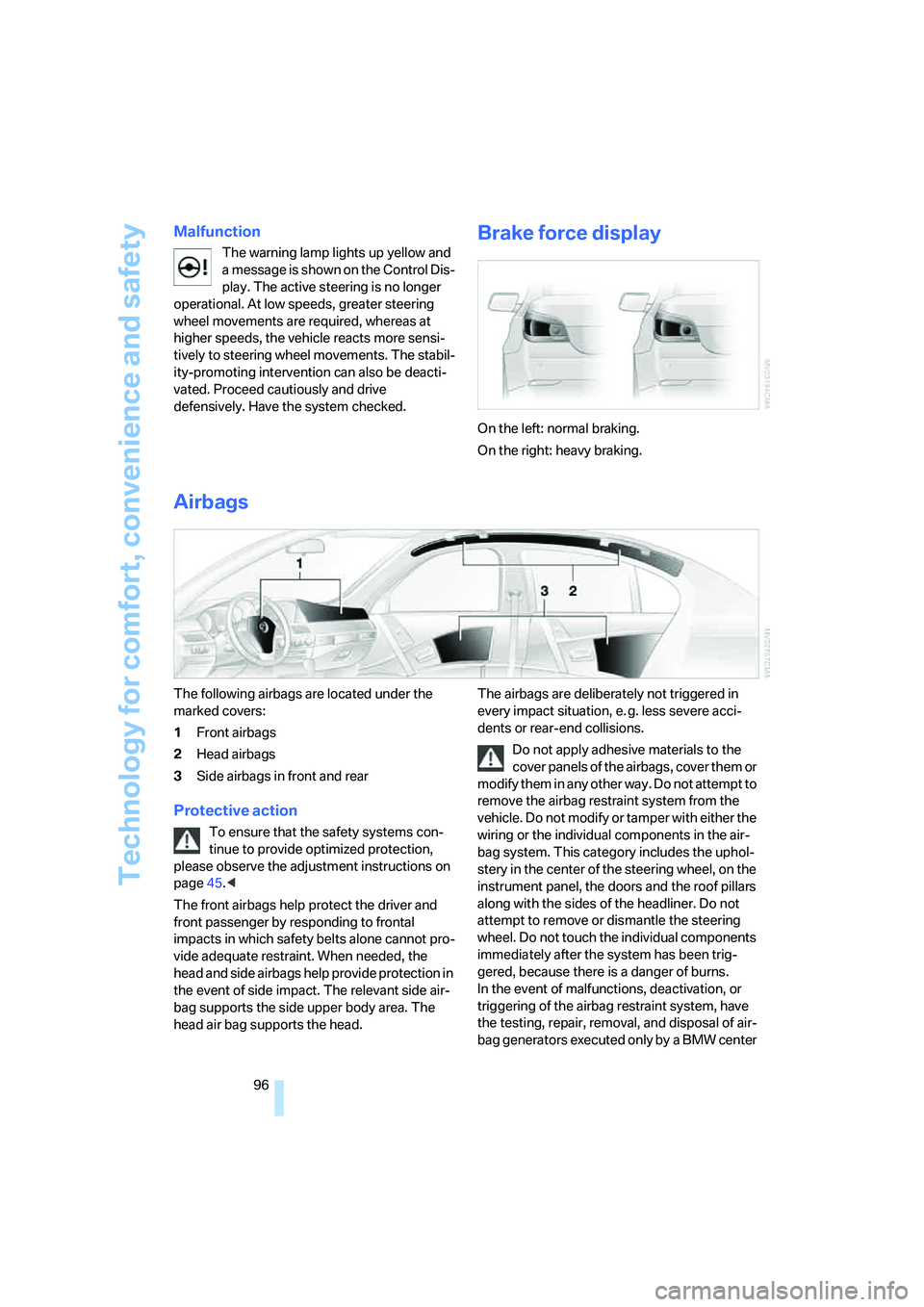
On the left: normal braking.
On the right: heavy braking.
Airbags
The following airbags are located under the
marked covers:
1Front airbags
2Head airbags
3Side airbags in front and rear
Protective action
To ensure that the safety systems con-
tinue to provide optimized protection,
please observe the adjustment instructions on
page45.<
The front airbags help protect the driver and
front passenger by responding to frontal
impacts in which safety belts alone cannot pro-
vide adequate restraint. When needed, the
head and side airbags help provide protection in
the event of side impact. The relevant side air-
bag supports the side upper body area. The
head air bag supports the head.The airbags are deliberately not triggered in
every impact situation, e. g. less severe acci-
dents or rear-end collisions.
Do not apply adhesive materials to the
cover panels of the airbags, cover them or
modify them in any other way. Do not attempt to
remove the airbag restraint system from the
vehicle. Do not modify or tamper with either the
wiring or the individual components in the air-
bag system. This category includes the uphol-
stery in the center of the steering wheel, on the
instrument panel, the doors and the roof pillars
along with the sides of the headliner. Do not
attempt to remove or dismantle the steering
wheel. Do not touch the individual components
immediately after the system has been trig-
gered, because there is a danger of burns.
In the event of malfunctions, deactivation, or
triggering of the airbag restraint system, have
the testing, repair, removal, and disposal of air-
bag generators executed only by a BMW center
Page 128 of 273
Things to remember when driving
126
Things to remember when driving
Break-in period
Moving parts need breaking-in time to adjust to
each other. To ensure that your vehicle contin-
ues to provide optimized economy of operation
throughout an extended service life, we request
that you devote careful attention to the follow-
ing section.
Engine and differential
Always obey all official speed limits.
Up to 1,200 miles/2,000 km
Drive at changing engine and driving speeds,
however do not exceed 4,500 rpm or 100 mph/
160 km/h.
Avoid full-throttle operation and use of the
transmission's kick-down mode during these
initial miles.
From 1,200 miles/2,000 km
The engine and vehicle speed can gradually be
increased.
SMG Sequential Manual Transmission
Do not use the acceleration assistant during the
break-in period, refer to page64.
Tires
Due to technical factors associated with their
manufacture, tires do not achieve their full trac-
tion potential until after an initial break-in
period. Therefore, drive reservedly during the
first 200 miles/300 km.
Brake system
Brakes require an initial break-in period of
approx. 300 miles/500 km to achieve optimized
contact and wear patterns between brake pads
and rotors. Drive in a reserved manner during
this break-in period.
Clutch
The function of the clutch is only at its opti-
mized level after a distance driven of approx.
300 miles/500 km.During this break-in period,
engage the clutch gently.
Following part replacement
Observe the break-in instructions again if com-
ponents mentioned above must be replaced
after subsequent driving operation.
General driving notes
Closing luggage compartment lid/
tailgate
Operate the vehicle only when the lug-
gage compartment lid/tailgate is com-
pletely closed. Otherwise, exhaust fumes could
enter the interior of the vehicle.<
If special circumstances should make it abso-
lutely necessary to operate the vehicle with the
luggage compartment lid/tailgate open:
1.Close all windows and the glass sunroof or
panorama glass sunroof.
2.Increase the air volume of the automatic cli-
mate control to a high level, refer to
page109.
Hot exhaust system
As in all vehicles, extremely high temper-
atures are generated on the exhaust sys-
tem. Do not remove the heat shields installed
adjacent to it, and never apply undercoating to
them. When driving, standing at idle and while
parking take care to avoid possible contact
between the hot exhaust system and any highly
flammable materials such as hay, leaves, grass,
etc. Such contact could lead to a fire, and with it
the risk of serious property damage as well as
personal injury. Do not touch hot exhaust tail
pipes. Otherwise there is a risk of burns.<
Page 132 of 273
Things to remember when driving
130
Securing cargo
>Use the luggage net*, luggage straps, or
securing straps to hold down small and
lightweight luggage and cargo.
>Heavy-duty cargo straps
* for securing
larger and heavier objects are available at
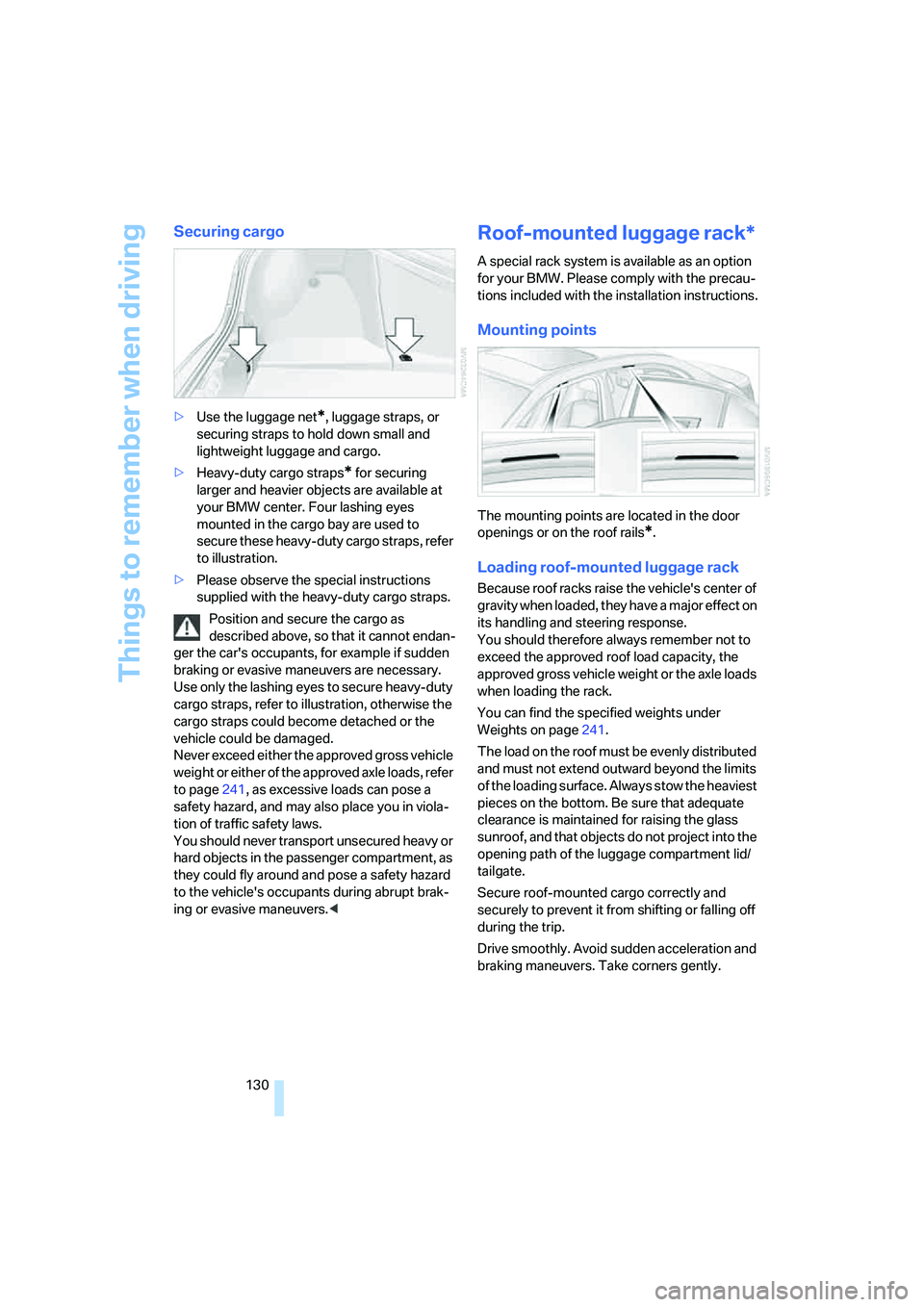
your BMW center. Four lashing eyes
mounted in the cargo bay are used to
secure these heavy-duty cargo straps, refer
to illustration.
>Please observe the special instructions
supplied with the heavy-duty cargo straps.
Position and secure the cargo as
described above, so that it cannot endan-
ger the car's occupants, for example if sudden
braking or evasive maneuvers are necessary.
Use only the lashing eyes to secure heavy-duty
cargo straps, refer to illustration, otherwise the
cargo straps could become detached or the
vehicle could be damaged.
Never exceed either the approved gross vehicle
weight or either of the approved axle loads, refer
to page241, as excessive loads can pose a
safety hazard, and may also place you in viola-
tion of traffic safety laws.
You should never transport unsecured heavy or
hard objects in the passenger compartment, as
they could fly around and pose a safety hazard
to the vehicle's occupants during abrupt brak-
ing or evasive maneuvers.<
Roof-mounted luggage rack*
A special rack system is available as an option
for your BMW. Please comply with the precau-
tions included with the installation instructions.
Mounting points
The mounting points are located in the door
openings or on the roof rails
*.
Loading roof-mounted luggage rack
Because roof racks raise the vehicle's center of
gravity when loaded, they have a major effect on
its handling and steering response.
You should therefore always remember not to
exceed the approved roof load capacity, the
approved gross vehicle weight or the axle loads
when loading the rack.
You can find the specified weights under
Weights on page241.
The load on the roof must be evenly distributed
and must not extend outward beyond the limits
of the loading surface. Always stow the heaviest
pieces on the bottom. Be sure that adequate
clearance is maintained for raising the glass
sunroof, and that objects do not project into the
opening path of the luggage compartment lid/
tailgate.
Secure roof-mounted cargo correctly and
securely to prevent it from shifting or falling off
during the trip.
Drive smoothly. Avoid sudden acceleration and
braking maneuvers. Take corners gently.
Page 196 of 273
Telephoning
194
Selecting an entry
The connection to the phone number of the
selected entry is established.
Redialing
The {Redial} command calls "Redial".
Notes
The commands in English were available
as of this printing. Other languages are
currently not available. To operate the mobile
phone via the voice command system, refer to
page22.<
Important for voice commands
For voice commands, keep the following in
mind:
>Issue the commands smoothly and at nor-
mal volume, avoiding excessive emphasis
and pauses.
>Keep the doors, windows and glass sunroof
closed to prevent interference from ambi-
ent noise.
>Avoid making other noise in the vehicle
while speaking.
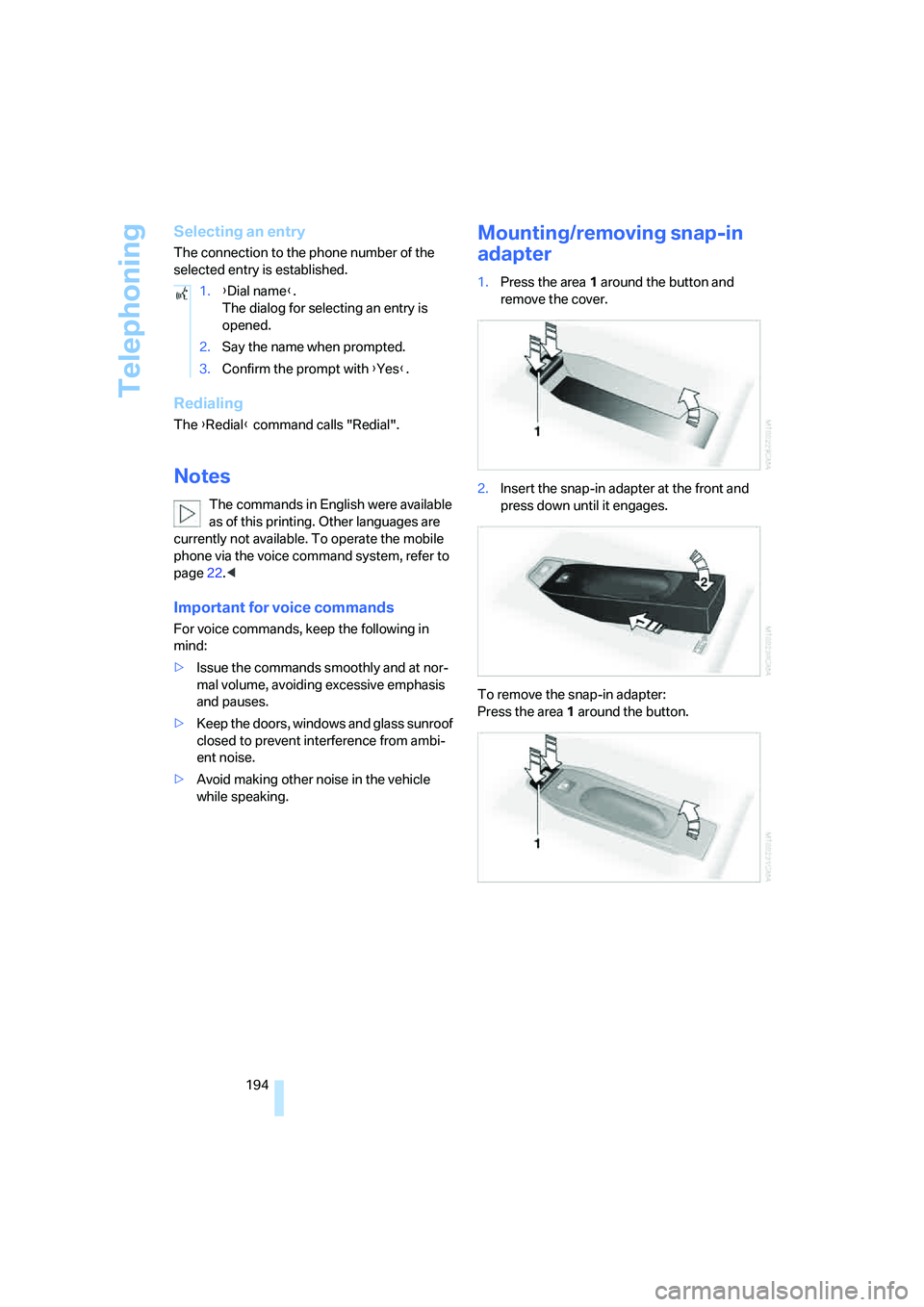
Mounting/removing snap-in
adapter
1.Press the area 1 around the button and
remove the cover.
2.Insert the snap-in adapter at the front and
press down until it engages.
To remove the snap-in adapter:
Press the area 1 around the button. 1.{Dial name}.
The dialog for selecting an entry is
opened.
2.Say the name when prompted.
3.Confirm the prompt with {Yes}.
Page 243 of 273
Reference 241
At a glance
Controls
Driving tips
Communications
Navigation
Entertainment
Mobility
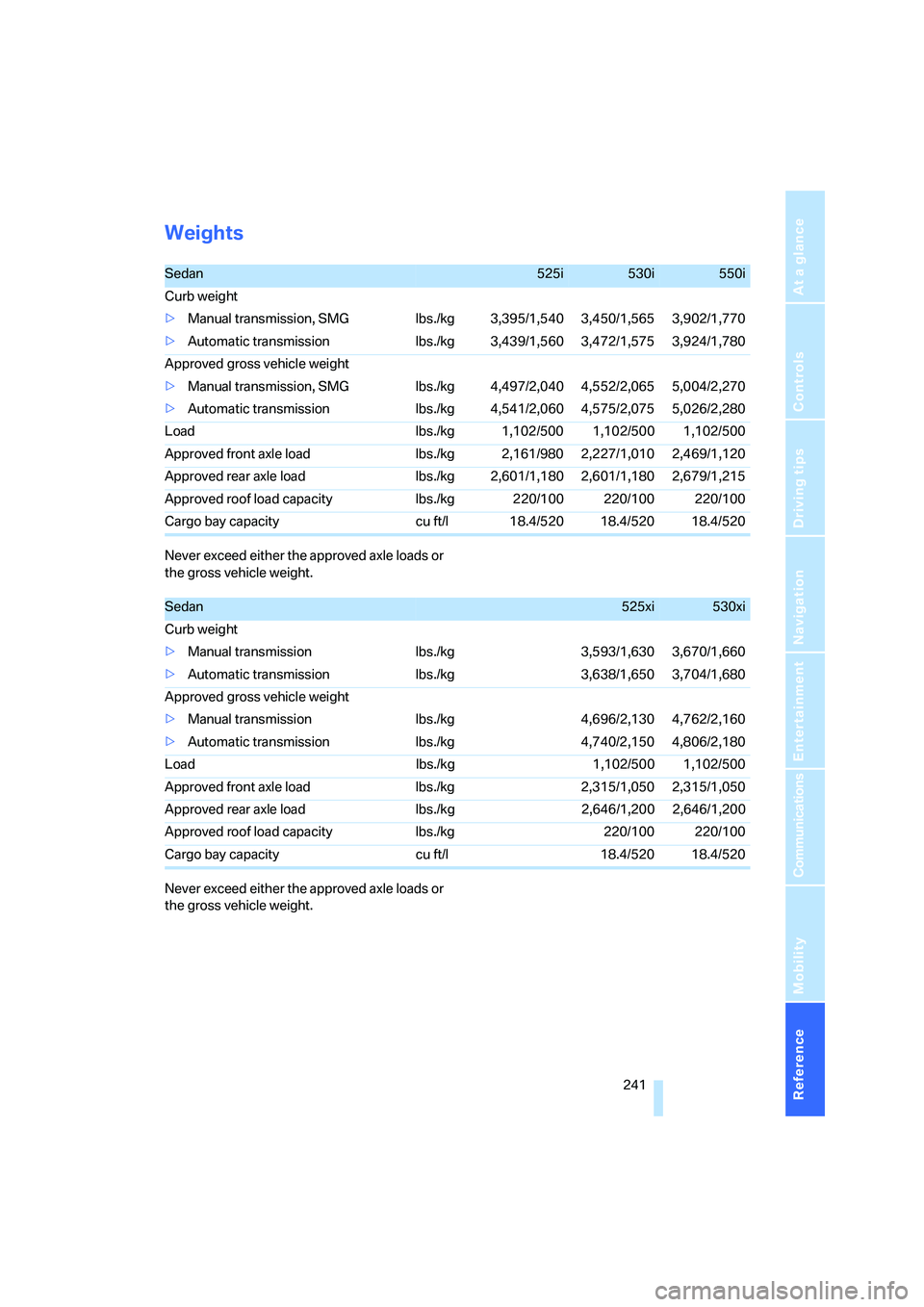
Weights
Never exceed either the approved axle loads or
the gross vehicle weight.
Never exceed either the approved axle loads or
the gross vehicle weight.
Sedan525i530i550i
Curb weight
>Manual transmission, SMG lbs./kg 3,395/1,540 3,450/1,565 3,902/1,770
>Automatic transmission lbs./kg 3,439/1,560 3,472/1,575 3,924/1,780
Approved gross vehicle weight
>Manual transmission, SMG lbs./kg 4,497/2,040 4,552/2,065 5,004/2,270
>Automatic transmission lbs./kg 4,541/2,060 4,575/2,075 5,026/2,280
Load lbs./kg 1,102/500 1,102/500 1,102/500
Approved front axle load lbs./kg 2,161/980 2,227/1,010 2,469/1,120
Approved rear axle load lbs./kg 2,601/1,180 2,601/1,180 2,679/1,215
Approved roof load capacity lbs./kg 220/100 220/100 220/100
Cargo bay capacity cu ft/l 18.4/520 18.4/520 18.4/520
Sedan525xi530xi
Curb weight
>Manual transmission lbs./kg 3,593/1,630 3,670/1,660
>Automatic transmission lbs./kg 3,638/1,650 3,704/1,680
Approved gross vehicle weight
>Manual transmission lbs./kg 4,696/2,130 4,762/2,160
>Automatic transmission lbs./kg 4,740/2,150 4,806/2,180
Load lbs./kg 1,102/500 1,102/500
Approved front axle load lbs./kg 2,315/1,050 2,315/1,050
Approved rear axle load lbs./kg 2,646/1,200 2,646/1,200
Approved roof load capacity lbs./kg 220/100 220/100
Cargo bay capacity cu ft/l 18.4/520 18.4/520
Page 244 of 273
Technical data
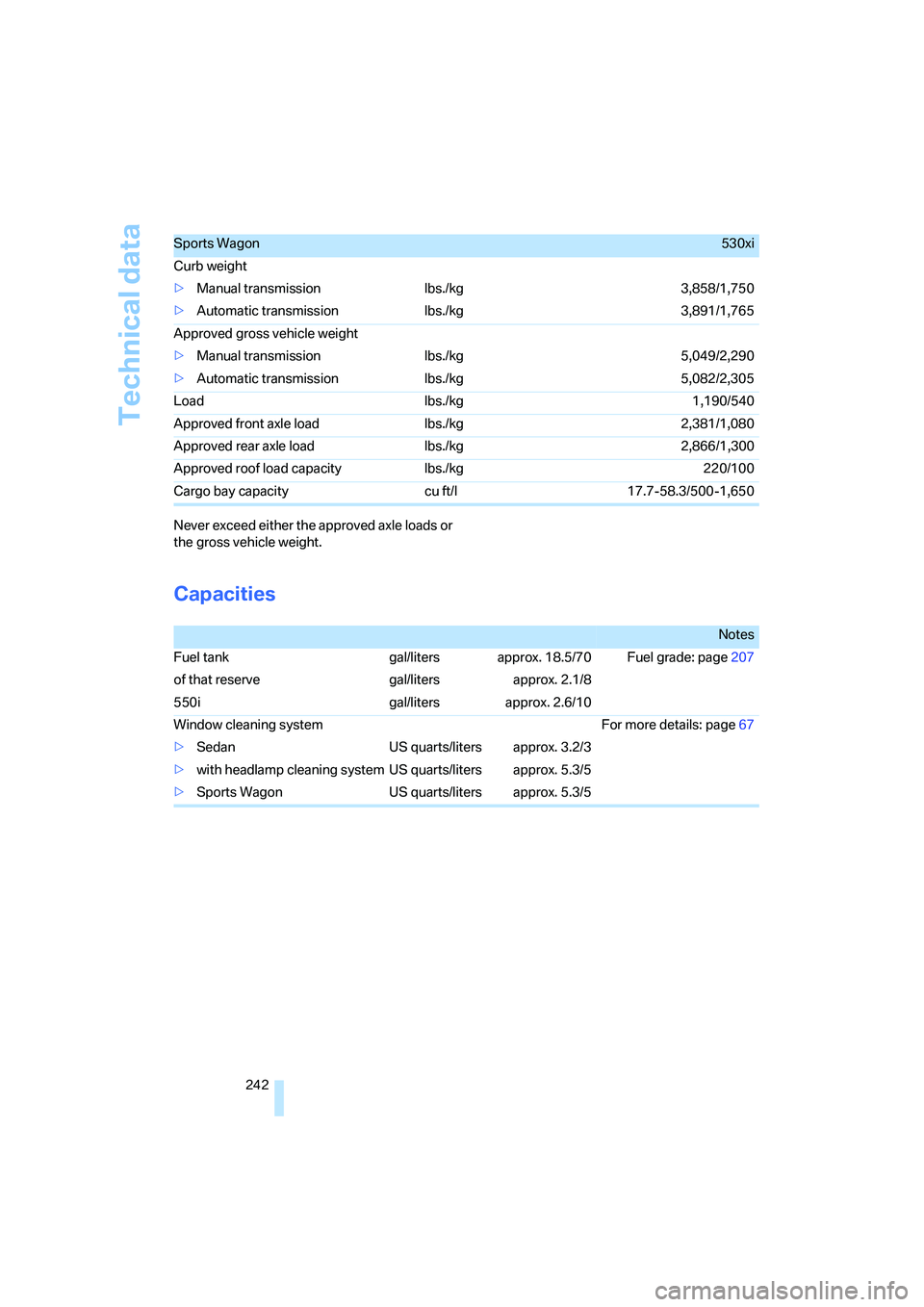
242 Never exceed either the approved axle loads or
the gross vehicle weight.
Capacities
Sports Wagon530xi
Curb weight
>Manual transmission lbs./kg 3,858/1,750
>Automatic transmission lbs./kg 3,891/1,765
Approved gross vehicle weight
>Manual transmission lbs./kg 5,049/2,290
>Automatic transmission lbs./kg 5,082/2,305
Load lbs./kg 1,190/540
Approved front axle load lbs./kg 2,381/1,080
Approved rear axle load lbs./kg 2,866/1,300
Approved roof load capacity lbs./kg 220/100
Cargo bay capacity cu ft/l 17.7-58.3/500-1,650
Notes
Fuel tank gal/liters approx. 18.5/70 Fuel grade: page207
of that reserve gal/liters approx. 2.1/8
550i gal/liters approx. 2.6/10
Window cleaning system For more details: page67
>Sedan US quarts/liters approx. 3.2/3
>with headlamp cleaning system US quarts/liters approx. 5.3/5
>Sports Wagon US quarts/liters approx. 5.3/5
Page 254 of 273
Everything from A to Z
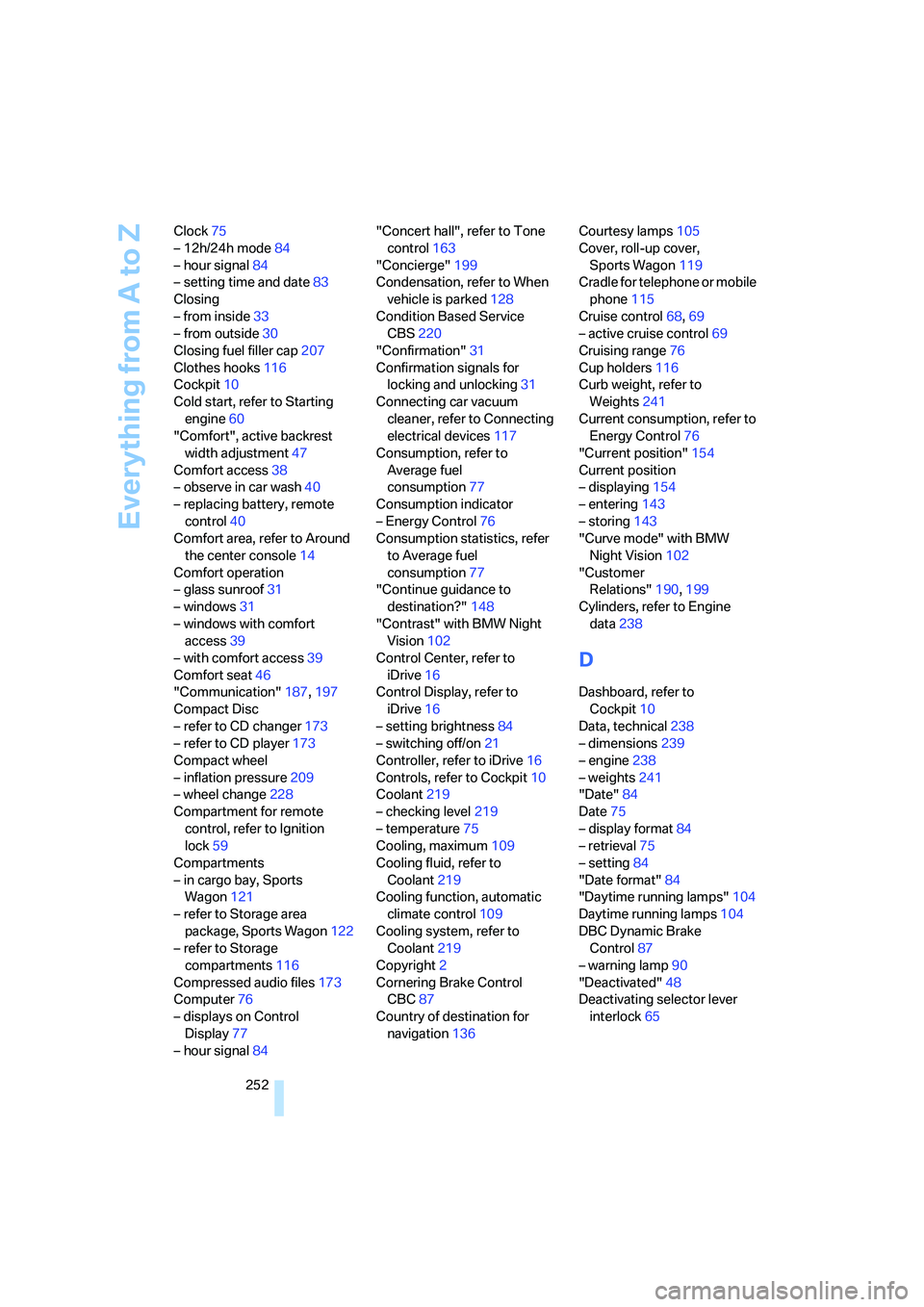
252 Clock75
– 12h/24h mode84
– hour signal84
– setting time and date83
Closing
– from inside33
– from outside30
Closing fuel filler cap207
Clothes hooks116
Cockpit10
Cold start, refer to Starting
engine60
"Comfort", active backrest
width adjustment47
Comfort access38
– observe in car wash40
– replacing battery, remote
control40
Comfort area, refer to Around
the center console14
Comfort operation
– glass sunroof31
– windows31
– windows with comfort
access39
– with comfort access39
Comfort seat46
"Communication"187,197
Compact Disc
– refer to CD changer173
– refer to CD player173
Compact wheel
– inflation pressure209
– wheel change228
Compartment for remote
control, refer to Ignition
lock59
Compartments
– in cargo bay, Sports
Wagon121
– refer to Storage area
package, Sports Wagon122
– refer to Storage
compartments116
Compressed audio files173
Computer76
– displays on Control
Display77
– hour signal84"Concert hall", refer to Tone
control163
"Concierge"199
Condensation, refer to When
vehicle is parked128
Condition Based Service
CBS220
"Confirmation"31
Confirmation signals for
locking and unlocking31
Connecting car vacuum
cleaner, refer to Connecting
electrical devices117
Consumption, refer to
Average fuel
consumption77
Consumption indicator
– Energy Control76
Consumption statistics, refer
to Average fuel
consumption77
"Continue guidance to
destination?"148
"Contrast" with BMW Night
Vision102
Control Center, refer to
iDrive16
Control Display, refer to
iDrive16
– setting brightness84
– switching off/on21
Controller, refer to iDrive16
Controls, refer to Cockpit10
Coolant219
– checking level219
– temperature75
Cooling, maximum109
Cooling fluid, refer to
Coolant219
Cooling function, automatic
climate control109
Cooling system, refer to
Coolant219
Copyright2
Cornering Brake Control
CBC87
Country of destination for
navigation136Courtesy lamps105
Cover, roll-up cover,
Sports Wagon119
Cradle for telephone or mobile
phone115
Cruise control68,69
– active cruise control69
Cruising range76
Cup holders116
Curb weight, refer to
Weights241
Current consumption, refer to
Energy Control76
"Current position"154
Current position
– displaying154
– entering143
– storing143
"Curve mode" with BMW
Night Vision102
"Customer
Relations"190,199
Cylinders, refer to Engine
data238
D
Dashboard, refer to
Cockpit10
Data, technical238
– dimensions239
– engine238
– weights241
"Date"84
Date75
– display format84
– retrieval75
– setting84
"Date format"84
"Daytime running lamps"104
Daytime running lamps104
DBC Dynamic Brake
Control87
– warning lamp90
"Deactivated"48
Deactivating selector lever
interlock65
Page 255 of 273
Reference 253
At a glance
Controls
Driving tips
Communications
Navigation
Entertainment
Mobility
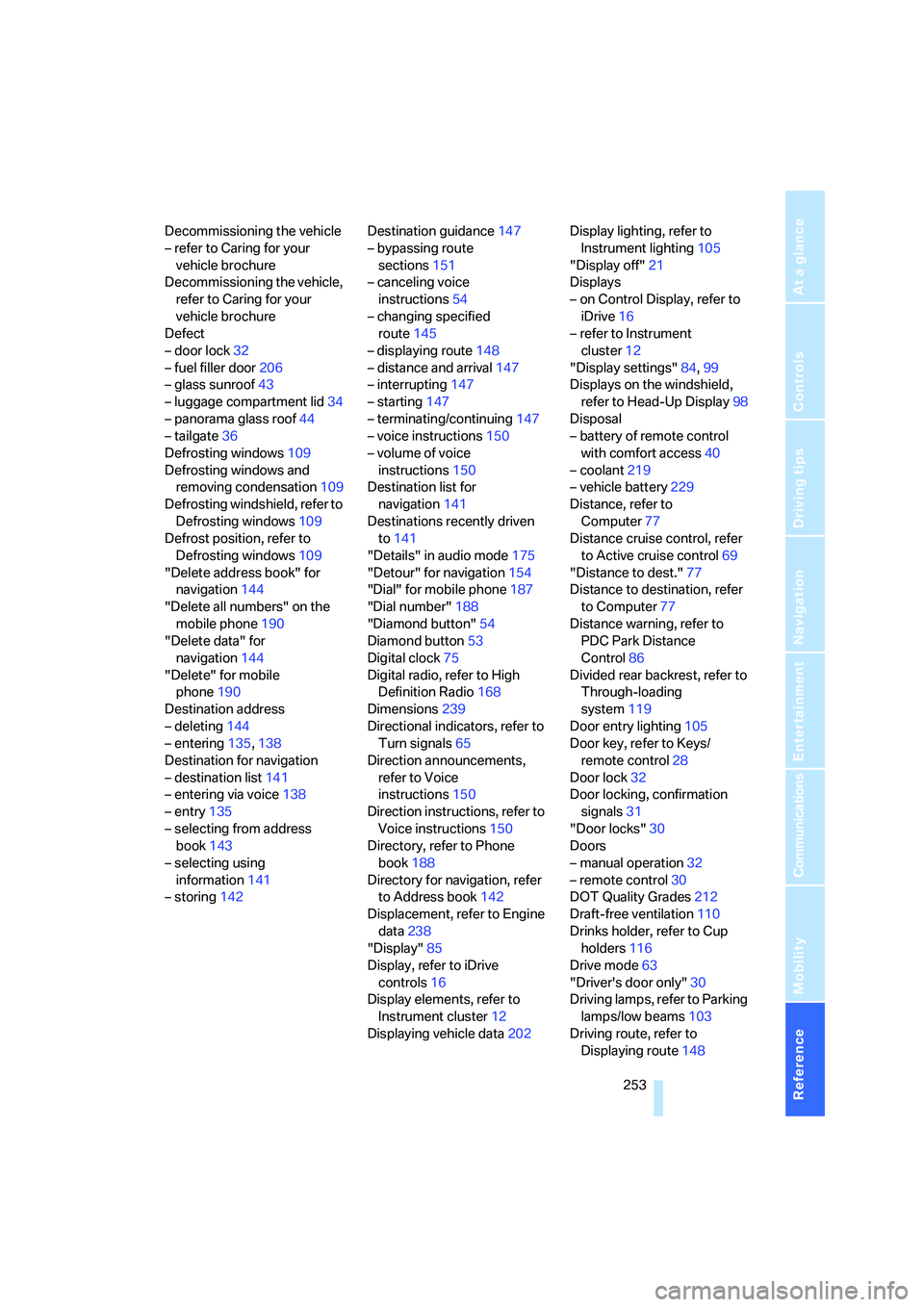
Decommissioning the vehicle
– refer to Caring for your
vehicle brochure
Decommissioning the vehicle,
refer to Caring for your
vehicle brochure
Defect
– door lock32
– fuel filler door206
– glass sunroof43
– luggage compartment lid34
– panorama glass roof44
– tailgate36
Defrosting windows109
Defrosting windows and
removing condensation109
Defrosting windshield, refer to
Defrosting windows109
Defrost position, refer to
Defrosting windows109
"Delete address book" for
navigation144
"Delete all numbers" on the
mobile phone190
"Delete data" for
navigation144
"Delete" for mobile
phone190
Destination address
– deleting144
– entering135,138
Destination for navigation
– destination list141
– entering via voice138
– entry135
– selecting from address
book143
– selecting using
information141
– storing142Destination guidance147
– bypassing route
sections151
– canceling voice
instructions54
– changing specified
route145
– displaying route148
– distance and arrival147
– interrupting147
– starting147
– terminating/continuing147
– voice instructions150
– volume of voice
instructions150
Destination list for
navigation141
Destinations recently driven
to141
"Details" in audio mode175
"Detour" for navigation154
"Dial" for mobile phone187
"Dial number"188
"Diamond button"54
Diamond button53
Digital clock75
Digital radio, refer to High
Definition Radio168
Dimensions239
Directional indicators, refer to
Turn signals65
Direction announcements,
refer to Voice
instructions150
Direction instructions, refer to
Voice instructions150
Directory, refer to Phone
book188
Directory for navigation, refer
to Address book142
Displacement, refer to Engine
data238
"Display"85
Display, refer to iDrive
controls16
Display elements, refer to
Instrument cluster12
Displaying vehicle data202Display lighting, refer to
Instrument lighting105
"Display off"21
Displays
– on Control Display, refer to
iDrive16
– refer to Instrument
cluster12
"Display settings"84,99
Displays on the windshield,
refer to Head-Up Display98
Disposal
– battery of remote control
with comfort access40
– coolant219
– vehicle battery229
Distance, refer to
Computer77
Distance cruise control, refer
to Active cruise control69
"Distance to dest."77
Distance to destination, refer
to Computer77
Distance warning, refer to
PDC Park Distance
Control86
Divided rear backrest, refer to
Through-loading
system119
Door entry lighting105
Door key, refer to Keys/
remote control28
Door lock32
Door locking, confirmation
signals31
"Door locks"30
Doors
– manual operation
32
– remote control30
DOT Quality Grades212
Draft-free ventilation110
Drinks holder, refer to Cup
holders116
Drive mode63
"Driver's door only"30
Driving lamps, refer to Parking
lamps/low beams103
Driving route, refer to
Displaying route148
Page 256 of 273
Everything from A to Z
254 Driving stability control
systems87
Driving through water127
Driving tips, refer to General
driving notes126
Dry air, refer to Cooling
function109
Drying the air, refer to Cooling
function109
DSC Dynamic Stability
Control88
– indicator lamp13,88
– malfunction90
DTC Dynamic Traction
Control88
– activating88
– indicator lamp13,88
DVD for navigation134
Dynamic Brake Control
DBC87
Dynamic Drive90
Dynamic Driving Control63
"Dynamic route" for
navigation145
Dynamic Stability Control
DSC88
Dynamic Traction Control
DTC88
E
Easy entry/exit53
– backrest width47
Eject button, refer to Buttons
on CD player160
Electrical malfunction
– door lock32
– driver's door32
– fuel filler door206
– glass sunroof, electric43
– luggage compartment lid34
– panorama glass sunroof44
– tailgate36
Electric steering wheel
adjustment53
Electronic brake-force
distribution87
Electronic oil level check217
Emergency call231Emergency operation, refer to
Manual operation
– door lock32
– driver's door32
– fuel filler door206
– luggage compartment lid34
– selector lever interlock,
automatic transmission65
– tailgate36
Emergency operation, refer to
Moving manually
– glass sunroof43
– panorama glass roof44
Emergency release for
luggage compartment lid in
cargo bay35
Emergency services, refer to
Roadside Assistance232
"Enable services"202
"End call"188
Energy-conscious driving,
refer to Energy Control76
Energy Control76
Engine
– breaking-in126
– data238
– overheated, refer to Coolant
temperature75
– speed238
– starting60
– starting, with comfort
access38
– starting difficulties60
– switching off61
Engine compartment217
Engine coolant219
Engine oil
– adding218
– additives, refer to Approved
engine oils218
– approved engine oil218
– checking oil level
217
– electronic oil level check217
– interval between changes,
refer to Service
requirements78
– oil change218
– oil grades, refer to Approved
engine oils218"Engine oil level"218
Engine output, refer to Engine
data238
Engine overheating, refer to
Coolant temperature75
Engine speed, refer to Engine
data238
Engine starting, refer to
Starting engine60
"Enter address"136,142
Entering destination via town/
city name136
Entering intersection,
navigation137
Entering the
address135,138
Entering town/city for
navigation136
Entering zip code for
navigation137
"Entertainment"160
Entertainment sound output
on/off161
Entry map for destination140
Environmentally friendly
driving, refer to Energy
Control76
"Equalizer", refer to Tone
control163
Equalizer, refer to Tone
control163
"ESN"170
ESP Electronic Stability
Program, refer to DSC
Dynamic Stability
Control88
Event Data Recorders221
Exhaust system, refer to Hot
exhaust system126
Exterior mirrors52
– adjusting52
– automatic dimming
feature53
– automatic heating52
– folding in and out52
– tilting down passenger-side
exterior mirror52
Page 258 of 273
Everything from A to Z
256 Gear display
– automatic transmission with
Steptronic64
– SMG Sequential Manual
Transmission62
Gearshift lever
– manual transmission62
Gearshift lever, manual
transmission62
Gearshift lever positions,
manual transmission62
General driving notes126
Glass sunroof, electric41
– comfort operation from
outside32
– comfort operation with
comfort access39
– moving manually43
– remote control31
Glove compartment114
– lighting114
– rechargeable flashlight115
GPS navigation, refer to
Navigation system134
Grills, refer to Ventilation110
Gross vehicle weight, refer to
Weights241
H
Halogen lamps223
Handbrake61
– indicator lamp13,61
Hand lamp, refer to
Rechargeable flashlight115
Hands-free system, refer to
Microphone14
Hazard warning flashers15
"HDC"89
HDC Hill Descent Control89
"HDC on"89
"HDC on / off"54
"HD radio"168
HD radio, refer to High
Definition Radio168
Head airbags96Headlamp
– cleaning tank, refer to
Capacities242
Headlamp control,
automatic103
Headlamp flasher65
Headlamps103
– care, refer to Caring for your
vehicle brochure
– cleaning, refer to Wiper
system66
– replacing bulbs223
– reservoir for washer
fluid217
Head Light, refer to Adaptive
Head Light104
Head restraints48
– front head restraints,
active49
– installing49
– removing49
– sitting safely45
"Head-Up Display"99
Head-Up Display98
Heated
– mirrors52
– rear window109
– seats50
– steering wheel53
Heating107
– exterior mirrors52
– interior107
– rear window109
– residual heat110
– seats50
– steering wheel53
Heating with engine switched
off, refer to Residual
heat110
Heavy cargo, refer to Securing
cargo130
Height, refer to
Dimensions
239
Height adjustment
– seats46
– steering wheel53High beams105
– headlamp flasher105
– indicator lamp13
– replacing bulbs224
High Definition Radio168
High water, refer to Driving
through water127
Hill Descent Control HDC89
Hills127
Holder for cups116
"Home address" for
navigation144
Homepage of BMW4
Hood216
Hooks for shopping bags,
Sports Wagon121
Horn10
Hotel function, refer to
Locking separately34
Hot exhaust system126
"Hour memo"84
"House number" for
destination entry138
Hydraulic brake assistant,
refer to DBC Dynamic Brake
Control87
Hydroplaning127
I
IBOC, refer to High Definition
Radio168
Ice, refer to Outside
temperature warning75
ID3 tag, refer to Information on
track175
Identification mark
– recommended tire
brands214
Identification marks
– run-flat tires213
– tire coding211