radio BMW 528I 2009 Service Manual
[x] Cancel search | Manufacturer: BMW, Model Year: 2009, Model line: 528I, Model: BMW 528I 2009Pages: 294, PDF Size: 9.55 MB
Page 202 of 294
Telephoning
200
Adjusting volume
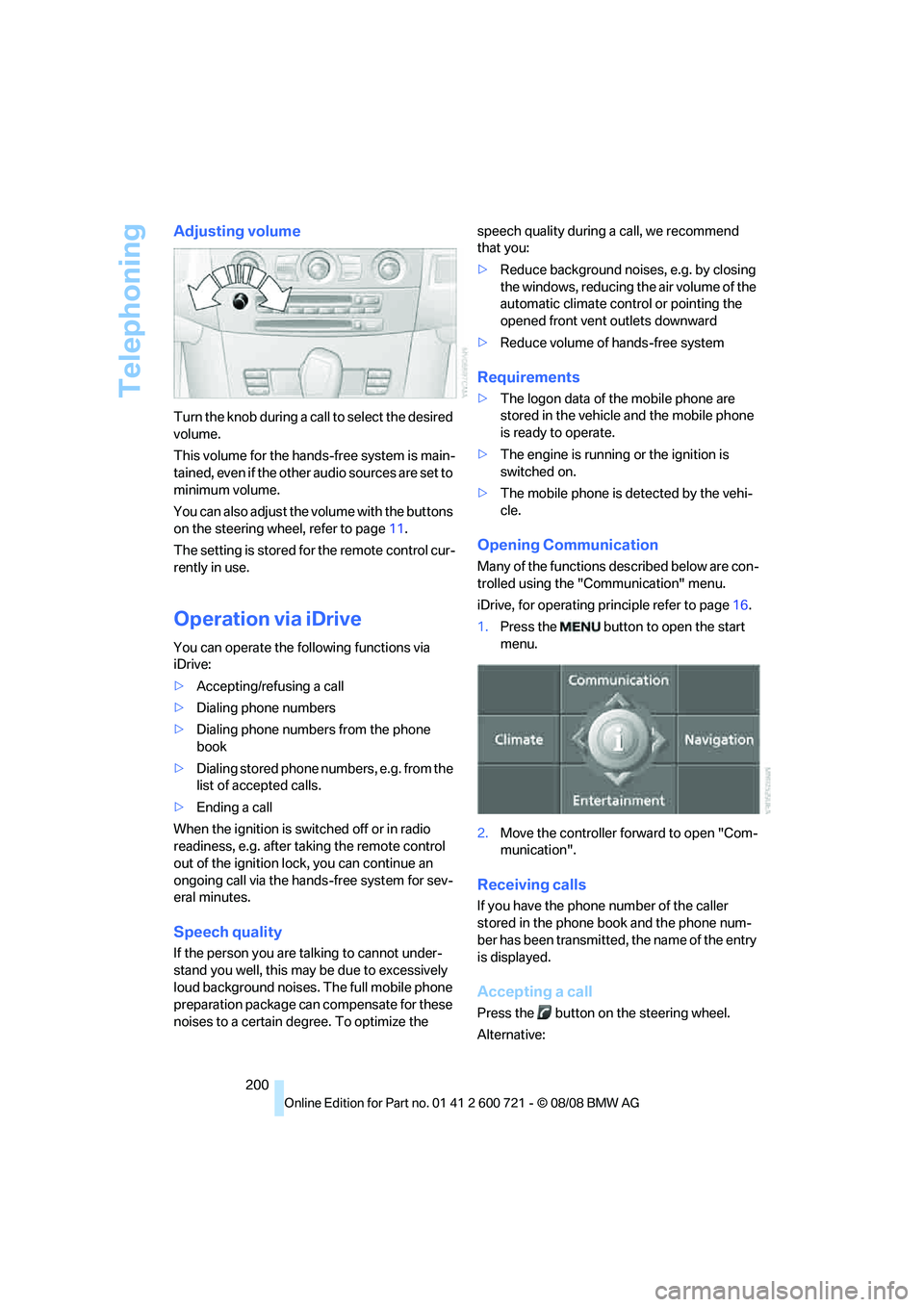
Turn the knob during a call to select the desired
volume.
This volume for the hands-free system is main-
tained, even if the other audio sources are set to
minimum volume.
You can also adjust the volume with the buttons
on the steering wheel, refer to page11.
The setting is stored for the remote control cur-
rently in use.
Operation via iDrive
You can operate the following functions via
iDrive:
>Accepting/refusing a call
>Dialing phone numbers
>Dialing phone numbers from the phone
book
>Dialing stored phone numbers, e.g. from the
list of accepted calls.
>Ending a call
When the ignition is switched off or in radio
readiness, e.g. after taking the remote control
out of the ignition lock, you can continue an
ongoing call via the hands-free system for sev-
eral minutes.
Speech quality
If the person you are talking to cannot under-
stand you well, this may be due to excessively
loud background noises. The full mobile phone
preparation package can compensate for these
noises to a certain degree. To optimize the speech quality during a call, we recommend
that you:
>Reduce background noises, e.g. by closing
the windows, reducing the air volume of the
automatic climate control or pointing the
opened front vent outlets downward
>Reduce volume of hands-free system
Requirements
>The logon data of the mobile phone are
stored in the vehicle and the mobile phone
is ready to operate.
>The engine is running or the ignition is
switched on.
>The mobile phone is detected by the vehi-
cle.
Opening Communication
Many of the functions described below are con-
trolled using the "Communication" menu.
iDrive, for operating principle refer to page16.
1.Press the button to open the start
menu.
2.Move the controller forward to open "Com-
munication".
Receiving calls
If you have the phone number of the caller
stored in the phone book and the phone num-
ber has been transmitted, the name of the entry
is displayed.
Accepting a call
Press the button on the steering wheel.
Alternative:
Page 210 of 294
Telephoning
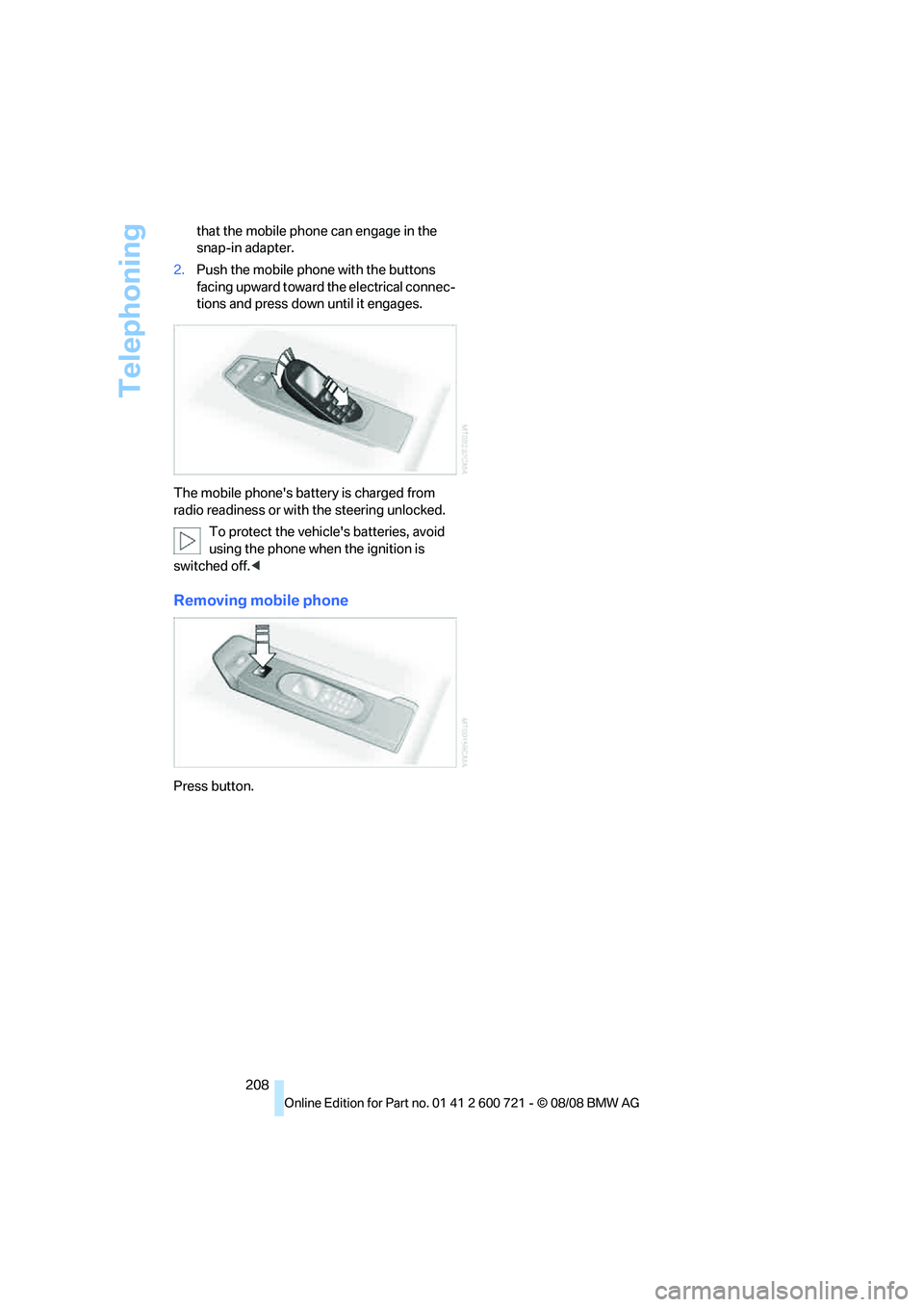
208 that the mobile phone can engage in the
snap-in adapter.
2.Push the mobile phone with the buttons
facing upward toward the electrical connec-
tions and press down until it engages.
The mobile phone's battery is charged from
radio readiness or with the steering unlocked.
To protect the vehicle's batteries, avoid
using the phone when the ignition is
switched off.<
Removing mobile phone
Press button.
Page 243 of 294
Mobility
241Reference
At a glance
Controls
Driving tips
Communications
Navigation
Entertainment
Outside sensors
Sensors on the outside of the vehicle, such as
Park Distance Control sensors or radar sensors,
should be kept clean and free of ice to retain
their full function.
Interior care
Upholstery materials/cloth-covered
paneling
Clean regularly with a vacuum cleaner in order
to remove surface dirt.
In the event of more serious soiling such as bev-
erage stains, use a soft sponge or a lint-free
microfiber cloth in combination with suitable
interior cleaners. Follow the instructions on the
packaging.
Clean upholstery material over a large
area extending out to the seams. Avoid
intense friction.<
Open Velcro fasteners on pants or other
items of clothing can cause damage to
the seat covering. Make sure that the Velcro
fasteners are closed.<
Leather/leather-covered paneling
The leather used by BMW is a high quality
natural product. Slight patterns in the
grain are part of the typical properties of a natu-
ral leather.
Dust and dirt from the road chafe in pores and
folds and result in considerable wear and cause
the leather surface to become prematurely brit-
tle. We therefore suggest that you clean the
leather with a dust cloth or vacuum cleaner at
regular intervals.<
Particularly with light-colored leather, make
sure to clean it regularly since it has a greater
tendency to become soiled.
Treat the leather twice a year with a leather
lotion since dirt and grease harm the protective
layer of the leather.
Carpets/luggage compartment
Carpeting, floor mats, and luggage compart-
ment rugs and paneling can be cleaned with a
vacuum or in the event of more serious soiling,
cleansed with an interior cleaner.
Floor mats and luggage compartment rugs can
be removed for cleaning. When inserting into
place, make sure that the seat rails do not pro-
trude over the floor mats; otherwise floor mats
can be damaged.
Fluff on new floor mats is a result of the produc-
tion process and can be removed by repeated
vacuuming.
Plastic components inside
Clean the glass cover of the instrument panel,
imitation leather surfaces, lamp lenses, and
matte components with water and, if necessary,
a solvent-free plastic cleaner.
Fine wooden components
Use a damp cloth to clean fine wooden trim
panels and components. Follow up by drying
with a soft cloth.
Safety belts
Do not use cleansers to clean the safety
belts since this can destroy the web-
bing.<
Inside sensors
Clean inside sensors such as those of the high-
beam assistant using a lint-free cloth moist-
ened with glass cleaner.
Displays
Clean displays like the radio or the Control Dis-
play using a display-cleaning cloth or a soft,
nonabrasive lint-free cloth.
Avoid using excessive pressure when
cleaning displays; otherwise, you could
damage them.<
Never use chemical-based cleansers or
household scouring products. Keep all
liquids away from the equipment. Otherwise
Page 253 of 294
Mobility
251Reference
At a glance
Controls
Driving tips
Communications
Navigation
Entertainment
3.Check and correct the tire inflation pressure
at the earliest opportunity.
Protect valve stems with valve stem
seal caps against dirt and contamina-
tion. Dirt in valve stems is a frequent source
of gradual air loss.<
4.Initialize the Flat Tire Monitor, refer to
page95, or reset the Tire Pressure Monitor,
refer to page97.
5.Replace the damaged tire as soon as possi-
ble and have the new wheel/tire balanced.
Driving with compact wheel
Drive reservedly and do not exceed a speed of
50 mph/80 km/h.
The driving characteristics change, for example
reduced track stability on braking, extended
braking distance, and altered self-steering
characteristics in the limit range. In conjunction
with winter tires, these characteristics are more
pronounced.
Only one compact wheel may be
mounted. Restore the wheels and tires to
their original size as quickly as possible. Failure
to do so is a safety risk.<
Vehicle battery
Battery care
The battery is 100 % maintenance-free, i.e., the
electrolyte will last for the life of the battery
when the vehicle is operated in a temperate cli-
mate. Your BMW center will be glad to advise in
all matters concerning the battery.
Charging battery
Only charge the battery in the vehicle via the
terminals in the engine compartment with the
engine switched off. Connections, refer to
Jump starting on page254.
Disposal
Have old batteries disposed of by your
BMW center or hand them in to a recy-
cling center. Maintain the battery in an upright position for transport and storage. Always
restrain the battery to prevent it from tipping
over during transport.<
Power failure
Following a temporary power failure, e.g. due to
a discharged battery, the use of some equip-
ment will be restricted, requiring its reinitializa-
tion. In the same way, individual settings are lost
and must be updated again:
>Seat, mirror and steering wheel memory
The positions must be stored again, refer to
page50.
>Time and date
Must be updated again, refer to page87.
>Radio
Radio stations must be stored again, refer
to page174.
>Navigation system
You must wait until the system becomes
functional again, refer to page142.
>Glass roof, electric
It may only be possible to raise the glass
roof. The system must be initialized, refer to
page44.
>Panorama glass roof
It may only be possible to raise the glass
roof. The system must be reinitialized, refer
to page46.
>Active steering
The system is deactivated and must be
reinitialized, refer to page99. Until then,
larger steering wheel movements are
required.
>Power windows
The pinch prevention system for the power
windows must be reinitialized, refer to
page42.
Talk to your BMW center before placing
the stored vehicle back in service.<
Fuses
Never attempt to repair a blown fuse and
do not replace a defective fuse with a sub-
Page 255 of 294
Mobility
253Reference
At a glance
Controls
Driving tips
Communications
Navigation
Entertainment
Giving and receiving assistance
Emergency request
Conditions for an emergency request:
>Full preparation package mobile phone.
With this equipment, an emergency request
is still possible when no mobile phone is
paired with the vehicle.
>BMW Assist is activated.
Activating BMW Assist, refer to page215.
>Radio readiness is activated.
>The BMW Assist system is logged on to a
mobile phone network.
>The emergency request system is opera-
ble.
Once your BMW Assist subscription expires,
the BMW Assist system can be deactivated by
a BMW center without you having to visit a
workshop. Once the BMW Assist system has
been deactivated, emergency requests are not
possible. The BMW Assist system can be reac-
tivated by a BMW center after signing a new
contract.
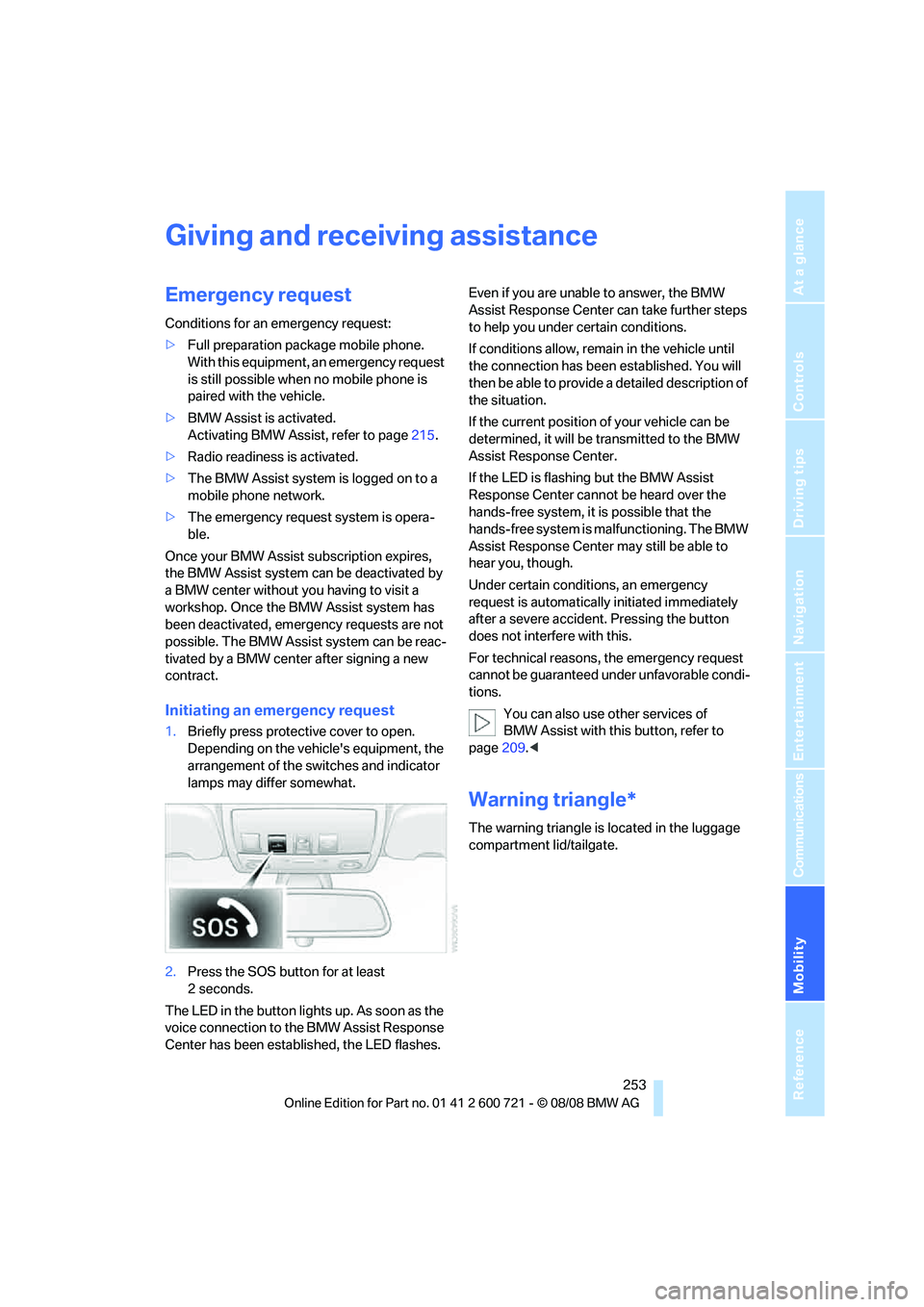
Initiating an emergency request
1.Briefly press protective cover to open.
Depending on the vehicle's equipment, the
arrangement of the switches and indicator
lamps may differ somewhat.
2.Press the SOS button for at least
2seconds.
The LED in the button lights up. As soon as the
voice connection to the BMW Assist Response
Center has been established, the LED flashes.Even if you are unable to answer, the BMW
Assist Response Center can take further steps
to help you under certain conditions.
If conditions allow, remain in the vehicle until
the connection has been established. You will
then be able to provide a detailed description of
the situation.
If the current position of your vehicle can be
determined, it will be transmitted to the BMW
Assist Response Center.
If the LED is flashing but the BMW Assist
Response Center cannot be heard over the
hands-free system, it is possible that the
hands-free system is malfunctioning. The BMW
Assist Response Center may still be able to
hear you, though.
Under certain conditions, an emergency
request is automatically initiated immediately
after a severe accident. Pressing the button
does not interfere with this.
For technical reasons, the emergency request
cannot be guaranteed under unfavorable condi-
tions.
You can also use other services of
BMW Assist with this button, refer to
page209.<
Warning triangle*
The warning triangle is located in the luggage
compartment lid/tailgate.
Page 268 of 294
Short commands of voice command system
266
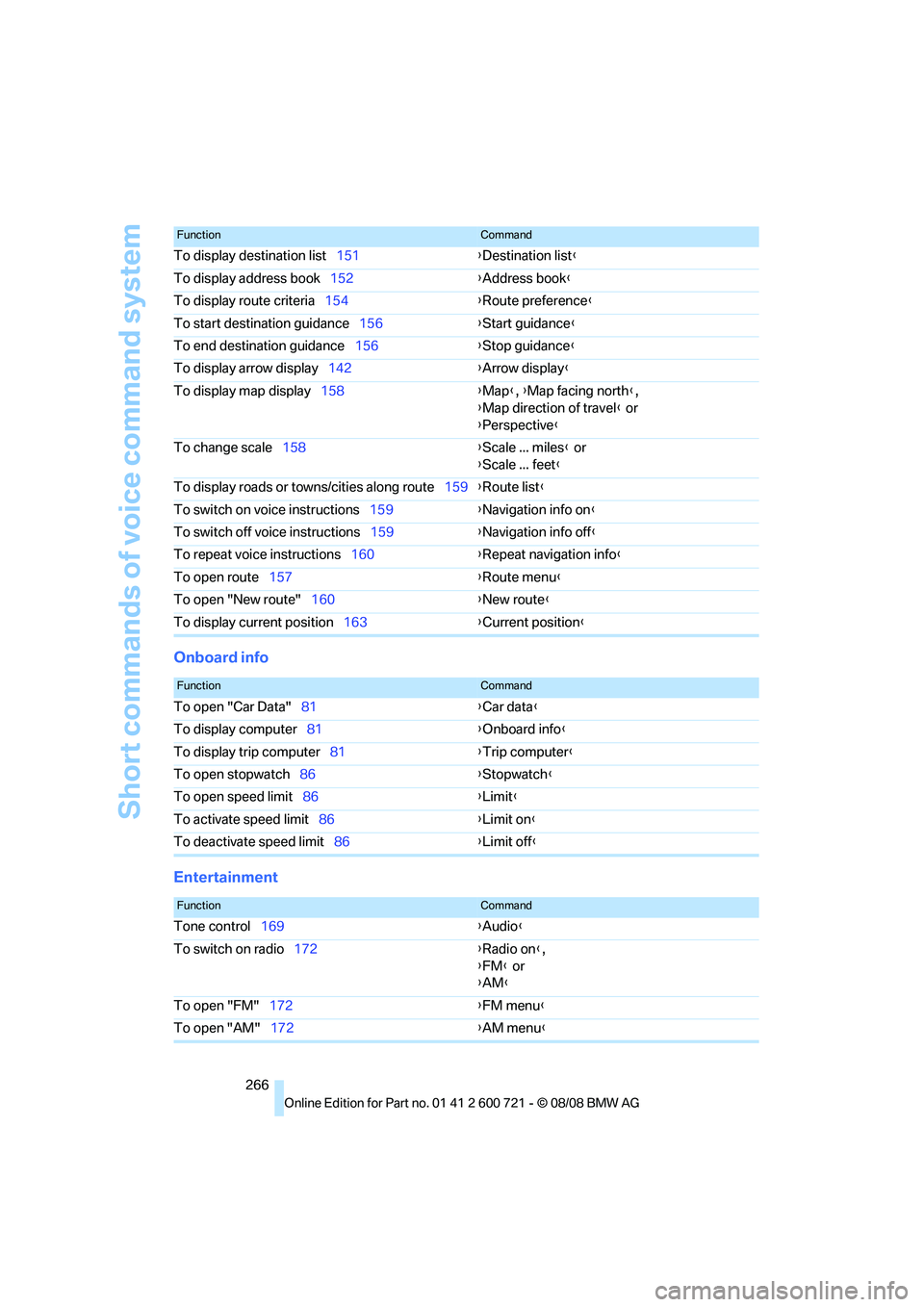
Onboard info
Entertainment
To display destination list151{Destination list}
To display address book152{Address book}
To display route criteria154{Route preference}
To start destination guidance156{Start guidance}
To end destination guidance156{Stop guidance}
To display arrow display142{Arrow display}
To display map display158{Map}, {Map facing north},
{Map direction of travel} or
{Perspective}
To change scale158{Scale ... miles} or
{Scale ... feet}
To display roads or towns/cities along route159{Route list}
To switch on voice instructions159{Navigation info on}
To switch off voice instructions159{Navigation info off}
To repeat voice instructions160{Repeat navigation info}
To open route157{Route menu}
To open "New route"160{New route}
To display current position163{Current position}
FunctionCommand
FunctionCommand
To open "Car Data"81{Car data}
To display computer81{Onboard info}
To display trip computer81{Trip computer}
To open stopwatch86{Stopwatch}
To open speed limit86{Limit}
To activate speed limit86{Limit on}
To deactivate speed limit86{Limit off}
FunctionCommand
Tone control169{Audio}
To switch on radio172{Radio on},
{FM} or
{AM}
To open "FM"172{FM menu}
To open "AM"172{AM menu}
Page 269 of 294
Reference 267
At a glance
Controls
Driving tips
Communications
Navigation
Entertainment
Mobility
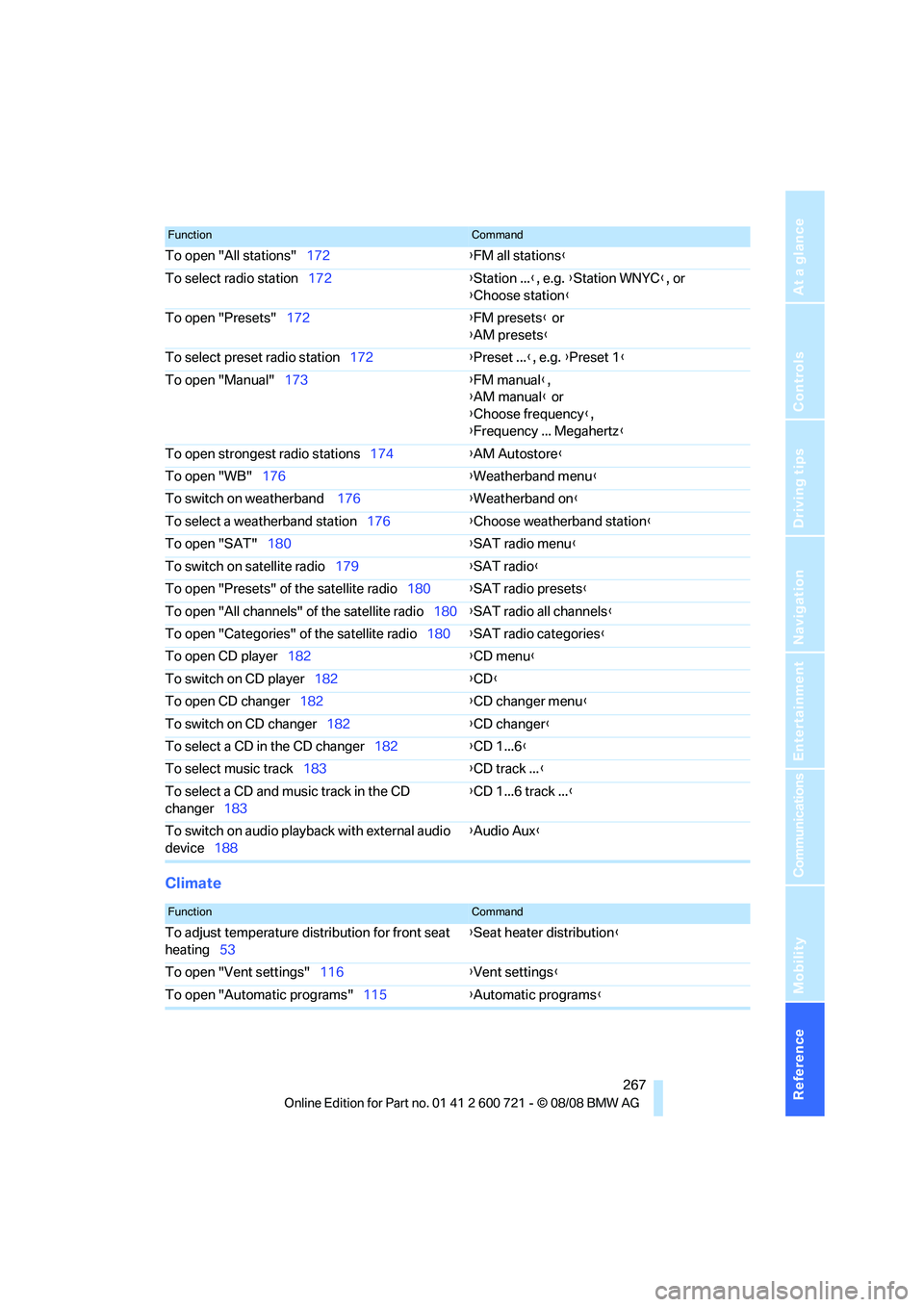
Climate
To open "All stations"172{FM all stations}
To select radio station172{Station ...}, e.g. {Station WNYC}, or
{Choose station}
To open "Presets"172{FM presets} or
{AM presets}
To select preset radio station172{Preset ...}, e.g. {Preset 1}
To open "Manual"173{FM manual},
{AM manual} or
{Choose frequency},
{Frequency ... Megahertz}
To open strongest radio stations174{AM Autostore}
To open "WB"176{Weatherband menu}
To switch on weatherband 176{Weatherband on}
To select a weatherband station176{Choose weatherband station}
To open "SAT"180{SAT radio menu}
To switch on satellite radio179{SAT radio}
To open "Presets" of the satellite radio180{SAT radio presets}
To open "All channels" of the satellite radio180{SAT radio all channels}
To open "Categories" of the satellite radio180{SAT radio categories}
To open CD player
182{CD menu}
To switch on CD player182{CD}
To open CD changer182{CD changer menu}
To switch on CD changer182{CD changer}
To select a CD in the CD changer182{CD 1...6}
To select music track183{CD track ...}
To select a CD and music track in the CD
changer183{CD 1...6 track ...}
To switch on audio playback with external audio
device188{Audio Aux}
FunctionCommand
FunctionCommand
To adjust temperature distribution for front seat
heating53{Seat heater distribution}
To open "Vent settings"116{Vent settings}
To open "Automatic programs"115{Automatic programs}
Page 272 of 294
Everything from A to Z
270
Everything from A to Z
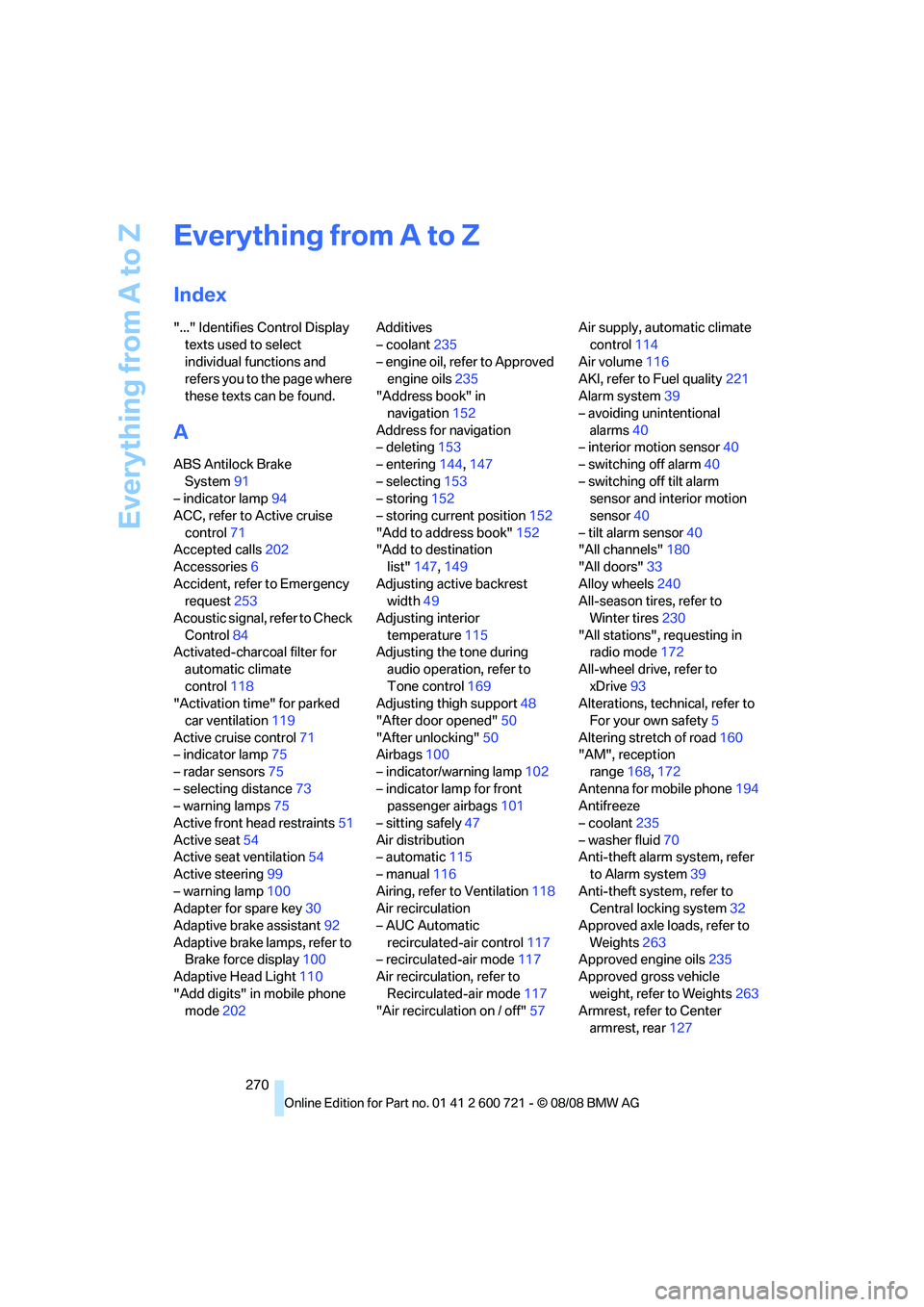
Index
"..." Identifies Control Display
texts used to select
individual functions and
refers you to the page where
these texts can be found.
A
ABS Antilock Brake
System91
– indicator lamp94
ACC, refer to Active cruise
control71
Accepted calls202
Accessories6
Accident, refer to Emergency
request253
Acoustic signal, refer to Check
Control84
Activated-charcoal filter for
automatic climate
control118
"Activation time" for parked
car ventilation119
Active cruise control71
– indicator lamp75
– radar sensors75
– selecting distance73
– warning lamps75
Active front head restraints51
Active seat54
Active seat ventilation54
Active steering99
– warning lamp100
Adapter for spare key30
Adaptive brake assistant92
Adaptive brake lamps, refer to
Brake force display100
Adaptive Head Light110
"Add digits" in mobile phone
mode202Additives
– coolant235
– engine oil, refer to Approved
engine oils235
"Address book" in
navigation152
Address for navigation
– deleting153
– entering144,147
– selecting153
– storing152
– storing current position152
"Add to address book"152
"Add to destination
list"147,149
Adjusting active backrest
width49
Adjusting interior
temperature115
Adjusting the tone during
audio operation, refer to
Tone control169
Adjusting thigh support48
"After door opened"50
"After unlocking"
50
Airbags100
– indicator/warning lamp102
– indicator lamp for front
passenger airbags101
– sitting safely47
Air distribution
– automatic115
– manual116
Airing, refer to Ventilation118
Air recirculation
– AUC Automatic
recirculated-air control117
– recirculated-air mode117
Air recirculation, refer to
Recirculated-air mode117
"Air recirculation on / off"57Air supply, automatic climate
control114
Air volume116
AKI, refer to Fuel quality221
Alarm system39
– avoiding unintentional
alarms40
– interior motion sensor40
– switching off alarm40
– switching off tilt alarm
sensor and interior motion
sensor40
– tilt alarm sensor40
"All channels"180
"All doors"33
Alloy wheels240
All-season tires, refer to
Winter tires230
"All stations", requesting in
radio mode172
All-wheel drive, refer to
xDrive93
Alterations, technical, refer to
For your own safety5
Altering stretch of road160
"AM", reception
range168,172
Antenna for mobile phone194
Antifreeze
– coolant235
– washer fluid70
Anti-theft alarm system, refer
to Alarm system39
Anti-theft system, refer to
Central locking system32
Approved axle loads, refer to
Weights263
Approved engine oils235
Approved gross vehicle
weight, refer to Weights263
Armrest, refer to Center
armrest, rear127
Page 273 of 294
Reference 271
At a glance
Controls
Driving tips
Communications
Navigation
Entertainment
Mobility
Around the center console14
Around the steering wheel10
Arrival time
– refer to Computer81
– refer to Starting destination
guidance156
"Arrow display" in
navigation157
"Arrow display pop-up
instructions"143
Ashtray
– front125
– rear126
Assist, refer to
BMW Assist209
Assistance systems, refer to
Driving stability control
systems91
Assistance window21
"Assist. window off"22
AUC Automatic recirculated-
air control117
Audio168,171,176
– controls168
– switching on/off168
– tone control169
– volume169
Audio device, external124
Automatic
– air distribution115
– air volume115
– cruise control71
– garage door opener121
– headlamp control108
– service notification211
– steering wheel
adjustment49
– storing stations174
– tailgate operation38
Automatic car washes136
Automatic climate control114
– automatic air
distribution115
– parked car ventilation118
– switching on and off118
– ventilation in rear118Automatic closing of doors,
refer to Automatic soft
closing35
Automatic curb monitor55
Automatic lighting
– refer to Automatic headlamp
control108
– refer to Daytime running
lamps109
– refer to Interior lamps112
– refer to Pathway lighting109
– refer to Welcome lamps108
Automatic lights
– refer to High-beam
assistant110
Automatic low beams, refer to
High-beam assistant110
"Automatic programs"115
Automatic roll-up cover,
Sports Wagon128
Automatic soft closing35
Automatic speed reduction for
descents, refer to HDC Hill
Descent Control93
Automatic station search173
Automatic transmission with
Steptronic64
– interlock65
– kick-down65
– manually unlocking and
locking transmission lock66
– shiftlock65
– towing256
– tow-starting257
– with comfort access42
"Automatic ventilation"119
AUTO program for automatic
climate control115
"Auto Request"211
"Autostore" on the
radio172,174
"AUX"168,188,190
AUX-IN connection188
"AUX IN" in audio mode188
Average fuel consumption80
– setting units89
Average speed, refer to
Computer80"Avoid ferries" in
navigation155
"Avoid highways" in
navigation155
Avoiding freeways for
navigation154
Avoiding unintentional
alarms40
"Avoid tollroads" in
navigation155
Axle loads, refer to
Weights263
"A - Z"202
B
Backrest contour, refer to
Lumbar support49
Backrests, refer to Seats48
Backrest width adjustment48
Back seats, refer to Rear seats
Backup lamps, replacing
bulbs246
"Balance", tone control170
Band-aids, refer to First-aid
kit254
Bass, refer to Tone
control169
"Bass", tone control169
Battery, refer to Vehicle
battery251
– jump starting254
Battery replacement
– remote control for comfort
access42
BC button, refer to
Computer80
Being towed256
Belts, refer to Safety belts52
Beverage holder, refer to Cup
holders125
Blower, refer to Air
volume116
"Bluetooth"195
BMW
– Car Shampoo241
"BMW Assist"210,211
Page 275 of 294
Reference 273
At a glance
Controls
Driving tips
Communications
Navigation
Entertainment
Mobility
Cargo bay
– capacity263
– emergency operation, refer
to Opening manually, Sports
Wagon38
– emergency release37
– expanding, Sports
Wagon128
– floor panel flap, refer to
Compartment in floor,
Sports Wagon129
– locking separately36
– opening/closing, refer to
Luggage compartment lid/
tailgate36
– opening from inside36
– opening from inside, Sports
Wagon37
– opening from outside36
– opening from outside,
Sports Wagon37
– opening with remote
control33
Cargo bay cover, refer to Roll-
up cover128
Caring for the vehicle
finish240
Car key, refer to Keys/remote
control30
Car phone194
– installation location, refer to
Center armrest123
– refer to Mobile phone194
– refer to separate operating
instructions
Car radio, refer to Radio172
Car Shampoo241
Car wash63,136
– with comfort access42
Car washes239
Catalytic converter, refer to
Hot exhaust system135
"Categories"180
CBC Cornering Brake
Control91
CBS Condition Based
Service237
"CD"168,182CD changer182
– controls168
– fast forward/reverse186
– installation location186
– random sequence185
– repeating a track185
– sampling tracks184
– selecting a CD182
– selecting a track183
– switching on/off168
– tone control169
– volume
169
CD player182
– controls168
– fast forward/reverse186
– random sequence185
– repeating a track185
– sampling a track184
– selecting a track183
– switching on/off168
– tone control169
– volume169
Center armrest
– front123
– rear127
Center brake lamp247
Center console14
"Central locking"32
Central locking
– from inside35
– from outside32
Central locking system32
– comfort access40
Changes, technical, refer to
For your own safety5
Changes, technical, refer to
Parts and accessories6
Changing language on
Control Display89
Changing scale for
navigation158
Changing units of measure on
Control Display89
Changing wheels229,248
CHECK button85
Check Control84
"Check Control
messages"85
Check Gas Cap221Checking the air pressure,
refer to Tire inflation
pressure222
Child restraint fixing system
LATCH59
Child restraints58
Child restraint systems58
Child-safety lock61
Child seats, refer to
Transporting children
safely58
Chime, refer to Check
Control84
Chock249
Chrome-plated parts241
Chrome polish241
Cigarette lighter125
Cigarette lighter socket, refer
to Connecting electrical
devices126
Cleaning your BMW, refer to
Care239
"Climate"53,115
Clock79
– 12h/24h format88
– hour signal88
– setting time and date87
Closing
– from inside35
– from outside32
Closing fuel filler cap221
Clothes hooks124
Cockpit10
Cold start, refer to Starting
engine63
Comfort access40
– observe in car wash42
– replacing battery, remote
control42
Comfort area, refer to Around
the center console14
Comfort seat48
"Communication"200,210,2
11,213
Compact Disc
– refer to CD changer182
– refer to CD player182