ABS BMW 528I SEDAN 2007 E60 Owner's Manual
[x] Cancel search | Manufacturer: BMW, Model Year: 2007, Model line: 528I SEDAN, Model: BMW 528I SEDAN 2007 E60Pages: 286, PDF Size: 9.31 MB
Page 75 of 286
Controls
73Reference
At a glance
Driving tips
Communications
Navigation
Entertainment
Mobility
If you are stopped behind a vehicle with the
brake pedal depressed and the system is inter-
rupted or deactivated:
1.Press button4 to activate a stored desired
speed or select a desired speed with the
lever, arrow1 or arrow2.
2.Release the brake pedal.
3.If the vehicle in front of you drives off, briefly
depress the accelerator pedal or press
button4.
Deactivating system
>Press the lever upward or downward twice
while driving.
>When stopped, do the same with the brake
pedal depressed.
>Switch off the ignition.
The displays turn off, and the stored desired
speed and distance are deleted.
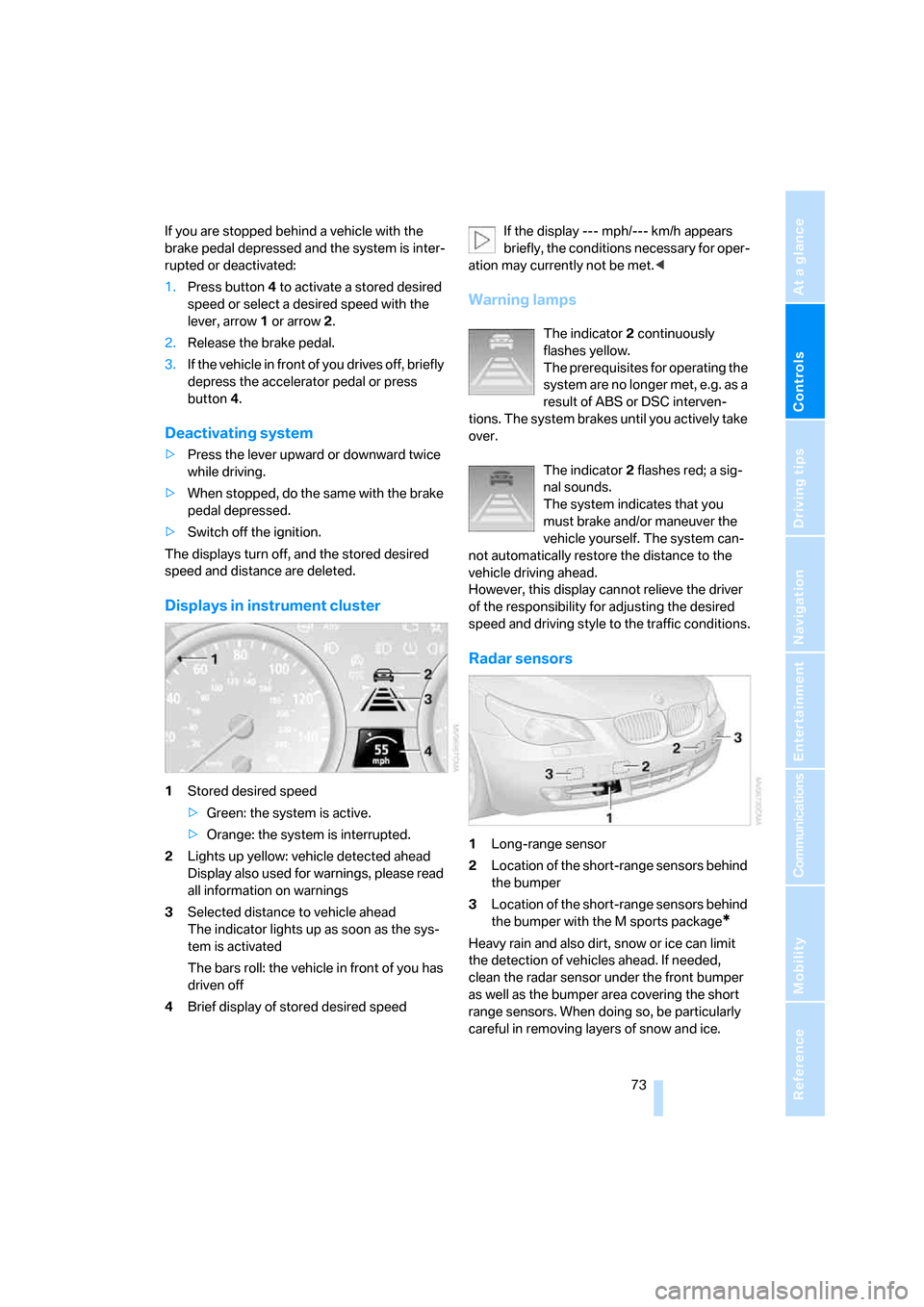
Displays in instrument cluster
1Stored desired speed
>Green: the system is active.
>Orange: the system is interrupted.
2Lights up yellow: vehicle detected ahead
Display also used for warnings, please read
all information on warnings
3Selected distance to vehicle ahead
The indicator lights up as soon as the sys-
tem is activated
The bars roll: the vehicle in front of you has
driven off
4Brief display of stored desired speedIf the display --- mph/--- km/h appears
briefly, the conditions necessary for oper-
ation may currently not be met.<
Warning lamps
The indicator2 continuously
flashes yellow.
The prerequisites for operating the
system are no longer met, e.g. as a
result of ABS or DSC interven-
tions. The system brakes until you actively take
over.
The indicator2 flashes red; a sig-
nal sounds.
The system indicates that you
must brake and/or maneuver the
vehicle yourself. The system can-
not automatically restore the distance to the
vehicle driving ahead.
However, this display cannot relieve the driver
of the responsibility for adjusting the desired
speed and driving style to the traffic conditions.
Radar sensors
1Long-range sensor
2Location of the short-range sensors behind
the bumper
3Location of the short-range sensors behind
the bumper with the M sports package
*
Heavy rain and also dirt, snow or ice can limit
the detection of vehicles ahead. If needed,
clean the radar sensor under the front bumper
as well as the bumper area covering the short
range sensors. When doing so, be particularly
careful in removing layers of snow and ice.
Page 92 of 286
Technology for comfort, convenience and safety
90 iDrive, for explanation of principle, refer to
page16.
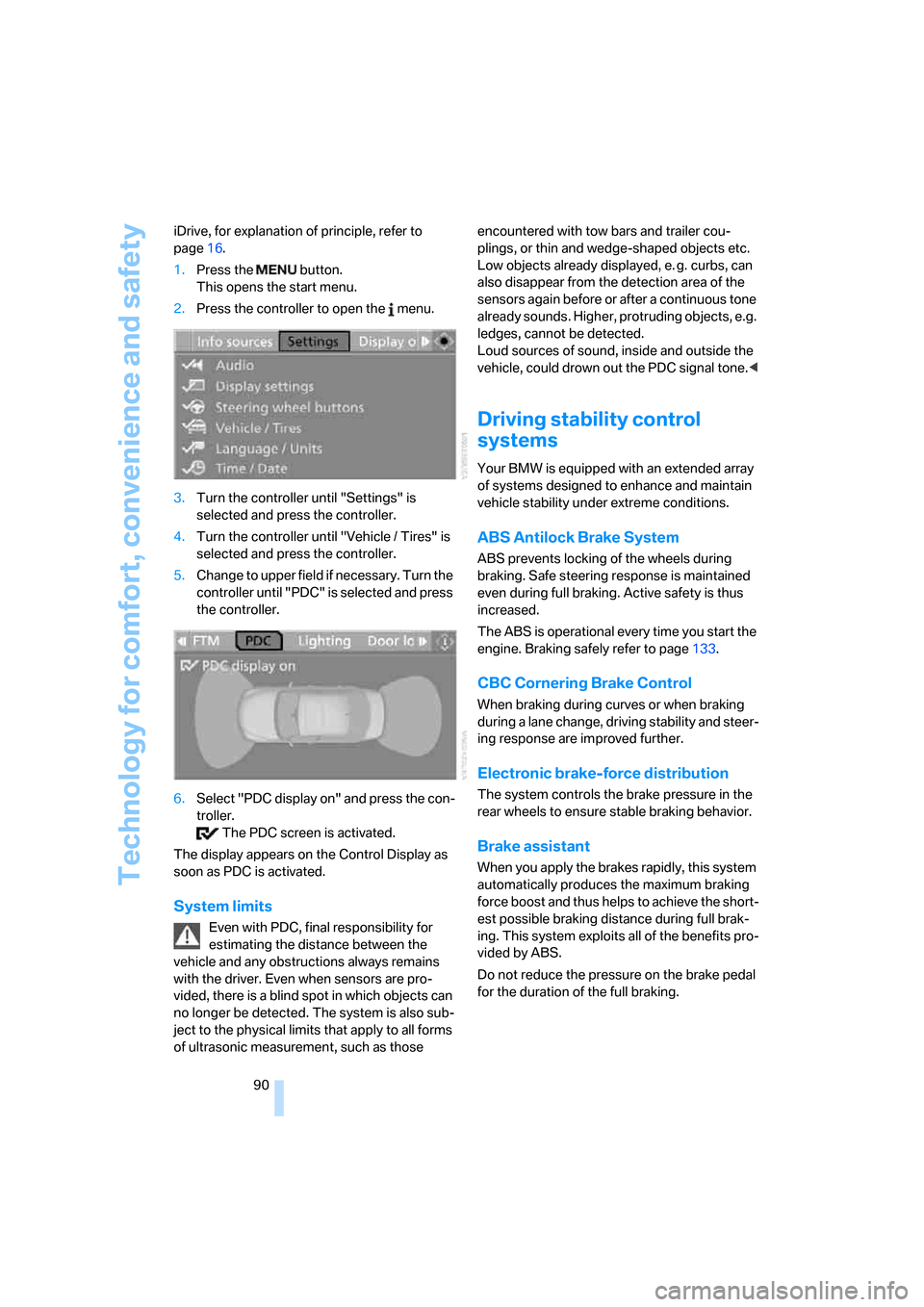
1.Press the button.
This opens the start menu.
2.Press the controller to open the menu.
3.Turn the controller until "Settings" is
selected and press the controller.
4.Turn the controller until "Vehicle / Tires" is
selected and press the controller.
5.Change to upper field if necessary. Turn the
controller until "PDC" is selected and press
the controller.
6.Select "PDC display on" and press the con-
troller.
The PDC screen is activated.
The display appears on the Control Display as
soon as PDC is activated.
System limits
Even with PDC, final responsibility for
estimating the distance between the
vehicle and any obstructions always remains
with the driver. Even when sensors are pro-
vided, there is a blind spot in which objects can
no longer be detected. The system is also sub-
ject to the physical limits that apply to all forms
of ultrasonic measurement, such as those encountered with tow bars and trailer cou-
plings, or thin and wedge-shaped objects etc.
Low objects already displayed, e. g. curbs, can
also disappear from the detection area of the
sensors again before or after a continuous tone
already sounds. Higher, protruding objects, e.g.
ledges, cannot be detected.
Loud sources of sound, inside and outside the
vehicle, could drown out the PDC signal tone.<
Driving stability control
systems
Your BMW is equipped with an extended array
of systems designed to enhance and maintain
vehicle stability under extreme conditions.
ABS Antilock Brake System
ABS prevents locking of the wheels during
braking. Safe steering response is maintained
even during full braking. Active safety is thus
increased.
The ABS is operational every time you start the
engine. Braking safely refer to page133.
CBC Cornering Brake Control
When braking during curves or when braking
during a lane change, driving stability and steer-
ing response are improved further.
Electronic brake-force distribution
The system controls the brake pressure in the
rear wheels to ensure stable braking behavior.
Brake assistant
When you apply the brakes rapidly, this system
automatically produces the maximum braking
force boost and thus helps to achieve the short-
est possible braking distance during full brak-
ing. This system exploits all of the benefits pro-
vided by ABS.
Do not reduce the pressure on the brake pedal
for the duration of the full braking.
Page 95 of 286
Controls
93Reference
At a glance
Driving tips
Communications
Navigation
Entertainment
Mobility
Using HDC
Manual transmission:
Use HDC in low gears and reverse gear.
Automatic transmission:
You can use HDC in every drive position.
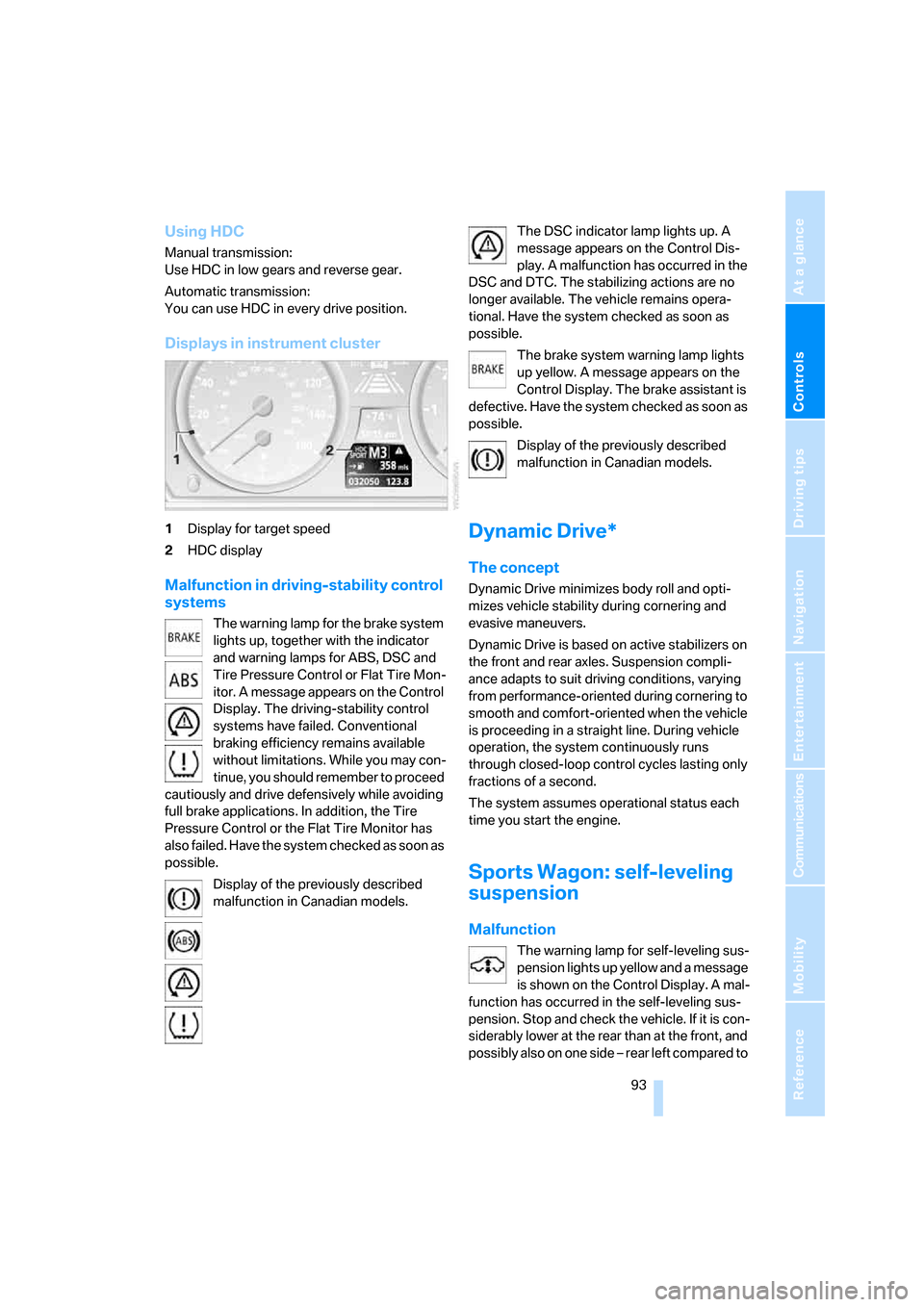
Displays in instrument cluster
1Display for target speed
2HDC display
Malfunction in driving-stability control
systems
The warning lamp for the brake system
lights up, together with the indicator
and warning lamps for ABS, DSC and
Tire Pressure Control or Flat Tire Mon-
itor. A message appears on the Control
Display. The driving-stability control
systems have failed. Conventional
braking efficiency remains available
without limitations. While you may con-
tinue, you should remember to proceed
cautiously and drive defensively while avoiding
full brake applications. In addition, the Tire
Pressure Control or the Flat Tire Monitor has
also failed. Have the system checked as soon as
possible.
Display of the previously described
malfunction in Canadian models.The DSC indicator lamp lights up. A
message appears on the Control Dis-
play. A malfunction has occurred in the
DSC and DTC. The stabilizing actions are no
longer available. The vehicle remains opera-
tional. Have the system checked as soon as
possible.
The brake system warning lamp lights
up yellow. A message appears on the
Control Display. The brake assistant is
defective. Have the system checked as soon as
possible.
Display of the previously described
malfunction in Canadian models.
Dynamic Drive*
The concept
Dynamic Drive minimizes body roll and opti-
mizes vehicle stability during cornering and
evasive maneuvers.
Dynamic Drive is based on active stabilizers on
the front and rear axles. Suspension compli-
ance adapts to suit driving conditions, varying
from performance-oriented during cornering to
smooth and comfort-oriented when the vehicle
is proceeding in a straight line. During vehicle
operation, the system continuously runs
through closed-loop control cycles lasting only
fractions of a second.
The system assumes operational status each
time you start the engine.
Sports Wagon: self-leveling
suspension
Malfunction
The warning lamp for self-leveling sus-
pension lights up yellow and a message
is shown on the Control Display. A mal-
function has occurred in the self-leveling sus-
pension. Stop and check the vehicle. If it is con-
siderably lower at the rear than at the front, and
possibly also on one side – rear left compared to
Page 134 of 286
Things to remember when driving
132
Things to remember when driving
Break-in period
Moving parts need breaking-in time to adjust to
each other. To ensure that your vehicle contin-
ues to provide optimized economy of operation
throughout an extended service life, we request
that you devote careful attention to the follow-
ing section.
Engine and differential
Always obey all official speed limits.
Up to 1,200 miles/2,000 km
Drive at changing engine and driving speeds,
however do not exceed 4,500 rpm or 100 mph/
160 km/h.
Avoid full-throttle operation and use of the
transmission's kick-down mode during these
initial miles.
From 1,200 miles/2,000 km
The engine and vehicle speed can gradually be
increased.
Tires
Due to technical factors associated with their
manufacture, tires do not achieve their full trac-
tion potential until after an initial break-in
period. Therefore, drive reservedly during the
first 200 miles/300 km.
Brake system
Brakes require an initial break-in period of
approx. 300 miles/500 km to achieve optimized
contact and wear patterns between brake pads
and rotors. Drive in a reserved manner during
this break-in period.
Clutch
The function of the clutch is only at its opti-
mized level after a distance driven of approx.
300 miles/500 km. During this break-in period,
engage the clutch gently.
Following part replacement
Observe the break-in instructions again if com-
ponents mentioned above must be replaced
after subsequent driving operation.
General driving notes
Closing luggage compartment lid/
tailgate
Operate the vehicle only when the lug-
gage compartment lid/tailgate is com-
pletely closed. Otherwise, exhaust fumes could
enter the interior of the vehicle.<
If special circumstances should make it abso-
lutely necessary to operate the vehicle with the
luggage compartment lid/tailgate open:
1.Close all windows and the glass sunroof or
panorama glass sunroof.
2.Increase the air volume of the automatic cli-
mate control to a high level, refer to
page113.
Hot exhaust system
As in all vehicles, extremely high temper-
atures are generated on the exhaust sys-
tem. Do not remove the heat shields installed
adjacent to it, and never apply undercoating to
them. When driving, standing at idle and while
parking take care to avoid possible contact
between the hot exhaust system and any highly
flammable materials such as hay, leaves, grass,
etc. Such contact could lead to a fire, and with it
the risk of serious property damage as well as
personal injury. Do not touch hot exhaust tail
pipes. Otherwise there is a risk of burns.<
Mobile communications devices in
vehicle
BMW discourages the use of mobile
communications devices, e. g. mobile
phones, inside the vehicle without a direct con-
nection to an outside antenna. Otherwise, the
Page 135 of 286
Driving tips
133Reference
At a glance
Controls
Communications
Navigation
Entertainment
Mobility
vehicle electronics and mobile communication
device can influence one another. In addition,
there is no assurance that the radiation which
results from transmission will be dissipated
from the vehicle interior.<
Hydroplaning
When driving on wet or slushy roads,
reduce road speed. If you do not, a wedge
of water can form between tires and road sur-
face. This phenomenon is referred to as hydro-
planing, and is characterized by a partial or
complete loss of contact between the tires and
the road surface, ultimately undermining your
ability to steer and brake the vehicle.<
The risk of hydroplaning increases as the tread
depth of the tires decreases, refer also to Mini-
mum tire tread on page225.
Driving through water
Do not drive through water on the road if it
is deeper than 1 ft/30 cm, and then only at
walking speed at the most. Otherwise, the vehi-
cle's engine, the electrical systems and the
transmission may be damaged.<
Using handbrake on inclines
On inclines, do not hold the vehicle with
the clutch; use the handbrake. Otherwise
greater clutch wear will result.<
Starting assistant
The starting assistant enables you to start off
conveniently on slopes. The handbrake is not
required for this purpose.
1.Hold the vehicle with the footbrake.
2.Release the footbrake and drive off quickly.
The starting assistant holds the vehicle
for approx. 2 seconds after releasing the
footbrake. Depending on the load, the vehicle
may also roll back slightly during this time.
After releasing the footbrake, drive off quickly,
otherwise the starting assistant no longer holds
the vehicle after approx. 2 seconds and it
begins to roll back.<
Braking safely
Your BMW is equipped with ABS as a standard
feature. In situations that require it, it is best to
brake with full force. Since the vehicle maintains
steering responsiveness, you can still avoid
possible obstacles with a minimum of steering
effort.
Pulsation of the brake pedal, combined with
sounds from the hydraulic circuits, indicate that
ABS is in its active mode.
Do not drive with your foot resting on the
brake pedal. Even light but consistent
pedal pressure can lead to high temperatures,
brake wear and possibly even brake failure.<
Driving in wet conditions
When roads are wet or there is heavy rain,
briefly exert gentle pressure on the brake pedal
every few miles. Monitor traffic conditions to
ensure that this maneuver does not endanger
other road users. The heat generated in this
process helps dry the pads and rotors to ensure
that full braking efficiency will then be available
when you need it.
Hills
To prevent overheating and the resulting
reduced efficiency of the brake system,
drive long or steep downhill gradients in the
gear in which the least braking is required. Even
light but consistent pressure on the brake pedal
can lead to high temperatures, brake wear and
possibly even brake failure.<
The braking effect of the engine can be further
increased by downshifting, if necessary all the
way down into first gear. This strategy helps
you avoid placing excessive loads on the brake
system. For information on downshifting in the
manual mode of the automatic transmission,
refer to page63.
Do not drive with the clutch depressed, in
idle or with the engine switched off, other-
wise there will be no engine braking action or
support of the braking force and steering.
Never allow floor mats, carpets or any other
objects to protrude into the area of movement
of the pedals and impair their operation.<
Page 228 of 286
Wheels and tires
226
Run-flat tires*
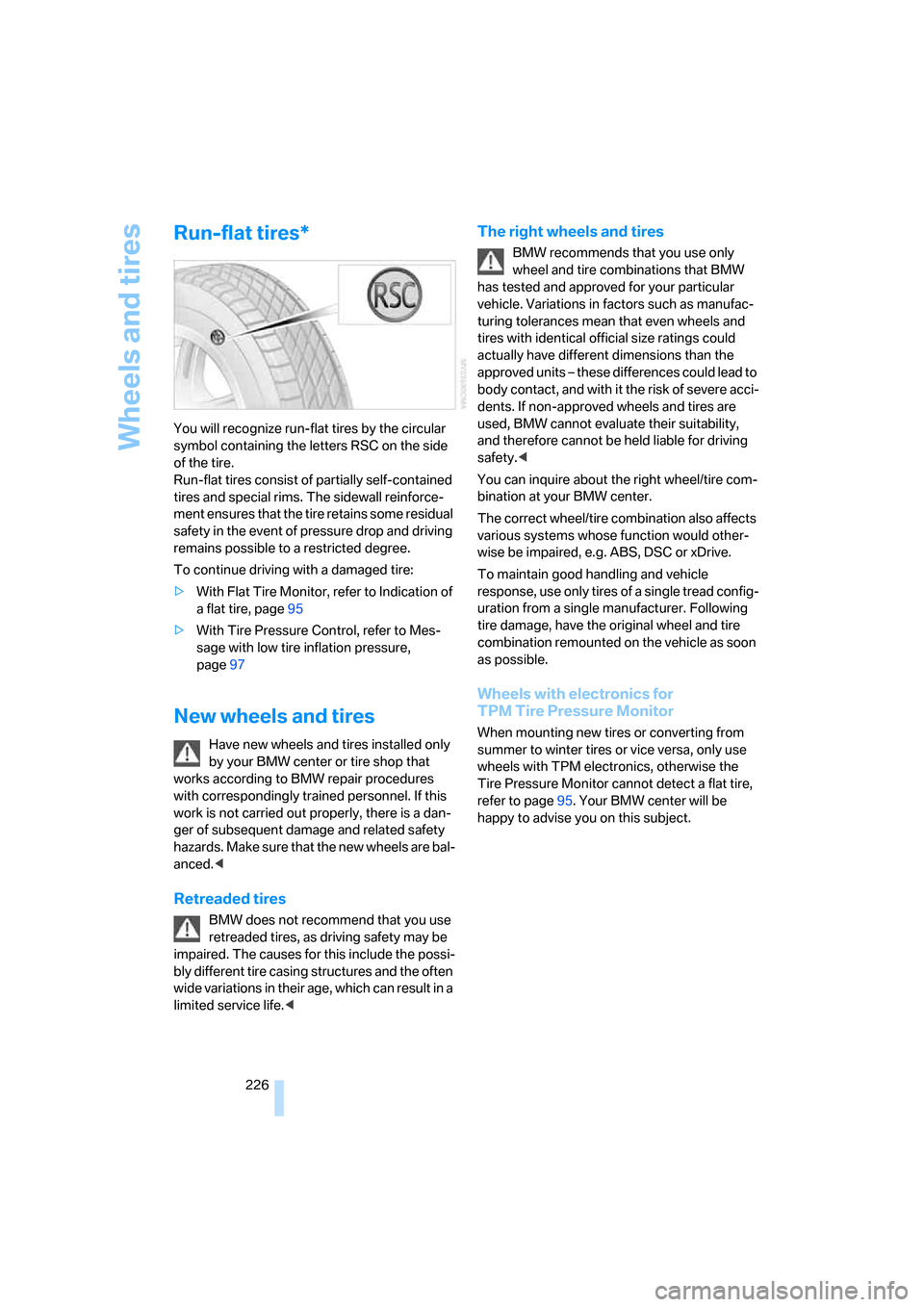
You will recognize run-flat tires by the circular
symbol containing the letters RSC on the side
of the tire.
Run-flat tires consist of partially self-contained
tires and special rims. The sidewall reinforce-
ment ensures that the tire retains some residual
safety in the event of pressure drop and driving
remains possible to a restricted degree.
To continue driving with a damaged tire:
>With Flat Tire Monitor, refer to Indication of
a flat tire, page95
>With Tire Pressure Control, refer to Mes-
sage with low tire inflation pressure,
page97
New wheels and tires
Have new wheels and tires installed only
by your BMW center or tire shop that
works according to BMW repair procedures
with correspondingly trained personnel. If this
work is not carried out properly, there is a dan-
ger of subsequent damage and related safety
h a z a r d s . M a k e s u re t h a t t h e n e w w h ee l s a r e b a l-
anced.<
Retreaded tires
BMW does not recommend that you use
retreaded tires, as driving safety may be
impaired. The causes for this include the possi-
bly different tire casing structures and the often
wide variations in their age, which can result in a
limited service life.<
The right wheels and tires
BMW recommends that you use only
wheel and tire combinations that BMW
has tested and approved for your particular
vehicle. Variations in factors such as manufac-
turing tolerances mean that even wheels and
tires with identical official size ratings could
actually have different dimensions than the
approved units – these differences could lead to
body contact, and with it the risk of severe acci-
dents. If non-approved wheels and tires are
used, BMW cannot evaluate their suitability,
and therefore cannot be held liable for driving
safety.<
You can inquire about the right wheel/tire com-
bination at your BMW center.
The correct wheel/tire combination also affects
various systems whose function would other-
wise be impaired, e.g. ABS, DSC or xDrive.
To maintain good handling and vehicle
response, use only tires of a single tread config-
uration from a single manufacturer. Following
tire damage, have the original wheel and tire
combination remounted on the vehicle as soon
as possible.
Wheels with electronics for
TPM Tire Pressure Monitor
When mounting new tires or converting from
summer to winter tires or vice versa, only use
wheels with TPM electronics, otherwise the
Tire Pressure Monitor cannot detect a flat tire,
refer to page95. Your BMW center will be
happy to advise you on this subject.
Page 236 of 286
Replacing components
234
Replacing components
Onboard toolkit
Sedan
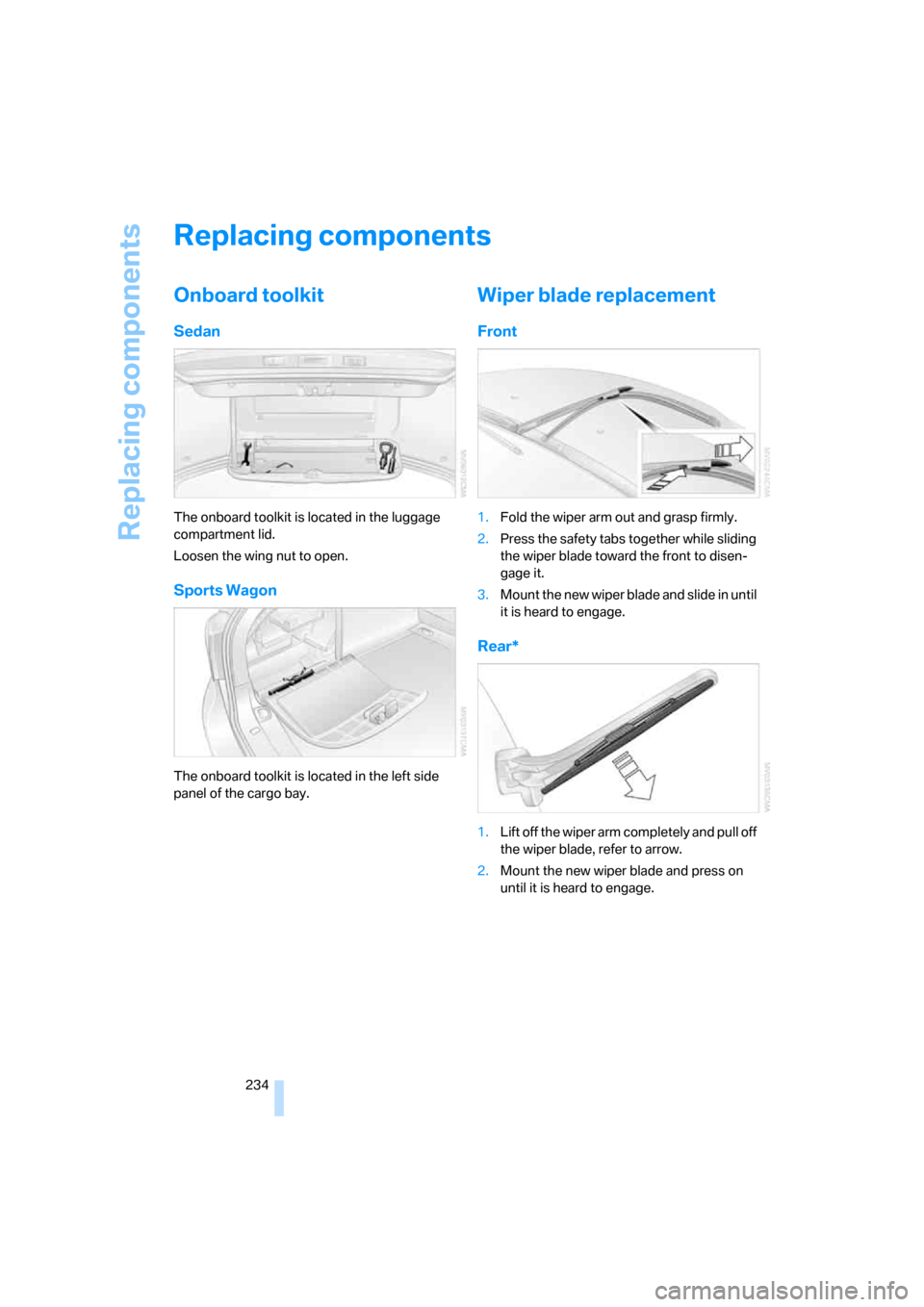
The onboard toolkit is located in the luggage
compartment lid.
Loosen the wing nut to open.
Sports Wagon
The onboard toolkit is located in the left side
panel of the cargo bay.
Wiper blade replacement
Front
1.Fold the wiper arm out and grasp firmly.
2.Press the safety tabs together while sliding
the wiper blade toward the front to disen-
gage it.
3.Mount the new wiper blade and slide in until
it is heard to engage.
Rear*
1.Lift off the wiper arm completely and pull off
the wiper blade, refer to arrow.
2.Mount the new wiper blade and press on
until it is heard to engage.
Page 264 of 286
Everything from A to Z
262
Everything from A to Z
Index
"..." Identifies Control Display
texts used to select
individual functions, and
indicates where to find them
in the text.
A
ABS Antilock Brake
System90
– indicator/warning lamp93
ACC, refer to Active cruise
control69
Accepted calls200
Accessories6
Accident, refer to Emergency
call244
Acoustic signal, refer to Check
Control82
Activated-charcoal filter for
automatic climate
control115
"Activation time" for parked-
car ventilation116
Active cruise control69
– indicator lamp73
– radar sensors73
– selecting distance71
– warning lamps73
Active head restraints,
front49
Active seat52
Active seat ventilation52
Active steering98
– warning lamp98
Adapter for spare key28
Adaptive brake lamps, refer to
Brake force display99
Adaptive Head Light109
"Add digits" for mobile
phone200Additives
– coolant231
– engine oil, refer to Approved
engine oils230
"Address book" for navigation
system149
Address for navigation
– deleting151
– entering142,145
– selecting150
– storing150
– storing current position150
"Add to address book"149
"Add to destination
list"145,146
Adjusting active backrest
width47
Adjusting interior
temperature112
Adjusting the tone during
audio operation, refer to
Tone control167
Adjusting thigh support46
Adjustment in audio mode
– front/rear balance168
– right/left balance168
"After door opened"48
"After unlocking"48
Airbags99
– indicator/warning lamp101
– indicator lamp for front
passenger airbags100
– sitting safely45
Air distribution
– automatic112
– manual113
Airing, refer to Ventilation115
Air recirculation
– AUC Automatic
recirculated-air control114
– recirculated-air mode114"Air recirculation on / off"55
Air supply, automatic climate
control111
Air volume113
AKI, refer to Fuel quality217
Alarm system37
– avoiding unintentional
alarms38
– interior motion sensor38
– switching off alarm38
– switching off tilt alarm
sensor and interior motion
sensor38
– tilt alarm sensor38
"All channels"177
"All doors"31
All-season tires, refer to
Winter tires227
"All stations", calling up with
radio170,173
All-wheel drive, refer to
xDrive92
Alterations, technical, refer to
For your own safety5
Altering stretch of road158
"AM", reception
range166,170
Antenna, refer to Caring for
your vehicle brochure
Antenna for mobile phone192
Antifreeze
– coolant231
– washer fluid68
Antilock Brake System
ABS90
– indicator/warning lamp93
Anti-theft alarm system, refer
to Alarm system37
Anti-theft system, refer to
Central locking system30
Approved axle loads, refer to
Weights255
Page 266 of 286
Everything from A to Z
264 "BMW Assist"208
BMW Assist207
– activating212
– breakdown assistance208
– contacting BMW Customer
Relations210
– displaying vehicle data213
– information service210
– services offered207
– TeleService209
– updating211
"BMW Contact"202
"BMW Contact
Numbers"202
BMW homepage4
BMW maintenance
system232
BMW Night Vision103
– activating104
– cleaning camera105
– cleaning camera, refer to
Wiper system67
– deactivating104
– making settings104
"BMW Service settings"211
BMW website4
Bottle holder, refer to Cup
holders121
Bracket for telephone or
mobile phone, refer to Snap-
in adapter205
Brake assistant90
– adaptive91
Brake force display99
Brake lamps
– replacing bulbs237
– two-stage99
Brake rotors
– breaking-in132
– refer to Braking safely133Brakes
– ABS Antilock Brake
System90
– brake assistant90
– brake force display99
– breaking-in132
– CBC Cornering Brake
Control90
– electronic brake-force
distribution90
– handbrake62
– refer to Braking safely133
– warning lamps13
Brake system132
– brake pads132
– breaking-in132
– disk brakes134
– warning lamp
93
Braking safely133
Breakdown assistance208
Breakdown services, refer to
Roadside Assistance245
Breaking-in brake pads132
Breaking-in the clutch132
Breaking-in the differential,
refer to Engine and
differential132
Break-in period132
"Brightness"87,102
– with BMW Night Vision105
Brightness of Control
Display87
Button for starting engine,
refer to Start/Stop button60
Buttons on steering wheel11
C
California Proposition 65
Warning6
"Call"200,211
Call
– accepting198
– displaying accepted201
– ending199
– in absence201
– rejecting199
– starting199Calling
– by entering phone
number199
– from phone book200
– from Top 8 list201
– redialing201
– refer to telephone operating
instructions
Can holder, refer to Cup
holders121
Capacities256
Car battery, refer to Vehicle
battery242
Car care, refer to Caring for
your vehicle brochure
Car-care products, refer to
Caring for your vehicle
brochure
"Car Data"79
Care233
– refer to Caring for your
vehicle brochure
Cargo
– refer to Cargo loading134
– securing135
– securing with ski bag127
Cargo bay
– capacity255
– emergency operation, refer
to Opening manually, Sports
Wagon36
– emergency release35
– expanding, Sports
Wagon125
– floor panel flap, refer to
Compartment in floor,
Sports Wagon126
– locking separately34
– opening/closing, refer to
Luggage compartment lid/
tailgate34
– opening from inside34
– opening from inside, Sports
Wagon35
– opening from outside34
– opening from outside,
Sports Wagon35
– opening with remote
control31
Page 272 of 286
Everything from A to Z
270 Hazard warning flashers15
"HDC"92
HDC Hill Descent Control92
"HDC on"92
"HDC on / off"55
"HD radio"174
HD radio, refer to High
Definition Radio174
Head airbags99
Headlamp control,
automatic107
Headlamp flasher66
Headlamps107
– care, refer to Caring for your
vehicle brochure
– cleaning, refer to Wiper
system67
– cleaning tank, refer to
Capacities256
– filler neck for washer
fluid229
– replacing bulbs236
Head Light, refer to Adaptive
Head Light109
Head restraints49
– front head restraints,
active49
– installing49
– removing49
– sitting safely45
"Head-Up Display"102
Head-Up Display101
Heated
– mirrors53
– rear window113
– seats51
– steering wheel54
Heating111
– exterior mirrors53
– interior111
– rear window113
– residual heat114
– seats51
– steering wheel54
Heating with engine switched
off, refer to Residual
heat114Heavy cargo, refer to Securing
cargo135
Height, refer to
Dimensions253
Height adjustment
– seats46
– steering wheel54
High beams109
– headlamp flasher109
– indicator lamp13
– replacing bulbs236
High Definition Radio174
High water, refer to Driving
through water133
Hill Descent Control HDC92
Hills133
Holder for cups121
"Home address" for
navigation system151
Homepage of BMW4
Hood228
Hooks for shopping bags,
Sports Wagon126
Horn10
Hotel function, refer to
Locking separately34
Hot exhaust system132
"Hour memo"86
"House number" for
destination entry144
Hydraulic brake assistant,
refer to Brake assistant90
Hydroplaning133
I
IBOC, refer to High Definition
Radio174
Ice, refer to Outside
temperature warning77
ID3 tag, refer to Information on
track181
Identification mark
– recommended tire
brands227
– run-flat tires226
– tire coding224iDrive16
– assistance window20
– automatic climate control
with expanded scope112
– changing date and time85
– changing language87
– changing menu page19
– changing settings85
– changing units of measure
and display type87
– confirming selection or
entry19
– controller16
– controls16
– displays, menus17
– operating principle17
– selecting menu item19
– setting brightness87
– start menu17
– status information20
– symbols18
Ignition60
– switched off61
– switched on60
Ignition key, refer to Keys/
remote control28
Ignition key position 1, refer to
Radio readiness60
Ignition key position 2, refer to
Ignition on60
Ignition lock60
– starting engine with comfort
access40
i menu17
Imprint2
Indicator/warning lamps13
– ABS Antilock Brake
System93
– active steering98
– airbags101
– brake system93
– DSC13,91
– DTC13,92
– Flat Tire Monitor95
– fog lamps13
– safety belt warning50
– TPM Tire Pressure
Monitor97