hdc BMW 535I XDRIVE 2009 Owners Manual
[x] Cancel search | Manufacturer: BMW, Model Year: 2009, Model line: 535I XDRIVE, Model: BMW 535I XDRIVE 2009Pages: 294, PDF Size: 9.55 MB
Page 14 of 294
Cockpit
12
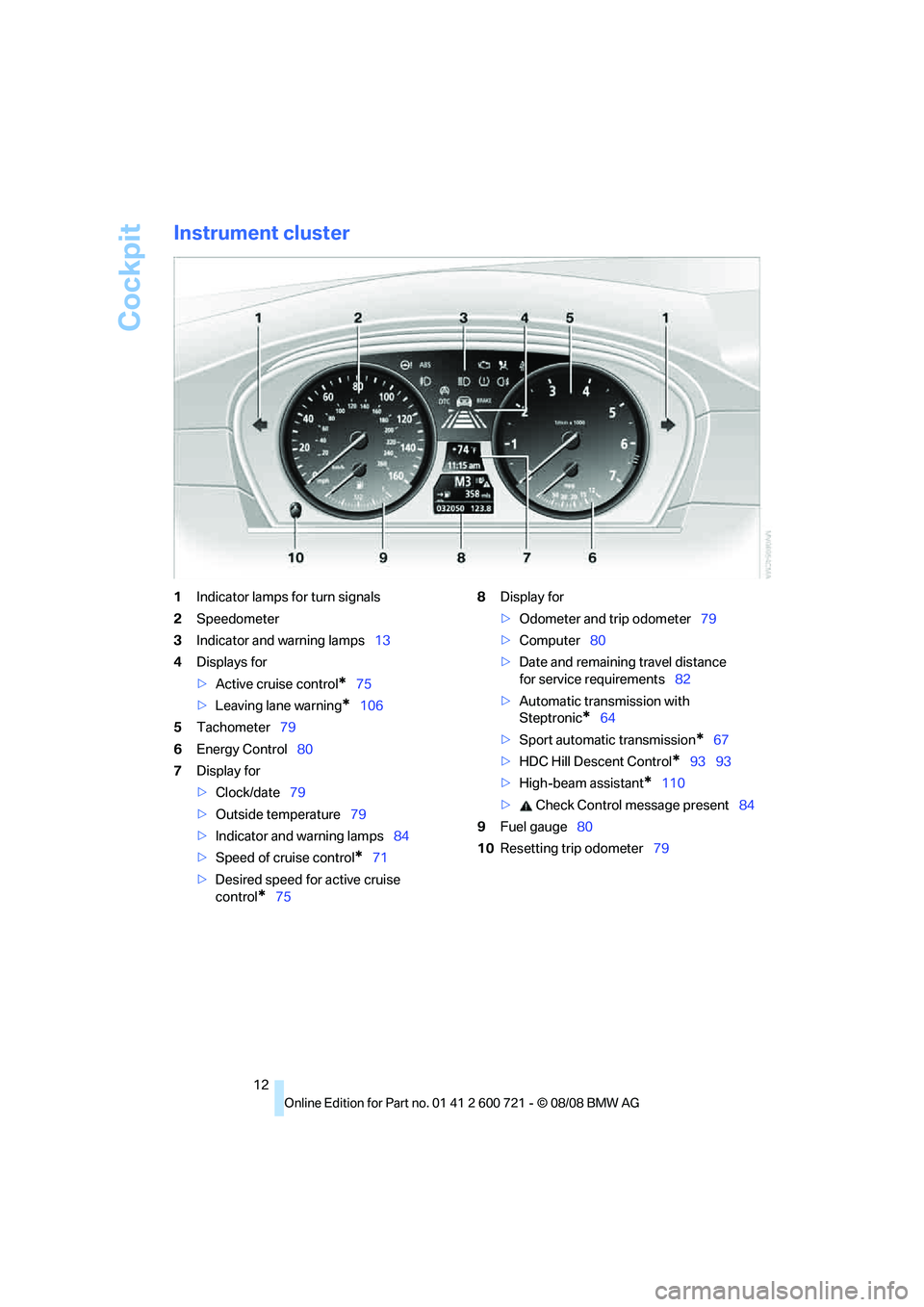
Instrument cluster
1Indicator lamps for turn signals
2Speedometer
3Indicator and warning lamps13
4Displays for
>Active cruise control
*75
>Leaving lane warning
*106
5Tachometer79
6Energy Control80
7Display for
>Clock/date79
>Outside temperature79
>Indicator and warning lamps84
>Speed of cruise control
*71
>Desired speed for active cruise
control
*758Display for
>Odometer and trip odometer79
>Computer80
>Date and remaining travel distance
for service requirements82
>Automatic transmission with
Steptronic
*64
>Sport automatic transmission
*67
>HDC Hill Descent Control
*93 93
>High-beam assistant
*110
> Check Control message present84
9Fuel gauge80
10Resetting trip odometer79
Page 59 of 294
Controls
57Reference
At a glance
Driving tips
Communications
Navigation
Entertainment
Mobility
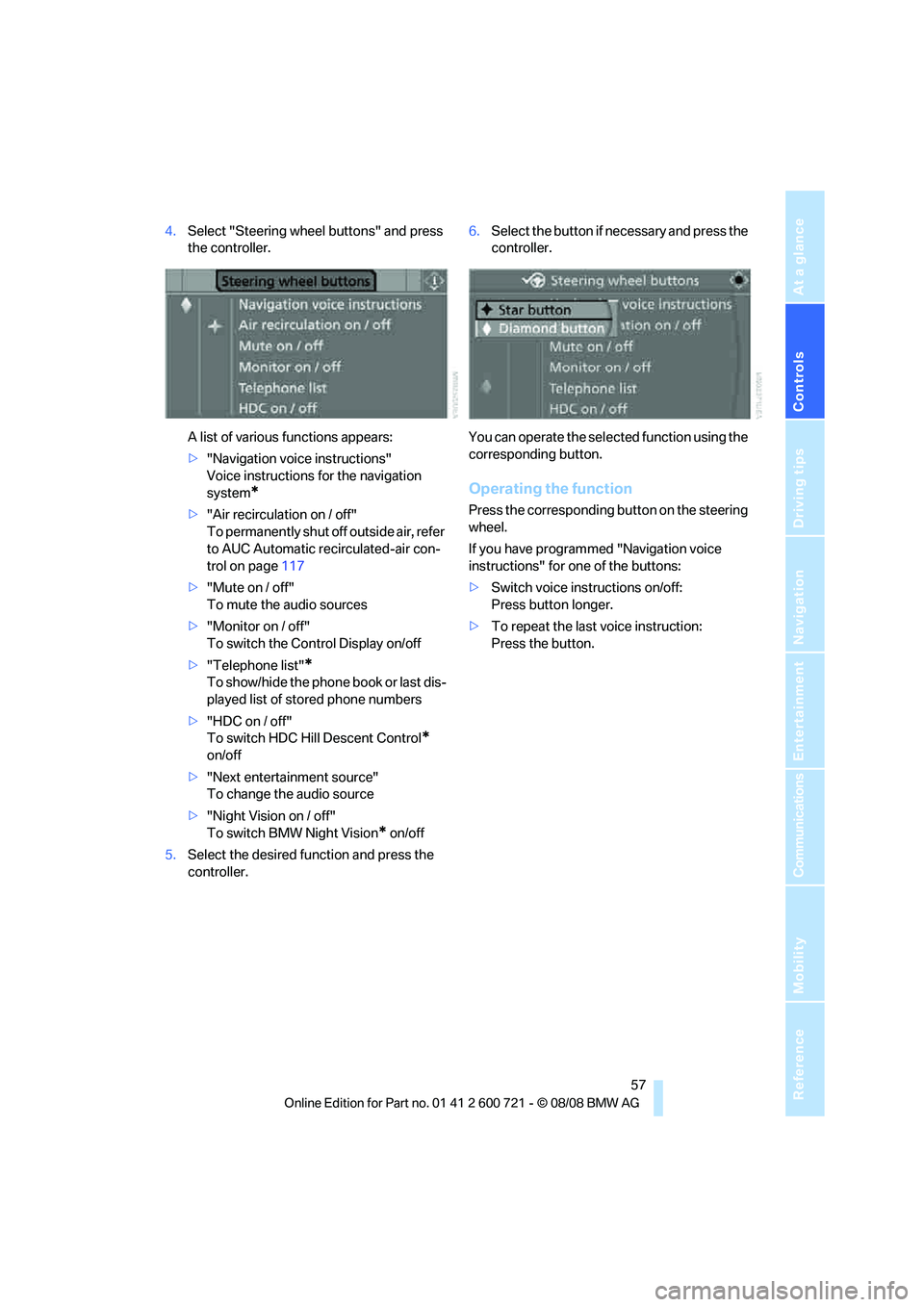
4.Select "Steering wheel buttons" and press
the controller.
A list of various functions appears:
>"Navigation voice instructions"
Voice instructions for the navigation
system
*
>"Air recirculation on / off"
To permanently shut off outside air, refer
to AUC Automatic recirculated-air con-
trol on page117
>"Mute on / off"
To mute the audio sources
>"Monitor on / off"
To switch the Control Display on/off
>"Telephone list"
*
To show/hide the phone book or last dis-
played list of stored phone numbers
>"HDC on / off"
To switch HDC Hill Descent Control
*
on/off
>"Next entertainment source"
To change the audio source
>"Night Vision on / off"
To switch BMW Night Vision
* on/off
5.Select the desired function and press the
controller.6.Select the button if necessary and press the
controller.
You can operate the selected function using the
corresponding button.
Operating the function
Press the corresponding button on the steering
wheel.
If you have programmed "Navigation voice
instructions" for one of the buttons:
>Switch voice instructions on/off:
Press button longer.
>To repeat the last voice instruction:
Press the button.
Page 95 of 294
Controls
93Reference
At a glance
Driving tips
Communications
Navigation
Entertainment
Mobility
The indicator lamp lights up:
DTC is activated.
Deactivating DTC
Press the button again; the DTC indicator lamp
in the instrument cluster goes out.
xDrive*
xDrive is the 4-wheel drive system of your
BMW. The combined effects of xDrive and DSC
further optimize the traction and dynamic driv-
ing characteristics. The 4-wheel drive system
xDrive variably distributes the drive torque to
the front and rear axle depending on the driving
situation and prevailing road conditions.
HDC Hill Descent Control*
The concept
HDC is a system for driving downhill in steep
terrain. This system reduces vehicle speed on
steep downhill gradients, thus allowing you to
maintain even better control of your BMW
under these conditions. The vehicle moves at
approximately twice walking speed without
active intervention from the driver.
HDC is available for activation at vehicle speeds
below approx. 22 mph/35 km/h. When driving
down steep hills with a speed below approx.
22 mph/35 km/h, the vehicle reduces speed
automatically down to approximately twice nor-
mal walking speed, approx. 7 mph/12 km/h, and
then keeps this speed constant.
You can use the accelerator or brakes to vary
this automatically controlled speed within a
range extending from approx. 3 mph/5 km/h to
15 mph/25 km/h.
You can specify a target speed within the same
range by using the lever of the cruise control
*.
Activating HDC
You can activate HDC:
>with the programmable buttons on the
steering wheel, refer to page56
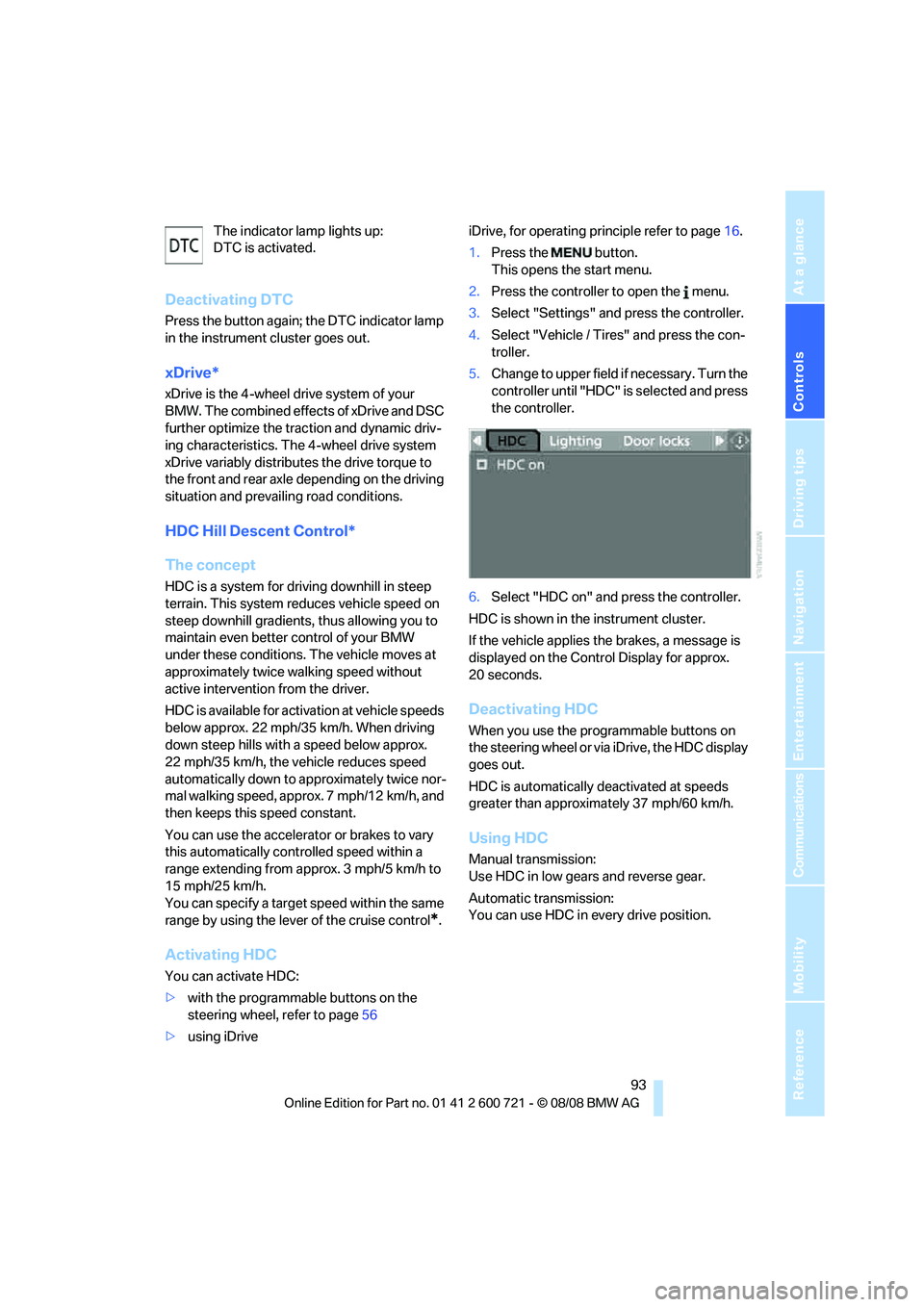
>using iDriveiDrive, for operating principle refer to page16.
1.Press the button.
This opens the start menu.
2.Press the controller to open the menu.
3.Select "Settings" and press the controller.
4.Select "Vehicle / Tires" and press the con-
troller.
5.Change to upper field if necessary. Turn the
controller until "HDC" is selected and press
the controller.
6.Select "HDC on" and press the controller.
HDC is shown in the instrument cluster.
If the vehicle applies the brakes, a message is
displayed on the Control Display for approx.
20 seconds.
Deactivating HDC
When you use the programmable buttons on
the steering wheel or via iDrive, the HDC display
goes out.
HDC is automatically deactivated at speeds
greater than approximately 37 mph/60 km/h.
Using HDC
Manual transmission:
Use HDC in low gears and reverse gear.
Automatic transmission:
You can use HDC in every drive position.
Page 96 of 294
Technology for comfort, convenience and safety
94
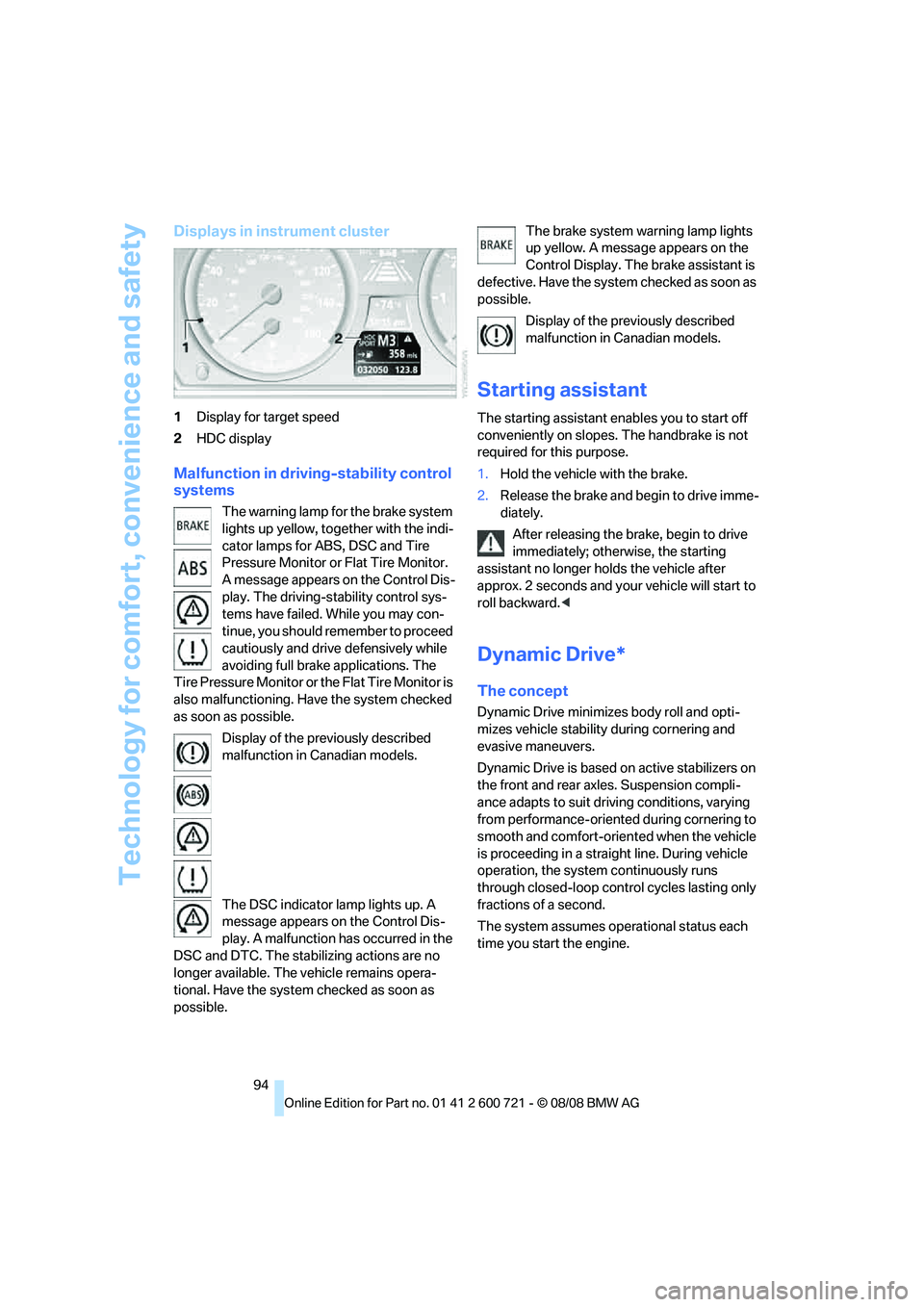
Displays in instrument cluster
1Display for target speed
2HDC display
Malfunction in driving-stability control
systems
The warning lamp for the brake system
lights up yellow, together with the indi-
cator lamps for ABS, DSC and Tire
Pressure Monitor or Flat Tire Monitor.
A message appears on the Control Dis-
play. The driving-stability control sys-
tems have failed. While you may con-
tinue, you should remember to proceed
cautiously and drive defensively while
avoiding full brake applications. The
Tire Pressure Monitor or the Flat Tire Monitor is
also malfunctioning. Have the system checked
as soon as possible.
Display of the previously described
malfunction in Canadian models.
The DSC indicator lamp lights up. A
message appears on the Control Dis-
play. A malfunction has occurred in the
DSC and DTC. The stabilizing actions are no
longer available. The vehicle remains opera-
tional. Have the system checked as soon as
possible.The brake system warning lamp lights
up yellow. A message appears on the
Control Display. The brake assistant is
defective. Have the system checked as soon as
possible.
Display of the previously described
malfunction in Canadian models.
Starting assistant
The starting assistant enables you to start off
conveniently on slopes. The handbrake is not
required for this purpose.
1.Hold the vehicle with the brake.
2.Release the brake and begin to drive imme-
diately.
After releasing the brake, begin to drive
immediately; otherwise, the starting
assistant no longer holds the vehicle after
approx. 2 seconds and your vehicle will start to
roll backward.<
Dynamic Drive*
The concept
Dynamic Drive minimizes body roll and opti-
mizes vehicle stability during cornering and
evasive maneuvers.
Dynamic Drive is based on active stabilizers on
the front and rear axles. Suspension compli-
ance adapts to suit driving conditions, varying
from performance-oriented during cornering to
smooth and comfort-oriented when the vehicle
is proceeding in a straight line. During vehicle
operation, the system continuously runs
through closed-loop control cycles lasting only
fractions of a second.
The system assumes operational status each
time you start the engine.
Page 270 of 294
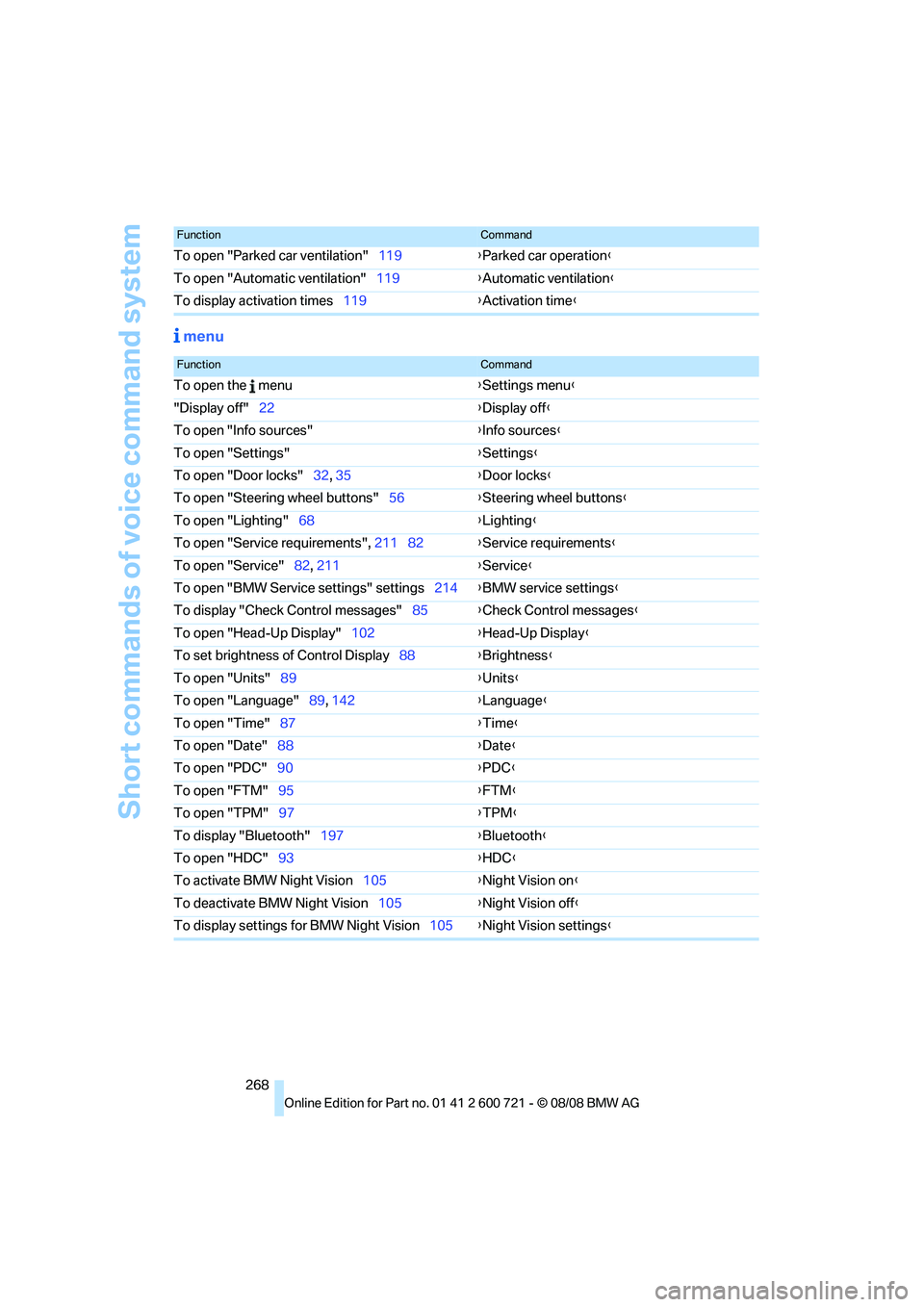
Short commands of voice command system
268
menu
To open "Parked car ventilation"119{Parked car operation}
To open "Automatic ventilation"119{Automatic ventilation}
To display activation times119{Activation time}
FunctionCommand
FunctionCommand
To open the menu{Settings menu}
"Display off"22{Display off}
To open "Info sources"{Info sources}
To open "Settings"{Settings}
To open "Door locks"32, 35{Door locks}
To open "Steering wheel buttons"56{Steering wheel buttons}
To open "Lighting"68{Lighting}
To open "Service requirements", 211 82{Service requirements}
To open "Service"82, 211{Service}
To open "BMW Service settings" settings214{BMW service settings}
To display "Check Control messages"85{Check Control messages}
To open "Head-Up Display"102{Head-Up Display}
To set brightness of Control Display88{Brightness}
To open "Units"89{Units}
To open "Language"89, 142{Language}
To open "Time"87{Time}
To open "Date"88{Date}
To open "PDC"90{PDC}
To open "FTM"95{FTM}
To open "TPM"97{
TPM}
To display "Bluetooth"197{Bluetooth}
To open "HDC"93{HDC}
To activate BMW Night Vision105{Night Vision on}
To deactivate BMW Night Vision105{Night Vision off}
To display settings for BMW Night Vision105{Night Vision settings}
Page 273 of 294
Reference 271
At a glance
Controls
Driving tips
Communications
Navigation
Entertainment
Mobility
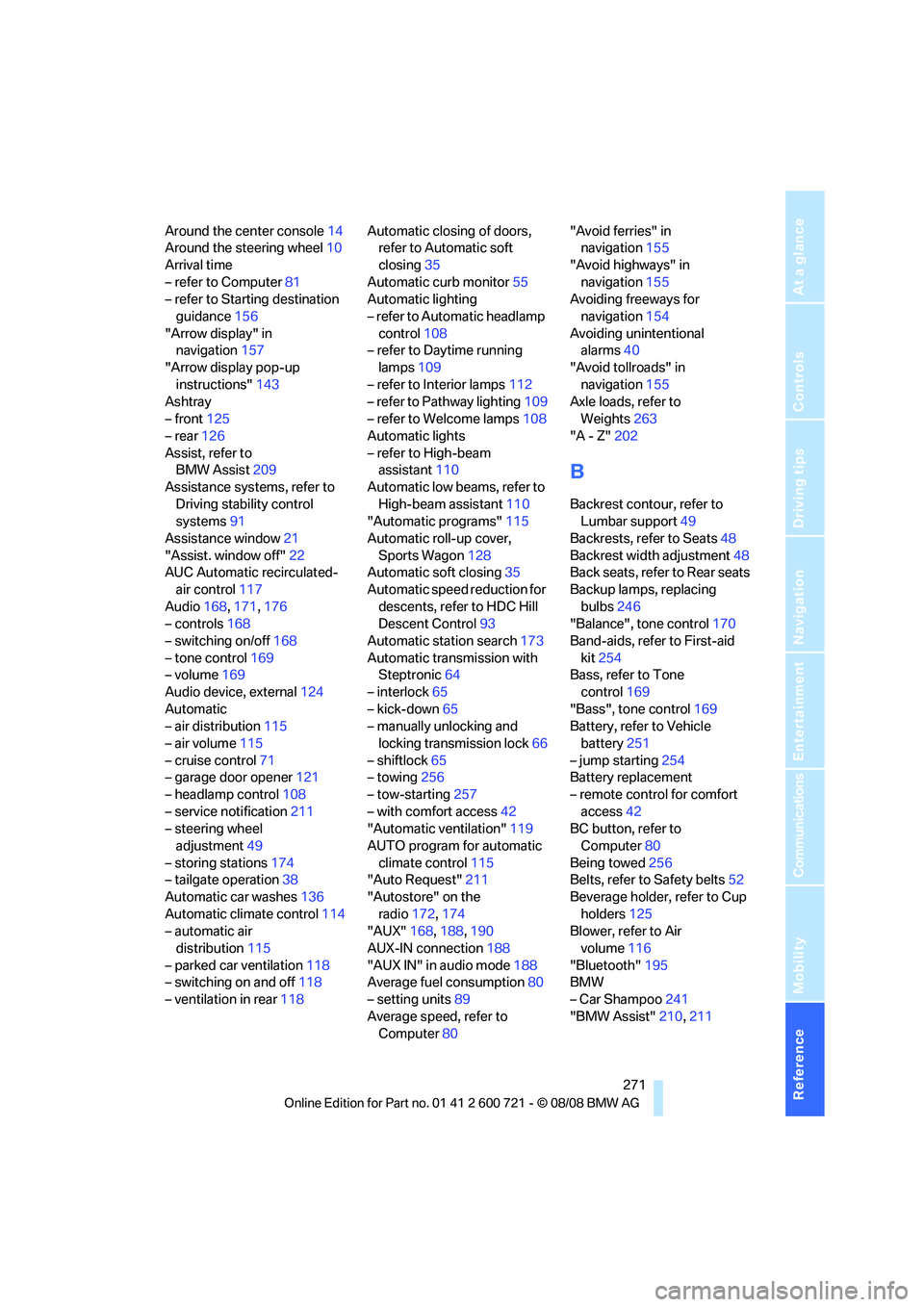
Around the center console14
Around the steering wheel10
Arrival time
– refer to Computer81
– refer to Starting destination
guidance156
"Arrow display" in
navigation157
"Arrow display pop-up
instructions"143
Ashtray
– front125
– rear126
Assist, refer to
BMW Assist209
Assistance systems, refer to
Driving stability control
systems91
Assistance window21
"Assist. window off"22
AUC Automatic recirculated-
air control117
Audio168,171,176
– controls168
– switching on/off168
– tone control169
– volume169
Audio device, external124
Automatic
– air distribution115
– air volume115
– cruise control71
– garage door opener121
– headlamp control108
– service notification211
– steering wheel
adjustment49
– storing stations174
– tailgate operation38
Automatic car washes136
Automatic climate control114
– automatic air
distribution115
– parked car ventilation118
– switching on and off118
– ventilation in rear118Automatic closing of doors,
refer to Automatic soft
closing35
Automatic curb monitor55
Automatic lighting
– refer to Automatic headlamp
control108
– refer to Daytime running
lamps109
– refer to Interior lamps112
– refer to Pathway lighting109
– refer to Welcome lamps108
Automatic lights
– refer to High-beam
assistant110
Automatic low beams, refer to
High-beam assistant110
"Automatic programs"115
Automatic roll-up cover,
Sports Wagon128
Automatic soft closing35
Automatic speed reduction for
descents, refer to HDC Hill
Descent Control93
Automatic station search173
Automatic transmission with
Steptronic64
– interlock65
– kick-down65
– manually unlocking and
locking transmission lock66
– shiftlock65
– towing256
– tow-starting257
– with comfort access42
"Automatic ventilation"119
AUTO program for automatic
climate control115
"Auto Request"211
"Autostore" on the
radio172,174
"AUX"168,188,190
AUX-IN connection188
"AUX IN" in audio mode188
Average fuel consumption80
– setting units89
Average speed, refer to
Computer80"Avoid ferries" in
navigation155
"Avoid highways" in
navigation155
Avoiding freeways for
navigation154
Avoiding unintentional
alarms40
"Avoid tollroads" in
navigation155
Axle loads, refer to
Weights263
"A - Z"202
B
Backrest contour, refer to
Lumbar support49
Backrests, refer to Seats48
Backrest width adjustment48
Back seats, refer to Rear seats
Backup lamps, replacing
bulbs246
"Balance", tone control170
Band-aids, refer to First-aid
kit254
Bass, refer to Tone
control169
"Bass", tone control169
Battery, refer to Vehicle
battery251
– jump starting254
Battery replacement
– remote control for comfort
access42
BC button, refer to
Computer80
Being towed256
Belts, refer to Safety belts52
Beverage holder, refer to Cup
holders125
Blower, refer to Air
volume116
"Bluetooth"195
BMW
– Car Shampoo241
"BMW Assist"210,211
Page 279 of 294
Reference 277
At a glance
Controls
Driving tips
Communications
Navigation
Entertainment
Mobility
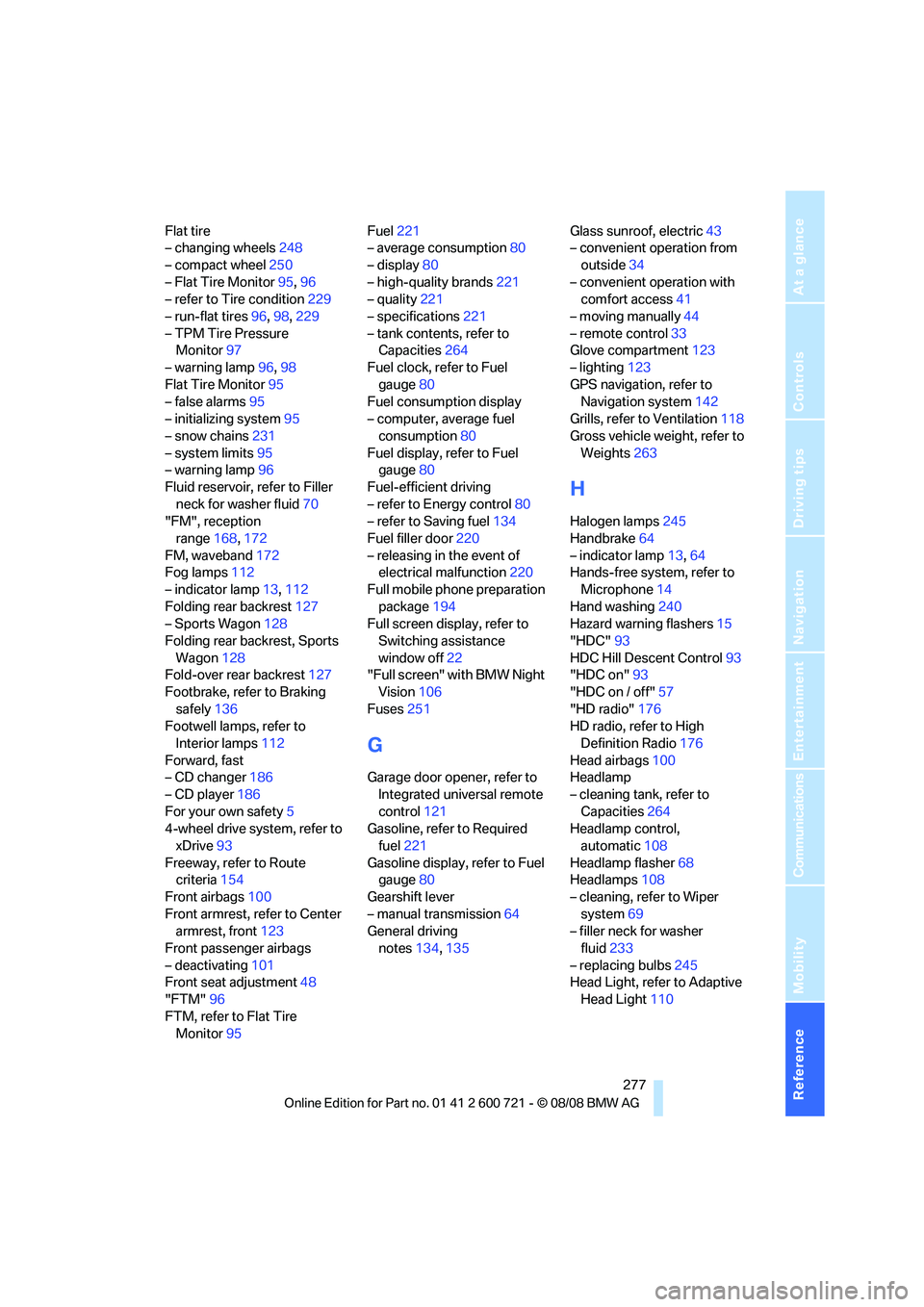
Flat tire
– changing wheels248
– compact wheel250
– Flat Tire Monitor95,96
– refer to Tire condition229
– run-flat tires96,98,229
– TPM Tire Pressure
Monitor97
– warning lamp96,98
Flat Tire Monitor95
– false alarms95
– initializing system95
– snow chains231
– system limits95
– warning lamp96
Fluid reservoir, refer to Filler
neck for washer fluid70
"FM", reception
range168,172
FM, waveband172
Fog lamps112
– indicator lamp13,112
Folding rear backrest127
– Sports Wagon128
Folding rear backrest, Sports
Wagon128
Fold-over rear backrest127
Footbrake, refer to Braking
safely136
Footwell lamps, refer to
Interior lamps112
Forward, fast
– CD changer186
– CD player186
For your own safety5
4-wheel drive system, refer to
xDrive93
Freeway, refer to Route
criteria154
Front airbags100
Front armrest, refer to Center
armrest, front123
Front passenger airbags
– deactivating101
Front seat adjustment48
"FTM"96
FTM, refer to Flat Tire
Monitor95Fuel221
– average consumption80
– display80
– high-quality brands221
– quality221
– specifications221
– tank contents, refer to
Capacities264
Fuel clock, refer to Fuel
gauge80
Fuel consumption display
– computer, average fuel
consumption80
Fuel display, refer to Fuel
gauge80
Fuel-efficient driving
– refer to Energy control80
– refer to Saving fuel134
Fuel filler door220
– releasing in the event of
electrical malfunction220
Full mobile phone preparation
package194
Full screen display, refer to
Switching assistance
window off22
"Full screen" with BMW Night
Vision106
Fuses251
G
Garage door opener, refer to
Integrated universal remote
control121
Gasoline, refer to Required
fuel221
Gasoline display, refer to Fuel
gauge80
Gearshift lever
– manual transmission64
General driving
notes134,135Glass sunroof, electric43
– convenient operation from
outside34
– convenient operation with
comfort access41
– moving manually44
– remote control33
Glove compartment123
– lighting123
GPS navigation, refer to
Navigation system142
Grills, refer to Ventilation118
Gross vehicle weight, refer to
Weights263
H
Halogen lamps245
Handbrake64
– indicator lamp13,64
Hands-free system, refer to
Microphone14
Hand washing240
Hazard warning flashers15
"HDC"93
HDC Hill Descent Control93
"HDC on"93
"HDC on / off"57
"HD radio"176
HD radio, refer to High
Definition Radio176
Head airbags100
Headlamp
– cleaning tank, refer to
Capacities264
Headlamp control,
automatic108
Headlamp flasher68
Headlamps108
– cleaning, refer to Wiper
system69
– filler neck for washer
fluid233
– replacing bulbs245
Head Light, refer to Adaptive
Head Light110
Page 280 of 294
Everything from A to Z
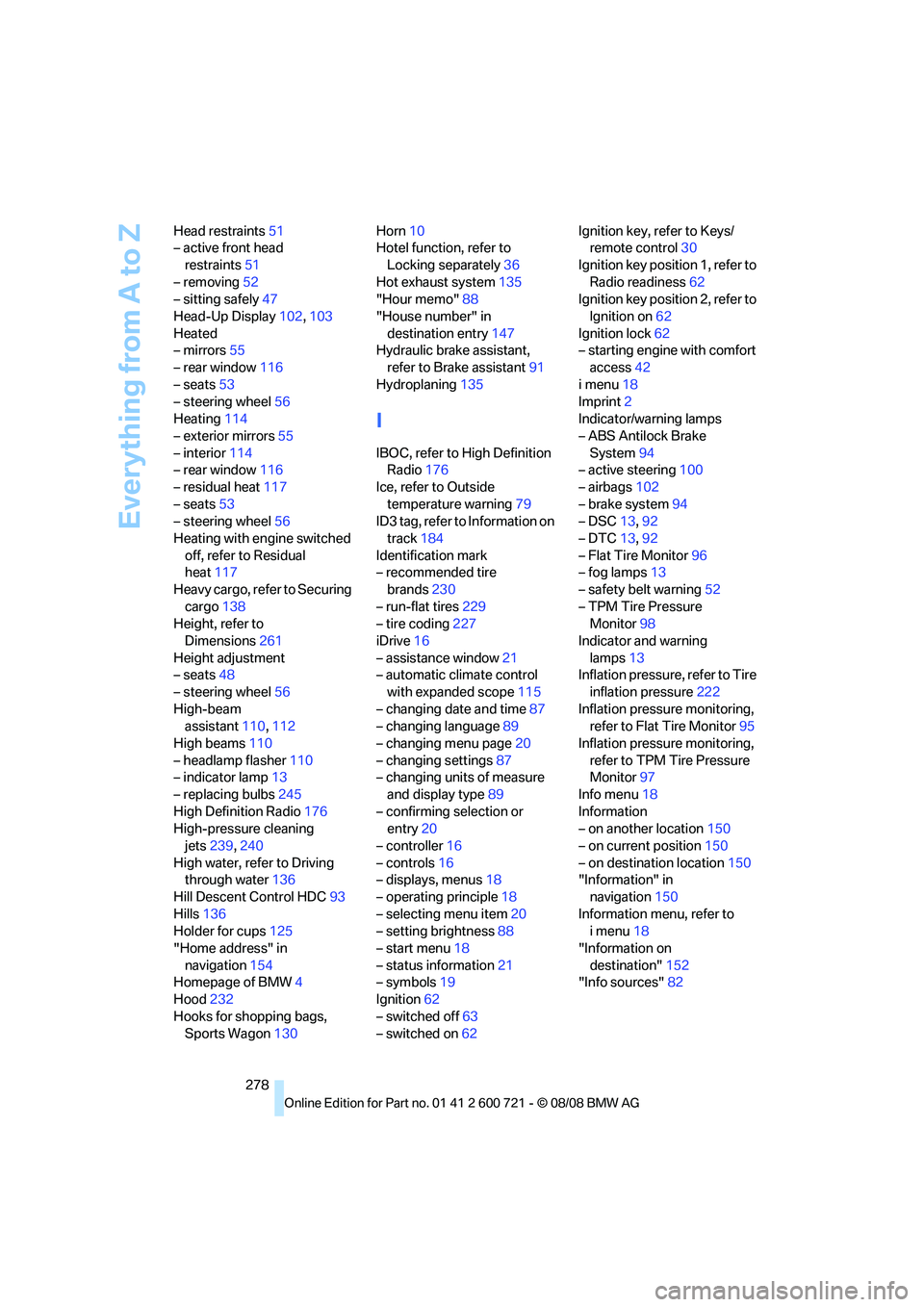
278 Head restraints51
– active front head
restraints51
– removing52
– sitting safely47
Head-Up Display102,103
Heated
– mirrors55
– rear window116
– seats53
– steering wheel56
Heating114
– exterior mirrors55
– interior114
– rear window116
– residual heat117
– seats53
– steering wheel56
Heating with engine switched
off, refer to Residual
heat117
Heavy cargo, refer to Securing
cargo138
Height, refer to
Dimensions261
Height adjustment
– seats48
– steering wheel56
High-beam
assistant110,112
High beams110
– headlamp flasher110
– indicator lamp13
– replacing bulbs245
High Definition Radio176
High-pressure cleaning
jets239,240
High water, refer to Driving
through water136
Hill Descent Control HDC93
Hills136
Holder for cups125
"Home address" in
navigation154
Homepage of BMW4
Hood232
Hooks for shopping bags,
Sports Wagon130Horn10
Hotel function, refer to
Locking separately36
Hot exhaust system135
"Hour memo"88
"House number" in
destination entry
147
Hydraulic brake assistant,
refer to Brake assistant91
Hydroplaning135
I
IBOC, refer to High Definition
Radio176
Ice, refer to Outside
temperature warning79
ID3 tag, refer to Information on
track184
Identification mark
– recommended tire
brands230
– run-flat tires229
– tire coding227
iDrive16
– assistance window21
– automatic climate control
with expanded scope115
– changing date and time87
– changing language89
– changing menu page20
– changing settings87
– changing units of measure
and display type89
– confirming selection or
entry20
– controller16
– controls16
– displays, menus18
– operating principle18
– selecting menu item20
– setting brightness88
– start menu18
– status information21
– symbols19
Ignition62
– switched off63
– switched on62Ignition key, refer to Keys/
remote control30
Ignition key position 1, refer to
Radio readiness62
Ignition key position 2, refer to
Ignition on62
Ignition lock62
– starting engine with comfort
access42
i menu18
Imprint2
Indicator/warning lamps
– ABS Antilock Brake
System94
– active steering100
– airbags102
– brake system94
– DSC13,92
– DTC13,92
– Flat Tire Monitor96
– fog lamps
13
– safety belt warning52
– TPM Tire Pressure
Monitor98
Indicator and warning
lamps13
Inflation pressure, refer to Tire
inflation pressure222
Inflation pressure monitoring,
refer to Flat Tire Monitor95
Inflation pressure monitoring,
refer to TPM Tire Pressure
Monitor97
Info menu18
Information
– on another location150
– on current position150
– on destination location150
"Information" in
navigation150
Information menu, refer to
imenu18
"Information on
destination"152
"Info sources"82