Fuel BMW 545I SEDAN 2005 E60 User Guide
[x] Cancel search | Manufacturer: BMW, Model Year: 2005, Model line: 545I SEDAN, Model: BMW 545I SEDAN 2005 E60Pages: 221, PDF Size: 8.19 MB
Page 72 of 221
Controls
71Reference
At a glance
Driving tips
Communication
Navigation
Entertainment
Mobility
>Distance to destination:
>Entering a distance manually in the com-
puter, see below.
>Entering a destination in the navigation
system
*, refer to page115.
>Average speed
>Average fuel consumption
Trip computer*
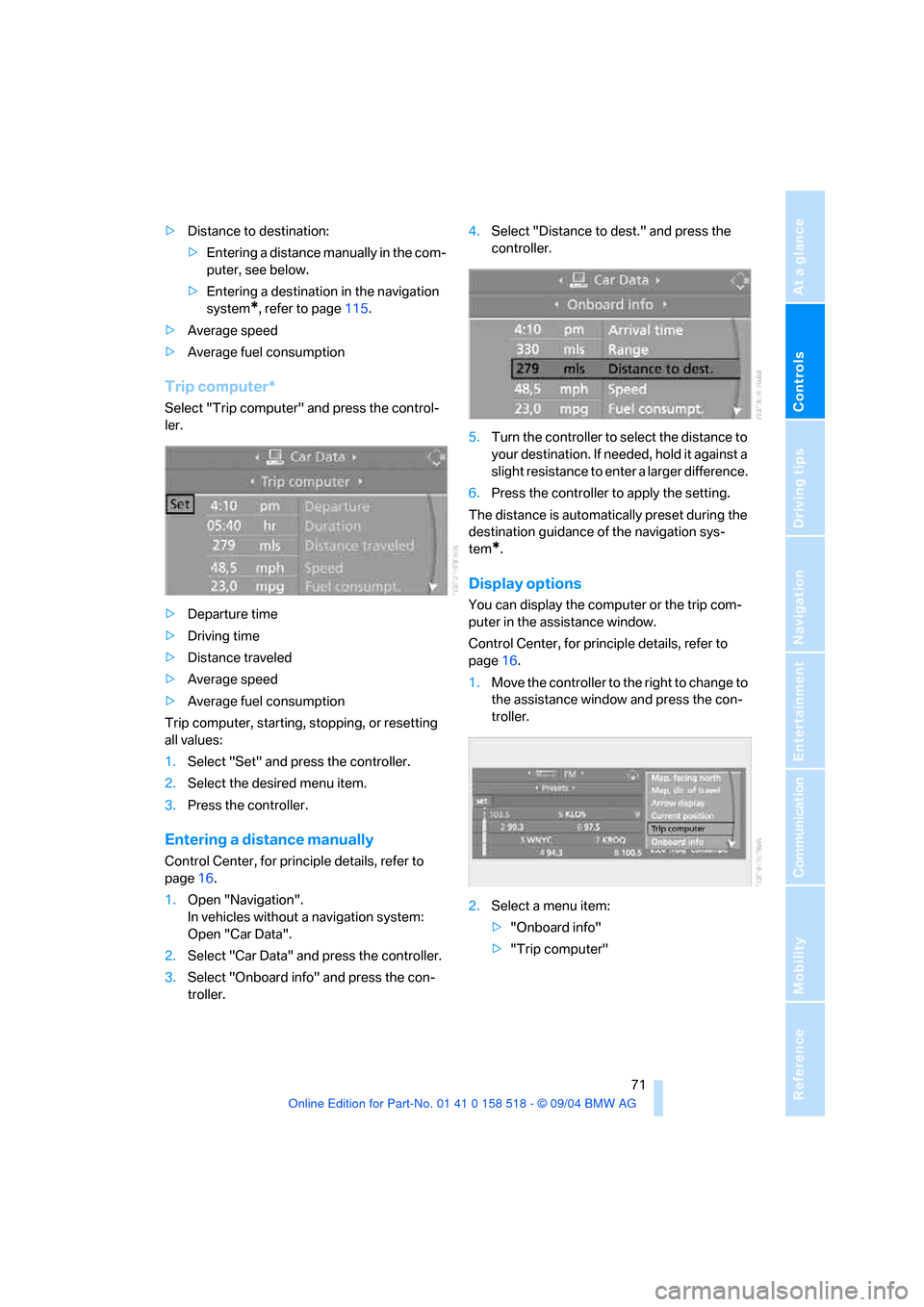
Select "Trip computer" and press the control-
ler.
>Departure time
>Driving time
>Distance traveled
>Average speed
>Average fuel consumption
Trip computer, starting, stopping, or resetting
all values:
1.Select "Set" and press the controller.
2.Select the desired menu item.
3.Press the controller.
Entering a distance manually
Control Center, for principle details, refer to
page16.
1.Open "Navigation".
In vehicles without a navigation system:
Open "Car Data".
2.Select "Car Data" and press the controller.
3.Select "Onboard info" and press the con-
troller.4.Select "Distance to dest." and press the
controller.
5.Turn the controller to select the distance to
your destination. If needed, hold it against a
slight resistance to enter a larger difference.
6.Press the controller to apply the setting.
The distance is automatically preset during the
destination guidance of the navigation sys-
tem
*.
Display options
You can display the computer or the trip com-
puter in the assistance window.
Control Center, for principle details, refer to
page16.
1.Move the controller to the right to change to
the assistance window and press the con-
troller.
2.Select a menu item:
>"Onboard info"
>"Trip computer"
Page 153 of 221
Telephoning
152
Telephoning
Safety notes
For your own safety
A car phone makes life more convenient in
many ways, and can even save lives in an emer-
gency. While you should consult your portable
phone's separate Owner's Manual for a detailed
description of safety precautions and informa-
tion, we request that you direct your particular
attention to the following:
Adjustments
To avoid posing a danger to yourself and
other road users, never adjust the system
settings unless your vehicle is stationary.<
Using the phone in your vehicle
Using a portable phone to make and
receive calls while driving is already illegal
in many countries in the world. Always use your
hands-free system, or stop your vehicle in an
area where you will not pose a safety hazard to
other road users.<
Vehicles and portable phones
Do not use your portable phone from
within a garage, or near an open hood.
The air in these areas could contain fuel vapors,
and the portable phone might generate sparks
that could cause fires.
This same precaution applies to open luggage
compartment lids on vehicles equipped for
operation using natural gas or hydrogen, and to
all vehicles with luggage compartment-
mounted batteries.<
Antenna
When using the portable phone, ensure
that all persons in the area are at least
20 in/50 cm from the antenna. Do not use the
portable phone when the antenna is damaged.
Contact between your skin and a damaged
antenna can result in minor burns.If the antenna is damaged, have it replaced
immediately.<
Special environmental conditions
Always switch off your portable phone in
areas where blasting work is being con-
ducted with explosives. The phone signals
could potentially act as a high-frequency trans-
mitter and set off explosions.
Always switch off your portable phone in areas
where an increased explosion danger is
present. This category includes service stations
along with fuel and chemical storage depots,
etc., and all areas in which the air can contain
fuel, chemicals or metal particles. Under these
conditions, your portable phone could conceiv-
ably generate sparks that could lead to a fire or
explosion. Always observe all legal regulations
governing the use of portable phones in the
vicinity of service stations, chemical factories
and other areas where an explosion potential
exists. Never use your portable phone in air-
craft; do not use this portable phone in hospi-
tals, care centers or at other locations where
medical equipment may be in operation, such
as accident sites.
Your service provider can furnish you with more
detailed information on legal regulations gov-
erning the use of your phone.<
Medical equipment
Portable phones can generate interfer-
ence capable of preventing hearing aids
and cardiac pacemakers from operating cor-
rectly. If you or any occupant of the vehicle will
be using such equipment, consult a physician
or the manufacturer of the equipment to deter-
mine whether it is adequately shielded against
high-frequency energy.<
Batteries
Never attempt to dismantle your portable
phone or its battery. Use only approved
battery types – the wrong battery can destroy
Page 168 of 221
Mobility
This section helps you maintain your
mobility by supplying important information
on vital topics including fuels and lubricants,
wheels and tires, service, maintenance and
breakdown assistance.
Mobility
Page 169 of 221
Refueling
168
Refueling
Always switch off the engine before refu-
eling. If you do not, fuel cannot be dis-
pensed into the tank and a message on the
Control Display will appear.<
Always observe all applicable precautions
and regulations when handling fuels.
Never carry spare fuel containers in your vehi-
cle. Whether empty or full, these containers can
leak, cause an explosion, and lead to fire in the
event of a collision.<
Fuel filler door
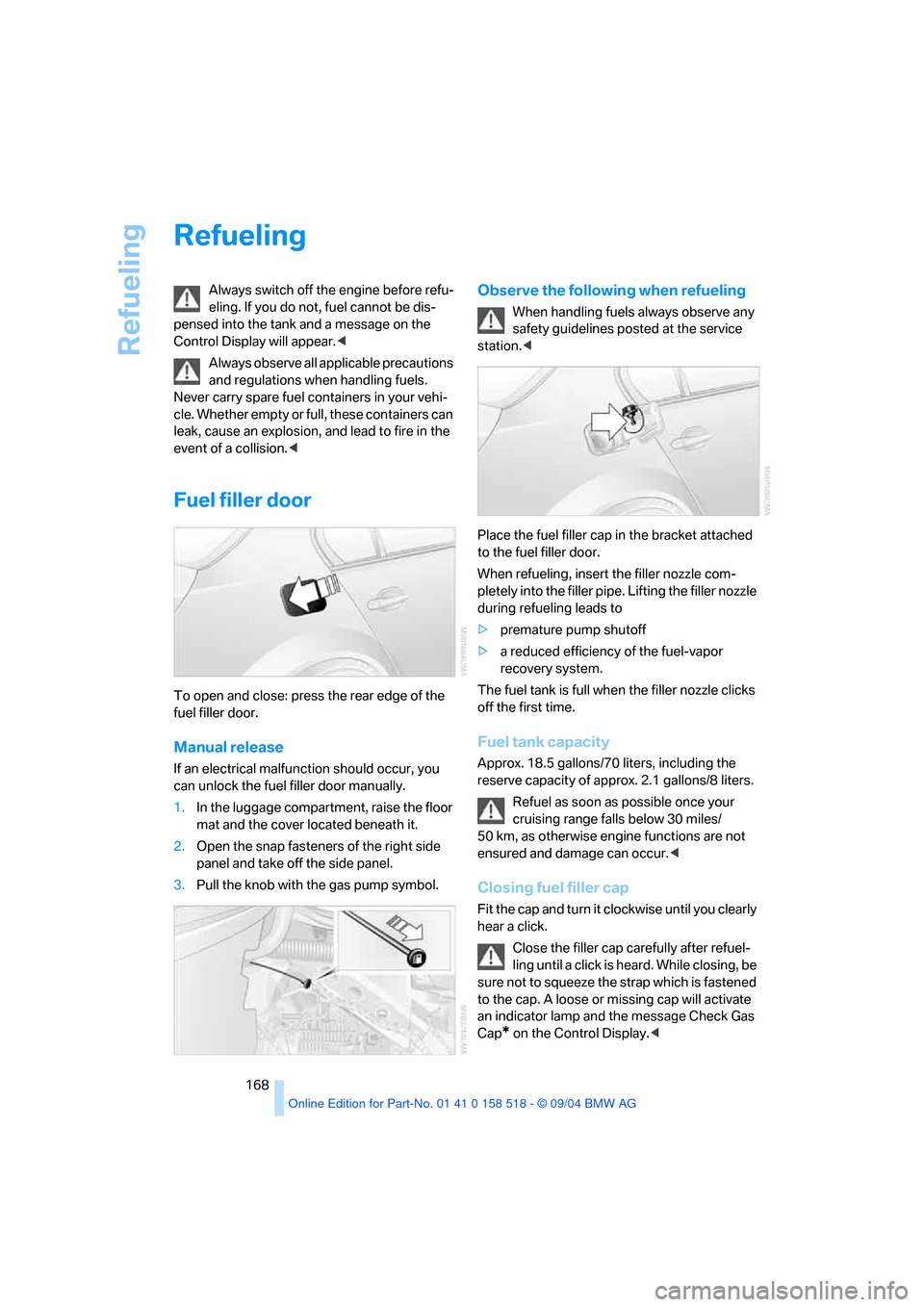
To open and close: press the rear edge of the
fuel filler door.
Manual release
If an electrical malfunction should occur, you
can unlock the fuel filler door manually.
1.In the luggage compartment, raise the floor
mat and the cover located beneath it.
2.Open the snap fasteners of the right side
panel and take off the side panel.
3.Pull the knob with the gas pump symbol.
Observe the following when refueling
When handling fuels always observe any
safety guidelines posted at the service
station.<
Place the fuel filler cap in the bracket attached
to the fuel filler door.
When refueling, insert the filler nozzle com-
pletely into the filler pipe. Lifting the filler nozzle
during refueling leads to
>premature pump shutoff
>a reduced efficiency of the fuel-vapor
recovery system.
The fuel tank is full when the filler nozzle clicks
off the first time.
Fuel tank capacity
Approx. 18.5 gallons/70 liters, including the
reserve capacity of approx. 2.1 gallons/8 liters.
Refuel as soon as possible once your
cruising range falls below 30 miles/
50 km, as otherwise engine functions are not
ensured and damage can occur.<
Closing fuel filler cap
Fit the cap and turn it clockwise until you clearly
hear a click.
Close the filler cap carefully after refuel-
ling until a click is heard. While closing, be
sure not to squeeze the strap which is fastened
to the cap. A loose or missing cap will activate
an indicator lamp and the message Check Gas
Cap
* on the Control Display.<
Page 170 of 221
Mobility
169Reference
At a glance
Controls
Driving tips
Communication
Navigation
Entertainment
Fuel specifications
The engine uses lead-free gasoline only.
Required fuel
Premium Unleaded Gasoline
The minimum octane rating is 91.
If you use gasoline with this minimum octane
rating, the engine may produce knocking
sounds when starting at high outside tempera-
tures. This has no affect on the engine life.
Minimum octane rating corresponds to the Anti
Knock Index AKI and is determined according
to the so-called (R+M)/2 method.
Do not use leaded gasoline, as otherwise
the lambda probe and catalytic converter
will be permanently damaged.<
Use high-quality brands
Field experience has indicated significant dif-
ferences in fuel quality: volatility, composition,
additives, etc., among gasolines offered for sale
in the United States and Canada. Fuels contain-
ing up to and including 10 % ethanol or other
oxygenates with up to 2.8 % oxygen by weight,
that is, 15 % MTBE or 3% methanol plus an
equivalent amount of co-solvent, will not void
the applicable warranties with respect to
defects in materials or workmanship.
The use of poor-quality fuels may result in
drivability, starting and stalling problems,
especially under certain environmental condi-
tions such as high ambient temperature and
high altitude.
Should you encounter drivability problems
which you suspect could be related to the fuel
you are using, we recommend that you respond
by switching to a recognized high-quality
brand.
Failure to comply with these recommendations
may also result in unscheduled maintenance.<
Page 176 of 221
Mobility
175Reference
At a glance
Controls
Driving tips
Communication
Navigation
Entertainment
approved units – these differences could lead to
body contact, and with it the risk of severe acci-
dents. If non-approved wheels and tires are
used, BMW cannot evaluate their suitability,
and therefore cannot be held liable for driving
safety.<
You can inquire about the right wheel/tire com-
bination at your BMW center.
The correct combination of wheels and tires is
another vital factor in ensuring reliable opera-
tion of various vehicle systems such as ABS
and DSC.
To maintain good handling and vehicle
response, use only tires of a single tread config-
uration from a single manufacturer. After a flat
tire, have the original wheel and tire combina-
tion remounted on the vehicle as soon as possi-
ble.
Recommended tire brands
BMW tests certain tire brands for each tire size,
classifies them as road-safe and approves
them. Consult your BMW center for more infor-
mation.
Observe any country-specific regulations, e.g.
on making a corresponding entry in the vehicle
documents.
The factory-mounted tires have been specially
selected to provide optimized performance
when installed on yo ur vehicle; if pro perly cared
for, they will provide a combination of safety and
excellent ride comfort.
Run-flat tires
When mounting new tires or changing from
summer tires to winter tires or vice versa, use
run-flat tires because there is no spare tire in
case of a flat. Your BMW center will be glad to
advise you.
For safety reasons, BMW recommends
that you do not have damaged run-flat
tires repaired; they should be replaced.<
Special characteristics of winter tires
BMW recommends winter tires for use in cold
winter driving conditions. Although all-season
M+S tires provide better winter traction than
summer tires, they generally fail to provide the
same levels of cold-weather performance as
winter tires.
Pay attention to speed
Do not exceed the maximum permissible
speed for the winter tires, otherwise tire
damage may occur, which can result in acci-
dents.<
Storage
Always store wheels and tires in a cool, dry
place with as little exposure to light as possible.
Always protect tires against all contact with oil,
grease and fuels. Do not exceed the maximum
tire inflation pressure indicated on the side wall
of the tire.
Snow chains*
BMW only tests certain fine-link snow chains,
classifies them as road-safe and approves
them. Consult your BMW center for more infor-
mation. BMW recommends using these
approved, fine-link snow chains.
Use is only permitted in pairs, with winter tires
on the rear wheels.
Observe the manufacturer's instructions when
mounting snow chains. Do not exceed a speed
of 30 mph/50 km/h with the chains mounted.
After snow chains are mounted, do not
initialize the Flat Tire Monitor.
When driving with snow chains, it can be useful
to activate the DTC temporarily, refer to
page78.<
Page 182 of 221
Mobility
181Reference
At a glance
Controls
Driving tips
Communication
Navigation
Entertainment
OBD Socket
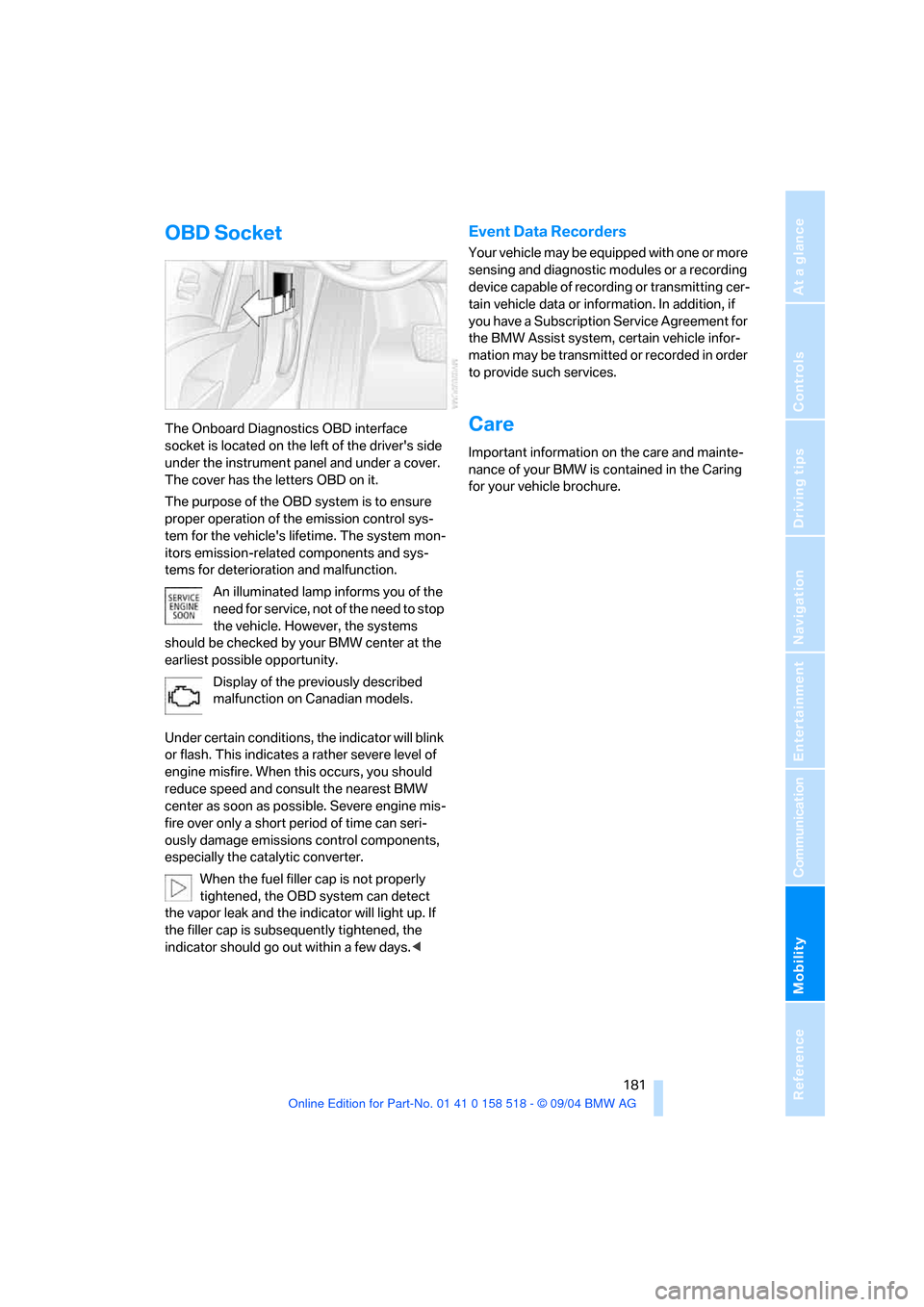
The Onboard Diagnostics OBD interface
socket is located on the left of the driver's side
under the instrument panel and under a cover.
The cover has the letters OBD on it.
The purpose of the OBD system is to ensure
proper operation of the emission control sys-
tem for the vehicle's lifetime. The system mon-
itors emission-related components and sys-
tems for deterioration and malfunction.
An illuminated lamp informs you of the
need for service, not of the need to stop
the vehicle. However, the systems
should be checked by your BMW center at the
earliest possible opportunity.
Display of the previously described
malfunction on Canadian models.
Under certain conditions, the indicator will blink
or flash. This indicates a rather severe level of
engine misfire. When this occurs, you should
reduce speed and consult the nearest BMW
center as soon as possible. Severe engine mis-
fire over only a short period of time can seri-
ously damage emissions control components,
especially the catalytic converter.
When the fuel filler cap is not properly
tightened, the OBD system can detect
the vapor leak and the indicator will light up. If
the filler cap is subsequently tightened, the
indicator should go out within a few days.<
Event Data Recorders
Your vehicle may be equipped with one or more
sensing and diagnostic modules or a recording
device capable of recording or transmitting cer-
tain vehicle data or information. In addition, if
you have a Subscription Service Agreement for
the BMW Assist system, certain vehicle infor-
mation may be transmitted or recorded in order
to provide such services.
Care
Important information on the care and mainte-
nance of your BMW is contained in the Caring
for your vehicle brochure.
Page 199 of 221
Technical data
198
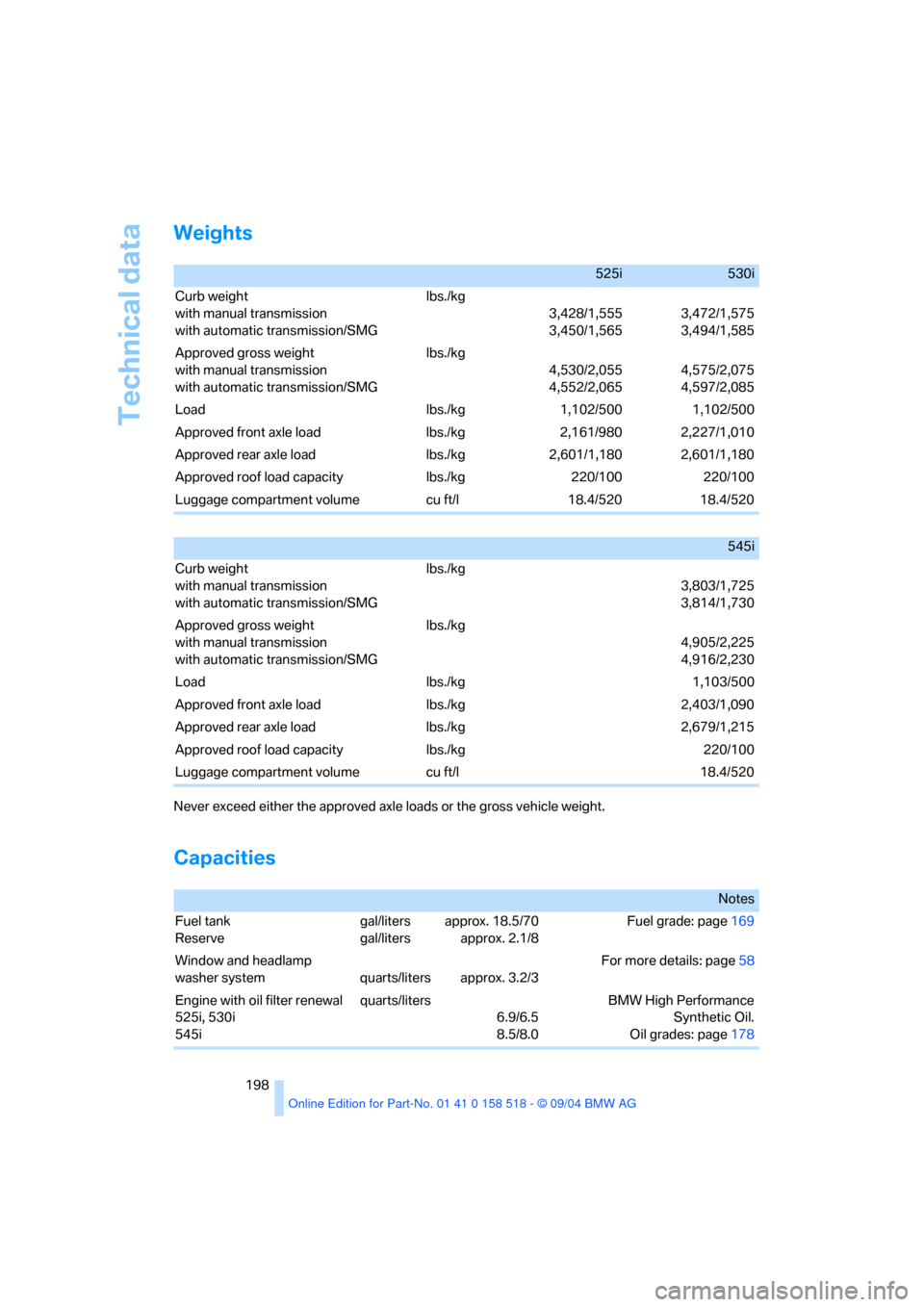
Weights
Never exceed either the approved axle loads or the gross vehicle weight.
Capacities
525i530i
Curb weight
with manual transmission
with automatic transmission/SMG lbs./kg
3,428/1,555
3,450/1,5653,472/1,575
3,494/1,585
Approved gross weight
with manual transmission
with automatic transmission/SMG lbs./kg
4,530/2,055
4,552/2,0654,575/2,075
4,597/2,085
Load lbs./kg 1,102/500 1,102/500
Approved front axle load lbs./kg 2,161/980 2,227/1,010
Approved rear axle load lbs./kg 2,601/1,180 2,601/1,180
Approved roof load capacity lbs./kg 220/100 220/100
Luggage compartment volume cu ft/l 18.4/520 18.4/520
545i
Curb weight
with manual transmission
with automatic transmission/SMG lbs./kg
3,803/1,725
3,814/1,730
Approved gross weight
with manual transmission
with automatic transmission/SMG lbs./kg
4,905/2,225
4,916/2,230
Load lbs./kg 1,103/500
Approved front axle load lbs./kg 2,403/1,090
Approved rear axle load lbs./kg 2,679/1,215
Approved roof load capacity lbs./kg 220/100
Luggage compartment volume cu ft/l 18.4/520
Notes
Fuel tank
Reserve gal/liters
gal/litersapprox. 18.5/70
approx. 2.1/8Fuel grade: page169
Window and headlamp
washer system quarts/liters approx. 3.2/3For more details: page58
Engine with oil filter renewal
525i, 530i
545iquarts/liters
6.9/6.5
8.5/8.0BMW High Performance
Synthetic Oil.
Oil grades: page178
Page 203 of 221
Everything from A to Z
202
Everything from A to Z
Index
"..." Identifies Control Display
texts used to select
individual functions,
pointing out where these are
located.
A
ABS Antilock Brake
System77
– indicator lamp79
– malfunction79
ACC, refer to Active cruise
control59
Acceleration assistant for
SMG Sequential manual
transmission55
Accessories6
Acoustic Signal, refer to
Check Control67
Activated-charcoal filter94
"Activation time" for
independent ventilation94
Active cruise control59
– indicator lamp60
– malfunction64
– selecting distance62
– sensor, refer to
Malfunction64
Active head restraints,
front42
Active roll stabilization79
Active seat44
Active seat ventilation44
Active steering81
– initializing system81
– warning lamp81
Adaptive Head Light88
"Add digits" for portable
phone155
"Address book" for
navigation120Address for navigation
– deleting121
– entering115
– selecting121
– storing current position120
"Add to destination list"117
Adhesive bandages, refer to
First-aid kit189
Adjusting active backrest
width40
Adjusting temperature in
upper body region93
Adjusting the temperature
with automatic climate
control91
Adjusting the thigh support39
Adjusting the tone during
audio operation, refer to
Tone control133
Adjustment in audio mode
– front-to-rear134
– right/left balance134
"After opening door"41
"After unlocking"41
Airbags83
– sitting safely38
– warning lamp84
Air circulation, refer to Air
recirculation91
Air distribution
– automatic91
– manual92
Airing, refer to Ventilation93
Air recirculation
– AUC Automatic recircu-
lated-air control91
– recirculated-air mode91
"Air recirculation on / off"46
Air vent outlets of automatic
climate control90
Air vents90
– refer to Ventilation93
Air volume91AKI, refer to Fuel
specifications169
Alarm system33
– avoiding unintentional
alarms34
– interior motion sensor34
– switching off the alarm34
– switching off the tilt alarm
sensor and interior motion
sensor34
– tilt alarm sensor34
All around the center
console14
All around the steering
wheel10
"All channels"143
"All doors"29
All-season tires, refer to
Winter tires175
Altering stretch of road127
"AM", reception
range133,138
Antenna for portable
phone152
Antifreeze
– coolant178
– washer fluid58
Antilock Brake System
ABS77
– indicator lamp79
Anti-theft alarm system, refer
to Alarm system33
Anti-theft system29
Anti-trapping mechanism
– glass sunroof, electric36
– power windows35
Approved axle loads, refer to
Weights198
Approved gross vehicle
weight, refer to Weights198
Armrest, refer to Center
armrest
– rear100
Page 204 of 221
Reference 203
At a glance
Controls
Driving tips
Communica-
Navigation
Entertainment
Mobility
Arrival time
– refer to Computer70
– refer to Starting destination
guidance124
"Arrow display" during
navigation126
Ashtray
– front99
– rear100
Assist, refer to BMW
Assist161
Assistance systems, refer to
Driving stability control
systems77
Assistance window20
AUC Automatic recirculated-
air control91
"Audio"134
Audio132
– controls132
– switching on/off132
– tone control133
– volume133
Automatic
– air distribution91
– air volume91
– garage door opener96
– headlamp control87
– service notification162
– steering wheel adjustment,
refer to Easy entry/exit45
– storing stations139
Automatic car washes108
– also refer to Caring for your
vehicle brochure
Automatic climate control90
– automatic air distribution91
– settings using the Control
Center92
– switching off92
Automatic curb monitor41
"Automatic programs"93
Automatic recirculated-air
control AUC91
Automatic station search139Automatic transmission with
Steptronic55
– convenience start52
– interlock51
– kick-down56
– selector lever interlock55
– shiftlock55
– sport program56
– starting the engine52
– tow starting192
– tow-starting192
"Automatic ventilation"94
AUTO program for automatic
climate control91
"Autostore" on the radio140
Average fuel consumption70
– setting the units73
Average speed, refer to
Computer70
"Avoid ferries" for
navigation123
Avoid freeways for
navigation122
"Avoid highways" for
navigation122
Avoiding unintentional
alarms34
"Avoid tollroads" for
navigation123
Axle loads, refer to
Weights198
"A - Z"155
B
Backrests, refer to Seats38
Backrest width adjustment39
Backup lamps, refer to
Reverse gear53
– replacing bulbs184
Backup lamps, refer to Tail
lamps184
Balance, tone control134
Bandages, refer to First-aid
kit189
Bass, tone control134Battery, refer to Vehicle
battery187
– jump starting190
Being towed191
Belts, refer to Safety belts42
Beverage holder, refer to Cup
holders99
Black ice, refer to Ice
warning65
Blower, refer to Air volume91
BMW Assist161
– enabling161
– services offered162
BMW maintenance
system180
"BMW Service"163
"BMW Service settings"162
Bottle holder, refer to Cup
holders99
Brake Assistant, refer to DBC
Dynamic Brake Control77
Brake fluid179
– warning lamp179
Brake Force Display82
Brake lamps
– Brake Force Display82
– replacing bulbs184
Brake pads179
– breaking-in106
Brake rotors108
Brakes
– ABS Antilock Brake
System77
– brake fluid179
– Brake Force Display82
– brake pads179
– breaking-in106
– handbrake52
– warning lamps13
Brake system106,179
– brake fluid level179
– brake pads106,179
– breaking-in106
– disc brakes108
– warning lamp79,179