steering wheel BMW 550I 2006 Owner's Guide
[x] Cancel search | Manufacturer: BMW, Model Year: 2006, Model line: 550I, Model: BMW 550I 2006Pages: 248, PDF Size: 8.58 MB
Page 175 of 248
Telephoning
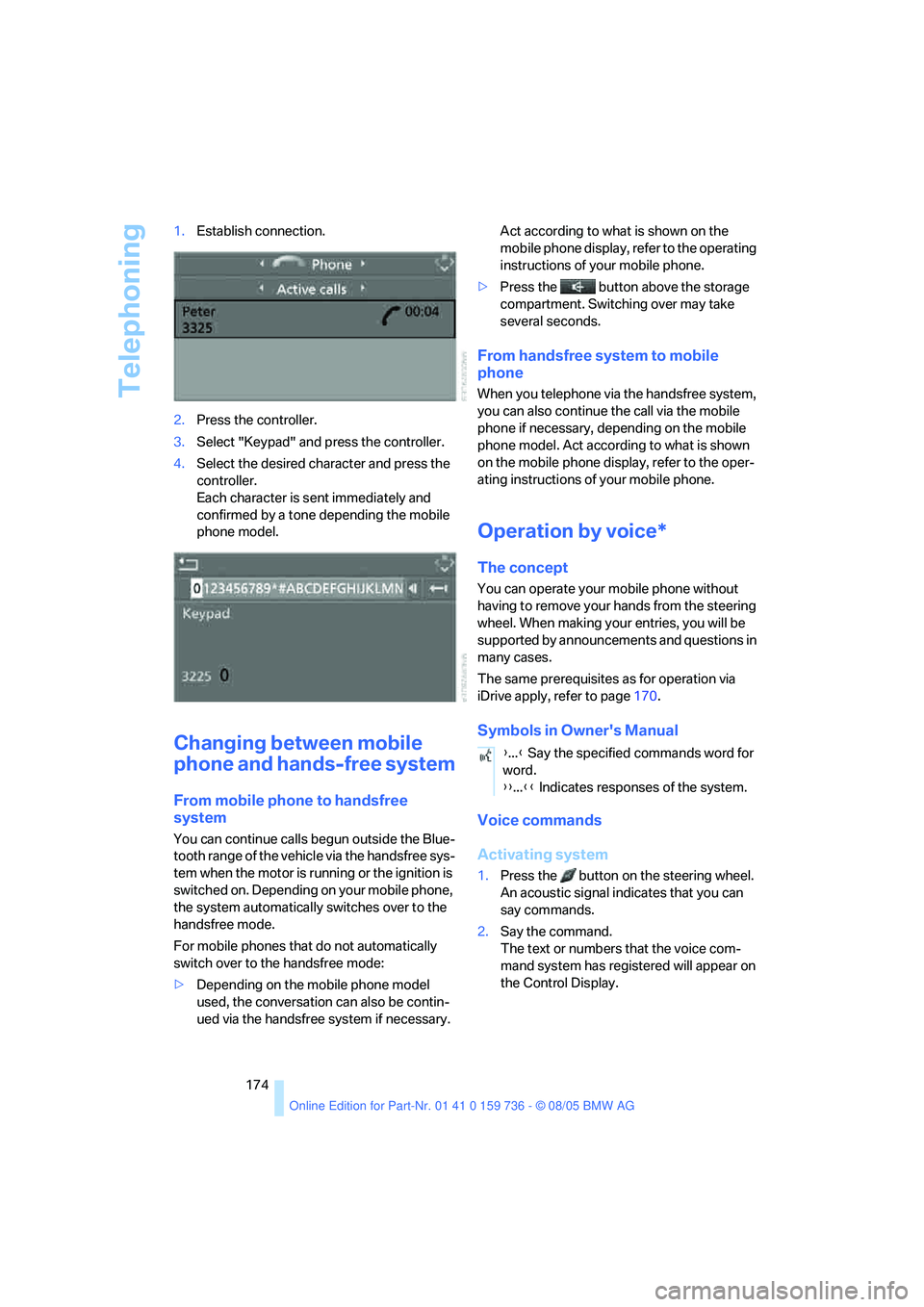
174 1.Establish connection.
2.Press the controller.
3.Select "Keypad" and press the controller.
4.Select the desired character
and press the
controller.
Each character is sent immediately and
confirmed by a tone depending the mobile
phone model.
Changing between mobile
phone and hands-free system
From mobile phone to handsfree
system
You can continue calls begun outside the Blue-
tooth range of the vehicle via the handsfree sys-
tem when the motor is running or the ignition is
switched on. Depending on your mobile phone,
the system automatically switches over to the
handsfree mode.
For mobile phones that do not automatically
switch over to the handsfree mode:
>Depending on the mobile phone model
used, the conversation can also be contin-
ued via the handsfree system if necessary. Act according to what is shown on the
mobile phone display, refer to the operating
instructions of your mobile phone.
>Press the button above the storage
compartment. Switching over may take
several seconds.
From handsfree system to mobile
phone
When you telephone via the handsfree system,
you can also continue the call via the mobile
phone if necessary, depending on the mobile
phone model. Act according to what is shown
on the mobile phone display, refer to the oper-
ating instructions of your mobile phone.
Operation by voice*
The concept
You can operate your mobile phone without
having to remove your hands from the steering
wheel. When making your entries, you will be
supported by announcements and questions in
many cases.
The same prerequisites as for operation via
iDrive apply, refer to page170.
Symbols in Owner's Manual
Voice commands
Activating system
1.Press the button on the steering wheel.
An acoustic signal indicates that you can
say commands.
2.Say the command.
The text or numbers that the voice com-
mand system has registered will appear on
the Control Display.
{...} Say the specified commands word for
word.
{{...}} Indicates responses of the system.
Page 176 of 248
175
Entertainment
Reference
At a glance
Controls
Driving tips Communications
Navigation
Mobility
Ending/canceling operation by voice
Press the button on the steering wheel
or
In dialogs where text is spoken, not a command,
e.g. a name, canceling is only possible using the
button on the steering wheel.
Having possible commands read aloud
The system understands default commands
that must be spoken word for word.
You can have the possible commands spoken
by the system at any point:
Using alternative commands
There are often a number of commands to run a
function, e.g.:
The system recognizes digits from zero to nine.
You can say each digit individually or group
them into a sequence to accelerate the input.{Cancel}.
{Help}
{Dial name} or {Name}.
Page 177 of 248
Telephoning
176
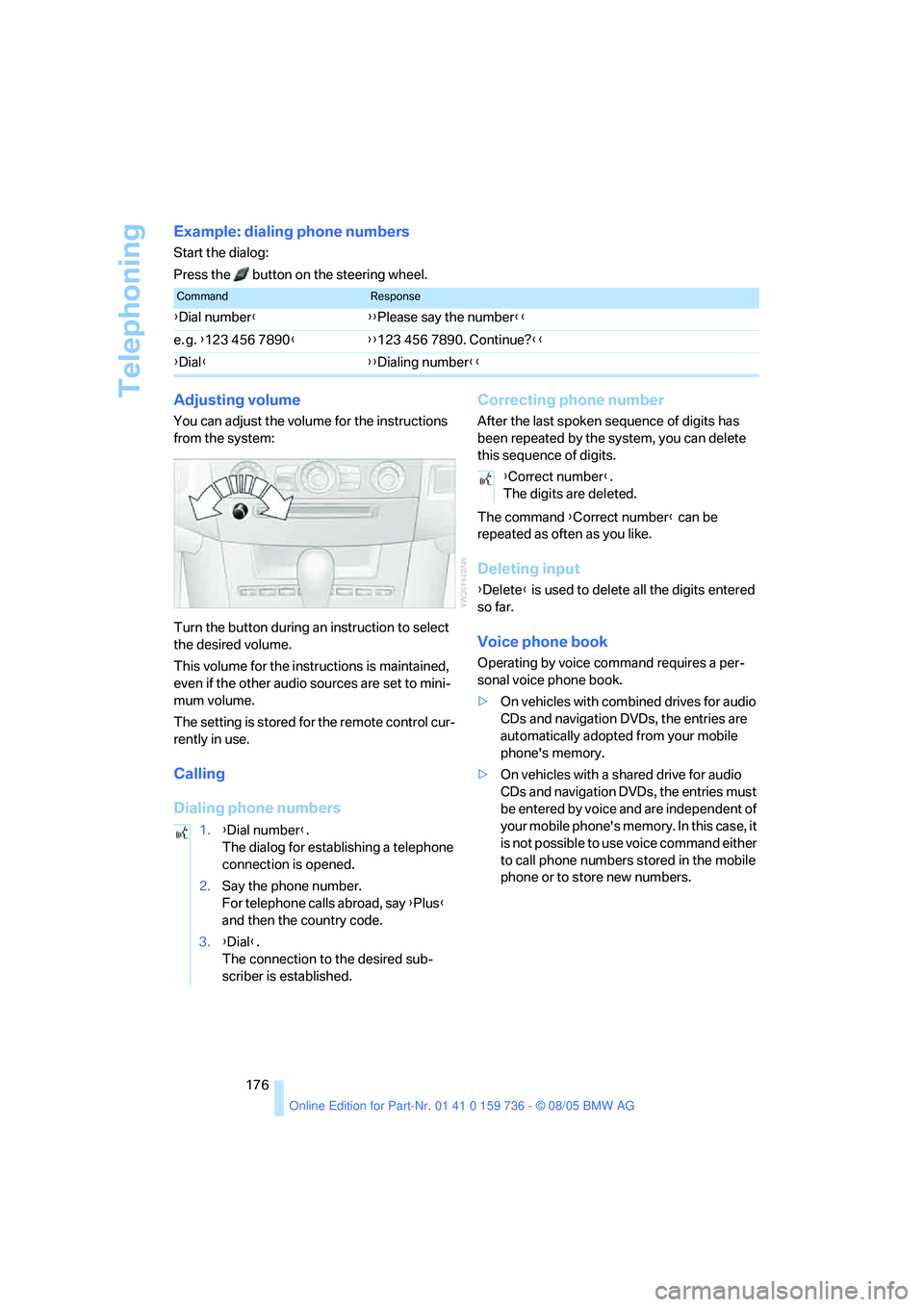
Example: dialing phone numbers
Start the dialog:
Press the button on the steering wheel.
Adjusting volume
You can adjust the volume for the instructions
from the system:
Turn the button during an instruction to select
the desired volume.
This volume for the instructions is maintained,
even if the other audio sources are set to mini-
mum volume.
The setting is stored for the remote control cur-
rently in use.
Calling
Dialing phone numbersCorrecting phone number
After the last spoken sequence of digits has
been repeated by the system, you can delete
this sequence of digits.
The command {Correct number} can be
repeated as often as you like.
Deleting input
{Delete} is used to delete all the digits entered
so far.
Voice phone book
Operating by voice command requires a per-
sonal voice phone book.
>On vehicles with combined drives for audio
CDs and navigation DVDs, the entries are
automatically adopted from your mobile
phone's memory.
>On vehicles with a shared drive for audio
CDs and navigation DVDs, the entries must
be entered by voice and are independent of
your mobile phone's memory. In this case, it
is not possible to use voice command either
to call phone numbers stored in the mobile
phone or to store new numbers.
CommandResponse
{Dial number}{{Please say the number}}
e. g. {123 456 7890}{{123 456 7890. Continue?}}
{Dial}{{Dialing number}}
1.{Dial number}.
The dialog for establishing a telephone
connection is opened.
2.Say the phone number.
For telephone calls abroad, say {Plus}
and then the country code.
3.{Dial}.
The connection to the desired sub-
scriber is established.
{Correct number}.
The digits are deleted.
Page 208 of 248
Mobility
207Reference
At a glance
Controls
Driving tips
Communications
Navigation
Entertainment
Changing wheels
Safety precautions in the event of a flat
tire or wheel change: park the vehicle as
far as possible from passing traffic and on solid
ground. Switch on the hazard warning flashers.
Lock the steering wheel in straight-ahead set-
ting of the wheels. Apply the handbrake and
engage first gear, reverse gear or selector lever
position P.
Have all vehicle occupants get out of the vehicle
and ensure that they remain outside the imme-
diate area in a safe place, such as behind a
guardrail.
If a warning triangle
* or portable hazard warning
lamp is required, set it up on the roadside at an
appropriate distance from the rear of the vehi-
cle. Comply with all safety guidelines and regu-
lations.
Change the wheel only on a level, firm surface
which is not slippery. The vehicle or the jack
could slip to the side if you attempt to raise the
vehicle on a soft or slippery surface such as
snow, ice, tiles, etc.
Position the jack on a firm support surface.
Do not use a wooden block or similar object as a
support base for the jack, as this would prevent
it from extending to its full support height and
reduce its load-carrying capacity.
To avoid serious or fatal injury: never lie under
the vehicle, and never start the engine while it is
supported by the jack.<
What you will need
To avoid rattling noises later on, note the posi-
tions of the tools before removing them, then
return them to their initial positions after com-
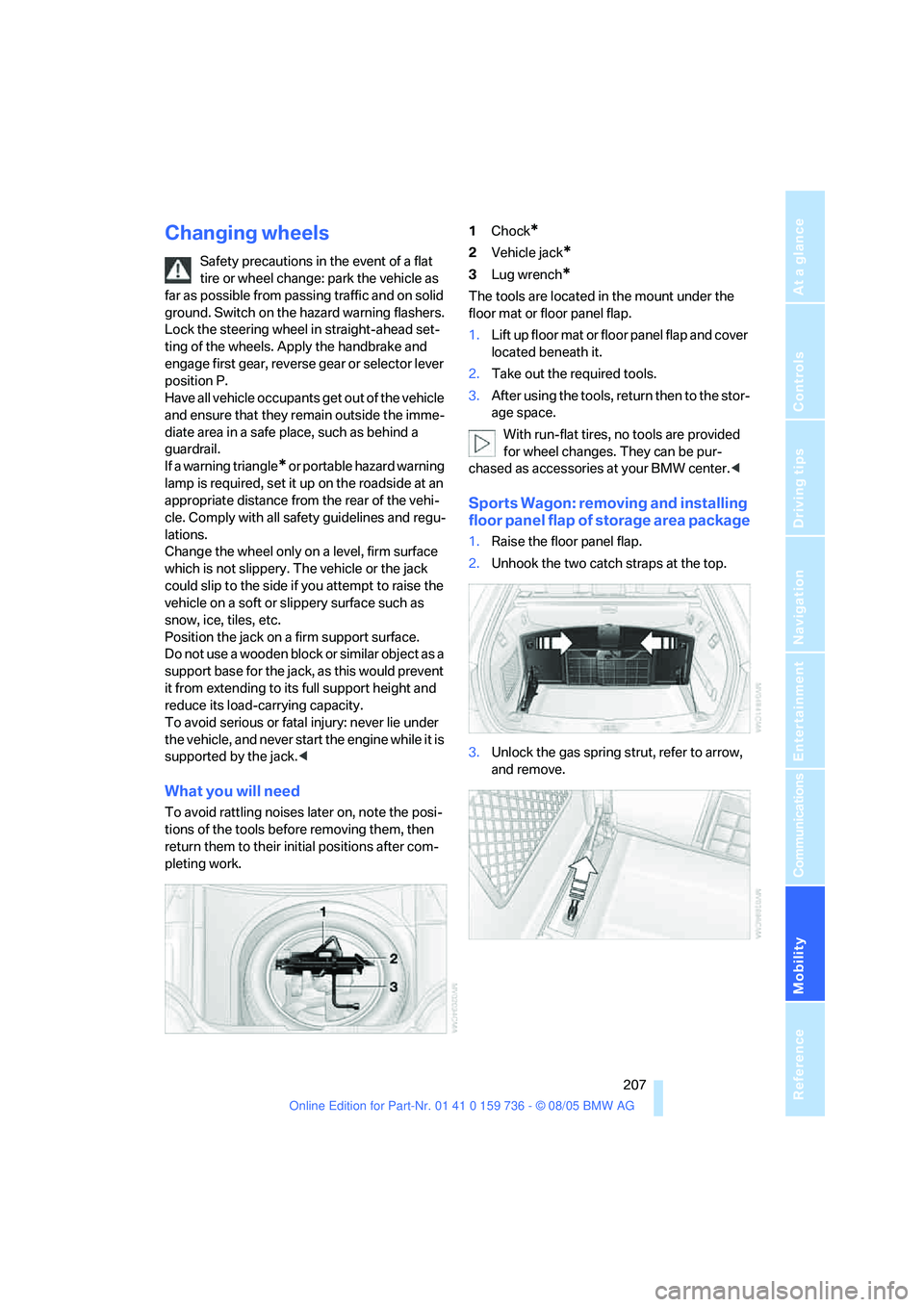
pleting work.1Chock
*
2Vehicle jack*
3Lug wrench*
The tools are located in the mount under the
floor mat or floor panel flap.
1.Lift up floor mat or floor panel flap and cover
located beneath it.
2.Take out the required tools.
3.After using the tools, return then to the stor-
age space.
With run-flat tires, no tools are provided
for wheel changes. They can be pur-
chased as accessories at your BMW center.<
Sports Wagon: removing and installing
floor panel flap of storage area package
1.Raise the floor panel flap.
2.Unhook the two catch straps at the top.
3.Unlock the gas spring strut, refer to arrow,
and remove.
Page 210 of 248
Mobility
209Reference
At a glance
Controls
Driving tips
Communications
Navigation
Entertainment
When you mount wheels other than Genu-
ine BMW light-alloy wheels, different lug
bolts may also be required.
4.Screw in the remaining lug bolts. Tighten all
the bolts securely in a diagonal pattern.
5.Lower the vehicle and remove the jack from
beneath the vehicle.
After mounting
1.Tighten the lug bolts in a diagonal pattern.
To ensure safety, always have the
lug bolts checked with a calibrated
torque wrench as soon as possible to
ensure that they are tightened to the speci-
fied torque. The tightening torque is
88.5 lb ft/120 Nm.<
2.When stowing the wheel and tools in the
vehicle, execute these steps in the reverse
order.
3.Check and correct the tire inflation pressure
at the earliest opportunity.
Protect valve stems and valve stem
seal caps against dirt and contamina-
tion. Dirt in valve stems is a frequent source
of gradual air loss.<
4.Initialize the Flat Tire Monitor, refer to
page88.
5.Replace the damaged tire as soon as possi-
ble and have the new wheel/tire balanced.
Driving with compact wheel
Drive reservedly and do not exceed a speed of
50 mph/80 km/h.
The driving characteristics change, for example
reduced track stability on braking, extended
braking distance, and altered self-steering
characteristics in the limit range. In conjunction
with winter tires, these characteristics are more
pronounced.
Only one compact wheel may be
mounted. You should re-equip with
wheels and tires of the original size as quickly as
possible.<
Vehicle battery
Battery care
The battery is 100 % maintenance-free, i.e., the
electrolyte will last for the life of the battery
when the vehicle is operated in a temperate cli-
mate. Your BMW center will be glad to advise in
all matters concerning the battery.
Charging battery
Only charge the battery in the vehicle via the
terminals in the engine compartment with the
engine off. Connections, refer to Jump starting
on page212.
Disposal
Have old batteries disposed of by your
BMW center or hand them in to a recy-
cling center. Maintain the battery in an upright
position for transport and storage. Always
restrain the battery to prevent it from tipping
over during transport.<
Power failure
After a temporary power loss, the functioning of
some equipment may be limited and require
reinitialization. Individual settings are also lost
and must be updated:
>Seat, mirror and steering wheel memory
The positions must be stored again, refer to
page45.
>Time and Date
The values must be updated, refer to
page80.
>Radio
Stations must be stored again if necessary,
refer to page150.
>Navigation system
Wait until the system starts, refer to
page141.
Page 215 of 248
Giving and receiving assistance
214 Sedan:
It is located in the toolkit in the luggage com-
partment lid, refer to page203.
Sports Wagon:
It is located in the toolkit behind the left side
panel in the cargo area, refer to page203.
Use only the tow fitting provided with the
vehicle and screw it all the way in. Use the
tow fitting for towing only on roads. Avoid lateral
loading of the tow fitting, e.g. do not lift the vehi-
cle by the tow fitting. Otherwise damage to the
tow fitting and the vehicle can occur.<
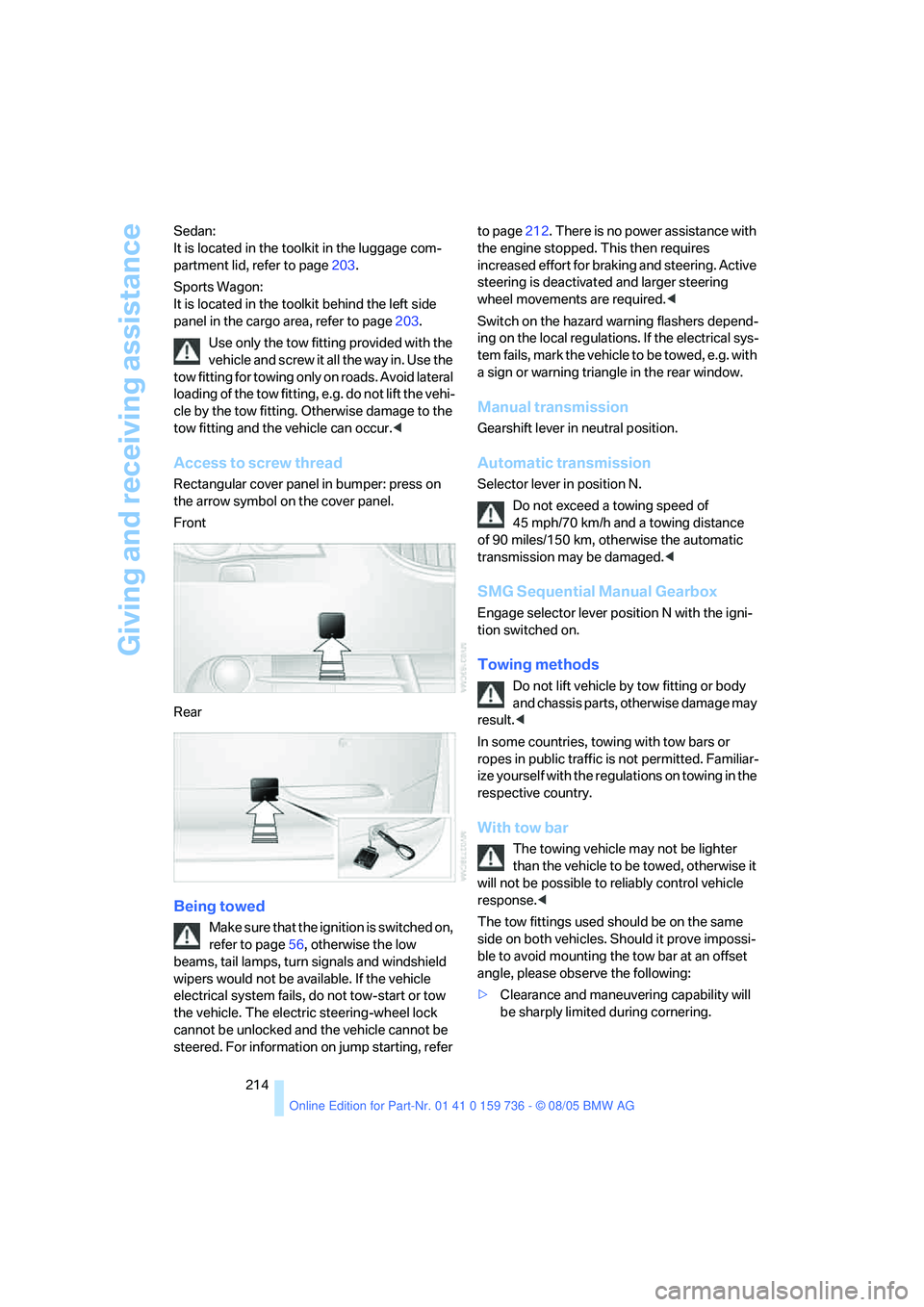
Access to screw thread
Rectangular cover panel in bumper: press on
the arrow symbol on the cover panel.
Front
Rear
Being towed
Make sure that the ignition is switched on,
refer to page56, otherwise the low
beams, tail lamps, turn signals and windshield
wipers would not be available. If the vehicle
electrical system fails, do not tow-start or tow
the vehicle. The electric steering-wheel lock
cannot be unlocked and the vehicle cannot be
steered. For information on jump starting, refer to page212. There is no power assistance with
the engine stopped. This then requires
increased effort for braking and steering. Active
steering is deactivated and larger steering
wheel movements are required.<
Switch on the hazard warning flashers depend-
ing on the local regulations. If the electrical sys-
tem fails, mark the vehicle to be towed, e.g. with
a sign or warning triangle in the rear window.
Manual transmission
Gearshift lever in neutral position.
Automatic transmission
Selector lever in position N.
Do not exceed a towing speed of
45 mph/70 km/h and a towing distance
of 90 miles/150 km, otherwise the automatic
transmission may be damaged.<
SMG Sequential Manual Gearbox
Engage selector lever position N with the igni-
tion switched on.
Towing methods
Do not lift vehicle by tow fitting or body
and chassis parts, otherwise damage may
result.<
In some countries, towing with tow bars or
ropes in public traffic is not permitted. Familiar-
ize yourself with the regulations on towing in the
respective country.
With tow bar
The towing vehicle may not be lighter
than the vehicle to be towed, otherwise it
will not be possible to reliably control vehicle
response.<
The tow fittings used should be on the same
side on both vehicles. Should it prove impossi-
ble to avoid mounting the tow bar at an offset
angle, please observe the following:
>Clearance and maneuvering capability will
be sharply limited during cornering.
Page 216 of 248
Mobility
215Reference
At a glance
Controls
Driving tips
Communications
Navigation
Entertainment
>When mounted at an angle, the tow bar will
exert lateral forces, tending to push the
vehicle sideways.
Only attach the tow bar to the tow fittings,
as attachment to other vehicle parts can
lead to damage.<
With tow rope
When starting off in the towing vehicle, make
sure that the tow rope is taut.
To avoid jerking and the associated
stresses on vehicle components when
towing, always use nylon ropes or nylon straps.
Only attach tow ropes to the tow fittings, as
attachment to other vehicle parts can lead to
damage.<
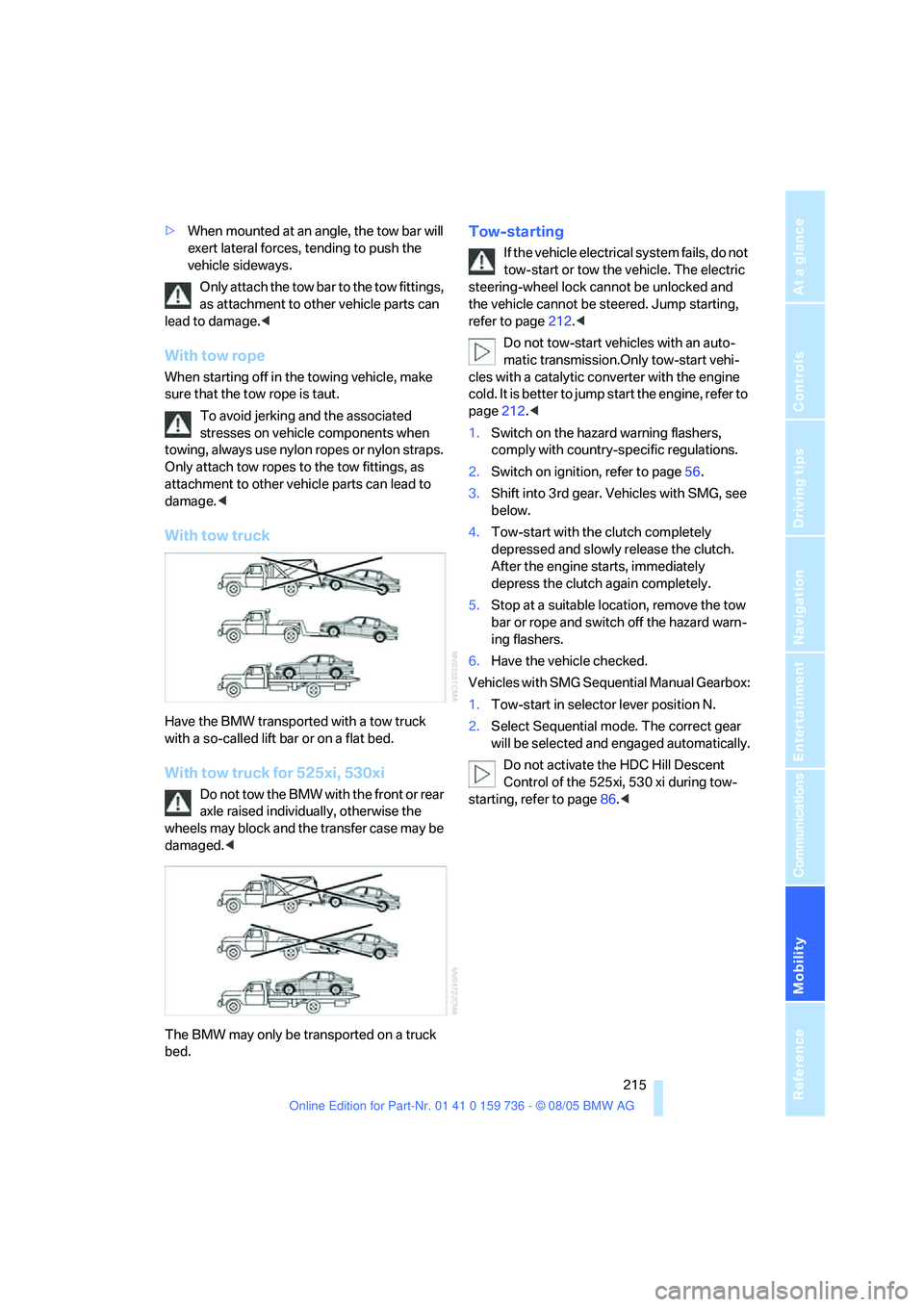
With tow truck
Have the BMW transported with a tow truck
with a so-called lift bar or on a flat bed.
With tow truck for 525xi, 530xi
Do not tow the BMW with the front or rear
axle raised individually, otherwise the
wheels may block and the transfer case may be
damaged.<
The BMW may only be transported on a truck
bed.
Tow-starting
If the vehicle electrical system fails, do not
tow-start or tow the vehicle. The electric
steering-wheel lock cannot be unlocked and
the vehicle cannot be steered. Jump starting,
refer to page212.<
Do not tow-start vehicles with an auto-
matic transmission.Only tow-start vehi-
cles with a catalytic converter with the engine
cold. It is better to jump start the engine, refer to
page212.<
1.Switch on the hazard warning flashers,
comply with country-specific regulations.
2.Switch on ignition, refer to page56.
3.Shift into 3rd gear. Vehicles with SMG, see
below.
4.Tow-start with the clutch completely
depressed and slowly release the clutch.
After the engine starts, immediately
depress the clutch again completely.
5.Stop at a suitable location, remove the tow
bar or rope and switch off the hazard warn-
ing flashers.
6.Have the vehicle checked.
Vehicles with SMG Sequential Manual Gearbox:
1.Tow-start in selector lever position N.
2.Select Sequential mode. The correct gear
will be selected and engaged automatically.
Do not activate the HDC Hill Descent
Control of the 525xi, 530 xi during tow-
starting, refer to page86.<
Page 227 of 248
Short commands of voice command system
226
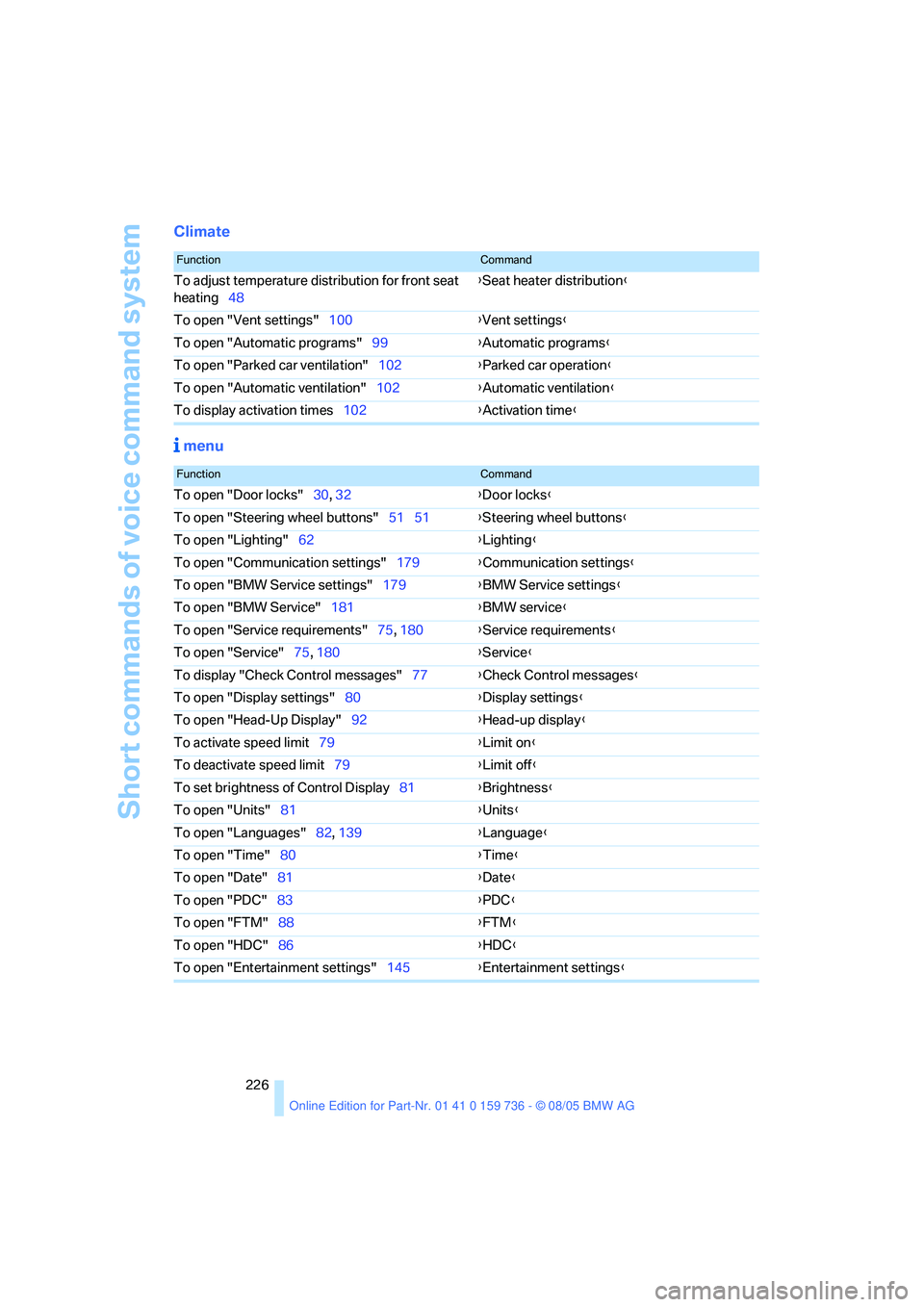
Climate
menu
FunctionCommand
To adjust temperature distribution for front seat
heating48{Seat heater distribution}
To open "Vent settings"100{Vent settings}
To open "Automatic programs"99{Automatic programs}
To open "Parked car ventilation"102{Parked car operation}
To open "Automatic ventilation"102{Automatic ventilation}
To display activation times102{Activation time}
FunctionCommand
To open "Door locks"30, 32{Door locks}
To open "Steering wheel buttons"51 51{Steering wheel buttons}
To open "Lighting"62{Lighting}
To open "Communication settings"179{Communication settings}
To open "BMW Service settings"179{BMW Service settings}
To open "BMW Service"181{BMW service}
To open "Service requirements"75, 180{Service requirements}
To open "Service"75, 180{Service}
To display "Check Control messages"77{Check Control messages}
To open "Display settings"80{Display settings}
To open "Head-Up Display"92{Head-up display}
To activate speed limit79{Limit on}
To deactivate speed limit79{Limit off}
To set brightness of Control Display81{Brightness}
To open "Units"81{Units}
To open "Languages"82, 139{Language}
To open "Time"80{Time}
To open "Date"81{Date}
To open "PDC"83{
PDC}
To open "FTM"88{FTM}
To open "HDC"86{HDC}
To open "Entertainment settings"145{Entertainment settings}
Page 228 of 248
227Reference
At a glance
Controls
Driving tips
Communications
Navigation
Entertainment
Mobility
Everything from A to Z
Index
"..." Identifies Control Display
texts used to select
individual functions, and
indicates where to find them
in the text.
A
ABS Antilock Brake
System84
ACC, refer to Active cruise
control65
Acceleration assistant for
SMG Sequential Manual
Gearbox61
Accessories6
Acoustic signal, refer to Check
Control77
Activated-charcoal filter102
"Activation time" for parked
car ventilation102
Active cruise control65
– indicator lamp68
– radar sensor69
– selecting distance67
– warning lamps69
Active head restraints,
front47
Active seat49
Active seat ventilation49
Active steering89
– warning lamp89
Adapter for spare key28
Adaptive brake lamps, refer to
Brake force display89
Adaptive Head Light95
"Add digits" for mobile
phone172
"Address book" for
navigation132Address for navigation
– deleting133
– entering125,128
– selecting133
– storing132
– storing current position133
"Add to address book"132
"Add to destination
list"128,129
Adjusting active backrest
width45
Adjusting confirmation signals
for locking and unlocking31
Adjusting the thigh support44
Adjusting the tone during
audio operation, refer to
Tone control145
Adjustment in audio mode
– front-to-rear146
– right/left balance146
"After door opened"46
"After unlocking"46
Airbags90
– sitting safely43
– warning lamp91
Air circulation, refer to Air
recirculation101
Air distribution
– automatic99
– manual100
Airing, refer to Ventilation101
Air recirculation
– AUC Automatic recircu-
lated-air control101
– recirculated-air mode101
"Air recirculation on / off"51
Air vent outlets of automatic
climate control98
Air vents98
– refer to Ventilation101
Air volume100
AKI, refer to Fuel quality187Alarm system36
– avoiding unintentional
alarms37
– interior motion sensor37
– switching off the alarm37
– switching off the tilt alarm
sensor and interior motion
sensor37
– tilt alarm sensor37
All around the center
console14
All around the steering
wheel10
"All channels"154
"All doors"30
All-season tires, refer to
Winter tires195
"All stations" calling up with
radio148,151
All-wheel drive, refer to
xDrive85
Alterations, technical, refer to
For your own safety5
Altering stretch of road140
"AM", reception
range144,148
Antenna for mobile phone166
Antifreeze
– coolant199
– washer fluid64
Antilock Brake System
ABS84
Anti-theft alarm system, refer
to Alarm system36
Anti-theft system, refer to
Central locking system29
Anti-trapping mechanism
– glass sunroof, electric41
– panorama glass sunroof42
– power windows39
Approved axle loads, refer to
Weights221
Approved engine oils
198
Page 229 of 248
Everything from A to Z
228 Approved gross vehicle
weight, refer to Weights221
Armrest, refer to Center
armrest, rear109
Arrival time
– refer to Computer74
– refer to Starting destination
guidance136
"Arrow display" during
navigation137
Ashtray
– front107
– rear108
Assist, refer to
BMW Assist179
Assistance systems, refer to
Driving stability control
systems84
Assistance window20
"Assist. window off"21
AUC Automatic recirculated-
air control101
Audio144
– controls144
– switching on/off144
– tone control145
– volume145
"Audio", refer to Tone
control145
Automatic
– air distribution99
– air volume99
– garage door opener104
– headlamp control94
– service notification180
– steering wheel adjustment,
refer to Easy entry/exit50
– storing stations149
– tailgate operation35
Automatically switching
between high beams and
low beams, refer to High-
beam assistant95
Automatic car washes118
– also refer to Caring for your
vehicle brochure
Automatic climate control98
– automatic air distribution99
– switching off101Automatic curb monitor50
Automatic lighting
– refer to Automatic headlamp
control94
– refer to Daytime driving
lamps94
– refer to High-beam
assistant95
– refer to Interior lamps97
– refer to Pathway lighting94
Automatic low-beam function,
refer to High-beam
assistant95
"Automatic programs"99
Automatic recirculated-air
control AUC101
Automatic station search149
Automatic transmission with
Steptronic61
– deactivating selector lever
interlock62
– interlock61
– kick-down61
– selector lever interlock61
– shiftlock61
– sport program62
– tow starting214
– tow-starting215
– with comfort access38
"Automatic ventilation"102
AUTO program for automatic
climate control99
"Autostore" on the
radio148,150
Average fuel consumption73
– setting the units81
Average speed, refer to
Computer73
"Avoid ferries" for
navigation135
"Avoid highways" for
navigation135
Avoiding freeways for
navigation135
Avoiding unintentional
alarms37
"Avoid tollroads" for
navigation135Axle loads, refer to
Weights221
"A - Z"172
B
Backrest contour, refer to
Lumbar support44
Backrests, refer to Seats44
Backrest width adjustment44
Backup lamps, refer to
Reverse gear59
– replacing bulbs205
"Balance", refer to Tone
control146
Balance, refer to Tone
control146
Band-aids, refer to First-aid
kit212
"Bass", refer to Tone
control146
Bass, refer to Tone
control145
Battery, refer to Vehicle
battery209
– jump starting212
Battery disposal
– remote control with comfort
access39
– vehicle battery209
Battery replacement, remote
control with comfort
access39
Being towed214
Belts, refer to Safety belts47
Beverage holder, refer to
Cup holders107
Blower, refer to Air
volume100
"BMW Assist"181
BMW Assist179
– enabling179
– services offered180
"BMW Contact"183
"BMW Contact
Numbers"183
BMW homepage4
BMW maintenance
system201