lock BMW 550I GRAN TURISMO 2011 Service Manual
[x] Cancel search | Manufacturer: BMW, Model Year: 2011, Model line: 550I GRAN TURISMO, Model: BMW 550I GRAN TURISMO 2011Pages: 297, PDF Size: 8.59 MB
Page 260 of 297
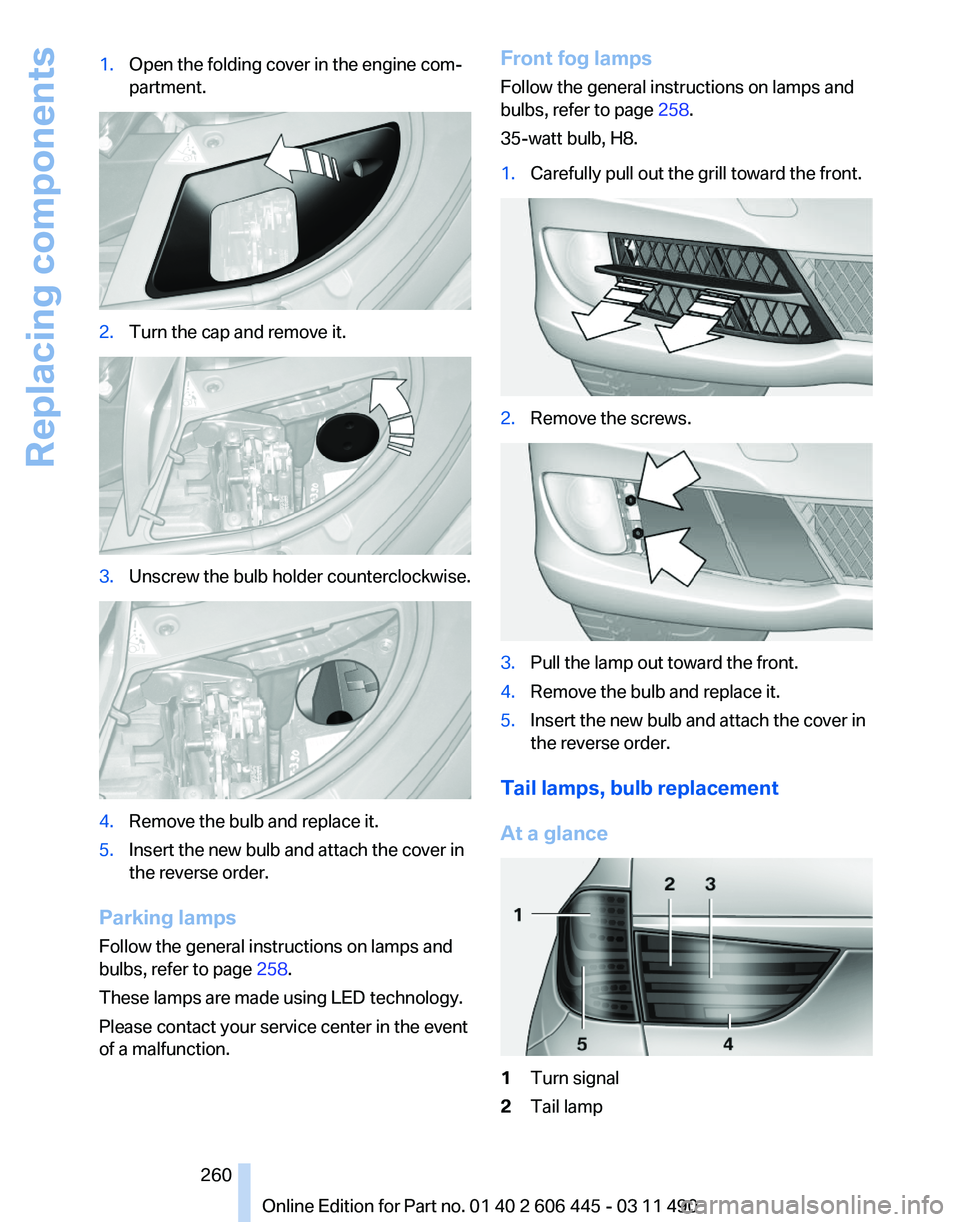
1.
Open the folding cover in the engine com‐
partment. 2.
Turn the cap and remove it. 3.
Unscrew the bulb holder counterclockwise. 4.
Remove the bulb and replace it.
5. Insert the new bulb and attach the cover in
the reverse order.
Parking lamps
Follow the general instructions on lamps and
bulbs, refer to page 258.
These lamps are made using LED technology.
Please contact your service center in the event
of a malfunction. Front fog lamps
Follow the general instructions on lamps and
bulbs, refer to page
258.
35-watt bulb, H8.
1. Carefully pull out the grill toward the front. 2.
Remove the screws. 3.
Pull the lamp out toward the front.
4. Remove the bulb and replace it.
5. Insert the new bulb and attach the cover in
the reverse order.
Tail lamps, bulb replacement
At a glance 1
Turn signal
2 Tail lamp
Seite 260
260 Online Edition for Part no. 01 40 2 606 445 - 03 11 490Replacing components
Page 262 of 297
When using run-flat tires* or tire sealants, a tire
does
not need to be changed immediately in the
event of pressure loss due to a flat tire.
The tools for changing wheels are available as
accessories from your service center.
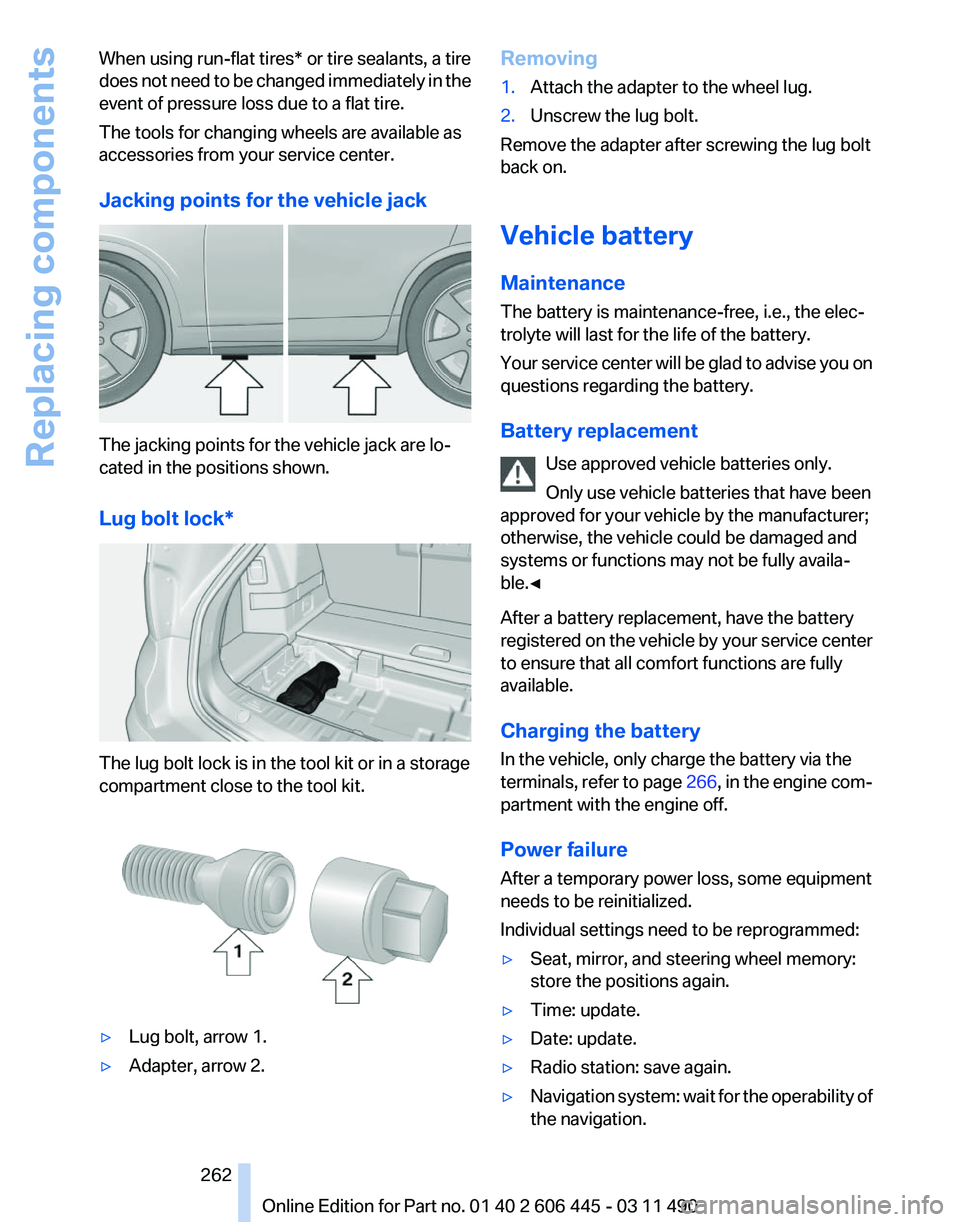
Jacking points for the vehicle jack The jacking points for the vehicle jack are lo‐
cated in the positions shown.
Lug bolt lock*
The lug bolt lock is in the tool kit or in a storage
compartment close to the tool kit.
▷
Lug bolt, arrow 1.
▷ Adapter, arrow 2. Removing
1.
Attach the adapter to the wheel lug.
2. Unscrew the lug bolt.
Remove the adapter after screwing the lug bolt
back on.
Vehicle battery
Maintenance
The battery is maintenance-free, i.e., the elec‐
trolyte will last for the life of the battery.
Your
service center will be glad to advise you on
questions regarding the battery.
Battery replacement
Use approved vehicle batteries only.
Only use vehicle batteries that have been
approved for your vehicle by the manufacturer;
otherwise, the vehicle could be damaged and
systems or functions may not be fully availa‐
ble.◀
After a battery replacement, have the battery
registered on the vehicle by your service center
to ensure that all comfort functions are fully
available.
Charging the battery
In the vehicle, only charge the battery via the
terminals, refer to page 266, in the engine com‐
partment with the engine off.
Power failure
After a temporary power loss, some equipment
needs to be reinitialized.
Individual settings need to be reprogrammed:
▷ Seat, mirror, and steering wheel memory:
store the positions again.
▷ Time: update.
▷ Date: update.
▷ Radio station: save again.
▷ Navigation system: wait for the operability of
the navigation. Seite 262
262 Online Edition for Part no. 01 40 2 606 445 - 03 11 490
Replacing components
Page 265 of 297
Assist Response Center may still be able to
hear you.
Initiating an Emergency Request
automatically
Under certain conditions, an Emergency Re‐
quest is automatically initiated immediately after
a severe accident. Automatic Collision Notifica‐
tion is not affected by pressing the SOS button.
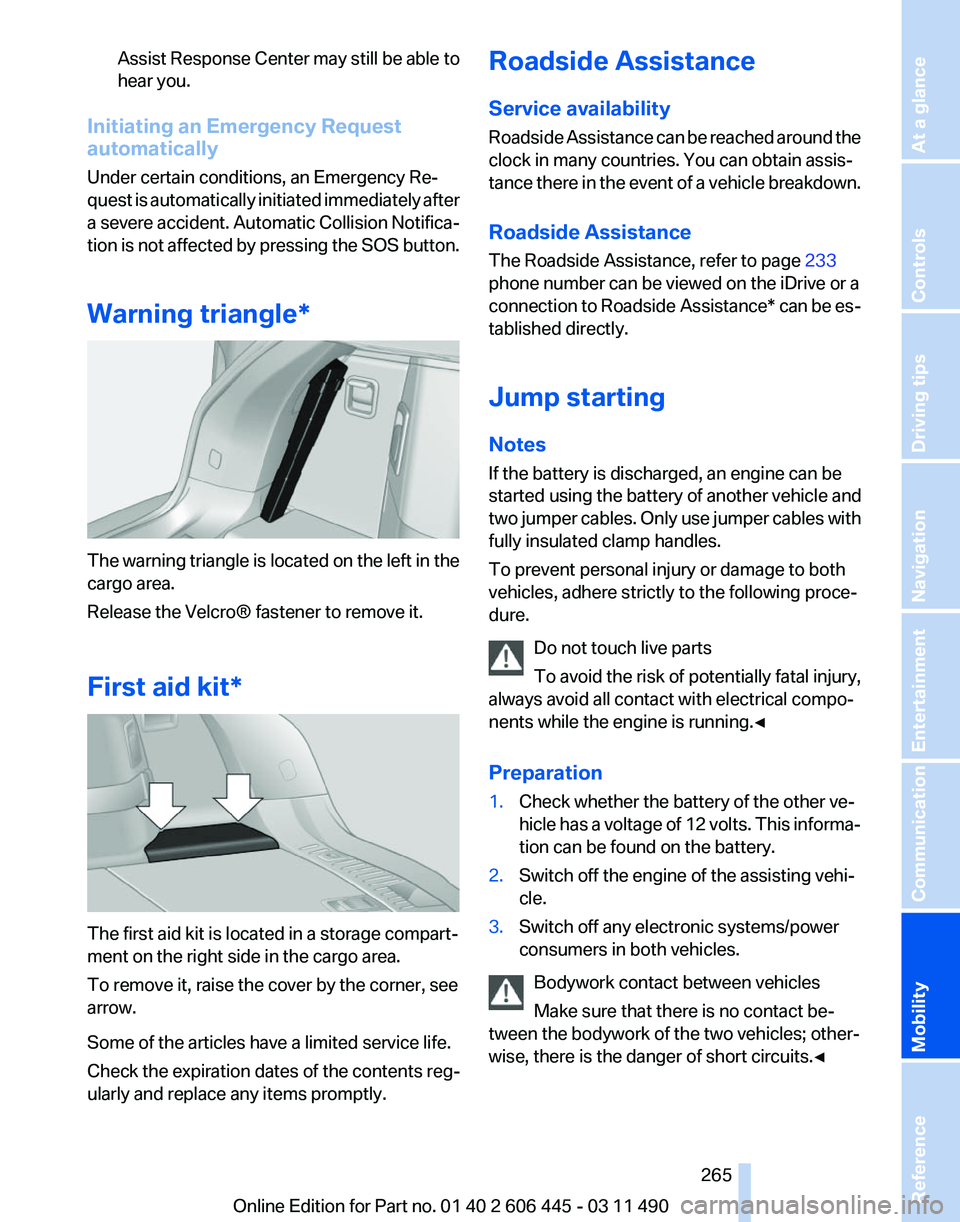
Warning triangle* The warning triangle is located on the left in the
cargo area.
Release the Velcro® fastener to remove it.
First aid kit*
The first aid kit is located in a storage compart‐
ment on the right side in the cargo area.
To remove it, raise the cover by the corner, see
arrow.
Some of the articles have a limited service life.
Check the expiration dates of the contents reg‐
ularly and replace any items promptly. Roadside Assistance
Service availability
Roadside Assistance can be reached around the
clock in many countries. You can obtain assis‐
tance there in the event of a vehicle breakdown.
Roadside Assistance
The Roadside Assistance, refer to page
233
phone number can be viewed on the iDrive or a
connection to Roadside Assistance* can be es‐
tablished directly.
Jump starting
Notes
If the battery is discharged, an engine can be
started using the battery of another vehicle and
two jumper cables. Only use jumper cables with
fully insulated clamp handles.
To prevent personal injury or damage to both
vehicles, adhere strictly to the following proce‐
dure.
Do not touch live parts
To avoid the risk of potentially fatal injury,
always avoid all contact with electrical compo‐
nents while the engine is running.◀
Preparation
1. Check whether the battery of the other ve‐
hicle has a voltage of 12 volts. This informa‐
tion can be found on the battery.
2. Switch off the engine of the assisting vehi‐
cle.
3. Switch off any electronic systems/power
consumers in both vehicles.
Bodywork contact between vehicles
Make sure that there is no contact be‐
tween the bodywork of the two vehicles; other‐
wise, there is the danger of short circuits.◀ Seite 265
265Online Edition for Part no. 01 40 2 606 445 - 03 11 490
Reference
Mobility Communication Entertainment Navigation Driving tips Controls At a glance
Page 269 of 297
Care
Car washes
Notes
Steam jets or high-pressure washers
When using steam jets or high-pressure
washers, hold them a sufficient distance away
and use a maximum temperature of 140 ℉/
60 ℃.
Holding them too close or using excessively
high
pressures or temperatures can cause dam‐
age or preliminary damage that may then lead to
long-term damage.
Follow the operating instructions for the high-
pressure washer.◀
Cleaning sensors/cameras with high-
pressure washers
When using high-pressure washers, do not
spray the exterior sensors and cameras, e.g.,
Park Distance Control*, for extended periods of
time and only from a distance of at least 12 in/
30 cm.◀
Wash your vehicle frequently, particularly in win‐
ter.
Intense soiling and road salt can damage the ve‐
hicle.
Washing in automatic car washes
Your vehicle can be washed in automatic car
washes right from the start.
Give preference to cloth car washes or those
that use soft brushes in order to avoid paint
damage.
Notes
Note the following:
▷ Make sure that the wheels and tires are not
damaged by the transport mechanisms.
▷ Fold in the exterior mirrors; otherwise, they
may
be damaged, depending on the width of
the vehicle. ▷
Deactivate the rain sensor, refer to page 72,
to avoid unintentional wiper activation.
▷ In some cases, an unintentional alarm can be
triggered
by the interior motion sensor of the
alarm system*. Follow the instructions on
avoiding an unintentional alarm, refer to
page 45.
Guide rails in car washes
Avoid car washes with guide rails higher
than 4 in/10 cm; otherwise, the vehicle body
could be damaged.
◀
Before driving into a car wash
The vehicle is able to roll when the following
steps are taken:
1. Depress the brake pedal.
2. Engage transmission position N.
3. Release the parking brake, refer to page 67,
or deactivate Automatic Hold, refer to
page 69.
4. Switch the engine off.
Transmission
position P with the igni‐
tion off
When the ignition is switched off, position P
is engaged automatically. When in an auto‐
matic car wash, for example, ensure that the
ignition is not switched off accidentally.◀ The vehicle cannot be locked from the outside
when in transmission position N.
A
signal is sounded when an attempt is made to
lock the vehicle.
Transmission position
Transmission position P is engaged automati‐
cally:
▷ When the ignition is switched off.
▷ After approx. 15 minutes. Seite 269
269Online Edition for Part no. 01 40 2 606 445 - 03 11 490
Reference
Mobility Communication Entertainment Navigation Driving tips Controls At a glance
Page 277 of 297
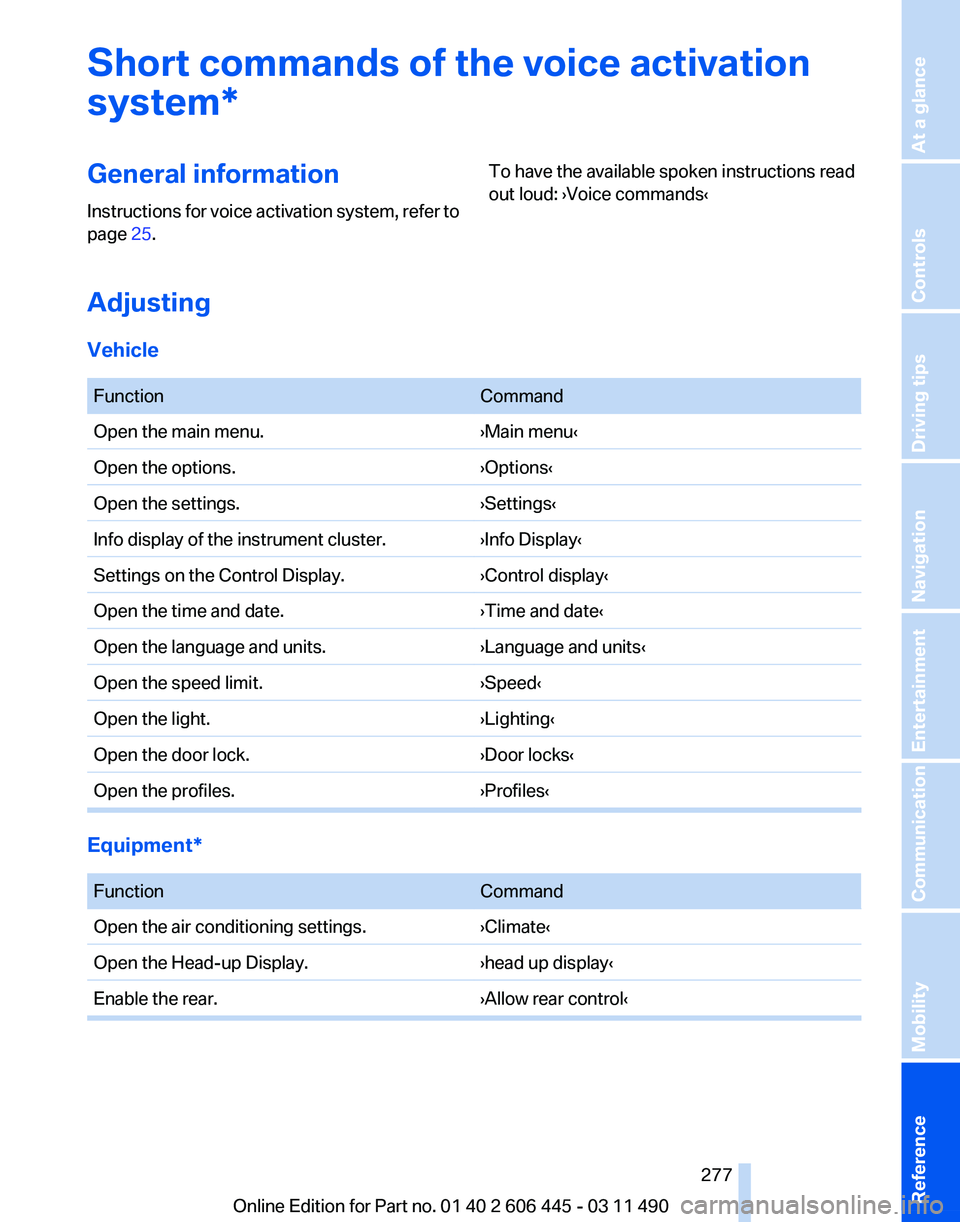
Short commands of the voice activation
system*
General information
Instructions
for voice activation system, refer to
page 25. To have the available spoken instructions read
out loud: ›Voice commands‹
Adjusting
Vehicle
Function
Command
Open the main menu. ›Main menu‹
Open the options. ›Options‹
Open the settings. ›Settings‹
Info display of the instrument cluster. ›Info Display‹
Settings on the Control Display. ›Control display‹
Open the time and date. ›Time and date‹
Open the language and units. ›Language and units‹
Open the speed limit. ›Speed‹
Open the light. ›Lighting‹
Open the door lock. ›Door locks‹
Open the profiles. ›Profiles‹Equipment*
Function
Command
Open the air conditioning settings. ›Climate‹
Open the Head-up Display. ›head up display‹
Enable the rear. ›Allow rear control‹ Seite 277
277Online Edition for Part no. 01 40 2 606 445 - 03 11 490
Reference Mobility Communication Entertainment Navigation Driving tips Controls At a glance
Page 286 of 297
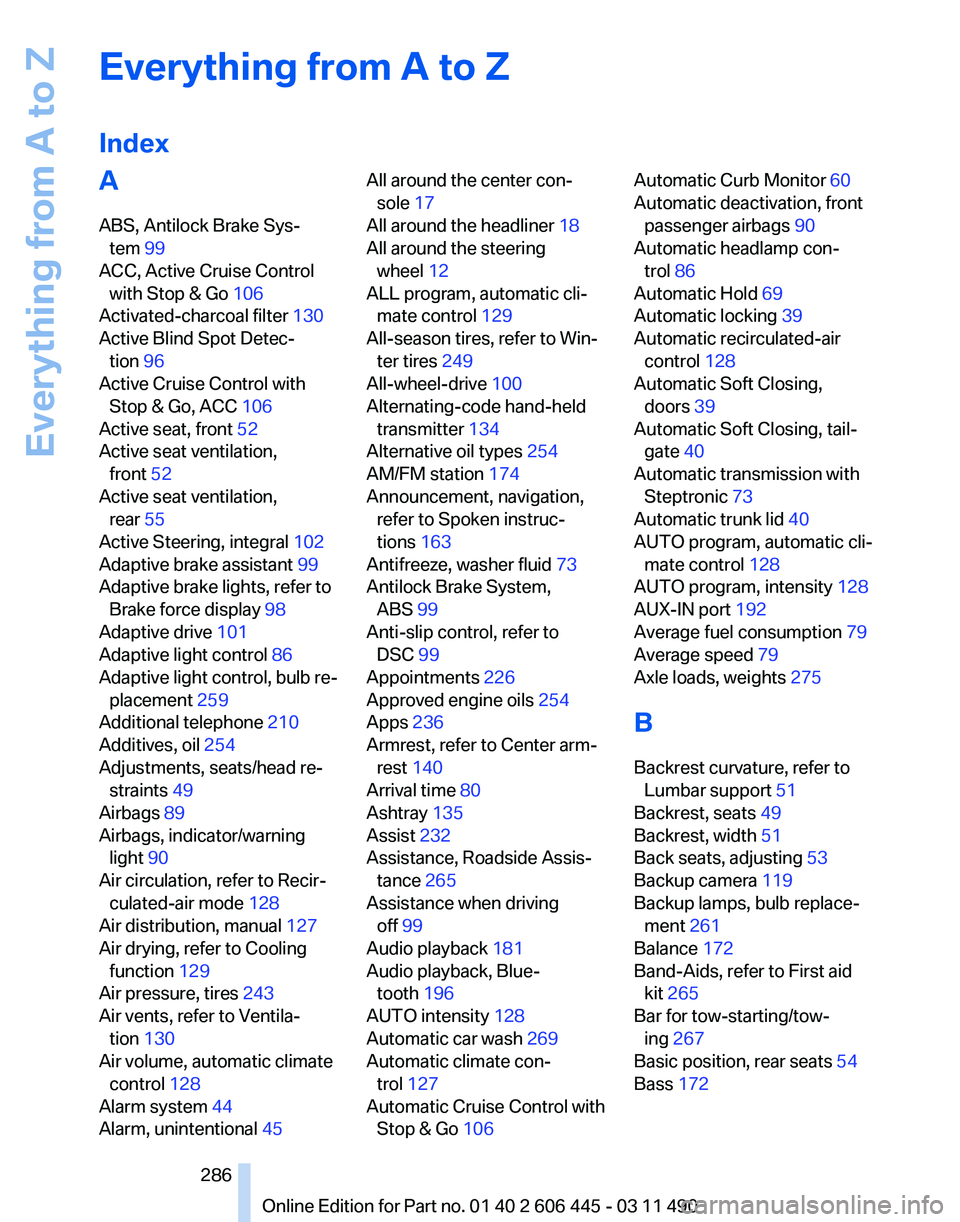
Everything from A to Z
Index
A
ABS, Antilock Brake Sys‐
tem 99
ACC, Active Cruise Control with Stop & Go 106
Activated-charcoal filter 130
Active Blind Spot Detec‐ tion 96
Active Cruise Control with Stop & Go, ACC 106
Active seat, front 52
Active seat ventilation, front 52
Active seat ventilation, rear 55
Active Steering, integral 102
Adaptive brake assistant 99
Adaptive brake lights, refer to Brake force display 98
Adaptive drive 101
Adaptive light control 86
Adaptive
light control, bulb re‐
placement 259
Additional telephone 210
Additives, oil 254
Adjustments, seats/head re‐ straints 49
Airbags 89
Airbags, indicator/warning light 90
Air circulation, refer to Recir‐ culated-air mode 128
Air distribution, manual 127
Air drying, refer to Cooling function 129
Air pressure, tires 243
Air vents, refer to Ventila‐ tion 130
Air volume, automatic climate control 128
Alarm system 44
Alarm, unintentional 45 All around the center con‐
sole 17
All around the headliner 18
All around the steering wheel 12
ALL program, automatic cli‐ mate control 129
All-season tires, refer to Win‐ ter tires 249
All-wheel-drive 100
Alternating-code hand-held transmitter 134
Alternative oil types 254
AM/FM station 174
Announcement, navigation, refer to Spoken instruc‐
tions 163
Antifreeze, washer fluid 73
Antilock Brake System, ABS 99
Anti-slip control, refer to DSC 99
Appointments 226
Approved engine oils 254
Apps 236
Armrest, refer to Center arm‐ rest 140
Arrival time 80
Ashtray 135
Assist 232
Assistance, Roadside Assis‐ tance 265
Assistance when driving off 99
Audio playback 181
Audio playback, Blue‐ tooth 196
AUTO intensity 128
Automatic car wash 269
Automatic climate con‐ trol 127
Automatic Cruise Control with Stop & Go 106 Automatic Curb Monitor
60
Automatic deactivation, front passenger airbags 90
Automatic headlamp con‐ trol 86
Automatic Hold 69
Automatic locking 39
Automatic recirculated-air control 128
Automatic Soft Closing, doors 39
Automatic Soft Closing, tail‐ gate 40
Automatic transmission with Steptronic 73
Automatic trunk lid 40
AUTO program, automatic cli‐ mate control 128
AUTO program, intensity 128
AUX-IN port 192
Average fuel consumption 79
Average speed 79
Axle loads, weights 275
B
Backrest curvature, refer to Lumbar support 51
Backrest, seats 49
Backrest, width 51
Back seats, adjusting 53
Backup camera 119
Backup lamps, bulb replace‐ ment 261
Balance 172
Band-Aids, refer to First aid kit 265
Bar for tow-starting/tow‐ ing 267
Basic position, rear seats 54
Bass 172
Seite 286
286 Online Edition for Part no. 01 40 2 606 445 - 03 11 490
Everything from A to Z
Page 287 of 297
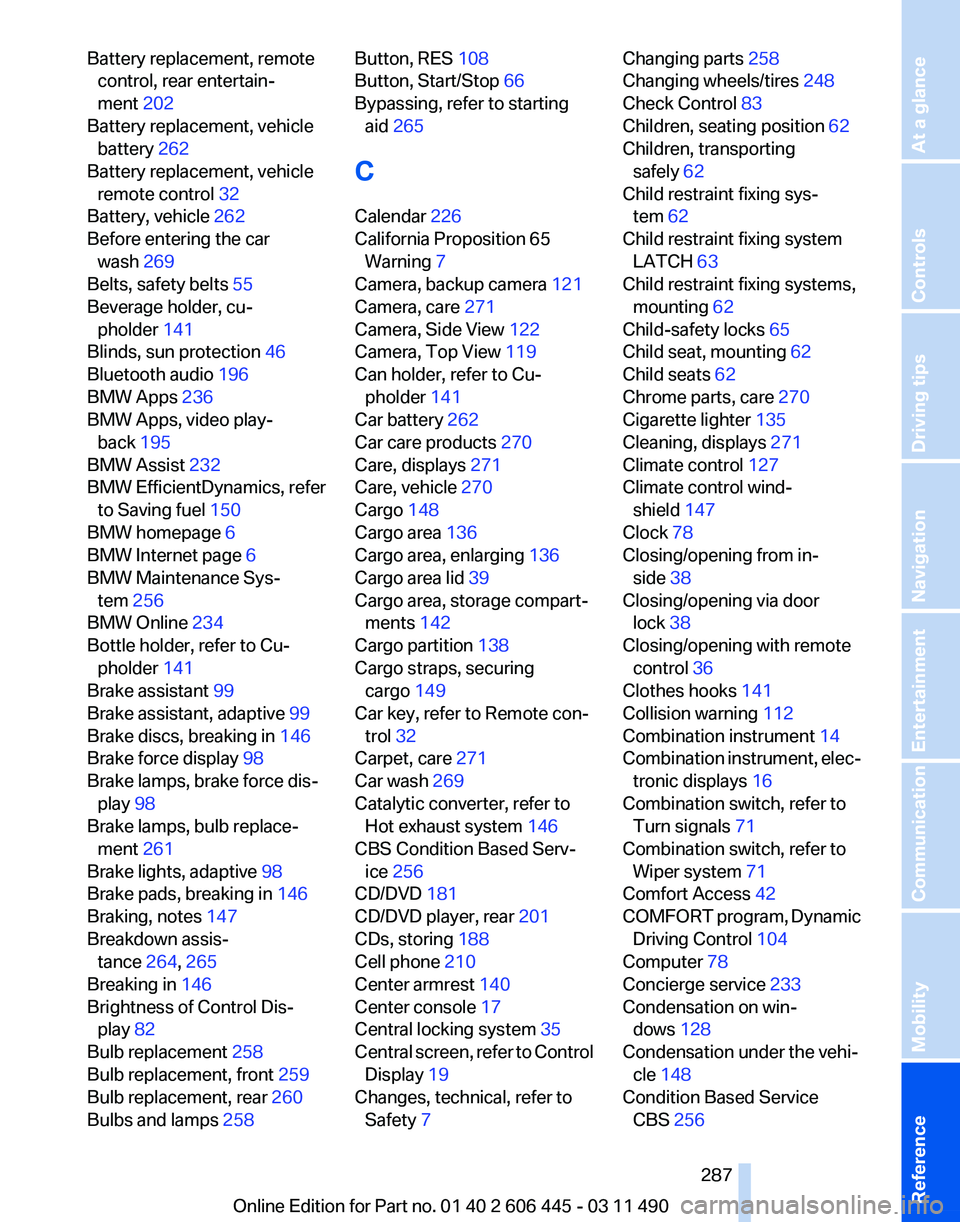
Battery replacement, remote
control, rear entertain‐
ment 202
Battery replacement, vehicle battery 262
Battery replacement, vehicle remote control 32
Battery, vehicle 262
Before entering the car wash 269
Belts, safety belts 55
Beverage holder, cu‐ pholder 141
Blinds, sun protection 46
Bluetooth audio 196
BMW Apps 236
BMW Apps, video play‐ back 195
BMW Assist 232
BMW EfficientDynamics, refer to Saving fuel 150
BMW homepage 6
BMW Internet page 6
BMW Maintenance Sys‐ tem 256
BMW Online 234
Bottle holder, refer to Cu‐ pholder 141
Brake assistant 99
Brake assistant, adaptive 99
Brake discs, breaking in 146
Brake force display 98
Brake lamps, brake force dis‐ play 98
Brake lamps, bulb replace‐ ment 261
Brake lights, adaptive 98
Brake pads, breaking in 146
Braking, notes 147
Breakdown assis‐ tance 264, 265
Breaking in 146
Brightness of Control Dis‐ play 82
Bulb replacement 258
Bulb replacement, front 259
Bulb replacement, rear 260
Bulbs and lamps 258 Button, RES 108
Button, Start/Stop 66
Bypassing, refer to starting
aid 265
C
Calendar 226
California Proposition 65 Warning 7
Camera, backup camera 121
Camera, care 271
Camera, Side View 122
Camera, Top View 119
Can holder, refer to Cu‐ pholder 141
Car battery 262
Car care products 270
Care, displays 271
Care, vehicle 270
Cargo 148
Cargo area 136
Cargo area, enlarging 136
Cargo area lid 39
Cargo area, storage compart‐ ments 142
Cargo partition 138
Cargo straps, securing cargo 149
Car key, refer to Remote con‐ trol 32
Carpet, care 271
Car wash 269
Catalytic converter, refer to Hot exhaust system 146
CBS Condition Based Serv‐ ice 256
CD/DVD 181
CD/DVD player, rear 201
CDs, storing 188
Cell phone 210
Center armrest 140
Center console 17
Central locking system 35
Central
screen, refer to Control
Display 19
Changes, technical, refer to Safety 7 Changing parts
258
Changing wheels/tires 248
Check Control 83
Children, seating position 62
Children, transporting safely 62
Child restraint fixing sys‐ tem 62
Child restraint fixing system LATCH 63
Child restraint fixing systems, mounting 62
Child-safety locks 65
Child seat, mounting 62
Child seats 62
Chrome parts, care 270
Cigarette lighter 135
Cleaning, displays 271
Climate control 127
Climate control wind‐ shield 147
Clock 78
Closing/opening from in‐ side 38
Closing/opening via door lock 38
Closing/opening with remote control 36
Clothes hooks 141
Collision warning 112
Combination instrument 14
Combination
instrument, elec‐
tronic displays 16
Combination switch, refer to Turn signals 71
Combination switch, refer to Wiper system 71
Comfort Access 42
COMFORT program, Dynamic Driving Control 104
Computer 78
Concierge service 233
Condensation on win‐ dows 128
Condensation under the vehi‐ cle 148
Condition Based Service CBS 256
Seite 287
287Online Edition for Part no. 01 40 2 606 445 - 03 11 490
Reference Mobility Communication Entertainment Navigation Driving tips Controls At a glance
Page 288 of 297
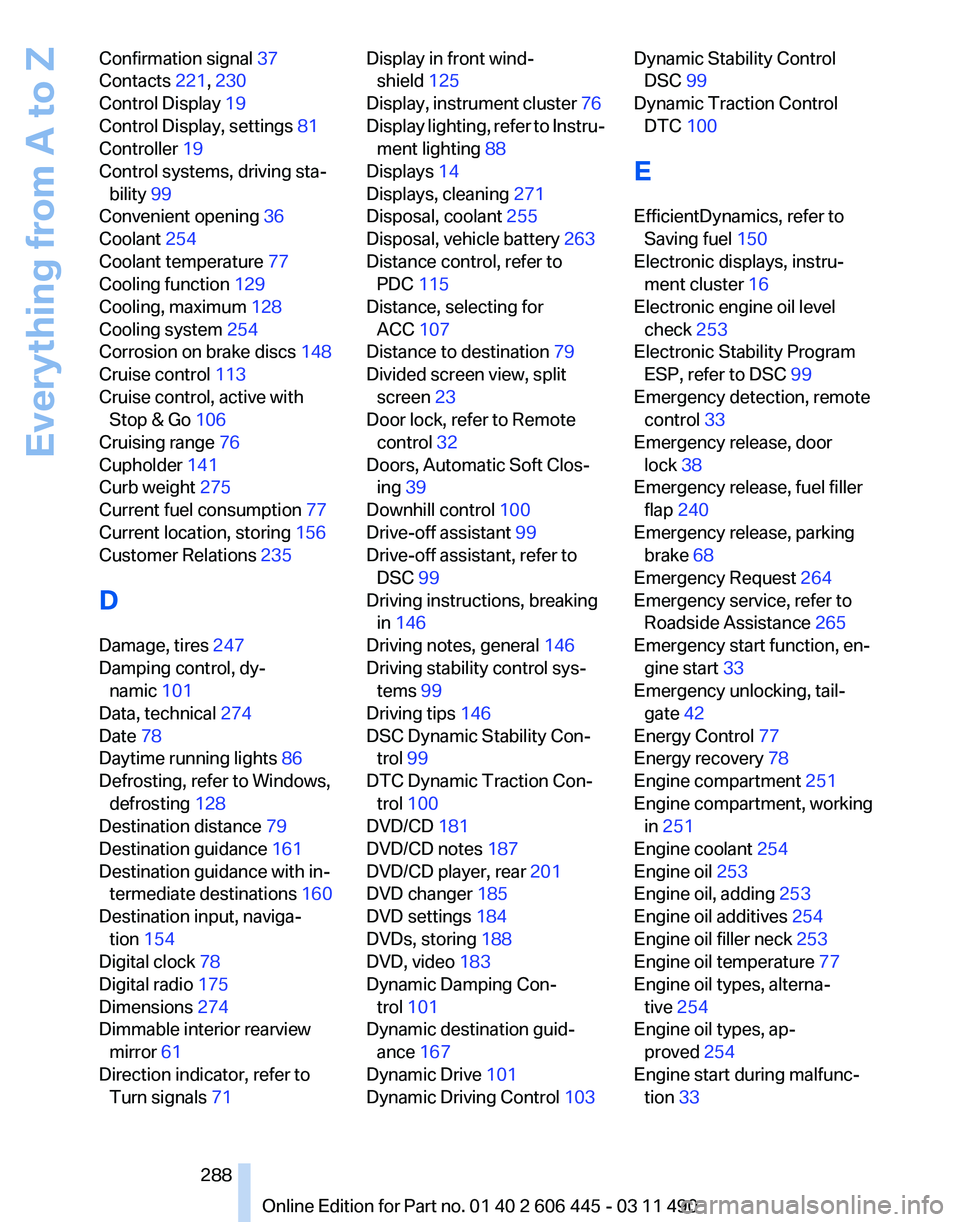
Confirmation signal
37
Contacts 221, 230
Control Display 19
Control Display, settings 81
Controller 19
Control systems, driving sta‐ bility 99
Convenient opening 36
Coolant 254
Coolant temperature 77
Cooling function 129
Cooling, maximum 128
Cooling system 254
Corrosion on brake discs 148
Cruise control 113
Cruise control, active with Stop & Go 106
Cruising range 76
Cupholder 141
Curb weight 275
Current fuel consumption 77
Current location, storing 156
Customer Relations 235
D
Damage, tires 247
Damping control, dy‐ namic 101
Data, technical 274
Date 78
Daytime running lights 86
Defrosting, refer to Windows, defrosting 128
Destination distance 79
Destination guidance 161
Destination guidance with in‐ termediate destinations 160
Destination input, naviga‐ tion 154
Digital clock 78
Digital radio 175
Dimensions 274
Dimmable interior rearview mirror 61
Direction indicator, refer to Turn signals 71 Display in front wind‐
shield 125
Display,
instrument cluster 76
Display lighting, refer to Instru‐ ment lighting 88
Displays 14
Displays, cleaning 271
Disposal, coolant 255
Disposal, vehicle battery 263
Distance control, refer to PDC 115
Distance, selecting for ACC 107
Distance to destination 79
Divided screen view, split screen 23
Door lock, refer to Remote control 32
Doors, Automatic Soft Clos‐ ing 39
Downhill control 100
Drive-off assistant 99
Drive-off assistant, refer to DSC 99
Driving instructions, breaking in 146
Driving notes, general 146
Driving stability control sys‐ tems 99
Driving tips 146
DSC Dynamic Stability Con‐ trol 99
DTC Dynamic Traction Con‐ trol 100
DVD/CD 181
DVD/CD notes 187
DVD/CD player, rear 201
DVD changer 185
DVD settings 184
DVDs, storing 188
DVD, video 183
Dynamic Damping Con‐ trol 101
Dynamic destination guid‐ ance 167
Dynamic Drive 101
Dynamic Driving Control 103 Dynamic Stability Control
DSC 99
Dynamic Traction Control DTC 100
E
EfficientDynamics, refer to Saving fuel 150
Electronic displays, instru‐ ment cluster 16
Electronic engine oil level check 253
Electronic Stability Program ESP, refer to DSC 99
Emergency detection, remote control 33
Emergency release, door lock 38
Emergency release, fuel filler flap 240
Emergency release, parking brake 68
Emergency Request 264
Emergency service, refer to Roadside Assistance 265
Emergency start function, en‐ gine start 33
Emergency unlocking, tail‐ gate 42
Energy Control 77
Energy recovery 78
Engine compartment 251
Engine compartment, working in 251
Engine coolant 254
Engine oil 253
Engine oil, adding 253
Engine oil additives 254
Engine oil filler neck 253
Engine oil temperature 77
Engine oil types, alterna‐ tive 254
Engine oil types, ap‐ proved 254
Engine start during malfunc‐ tion 33
Seite 288
288 Online Edition for Part no. 01 40 2 606 445 - 03 11 490
Everything from A to Z
Page 290 of 297
I
Ice warning, refer to External
temperature warning 77
Icy roads, refer to External temperature warning 77
Identification marks, tires 246
Identification number, refer to Engine compartment 251
iDrive 19
Ignition key, refer to Remote control 32
Ignition off 66
Ignition on 66
Indication of a flat tire 93
Indicator and warning mes‐ sages 14
Indicator lamps 14
Individual air distribution 127
Individual settings, refer to Personal Profile 33
Inflation pressure, tires 243
Info display, refer to Com‐ puter 78
Information on the navigation data 168
Initialization, Integral Active Steering 102
Initializing,
Tire Pressure Mon‐
itor TPM 93
Instrument cluster 14, 76
Instrument cluster, electronic displays 16
Instrument lighting 88
Integral Active Steering 102
Integrated key 32
Integrated universal remote control 133
Intensity, AUTO program 128
Interactive map 158
Interior equipment 133
Interior lamps 88
Interior lamps via remote con‐ trol 36
Interior motion sensor 45
Interior rearview mirror 60
Interior rearview mirror, auto‐ matic dimming feature 61 Intermediate destinations
160
Internet page 6
Intersection, entering for navi‐ gation 155
Interval display, service re‐ quirements 82
iPod/iPhone 193
J
Jacking points for the vehicle jack 262
Jack,
refer to Vehicle jack 262
Joystick, automatic transmis‐ sion 74
K
Key/remote control 32
Keyless Go, refer to Comfort Access 42
Key Memory, refer to Personal Profile 33
Kickdown, automatic trans‐ mission 74
Knee airbag 89
L
Lamp replacement 258
Lamp replacement, front 259
Lamp replacement, rear 260
Lamps 85
Lamps and bulbs 258
Lane departure warning 95
Lane margin, warning 95
Language on Control Dis‐ play 82
Lashing eyes, securing cargo 149
LATCH child restraint fixing system 63
Leather, care 270
LEDs, light-emitting di‐ odes 259
Length, vehicle 275
Letters and numbers, enter‐ ing 24 License plate lamp, bulb re‐
placement 261
Light-alloy wheels, care 270
Light control 86
Light-emitting diodes, LEDs 259
Lighter, front 135
Lighting 85
Lighting
via remote control 36
Light switch 85
Load 149
Loading 148
Loading position 138
Lock, door 38
Locking/unlocking from in‐ side 38
Locking/unlocking via door lock 38
Locking/unlocking with re‐ mote control 36
Locking, automatic 39
Locking, central 35
Locking via tailgate 40
Lock, power window 46
Locks, doors, and win‐ dows 65
Low beams 85
Low beams, automatic, refer to High-beam Assistant 87
Lower back support 51
Lug bolt lock 262
Luggage rack, refer to Roof- mounted luggage rack 149
Lumbar support 51
M
Maintenance 256
Maintenance require‐ ments 256
Maintenance, service require‐ ments 82
Maintenance System, BMW 256
Malfunction displays, refer to Check Control 83
Malfunction, self-leveling sus‐ pension 103
Seite 290
290 Online Edition for Part no. 01 40 2 606 445 - 03 11 490
Everything from A to Z
Page 291 of 297
Manual air distribution
127
Manual air volume 128
Manual brake, refer to Parking brake 67
Manual mode, transmis‐ sion 75
Manual operation, backup camera 119
Manual operation, door lock 38
Manual
operation, exterior mir‐
rors 60
Manual operation, fuel filler flap 240
Manual operation, Park Dis‐ tance Control PDC 116
Manual operation, parking brake 68
Manual operation, Side View 122
Manual operation, Top View 118
Map, destination entry 158
Map in split screen 165
Map view 163
Marking on approved tires 248
Marking, run-flat tires 249
Massage seat, front 52
Master key, refer to Remote control 32
Maximum cooling 128
Maximum speed, winter tires 249
Measure, units of 82
Medical kit 265
Memory for seat, mirrors, steering wheel 58
Menu in instrument cluster 78
Menus, operating, iDrive 19
Menus, refer to iDrive operat‐ ing concept 20
Message list, traffic bulle‐ tins 165
Messages 224
Messages, refer to Check Control 83
Microfilter 130 Minimum tread, tires
247
Mirror 59
Mirror memory 58
Mobile communication devi‐ ces in the vehicle 147
Mobile phone 210
Modifications, technical, refer to Safety 7
Moisture in headlamp 259
Monitor, refer to Control Dis‐ play 19
Mounting of child restraint fix‐ ing systems 62
MP3 player 192
Multi-function hook 142
Multifunction steering wheel, buttons 12
Multimedia 181
Music collection 188
Music search 189
Music, storing 188
N
Navigation 154
Navigation data 168
Neck restraints, front, refer to Head restraints 56
Neck restraints, rear, refer to Head restraints 57
New wheels and tires 248
Night Vision with pedestrian detection 122
NORMAL program, Dynamic Driving Control 104
Notes 227
Nylon rope for tow-starting/ towing 267
O
OBD Onboard Diagnos‐ tics 256
Obstacle marking, backup camera 120
Odometer 78
Office 221
Oil 253 Oil, adding
253
Oil additives 254
Oil
change interval, service re‐
quirements 82
Oil filler neck 253
Oil level check 253
Oil types, alternative 254
Oil types, approved 254
Old batteries, disposal 263
Onboard Diagnostics OBD 256
Onboard monitor, refer to Control Display 19
Online, refer to BMW On‐ line 234
Opening/closing from in‐ side 38
Opening/closing via door lock 38
Opening/closing with remote control 36
Operating concept, iDrive 19
Outside air, refer to Automatic recirculated-air control 128
Overheating of engine, refer to Coolant temperature 77
P
Paint, vehicle 270
Panic mode 36
Panoramic glass sunroof 47
Park Distance Control PDC 115
Parked-car ventilation 132
Parked vehicle, condensa‐ tion 148
Parking aid, refer to PDC 115
Parking brake 67
Parking lamps 85
Parking lamps, bulb replace‐ ment 260
Parking with Auto Hold 69
Passenger side mirror, tilting downward 60
Pathway lines, backup cam‐ era 120
Seite 291
291Online Edition for Part no. 01 40 2 606 445 - 03 11 490
Reference Mobility Communication Entertainment Navigation Driving tips Controls At a glance