center console BMW 6 SERIES 2007 Owners Manual
[x] Cancel search | Manufacturer: BMW, Model Year: 2007, Model line: 6 SERIES, Model: BMW 6 SERIES 2007Pages: 254, PDF Size: 7.32 MB
Page 16 of 254
Cockpit
14
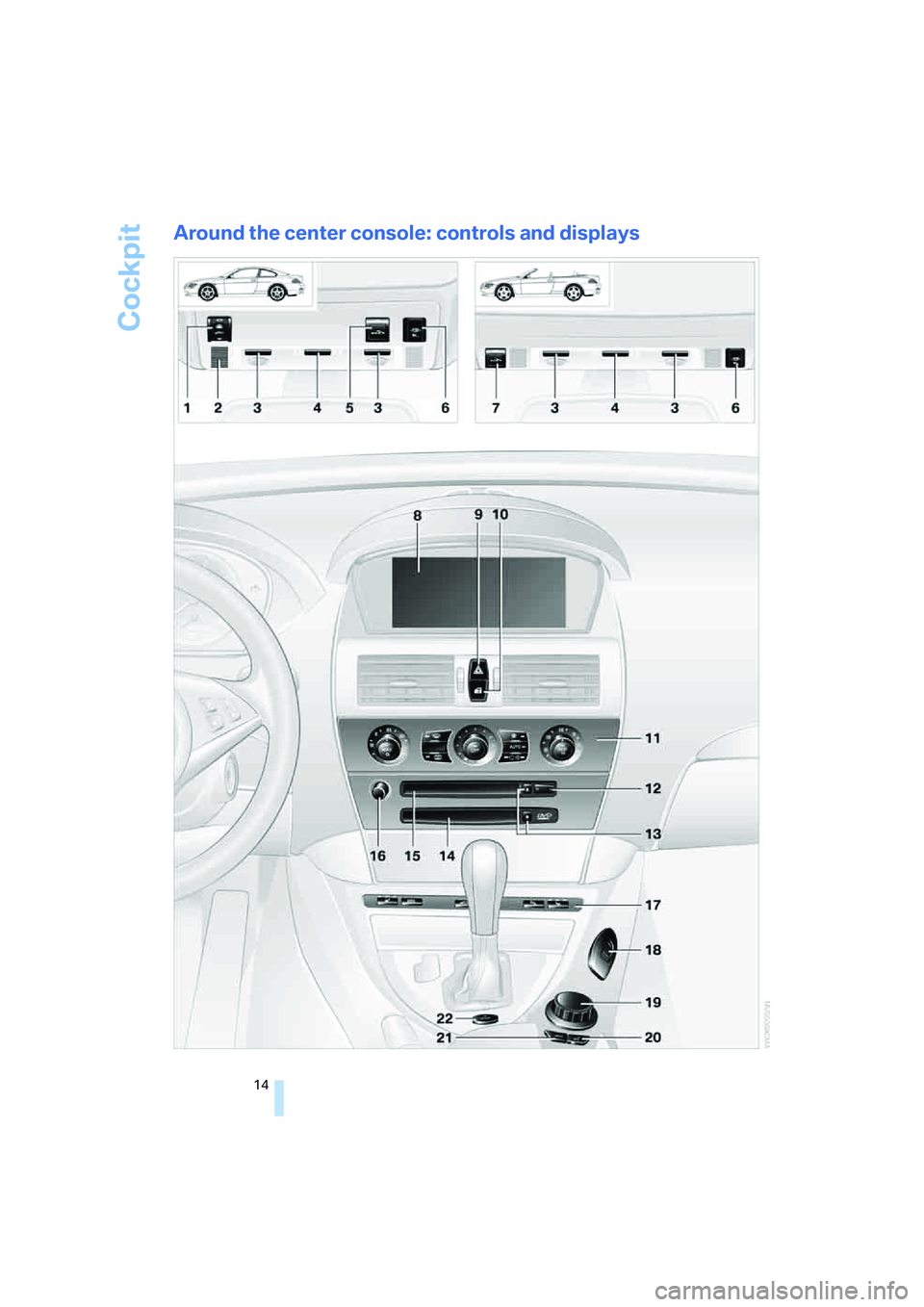
Around the center console: controls and displays
Page 25 of 254
At a glance
23Reference
Controls
Driving tips
Communications
Navigation
Entertainment
Mobility
If no other commands are possible, then oper-
ate the equipment using iDrive.
Terminating or canceling voice
command
Press the button on the steering wheel or in
the center console
or
Commands
Having possible commands read aloud
You can have the system read aloud the possi-
ble commands related to the selected menu
item on the Control Display.
To have the system list the possible com-
mands:
For example, if you have selected "CD", the
system will read aloud the possible commands
for operating the CD player and the CD
changer
*.
Opening help
Using alternative commands
There are often several commands for running
a function, e.g.:
Running functions directly with short
commands
With short commands you can run certain func-
tions directly, regardless of which menu item is
selected, refer to page227.
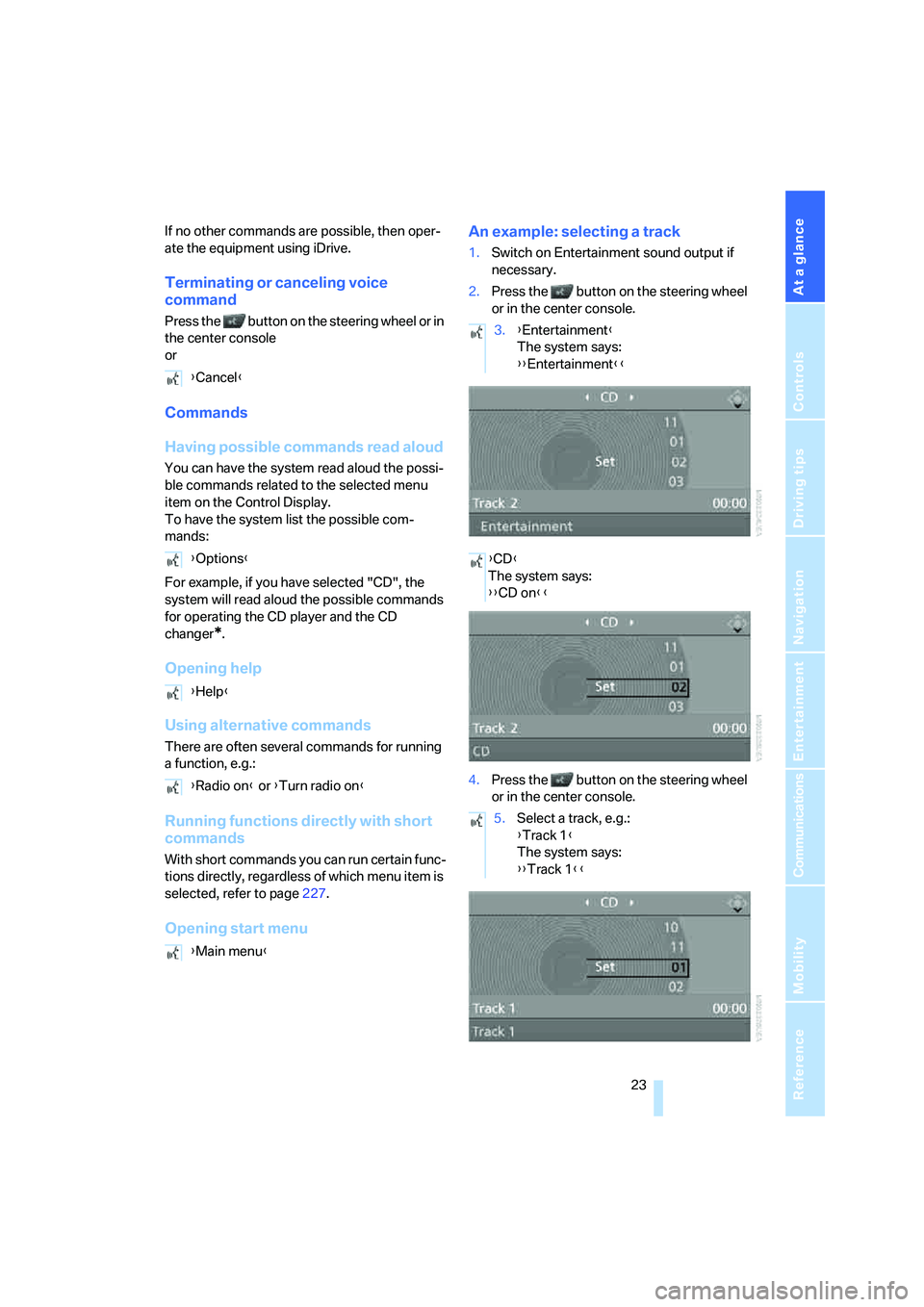
Opening start menuAn example: selecting a track
1.Switch on Entertainment sound output if
necessary.
2.Press the button on the steering wheel
or in the center console.
4.Press the button on the steering wheel
or in the center console. {Cancel}
{Options}
{Help}
{Radio on} or {Turn radio on}
{Main menu}
3.{Entertainment}
The system says:
{{Entertainment}}
{CD}
The system says:
{{CD on}}
5.Select a track, e.g.:
{Track 1}
The system says:
{{Track 1}}
Page 32 of 254
Opening and closing
30
Central locking system
The concept
The central locking system is ready for opera-
tion whenever the driver's door is closed.
The system either locks or unlocks all of the fol-
lowing:
>Doors
>Compartment in the front center console
>Luggage compartment lid
>Fuel filler door
Operating from outside
>via the remote control
>via the door lock
>with comfort access
* via the door handles
These actions operate the anti-theft system at
the same time. It prevents the doors from being
unlocked using the lock buttons or door han-
dles. The interior lamps and the courtesy
lamps
* are also switched on and off with the
remote control. The alarm system
is armed/dis-
armed at the same time.
You can find more detailed information on the
alarm system
on page35.
Operating from inside
Via the central locking button, refer to page32.
The fuel filler door
and the compartment in the
front center console are not locked, refer to
page32.
In the event of a serious accident, the central
locking system unlocks automatically. The haz-
ard warning flashers and interior lamps are also
switched on.
Opening and closing:
from outside
Using remote control
Persons or animals left unattended in a
parked vehicle can lock the doors from
the inside. Always take along the remote control when leaving the vehicle so that the vehicle can
then be opened from the outside.<
Unlocking
Press the button.
You can set how the vehicle is unlocked. The
setting is stored for the remote control currently
in use.
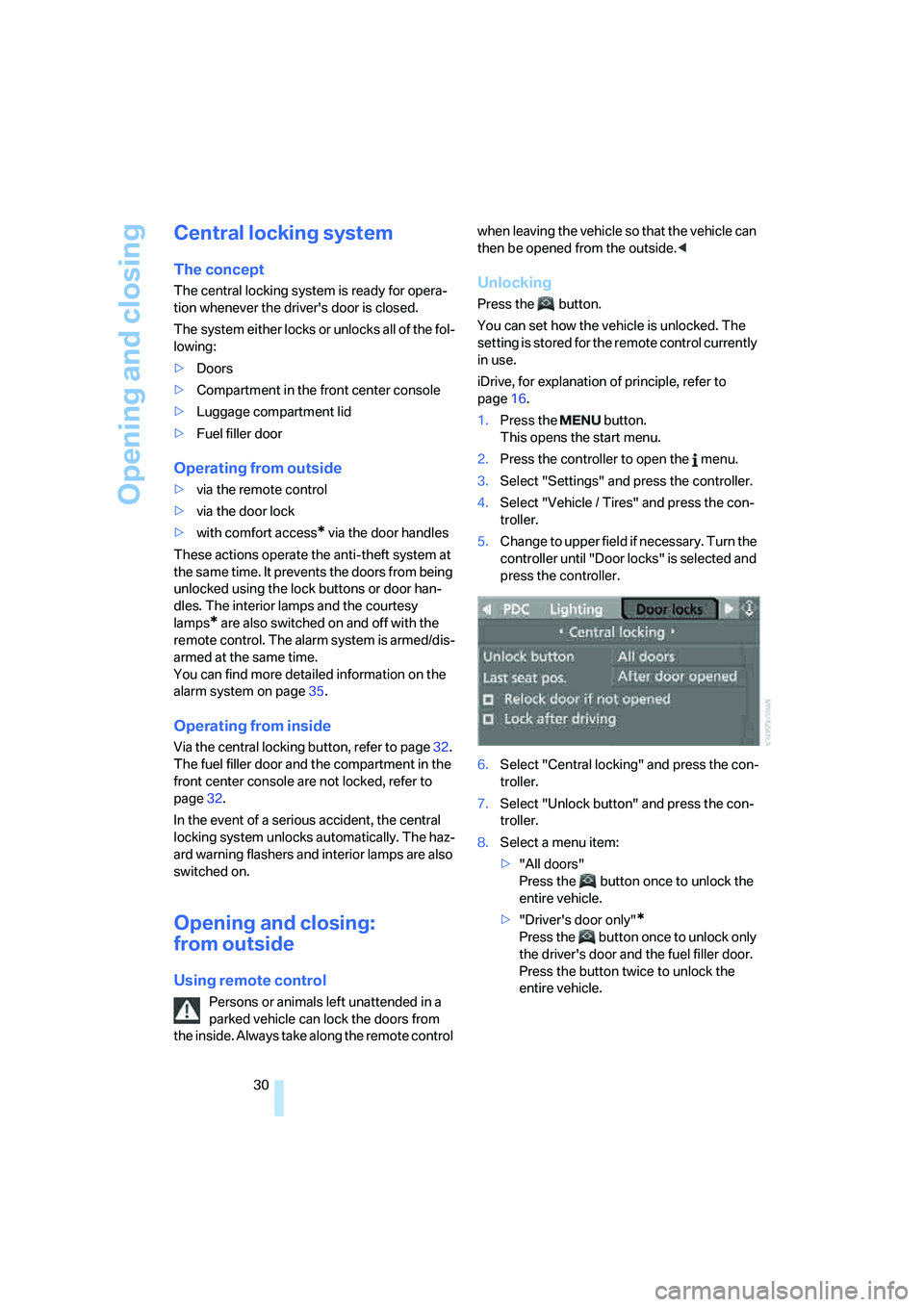
iDrive, for explanation of principle, refer to
page16.
1.Press the button.
This opens the start menu.
2.Press the controller to open the menu.
3.Select "Settings" and press the controller.
4.Select "Vehicle / Tires" and press the con-
troller.
5.Change to upper field if necessary. Turn the
controller until "Door locks" is selected and
press the controller.
6.Select "Central locking" and press the con-
troller.
7.Select "Unlock button" and press the con-
troller.
8.Select a menu item:
>"All doors"
Press the button once to unlock the
entire vehicle.
>"Driver's door only"
*
Press the button once to unlock only
the driver's door and the fuel filler door.
Press the button twice to unlock the
entire vehicle.
Page 35 of 254
Controls
33Reference
At a glance
Driving tips
Communications
Navigation
Entertainment
Mobility
Automatic locking
iDrive, for explanation of principle, refer to
page16.
1.Press the button.
This opens the start menu.
2.Press the controller to open the menu.
3.Select "Settings" and press the controller.
4.Select "Vehicle / Tires" and press the con-
troller.
5.Change to upper field if necessary. Turn the
controller until "Door locks" is selected and
press the controller.
6.Select "Central locking" and press the con-
troller.
7.Select a menu item:
>"Relock door if not opened"
The central locking system automati-
cally locks the vehicle after a short time
when no door has been opened.
>"Lock after driving"
The central locking system automati-
cally locks the vehicle as soon as you
start to drive.
8.Press the controller.
The setting is selected.
The setting is stored for the remote control cur-
rently in use.
Unlocking and opening doors
>Either unlock both doors at the same time
with the button for the central locking sys-
tem and then pull the door handle above the
armrest or>pull the door handle for each door twice: the
first pull unlocks the door, and the second
one opens it.
Locking doors
>Use the central locking button to lock both
of the doors simultaneously, or
>press down the lock button of a door.
To prevent you from being locked out, the
open driver's door cannot be locked using
the lock button.
Persons or animals left unattended in a
parked vehicle can lock the doors from
the inside. Always take along the remote control
when leaving the vehicle so that the vehicle can
then be opened from the outside.<
Hotel function
The hotel function locks the compartment in
the front center console and the luggage com-
partment lid separately and disconnects them
from the central locking system. If you hand
over the remote control without the integrated
key, refer to page28, e.g. at a hotel, then this
prevents access to the luggage compartment
and to the compartment in the front center con-
sole.
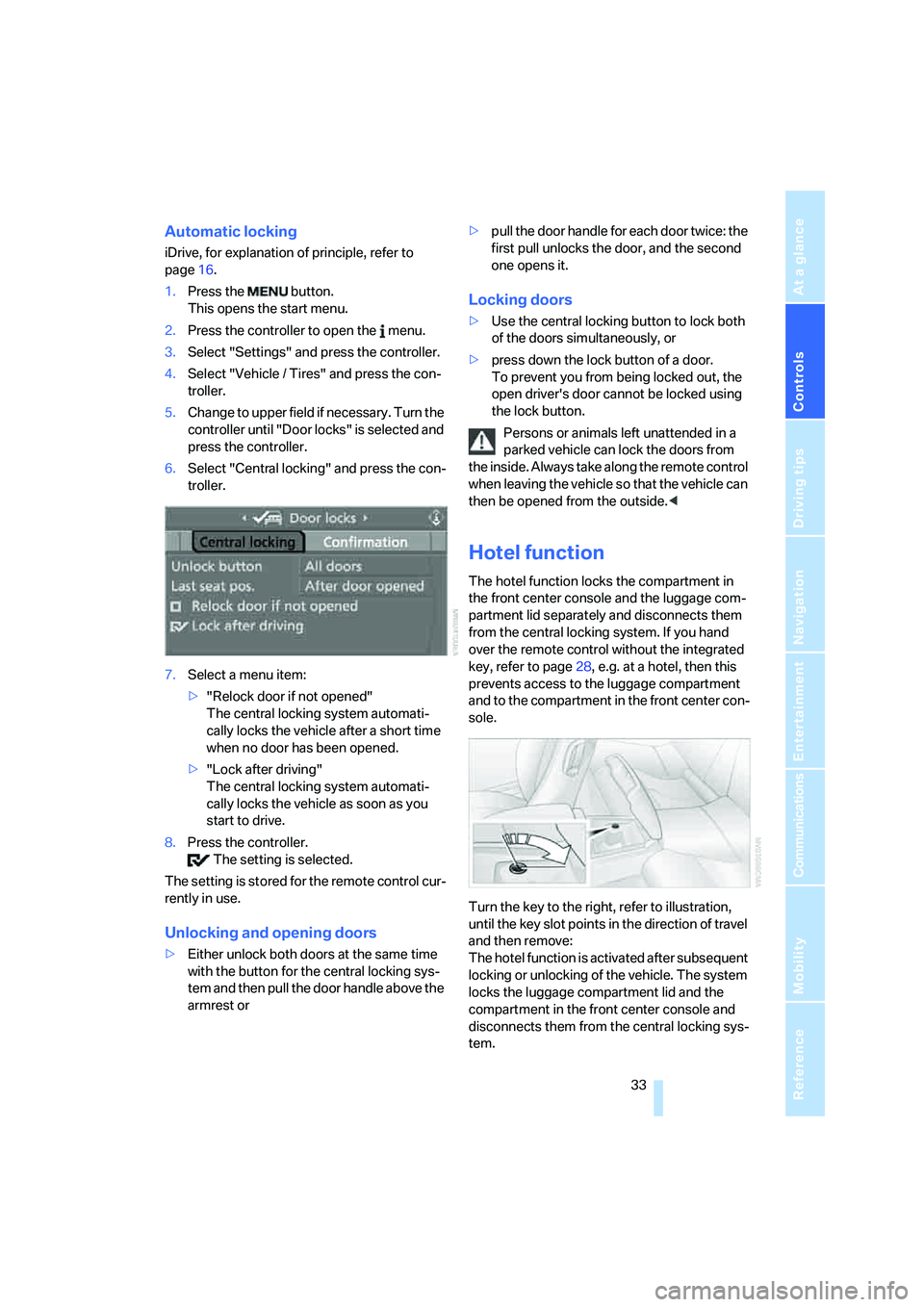
Turn the key to the right, refer to illustration,
until the key slot points in the direction of travel
and then remove:
The hotel function is activated after subsequent
locking or unlocking of the vehicle. The system
locks the luggage compartment lid and the
compartment in the front center console and
disconnects them from the central locking sys-
tem.
Page 36 of 254
Opening and closing
34
Unlocking manually
In order to manually unlock the compartment in
the front center console in the event of an elec-
trical malfunction, turn the key all the way to the
right until it reaches the stop.
If unlocking was manual, return the lock to
the home position, i.e. all the way back to
the left, before reactivating the hotel function.<
Doors
Automatic soft closing*
To close the doors, merely press it closed gen-
tly. The closing process will then be carried out
automatically.
Make sure that the closing path of the
doors is clear; otherwise injuries may
result.<
Luggage compartment lid
During opening, the luggage compart-
ment lid pivots back and up. Make sure
there is sufficient clearance.<
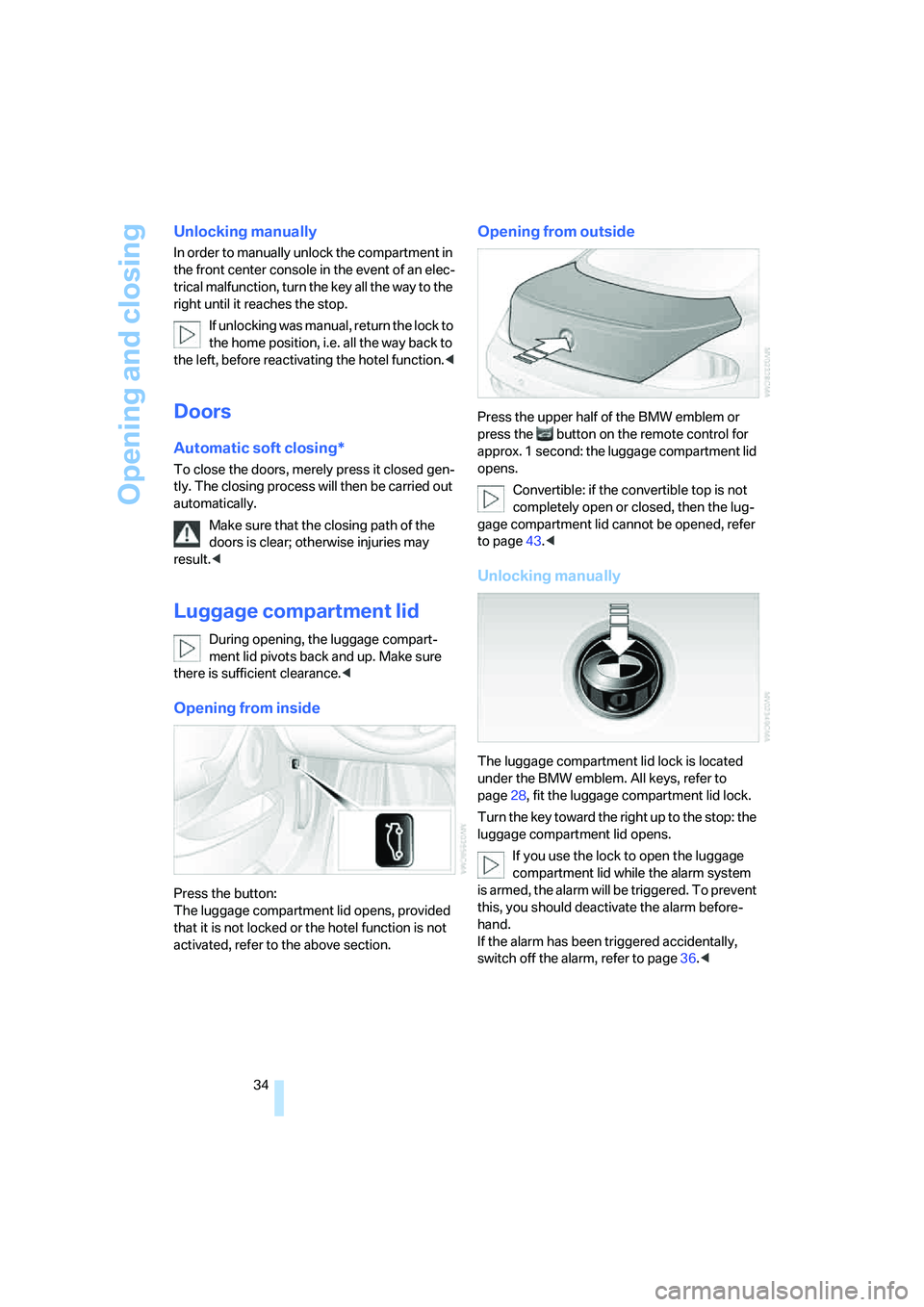
Opening from inside
Press the button:
The luggage compartment lid opens, provided
that it is not locked or the hotel function is not
activated, refer to the above section.
Opening from outside
Press the upper half of the BMW emblem or
press the button on the remote control for
approx. 1 second: the luggage compartment lid
opens.
Convertible: if the convertible top is not
completely open or closed, then the lug-
gage compartment lid cannot be opened, refer
to page43.<
Unlocking manually
The luggage compartment lid lock is located
under the BMW emblem. All keys, refer to
page28, fit the luggage compartment lid lock.
Turn the key toward the right up to the stop: the
luggage compartment lid opens.
If you use the lock to open the luggage
compartment lid while the alarm system
is armed, the alarm will be triggered. To prevent
this, you should deactivate the alarm before-
hand.
If the alarm has been triggered accidentally,
switch off the alarm, refer to page36.<
Page 116 of 254
Practical interior accessories
114 Be sure that the flashlight is switched off
when it is inserted into its socket. Failure
to comply with this precaution could lead to
overcharging and damage.<
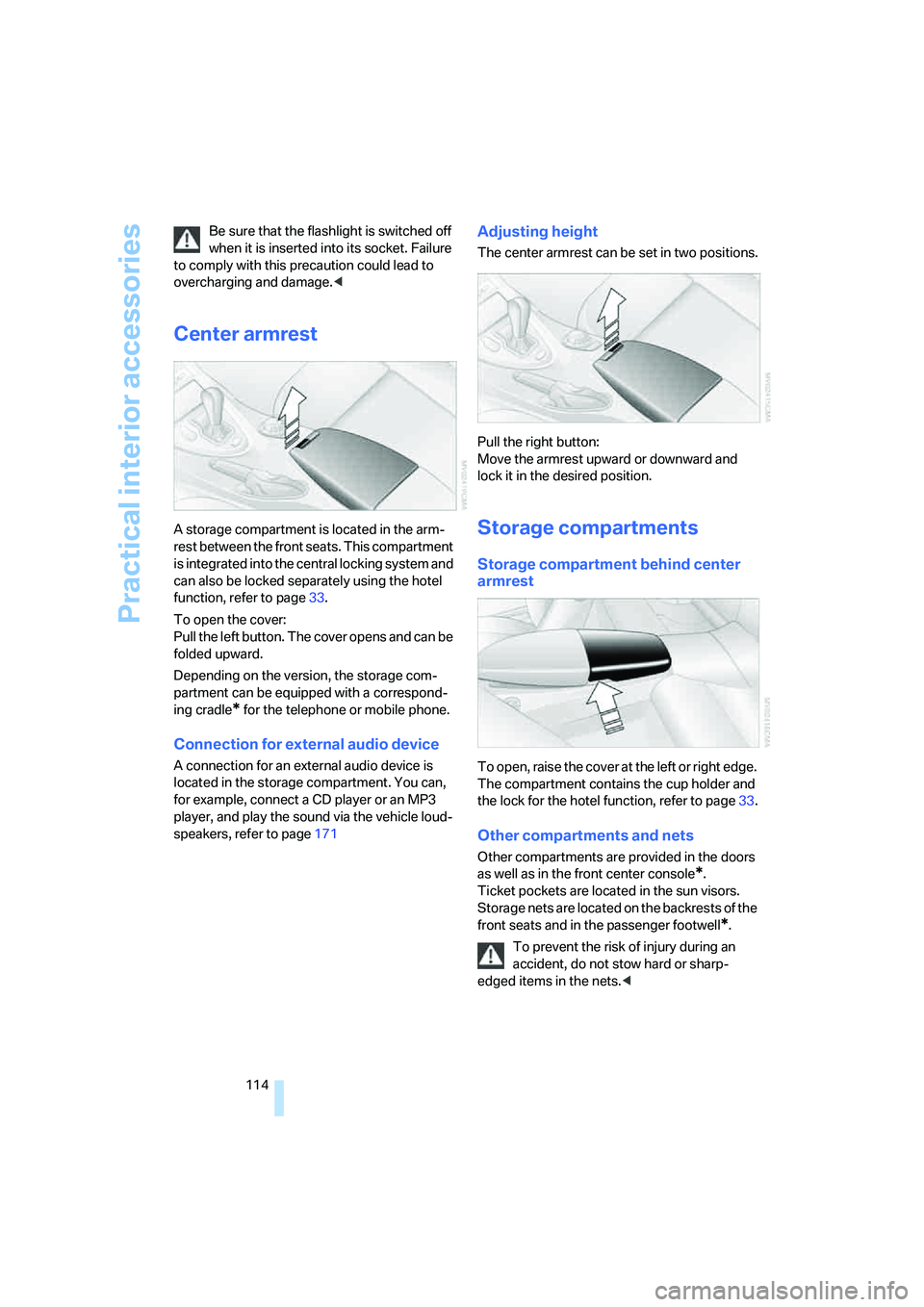
Center armrest
A storage compartment is located in the arm-
rest between the front seats. This compartment
is integrated into the central locking system and
can also be locked separately using the hotel
function, refer to page33.
To open the cover:
Pull the left button. The cover opens and can be
folded upward.
Depending on the version, the storage com-
partment can be equipped with a correspond-
ing cradle
* for the telephone or mobile phone.
Connection for external audio device
A connection for an external audio device is
located in the storage compartment. You can,
for example, connect a CD player or an MP3
player, and play the sound via the vehicle loud-
speakers, refer to page171
Adjusting height
The center armrest can be set in two positions.
Pull the right button:
Move the armrest upward or downward and
lock it in the desired position.
Storage compartments
Storage compartment behind center
armrest
To open, raise the cover at the left or right edge.
The compartment contains the cup holder
and
the lock for the hotel function, refer to page33.
Other compartments and nets
Other compartments are provided in the doors
as well as in the front center console
*.
Ticket pockets are located in the sun visors.
Storage nets are located on the backrests of the
front seats and in the passenger footwell
*.
To prevent the risk of injury during an
accident, do not stow hard or sharp-
edged items in the nets.<
Page 117 of 254
Controls
115Reference
At a glance
Driving tips
Communications
Navigation
Entertainment
Mobility
Another storage space is located in the luggage
compartment in the right side panel. If you wish,
this is also suitable to store the onboard docu-
mentation.
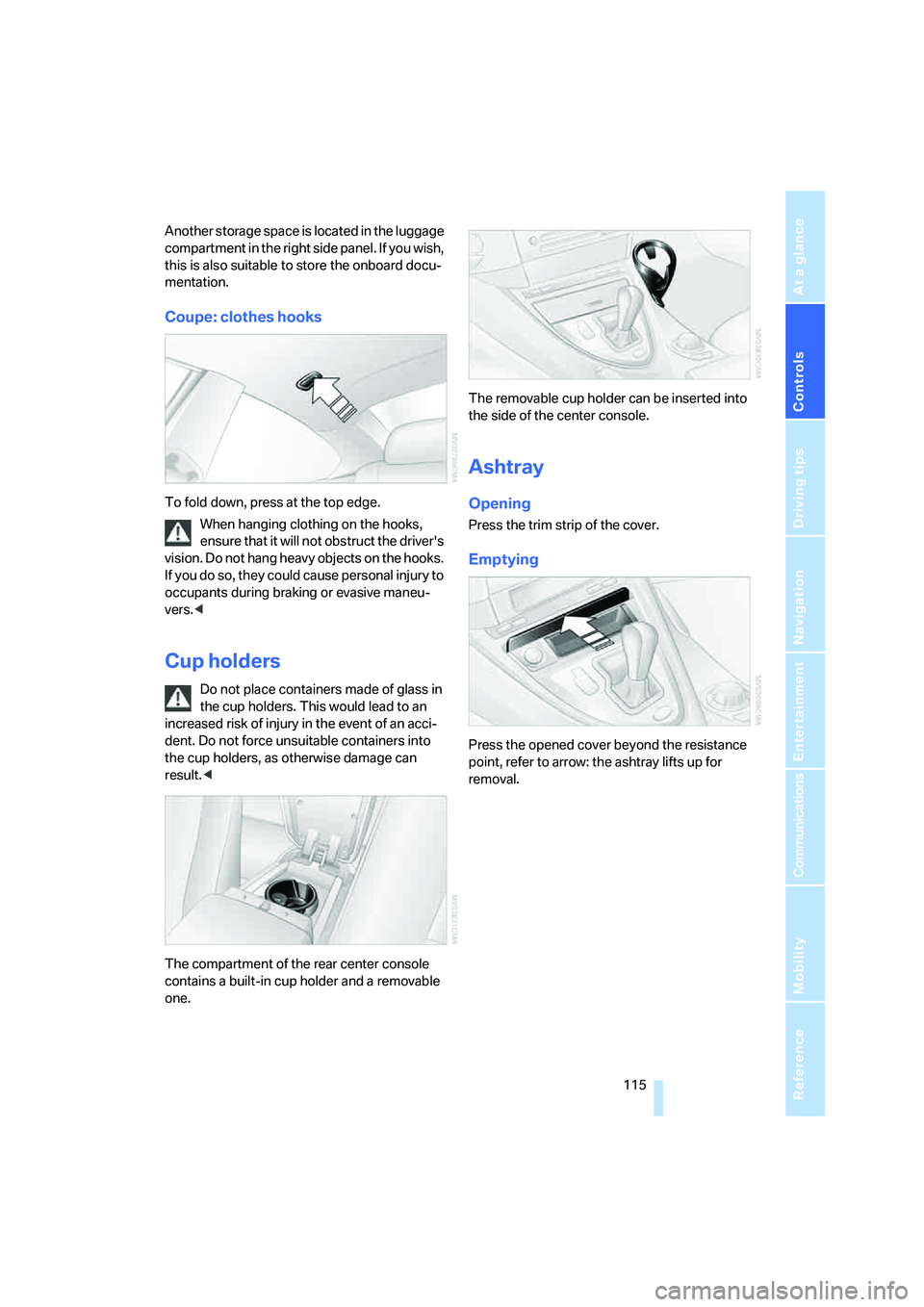
Coupe: clothes hooks
To fold down, press at the top edge.
When hanging clothing on the hooks,
ensure that it will not obstruct the driver's
vision. Do not hang heavy objects on the hooks.
If you do so, they could cause personal injury to
occupants during braking or evasive maneu-
vers.<
Cup holders
Do not place containers made of glass in
the cup holders. This would lead to an
increased risk of injury in the event of an acci-
dent. Do not force unsuitable containers into
the cup holders, as otherwise damage can
result.<
The compartment of the rear center console
contains a built-in cup holder and a removable
one.The removable cup holder can be inserted into
the side of the center console.
Ashtray
Opening
Press the trim strip of the cover.
Emptying
Press the opened cover beyond the resistance
point, refer to arrow: the ashtray lifts up for
removal.
Page 133 of 254
Navigation
Driving tips
131Reference
At a glance
Controls
Communications
Entertainment
Mobility
Entering house number
All house numbers stored for the street on the
navigation DVD can be entered.
1.Select "House number" and press the con-
troller.
2.Enter the house number:
Select the individual digits and press the
controller.
3.Change into the third field from the top.
Turn the controller until the house number
is selected and press the controller.
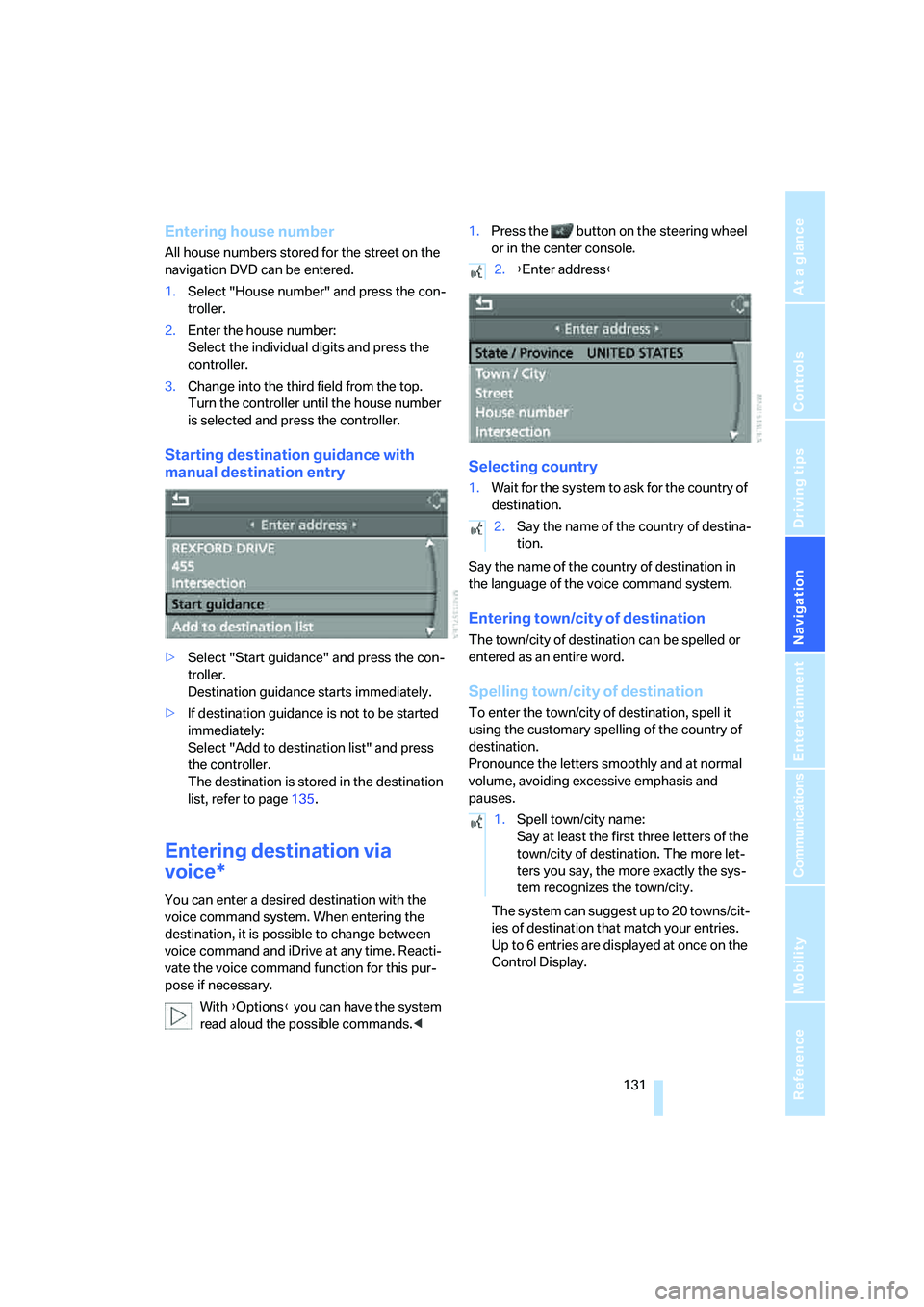
Starting destination guidance with
manual destination entry
>Select "Start guidance" and press the con-
troller.
Destination guidance starts immediately.
>If destination guidance is not to be started
immediately:
Select "Add to destination list" and press
the controller.
The destination is stored in the destination
list, refer to page135.
Entering destination via
voice*
You can enter a desired destination with the
voice command system. When entering the
destination, it is possible to change between
voice command and iDrive at any time. Reacti-
vate the voice command function for this pur-
pose if necessary.
With {Options} you can have the system
read aloud the possible commands.<1.Press the button on the steering wheel
or in the center console.
Selecting country
1.Wait for the system to ask for the country of
destination.
Say the name of the country of destination in
the language of the voice command system.
Entering town/city of destination
The town/city of destination can be spelled or
entered as an entire word.
Spelling town/city of destination
To enter the town/city of destination, spell it
using the customary spelling of the country of
destination.
Pronounce the letters smoothly and at normal
volume, avoiding excessive emphasis and
pauses.
The system can suggest up to 20 towns/cit-
ies of destination that match your entries.
Up to 6 entries are displayed at once on the
Control Display.
2.{Enter address}
2.Say the name of the country of destina-
tion.
1.Spell town/city name:
Say at least the first three letters of the
town/city of destination. The more let-
ters you say, the more exactly the sys-
tem recognizes the town/city.
Page 234 of 254
Everything from A to Z
232
Everything from A to Z
Index
"..." Identifies Control Display
texts used to select
individual functions, and
indicates where to find them
in the text.
A
ABS Antilock Brake
System87
– indicator/warning lamp89
ACC, refer to Active cruise
control68
Acceleration assistant with
SMG65
Accepted calls182
Accessories6
Accident, refer to Emergency
call217
Activated-charcoal filter for
automatic climate
control110
Activating hour signal84
"Activation time" for parked-
car ventilation110
Active cruise control68
– indicator lamp71
– radar sensor72
– selecting distance70
– warning lamps71
Active steering94
– warning lamp94
Adapter for spare key28
Adaptive brake lamps, refer to
Brake force display94
Adaptive Head Light103
"Add digits" for mobile
phone182
Additives
– coolant209
– engine oil, refer to Approved
engine oils208"Address book" for navigation
system136
Address for navigation
– deleting137
– entering128,131
– selecting136
– storing136
– storing current position136
"Add to address book"135
"Add to destination
list"131,133
Adjusting interior
temperature107
Adjusting thigh support49
Adjusting tone in audio mode,
refer to Tone control153
"After door opened"51
"After unlocking"51
Airbags94
– deactivating, refer to
Exception for front
passenger seat57
– indicator/warning lamp96
– indicator lamp for front
passenger airbags95
– sitting safely48
Air distribution
– automatic107
– manual108
Airing, refer to Ventilation109
Air outlets, refer to
Ventilation109
Air recirculation, refer to AUC
Automatic recirculated-air
control109
"Air recirculation on / off"56
Air supply, automatic climate
control106
Air volume108
AKI, refer to Fuel
specifications199Alarm system35
– avoiding unintentional
alarms36
– interior motion sensor36
– switching off alarm36
– switching off tilt alarm
sensor and interior motion
sensor36
– tilt alarm sensor36
"All channels"163
"All doors"30
All-season tires, refer to
Winter tires205
"All stations", calling up with
radio156,159
Alterations, technical, refer to
For your own safety6
"AM", reception
range152,156
Antenna, refer to Caring for
your vehicle brochure
Antenna for mobile phone174
Antifreeze
– coolant209
– washer fluid67
Antilock Brake System
ABS87
– indicator/warning lamp89
Anti-theft alarm system, refer
to Alarm system35
Anti-theft system, refer to
Central locking system30
Approved axle loads, refer to
Weights226
Approved engine oils208
Approved gross vehicle
weight, refer to Weights226
Armrest, refer to Center
armrest114
Around the center console14
Around the steering wheel10
Page 237 of 254
Reference 235
At a glance
Controls
Driving tips
Communications
Navigation
Entertainment
Mobility
CD changer165
– controls152
– fast forward/reverse168
– installation location168
– random sequence168
– repeating a track167
– sampling a track167
– selecting a CD165
– selecting a track166
– switching on/off152
– tone control153
– volume153
CD player165
– controls152
– fast forward/reverse168
– random sequence168
– repeating a track167
– sampling a track167
– selecting a track166
– switching on/off152
– tone control153
– volume153
Center armrest, adjusting
height114
Center console14
"Central locking"30
Central locking
– from inside32
– from outside30
Central locking system30
– comfort access37
– hotel function33
Changes, technical, refer to
For your own safety6
Changing a wheel215
Changing language on
Control Display85
Changing scale for navigation
system display142
Changing units of measure on
Control Display85
Changing wheels204
CHECK button81
Check Control80
"Check Control
messages"81
Check Gas Cap198
Checking air pressure, refer to
Tire inflation pressure200Child-restraint fixing system
LATCH58
Child restraint systems57
Child seats, refer to
Transporting children
safely57
Chrome parts, refer to Caring
for your vehicle brochure
Cigarette lighter
116
Cigarette lighter socket, refer
to Connecting electrical
devices116
Cleaning, refer to Caring for
your vehicle brochure
"Climate"107
Clock75
– 12h/24h mode84
– hour signal84
– setting time and date83
Closing
– from inside32
– from outside30
Closing fuel filler cap198
Clothes hooks, Coupe115
Cockpit10
Cold start, refer to Starting
engine60
Comfort access37
– observe in car wash38
– replacing battery, remote
control38
Comfort closing
– windows, with comfort
access with Coupe37
– with comfort access37
Comfort operation
– convertible top31,32
– glass sunroof31,32
– windows31,32
"Communication"180,190
Compact disc
– refer to CD changer165
– refer to CD player165
Compartment for remote
control, refer to Ignition
lock59
Compartments, refer to
Storage compartments114
Compressed audio files165Computer76
– displays on Control
Display77
– hour signal84
"Concert hall", refer to Tone
control155
"Concierge"192
Condensation, refer to When
vehicle is parked122
Condition Based Service
CBS210
"Confirmation"31
Confirmation signals for
locking and unlocking31
Connecting car vacuum
cleaner, refer to Connecting
electrical devices116
Consumption display, refer to
Average fuel
consumption
76
Consumption statistics, refer
to Average fuel
consumption76
"Continue guidance to
destination?"141
"Contrast" with BMW Night
Vision101
Control Center, refer to
iDrive16
Control Display, refer to
iDrive16
– setting brightness84
– switching off/on21
Controller, refer to iDrive16
Controls, refer to Cockpit10
Convertible
– convertible program for
automatic climate
control107
– opening and closing
windows39
– rollover protection
system96
– top42
– wind deflector46
– window and convertible top
operation with comfort
access37