ECU BMW 6 SERIES 2009 User Guide
[x] Cancel search | Manufacturer: BMW, Model Year: 2009, Model line: 6 SERIES, Model: BMW 6 SERIES 2009Pages: 272, PDF Size: 9.16 MB
Page 98 of 272
Technology for comfort, convenience and safety
96
Protective action
To ensure that the safety systems con-
tinue to provide optimized protection,
please observe the adjustment instructions on
page49.<
The front airbags help protect the driver and
front passenger by responding to frontal
impacts in which safety belts alone cannot pro-
vide adequate restraint. When needed, the
head and side airbags help provide protection in
the event of side impact. The relevant side air-
bag supports the side upper body area. The
head air bag supports the head. The knee air-
bag protects the legs from colliding with the
cockpit.
The airbags are deliberately not triggered in
every impact situation, e. g. less severe acci-
dents or rear-end collisions.
Do not apply adhesive materials to the
cover panels of the airbags, cover them or
modify them in any other way. Do not attempt to
remove the airbag restraint system from the
vehicle. Do not modify or tamper with either the
wiring or the individual components in the air-
bag system. This category includes the uphol-
stery in the center of the steering wheel, on the
instrument panel, the side trim panels on the
doors and on the Coupe, the roof pillars along
with the sides of the headliner. Do not attempt
to remove or dismantle the steering wheel.
Do not touch the individual components
directly after the system has been triggered,
because there is a danger of burns.
In the event of malfunctions, deactivation, or
triggering of the airbag restraint system, have
the testing, repair, removal, and disposal of air-
bag generators executed only by a BMW center
or a workshop that works according to BMW
repair procedures with correspondingly trained
personnel and has the required explosives
licenses. Otherwise unprofessional attempts to
service the system could lead to failure in an
emergency or undesired airbag triggering,
either of which could result in personal injury.<
Warnings and information on the airbags is also
provided on the sun visors.
Automatic deactivation of front
passenger airbags
The occupation of the seat is detected by eval-
uating the impression on the occupied seat sur-
face of the front passenger seat. The system
correspondingly activates or deactivates the
front, knee and side airbags on the front pas-
senger side.
The current status of the front passenger
airbag, i.e. deactivated or activated, is
indicated by the indicator lamp over the interior
rearview mirror, refer to Operating state of front
passenger airbags in the following.<
Before transporting a child in the front
passenger seat, read the safety informa-
tion and follow the instructions under Trans-
porting children safely, refer to page58.
The front, knee and side airbags on the front
passenger side can be deactivated for teenag-
ers and adults in certain sitting positions; the
indicator lamp for the front passenger airbags
lights up when this occurs. In these cases,
change the sitting position so that the front pas-
senger airbags are activated and the indicator
lamp goes out. If the desired status cannot be
produced by changing the sitting position,
transport the corresponding person in the rear
seat.
Do not fit seat covers, seat cushion padding,
ball mats or other items onto the front passen-
ger seat unless they are specifically recom-
mended by BMW. Do not lay objects under the
seat which could press against the seat from
below. Otherwise a correct evaluation of the
occupied seat surface cannot be ensured.<
Page 124 of 272
Practical interior accessories
122
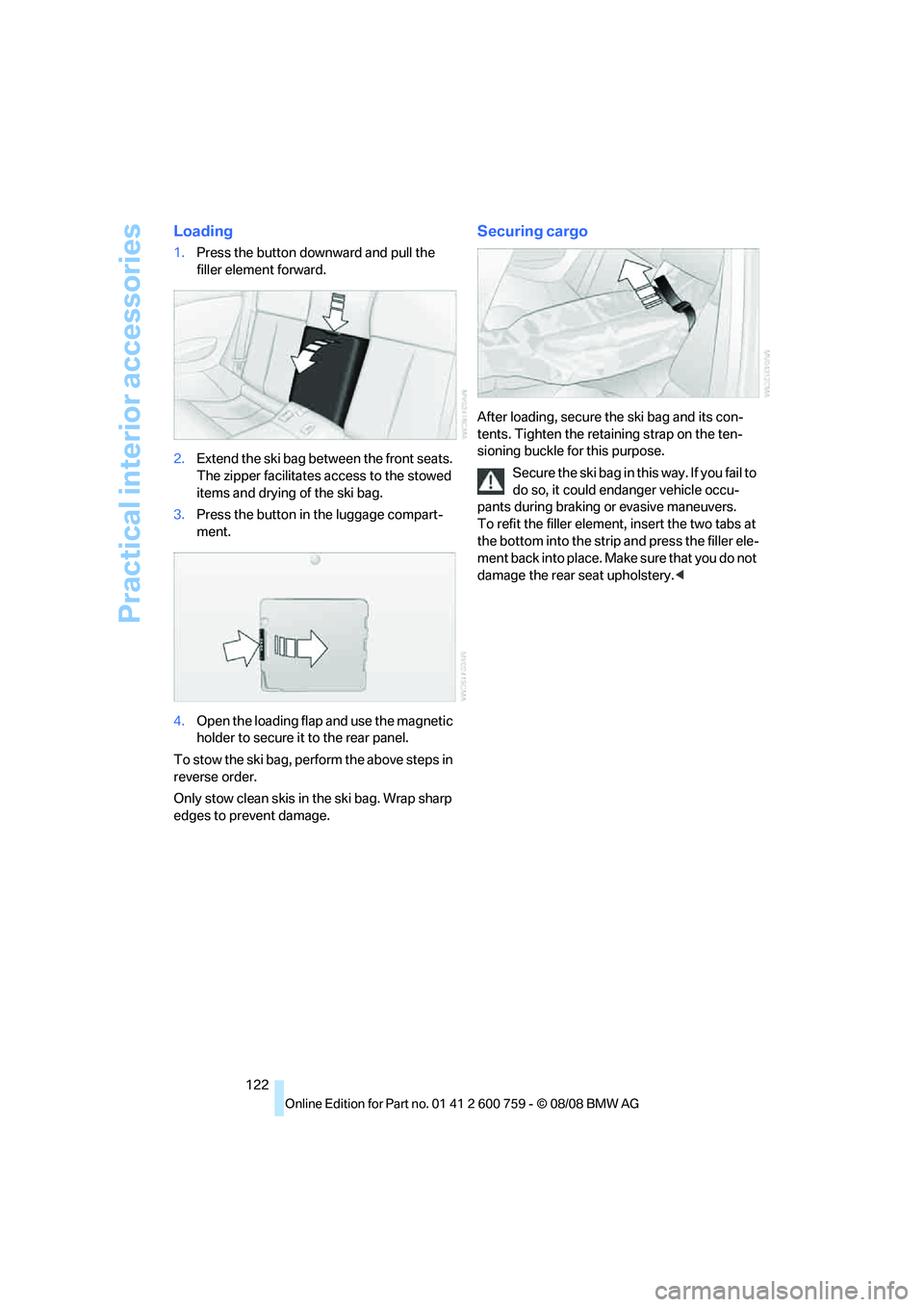
Loading
1.Press the button downward and pull the
filler element forward.
2.Extend the ski bag between the front seats.
The zipper facilitates access to the stowed
items and drying of the ski bag.
3.Press the button in the luggage compart-
ment.
4.Open the loading flap and use the magnetic
holder to secure it to the rear panel.
To stow the ski bag, perform the above steps in
reverse order.
Only stow clean skis in the ski bag. Wrap sharp
edges to prevent damage.
Securing cargo
After loading, secure the ski bag and its con-
tents. Tighten the retaining strap on the ten-
sioning buckle for this purpose.
Secure the ski bag in this way. If you fail to
do so, it could endanger vehicle occu-
pants during braking or evasive maneuvers.
To refit the filler element, insert the two tabs at
the bottom into the strip and press the filler ele-
ment back into place. Make sure that you do not
damage the rear seat upholstery.<
Page 132 of 272
Things to remember when driving
130
Securing cargo
>Use the luggage net* or securing straps to
hold down small and lightweight luggage
and cargo.
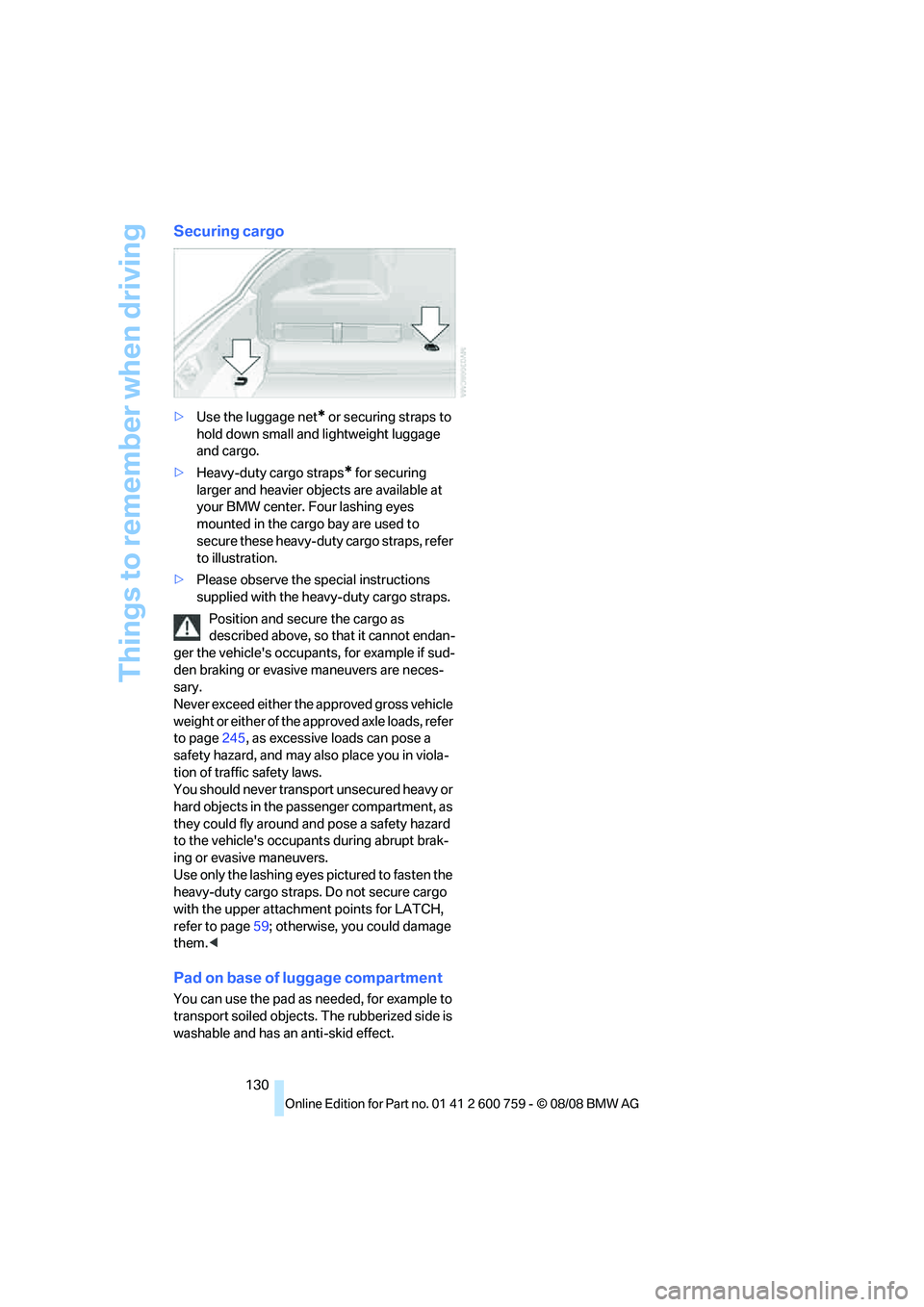
>Heavy-duty cargo straps
* for securing
larger and heavier objects are available at
your BMW center. Four lashing eyes
mounted in the cargo bay are used to
secure these heavy-duty cargo straps, refer
to illustration.
>Please observe the special instructions
supplied with the heavy-duty cargo straps.
Position and secure the cargo as
described above, so that it cannot endan-
ger the vehicle's occupants, for example if sud-
den braking or evasive maneuvers are neces-
sary.
Never exceed either the approved gross vehicle
weight or either of the approved axle loads, refer
to page245, as excessive loads can pose a
safety hazard, and may also place you in viola-
tion of traffic safety laws.
You should never transport unsecured heavy or
hard objects in the passenger compartment, as
they could fly around and pose a safety hazard
to the vehicle's occupants during abrupt brak-
ing or evasive maneuvers.
Use only the lashing eyes pictured to fasten the
heavy-duty cargo straps. Do not secure cargo
with the upper attachment points for LATCH,
refer to page59; otherwise, you could damage
them.<
Pad on base of luggage compartment
You can use the pad as needed, for example to
transport soiled objects. The rubberized side is
washable and has an anti-skid effect.
Page 190 of 272
Telephoning
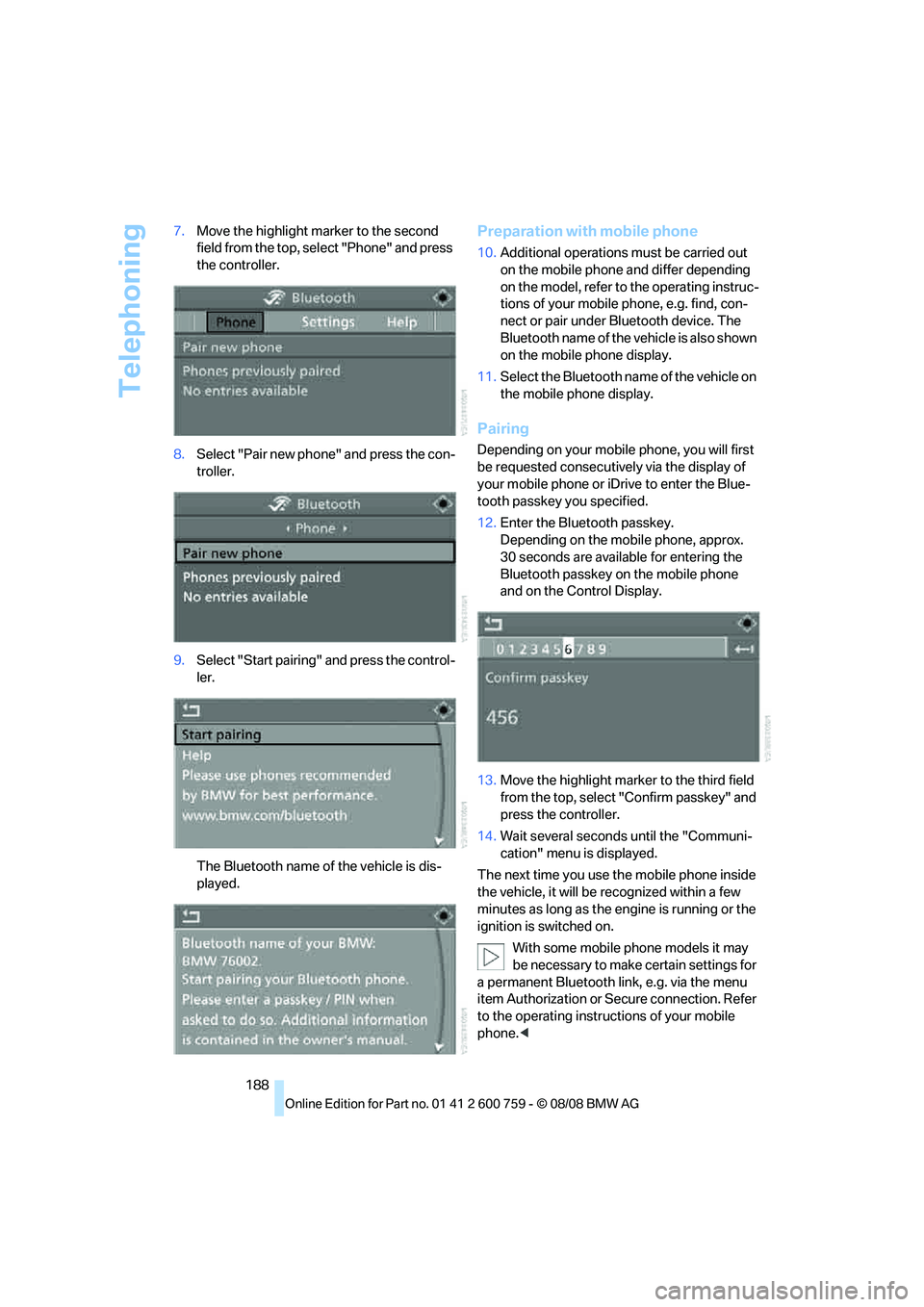
188 7.Move the highlight marker to the second
field from the top, select "Phone" and press
the controller.
8.Select "Pair new phone" and press the con-
troller.
9.Select "Start pairing" and press the control-
ler.
The Bluetooth name of the vehicle is dis-
played.
Preparation with mobile phone
10.Additional operations must be carried out
on the mobile phone and differ depending
on the model, refer to the operating instruc-
tions of your mobile phone, e.g. find, con-
nect or pair under Bluetooth device. The
Bluetooth name of the vehicle is also shown
on the mobile phone display.
11.Select the Bluetooth name of the vehicle on
the mobile phone display.
Pairing
Depending on your mobile phone, you will first
be requested consecutively via the display of
your mobile phone or iDrive to enter the Blue-
tooth passkey you specified.
12.Enter the Bluetooth passkey.
Depending on the mobile phone, approx.
30 seconds are available for entering the
Bluetooth passkey on the mobile phone
and on the Control Display.
13.Move the highlight marker to the third field
from the top, select "Confirm passkey" and
press the controller.
14.Wait several seconds until the "Communi-
cation" menu is displayed.
The next time you use the mobile phone inside
the vehicle, it will be recognized within a few
minutes as long as the engine is running or the
ignition is switched on.
With some mobile phone models it may
be necessary to make certain settings for
a permanent Bluetooth link, e.g. via the menu
item Authorization or Secure connection. Refer
to the operating instructions of your mobile
phone.<
Page 222 of 272
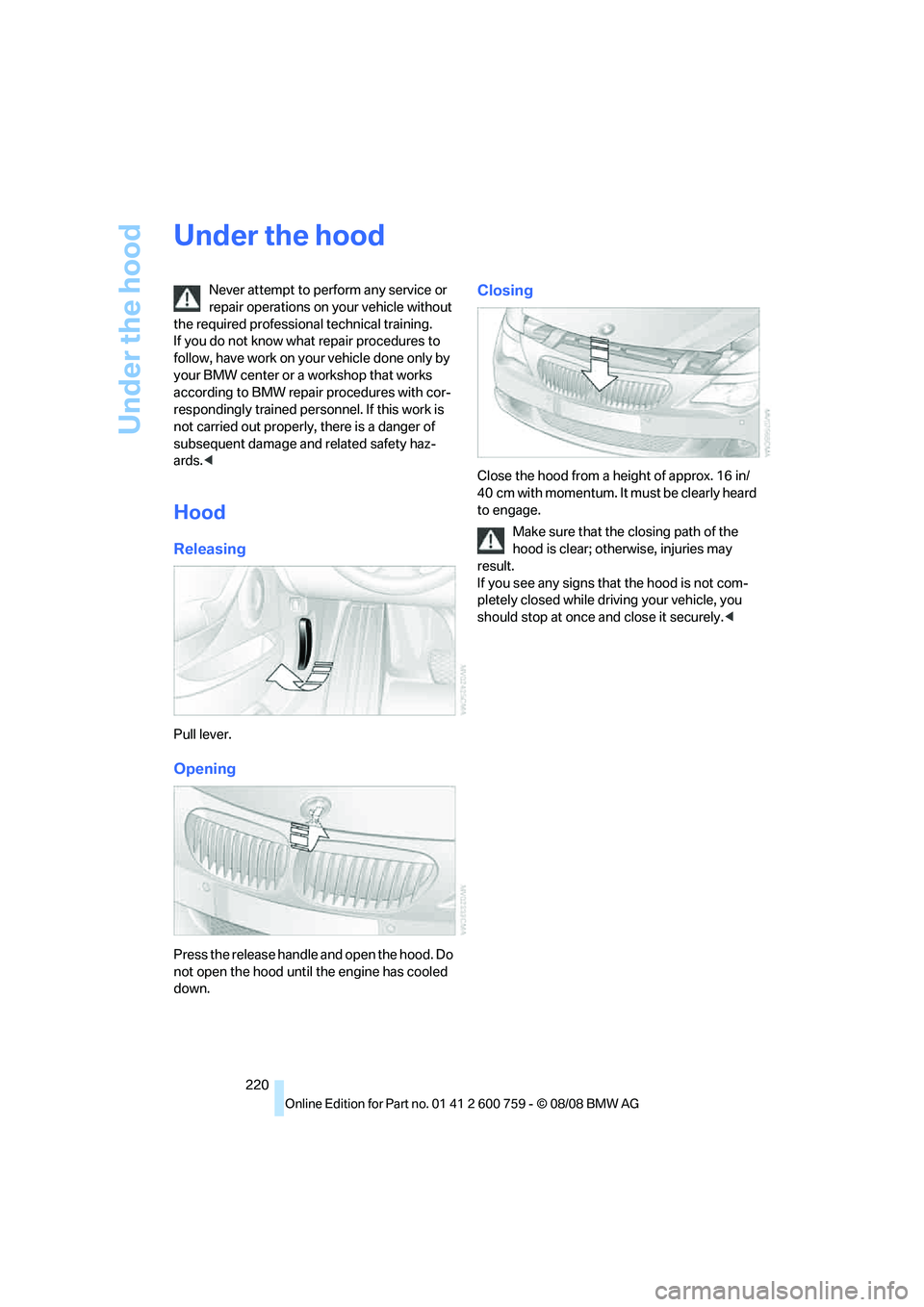
Under the hood
220
Under the hood
Never attempt to perform any service or
repair operations on your vehicle without
the required professional technical training.
If you do not know what repair procedures to
follow, have work on your vehicle done only by
your BMW center or a workshop that works
according to BMW repair procedures with cor-
respondingly trained personnel. If this work is
not carried out properly, there is a danger of
subsequent damage and related safety haz-
ards.<
Hood
Releasing
Pull lever.
Opening
Press the release handle and open the hood. Do
not open the hood until the engine has cooled
down.
Closing
Close the hood from a height of approx. 16 in/
4 0 c m w i t h m o m e n t um . I t m u st b e c l e a r l y h e a r d
to engage.
Make sure that the closing path of the
hood is clear; otherwise, injuries may
result.
If you see any signs that the hood is not com-
pletely closed while driving your vehicle, you
should stop at once and close it securely.<
Page 259 of 272
Reference 257
At a glance
Controls
Driving tips
Communications
Navigation
Entertainment
Mobility
FTM, refer to Flat Tire
Monitor90
Fuel
– average consumption77
– display77
– fuel specifications213
– high-quality brands213
– quality213
– refer to Average fuel
consumption77
– specifications213
– tank contents, refer to
Capacities245
Fuel clock, refer to Fuel
gauge77
Fuel display, refer to Fuel
gauge77
Fuel-efficient driving
– refer to Saving fuel126
Fuel filler door212
– releasing in the event of
electrical malfunction212
Full mobile phone preparation
package186
Full screen display, refer to
Switching assistance
window off21
"Full screen" with BMW Night
Vision102
Fuses234
G
Garage door opener, refer to
Integrated universal remote
control117
Gasoline, refer to Fuel
specifications213
Gasoline, refer to Required
fuel213
Gasoline display, refer to Fuel
gauge77
Gearshift lever
– manual transmission62
General driving
notes126,127Glass sunroof, electric with
raise function42
– convenient operation34
– convenient operation with
comfort access39
– moving manually43
– remote control32
Glove compartment118
GPS navigation, refer to
Navigation system134
Grills, refer to Ventilation114
Gross vehicle weight, refer to
Weights245
H
Handbrake62
– indicator lamp13,62
Hands-free system, refer to
Microphone14
Hand washing228
Hazard warning flashers15
"HD radio"168
HD radio, refer to High
Definition Radio168
Head airbags95
Headlamp
– cleaning tank, refer to
Capacities245
Headlamp control,
automatic104
Headlamp flasher65
Headlamps
– cleaning, refer to Wiper
system66
– filler neck for washer
fluid221
– replacing bulbs231
Head Light, refer to Adaptive
Head Light106
Head restraints
– active front head
restraints52
– front52
– sitting safely49
Head-Up Display98,99Heated
– mirrors55
– rear window112
– seats55
– steering wheel56
Heating111
– exterior mirrors55
– interior110
– rear window112
– residual heat114
– seats55
– steering wheel56
Heating with engine switched
off, refer to Residual
heat114
Heavy cargo, refer to Securing
cargo130
Height, refer to
Dimensions243
Height adjustment
– seats50
– steering wheel56
High-beam assistant106
High beams106
– headlamp flasher106
– indicator lamp13
High Definition Radio168
High-pressure cleaning
jets
227,228
High water, refer to Driving
through water128
Hills128
Holder for cups120
"Home address" in
navigation146
Homepage of BMW4
Hood220
Horn10
Hotel function35
– unlocking manually35
Hot exhaust system127
"Hour memo"85
"House number" in
destination entry139
Hydraulic brake assist, refer to
Brake assist88
Hydroplaning127
– also refer to Minimum tread
depth217
Page 261 of 272
Reference 259
At a glance
Controls
Driving tips
Communications
Navigation
Entertainment
Mobility
L
Lamps
– refer to High-beam
assistant106
– refer to Parking lamps/low
beams104
Lamps and bulbs231
Lane limit lines, refer to
Leaving lane warning102
"Language / Units"86
"Language / Units" in
navigation135,151
"Languages"86
"Languages" in
navigation135,151
Lashing eyes, refer to
Securing cargo130
Last destinations, refer to
Destination list143
"Last seat pos."52
LATCH child restraint fixing
system58
Leather care229
Leaving lane warning102
LEDs light-emitting
diodes231
Length, refer to
Dimensions243
License plate lamp, replacing
bulbs233
Light-emitting diodes
LEDs231
Lighter121
"Lighting"66,105
Lighting
– instruments108
– lamps and bulbs231
– of the vehicle, refer to
Lamps104
Light switch104
"Limit"83
Loading
– securing cargo130
– stowing cargo129
– vehicle129
Loading, refer to Cargo
loading129Load securing equipment,
refer to Securing cargo130
"Lock after driving"35
Lock buttons in the doors,
refer to Lokking35
Locking33
– confirmation signals33
– from inside35
– from outside33
– without key, refer to Comfort
access38
Locking and unlocking doors
– confirmation signals
33
– from inside34
– from outside32
Low beams104
– automatic104
– replacing bulbs232
Lower back support, refer to
Lumbar support50
Luggage compartment
– hotel function35
– increasing capacity,
Convertible37
Luggage compartment lid35
– emergency operation36
– emergency release37
– opening from inside36
– opening from outside36
– opening with remote
control33,36
– unlocking manually36
Luggage compartment lid/
tailgate
– comfort access39
Lumbar support50
LW, waveband164
M
M+S tires, refer to Winter
tires219Maintenance225
– refer to Service and
Warranty Information
Booklet for US models225
– refer to Service
requirements79
– refer to Warranty and
Service Guide Booklet for
Canadian models225
Maintenance system225
Malfunction
– convertible top45
– driver's door34
– fuel filler door212
– hotel function35
Malfunction warnings, refer to
Check Control81
Manual air distribution112
"Manual" in radio mode165
Manual operation
– convertible top45
– door lock34
– driver's door34
– fuel filler door212
– glass sunroof43
– hotel function35
– luggage compartment lid36
– transmission lock, sport
automatic transmission64
Manual transmission62
"Map direction of travel"150
Map display150
"Map facing north"150
Map for navigation
– changing scale150
– destination entry141
Map view facing north150
Master key, refer to Keys/
remote control30
Maximum cooling113
Maximum speed with winter
tires219
Measurements, refer to
Dimensions
– Convertible244
– Coupe243
Memory, refer to Seat, mirror
and steering wheel
memory51
Page 265 of 272
Reference 263
At a glance
Controls
Driving tips
Communications
Navigation
Entertainment
Mobility
Retreaded tires218
Reverse, fast
– CD changer178
– CD player178
Reverse gear
– manual transmission62
– Sport automatic
transmission63
Road map150
"Roadside
Assistance"196,202
Roadside assistance202,236
Roadside parking lamps106
– replacing bulbs, refer to
Parking lamps232
Rollover protection system on
Convertible97
– lowering98
Rope, refer to Tow-starting
and towing237
Rotary/pushbutton, refer to
iDrive16
Route146
– bypassing sections152
– changing152
– changing criteria146
– displaying149
– displaying arrow display149
– displaying map view150
– displaying streets or towns/
cities151
– selecting146
Route information, refer to
Destination guidance with
voice instructions151
Route map, refer to Displaying
map view150
"Route preference",
changing146
Route selection146
RSC Runflat System
Component, refer to Run-
flat tires218
Run-flat System Component
RSC, refer to Run-flat
tires218Run-flat tires218
– continuing driving with a
damaged tire92,93
– flat tire92,93
– Flat Tire Monitor90
– new tires218,219
– tire inflation pressure214
– Tire Pressure Monitor92
– winter tires219
S
Safety belts54
– damage55
– indicator lamp54
– reminder54
– sitting safely49
Safety belt tensioners, refer to
Safety belts54
Safety systems
– ABS Antilock Brake
System88
– airbags95
– driving stability control
systems88
– rollover protection system,
Convertible97
– safety belts54
Safety tires, refer to Run-flat
tires218
Satellite radio171
– enabling channel171
– selecting channel171
– storing channel171
"SAT" in radio mode160,171
"Save current
destination"146
"Scan"
– music tracks on CD176
– stations in radio mode165
Scan
– CD changer176
– CD player176
– radio165
"Scan all" in audio mode176
"Scan directory" in audio
mode176
Screen, refer to iDrive16Screw thread for tow
fitting238
SDARS, refer to Satellite
radio171
Seats49
– adjusting the seats50
– heating55
– lumbar support50
– memory, refer to Seat, mirror
and steering wheel
memory51
– sitting safely49
– sports seat50
– storing the setting51
– thigh support50
Securing cargo130
– ski bag122
"Select as
destination"142,205
"Select current speed"83
Selecting audio sources, refer
to Operation via iDrive160
Selecting distance with active
cruise control70
Selecting frequency
manually165
Selecting menu items20
Selecting route146
Selection options with
navigation system146
Service, refer to Roadside
Assistance236
Service and Warranty
Information Booklet for
US models225
"Service Info"79,203,222
Service Interval Display
– refer to CBS Condition
Based Service225
– refer to Service
requirements79
"Service Request"196,203
"Service
requirements"80,203,222
Service requirements79
– refer to CBS Condition
Based Service225
"Set date"85
"Set" in audio mode160
Page 268 of 272
Everything from A to Z
266 Tires
– age216
– air loss92,93
– breaking-in126
– condition217
– damage217
– inflation pressure214
– minimum tread depth217
– new wheels and tires218
– pressure monitoring, refer to
Flat Tire Monitor90
– pressure monitoring, refer to
Tire Pressure Monitor92
– replacing218
– retreaded tires218
– run-flat tires218
– size215
– size, refer to The right
wheels and tires218
– wear indicators217
– wheel/tire combination218
– winter tires219
Tires, run-flat
– refer to Run-flat tires218
– winter tires219
TMC station, refer to Traffic
information152
"Tone"161
Tone dialing method196
Tone in audio mode
– adjusting161
– middle setting163
Tone on locking/unlocking33
Tools, refer to Onboard
toolkit231
Top44
"Top 8" in mobile phone
mode194
Torque, refer to Engine
data242
Touch tone dialing, refer to
Tone dialing method196
Tow bar238
Tow fitting237Towing237
– methods238
– tow fittings237
– with manual
transmission238
– with Sport automatic
transmission238
"Town / City" in destination
entry137
Tow rope238
Tow-starting237
"TPM"93
TPM Tire Pressure
Monitor92
– resetting system93
– system limits92
– warning lamp93
Tracks
– random sequence177
– sampling on CD176
– selecting with CD175
Traction-assist feature, refer
to DSC Dynamic Stability
Control89
Traction control, refer to DSC
Dynamic Stability
Control89
Traffic information for
navigation152
– depiction in route map154
– displaying153
– during destination
guidance155
– symbols154
"Traffic Info settings"153
Traffic jam
– displaying traffic
information152
– refer to Bypassing route
sections152
Transmission
– manual transmission62
– sport automatic
transmission62
– starting assistant90
– towing238
– transmission lock, manually
locking and unlocking, sport
automatic transmission64Transporting children
safely58
Transport securing device,
refer to Securing cargo130
Tread depth, refer to Minimum
tire tread217
Treble, refer to Tone
control161
"Treble", tone control161
"Trip computer"79
Trip computer78
Trip-distance counter
– refer to Trip computer78
– refer to Trip meter76
"Triple turn signal"66
Trip meter76
– also refer to Trip
computer78
Trip odometer, refer to Trip
meter76
Trunk, refer to Luggage
compartment37
Trunk lid, refer to Luggage
compartment lid35
Turning circle, refer to
Dimensions243
Turn signals65
U
Uniform Tire Quality Grading/
UTQR216
"Units"86
Units
– temperature86
Units of measure
– average fuel
consumption86
Universal garage-door
opener, refer to Integrated
universal remote
control117
Universal remote control, refer
to Integrated universal
remote control117
"Unlock button"32