window BMW 6 SERIES 2009 Owner's Guide
[x] Cancel search | Manufacturer: BMW, Model Year: 2009, Model line: 6 SERIES, Model: BMW 6 SERIES 2009Pages: 272, PDF Size: 9.16 MB
Page 229 of 272
Mobility
227Reference
At a glance
Controls
Driving tips
Communications
Navigation
Entertainment
Care
Car-care products
Regular cleaning and care make a significant
contribution to retaining your BMW's value.
For the cleaning and care of your vehicle, BMW
recommends using only products that BMW
has approved for this purpose.
Your BMW center will be glad to advise you
about products and services for the cleaning
and care of your BMW.
Genuine BMW Care Products are materi-
als tested, laboratory tested, and tested in
actual use. They offer optimum care and pro-
tection for your vehicle.<
Do not use cleaners that contain alcohol
or solvents; they can damage your vehi-
cle.<
Cleaning agents can contain substances
that are dangerous or pose health risks.
You should therefore heed the warnings and
hazard indications on the packaging. Open the
doors or windows on your vehicle whenever
cleaning the interior. Make sure there is suffi-
cient ventilation in enclosed spaces. Use only
products that are formulated for vehicle clean-
ing.<
Exterior care
Washing your vehicle
In the winter months, it is especially
important to ensure that the vehicle is
washed on a regular basis. Otherwise, signifi-
cant soiling and road salt can cause damage to
the vehicle.<
After washing the vehicle, apply the
brakes briefly to dry them. Failure to do so
may lead to a reduction in braking efficiency and
also to corrosion of the brake rotors.<
Car washes
Give preference to cloth car washes.Do not use high-pressure car washes
because they can cause drops of water to
penetrate in the vicinity of the windshield.<
Before driving into the car wash, make sure that
it is suitable for your BMW. Pay attention to the
following points:
>Dimensions of your vehicle, refer to
page243.
>If necessary, fold in the outside rearview
mirrors, refer to page55.
>Maximum permissible tire width.
>The convertible top must not be treated
with wax. Make sure that a program without
wax or a special convertible program is
available.
Preparations for driving into the car wash:
>Deactivate rain sensor to prevent unwanted
wiper activation.
>Remove additional add-on parts, e.g. spoil-
ers or phone antennas, if they could be
damaged.
Automatic transmission
Before driving into the car wash, make sure the
vehicle is able to roll by making sure to:
1.Insert the remote control into the ignition
lock, even with comfort access.
2.Shift into transmission position N.
3.Release the parking brake.
4.Switch off the engine.
5.Leave the remote control in the ignition lock
so that the vehicle can roll.
Steam cleaners/high-pressure
cleaning jets
When using steam jets or high-pressure
washers, ensure that you maintain suffi-
cient clearance to the vehicle and do not exceed
a temperature of 606.
Insufficient distance or excessive pressure or
temperature can damage parts of the vehicle or
Page 230 of 272
Care
228 can result in water penetration. Follow the oper-
ating instructions for the high-pressure clean-
ing jets.<
When using high-pressure cleaning jets,
do not remain in one place for a long time
and be sure to maintain a distance of at least
12 in/30 cm from sensors, e.g. Park Distance
Control sensors or radar sensors.<
Hand washing
When washing the vehicle by hand, use plenty
of water and car washing shampoo. Clean the
vehicle with gentle pressure using a sponge or a
washing brush.
Before cleaning the windshield, deacti-
vate the rain sensor or switch off the igni-
tion to prevent unwanted wiper operation.<
Follow local guidelines for washing vehi-
cles by hand.<
Headlamps
Do not rub dry and never use abrasives or
strong solvents to clean the covers.
Loosen dirt, e.g. insects, with shampoo or
insect remover and wash away with plenty of
water.
Use a window de-icer to remove accumulated
ice and snow, not a scraper.
Windows
Use a glass cleaner to clean the inside and out-
side surfaces of the windows and the glass sur-
faces of the mirrors.
Do not use quartz-containing cleansers
to clean glass surfaces of the mirrors.<
Wiper blades
Clean with soapy water and replace regularly to
prevent streaking.
The presence of wax and sealant residues
and dirt on the windows leads to streaking
during wiper operation and results in premature
wear on wiper blades as well as interference
with the rain sensor.<
Convertible top care
The appearance and service life of the convert-
ible top depend on proper care and operation.
Please follow these instructions:
>Never stow the convertible top in the con-
vertible top compartment when it is wet or
frozen, since this can cause water marks,
mildew stains, and scuff marks.
>Remove water marks on the headliner with
a microfiber cloth and interior cleanser.
>When parking for long intervals in enclosed
spaces, make sure there is sufficient venti-
lation.
>Remove bird droppings immediately
because their caustic properties have a cor-
rosive effect on the convertible top and can
damage the rubber seals.
Do not use stain remover, paint thinner,
solvents, gasoline, or the like to remove
stains. These substances can damage the rub-
ber coating. Improper care and cleaning can
cause leaks to develop in the convertible top
and its seams.<
In the event of more serious soiling, use a spe-
cial convertible top cleaner.
When doing so, follow the manufacturer's
directions for use.
After three to five washings, treat the convert-
ible top with sealant.
Caring for the vehicle finish
Regular care helps your vehicle retain its value
and protects the paint from the long-term
effects of aggressive substances.
Regionally occurring environmental factors can
affect and damage vehicle finish. It is therefore
important to tailor the frequency and extent of
your car care accordingly.
Immediately remove particularly aggressive
substances such as spilled fuel, oil, grease,
brake fluid, tree resin, or bird droppings; other-
wise, they may damage your paint.
Page 231 of 272
Mobility
229Reference
At a glance
Controls
Driving tips
Communications
Navigation
Entertainment
Repairing paint damage
Repair stone damage or scratches imme-
diately, depending on the severity of the
damage, to prevent the formation of rust.<
BMW recommends having paint damage pro-
fessionally repaired using Genuine BMW finish
materials in accordance with factory guidelines.
Waxing
Sealant is required when water no longer beads
on the clean surface of the paint. Use only prod-
ucts that contain carnauba wax or synthetic wax
to seal your finish.
Rubber gaskets
Treat only with water or a rubber care product.
To avoid noise or damage, do not use
products that contain silicone to care for
rubber gaskets.<
Chrome components
Particularly after exposure to road salt, thor-
oughly cleanse parts like the radiator grille, door
handles, or window frames with plenty of water
with shampoo added to it. For additional treat-
ment, use chrome polish.
Alloy wheels
Depending on your system, braking can gener-
ate dust, which settles on the light-alloy wheels.
Remove this dust regularly with acid-free wheel
cleaner.
Do not use aggressive, acid-containing,
strongly alkaline, or coarse cleansers and
do not use steam cleaners at temperatures
greater than 60 °C; otherwise you may damage
your vehicle.<
Outside sensors
Sensors outside the vehicle, such as Park
Distance Control sensors or radar sen-
sors, should be kept clean and free of ice to
maintain their full function.<
Interior care
Upholstery materials/cloth-covered
paneling
Clean regularly with a vacuum cleaner in order
to remove surface dirt.
In the event of more serious soiling such as bev-
erage stains, use a soft sponge or a lint-free
microfiber cloth in combination with suitable
interior cleaners. Follow the instructions on the
packaging.
Clean upholstery material over a large
area extending out to the seams. Avoid
intense friction.<
Open Velcro fasteners on pants or other
items of clothing can cause damage to
the seat covering. Make sure that the Velcro
fasteners are closed.<
Leather/leather-covered paneling
The leather used by BMW is a high quality
natural product. Slight patterns in the
grain are part of the typical properties of a natu-
ral leather.<
Dust and dirt from the road chafe in pores and
folds and result in considerable wear and cause
the leather surface to become prematurely brit-
tle. We therefore suggest that you clean the
leather with a dust cloth or vacuum cleaner at
regular intervals.
Particularly with light-colored leather, make
sure to clean it regularly since it has a greater
tendency to become soiled.
Treat the leather twice a year with a leather
lotion since dirt and grease harm the protective
layer of the leather.
Carpets/luggage compartment
Carpeting, floor mats, and luggage compart-
ment rugs and paneling can be cleaned with a
vacuum or in the event of more serious soiling,
cleansed with an interior cleaner.
Floor mats and luggage compartment rugs can
be removed for cleaning. When inserting into
place, make sure that the seat rails do not pro-
Page 236 of 272
Replacing components
234 >Seat, mirror and steering wheel
* memory
The positions must be stored again, refer to
page51.
>Time and date
Must be updated again, refer to page84.
>Radio
Radio stations must be stored again, refer
to page166.
>Navigation system
You must wait until the system becomes
functional again, refer to page134.
>Glass roof, electric
It may not be possible to move the glass
roof. The system must be initialized, refer to
page43.
>Active steering
The system is deactivated and must be
reinitialized, refer to page95. Until then,
larger steering wheel movements are
required.
>Power windows
The pinch prevention system for the power
windows must be reinitialized, refer to
page40.
Talk to your BMW center before placing
the stored vehicle back in service. <
Fuses
Never attempt to repair a blown fuse and
do not replace a defective fuse with a sub-
stitute of another color or amperage rating, as
this could lead to a circuit overload, ultimately
resulting in a fire in the vehicle.<
Spare fuses and a pair of plastic tweezers are
located in the compartment for the onboard tool
kit, refer to page231.
Information on fuse allocation is located below
the bracket for the onboard tool kit, see below.
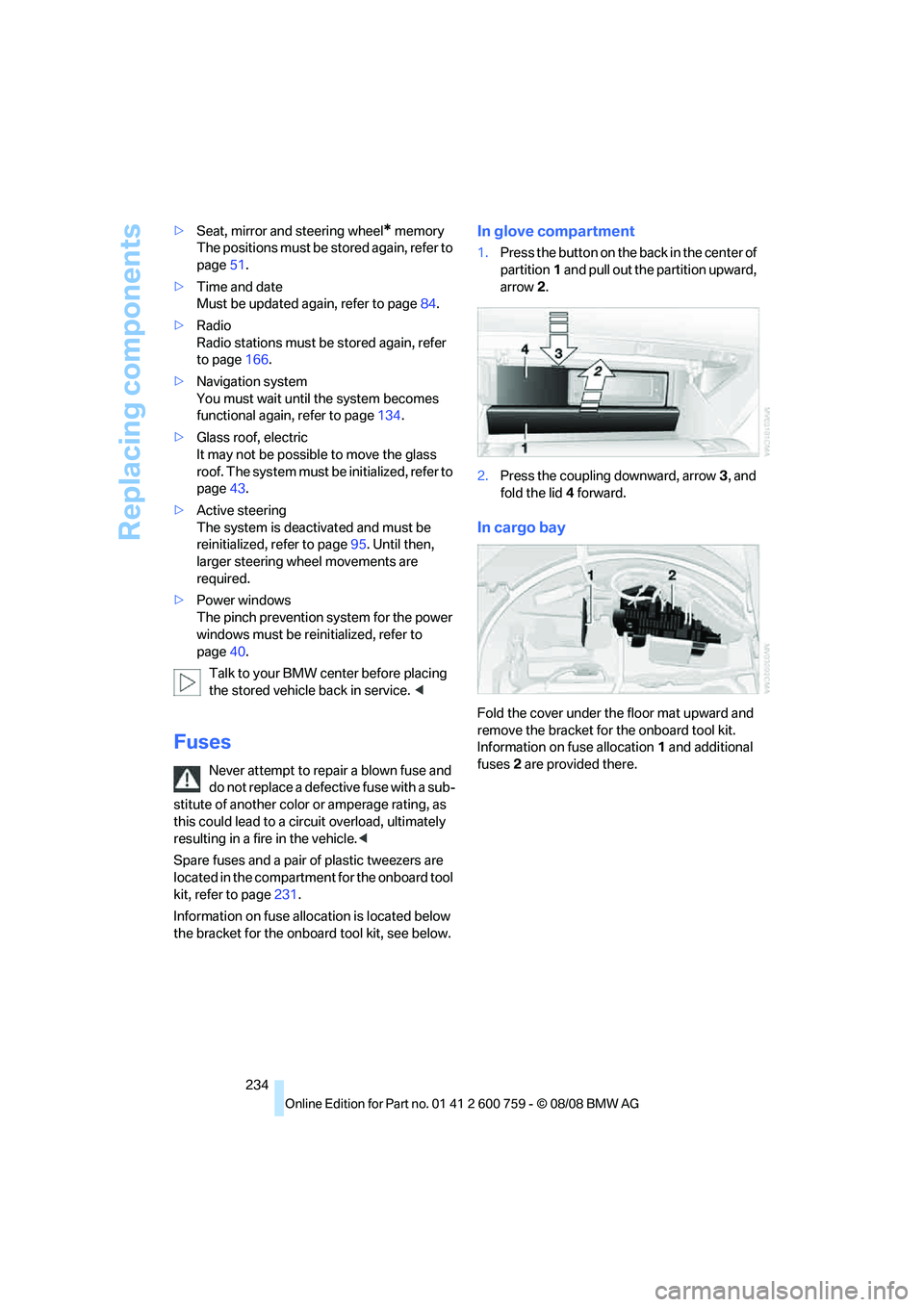
In glove compartment
1.Press the button on the back in the center of
partition1 and pull out the partition upward,
arrow2.
2.Press the coupling downward, arrow3, and
fold the lid 4 forward.
In cargo bay
Fold the cover under the floor mat upward and
remove the bracket for the onboard tool kit.
Information on fuse allocation1 and additional
fuses2 are provided there.
Page 240 of 272
Giving and receiving assistance
238
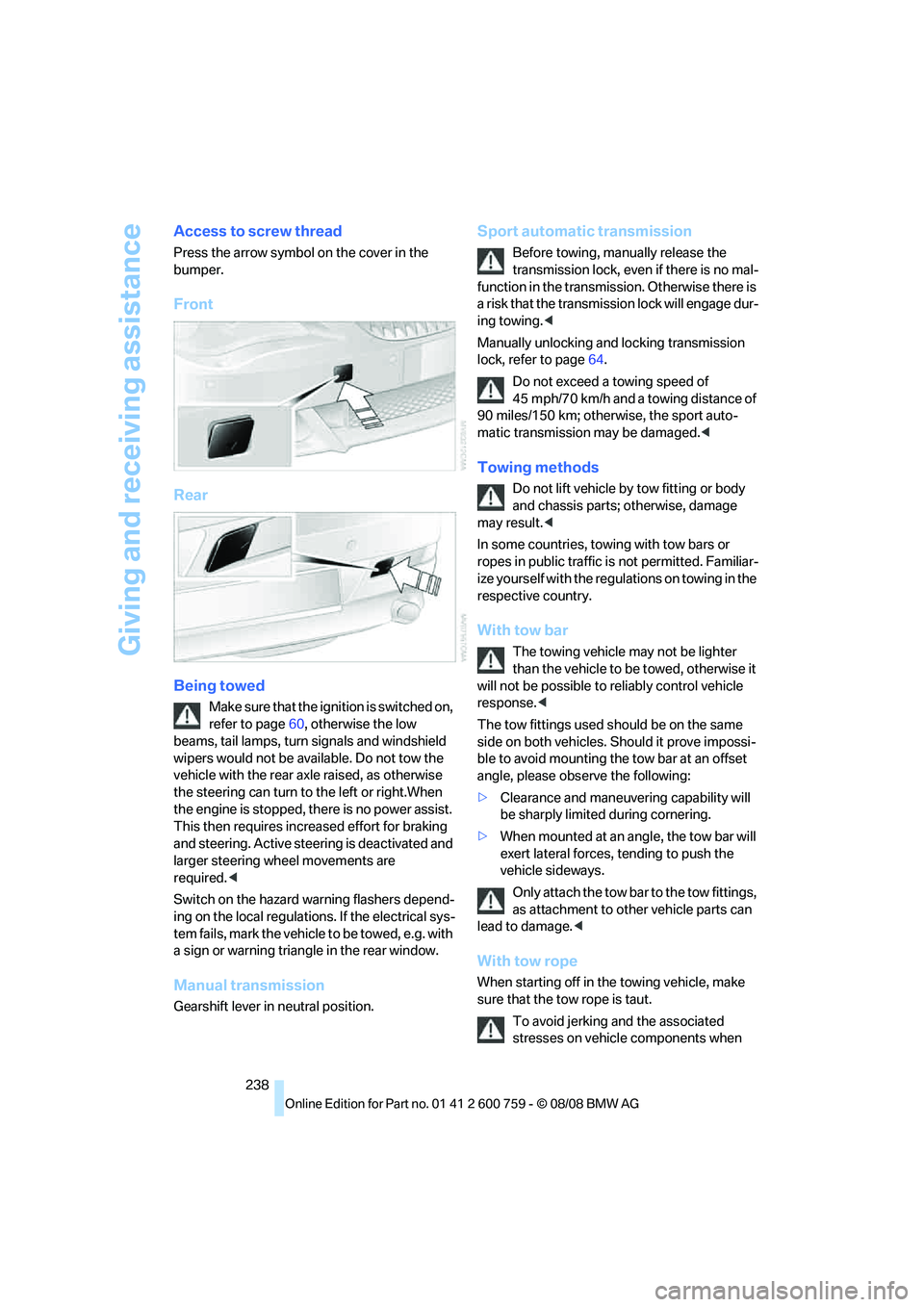
Access to screw thread
Press the arrow symbol on the cover in the
bumper.
Front
Rear
Being towed
Make sure that the ignition is switched on,
refer to page60, otherwise the low
beams, tail lamps, turn signals and windshield
wipers would not be available. Do not tow the
vehicle with the rear axle raised, as otherwise
the steering can turn to the left or right.When
the engine is stopped, there is no power assist.
This then requires increased effort for braking
and steering. Active steering is deactivated and
larger steering wheel movements are
required.<
Switch on the hazard warning flashers depend-
ing on the local regulations. If the electrical sys-
tem fails, mark the vehicle to be towed, e.g. with
a sign or warning triangle in the rear window.
Manual transmission
Gearshift lever in neutral position.
Sport automatic transmission
Before towing, manually release the
transmission lock, even if there is no mal-
function in the transmission. Otherwise there is
a risk that the transmission lock will engage dur-
ing towing.<
Manually unlocking and locking transmission
lock, refer to page64.
Do not exceed a towing speed of
45 mph/70 km/h and a towing distance of
90 miles/150 km; otherwise, the sport auto-
matic transmission may be damaged.<
Towing methods
Do not lift vehicle by tow fitting or body
and chassis parts; otherwise, damage
may result.<
In some countries, towing with tow bars or
ropes in public traffic is not permitted. Familiar-
ize yourself with the regulations on towing in the
respective country.
With tow bar
The towing vehicle may not be lighter
than the vehicle to be towed, otherwise it
will not be possible to reliably control vehicle
response.<
The tow fittings used should be on the same
side on both vehicles. Should it prove impossi-
ble to avoid mounting the tow bar at an offset
angle, please observe the following:
>Clearance and maneuvering capability will
be sharply limited during cornering.
>When mounted at an angle, the tow bar will
exert lateral forces, tending to push the
vehicle sideways.
Only attach the tow bar to the tow fittings,
as attachment to other vehicle parts can
lead to damage.<
With tow rope
When starting off in the towing vehicle, make
sure that the tow rope is taut.
To avoid jerking and the associated
stresses on vehicle components when
Page 247 of 272
Reference 245
At a glance
Controls
Driving tips
Communications
Navigation
Entertainment
Mobility
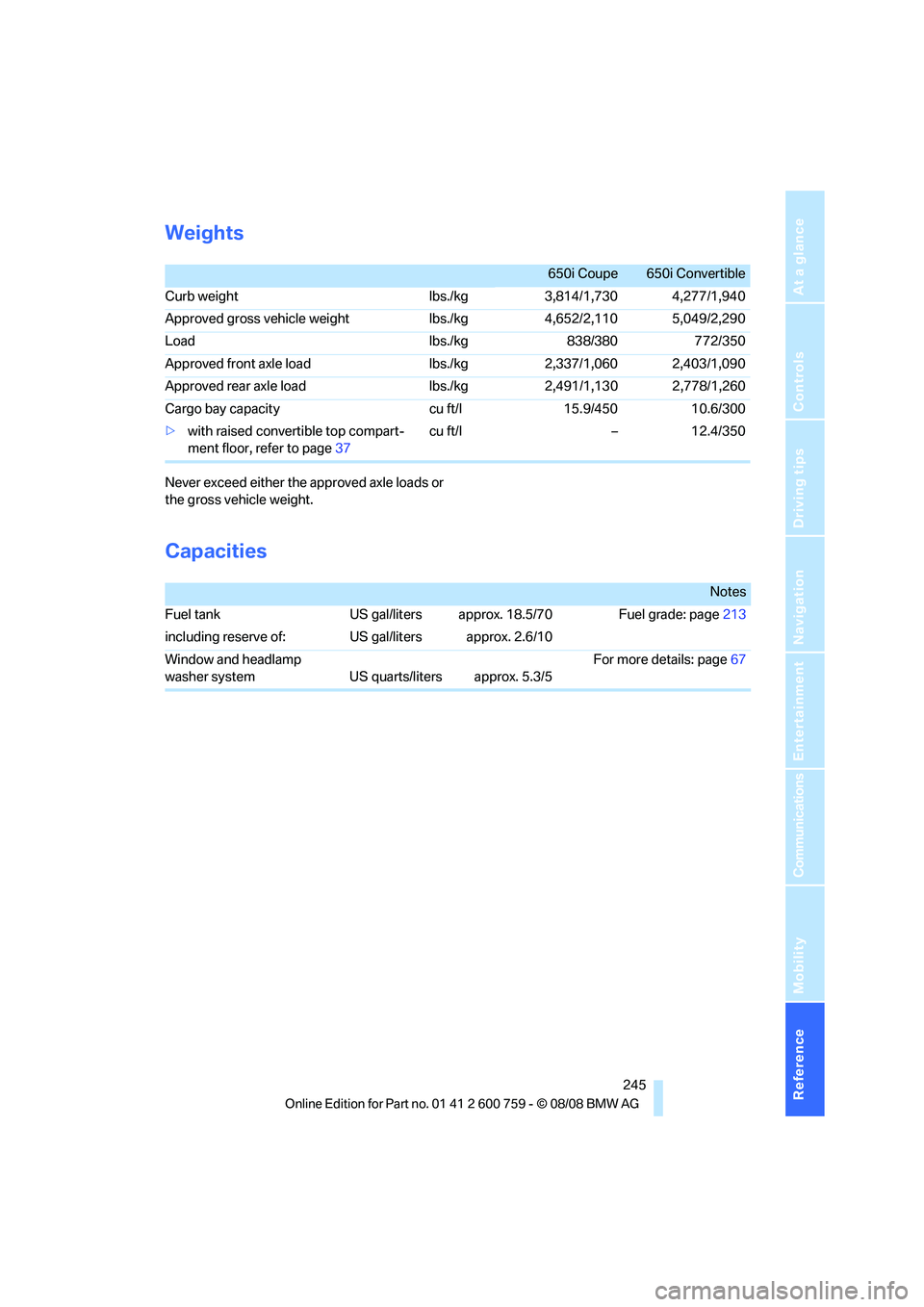
Weights
Never exceed either the approved axle loads or
the gross vehicle weight.
Capacities
650i Coupe 650i Convertible
Curb weight lbs./kg 3,814/1,730 4,277/1,940
Approved gross vehicle weightlbs./kg 4,652/2,110 5,049/2,290
Load lbs./kg 838/380 772/350
Approved front axle load lbs./kg 2,337/1,060 2,403/1,090
Approved rear axle load lbs./kg 2,491/1,130 2,778/1,260
Cargo bay capacity cu ft/l 15.9/450 10.6/300
>with raised convertible top compart-
ment floor, refer to page37cu ft/l – 12.4/350
Notes
Fuel tank US gal/liters approx. 18.5/70 Fuel grade: page213
including reserve of: US gal/liters approx. 2.6/10
Window and headlamp
washer system US quarts/liters approx. 5.3/5For more details: page67
Page 248 of 272
Short commands of voice command system
246
Short commands of voice command
system
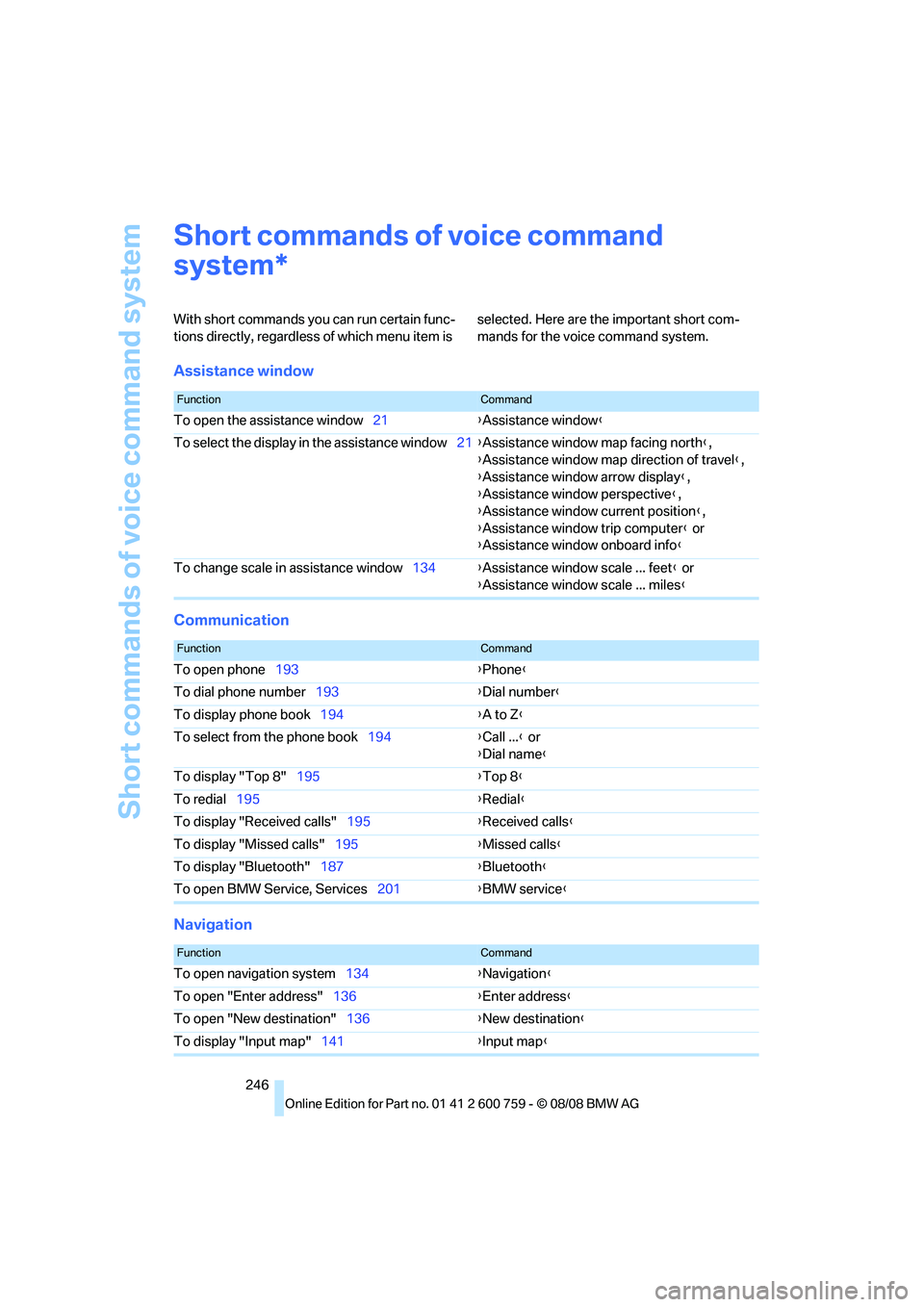
With short commands you can run certain func-
tions directly, regardless of which menu item is selected. Here are the important short com-
mands for the voice command system.
Assistance window
Communication
Navigation
*
FunctionCommand
To open the assistance window21{Assistance window}
To select the display in the assistance window21{Assistance window map facing north},
{Assistance window map direction of travel},
{Assistance window arrow display},
{Assistance window perspective},
{Assistance window current position},
{Assistance window trip computer} or
{Assistance window onboard info}
To change scale in assistance window134{Assistance window scale ... feet} or
{Assistance window scale ... miles}
FunctionCommand
To open phone193{Phone}
To dial phone number193{Dial number}
To display phone book194{A to Z}
To select from the phone book194{Call ...} or
{Dial name}
To display "Top 8"195{Top 8}
To redial195{Redial}
To display "Received calls"195{Received calls}
To display "Missed calls"195{Missed calls}
To display "Bluetooth"187{Bluetooth}
To open BMW Service, Services201{BMW service}
FunctionCommand
To open navigation system134{Navigation}
To open "Enter address"136{Enter address}
To open "New destination"136{New destination}
To display "Input map"141{Input map}
Page 253 of 272
Reference 251
At a glance
Controls
Driving tips
Communications
Navigation
Entertainment
Mobility
"Arrow display" in
navigation149
"Arrow display pop-up
instructions"135
Ashtray121
Assist, refer to
BMW Assist201
Assistance systems, refer to
Driving stability control
systems88
Assistance window21
"Assist. window off"22
AUC
– Automatic recirculated-air
control113
AUC Automatic recirculated-
air control113
"Audio"161,163,168
Audio160
– controls160
– switching on/off160
– tone control161
– volume161
Audio device, external119
Automatic
– air distribution111
– air volume111
– cruise control67,68
– headlamp control104
– service notification203
– steering wheel
adjustment51
– storing stations166
Automatic car washes128
– also refer to Comfort
access40
Automatic climate control110
– automatic air
distribution111
– convertible program111
– switching on and off114
– ventilation with vehicle
parked114
Automatic closing of doors,
refer to Automatic soft
closing35
Automatic curb monitor56Automatic lighting
– refer to Automatic headlamp
control104
– refer to Daytime running
lamps105
– refer to High-beam
assistant106
– refer to Interior lamps108
– refer to Pathway lighting105
– refer to Welcome lamps104
"Automatic programs"
111
Automatic soft closing35
Automatic station search165
"Automatic ventilation"115
AUTO program for automatic
climate control111
"Auto Request"203
"Autostore" on the
radio164,166
"AUX"160,180,182
AUX-IN connection119,180
"AUX IN" in audio mode180
Average fuel consumption77
– setting units86
Average speed77
"Avoid ferries" in
navigation147
"Avoid highways" in
navigation147
Avoiding freeways for
navigation146
Avoiding unintentional
alarms38
"Avoid tollroads" in
navigation147
Axle loads, refer to
Weights245
"A - Z"194
B
Backrest contour, refer to
Lumbar support50
Backrests, refer to Seats49
Backup lamps, replacing
bulbs, refer to Tail
lamps232
"Balance", tone control162Band-aids, refer to First-aid
kit236
Bass, refer to Tone
control161
"Bass", tone control161
Battery
– jump starting236
– refer to Vehicle battery233
Battery replacement, remote
control for comfort
access40
BC button, refer to
Computer77
Being towed238
Belts, refer to Safety belts54
Beverage holder, refer to Cup
holders120
Blower, refer to Air
volume112
"Bluetooth"187
BMW
– Car Shampoo230
"BMW Assist"202,203
BMW Assist201
– activating206
– BMW TeleServices203
– concierge service204
– contacting BMW Customer
Relations204
– displaying vehicle data207
– offered services201
– roadside assistance202
– updating205
"BMW Contact"196
"BMW Contact
Numbers"196
BMW homepage4
BMW maintenance
system225
BMW Night Vision100
– activating101
– cleaning camera102
– cleaning camera, refer to
Wiper system67
– deactivating101
– making settings102
"BMW Service settings"206
BMW TeleServices203
Page 254 of 272
Everything from A to Z
252 BMW TeleServices services
– displaying204
– updating204
BMW website4
Bottle holder, refer to Cup
holders120
Bracket for telephone or
mobile phone
– refer to Snap-in adapter199
Brake assistant88
– adaptive89
Brake force display95
Brake lamps
– replacing bulbs, refer to Tail
lamps232
– two-stage95
Brake rotors
– breaking-in126
– refer to Braking safely128
Brakes
– ABS Antilock Brake
System88
– brake force display95
– breaking-in126
– CBC Cornering Brake
Control88
– handbrake62
– refer to Braking safely128
Brake system126
– brake pads126
– brake rotors128
– breaking-in126
– warning lamp13,90
Braking
– electronic brake-force
distribution88
Braking safely128
Breakdown services, refer to
Roadside Assistance236
Breaking-in brake pads126
Breaking-in the clutch126
Breaking-in the differential,
refer to Engine and
differential126
Break-in period126
"Brightness"86,99
Brightness of Control
Display85"Brightness" with BMW Night
Vision102
Button for starting engine,
refer to Start/Stop button60
Buttons on steering wheel11
C
California Proposition 65
Warning6
Call194,205
– accepting192
– displaying accepted195
– ending193
– in absence195
– rejecting193
– starting193
Calling
– by entering phone
number193
– from phone book194
– from Top 8 list195
– redialing195
Can holder, refer to Cup
holders120
Capacities245
Car battery, refer to Vehicle
battery233
"Car Data"78Care227
– car-care products227
– carpets229
– car washes227
– CD/DVD player230
– chrome components229
– convertible top228
– displays230
– exterior227
– fine wooden
components230
– hand washing228
– headlamps228
– high-pressure cleaning
jets227
– interior229
– leather229
– light-alloy wheels229
– paint228
– plastic components230
– rubber gaskets229
– safety belts230
– sensors and cameras230
– upholstery and cloth-
covered paneling229
– windows228
– wiper blades228
Cargo bay
– capacity245
– emergency release37
– opening/closing, refer to
Luggage compartment
lid36
– opening from inside36
– opening from outside
36
– opening with remote
control33
Caring for the vehicle
finish228
Car key, refer to Keys/remote
control30
Car phone186
– installation location, refer to
Center armrest119
– refer to Mobile phone186
– refer to separate operating
instructions
Car radio, refer to Radio164
Car Shampoo230
Page 255 of 272
Reference 253
At a glance
Controls
Driving tips
Communications
Navigation
Entertainment
Mobility
Car wash61,128
– refer to Before driving into a
car wash128
– with comfort access40
Car washes227
Catalytic converter, refer to
Hot exhaust system127
"Categories"172
CBC Cornering Brake
Control88
CBS Condition Based
Service225
"CD"160,174
CD changer174
– controls160
– fast forward/reverse178
– installation location178
– random sequence177
– repeating a track177
– sampling tracks176
– selecting a CD174
– selecting a track175
– switching on/off160
– tone control161
– volume161
CD player174
– controls160
– fast forward/reverse178
– random sequence177
– repeating a track177
– sampling a track176
– selecting a track175
– switching on/off160
– tone control161
– volume161
Center armrest, adjusting
height119
Center console14
"Central locking"32
Central locking
– from inside34
– from outside32
Central locking system31
– comfort access38
– hotel function35
Changes, technical, refer to
For your own safety6
Changing language on
Control Display86Changing scale for
navigation150
Changing units of measure on
Control Display86
Changing wheels
218,233
CHECK button82
Check Control81
"Check Control
messages"82
Check Gas Cap212
Checking air pressure, refer to
Tire inflation pressure214
Child restraint fixing system
LATCH58
Child restraint systems58
Child seats, refer to
Transporting children
safely58
Chrome-plated parts230
Chrome polish230
Cigarette lighter121
Cigarette lighter socket, refer
to Connecting electrical
devices121
Cleaning your BMW, refer to
Care227
"Climate"111
Clock76
– 12h/24h format85
– hour signal85
– setting time and date84
Closing
– from inside34
– from outside32
Closing fuel filler cap212
Clothes hooks, Coupe120
Cockpit10
Cold start, refer to Starting
engine61
Combined instrument, refer to
Instrument cluster12
Comfort access38
– observe in car wash40
– replacing battery, remote
control40
Comfort closing
– windows, with comfort
access with Coupe39
– with comfort access39"Communi-
cation"192,202,203
Compact Disc
– refer to CD changer174
– refer to CD player174
Compartment for remote
control, refer to Ignition
lock60
Compartments, refer to
Storage compartments120
Compressed audio files174
Computer77
– displays on Control
Display
78
– hour signal85
"Concert hall", tone
control162
"Concierge"205
Concierge service204
Condensation, refer to When
vehicle is parked128
Condition Based Service
CBS225
"Confirmation"33
Confirmation signals for
locking and unlocking33
Connecting car vacuum
cleaner, refer to Connecting
electrical devices121
Consumption display, refer to
Average fuel
consumption77
Consumption statistics, refer
to Average fuel
consumption77
"Continue guidance to
destination?"149
"Contrast" with BMW Night
Vision102
Control Center, refer to
iDrive16
Control Display, refer to
iDrive16
– setting brightness85
– switching off/on22
Controller, refer to iDrive16
Controls, refer to Cockpit10