check engine light BMW 6 SERIES GRAN COUPE 2017 User Guide
[x] Cancel search | Manufacturer: BMW, Model Year: 2017, Model line: 6 SERIES GRAN COUPE, Model: BMW 6 SERIES GRAN COUPE 2017Pages: 261, PDF Size: 5.24 MB
Page 158 of 261
Displaying the turning radius and
pathway lines▷The static, red turning radius line shows
the space needed to the side of the vehicle
when the steering wheel is turned all the
way.▷The variable, green pathway line assists
you in assessing the amount of space ac‐
tually needed to the side of the vehicle.
The lane line depends on the engaged
gear and the current steering angle. The
track line is continuously adjusted for the
steering wheel movement.
"Parking aid lines"
Turning circle and pathway lines are displayed.
System limits
Top View cannot be used in the following sit‐
uations:
▷With a door open.▷With the tailgate open.▷With an exterior mirror folded in.▷In poor light.
A Check Control message is displayed in some
of these situations.
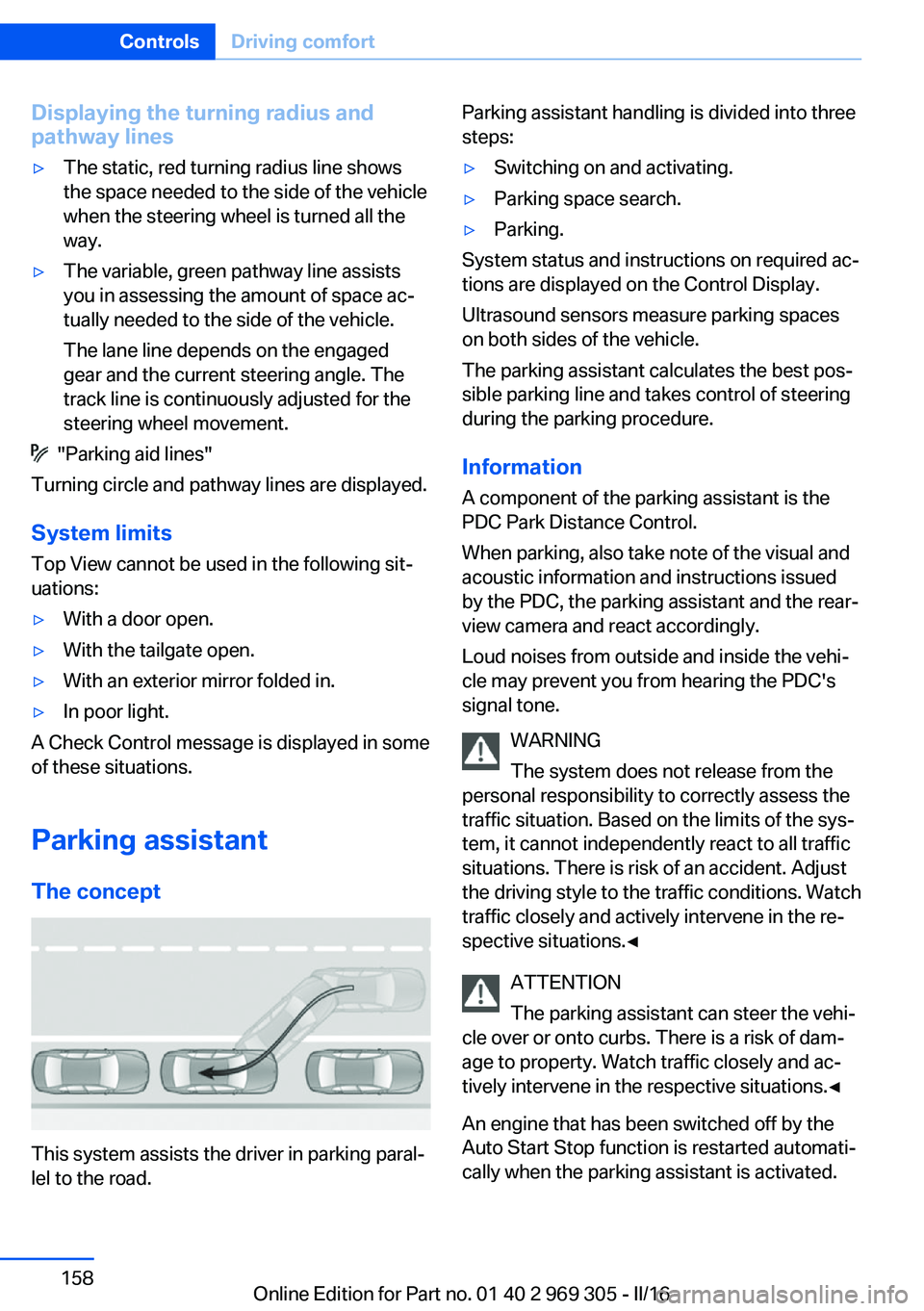
Parking assistant The concept
This system assists the driver in parking paral‐
lel to the road.
Parking assistant handling is divided into three
steps:▷Switching on and activating.▷Parking space search.▷Parking.
System status and instructions on required ac‐
tions are displayed on the Control Display.
Ultrasound sensors measure parking spaces
on both sides of the vehicle.
The parking assistant calculates the best pos‐
sible parking line and takes control of steering
during the parking procedure.
Information A component of the parking assistant is the
PDC Park Distance Control.
When parking, also take note of the visual and
acoustic information and instructions issued
by the PDC, the parking assistant and the rear‐
view camera and react accordingly.
Loud noises from outside and inside the vehi‐
cle may prevent you from hearing the PDC's
signal tone.
WARNING
The system does not release from the
personal responsibility to correctly assess the
traffic situation. Based on the limits of the sys‐
tem, it cannot independently react to all traffic
situations. There is risk of an accident. Adjust
the driving style to the traffic conditions. Watch
traffic closely and actively intervene in the re‐
spective situations.◀
ATTENTION
The parking assistant can steer the vehi‐
cle over or onto curbs. There is a risk of dam‐
age to property. Watch traffic closely and ac‐
tively intervene in the respective situations.◀
An engine that has been switched off by the
Auto Start Stop function is restarted automati‐
cally when the parking assistant is activated.
Seite 158ControlsDriving comfort158
Online Edition for Part no. 01 40 2 969 305 - II/16
Page 224 of 261
CoolantVehicle features and optionsThis chapter describes all standard, country-
specific and optional features offered with the
series. It also describes features that are not
necessarily available in your car, e. g., due to
the selected options or country versions. This
also applies to safety-related functions and
systems. The respectively applicable country
provisions must be observed when using the
respective features and systems.
Information WARNING
With the engine hot and the cooling sys‐
tem open, coolant can escape and lead to
scalding. There is a a risk of injury. Only open
the cooling system with the engine cooled
down.◀
WARNING
Additives are harmful and incorrect addi‐
tives can damage the engine. There is a risk of
injury and risk of property damage. Do not al‐
low additives to come into contact with skin,
eyes or articles of clothing. Use suitable addi‐
tives only.◀
Coolant consists of water and additives.
Not all commercially available additives are
suitable for the vehicle. Information about suit‐
able additives is available from a dealer’s serv‐
ice center or another qualified service center or
repair shop.
Coolant level
General information
If there is no Min. and Max. mark in the filler
neck of the coolant reservoir, have the coolantlevel checked if needed by a dealer’s service
center or another qualified service center or re‐
pair shop and add coolant as needed.
Overview
Depending on the engine installation, the cool‐
ant reservoir is located on the right side or the
left side of the engine compartment.
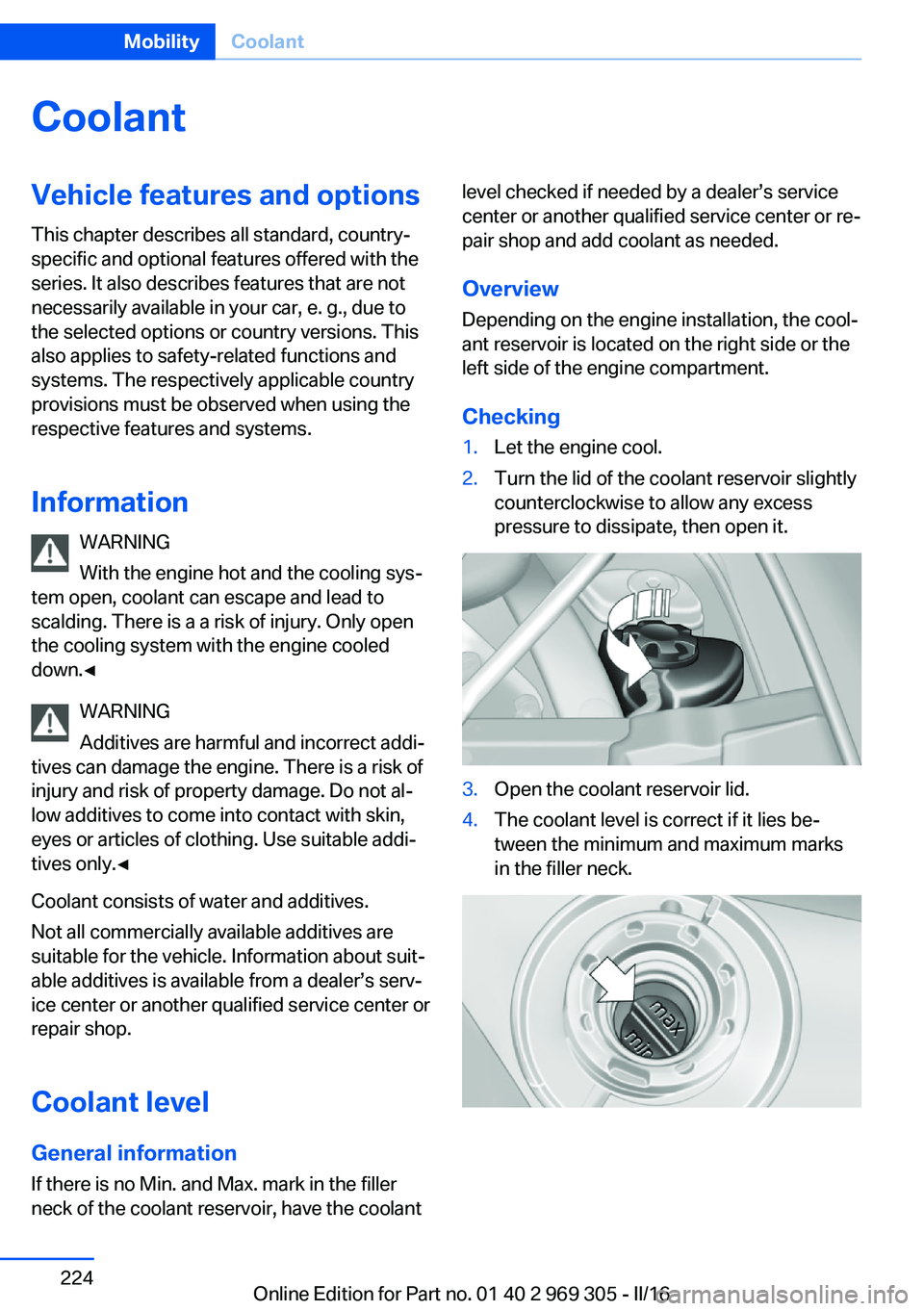
Checking1.Let the engine cool.2.Turn the lid of the coolant reservoir slightly
counterclockwise to allow any excess
pressure to dissipate, then open it.3.Open the coolant reservoir lid.4.The coolant level is correct if it lies be‐
tween the minimum and maximum marks
in the filler neck.Seite 224MobilityCoolant224
Online Edition for Part no. 01 40 2 969 305 - II/16
Page 227 of 261
Socket for OBD Onboard
Diagnosis
Information ATTENTION
The socket for Onboard Diagnosis is an
intricate component intended to be used in
conjunction with specialized equipment to
check the vehicle’s primary emissions system.
Improper use of the socket for Onboard Diag‐
nosis, or contact with the socket for Onboard
Diagnosis for other than its intended purpose,
can cause vehicle malfunctions and creates
risks of personal and property damage. Given
the foregoing, the manufacture of your vehicle
strongly recommends that access to the
socket for Onboard Diagnosis be limited to a
dealer's service center or another qualified
service center or repair shop or other persons
that have the specialized training and equip‐
ment for purposes of properly utilizing the
socket for Onboard Diagnosis.◀
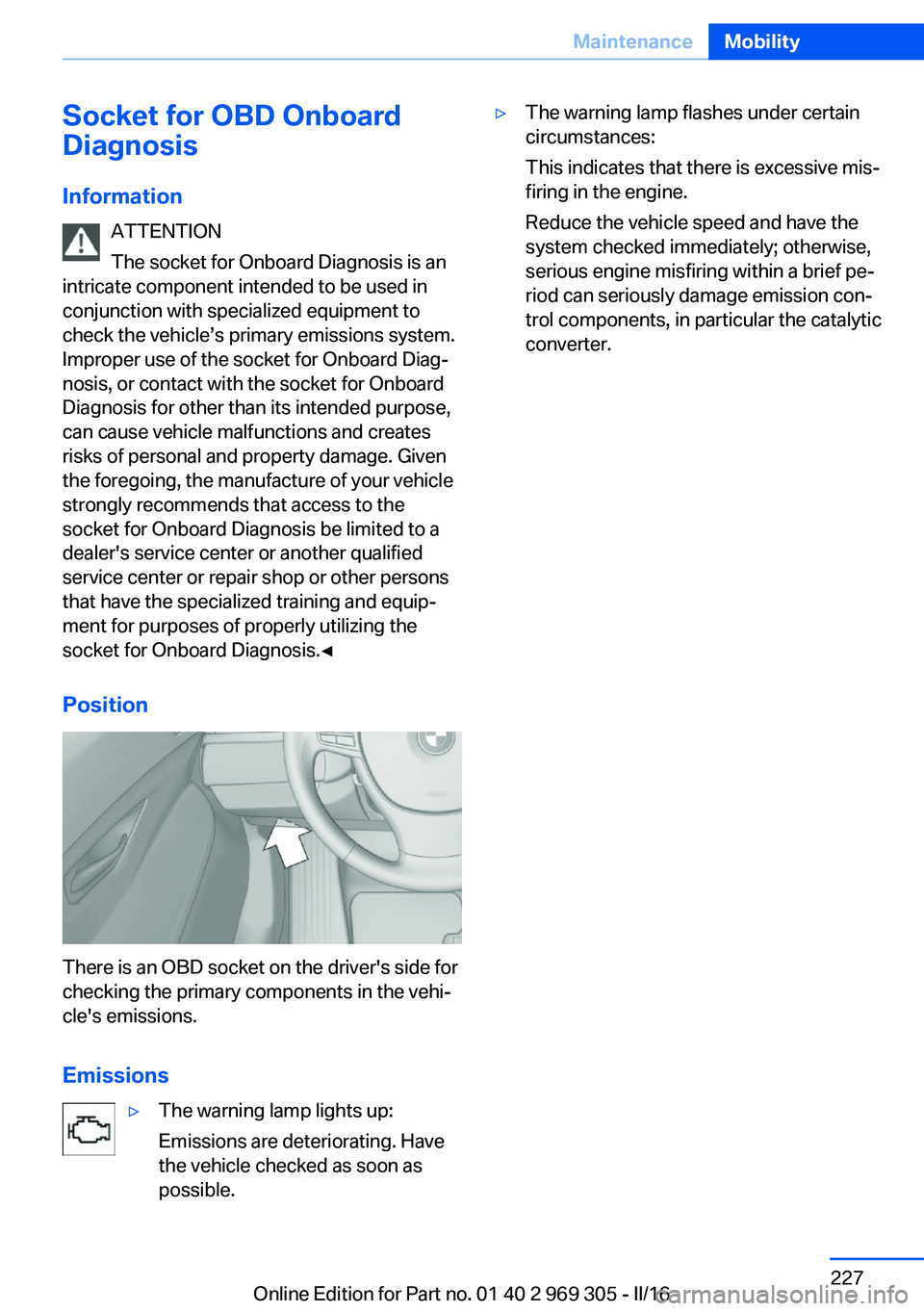
Position
There is an OBD socket on the driver's side for
checking the primary components in the vehi‐
cle's emissions.
Emissions
▷The warning lamp lights up:
Emissions are deteriorating. Have
the vehicle checked as soon as
possible.▷The warning lamp flashes under certain
circumstances:
This indicates that there is excessive mis‐
firing in the engine.
Reduce the vehicle speed and have the
system checked immediately; otherwise,
serious engine misfiring within a brief pe‐
riod can seriously damage emission con‐
trol components, in particular the catalytic
converter.Seite 227MaintenanceMobility227
Online Edition for Part no. 01 40 2 969 305 - II/16
Page 236 of 261
corresponding engine or body ground of
the vehicle to be started.
Starting the engine
Never use spray fluids to start the engine.
1.Start the engine of the assisting vehicle
and let it run for several minutes at an in‐
creased idle speed.2.Start the engine of the vehicle that is to be
started in the usual way.
If the first starting attempt is not success‐
ful, wait a few minutes before making an‐
other attempt in order to allow the dis‐
charged battery to recharge.3.Let both engines run for several minutes.4.Disconnect the jumper cables in the re‐
verse order.
Check the battery and recharge if needed.
Tow-starting and towing Information WARNING
Due to system limits, individual functions
can malfunction during tow-starting/towing
with the Intelligent Safety systems activated,
e.g., approach control warning with light brak‐
ing function. There is risk of an accident.
Switch all Intelligent Safety systems off prior to
tow-starting/towing.◀
Steptronic transmission: transporting
the vehicle
Information
The vehicle is not permitted to be towed.
ATTENTION
The vehicle can be damaged when tow‐
ing the vehicle with a single lifted axle. There is a risk of damage to property. The vehicle
should only be transported on a loading plat‐
form.◀
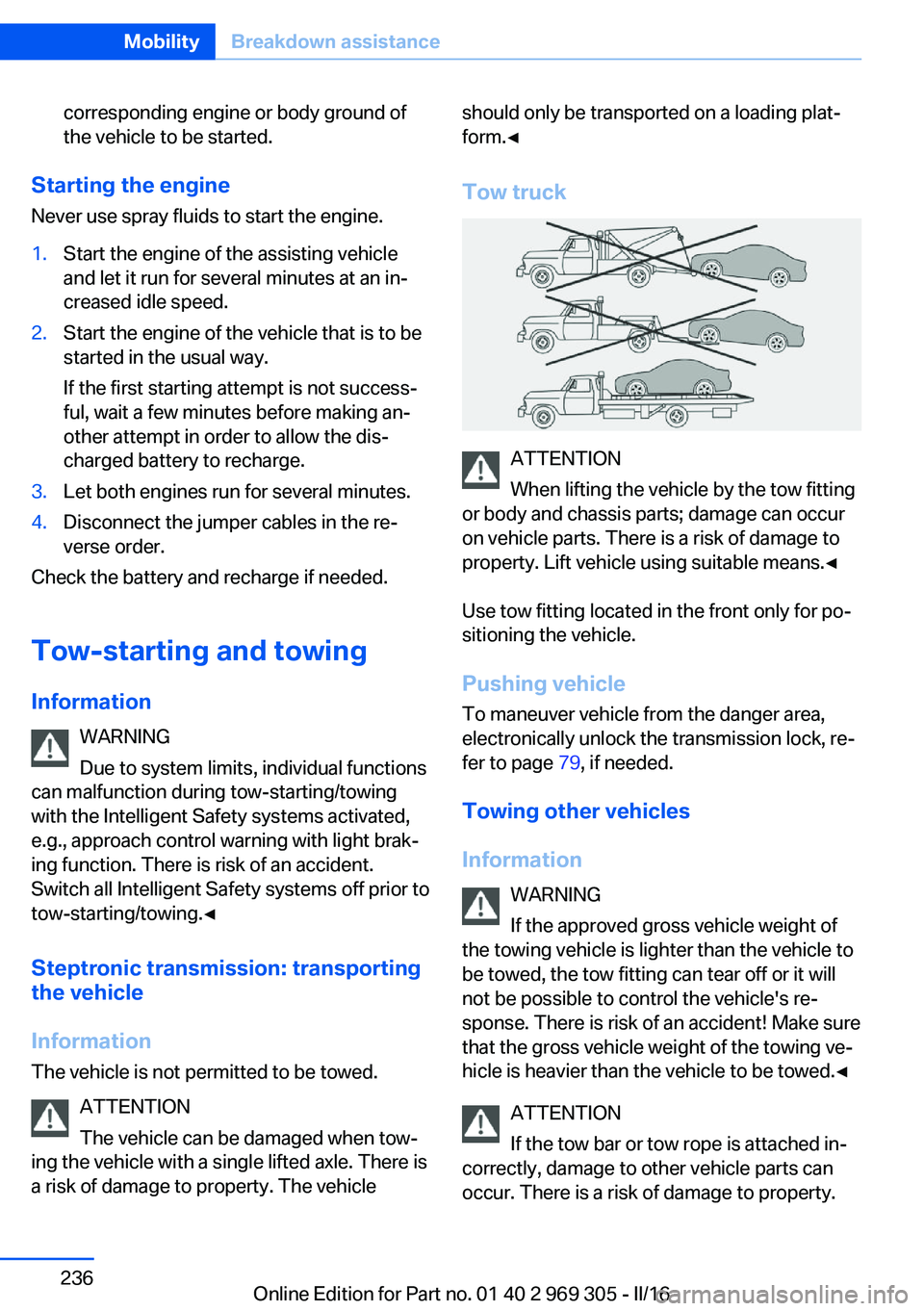
Tow truck
ATTENTION
When lifting the vehicle by the tow fitting
or body and chassis parts; damage can occur
on vehicle parts. There is a risk of damage to
property. Lift vehicle using suitable means.◀
Use tow fitting located in the front only for po‐
sitioning the vehicle.
Pushing vehicle To maneuver vehicle from the danger area,
electronically unlock the transmission lock, re‐
fer to page 79, if needed.
Towing other vehicles
Information WARNING
If the approved gross vehicle weight of
the towing vehicle is lighter than the vehicle to
be towed, the tow fitting can tear off or it will
not be possible to control the vehicle's re‐
sponse. There is risk of an accident! Make sure
that the gross vehicle weight of the towing ve‐
hicle is heavier than the vehicle to be towed.◀
ATTENTION
If the tow bar or tow rope is attached in‐
correctly, damage to other vehicle parts can
occur. There is a risk of damage to property.
Seite 236MobilityBreakdown assistance236
Online Edition for Part no. 01 40 2 969 305 - II/16
Page 240 of 261
Before driving into a car wash
In order to ensure that the vehicle can roll in a
car wash, take the following steps:1.Drive into the car wash.2.Engage selector lever position N.3.Deactivating Automatic Hold, refer to
page 72.4.Release the parking brake.5.Switch the engine off.
In this way, the ignition remains switched
on, and a Check-Control message is dis‐
played.
CAUTION
Selector lever position P is automati‐
cally engaged when the ignition is
switched off. There is a risk of property
damage. Do not switch ignition off in car
washes.◀
The vehicle cannot be locked from the outside
when in selector lever position N. A signal
sounds when an attempt is made to lock the
vehicle.
To start the engine:
1.Depress the brake pedal.2.Press the Start/Stop button.
Pressing the Start/Stop button without step‐
ping on the brake turns the ignition off.
Selector lever positionSelector lever position P is engaged automati‐
cally:
▷When the ignition is switched off.▷After approx. 15 minutes.
Headlights
▷Do not rub dry and do not use abrasive or
acidic cleansers.▷Soak areas that have been dirtied e. g.,
from insects, with shampoo and wash off
with water.▷Thaw ice with de-icing spray; do not use an
ice scraper.
After washing the vehicle
After washing the vehicle, apply the brakes
briefly to dry them; otherwise, braking action
can be reduced and corrosion of the brake
discs can occur.
Completely remove all residues on the win‐
dows, to minimize loss of visibility due to
smearing and to reduce wiper noises and
wiper blade wear.
Vehicle care
Vehicle care products BMW recommends using vehicle care and
cleaning products from BMW.
WARNING
Cleansers can contain substances that
are dangerous and harmful to your health. There is a risk of injury. When cleaning the in‐
terior, open the doors or windows. Only use
products intended for cleaning vehicles. Fol‐
low the instructions on the container.◀
Vehicle paint
Regular care contributes to driving safety and
value retention. Environmental influences in
areas with elevated air pollution or natural con‐
taminants, such as tree resin or pollen can af‐
fect the vehicle's paintwork. Tailor the fre‐
quency and extent of your vehicle care to
these influences.
Aggressive substances such as spilled fuel, oil,
grease or bird droppings, must be removed im‐
mediately to prevent the finish from being al‐
tered or discolored.
Matte finish
Only use cleaning and care products suitable
for vehicles with matte finish. These are availa‐
Seite 240MobilityCare240
Online Edition for Part no. 01 40 2 969 305 - II/16
Page 251 of 261
Battery replacement, vehicleremote control 35
Battery, vehicle 231
Being towed, see Tow-start‐ ing and towing 236
Belts, safety belts 55
Beverage holder, cup holder 179
Blinds, sun protection 48
BMW Assist, see Owner's Manual for Navigation, En‐
tertainment and Communi‐
cation
BMW Driver’s Guide app 6
BMW Homepage 6
BMW Internet page 6
BMW maintenance sys‐ tem 226
Bonus range, ECO PRO 192
Bottle holder, see Cup holder 179
Brake assistant 133
Brake assistant, adaptive 133
Brake discs, break-in 184
Brake force display 130
Brake lights, adaptive 130
Brake lights, brake force dis‐ play 130
Brake lights, bulb replace‐ ment 230
Brake pads, break-in 184
Braking, information 186
Breakdown assis‐ tance 233, 234
Break-in 184
Brightness of Control Dis‐ play 97
Bulb replacement, front 228
Bulb replacement, rear 230
Button, RES 144
Button, Start/Stop 66
Bypassing, see Jump-start‐ ing 235 C
California Proposition 65 Warning 8
Calling up mirror adjust‐ ment 44
Calling up seat adjust‐ ment 44
Calling up steering wheel ad‐ justment 44
Camera lenses, care 242
Camera, rearview cam‐ era 153
Camera, Side View 155
Camera, Top View 157
Can holder, see Cup holder 179
Car battery 231
Care, displays 242
Care, vehicle 240
Cargo 188
Cargo area, enlarging 174
Cargo area, storage compart‐ ments 179
Cargo straps, securing cargo 189
Car key, see Remote con‐ trol 34
Carpet, care 242
Car wash 239
Catalytic converter, see Hot exhaust system 185
CBS Condition Based Serv‐ ice 226
CD/Multimedia, see Owner's Manual for Navigation, En‐
tertainment and Communi‐
cation
Center console 16
Central locking system 40
Central screen, see Control Display 18
Changes, technical, see Own Safety 7
Changing parts 228
Changing wheels 231 Changing wheels/tires 210
Chassis number, see Vehicle identification number 10
Check Control 85
Checking the engine oil level electronically 220
Checking the oil level elec‐ tronically 220
Children, seating position 62
Children, transporting safely 62
Child restraint fixing system LATCH 64
Child restraint system 62
Child restraint systems, mounting 63
Child safety locks 65
Child seat, mounting 63
Child seats 62
Chrome parts, care 241
Cigarette lighter 171
Cleaning displays 242
Climate control 162
Climate control laminated tinted safety glass 185
Climate control wind‐ shield 185
Clock 90
Closing/opening via door lock 39
Closing/opening with remote control 38
Clothes hooks 179
Coasting 194
Coasting with engine decou‐ pled, coasting 194
Coasting with idling en‐ gine 194
Combination switch, see Turn signals 73
Combination switch, see Wiper system 73
COMFORT+ program, Driving Dynamics Control 139
Comfort Access 42 Seite 251Everything from A to ZReference251
Online Edition for Part no. 01 40 2 969 305 - II/16
Page 253 of 261
Electronic Stability ProgramESP, see DSC 133
Emergency detection, remote control 35
Emergency Request 233
Emergency service, see Roadside Assistance 234
Emergency start function, en‐ gine start 35
Emergency unlocking, tail‐ gate 42
Emergency unlocking, trans‐ mission lock 79
Energy Control 90
Energy recovery 91
Engine, automatic Start/Stop function 68
Engine, automatic switch- off 68
Engine compartment 217
Engine compartment, work‐ ing in 217
Engine coolant 224
Engine idling when driving, coasting 194
Engine oil 220
Engine oil, adding 221
Engine oil additives 222
Engine oil change 222
Engine oil filler neck 221
Engine oil temperature 89
Engine oil types, alterna‐ tive 222
Engine oil types, suitable 222
Engine start during malfunc‐ tion 35
Engine start, jump-start‐ ing 235
Engine start, see Starting the engine 67
Engine stop 67
Engine temperature 89
Entering/exiting vehicle, as‐ sistance, steering wheel 60
Entering a car wash 239
Equipment, interior 169 Error displays, see Check
Control 85
ESP Electronic Stability Pro‐ gram, see DSC 133
Exchanging wheels/tires 210
Exhaust system 185
Exterior mirror, automatic dimming feature 59
Exterior mirrors 58
External start 235
External temperature dis‐ play 89
External temperature warn‐ ing 89
Eyes for securing cargo 189
F
Failure message, see Check Control 85
False alarm, see Unintentional alarm 46
Fan, see Air flow 164
Filler neck for engine oil 221
Fine wood, care 241
First-aid kit 234
Flat tire, changing wheels 231
Flat Tire Monitor FTM 112
Flat tire, repairing 212
Flat tire, Tire Pressure Moni‐ tor TPM 108
Flat tire, warning lamp 109, 112
Flooding 185
Floor carpet, care 242
Floor mats, care 242
Fold-away position, wiper 75
Fold down the rear seat back‐ rest, see Though-loading
system 174
Foot brake 186
For the roofliner, see All around the interior mirror 17
Front airbags 105
Front center armrest 178 Front-end collision warning
with braking function 115
Front-end collision warning with City Braking func‐
tion 118
Front fog lamps, , LED, bulb replacement 230
Front fog lights 103
Front lights 228
Front-seat passenger airbags, automatic deactivation 107
Front-seat passenger airbags, indicator lamp 107
Front seats 51
FTM Flat Tire Monitor 112
Fuel 200
Fuel cap 198
Fuel consumption, see Aver‐ age fuel consumption 95
Fuel filler flap 198
Fuel gauge 89
Fuel quality 200
Fuel recommendation 200
Fuel, tank capacity 248
Fuse 232
G
Garage door opener, see Uni‐ versal Integrated Remote
Control 169
Gasoline 200
Gear change, Steptronic transmission 77
Gear shift indicator 92
General driving notes 184
Glare shield 171
Glass sunroof, powered with tilt function 49
Glove compartment 177
GPS location, vehicle posi‐ tion 97
Gross vehicle weight, ap‐ proved 247 Seite 253Everything from A to ZReference253
Online Edition for Part no. 01 40 2 969 305 - II/16