remote start BMW 6 SERIES GRAN COUPE 2017 User Guide
[x] Cancel search | Manufacturer: BMW, Model Year: 2017, Model line: 6 SERIES GRAN COUPE, Model: BMW 6 SERIES GRAN COUPE 2017Pages: 261, PDF Size: 5.24 MB
Page 72 of 261
DeactivatingPress button again.
The LED and the letters AUTO H go
out.
Automatic Hold is deactivated.
If the vehicle is being held by Automatic Hold,
press on the brake pedal to deactivate it.
When the parking brake is set manually, Auto‐
matic Hold is deactivated automatically.
Driving Automatic Hold is activated: the vehicle is au‐
tomatically secured against rolling after brak‐
ing to a standstill.
The indicator lamp lights up green.
Step on the accelerator pedal to drive
off.
The brake is released automatically.
The indicator lamp goes out.
ATTENTION
If the vehicle is stationary, Automatic
Hold engages the parking brake. It prevents
the vehicle from rolling in a vehicle wash.
There is a risk of damage to property. Deacti‐
vate Automatic Hold prior to entering the vehi‐
cle wash.◀
Parking The parking brake is automatically set if the
engine is switched off while the vehicle is be‐
ing held by Automatic Hold.
The indicator lamp changes from green
to red.
The parking brake is not set if the en‐
gine is switched off while the vehicle is coast‐
ing to a halt. Automatic Hold is deactivated.
Automatic Hold remains activated during the
engine stop brought about by the Auto Start/
Stop function.WARNING
Unattended children or animals can
cause the vehicle to move and endanger them‐
selves and traffic, e.g., due to the following ac‐
tions:▷Pressing the Start/Stop button.▷Releasing the parking brake.▷Opening and closing the doors or win‐
dows.▷Engaging selector lever position N.▷Using vehicle equipment.
There is risk of accidents or injuries. Do not
leave children or animals unattended in the ve‐
hicle. Take the remote control with you when
exiting and lock the vehicle.◀
Malfunction
In the event of a failure or malfunction of the
parking brake, secure the vehicle against roll‐
ing using a wheel chock, e.g., when leaving it.
After a power failure
Putting the parking brake into
operation
1.Switch on the ignition.2. Press the switch while stepping on
the brake pedal or selector lever position P
is set.
It may take several seconds for the brake to be
put into operation. Any sounds associated with
this are normal.
The indicator lamp in the instrument
cluster goes out as soon as the parking
brake is ready for operation.
Seite 72ControlsDriving72
Online Edition for Part no. 01 40 2 969 305 - II/16
Page 170 of 261
proximately 20 seconds until the LED on
the interior mirror flashes. This erases all
programming of the buttons on the interior
mirror.3.Hold the hand-held transmitter for the sys‐
tem to be controlled approx. 1 to 3 in‐
ches/2.5 to 8 cm away from the buttons of
the interior mirror. The required distance
depends on the manual transmitter.4.Simultaneously press and hold the button
of the desired function on the hand-held
transmitter and the button to be program‐
med on the interior mirror. The LED on the
interior mirror will begin flashing slowly.5.Release both buttons as soon as the LED
flashes more rapidly. The LED flashing
faster indicates that the button on the inte‐
rior mirror has been programmed.
If the LED does not flash faster after at
least 60 seconds, change the distance be‐
tween the interior mirror and the hand-held
transmitter and repeat the step. Several
more attempts at different distances may
be necessary. Wait at least 15 seconds be‐
tween attempts.
Canada: if programming with the hand-
held transmitter was interrupted, hold
down the interior mirror button and repeat‐
edly press and release the hand-held
transmitter button for 2 seconds.6.To program other functions on other but‐
tons, repeat steps 3 to 5.
The systems can be controlled using the inte‐
rior mirror buttons.
Special feature of the alternating-code wireless system
If you are unable to operate the system after
repeated programming, please check if the
system to be controlled features an alternat‐
ing-code radio system.
Read the system's owner's manual, or press
the programmed button on the interior mirror
longer. If the LED on the interior mirror starts
flashing rapidly and then stays lit constantly for
2 seconds, the system features an alternating-
code radio system. Flashing and continuous il‐
lumination of the LED will repeat for approxi‐
mately 20 seconds.
For systems with an alternating-code radio
system, the universal remote control and the
system also have to be synchronized.
Please read the owner's manual to find out
how to synchronize the system.
Synchronizing is easier with the aid of a sec‐
ond person.
Synchronizing the universal remote control
with the system:1.Park the vehicle within range of the re‐
mote-controlled system.2.Program the relevant button on the interior
mirror as described.3.Locate and press the synchronizing button
on the system being programmed. You
have approx. 30 seconds for the next step.4.Hold down the programmed button on the
interior mirror for approximately 3 seconds
and then release it. If necessary, repeat this
step up to three times in order to finish
synchronization. Once synchronization is
complete, the programmed function will be
carried out.
Reprogramming individual buttons
1.Switch on the ignition.2.Press and hold the interior mirror button to
be programmed.3.As soon as the interior mirror LED starts
flashing slowly, hold the hand-held trans‐
mitter for the system to be controlled ap‐
prox. 1 to 3 inches/2.5 to 8 cm away from
the buttons of the interior mirror. The re‐
quired distance depends on the manual
transmitter.Seite 170ControlsInterior equipment170
Online Edition for Part no. 01 40 2 969 305 - II/16
Page 171 of 261
4.Likewise, press and hold the button of the
desired function on the hand-held trans‐
mitter.5.Release both buttons as soon as the inte‐
rior mirror LED flashes more rapidly. The
LED flashing faster indicates that the but‐
ton on the interior mirror has been pro‐
grammed. The system can then be con‐
trolled by the button on the interior mirror.
If the LED does not flash faster after at
least 60 seconds, change the distance and
repeat the step. Several more attempts at
different distances may be necessary. Wait
at least 15 seconds between attempts.
Canada: if programming with the hand-
held transmitter was interrupted, hold
down the interior mirror button and repeat‐
edly press and release the hand-held
transmitter button for 2 seconds.
Controls
WARNING
Body parts can be jammed when operat‐
ing remote-controlled systems, e.g., the ga‐
rage door, using the integrated universal re‐
mote control. There is a risk of injury or risk of
property damage. Make sure that the area of
movement of the respective system is clear
during programming and operation. Also follow
the safety instructions of the hand-held trans‐
mitter.◀
The system, such as the garage door, can be
operated using the button on the interior mirror
while the engine is running or when the ignition is started. To do this, hold down the button
within receiving range of the system until the
function is activated. The interior mirror LED
stays lit while the wireless signal is being
transmitted.
Deleting stored functions Press and hold the left and right button on the
interior mirror simultaneously for approxi‐
mately 20 seconds until the LED flashes rap‐
idly. All stored functions will be deleted. The
functions cannot be deleted individually.
Sun visor Glare shieldFold the sun visor down or up.
Vanity mirror A vanity mirror is located in the sun visor be‐
hind a cover. When the cover is opened, the
mirror lighting switches on.
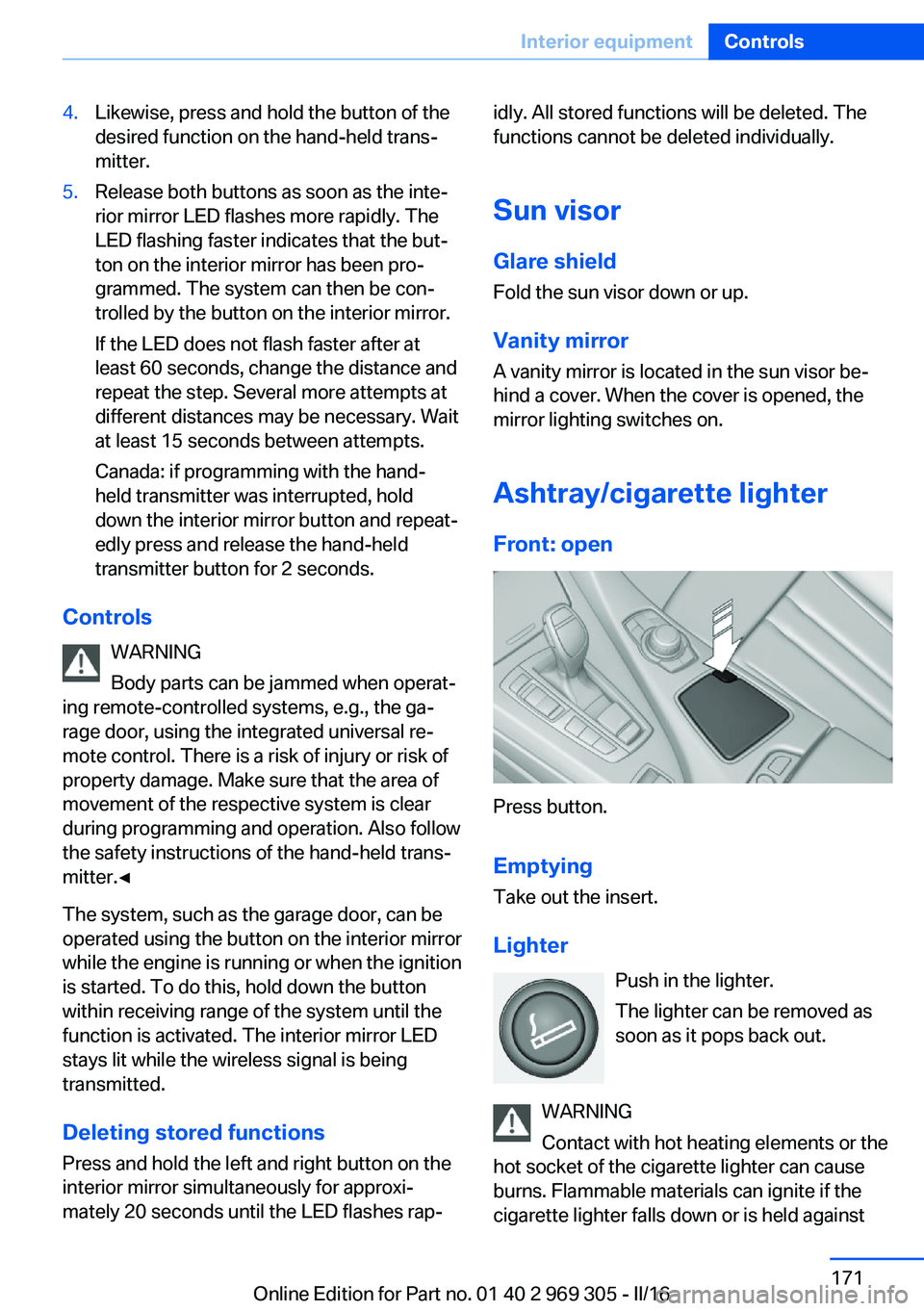
Ashtray/cigarette lighterFront: open
Press button.
Emptying Take out the insert.
Lighter Push in the lighter.
The lighter can be removed as
soon as it pops back out.
WARNING
Contact with hot heating elements or the
hot socket of the cigarette lighter can cause
burns. Flammable materials can ignite if the
cigarette lighter falls down or is held against
Seite 171Interior equipmentControls171
Online Edition for Part no. 01 40 2 969 305 - II/16
Page 172 of 261
the respective objects. There is risk of fire and
injuries. Hold the cigarette lighter on its handle.
Make sure that children do not use the ciga‐
rette lighter and do not burn themselves, e.g.,
by carrying the remote control along when ex‐
iting the vehicle.◀
ATTENTION
If metal objects fall into the socket, they
can cause a short circuit. There is a risk of
damage to property. Replace the cigarette
lighter or socket cover again after using the
socket.◀
Connecting electrical
devices
Information ATTENTION
Battery chargers for the vehicle battery
can work with high voltages and currents,
which means that the 12 volt on-board net‐
work can be overloaded or damaged. There is
a risk of damage to property. Only connect
battery chargers for the vehicle battery to the
starting aid terminals in the engine compart‐
ment.◀
ATTENTION
If metal objects fall into the socket, they
can cause a short circuit. There is a risk of
damage to property. Replace the cigarette
lighter or socket cover again after using the
socket.◀
Sockets
General information
The lighter socket can be used as a socket for
electrical equipment while the engine is run‐
ning or when the ignition is switched on.Information
The total load of all sockets must not exceed
140 watts at 12 volts.
Do not damage the socket by using non-com‐
patible connectors.
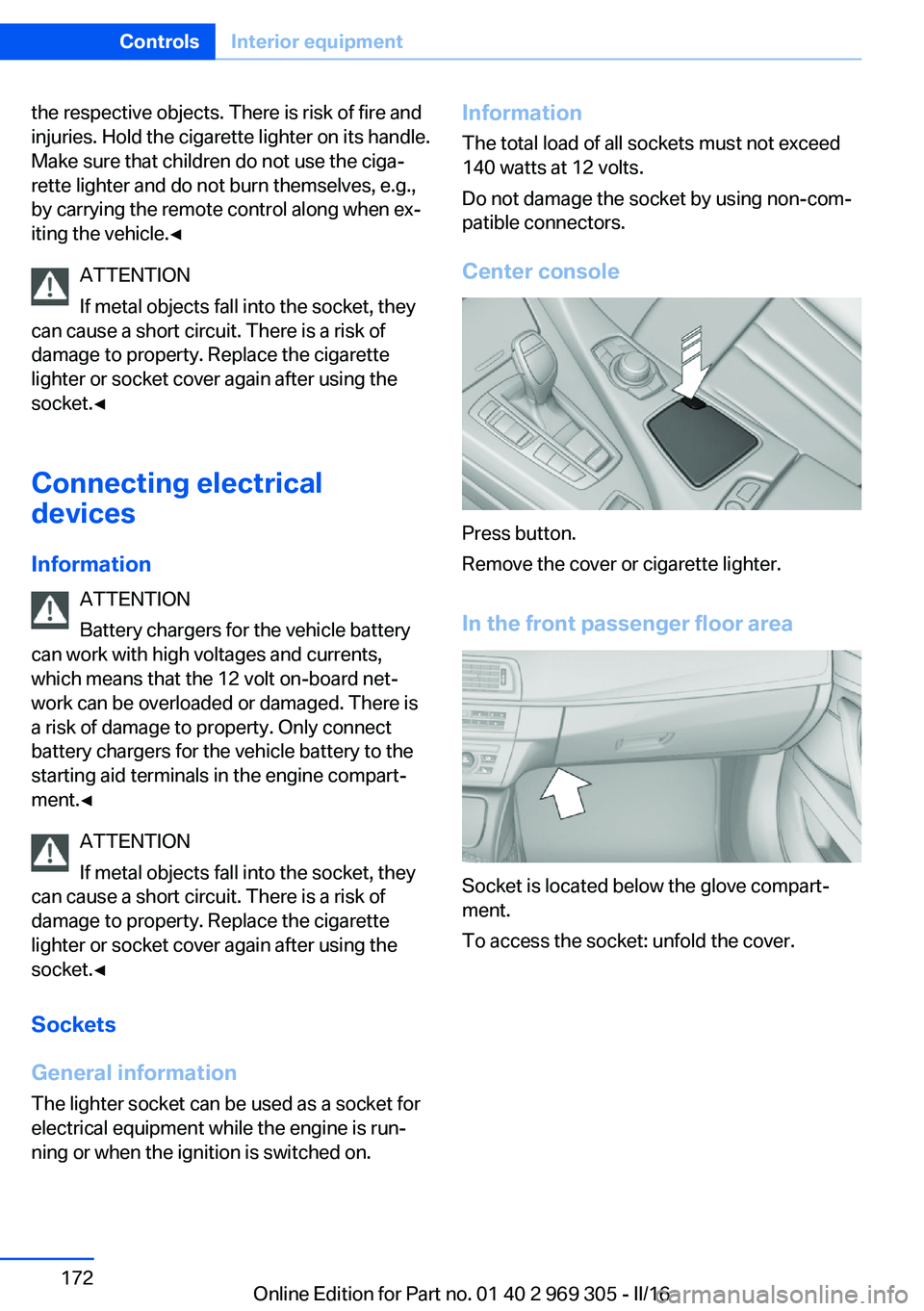
Center console
Press button.
Remove the cover or cigarette lighter.
In the front passenger floor area
Socket is located below the glove compart‐
ment.
To access the socket: unfold the cover.
Seite 172ControlsInterior equipment172
Online Edition for Part no. 01 40 2 969 305 - II/16
Page 251 of 261
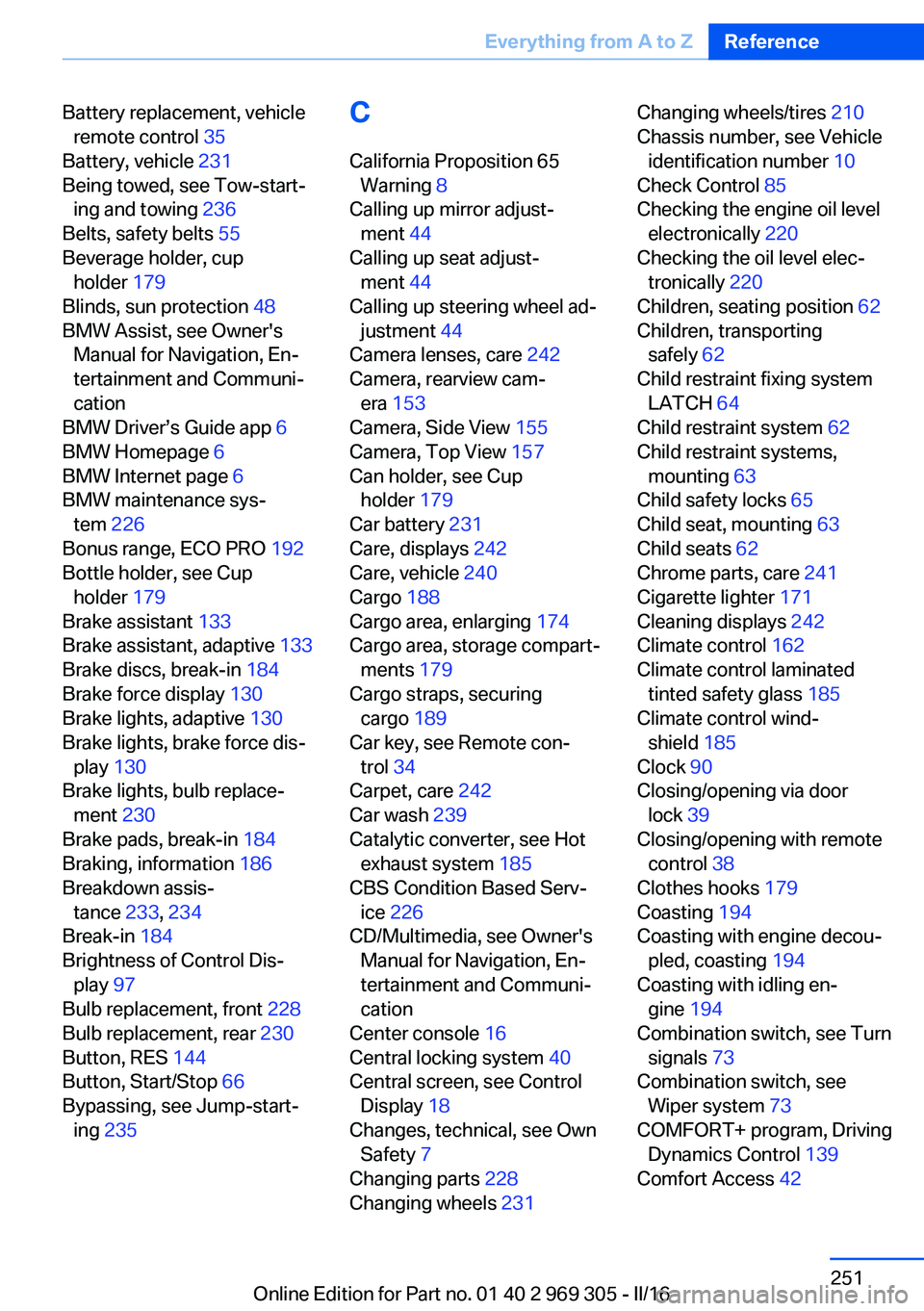
Battery replacement, vehicleremote control 35
Battery, vehicle 231
Being towed, see Tow-start‐ ing and towing 236
Belts, safety belts 55
Beverage holder, cup holder 179
Blinds, sun protection 48
BMW Assist, see Owner's Manual for Navigation, En‐
tertainment and Communi‐
cation
BMW Driver’s Guide app 6
BMW Homepage 6
BMW Internet page 6
BMW maintenance sys‐ tem 226
Bonus range, ECO PRO 192
Bottle holder, see Cup holder 179
Brake assistant 133
Brake assistant, adaptive 133
Brake discs, break-in 184
Brake force display 130
Brake lights, adaptive 130
Brake lights, brake force dis‐ play 130
Brake lights, bulb replace‐ ment 230
Brake pads, break-in 184
Braking, information 186
Breakdown assis‐ tance 233, 234
Break-in 184
Brightness of Control Dis‐ play 97
Bulb replacement, front 228
Bulb replacement, rear 230
Button, RES 144
Button, Start/Stop 66
Bypassing, see Jump-start‐ ing 235 C
California Proposition 65 Warning 8
Calling up mirror adjust‐ ment 44
Calling up seat adjust‐ ment 44
Calling up steering wheel ad‐ justment 44
Camera lenses, care 242
Camera, rearview cam‐ era 153
Camera, Side View 155
Camera, Top View 157
Can holder, see Cup holder 179
Car battery 231
Care, displays 242
Care, vehicle 240
Cargo 188
Cargo area, enlarging 174
Cargo area, storage compart‐ ments 179
Cargo straps, securing cargo 189
Car key, see Remote con‐ trol 34
Carpet, care 242
Car wash 239
Catalytic converter, see Hot exhaust system 185
CBS Condition Based Serv‐ ice 226
CD/Multimedia, see Owner's Manual for Navigation, En‐
tertainment and Communi‐
cation
Center console 16
Central locking system 40
Central screen, see Control Display 18
Changes, technical, see Own Safety 7
Changing parts 228
Changing wheels 231 Changing wheels/tires 210
Chassis number, see Vehicle identification number 10
Check Control 85
Checking the engine oil level electronically 220
Checking the oil level elec‐ tronically 220
Children, seating position 62
Children, transporting safely 62
Child restraint fixing system LATCH 64
Child restraint system 62
Child restraint systems, mounting 63
Child safety locks 65
Child seat, mounting 63
Child seats 62
Chrome parts, care 241
Cigarette lighter 171
Cleaning displays 242
Climate control 162
Climate control laminated tinted safety glass 185
Climate control wind‐ shield 185
Clock 90
Closing/opening via door lock 39
Closing/opening with remote control 38
Clothes hooks 179
Coasting 194
Coasting with engine decou‐ pled, coasting 194
Coasting with idling en‐ gine 194
Combination switch, see Turn signals 73
Combination switch, see Wiper system 73
COMFORT+ program, Driving Dynamics Control 139
Comfort Access 42 Seite 251Everything from A to ZReference251
Online Edition for Part no. 01 40 2 969 305 - II/16
Page 253 of 261
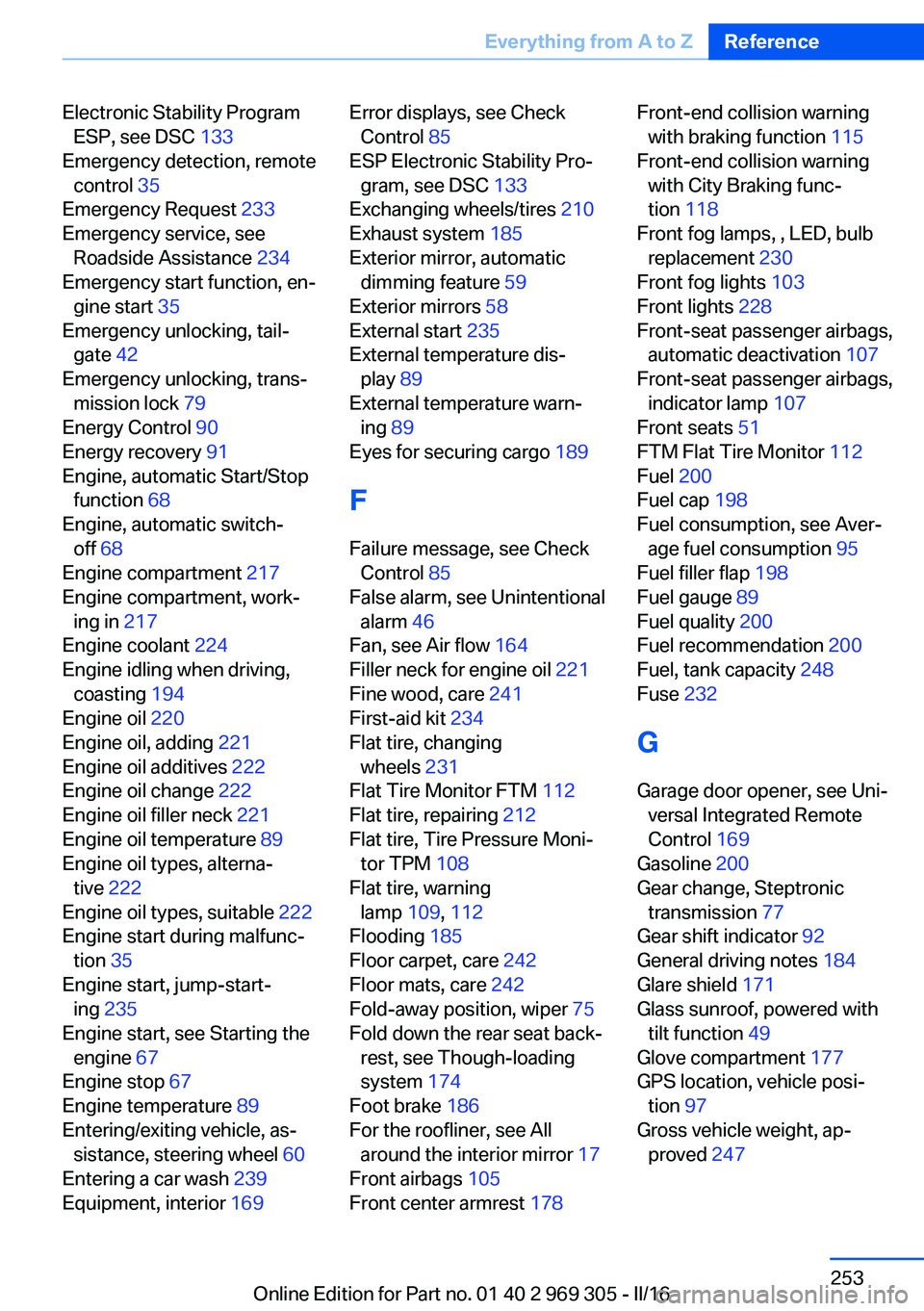
Electronic Stability ProgramESP, see DSC 133
Emergency detection, remote control 35
Emergency Request 233
Emergency service, see Roadside Assistance 234
Emergency start function, en‐ gine start 35
Emergency unlocking, tail‐ gate 42
Emergency unlocking, trans‐ mission lock 79
Energy Control 90
Energy recovery 91
Engine, automatic Start/Stop function 68
Engine, automatic switch- off 68
Engine compartment 217
Engine compartment, work‐ ing in 217
Engine coolant 224
Engine idling when driving, coasting 194
Engine oil 220
Engine oil, adding 221
Engine oil additives 222
Engine oil change 222
Engine oil filler neck 221
Engine oil temperature 89
Engine oil types, alterna‐ tive 222
Engine oil types, suitable 222
Engine start during malfunc‐ tion 35
Engine start, jump-start‐ ing 235
Engine start, see Starting the engine 67
Engine stop 67
Engine temperature 89
Entering/exiting vehicle, as‐ sistance, steering wheel 60
Entering a car wash 239
Equipment, interior 169 Error displays, see Check
Control 85
ESP Electronic Stability Pro‐ gram, see DSC 133
Exchanging wheels/tires 210
Exhaust system 185
Exterior mirror, automatic dimming feature 59
Exterior mirrors 58
External start 235
External temperature dis‐ play 89
External temperature warn‐ ing 89
Eyes for securing cargo 189
F
Failure message, see Check Control 85
False alarm, see Unintentional alarm 46
Fan, see Air flow 164
Filler neck for engine oil 221
Fine wood, care 241
First-aid kit 234
Flat tire, changing wheels 231
Flat Tire Monitor FTM 112
Flat tire, repairing 212
Flat tire, Tire Pressure Moni‐ tor TPM 108
Flat tire, warning lamp 109, 112
Flooding 185
Floor carpet, care 242
Floor mats, care 242
Fold-away position, wiper 75
Fold down the rear seat back‐ rest, see Though-loading
system 174
Foot brake 186
For the roofliner, see All around the interior mirror 17
Front airbags 105
Front center armrest 178 Front-end collision warning
with braking function 115
Front-end collision warning with City Braking func‐
tion 118
Front fog lamps, , LED, bulb replacement 230
Front fog lights 103
Front lights 228
Front-seat passenger airbags, automatic deactivation 107
Front-seat passenger airbags, indicator lamp 107
Front seats 51
FTM Flat Tire Monitor 112
Fuel 200
Fuel cap 198
Fuel consumption, see Aver‐ age fuel consumption 95
Fuel filler flap 198
Fuel gauge 89
Fuel quality 200
Fuel recommendation 200
Fuel, tank capacity 248
Fuse 232
G
Garage door opener, see Uni‐ versal Integrated Remote
Control 169
Gasoline 200
Gear change, Steptronic transmission 77
Gear shift indicator 92
General driving notes 184
Glare shield 171
Glass sunroof, powered with tilt function 49
Glove compartment 177
GPS location, vehicle posi‐ tion 97
Gross vehicle weight, ap‐ proved 247 Seite 253Everything from A to ZReference253
Online Edition for Part no. 01 40 2 969 305 - II/16
Page 254 of 261
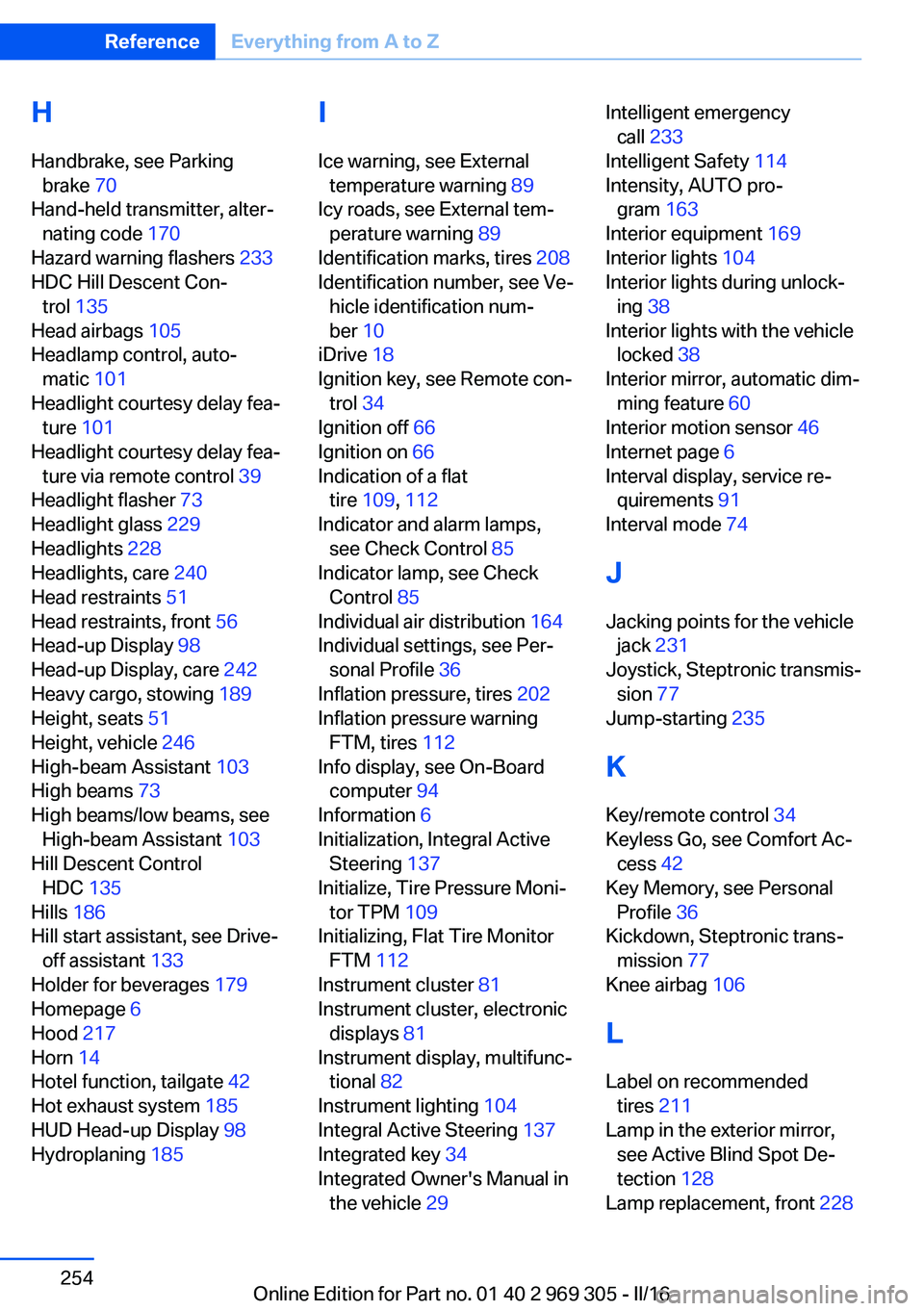
H
Handbrake, see Parking brake 70
Hand-held transmitter, alter‐ nating code 170
Hazard warning flashers 233
HDC Hill Descent Con‐ trol 135
Head airbags 105
Headlamp control, auto‐ matic 101
Headlight courtesy delay fea‐ ture 101
Headlight courtesy delay fea‐ ture via remote control 39
Headlight flasher 73
Headlight glass 229
Headlights 228
Headlights, care 240
Head restraints 51
Head restraints, front 56
Head-up Display 98
Head-up Display, care 242
Heavy cargo, stowing 189
Height, seats 51
Height, vehicle 246
High-beam Assistant 103
High beams 73
High beams/low beams, see High-beam Assistant 103
Hill Descent Control HDC 135
Hills 186
Hill start assistant, see Drive- off assistant 133
Holder for beverages 179
Homepage 6
Hood 217
Horn 14
Hotel function, tailgate 42
Hot exhaust system 185
HUD Head-up Display 98
Hydroplaning 185 I
Ice warning, see External temperature warning 89
Icy roads, see External tem‐ perature warning 89
Identification marks, tires 208
Identification number, see Ve‐ hicle identification num‐
ber 10
iDrive 18
Ignition key, see Remote con‐ trol 34
Ignition off 66
Ignition on 66
Indication of a flat tire 109 , 112
Indicator and alarm lamps, see Check Control 85
Indicator lamp, see Check Control 85
Individual air distribution 164
Individual settings, see Per‐ sonal Profile 36
Inflation pressure, tires 202
Inflation pressure warning FTM, tires 112
Info display, see On-Board computer 94
Information 6
Initialization, Integral Active Steering 137
Initialize, Tire Pressure Moni‐ tor TPM 109
Initializing, Flat Tire Monitor FTM 112
Instrument cluster 81
Instrument cluster, electronic displays 81
Instrument display, multifunc‐ tional 82
Instrument lighting 104
Integral Active Steering 137
Integrated key 34
Integrated Owner's Manual in the vehicle 29 Intelligent emergency
call 233
Intelligent Safety 114
Intensity, AUTO pro‐ gram 163
Interior equipment 169
Interior lights 104
Interior lights during unlock‐ ing 38
Interior lights with the vehicle locked 38
Interior mirror, automatic dim‐ ming feature 60
Interior motion sensor 46
Internet page 6
Interval display, service re‐ quirements 91
Interval mode 74
J
Jacking points for the vehicle jack 231
Joystick, Steptronic transmis‐ sion 77
Jump-starting 235
K
Key/remote control 34
Keyless Go, see Comfort Ac‐ cess 42
Key Memory, see Personal Profile 36
Kickdown, Steptronic trans‐ mission 77
Knee airbag 106
L Label on recommended tires 211
Lamp in the exterior mirror, see Active Blind Spot De‐
tection 128
Lamp replacement, front 228 Seite 254ReferenceEverything from A to Z254
Online Edition for Part no. 01 40 2 969 305 - II/16
Page 258 of 261
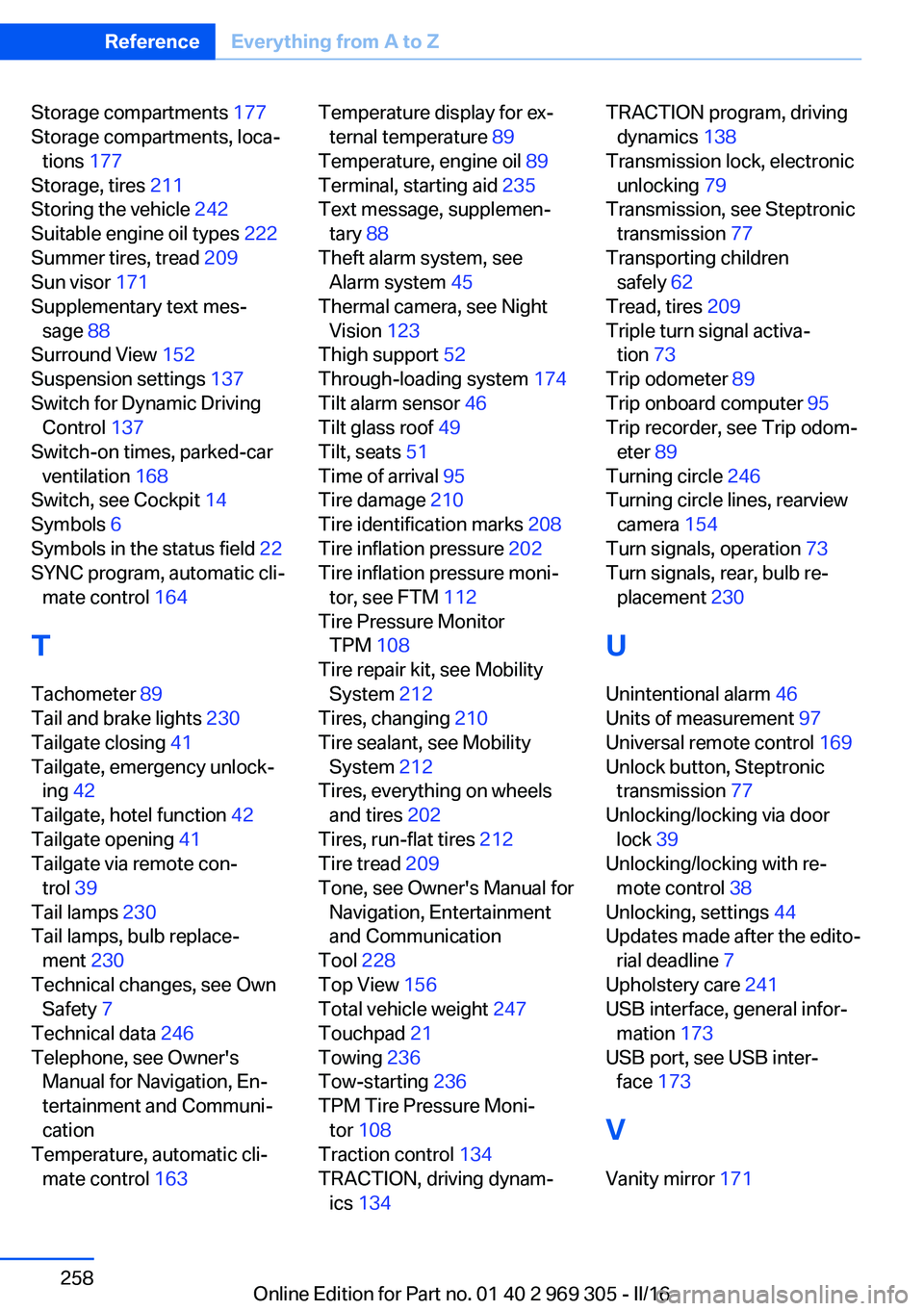
Storage compartments 177
Storage compartments, loca‐ tions 177
Storage, tires 211
Storing the vehicle 242
Suitable engine oil types 222
Summer tires, tread 209
Sun visor 171
Supplementary text mes‐ sage 88
Surround View 152
Suspension settings 137
Switch for Dynamic Driving Control 137
Switch-on times, parked-car ventilation 168
Switch, see Cockpit 14
Symbols 6
Symbols in the status field 22
SYNC program, automatic cli‐ mate control 164
T Tachometer 89
Tail and brake lights 230
Tailgate closing 41
Tailgate, emergency unlock‐ ing 42
Tailgate, hotel function 42
Tailgate opening 41
Tailgate via remote con‐ trol 39
Tail lamps 230
Tail lamps, bulb replace‐ ment 230
Technical changes, see Own Safety 7
Technical data 246
Telephone, see Owner's Manual for Navigation, En‐
tertainment and Communi‐
cation
Temperature, automatic cli‐ mate control 163 Temperature display for ex‐
ternal temperature 89
Temperature, engine oil 89
Terminal, starting aid 235
Text message, supplemen‐ tary 88
Theft alarm system, see Alarm system 45
Thermal camera, see Night Vision 123
Thigh support 52
Through-loading system 174
Tilt alarm sensor 46
Tilt glass roof 49
Tilt, seats 51
Time of arrival 95
Tire damage 210
Tire identification marks 208
Tire inflation pressure 202
Tire inflation pressure moni‐ tor, see FTM 112
Tire Pressure Monitor TPM 108
Tire repair kit, see Mobility System 212
Tires, changing 210
Tire sealant, see Mobility System 212
Tires, everything on wheels and tires 202
Tires, run-flat tires 212
Tire tread 209
Tone, see Owner's Manual for Navigation, Entertainment
and Communication
Tool 228
Top View 156
Total vehicle weight 247
Touchpad 21
Towing 236
Tow-starting 236
TPM Tire Pressure Moni‐ tor 108
Traction control 134
TRACTION, driving dynam‐ ics 134 TRACTION program, driving
dynamics 138
Transmission lock, electronic unlocking 79
Transmission, see Steptronic transmission 77
Transporting children safely 62
Tread, tires 209
Triple turn signal activa‐ tion 73
Trip odometer 89
Trip onboard computer 95
Trip recorder, see Trip odom‐ eter 89
Turning circle 246
Turning circle lines, rearview camera 154
Turn signals, operation 73
Turn signals, rear, bulb re‐ placement 230
U
Unintentional alarm 46
Units of measurement 97
Universal remote control 169
Unlock button, Steptronic transmission 77
Unlocking/locking via door lock 39
Unlocking/locking with re‐ mote control 38
Unlocking, settings 44
Updates made after the edito‐ rial deadline 7
Upholstery care 241
USB interface, general infor‐ mation 173
USB port, see USB inter‐ face 173
V Vanity mirror 171 Seite 258ReferenceEverything from A to Z258
Online Edition for Part no. 01 40 2 969 305 - II/16