bulb BMW 640I COUPE 2013 Owners Manual
[x] Cancel search | Manufacturer: BMW, Model Year: 2013, Model line: 640I COUPE, Model: BMW 640I COUPE 2013Pages: 232, PDF Size: 8.98 MB
Page 64 of 232
To switch off manually, press the lever to the re‐
sistance point.
Unusually rapid flashing of the indicator lamp in‐
dicates that a turn signal bulb has failed.
Triple turn signal activation
Press the lever to the resistance point.
The turn signal flashes three times.
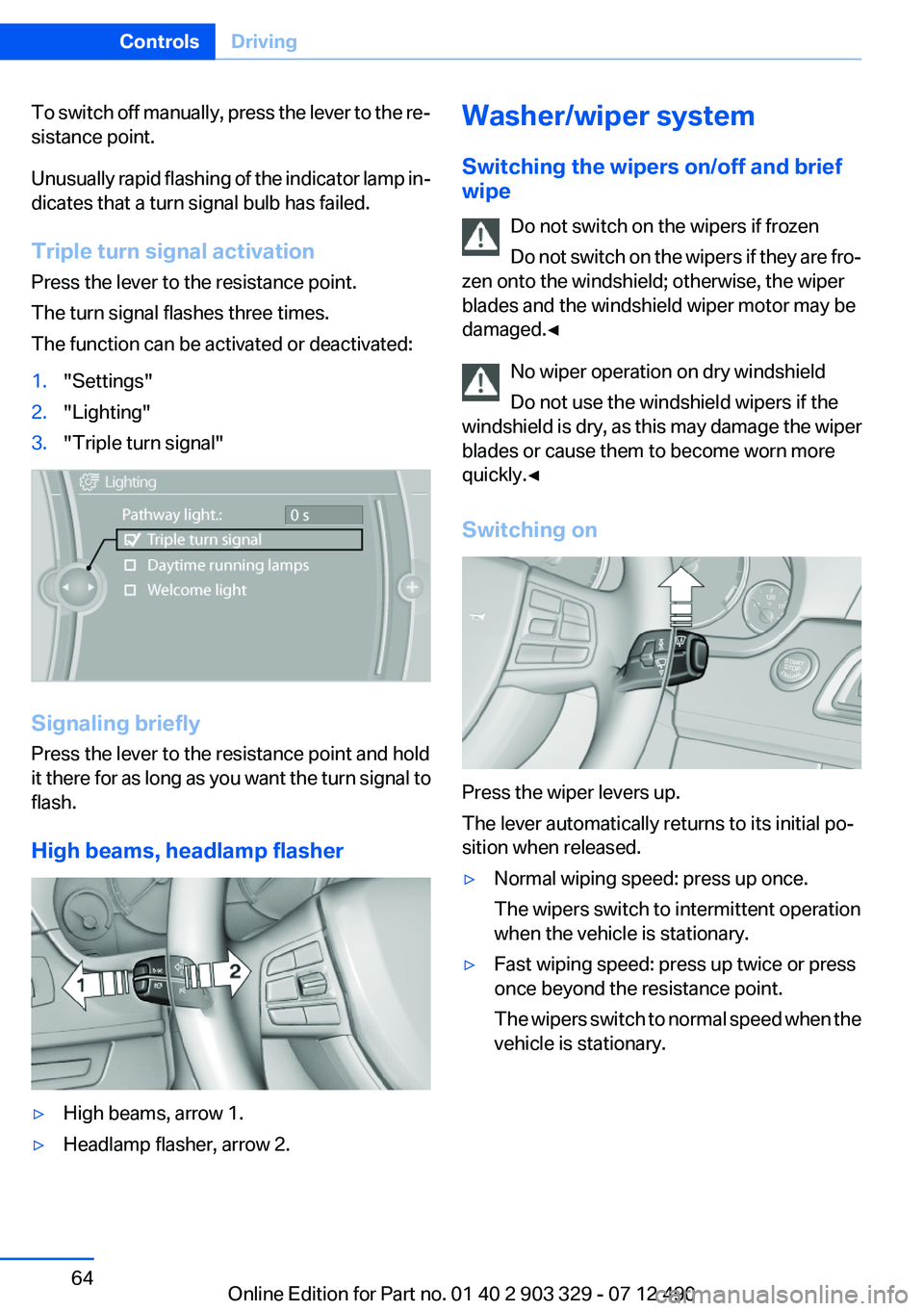
The function can be activated or deactivated:1."Settings"2."Lighting"3."Triple turn signal"
Signaling briefly
Press the lever to the resistance point and hold
it there for as long as you want the turn signal to
flash.
High beams, headlamp flasher
▷High beams, arrow 1.▷Headlamp flasher, arrow 2.Washer/wiper system
Switching the wipers on/off and brief
wipe
Do not switch on the wipers if frozen
Do not switch on the wipers if they are fro‐
zen onto the windshield; otherwise, the wiper
blades and the windshield wiper motor may be
damaged.◀
No wiper operation on dry windshield
Do not use the windshield wipers if the
windshield is dry, as this may damage the wiper
blades or cause them to become worn more
quickly.◀
Switching on
Press the wiper levers up.
The lever automatically returns to its initial po‐
sition when released.
▷Normal wiping speed: press up once.
The wipers switch to intermittent operation
when the vehicle is stationary.▷Fast wiping speed: press up twice or press
once beyond the resistance point.
The wipers switch to normal speed when the
vehicle is stationary.Seite 64ControlsDriving64
Online Edition for Part no. 01 40 2 903 329 - 07 12 490
Page 192 of 232
Replacing componentsVehicle equipment
All standard, country-specific and optional
equipment that is offered in the model series is
described in this chapter. Therefore, equipment
is also described that is not available in a vehicle,
e. g., because of the selected optional equip‐
ment or country variant. This also applies for
safety-related functions and systems.
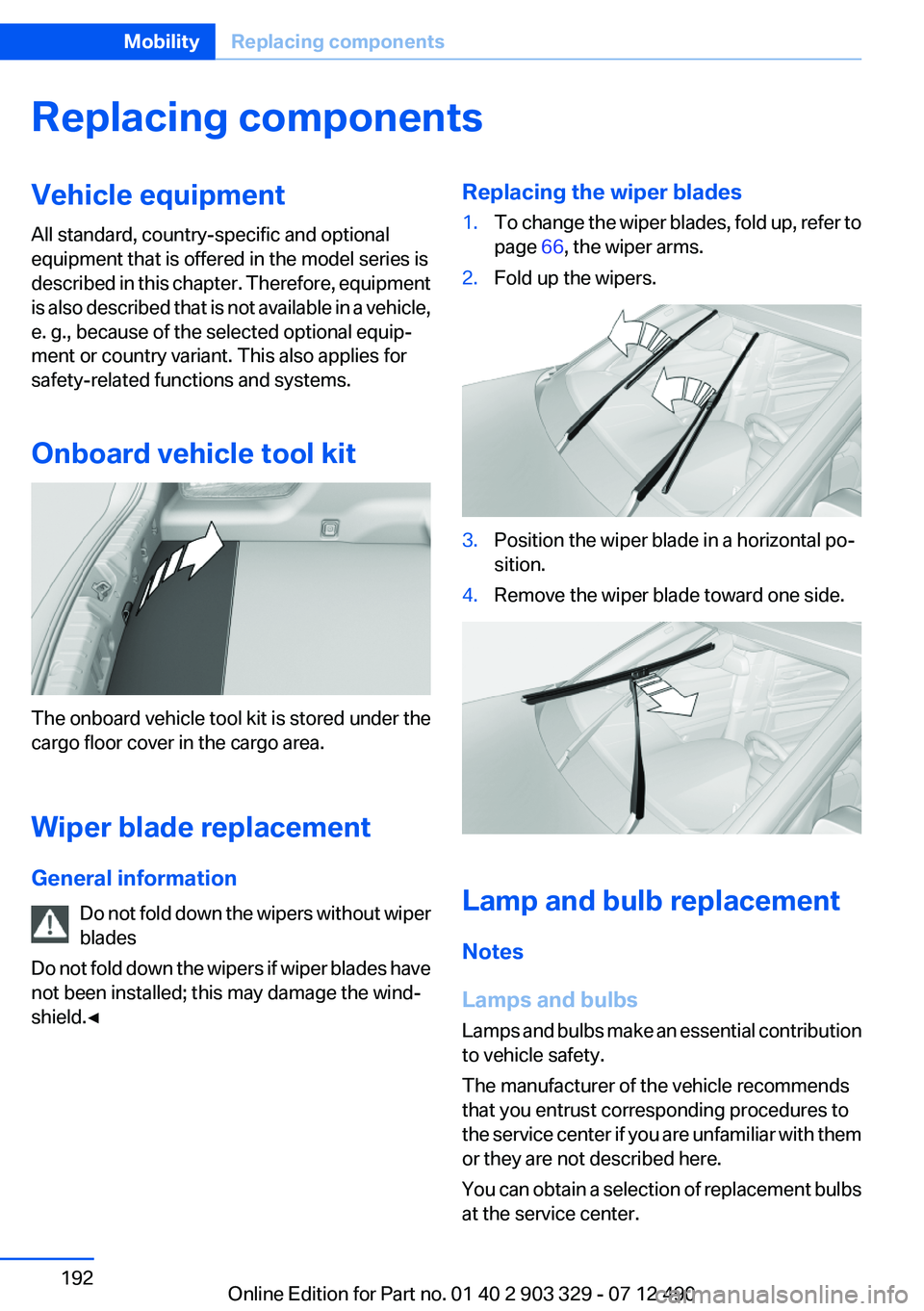
Onboard vehicle tool kit
The onboard vehicle tool kit is stored under the
cargo floor cover in the cargo area.
Wiper blade replacement
General information Do not fold down the wipers without wiper
blades
Do not fold down the wipers if wiper blades have
not been installed; this may damage the wind‐
shield.◀
Replacing the wiper blades1.To change the wiper blades, fold up, refer to
page 66, the wiper arms.2.Fold up the wipers.3.Position the wiper blade in a horizontal po‐
sition.4.Remove the wiper blade toward one side.
Lamp and bulb replacement
Notes
Lamps and bulbs
Lamps and bulbs make an essential contribution
to vehicle safety.
The manufacturer of the vehicle recommends
that you entrust corresponding procedures to
the service center if you are unfamiliar with them
or they are not described here.
You can obtain a selection of replacement bulbs
at the service center.
Seite 192MobilityReplacing components192
Online Edition for Part no. 01 40 2 903 329 - 07 12 490
Page 193 of 232
Danger of burns
Only change bulbs when they are cool;
otherwise, there is the danger of getting
burned.◀
Working on the lighting system
When working on the lighting system, you
should always switch off the lights affected to
prevent short circuits.
To avoid possible injury or equipment damage
when replacing bulbs, observe any instructions
provided by the bulb manufacturer.◀
Do not perform work/bulb replacement on
xenon headlamps
Have any work on the xenon lighting system, in‐
cluding bulb replacement, performed only by a
service center. Due to the high voltage present
in the system, there is the danger of fatal injuries
if work is carried out improperly.◀
Do not touch the bulbs
Do not touch the glass of new bulbs with
your bare hands, as even minute amounts of
contamination will burn into the bulb's surface
and reduce its service life.
Use a clean tissue, cloth or something similar, or
hold the bulb by its base.◀
Light-emitting diodes (LEDs)
Light-emitting diodes installed behind a cover
serve as the light source for controls, display el‐
ements and other equipment.
These light-emitting diodes, which are related
to conventional lasers, are officially designated
as Class 1 light-emitting diodes.
Do not remove the covers
Do not remove the covers, and never stare
into the unfiltered light for several hours; other‐
wise, irritation of the retina could result.◀Headlamp glass
Condensation can form on the inside of the ex‐
ternal lamps in cool or humid weather. When
driving with the light switched on, the conden‐
sation evaporates after a short time. The head‐
lamp glasses do not need to be changed.
If the headlamps do not dim despite driving with
the light switched on, increasing humidity forms,
e. g. water droplets in the light, have the service
center check this.
Xenon headlamps
Notes
Because of the long life of these bulbs, the like‐
lihood of failure is very low. Switching the lamps
on and off frequently shortens their life.
If a xenon bulb fails, switch on the front fog lamps
and continue the trip with great care. Comply
with local regulations.
Do not perform work/bulb replacement on
xenon headlamps
Have any work on the xenon lighting system, in‐
cluding bulb replacement, performed only by a
service center. Due to the high voltage present
in the system, there is the danger of fatal injuries
if work is carried out improperly.◀
For checking and adjusting headlamp aim,
please contact your BMW center.
Light-emitting diodes (LEDs)
Follow the general instructions on lamps and
bulbs, refer to page 192.
With Xenon-headlamps, the following lamps are
designed with LED technology:▷Parking lamps and roadside parking lamps▷Turn signals, incl. side indicators▷Front fog lamps▷Daytime running lights
Contact your service center in the event of a
malfunction.
Seite 193Replacing componentsMobility193
Online Edition for Part no. 01 40 2 903 329 - 07 12 490
Page 194 of 232
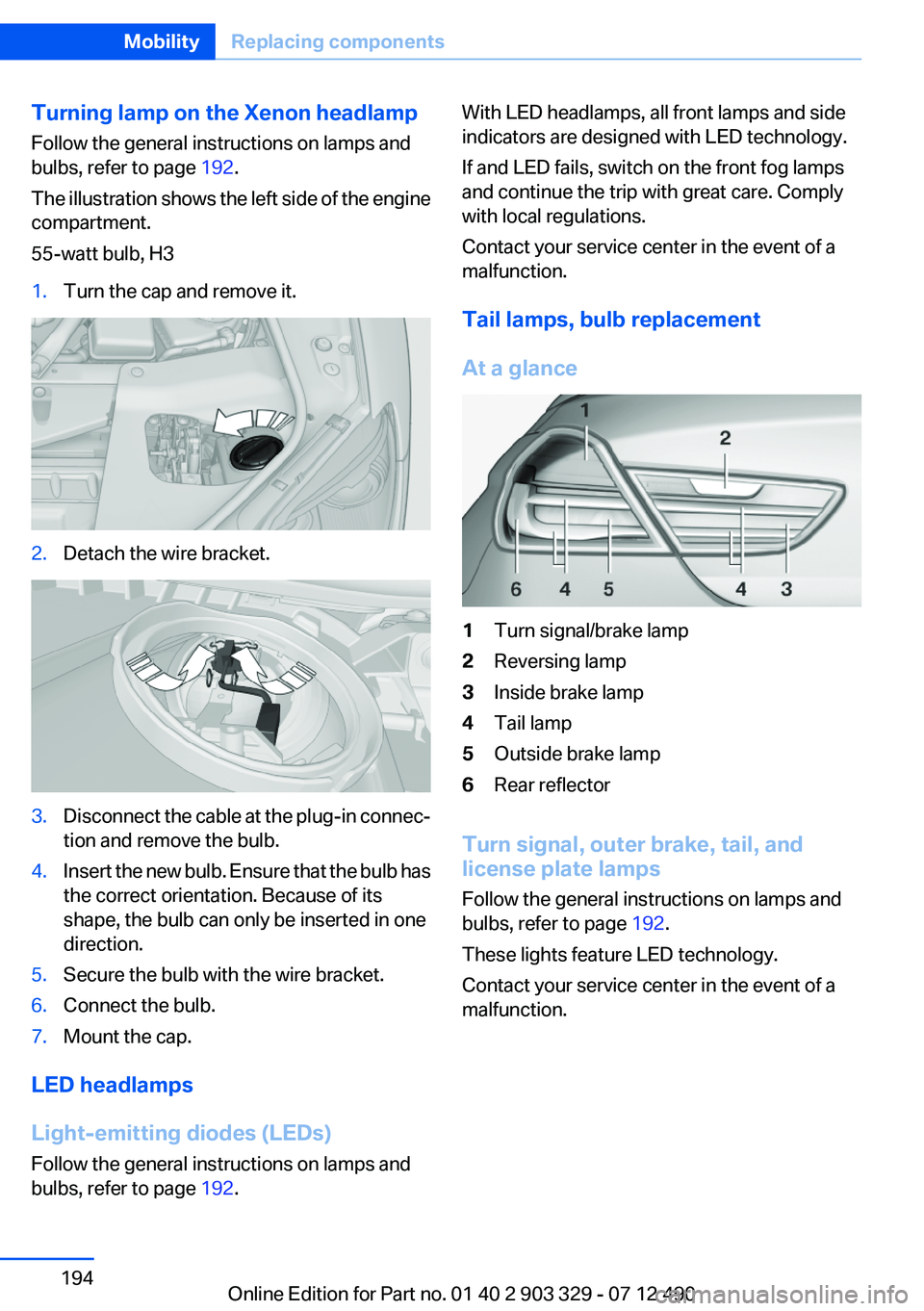
Turning lamp on the Xenon headlamp
Follow the general instructions on lamps and
bulbs, refer to page 192.
The illustration shows the left side of the engine
compartment.
55-watt bulb, H31.Turn the cap and remove it.2.Detach the wire bracket.3.Disconnect the cable at the plug-in connec‐
tion and remove the bulb.4.Insert the new bulb. Ensure that the bulb has
the correct orientation. Because of its
shape, the bulb can only be inserted in one
direction.5.Secure the bulb with the wire bracket.6.Connect the bulb.7.Mount the cap.
LED headlamps
Light-emitting diodes (LEDs)
Follow the general instructions on lamps and
bulbs, refer to page 192.
With LED headlamps, all front lamps and side
indicators are designed with LED technology.
If and LED fails, switch on the front fog lamps
and continue the trip with great care. Comply
with local regulations.
Contact your service center in the event of a
malfunction.
Tail lamps, bulb replacement
At a glance1Turn signal/brake lamp2Reversing lamp3Inside brake lamp4Tail lamp5Outside brake lamp6Rear reflector
Turn signal, outer brake, tail, and
license plate lamps
Follow the general instructions on lamps and
bulbs, refer to page 192.
These lights feature LED technology.
Contact your service center in the event of a
malfunction.
Seite 194MobilityReplacing components194
Online Edition for Part no. 01 40 2 903 329 - 07 12 490
Page 195 of 232
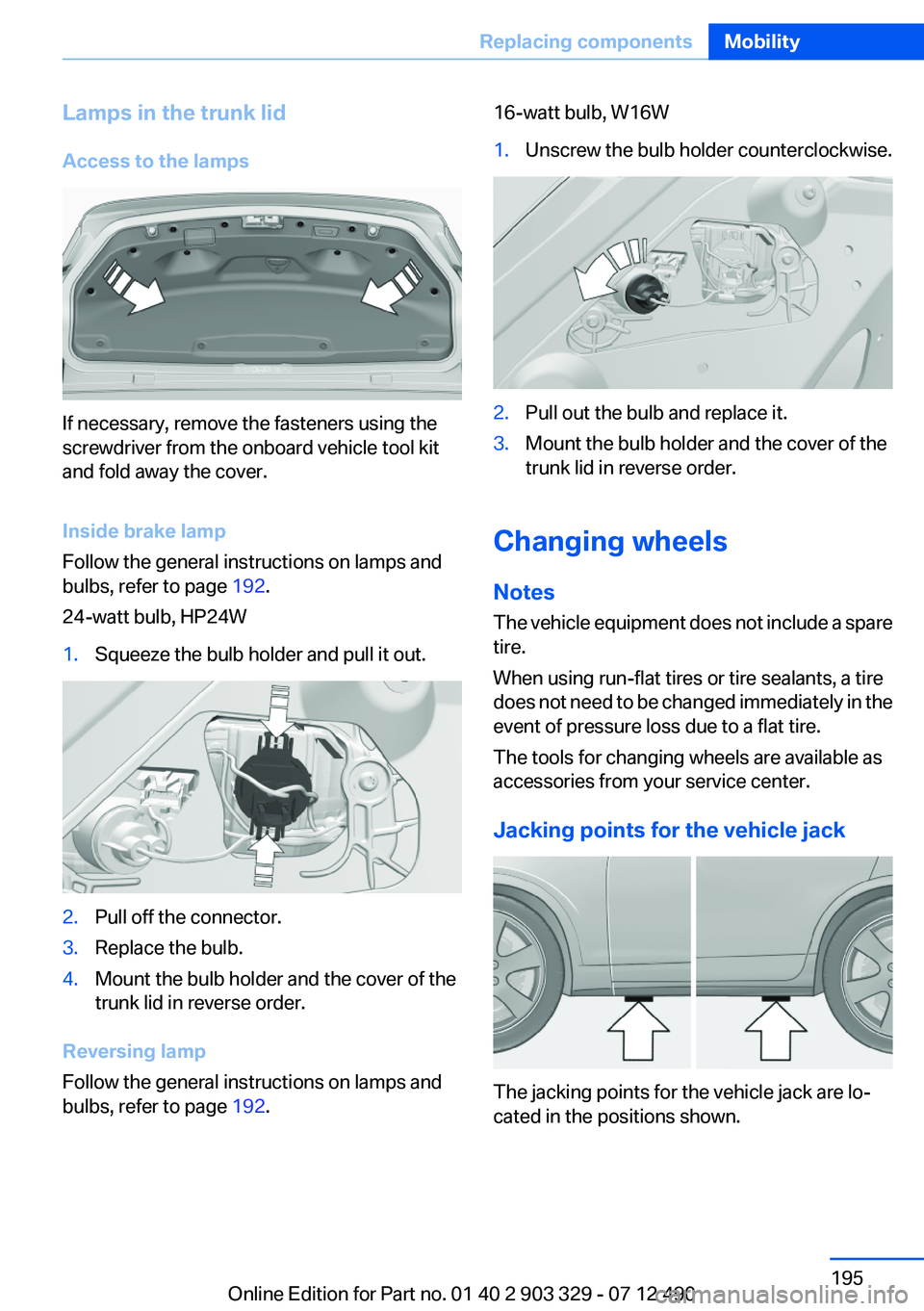
Lamps in the trunk lid
Access to the lamps
If necessary, remove the fasteners using the
screwdriver from the onboard vehicle tool kit
and fold away the cover.
Inside brake lamp
Follow the general instructions on lamps and
bulbs, refer to page 192.
24-watt bulb, HP24W
1.Squeeze the bulb holder and pull it out.2.Pull off the connector.3.Replace the bulb.4.Mount the bulb holder and the cover of the
trunk lid in reverse order.
Reversing lamp
Follow the general instructions on lamps and
bulbs, refer to page 192.
16-watt bulb, W16W1.Unscrew the bulb holder counterclockwise.2.Pull out the bulb and replace it.3.Mount the bulb holder and the cover of the
trunk lid in reverse order.
Changing wheels
Notes
The vehicle equipment does not include a spare
tire.
When using run-flat tires or tire sealants, a tire
does not need to be changed immediately in the
event of pressure loss due to a flat tire.
The tools for changing wheels are available as
accessories from your service center.
Jacking points for the vehicle jack
The jacking points for the vehicle jack are lo‐
cated in the positions shown.
Seite 195Replacing componentsMobility195
Online Edition for Part no. 01 40 2 903 329 - 07 12 490
Page 223 of 232
BMW Maintenance Sys‐tem 189
Bottle holder, refer to Cu‐ pholder 153
Brake assistant 111
Brake assistant, adaptive 111
Brake discs, breaking in 158
Brake force display 110
Brake lamps, brake force dis‐ play 110
Brake lamps, bulb replace‐ ment 194
Brake lights, adaptive 110
Brake pads, breaking in 158
Braking, notes 159
Breakdown assis‐ tance 198, 199
Breaking in 158
Brightness of Control Dis‐ play 85
Bulb replacement 192
Bulb replacement, front 0
Bulb replacement, rear 194
Bulbs and lamps 192
Button, RES 121
Button, Start/Stop 57
Bypassing, refer to Jump- starting 200
C
California Proposition 65 Warning 7
Camera, backup camera 130
Camera, care 207
Camera, Side View 134
Camera, Top View 132
Can holder, refer to Cu‐ pholder 153
Car battery 196
Car care products 205
Care, displays 207
Care, vehicle 205
Cargo 161
Cargo area lid 37 Cargo area, storage compart‐
ments 153
Cargo straps, securing cargo 162
Car key, refer to Remote con‐ trol 30
Carpet, care 206
Car wash 204
Catalytic converter, refer to Hot exhaust system 159
CBS Condition Based Serv‐ ice 189
CD/Multimedia, see user's manual for Navigation, Enter‐
tainment and Communica‐
tion
Center console 14
Central locking system 33
Central screen, refer to Control Display 16
Changes, technical, refer to Safety 7
Changing parts 192
Changing wheels 195
Changing wheels/tires 180
Check Control 74
Children, seating position 54
Children, transporting safely 54
Child restraint fixing sys‐ tem 54
Child restraint fixing system LATCH 55
Child restraint fixing systems, mounting 54
Child seat, mounting 54
Child seats 54
Chrome parts, care 206
Cigarette lighter 148
Cleaning, displays 207
Climate control 141
Climate control wind‐ shield 159
Clock 77
Closing/opening from in‐ side 37 Closing/opening via door
lock 36
Closing/opening with remote control 34
Clothes hooks 152
Collision warning 100, 102
Combination switch, refer to Turn signals 63
Combination switch, refer to Wiper system 64
COMFORT+ program, Driving Experience Switch 117
Comfort Access 39
COMFORT program, Driving Experience Switch 117
Computer 81
Condensation on win‐ dows 142
Condensation under the vehi‐ cle 160
Condition Based Service CBS 189
Configure driving mode 117
Confirmation signal 35
ConnectedDrive, see user's manual for Navigation, Enter‐
tainment and Communica‐
tion
Control Display 16
Control Display, settings 84
Controller 16
Control systems, driving sta‐ bility 111
Convenient opening 35
Coolant 188
Coolant temperature 77
Cooling function 143
Cooling, maximum 142
Cooling system 188
Corrosion on brake discs 160
Cruise control 125
Cruise control, active with Stop & Go 119
Cruising range 78
Cupholder 153
Current fuel consumption 78 Seite 223Everything from A to ZReference223
Online Edition for Part no. 01 40 2 903 329 - 07 12 490
Page 226 of 232
Instrument cluster 70
Instrument cluster, electronic displays 71
Instrument display, multifunc‐ tional 71
Instrument lighting 90
Integral Active Steering 114
Integrated key 30
Integrated universal remote control 146
Intensity, AUTO program 142
Interior equipment 146
Interior lamps 91
Interior lamps via remote con‐ trol 35
Interior motion sensor 41
Interior rearview mirror, auto‐ matic dimming feature 52
Internet page 6
Interval display, service re‐ quirements 78
J
Jacking points for the vehicle jack 195
Jack, refer to Vehicle jack 195
Joystick, automatic transmis‐ sion 67
Jump-starting 200
K
Key/remote control 30
Keyless Go, refer to Comfort Access 39
Key Memory, refer to Personal Profile 31
Kickdown, automatic trans‐ mission 67
Knee airbag 93
L
Lamp replacement 192
Lamp replacement, front 0 Lamp replacement, rear 194
Lamps 87
Lamps and bulbs 192
Lane departure warning 107
Lane margin, warning 107
Language on Control Dis‐ play 85
Lashing eyes, securing cargo 162
LATCH child restraint fixing system 55
Leather, care 205
LED headlamps, Bulb replace‐ ment 194
LED light 194
LEDs, light-emitting di‐ odes 193
Length, vehicle 211
Letters and numbers, enter‐ ing 21
License plate lamp, bulb re‐ placement 194
Light-alloy wheels, care 206
Light control 89
Light-emitting diodes, LEDs 193
Lighting 87
Lighting, speaker 91
Lighting via remote control 35
Light switch 87
Load 161
Loading 161
Lock, door 36
Locking/unlocking from in‐ side 37
Locking/unlocking via door lock 36
Locking/unlocking with re‐ mote control 34
Locking, automatic 37
Locking, central 33
Locking via trunk lid 38
Low beams 87
Low beams, automatic, refer to High-beam Assistant 89
Lower back support 46 Lumbar support 46
M
Maintenance 189
Maintenance require‐ ments 189
Maintenance, service require‐ ments 78
Maintenance system, BMW 189
Malfunction displays, refer to Check Control 74
Manual air distribution 142
Manual air flow 142
Manual brake, refer to Parking brake 61
Manual mode, transmis‐ sion 68
Manual operation, backup camera 130
Manual operation, door lock 37
Manual operation, exterior mir‐ rors 52
Manual operation, fuel filler flap 170
Manual operation, Park Dis‐ tance Control PDC 128
Manual operation, Side View 134
Manual operation, Top View 133
Manual transmission 66
Marking on approved tires 180
Marking, run-flat tires 181
Massage seat, front 47
Master key, refer to Remote control 30
Maximum cooling 142
Maximum speed, display 79
Maximum speed, winter tires 181
Measure, units of 85
Medical kit 199 Seite 226ReferenceEverything from A to Z226
Online Edition for Part no. 01 40 2 903 329 - 07 12 490
Page 228 of 232
R
Radiator fluid 188
Radio-operated key, refer to Remote control 30
Radio ready state 58
Radio, see user's manual for Navigation, Entertainment
and Communication
Rain sensor 65
Rear axle steering 114
Rear lamps 194
Rearview mirror 51
Rear window defroster 143
Recirculated-air mode 143
Recommended tire brands 180
Refueling 170
Remaining range 78
Remote control/key 30
Remote control, malfunc‐ tion 36
Remote control, universal 146
Replacement fuse 196
Replacing parts 192
Replacing wheels/tires 180
Reporting safety defects 8
RES button 121
Reserve warning, refer to Range 78
Reset, Tire Pressure Monitor TPM 96
Residual heat, automatic cli‐ mate control 143
Retaining straps, securing cargo 162
Retreaded tires 180
Reversing lamp, bulb replace‐ ment 195
Roadside parking lamps 88
Roller sunblinds 42
Roll stabilization, refer to Adaptive Drive 114
Roll stabilization, refer to Dy‐ namic Drive 114
RON gasoline quality 172 Rope for tow-starting/tow‐
ing 202
RSC Run Flat System Compo‐ nent, refer to Run-flat
tires 181
Rubber components, care 206
Run-flat tires 181
S
Safe braking 159
Safety 7
Safety belt reminder for driv‐ er's seat and front passenger
seat 49
Safety belts 48
Safety belts, care 206
Safety systems, airbags 92
Saving fuel 0
Screen, refer to Control Dis‐ play 16
Screwdriver 192
Screw thread for tow fit‐ ting 203
Seat belts, refer to Safety belts 48
Seat heating, front 47
Seating position for chil‐ dren 54
Seat, mirror, and steering wheel memory 50
Seats 45
Seat ventilation, front 47
Selection list in instrument cluster 81
Selector lever, automatic transmission 67
Sensors, care 207
Service and warranty 7
Service requirements, Condi‐ tion Based Service CBS 189
Service requirements, dis‐ play 78
Service, Roadside Assis‐ tance 199 Settings on Control Dis‐
play 84
Settings, storing for seat, mir‐ rors, steering wheel 50
Shifting, automatic transmis‐ sion 67
Shifting, manual transmis‐ sion 66
Shift paddles on steering wheel 68
Short commands 213
Shoulder support 47
Side airbags 92
Side View 134
Signaling, horn 12
Signals when unlocking 35
Sitting safely 45
Size 210
Ski bag 149
Smallest turning circle 211
Smoker's package 148
Snow chains 181
Socket 149
Socket, OBD Onboard Diag‐ nostics 190
SOS button 198
Spare fuse 196
Speaker lighting 91
Specified engine oil types 186
Speed, average 82
Speed limit detection, on‐ board computer 83
Speed limiter, display 79
Speed Limit Information 79
Speed limit in the com‐ puter 83
Split screen 20
SPORT+ program, Dynamic Driving Control 116
Sport automatic transmis‐ sion 68
SPORT program, Dynamic Driving Control 116
Sport program, transmis‐ sion 68 Seite 228ReferenceEverything from A to Z228
Online Edition for Part no. 01 40 2 903 329 - 07 12 490
Page 229 of 232
Stability control systems 111
Start/stop, automatic func‐ tion 59
Start/Stop button 57
Start function during malfunc‐ tion 31
Starting the engine 58
Status display, tires 95
Status information, iDrive 19
Status of Owner's Manual 6
Steering, Integral Active Steering 114
Steering wheel, adjusting 53
Steering wheel heating 53
Steering wheel memory 50
Steptronic, automatic trans‐ mission 67
Stopping the engine 58
Storage compartments 151
Storage compartments, loca‐ tions 151
Storage, tires 181
Storing the vehicle 207
Summer tires, tread 179
Supplementary text mes‐ sage 76
Surround View 129
Suspension settings 115
Switch for Dynamic Driving Control 115
Switch-on times, parked-car ventilation 145
Switch, refer to Cockpit 12
Symbols 6
T
Tachometer 77
Tail and brake lamps 194
Tailgate 37
Tailgate via remote control 35
Tail lamps 194
Tail lamps, bulb replace‐ ment 194
Technical changes, refer to Safety 7 Technical data 210
Telephone, see user's manual for Navigation, Entertain‐
ment and Communication
Temperature, automatic cli‐ mate control 142
Temperature display, external temperature 77
Temperature, engine oil 77
Tempomat, refer to Active Cruise Control 119
Terminal, jump-starting 200
Text message, supplemen‐ tary 76
Theft alarm system, refer to Alarm system 40
Theft protection, refer to Cen‐ tral locking system 33
Thermal camera, refer to Night Vision 104
Thigh support 46
Tilt alarm sensor 41
Tilt glass roof 43
Tilt, seats 45
Time of arrival 83
Tire damage 179
Tire identification marks 178
Tire inflation pressure 173
Tire inflation pressure monitor, refer to FTM 98
Tire Pressure Monitor TPM 95
Tires, changing 180
Tires, everything on wheels and tires 173
Tires, run-flat tires 181
Tire tread 179
Tone, see user's manual for Navigation, Entertainment
and Communication
Tools 192
Top View 132
Total vehicle weight 211
Tow fitting 202
Towing 201
Tow-starting 201 Tow truck 201
TPM Tire Pressure Moni‐ tor 95
Traction control 112
TRACTION program, Dynamic Driving Control 116
Transmission, automatic 67
Transmission, manual 66
Transporting children safely 54
Tread, tires 179
Trip computer 83
Triple turn signal activa‐ tion 64
Trip odometer 77
Truck for tow-starting/tow‐ ing 201
Trunk lid 37
Trunk lid, emergency unlock‐ ing 38
Trunk lid, hotel function 38
Trunk lid via remote con‐ trol 35
Turning circle 211
Turning circle lines, backup camera 131
Turn signals, operation 63
Turn signals, rear, bulb re‐ placement 194
U
Unintentional alarm 41
Units of measure 85
Universal remote control 146
Unlock button, automatic transmission 67
Unlocking/locking from in‐ side 37
Unlocking/locking via door lock 36
Unlocking/locking with remote control 34
Updates made after the edito‐ rial deadline 6
Upholstery care 206 Seite 229Everything from A to ZReference229
Online Edition for Part no. 01 40 2 903 329 - 07 12 490
Page 230 of 232
USB interface 151
V
Variable steering, Integral Ac‐ tive Steering 114
Vehicle battery 196
Vehicle battery, replacing 196
Vehicle, breaking in 158
Vehicle care 205
Vehicle equipment 6
Vehicle identification number, refer to Identification number
in the engine compart‐
ment 183
Vehicle jack 195
Vehicle paint 205
Vehicle storage 207
Vehicle wash 204
Ventilation 144
Ventilation, refer to Parked-car ventilation 144
Voice activation, short com‐ mands 213
Voice activation system 22
W
Warning messages, refer to Check Control 74
Warning triangle 199
Washer fluid 66
Washer fluid reservoir, ca‐ pacity 212
Washer nozzles, wind‐ shield 66
Washer system 64
Washing, vehicle 204
Water on roads 159
Weights 211
Welcome lamps 87
Wheel base, vehicle 211
Wheels, changing 180
Wheels, everything on wheels and tires 173 Wheels, Flat Tire Monitor
FTM 98
Wheels, Tire Pressure Monitor TPM 95
Width, vehicle 210
Window defroster, rear 143
Windows, powered 41
Windshield, climate con‐ trol 159
Windshield washer fluid 66
Windshield washer noz‐ zles 66
Windshield washer system 64
Windshield wiper 64
Windshield wipers, fold-out position 66
Winter storage, care 207
Winter tires, suitable tires 181
Winter tires, tread 179
Wiper blades, replacing 192
Wiper fluid 66
Wiper system 64
Wood, care 206
Word match concept, naviga‐ tion 21
Wrench 192
X
xDrive 113
Xenon headlamps, bulb re‐ placement 193 Seite 230ReferenceEverything from A to Z230
Online Edition for Part no. 01 40 2 903 329 - 07 12 490