control center BMW 645CI CONVERTIBLE 2005 Owners Manual
[x] Cancel search | Manufacturer: BMW, Model Year: 2005, Model line: 645CI CONVERTIBLE, Model: BMW 645CI CONVERTIBLE 2005Pages: 217, PDF Size: 7.92 MB
Page 4 of 217
Reference
At a glance
Controls
Driving tips
Communications
Navigation
Entertainment
Mobility
Contents
The fastest way to find specific topics is to use
the index, refer to page199.
Using this Owner's Manual
4Notes
Reporting safety defects 7
At a glance
10Cockpit
16Control Center
22Voice command system
Controls
28Opening and closing
44Adjustments
52Transporting children safely
54Driving
69Everything under control
80Technology for comfort, convenience
and safety
91Lamps
94A congenial climate
100Practical interior accessories
Driving tips
108Things to remember when driving
Navigation
114Starting navigation system
115Destination entry
124Destination guidance
129What to do if …
Entertainment
132On/off and tone
136Radio
143CD player and CD changer
Communications
150Telephoning
159TeleService, BMW Assist
Mobility
166Refueling
168Wheels and tires
174Under the hood
178Maintenance
180Replacing components
185Giving and receiving assistance
Reference
192Technical data
196Short commands of the voice command
system
199Everything from A to Z
Page 5 of 217
Notes
4
Notes
Using this Owner's Manual
We have made every effort to ensure that you
are able to find what you need in this Owner's
Manual as quickly as possible. The fastest way
to find specific topics is to use the detailed
index at the back of the manual. If you wish to
gain an initial overview of your vehicle, you will
find this in the first chapter.
Should you want to sell your BMW some day,
please remember to hand over the Owner's
Manual as well; it is an important component of
your vehicle.
Additional sources of information
Should you have any other questions, your
BMW center will be glad to advise you at any
time.
You can find information on BMW, e.g. technol-
ogy, on the Internet at www.bmwusa.com.
Symbols used
Indicates precautions that must be fol-
lowed precisely in order to avoid the pos-
sibility of personal injury and serious damage to
the vehicle.
Indicates information that will assist you
in gaining the optimum benefit from your
vehicle and enable you to care more effectively
for your vehicle.
Refers to measures that can be taken to
help protect the environment.
*Indicates special equipment, country-spe-
cific equipment and optional extras, as well as
equipment and functions not yet available at the
time of printing.
"..." Identifies Control Display texts used to
select individual functions.
Symbols on vehicle components
Indicates that you should consult the rel-
evant section of this Owner's Manual for
information on a particular part or assembly.
Page 7 of 217
Notes
6
For your own safety
Maintenance and repair
Advanced technology, e. g. the use of
modern materials and high-performance
electronics, requires specially adapted mainte-
nance and repair methods. Therefore, have cor-
responding work on your BMW carried out only
by a BMW center or a workshop that works
according to BMW repair procedures with cor-
respondingly trained personnel. If work is car-
ried out improperly there is a danger of conse-
quential damage and the related safety risks.<
California Proposition 65 Warning
California law requires us to issue the following
warning:
Engine exhaust and a wide variety of
automobile components and parts,
including components found in the interior fur-
nishings in a vehicle, contain or emit chemicals
known to the State of California to cause cancer
and birth defects and reproductive harm. In
addition, certain fluids contained in vehicles and
certain products of component wear contain or
emit chemicals known to the State of California
to cause cancer and birth defects or other
reproductive harm.
Battery posts, terminals and related accesso-
ries contain lead and lead compounds. Wash
your hands after handling.
Used engine oil contains chemicals that have
caused cancer in laboratory animals. Always
protect your skin by washing thoroughly with
soap and water.<
Parts and accessories
For your own safety, use genuine parts
and accessories approved by BMW.
When you purchase accessories tested and
approved by BMW and Genuine BMW Parts,
you simultaneously acquire the assurance that
they have been thoroughly tested by BMW to
ensure optimum performance when installed
on your vehicle.
BMW warrants these parts to be free from
defects in material and workmanship.
BMW will not accept any liability for damage
resulting from installation of parts and accesso-
ries not approved by BMW.
BMW cannot test every product made by other
manufacturers to verify if it can be used on a
BMW safely and without risk to either the vehi-
cle, its operation, or its occupants.
Genuine BMW Parts, BMW Accessories and
other products approved by BMW, together
with professional advice on using these items,
are available from all BMW centers.
Installation and operation of non-BMW
approved accessories such as alarms, radios,
amplifiers, radar detectors, wheels, suspension
components, brake dust shields, telephones,
including operation of any mobile phone from
within the vehicle without using an externally
mounted antenna, or transceiver equipment, for
instance, CBs, walkie-talkies, ham radios or
similar accessories, may cause extensive dam-
age to the vehicle, compromise its safety, inter-
fere with the vehicle's electrical system or affect
the validity of the BMW Limited Warranty. Refer
to your BMW center for additional informa-
tion.<
Maintenance, replacement, or repair of
the emission control devices and sys-
tems may be performed by any automotive
repair establishment or individual using any cer-
tified automotive part.<
Page 15 of 217
Cockpit
14
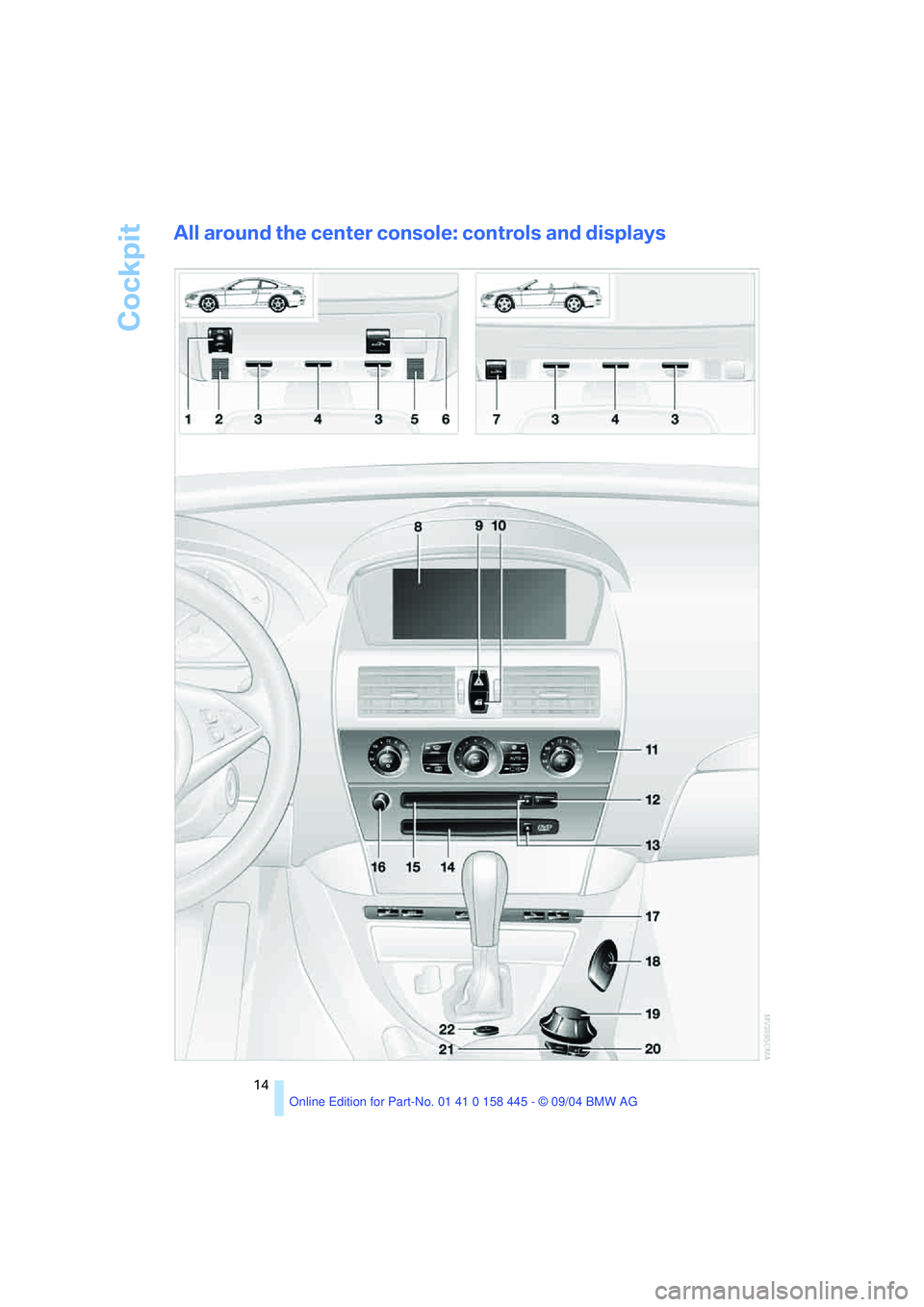
All around the center console: controls and displays
Page 17 of 217
Control Center
16
Control Center
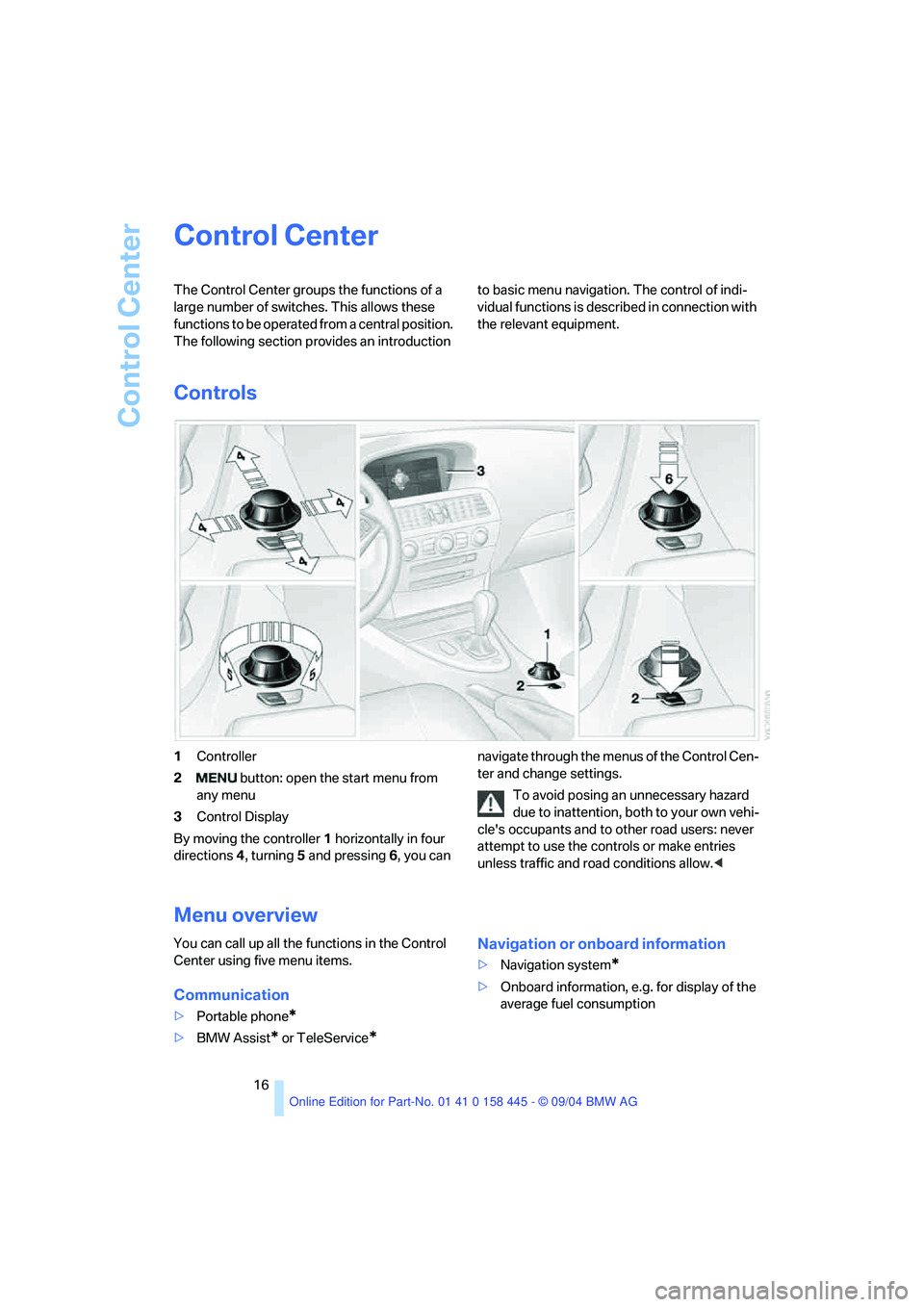
The Control Center groups the functions of a
large number of switches. This allows these
functions to be operated from a central position.
The following section provides an introduction to basic menu navigation. The control of indi-
vidual functions is described in connection with
the relevant equipment.
Controls
1Controller
2 button: open the start menu from
any menu
3Control Display
By moving the controller1 horizontally in four
directions4, turning5 and pressing 6, you can navigate through the menus of the Control Cen-
ter and change settings.
To avoid posing an unnecessary hazard
due to inattention, both to your own vehi-
cle's occupants and to other road users: never
attempt to use the controls or make entries
unless traffic and road conditions allow.<
Menu overview
You can call up all the functions in the Control
Center using five menu items.
Communication
>Portable phone*
>BMW Assist* or TeleService*
Navigation or onboard information
>Navigation system*
>Onboard information, e.g. for display of the
average fuel consumption
Page 19 of 217

Control Center
18 5A symbol indicates the last selected menu
item of the start menu:
Communication
Navigation or onboard information
Entertainment
Climate
menu
Page 21 of 217
Control Center
20
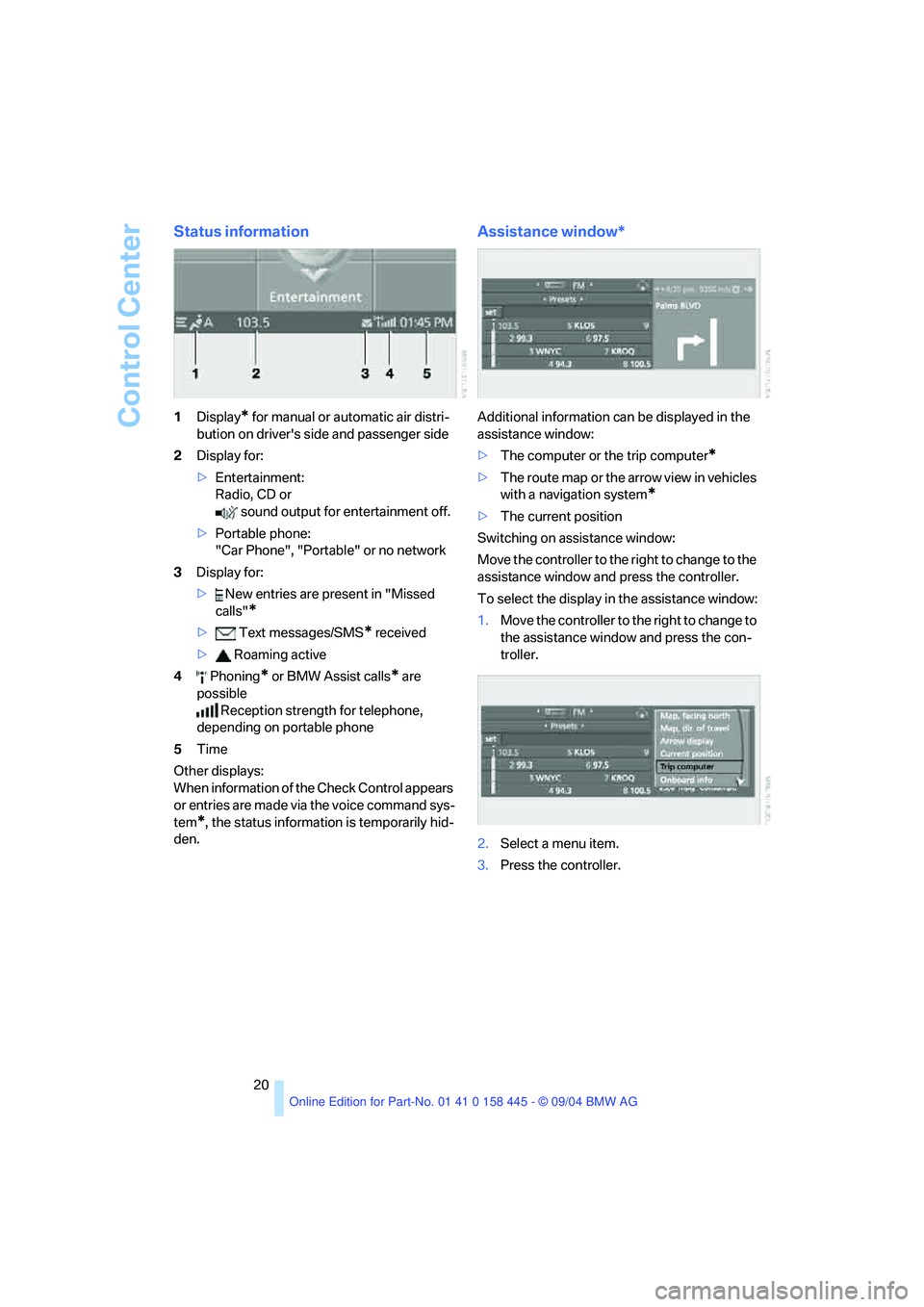
Status information
1Display* for manual or automatic air distri-
bution on driver's side and passenger side
2Display for:
>Entertainment:
Radio, CD or
sound output for entertainment off.
>Portable phone:
"Car Phone", "Portable" or no network
3Display for:
> New entries are present in "Missed
calls"
*
> Text messages/SMS* received
> Roaming active
4 Phoning
* or BMW Assist calls* are
possible
Reception strength for telephone,
depending on portable phone
5Time
Other displays:
When information of the Check Control appears
or entries are made via the voice command sys-
tem
*, the status information is temporarily hid-
den.
Assistance window*
Additional information can be displayed in the
assistance window:
>The computer or the trip computer
*
>The route map or the arrow view in vehicles
with a navigation system
*
>The current position
Switching on assistance window:
Move the controller to the right to change to the
assistance window and press the controller.
To select the display in the assistance window:
1.Move the controller to the right to change to
the assistance window and press the con-
troller.
2.Select a menu item.
3.Press the controller.
Page 23 of 217
Voice command system
22
Voice command system
The concept
The voice command system allows you to con-
trol operation of various vehicle systems with-
out ever removing your hands from the steering
wheel.
Individual menu items on the Control Display
can be spoken as commands. This frees you of
having to use the controller.
The voice command system transforms your
oral commands into control signals for the
selected systems and provides support in the
form of instructions or questions.
The voice command system includes a special
microphone.
The microphone is located:
>In the Coupe near the interior rearview mir-
ror, refer to page14
>In the Convertible on the steering column
Precondition
In the Control Center, set the language that
applies for the voice command system in order
to enable identification of the spoken com-
mands. For information on setting the language
of the Control Center, refer to page78.
Symbol in the Owner's Manual
Voice commands
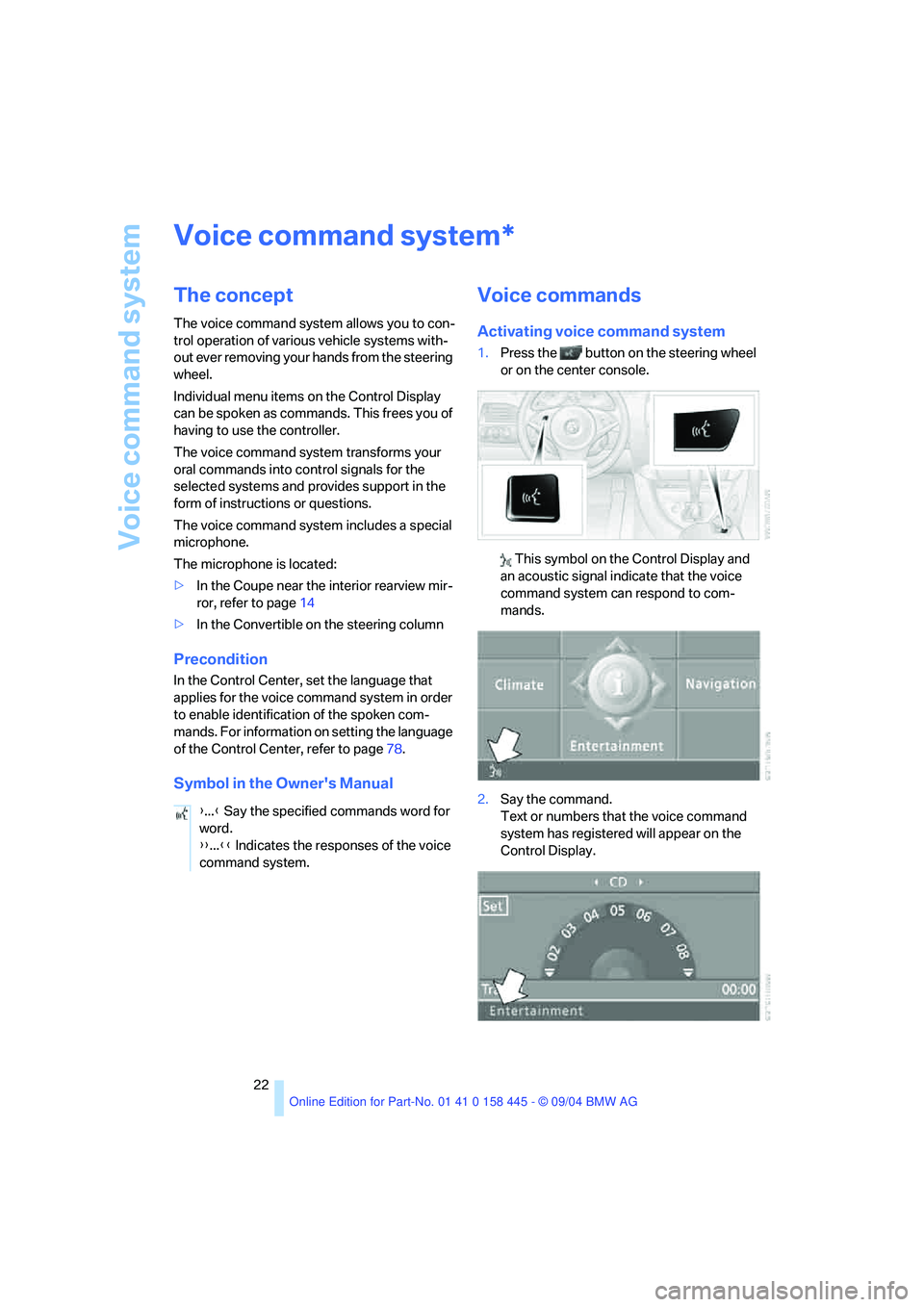
Activating voice command system
1.Press the button on the steering wheel
or on the center console.
This symbol on the Control Display and
an acoustic signal indicate that the voice
command system can respond to com-
mands.
2.Say the command.
Text or numbers that the voice command
system has registered will appear on the
Control Display.
*
{...} Say the specified commands word for
word.
{{...}} Indicates the responses of the voice
command system.
Page 24 of 217
At a glance
23Reference
Controls
Driving tips
Communications
Navigation
Entertainment
Mobility
This symbol appears on the Control Display
when you can input additional voice com-
mands.
If no further voice commands are possible,
operate the equipment using the Control Cen-
ter.
Terminating or canceling voice
command system
Press the button on the steering wheel or
on the center console
or
Voice commands
Having the possible voice commands
read aloud
You can have the system read aloud the possi-
ble voice commands related to the selected
menu item on the Control Display.
For example, if you have selected "CD", the
system will read aloud possible voice com-
mands for operating the CD player and the
CD changer
*:
Opening help
Using alternative voice commands
There are often a number of commands to run a
function, e.g.:
Calling up functions directly
With short commands you can carry out certain
functions directly, regardless of which menu
item is selected, refer to page196.
Opening the start menu
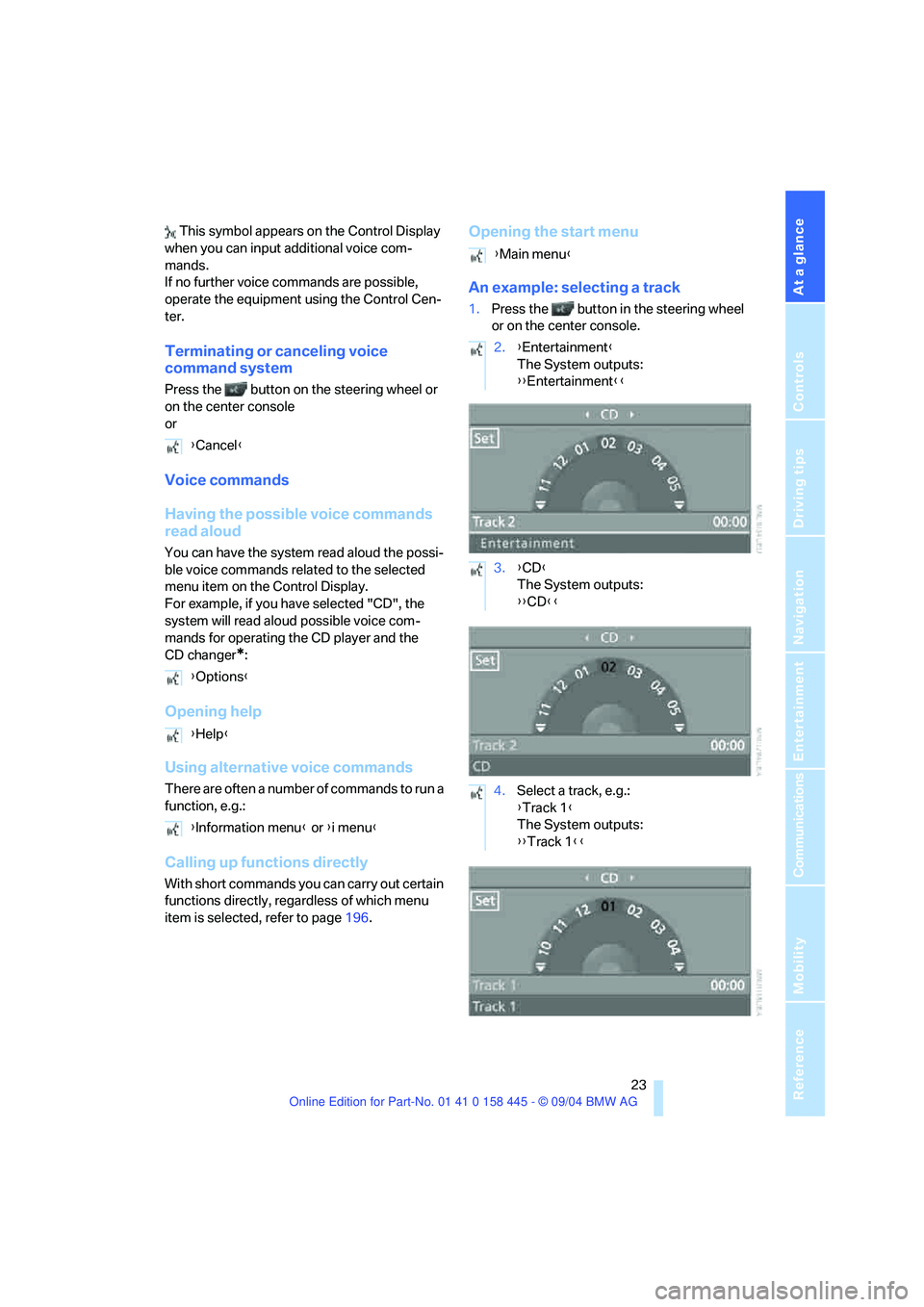
An example: selecting a track
1.Press the button in the steering wheel
or on the center console.
{Cancel}
{Options}
{Help}
{Information menu} or {i menu}
{Main menu}
2.{Entertainment}
The System outputs:
{{Entertainment}}
3.{CD}
The System outputs:
{{CD}}
4.Select a track, e.g.:
{Track 1}
The System outputs:
{{Track 1}}
Page 29 of 217
Opening and closing
28
Opening and closing
The key set
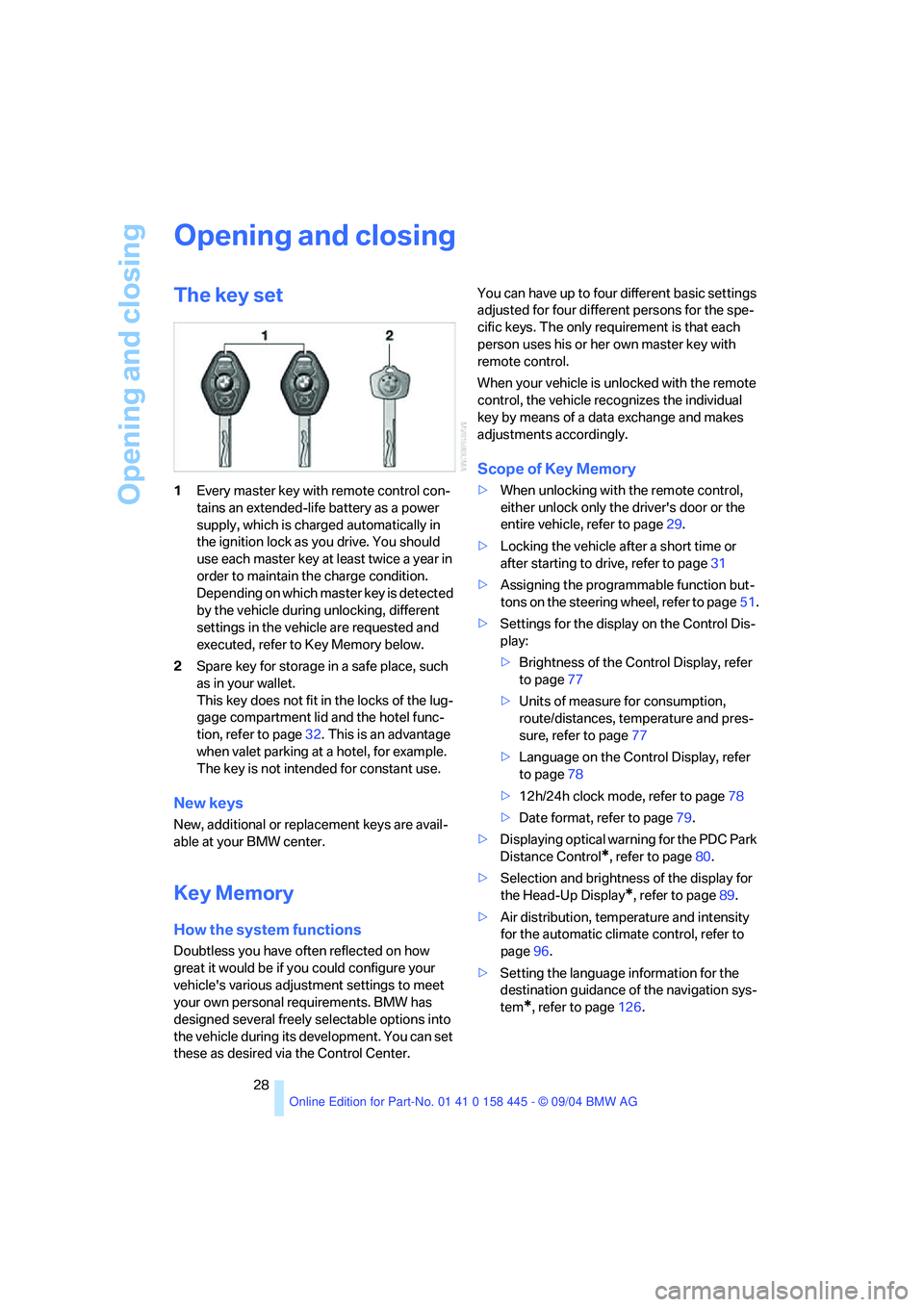
1Every master key with remote control con-
tains an extended-life battery as a power
supply, which is charged automatically in
the ignition lock as you drive. You should
use each master key at least twice a year in
order to maintain the charge condition.
Depending on which master key is detected
by the vehicle during unlocking, different
settings in the vehicle are requested and
executed, refer to Key Memory below.
2Spare key for storage in a safe place, such
as in your wallet.
This key does not fit in the locks of the lug-
gage compartment lid and the hotel func-
tion, refer to page32. This is an advantage
when valet parking at a hotel, for example.
The key is not intended for constant use.
New keys
New, additional or replacement keys are avail-
able at your BMW center.
Key Memory
How the system functions
Doubtless you have often reflected on how
great it would be if you could configure your
vehicle's various adjustment settings to meet
your own personal requirements. BMW has
designed several freely selectable options into
the vehicle during its development. You can set
these as desired via the Control Center.You can have up to four different basic settings
adjusted for four different persons for the spe-
cific keys. The only requirement is that each
person uses his or her own master key with
remote control.
When your vehicle is unlocked with the remote
control, the vehicle recognizes the individual
key by means of a data exchange and makes
adjustments accordingly.
Scope of Key Memory
>When unlocking with the remote control,
either unlock only the driver's door or the
entire vehicle, refer to page29.
>Locking the vehicle after a short time or
after starting to drive, refer to page31
>Assigning the programmable function but-
tons on the steering wheel, refer to page51.
>Settings for the display on the Control Dis-
play:
>Brightness of the Control Display, refer
to page77
>Units of measure for consumption,
route/distances, temperature and pres-
sure, refer to page77
>Language on the Control Display, refer
to page78
>12h/24h clock mode, refer to page78
>Date format, refer to page79.
>Displaying optical warning for the PDC Park
Distance Control
*, refer to page80.
>Selection and brightness of the display for
the Head-Up Display
*, refer to page89.
>Air distribution, temperature and intensity
for the automatic climate control, refer to
page96.
>Setting the language information for the
destination guidance of the navigation sys-
tem
*, refer to page126.