phone BMW 645CI COUPE 2004 E63 User Guide
[x] Cancel search | Manufacturer: BMW, Model Year: 2004, Model line: 645CI COUPE, Model: BMW 645CI COUPE 2004 E63Pages: 216, PDF Size: 3.46 MB
Page 98 of 216
Practical interior accessories
96 Be sure that the flashlight is switched
off when it is inserted into its holder.
Failure to comply with this precaution
could lead to overcharging and damage.<
Center armrest
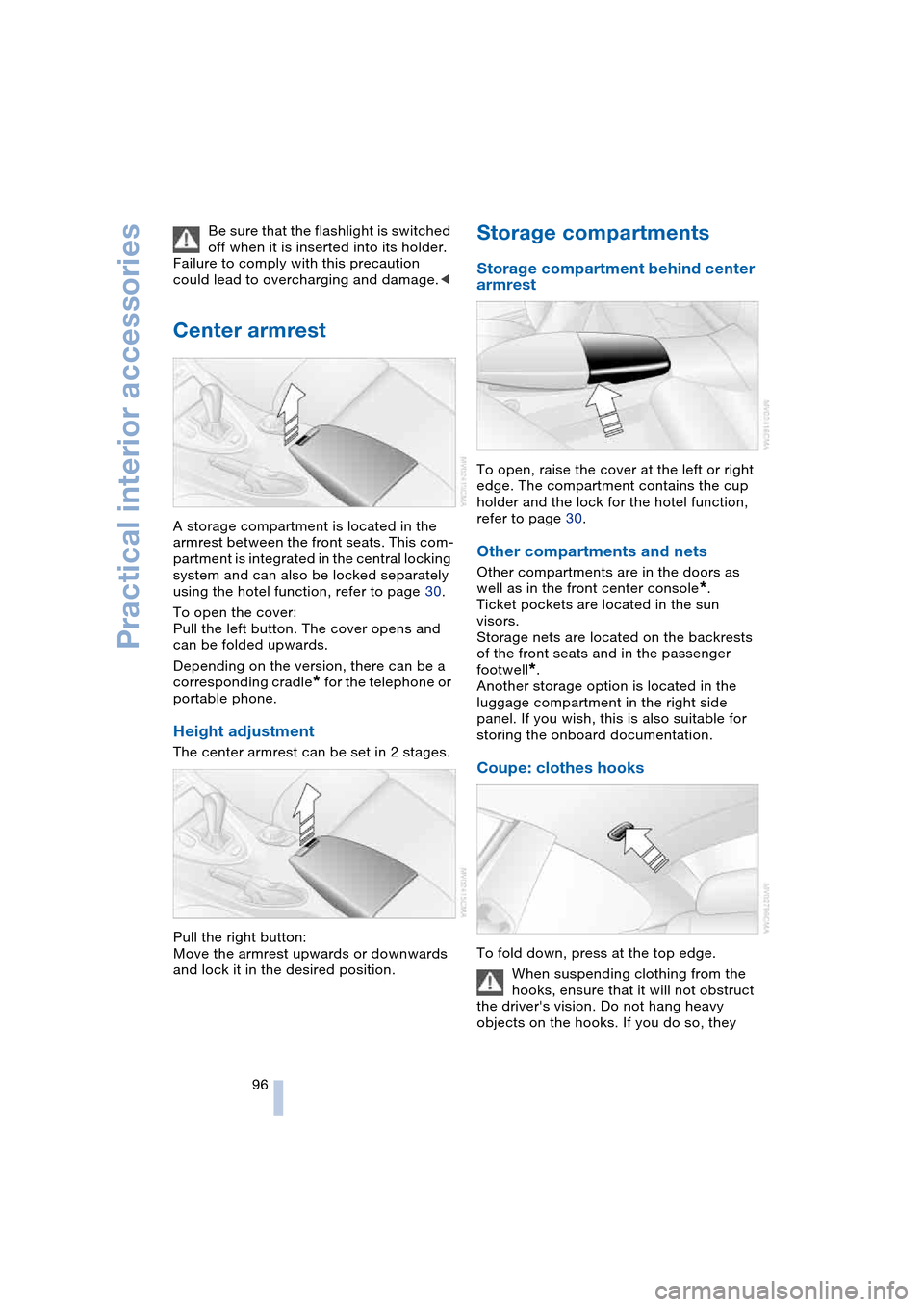
A storage compartment is located in the
armrest between the front seats. This com-
partment is integrated in the central locking
system and can also be locked separately
using the hotel function, refer to page 30.
To open the cover:
Pull the left button. The cover opens and
can be folded upwards.
Depending on the version, there can be a
corresponding cradle
* for the telephone or
portable phone.
Height adjustment
The center armrest can be set in 2 stages.
Pull the right button:
Move the armrest upwards or downwards
and lock it in the desired position.
Storage compartments
Storage compartment behind center
armrest
To open, raise the cover at the left or right
edge. The compartment contains the cup
holder and the lock for the hotel function,
refer to page 30.
Other compartments and nets
Other compartments are in the doors as
well as in the front center console
*.
Ticket pockets are located in the sun
visors.
Storage nets are located on the backrests
of the front seats and in the passenger
footwell
*.
Another storage option is located in the
luggage compartment in the right side
panel. If you wish, this is also suitable for
storing the onboard documentation.
Coupe: clothes hooks
To fold down, press at the top edge.
When suspending clothing from the
hooks, ensure that it will not obstruct
the driver's vision. Do not hang heavy
objects on the hooks. If you do so, they
Page 106 of 216
Things to remember when driving
104
Mobile communication devices in
vehicle
BMW advises against using mobile
communication devices, e.g. portable
phones, in the inside of the vehicle without
a direct connection to an external antenna.
Otherwise, the vehicle electronics and
mobile communication device can influ-
ence one another. It is not ensured that the
waves emitted during transmission are led
out of the vehicle interior.<
Cargo loading
To avoid loading the tires beyond
their approved carrying capacity,
never overload the vehicle. Overloading
can lead to overheating and increases the
rate at which damage develops inside the
tires. The ultimate result can assume the
form of a sudden air loss.<
Determining loading limit
1.Locate the following statement on your
vehicle's placard
*:
The combined weight of occu-
pants and cargo should never
exceed XXX lbs. or YYY kg, as other-
wise the vehicle may be damaged and
unstable driving conditions may
result.<
2.Determine the combined weight of the
driver and passengers that will be riding
in your vehicle
3.Subtract the combined weight of the
driver and passengers from XXX lbs. or
YYY kg4.The resulting figure equals the available
amount of cargo and luggage load
capacity.
For example, if the XXX amount equals
1400 lbs. and there will be five 150-lbs.
passengers in your vehicle, the amount
of available cargo and luggage load
capacity is 650 lbs.:
1400 lbs. minus 750 lbs. = 650 lbs.
5.Determine the combined weight of lug-
gage and cargo being loaded on the
vehicle. That weight may not safely
exceed the available cargo and luggage
load capacity calculated in step 4
6.If your vehicle will be towing a trailer,
part of the load from your trailer will be
transferred to your vehicle. Consult the
manual for transporting a trailer to
determine how this may reduce the
available cargo and luggage load
capacity of your vehicle.
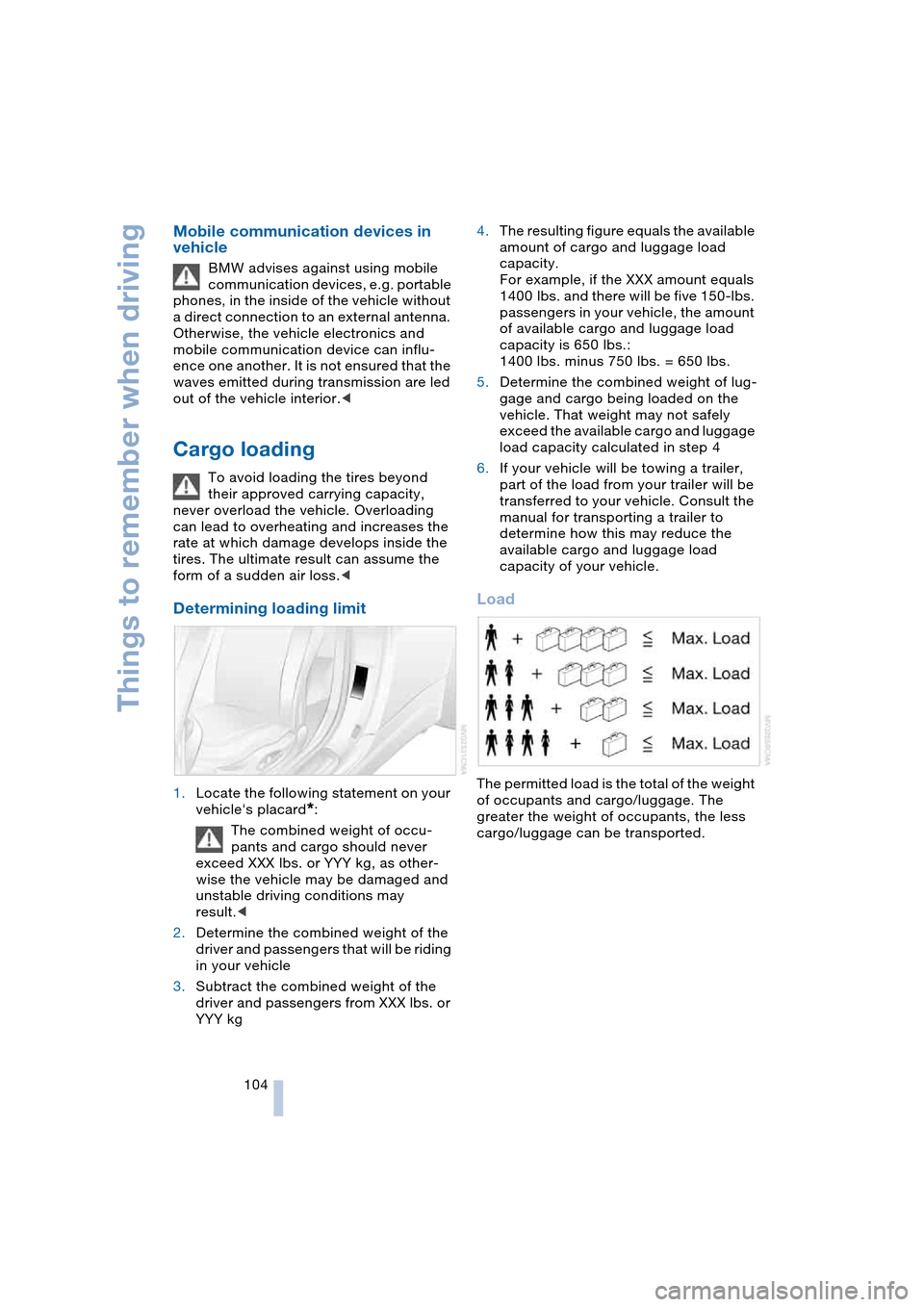
Load
The permitted load is the total of the weight
of occupants and cargo/luggage. The
greater the weight of occupants, the less
cargo/luggage can be transported.
Page 115 of 216
Navigation
Driving tips
113Reference
At a glance
Controls
Communications
Entertainment
Mobility
Selecting destination using
information
You can obtain a display of selected desti-
nations for towns/cities and apply them
into the destination guidance, e. g. hotels,
sights or hospitals.
Control Center, for principle details, refer to
page 16:
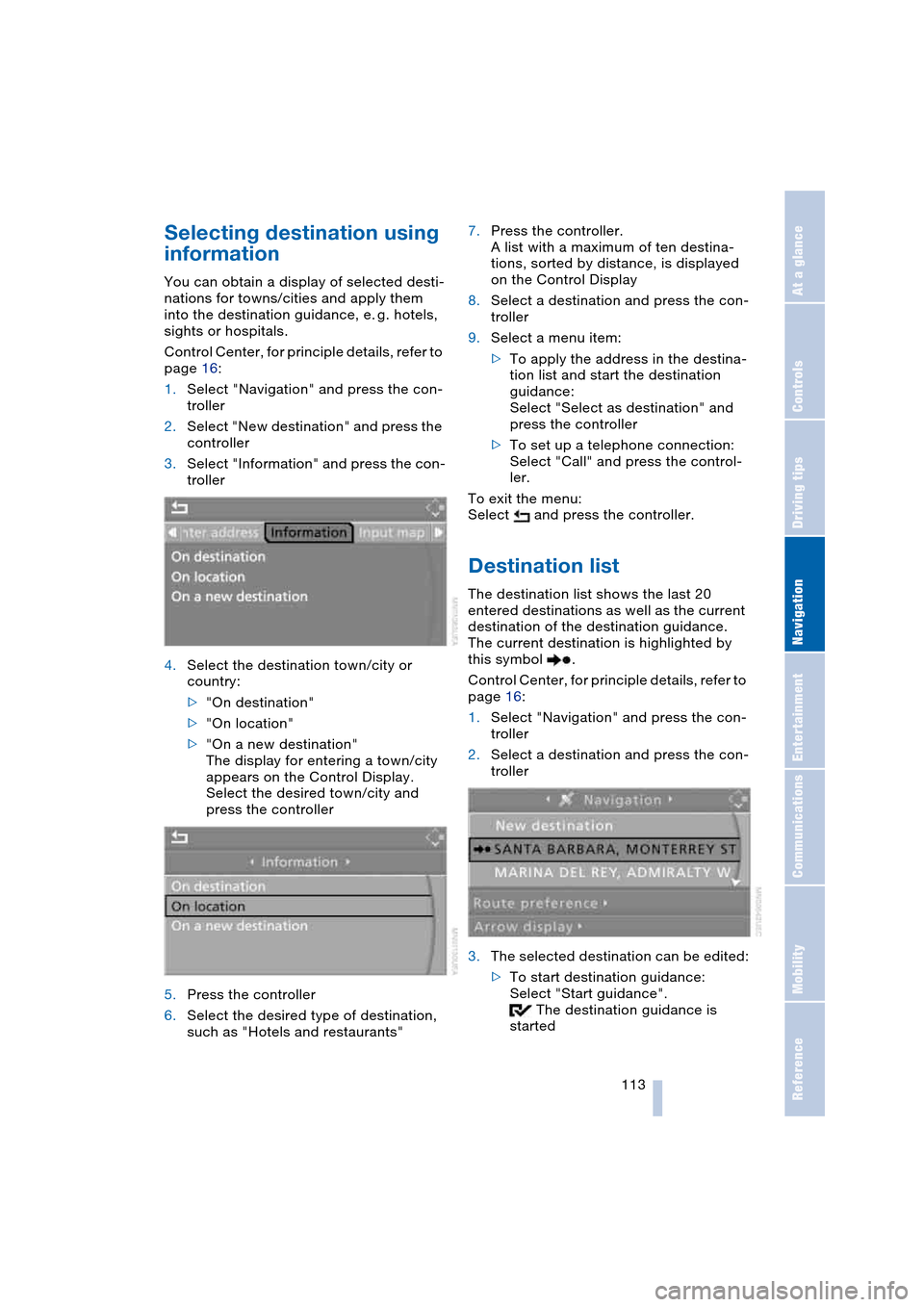
1.Select "Navigation" and press the con-
troller
2.Select "New destination" and press the
controller
3.Select "Information" and press the con-
troller
4.Select the destination town/city or
country:
>"On destination"
>"On location"
>"On a new destination"
The display for entering a town/city
appears on the Control Display.
Select the desired town/city and
press the controller
5.Press the controller
6.Select the desired type of destination,
such as "Hotels and restaurants"7.Press the controller.
A list with a maximum of ten destina-
tions, sorted by distance, is displayed
on the Control Display
8.Select a destination and press the con-
troller
9.Select a menu item:
>To apply the address in the destina-
tion list and start the destination
guidance:
Select "Select as destination" and
press the controller
>To set up a telephone connection:
Select "Call" and press the control-
ler.
To exit the menu:
Select and press the controller.
Destination list
The destination list shows the last 20
entered destinations as well as the current
destination of the destination guidance.
The current destination is highlighted by
this symbol .
Control Center, for principle details, refer to
page 16:
1.Select "Navigation" and press the con-
troller
2.Select a destination and press the con-
troller
3.The selected destination can be edited:
>To start destination guidance:
Select "Start guidance".
The destination guidance is
started
Page 136 of 216
Radio
134 You may experience signal drops and
muting events related to this new
technology.<
Enabling or disabling channels
Control Center, for principle details, refer to
page 16:
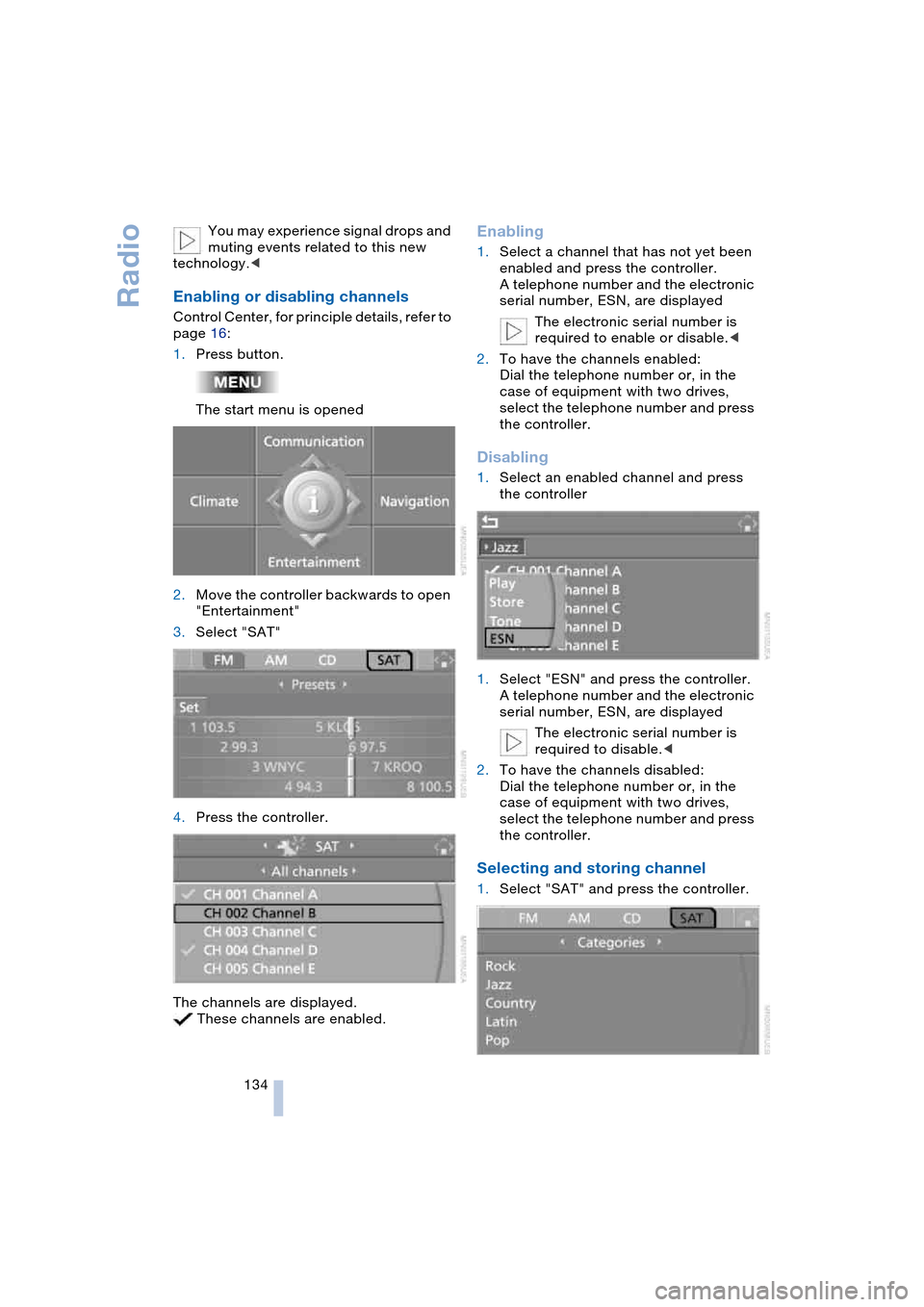
1.Press button.
The start menu is opened
2.Move the controller backwards to open
"Entertainment"
3.Select "SAT"
4.Press the controller.
The channels are displayed.
These channels are enabled.
Enabling
1.Select a channel that has not yet been
enabled and press the controller.
A telephone number and the electronic
serial number, ESN, are displayed
The electronic serial number is
required to enable or disable.<
2.To have the channels enabled:
Dial the telephone number or, in the
case of equipment with two drives,
select the telephone number and press
the controller.
Disabling
1.Select an enabled channel and press
the controller
1.Select "ESN" and press the controller.
A telephone number and the electronic
serial number, ESN, are displayed
The electronic serial number is
required to disable.<
2.To have the channels disabled:
Dial the telephone number or, in the
case of equipment with two drives,
select the telephone number and press
the controller.
Selecting and storing channel
1.Select "SAT" and press the controller.
Page 145 of 216
Communications
This chapter summarizes how you operate
your BMW portable phone via the Control
Center or voice control and how you use
BMW Assist or TeleService.
Page 146 of 216
Telephoning
144
Telephoning
Safety notes
For your own safety
Your car phone makes life more convenient
in many ways, and can even save lives in an
emergency. While you should consult your
portable phone's separate Owner's Manual
for a detailed description of safety precau-
tions and information, we request that you
direct your particular attention to the fol-
lowing:
Adjustments
To avoid posing a danger to yourself
and other road users, never adjust the
system settings unless your vehicle is sta-
tionary.<
Using the phone in your vehicle
Using a portable phone while driving
is now illegal in many states and cit-
ies. Always use your hands-free system, or
stop your vehicle in an area where you will
not pose a safety hazard to other road
users.<
Vehicles and portable phones
Do not use your phone within a
garage, or near an open hood. The air
in these areas could contain fuel vapors,
and the portable phone might generate
sparks that could result in burns.
This same precaution applies to open lug-
gage compartment lids on vehicles
equipped for operation using natural gas or
hydrogen, and to all vehicles with luggage
compartment-mounted batteries.<
Antenna
When using the phone, ensure that all
persons in the area are at least 20 in/
50 cm from the antenna. Never use your
BMW portable phone if the antenna is dam-
aged. Contact between your skin and a damaged antenna can result in minor
burns.
If the antenna is damaged, have it replaced
immediately.<
Special environmental conditions
Always switch off your BMW portable
phone in areas where blasting work is
being conducted with explosives. The
phone signals could potentially act as a
high-frequency transmitter and set off
explosions.
Always switch off your BMW portable
phone in areas where an increased explo-
sion danger is present. This category
includes gas stations along with fuel and
chemical storage depots, etc., and all
areas in which the air can contain fuel,
chemicals or metal particles. Under these
conditions, your BMW portable phone
could conceivably generate sparks that
could lead to a fire or explosion. Always
observe all legal regulations governing the
use of portable phones in the vicinity of gas
stations, chemical factories and other
areas where an explosion potential exists.
Never use your BMW portable phone in air-
craft; do not use this portable phone in hos-
pitals, care centers or at other locations
where medical equipment may be in oper-
ation, such as accident sites, etc.
Your wireless service provider can furnish
you with more detailed information on legal
regulations governing the use of your
phone.<
Medical equipment
Portable phones can generate inter-
ference capable of preventing hearing
aids and cardiac pacemakers from operat-
ing correctly. If you or any occupant of the
vehicle use such equipment, consult a phy-
sician or the manufacturer of the equip-
ment to determine whether it is adequately
shielded against high-frequency energy.<
Page 147 of 216
145
Entertainment
Reference
At a glance
Controls
Driving tips Communications
Navigation
Mobility
Batteries
Never attempt to dismantle your
BMW portable phone or its battery.
Use only approved battery types – the
wrong battery can destroy your portable
phone.
To avoid possible short circuits, after
removing a battery you should never allow
it to come into contact with metallic sur-
faces of any kind.<
Disposing of used batteries
Return used batteries to a recycling
collection point or to your BMW cen-
ter.<
Care instructions
You can find what you need to know about
caring for your portable phone in the Caring
for your vehicle brochure and in the sepa-
rate portable phone Owner's Manual.
Operating options
You can operate the BMW portable phone*
with:
>The steering wheel, refer to page 11
>The Control Center, refer to page 146
>Voice control, refer to page 151.
Telephoning with car phone:
BMW Assist calls
You can use the car phone via the hands-
free system for BMW Assist calls.
When the status information "Car Phone" is
displayed in "Communication", only BMW
Assist calls are possible.
Activating the
BMW portable phone*
Requirements for portable phones with
SIM card:
>Enter a Personal Identification Number,
PIN, if necessary
>Remove all keypad locks, refer to sepa-
rate Owner's Manual.
Before starting off, place the BMW portable
phone in the cradle. If a connection to
BMW Assist has been established, you
cannot use the BMW portable phone until
this connection has been terminated.
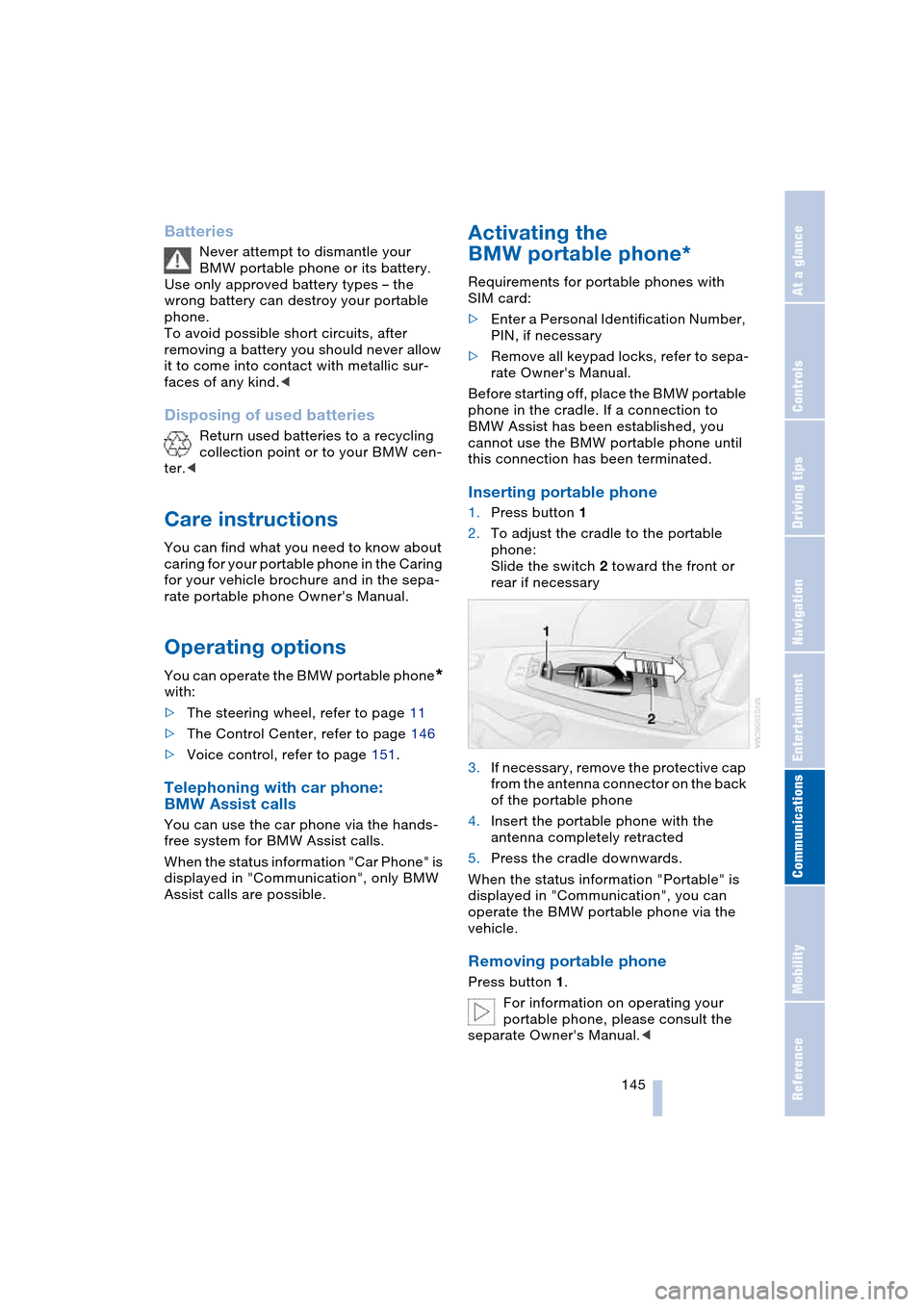
Inserting portable phone
1.Press button 1
2.To adjust the cradle to the portable
phone:
Slide the switch 2 toward the front or
rear if necessary
3.If necessary, remove the protective cap
from the antenna connector on the back
of the portable phone
4.Insert the portable phone with the
antenna completely retracted
5.Press the cradle downwards.
When the status information "Portable" is
displayed in "Communication", you can
operate the BMW portable phone via the
vehicle.
Removing portable phone
Press button 1.
For information on operating your
portable phone, please consult the
separate Owner's Manual.<
Page 148 of 216
Telephoning
146
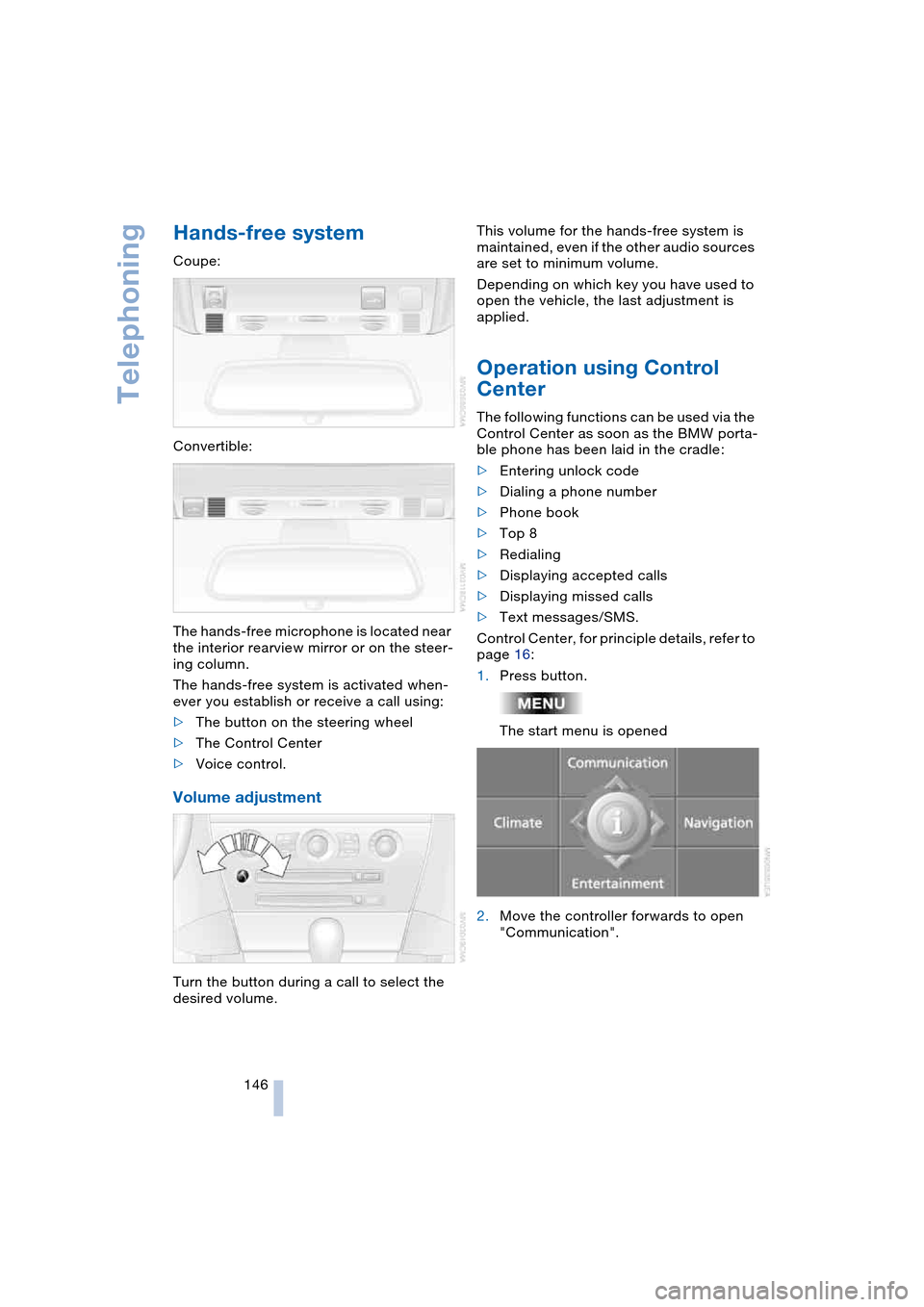
Hands-free system
Coupe:
Convertible:
The hands-free microphone is located near
the interior rearview mirror or on the steer-
ing column.
The hands-free system is activated when-
ever you establish or receive a call using:
>The button on the steering wheel
>The Control Center
>Voice control.
Volume adjustment
Turn the button during a call to select the
desired volume.This volume for the hands-free system is
maintained, even if the other audio sources
are set to minimum volume.
Depending on which key you have used to
open the vehicle, the last adjustment is
applied.
Operation using Control
Center
The following functions can be used via the
Control Center as soon as the BMW porta-
ble phone has been laid in the cradle:
>Entering unlock code
>Dialing a phone number
>Phone book
>Top 8
>Redialing
>Displaying accepted calls
>Displaying missed calls
>Text messages/SMS.
Control Center, for principle details, refer to
page 16:
1.Press button.
The start menu is opened
2.Move the controller forwards to open
"Communication".
Page 149 of 216
147
Entertainment
Reference
At a glance
Controls
Driving tips Communications
Navigation
Mobility
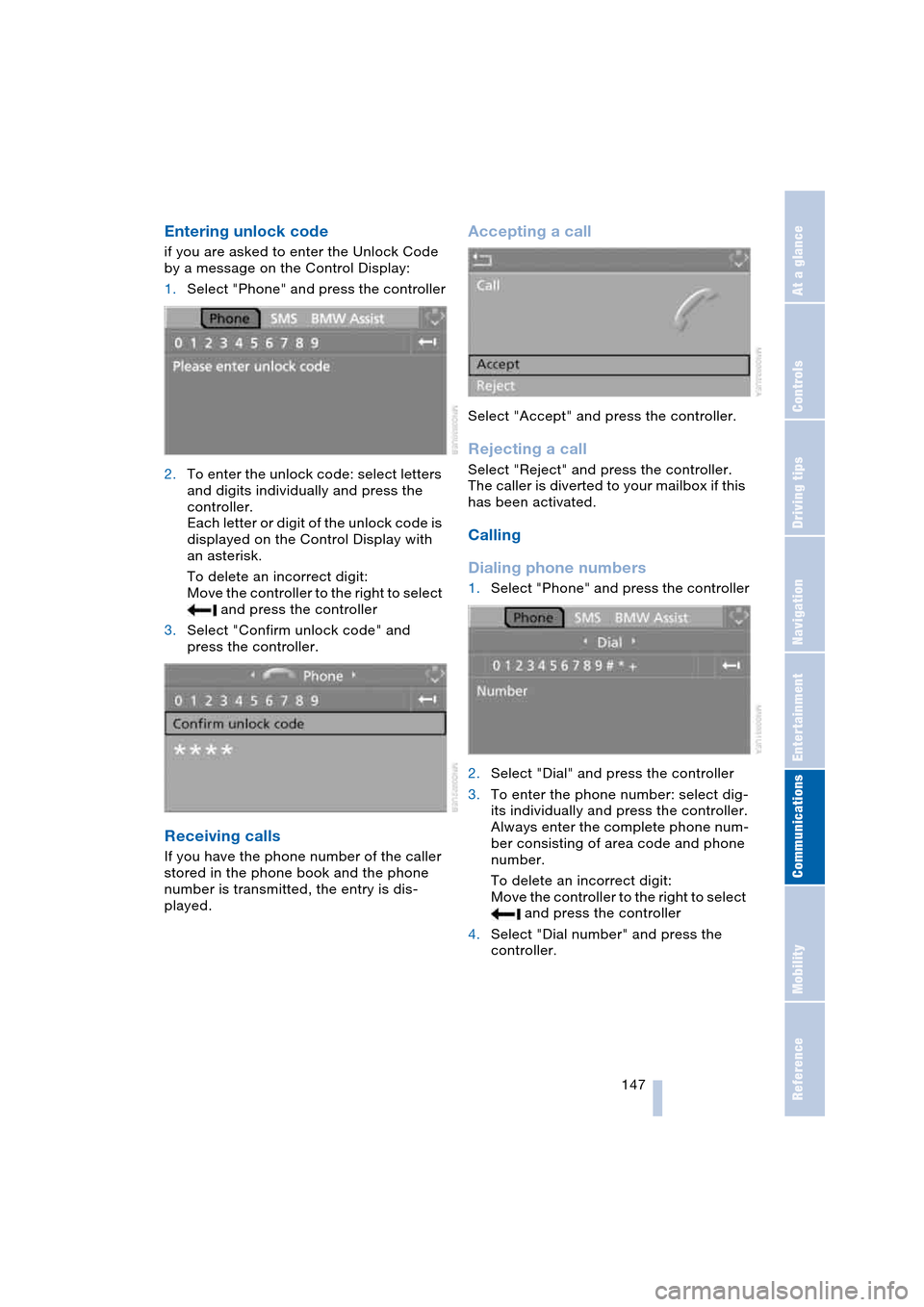
Entering unlock code
if you are asked to enter the Unlock Code
by a message on the Control Display:
1.Select "Phone" and press the controller
2.To enter the unlock code: select letters
and digits individually and press the
controller.
Each letter or digit of the unlock code is
displayed on the Control Display with
an asterisk.
To delete an incorrect digit:
Move the controller to the right to select
and press the controller
3.Select "Confirm unlock code" and
press the controller.
Receiving calls
If you have the phone number of the caller
stored in the phone book and the phone
number is transmitted, the entry is dis-
played.
Accepting a call
Select "Accept" and press the controller.
Rejecting a call
Select "Reject" and press the controller.
The caller is diverted to your mailbox if this
has been activated.
Calling
Dialing phone numbers
1.Select "Phone" and press the controller
2.Select "Dial" and press the controller
3.To enter the phone number: select dig-
its individually and press the controller.
Always enter the complete phone num-
ber consisting of area code and phone
number.
To delete an incorrect digit:
Move the controller to the right to select
and press the controller
4.Select "Dial number" and press the
controller.
Page 150 of 216
Telephoning
148
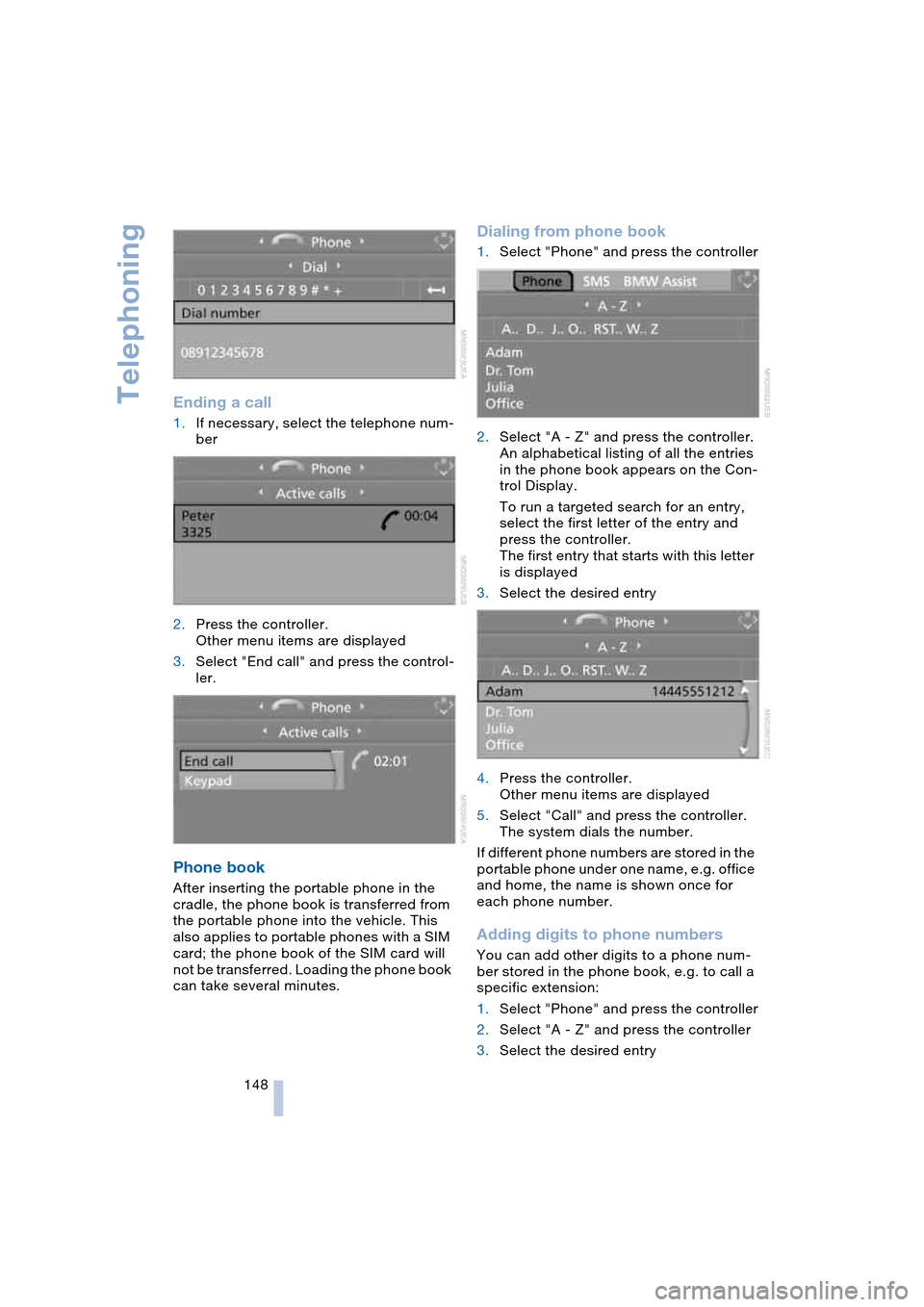
Ending a call
1.If necessary, select the telephone num-
ber
2.Press the controller.
Other menu items are displayed
3.Select "End call" and press the control-
ler.
Phone book
After inserting the portable phone in the
cradle, the phone book is transferred from
the portable phone into the vehicle. This
also applies to portable phones with a SIM
card; the phone book of the SIM card will
not be transferred. Loading the phone book
can take several minutes.
Dialing from phone book
1.Select "Phone" and press the controller
2.Select "A - Z" and press the controller.
An alphabetical listing of all the entries
in the phone book appears on the Con-
trol Display.
To run a targeted search for an entry,
select the first letter of the entry and
press the controller.
The first entry that starts with this letter
is displayed
3.Select the desired entry
4.Press the controller.
Other menu items are displayed
5.Select "Call" and press the controller.
The system dials the number.
If different phone numbers are stored in the
portable phone under one name, e.g. office
and home, the name is shown once for
each phone number.
Adding digits to phone numbers
You can add other digits to a phone num-
ber stored in the phone book, e.g. to call a
specific extension:
1.Select "Phone" and press the controller
2.Select "A - Z" and press the controller
3.Select the desired entry