tow BMW 645CI COUPE 2004 E63 Owner's Guide
[x] Cancel search | Manufacturer: BMW, Model Year: 2004, Model line: 645CI COUPE, Model: BMW 645CI COUPE 2004 E63Pages: 216, PDF Size: 3.46 MB
Page 116 of 216
Destination entry
114 >To display information on the desti-
nation:
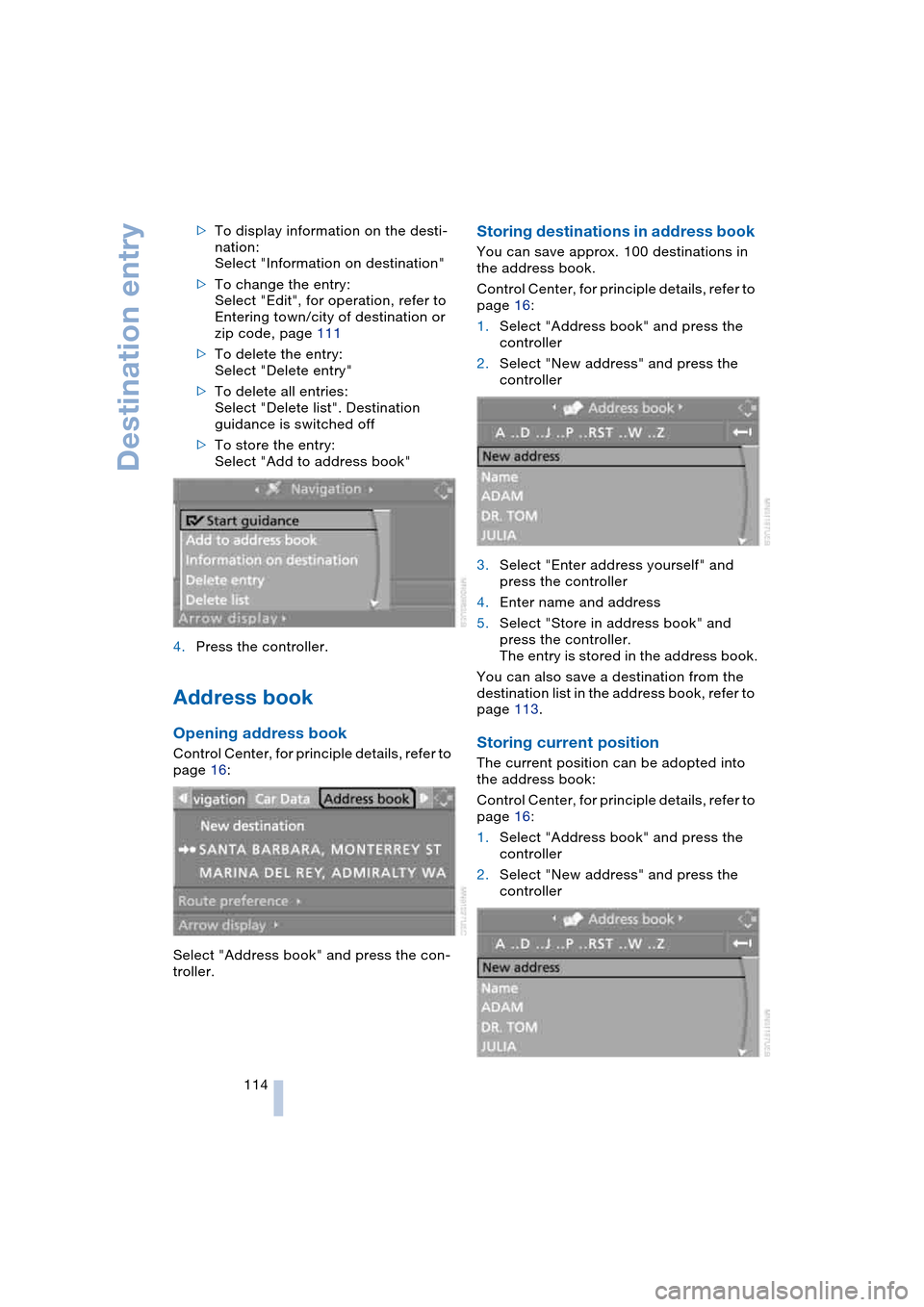
Select "Information on destination"
>To change the entry:
Select "Edit", for operation, refer to
Entering town/city of destination or
zip code, page 111
>To delete the entry:
Select "Delete entry"
>To delete all entries:
Select "Delete list". Destination
guidance is switched off
>To store the entry:
Select "Add to address book"
4.Press the controller.
Address book
Opening address book
Control Center, for principle details, refer to
page 16:
Select "Address book" and press the con-
troller.
Storing destinations in address book
You can save approx. 100 destinations in
the address book.
Control Center, for principle details, refer to
page 16:
1.Select "Address book" and press the
controller
2.Select "New address" and press the
controller
3.Select "Enter address yourself" and
press the controller
4.Enter name and address
5.Select "Store in address book" and
press the controller.
The entry is stored in the address book.
You can also save a destination from the
destination list in the address book, refer to
page 113.
Storing current position
The current position can be adopted into
the address book:
Control Center, for principle details, refer to
page 16:
1.Select "Address book" and press the
controller
2.Select "New address" and press the
controller
Page 119 of 216
Navigation
Driving tips
117Reference
At a glance
Controls
Communications
Entertainment
Mobility
You can change the choice of route when-
ever the destination guidance is active.
Wordmatch principle
The system supports the wordmatch prin-
ciple to make it easier for you to enter the
names of streets or towns/cities. The sys-
tem runs ongoing checks, comparing your
destination entries with the data stored on
the navigation DVD as the basis for instant
response. The user benefits include:
>Names of specific locations can also
vary from the official versions provided
that the spelling of the entry corre-
sponds to a standard form used in
another country.
Example:
Instead of 'München', you can also
enter the English spelling 'Munich' or
the Italian spelling 'Monaco'
>When you are entering the names of
towns/cities and streets the system will
complete them automatically as soon
as enough letters are available to
ensure unambiguous identification
>The system only accepts name entries
beginning with letters that are stored on
the navigation DVD. The system will not
accept nonexistent names and
addresses.
Page 122 of 216
Destination guidance
120
Displaying route map
You can have your current position dis-
played on a map. After starting the destina-
tion guidance, the planned route is shown
on the map.
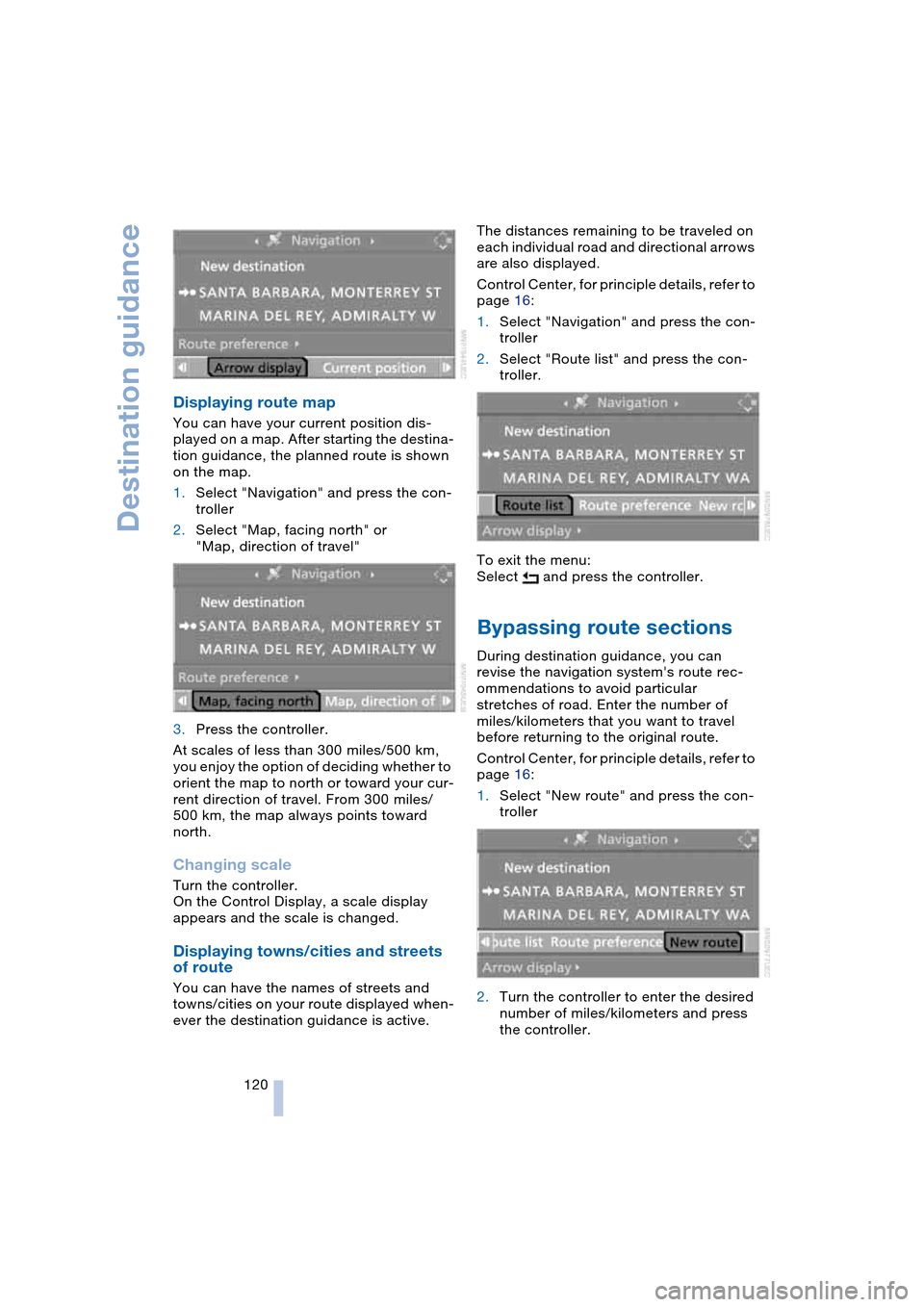
1.Select "Navigation" and press the con-
troller
2.Select "Map, facing north" or
"Map, direction of travel"
3.Press the controller.
At scales of less than 300 miles/500 km,
you enjoy the option of deciding whether to
orient the map to north or toward your cur-
rent direction of travel. From 300 miles/
500 km, the map always points toward
north.
Changing scale
Turn the controller.
On the Control Display, a scale display
appears and the scale is changed.
Displaying towns/cities and streets
of route
You can have the names of streets and
towns/cities on your route displayed when-
ever the destination guidance is active.The distances remaining to be traveled on
each individual road and directional arrows
are also displayed.
Control Center, for principle details, refer to
page 16:
1.Select "Navigation" and press the con-
troller
2.Select "Route list" and press the con-
troller.
To exit the menu:
Select and press the controller.
Bypassing route sections
During destination guidance, you can
revise the navigation system's route rec-
ommendations to avoid particular
stretches of road. Enter the number of
miles/kilometers that you want to travel
before returning to the original route.
Control Center, for principle details, refer to
page 16:
1.Select "New route" and press the con-
troller
2.Turn the controller to enter the desired
number of miles/kilometers and press
the controller.
Page 124 of 216
What to do if …
122
What to do if …
What to do if …
>you request the current position of your
vehicle, but do not receive a precise
display?
The system is unable to receive enough
GPS signals at your current position
owing to obstructions, your current
position is not yet available on your nav-
igation DVD, or the system is in the pro-
cess of calculating your current posi-
tion. As a rule, reception is guaranteed
under a clear sky
>the destination guidance does not
apply a destination?
The data of the destination is not stored
on the navigation DVD that is loaded.
Select a destination that is as close as
possible to the original
>the destination guidance does not
apply an address without the street
name?
On the navigation DVD, no downtown
area can be determined for the city or
town entered. Enter any street, or a
destination such as the railway station
etc., then start the destination guidance>you want to enter a destination for the
destination guidance, but it is not pos-
sible to select the letters for your
desired entry?
The destination data is not recorded on
the navigation DVD that is loaded. In
this case, the system will not offer you
any letters to choose from. Select a
destination that is as close as possible
to the original
>the system stops furnishing directions
on which way to turn as you approach
intersections?
You are driving in an area that has not
yet been completely recorded on the
navigation DVD. Instead of an arrow
indicating a turn, you will see an arrow
which indicates the general direction of
your planned route. Or you have left the
recommended route and the system
requires a few seconds to calculate a
new recommended route
>the battery has been disconnected?
It will take approx. 10 minutes for the
system to resume operation.
Page 147 of 216
145
Entertainment
Reference
At a glance
Controls
Driving tips Communications
Navigation
Mobility
Batteries
Never attempt to dismantle your
BMW portable phone or its battery.
Use only approved battery types – the
wrong battery can destroy your portable
phone.
To avoid possible short circuits, after
removing a battery you should never allow
it to come into contact with metallic sur-
faces of any kind.<
Disposing of used batteries
Return used batteries to a recycling
collection point or to your BMW cen-
ter.<
Care instructions
You can find what you need to know about
caring for your portable phone in the Caring
for your vehicle brochure and in the sepa-
rate portable phone Owner's Manual.
Operating options
You can operate the BMW portable phone*
with:
>The steering wheel, refer to page 11
>The Control Center, refer to page 146
>Voice control, refer to page 151.
Telephoning with car phone:
BMW Assist calls
You can use the car phone via the hands-
free system for BMW Assist calls.
When the status information "Car Phone" is
displayed in "Communication", only BMW
Assist calls are possible.
Activating the
BMW portable phone*
Requirements for portable phones with
SIM card:
>Enter a Personal Identification Number,
PIN, if necessary
>Remove all keypad locks, refer to sepa-
rate Owner's Manual.
Before starting off, place the BMW portable
phone in the cradle. If a connection to
BMW Assist has been established, you
cannot use the BMW portable phone until
this connection has been terminated.
Inserting portable phone
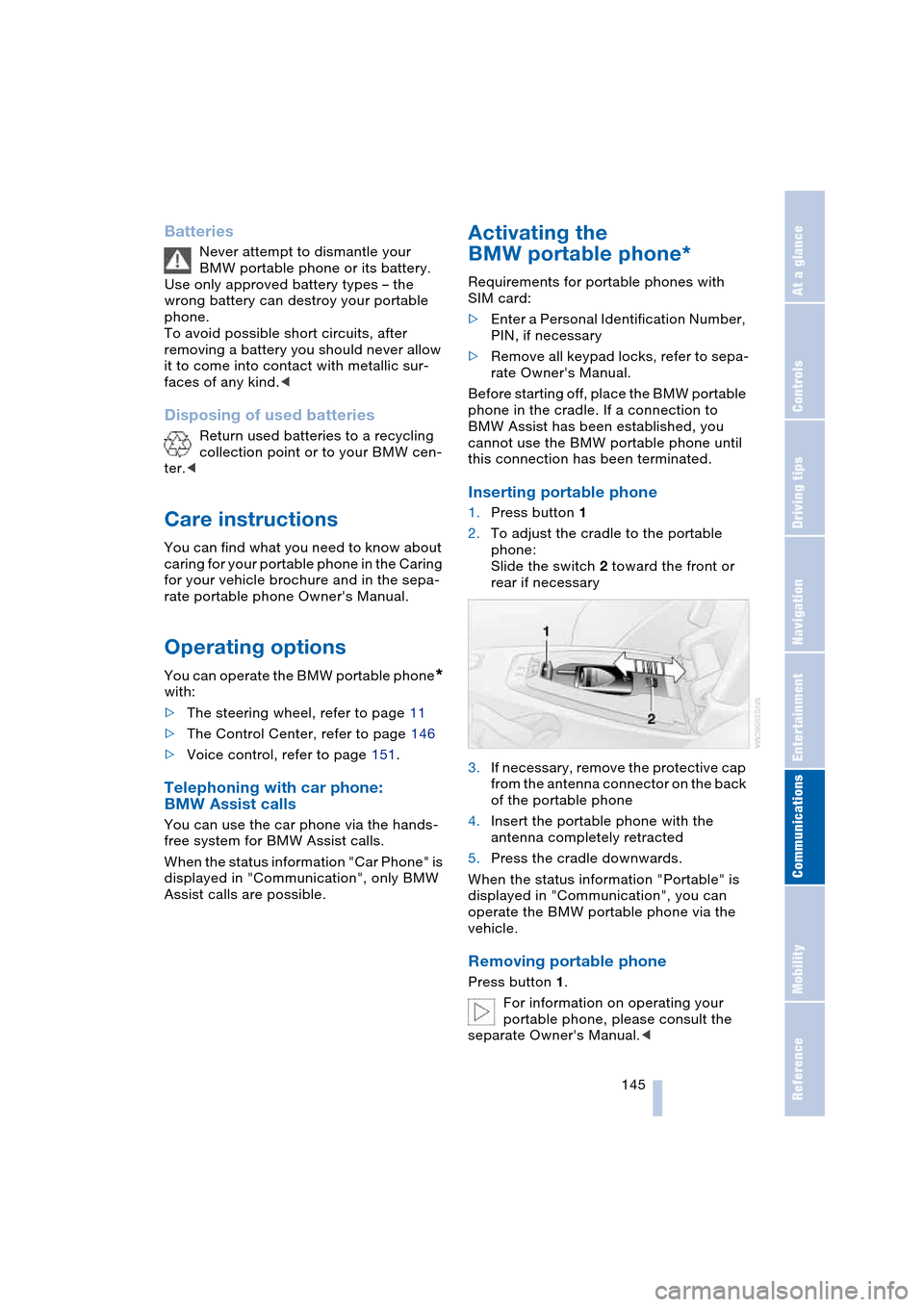
1.Press button 1
2.To adjust the cradle to the portable
phone:
Slide the switch 2 toward the front or
rear if necessary
3.If necessary, remove the protective cap
from the antenna connector on the back
of the portable phone
4.Insert the portable phone with the
antenna completely retracted
5.Press the cradle downwards.
When the status information "Portable" is
displayed in "Communication", you can
operate the BMW portable phone via the
vehicle.
Removing portable phone
Press button 1.
For information on operating your
portable phone, please consult the
separate Owner's Manual.<
Page 169 of 216
Mobility
167Reference
At a glance
Controls
Driving tips
Communications
Navigation
Entertainment
Temperature
The temperature grades are A, the highest,
B, and C, representing the tire's resistance
to the generation of heat and its ability to
dissipate heat when tested under con-
trolled conditions on a specified indoor lab-
oratory test wheel.
Sustained high temperature can cause the
material of the tire to degenerate and
reduce tire life, and excessive temperature
can lead to sudden tire failure. The grade C
corresponds to a level of performance
which all passenger car tires must meet
under the Federal Motor Vehicle Safety
Standard No. 109. Grades B and A repre-
sent higher levels of performance on the
laboratory test wheel than the minimum
required by law.
The temperature grade for this tire is
established for a tire that is properly
inflated and not overloaded. Excessive
speed, underinflation, or excessive load-
ing, either separately or in combination,
can cause heat buildup and possible tire
failure.<
RSC – run-flat tires
You will recognize run-flat tires by a circular
symbol containing the letters RSC on the
side of the tire, refer to page 168.
M+S
Winter and all-season tires.
These have better winter properties than
summer tires.
Tire condition
Before driving off, inspect your tires for
tread wear, signs of damage and foreign
objects lodged in the tread, and check the
tread depth.
Minimum tread depth
The tread depth should not drop below
0.12 in/3 mm, although, for example, Euro-
pean legislation only specifies a minimum
tread depth of 0.063 in/1.6 mm. At tread
depths below 0.12 in/3 mm there is an increased risk of high-speed hydroplaning,
even when only small amounts of water are
present on the road surface.
As winter tires display a noticeable loss in
their ability to cope with cold-weather driv-
ing conditions once the tread wears to
below 0.157 in/4 mm, to ensure continued
safety you should always have such tires
replaced.
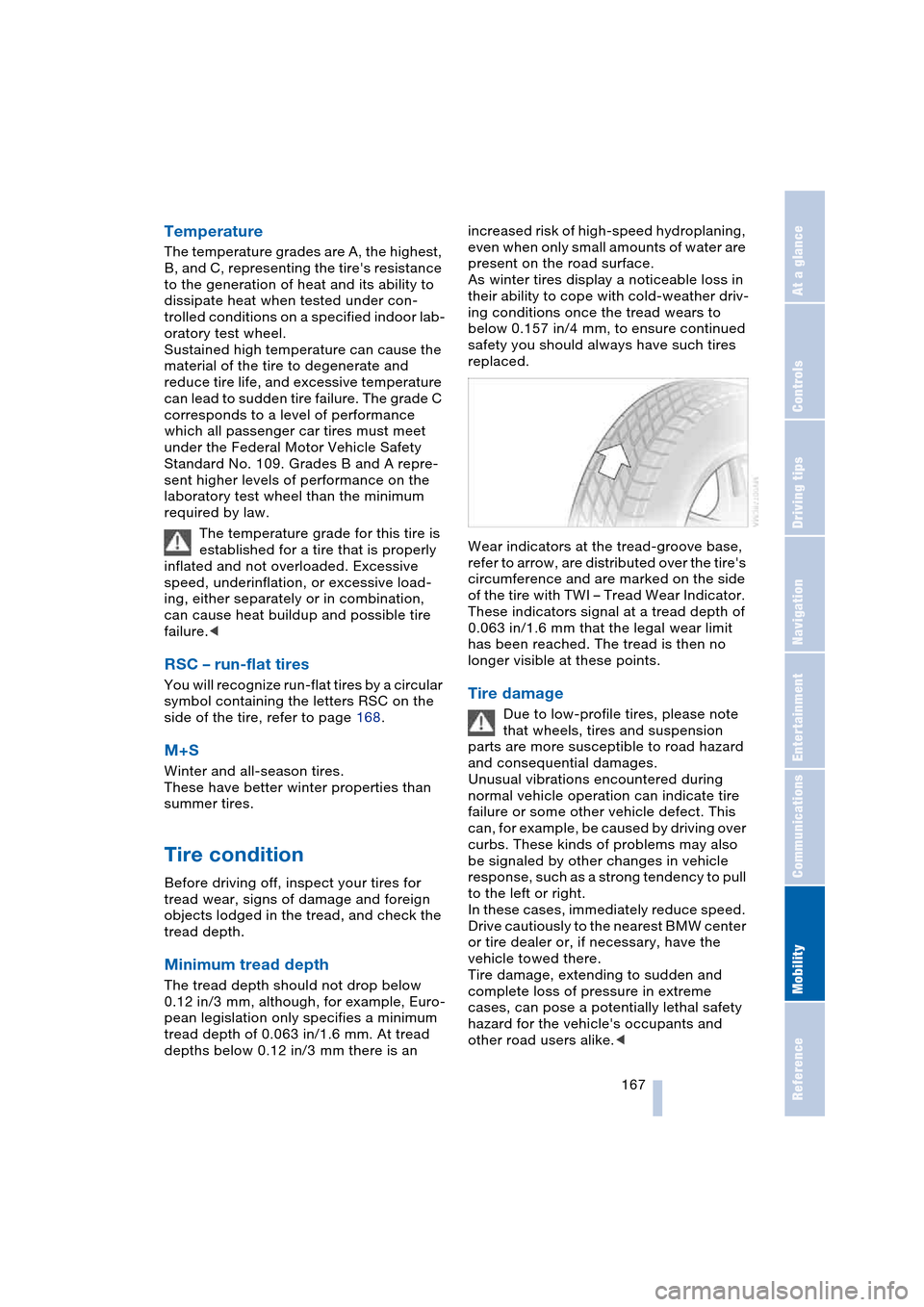
Wear indicators at the tread-groove base,
refer to arrow, are distributed over the tire's
circumference and are marked on the side
of the tire with TWI – Tread Wear Indicator.
These indicators signal at a tread depth of
0.063 in/1.6 mm that the legal wear limit
has been reached. The tread is then no
longer visible at these points.
Tire damage
Due to low-profile tires, please note
that wheels, tires and suspension
parts are more susceptible to road hazard
and consequential damages.
Unusual vibrations encountered during
normal vehicle operation can indicate tire
failure or some other vehicle defect. This
can, for example, be caused by driving over
curbs. These kinds of problems may also
be signaled by other changes in vehicle
response, such as a strong tendency to pull
to the left or right.
In these cases, immediately reduce speed.
Drive cautiously to the nearest BMW center
or tire dealer or, if necessary, have the
vehicle towed there.
Tire damage, extending to sudden and
complete loss of pressure in extreme
cases, can pose a potentially lethal safety
hazard for the vehicle's occupants and
other road users alike.<
Page 173 of 216
Mobility
171Reference
At a glance
Controls
Driving tips
Communications
Navigation
Entertainment
Engine compartment
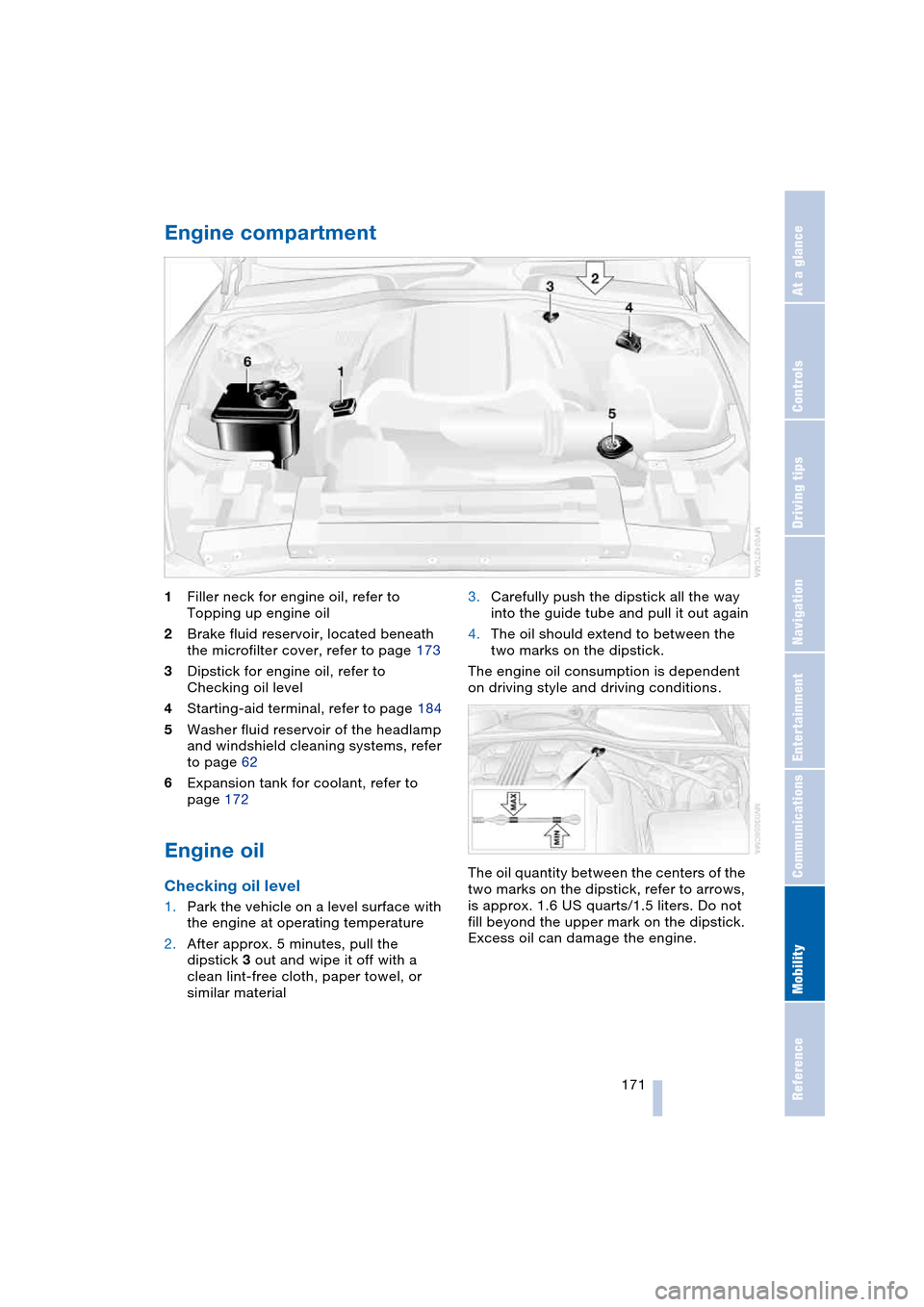
1Filler neck for engine oil, refer to
Topping up engine oil
2Brake fluid reservoir, located beneath
the microfilter cover, refer to page 173
3Dipstick for engine oil, refer to
Checking oil level
4Starting-aid terminal, refer to page 184
5Washer fluid reservoir of the headlamp
and windshield cleaning systems, refer
to page 62
6Expansion tank for coolant, refer to
page 172
Engine oil
Checking oil level
1.Park the vehicle on a level surface with
the engine at operating temperature
2.After approx. 5 minutes, pull the
dipstick 3 out and wipe it off with a
clean lint-free cloth, paper towel, or
similar material3.Carefully push the dipstick all the way
into the guide tube and pull it out again
4.The oil should extend to between the
two marks on the dipstick.
The engine oil consumption is dependent
on driving style and driving conditions.
The oil quantity between the centers of the
two marks on the dipstick, refer to arrows,
is approx. 1.6 US quarts/1.5 liters. Do not
fill beyond the upper mark on the dipstick.
Excess oil can damage the engine.
Page 180 of 216
Replacing components
178
Replacing components
Onboard tool kit
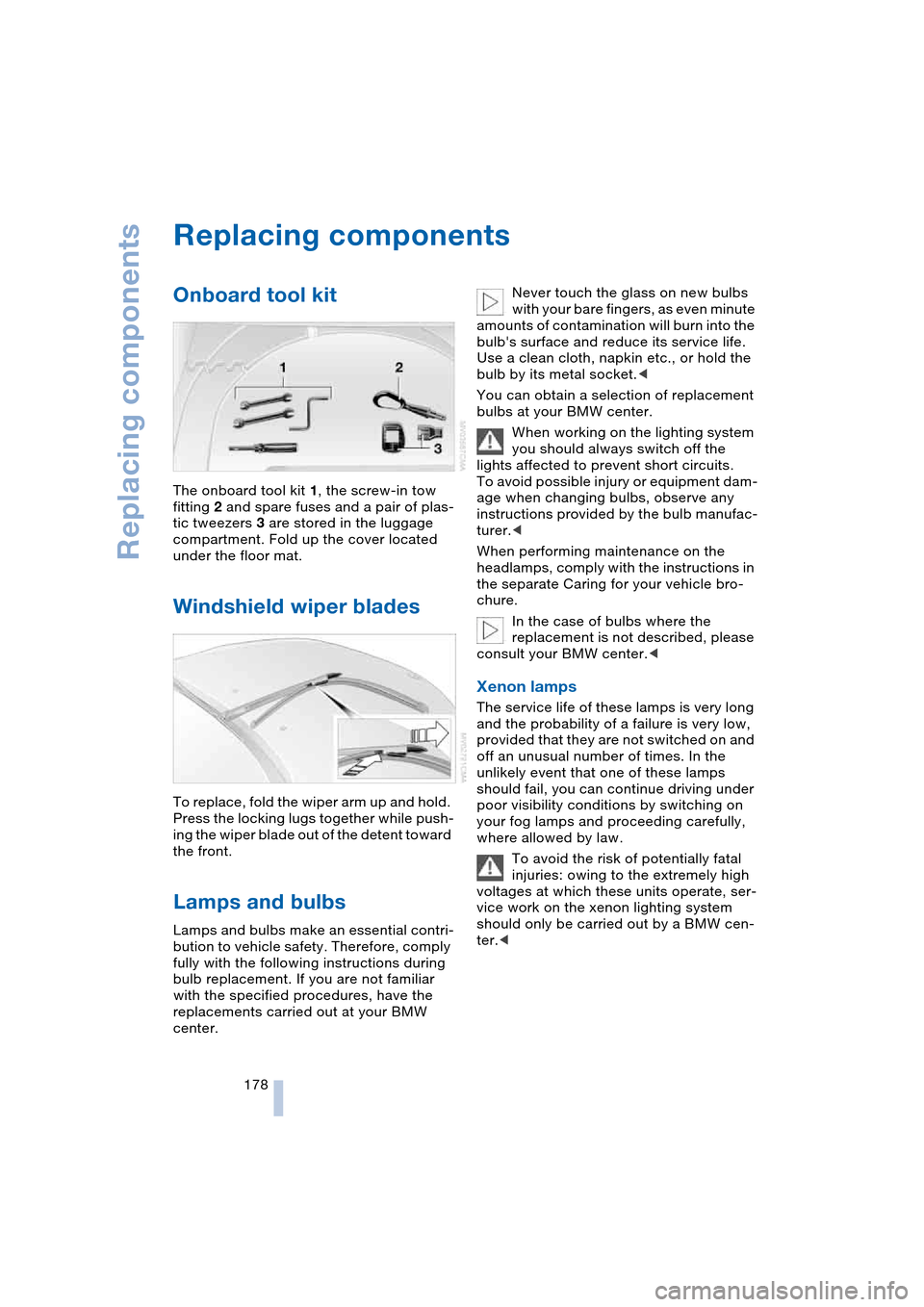
The onboard tool kit 1, the screw-in tow
fitting 2 and spare fuses and a pair of plas-
tic tweezers 3 are stored in the luggage
compartment. Fold up the cover located
under the floor mat.
Windshield wiper blades
To replace, fold the wiper arm up and hold.
Press the locking lugs together while push-
ing the wiper blade out of the detent toward
the front.
Lamps and bulbs
Lamps and bulbs make an essential contri-
bution to vehicle safety. Therefore, comply
fully with the following instructions during
bulb replacement. If you are not familiar
with the specified procedures, have the
replacements carried out at your BMW
center.Never touch the glass on new bulbs
with your bare fingers, as even minute
amounts of contamination will burn into the
bulb's surface and reduce its service life.
Use a clean cloth, napkin etc., or hold the
bulb by its metal socket.<
You can obtain a selection of replacement
bulbs at your BMW center.
When working on the lighting system
you should always switch off the
lights affected to prevent short circuits.
To avoid possible injury or equipment dam-
age when changing bulbs, observe any
instructions provided by the bulb manufac-
turer.<
When performing maintenance on the
headlamps, comply with the instructions in
the separate Caring for your vehicle bro-
chure.
In the case of bulbs where the
replacement is not described, please
consult your BMW center.<
Xenon lamps
The service life of these lamps is very long
and the probability of a failure is very low,
provided that they are not switched on and
off an unusual number of times. In the
unlikely event that one of these lamps
should fail, you can continue driving under
poor visibility conditions by switching on
your fog lamps and proceeding carefully,
where allowed by law.
To avoid the risk of potentially fatal
injuries: owing to the extremely high
voltages at which these units operate, ser-
vice work on the xenon lighting system
should only be carried out by a BMW cen-
ter.<
Page 181 of 216
Mobility
179Reference
At a glance
Controls
Driving tips
Communications
Navigation
Entertainment
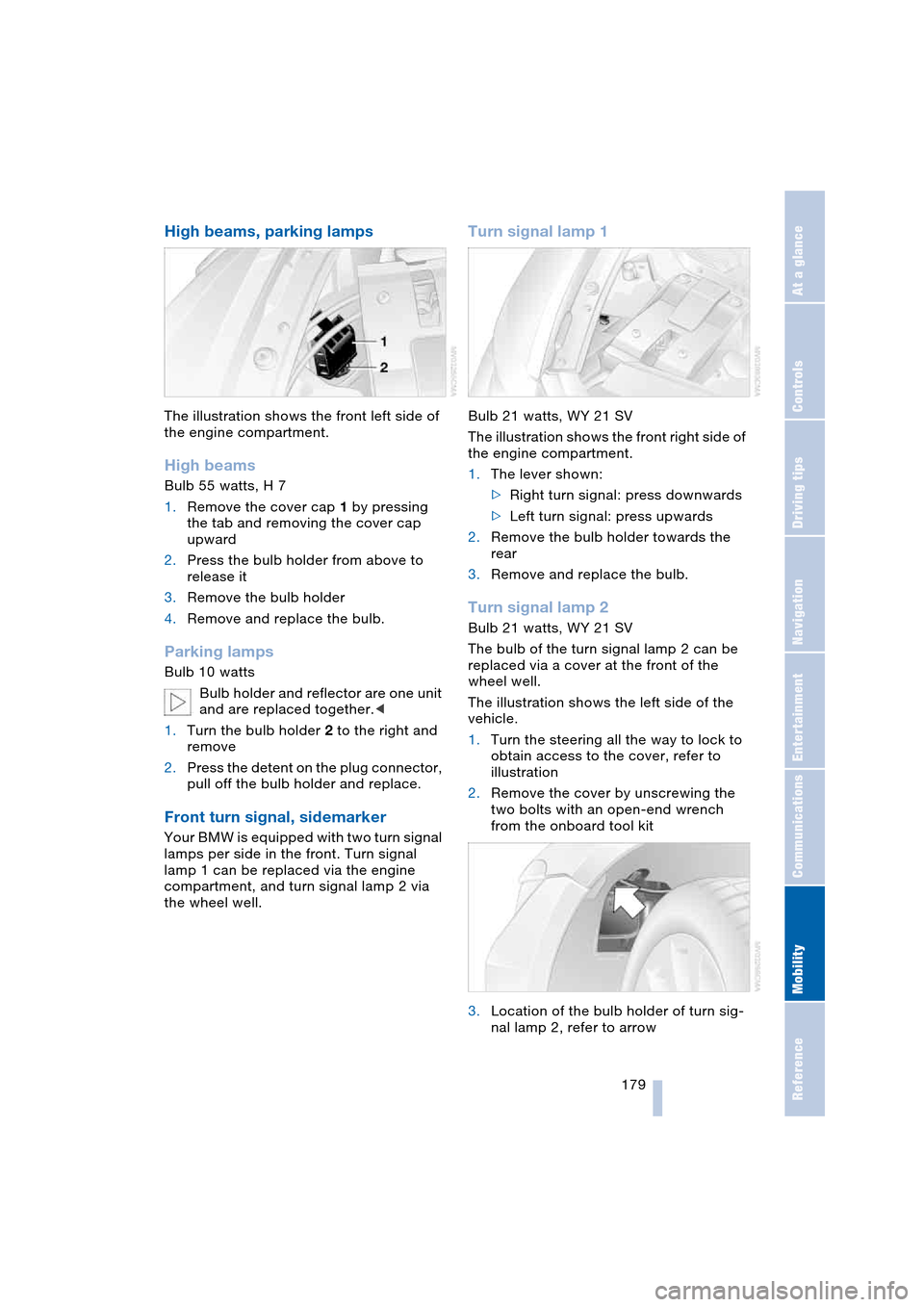
High beams, parking lamps
The illustration shows the front left side of
the engine compartment.
High beams
Bulb 55 watts, H 7
1.Remove the cover cap 1 by pressing
the tab and removing the cover cap
upward
2.Press the bulb holder from above to
release it
3.Remove the bulb holder
4.Remove and replace the bulb.
Parking lamps
Bulb 10 watts
Bulb holder and reflector are one unit
and are replaced together.<
1.Turn the bulb holder 2 to the right and
remove
2.Press the detent on the plug connector,
pull off the bulb holder and replace.
Front turn signal, sidemarker
Your BMW is equipped with two turn signal
lamps per side in the front. Turn signal
lamp 1 can be replaced via the engine
compartment, and turn signal lamp 2 via
the wheel well.
Turn signal lamp 1
Bulb 21 watts, WY 21 SV
The illustration shows the front right side of
the engine compartment.
1.The lever shown:
>Right turn signal: press downwards
>Left turn signal: press upwards
2.Remove the bulb holder towards the
rear
3.Remove and replace the bulb.
Turn signal lamp 2
Bulb 21 watts, WY 21 SV
The bulb of the turn signal lamp 2 can be
replaced via a cover at the front of the
wheel well.
The illustration shows the left side of the
vehicle.
1.Turn the steering all the way to lock to
obtain access to the cover, refer to
illustration
2.Remove the cover by unscrewing the
two bolts with an open-end wrench
from the onboard tool kit
3.Location of the bulb holder of turn sig-
nal lamp 2, refer to arrow
Page 182 of 216
Replacing components
180 4.Turn the bulb holder to the left and pull
out
5.Remove and replace the bulb.
Sidemarker
Bulb 5 watts, WY5W ST
The bulb can be replaced via a cover at the
front of the wheel well, refer to the descrip-
tion for turn signal lamp 2.
1.The bulb holder of the sidemarker lamp
is located toward the outside of the
vehicle next to the bulb holder of turn
signal lamp 2
2.Turn the bulb holder to the left and pull
out
3.Remove and replace the bulb.
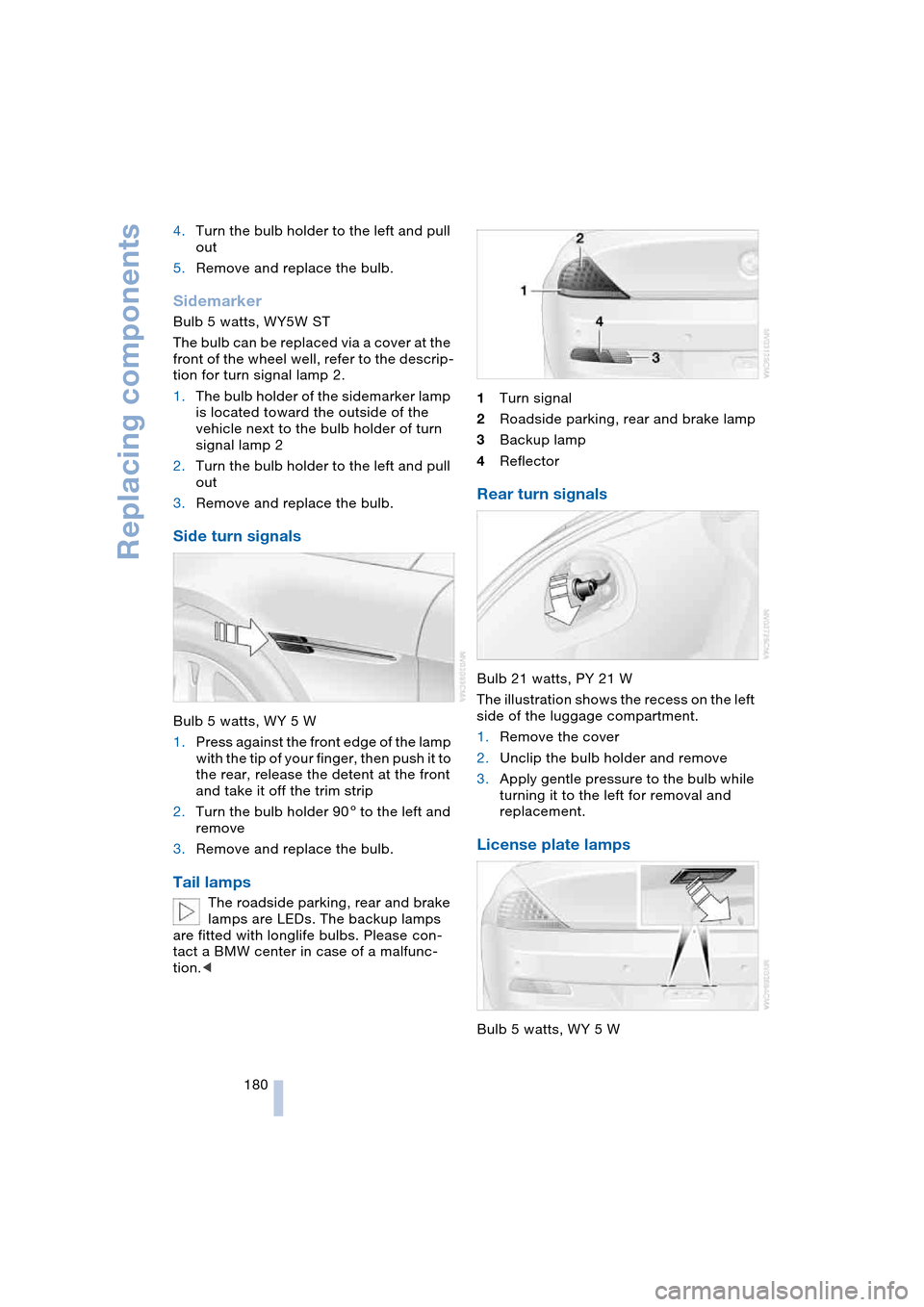
Side turn signals
Bulb 5 watts, WY 5 W
1.Press against the front edge of the lamp
with the tip of your finger, then push it to
the rear, release the detent at the front
and take it off the trim strip
2.Turn the bulb holder 905 to the left and
remove
3.Remove and replace the bulb.
Tail lamps
The roadside parking, rear and brake
lamps are LEDs. The backup lamps
are fitted with longlife bulbs. Please con-
tact a BMW center in case of a malfunc-
tion.<1Turn signal
2Roadside parking, rear and brake lamp
3Backup lamp
4Reflector
Rear turn signals
Bulb 21 watts, PY 21 W
The illustration shows the recess on the left
side of the luggage compartment.
1.Remove the cover
2.Unclip the bulb holder and remove
3.Apply gentle pressure to the bulb while
turning it to the left for removal and
replacement.
License plate lamps
Bulb 5 watts, WY 5 W