navigation system BMW 645CI COUPE 2004 E63 Workshop Manual
[x] Cancel search | Manufacturer: BMW, Model Year: 2004, Model line: 645CI COUPE, Model: BMW 645CI COUPE 2004 E63Pages: 216, PDF Size: 3.46 MB
Page 147 of 216
145
Entertainment
Reference
At a glance
Controls
Driving tips Communications
Navigation
Mobility
Batteries
Never attempt to dismantle your
BMW portable phone or its battery.
Use only approved battery types – the
wrong battery can destroy your portable
phone.
To avoid possible short circuits, after
removing a battery you should never allow
it to come into contact with metallic sur-
faces of any kind.<
Disposing of used batteries
Return used batteries to a recycling
collection point or to your BMW cen-
ter.<
Care instructions
You can find what you need to know about
caring for your portable phone in the Caring
for your vehicle brochure and in the sepa-
rate portable phone Owner's Manual.
Operating options
You can operate the BMW portable phone*
with:
>The steering wheel, refer to page 11
>The Control Center, refer to page 146
>Voice control, refer to page 151.
Telephoning with car phone:
BMW Assist calls
You can use the car phone via the hands-
free system for BMW Assist calls.
When the status information "Car Phone" is
displayed in "Communication", only BMW
Assist calls are possible.
Activating the
BMW portable phone*
Requirements for portable phones with
SIM card:
>Enter a Personal Identification Number,
PIN, if necessary
>Remove all keypad locks, refer to sepa-
rate Owner's Manual.
Before starting off, place the BMW portable
phone in the cradle. If a connection to
BMW Assist has been established, you
cannot use the BMW portable phone until
this connection has been terminated.
Inserting portable phone
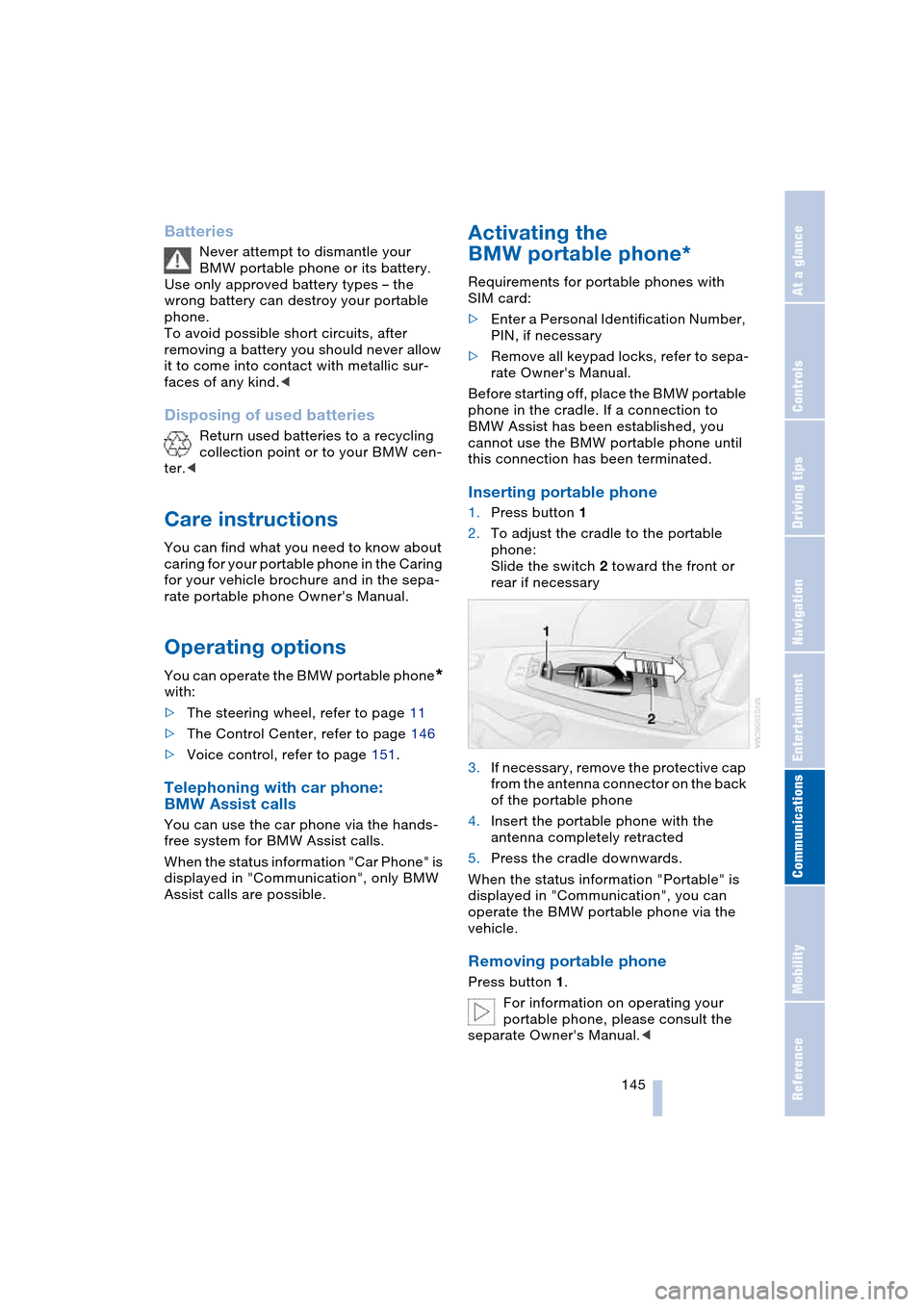
1.Press button 1
2.To adjust the cradle to the portable
phone:
Slide the switch 2 toward the front or
rear if necessary
3.If necessary, remove the protective cap
from the antenna connector on the back
of the portable phone
4.Insert the portable phone with the
antenna completely retracted
5.Press the cradle downwards.
When the status information "Portable" is
displayed in "Communication", you can
operate the BMW portable phone via the
vehicle.
Removing portable phone
Press button 1.
For information on operating your
portable phone, please consult the
separate Owner's Manual.<
Page 151 of 216
149
Entertainment
Reference
At a glance
Controls
Driving tips Communications
Navigation
Mobility
4.Press the controller.
Other menu items are displayed
5.Select "Add digits" and press the con-
troller
6.To supplement the phone number:
select digits individually and press the
controller
7.Select "Dial number" and press the
controller.
Lists
Your phone stores phone numbers you
have dialed and calls you missed. If the
caller is entered in the phone book, the
name of the caller is displayed instead of
the phone number.
You can select the desired subscriber from
the list and establish the connection.
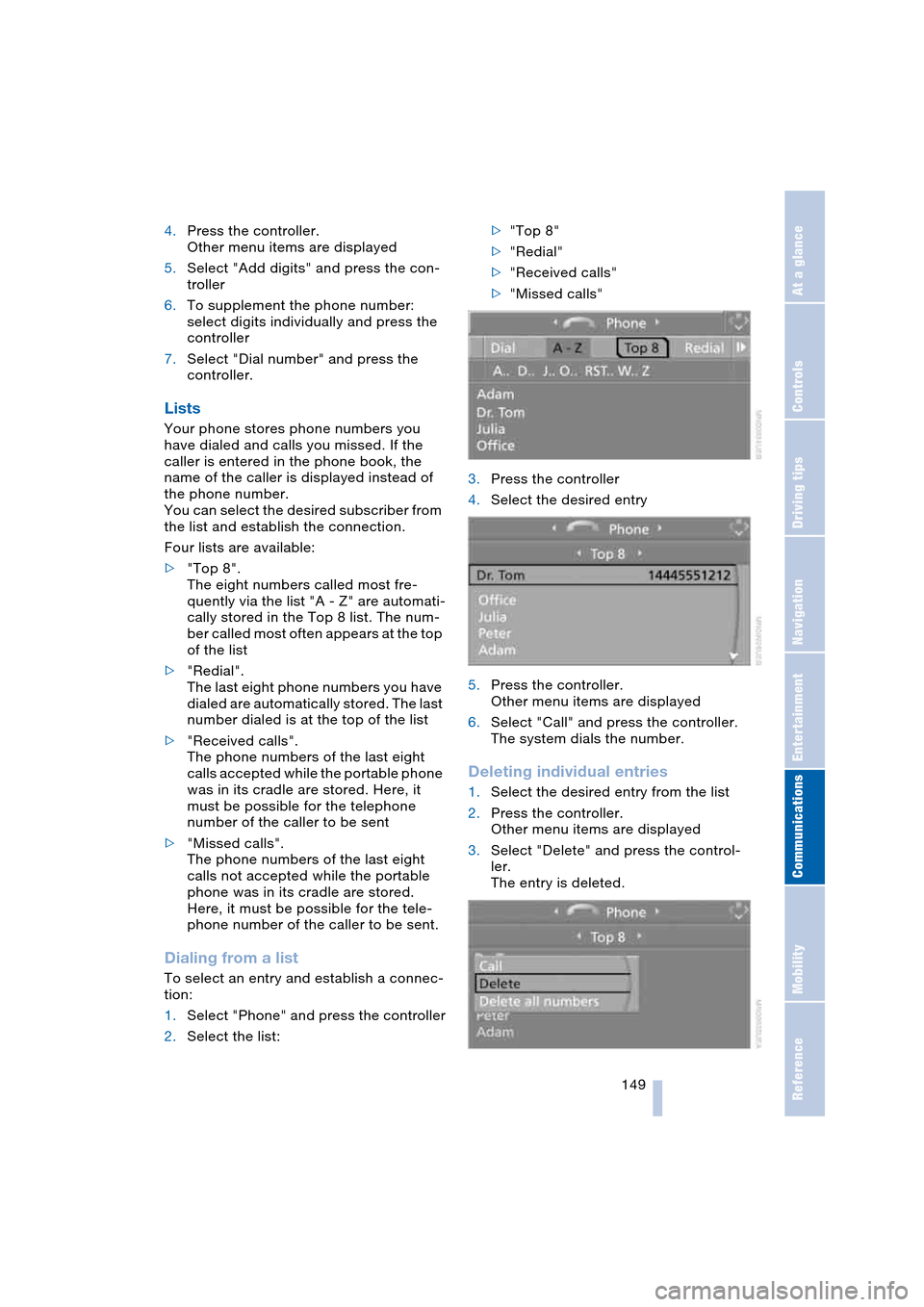
Four lists are available:
>"Top 8".
The eight numbers called most fre-
quently via the list "A - Z" are automati-
cally stored in the Top 8 list. The num-
ber called most often appears at the top
of the list
>"Redial".
The last eight phone numbers you have
dialed are automatically stored. The last
number dialed is at the top of the list
>"Received calls".
The phone numbers of the last eight
calls accepted while the portable phone
was in its cradle are stored. Here, it
must be possible for the telephone
number of the caller to be sent
>"Missed calls".
The phone numbers of the last eight
calls not accepted while the portable
phone was in its cradle are stored.
Here, it must be possible for the tele-
phone number of the caller to be sent.
Dialing from a list
To select an entry and establish a connec-
tion:
1.Select "Phone" and press the controller
2.Select the list:>"Top 8"
>"Redial"
>"Received calls"
>"Missed calls"
3.Press the controller
4.Select the desired entry
5.Press the controller.
Other menu items are displayed
6.Select "Call" and press the controller.
The system dials the number.
Deleting individual entries
1.Select the desired entry from the list
2.Press the controller.
Other menu items are displayed
3.Select "Delete" and press the control-
ler.
The entry is deleted.
Page 153 of 216
151
Entertainment
Reference
At a glance
Controls
Driving tips Communications
Navigation
Mobility
To close the text message:
Move the controller forwards to select
and press the controller.
Calling sender
1.Select the desired text message and
press the controller.
The text message is displayed
2.Select "Options" and press the control-
ler
3.Select "Call sender" and press the con-
troller.
The selected sender is called.
Deleting text messages/SMS
1.Select the desired text message and
press the controller.
The text message is displayed
2.Select "Options" and press the control-
ler
3.Select "Delete" and press the control-
ler.
The text message of the portable phone
is deleted.
Operation by voice control*
The concept
You can operate your portable phone with-
out having to remove your hands from the
steering wheel. The system operates on
the basis of voice commands that you learn
easily after using them a few times. In addi-
tion, you are also supported by instructions
or questions.
Symbols usedVoice commands
In ignition key position 2:
1.Briefly press the button on the steer-
ing wheel.
A sound signal indicates operating
readiness
2.Speak voice commands.
To have the system list the voice com-
mands possible in each case:
Canceling operation via voice
control
Briefly press the button on the steering
wheel
or
In dialogs where text of any kind can be
spoken, e.g. a name, canceling is only pos-
sible using the button. Voice control dia-
log is automatically interrupted when an
incoming call is received.
Voice commands
In addition to the commands described in
this Owner's Manual, alternative com-
mands are often possible for the same
functions, e.g.:
Digits from zero to nine are understood.
You can say each digit individually or group
them into a sequence of three to five digits
to speed up the process.
{...} Identifies voice commands.
{{...}} Identifies instructions generated
by the system.
{Help}.
{Cancel}.
{Dial name} or {Name}.
Page 155 of 216
153
Entertainment
Reference
At a glance
Controls
Driving tips Communications
Navigation
Mobility
Correcting phone number
After the last spoken sequence of digits
has been repeated by the system, you can
delete this sequence of digits.
The command {Correct number} can be
repeated as often as you like.
Deleting input
{Delete} is used to delete all the digits
entered so far.
Voice phone book
You can create a voice phone book with
up to 50 phone numbers and names. The
names and phone numbers in the voice
phone book are independent of the mem-
ory of your BMW portable phone.
Storing an entry
An entry always consists of a name and
phone number.
Selecting an entry
The connection to the phone number of the
selected entry is established.
Reading out and selecting entries
You can have all the entries of your voice
phone book read out in the order of input
and select a certain entry to establish a
connection:
Redialing
{Redial} dials the last phone number
dialed.
Deleting an entry
You can delete any entry from the voice
phone book.
Deleting all entries
{Delete phone book} deletes all entries in
the phone book. {Correct number}.
The digits are deleted.
1.{Save name}.
The dialog for storing a name is
called up
2.Speak name and repeat entry upon
request.
The duration of the name in the
phone book must not exceed
approx. 2 seconds
3.Speak the phone number upon
request
4.To save the phone number:
{Save}.
1.{Dial name}.
The dialog for selecting an entry is
called up
2.Speak the name on request
3.Confirm the prompt with {Yes}.
1.{Read phone book}.
The dialog for reading the phone
book is called up
2.{Dial number} when the desired
entry is read out.
1.{Delete name}.
The dialog for deleting an entry is
called up
2.Speak the name on request
3.Confirm the prompt with {Yes}.
1.{Delete phone book}.
The dialog for deleting the phone
book is called up
2.Confirm the prompt with {Yes}
3.Confirm the repeated prompt with
{Yes}.
Page 173 of 216
Mobility
171Reference
At a glance
Controls
Driving tips
Communications
Navigation
Entertainment
Engine compartment
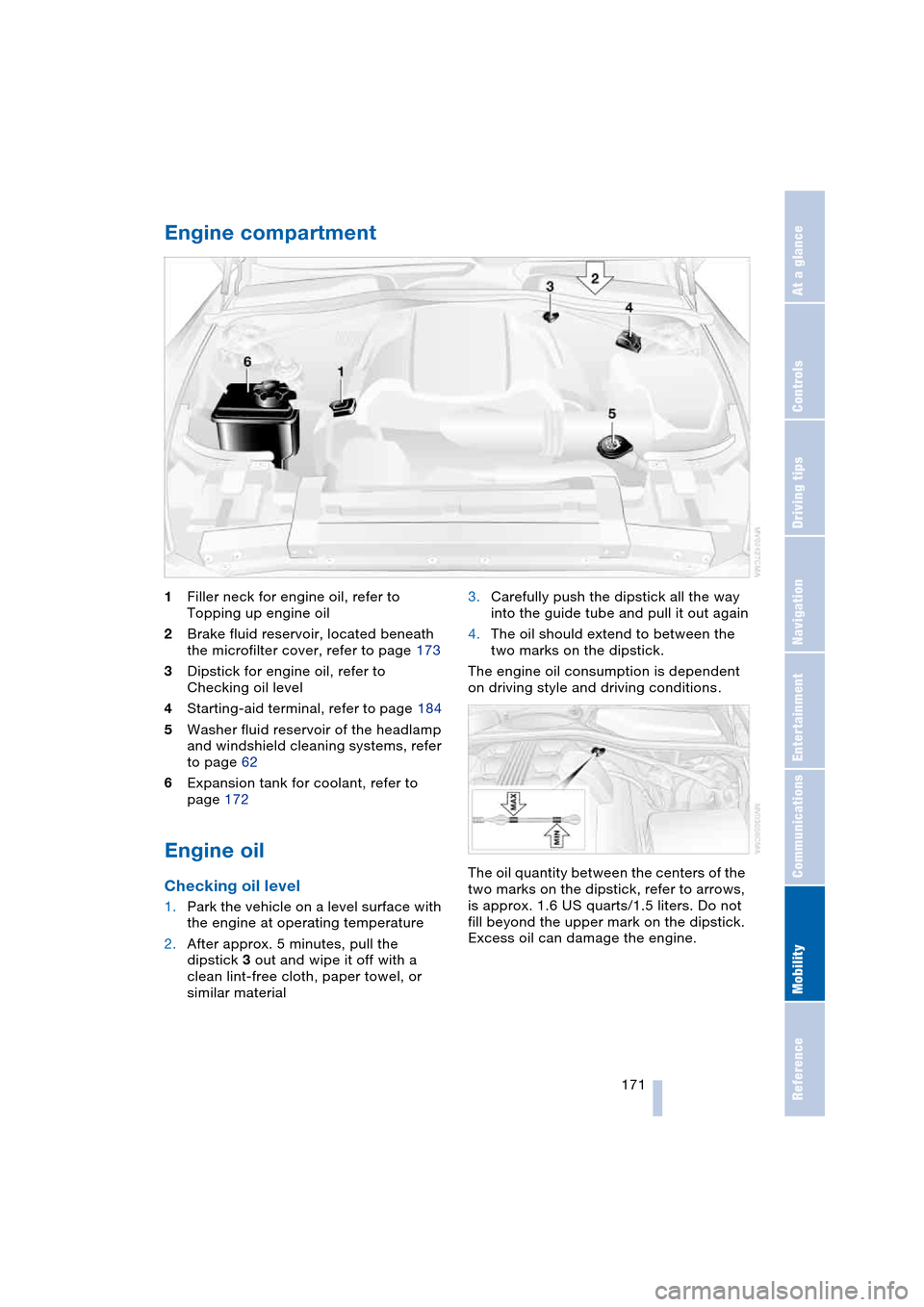
1Filler neck for engine oil, refer to
Topping up engine oil
2Brake fluid reservoir, located beneath
the microfilter cover, refer to page 173
3Dipstick for engine oil, refer to
Checking oil level
4Starting-aid terminal, refer to page 184
5Washer fluid reservoir of the headlamp
and windshield cleaning systems, refer
to page 62
6Expansion tank for coolant, refer to
page 172
Engine oil
Checking oil level
1.Park the vehicle on a level surface with
the engine at operating temperature
2.After approx. 5 minutes, pull the
dipstick 3 out and wipe it off with a
clean lint-free cloth, paper towel, or
similar material3.Carefully push the dipstick all the way
into the guide tube and pull it out again
4.The oil should extend to between the
two marks on the dipstick.
The engine oil consumption is dependent
on driving style and driving conditions.
The oil quantity between the centers of the
two marks on the dipstick, refer to arrows,
is approx. 1.6 US quarts/1.5 liters. Do not
fill beyond the upper mark on the dipstick.
Excess oil can damage the engine.
Page 175 of 216
Mobility
173Reference
At a glance
Controls
Driving tips
Communications
Navigation
Entertainment
3.The coolant level is correct when the
measuring range of the fill level indica-
tor is at the level of the upper edge of
the filler neck, also refer to the drawing
next to the filler neck
4.If the coolant is low, slowly add coolant
up to the specified level – do not overfill
5.Turn the cap until you hear a click
6.Have the reason for the coolant loss
eliminated as soon as possible.
Brake system
Malfunction
Brake fluid
The warning lamp lights up in red
in spite of the handbrake being
released; a message appears on
the Control Display.
Stop the vehicle immediately.
The brake fluid in the reservoir has fallen to
below the minimum level. At the same time,
a significantly longer brake pedal path is
noticeable. Have the system checked
immediately by a BMW center.
Warning lamp for Canadian models.
When you continue driving, an
increased brake pedal path can be
necessary, and significantly longer braking
distances might be required. Please adapt
your driving style accordingly.<
Brake pads
The warning lamp lights up in red
in spite of the handbrake being
released; a message appears on
the Control Display. The brake pads have
reached their minimum pad thickness.
Have the brake pads replaced as soon as
possible.
Warning lamp for Canadian models.For your own safety: use only brake
pads that BMW has approved for your
particular vehicle model. As BMW cannot
assess the suitability of other brake pads
for use on your vehicle, BMW is unable to
assume continued responsibility for the
vehicle's operating safety if non-approved
pads are installed.<
Page 179 of 216
Mobility
177Reference
At a glance
Controls
Driving tips
Communications
Navigation
Entertainment
When the fuel filler cap is not properly
tightened, the OBD system can
detect the vapor leak and the indicator
lamp will light up. If the filler cap is subse-
quently tightened, the indicator lamp
should go out within a few days.<
Page 184 of 216
Replacing components
182 >Active steering
The system is deactivated and has to be
initialized, refer to page 80. Until then,
greater steering wheel movement is
required
>Seat, mirror and steering wheel
memory
The position must be newly stored,
refer to page 44
>Time and date
The settings must be updated, refer to
page 73
>Radio
Radio stations have to be stored again,
refer to page 132
>Navigation system
Wait to see what happens with the
functional capability, refer to page 122.
Fuses
Never attempt to repair a blown fuse,
and do not replace a defective fuse
with a substitute of another color or amper-
age rating, as this could lead to overloading
of the wiring, ultimately resulting in a fire in
the vehicle.<
Information on the fuse assignment is
located below the bracket for the onboard
tool kit, see below.
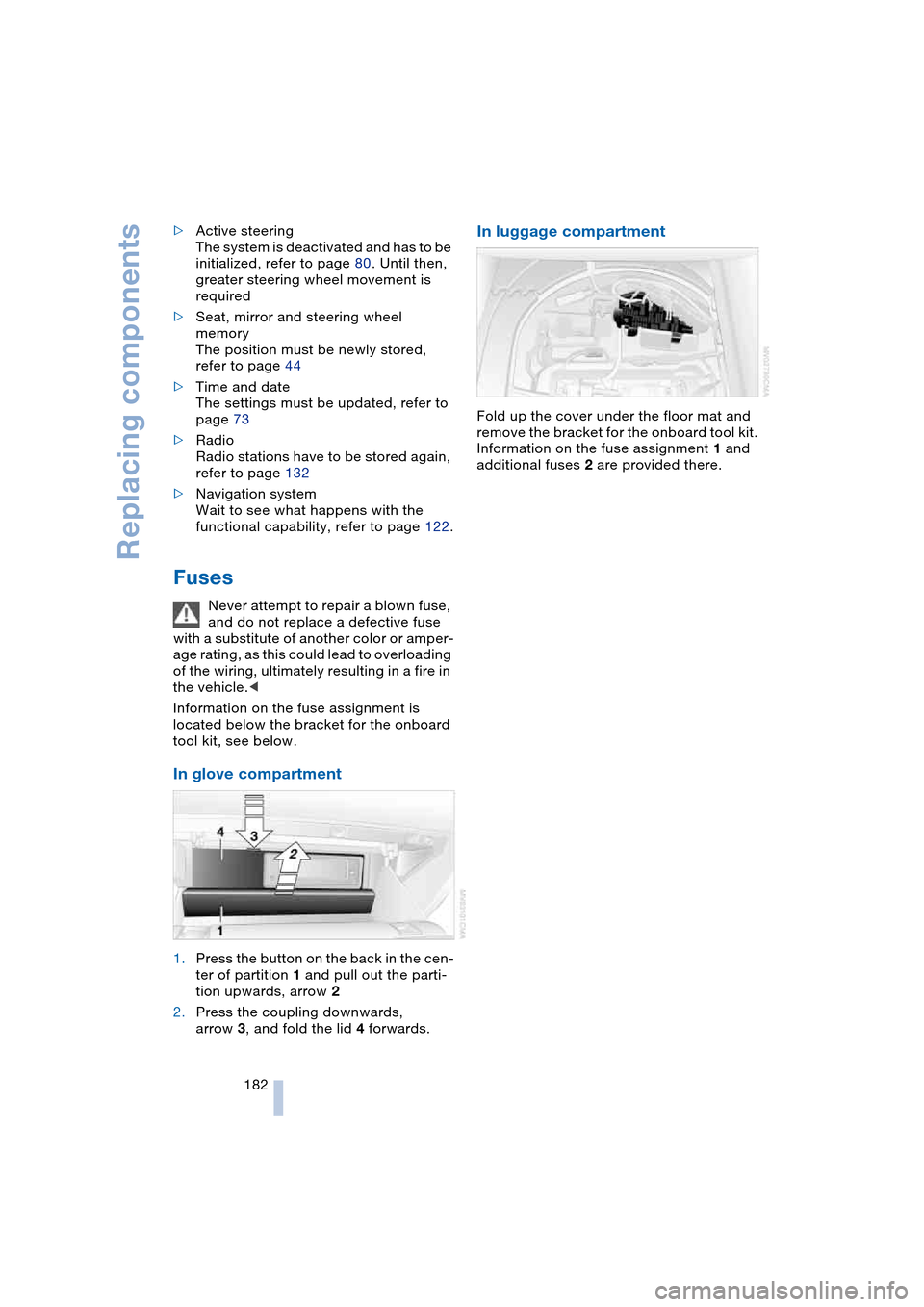
In glove compartment
1.Press the button on the back in the cen-
ter of partition 1 and pull out the parti-
tion upwards, arrow 2
2.Press the coupling downwards,
arrow 3, and fold the lid 4 forwards.
In luggage compartment
Fold up the cover under the floor mat and
remove the bracket for the onboard tool kit.
Information on the fuse assignment 1 and
additional fuses 2 are provided there.
Page 185 of 216
Mobility
183Reference
At a glance
Controls
Driving tips
Communications
Navigation
Entertainment
Giving and receiving assistance
Emergency call*
Conditions for an emergency call:
>Ignition key as of position 1
>The car phone is logged on to a
portable telephone network
>The emergency call system is operable.
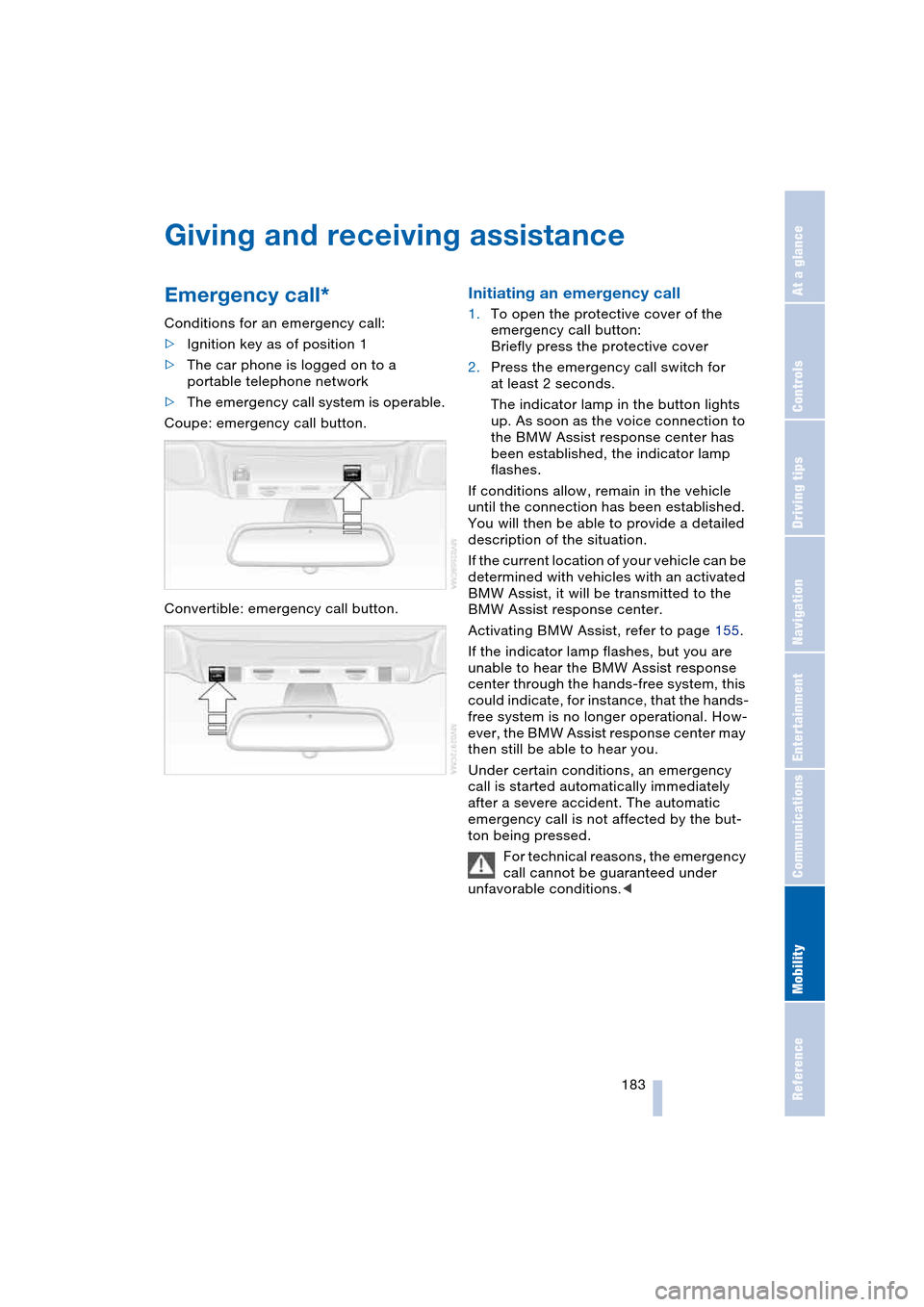
Coupe: emergency call button.
Convertible: emergency call button.
Initiating an emergency call
1.To open the protective cover of the
emergency call button:
Briefly press the protective cover
2.Press the emergency call switch for
at least 2 seconds.
The indicator lamp in the button lights
up. As soon as the voice connection to
the BMW Assist response center has
been established, the indicator lamp
flashes.
If conditions allow, remain in the vehicle
until the connection has been established.
You will then be able to provide a detailed
description of the situation.
If the current location of your vehicle can be
determined with vehicles with an activated
BMW Assist, it will be transmitted to the
BMW Assist response center.
Activating BMW Assist, refer to page 155.
If the indicator lamp flashes, but you are
unable to hear the BMW Assist response
center through the hands-free system, this
could indicate, for instance, that the hands-
free system is no longer operational. How-
ever, the BMW Assist response center may
then still be able to hear you.
Under certain conditions, an emergency
call is started automatically immediately
after a severe accident. The automatic
emergency call is not affected by the but-
ton being pressed.
For technical reasons, the emergency
call cannot be guaranteed under
unfavorable conditions.<
Page 195 of 216
Reference 193
At a glance
Controls
Driving tips
Communications
Navigation
Entertainment
Mobility
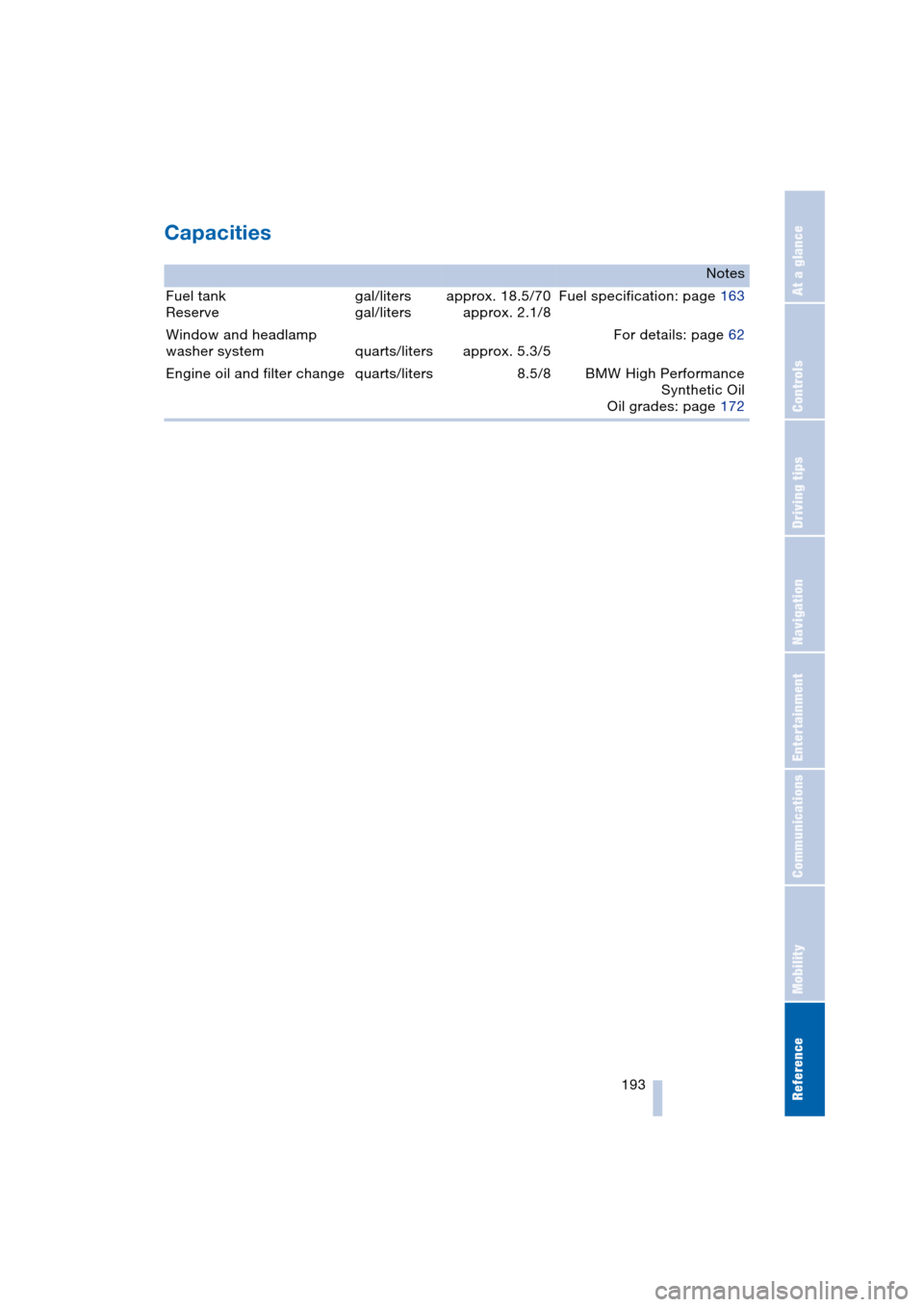
Capacities
Notes
Fuel tank
Reservegal/liters
gal/litersapprox. 18.5/70
approx. 2.1/8Fuel specification: page 163
Window and headlamp
washer system quarts/liters approx. 5.3/5For details: page 62
Engine oil and filter change quarts/liters 8.5/8 BMW High Performance
Synthetic Oil
Oil grades: page 172