eng BMW 650I CONVERTIBLE 2006 E64 Owner's Manual
[x] Cancel search | Manufacturer: BMW, Model Year: 2006, Model line: 650I CONVERTIBLE, Model: BMW 650I CONVERTIBLE 2006 E64Pages: 236, PDF Size: 8.21 MB
Page 3 of 236

© 2005 Bayerische Motoren Werke
Aktiengesellschaft
Munich, Germany
Reprinting, including excerpts,
only with the written consent of
BMW AG, Munich.
Order No. 01 41 0 159 709
US English VIII/05, 05 09 510
Printed in Germany
Printed on environmentally friendly paper,
bleached without chlorine, suitable for recycling.
Page 7 of 236
Notes
6
For your own safety
Maintenance and repairs
Advanced technology, e.g. the use of
modern materials and high-performance
electronics, requires specially adapted mainte-
nance and repair methods. Have corresponding
work on your BMW performed only by your
BMW center or a workshop that works accord-
ing to BMW repair procedures with appropri-
ately trained personnel. If this work is not
carried out properly, there is a danger of subse-
quent damage and related safety hazards.<
California Proposition 65 Warning
California law requires us to issue the following
warning:
Engine exhaust and a wide variety of
automobile components and parts,
including components found in the interior fur-
nishings in a vehicle, contain or emit chemicals
known to the State of California to cause cancer
and birth defects and reproductive harm. In
addition, certain fluids contained in vehicles and
certain products of component wear contain or
emit chemicals known to the State of California
to cause cancer and birth defects or other
reproductive harm.
Battery posts, terminals and related accesso-
ries contain lead and lead compounds. Wash
your hands after handling.
Used engine oil contains chemicals that have
caused cancer in laboratory animals. Always
protect your skin by washing thoroughly with
soap and water.<
Parts and accessories
For your own safety, use genuine parts
and accessories approved by BMW.
When you purchase accessories tested and
approved by BMW and Genuine BMW Parts,
you simultaneously acquire the assurance that
they have been thoroughly tested by BMW to
ensure optimum performance when installed
on your vehicle.
BMW warrants these parts to be free from
defects in material and workmanship.
BMW will not accept any liability for damage
resulting from installation of parts and accesso-
ries not approved by BMW.
BMW cannot test every product made by other
manufacturers to verify if it can be used on a
BMW safely and without risk to either the vehi-
cle, its operation, or its occupants.
Genuine BMW Parts, BMW Accessories and
other products approved by BMW, together
with professional advice on using these items,
are available from all BMW centers.
Installation and operation of non-BMW
approved accessories such as alarms, radios,
amplifiers, radar detectors, wheels, suspension
components, brake dust shields, telephones,
including operation of any mobile phone from
within the vehicle without using an externally
mounted antenna, or transceiver equipment, for
instance, CBs, walkie-talkies, ham radios or
similar accessories, may cause extensive dam-
age to the vehicle, compromise its safety, inter-
fere with the vehicle's electrical system or affect
the validity of the BMW Limited Warranty. See
your BMW center for additional information.<
Maintenance, replacement, or repair of
the emission control devices and sys-
tems may be performed by any automotive
repair establishment or individual using any cer-
tified automotive part.<
Page 12 of 236
At a glance
11Reference
Controls
Driving tips
Communications
Navigation
Entertainment
Mobility
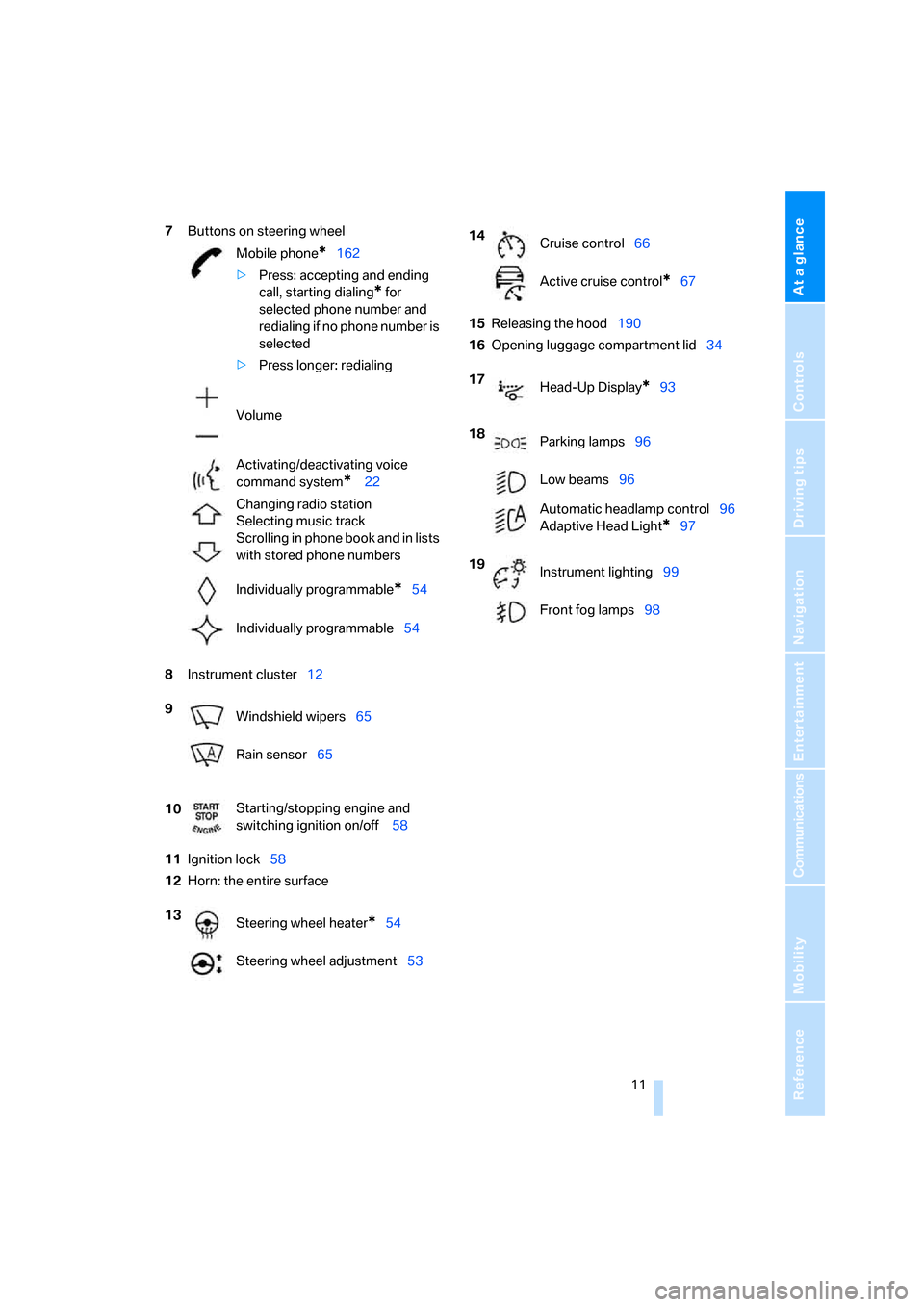
7Buttons on steering wheel
8Instrument cluster12
11Ignition lock58
12Horn: the entire surface15Releasing the hood190
16Opening luggage compartment lid34 Mobile phone
*162
>Press: accepting and ending
call, starting dialing
* for
selected phone number and
redialing if no phone number is
selected
>Press longer: redialing
Volume
Activating/deactivating voice
command system
* 22
Changing radio station
Selecting music track
Scrolling in phone book and in lists
with stored phone numbers
Individually programmable
*54
Individually programmable54
9
Windshield wipers65
Rain sensor65
10Starting/stopping engine and
switching ignition on/off 58
13
Steering wheel heater
*54
Steering wheel adjustment53
14
Cruise control66
Active cruise control
*67
17
Head-Up Display
*93
18
Parking lamps96
Low beams96
Automatic headlamp control96
Adaptive Head Light
*97
19
Instrument lighting99
Front fog lamps98
Page 13 of 236
Cockpit
12
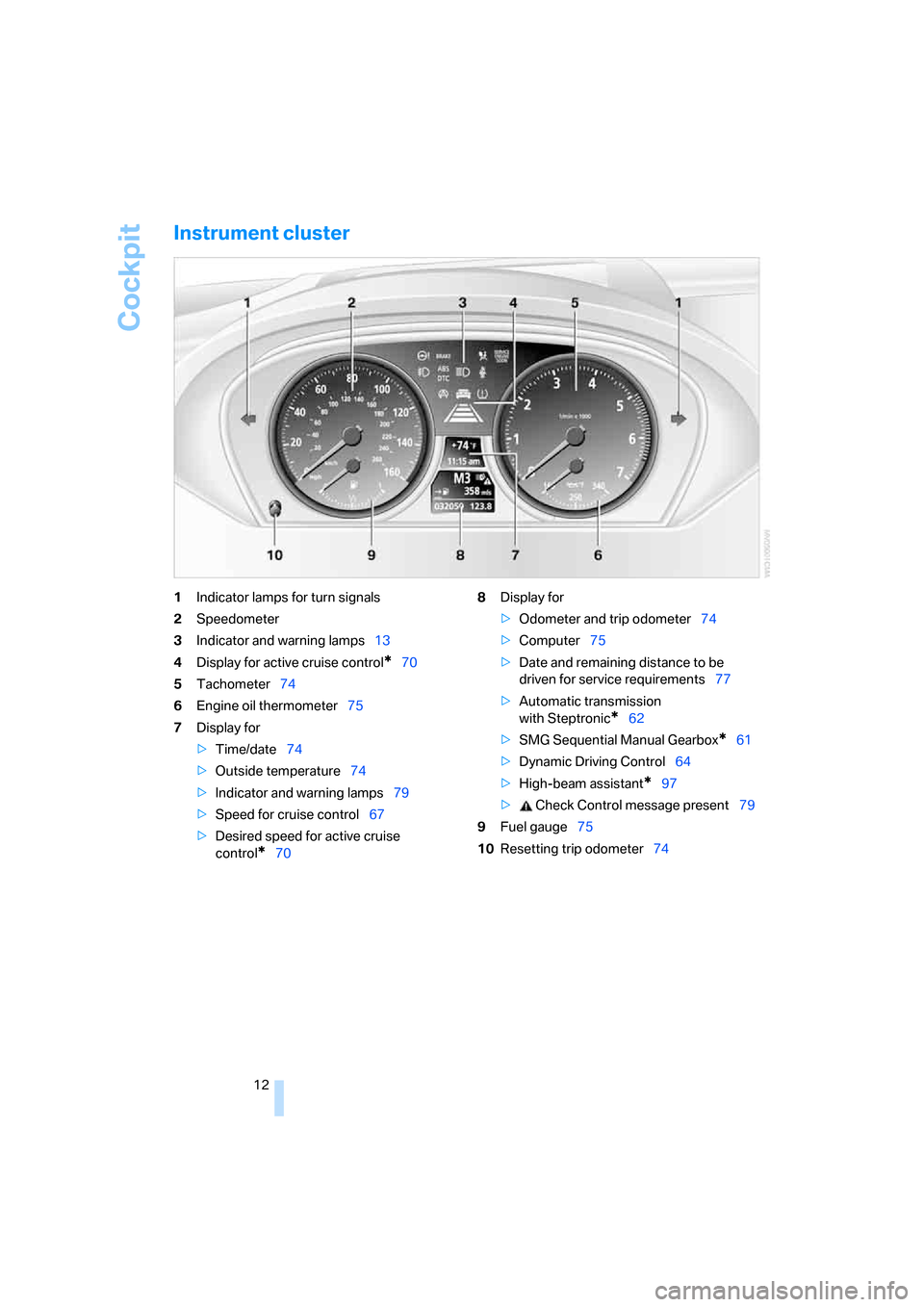
Instrument cluster
1Indicator lamps for turn signals
2Speedometer
3Indicator and warning lamps13
4Display for active cruise control
*70
5Tachometer74
6Engine oil thermometer75
7Display for
>Time/date74
>Outside temperature74
>Indicator and warning lamps79
>Speed for cruise control67
>Desired speed for active cruise
control
*708Display for
>Odometer and trip odometer74
>Computer75
>Date and remaining distance to be
driven for service requirements77
>Automatic transmission
with Steptronic
*62
>SMG Sequential Manual Gearbox
*61
>Dynamic Driving Control64
>High-beam assistant
*97
> Check Control message present79
9Fuel gauge75
10Resetting trip odometer74
Page 14 of 236
At a glance
13Reference
Controls
Driving tips
Communications
Navigation
Entertainment
Mobility
Indicator and warning lamps
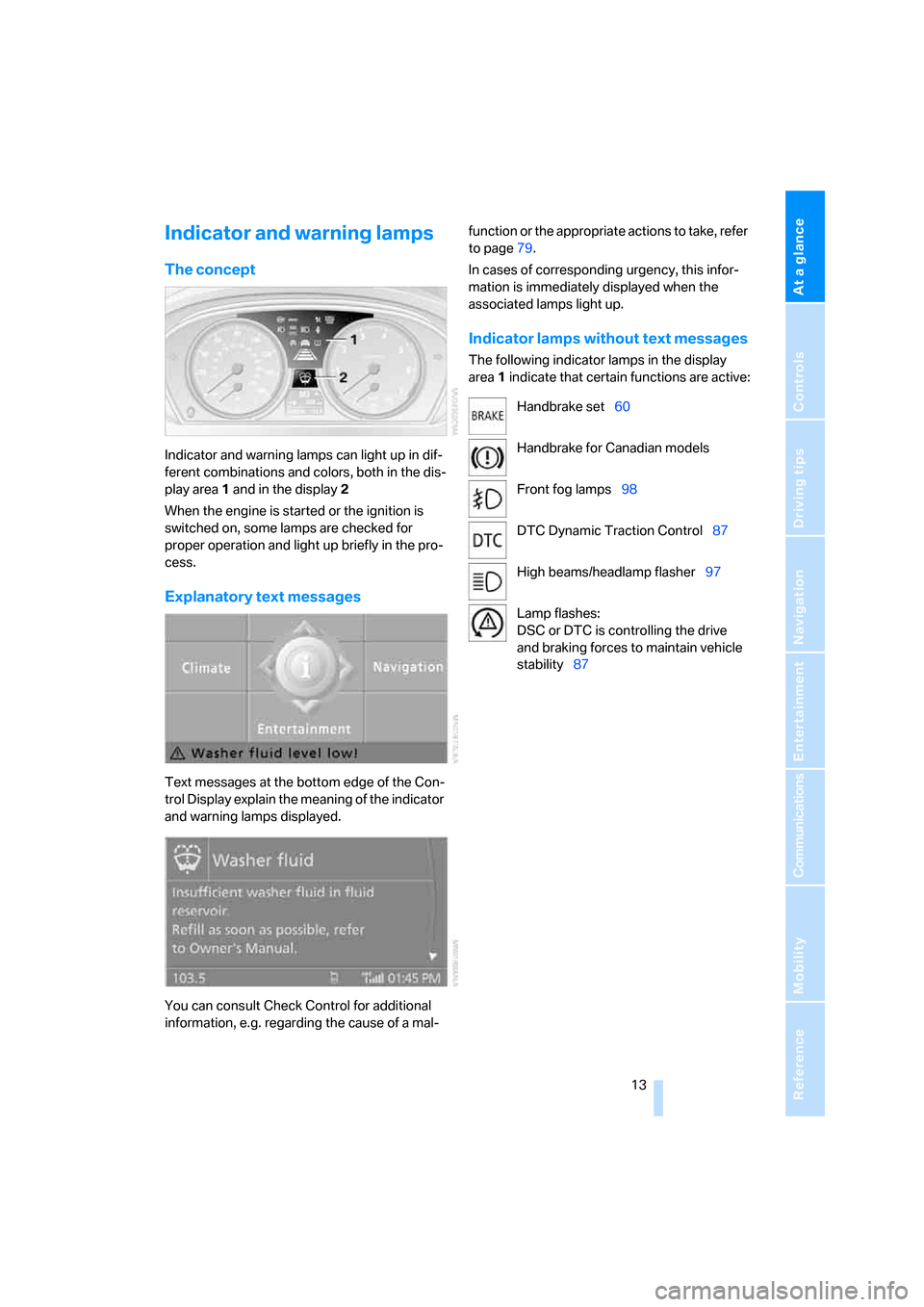
The concept
Indicator and warning lamps can light up in dif-
ferent combinations and colors, both in the dis-
play area1 and in the display2
When the engine is started or the ignition is
switched on, some lamps are checked for
proper operation and light up briefly in the pro-
cess.
Explanatory text messages
Text messages at the bottom edge of the Con-
trol Display explain the meaning of the indicator
and warning lamps displayed.
You can consult Check Control for additional
information, e.g. regarding the cause of a mal-function or the appropriate actions to take, refer
to page79.
In cases of corresponding urgency, this infor-
mation is immediately displayed when the
associated lamps light up.
Indicator lamps without text messages
The following indicator lamps in the display
area1 indicate that certain functions are active:
Handbrake set60
Handbrake for Canadian models
Front fog lamps98
DTC Dynamic Traction Control87
High beams/headlamp flasher97
Lamp flashes:
DSC or DTC is controlling the drive
and braking forces to maintain vehicle
stability87
Page 16 of 236
At a glance
15Reference
Controls
Driving tips
Communications
Navigation
Entertainment
Mobility
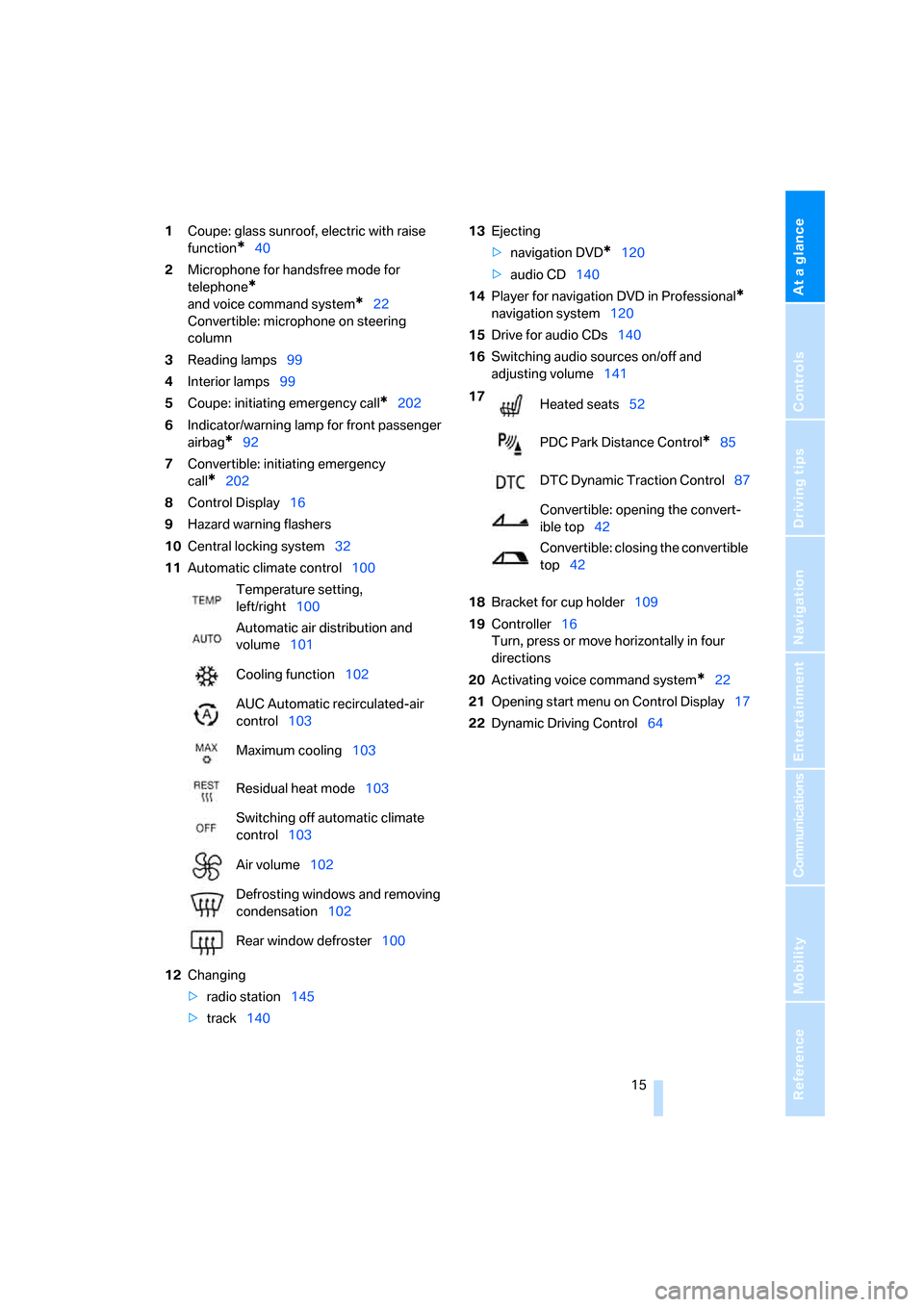
1Coupe: glass sunroof, electric with raise
function
*40
2Microphone for handsfree mode for
telephone
*
and voice command system*22
Convertible: microphone on steering
column
3Reading lamps99
4Interior lamps99
5Coupe: initiating emergency call
*202
6Indicator/warning lamp for front passenger
airbag
*92
7Convertible: initiating emergency
call
*202
8Control Display16
9Hazard warning flashers
10Central locking system32
11Automatic climate control100
12Changing
>radio station145
>track14013Ejecting
>navigation DVD
*120
>audio CD140
14Player for navigation DVD in Professional
*
navigation system120
15Drive for audio CDs140
16Switching audio sources on/off and
adjusting volume141
18Bracket for cup holder109
19Controller16
Turn, press or move horizontally in four
directions
20Activating voice command system
*22
21Opening start menu on Control Display17
22Dynamic Driving Control64 Temperature setting,
left/right100
Automatic air distribution and
volume101
Cooling function102
AUC Automatic recirculated-air
control103
Maximum cooling103
Residual heat mode103
Switching off automatic climate
control103
Air volume102
Defrosting windows and removing
condensation102
Rear window defroster100
17
Heated seats52
PDC Park Distance Control
*85
DTC Dynamic Traction Control87
Convertible: opening the convert-
ible top42
Convertible: closing the convertible
top42
Page 21 of 236
iDrive
20
Status information
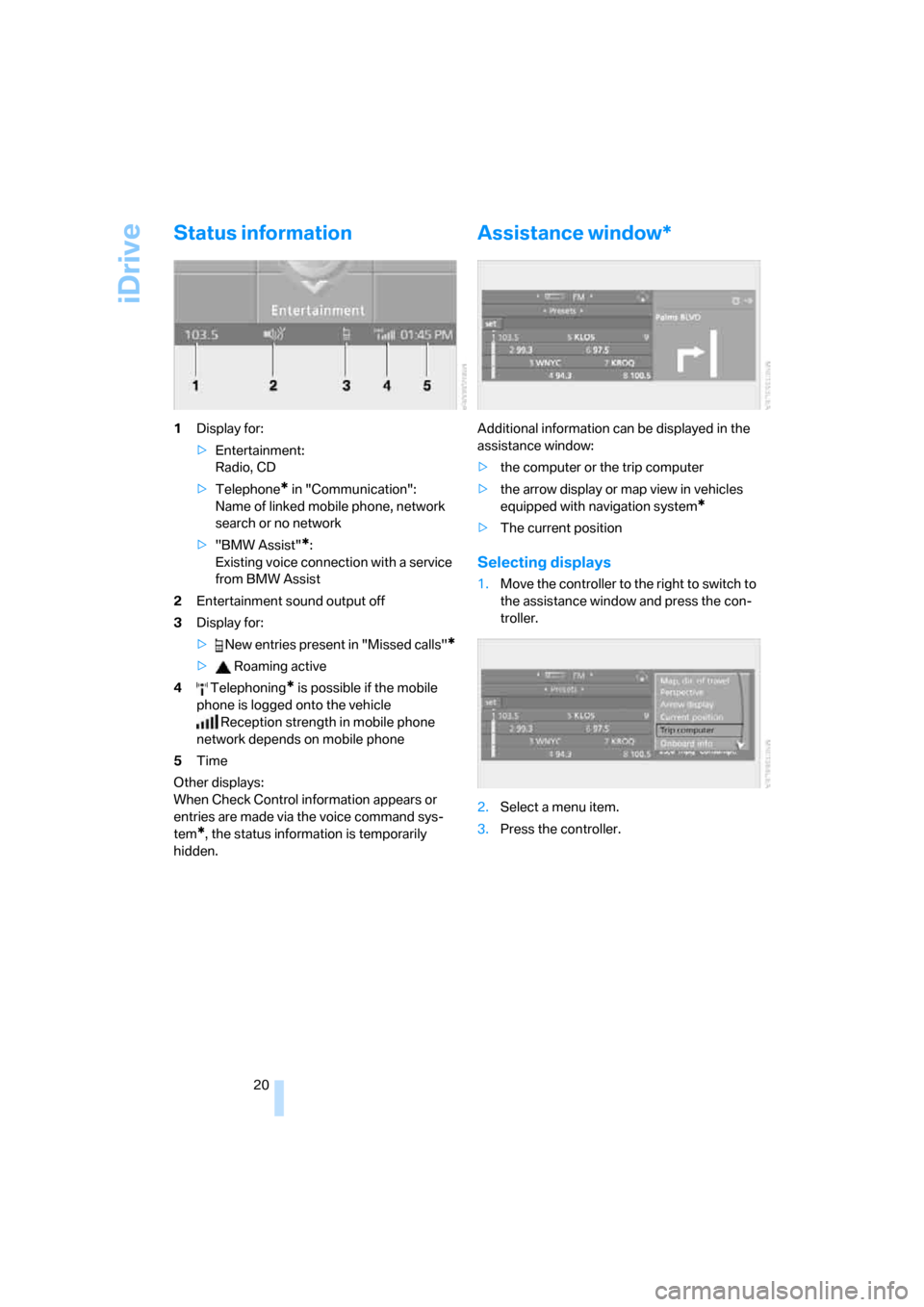
1Display for:
>Entertainment:
Radio, CD
>Telephone
* in "Communication":
Name of linked mobile phone, network
search or no network
>"BMW Assist"
*:
Existing voice connection with a service
from BMW Assist
2Entertainment sound output off
3Display for:
> New entries present in "Missed calls"
*
> Roaming active
4 Telephoning
* is possible if the mobile
phone is logged onto the vehicle
Reception strength in mobile phone
network depends on mobile phone
5Time
Other displays:
When Check Control information appears or
entries are made via the voice command sys-
tem
*, the status information is temporarily
hidden.
Assistance window*
Additional information can be displayed in the
assistance window:
>the computer or the trip computer
>the arrow display or map view in vehicles
equipped with navigation system
*
>The current position
Selecting displays
1.Move the controller to the right to switch to
the assistance window and press the con-
troller.
2.Select a menu item.
3.Press the controller.
Page 33 of 236
Opening and closing
32 >this device must accept any interference
received, including interference that may
cause undesired operation.
Any unauthorized modifications or
changes to these devices could void the
user's authority to operate this equipment.<
Using door lock
When unlocking
1.Turning the key once unlocks the driver's
door and the fuel filler door.
2.A second turn of the key unlocks the pas-
senger door and luggage compartment lid.
Convenience operation
You can also use the door lock to operate the
windows and the glass sunroof
* in the Coupe
or to operate the windows and the top in the
Convertible.
>To open:
With the door closed, turn the key to the
Unlock position and hold it there.
>To close:
With the door closed, turn the key to the
Lock position and hold it there.
Keep a close eye on the closing process
and also on the opening process of the
convertible top to be sure that no one is injured.
Releasing the key stops the operation.<
Manual operation
In the event of an electrical malfunction, you can
turn the key all the way to the right or left in the
door lock to lock or unlock the driver's door.
Opening and closing: from
inside
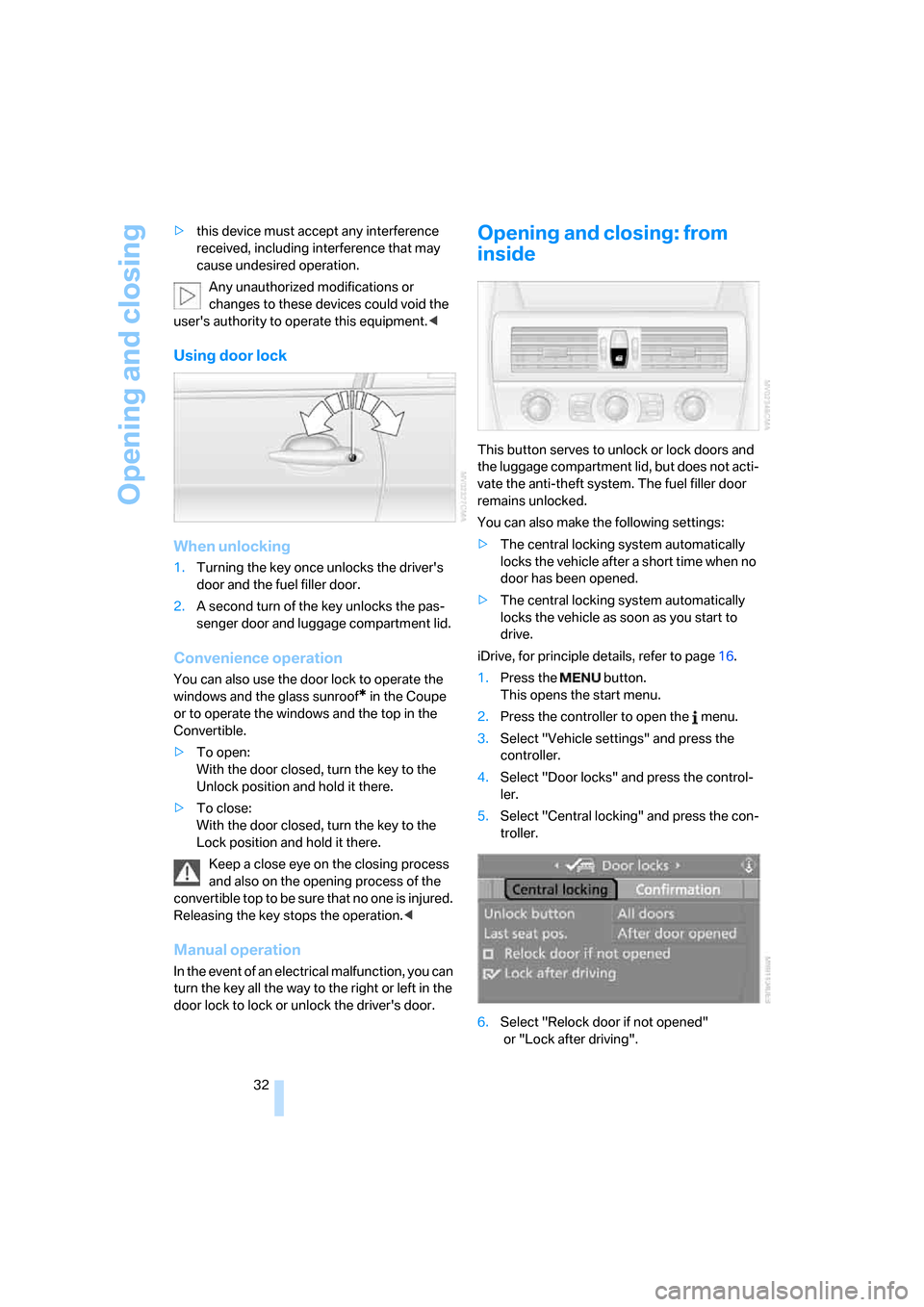
This button serves to unlock or lock doors and
the luggage compartment lid, but does not acti-
vate the anti-theft system. The fuel filler door
remains unlocked.
You can also make the following settings:
>The central locking system automatically
locks the vehicle after a short time when no
door has been opened.
>The central locking system automatically
locks the vehicle as soon as you start to
drive.
iDrive, for principle details, refer to page16.
1.Press the button.
This opens the start menu.
2.Press the controller to open the menu.
3.Select "Vehicle settings" and press the
controller.
4.Select "Door locks" and press the control-
ler.
5.Select "Central locking" and press the con-
troller.
6.Select "Relock door if not opened"
or "Lock after driving".
Page 35 of 236
Opening and closing
34
Luggage compartment lid
During opening, the luggage compart-
ment lid pivots back and up. Make sure
there is sufficient clearance.<
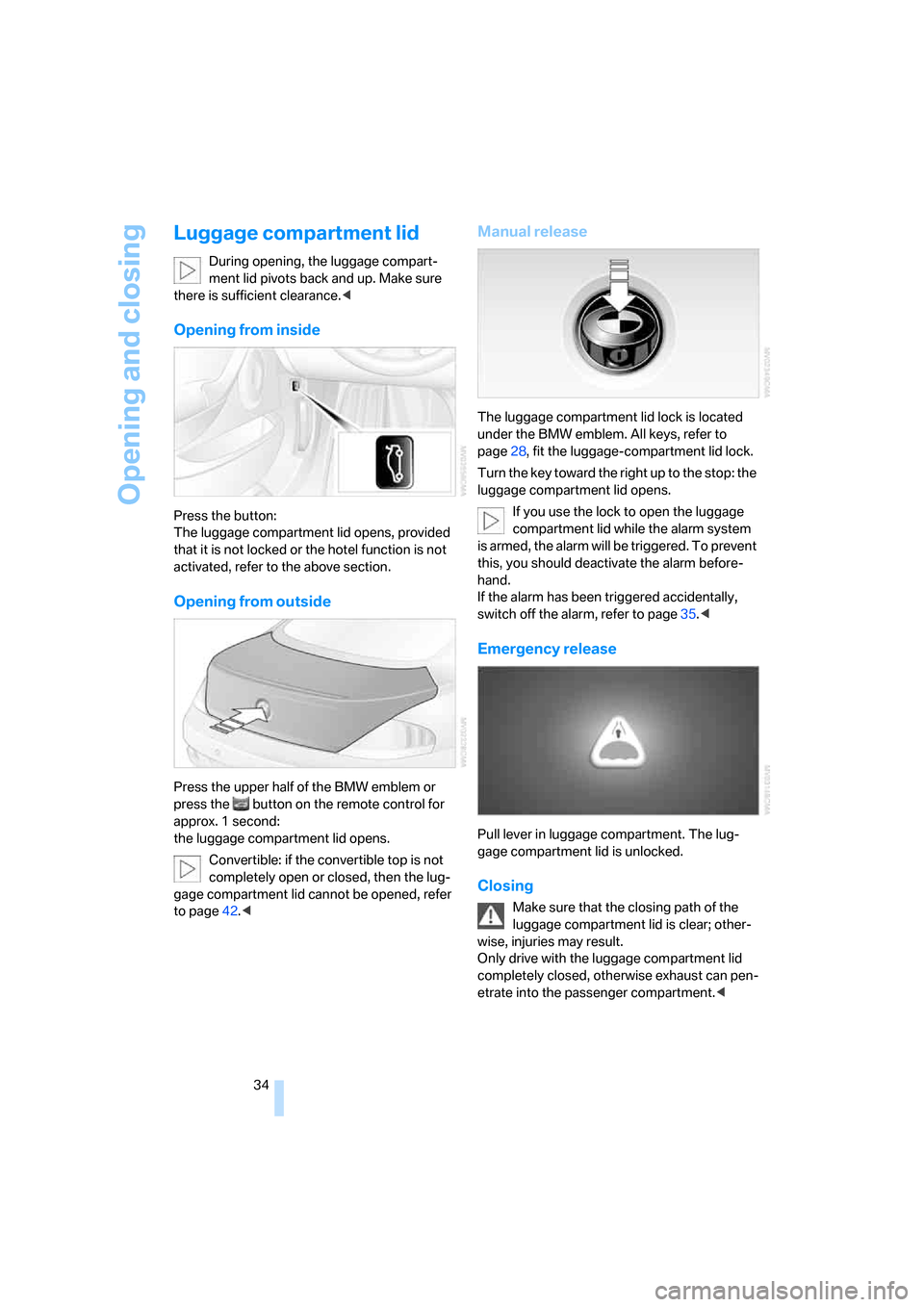
Opening from inside
Press the button:
The luggage compartment lid opens, provided
that it is not locked or the hotel function is not
activated, refer to the above section.
Opening from outside
Press the upper half of the BMW emblem or
press the button on the remote control for
approx. 1 second:
the luggage compartment lid opens.
Convertible: if the convertible top is not
completely open or closed, then the lug-
gage compartment lid cannot be opened, refer
to page42.<
Manual release
The luggage compartment lid lock is located
under the BMW emblem. All keys, refer to
page28, fit the luggage-compartment lid lock.
Turn the key toward the right up to the stop: the
luggage compartment lid opens.
If you use the lock to open the luggage
compartment lid while the alarm system
is armed, the alarm will be triggered. To prevent
this, you should deactivate the alarm before-
hand.
If the alarm has been triggered accidentally,
switch off the alarm, refer to page35.<
Emergency release
Pull lever in luggage compartment. The lug-
gage compartment lid is unlocked.
Closing
Make sure that the closing path of the
luggage compartment lid is clear; other-
wise, injuries may result.
Only drive with the luggage compartment lid
completely closed, otherwise exhaust can pen-
etrate into the passenger compartment.<
Page 37 of 236
Opening and closing
36
Indicator lamp displays
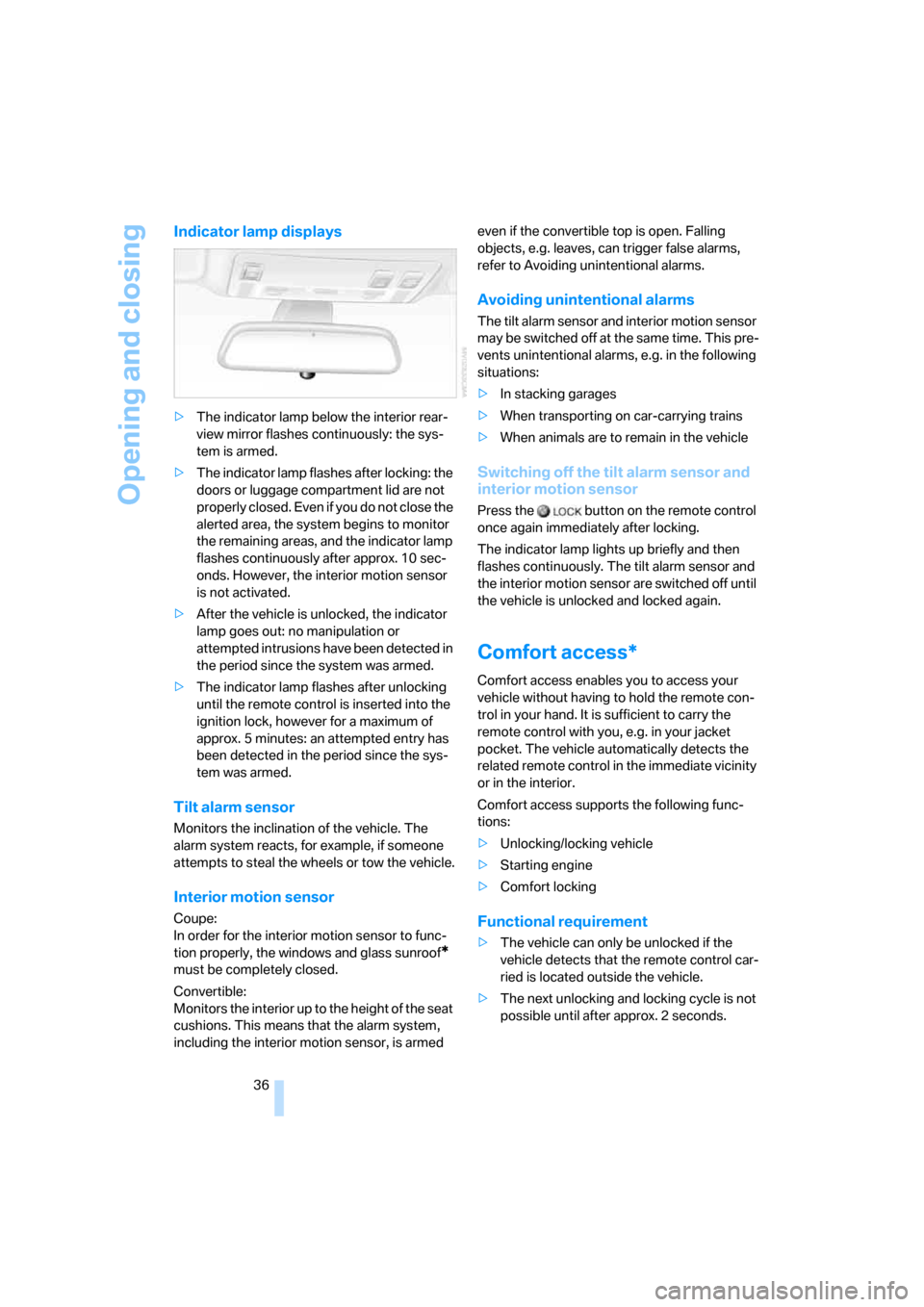
>The indicator lamp below the interior rear-
view mirror flashes continuously: the sys-
tem is armed.
>The indicator lamp flashes after locking: the
doors or luggage compartment lid are not
properly closed. Even if you do not close the
alerted area, the system begins to monitor
the remaining areas, and the indicator lamp
flashes continuously after approx. 10 sec-
onds. However, the interior motion sensor
is not activated.
>After the vehicle is unlocked, the indicator
lamp goes out: no manipulation or
attempted intrusions have been detected in
the period since the system was armed.
>The indicator lamp flashes after unlocking
until the remote control is inserted into the
ignition lock, however for a maximum of
approx. 5 minutes: an attempted entry has
been detected in the period since the sys-
tem was armed.
Tilt alarm sensor
Monitors the inclination of the vehicle. The
alarm system reacts, for example, if someone
attempts to steal the wheels or tow the vehicle.
Interior motion sensor
Coupe:
In order for the interior motion sensor to func-
tion properly, the windows and glass sunroof
*
must be completely closed.
Convertible:
Monitors the interior up to the height of the seat
cushions. This means that the alarm system,
including the interior motion sensor, is armed even if the convertible top is open. Falling
objects, e.g. leaves, can trigger false alarms,
refer to Avoiding unintentional alarms.
Avoiding unintentional alarms
The tilt alarm sensor and interior motion sensor
may be switched off at the same time. This pre-
vents unintentional alarms, e.g. in the following
situations:
>In stacking garages
>When transporting on car-carrying trains
>When animals are to remain in the vehicle
Switching off the tilt alarm sensor and
interior motion sensor
Press the button on the remote control
once again immediately after locking.
The indicator lamp lights up briefly and then
flashes continuously. The tilt alarm sensor and
the interior motion sensor are switched off until
the vehicle is unlocked and locked again.
Comfort access*
Comfort access enables you to access your
vehicle without having to hold the remote con-
trol in your hand. It is sufficient to carry the
remote control with you, e.g. in your jacket
pocket. The vehicle automatically detects the
related remote control in the immediate vicinity
or in the interior.
Comfort access supports the following func-
tions:
>Unlocking/locking vehicle
>Starting engine
>Comfort locking
Functional requirement
>The vehicle can only be unlocked if the
vehicle detects that the remote control car-
ried is located outside the vehicle.
>The next unlocking and locking cycle is not
possible until after approx. 2 seconds.