low beam BMW 650I CONVERTIBLE 2008 E64 User Guide
[x] Cancel search | Manufacturer: BMW, Model Year: 2008, Model line: 650I CONVERTIBLE, Model: BMW 650I CONVERTIBLE 2008 E64Pages: 264, PDF Size: 9.07 MB
Page 108 of 264
Lamps
106 3.Select "Settings" and press the controller.
4.Select "Vehicle / Tires" and press the con-
troller.
5.Change to upper field if necessary. Turn the
controller until "Lighting" is selected and
press the controller.
6.Select "High-beam assistant" and press
the controller.
High-beam assistant is switched off.
The setting is stored for the remote control cur-
rently in use.
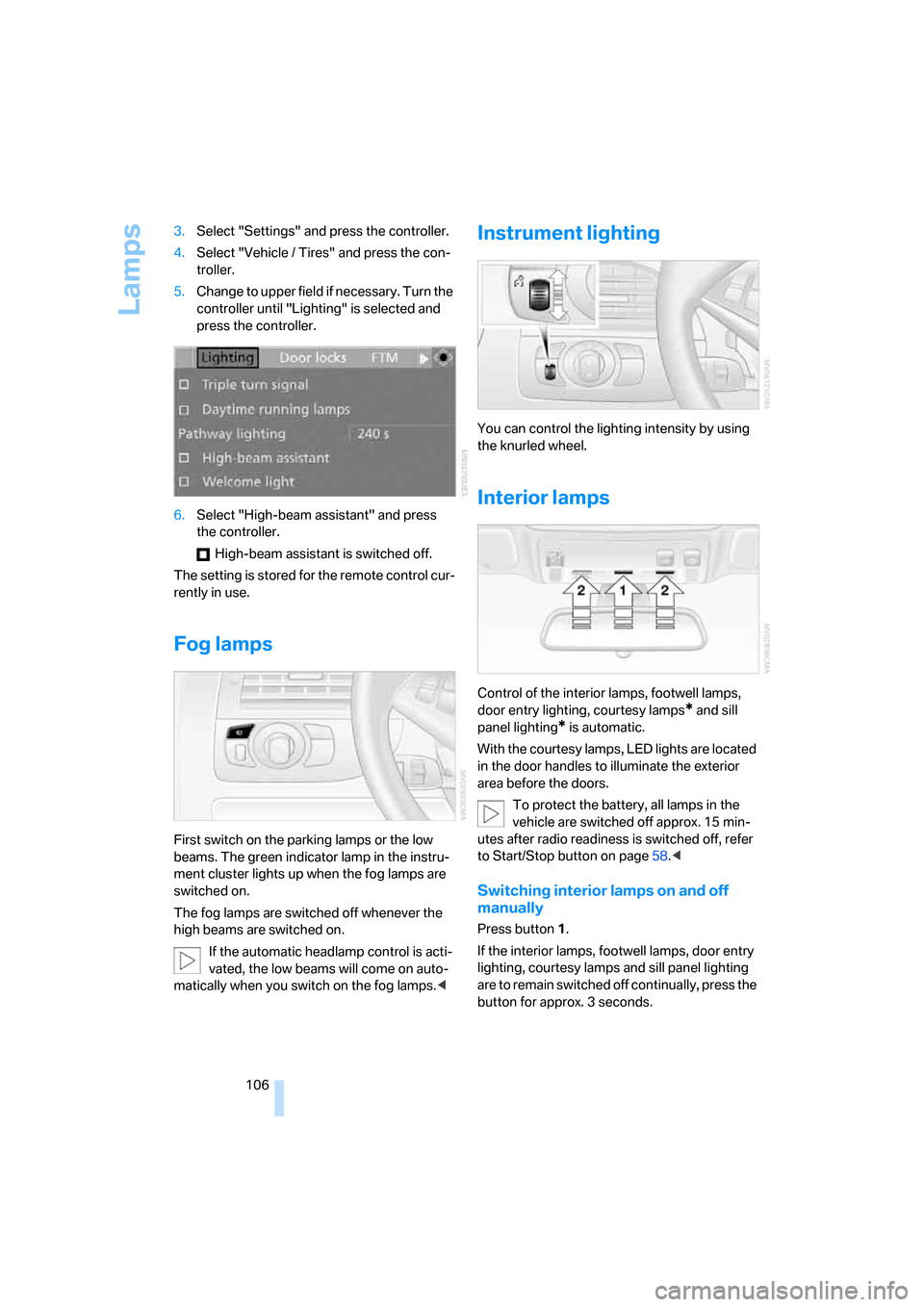
Fog lamps
First switch on the parking lamps or the low
beams. The green indicator lamp in the instru-
ment cluster lights up when the fog lamps are
switched on.
The fog lamps are switched off whenever the
high beams are switched on.
If the automatic headlamp control is acti-
vated, the low beams will come on auto-
matically when you switch on the fog lamps.<
Instrument lighting
You can control the lighting intensity by using
the knurled wheel.
Interior lamps
Control of the interior lamps, footwell lamps,
door entry lighting, courtesy lamps
* and sill
panel lighting
* is automatic.
With the courtesy lamps, LED lights are located
in the door handles to illuminate the exterior
area before the doors.
To protect the battery, all lamps in the
vehicle are switched off approx. 15 min-
utes after radio readiness is switched off, refer
to Start/Stop button on page58.<
Switching interior lamps on and off
manually
Press button 1.
If the interior lamps, footwell lamps, door entry
lighting, courtesy lamps and sill panel lighting
are to remain switched off continually, press the
button for approx. 3 seconds.
Page 232 of 264
Giving and receiving assistance
230
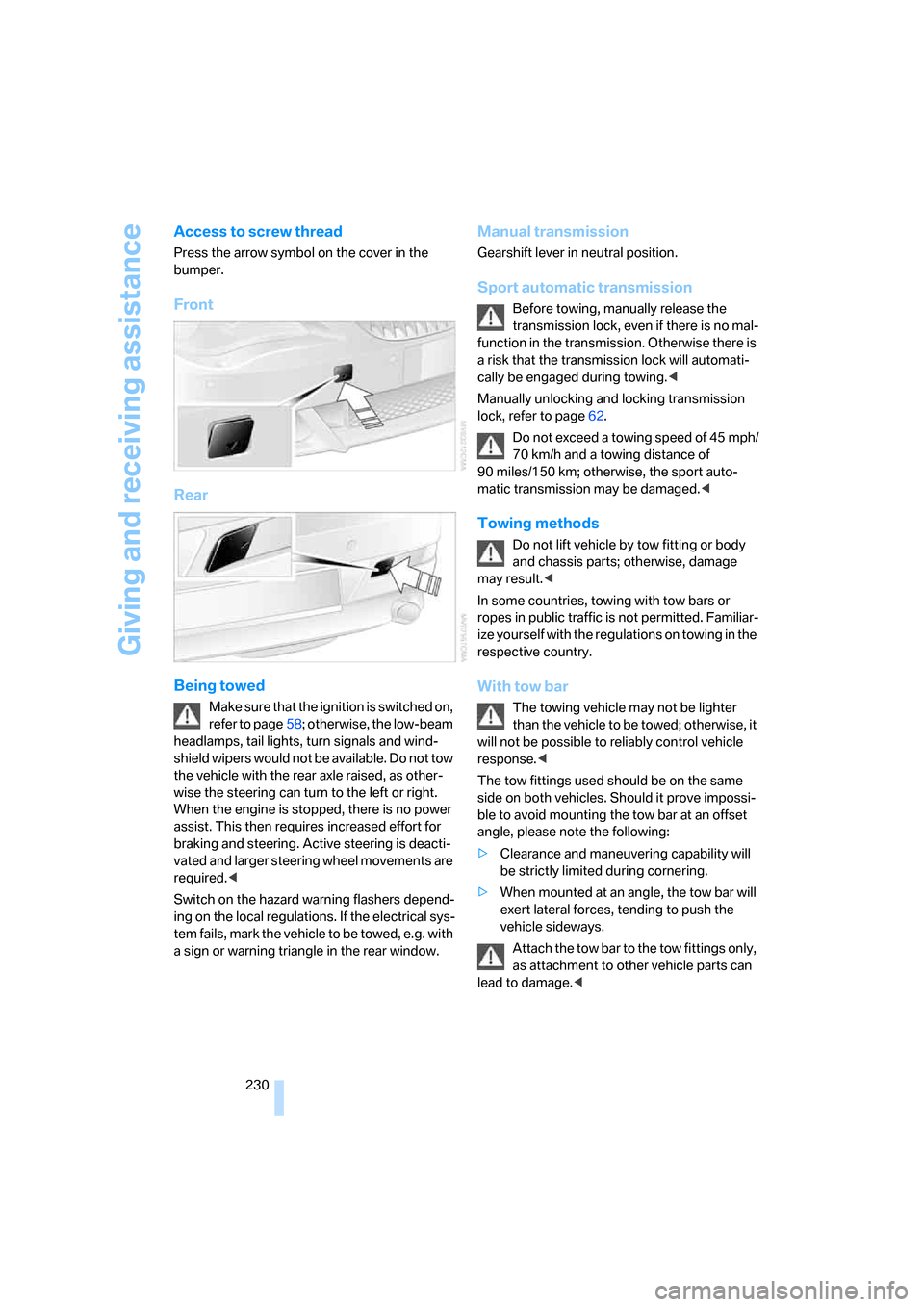
Access to screw thread
Press the arrow symbol on the cover in the
bumper.
Front
Rear
Being towed
Make sure that the ignition is switched on,
refer to page58; otherwise, the low-beam
headlamps, tail lights, turn signals and wind-
shield wipers would not be available. Do not tow
the vehicle with the rear axle raised, as other-
wise the steering can turn to the left or right.
When the engine is stopped, there is no power
assist. This then requires increased effort for
braking and steering. Active steering is deacti-
vated and larger steering wheel movements are
required.<
Switch on the hazard warning flashers depend-
ing on the local regulations. If the electrical sys-
tem fails, mark the vehicle to be towed, e.g. with
a sign or warning triangle in the rear window.
Manual transmission
Gearshift lever in neutral position.
Sport automatic transmission
Before towing, manually release the
transmission lock, even if there is no mal-
function in the transmission. Otherwise there is
a risk that the transmission lock will automati-
cally be engaged during towing.<
Manually unlocking and locking transmission
lock, refer to page62.
Do not exceed a towing speed of 45 mph/
70 km/h and a towing distance of
90 miles/150 km; otherwise, the sport auto-
matic transmission may be damaged.<
Towing methods
Do not lift vehicle by tow fitting or body
and chassis parts; otherwise, damage
may result.<
In some countries, towing with tow bars or
ropes in public traffic is not permitted. Familiar-
ize yourself with the regulations on towing in the
respective country.
With tow bar
The towing vehicle may not be lighter
than the vehicle to be towed; otherwise, it
will not be possible to reliably control vehicle
response.<
The tow fittings used should be on the same
side on both vehicles. Should it prove impossi-
ble to avoid mounting the tow bar at an offset
angle, please note the following:
>Clearance and maneuvering capability will
be strictly limited during cornering.
>When mounted at an angle, the tow bar will
exert lateral forces, tending to push the
vehicle sideways.
Attach the tow bar to the tow fittings only,
as attachment to other vehicle parts can
lead to damage.<
Page 245 of 264
Reference 243
At a glance
Controls
Driving tips
Communications
Navigation
Entertainment
Mobility
Arrival time
– refer to Computer76
– refer to Starting destination
guidance146
"Arrow display" for navigation
system147
"Arrow display pop-up
instructions"133
Ashtray118
Assist, refer to
BMW Assist199
Assistance systems, refer to
Driving stability control
systems86
Assistance window20
"Assist. window off"21
AUC Automatic recirculated-
air control111
"Audio"159,161,166
Audio158
– controls158
– switching on/off158
– tone control159
– volume159
Audio device, external117
Automatic
– air distribution109
– air volume109
– cruise control65,66
– headlamp control102
– recirculated-air control
AUC111
– service notification201
– steering wheel
adjustment49
– storing stations164
Automatic car washes127
– also refer to Caring for your
vehicle brochure
– also refer to Comfort
access38
Automatic climate control108
– automatic air
distribution109
– convertible program109
– switching on and off112
– ventilation with vehicle
parked112Automatic closing of doors,
refer to Automatic soft
closing34
Automatic curb monitor54
Automatic lighting
– refer to Automatic headlamp
control102
– refer to Daytime running
lamps103
– refer to High-beam
assistant104
– refer to Interior lamps106
– refer to Pathway lighting103
– refer to Welcome lamps102
"Automatic programs"109
Automatic soft closing34
Automatic station search163
"Automatic ventilation"113
AUTO program with
automatic climate
control109
"Autostore" on the
radio162,164
"AUX"158,178,180
– in audio mode178
AUX-In connection117,178
Average fuel consumption75
– setting units84
Average speed75
"Avoid ferries" for navigation
system145
"Avoid highways" for
navigation system144
Avoiding freeways for
navigation144
Avoiding unintentional
alarms36
"Avoid tollroads" for
navigation system145
Axle loads, refer to
Weights237
"A - Z"192
B
Backrest contour, refer to
Lumbar support48
Backrests, refer to Seats48
Backup lamps, replacing
bulbs, refer to Tail
lamps224
"Balance", refer to Tone
control160
Band-aids, refer to First-aid
kit228
Bass, refer to Tone
control159
"Bass", tone control159
Battery
– jump starting228
– refer to Vehicle battery225
Battery replacement, remote
control for comfort
access38
BC button, refer to
Computer75
Being towed230
Belts, refer to Safety belts52
Beverage holder, refer to Cup
holders118
Blower, refer to Air
volume110
"Bluetooth"185
"BMW Assist"200
BMW Assist199
– activating204
– concierge service202
– contacting BMW Customer
Relations202
– displaying vehicle data205
– offered services199
– roadside assistance200
– TeleService201
– updating203
"BMW Contact"194
"BMW Contact
Numbers"194
BMW homepage4
BMW Maintenance
System221
Page 249 of 264
Reference 247
At a glance
Controls
Driving tips
Communications
Navigation
Entertainment
Mobility
Direct selection buttons21
Displacement, refer to Engine
data234
"Display"84
Display, refer to iDrive
controls16
Display elements, refer to
Instrument cluster12
Displaying vehicle data205
Display lighting, refer to
Instrument lighting106
"Display off"21
Displays
– on Control Display, refer to
iDrive16
– refer to Instrument
cluster12
"Display settings"84,97
Displays on the windshield,
refer to Head-Up Display96
Disposal
– battery of remote control
with comfort access38
– coolant219
– vehicle battery225
Distance, refer to
Computer76
Distance control, refer to
Active cruise control66
"Distance to dest."76
Distance to destination, refer
to Computer76
Distance warning, refer to
PDC Park Distance
Control85
Door entry lighting, refer to
Interior lamps106
Door key, refer to Keys/
remote control28
Door lock32
"Door locks"30,78
Doors
– manual operation32
– remote control30,31
DOT Quality Grades212
Draft-free ventilation112
"Driver's door only"30Driving lamps, refer to Parking
lamps/low beams102
Driving route, refer to
Displaying route147
Driving stability control
systems86
Driving through water126
Driving tips, refer to General
driving notes124
Drying the air, refer to Cooling
function111
DSC Dynamic Stability
Control
87
– indicator lamp13,87
– malfunction88
DTC Dynamic Traction
Control87
– activating88
– indicator lamp13,88
DVD for navigation132
Dynamic Drive89
Dynamic Driving Control62
"Dynamic route" for
navigation145
Dynamic Stability Control
DSC87
Dynamic Traction Control
DTC87
E
Easy entry, refer to Entering
rear51
Easy entry/exit54
Eject button, refer to Buttons
on CD player158
Electrical malfunction
– convertible top43
– door lock32
– driver's door32
– fuel filler door208
– glass sunroof41
– luggage compartment lid34
– storage compartment, hotel
function33
Electric convertible top42Electric steering wheel
adjustment54
Electronic brake-force
distribution87
Electronic oil level check218
Emergency assistance, refer
to Roadside Assistance228
Emergency operation, refer to
Manual operation
– convertible top43
– door lock32
– driver's door32
– fuel filler door208
– glass sunroof41
– hotel function33
– luggage compartment lid34
– transmission lock, sport
automatic transmission62
Emergency release for
luggage compartment lid in
luggage compartment35
Emergency request227
Emergency services, refer to
Roadside Assistance228
"Enable services"205
"End call"192
Engine
– breaking-in124
– data234
– overheated, refer to Coolant
temperature74
– speed234
– starting59
– starting, comfort access36
– switching off59
– switching off when equipped
with Automatic
transmission, with comfort
access38
Engine compartment217
Engine coolant219
Page 253 of 264
Reference 251
At a glance
Controls
Driving tips
Communications
Navigation
Entertainment
Mobility
Knee airbags94
Knock control209
L
Lamps
– refer to High-beam
assistant104
– refer to Parking lamps/low
beams102
Lamps and bulbs223
Lane limit lines, refer to
Leaving lane warning101
"Language / Units"84
– for navigation
system133,149
"Languages"84
– for navigation
system133,149
Lashing eyes, refer to
Securing cargo128
Last destinations, refer to
Destination list141
"Last seat pos."50
LATCH child restraint fixing
system56
Leaving lane warning101
LEDs light-emitting
diodes223
Length, refer to
Dimensions235
License plate lamps, replacing
bulbs225
Light-emitting diodes
LEDs223
Lighter119
"Lighting"64,103
Lighting
– instruments106
– lamps and bulbs223
– of the vehicle, refer to
Lamps102
Light switch102
"Limit"81
Loading, refer to Cargo
loading127
Load securing equipment,
refer to Securing cargo128"Lock after driving"33
Lock buttons in the doors,
refer to Locking33
Locking31
– confirmation signals31
– from inside33
– from outside31
– without key, refer to Comfort
access36
Locking and unlocking doors
– confirmation signals31
– from inside32
– from outside30
Low beams102
– automatic102
– replacing bulbs224
Lower back support, refer to
Lumbar support48
Luggage compartment
– capacity237
– emergency release35
– hotel function33
– increasing capacity,
Convertible35
– opening/closing, refer to
Luggage compartment
lid34
– opening from inside34
– opening from outside34
– opening with remote
control31
Luggage compartment lid34
– comfort access37
– emergency operation34
– emergency release35
– opening from inside34
– opening from outside34
– opening with remote
control31,34
– unlocking manually34
Lumbar support48
LW, waveband162
M
M+S tires, refer to Winter
tires215
Maintenance221
– refer to Service and
Warranty Information
Booklet for US models221
– refer to Service
requirements77
– refer to Warranty and
Service Guide Booklet for
Canadian models221
Maintenance system221
Malfunction
– convertible top43
– door lock32
– driver's door32
– fuel filler door208
– glass sunroof41
– hotel function33
– luggage compartment lid34
Malfunction warnings, refer to
Check Control79
Manual air distribution110
"Manual" on the radio163
Manual operation
– convertible top43
– door lock32
– driver's door32
– fuel filler door208
– glass sunroof41
– hotel function33
– luggage compartment lid34
– transmission lock, sport
automatic transmission62
Manual transmission60
"Map direction of travel"148
"Map facing north"148
Map for navigation
– changing scale148
– destination entry139
Map view148
Map view facing north148
Master key, refer to Keys/
remote control28
Maximum cooling111
Page 259 of 264
Reference 257
At a glance
Controls
Driving tips
Communications
Navigation
Entertainment
Mobility
"Stop" for stopwatch82
"Stopwatch"82
Stopwatch82
Storage compartments117
"Store in address book" for
navigation system142
"Store" on the radio164,171
Storing current position142
Storing sitting position, refer
to Seat, mirror and steering
wheel memory49
Storing tires215
"Street" for destination
entry136
Summer tires, refer to Wheels
and tires210
"Surround Settings", refer to
Tone control160
SW, waveband162
Switches, refer to Cockpit10
Switching automatically
between high beams and
low beams, refer to High-
beam assistant104
Switching on
– audio158
– CD changer158
– CD player158
– radio158
Swiveling headlamps, refer to
Adaptive Head Light104
Symbols4
– indicator and warning
lamps13
– navigation system152
– status information20
– traffic information with
navigation system150
T
Tachometer74
Tail lamps224
– replacing bulbs224
Tank capacity
– also refer to Capacities237
– fuel tank capacity208
Target cursor for
navigation139Technical alterations, refer to
For your own safety6
Technical data234
Telematics, refer to
BMW Assist199
Telephone
– installation location, refer to
Center armrest117
– refer to Mobile phone184
– refer to separate operating
instructions
"Telephone list"55
TeleService201
Temperature
– adjusting in upper body
region110
– adjusting with automatic
climate control109
– changing units of
measure84
– refer to Coolant
temperature74
Temperature display
– changing units of
measure84
– outside temperature74
– outside temperature
warning74
Temperature gauge, engine
oil75
Tempomat, refer to Cruise
control65
"Terminate services"204
"Text language"84
"Theater", refer to Tone
control161
The individual vehicle5
Tie-down points, refer to
Securing cargo128
Tilt alarm sensor36
– switching off36
Tilting down passenger-side
exterior mirror54
"Time"83
"Time / Date"82
"Time format"83
Timer, refer to Preselecting
activation time113"Timer 1" for parked-car
ventilation113
"Timer 2" for parked-car
ventilation113
Tire inflation pressure210
Tire pressure loss90,91
Tire Pressure Monitor
TPM90
Tire Quality Grading212
Tire replacement, new wheels
and tires214
Tires
– age212
– air loss90,92
– breaking-in124
– condition213
– damage213
– inflation pressure210
– minimum tread depth213
– monitoring inflation
pressure, refer to Flat Tire
Monitor89
– new wheels and tires214
– pressure monitoring, refer to
Tire Pressure Monitor90
– replacing214
– retreaded tires214
– run-flat tires214
– size211
– size, refer to The right
wheels and tires214
– wear indicators213
– wheel/tire combination214
– winter tires215
– with run-flat properties, refer
to Run-flat tires214
TMC station, refer to Traffic
information150
"Tone"159
Tone dialing method194
Tone in audio mode
– adjusting159
– middle setting161
Tone on locking/unlocking31
Tools, refer to Onboard tool
kit223
Top42
"Top 8" for mobile phone192