Idrive BMW 650I CONVERTIBLE 2009 E64 Workshop Manual
[x] Cancel search | Manufacturer: BMW, Model Year: 2009, Model line: 650I CONVERTIBLE, Model: BMW 650I CONVERTIBLE 2009 E64Pages: 272, PDF Size: 9.16 MB
Page 204 of 272
BMW Assist
202
Characteristics of the offered services
The following characteristics apply to the ser-
vices:
>The offered services are country-specific.
>Voice contact is established or data are
transmitted, depending on the equipment
and the country. In some countries, it is
possible to do both.
>The data transmitted can, for example, be
the vehicle data, your current position or the
CBS Condition Based Service data.
Using services
Contacting BMW Assist Response
Center
You can contact the BMW Assist Response
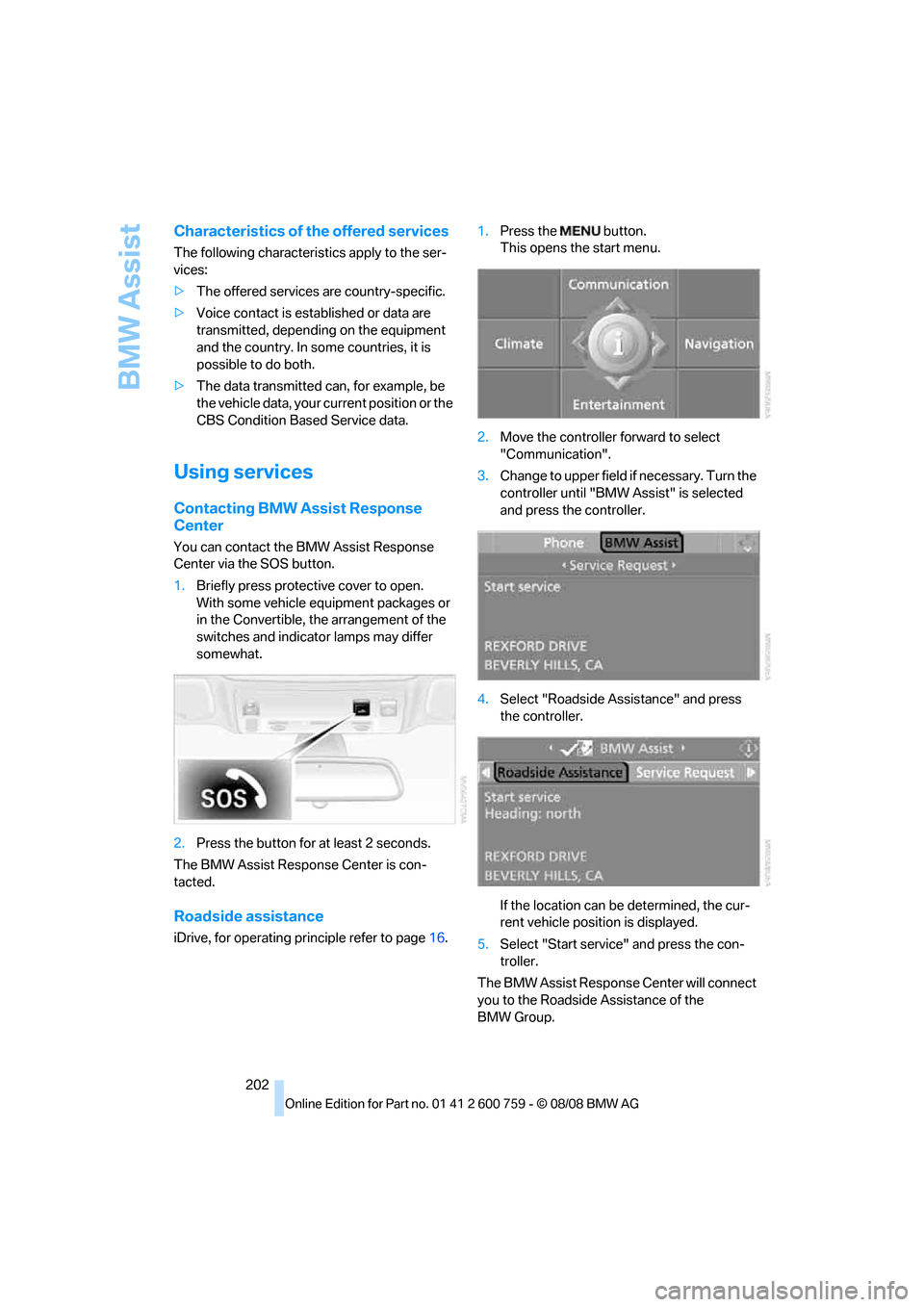
Center via the SOS button.
1.Briefly press protective cover to open.
With some vehicle equipment packages or
in the Convertible, the arrangement of the
switches and indicator lamps may differ
somewhat.
2.Press the button for at least 2 seconds.
The BMW Assist Response Center is con-
tacted.
Roadside assistance
iDrive, for operating principle refer to page16.1.Press the button.
This opens the start menu.
2.Move the controller forward to select
"Communication".
3.Change to upper field if necessary. Turn the
controller until "BMW Assist" is selected
and press the controller.
4.Select "Roadside Assistance" and press
the controller.
If the location can be determined, the cur-
rent vehicle position is displayed.
5.Select "Start service" and press the con-
troller.
The BMW Assist Response Center will connect
you to the Roadside Assistance of the
BMW Group.
Page 224 of 272
Under the hood
222
Engine oil
The engine oil consumption is dependent on
driving style and driving conditions.
Checking engine oil level
Your vehicle is equipped with an electronic oil
level check.
The condition for the most accurate indication
of the oil level possible is measurement with the
engine at operating temperature, i.e. following
an uninterrupted drive of at least 6 miles/10 km.
You can display the oil level on the Control Dis-
play while driving or when stopped on a level
surface with the engine running.
iDrive, for operating principle refer to page16.
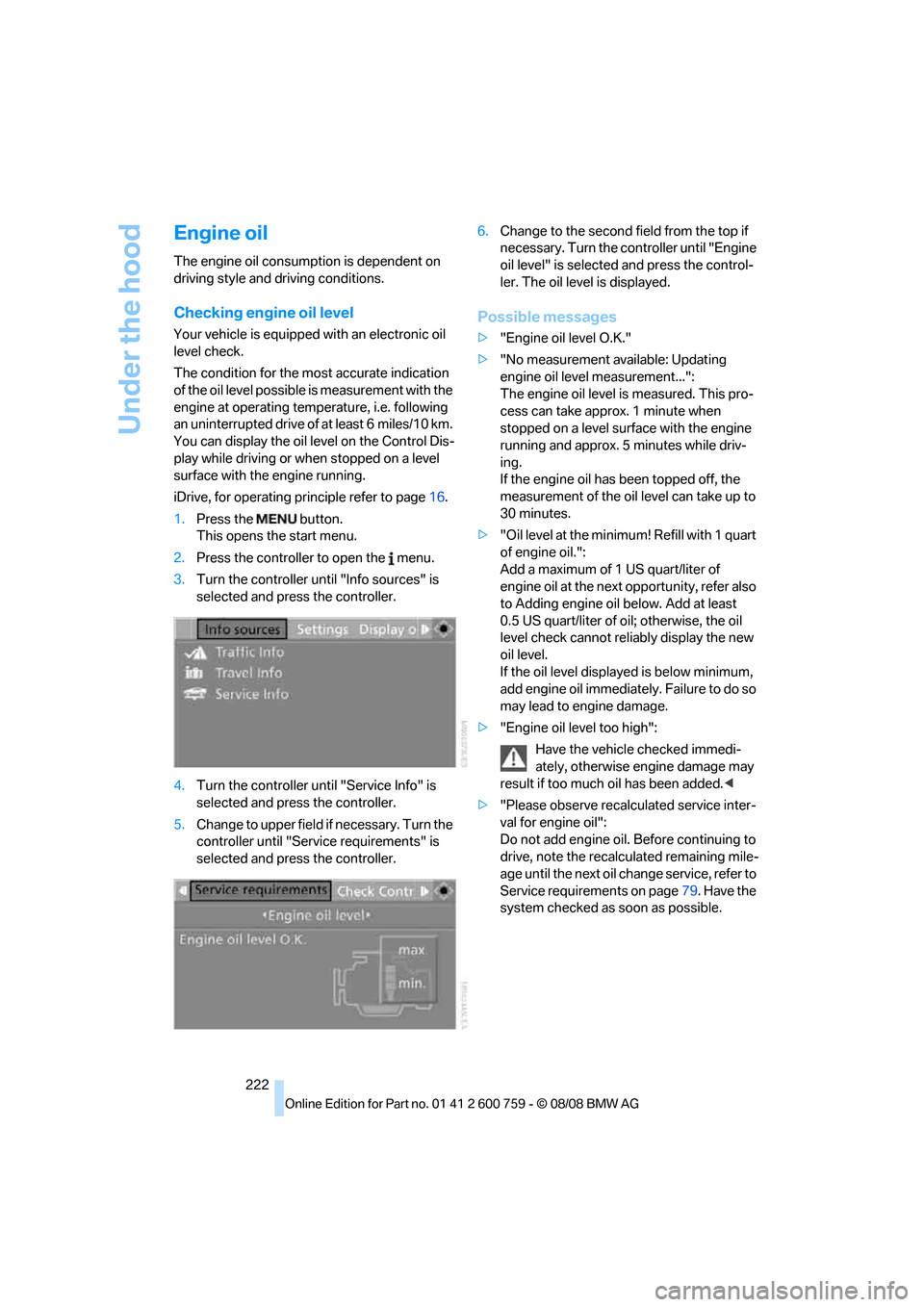
1.Press the button.
This opens the start menu.
2.Press the controller to open the menu.
3.Turn the controller until "Info sources" is
selected and press the controller.
4.Turn the controller until "Service Info" is
selected and press the controller.
5.Change to upper field if necessary. Turn the
controller until "Service requirements" is
selected and press the controller.6.Change to the second field from the top if
necessary. Turn the controller until "Engine
oil level" is selected and press the control-
ler. The oil level is displayed.
Possible messages
>"Engine oil level O.K."
>"No measurement available: Updating
engine oil level measurement...":
The engine oil level is measured. This pro-
cess can take approx. 1 minute when
stopped on a level surface with the engine
running and approx. 5 minutes while driv-
ing.
If the engine oil has been topped off, the
measurement of the oil level can take up to
30 minutes.
>"Oil level at the minimum! Refill with 1 quart
of engine oil.":
Add a maximum of 1 US quart/liter of
engine oil at the next opportunity, refer also
to Adding engine oil below. Add at least
0.5 US quart/liter of oil; otherwise, the oil
level check cannot reliably display the new
oil level.
If the oil level displayed is below minimum,
add engine oil immediately. Failure to do so
may lead to engine damage.
>"Engine oil level too high":
Have the vehicle checked immedi-
ately, otherwise engine damage may
result if too much oil has been added.<
>"Please observe recalculated service inter-
val for engine oil":
Do not add engine oil. Before continuing to
drive, note the recalculated remaining mile-
age until the next oil change service, refer to
Service requirements on page79. Have the
system checked as soon as possible.
Page 238 of 272
Giving and receiving assistance
236
Warning triangle*
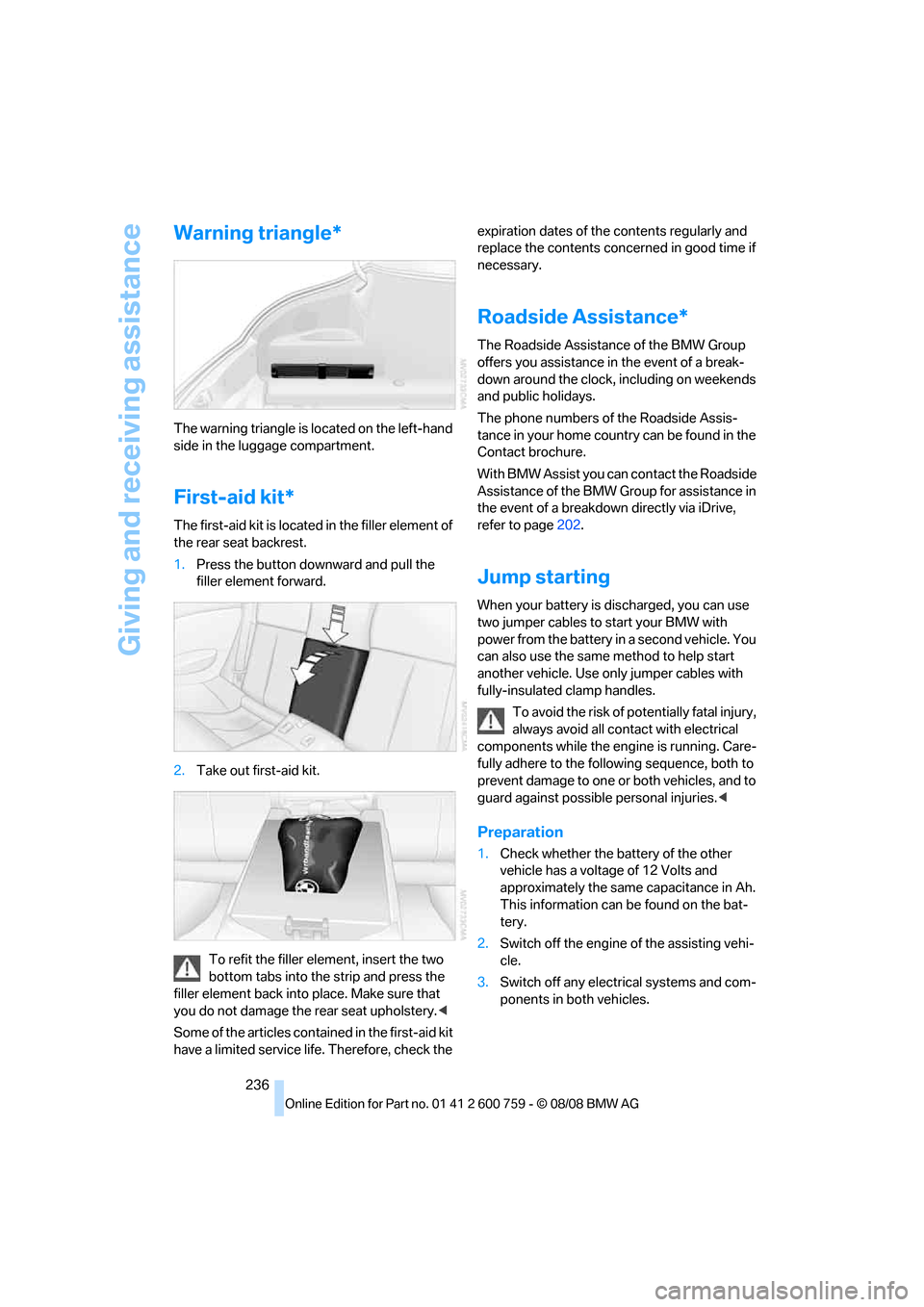
The warning triangle is located on the left-hand
side in the luggage compartment.
First-aid kit*
The first-aid kit is located in the filler element of
the rear seat backrest.
1.Press the button downward and pull the
filler element forward.
2.Take out first-aid kit.
To refit the filler element, insert the two
bottom tabs into the strip and press the
filler element back into place. Make sure that
you do not damage the rear seat upholstery.<
Some of the articles contained in the first-aid kit
have a limited service life. Therefore, check the expiration dates of the contents regularly and
replace the contents concerned in good time if
necessary.
Roadside Assistance*
The Roadside Assistance of the BMW Group
offers you assistance in the event of a break-
down around the clock, including on weekends
and public holidays.
The phone numbers of the Roadside Assis-
tance in your home country can be found in the
Contact brochure.
With BMW Assist you can contact the Roadside
Assistance of the BMW Group for assistance in
the event of a breakdown directly via iDrive,
refer to page202.
Jump starting
When your battery is discharged, you can use
two jumper cables to start your BMW with
power from the battery in a second vehicle. You
can also use the same method to help start
another vehicle. Use only jumper cables with
fully-insulated clamp handles.
To avoid the risk of potentially fatal injury,
always avoid all contact with electrical
components while the engine is running. Care-
fully adhere to the following sequence, both to
prevent damage to one or both vehicles, and to
guard against possible personal injuries.<
Preparation
1.Check whether the battery of the other
vehicle has a voltage of 12 Volts and
approximately the same capacitance in Ah.
This information can be found on the bat-
tery.
2.Switch off the engine of the assisting vehi-
cle.
3.Switch off any electrical systems and com-
ponents in both vehicles.
Page 255 of 272
Reference 253
At a glance
Controls
Driving tips
Communications
Navigation
Entertainment
Mobility
Car wash61,128
– refer to Before driving into a
car wash128
– with comfort access40
Car washes227
Catalytic converter, refer to
Hot exhaust system127
"Categories"172
CBC Cornering Brake
Control88
CBS Condition Based
Service225
"CD"160,174
CD changer174
– controls160
– fast forward/reverse178
– installation location178
– random sequence177
– repeating a track177
– sampling tracks176
– selecting a CD174
– selecting a track175
– switching on/off160
– tone control161
– volume161
CD player174
– controls160
– fast forward/reverse178
– random sequence177
– repeating a track177
– sampling a track176
– selecting a track175
– switching on/off160
– tone control161
– volume161
Center armrest, adjusting
height119
Center console14
"Central locking"32
Central locking
– from inside34
– from outside32
Central locking system31
– comfort access38
– hotel function35
Changes, technical, refer to
For your own safety6
Changing language on
Control Display86Changing scale for
navigation150
Changing units of measure on
Control Display86
Changing wheels
218,233
CHECK button82
Check Control81
"Check Control
messages"82
Check Gas Cap212
Checking air pressure, refer to
Tire inflation pressure214
Child restraint fixing system
LATCH58
Child restraint systems58
Child seats, refer to
Transporting children
safely58
Chrome-plated parts230
Chrome polish230
Cigarette lighter121
Cigarette lighter socket, refer
to Connecting electrical
devices121
Cleaning your BMW, refer to
Care227
"Climate"111
Clock76
– 12h/24h format85
– hour signal85
– setting time and date84
Closing
– from inside34
– from outside32
Closing fuel filler cap212
Clothes hooks, Coupe120
Cockpit10
Cold start, refer to Starting
engine61
Combined instrument, refer to
Instrument cluster12
Comfort access38
– observe in car wash40
– replacing battery, remote
control40
Comfort closing
– windows, with comfort
access with Coupe39
– with comfort access39"Communi-
cation"192,202,203
Compact Disc
– refer to CD changer174
– refer to CD player174
Compartment for remote
control, refer to Ignition
lock60
Compartments, refer to
Storage compartments120
Compressed audio files174
Computer77
– displays on Control
Display
78
– hour signal85
"Concert hall", tone
control162
"Concierge"205
Concierge service204
Condensation, refer to When
vehicle is parked128
Condition Based Service
CBS225
"Confirmation"33
Confirmation signals for
locking and unlocking33
Connecting car vacuum
cleaner, refer to Connecting
electrical devices121
Consumption display, refer to
Average fuel
consumption77
Consumption statistics, refer
to Average fuel
consumption77
"Continue guidance to
destination?"149
"Contrast" with BMW Night
Vision102
Control Center, refer to
iDrive16
Control Display, refer to
iDrive16
– setting brightness85
– switching off/on22
Controller, refer to iDrive16
Controls, refer to Cockpit10
Page 257 of 272
Reference 255
At a glance
Controls
Driving tips
Communications
Navigation
Entertainment
Mobility
Dimensions
– Convertible244
– Coupe243
Directional indicators, refer to
Turn signals65
Direction announcements,
refer to Voice
instructions151
Direction instructions, refer to
Voice instructions151
Directory, refer to Phone
book194
Directory for navigation, refer
to Address book144
Displacement, refer to Engine
data242
"Display"86
Display, refer to iDrive
controls16
Display elements, refer to
Instrument cluster12
Displaying vehicle data207
Display lighting, refer to
Instrument lighting108
"Display off"22
Displays
– on Control Display, refer to
iDrive16
– refer to Instrument
cluster12
"Display settings"85,99
Displays on the windshield,
refer to Head-Up Display98
Disposal
– battery of remote control
with comfort access40
– coolant223
– vehicle battery233
Distance, refer to
Computer78
Distance control, refer to
Active cruise control68
Distance to destination, refer
to Computer78
Distance warning, refer to
PDC Park Distance
Control87
Door entry lighting, refer to
Interior lamps108Door key, refer to Keys/
remote control30
Door lock34
"Door locks"32,80
Doors
– manual operation34
– remote control32
DOT Quality Grades216
Draft-free ventilation114
Drinks holder, refer to Cup
holders120
"Driver's door only"32
Driving lamps, refer to Parking
lamps/low beams
104
Driving route, refer to
Displaying route149
Driving stability control
systems88
Driving through water128
Driving tips, refer to General
driving notes126
Dry air, refer to Cooling
function113
Drying the air, refer to Cooling
function113
DSC Dynamic Stability
Control89
– indicator lamp13,89
– malfunction90
DTC Dynamic Traction
Control89
– activating89
– indicator lamp13,90
DVD for navigation134
Dynamic Brake Control DBC
– warning lamp90
Dynamic Drive90
Dynamic Driving Control64
"Dynamic route" in
navigation147
Dynamic Stability Control
DSC89
Dynamic Traction Control
DTC89
E
Easy entry, refer to Entering
rear53Easy entry/exit56
Eject button, refer to Buttons
in area of CD player160
Electrical malfunction
– convertible top45
– door lock34
– driver's door34
– fuel filler door212
– glass sunroof43
– luggage compartment lid36
– storage compartment, hotel
function35
Electrical steering wheel
adjustment56
Electric convertible top44
Electronic brake-force
distribution88
Electronic oil level check222
Emergency operation, refer to
Manual operation
– convertible top45
– door lock34
– driver's door34
– fuel filler door212
– glass sunroof43
– hotel function35
– luggage compartment lid36
– transmission lock, sport
automatic transmission64
Emergency release for
luggage compartment lid in
cargo bay37
Emergency request235
Emergency services, refer to
Roadside Assistance236
"Enabled services"207
"Enabled TeleServices"204
"Enable services"207
"End call"194
Page 260 of 272
Everything from A to Z
258
I
IBOC, refer to High Definition
Radio168
Ice on roads, refer to Outside
temperature warning76
ID3 tag, refer to Information on
track176
Identification mark
– recommended tire
brands219
– run-flat tires218
– tire coding216
iDrive16
– assistance window21
– changing date and time84
– changing language86
– changing menu page20
– changing settings84
– changing units of measure
and display type86
– confirming selection or
entry20
– controller16
– controls16
– displays, menus18
– operating principle18
– selecting menu item20
– setting brightness85
– start menu18
– status information21
– symbols19
Ignition60
– switched off61
– switched on60
Ignition key, refer to Keys/
remote control30
Ignition key position 1, refer to
Radio readiness60
Ignition key position 2, refer to
Ignition on60
Ignition lock60
– starting engine with comfort
access39
i menu18
Imprint2Indicator/warning lamps
– ABS Antilock Brake
System90
– active steering95
– airbags97
– brake system90
– DSC13,89
– DTC13,90
– Flat Tire Monitor92
– fog lamps13,108
– handbrake13,62
– safety belt warning54
– TPM Tire Pressure
Monitor93
Indicator and warning lamps
– overview13
Indicator lighting, refer to
Instrument lighting108
Inflation pressure, refer to Tire
inflation pressure214
Inflation pressure monitoring,
refer to Flat Tire Monitor90
Inflation pressure monitoring,
refer to Tire Pressure
Monitor92
Info menu18
Information
– on another location142
– on current position142
– on destination location142
"Information" in
navigation142
Information menu, refer to
imenu18
"Information on
destination"144
"Info sources"79
Initializing
– Flat Tire Monitor91
– radio, refer to Storing
stations166
– refer to Power failure233
– seat, mirror and steering
wheel memory51
– time and date84
"Input map"141
Installation location
– CD changer178
– drive for navigation DVD134Instructions for navigation
system, refer to Voice
instructions151
Instrument cluster12
Instrument lighting108
Instrument panel, refer to
Cockpit10
Integrated key30
Integrated universal remote
control117
Interesting destination for
navigation142
"Interim time"84
Interior lamps108
– switching on with remote
control33
Interior motion sensor38
– switching off38
Interior rearview mirror,
automatic dimming
feature56
Intermittent mode of the
wipers66
J
Jacking points233
Joystick, refer to iDrive16
Jumpering, refer to Jump
starting236
Jump starting236
K
Keyless-Go, refer to Comfort
access38
Keyless opening and closing,
refer to Comfort access38
Key Memory, refer to Personal
Profile30
"Keypad"196
Keys30
– key-related settings, refer to
Personal Profile30
– spare key30
Kick-down, Sport automatic
transmission63
Knee airbags95
Knock control213
Page 262 of 272
Everything from A to Z
260 MENU, button refer to Start
menu18
Menus, refer to iDrive16
Message list, traffic
information153
Microfilter114
Microphone
– for mobile phone14
– for voice command
system14
Mirror dimming feature56
Mirrors55
– automatic curb monitor56
– folding in and out55
– heating55
– memory, refer to Seat, mirror
and steering wheel
memory51
"Missed calls"194
Missed calls195
Mobile phone
– accepted calls195
– adjusting volume192
– calling193
– ending call193
– installation location, refer to
Center armrest119
– missed calls195
– operation by voice197
– operation via iDrive192
– redialing195
– refer to separate operating
instructions
– Top 8195
– touch tone dialing, refer to
Tone dialing method196
Mobile phone, refer to
separate operating
instructions
Mobile phone battery200
Monitor, refer to iDrive16
Monitoring pressure of tires,
refer to Flat Tire Monitor90
"Monitor on / off"57
Most recent mobile phone
numbers195MP3
– compressed audio files174
– USB-audio interface/mobile
phone audio interface181
Multi-function steering wheel,
refer to Buttons on steering
wheel11
Multifunction switch
– refer to Turn signals/
headlamp flasher65
– refer to Wiper system66
Music tracks
– finding176
– random play sequence177
– sampling, scan176
"Mute on / off"57
MW, waveband
164
N
"Navigation"78,136
Navigation destination
– entering manually136
– home address146
– selecting via map141
Navigation drive, installation
location134
Navigation DVD134
Navigation instructions, refer
to Switching voice
instructions on/off151Navigation system134
– address book144
– bypassing route
sections152
– destination entry136
– destination guidance in
assistance window134
– destination list143
– displaying current
position155
– displaying route149
– entering a destination
manually136
– entering destination via
voice139
– last destinations143
– navigation DVD134
– route list151
– searching for a special
destination142
– selecting destination using
information142
– selecting destination via
map141
– selecting route criteria146
– starting destination
guidance148
– switching off, refer to
Terminating/continuing
destination guidance148
– terminating/continuing
destination guidance148
– voice instructions151
– volume adjustment152
"Navigation voice
instructions"57,151
Neck support, refer to Front
head restraints52
"New address" in
navigation144
"New destination"136,141
New remote control30
"New route"152
New wheels and tires218
"Next entertainment
source"57
Night Vision, refer to
BMW Night Vision
100
"Night Vision off"102
Page 263 of 272
Reference 261
At a glance
Controls
Driving tips
Communications
Navigation
Entertainment
Mobility
"Night Vision on / off"57
Nozzles, refer to Windshield
washer nozzles67
Nylon rope, refer to Tow-
starting and towing237
O
OBD socket, refer to Socket
for Onboard Diagnostics
interface226
Octane ratings, refer to Fuel
specifications213
Odometer76
Oil, refer to Engine oil222
Oil change intervals
– refer to Service and
Warranty Information
Booklet for US models or
Warranty and Service Guide
Booklet for Canadian
models
– refer to Service
requirements79
"On a new destination" in
navigation142
Onboard computer, refer to
iDrive16
"Onboard info"78
Onboard toolkit231
"On destination"142
"On location"142
Opening and closing
– comfort access38
– from inside34
– from outside32
– using remote control32
– using the door lock34
Operating principle, iDrive18Operation by voice for mobile
phone197
– adjusting volume198
– canceling197
– commands197
– correcting phone
number198
– dialing phone number198
– placing a call198
– redialing199
– voice phone book198
"Options"205,206
Orientation menu, refer to
Start menu18
Output, refer to Engine
data242
Outside air, refer to AUC
Automatic recirculated-air
control113
Outside temperature
display76
– changing unit of measure86
Overheated engine, refer to
Coolant temperature76
Overview
– operating principle18
– radio control160
– screen display21
P
Panic mode33
Park Distance Control PDC87
"Parked car operation"115
"Parked car ventilation"115
Parked car ventilation
– activating activation
time115
– preselecting activation
times115
– switching on and off
directly115
Parked car ventilation system
– LED110
Parking
– vehicle61
Parking aid, refer to PDC Park
Distance Control87Parking assistant, refer to
PDC Park Distance
Control87
Parking brake, refer to
Handbrake62
Parking lamps104
– replacing bulbs232
Parts and accessories6
Passenger-side exterior
mirror, tilting down56
"Pathway lighting"105
Pathway lighting105
"PDC"88
"PDC display on"88
PDC Park Distance Control87
Personal Profile30
"Perspective"150
"Phone"188,190,193
Phone book192
– changing entry194
– creating and editing voice
phone book198
– deleting all entries195
– deleting entry195
– dialing phone number194
Phone numbers
– deleting from phone
book195
– dialing193
– most recent numbers195
– selecting in phone book195
– Top 8195
Pinch protection system
– glass sunroof43
– power windows42
Plasters, refer to First-aid
kit236
Plug-in unit for remote
control, refer to Ignition
lock60
Polish230
Pollen, refer to Microfilter/
activated charcoal filter114
Position, refer to Displaying
current position155
Position, refer to Storing
current position144
Power failure233
Page 265 of 272
Reference 263
At a glance
Controls
Driving tips
Communications
Navigation
Entertainment
Mobility
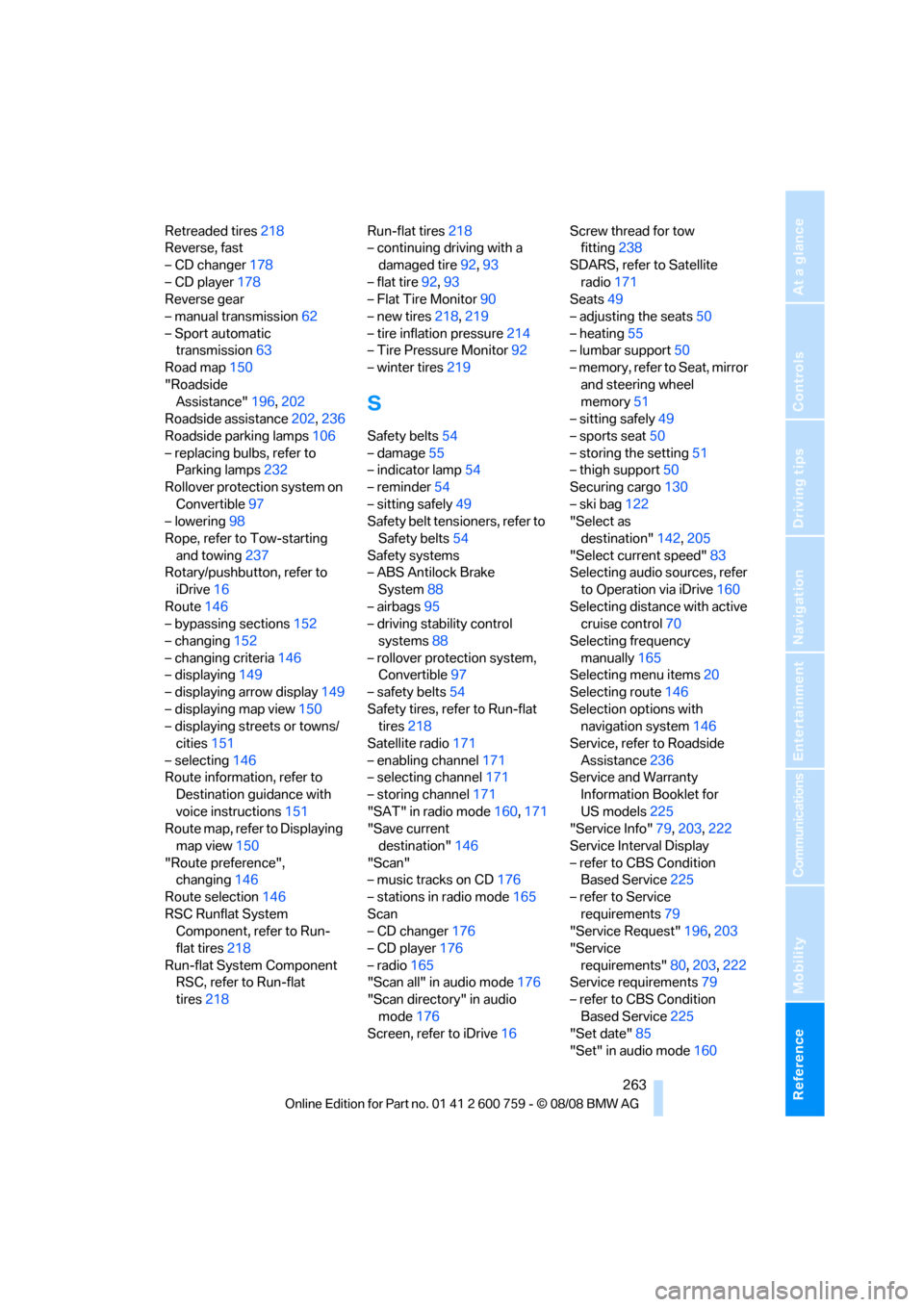
Retreaded tires218
Reverse, fast
– CD changer178
– CD player178
Reverse gear
– manual transmission62
– Sport automatic
transmission63
Road map150
"Roadside
Assistance"196,202
Roadside assistance202,236
Roadside parking lamps106
– replacing bulbs, refer to
Parking lamps232
Rollover protection system on
Convertible97
– lowering98
Rope, refer to Tow-starting
and towing237
Rotary/pushbutton, refer to
iDrive16
Route146
– bypassing sections152
– changing152
– changing criteria146
– displaying149
– displaying arrow display149
– displaying map view150
– displaying streets or towns/
cities151
– selecting146
Route information, refer to
Destination guidance with
voice instructions151
Route map, refer to Displaying
map view150
"Route preference",
changing146
Route selection146
RSC Runflat System
Component, refer to Run-
flat tires218
Run-flat System Component
RSC, refer to Run-flat
tires218Run-flat tires218
– continuing driving with a
damaged tire92,93
– flat tire92,93
– Flat Tire Monitor90
– new tires218,219
– tire inflation pressure214
– Tire Pressure Monitor92
– winter tires219
S
Safety belts54
– damage55
– indicator lamp54
– reminder54
– sitting safely49
Safety belt tensioners, refer to
Safety belts54
Safety systems
– ABS Antilock Brake
System88
– airbags95
– driving stability control
systems88
– rollover protection system,
Convertible97
– safety belts54
Safety tires, refer to Run-flat
tires218
Satellite radio171
– enabling channel171
– selecting channel171
– storing channel171
"SAT" in radio mode160,171
"Save current
destination"146
"Scan"
– music tracks on CD176
– stations in radio mode165
Scan
– CD changer176
– CD player176
– radio165
"Scan all" in audio mode176
"Scan directory" in audio
mode176
Screen, refer to iDrive16Screw thread for tow
fitting238
SDARS, refer to Satellite
radio171
Seats49
– adjusting the seats50
– heating55
– lumbar support50
– memory, refer to Seat, mirror
and steering wheel
memory51
– sitting safely49
– sports seat50
– storing the setting51
– thigh support50
Securing cargo130
– ski bag122
"Select as
destination"142,205
"Select current speed"83
Selecting audio sources, refer
to Operation via iDrive160
Selecting distance with active
cruise control70
Selecting frequency
manually165
Selecting menu items20
Selecting route146
Selection options with
navigation system146
Service, refer to Roadside
Assistance236
Service and Warranty
Information Booklet for
US models225
"Service Info"79,203,222
Service Interval Display
– refer to CBS Condition
Based Service225
– refer to Service
requirements79
"Service Request"196,203
"Service
requirements"80,203,222
Service requirements79
– refer to CBS Condition
Based Service225
"Set date"85
"Set" in audio mode160
Page 266 of 272
Everything from A to Z
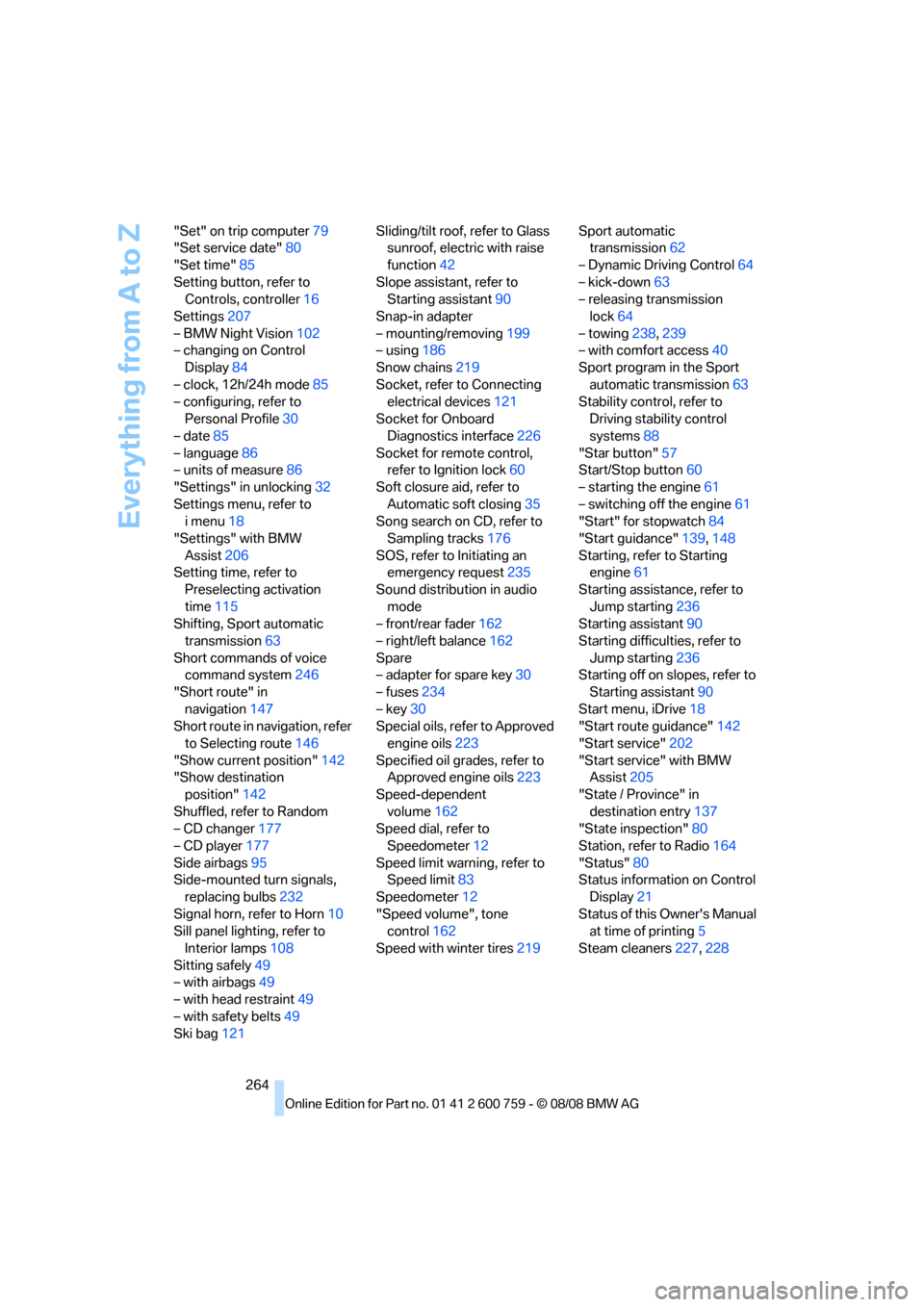
264 "Set" on trip computer79
"Set service date"80
"Set time"85
Setting button, refer to
Controls, controller16
Settings207
– BMW Night Vision102
– changing on Control
Display84
– clock, 12h/24h mode85
– configuring, refer to
Personal Profile30
– date85
– language86
– units of measure86
"Settings" in unlocking32
Settings menu, refer to
imenu18
"Settings" with BMW
Assist206
Setting time, refer to
Preselecting activation
time115
Shifting, Sport automatic
transmission63
Short commands of voice
command system246
"Short route" in
navigation147
Short route in navigation, refer
to Selecting route146
"Show current position"142
"Show destination
position"142
Shuffled, refer to Random
– CD changer177
– CD player177
Side airbags95
Side-mounted turn signals,
replacing bulbs232
Signal horn, refer to Horn10
Sill panel lighting, refer to
Interior lamps108
Sitting safely49
– with airbags49
– with head restraint49
– with safety belts49
Ski bag121Sliding/tilt roof, refer to Glass
sunroof, electric with raise
function42
Slope assistant, refer to
Starting assistant90
Snap-in adapter
– mounting/removing199
– using186
Snow chains219
Socket, refer to Connecting
electrical devices121
Socket for Onboard
Diagnostics interface
226
Socket for remote control,
refer to Ignition lock60
Soft closure aid, refer to
Automatic soft closing35
Song search on CD, refer to
Sampling tracks176
SOS, refer to Initiating an
emergency request235
Sound distribution in audio
mode
– front/rear fader162
– right/left balance162
Spare
– adapter for spare key30
– fuses234
– key30
Special oils, refer to Approved
engine oils223
Specified oil grades, refer to
Approved engine oils223
Speed-dependent
volume162
Speed dial, refer to
Speedometer12
Speed limit warning, refer to
Speed limit83
Speedometer12
"Speed volume", tone
control162
Speed with winter tires219Sport automatic
transmission62
– Dynamic Driving Control64
– kick-down63
– releasing transmission
lock64
– towing238,239
– with comfort access40
Sport program in the Sport
automatic transmission63
Stability control, refer to
Driving stability control
systems88
"Star button"57
Start/Stop button60
– starting the engine61
– switching off the engine61
"Start" for stopwatch84
"Start guidance"139,148
Starting, refer to Starting
engine61
Starting assistance, refer to
Jump starting236
Starting assistant90
Starting difficulties, refer to
Jump starting236
Starting off on slopes, refer to
Starting assistant90
Start menu, iDrive18
"Start route guidance"142
"Start service"202
"Start service" with BMW
Assist205
"State / Province" in
destination entry137
"State inspection"80
Station, refer to Radio164
"Status"80
Status information on Control
Display21
Status of this Owner's Manual
at time of printing5
Steam cleaners227,228