display BMW 650I COUPE 2006 E63 User Guide
[x] Cancel search | Manufacturer: BMW, Model Year: 2006, Model line: 650I COUPE, Model: BMW 650I COUPE 2006 E63Pages: 236, PDF Size: 8.21 MB
Page 19 of 236
iDrive
18
Opening menu items of start menu
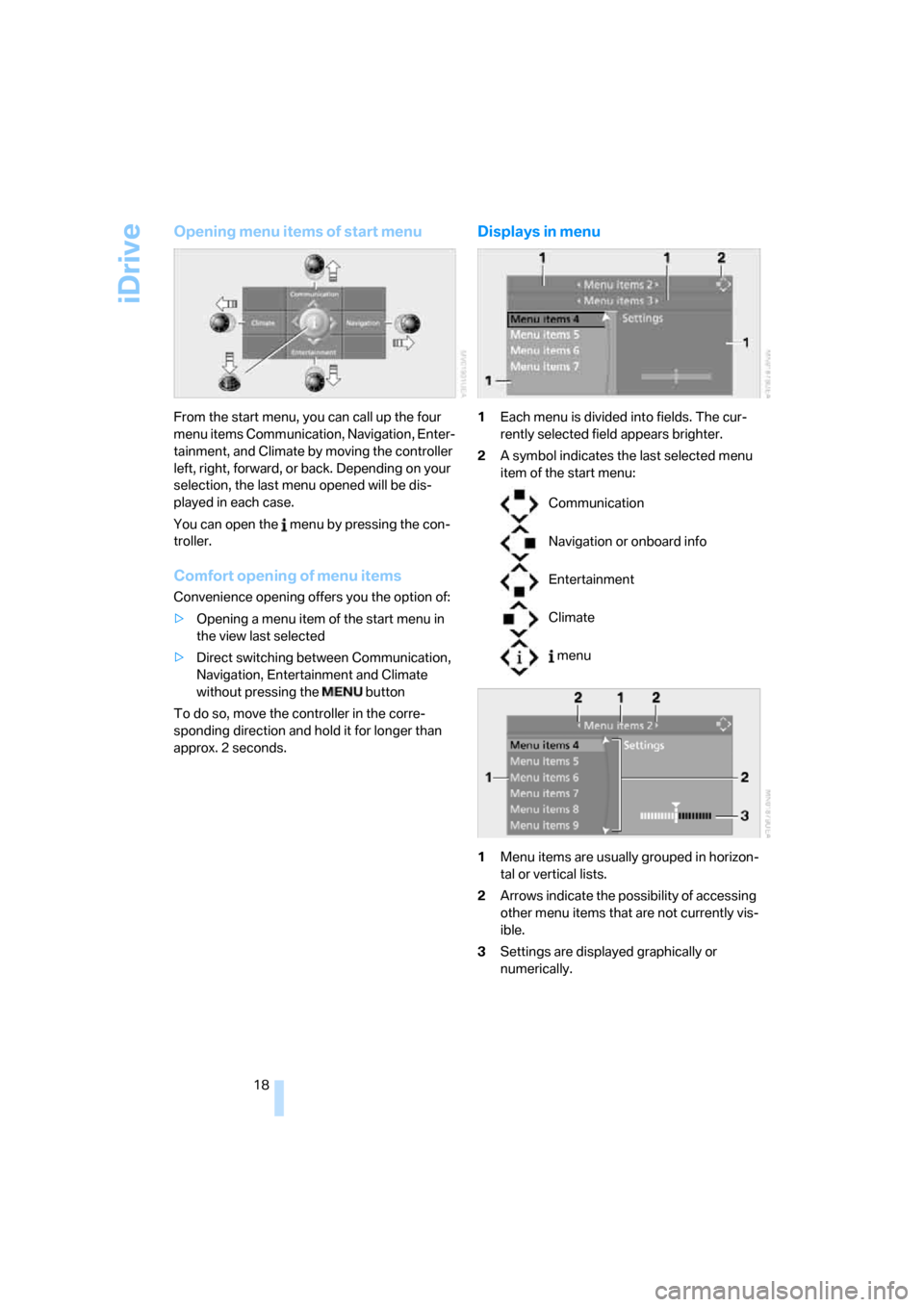
From the start menu, you can call up the four
menu items Communication, Navigation, Enter-
tainment, and Climate by moving the controller
left, right, forward, or back. Depending on your
selection, the last menu opened will be dis-
played in each case.
You can open the menu by pressing the con-
troller.
Comfort opening of menu items
Convenience opening offers you the option of:
>Opening a menu item of the start menu in
the view last selected
>Direct switching between Communication,
Navigation, Entertainment and Climate
without pressing the button
To do so, move the controller in the corre-
sponding direction and hold it for longer than
approx. 2 seconds.
Displays in menu
1Each menu is divided into fields. The cur-
rently selected field appears brighter.
2A symbol indicates the last selected menu
item of the start menu:
1Menu items are usually grouped in horizon-
tal or vertical lists.
2Arrows indicate the possibility of accessing
other menu items that are not currently vis-
ible.
3Settings are displayed graphically or
numerically.
Communication
Navigation or onboard info
Entertainment
Climate
menu
Page 20 of 236
At a glance
19Reference
Controls
Driving tips
Communications
Navigation
Entertainment
Mobility
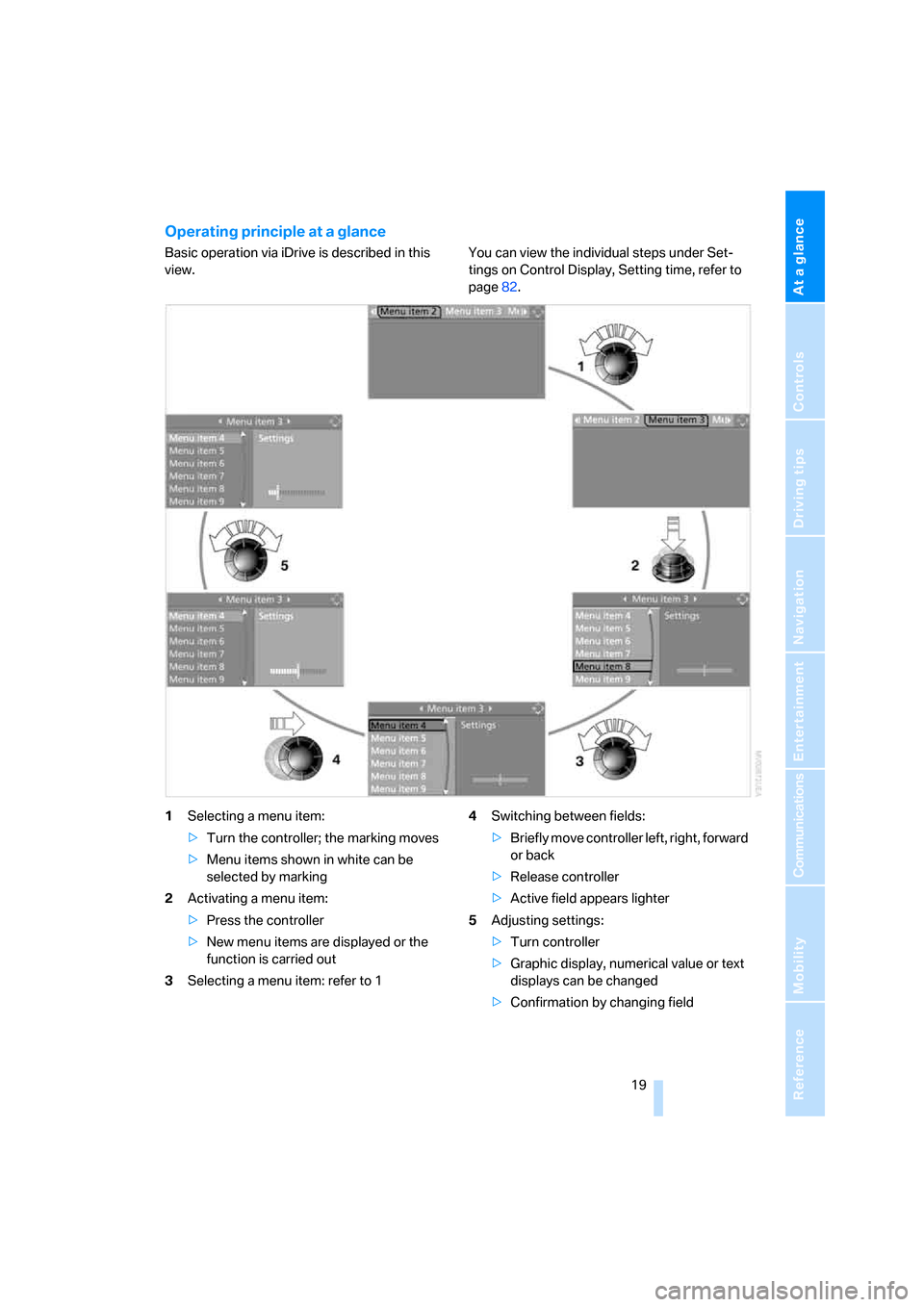
Operating principle at a glance
Basic operation via iDrive is described in this
view.You can view the individual steps under Set-
tings on Control Display, Setting time, refer to
page82.
1Selecting a menu item:
>Turn the controller; the marking moves
>Menu items shown in white can be
selected by marking
2Activating a menu item:
>Press the controller
>New menu items are displayed or the
function is carried out
3Selecting a menu item: refer to 14Switching between fields:
>Briefly move controller left, right, forward
or back
>Release controller
>Active field appears lighter
5Adjusting settings:
>Turn controller
>Graphic display, numerical value or text
displays can be changed
>Confirmation by changing field
Page 21 of 236
iDrive
20
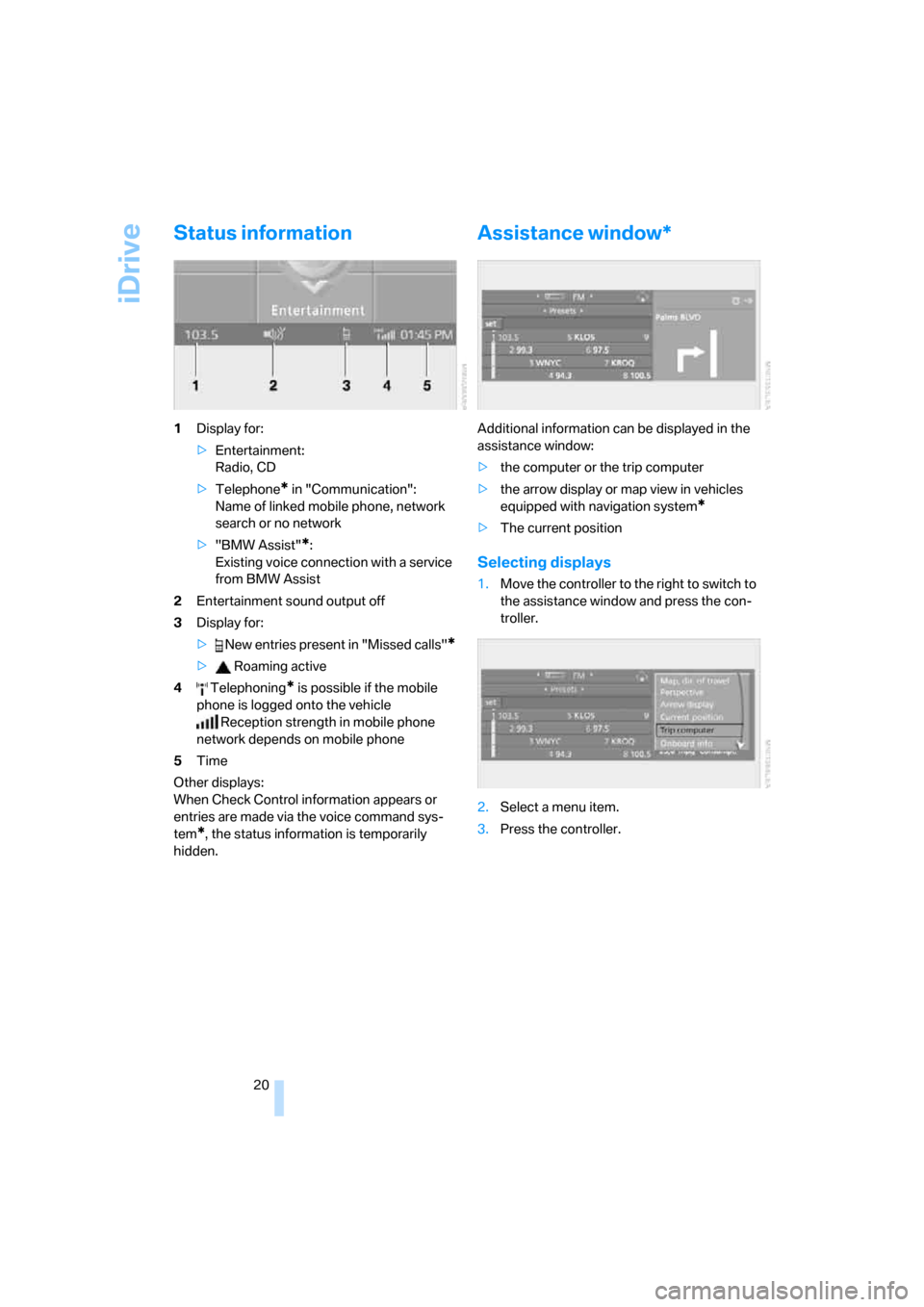
Status information
1Display for:
>Entertainment:
Radio, CD
>Telephone
* in "Communication":
Name of linked mobile phone, network
search or no network
>"BMW Assist"
*:
Existing voice connection with a service
from BMW Assist
2Entertainment sound output off
3Display for:
> New entries present in "Missed calls"
*
> Roaming active
4 Telephoning
* is possible if the mobile
phone is logged onto the vehicle
Reception strength in mobile phone
network depends on mobile phone
5Time
Other displays:
When Check Control information appears or
entries are made via the voice command sys-
tem
*, the status information is temporarily
hidden.
Assistance window*
Additional information can be displayed in the
assistance window:
>the computer or the trip computer
>the arrow display or map view in vehicles
equipped with navigation system
*
>The current position
Selecting displays
1.Move the controller to the right to switch to
the assistance window and press the con-
troller.
2.Select a menu item.
3.Press the controller.
Page 22 of 236
At a glance
21Reference
Controls
Driving tips
Communications
Navigation
Entertainment
Mobility
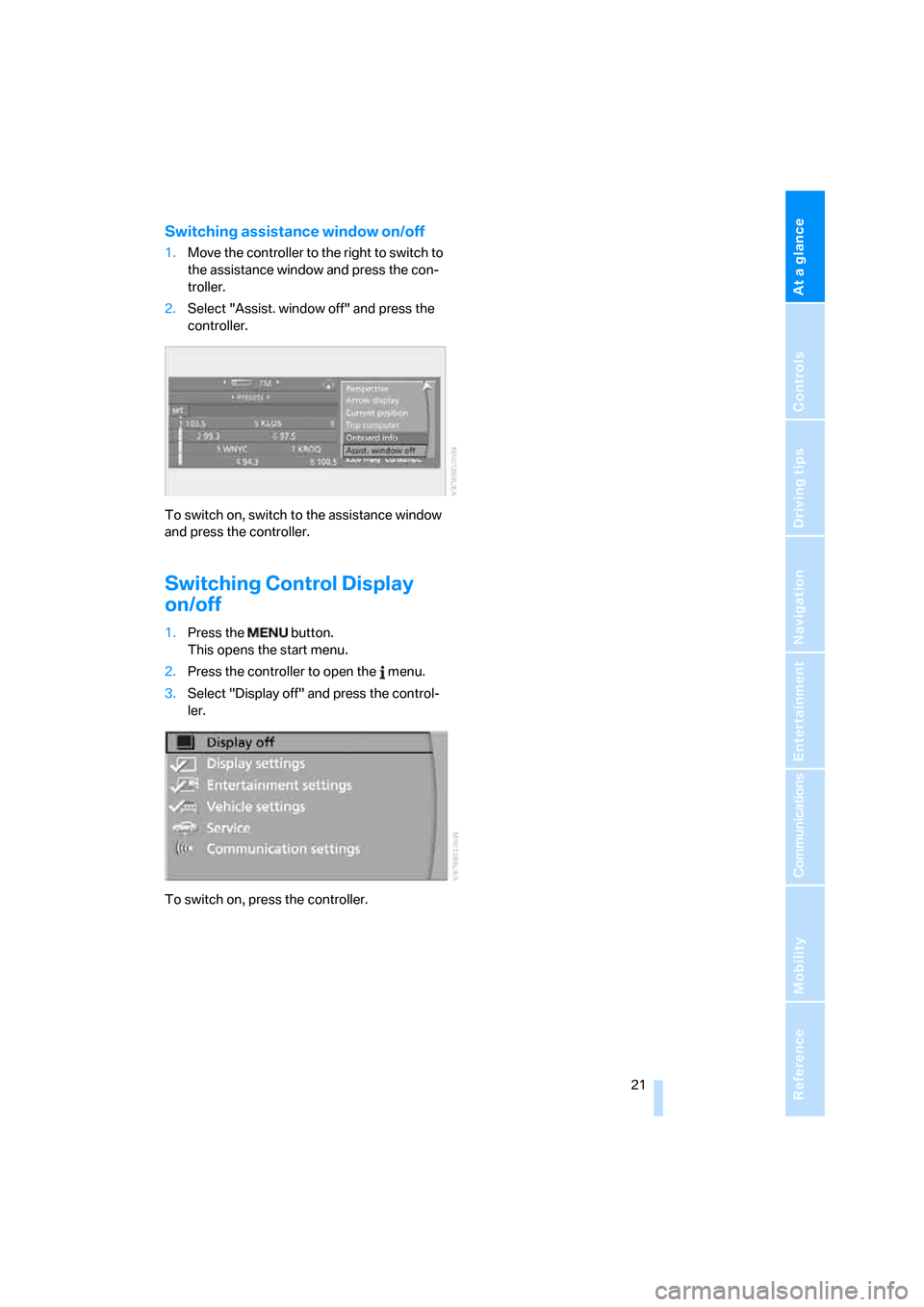
Switching assistance window on/off
1.Move the controller to the right to switch to
the assistance window and press the con-
troller.
2.Select "Assist. window off" and press the
controller.
To switch on, switch to the assistance window
and press the controller.
Switching Control Display
on/off
1.Press the button.
This opens the start menu.
2.Press the controller to open the menu.
3.Select "Display off" and press the control-
ler.
To switch on, press the controller.
Page 23 of 236
Voice command system
22
Voice command system
The concept
The voice command system allows you to con-
trol operation of various vehicle systems with-
out ever removing your hands from the steering
wheel.
Individual menu items on the Control Display
can be spoken as commands. This frees you of
having to use the controller.
The voice command system transforms your
spoken commands into control signals for the
selected systems and provides support in the
form of instructions or questions.
The voice command system includes a special
microphone.
The microphone is located:
>Near the interior rearview mirror in the
Coupe, refer to page14
>On the steering column in the Convertible
Prerequisite
In order to enable identification of the com-
mands to be spoken, use iDrive to set the lan-
guage for the voice command system. Setting
iDrive language, refer to page84.
Symbol in the Owner's Manual
Voice commands
Activating voice command system
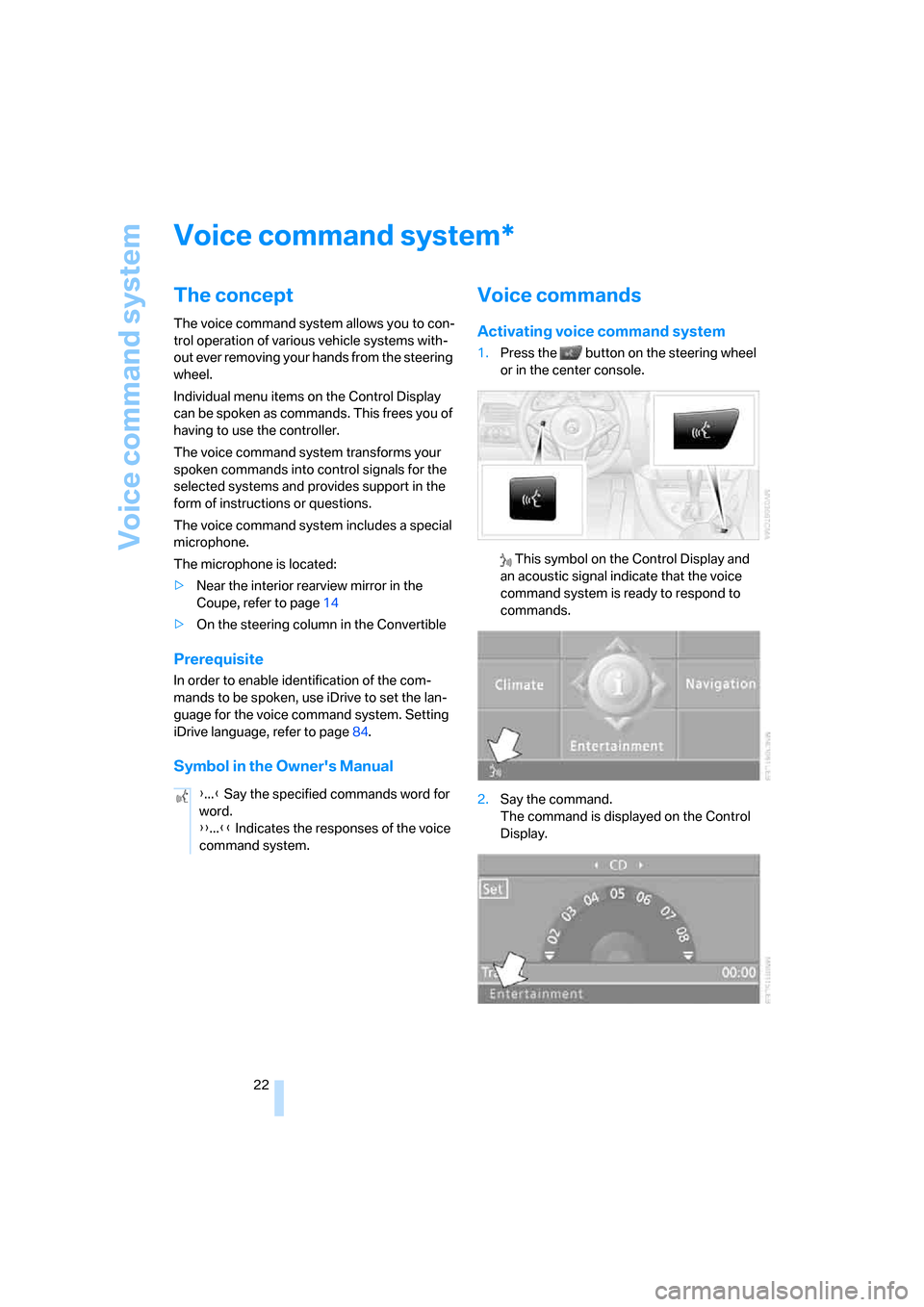
1.Press the button on the steering wheel
or in the center console.
This symbol on the Control Display and
an acoustic signal indicate that the voice
command system is ready to respond to
commands.
2.Say the command.
The command is displayed on the Control
Display.
*
{...} Say the specified commands word for
word.
{{...}} Indicates the responses of the voice
command system.
Page 24 of 236
At a glance
23Reference
Controls
Driving tips
Communications
Navigation
Entertainment
Mobility
This symbol appears on the Control Display
when it is possible to input additional com-
mands.
If no other commands are possible, then oper-
ate the equipment using iDrive.
Terminating or canceling voice input
Press the button on the steering wheel or in
the center console
or
Commands
Having possible commands read aloud
You can have the system read aloud the possi-
ble commands related to the selected menu
item on the Control Display.
To have the system list the possible com-
mands:
For example, if you have selected "CD", the
system will read aloud the possible commands
for operating the CD player and the CD
changer.
Opening help
Using alternative commands
There are often several commands for running
a function, e.g.:
Running functions directly with short
commands
You can use short commands to carry out cer-
tain functions directly, regardless of which
menu item is selected, refer to page213.
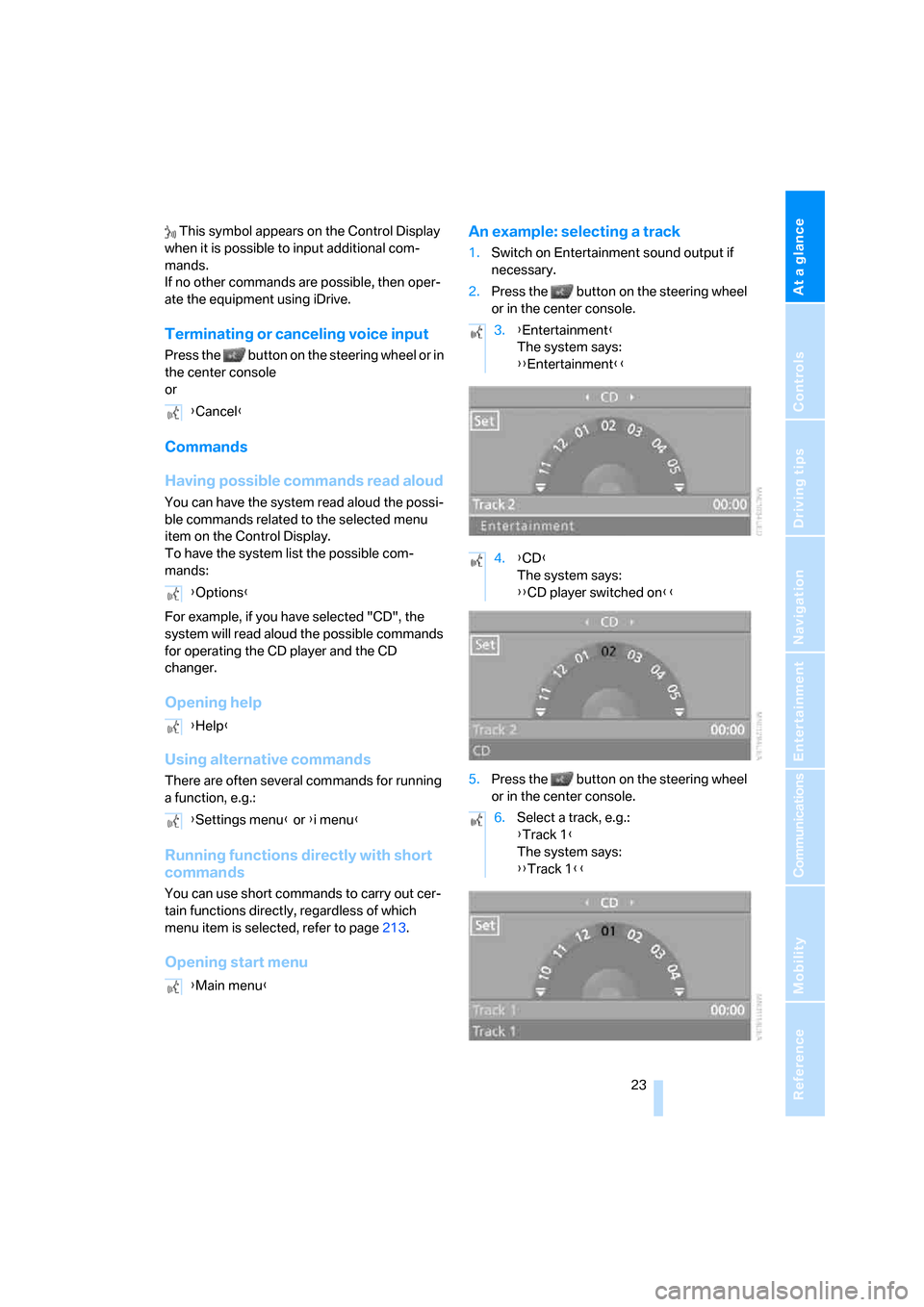
Opening start menuAn example: selecting a track
1.Switch on Entertainment sound output if
necessary.
2.Press the button on the steering wheel
or in the center console.
5.Press the button on the steering wheel
or in the center console. {Cancel}
{Options}
{Help}
{Settings menu} or {i menu}
{Main menu}
3.{Entertainment}
The system says:
{{Entertainment}}
4.{CD}
The system says:
{{CD player switched on}}
6.Select a track, e.g.:
{Track 1}
The system says:
{{Track 1}}
Page 30 of 236
Controls
29Reference
At a glance
Driving tips
Communications
Navigation
Entertainment
Mobility
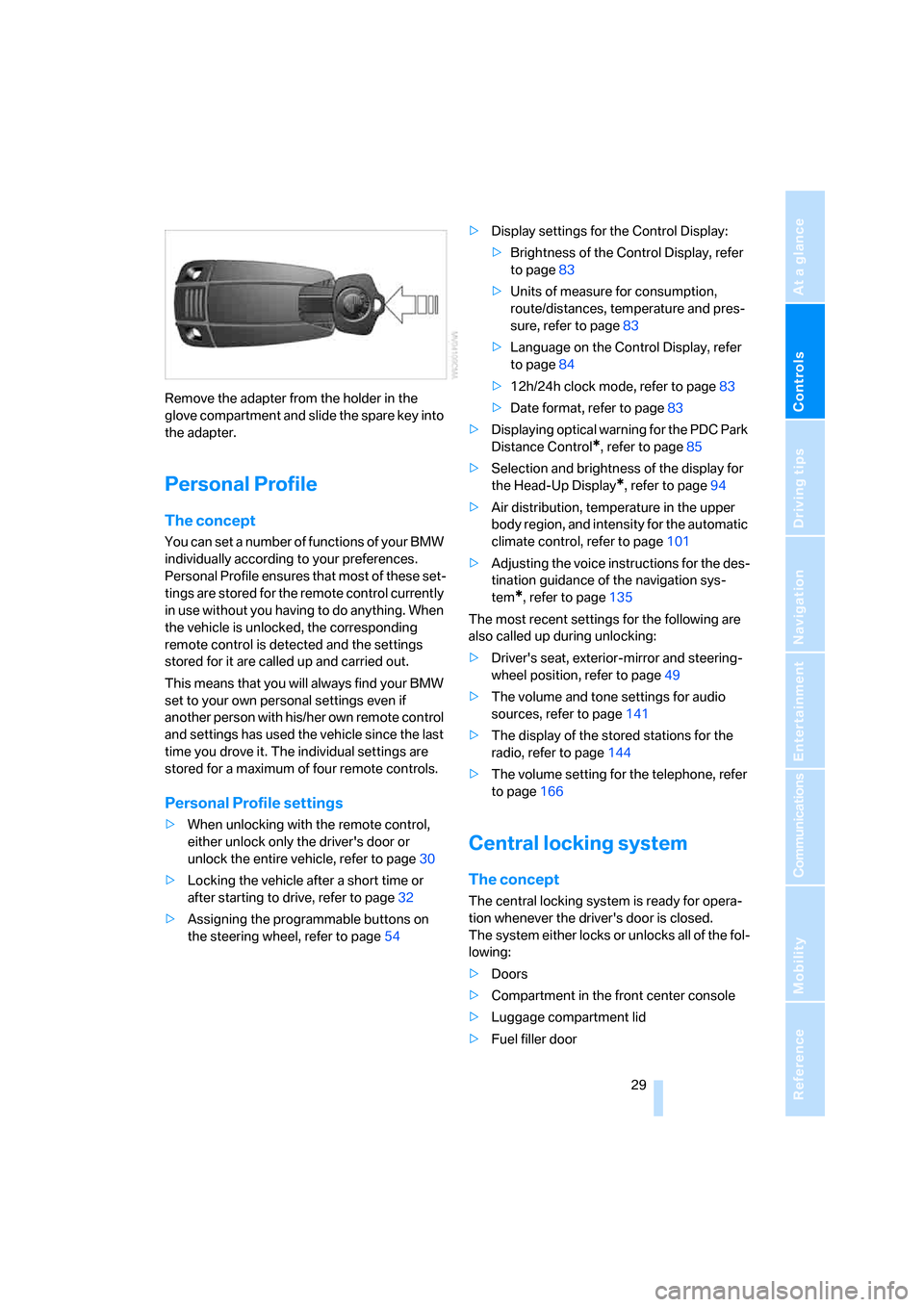
Remove the adapter from the holder in the
glove compartment and slide the spare key into
the adapter.
Personal Profile
The concept
You can set a number of functions of your BMW
individually according to your preferences.
Personal Profile ensures that most of these set-
tings are stored for the remote control currently
in use without you having to do anything. When
the vehicle is unlocked, the corresponding
remote control is detected and the settings
stored for it are called up and carried out.
This means that you will always find your BMW
set to your own personal settings even if
another person with his/her own remote control
and settings has used the vehicle since the last
time you drove it. The individual settings are
stored for a maximum of four remote controls.
Personal Profile settings
>When unlocking with the remote control,
either unlock only the driver's door or
unlock the entire vehicle, refer to page30
>Locking the vehicle after a short time or
after starting to drive, refer to page32
>Assigning the programmable buttons on
the steering wheel, refer to page54>Display settings for the Control Display:
>Brightness of the Control Display, refer
to page83
>Units of measure for consumption,
route/distances, temperature and pres-
sure, refer to page83
>Language on the Control Display, refer
to page84
>12h/24h clock mode, refer to page83
>Date format, refer to page83
>Displaying optical warning for the PDC Park
Distance Control
*, refer to page85
>Selection and brightness of the display for
the Head-Up Display
*, refer to page94
>Air distribution, temperature in the upper
body region, and intensity for the automatic
climate control, refer to page101
>Adjusting the voice instructions for the des-
tination guidance of the navigation sys-
tem
*, refer to page135
The most recent settings for the following are
also called up during unlocking:
>Driver's seat, exterior-mirror and steering-
wheel position, refer to page49
>The volume and tone settings for audio
sources, refer to page141
>The display of the stored stations for the
radio, refer to page144
>The volume setting for the telephone, refer
to page166
Central locking system
The concept
The central locking system is ready for opera-
tion whenever the driver's door is closed.
The system either locks or unlocks all of the fol-
lowing:
>Doors
>Compartment in the front center console
>Luggage compartment lid
>Fuel filler door
Page 37 of 236
Opening and closing
36
Indicator lamp displays
>The indicator lamp below the interior rear-
view mirror flashes continuously: the sys-
tem is armed.
>The indicator lamp flashes after locking: the
doors or luggage compartment lid are not
properly closed. Even if you do not close the
alerted area, the system begins to monitor
the remaining areas, and the indicator lamp
flashes continuously after approx. 10 sec-
onds. However, the interior motion sensor
is not activated.
>After the vehicle is unlocked, the indicator
lamp goes out: no manipulation or
attempted intrusions have been detected in
the period since the system was armed.
>The indicator lamp flashes after unlocking
until the remote control is inserted into the
ignition lock, however for a maximum of
approx. 5 minutes: an attempted entry has
been detected in the period since the sys-
tem was armed.
Tilt alarm sensor
Monitors the inclination of the vehicle. The
alarm system reacts, for example, if someone
attempts to steal the wheels or tow the vehicle.
Interior motion sensor
Coupe:
In order for the interior motion sensor to func-
tion properly, the windows and glass sunroof
*
must be completely closed.
Convertible:
Monitors the interior up to the height of the seat
cushions. This means that the alarm system,
including the interior motion sensor, is armed even if the convertible top is open. Falling
objects, e.g. leaves, can trigger false alarms,
refer to Avoiding unintentional alarms.
Avoiding unintentional alarms
The tilt alarm sensor and interior motion sensor
may be switched off at the same time. This pre-
vents unintentional alarms, e.g. in the following
situations:
>In stacking garages
>When transporting on car-carrying trains
>When animals are to remain in the vehicle
Switching off the tilt alarm sensor and
interior motion sensor
Press the button on the remote control
once again immediately after locking.
The indicator lamp lights up briefly and then
flashes continuously. The tilt alarm sensor and
the interior motion sensor are switched off until
the vehicle is unlocked and locked again.
Comfort access*
Comfort access enables you to access your
vehicle without having to hold the remote con-
trol in your hand. It is sufficient to carry the
remote control with you, e.g. in your jacket
pocket. The vehicle automatically detects the
related remote control in the immediate vicinity
or in the interior.
Comfort access supports the following func-
tions:
>Unlocking/locking vehicle
>Starting engine
>Comfort locking
Functional requirement
>The vehicle can only be unlocked if the
vehicle detects that the remote control car-
ried is located outside the vehicle.
>The next unlocking and locking cycle is not
possible until after approx. 2 seconds.
Page 38 of 236
Controls
37Reference
At a glance
Driving tips
Communications
Navigation
Entertainment
Mobility
>The engine can only be started if the vehicle
detects that the remote control carried is
located in the vehicle.
Special features in contrast to ordinary
remote control
It is basically irrelevant whether you operate the
above-mentioned functions with the comfort
access feature or by pressing the buttons on
the remote control. Before doing so, please
familiarize yourself with the information on
opening and closing, starting on page28.
The special features when using comfort
access are described below.
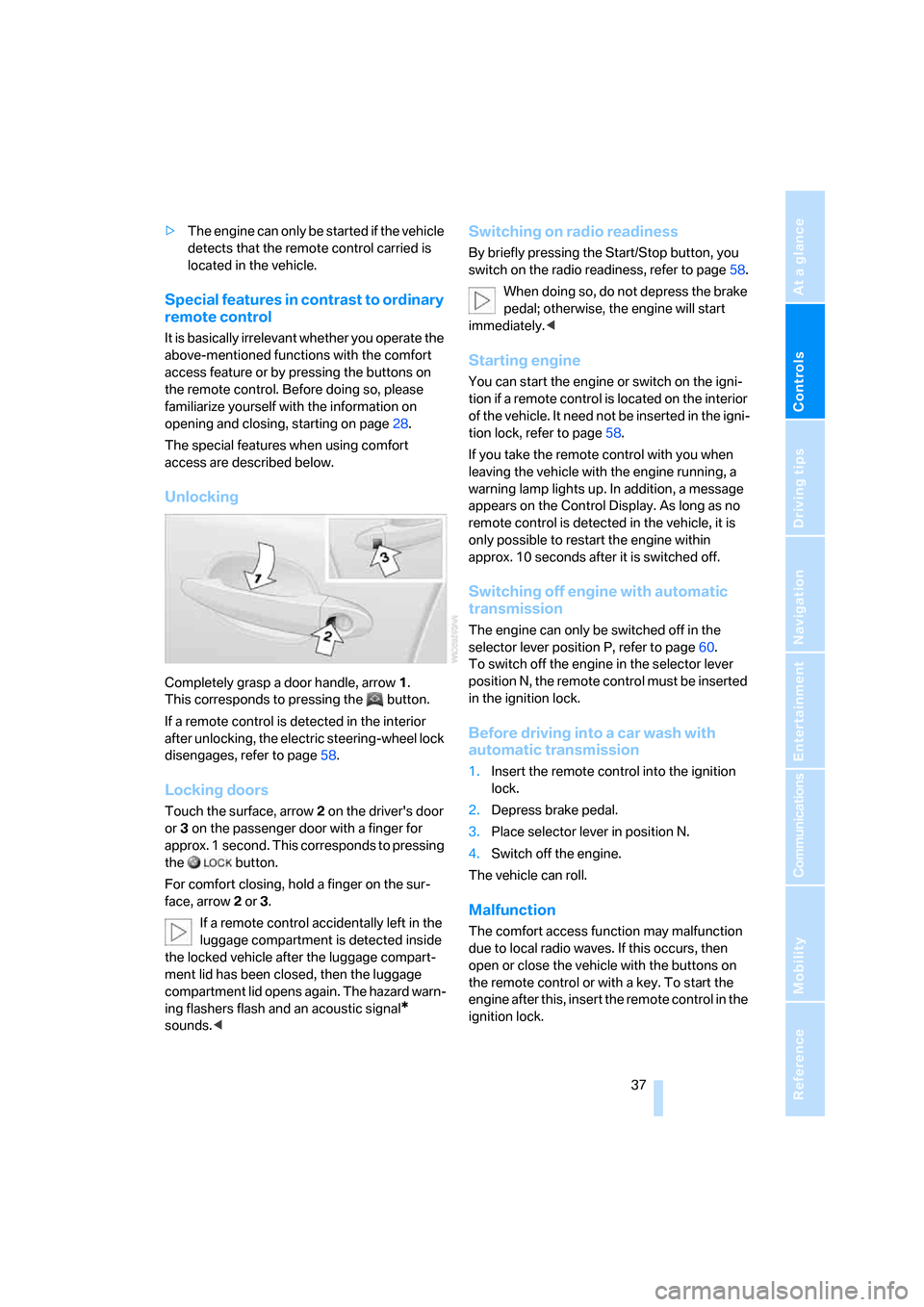
Unlocking
Completely grasp a door handle, arrow1.
This corresponds to pressing the button.
If a remote control is detected in the interior
after unlocking, the electric steering-wheel lock
disengages, refer to page58.
Locking doors
Touch the surface, arrow2 on the driver's door
or3 on the passenger door with a finger for
approx. 1 second. This corresponds to pressing
the button.
For comfort closing, hold a finger on the sur-
face, arrow2 or 3.
If a remote control accidentally left in the
luggage compartment is detected inside
the locked vehicle after the luggage compart-
ment lid has been closed, then the luggage
compartment lid opens again. The hazard warn-
ing flashers flash and an acoustic signal
*
sounds.<
Switching on radio readiness
By briefly pressing the Start/Stop button, you
switch on the radio readiness, refer to page58.
When doing so, do not depress the brake
pedal; otherwise, the engine will start
immediately.<
Starting engine
You can start the engine or switch on the igni-
tion if a remote control is located on the interior
of the vehicle. It need not be inserted in the igni-
tion lock, refer to page58.
If you take the remote control with you when
leaving the vehicle with the engine running, a
warning lamp lights up. In addition, a message
appears on the Control Display. As long as no
remote control is detected in the vehicle, it is
only possible to restart the engine within
approx. 10 seconds after it is switched off.
Switching off engine with automatic
transmission
The engine can only be switched off in the
selector lever position P, refer to page60.
To switch off the engine in the selector lever
position N, the remote control must be inserted
in the ignition lock.
Before driving into a car wash with
automatic transmission
1.Insert the remote control into the ignition
lock.
2.Depress brake pedal.
3.Place selector lever in position N.
4.Switch off the engine.
The vehicle can roll.
Malfunction
The comfort access function may malfunction
due to local radio waves. If this occurs, then
open or close the vehicle with the buttons on
the remote control or with a key. To start the
engine after this, insert the remote control in the
ignition lock.
Page 43 of 236
Opening and closing
42 In order to avoid damage, do not operate
the convertible top at temperatures
below + 147/–106.
Do not leave the convertible top in its storage
compartment for longer than one day when wet;
otherwise, damage from moisture can occur.
Do not place any objects on the convertible top;
otherwise, if the top were to be operated, these
objects could fall off and lead to damage or
injury.
Never move the convertible top when the roll-
over protection system is raised.
Driving without having completed the opening
or closing action can lead to damage or injury.
Do not place hands in the top mechanism dur-
ing the opening and closing action. Keep chil-
dren away from the travel path of the convert-
ible top.
For safety reasons, do not operate the convert-
ible top unless the vehicle is stationary.<
If you have initiated top operation with the
vehicle at a stop and then start to drive,
e.g. at a traffic light, you can continue the
initiated operation up to a speed of 20 mph/
30 km/h:
To do so, press and hold the corresponding
button.<
Partial vacuums that occur at higher
speeds in the passenger compartment
can make the convertible top flap. Use the auto-
matic climate control to increase the air supply
so that a partial vacuum in the vehicle does not
occur.<
Prior to opening and closing
>Read the safety precautions above carefully
and comply with them fully.
>Make sure that the convertible top com-
partment floor in the luggage compartment
is in the lowered position, refer to page35;
otherwise, the convertible top cannot be
opened.
>Make sure that the luggage compartment
lid is closed.
Opening and closing
Ignition key in radio ready position or higher,
refer to page58, with the vehicle stationary:
To avoid putting excessive strain on the
battery, operate the convertible top only
when the engine is running, if possible.
Before closing the convertible top, remove for-
eign objects from the windshield frame, as
these might inhibit closing of the convertible
top.<
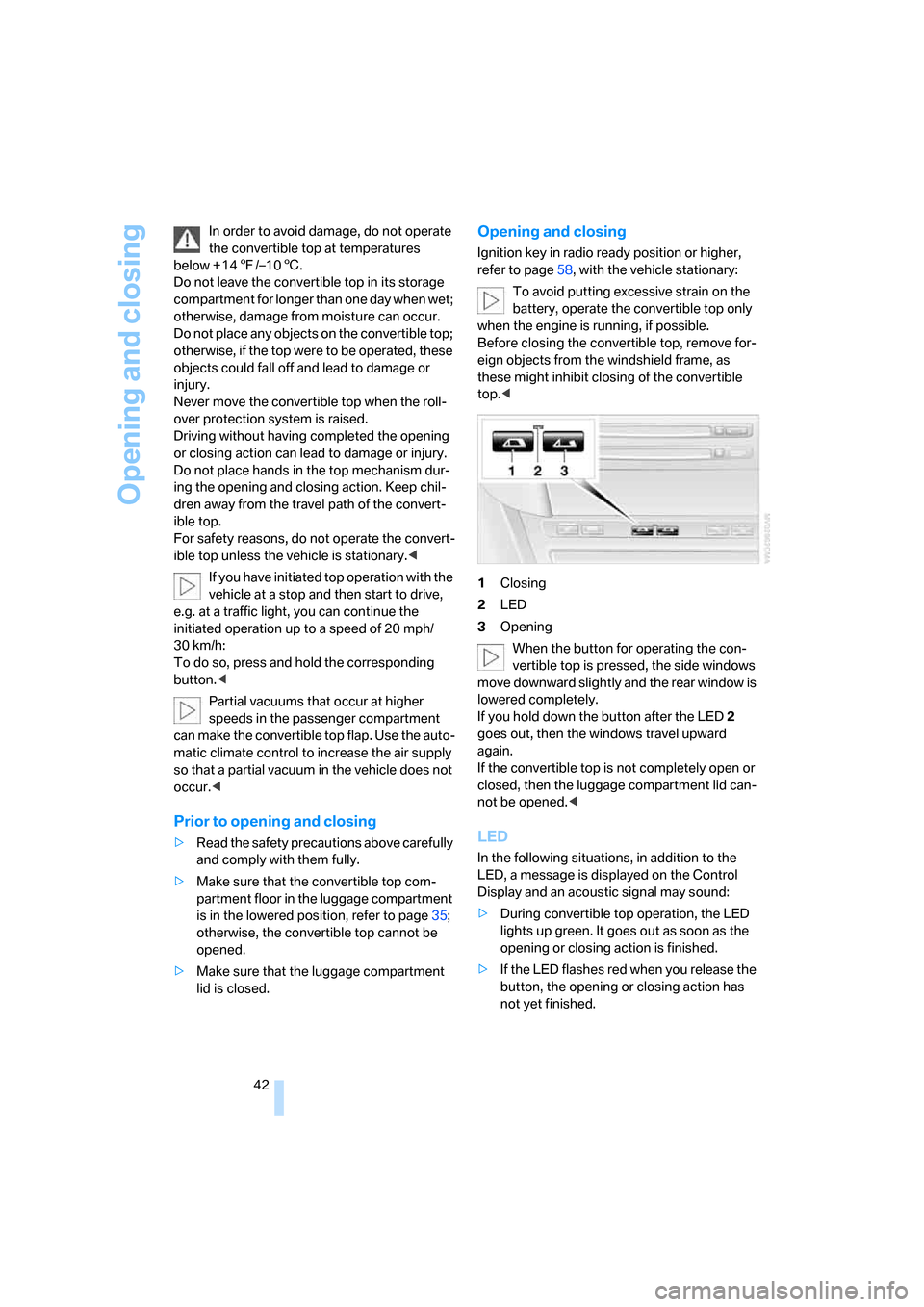
1Closing
2LED
3Opening
When the button for operating the con-
vertible top is pressed, the side windows
move downward slightly and the rear window is
lowered completely.
If you hold down the button after the LED2
goes out, then the windows travel upward
again.
If the convertible top is not completely open or
closed, then the luggage compartment lid can-
not be opened.<
LED
In the following situations, in addition to the
LED, a message is displayed on the Control
Display and an acoustic signal may sound:
>During convertible top operation, the LED
lights up green. It goes out as soon as the
opening or closing action is finished.
>If the LED flashes red when you release the
button, the opening or closing action has
not yet finished.