fog light BMW 650I COUPE 2015 User Guide
[x] Cancel search | Manufacturer: BMW, Model Year: 2015, Model line: 650I COUPE, Model: BMW 650I COUPE 2015Pages: 251, PDF Size: 7.22 MB
Page 122 of 251
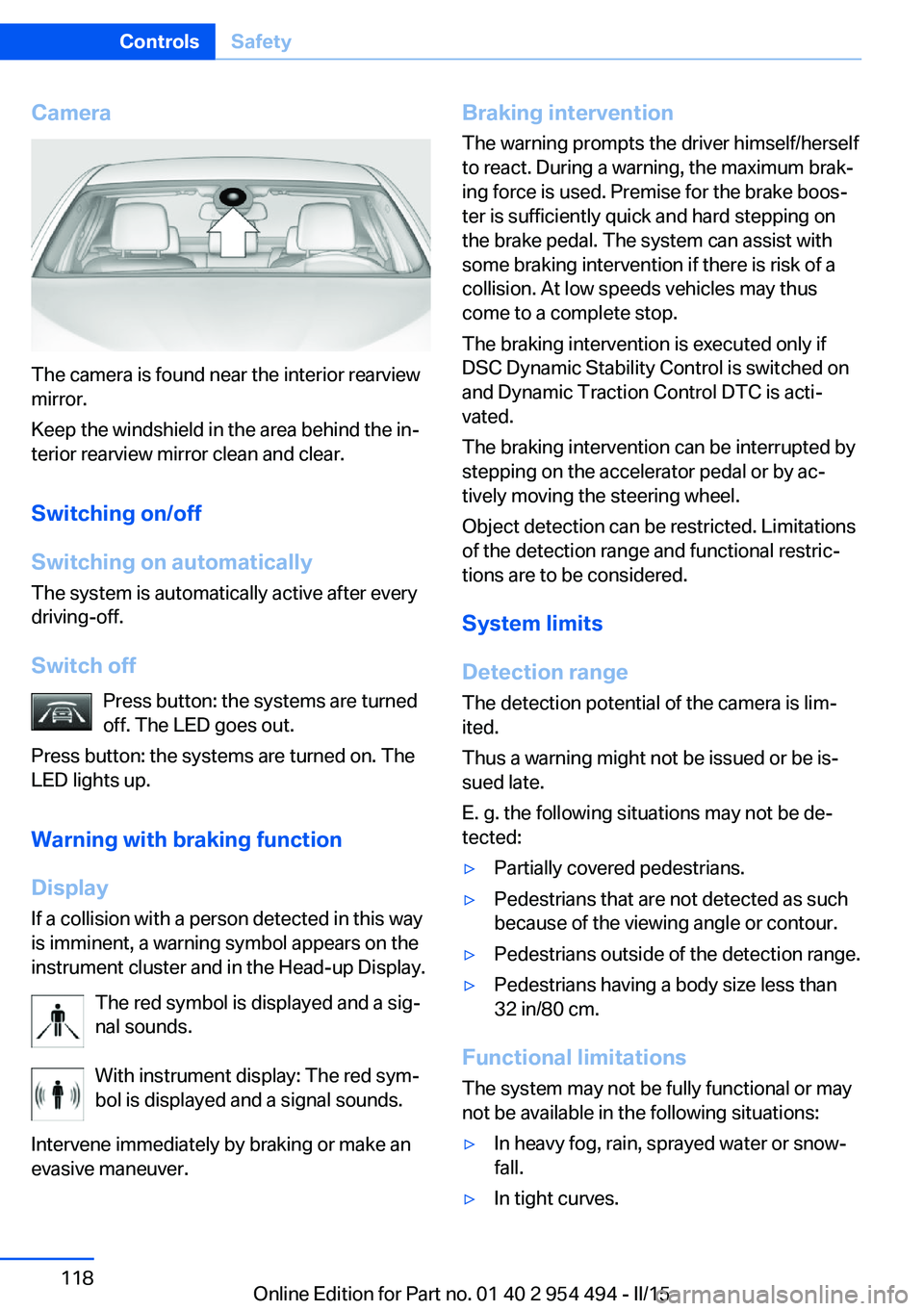
Camera
The camera is found near the interior rearview
mirror.
Keep the windshield in the area behind the in‐
terior rearview mirror clean and clear.
Switching on/off
Switching on automatically The system is automatically active after every
driving-off.
Switch off Press button: the systems are turned
off. The LED goes out.
Press button: the systems are turned on. The
LED lights up.
Warning with braking function
Display
If a collision with a person detected in this way
is imminent, a warning symbol appears on the
instrument cluster and in the Head-up Display.
The red symbol is displayed and a sig‐
nal sounds.
With instrument display: The red sym‐
bol is displayed and a signal sounds.
Intervene immediately by braking or make an
evasive maneuver.
Braking intervention
The warning prompts the driver himself/herself
to react. During a warning, the maximum brak‐
ing force is used. Premise for the brake boos‐
ter is sufficiently quick and hard stepping on
the brake pedal. The system can assist with
some braking intervention if there is risk of a
collision. At low speeds vehicles may thus
come to a complete stop.
The braking intervention is executed only if
DSC Dynamic Stability Control is switched on
and Dynamic Traction Control DTC is acti‐
vated.
The braking intervention can be interrupted by
stepping on the accelerator pedal or by ac‐
tively moving the steering wheel.
Object detection can be restricted. Limitations
of the detection range and functional restric‐
tions are to be considered.
System limits
Detection range
The detection potential of the camera is lim‐
ited.
Thus a warning might not be issued or be is‐
sued late.
E. g. the following situations may not be de‐
tected:▷Partially covered pedestrians.▷Pedestrians that are not detected as such
because of the viewing angle or contour.▷Pedestrians outside of the detection range.▷Pedestrians having a body size less than
32 in/80 cm.
Functional limitations
The system may not be fully functional or may
not be available in the following situations:
▷In heavy fog, rain, sprayed water or snow‐
fall.▷In tight curves.Seite 118ControlsSafety118
Online Edition for Part no. 01 40 2 954 494 - II/15
Page 127 of 251
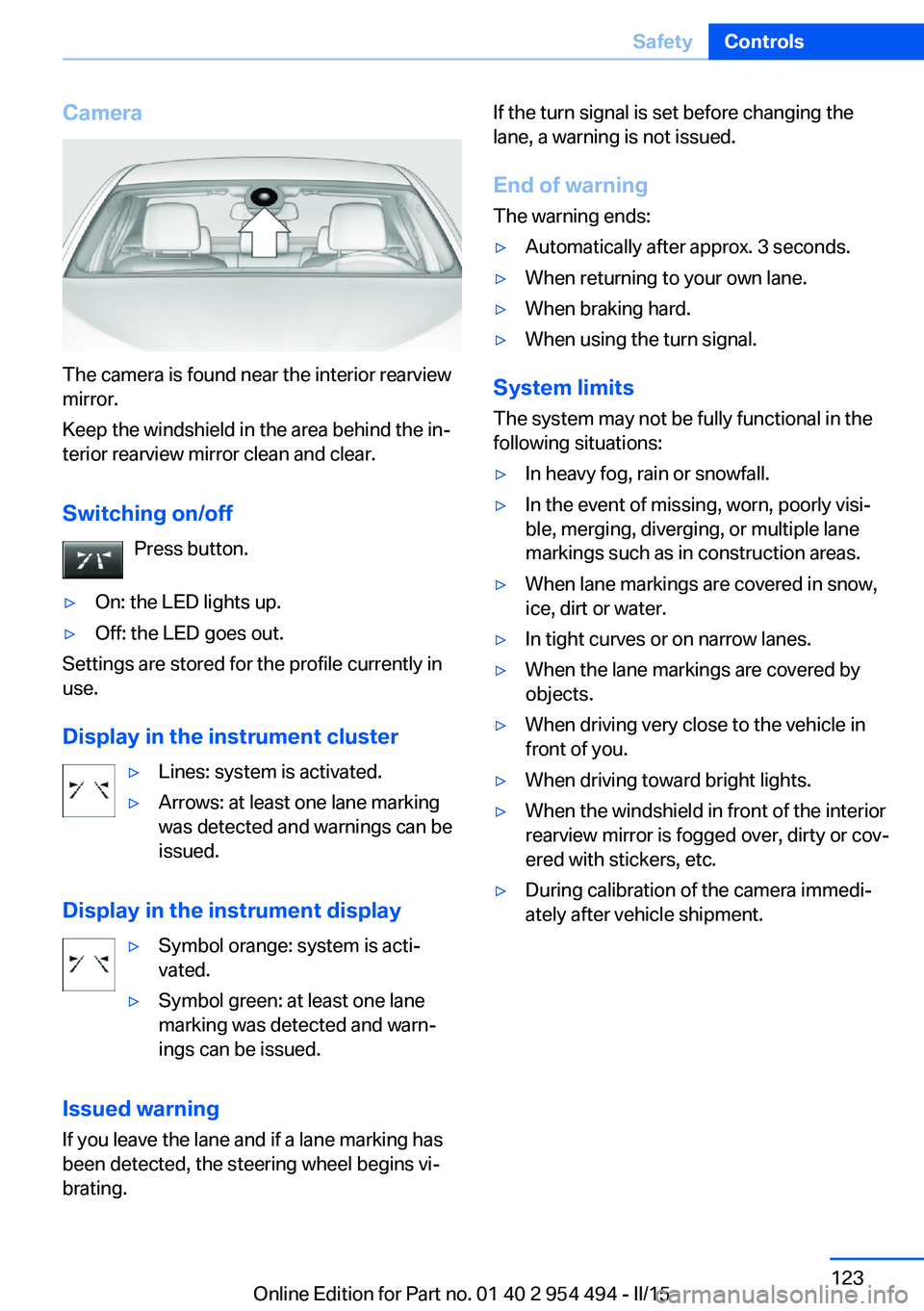
Camera
The camera is found near the interior rearview
mirror.
Keep the windshield in the area behind the in‐
terior rearview mirror clean and clear.
Switching on/off Press button.
▷On: the LED lights up.▷Off: the LED goes out.
Settings are stored for the profile currently in
use.
Display in the instrument cluster
▷Lines: system is activated.▷Arrows: at least one lane marking
was detected and warnings can be
issued.
Display in the instrument display
▷Symbol orange: system is acti‐
vated.▷Symbol green: at least one lane
marking was detected and warn‐
ings can be issued.
Issued warning
If you leave the lane and if a lane marking has
been detected, the steering wheel begins vi‐
brating.
If the turn signal is set before changing the
lane, a warning is not issued.
End of warning The warning ends:▷Automatically after approx. 3 seconds.▷When returning to your own lane.▷When braking hard.▷When using the turn signal.
System limits
The system may not be fully functional in the
following situations:
▷In heavy fog, rain or snowfall.▷In the event of missing, worn, poorly visi‐
ble, merging, diverging, or multiple lane
markings such as in construction areas.▷When lane markings are covered in snow,
ice, dirt or water.▷In tight curves or on narrow lanes.▷When the lane markings are covered by
objects.▷When driving very close to the vehicle in
front of you.▷When driving toward bright lights.▷When the windshield in front of the interior
rearview mirror is fogged over, dirty or cov‐
ered with stickers, etc.▷During calibration of the camera immedi‐
ately after vehicle shipment.Seite 123SafetyControls123
Online Edition for Part no. 01 40 2 954 494 - II/15
Page 129 of 251
Display
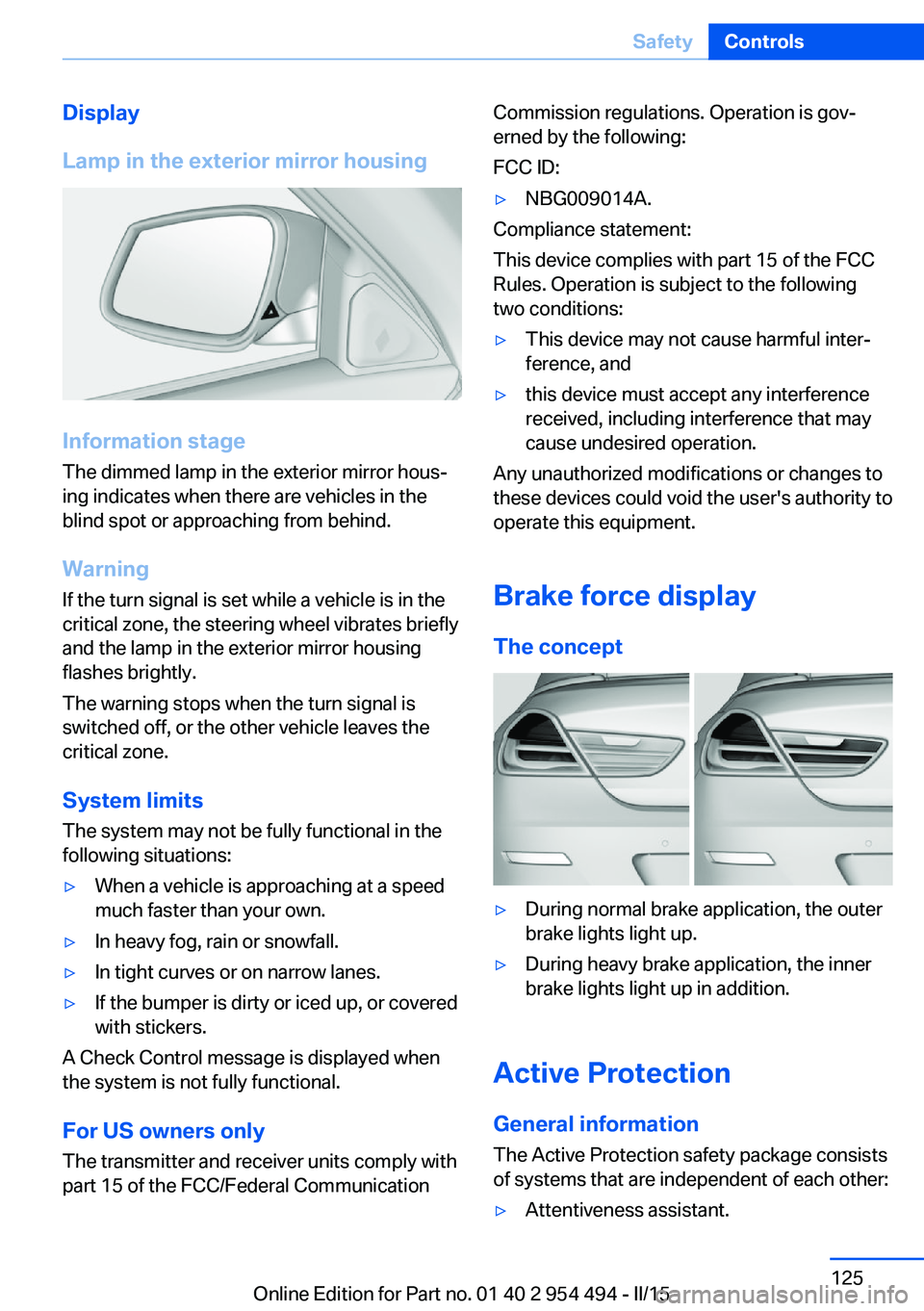
Lamp in the exterior mirror housing
Information stage
The dimmed lamp in the exterior mirror hous‐
ing indicates when there are vehicles in the
blind spot or approaching from behind.
Warning If the turn signal is set while a vehicle is in the
critical zone, the steering wheel vibrates briefly
and the lamp in the exterior mirror housing
flashes brightly.
The warning stops when the turn signal is
switched off, or the other vehicle leaves the
critical zone.
System limits
The system may not be fully functional in the
following situations:
▷When a vehicle is approaching at a speed
much faster than your own.▷In heavy fog, rain or snowfall.▷In tight curves or on narrow lanes.▷If the bumper is dirty or iced up, or covered
with stickers.
A Check Control message is displayed when
the system is not fully functional.
For US owners only The transmitter and receiver units comply with
part 15 of the FCC/Federal Communication
Commission regulations. Operation is gov‐
erned by the following:
FCC ID:▷NBG009014A.
Compliance statement:
This device complies with part 15 of the FCC
Rules. Operation is subject to the following
two conditions:
▷This device may not cause harmful inter‐
ference, and▷this device must accept any interference
received, including interference that may
cause undesired operation.
Any unauthorized modifications or changes to
these devices could void the user's authority to
operate this equipment.
Brake force display
The concept
▷During normal brake application, the outer
brake lights light up.▷During heavy brake application, the inner
brake lights light up in addition.
Active Protection
General information
The Active Protection safety package consists
of systems that are independent of each other:
▷Attentiveness assistant.Seite 125SafetyControls125
Online Edition for Part no. 01 40 2 954 494 - II/15
Page 140 of 251
Driving comfortVehicle features and options
This chapter describes all standard, country-
specific and optional features offered with the
series. It also describes features that are not
necessarily available in your car, e. g., due to
the selected options or country versions. This
also applies to safety-related functions and
systems. The respectively applicable country
provisions must be observed when using the
respective features and systems.
Active Cruise Control with Stop & Go function, ACC
The concept
Use this system to select a desired speed that
the vehicle will maintain automatically on clear
roads.
To the extent possible, the system automati‐
cally adjusts the speed to a slower vehicle
ahead of you.
The distance that the vehicle maintains to the
vehicle ahead of you can be varied.
For safety reasons, it depends on the speed.
To maintain a certain distance, the system au‐
tomatically reduces the speed, applies the
brakes lightly, or accelerates again if the vehi‐
cle ahead begins moving faster.
If the vehicle ahead of you brakes to a halt, and
then proceeds to drive again within a brief pe‐
riod, the system is able to detect this within the
given system limits. Your own vehicle will
brake automatically and then accelerate again.
If the vehicle ahead of you drives away again
after a prolonged period, briefly press the ac‐
celerator pedal or press the appropriate button
to reactivate the system. The vehicle will auto‐
matically accelerate.As soon as the road is clear, the vehicle accel‐
erates to the desired speed.
The speed is also maintained downhill, but
may not be maintained uphill if engine power is
insufficient.
General information
Depending on the driving settings, the features
of the cruise control can change in certain
areas.
Hints Personal responsibility
Even an active system holds the driver
responsible for his or her driving, particularly
for staying in your lane, adjusting your speed,
keeping your distance and for your driving
style all in relation to traffic.
Technically the system has its limits, it cannot
independently react to all traffic situations.
Monitor your driving, be on the alert, observe
the vehicle surroundings and other traffic and
react when needed, e.g. through braking,
steering or make evasive maneuvers - risk of
accident.◀
Unfavorable weather conditions
In the event of unfavorable weather and
light conditions, e. g. if there is rain, snowfall,
slush, fog or glare, this may result in poorer
recognition of vehicles as well as short-term
interruptions for vehicles that are already de‐
tected. Drive attentively, and react to the cur‐
rent traffic situation. Intervene actively when
necessary, e.g., by braking, steering or making
an evasive maneuver, otherwise, there is the
risk of an accident.◀Seite 136ControlsDriving comfort136
Online Edition for Part no. 01 40 2 954 494 - II/15
Page 142 of 251
The indicator lights in the instrument cluster
light up and the mark in the speedometer is set
to the current speed.
Cruise control can be used.
Switch off Deactivated or interrupted system
With deactivated or interrupted system
use your brakes, steering and moves as usual
to avoid the chance of an accident.◀
To switch off the system while standing, step
on brake pedal at the same time.
Press button on the steering wheel.▷If active: press twice.▷If interrupted: press once.
The displays go out. The stored desired speed
is deleted.
Interrupting Press button on the steering wheel.
If interrupting the system while stationary,
press on the brake pedal at the same time.
The system is automatically interrupted in the
following situations:
▷When the brakes are applied.▷When selector lever position D is disen‐
gaged.▷When DTC Dynamic Traction Control is
activated or DSC is deactivated.▷When DSC is actively controlling stability.▷When SPORT+ is activated with Driving
Dynamics Control.▷If the safety belt and the driver's door are
opened while the vehicle is standing still.▷If the system has not detected objects for
an extended period, e.g., on a road with
very little traffic without curb or shoulder
markings.▷If the detection range of the radar is dis‐
rupted, e.g., by dirt or heavy fog.
Maintaining, storing, and changing the
speed
Hints Adjusting the desired speedModify desired speed to road conditions
and be ready to brake at all times; otherwise,
there is the risk of an accident.◀
Differences in speed
Large differences in speed relative to
other vehicles cannot be compensated by the
system such as in the following situations:
▷When fast approaching a slowly moving
vehicle.▷When another vehicle suddenly swerves
into the wrong lane.▷When stationary objects are approached at
high speed.◀
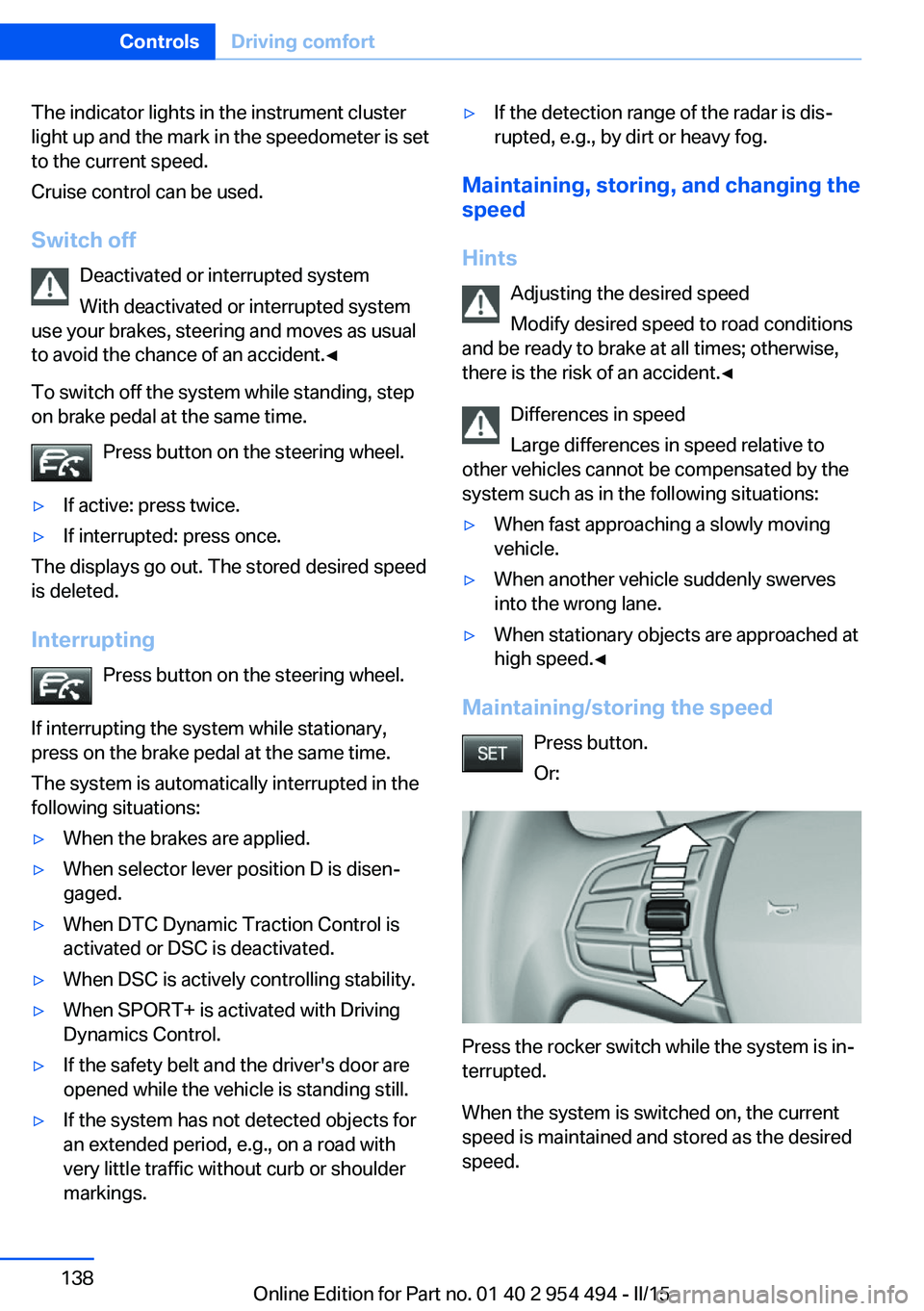
Maintaining/storing the speed
Press button.
Or:
Press the rocker switch while the system is in‐
terrupted.
When the system is switched on, the current
speed is maintained and stored as the desired
speed.
Seite 138ControlsDriving comfort138
Online Edition for Part no. 01 40 2 954 494 - II/15
Page 221 of 251
the service center if you are unfamiliar those or
if they have not been described here.
You can obtain a selection of replacement
bulbs at the service center.
Danger of burns
Only change bulbs when they are cool;
otherwise, there is a danger of getting
burned.◀
Working on the lighting system
When working on the lighting system,
you should always reel off the lights affected to
prevent short circuits.
To avoid possible injury or equipment damage
when replacing bulbs, observe any instructions
provided by the bulb manufacturer.◀
Do not touch the bulbs
Do not touch the glass of new bulbs with
your bare hands, as even minute amounts of
contamination will burn into the bulb's surface
and reduce its service life.
Use a clean tissue, cloth or something similar,
or hold the bulb by its base.◀
Light-emitting diodes (LEDs)
Some items of equipment use light-emitting
diodes installed behind a cover as a light
source.
These light-emitting diodes, which are related
to conventional lasers, are officially designated as Class 1 light-emitting diodes.
Do not remove the covers
Do not remove the covers, and never
stare into the unfiltered light for several hours;
otherwise, irritation of the retina could result.◀
Headlight glass
Condensation can form on the inside of the ex‐
ternal lights in cool or humid weather. When
driving with the light switched on, the conden‐
sation evaporates after a short time. The head‐
light glass does not need to be changed.If the headlights do not dim despite driving
with the light switched on, increasing humidity
forms, e. g. water droplets in the light, have the
service center check this.
Headlight setting The headlight adjustments can be affected by
changing lights and bulbs. Have the head‐
lights' settings checked and corrected by serv‐
ice after a replacement.
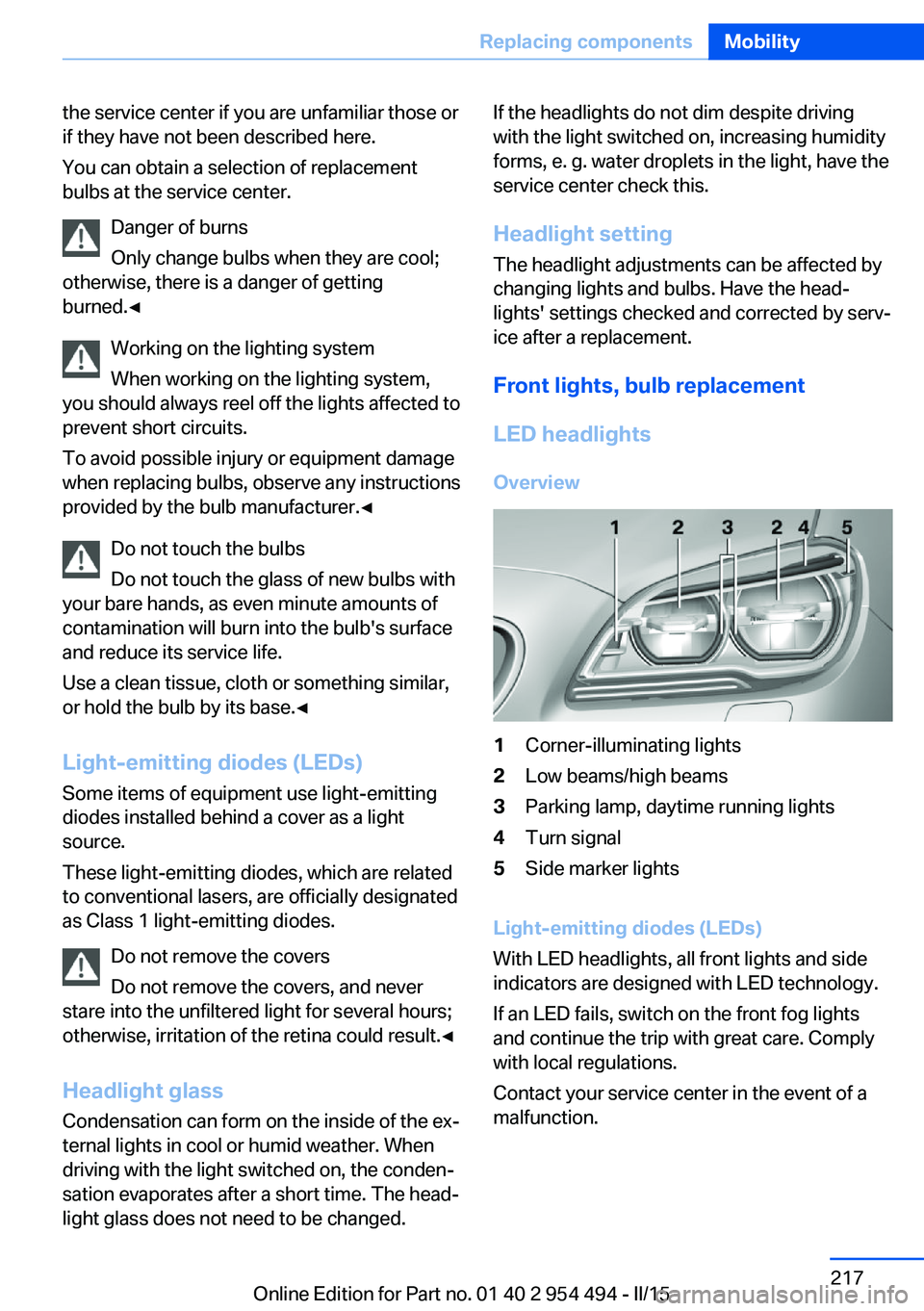
Front lights, bulb replacement LED headlights Overview1Corner-illuminating lights2Low beams/high beams3Parking lamp, daytime running lights4Turn signal5Side marker lights
Light-emitting diodes (LEDs)
With LED headlights, all front lights and side
indicators are designed with LED technology.
If an LED fails, switch on the front fog lights
and continue the trip with great care. Comply
with local regulations.
Contact your service center in the event of a
malfunction.
Seite 217Replacing componentsMobility217
Online Edition for Part no. 01 40 2 954 494 - II/15
Page 222 of 251
LED front fog lights
These front fog lights are made using LED
technology. Contact your service center in the
event of a malfunction.
Turn signal in exterior mirror The turn signals in the exterior mirrors feature
LED technology. Contact your service center in the event of a malfunction.
Tail lights, bulb replacement
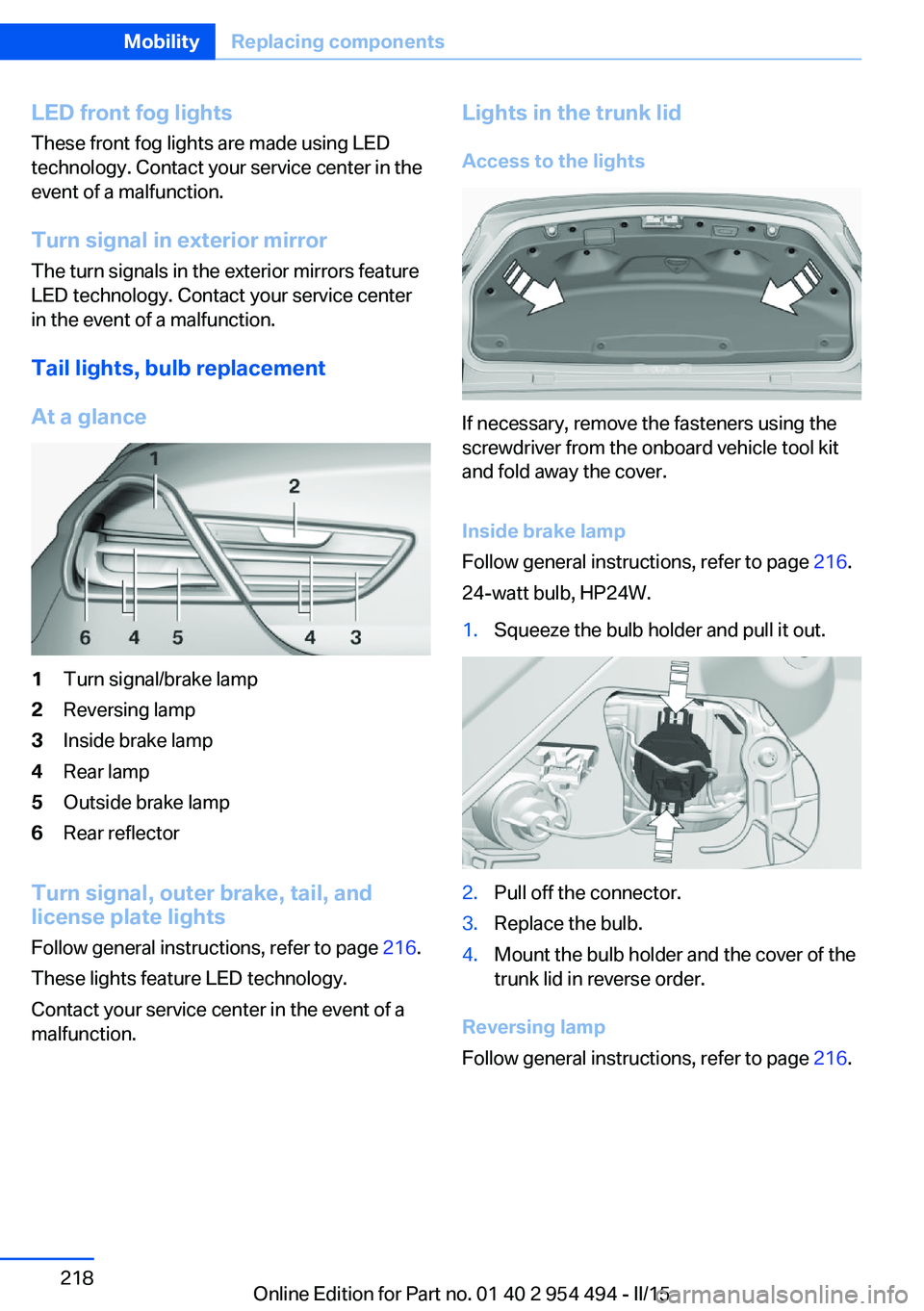
At a glance1Turn signal/brake lamp2Reversing lamp3Inside brake lamp4Rear lamp5Outside brake lamp6Rear reflector
Turn signal, outer brake, tail, and
license plate lights
Follow general instructions, refer to page 216.
These lights feature LED technology.
Contact your service center in the event of a
malfunction.
Lights in the trunk lid
Access to the lights
If necessary, remove the fasteners using the
screwdriver from the onboard vehicle tool kit
and fold away the cover.
Inside brake lamp
Follow general instructions, refer to page 216.
24-watt bulb, HP24W.
1.Squeeze the bulb holder and pull it out.2.Pull off the connector.3.Replace the bulb.4.Mount the bulb holder and the cover of the
trunk lid in reverse order.
Reversing lamp
Follow general instructions, refer to page 216.
Seite 218MobilityReplacing components218
Online Edition for Part no. 01 40 2 954 494 - II/15
Page 243 of 251
Energy recovery 87
Engine, automatic Start/Stop function 65
Engine, automatic switch- off 65
Engine compartment 207
Engine compartment, work‐ ing in 207
Engine coolant 212
Engine idling when driving, coasting 183
Engine oil 209
Engine oil, adding 210
Engine oil additives 210
Engine oil change 211
Engine oil filler neck 210
Engine oil temperature 85
Engine oil types, alterna‐ tive 211
Engine oil types, ap‐ proved 211
Engine start during malfunc‐ tion 35
Engine start, jump-start‐ ing 223
Engine start, refer to Starting the engine 64
Engine stop 64
Engine temperature 85
Entering/exiting vehicle, as‐ sistance, steering wheel 58
Entering a car wash 226
Equipment, interior 164
Error displays, see Check Control 81
ESP Electronic Stability Pro‐ gram, refer to DSC 128
Exchanging wheels/tires 200
Exhaust system 174
Exterior mirror, automatic dimming feature 57
Exterior mirrors 56
External start 223
External temperature dis‐ play 85 External temperature warn‐
ing 85
Eyes for securing cargo 178
F
Failure message, see Check Control 81
False alarm, refer to Uninten‐ tional alarm 45
Fan, refer to Air flow 158
Filler neck for engine oil 210
Fine wood, care 228
First aid kit 222
Fitting for towing, see Tow fit‐ ting 225
Flat tire, changing wheels 219
Flat Tire Monitor FTM 108
Flat tire, Tire Pressure Moni‐ tor TPM 104
Flat tire, warning lamp 105, 108
Flooding 175
Floor carpet, care 229
Floor mats, care 229
Fold-out position, wiper 71
Foot brake 175
For the roofliner, refer to All around the interior rearview
mirror 17
Front airbags 101
Front center armrest 170
Front-end collision warning with braking function 111
Front-end collision warning with City Braking func‐
tion 114
Front fog lights 99
Front fog lights, bulb replace‐ ment 218
Front lights 216
front-seat passenger airbags, automatic deactivation 103
Front-seat passenger airbags, indicator lamp 103 Front seats 49
FTM Flat Tire Monitor 108
Fuel 190
Fuel consumption, refer to Average fuel consump‐
tion 90
Fuel filler flap 188
Fuel gauge 85
Fuel lid 188
Fuel quality 190
Fuel recommendation 190
Fuel, tank capacity 234
Fuse 220
G
Garage door opener, refer to Universal Integrated Remote
Control 164
Gasoline 190
Gear change, Steptronic transmission 73
Gear shift indicator 88
General driving notes 174
Glare shield 166
Glass sunroof, powered with tilt function 46
Glove compartment 169
Gross vehicle weight, ap‐ proved 233
H
Handbrake, refer to Parking brake 66
Hand-held transmitter, alter‐ nating code 165
Hazard warning flashers 221
HDC Hill Descent Con‐ trol 130
Head airbags 101
Headlight control, auto‐ matic 97
Headlight courtesy delay fea‐ ture 97 Seite 239Everything from A to ZReference239
Online Edition for Part no. 01 40 2 954 494 - II/15
Page 244 of 251
Headlight courtesy delay fea‐ture via remote control 38
Headlight flasher 70
Headlight glass 217
Headlights 216
Headlights, care 227
Headlight washer system 70
Head restraints 49
Head restraints, front 53
Head-up Display 93
Head-up Display, care 229
Heating, refer to Parked-car heating 161
Heavy cargo, stowing 178
Height, seats 49
Height, vehicle 232
High-beam Assistant 98
High beams 70
High beams/low beams, refer to High-beam Assistant 98
Hill Descent Control HDC 130
Hills 176
Hill start assistant, refer to Drive-off assistant 128
Hints 6
Holder for beverages 171
Homepage 6
Hood 207
Horn 14
Hotel function, trunk lid 41
Hot exhaust system 174
HUD Head-up Display 93
Hydroplaning 175
I Ice warning, see External temperature warning 85
Icy roads, see External tem‐ perature warning 85
Identification marks, tires 198
Identification number, see ve‐ hicle identification num‐
ber 9
iDrive 18 Ignition key, refer to Remote
control 34
Ignition off 63
Ignition on 63
Indication of a flat tire 105 , 108
Indicator and alarm lamps, see Check Control 81
Indicator lamp, see Check Control 81
Individual air distribution 158
Individual settings, refer to Personal Profile 35
Inflation pressure, tires 192
Inflation pressure warning FTM, tires 108
Info display, refer to On- Board computer 90
Initialization, Integral Active Steering 132
Initialize, Tire Pressure Moni‐ tor TPM 105
Initializing, Flat Tire Monitor FTM 108
Instrument cluster 77
Instrument cluster, electronic displays 77
Instrument display, multifunc‐ tional 78
Instrument lighting 99
Integral Active Steering 132
Integrated key 34
Integrated Owner's Manual in the vehicle 29
Intelligent Emergency Re‐ quest 221
Intelligent Safety 110
Intensity, AUTO pro‐ gram 158
Interior equipment 164
Interior lights 99
Interior lights during unlock‐ ing 37
Interior lights with the vehicle locked 38
Interior motion sensor 44 Interior rearview mirror, auto‐
matic dimming feature 57
Internet page 6
Interval display, service re‐ quirements 87
Interval mode 70
J
Jacking points for the vehicle jack 219
Joystick, Steptronic transmis‐ sion 73
Jump-starting 223
K
Key/remote control 34
Keyless Go, refer to Comfort Access 41
Key Memory, refer to Per‐ sonal Profile 35
Kickdown, Steptronic trans‐ mission 73
Knee airbag 102
L Lamp replacement, front 216
Lamp replacement, rear 218
Lane departure warning 122
Lane margin, warning 122
Language on Control Dis‐ play 93
Lashing eyes, securing cargo 178
LATCH child restraint sys‐ tem 61
Launch Control 75
Leather, care 228
LED front fog lights, bulb re‐ placement 218
LED headlights, bulb replace‐ ment 217
LED light 217 Seite 240ReferenceEverything from A to Z240
Online Edition for Part no. 01 40 2 954 494 - II/15