climate settings BMW 650I COUPE&CONVERTIBLE 2006 Owners Manual
[x] Cancel search | Manufacturer: BMW, Model Year: 2006, Model line: 650I COUPE&CONVERTIBLE, Model: BMW 650I COUPE&CONVERTIBLE 2006Pages: 242, PDF Size: 8.47 MB
Page 18 of 242
At a glance
17Reference
Controls
Driving tips
Communications
Navigation
Entertainment
Mobility
Menu overview
Communication
>Telephone*
>BMW Assist* or TeleService*
Navigation or onboard information
>Navigation system*
>Onboard info, e.g. for displaying of the
average fuel consumption
Entertainment
>Radio
>CD player and CD changer
*
Climate
>Air distribution
>Automatic program
>Parked car ventilation
menu
>Switching off the Control Display
>Tone and display settings
>Settings for your vehicle, e.g. for the central
locking system
>Display of service requirements and dates
for statutory emission and vehicle inspec-
tions
>Settings for the telephone
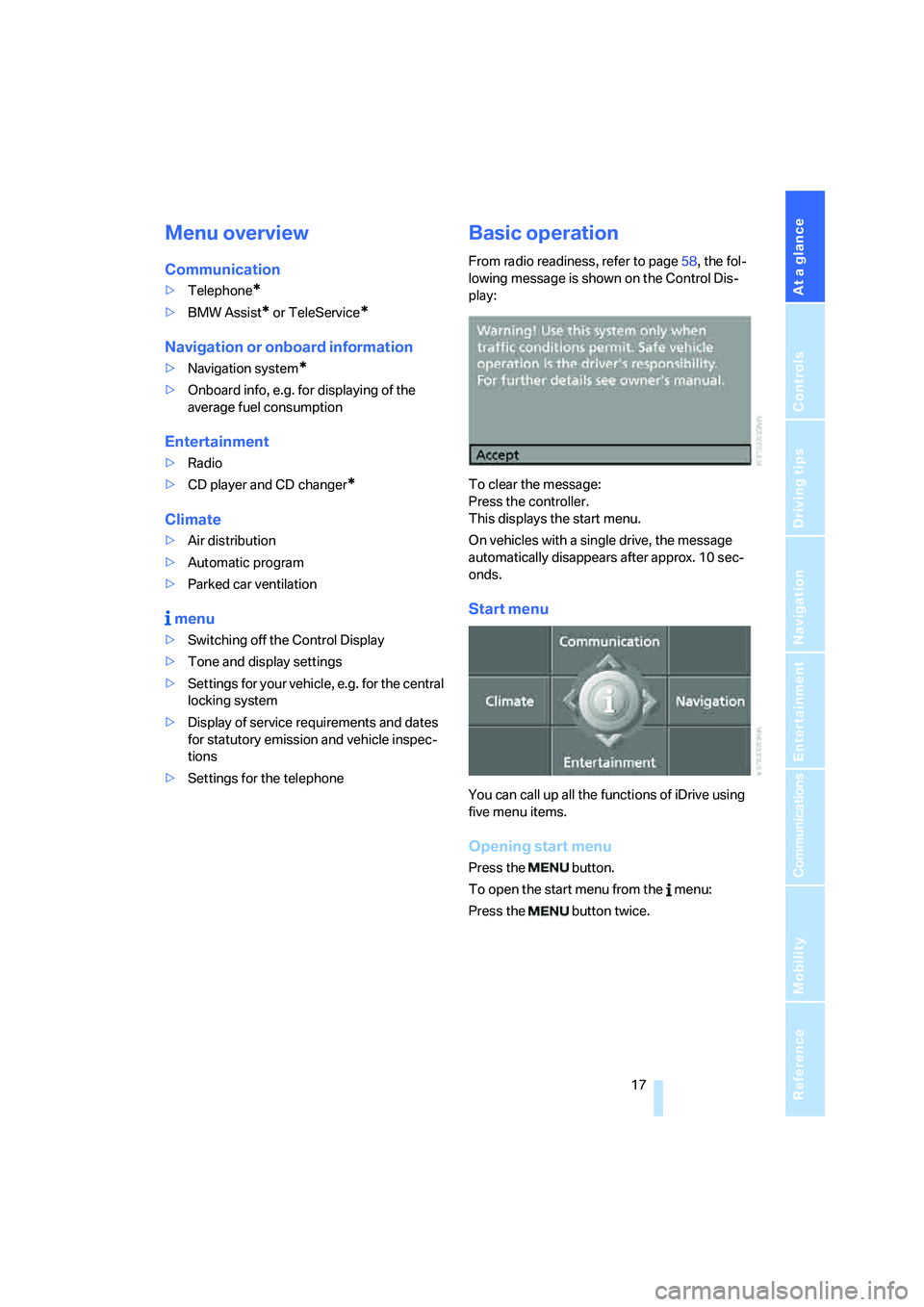
Basic operation
From radio readiness, refer to page58, the fol-
lowing message is shown on the Control Dis-
play:
To clear the message:
Press the controller.
This displays the start menu.
On vehicles with a single drive, the message
automatically disappears after approx. 10 sec-
onds.
Start menu
You can call up all the functions of iDrive using
five menu items.
Opening start menu
Press the button.
To open the start menu from the menu:
Press the button twice.
Page 19 of 242
iDrive
18
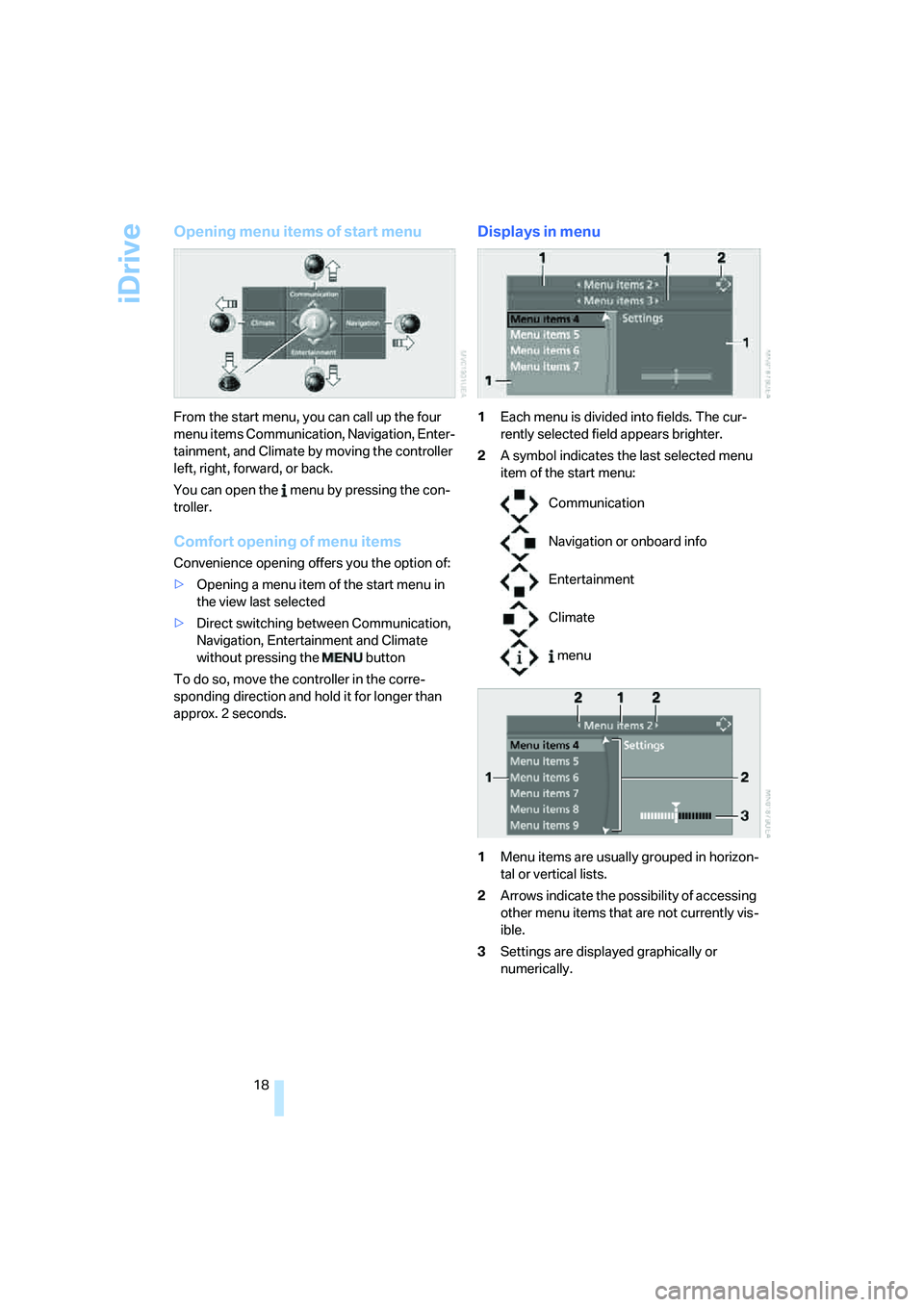
Opening menu items of start menu
From the start menu, you can call up the four
menu items Communication, Navigation, Enter-
tainment, and Climate by moving the controller
left, right, forward, or back.
You can open the menu by pressing the con-
troller.
Comfort opening of menu items
Convenience opening offers you the option of:
>Opening a menu item of the start menu in
the view last selected
>Direct switching between Communication,
Navigation, Entertainment and Climate
without pressing the button
To do so, move the controller in the corre-
sponding direction and hold it for longer than
approx. 2 seconds.
Displays in menu
1Each menu is divided into fields. The cur-
rently selected field appears brighter.
2A symbol indicates the last selected menu
item of the start menu:
1Menu items are usually grouped in horizon-
tal or vertical lists.
2Arrows indicate the possibility of accessing
other menu items that are not currently vis-
ible.
3Settings are displayed graphically or
numerically.
Communication
Navigation or onboard info
Entertainment
Climate
menu
Page 30 of 242
Controls
29Reference
At a glance
Driving tips
Communications
Navigation
Entertainment
Mobility
Remove the adapter from the holder in the
glove compartment and slide the spare key into
the adapter before use.
Personal Profile
The concept
You can set a number of functions of your BMW
individually according to your preferences. Per-
sonal Profile ensures that most of these set-
tings are stored for the remote control currently
in use without you having to do anything. When
the vehicle is unlocked, the corresponding
remote control is detected and the settings
stored for it are called up and carried out.
This means that you will always find your BMW
set to your own personal settings even if
another person with his/her own remote control
and settings has used the vehicle since the last
time you drove it. The individual settings are
stored for a maximum of four remote controls.
Personal Profile settings
Details on the settings are provided on the
specified pages.
>When unlocking with the remote control,
either unlock only the driver's door or
unlock the entire vehicle, refer to page30
>Locking the vehicle after a short time or
after starting to drive, refer to page33
>Assigning the programmable buttons on
the steering wheel, refer to page54>Settings for the display on the Control Dis-
play:
>Brightness of the Control Display, refer
to page83
>Units of measure for consumption,
route/distances, temperature and pres-
sure, refer to page84
>Language on the Control Display, refer
to page84
>12h/24h clock mode, refer to page83
>Date format, refer to page83
>Showing optical warning for PDC Park Dis-
tance Control
*, refer to page85
>Selection and brightness of the display for
the Head-Up Display
*, refer to page96
>Display settings of BMW Night Vision
*,
refer to page98
>Air distribution, temperature in the upper
body region, and intensity for the automatic
climate control, refer to page105
>Adjusting the voice instructions for the des-
tination guidance of the navigation sys-
tem
*, refer to page139
The most recent settings for the following are
also called up during unlocking:
>Driver's seat, exterior-mirror and steering-
wheel position, refer to page49
>Audio sources, setting volume and tone,
refer to page145
>The display of the stored stations for the
radio, refer to page148
>The volume setting for the telephone, refer
to page170
Central locking system
The concept
The central locking system is ready for opera-
tion whenever the driver's door is closed.
The system either locks or unlocks all of the fol-
lowing:
>Doors
Page 106 of 242
Controls
105Reference
At a glance
Driving tips
Communications
Navigation
Entertainment
Mobility
The current setting for air distribution is dis-
played on the Control Display.
A congenial climate
The AUTO program offers the optimum air dis-
tribution and air volume for virtually all condi-
tions, refer to AUTO program below. Now you
only need to select an interior temperature that
you find pleasant.
The following sections contain more detailed
information on the available setting options.
Most settings are stored for the remote control
currently in use, also refer to Personal Profile
settings on page29.
AUTO program
The AUTO program handles the
adjustment of air distribution to the
windshield and side windows, in
the direction of the upper body, and in the foot-
well, as well as the adjustment of the air volume.
It also adapts your instructions for the tempera-
ture to outside influences throughout the year.
The cooling is switched on automatically with
the AUTO program. At the same time, a con-
densation sensor controls the program in such
a way that window condensation is prevented
as much as possible.
Intensity of AUTO program
To meet your individual needs, you can
increase or decrease the intensity of the auto-
matic climate control.
iDrive, for explanation of principle, refer to
page16.
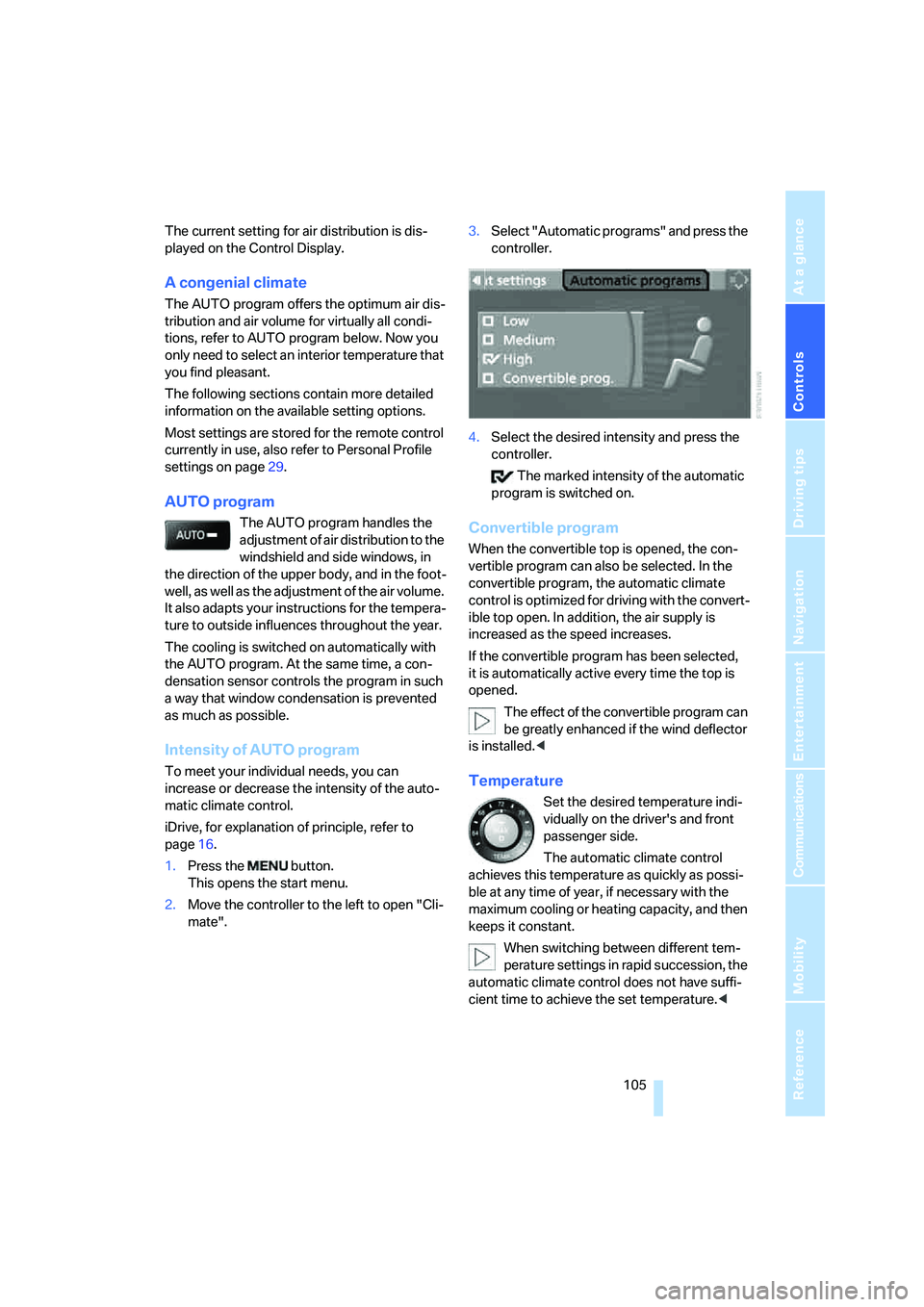
1.Press the button.
This opens the start menu.
2.Move the controller to the left to open "Cli-
mate".3.Select "Automatic programs" and press the
controller.
4.Select the desired intensity and press the
controller.
The marked intensity of the automatic
program is switched on.
Convertible program
When the convertible top is opened, the con-
vertible program can also be selected. In the
convertible program, the automatic climate
control is optimized for driving with the convert-
ible top open. In addition, the air supply is
increased as the speed increases.
If the convertible program has been selected,
it is automatically active every time the top is
opened.
The effect of the convertible program can
be greatly enhanced if the wind deflector
is installed.<
Temperature
Set the desired temperature indi-
vidually on the driver's and front
passenger side.
The automatic climate control
achieves this temperature as quickly as possi-
ble at any time of year, if necessary with the
maximum cooling or heating capacity, and then
keeps it constant.
When switching between different tem-
perature settings in rapid succession, the
automatic climate control does not have suffi-
cient time to achieve the set temperature.<
Page 107 of 242
Climate
106
Adapting temperature in upper body
region
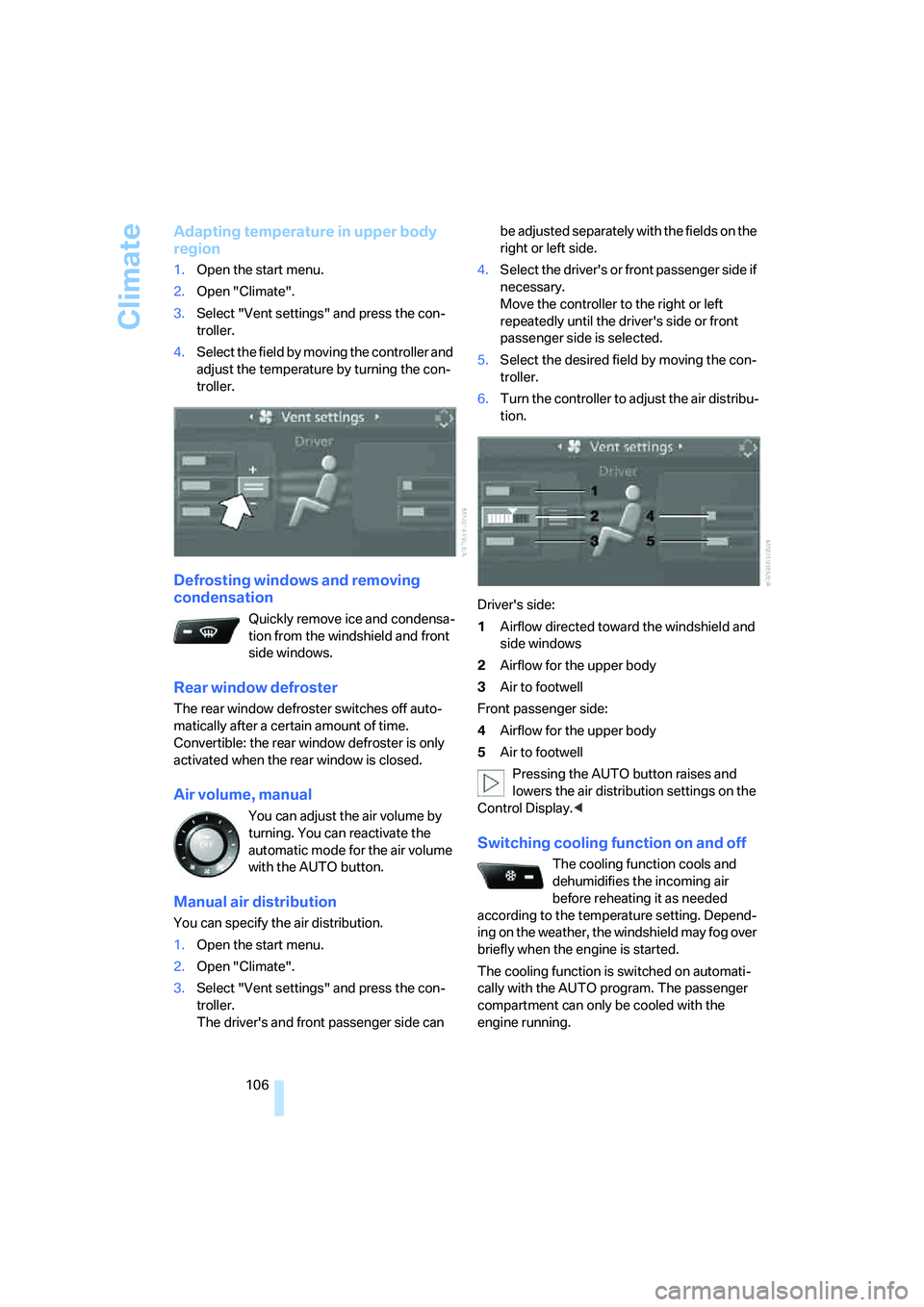
1.Open the start menu.
2.Open "Climate".
3.Select "Vent settings" and press the con-
troller.
4.Select the field by moving the controller and
adjust the temperature by turning the con-
troller.
Defrosting windows and removing
condensation
Quickly remove ice and condensa-
tion from the windshield and front
side windows.
Rear window defroster
The rear window defroster switches off auto-
matically after a certain amount of time.
Convertible: the rear window defroster is only
activated when the rear window is closed.
Air volume, manual
You can adjust the air volume by
turning. You can reactivate the
automatic mode for the air volume
with the AUTO button.
Manual air distribution
You can specify the air distribution.
1.Open the start menu.
2.Open "Climate".
3.Select "Vent settings" and press the con-
troller.
The driver's and front passenger side can be adjusted separately with the fields on the
right or left side.
4.Select the driver's or front passenger side if
necessary.
Move the controller to the right or left
repeatedly until the driver's side or front
passenger side is selected.
5.Select the desired field by moving the con-
troller.
6.Turn the controller to adjust the air distribu-
tion.
Driver's side:
1Airflow directed toward the windshield and
side windows
2Airflow for the upper body
3Air to footwell
Front passenger side:
4Airflow for the upper body
5Air to footwell
Pressing the AUTO button raises and
lowers the air distribution settings on the
Control Display.<
Switching cooling function on and off
The cooling function cools and
dehumidifies the incoming air
before reheating it as needed
according to the temperature setting. Depend-
ing on the weather, the windshield may fog over
briefly when the engine is started.
The cooling function is switched on automati-
cally with the AUTO program. The passenger
compartment can only be cooled with the
engine running.
Page 222 of 242
Reference 221
At a glance
Controls
Driving tips
Communications
Navigation
Entertainment
Mobility
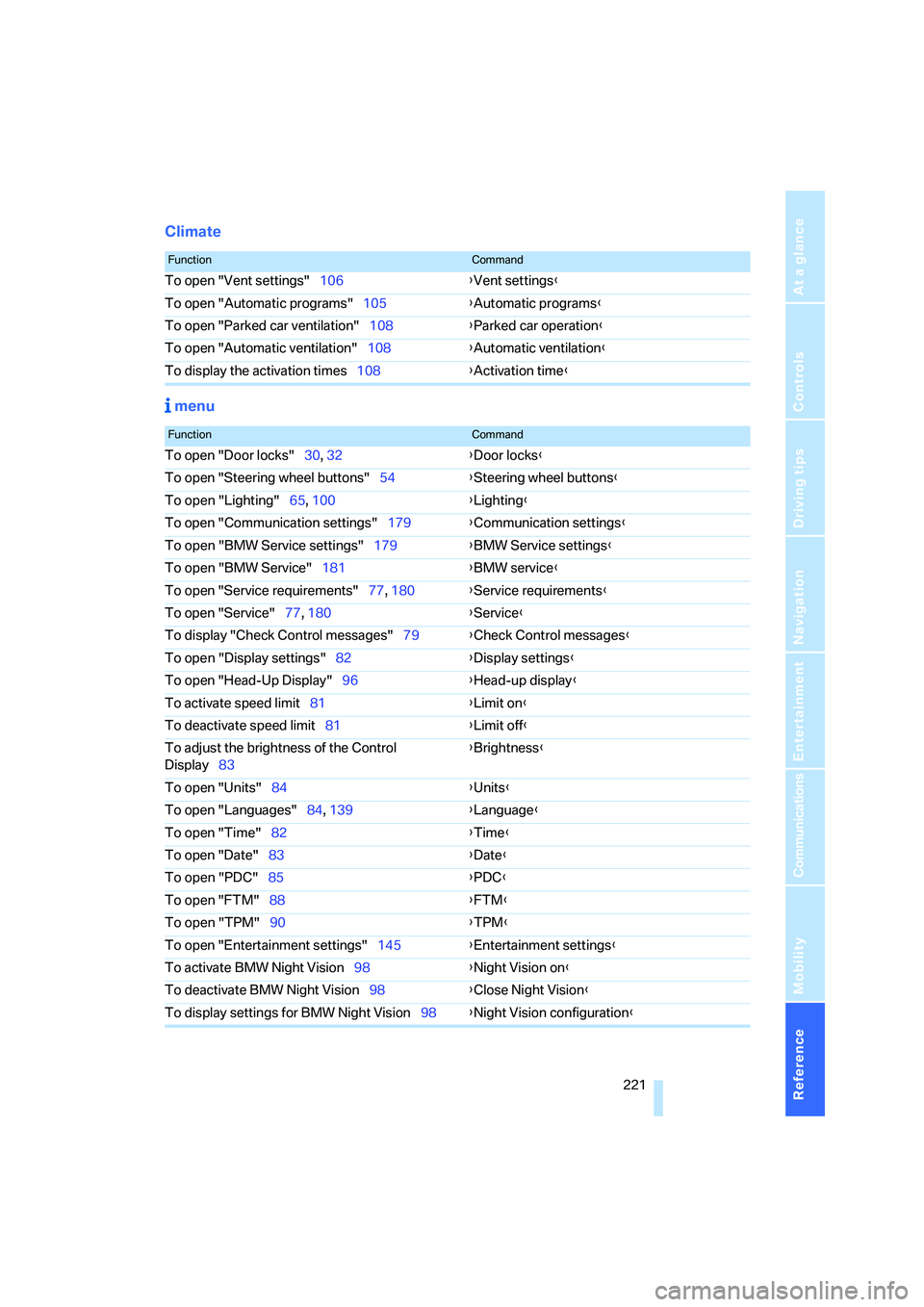
Climate
menu
FunctionCommand
To open "Vent settings"106{Vent settings}
To open "Automatic programs"105{Automatic programs}
To open "Parked car ventilation"108{Parked car operation}
To open "Automatic ventilation"108{Automatic ventilation}
To display the activation times108{Activation time}
FunctionCommand
To open "Door locks"30, 32{Door locks}
To open "Steering wheel buttons"54{Steering wheel buttons}
To open "Lighting"65, 100{Lighting}
To open "Communication settings"179{Communication settings}
To open "BMW Service settings"179{BMW Service settings}
To open "BMW Service"181{BMW service}
To open "Service requirements"77, 180{Service requirements}
To open "Service"77, 180{Service}
To display "Check Control messages"79{Check Control messages}
To open "Display settings"82{Display settings}
To open "Head-Up Display"96{Head-up display}
To activate speed limit81{Limit on}
To deactivate speed limit81{Limit off}
To adjust the brightness of the Control
Display83{Brightness}
To open "Units"84{Units}
To open "Languages"84, 139{Language}
To open "Time"82{Time}
To open "Date"83{Date}
To open "PDC"85{PDC}
To open "FTM"88{FTM}
To open "TPM"90{TPM}
To open "Entertainment settings"145{Entertainment settings}
To activate BMW Night Vision98{Night Vision on}
To deactivate BMW Night Vision98{Close Night Vision}
To display settings for BMW Night Vision98{Night Vision configuration}
Page 224 of 242
Reference 223
At a glance
Controls
Driving tips
Communications
Navigation
Entertainment
Mobility
Audio144
– controls144
– switching on/off144
– tone control145
– volume145
"Audio", refer to Tone
control145
Automatic
– air distribution105
– air volume105
– headlamp control100
– service notification180
– steering wheel adjustment,
refer to Easy entry/exit53
– storing stations149
Automatically switching
between high beams and
low beams, refer to High-
beam assistant102
Automatic car washes120
– also refer to Comfort
access38
– also refer to the Caring for
your vehicle brochure
Automatic climate control104
– automatic air
distribution105
– convertible program105
– switching off107
Automatic closing of doors,
see Automatic soft
closing33
Automatic curb monitor53
Automatic lighting
– refer to Automatic headlamp
control100
– refer to Daytime running
lamps101
– refer to High-beam
assistant102
– refer to Interior lamps103
– refer to Pathway lighting100
"Automatic programs"105
Automatic recirculated-air
control AUC107
Automatic soft closing33
Automatic station search149Automatic transmission with
Steptronic62
– deactivating selector lever
interlock63
– Dynamic Driving Control64
– interlock62
– kick-down63
– selector lever lock,
Interlock62
– shiftlock62
– towing209
– tow-starting210
– with comfort access38
"Automatic ventilation"108
AUTO program with
automatic climate
control105
"Autostore" on the
radio148,150
Average fuel consumption75
– setting units84
Average speed75
"Avoid ferries" for
navigation135
"Avoid highways" for
navigation135
Avoiding freeways for
navigation134
Avoiding unintentional
alarms36
"Avoid tollroads" for
navigation135
Axle loads, refer to
Weights217
"A - Z"171,172
B
Backrest contour, refer to
Lumbar support48
Backrests, refer to Seats48
Backup lamps
– refer to Reverse gear61
– replacing bulbs, refer to Tail
lamps203
"Balance", refer to Tone
control146Balance, refer to Tone
control146
Balance adjustment in audio
mode, right/left146
Band-aids, refer to First-aid
kit207
Bass, refer to Tone
control145
"Bass", tone control146
Battery
– disposal38
– jump starting207
– refer to Vehicle battery204
Battery change38
Being towed209
Belts, refer to Safety belts51
Blower, refer to Air
volume106
"BMW Assist"181
BMW Assist179
– enabling179
– services offered180
"BMW Contact"173
"BMW Contact
Numbers"173
BMW homepage4
BMW Maintenance
System199
BMW Night Vision97
– activating98
– cleaning camera99
– cleaning camera, refer to
Wiper system66
– deactivating98
– making settings98
"BMW Service"181
"BMW Service settings"180
BMW website4
Brake Assistant, refer to DBC
Dynamic Brake Control86
Brake fluid197
– level197
– warning lamp197
Brake force display92
Brake hydraulic system197
Brake lamps
– brake force display92
– replacing bulbs, refer to Tail
lamps203
Page 226 of 242
Reference 225
At a glance
Controls
Driving tips
Communications
Navigation
Entertainment
Mobility
Central locking system29
– comfort access36
– from inside vehicle32
Changes, technical, refer to
For your own safety6
Changing a wheel204
Changing language on
Control Display84
Changing units of measure on
Control Display84
Changing wheels192
CHECK button80
Check Control79
"Check Control
messages"80
Check Gas Cap186
Checking air pressure, refer to
Tire inflation pressure188
Children's seats, refer to Child
restraint systems56
Child-restraint fixing system
LATCH57
Child restraint systems56
Chrome parts, care, refer to
the Caring for your vehicle
brochure
Cigarette lighter113
Cigarette lighter socket, refer
to Connecting electrical
devices114
Cleaning, refer to Caring for
your vehicle brochure
"Climate"105
Clock74
– 12h/24h mode83
– setting time and date82
Closing
– from inside32
– from outside30
Closing fuel filler cap186
Clothes hooks, Coupe113
Cockpit10
Cold start, refer to Starting
engine59
Comfort access36
– observe in car wash38
– replacing battery38Comfort closing
– windows, with comfort
access with Coupe37
– with comfort access37
"Communication"170,181
"Communication
settings"180
Compact disc
– refer to CD changer157
– refer to CD player157
Compartment for remote
control, refer to Ignition
lock58
Compartments, refer to
Storage compartments112
Compressed audio files157
Computer75
– displays on Control
Display76
– hour signal83
"Concert hall", refer to Tone
control146
Condition Based Service
CBS199
"Confirmation"31
Connecting car vacuum
cleaner, refer to Connecting
electrical devices114
Consumption display, refer to
Average fuel
consumption75
Consumption statistics, refer
to Average fuel
consumption75
"Continue guidance to
destination?"136
"Contrast" with BMW Night
Vision99
Control Center, refer to
iDrive16
Control Display, refer to
iDrive16
– setting brightness83
Controller, refer to iDrive16
Controls, refer to Cockpit10
Convenience operation
– convertible top31,32
– glass sunroof31,32
– windows31,32Convertible
– convertible program for
automatic climate
control105
– opening and closing
windows38
– rollover protection
system94
– top42
– wind deflector45
– window and convertible top
operation with comfort
access37
Convertible top
– care, refer to the Caring for
your vehicle brochure
– convenience operation32
– emergency closing43
– manual closing43
– opening and closing42
Coolant197
– checking level197
– temperature74
Cooling, maximum107
Cornering Brake Control
CBC86
Country of destination for
navigation126
Courtesy lamps, refer to
Interior lamps103
Cruise control66,67
– active cruise control67
Cruising range75
Curb weight, refer to
Weights217
"Current position"140
Current position
– displaying140
– entering132
– storing132
"Curve mode" with
BMW Night Vision99
"Customer
Relations"173,182
Cylinders, refer to Engine
data214
Page 237 of 242
Everything from A to Z
236 Storing current position132
Storing radio stations150
Storing sitting position, refer
to Seat, mirror and steering
wheel memory49
Storing tires193
Straps, refer to Loading121
"Street" for destination
entry127
Summer tires, refer to Wheels
and tires188
"Surround Settings", adjust
the sound146
SW, waveband148
Switches, refer to Cockpit10
Switching between high
beams and low beams,
automatic, refer to High-
beam assistant102
Switching off tilt alarm
sensor36
Switching on
– audio144
– CD changer144
– CD player144
– radio144
Switching the cooling function
on and off106
Swiveling headlamps, refer to
Adaptive Head Light101
Symbols4
– indicator and warning
lamps13
T
Tachometer74
Tail lamps203
– replacing bulbs203
Tank capacity
– also refer to Filling
capacities217
– fuel tank capacity186
Target cursor for
navigation130
Technical alterations, refer to
For your own safety6
Technical data214Telematic, refer to
TeleService,
BMW Assist179
Telephone, refer to Mobile
phone166
Telephone, refer to separate
operating instructions
"Telephone list"54
TeleService179
– enabling179
– services offered180
Temperature
– adjusting in upper body
region106
– adjusting with automatic
climate control105
– of coolant, refer to Coolant
temperature74
Temperature display
– changing units of
measure84
– outside temperature74
– temperature warning74
Temperature gauge, engine
oil75
Temperature warning74
Tempomat, refer to Cruise
control66
"Terminate services"182
"Text language"84
"Theater", refer to Tone
control146
The individual vehicle5
Tie-down points, refer to
Securing cargo121
Tilting down passenger-side
exterior mirror53
"Time"82
"Time format"83
Timer, refer to Preselecting
activation time108
"Timer 1" for parked car
ventilation109
"Timer 2" for parked car
ventilation109
Tire inflation pressures188
Tire pressure loss89,90
Tire Pressure Monitor
TPM89Tire Quality Grading190
Tires
– age190
– air loss89,91
– breaking-in118
– condition191
– damage191
– inflation pressure188
– minimum tread depth191
– monitoring inflation
pressure, refer to Flat Tire
Monitor88
– new wheels and tires192
– pressure monitoring, refer to
Tire Pressure Monitor89
– replacing192
– retreaded tires192
– run-flat tires192
– size189
– size, refer to The right
wheels and tires192
– wear indicators191
– wheel/tire combination192
– winter tires193
Tires with run-flat properties,
refer to Run-flat tires192
"Tone"145
Tone dialing method174
Tone in audio mode
– adjusting145
– middle setting147
Tone on locking/unlocking31
Tools, refer to Onboard tool
kit201
Top42
"Top 8" for mobile phone171
Torque, refer to Engine
specifications214
Touch tone dialing, refer to
Tone dialing method174
Tow fitting208
Towing208
– tow fitting208
"Town / City" for destination
entry126
Tow-starting208,210
"TPM"90
Page 238 of 242
Reference 237
At a glance
Controls
Driving tips
Communications
Navigation
Entertainment
Mobility
TPM Tire Pressure
Monitor89
– resetting system90
– system limits90
– warning lamp91
Tracks
– finding159
– random play sequence160
– sample, Scan159
Track width, refer to
Dimensions215
Traction-assist feature, refer
to DSC Dynamic Stability
Control86
Traction control, refer to DSC
Dynamic Stability
Control86
Traffic congestion, refer to
Bypassing route
sections140
Transmission
– automatic transmission with
Steptronic62
– deactivating selector lever
interlock on automatic
transmission with
Steptronic63
– manual transmission60
– SMG Sequential Manual
Transmission61
– starting assistant119
Transporting children
safely56
Transport securing device,
refer to Securing cargo121
Tread depth, refer to Minimum
tread depth191
Treble, refer to Tone
control145
"Treble", tone control146
"Trip computer"77
Trip computer76
Trip-distance counter, refer to
Trip odometer74
"Triple turn signal
activation"65
Trip odometer74Trunk, refer to Luggage
compartment35
Trunk lid, refer to Luggage
compartment lid34
Turning circle, refer to
Dimensions215
Turn signals64
– replacing bulbs202
U
Undercarriage protection,
refer to the Caring for your
vehicle brochure
Uniform Tire Quality Grading/
UTQR190
"Units"84
Units
– average fuel
consumption84
– temperature84
Universal garage-door
opener, refer to Integrated
universal remote
control110
Universal remote control, refer
to Integrated universal
remote control110
"Unlock button"30
Unlocking
– from inside33
– from outside30
– without key, refer to Comfort
access36
Unlocking and locking doors,
setting confirmation
signals31
Unlocking without key, refer to
Comfort access36
"Update services"182
"Use current location as
address"133,134
Used batteries
– refer to Disposal204
– refer to Replacing battery38
V
Vehicle
– breaking-in118
– care, refer to the Caring for
your vehicle brochure
– cargo loading120
– dimensions215
– parking60
– washing, refer to the Caring
for your vehicle brochure
– weights217
Vehicle battery204
Vehicle jack204
– jacking points204
Vehicle position, refer to
Displaying current
position140
"Vehicle settings" when
unlocking30
Ventilation107
– draft-free108
– for cooling108
– parked car ventilation108
Vent outlets of automatic
climate control104
"Vent settings"106
Voice, refer to Destination
guidance with voice
instructions139
Voice command system22
– short commands218
Voice instructions for
navigation system139
– muting55
– repeating55,139
– switching on/off55,139
– volume139
Voice phone book176
Volume144
– audio sources144
– mobile phone170
– setting speed-
dependent146
– voice instructions139
Volume adjustment in audio
mode, front-to-rear146