reset BMW 7 SERIES 2015 G11 Owner's Guide
[x] Cancel search | Manufacturer: BMW, Model Year: 2015, Model line: 7 SERIES, Model: BMW 7 SERIES 2015 G11Pages: 314, PDF Size: 7.9 MB
Page 266 of 314
▷The system has detected a wheel change,
but no reset was done.▷No reset was performed for the system.
The system therefore issues a warning
based on the tire inflation pressures before
the last reset.▷Inflation was not carried out according to
specifications.▷The tire inflation pressure has fallen below
the level of the last reset.
In these cases:
1.Check the tire pressure and correct as
needed.2.Reset the system.
Message in case of low tire pressure
The yellow warning lamp lights up.
A Check Control message is displayed.
▷There is a tire inflation pressure loss.▷No reset was performed for the system.
The system therefore issues a warning
based on the tire inflation pressures before
the last reset.
In these cases:
1.Reduce your speed and drive moderately.
Do not exceed a speed of
80 mph/130 km/h.2.At the next opportunity, e.g. gas station,
check and if necessary correct the tire in‐
flation pressure in all four tires.3.Reset the system.
Message in case of sharp tire inflation pressure loss
The yellow warning lamp lights up.
A symbol with the affected tires will be dis‐
played in the Check Control message.▷There is a flat tire or a major loss in tire in‐
flation pressure.▷No reset was performed for the system.
The system therefore issues a warning
based on the tire inflation pressures before
the last reset.
In these cases:
1.Reduce your speed and stop cautiously.
Avoid sudden braking and steering maneu‐
vers.2.Check whether the vehicle is fitted with
normal tires or run-flat tires.
Run-flat tires, refer to page 260, are la‐
beled with a circular symbol containing the
letters RSC marked on the tire's sidewall.
WARNING
A damaged regular tire with low or miss‐
ing tire inflation pressure impacts handling,
such as steering and braking response. Run-
flat tires can maintain limited stability. There is
risk of an accident. Do not continue driving if
the vehicle is not equipped with run-flat tires.
Observe the information on run-flat tires and
continued driving with these tires.◀
A low tire inflation pressure might turn on DSC
Dynamic Stability Control.
Actions in the event of a flat tire
Normal tires
1.Identify the damaged tire.
Do this by checking the air pressure in all
four tires.
The tire pressure gauge of the Mobility
System, refer to page 260, can be used for
this purpose.
If the tire inflation pressure in all four tires
is shown to be correct, it is possible that
the Tire Pressure Monitor did not perform
a reset. Then perform the reset.Seite 266MobilityWheels and tires266
Online Edition for Part no. 0140 2 964 330 - VI/15
Page 267 of 314
If identification of flat tire damage is not
possible, please contact a dealer’s service
center or another qualified service center
or repair shop.2.Fixing a flat tire, where applicable with the
Mobility System.3.Replacing a damaged tire, where applica‐
ble with the emergency wheel.
Use of sealant, e.g., the Mobility System, may
damage the TPM wheel electronics. In this
case, have the electronics checked at the next
opportunity and have them replaced if needed.
Run-flat tires Maximum speed
You may continue driving with a damaged tire
at speeds up to 50 mph/80 km/h.
Continued driving with a flat tire
If continuing to drive with a damaged tire:
1.Avoid sudden braking and steering maneu‐
vers.2.Do not exceed a speed of 50 mph/80 km/h.3.Check the air pressure in all four tires at
the next opportunity.
If the tire inflation pressure in all four tires
is shown to be correct, it is possible that
the Tire Pressure Monitor did not perform
a reset. In that case, carry out a reset.
Possible driving distance with complete loss of
tire inflation pressure:
The possible driving distance after a loss of tire
inflation pressure depends on cargo load, driv‐
ing style and road conditions.
A vehicle with an average load has a possible
driving range of approx. 50 miles/80 km.
A vehicle with a damaged tire reacts differ‐
ently, e.g., it has reduced lane stability during
braking, a longer braking distance and different
self-steering properties. Adjust your driving
style accordingly. Avoid abrupt steering ma‐
neuvers or driving over obstacles, e.g., curbs,
potholes, etc.
Because the possible driving distance de‐
pends on how the vehicle is used during the
trip, the actual distance may be shorter or lon‐
ger depending on the driving speed, road con‐
ditions, external temperature, cargo load, etc.
WARNING
Your vehicle handles differently when a
run-flat tire is damaged and has low or missing
tire inflation pressure, e.g., your lane stability is
reduced when braking, braking distances are
longer and the self-steering properties will
change. There is risk of an accident.
Drive moderately and do not exceed a speed of
50 mph/80 km/h.◀
System limits
The system does not function properly if a re‐
set has not been carried out, e.g., a flat tire is
reported though tire inflation pressures are
correct.
The tire inflation pressure depends on the
tire's temperature. Driving or exposure to the
sun will increase the tire's temperature, thus
increasing the tire inflation pressure. The tire
inflation pressure is reduced when the tire
temperature falls again. These circumstances
may cause a warning when temperatures fall
very sharply.
The system cannot indicate sudden serious
tire damage caused by external circumstances.
Malfunction The yellow warning lamp flashes andthen lights up continuously. A Check
Control message is displayed. No flat
tire or loss of tire inflation pressure can be de‐
tected.
Examples and recommendations in the follow‐
ing situations:▷A wheel without TPM electronics is
mounted, e.g. emergency wheel: Have itSeite 267Wheels and tiresMobility267
Online Edition for Part no. 0140 2 964 330 - VI/15
Page 268 of 314
checked by a dealer’s service center or an‐
other qualified service center or repair
shop as needed.▷Malfunction: Have system checked by a
dealer’s service center or another qualified
service center or repair shop.▷TPM was unable to complete the reset.
Reset the system again.▷Interference through systems or devices
with the same radio frequency: After leav‐
ing the area of the interference, the system
automatically becomes active again.
Declaration according to NHTSA/
FMVSS 138 Tire Pressure Monitoring
System
Each tire, including the spare (if provided)
should be checked monthly when cold and in‐
flated to the inflation pressure recommended
by the vehicle manufacturer on the vehicle
placard or tire inflation pressure label. (If your
vehicle has tires of a different size than the size
indicated on the vehicle placard or tire inflation
pressure label, you should determine the
proper tire inflation pressure for those tires.)
As an added safety feature, your vehicle has
been equipped with a tire pressure monitoring
system (TPMS) that illuminates a low tire pres‐
sure telltale when one or more of your tires is
significantly under-inflated. Accordingly, when
the low tire pressure telltale illuminates, you
should stop and check your tires as soon as
possible, and inflate them to the proper pres‐
sure. Driving on a significantly under-inflated
tire causes the tire to overheat and can lead to
tire failure. Under-inflation also reduces fuel ef‐
ficiency and tire tread life, and may affect the
vehicle's handling and stopping ability. Please
note that the TPMS is not a substitute for
proper tire maintenance, and it is the driver's
responsibility to maintain correct tire pressure,
even if under-inflation has not reached the
level to trigger illumination of the TPMS low
tire pressure telltale. Your vehicle has also
been equipped with a TPMS malfunction indi‐
cator to indicate when the system is not oper‐
ating properly. The TPMS malfunction indica‐
tor is combined with the low tire pressure
telltale. When the system detects a malfunc‐
tion, the telltale will flash for approximately one
minute and then remain continuously illumi‐
nated. This sequence will continue upon sub‐
sequent vehicle start-ups as long as the mal‐
function exists. When the malfunction indicator
is illuminated, the system may not be able to
detect or signal low tire pressure as intended.
TPMS malfunctions may occur for a variety of
reasons, including the installation of replace‐
ment or alternate tires or wheels on the vehicle
that prevent the TPMS from functioning prop‐
erly. Always check the TPMS malfunction tell‐
tale after replacing one or more tires or wheels
on your vehicle to ensure that the replacement
or alternate tires and wheels allow the TPMS
to continue to function properly.
FTM Flat Tire Monitor
The concept The system detects tire inflation pressure loss
on the basis of rotation speed differences be‐
tween the individual wheels while driving.
In the event of a tire inflation pressure loss, the
diameter and therefore the rotational speed of
the corresponding wheel changes. This will be
detected and reported as a flat tire.
The system does not measure the actual infla‐
tion pressure in the tires.
Functional requirements
The system must have been initialized when
the tire inflation pressure was correct; other‐
wise, reliable flagging of a flat tire is not as‐
sured. Initialize the system after each correc‐
tion of the tire inflation pressure and after
every tire or wheel change.Seite 268MobilityWheels and tires268
Online Edition for Part no. 0140 2 964 330 - VI/15
Page 269 of 314
Status displayThe current status of the flat tire monitor can
be displayed, e.g., whether the RPA is active.
About iDrive:1."My Vehicle"2."Vehicle status"3. "Flat Tire Monitor"
The status is displayed.
Initialization
When initializing the once set inflation tire
pressures serve as reference values in order to
detect a flat tire. Initialization is started by con‐
firming the tire inflation pressures.
Do not initialize the system when driving with
snow chains.
About iDrive:
1."My Vehicle"2."Vehicle status"3.Flat Tire Monitor reset4.Start the engine - do not drive off.5.Start the initialization: "Perform reset"6.Drive away.
The initialization is completed while driving,
which can be interrupted at any time.
The initialization automatically continues when
driving resumes.
Indication of a flat tire The yellow warning lamp lights up. A
Check Control message is displayed.
There is a flat tire or a major loss in tire
inflation pressure.
1.Reduce your speed and stop cautiously.
Avoid sudden braking and steering maneu‐
vers.2.Check whether the vehicle is fitted with
normal tires or run-flat tires.Run-flat tires, refer to page 260, are la‐
beled with a circular symbol containing the
letters RSC marked on the tire's sidewall.
WARNING
A damaged regular tire with low or miss‐
ing tire inflation pressure impacts handling,
such as steering and braking response. Run-
flat tires can maintain limited stability. There is
risk of an accident. Do not continue driving if
the vehicle is not equipped with run-flat tires.
Observe the information on run-flat tires and
continued driving with these tires.◀
When a flat tire is indicated, DSC Dynamic Sta‐
bility Control is switched on if needed.
System limits
A natural, even tire inflation pressure loss in all four tires will not be recognized. Therefore,
check the tire inflation pressure regularly.
Sudden serious tire damage caused by exter‐
nal circumstances cannot be recognized in ad‐
vance.
The system could be delayed or malfunction in
the following situations:
▷When the system has not been initialized.▷When driving on a snowy or slippery road
surface.▷Sporty driving style: spinning traction
wheels, high lateral acceleration (drifting).▷When driving with snow chains.
Actions in the event of a flat tire
Normal tires
1.Identify the damaged tire.
Do this by checking the air pressure in all
four tires.
The tire pressure gauge of the Mobility
System, refer to page 260, can be used for
this purpose.
If the tire inflation pressure in all four tires
is correct, the Flat Tire Monitor may notSeite 269Wheels and tiresMobility269
Online Edition for Part no. 0140 2 964 330 - VI/15
Page 284 of 314
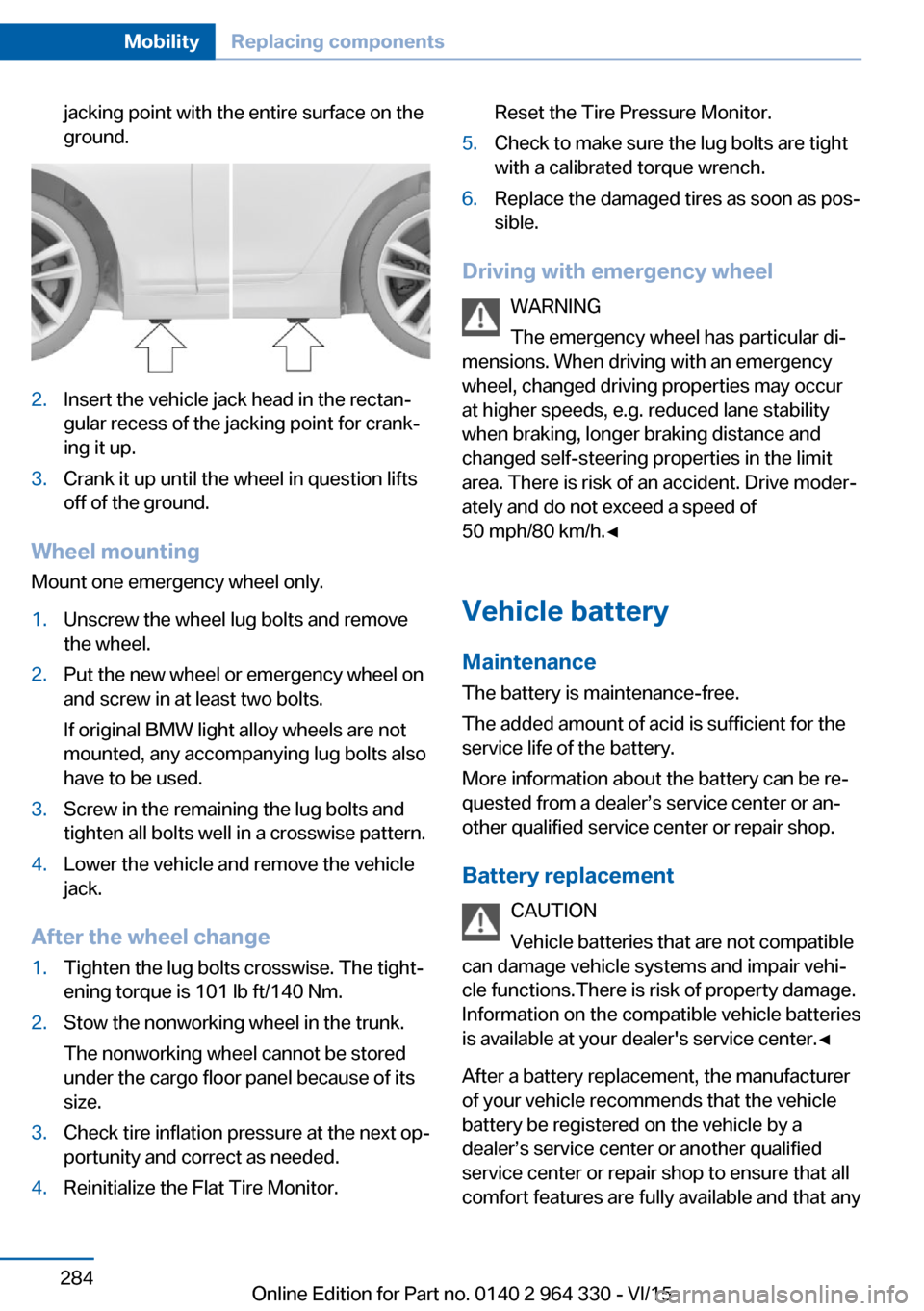
jacking point with the entire surface on the
ground.2.Insert the vehicle jack head in the rectan‐
gular recess of the jacking point for crank‐
ing it up.3.Crank it up until the wheel in question lifts
off of the ground.
Wheel mounting
Mount one emergency wheel only.
1.Unscrew the wheel lug bolts and remove
the wheel.2.Put the new wheel or emergency wheel on
and screw in at least two bolts.
If original BMW light alloy wheels are not
mounted, any accompanying lug bolts also
have to be used.3.Screw in the remaining the lug bolts and
tighten all bolts well in a crosswise pattern.4.Lower the vehicle and remove the vehicle
jack.
After the wheel change
1.Tighten the lug bolts crosswise. The tight‐
ening torque is 101 lb ft/140 Nm.2.Stow the nonworking wheel in the trunk.
The nonworking wheel cannot be stored
under the cargo floor panel because of its
size.3.Check tire inflation pressure at the next op‐
portunity and correct as needed.4.Reinitialize the Flat Tire Monitor.Reset the Tire Pressure Monitor.5.Check to make sure the lug bolts are tight
with a calibrated torque wrench.6.Replace the damaged tires as soon as pos‐
sible.
Driving with emergency wheel
WARNING
The emergency wheel has particular di‐
mensions. When driving with an emergency
wheel, changed driving properties may occur
at higher speeds, e.g. reduced lane stability
when braking, longer braking distance and
changed self-steering properties in the limit
area. There is risk of an accident. Drive moder‐
ately and do not exceed a speed of
50 mph/80 km/h.◀
Vehicle battery Maintenance
The battery is maintenance-free.
The added amount of acid is sufficient for the
service life of the battery.
More information about the battery can be re‐
quested from a dealer’s service center or an‐
other qualified service center or repair shop.
Battery replacement CAUTION
Vehicle batteries that are not compatible
can damage vehicle systems and impair vehi‐
cle functions.There is risk of property damage.
Information on the compatible vehicle batteries
is available at your dealer's service center.◀
After a battery replacement, the manufacturer
of your vehicle recommends that the vehicle
battery be registered on the vehicle by a
dealer’s service center or another qualified
service center or repair shop to ensure that all
comfort features are fully available and that any
Seite 284MobilityReplacing components284
Online Edition for Part no. 0140 2 964 330 - VI/15
Page 309 of 314
QQueuing Assistant, see Steering and lane guidance
assistant including Traffic
Jam Assist 177
R Radiator fluid 277
Radio 6
Radio-operated key, see Re‐ mote control 54
Rain sensor 104
Rear automatic climate con‐ trol 207
Rear axle steering 166
Rear center armrest 227
Rear collision prevention 159
Rear collision warning 159
Rear cooler 223
Rear drink holder 228
Rear seats 78
Rear seats, basic position 80
Rear vanity mirror 86
Rearview camera, see Sur‐ round View 187
Rearview camera, without Surround View 184
Rearview mirror 85
Rear window defroster 206
Recirculated-air mode 205
Recommended fuel grade 252
Recommended tire brands 259
Refueling 250
Remaining range 123
Remote control/key 54
Remote control, malfunc‐ tion 62
Remote control, univer‐ sal 215
Remote control with dis‐ play 55
Replace front fog lamps 282 Replace front lamps 282
Replace headlamps 282
Replace key lights 282
Replace LED front fog lamps 282
Replace LED headlights 282
Replace light-emitting diodes, LEDs 282
Replacement fuse 285
Replace tail lamps 282
Replacing parts 281
Replacing wheels/tires 258
Reporting safety malfunc‐ tions 10
RES CNCL button, see Active Cruise Control, ACC 168
RES CNCL button, see Cruise control 175
Reserve warning, see Range 123
Reset, Tire Pressure Monitor TPM 265
Retaining straps, securing cargo 238
Retreaded tires 259
Roadside parking lights 130
Roller sunblinds 72
RON recommended fuel grade 252
Roofliner 18
Roof load capacity 299
Roof-mounted luggage rack 238
Rope for tow-starting/ towing 289
Route-ahead assistant 244
RSC Run Flat System Com‐ ponent, see Run-flat
tires 260
Rubber components, care 293
Run-flat tires 260
S Safe braking 235 Safety belt reminder for driv‐
er's seat and front passen‐
ger seat 81
Safety belts 80
Safety belts, care 293
Safety package, see Active Protection 160
Safety switch, windows 71
Safety systems, airbags 136
Safety systems, see Intelli‐ gent Safety 139
Saving fuel 240
Screen, see Control Dis‐ play 21
Screwdriver, see Onboard ve‐ hicle tool kit 281
Screw thread for tow fitting, see tow-starting/towing,
thread for tow fitting, see
tow-starting/towing 289
Sealant 260
Seat belts, see Safety belts 80
Seat cushion heating 91
Seat heating 91
Seating position for chil‐ dren 93
Seat, mirror, and steering wheel memory 87
Seats 76
Seats, front 76
Seats, rear 78
Seat ventilation 92
Selection list in instrument cluster 121
Selector lever, Steptronic transmission 106
Self-leveling suspension 200
Sensors, care 294
Service and warranty 8
Service requirements, Condi‐ tion Based Service
CBS 279
Service requirements, dis‐ play 119
Services, ConnectedDrive 6 Seite 309Everything from A to ZReference309
Online Edition for Part no. 0140 2 964 330 - VI/15