Seat BMW 7 SERIES 2016 G11 Service Manual
[x] Cancel search | Manufacturer: BMW, Model Year: 2016, Model line: 7 SERIES, Model: BMW 7 SERIES 2016 G11Pages: 314, PDF Size: 7.9 MB
Page 227 of 314
Storage compartment in the
rear
Opening
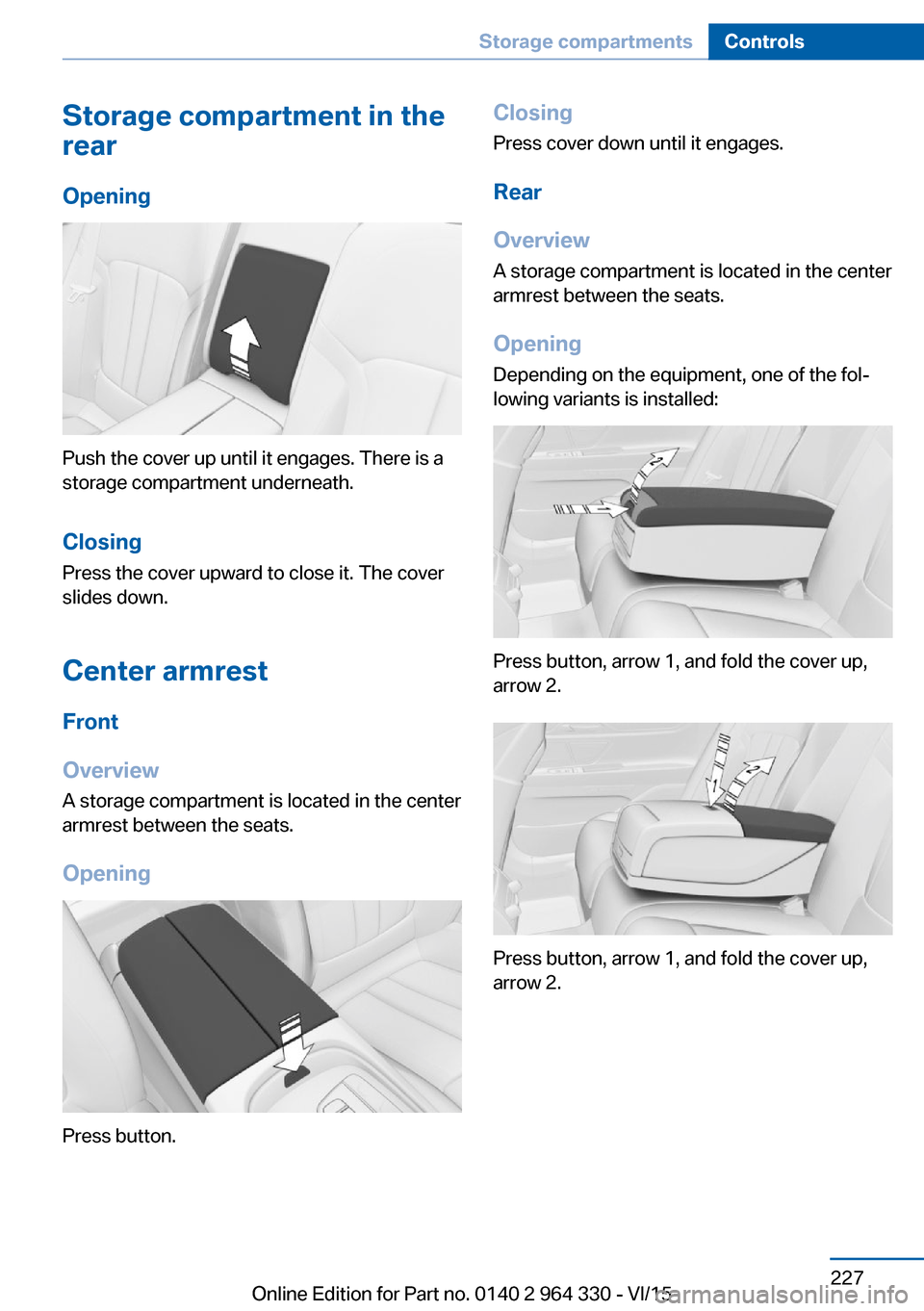
Push the cover up until it engages. There is a
storage compartment underneath.
Closing Press the cover upward to close it. The cover
slides down.
Center armrest
Front
Overview
A storage compartment is located in the center
armrest between the seats.
Opening
Press button.
ClosingPress cover down until it engages.
Rear
Overview
A storage compartment is located in the center armrest between the seats.
Opening
Depending on the equipment, one of the fol‐
lowing variants is installed:
Press button, arrow 1, and fold the cover up,
arrow 2.
Press button, arrow 1, and fold the cover up,
arrow 2.
Seite 227Storage compartmentsControls227
Online Edition for Part no. 0140 2 964 330 - VI/15
Page 238 of 314
Load
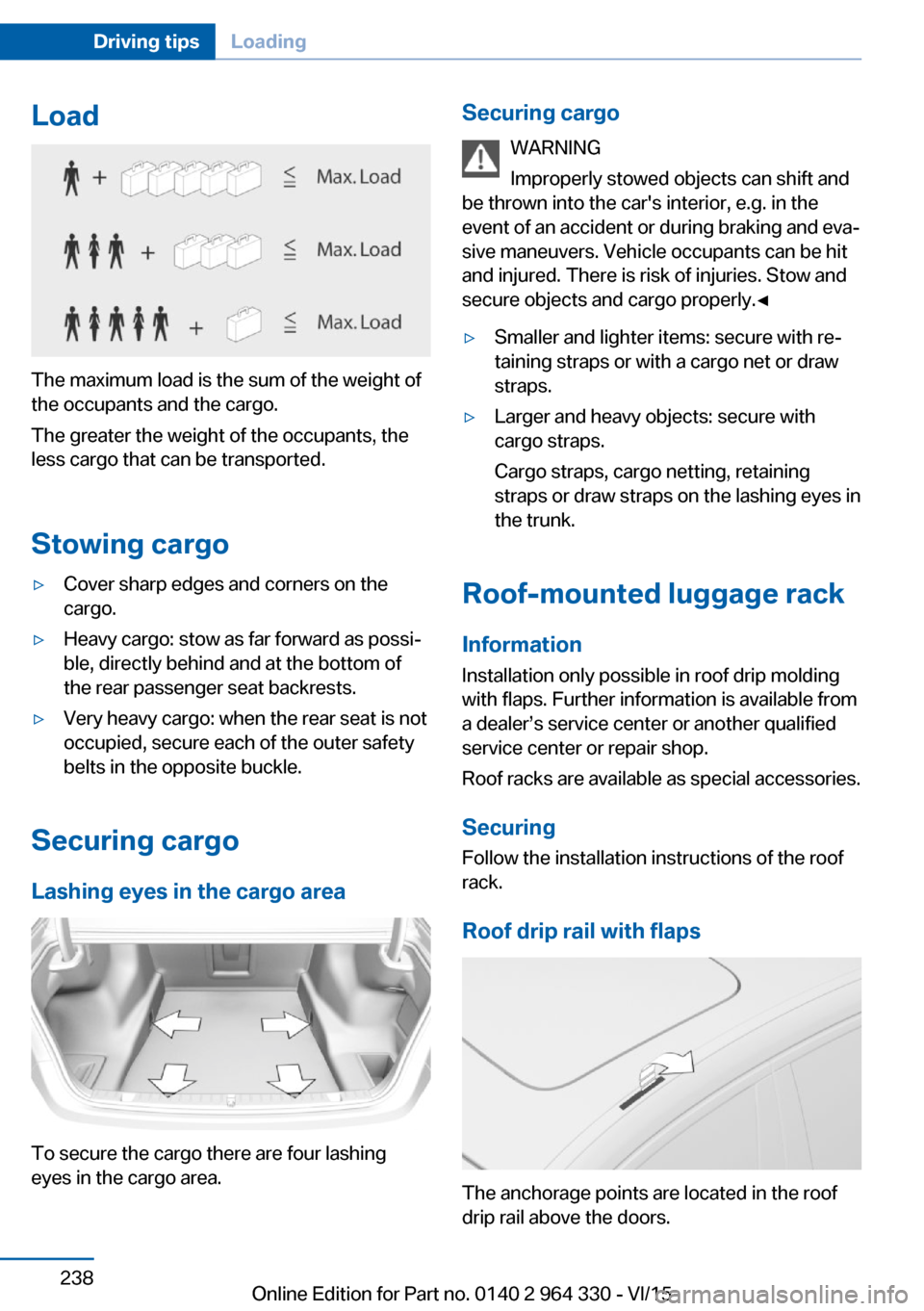
The maximum load is the sum of the weight of
the occupants and the cargo.
The greater the weight of the occupants, the
less cargo that can be transported.
Stowing cargo
▷Cover sharp edges and corners on the
cargo.▷Heavy cargo: stow as far forward as possi‐
ble, directly behind and at the bottom of
the rear passenger seat backrests.▷Very heavy cargo: when the rear seat is not
occupied, secure each of the outer safety
belts in the opposite buckle.
Securing cargo
Lashing eyes in the cargo area
To secure the cargo there are four lashing
eyes in the cargo area.
Securing cargo
WARNING
Improperly stowed objects can shift and
be thrown into the car's interior, e.g. in the
event of an accident or during braking and eva‐
sive maneuvers. Vehicle occupants can be hit
and injured. There is risk of injuries. Stow and
secure objects and cargo properly.◀▷Smaller and lighter items: secure with re‐
taining straps or with a cargo net or draw
straps.▷Larger and heavy objects: secure with
cargo straps.
Cargo straps, cargo netting, retaining
straps or draw straps on the lashing eyes in
the trunk.
Roof-mounted luggage rack
Information
Installation only possible in roof drip molding
with flaps. Further information is available from
a dealer’s service center or another qualified
service center or repair shop.
Roof racks are available as special accessories.
Securing
Follow the installation instructions of the roof
rack.
Roof drip rail with flaps
The anchorage points are located in the roof
drip rail above the doors.
Seite 238Driving tipsLoading238
Online Edition for Part no. 0140 2 964 330 - VI/15
Page 241 of 314
Avoid high engine speeds
As a rule: driving at low engine speeds lowers
fuel consumption and reduces wear.
If necessary, observe the gear shift indicator,
refer to page 120, of the vehicle.
Use coasting conditions When approaching a red light, take your foot
off the accelerator and let the vehicle coast to
a halt.
For going downhill take your foot off the accel‐
erator and let the vehicle roll.
The flow of fuel is interrupted while coasting.
Switch off the engine during longer stops
Switch off the engine during longer stops, e.g.,
at traffic lights, railroad crossings or in traffic
congestion.
Auto Start/Stop function The Auto Start/Stop function of your vehicle
automatically switches off the engine during a
stop.
If the engine is switched off and then restarted
rather than leaving the engine running con‐
stantly, fuel consumption and emissions are
reduced. Savings can begin within a few sec‐
onds of switching off the engine.
In addition, fuel consumption is also deter‐
mined by other factors, such as driving style,
road conditions, maintenance or environmental
factors.
Switch off any functions that
are not currently needed
Functions such as seat heating and the rear
window defroster require a lot of energy andreduce the range, especially in city and stop-
and-go traffic.
Switch off these functions if they are not
needed.
The ECO PRO driving program supports the
energy conserving use of comfort features.
These functions are automatically deactivated
partially or completely.
Have maintenance carried
out
Have vehicles maintained regularly to achieve
optimal vehicle efficiency and service life.
BMW recommends that maintenance work be
performed by a BMW dealer’s service center.
For information on the BMW Maintenance
System, refer to page 279.
ECO PRO
The concept
ECO PRO supports a driving style that saves
on fuel consumption. For this purpose, the en‐
gine control and comfort features, e. g. the cli‐
mate control output, are adjusted.
Under certain conditions the engine is auto‐
matically decoupled from the transmission in
the D selector lever position. The vehicle con‐
tinues traveling with the engine idling to re‐
duce fuel consumption. Selector lever position
D remains engaged.
In addition, context-sensitive instructions are
displayed to assist with an optimized fuel con‐
sumption driving style.
The achieved extended range is displayed in
the instrument cluster as bonus range.
Overview
The system includes the following
EfficientDynamics functions and displays:▷ECO PRO bonus range, refer to page 243.Seite 241Saving fuelDriving tips241
Online Edition for Part no. 0140 2 964 330 - VI/15
Page 242 of 314
▷ECO PRO tips driving instruction, refer to
page 243.▷ECO PRO climate control, refer to
page 242.▷ECO PRO route-ahead assistant driving in‐
struction, refer to page 244.▷ECO PRO coasting driving status, refer to
page 245.▷ECO PRO driving style analysis, refer to
page 246.
Activating ECO PRO
Press button. ECO PRO is displayed
in the instrument cluster.
Configuring ECO PRO INDIVIDUAL
Opening via the Driving Dynamics
Control
1.Activate ECO PRO.2."Configure ECO PRO INDIVIDUAL"
Opening via iDrive
1."My Vehicle"2."Vehicle settings"3."Driving Experience Control"4."Configure ECO PRO INDIVIDUAL"
ECO PRO notes
Activate the ECO PRO limit:
"ECO PRO speed warning"
An ECO PRO tip is displayed if the speed of
the set ECO PRO limit is exceeded.
Adjust the ECO PRO limit speed:
▷"Tip at:"
Activating ECO PRO functions
Adjust, which ECO PRO functions should be
used.
▷"Coasting"▷"ECO PRO seat climate control"▷"ECO PRO climate control"▷"ECO PRO sight"▷"Route-ahead assistant"
Coasting
Fuel-efficiency can be optimized by disengag‐
ing the engine and Coasting with the engine
idling.
ECO PRO seat heating
The output of seat heating and possibly seat
ventilation is reduced on activation of ECO
PRO.
ECO PRO climate control "ECO PRO climate control"
Climate control is set to be fuel-efficient.
By making a slight change to the set tempera‐
ture, or slowly adjusting the rate of heating or
cooling of the car's interior, fuel consumption
can be economized.
The mirror heating is made available when out‐
side temperatures are very cold.
Route-ahead assistant The route-ahead assistant detects and indi‐
cates route sections ahead of the vehicle.
Resetting the settings Reset ECO PRO INDIVIDUAL to the standard
settings:
Select and confirm "Reset to ECO PRO
STANDARD".
Display in the instrument cluster
Display
When ECO PRO mode is activated, the display
switches to a special configuration.
Some of the displays may differ from the dis‐
play in the instrument cluster.
Seite 242Driving tipsSaving fuel242
Online Edition for Part no. 0140 2 964 330 - VI/15
Page 285 of 314
Check Control messages of these comfort fea‐
tures are no longer displayed.
Charging the battery
General information
Make sure that the battery is always suffi‐
ciently charged to guarantee that the battery
remains usable for its full service life.
The battery may need to be charged in the fol‐
lowing cases:▷When making frequent short-distance
drives.▷If the vehicle is not used for prolonged pe‐
riods, longer than a month.
Information
CAUTION
Battery chargers for the vehicle battery
can work with high voltages and currents,
which means that the 12V on-board network
can be overloaded or damaged. There is risk of
property damage. Only connect battery charg‐
ers for the vehicle battery to the starting aid
terminals in the engine compartment.◀
Starting aid terminals
In the vehicle, only charge the battery via the
starting aid terminals, refer to page 288, in the
engine compartment with the engine off.
Power failure
After a temporary power loss, some equipment
needs to be newly initialized or individual set‐
tings updated, e. g.:
▷Seat, mirror, and steering wheel memory:
store the positions again.▷Time: update.▷Date: update.▷Glass sunroof: initialize the system, refer to
page 75.Disposing of old batteries
Have old batteries disposed of by a
dealer’s service center or another
qualified service center or repair shop
or take them to a collection point.
Maintain the battery in an upright position for
transport and storage. Secure the battery so
that it does not tip over during transport.
Fuses Information WARNING
Incorrect and repaired fuses can overload
electrical lines and components. There is risk
of fire. Never attempt to repair a blown fuse
and do not replace a nonworking fuse with a
substitute of another color or amperage rat‐
ing.◀
In the trunk
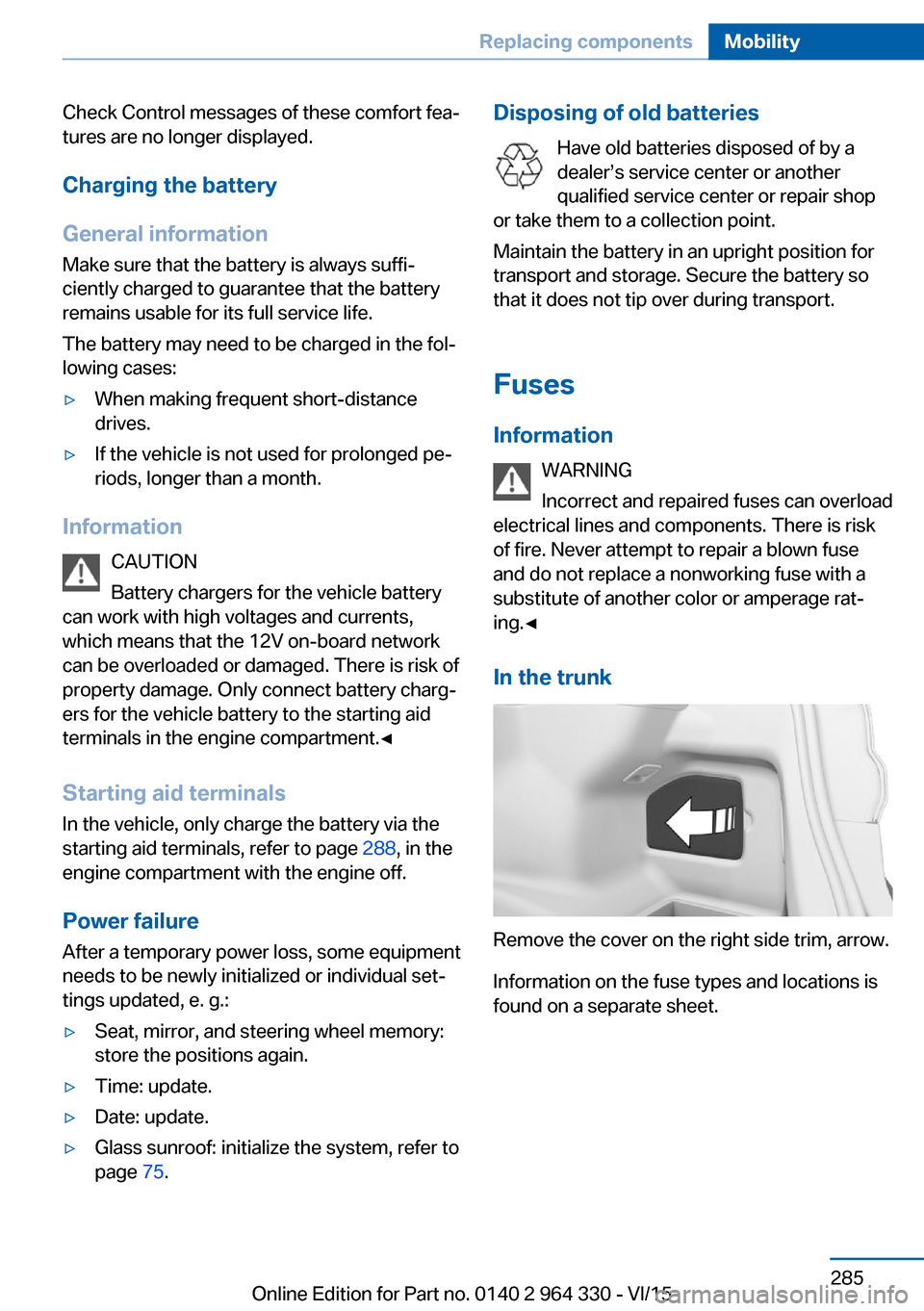
Remove the cover on the right side trim, arrow.
Information on the fuse types and locations is
found on a separate sheet.
Seite 285Replacing componentsMobility285
Online Edition for Part no. 0140 2 964 330 - VI/15
Page 293 of 314
Clean light-colored leather more frequently be‐
cause soiling on such surfaces is substantially
more visible.
Use leather care products; otherwise, dirt and
grease will gradually break down the protective
layer of the leather surface.
Suitable care products are available from a
dealer’s service center or another qualified
service center or repair shop.
Upholstery material careVacuum regularly with a vacuum cleaner.
If upholstery is very dirty, e.g., with beverage
stains, use a soft sponge or microfiber cloth
with a suitable interior cleaner.
Clean the upholstery down to the seams using
large sweeping motions. Avoid rubbing the
material vigorously.
CAUTION
Open Velcro® fasteners on articles of
clothing can damage the seat covers. There is
risk of property damage. Ensure that any Vel‐
cro® fasteners are closed.◀
Caring for special components
Light-alloy wheels When cleaning the vehicle, use only neutral
wheel cleaners having a pH value from 5 to 9.
Do not use abrasive cleaning agents or steam jets above 140 ℉/60 ℃. Follow the manufac‐
turer's instructions.
Aggressive, acidic or alkaline cleaning agents
can destroy the protective layer of adjacent
components, such as the brake disk.
Chrome surfaces
Carefully clean components such as the radia‐
tor grille or door handles with an ample supply
of water, possibly with shampoo added, partic‐
ularly when they have been exposed to road
salt.Rubber components
Environmental influences can cause surface
soiling of rubber parts and a loss of gloss. For
cleaning, use only water and suitable care
products, the manufacturer of your vehicle rec‐
ommends original BMW care products.
Treat especially worn rubber parts with rubber
care agents at regular intervals. When cleaning
rubber seals, do not use any silicon-containing
car care products in order to avoid damage or
noises.
Fine wood partsClean fine wood facing and fine wood compo‐
nents only with a moist rag. Then dry with a
soft cloth.
Plastic components
These include:▷Imitation leather surfaces.▷Roofliner.▷Lamp lenses.▷Instrument cluster cover.▷Matt black spray-coated components.▷Painted parts in the interior.
Clean with a microfiber cloth.
Dampen cloth lightly with water.
Do not soak the roofliner.
CAUTION
Cleansers that contain alcohol or sol‐
vents, such as lacquer thinners, heavy-duty
grease removers, fuel, or such, can damage
plastic parts. There is risk of property damage.
Clean with a microfiber cloth. Dampen cloth
lightly with water.◀
Safety belts
Dirty belt straps impede the reeling action and
thus have a negative impact on safety.
Seite 293CareMobility293
Online Edition for Part no. 0140 2 964 330 - VI/15
Page 302 of 314
Everything from A to Z
IndexA ABS, Antilock Brake Sys‐ tem 163
ACC, Active Cruise Control with Stop & Go 168
Acceleration Assistant, see Launch Control 106
Accessories and parts 7
Accident prevention, see Ac‐ tive Protection 160
Activated-charcoal filter 206
Activating gesture control 30
Active Blind Spot Detec‐ tion 153
Active comfort chassis 201
Active Cruise Control with Stop & Go, ACC 168
Active damping adjust‐ ment 201
Active Protection 160
Active roll stabilization 202
Active seat ventilation 92
Active Steering, integral 166
Adaptive brake assistant 163
Adaptive brake lights, see Brake force display 160
ADAPTIVE drive mode, see Driving Dynamics Con‐
trol 110
Adaptive Light Control 131
ADAPTIVE, see Driving Dy‐ namics Control 110
Additives, oil 275
Adjustments, seats/head re‐ straints 76
After washing vehicle 292
Airbags 136
Airbags, indicator/warning light 137 Air circulation, see Recircu‐
lated-air mode 205
Air, dehumidifying, see Cool‐ ing function 204
Air distribution, manual 205
Air flow, automatic climate control 205
Air outlets, see ventila‐ tion 206
Air pressure, tires 254
Air suspension 200
Alarm system 69
Alarm, unintentional 70
All around the center con‐ sole 16
All around the roofliner 18
All around the steering wheel 14
All-season tires, see Winter tires 259
All-wheel-drive, see xDrive 165
Alternating-code hand-held transmitter 216
Alternative oil types 275
Ambient air package 211
Ambient light 133, 134
Animal detection, see Night Vision 147
Antifreeze, washer fluid 106
Antilock Brake System, ABS 163
Anti-slip control, see DSC 163
Approved axle load 299
Arrival time 124
Ashtray 217
Ashtray, front 217
Ashtray, rear 218
Assistance when driving off 163 Attentiveness assistant 161
AUC Automatic Recirculating Air Control 205
Audio 6
AUTO H button 100
AUTO H button, see Auto‐ matic Hold 100
AUTO intensity 204
Automatic car wash 291
Automatic climate con‐ trol 203
Automatic Cruise Control with Stop & Go 168
Automatic Curb Monitor 85
Automatic deactivation, Front-seat passenger air‐
bags 138
Automatic headlight con‐ trol 130
Automatic Hold 100
Automatic locking 68
Automatic Recirculating Air Control AUC 205
Automatic Soft Closing, doors 63
Automatic transmission, see Steptronic transmis‐
sion 106
Automatic unlocking 68
AUTO program, automatic cli‐ mate control 204
AUTO program, intensity 204
Auto Start/Stop function 98
Average fuel consump‐ tion 124
Average speed 124
Axle loads, weights 299 Seite 302ReferenceEverything from A to Z302
Online Edition for Part no. 0140 2 964 330 - VI/15
Page 303 of 314
BBackrest curvature, see Lum‐ bar support 77
Backrest, seats 76
Backrest, width 77
Band-aids, see First-aid kit 287
Bar for tow-starting/ towing 289
Basic position, rear seats 80
Battery replacement, vehicle battery 284
Battery replacement, vehicle remote control 55
Battery, vehicle 284
Being towed, see tow-start‐ ing/towing 289
Belts, safety belts 80
Beverage holder, cu‐ pholder 228
Blinds, sun protection 72
Bluetooth connection 42
BMW Assist 6
BMW display key 55
BMW Driver’s Guide App 6
BMW gesture control 30
BMW Homepage 6
BMW Internet page 6
BMW maintenance sys‐ tem 279
BMW Touch Command 36
Bonus range, ECO PRO 243
Bottle holder, see Cu‐ pholder 228
Brake assistant 163
Brake assistant, adaptive 163
Brake discs, break-in 234
Brake force display 160
Brake lights, adaptive 160
Brake lights, brake force dis‐ play 160
Brake pads, break-in 234
Braking, hints 235
Breakdown assistance 286
Break-in 234 Brightness of Control Dis‐
play 39
Bulb replacement 282
Bulb replacement, front 282
Bulb replacement, front lamps 282
Bulb replacement, rear 282
Bulb replacement, tail lamps 282
Bulbs and lights 282
Button, Start/Stop 97
Bypassing, see Jump-start‐ ing 287
C
California Proposition 65 Warning 8
Calling up mirror adjust‐ ment 68
Calling up seat adjust‐ ment 68
Calling up steering wheel ad‐ justment 68
Camera-based damping ad‐ justment 201
Camera lenses, care 294
Camera, rearview camera, without Surround View 184
Camera, see Surround View 187
Can holder, see Cu‐ pholder 228
Captain’s chair 89
Car battery 284
Car care products 292
Care, displays 294
Care, vehicle 292
Cargo 237
Cargo area, storage compart‐ ments 229
Cargo, securing 238
Cargo straps, securing cargo 238
Car key, see Remote con‐ trol 54 Carpet, care 294
Cartridge replacement, see Ambient air package 211
Car wash 291
Catalytic converter, see Hot exhaust system 235
CBS Condition Based Serv‐ ice 279
Center armrest 227
Center console 16
Central locking system 63
Central screen, see Control Display 21
Changes, technical, see Own Safety 7
Changing parts 281
Changing wheels 282
Changing wheels/tires 258
Chassis number, see vehicle identification number 10
Check Control 114
Checking the engine oil level electronically 273
Checking the oil level elec‐ tronically 273
Children, seating position 93
Children, transporting safely 93
Child restraint fixing sys‐ tem 93
Child restraint fixing system LATCH 95
Child restraint fixing systems, mounting 94
Child safety locks 96
Child seat, mounting 94
Child seats 93
Chrome parts, care 293
Cigarette lighter 218
Cleaning displays 294
Climate control 203
Climate control on roof‐ liner 209
Clock 118
Closing the trunk lid with no- touch activation 66 Seite 303Everything from A to ZReference303
Online Edition for Part no. 0140 2 964 330 - VI/15
Page 306 of 314
Fragrance, see Ambient airpackage 211
Fragrancing, see Ambient air package 211
Front airbags 136
Front center armrest 227
Front cupholder 228
Front fog lights 132
Front passenger seat, adjust‐ ing 78
Front-seat passenger airbags, automatic deactivation 138
Front-seat passenger airbags, indicator lamp 138
Front seats 76
FTM Flat Tire Monitor 268
Fuel 252
Fuel consumption, see Aver‐ age fuel consumption 124
Fuel filler flap 250
Fuel gauge 118
Fuel lid 250
Fuel quality 252
Fuel recommendation 252
Fuel, tank capacity 300
Fuse 285
G
Garage door opener, see Uni‐ versal Integrated Remote
Control 215
Gasoline 252
Gear change, Steptronic transmission 106
Gear shift indicator 120
General driving notes 234
General settings 38
Gentleman function 78
Gesture 30
Gesture control 30
Gesture operation 30
Glare shield 217
Glass sunroof, powered 73
Glove compartment 225 Gross vehicle weight, ap‐
proved 299
H
Handbrake, see Parking brake 100
Hand-held transmitter, alter‐ nating code 216
Hand movement 30
Hazard warning flashers 286
HDC Hill Descent Con‐ trol 165
Head airbags 136
Headlight control, auto‐ matic 130
Headlight courtesy delay fea‐ ture 130
Headlight courtesy delay fea‐ ture via remote control 61
Headlight flasher 103
Headlight glass 282
Headlights, care 292
Head restraint pillows 84
Head restraints 76
Head restraints, front 82
Head restraints, rear 83
Head-up Display 126
Head-up Display, care 294
Heating, see Parked-car heat‐ ing 209
Heavy cargo, stowing 238
High-beam Assistant 132
High beams 103
High beams/low beams, see High-beam Assistant 132
Hill Descent Control HDC 165
Hills 236
Hill start assistant, see Drive- off assistant 163
Holder for beverages 228
Homepage 6
Hood 272
Horn 14
Hotel function, trunk lid 65 Hot exhaust system 235
HUD Head-up Display 126
Hydroplaning 235
I iBrake — Post Crash 161
Ice warning, see External temperature warning 118
Icy roads, see External tem‐ perature warning 118
Identification marks, tires 256
Identification number, see ve‐ hicle identification num‐
ber 10
Idle state, operating and drive readiness 19
iDrive 21
Ignition key, see Remote con‐ trol 54
Indication of a flat tire 266 , 269
Indicator and alarm lamps, see Check Control 114
Indicator lamp, see Check Control 114
Individual air distribution 205
Individual settings, see pro‐ files 58
Inflation pressure, tires 254
Inflation pressure warning FTM, tires 268
Information 6
Initialize, Tire Pressure Moni‐ tor TPM 265
Initializing, Flat Tire Monitor FTM 269
Instrument cluster 113
Instrument lighting 133
Integral Active Steering 166
Integrated key 54
Integrated Owner's Manual in the vehicle 49
Intelligent Emergency Re‐ quest 286
Intelligent Safety 139 Seite 306ReferenceEverything from A to Z306
Online Edition for Part no. 0140 2 964 330 - VI/15
Page 307 of 314
Intensity, AUTO pro‐gram 204
Interior equipment 215
Interior lights 133
Interior lights during unlock‐ ing 60
Interior lights with the vehicle locked 61
Interior motion sensor 70
Interior rearview mirror, auto‐ matic dimming feature 86
Internet page 6
Interval display, service re‐ quirements 119
Ionization, see Ambient air package 211
J Jacking points for the vehicle jack 282
Joystick, Steptronic transmis‐ sion 106
Jump-starting 287
K Key/remote control 54
Keyless Go, see Comfort Ac‐ cess 65
Kickdown, Steptronic trans‐ mission 106
Knee airbag 137
L Label on recommended tires 259
Lamp in the exterior mirror, see Active Blind Spot De‐
tection 153
Lamp in the exterior mirror, see crossing traffic warn‐
ing 197
Lamp replacement 282
Lamp replacement, front 282 Lamp replacement, rear 282
Lane departure warning 150
Lane margin, warning 150
Language, on the Control Display 38
Lashing eyes, securing cargo 238
LATCH child restraint sys‐ tem 95
Launch Control 106
Leather, care 292
LEDs, replace light-emitting diodes 282
Light alloy wheels, care 293
Light control 131
Lighting 129
Lights 129
Lights and bulbs 282
Light switch 129
List of all messages 40
Load 238
Loading 237
Lock, door 62
Locking, automatic 68
Locking, settings 67
Locking via door lock 62
Locking with remote con‐ trol 60
Lock, power window 71
Locks, doors, and win‐ dows 96
Low beams 129
Low beams, automatic, see High-beam Assistant 132
Lower back support 77
Luggage rack, see Roof- mounted luggage rack 238
Lumbar support 77
M
Maintenance 279
Maintenance require‐ ments 279
Maintenance, service require‐ ments 119 Maintenance system,
BMW 279
Make-up mirror 217
Malfunction displays, see Check Control 114
Manual air distribution 205
Manual air flow 205
Manual brake, see Parking brake 100
Manual mode, Steptronic transmission 106
Manual operation, door lock 62
Manual operation, exterior mirrors 85
Manual operation, fuel filler flap 250
Marking, run-flat tires 260
Massage seat, front 88
Massage seat, rear 88
Master key, see Remote con‐ trol 54
Maximum cooling 204
Maximum speed, display 120
Maximum speed, winter tires 259
Measurement, units of 39
Medical kit 287
Memory for seat, mirrors, steering wheel 87
Menu in instrument clus‐ ter 121
Menus 22
Menus, operating, iDrive 21
Messages 40
Messages, see Check Con‐ trol 114
Microfilter 206
Minimum tread, tires 258
Mirror 85
Mirror memory 87
Mobile communication devi‐ ces in the vehicle 235
Mobility System 260
Modifications, technical, see Own Safety 7 Seite 307Everything from A to ZReference307
Online Edition for Part no. 0140 2 964 330 - VI/15