vent BMW 7 SERIES 2016 G12 Workshop Manual
[x] Cancel search | Manufacturer: BMW, Model Year: 2016, Model line: 7 SERIES, Model: BMW 7 SERIES 2016 G12Pages: 314, PDF Size: 7.9 MB
Page 183 of 314
sion cannot be prevented under all circum‐
stances.
The function is available from walking speed
while backing up or rolling backward.
A press of the gas pedal interrupts the braking
intervention.
After emergency braking to a stop, further
creeping toward an obstacle is possible. To
creep toward the obstacle, lightly press the ac‐
celerator pedal and release it again.
If the accelerator pedal is heavily depressed,
the vehicle drives off as usual. Manual braking
is possible at any time.
General information The system uses the ultrasound sensors of
PDC and parking assistant.
Information WARNING
The system does not relieve from the
personal responsibility to correctly assess the
traffic situation. There is risk of an accident.
Adjust the driving style to the traffic condi‐
tions. Watch traffic and vehicle surroundings
closely and actively interfere in the respective
situations.◀
Activating/deactivating the system About iDrive:1."My Vehicle"2."Vehicle settings"3."Parking"4."Active PDC emergency brake function"5."Active PDC emergency brake function"
The setting is stored for the drive profile cur‐
rently used.
With parking assistant: side
protection
The concept Obstacles on the side of the vehicle are de‐
tected by the sensors of the system. The sys‐
tem warns against these obstacles.
Display
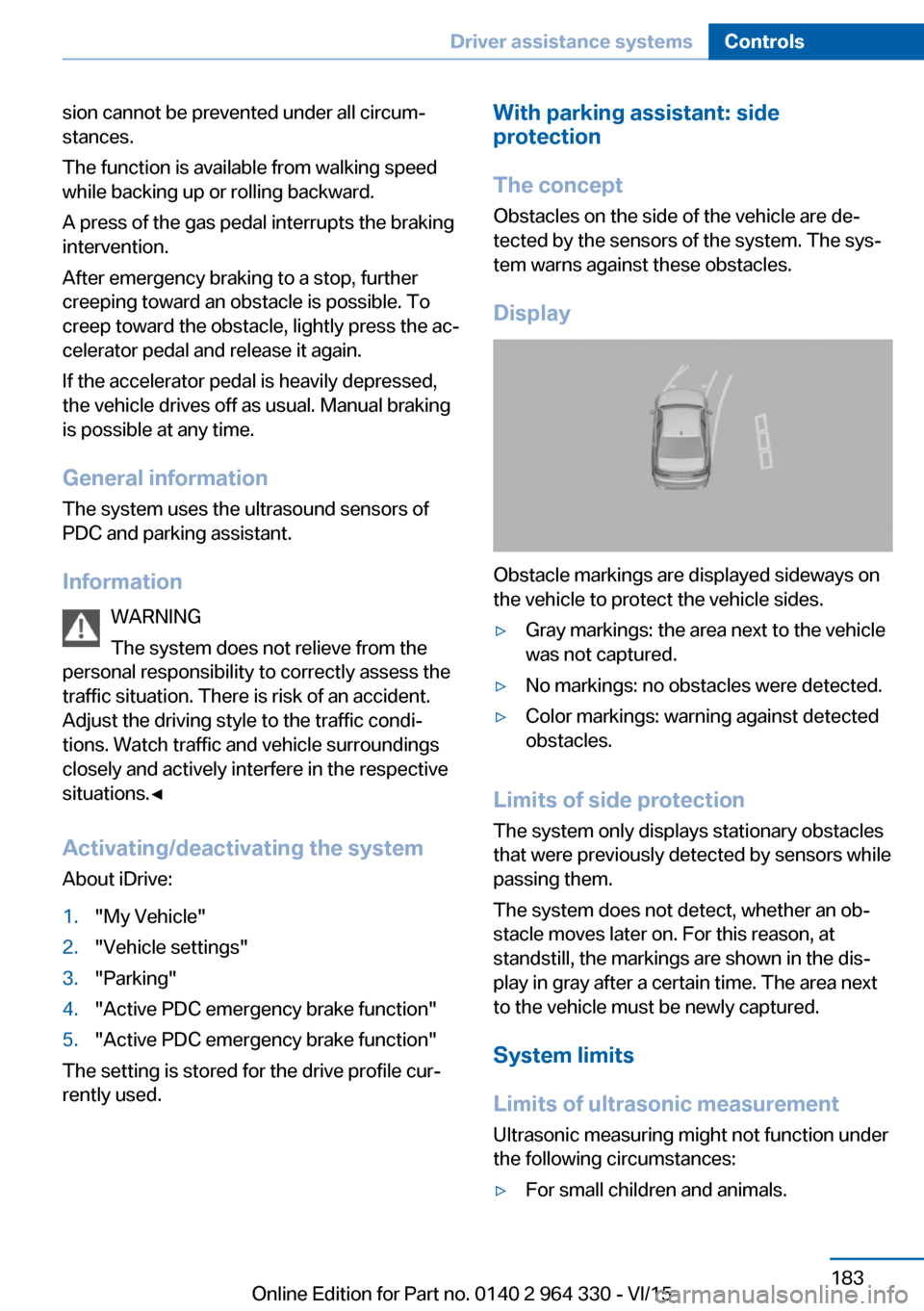
Obstacle markings are displayed sideways on
the vehicle to protect the vehicle sides.
▷Gray markings: the area next to the vehicle
was not captured.▷No markings: no obstacles were detected.▷Color markings: warning against detected
obstacles.
Limits of side protection
The system only displays stationary obstacles
that were previously detected by sensors while passing them.
The system does not detect, whether an ob‐
stacle moves later on. For this reason, at standstill, the markings are shown in the dis‐
play in gray after a certain time. The area next
to the vehicle must be newly captured.
System limits
Limits of ultrasonic measurement Ultrasonic measuring might not function under
the following circumstances:
▷For small children and animals.Seite 183Driver assistance systemsControls183
Online Edition for Part no. 0140 2 964 330 - VI/15
Page 193 of 314
Gray hatched areas with symbol, e.g. open
door, in the camera image mark areas that are
currently not displayed.
Gray hatched areas without symbol, e.g. in
front of the vehicle, mark areas that are not
visible to the cameras.
System limits
Non-visible areas
Areas around the vehicle that are not visible
because of the viewing angle of the cameras,
are presented hatched in gray.
Detection of objects Very low obstacles as well as high, protruding
objects such as ledges may not be detected by
the system.
Assistance functions also take into account
data of the PDC.
Follow instructions in the PDC chapter, refer to
page 180.
The objects displayed on the Control Display
under certain circumstances are closer than
they appear. Do not estimate the distance from
the objects on the display.
Malfunction
A camera malfunction is displayed on the Con‐
trol Display.
A yellow symbol is displayed and the
recording range of the malfunctioning
camera is displayed in black on the
Control Display.Parking assistant
The concept
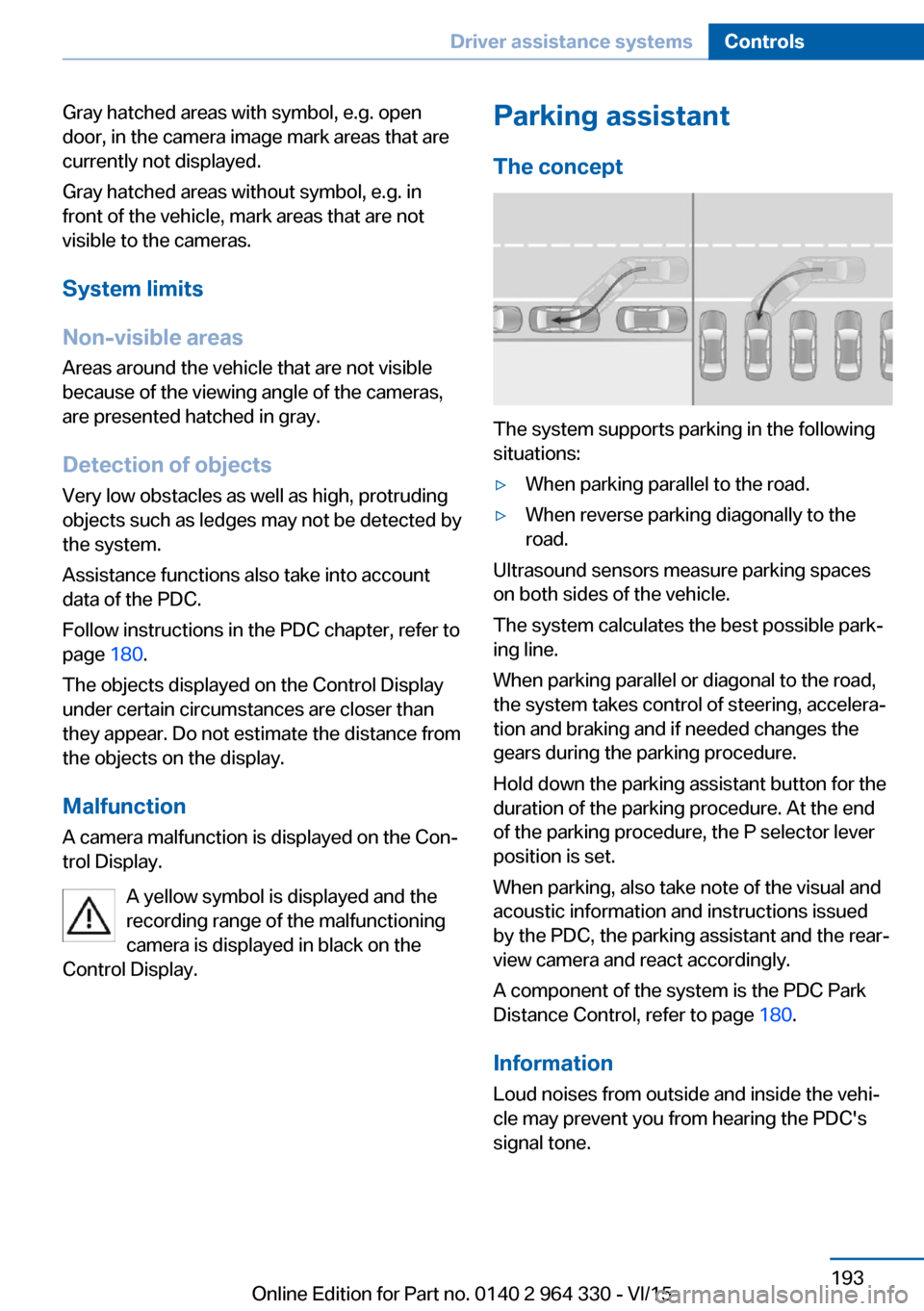
The system supports parking in the following
situations:
▷When parking parallel to the road.▷When reverse parking diagonally to the
road.
Ultrasound sensors measure parking spaces
on both sides of the vehicle.
The system calculates the best possible park‐
ing line.
When parking parallel or diagonal to the road,
the system takes control of steering, accelera‐
tion and braking and if needed changes the
gears during the parking procedure.
Hold down the parking assistant button for the
duration of the parking procedure. At the end
of the parking procedure, the P selector lever
position is set.
When parking, also take note of the visual and
acoustic information and instructions issued
by the PDC, the parking assistant and the rear‐
view camera and react accordingly.
A component of the system is the PDC Park
Distance Control, refer to page 180.
Information Loud noises from outside and inside the vehi‐
cle may prevent you from hearing the PDC's
signal tone.
Seite 193Driver assistance systemsControls193
Online Edition for Part no. 0140 2 964 330 - VI/15
Page 203 of 314
Climate controlVehicle features and options
This chapter describes all standard, country-
specific and optional features offered with the
series. It also describes features that are not
necessarily available in your car, e. g., due to
the selected options or country versions. This
also applies to safety-related functions and
systems. The respectively applicable country
provisions must be observed when using the
respective features and systems.
Automatic climate control Overview
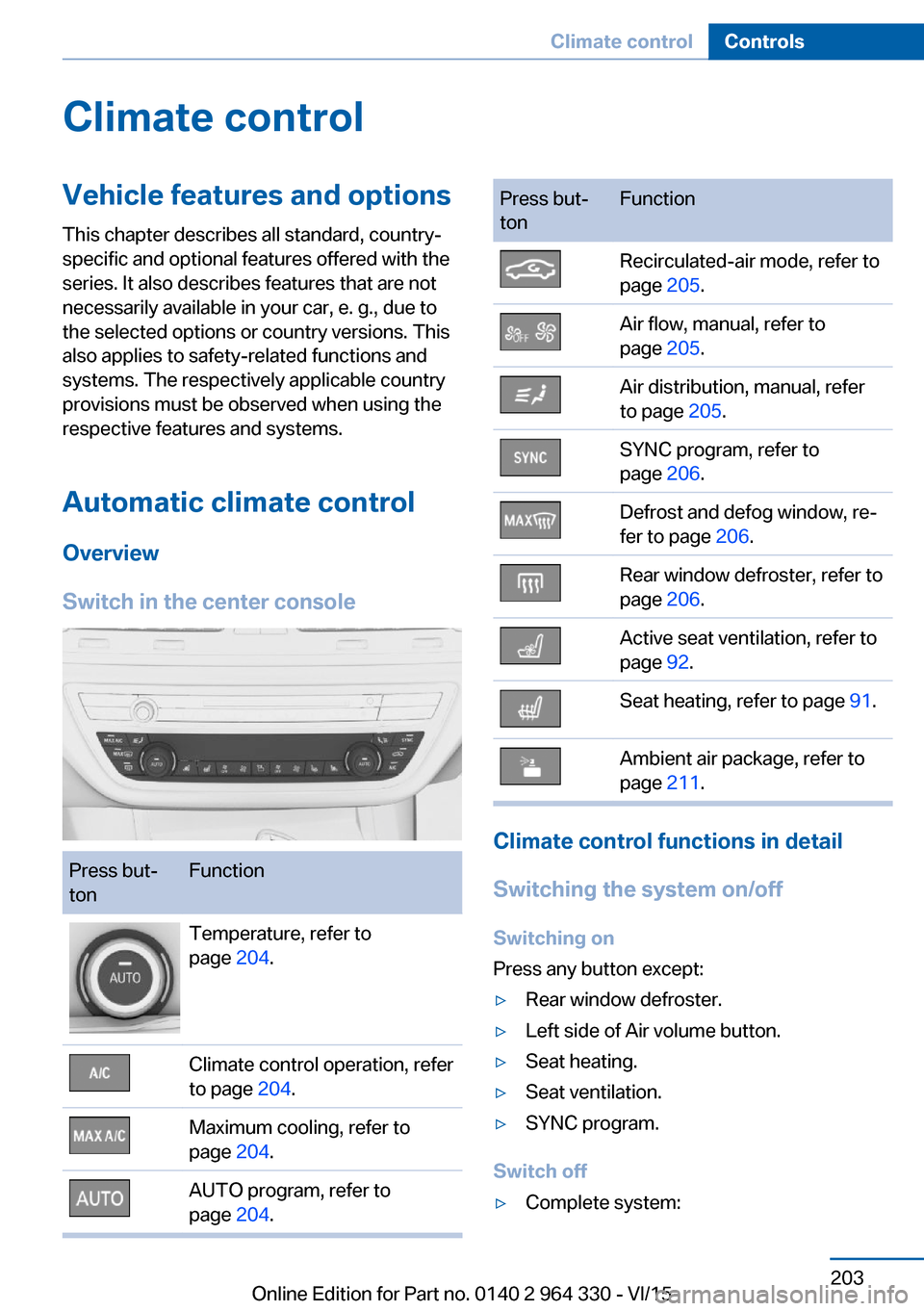
Switch in the center consolePress but‐
tonFunctionTemperature, refer to
page 204.Climate control operation, refer
to page 204.Maximum cooling, refer to
page 204.AUTO program, refer to
page 204.Press but‐
tonFunctionRecirculated-air mode, refer to
page 205.Air flow, manual, refer to
page 205.Air distribution, manual, refer
to page 205.SYNC program, refer to
page 206.Defrost and defog window, re‐
fer to page 206.Rear window defroster, refer to
page 206.Active seat ventilation, refer to
page 92.Seat heating, refer to page 91.Ambient air package, refer to
page 211.
Climate control functions in detail
Switching the system on/off
Switching on
Press any button except:
▷Rear window defroster.▷Left side of Air volume button.▷Seat heating.▷Seat ventilation.▷SYNC program.
Switch off
▷Complete system:Seite 203Climate controlControls203
Online Edition for Part no. 0140 2 964 330 - VI/15
Page 204 of 314
Press and hold the left button on
the driver's side until the control
clicks off.▷On the front passenger side:
Press and hold the left button on
the front passenger side.
Temperature
Turn the ring to set the desired
temperature.
The automatic climate control achieves this
temperature as quickly as possible, if needed
by using the maximum cooling or heating ca‐
pacity, and then keeps it constant.
Do not rapidly switch between different tem‐
perature settings. Otherwise, the automatic cli‐
mate control will not have sufficient time to ad‐
just the set temperature.
Information
Symbol is displayed permanently on the
display of the automatic climate control.
Cooling function The car's interior can only be cooled with the
engine running.
Press button. The LED lights up.
The air will be cooled and dehumidi‐
fied and, depending on the temperature set‐
ting, warmed again.
Depending on the weather, the windshield and
side windows may fog up briefly when the en‐
gine is started.
The cooling function is switched on automati‐
cally with the AUTO program.
When using the automatic climate control,
condensation water, refer to page 236, devel‐
ops that exits underneath the vehicle.
Maximum cooling
Press button.
The system is set to the lowest tem‐
perature, optimum air flow and air circulation
mode.
Air flows out of the vents to the upper body re‐
gion. The vents need to be open for this.
The function is available with external temper‐
atures beyond approx. 32 ℉/0 ℃ and with the
engine running.
Adjust air flow on the driver's side with the pro‐
gram active.
AUTO program Press button.
Air flow, air distribution and tempera‐
ture are controlled automatically.
Depending on the selected temperature,
AUTO intensity program and outside influen‐
ces, the air is directed to the windshield, side
windows, upper body, and into the footwell.
The cooling function, refer to page 204, is
switched on automatically with the AUTO pro‐
gram.
At the same time, a condensation sensor con‐
trols the program so as to prevent window
condensation as much as possible.
To switch off the program: press the button
again or manually adjust the air distribution.
Intensity of the AUTO program
With the AUTO program activated, the auto‐
matic intensity control can be changed.
Press the left or right side of the but‐
ton: decrease or increase the inten‐
sity.
The selected intensity is shown on the display
of the automatic climate control.Seite 204ControlsClimate control204
Online Edition for Part no. 0140 2 964 330 - VI/15
Page 206 of 314
If there is window condensation, press
the button on the driver's side to uti‐
lize the condensation sensor.
SYNC program Press button.
The current settings on the driver's
side for temperature, air flow, air distribution,
and AUTO program are transferred to the front
passenger side and to the left and right rear.
To switch off, press the button again.
The program is switched off if the settings on
the front passenger side or in the rear are
changed.
Defrosts windows and removes
condensation
Press button.
Ice and condensation are quickly re‐
moved from the windshield and the front side
windows.
For this purpose, point the side vents onto the
side windows as needed.
Adjust air flow with the program active. If there is window condensation, you
can also switch on the air conditioning
or press the button to utilize the condensation
sensor.
Rear window defroster Press button.
The rear window defroster switches
off automatically after a certain period of time.
Microfilter/activated-charcoal filter
The microfilter removes dust and pollen from
the incoming air.
The activated-charcoal filter removes gaseous
pollutants from the outside air that enters the
vehicle.This combined filter should be replaced during
scheduled maintenance, refer to page 279, of
your vehicle.
Ventilation
Setting The air flow directions can be individually ad‐
justed:▷Direct ventilation:
The air flow is directly pointed onto the
person. The air flow heats or cools noticea‐
bly, depending on the adjusted tempera‐
ture.▷Indirect ventilation:
If the vents are fully or partly closed, the air
is directly routed into the car's interior.
Indirect ventilation can also be adjusted on
the Control Display.
Front ventilation
▷Lever for changing the air flow direction,
arrow 1.▷Thumbwheel for continuous opening and
closing of the vents, arrow 2▷Touch sensor or thumbwheel to vary the
temperature, arrow 3.
With touch sensor, push the marking in the
desired direction:
Toward blue: colder.
Toward red: warmer.Seite 206ControlsClimate control206
Online Edition for Part no. 0140 2 964 330 - VI/15
Page 207 of 314
The set interior temperature for the driver
and passenger are not changed.
Adjusting the ventilation
▷Ventilation for cooling:
Direct vent in your direction when vehicle's
interior is too hot.▷Draft-free ventilation:
Adjust the vent to let the air flow past the
occupants.
Indirect ventilation
Air is indirectly routed into the car's interior.
About iDrive:
1."My Vehicle"2."Vehicle settings"3."Climate functions"4."Indirect ventilation"
Ventilation in rear, center
▷Lever for changing the air flow direction,
arrow 1.▷Thumbwheels to vary the temperature, ar‐
row 2.
Toward blue: colder.
Toward red: warmer.Lateral ventilation▷Lever for changing the air flow direction,
arrow 1.▷Thumbwheel for continuous opening and
closing of the vents, arrow 2.
Rear automatic climate
control
Overview
1Temperature2AUTO program3Air distribution, manual4Air flow, AUTO intensity5Display6Maximum cooling7Seat heating 918Active seat ventilation 92Seite 207Climate controlControls207
Online Edition for Part no. 0140 2 964 330 - VI/15
Page 208 of 314
Switch on/off: via iDrive1."My Vehicle"2."Vehicle settings"3."Climate functions"4."Rear climate"
The rear automatic climate control is not ready
for operation if the automatic climate control is
switched off or if the function for defrosting or
defogging the windows is active: defrost win‐
dows and remove condensation.
Switch on/off: via button
Switching on Press any button except:
▷Left side of Air volume button.▷Seat heating.▷Seat ventilation.
Switch off
Press and hold the left button.
AUTO program Press button.
Air flow, air distribution, and tempera‐
ture are controlled automatically:
Depending on the selected temperature, the
AUTO intensity, and outside influences, the air
is directed to the upper body and into the foot‐
well.
The cooling function is switched on automati‐
cally with the AUTO program.
Intensity of the AUTO programWith the AUTO program activated, the auto‐
matic intensity control can be changed:
Press the left or right side of the but‐
ton: decrease or increase the inten‐
sity.
The selected intensity is shown on the display
of the automatic climate control.
Temperature Turn the ring to set the desired
temperature.
The automatic climate control achieves this
temperature as quickly as possible, if needed
by using the maximum cooling or heating ca‐
pacity, and then keeps it constant.
Do not rapidly switch between different tem‐
perature settings. The automatic climate con‐
trol will not have sufficient time to adjust the
set temperature.
The temperature can also be operated using
BMW Touch Command.
Information
Symbol is displayed permanently on the
display of the automatic climate control.
Manual air distribution
The air distribution can be adjusted to individ‐
ual needs.
Press button repeatedly to select a
program:
▷Upper body region.▷Upper body region and footwell.▷Footwell.
The air distribution can also be operated using
BMW Touch Command.
Air flow, manual To manually adjust air flow turn off AUTO pro‐
gram first.
Press the left or right side of the but‐
ton: decrease or increase air flow.
Seite 208ControlsClimate control208
Online Edition for Part no. 0140 2 964 330 - VI/15
Page 209 of 314
The selected air flow is shown on the display of
the automatic climate control.
The air flow can also be operated using BMW
Touch Command.
Maximum cooling Press button.
The system is set to the lowest tem‐
perature, maximum air flow and air circulation
mode.
Air flows out of the vents to the upper body re‐
gion. The vents need to be open for this.
Air is cooled as quickly as possible:▷At an external temperature of approx.
32 ℉/0 ℃.▷When the engine is running.
Operation is also possible using BMW Touch
Command.
Climate control operation on the
roofliner
Temperature Turn the ring to set the desired
temperature.
Air flow Press the left or right side of the but‐
ton: decrease or increase air flow.
LEDs indicate the intensity of the air supply.
The air flow may be reduced automatically to
save battery power.
Ventilation
Thumbwheel for changing the air flow direc‐
tion.
Parked-car ventilation/
heating
The concept
The parked-car ventilation ventilates the vehi‐
cle interior and lowers its temperature, if
needed.
The parked-car heating warms the vehicle in‐
terior, making snow and ice easier to remove.
The system uses the fuel of the vehicle for
heat generation.
Parked-car ventilation and parked-car heating
can be switched on and off directly or via a pre-
set departure time.
The reel-on time is automatically determined
based on the external temperature. The sys‐
tem promptly switches on before the selected
departure time.
Information DANGER
If the exhaust pipe is blocked or ventila‐
tion is insufficient, harmful exhaust gases can
enter into the vehicle. The exhaust gases con‐
tain carbon monoxide, an odorless and color‐
less but highly toxic gas. In enclosed areas, ex‐
haust gases can also accumulate outside of
the vehicle. There is danger to life. Keep the
exhaust pipe free and ensure sufficient ventila‐
Seite 209Climate controlControls209
Online Edition for Part no. 0140 2 964 330 - VI/15
Page 210 of 314
tion. Do not switch on parked-car heating in
enclosed areas.◀
WARNING
During parked-car heating operation,
high temperatures can occur underneath the
body, e.g. caused by the exhaust gas system. If
combustible materials, such as leaves or grass,
come in contact with hot parts of the exhaust
gas system, these materials can ignite. There
is risk of fire. Make sure that no combustible
materials can come in contact with hot vehicle
parts during parked-car heating operation.◀
At external temperatures below 32 ℉/0 ℃, wa‐
ter vapor occurs that emerges from below the
vehicle.
Functional requirements▷The vehicle is in the idle or operating readi‐
ness state.▷Battery is sufficiently charged.▷Parked-car heating: the fuel tank is filled to
above the reserve range.
Open the vents to allow air to flow out.
Switching on/off directly
There are different ways to switch the system
on or off.
It switches of automatically after some time.
The system continues to run for some time af‐
ter being switched off.
Via the automatic climate controlbutton
When the vehicle is in standby state, parked-
car ventilation can be switched on or off via the
automatic climate control buttons.
Press any button except:
▷Rear window defroster.▷Left side of Air volume button.▷Seat heating.▷Seat ventilation.▷SYNC program.
Via the iDrive
Parked-car ventilation can be switched on or
off via iDrive.
1."My Vehicle"2."Vehicle settings"3."Climate functions"4."Comfort ventilation" or "Comfort heating/
ventilation"5."Activate now"
symbol on the automatic climate control
signals to switched on system.
Via BMW display key Parked-car ventilation and parked-car heating
can be switched on or off via the BMW display
key.
Switching on directly
1.Switch on the display of the BMW display
key.2."Climate control setting"3. , Tap symbol.4."Activate now"5."Start"
Switching off directly
1.Switch on the display of the BMW display
key.2."Climate control setting"3. , Tap symbol.4."Stop"
Departure time
Different departure times can be adjusted to
ensure a comfortable interior temperature in
the vehicle at the time of departure.
▷One-time departure time: the time can be
set.Seite 210ControlsClimate control210
Online Edition for Part no. 0140 2 964 330 - VI/15
Page 211 of 314
The system is switched on once at the de‐
sired time.▷Departure time with weekday: time and day
of the week can be set.
The system is switched on repeatedly on
the desired day of the week and time.
The departure time is pres-set in two steps:
▷Set departure times.▷Activate departure times.
Setting departure time
Via the iDrive
1."My Vehicle"2."Climate functions"3."Comfort ventilation" or "Comfort heating/
ventilation"4.Select the desired departure time.5.Set the departure time.6.Select day of the week if needed.
Via BMW display key
1.Switch on the display of the BMW display
key.2."Climate control setting"3. , Tap symbol.4.Select the desired departure time.5. If necessary, tap day of the week.6.Select time.7."OK"
Activating the departure time
If a departure time should influence the switch‐
ing on of parked-car heating/ventilation, the re‐ spective departure time must be activated first.
Via the iDrive
1."My Vehicle"2."Climate functions"3."Comfort heating/ventilation"4."For departure time"
Activate the desired departure time.
The symbol on the automatic climate con‐
trol signals an activated departure time.
Via BMW display key
1.Switch on the display of the BMW display
key.2."Climate control setting"3. , Tap symbol.4. Tap symbol.
Activate the desired departure time.
Ambient air package
The concept The Ambient Air Package can be used to clean
and scent the interior air with high-quality fra‐
grances.
Two fragrances can be selected in the vehicle.
A variety other fragrances is possible by re‐
placing the fragrance cartridges.
Ionization is used to clean the air from sus‐
pended particles. Together with the selected
fragrance, ionization enhances well-being and
relaxation while driving.
Ionization
Ionization cleans the vehicle's interior air of
suspended particles.
Switching ionization on/off
About iDrive:
1."My Vehicle"2."Vehicle settings"3."Climate functions"4."Air quality"5."Ionization"Seite 211Climate controlControls211
Online Edition for Part no. 0140 2 964 330 - VI/15