ECO mode BMW 740I 1998 User Guide
[x] Cancel search | Manufacturer: BMW, Model Year: 1998, Model line: 740I, Model: BMW 740I 1998Pages: 211, PDF Size: 1.68 MB
Page 80 of 211
79n
RepairsIndexOverview Controls Car care Technology Data
Digital clockFrom ignition switch position 1, you can
make use of the following functions:
>Time and date
>Program an hourly reminder (memo),
for instance, to remind you of news
broadcasts
>Independent ventilation system.380us173
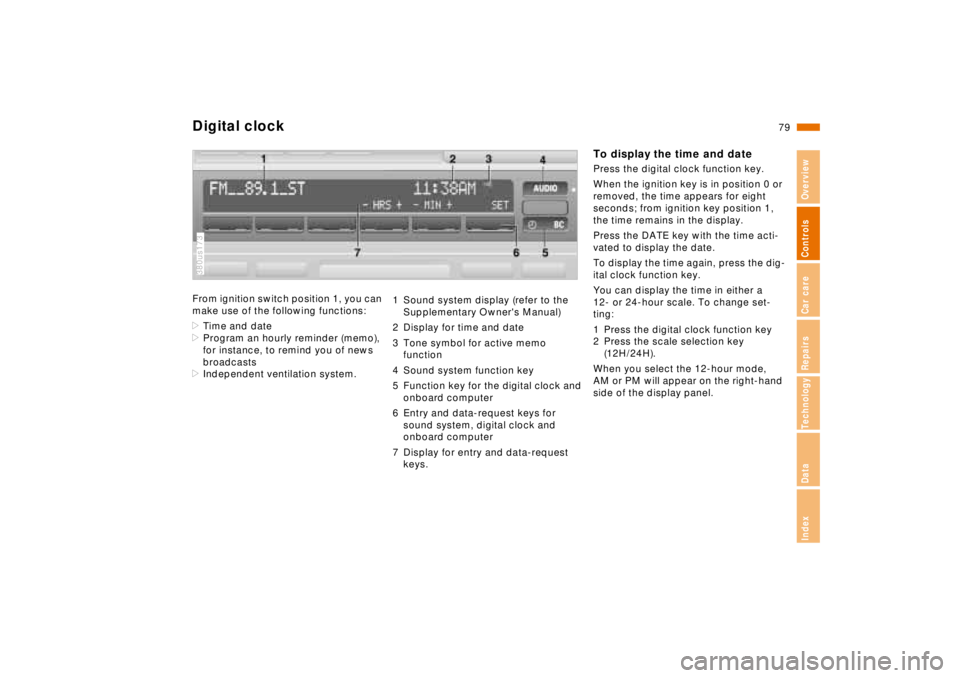
1 Sound system display (refer to the
Supplementary Owner's Manual)
2 Display for time and date
3 Tone symbol for active memo
function
4 Sound system function key
5 Function key for the digital clock and
onboard computer
6 Entry and data-request keys for
sound system, digital clock and
onboard computer
7 Display for entry and data-request
keys.
To display the time and datePress the digital clock function key.
When the ignition key is in position 0 or
removed, the time appears for eight
seconds; from ignition key position 1,
the time remains in the display.
Press the DATE key with the time acti-
vated to display the date.
To display the time again, press the dig-
ital clock function key.
You can display the time in either a
12- or 24-hour scale. To change set-
ting:
1 Press the digital clock function key
2 Press the scale selection key
(12H/24H).
When you select the 12-hour mode,
AM or PM will appear on the right-hand
side of the display panel.
Page 104 of 211
103n
RepairsIndexOverview Controls Car care Technology Data
Automatic climate controlAutomatic recirculated-air control
(AUC)
You can respond to unpleasant
external odors by temporarily
stopping the flow of outside air. The
system then recirculates the air cur-
rently within the vehicle. Press the but-
ton repeatedly to run through the fol-
lowing control sequence:
>Indicator lamps off: Fresh air flows
into the vehicle
>Left-hand indicator lamp on – AUC
mode: The system detects pollutants
in the outside air and responds by
deactivating the outside air flow when
required. The system then recircu-
lates the air currently within the vehi-
cle
>Right-hand indicator lamp on: The
flow of external air into the vehicle is
permanently blocked. The system
then recirculates the air currently
within the vehicle.
If you have a multi-function steering
wheel with the AUC button (refer to
page 23), you can also switch between
"OFF" and AUC from there.
If the windows fog over in the re-
circulated-air mode, switch this
mode off and increase the air supply as
required.<
Rear window defroster
When the rear window defroster
is activated, the indicator lamp
comes on. The rear window defroster
switches off automatically.
Temperature
You can make individual
temperature settings on the
driver's side and the front passenger
side. Your settings will be shown in the
display 7. The displayed temperatures
are reference values for the interior
temperature. We recommend 707
(226) as a comfortable setting,
whether the air conditioner is operating
or not. When you start the vehicle, the
system ensures that the selected tem-
perature is achieved as quickly as pos-
sible. It then maintains this tempera-
ture, regardless of the season.
You can set uncontrolled heater
output at up to 907 (326). Full
cooling output is available from the air
conditioner down to 607 (166).<
Air supply
In the "AUTO" program, the
air flow is controlled auto-
matically. AUTO will appear in the dis-
play, refer to the overview on page 100.
Use "+" and "–" to vary the air flow.
When your setting is displayed by bars,
the automatic air flow is switched off.
Automatic air distribution maintains its
setting. You can reactivate the auto-
matic air flow by pressing the "AUTO"
button.
When you press "– " during operation at
minimum blower speed all displays are
canceled: The fan, heating and air con-
ditioner are switched off. The outside
air supply is closed. By pressing any
button of the automatic climate control
(except the "REST" button 9), you can
switch the system back on.