radio BMW 740I 1998 Owners Manual
[x] Cancel search | Manufacturer: BMW, Model Year: 1998, Model line: 740I, Model: BMW 740I 1998Pages: 211, PDF Size: 1.68 MB
Page 5 of 211

© 1998 BMW AG
Munich, Germany
Reprinting, including excerpts, only with the
written consent of BMW AG, Munich.
Order no. 01 41 9 791 187
US English VIII/98
Printed in Germany
Printed on environmentally friendly paper
(bleached without chlorine, suitable for recycling).
4n
Notes on the Owner's Manual
We have made every effort to ensure
that you are able to find what you need
in this Owner's Manual as quickly as
possible. The fastest way to find certain
topics is by using the detailed index at
the end. If you desire an initial overview
of your vehicle, this can be found in the
first chapter. The detailed list of con-
tents that directly follows the summary
of contents is intended to stimulate
your curiosity regarding your BMW and
to encourage you to read the manual.
Should you wish to sell your BMW at
some time in the future, please remem-
ber to hand over the Owner's Manual to
the new owner; it is part of the vehicle.
If you have any additional questions, an
authorized BMW center will be glad to
advise you.
Symbols used
These sections contain vital infor-
mation – please read the accom-
panying text passages carefully, both
for your own safety and to prevent dam-
age to your BMW.
<
These passages contain informa-
tion on special and unique fea-
tures of your vehicle.
<
Indicates special information on
recycling.
<
<
Indicates the end of a note.
*
Indicates special equipment, country-
specific equipment and optional extras.
Indicates that you should consult
the relevant section of this Owner's
Manual for information on a particular
part or assembly.
Alerts you to functions which can
be adjusted for individual drivers
by your authorized BMW center ("Car
Memory" or "Key Memory"). Refer to
page 53.
<
The individual vehicle
On buying your BMW, you have de-
cided in favor of a model with individu-
alized equipment and features. This
Owner's Manual describes all models
and equipment that BMW offers within
the same group.
We hope you will understand that
equipment and features are included
which you might not have chosen for
your vehicle. Any differences can easily
be identified, since all optional acces-
sories and special equipment are
marked with an asterisk
*
.
If your BMW features equipment which
is not described in this Owner's Manual
(car radio or telephone, for instance),
Supplementary Owner's Manuals are
enclosed. We ask you to read these
manuals as well.
Page 7 of 211

6n
For your own safety
Use unleaded gasoline only. Fuels
containing up to 10% ethanol or
other oxygenates with up to 2.8% oxy-
gen by weight (i.e., 15% MTBE or
3% methanol plus an equivalent
amount of co-solvent) will not void the
applicable warranties with respect to
defects in materials or workmanship.
Field experience has indicated signifi-
cant differences in fuel quality (i.e., vol-
atility, composition, additives, etc.)
among gasolines offered for sale in the
United States and Canada. The use of
poor-quality fuels may result in drive-
ability, starting and stalling problems,
especially under certain environmental
conditions, such as high ambient tem-
perature and high altitude.
Should you encounter driveability prob-
lems that you suspect could be related
to the fuel you are using, we recom-
mend that you respond by switching to
a recognized high-quality brand.
Failure to comply with these recom-
mendations may result in unscheduled
maintenance.
Follow the relevant safety rules when
you are handling gasoline.
<
Important safety information!
For your own safety, use genuine
parts and accessories approved by
BMW.
When you purchase accessories tested
and approved by BMW and Original
BMW Parts, you simultaneously acquire
the assurance that they have been thor-
oughly tested by BMW to ensure opti-
mum performance when installed on
your vehicle.
BMW warrants these parts to be free
from defects in material and workman-
ship.
BMW will not accept any liability for
damage resulting from installation of
parts and accessories not approved by
BMW.
BMW cannot test every product from
other manufacturers to verify if it can be
used on a BMW safely and without risk
to either the vehicle, its operation, or its
occupants.
Original BMW Parts, BMW Accessories
and other products approved by BMW,
together with professional advice on
using these items, are available from all
BMW centers.
Installation and operation of non-BMW
approved accessories such as alarms,
radios, amplifiers, radar detectors,
wheels, suspension components, brake
dust shields, telephones (including op-
eration of any portable cellular phone
from within the vehicle without using an
externally-mounted antenna) or trans-
ceiver equipment (C.B., walkie-talkie,
ham radio, for instance) may cause ex-
tensive damage to the vehicle, compro-
mise its safety, interfere with the vehi-
cle's electrical system, or affect the
validity of the BMW Limited Warranty.
See your authorized BMW center for
additional information.
<
Maintenance, replacement, or re-
pair of the emission control de-
vices and systems may be performed
by any automotive repair establishment
or individual using any certified automo-
tive part.
<
Page 11 of 211

Contents
Overview
Controls and features
Cockpit16
Instrument cluster18
Indicator and warning lamps20
Multifunction steering wheel
(MFL)23
Hazard warning flashers24
Warning triangle24
First-aid kit24
Refueling25
Fuel specifications25
Tire inflation pressure26
Locks and security systems:
Keys30
Electronic vehicle
immobilizer31
Central locking system32
Door locks – outside32
Radio remote control33
Door locks – inside36
Luggage compartment lid37
Luggage compartment39
Alarm system40
Electric power windows42
Security glass43
Sliding/Tilt sunroof44
Adjustments:
Seats46
Steering wheel49
Mirrors50
Seat, mirror and steering wheel
memory51
Car Memory, Key Memory53
Passenger safety systems:
Safety belts54
Airbags55
Child restraints57
Child restraint installation58
Child-safety locks58
Driving:
Steering/Ignition lock59
Starting engine59
Switching off engine60Parking brake61
Automatic transmission62
Automatic transmission with
Steptronic65
Turn signal/Headlamp flasher68
Washer/Wiper system/Rain
sensor68
Rear window defroster70
Cruise control70
Everything under control:
Odometer, outside temperature
display72
Tachometer72
Energy control73
Fuel gauge73
Temperature gauge74
Service Interval Display74
Check Control 75
Multi-Information Display
(MID)78
Digital clock79
Onboard computer84
Technology for safety and
convenience:
Park Distance Control PDC90
Automatic Stability Control plus
Traction (ASC+T)/Dynamic Sta-
bility Control (DSC)92
Electronic Damper Control
(EDC)93
Tire Pressure Control (RDC)94
Page 12 of 211

11n
Controls and features
Operation, care and maintenance
Lamps:
Parking lamps/Low beams96
Instrument panel lighting96
High beams/Parking lamps97
Fog lamps97
Interior lamps97
Reading lamps98
Controlling the climate
for pleasant driving:
Automatic climate control100
Rear passenger-area air
conditioning105
Seat heating106
Steering wheel heating106
Roller sun blind107
Independent ventilation
system107
Cabin convenience:
Integrated Universal
Remote Control108
Glove compartment110
Center armrests111
Additional storage areas113
Cup holder113
Cellular phone113
Ashtray114
Cigarette lighter115
Rear footrests115
Loading and transporting cargo:
Ski bag116
Cargo loading118
Roof-mounted luggage rack118
Special operating instructions:
Break-in procedure122
Driving notes123
Catalytic converter124
Antilock Brake System
(ABS)125
Disc brakes126
Brake system128
Winter operation128
Power steering130
Level control system130
Cellular phone131
Radio reception131
Wheels and tires:
Tire inflation pressure132
Tire condition132
Tire replacement133
Tire rotation133
Wheel and tire
combinations134
Winter tires135
Snow chains135
Approved wheel and tire
specifications136
Under the hood:
Hood137
Engine compartment138
Washer fluids142
Washer nozzles142
Engine oil143
Coolant146
Brake fluid147
Oil for power steering/
Level control system148
Vehicle Identification
Number148
Care and maintenance:
The BMW Maintenance
System149
Caring for your car150
Airbags156
Vehicle storage156
Laws and regulations:
Technical modifications to the
vehicle157
OBD connector158
Page 13 of 211

Contents
Owner service procedures
Advanced technology
Technical data
Replacement procedures:
Onboard tool kit162
Windshield wiper blades162
Lamps and bulbs163
Remote control168
Changing tires170
Battery173
Fuses176
In case of electrical
malfunction:
Fuel filler door178
Sliding/Tilt sunroof178
Assistance, giving and
receiving:
Jump-starting179
Towing the vehicle180Airbags184
Adaptive Transmission Control
(ATC)184
Automatic Stability Control plus
Traction (ASC+T)/Dynamic Sta-
bility Control (DSC)185
Radio reception186
BMW Active Seat186
Safety belt tensioner187
DSP sound system187
Interior rearview mirror with auto-
matic dimming feature188
Tire Pressure Control (RDC)189
Xenon lamps190
Water and dirt repelling
windshield191Engine specifications194
Dimensions195
Weights196
Capacities197
Electrical system198
Drive belts198
Page 24 of 211
23n
RepairsIndexOverview Controls Car care Technology Data
Multifunction steering wheel (MFL)
The controls integrated in the multi-
function steering wheel are provided so
that you can operate a number of ac-
cessories quickly and without being
distracted from traffic conditions. You
may operate:
>
Some of the functions of the radio,
the CD and cassette modes
>
The recirculated-air mode of the air
conditioner or
>The steering wheel heating
>The cruise control and
>Selected cellular phone functions.
In order to operate a system via
the MFL, the corresponding sys-
tem controls must be switched on.<
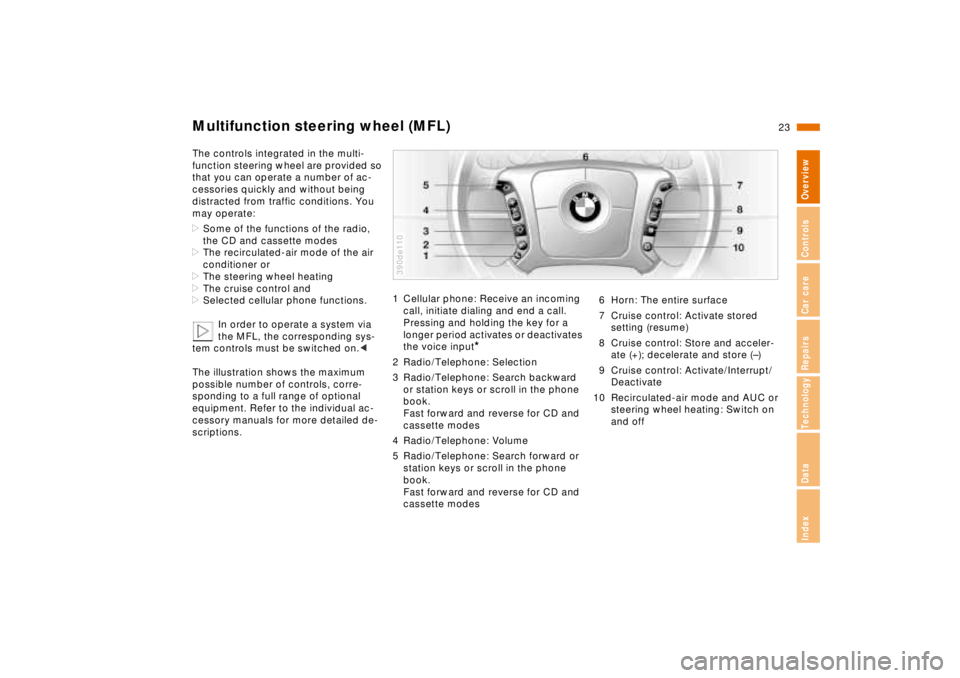
The illustration shows the maximum
possible number of controls, corre-
sponding to a full range of optional
equipment. Refer to the individual ac-
cessory manuals for more detailed de-
scriptions.
1 Cellular phone: Receive an incoming
call, initiate dialing and end a call.
Pressing and holding the key for a
longer period activates or deactivates
the voice input
*
2 Radio/Telephone: Selection
3 Radio/Telephone: Search backward
or station keys or scroll in the phone
book.
Fast forward and reverse for CD and
cassette modes
4 Radio/Telephone: Volume
5 Radio/Telephone: Search forward or
station keys or scroll in the phone
book.
Fast forward and reverse for CD and
cassette modes390de110
6 Horn: The entire surface
7 Cruise control: Activate stored
setting (resume)
8 Cruise control: Store and acceler-
ate (+); decelerate and store (–)
9 Cruise control: Activate/Interrupt/
Deactivate
10 Recirculated-air mode and AUC or
steering wheel heating: Switch on
and off
Page 29 of 211
28n
Locks and security systems:
Keys30
Electronic vehicle
immobilizer31
Central locking system32
Door locks – outside32
Radio remote control33
Door locks – inside36
Luggage compartment lid37
Luggage compartment39
Alarm system40
Electric power windows42
Security glass43
Sliding/Tilt sunroof44
Adjustments:
Seats46
Steering wheel49
Mirrors50
Seat, mirror and steering wheel
memory51
Car Memory, Key Memory53
Passenger safety systems:
Safety belts54
Airbags55
Child restraints57
Child restraint installation58
Child-safety locks58
Driving:
Steering/Ignition lock59
Starting engine59
Switching off engine60
Page 31 of 211
30n
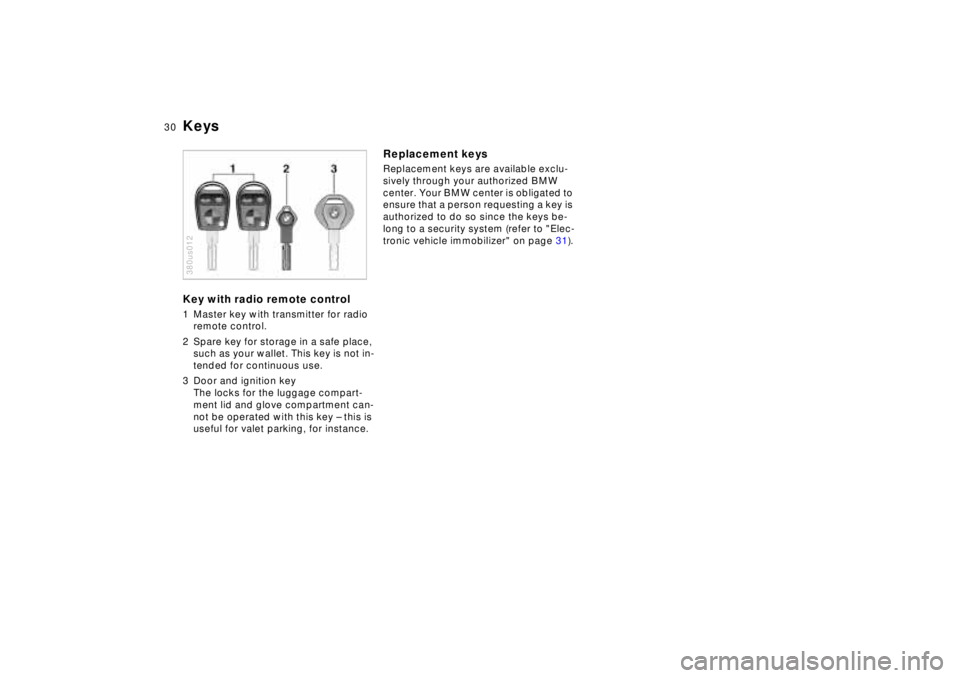
KeysKey with radio remote control1 Master key with transmitter for radio
remote control.
2 Spare key for storage in a safe place,
such as your wallet. This key is not in-
tended for continuous use.
3 Door and ignition key
The locks for the luggage compart-
ment lid and glove compartment can-
not be operated with this key – this is
useful for valet parking, for instance.380us012
Replacement keysReplacement keys are available exclu-
sively through your authorized BMW
center. Your BMW center is obligated to
ensure that a person requesting a key is
authorized to do so since the keys be-
long to a security system (refer to "Elec-
tronic vehicle immobilizer" on page 31).
Page 34 of 211
33n
RepairsIndexOverview Controls Car care Technology Data
Radio remote controlThe remote control makes opening and
locking the doors of your vehicle very
convenient. Furthermore, it provides
three additional functions which can
only be executed by means of the re-
mote control:
>Switching on the interior lamps and il-
luminating the exterior door handles.
With this function, you can also
"search for" your vehicle, when
parked in an underground garage, for
instance
>To open luggage compartment lid
The luggage compartment lid will
open slightly, regardless of whether
the lid was previously locked or un-
locked
>Panic Mode
In case of danger, you can trigger an
alarm.
The anti-theft system is also deacti-
vated/activated simultaneously with
the unlocking or locking of the vehicle,
and the alarm system is disarmed/
armed.
When the vehicle is unlocked, the inte-
rior lamps and the exterior door handle
illumination are switched on.
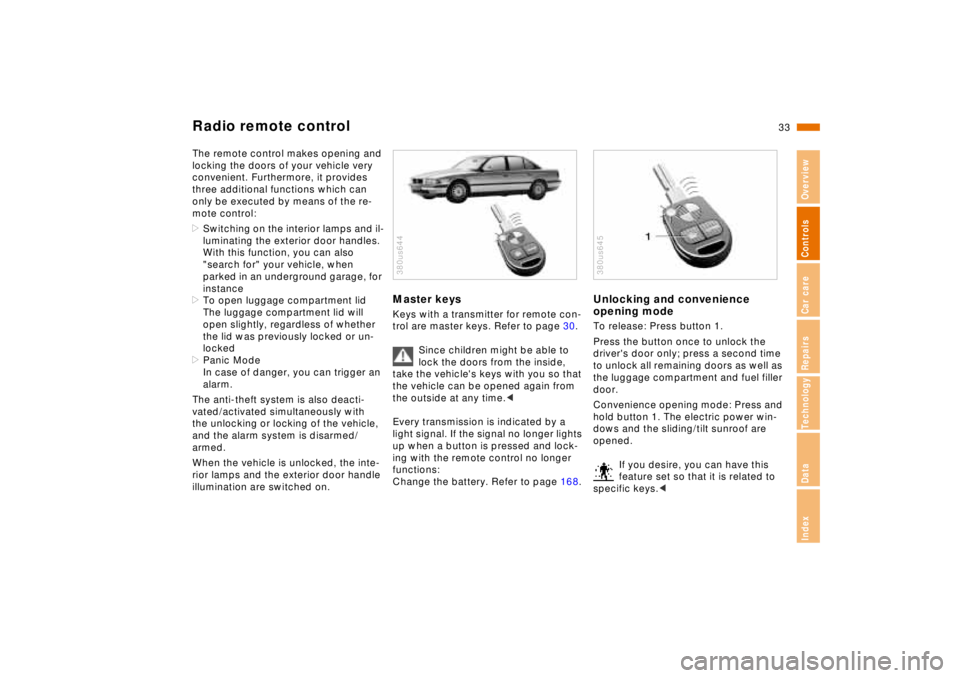
Master keysKeys with a transmitter for remote con-
trol are master keys. Refer to page 30.
Since children might be able to
lock the doors from the inside,
take the vehicle's keys with you so that
the vehicle can be opened again from
the outside at any time.<
Every transmission is indicated by a
light signal. If the signal no longer lights
up when a button is pressed and lock-
ing with the remote control no longer
functions:
Change the battery. Refer to page 168.380us644
Unlocking and convenience
opening modeTo release: Press button 1.
Press the button once to unlock the
driver's door only; press a second time
to unlock all remaining doors as well as
the luggage compartment and fuel filler
door.
Convenience opening mode: Press and
hold button 1. The electric power win-
dows and the sliding/tilt sunroof are
opened.
If you desire, you can have this
feature set so that it is related to
specific keys.< 380us645
Page 35 of 211
34n
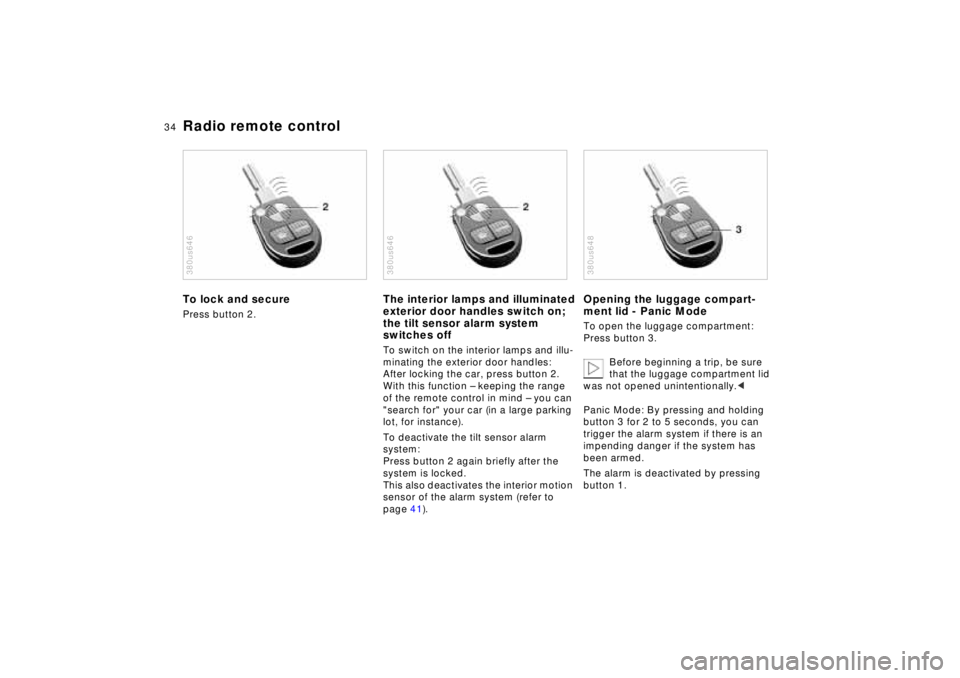
Radio remote controlTo lock and securePress button 2.380us646
The interior lamps and illuminated
exterior door handles switch on;
the tilt sensor alarm system
switches offTo switch on the interior lamps and illu-
minating the exterior door handles:
After locking the car, press button 2.
With this function – keeping the range
of the remote control in mind – you can
"search for" your car (in a large parking
lot, for instance).
To deactivate the tilt sensor alarm
system:
Press button 2 again briefly after the
system is locked.
This also deactivates the interior motion
sensor of the alarm system (refer to
page 41).380us646
Opening the luggage compart-
ment lid - Panic ModeTo open the luggage compartment:
Press button 3.
Before beginning a trip, be sure
that the luggage compartment lid
was not opened unintentionally.<
Panic Mode: By pressing and holding
button 3 for 2 to 5 seconds, you can
trigger the alarm system if there is an
impending danger if the system has
been armed.
The alarm is deactivated by pressing
button 1.380us648