OBD BMW 740LI 2012 F02 Owner's Manual
[x] Cancel search | Manufacturer: BMW, Model Year: 2012, Model line: 740LI, Model: BMW 740LI 2012 F02Pages: 299, PDF Size: 8.49 MB
Page 258 of 299
Maintenance
BMW Maintenance System
The maintenance system directs you to re‐
quired
maintenance measures and thereby sup‐
ports you in maintaining road safety and the op‐
erational reliability of the vehicle.
Condition Based Service CBS
Sensors and special algorithms take into ac‐
count the driving conditions of your vehicle.
Based on this, Condition Based Service deter‐
mines the maintenance requirements.
The system makes it possible to adapt the
amount of maintenance you need to your user
profile.
Details on the service requirements, refer to
page 81, can be displayed on the Control Dis‐
play.
Service data in the remote control
Information on the required maintenance is con‐
tinuously stored in the remote control. Your
service center will read out this data and suggest
the right array of service procedures for your ve‐
hicle.
Therefore, hand your service specialist the re‐
mote control that you used most recently.
Storage periods
Storage periods during which the vehicle bat‐
tery was disconnected are not taken into ac‐
count.
If this occurs, have a service center update the
time-dependent maintenance procedures,
such as checking brake fluid and, if necessary,
changing the engine oil and the microfilter/acti‐
vated-charcoal filter. Service and Warranty
Information Booklet for US
models and Warranty and
Service Guide Booklet for
Canadian models
Please
consult your Service and Warranty Infor‐
mation Booklet for US models and Warranty and
Service Guide Booklet for Canadian models for
additional information on service requirements.
Maintenance and repair should be performed by
your service center. Make sure to have regular
maintenance procedures recorded in the vehi‐
cle's Service and Warranty Information Booklet
for US models, and in the Warranty and Service
Guide Booklet for Canadian models. These en‐
tries are proof of regular maintenance.
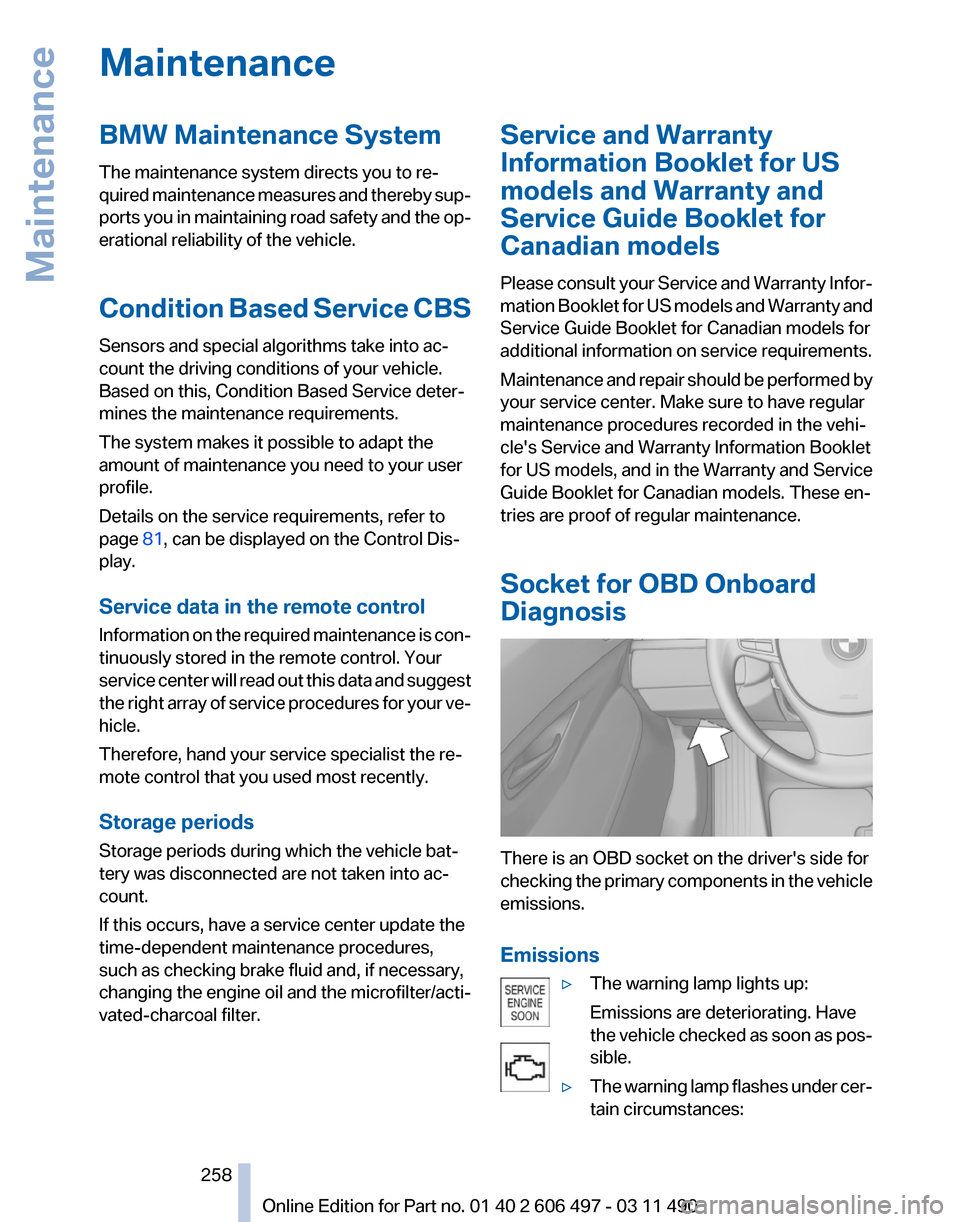
Socket for OBD Onboard
Diagnosis There is an OBD socket on the driver's side for
checking
the primary components in the vehicle
emissions.
Emissions
▷The warning lamp lights up:
Emissions are deteriorating. Have
the
vehicle checked as soon as pos‐
sible.
▷ The warning lamp flashes under cer‐
tain circumstances: Seite 258
258 Online Edition for Part no. 01 40 2 606 497 - 03 11 490
Maintenance
Page 259 of 299
This indicates that there is excessive
misfiring in the engine.
Reduce the vehicle speed and have
the system checked immediately;
otherwise, serious engine misfiring
within a brief period can seriously
damage emission control compo‐
nents,
in particular the catalytic con‐
verter.
Fuel cap The indicator lamp lights up.
If the fuel cap is not properly tightened,
the
OBD system may conclude that fuel
vapor is escaping. If the cap is then tightened,
the display should go out in a short time.
Data memory
Your vehicle records data relating to vehicle op‐
eration, faults and user settings. These data are
stored in the remote control and can be read out
with suitable devices, particularly when the ve‐
hicle is serviced. The data obtained in this way
provide valuable information for service proc‐
esses and repair or for optimizing and develop‐
ing vehicle functions further.
In addition, if you signed a service contract for
Assist, certain vehicle data can be sent directly
from the vehicle to facilitate the desired serv‐
ices. Seite 259
259Online Edition for Part no. 01 40 2 606 497 - 03 11 490
Reference
Mobility Communication Entertainment Navigation Driving tips Controls At a glance
Page 293 of 299
Maintenance System,
BMW 258
Malfunction displays, refer to Check Control 82
Malfunction, self-leveling sus‐ pension 102
Manual air distribution 125
Manual air volume 126
Manual brake, refer to Parking brake 66
Manual mode, transmis‐ sion 74
Manual operation, backup camera 116
Manual operation, door lock 38
Manual
operation, exterior mir‐
rors 59
Manual operation, fuel filler flap 242
Manual operation, Park Dis‐ tance Control PDC 114
Manual operation, parking brake 67
Manual operation, Side View 118
Manual operation, Top View 119
Manual operation, trunk lid 40
Map, destination entry 156
Map in split screen 163
Map view 161
Marking on approved tires 250
Marking, run-flat tires 251
Massage seat, front 50
Massage seat, rear 52
Master key, refer to Remote control 32
Maximum cooling 126
Maximum speed, winter tires 251
Measure, units of 81
Medical kit 267
Memory for seat, mirrors, steering wheel 57
Menu in instrument cluster 77
Menus, operating, iDrive 19 Menus, refer to iDrive operat‐
ing concept 20
Message list, traffic bulle‐ tins 163
Messages 226
Messages, refer to Check Control 82
Microfilter 128
Minimum tread, tires 249
Mirror 58
Mirror memory 57
Mobile communication devi‐ ces in the vehicle 145
Mobile phone 212
Modifications, technical, refer to Safety 7
Moisture in headlamp 261
Monitor, refer to Control Dis‐ play 19
Mounting of child restraint fix‐ ing systems 61
MP3 player 190
Multifunction steering wheel, buttons 12
Multimedia 179
Music collection 186
Music search 187
Music, storing 186
N
Navigation 152
Navigation data 166
Neck restraints, front, refer to Head restraints 54
Neck restraints, rear, refer to Head restraints 55
New wheels and tires 250
Night Vision with pedestrian detection 120
NORMAL program, Dynamic Driving Control 103
Notes 229
Nylon rope for tow-starting/ towing 269 O
OBD Onboard Diagnos‐
tics 258
Obstacle marking, backup camera 117
Odometer 77
Office 223
Oil 255
Oil, adding 255
Oil additives 256
Oil
change interval, service re‐
quirements 81
Oil filler neck 255
Oil level check 255
Oil types, alternative 256
Oil types, approved 256
Old batteries, disposal 265
Onboard Diagnostics OBD 258
Onboard monitor, refer to Control Display 19
Online, refer to BMW On‐ line 236
Opening/closing from in‐ side 39
Opening/closing via door lock 38
Opening/closing with remote control 36
Operating concept, iDrive 19
Outside air, refer to Automatic recirculated-air control 126
Overheating of engine, refer to Coolant temperature 76
P
Paint, vehicle 272
Panic mode 36
Park Distance Control PDC 113
Parked-car ventilation 130
Parked vehicle, condensa‐ tion 146
Parking aid, refer to PDC 113
Parking brake 66
Parking lamps 84
Seite 293
293Online Edition for Part no. 01 40 2 606 497 - 03 11 490
Reference Mobility Communication Entertainment Navigation Driving tips Controls At a glance
Page 295 of 299
Seats 48
Seats, rear, adjusting 51
Seat ventilation, front 51
Seat ventilation, rear 53
Selection list in instrument cluster 77
Selector lever, automatic transmission 73
Self-leveling suspension, air suspension 101
Self-leveling suspension, mal‐ function 102
Sensors, care 273
Service and warranty 7
Service requirements, CBS Condition Based Serv‐
ice 258
Service requirements, dis‐ play 81
Service, Roadside Assis‐ tance 267
Settings on Control Dis‐ play 80
Settings, storing for seat, mir‐ rors, steering wheel 57
Shifting, automatic transmis‐ sion 72
Short commands 280
Shoulder support 49
Side airbags 88
Side View 118
Signaling, horn 12
Signals when unlocking 37
Sitting safely 48
Size 276
Ski bag 136
Slide/tilt glass roof 46
Smallest turning circle 277
Smoker's package 134
Snap-in adapter, mobile phone 221
Snow chains 251
Socket 134
Socket, OBD Onboard Diag‐ nostics 258
Software applications, iPhone 238
Software update 197 Spare fuse 265
Special destinations, naviga‐ tion 155
Specified engine oil types 256
Speed, average 78
Speed limit, setting 79
Speedometer 14
Split screen 23
Split
screen map settings 163
Spoken instructions, naviga‐ tion 161
SPORT+ program, Dynamic Driving Control 103
SPORT program, Dynamic Driving Control 103
Sport program, transmis‐ sion 74
Stability control systems 98
Start/Stop button 65
Start function during malfunc‐ tion 33
Starting aid 267
Starting the engine 65
State/province, selecting for navigation 152
Stations, stored 178
Station, storing 172
Status display, tires 91
Status information, iDrive 22
Status of Owner's Manual 6
Steering, Integral Active Steering 101
Steering wheel, adjusting 60
Steering wheel heating 60
Steering wheel memory 57
Steptronic, automatic trans‐ mission 72
Stopping the engine 66
Storage compartments 138
Storage compartments, loca‐ tions 138
Storage, tires 251
Storing the vehicle 273
Street, entering for naviga‐ tion 153
Summer tires, tread 249 Supplementary text mes‐
sage 83
Surround View 115
Suspension settings 102
Switch for Dynamic Driving Control 102
Switch-on times, parked-car ventilation 131
Switch, refer to Cockpit 12
Symbols 6
T
Tachometer 76
Tail and brake lamps 263
Tailgate 39
Tailgate, automatic 40
Tailgate
via remote control 37
Tail lamps 263
Tail lamps, bulb replace‐ ment 263
Tasks 229
Technical changes, refer to Safety 7
Technical data 276
TeleService 234
Temperature, automatic cli‐ mate control 126
Temperature display, external temperature 76
Temperature, engine oil 76
Tempomat, refer to Active Cruise Control 105
Terminal, starting aid 268
Text messages 226
Text message, supplemen‐ tary 83
Theft alarm system, refer to Alarm system 43
Theft protection, lug bolts 264
Theft protection, refer to Cen‐ tral locking system 35
Thermal camera, refer to Night Vision 120
Thigh support 48
Tilt alarm sensor 44
Tilt, seats 48
Seite 295
295Online Edition for Part no. 01 40 2 606 497 - 03 11 490
Reference Mobility Communication Entertainment Navigation Driving tips Controls At a glance