phone BMW 745i 2005 E65 Owner's Guide
[x] Cancel search | Manufacturer: BMW, Model Year: 2005, Model line: 745i, Model: BMW 745i 2005 E65Pages: 239, PDF Size: 8.03 MB
Page 178 of 239
Using the phone in your vehicle
176
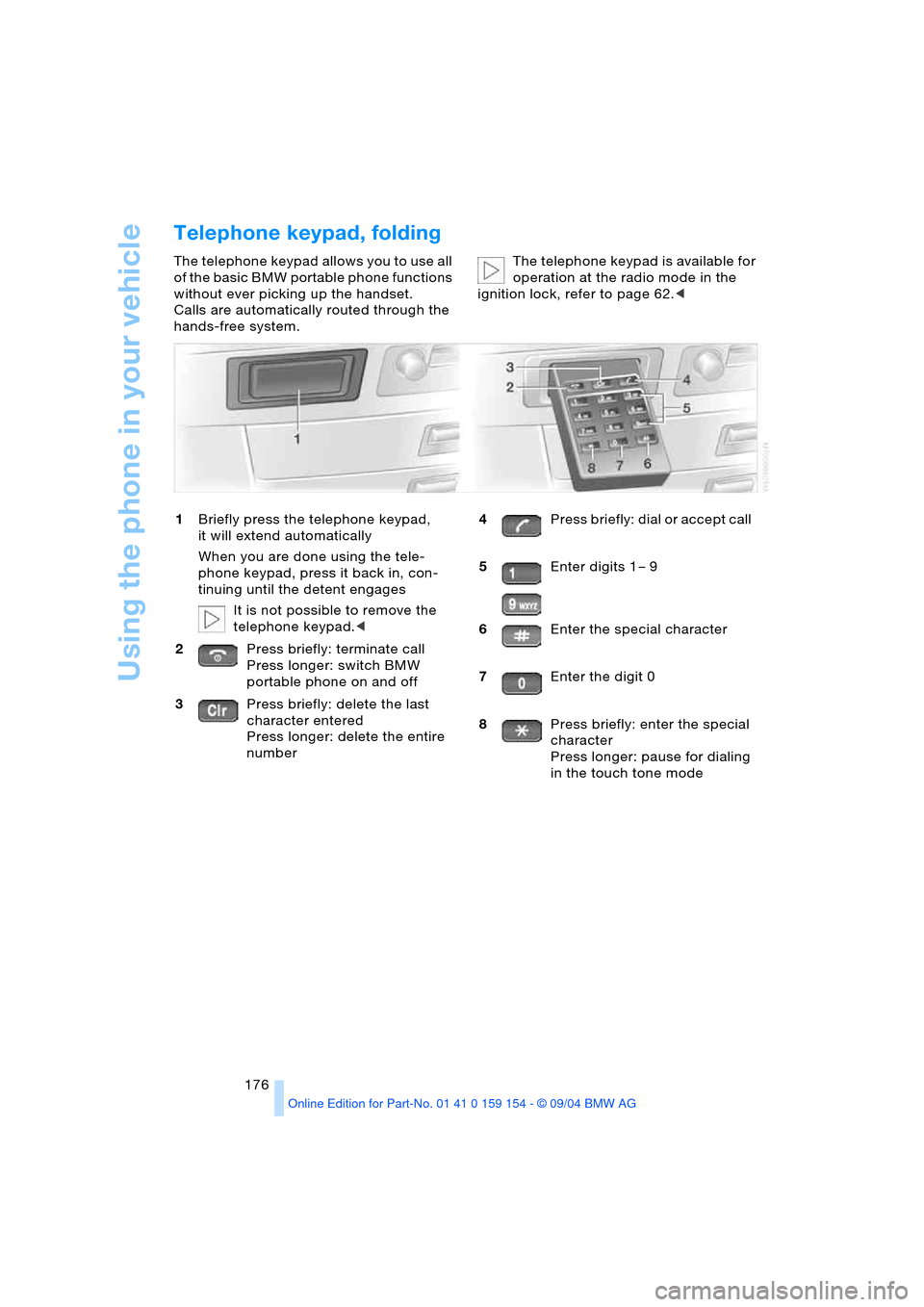
Telephone keypad, folding
The telephone keypad allows you to use all
of the basic BMW portable phone functions
without ever picking up the handset.
Calls are automatically routed through the
hands-free system.The telephone keypad is available for
operation at the radio mode in the
ignition lock, refer to page 62.<
1Briefly press the telephone keypad,
it will extend automatically
When you are done using the tele-
phone keypad, press it back in, con-
tinuing until the detent engages
It is not possible to remove the
telephone keypad.<
2Press briefly: terminate call
Press longer: switch BMW
portable phone on and off
3Press briefly: delete the last
character entered
Press longer: delete the entire
number4Press briefly: dial or accept call
5Enter digits 1 – 9
6Enter the special character
7Enter the digit 0
8Press briefly: enter the special
character
Press longer: pause for dialing
in the touch tone mode
Page 179 of 239
177
Entertainment
Reference
At a glance
Controls
Driving tips Communications
Navigation
Mobility
Hands-free system
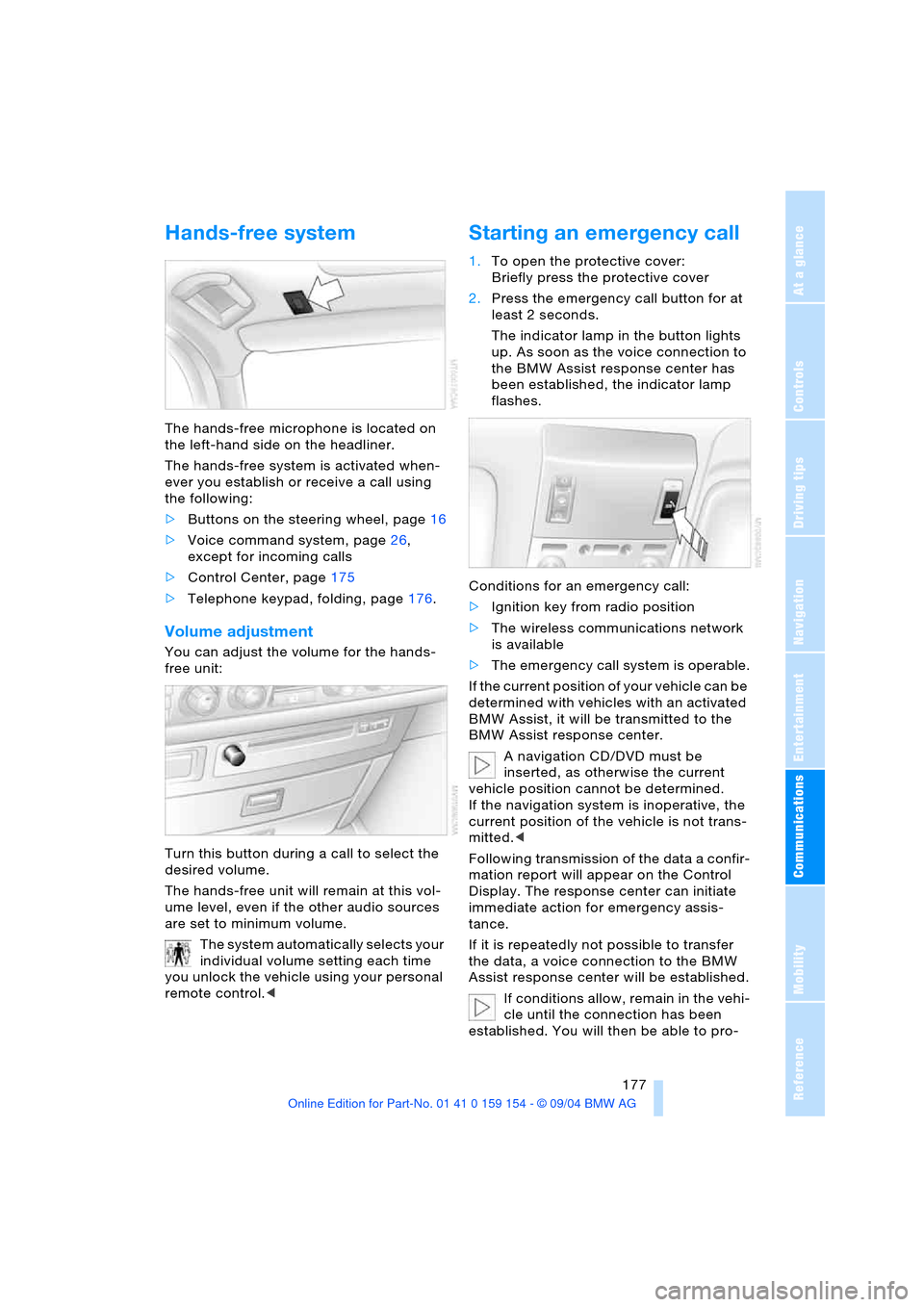
The hands-free microphone is located on
the left-hand side on the headliner.
The hands-free system is activated when-
ever you establish or receive a call using
the following:
>Buttons on the steering wheel, page16
>Voice command system, page26,
except for incoming calls
>Control Center, page175
>Telephone keypad, folding, page176.
Volume adjustment
You can adjust the volume for the hands-
free unit:
Turn this button during a call to select the
desired volume.
The hands-free unit will remain at this vol-
ume level, even if the other audio sources
are set to minimum volume.
The system automatically selects your
individual volume setting each time
you unlock the vehicle using your personal
remote control.<
Starting an emergency call
1.To open the protective cover:
Briefly press the protective cover
2.Press the emergency call button for at
least 2 seconds.
The indicator lamp in the button lights
up. As soon as the voice connection to
the BMW Assist response center has
been established, the indicator lamp
flashes.
Conditions for an emergency call:
>Ignition key from radio position
>The wireless communications network
is available
>The emergency call system is operable.
If the current position of your vehicle can be
determined with vehicles with an activated
BMW Assist, it will be transmitted to the
BMW Assist response center.
A navigation CD/DVD must be
inserted, as otherwise the current
vehicle position cannot be determined.
If the navigation system is inoperative, the
current position of the vehicle is not trans-
mitted.<
Following transmission of the data a confir-
mation report will appear on the Control
Display. The response center can initiate
immediate action for emergency assis-
tance.
If it is repeatedly not possible to transfer
the data, a voice connection to the BMW
Assist response center will be established.
If conditions allow, remain in the vehi-
cle until the connection has been
established. You will then be able to pro-
Page 180 of 239
Using the phone in your vehicle
178 vide a detailed description of the situa-
tion.<
For technical reasons, the emergency
call cannot be guaranteed under
unfavorable conditions.<
Under certain conditions, an emergency
call is started automatically immediately
after a severe accident. The automatic
emergency call is not affected by the emer-
gency call button being pressed.
Commissioning
BMW portable phone
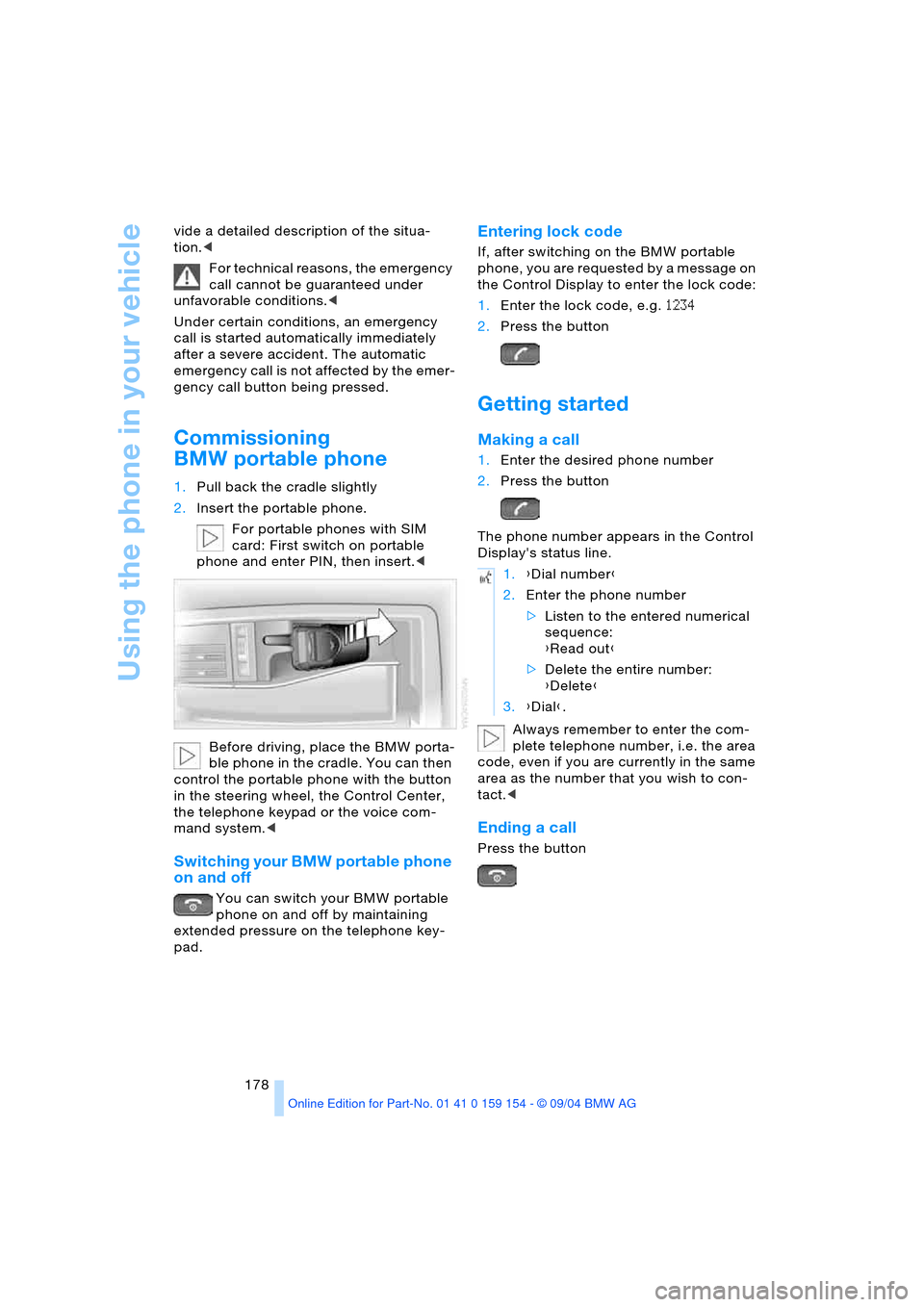
1.Pull back the cradle slightly
2.Insert the portable phone.
For portable phones with SIM
card: First switch on portable
phone and enter PIN, then insert.<
Before driving, place the BMW porta-
ble phone in the cradle. You can then
control the portable phone with the button
in the steering wheel, the Control Center,
the telephone keypad or the voice com-
mand system.<
Switching your BMW portable phone
on and off
You can switch your BMW portable
phone on and off by maintaining
extended pressure on the telephone key-
pad.
Entering lock code
If, after switching on the BMW portable
phone, you are requested by a message on
the Control Display to enter the lock code:
1.Enter the lock code, e.g. 1234
2.Press the button
Getting started
Making a call
1.Enter the desired phone number
2.Press the button
The phone number appears in the Control
Display's status line.
Always remember to enter the com-
plete telephone number, i.e. the area
code, even if you are currently in the same
area as the number that you wish to con-
tact.<
Ending a call
Press the button
1.{Dial number}
2.Enter the phone number
>Listen to the entered numerical
sequence:
{Read out}
>Delete the entire number:
{Delete}
3.{Dial}.
Page 181 of 239
179
Entertainment
Reference
At a glance
Controls
Driving tips Communications
Navigation
Mobility
Calls during a call
This function can only be used through the
keypad.
Accepting a call
Press the button
Rejecting a call
Press the button
Switching between two calls
Press button again
Ending a call when two connections
exist, switching between calls
Press the button
The current connection is terminated. The
second call kept on hold can now be con-
tinued.
The second calling party's number will be
displayed on the Control Display, even after
the second call is terminated.
Phone book
You must enter your portable phone's
phone book in the voice command system
before it will be available for access using
the vehicle's voice commands. This creates
a special voice-command phone book. If
changes are then made to the phone book
using the voice command system, these
modifications will apply exclusively to the
voice-command phone book, and not to
the phone book in the portable phone.
Creating and updating voice-
command phone book*
The entries in the portable phone's phone
book appear sequentially on the Info Dis-
play.
You must assign a specific name to each
number that you wish to transfer to the
voice-command phone book. These num-
bers will no longer be requested during
updates.
Making a new entry in voice-
command phone book
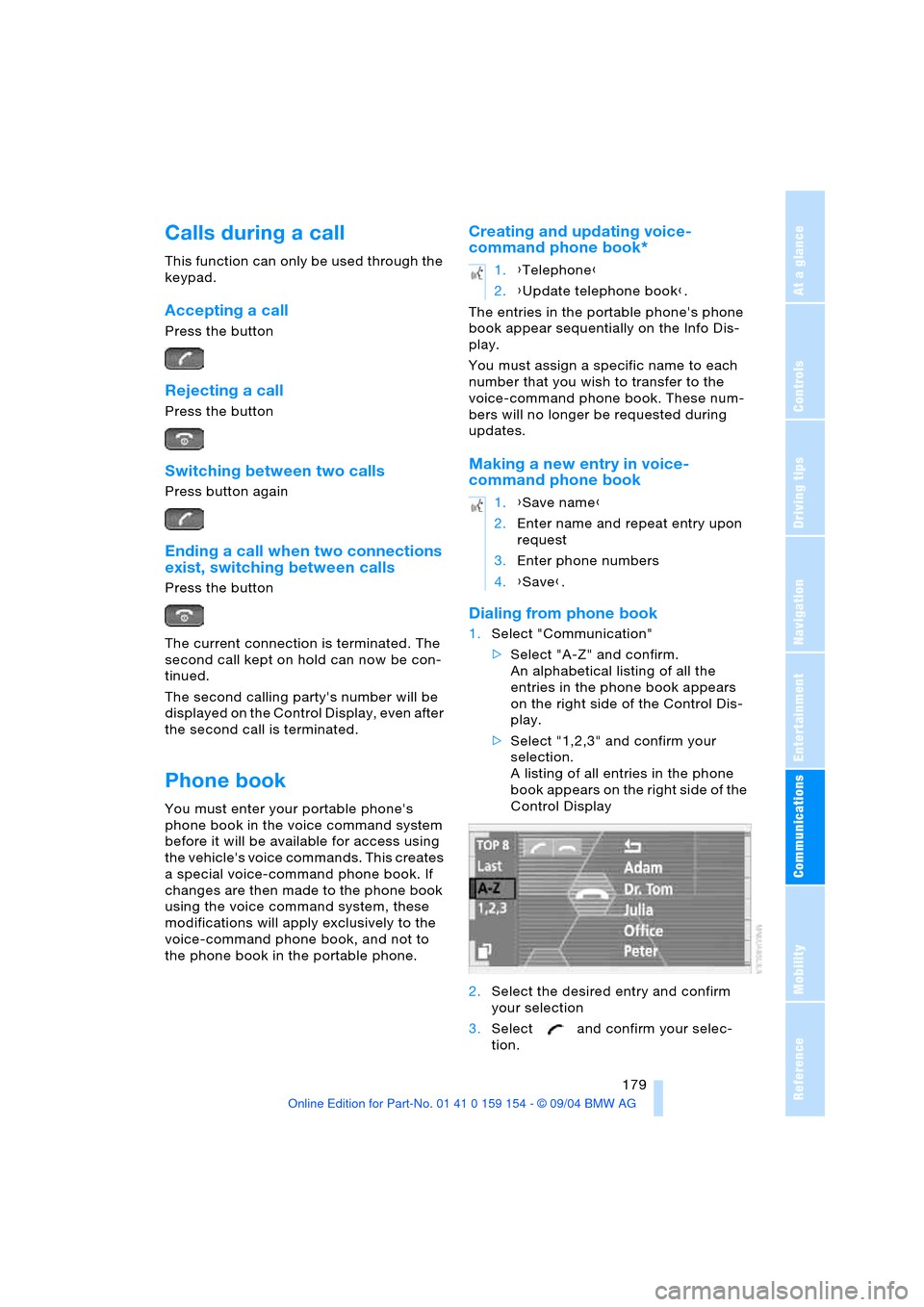
Dialing from phone book
1.Select "Communication"
>Select "A-Z" and confirm.
An alphabetical listing of all the
entries in the phone book appears
on the right side of the Control Dis-
play.
>Select "1,2,3" and confirm your
selection.
A listing of all entries in the phone
book appears on the right side of the
Control Display
2.Select the desired entry and confirm
your selection
3.Select and confirm your selec-
tion.
1.{Telephone}
2.{Update telephone book}.
1.{Save name}
2.Enter name and repeat entry upon
request
3.Enter phone numbers
4.{Save}.
Page 182 of 239
Using the phone in your vehicle
180 The connection is established.
Here, the dialed number appears in the
upper status line, refer to page23.
The system dials the number.
The connection can also be estab-
lished using the button on the steer-
ing wheel or the telephone keypad.<
Select and confirm to end the call.
Viewing entries
Deleting individual entries
Deleting entire phone book
Selecting a number from
Top 8 list
The eight numbers that you call most fre-
quently on the BMW portable phone are
automatically stored in the Top 8 list.
The phone numbers are only stored in
the Top 8 list when these phone num-
bers are stored as an entry in the portable
phone.<
The number called most often appears at
the top of the list.1.In the "Communication" menu, select
"TOP 8" and confirm your selection
2.Select an entry from the list that now
appears on the display, and confirm
your selection
3.Select and confirm your selec-
tion.
The connection is established. Here,
the dialed number appears in the upper
status line, refer to page23.
The connection can also be set up
using the button on the steering
wheel or the telephone keypad.<
Select and confirm to end the call.
Redialing
Numbers that you reached on earlier
attempts as well as numbers that were
unavailable are automatically stored in your
redialing list. A total of 8 phone numbers
can be stored. The last number dialed is at
the top of the list.
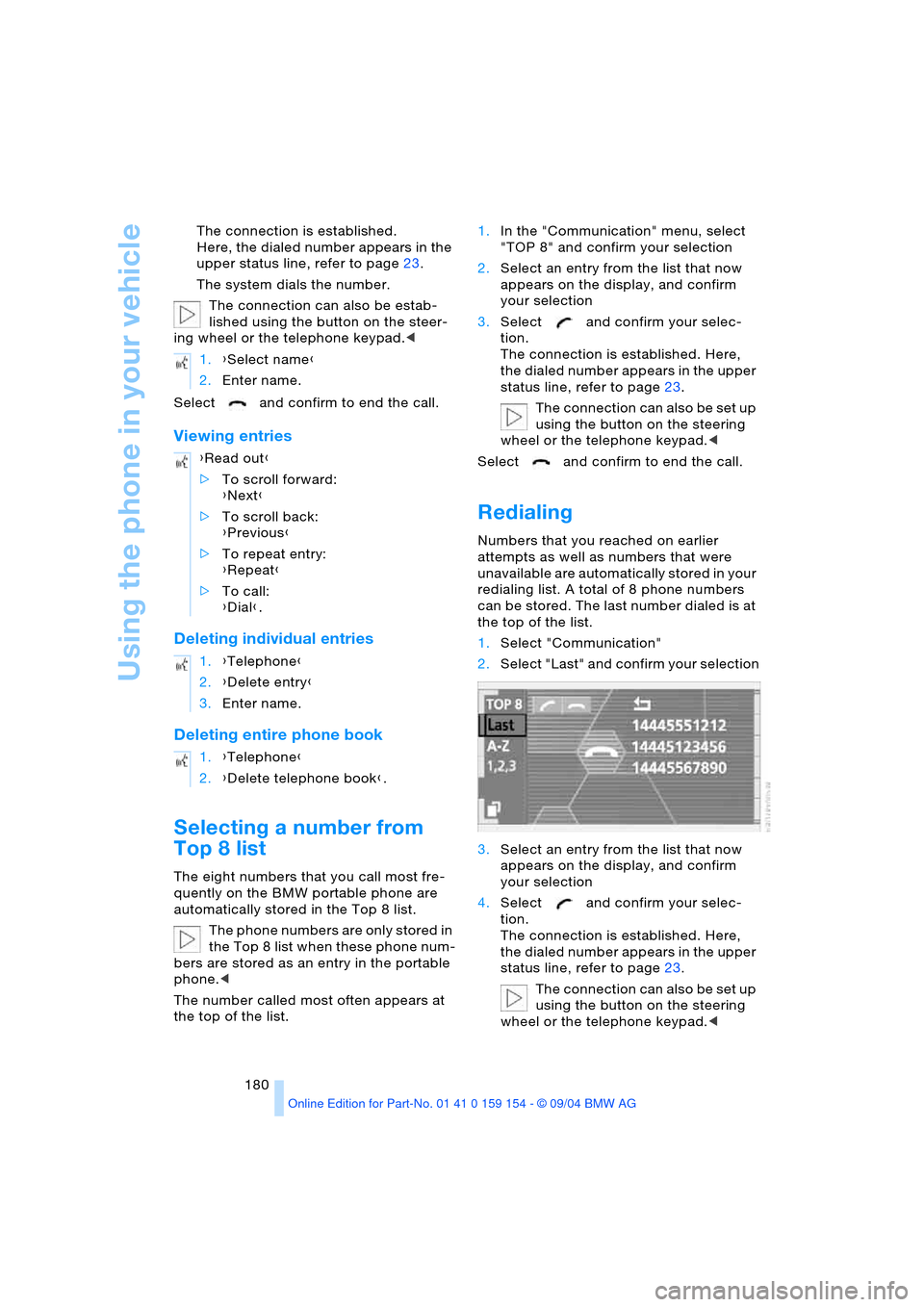
1.Select "Communication"
2.Select "Last" and confirm your selection
3.Select an entry from the list that now
appears on the display, and confirm
your selection
4.Select and confirm your selec-
tion.
The connection is established. Here,
the dialed number appears in the upper
status line, refer to page23.
The connection can also be set up
using the button on the steering
wheel or the telephone keypad.< 1.{Select name}
2.Enter name.
{Read out}
>To scroll forward:
{Next}
>To scroll back:
{Previous}
>To repeat entry:
{Repeat}
>To call:
{Dial}.
1.{Telephone}
2.{Delete entry}
3.Enter name.
1.{Telephone}
2.{Delete telephone book}.
Page 183 of 239
181
Entertainment
Reference
At a glance
Controls
Driving tips Communications
Navigation
Mobility
You can use the voice command system to
redial the last number called:
Select and confirm to end the call.
Missed calls
If the phone number of the caller was trans-
ferred, you can have a list of all missed calls
displayed if this service is supported by
your wireless service provider.
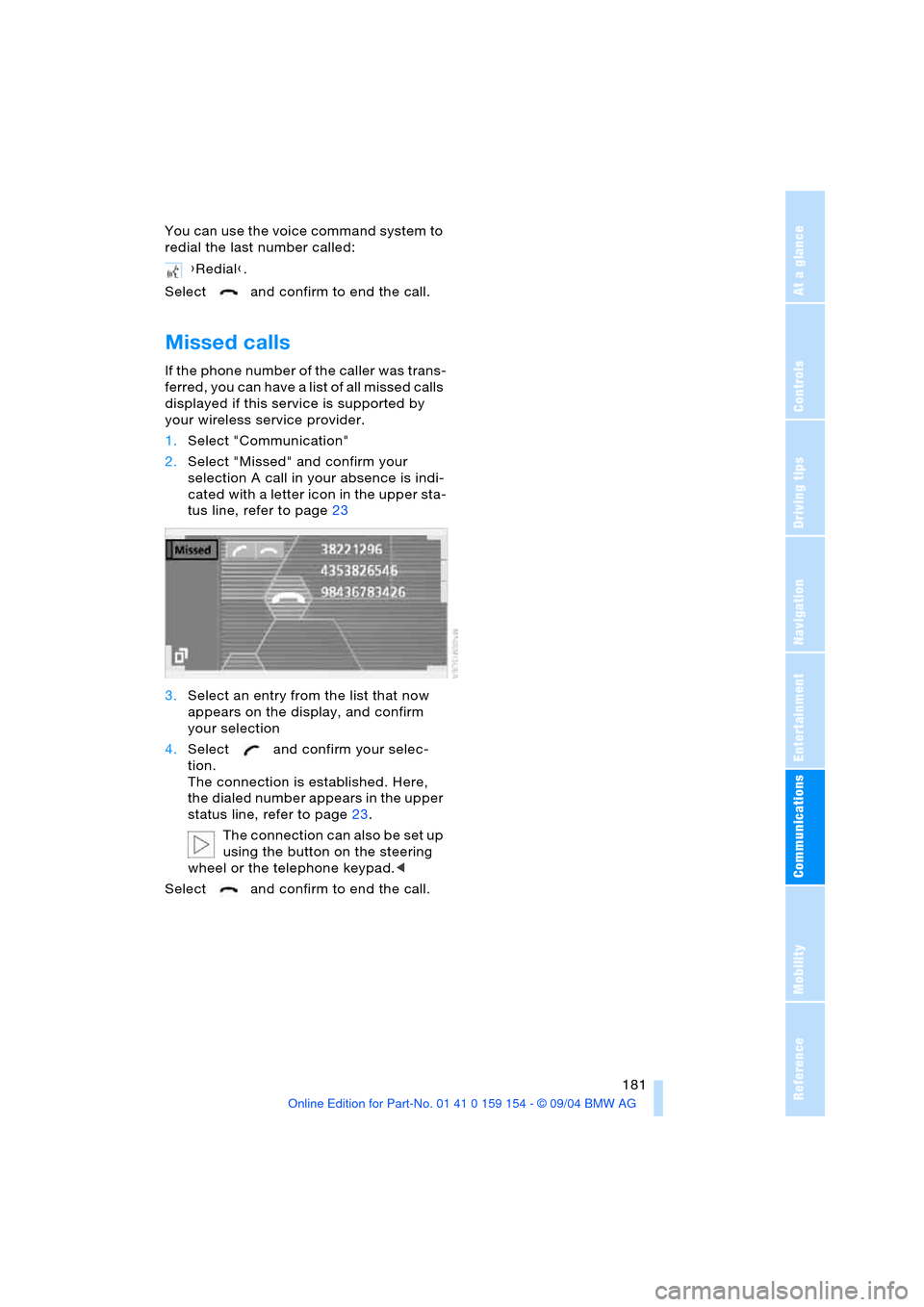
1.Select "Communication"
2.Select "Missed" and confirm your
selection A call in your absence is indi-
cated with a letter icon in the upper sta-
tus line, refer to page23
3.Select an entry from the list that now
appears on the display, and confirm
your selection
4.Select and confirm your selec-
tion.
The connection is established. Here,
the dialed number appears in the upper
status line, refer to page23.
The connection can also be set up
using the button on the steering
wheel or the telephone keypad.<
Select and confirm to end the call.{Redial}.
Page 184 of 239
BMW Assist
182
BMW Assist
To avoid posing an unnecessary haz-
ard, both to your own vehicle's occu-
pants and to other road users, only make
entries with the vehicle stationary.<
Requirements
If the following requirements are met, you
can call up BMW Assist:
>Telephone is connected and switched
on
>The lock code has been entered
>The mobile communications network is
available
>GPS reception for transmission of the
data is ensured.
The position of the vehicle can influ-
ence the mobile communications/
GPS reception. As a rule, mobile communi-
cations/GPS reception is only possible
under a clear sky.
When vehicle data is exchanged with the
BMW Service Center, a corresponding
message appears on the Control Display.<
Roadside Assistance of the
BMW Group
Here, you can automatically dial the num-
ber of the Roadside Assistance of the BMW
Group, your BMW center or BMW Cus-
tomer Relations.
To contact Roadside Assistance, for exam-
ple in the event of a breakdown:
1.Select "BMW Assist" and confirm your
selection
2.Select "BMW Services" and confirm
your selection
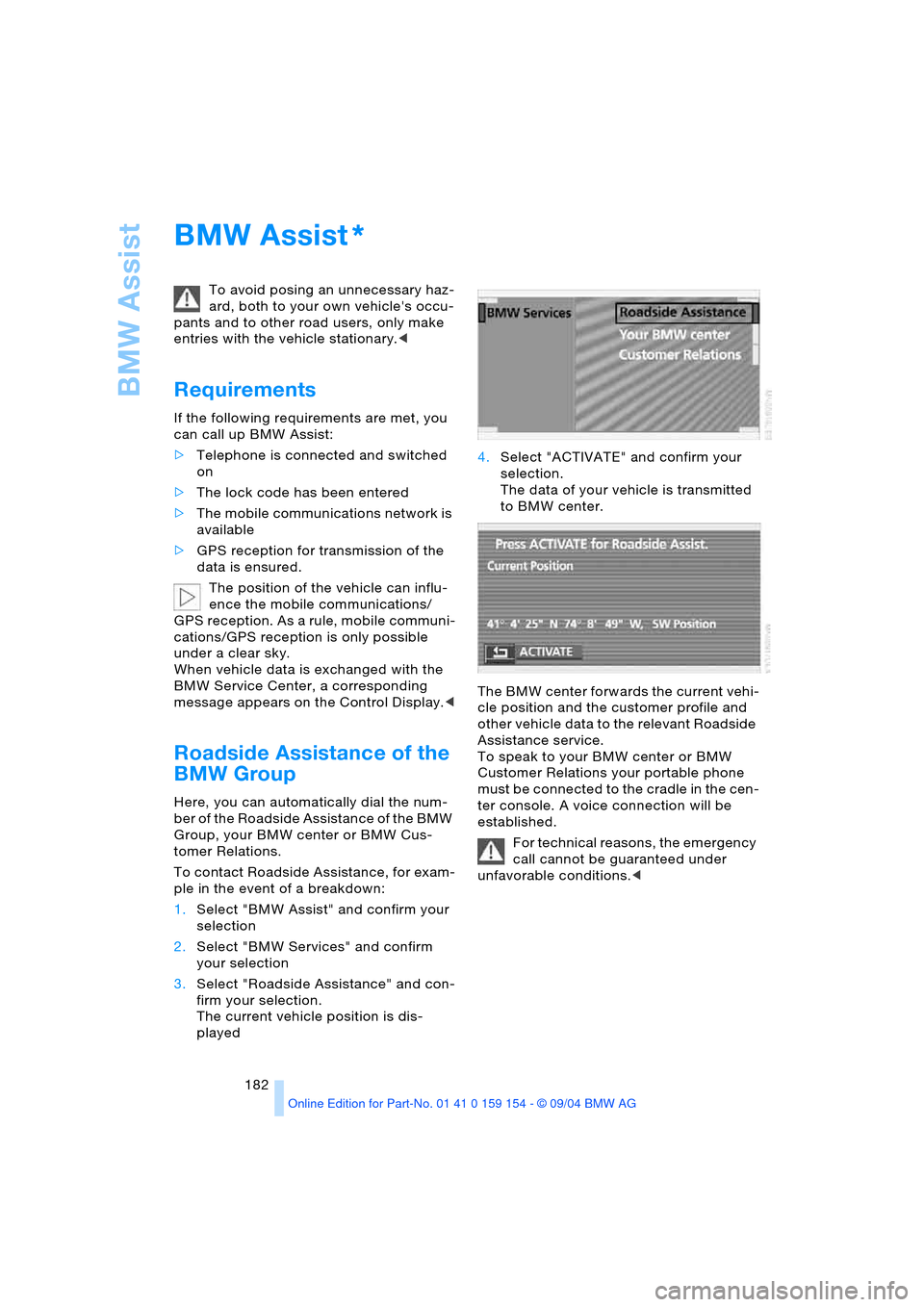
3.Select "Roadside Assistance" and con-
firm your selection.
The current vehicle position is dis-
played4.Select "ACTIVATE" and confirm your
selection.
The data of your vehicle is transmitted
to BMW center.
The BMW center forwards the current vehi-
cle position and the customer profile and
other vehicle data to the relevant Roadside
Assistance service.
To speak to your BMW center or BMW
Customer Relations your portable phone
must be connected to the cradle in the cen-
ter console. A voice connection will be
established.
For technical reasons, the emergency
call cannot be guaranteed under
unfavorable conditions.<
*
Page 220 of 239
Everything from A to Z
218
Everything from A to Z
Index
A
A/C operation
– automatic climate
control105
"ABC..." for navigation132
ABS Antilock Brake
System92
– indicator lamp13
ACC, refer to Active cruise
control75
"ACCEPT" for
navigation137,143
Accepting call
– automatic177
– during a call179
Accessories, refer to Your
individual vehicle5
Accident, refer to
– Giving and receiving
assistance209
– Roadside Assistance182
"ACTIVATE",
BMW Assist182
Activated-charcoal
filter108
Active cruise control75
– malfunction80
Active head restraints,
front49
Active seat53
Active seat ventilation52
Adapter for spare key35
Adaptive Head Light101
Address
– deleting143
– displaying142
– entering143
– storing142
– storing current
position143
"Address book" for
navigation142
Adjust cooling capacity of
rear air conditioner109Adjusting interior
temperature105
Adjusting seats47
Air, drying, refer to
A/C operation105
Airbags98
– indicator lamp13
– safe sitting position46
Air conditioner in the
rear109
Air conditioner mode105
Air conditioning in rear109
Air conditioning while
parked110
Air distribution
– automatic climate
control104,107
– individual108
Airing, refer to
Ventilation106,110
Air jets, refer to
Ventilation106,110
Air pressure, refer to Tire
inflation pressure188
Air recirculation, refer to
Recirculated air105
Air supply
– automatic climate
control105
– rear air conditioner109
Air vents, refer to
Ventilation106
AKI, refer to Fuel
specifications187
Alarm system42
– avoiding unintentional
alarms43
All-season tires, refer to
Winter tires193
Altering stretch of road140
Alternate route, refer to
Detour140
"AM..."
– audio mode148
– radio152,154AM waveband152
"ANGLE" for
DVD mode169
Antenna174
Antenna for portable
phone174
Antifreeze
– coolant196
– washer fluid73
Antilock Brake System ABS
– indicator lamp13
Anti-theft alarm system35
– refer to Alarm system42
Anti-trapping mechanism
– glass roof, electric45
– power windows44
Armrest, refer to Center
armrest115,118
"Arrow display" for
navigation139,140
Arrow display for
navigation140
"AS ADDRESS", navigation
– creating directory142
– current position143
– destination entry133
– destination list137
– home address142
– recent destinations136
"AS DEST.", navigation
– recent destinations136
Ashtray117
– front117
– rear117
Assist182
Assistance system, refer to
DSC Dynamic Stability
Control93
Assistance window
– help texts22
– refer to Control Center22
– status lines23
AUC Automatic
recirculated-air
control105
Page 221 of 239
Reference 219
At a glance
Controls
Driving tips
Communications
Navigation
Entertainment
Mobility
"Audio"
– audio mode148
– radio152
Audio148
– adjusting tone149
– controls148
– switching on/off149
– volume149
"AUDIO" for
DVD mode169
Audio mode148
"AUTO", automatic climate
control107
Automatic
– air distribution104
– air supply104
– headlamp control100
– luggage compartment lid
operation36,41
– steering wheel
adjustment54
– windshield washer72
Automatic car wash, refer
to the Caring for your
vehicle brochure
Automatic climate
control103
– rear air conditioner109
– rear cooler114
– settings in Control
Display107
Automatic curb monitor56
Automatic Hold
– parking65
– parking brake65
Automatic recirculated-air
control AUC105
Automatic soft closing
– doors39
– luggage compartment
lid40
Automatic station
search152
Automatic station
storage153Automatic transmission
with Steptronic68
– ignition62
– interlock62
– selector lever interlock68
– shiftlock69
– towing210
"AUTO P"
– function button54
– vehicle65
AUTO program, refer to
Automatic air
distribution104
"AUTOSTOR" for radio154
Average fuel
consumption86
– setting units89
Average speed86
– setting units89
"Avoid highway"137
Avoiding tolls137
"Avoid route"141
"Avoid sect."140
"Avoid tolls"137
Axle loads, refer to
Weights216
"A-Z", telephone179
B
Backrests, refer to Seat
adjustment47,48
Backrest width
adjustment47
Backup lamps, bulb
replacement203
"Balance" in audio
mode150
Bandages, refer to
First-aid kit209
Bar, towing211
"Bass" in audio mode150
Battery207
– indicator lamp207
– jump-starting209
– remote control34
– switch207
"BC", refer to Computer87
Belts, refer to Safety
belts51
Beverage holders116Blower, automatic climate
control103
BMW active seat53
"BMW Assist"182
BMW Assist182
BMW Maintenance
System198
"BMW Services",
BMW Assist182
Bottle holder, refer to
Beverage holders116
Brake fluid197
– indicator lamp13
– level197
Brake Force Display97
Brake hydraulic
systems197
Brake lamps
– adaptive, refer to Brake
force display97
– bulb replacement203
– indicator lamp, defective
lamp83
Brake pad wear indicator,
indicator lamp13
Brake rotors
– brake system123
– break-in122
Brakes123
– ABS92
– brake fluid197
– break-in122
– indicator/warning
lamps13,92,94
– parking brake64
Brake system197
– brake fluid level197
– brake pads82
– break-in122
– disc brakes123
– indicator lamp13
Breakdown recovery, refer
to Roadside
Assistance182
Breakdown service, refer to
Roadside Assistance182
Break-in procedures122
"Brief info", Control
Center22
Page 222 of 239
Everything from A to Z
220 "Brightness"
– in the Control Center90
– in TV mode164
Brightness90
– in TV mode164
– on Control Display90
Bulb replacement, refer to
Lamps and bulbs201
Buttons on multi-function
steering wheel16
– automatic transmission
with Steptronic70
Bypassing traffic
congestion140
C
Calculating distance86
California laws
– Event Data Recorders200
– Proposition 65
Warning200
Call
– beginning178
– during a call179
– ending178
– replacing179
– when absent181
Calling
– from phone book179
– from the Top 8 list180
– redialing180
– with telephone keypad,
folding176
Calls, switching between
two calls179
Can holder, refer to
Beverage holders116
Capacities217
Car care, refer to the Caring
for your vehicle brochure
Car-care products, refer to
the Caring for your vehicle
brochure
"Car data", vehicle84
Care, refer to the Caring for
your vehicle brochure
Caring for the vehicle finish,
refer to the Caring for
your vehicle brochure
Car jack points205Car key, refer to
Key/remote control34
Carpet care, refer to the
Caring for your vehicle
brochure
Car phone, refer to
separate portable phone
Owner's Manual174
Car radio, refer to
Radio152
Car wash122
– refer to the Caring for your
vehicle brochure
– with Comfort Access122
Catalytic converter, refer to
High temperatures122
CBC Cornering Brake
Control92
– warning lamp13
CBS Condition Based
Service198
"CD"
– in audio mode148
– in CD player mode158
CD changer160
– adjusting tone149
– controls148
– fast forward, reverse162
– location160
– random sequence161
– sampling161
– selecting a CD161
– selecting track162
– starting160
– volume149
CD player158
– adjusting tone149
– controls148
– fast forward, reverse159
– random sequence158
– sampling158
– selecting tracks158
– starting158
– volume149
Center armrest115,118
Center brake lamp, bulb
replacement203
Center console, refer to
Comfort features14Central locking system35
– Comfort Access37
– interior38
"CHANGE" for
navigation137
Changes, technical, refer to
For your own safety5
Changing language89
Changing navigation CDs/
DVDs130
Changing scale140
Changing settings on the
Control Display89
Changing time display89
Changing units of measure
in Control Display89
Changing wheels204
Charge current indicator
lamp83
CHECK button84
Check Control83
– "Check"84
Child's seats, refer to Child-
restraint systems58
Child-restraint systems58
Child-safety lock60
Chrome parts, refer to the
Caring for your vehicle
brochure
Chrome-plated parts, care,
refer to the Caring for
your vehicle brochure
Cigarette lighter117,118
Cleaning, vehicle, refer to
the Caring for your vehicle
brochure
Cleaning windshield72
Climate comfort
windshield126
"Climate" for seat
heating52
"Clock"90
Clock81
– 12/24-hour mode89
– setting90
– setting time and date90
Closing
– from inside38
– from outside35
Clothes hooks116
Cockpit10,14