climate control BMW 745LI SEDAN 2002 User Guide
[x] Cancel search | Manufacturer: BMW, Model Year: 2002, Model line: 745LI SEDAN, Model: BMW 745LI SEDAN 2002Pages: 208, PDF Size: 6.33 MB
Page 103 of 208
A congenial climate
102 heated air into the interior in accordance
with the selected distribution pattern while
the ignition is off.
Provided that the engine has warmed
to its normal operating temperature
and the battery is charged, you can use this
function for up to 15 minutes after
switching off the ignition. The LED within
the button lights up to confirm compliance
with both of these conditions.<
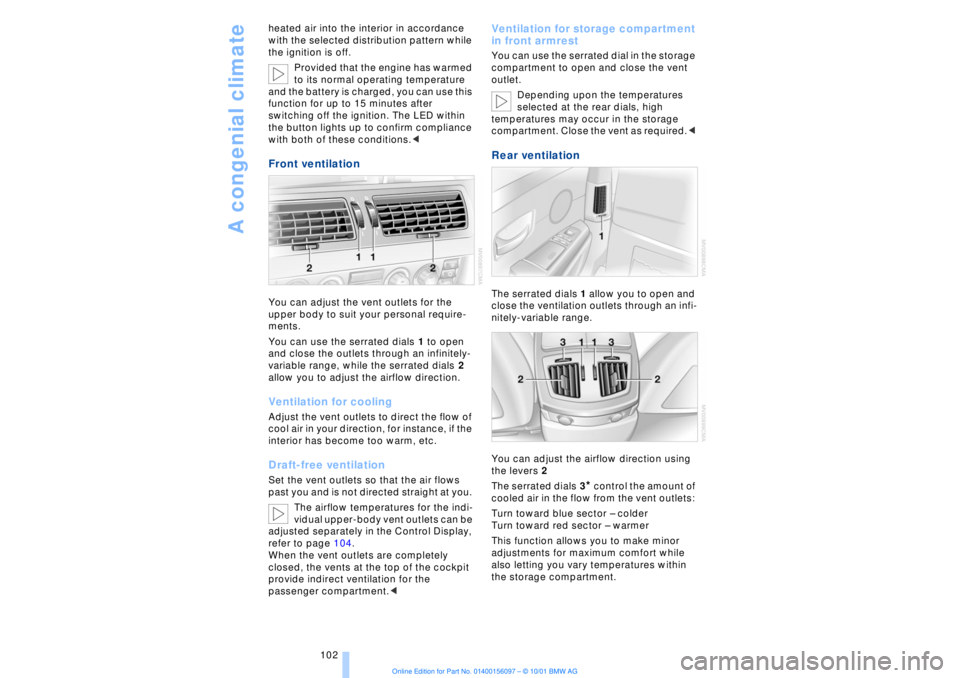
Front ventilation You can adjust the vent outlets for the
upper body to suit your personal require-
ments.
You can use the serrated dials 1 to open
and close the outlets through an infinitely-
variable range, while the serrated dials 2
allow you to adjust the airflow direction. Ventilation for cooling Adjust the vent outlets to direct the flow of
cool air in your direction, for instance, if the
interior has become too warm, etc.Draft-free ventilationSet the vent outlets so that the air flows
past you and is not directed straight at you.
The airflow temperatures for the indi-
vidual upper-body vent outlets can be
adjusted separately in the Control Display,
refer to page 104.
When the vent outlets are completely
closed, the vents at the top of the cockpit
provide indirect ventilation for the
passenger compartment.<
Ventilation for storage compartment
in front armrest You can use the serrated dial in the storage
compartment to open and close the vent
outlet.
Depending upon the temperatures
selected at the rear dials, high
temperatures may occur in the storage
compartment. Close the vent as required.< Rear ventilation The serrated dials 1 allow you to open and
close the ventilation outlets through an infi-
nitely-variable range.
You can adjust the airflow direction using
the levers 2
The serrated dials 3
* control the amount of
cooled air in the flow from the vent outlets:
Turn toward blue sector Ð colder
Turn toward red sector Ð warmer
This function allows you to make minor
adjustments for maximum comfort while
also letting you vary temperatures within
the storage compartment.
Page 104 of 208
At a glanceControlsDriving tipsCommunicationsNavigationEntertainmentMobilityReference
103
Switching off the automatic climate
control*
The air supply, the heater and
the air conditioner are all
switched off. You can restart
the automatic climate control
by pressing any of its buttons
except the REST button.
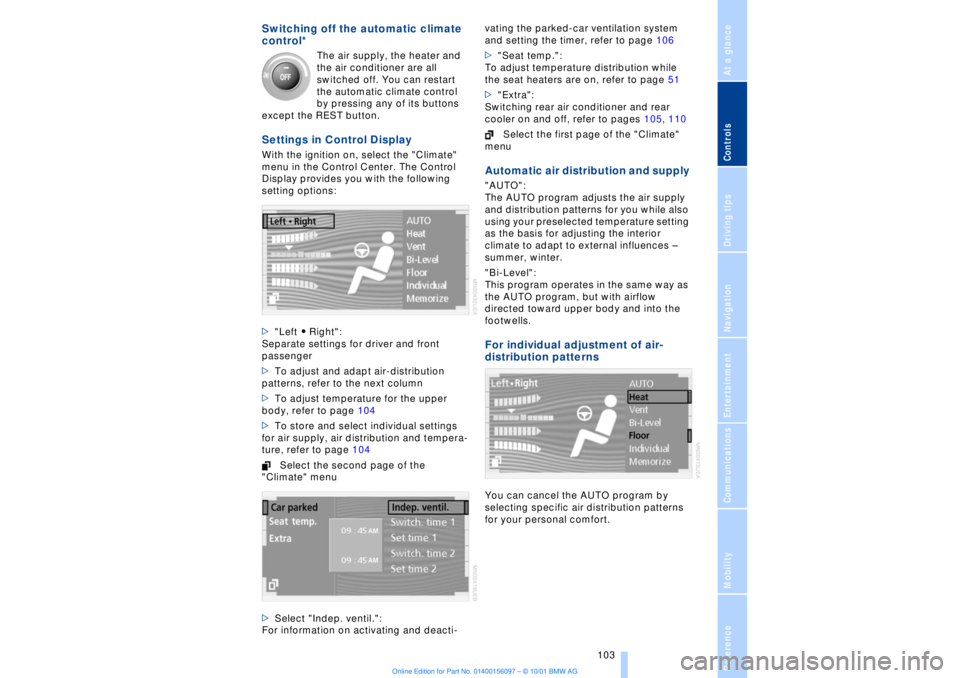
Settings in Control Display With the ignition on, select the "Climate"
menu in the Control Center. The Control
Display provides you with the following
setting options:
>"Left A Right":
Separate settings for driver and front
passenger
>To adjust and adapt air-distribution
patterns, refer to the next column
>To adjust temperature for the upper
body, refer to page 104
>To store and select individual settings
for air supply, air distribution and tempera-
ture, refer to page 104
Select the second page of the
"Climate" menu
>Select "Indep. ventil.":
For information on activating and deacti-vating the parked-car ventilation system
and setting the timer, refer to page 106
>"Seat temp.":
To adjust temperature distribution while
the seat heaters are on, refer to page 51
>"Extra":
Switching rear air conditioner and rear
cooler on and off, refer to pages 105, 110
Select the first page of the "Climate"
menu
Automatic air distribution and supply "AUTO":
The AUTO program adjusts the air supply
and distribution patterns for you while also
using your preselected temperature setting
as the basis for adjusting the interior
climate to adapt to external influences Ð
summer, winter.
"Bi-Level":
This program operates in the same way as
the AUTO program, but with airflow
directed toward upper body and into the
footwells. For individual adjustment of air-
distribution patternsYou can cancel the AUTO program by
selecting specific air distribution patterns
for your personal comfort.
Page 105 of 208
A congenial climate
104
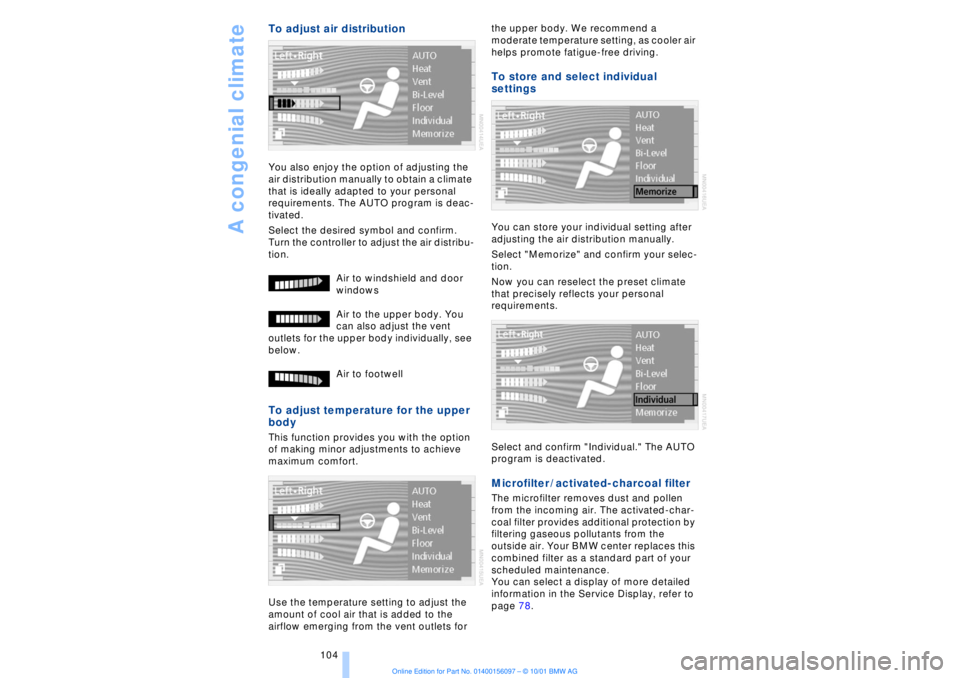
To adjust air distribution You also enjoy the option of adjusting the
air distribution manually to obtain a climate
that is ideally adapted to your personal
requirements. The AUTO program is deac-
tivated.
Select the desired symbol and confirm.
Turn the controller to adjust the air distribu-
tion.
Air to windshield and door
windows
Air to the upper body. You
can also adjust the vent
outlets for the upper body individually, see
below.
Air to footwell To adjust temperature for the upper
body This function provides you with the option
of making minor adjustments to achieve
maximum comfort.
Use the temperature setting to adjust the
amount of cool air that is added to the
airflow emerging from the vent outlets for the upper body. We recommend a
moderate temperature setting, as cooler air
helps promote fatigue-free driving.
To store and select individual
settings You can store your individual setting after
adjusting the air distribution manually.
Select "Memorize" and confirm your selec-
tion.
Now you can reselect the preset climate
that precisely reflects your personal
requirements.
Select and confirm "Individual." The AUTO
program is deactivated. Microfilter / activated-charcoal filter The microfilter removes dust and pollen
from the incoming air. The activated-char-
coal filter provides additional protection by
filtering gaseous pollutants from the
outside air. Your BMW center replaces this
combined filter as a standard part of your
scheduled maintenance.
You can select a display of more detailed
information in the Service Display, refer to
page 78.
Page 106 of 208
At a glanceControlsDriving tipsCommunicationsNavigationEntertainmentMobilityReference
105
Rear air conditioner* The following settings and operating
modes can be selected and adjusted sepa-
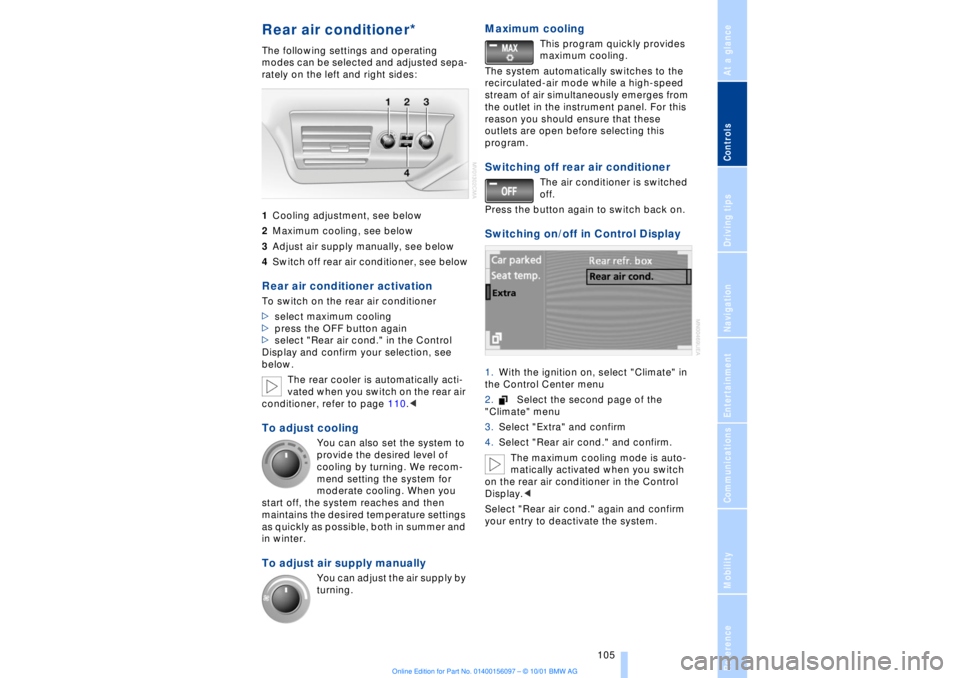
rately on the left and right sides:
1Cooling adjustment, see below
2Maximum cooling, see below
3Adjust air supply manually, see below
4Switch off rear air conditioner, see belowRear air conditioner activation To switch on the rear air conditioner
>select maximum cooling
>press the OFF button again
>select "Rear air cond." in the Control
Display and confirm your selection, see
below.
The rear cooler is automatically acti-
vated when you switch on the rear air
conditioner, refer to page 110.< To adjust cooling
You can also set the system to
provide the desired level of
cooling by turning. We recom-
mend setting the system for
moderate cooling. When you
start off, the system reaches and then
maintains the desired temperature settings
as quickly as possible, both in summer and
in winter.
To adjust air supply manually
You can adjust the air supply by
turning.
Maximum cooling
This program quickly provides
maximum cooling.
The system automatically switches to the
recirculated-air mode while a high-speed
stream of air simultaneously emerges from
the outlet in the instrument panel. For this
reason you should ensure that these
outlets are open before selecting this
program.
Switching off rear air conditioner
The air conditioner is switched
off.
Press the button again to switch back on.
Switching on/off in Control Display 1.With the ignition on, select "Climate" in
the Control Center menu
2.Select the second page of the
"Climate" menu
3.Select "Extra" and confirm
4.Select "Rear air cond." and confirm.
The maximum cooling mode is auto-
matically activated when you switch
on the rear air conditioner in the Control
Display.<
Select "Rear air cond." again and confirm
your entry to deactivate the system.
Page 107 of 208
A congenial climate
106
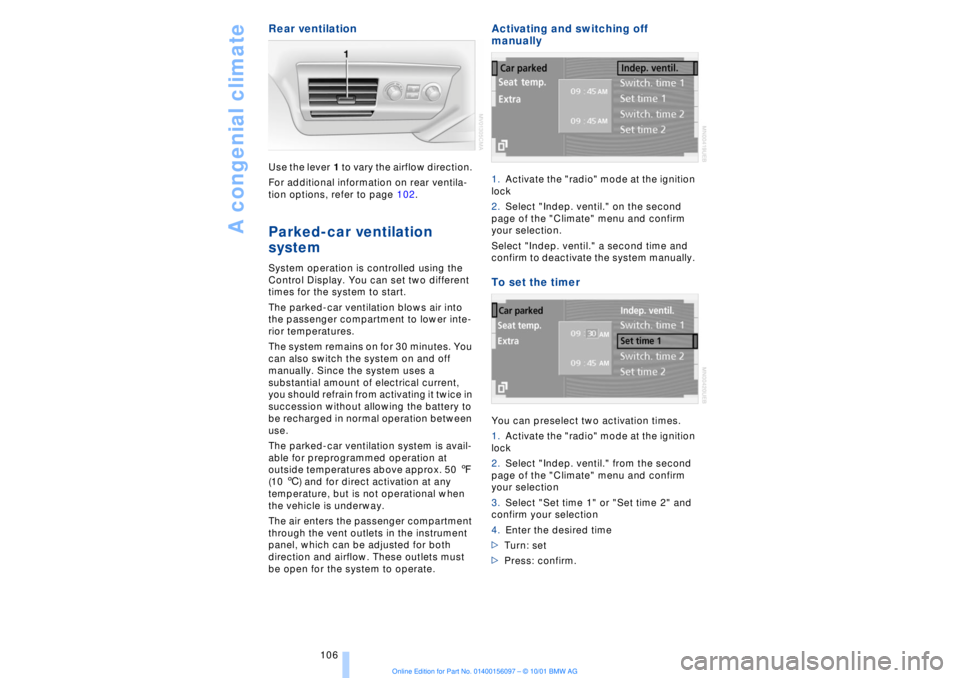
Rear ventilation Use the lever 1 to vary the airflow direction.
For additional information on rear ventila-
tion options, refer to page 102. Parked-car ventilation
system
System operation is controlled using the
Control Display. You can set two different
times for the system to start.
The parked-car ventilation blows air into
the passenger compartment to lower inte-
rior temperatures.
The system remains on for 30 minutes. You
can also switch the system on and off
manually. Since the system uses a
substantial amount of electrical current,
you should refrain from activating it twice in
succession without allowing the battery to
be recharged in normal operation between
use.
The parked-car ventilation system is avail-
able for preprogrammed operation at
outside temperatures above approx. 50 7
(10 6) and for direct activation at any
temperature, but is not operational when
the vehicle is underway.
The air enters the passenger compartment
through the vent outlets in the instrument
panel, which can be adjusted for both
direction and airflow. These outlets must
be open for the system to operate.
Activating and switching off
manually 1.Activate the "radio" mode at the ignition
lock
2.Select "Indep. ventil." on the second
page of the "Climate" menu and confirm
your selection.
Select "Indep. ventil." a second time and
confirm to deactivate the system manually. To set the timer You can preselect two activation times.
1.Activate the "radio" mode at the ignition
lock
2.Select "Indep. ventil." from the second
page of the "Climate" menu and confirm
your selection
3.Select "Set time 1" or "Set time 2" and
confirm your selection
4.Enter the desired time
>Turn: set
>Press: confirm.
Page 111 of 208
Practical interior accessories
110 lock and close the doors; this precaution
prevents children from using the sun blinds
and injuring themselves, etc.<
To automatically extend and retract
the sun blinds You can extend and retract the sun blinds
together by briefly pressing button 3. Rear cooler
*
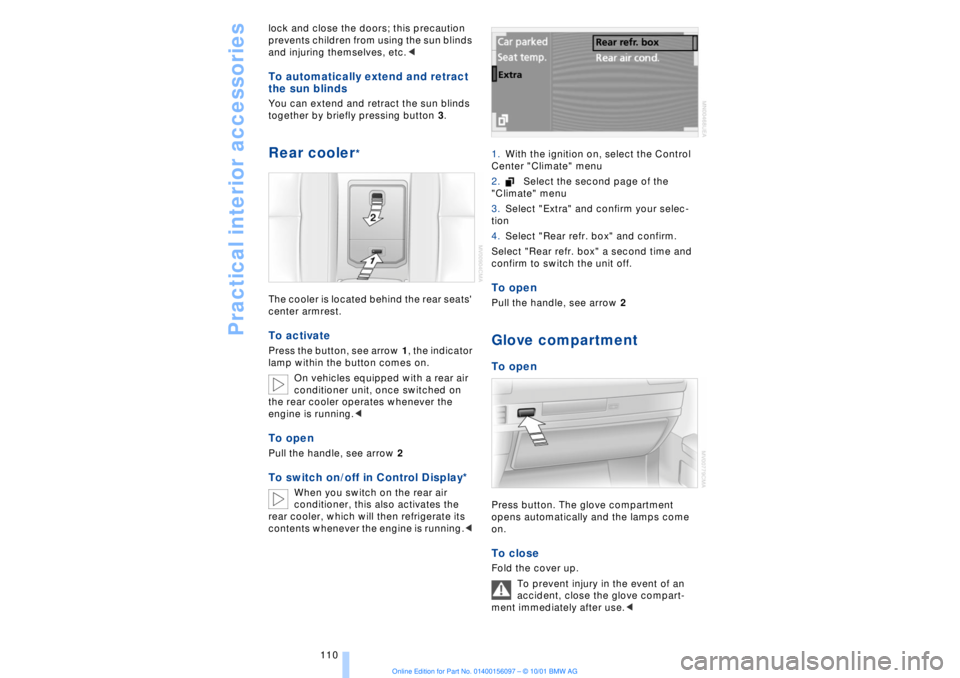
The cooler is located behind the rear seats'
center armrest. To activate Press the button, see arrow 1, the indicator
lamp within the button comes on.
On vehicles equipped with a rear air
conditioner unit, once switched on
the rear cooler operates whenever the
engine is running.< To openPull the handle, see arrow 2To switch on/off in Control Display*
When you switch on the rear air
conditioner, this also activates the
rear cooler, which will then refrigerate its
contents whenever the engine is running.< 1.With the ignition on, select the Control
Center "Climate" menu
2.Select the second page of the
"Climate" menu
3.Select "Extra" and confirm your selec-
tion
4.Select "Rear refr. box" and confirm.
Select "Rear refr. box" a second time and
confirm to switch the unit off.
To openPull the handle, see arrow 2Glove compartment To openPress button. The glove compartment
opens automatically and the lamps come
on. To close Fold the cover up.
To prevent injury in the event of an
accident, close the glove compart-
ment immediately after use.<
Page 112 of 208
At a glanceControlsDriving tipsCommunicationsNavigationEntertainmentMobilityReference
111
Rechargeable flashlight The flashlight is located on the left-hand
side of the glove compartment.
It features integral overload protection, so
it can be left in its holder continuously.
Be sure that the flashlight is switched
off when it is inserted into its holder.
Failure to comply with this precaution
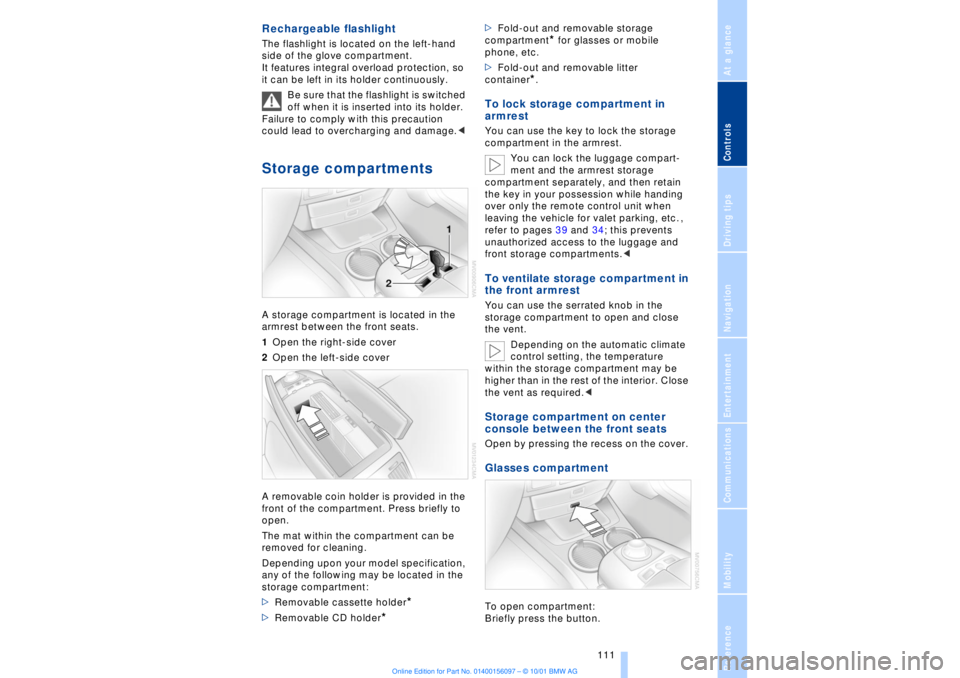
could lead to overcharging and damage.< Storage compartments A storage compartment is located in the
armrest between the front seats.
1Open the right-side cover
2Open the left-side cover
A removable coin holder is provided in the
front of the compartment. Press briefly to
open.
The mat within the compartment can be
removed for cleaning.
Depending upon your model specification,
any of the following may be located in the
storage compartment:
>Removable cassette holder
*
>Removable CD holder
* >Fold-out and removable storage
compartment
* for glasses or mobile
phone, etc.
>Fold-out and removable litter
container
*.
To lock storage compartment in
armrest You can use the key to lock the storage
compartment in the armrest.
You can lock the luggage compart-
ment and the armrest storage
compartment separately, and then retain
the key in your possession while handing
over only the remote control unit when
leaving the vehicle for valet parking, etc. ,
refer to pages 39 and 34; this prevents
unauthorized access to the luggage and
front storage compartments.< To ventilate storage compartment in
the front armrest You can use the serrated knob in the
storage compartment to open and close
the vent.
Depending on the automatic climate
control setting, the temperature
within the storage compartment may be
higher than in the rest of the interior. Close
the vent as required.< Storage compartment on center
console between the front seats Open by pressing the recess on the cover. Glasses compartment To open compartment:
Briefly press the button.
Page 133 of 208
Navigation
132 The system also provides you with voice
instructions.
The system continues to guide you to
your destination when you select
another menu, such as "Entertainment" or
"Climate control." Voice instructions will
inform you of upcoming turns well before
you arrive at the intersections.<
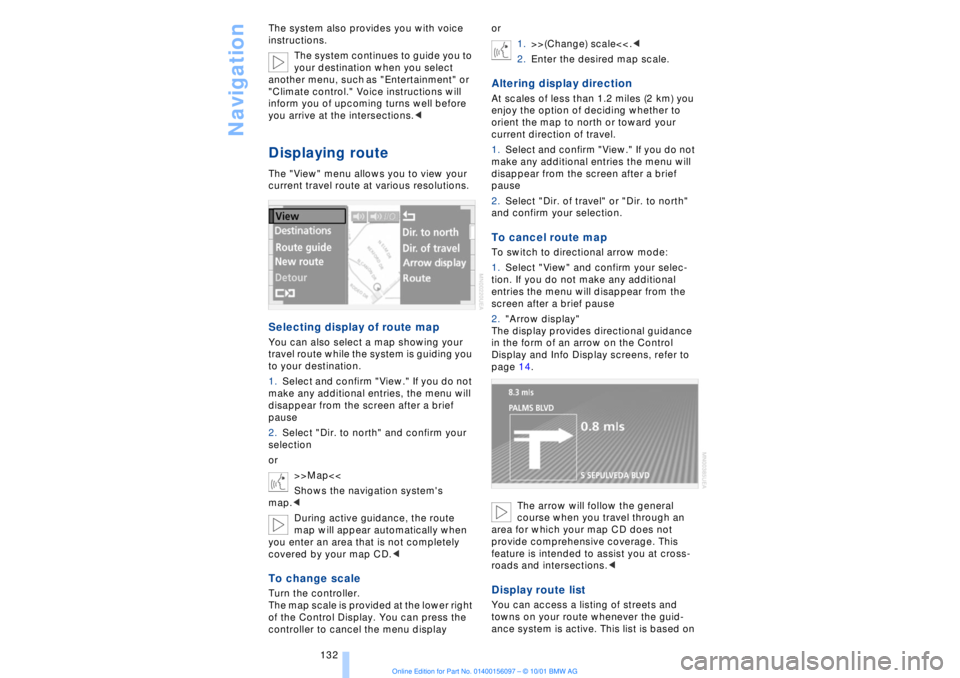
Displaying routeThe "View" menu allows you to view your
current travel route at various resolutions.Selecting display of route mapYou can also select a map showing your
travel route while the system is guiding you
to your destination.
1.Select and confirm "View." If you do not
make any additional entries, the menu will
disappear from the screen after a brief
pause
2.Select "Dir. to north" and confirm your
selection
or
>>Map<<
Shows the navigation system's
map.<
During active guidance, the route
map will appear automatically when
you enter an area that is not completely
covered by your map CD.
of the Control Display. You can press the
controller to cancel the menu displayor
1.>>(Change) scale<<.<
2.Enter the desired map scale.
Altering display directionAt scales of less than 1.2 miles (2 km) you
enjoy the option of deciding whether to
orient the map to north or toward your
current direction of travel.
1.Select and confirm "View." If you do not
make any additional entries the menu will
disappear from the screen after a brief
pause
2.Select "Dir. of travel" or "Dir. to north"
and confirm your selection.To cancel route mapTo switch to directional arrow mode:
1.Select "View" and confirm your selec-
tion. If you do not make any additional
entries the menu will disappear from the
screen after a brief pause
2."Arrow display"
The display provides directional guidance
in the form of an arrow on the Control
Display and Info Display screens, refer to
page 14.
The arrow will follow the general
course when you travel through an
area for which your map CD does not
provide comprehensive coverage. This
feature is intended to assist you at cross-
roads and intersections.< Display route listYou can access a listing of streets and
towns on your route whenever the guid-
ance system is active. This list is based on
Page 173 of 208
Wheels and tires
172
Tire replacement To maintain good handling and vehicle
response, use only tires of a single tread
configuration from a single manufacturer.
BMW tests and approves specific wheel
and tire combinations. DOT Quality Grades Treadwear
Traction AA A B C
Temperature A B C
All passenger car tires must conform
to Federal Safety Requirements in
addition to these grades.< TreadwearThe treadwear grade is a comparative
rating based on the wear rate of the tire
when tested under controlled conditions
on a specified government test course.
For example, a tire graded 150 would wear
one and one-half (1g) times as well on the
government course as a tire graded 100.
The relative performance of tires depends
upon the actual conditions of their use,
however, and may depart significantly from
the norm due to variations in driving habits,
service practices and differences in road
characteristics and climate.TractionThe traction grades, from highest to lowest,
are AA, A, B, and C.
Those grades represent the tire's ability to
stop on wet pavement as measured under
controlled conditions on specified govern-
ment test surfaces of asphalt and concrete.
A tire marked C may have poor traction
performance.
The traction grade assigned to this
tire is based on straight-ahead
braking traction tests, and does not include
acceleration, cornering, hydroplaning, or
peak traction characteristics.< TemperatureThe temperature grades are A (the highest),
B, and C, representing the tire's resistance to the generation of heat and its ability to
dissipate heat when tested under
controlled conditions on a specified indoor
laboratory test wheel.
Sustained high temperature can cause the
material of the tire to degenerate and
reduce tire life, and excessive temperature
can lead to sudden tire failure. The grade C
corresponds to a level of performance
which all passenger car tires must meet
under the Federal Motor Safety Standard
No. 109. Grades B and A represent higher
levels of performance on the laboratory test
wheel than the minimum required by law.
The temperature grade for this tire is
established for a tire that is properly
inflated and not overloaded. Excessive
speed, underinflation, or excessive
loading, either separately or in combina-
tion, can cause heat buildup and possible
tire failure.<
Uniform Tire Quality Grading Quality grades can be found where appli-
cable on the tire sidewall between tread
shoulder and maximum section width. For
example:
Treadwear 200 Traction AA
Temperature A
Do not use retreaded tires, since
driving safety may be impaired.
Possible variations in the design and the
age (which could be substantial) of the
carcasses can lead to unusually rapid
wear.< Tire age The tire's date of manufacture is indicated
on the sidewall:
DOT ... 4901 indicates that a tire was
manufactured in week 49 of the year 2001.
Regardless of milage or wear, BMW
recommends that you replace all tires Ð
including the spare tire Ð after a maximum
of 6 years, even though the tires may have
a theoretical service life of up to 10 years.
Page 186 of 208
OverviewControlsDriving tipsCommunicationsNavigationEntertainmentMobilityReference
185
additional precautions to secure the
vehicle from rolling.
3.Loosen the lug bolts 1/2 a turn
4.Set up the jack beneath the jacking
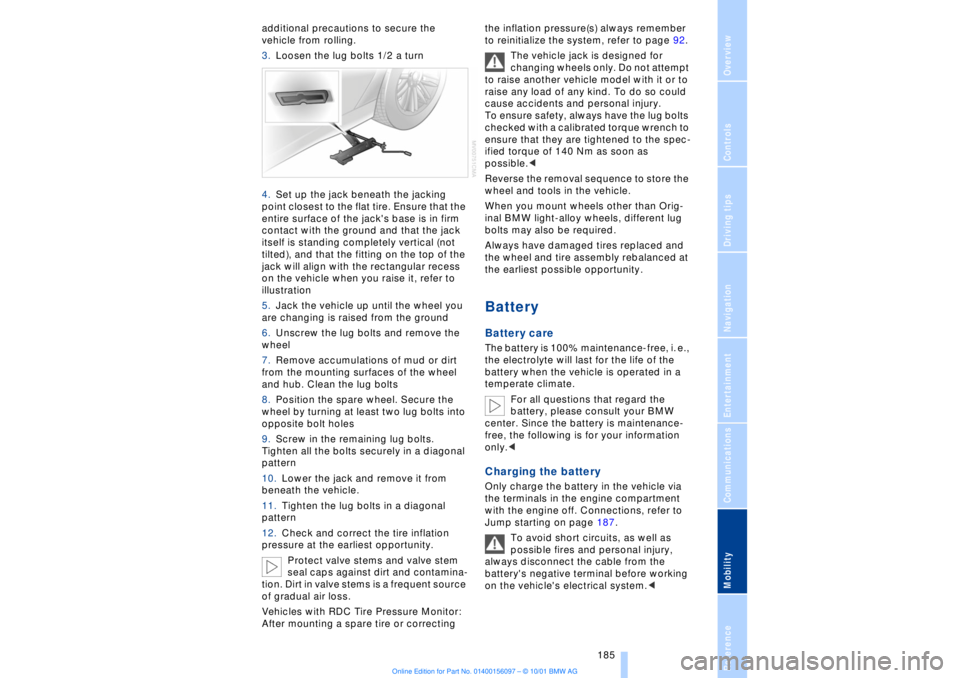
point closest to the flat tire. Ensure that the
entire surface of the jack's base is in firm
contact with the ground and that the jack
itself is standing completely vertical (not
tilted), and that the fitting on the top of the
jack will align with the rectangular recess
on the vehicle when you raise it, refer to
illustration
5.Jack the vehicle up until the wheel you
are changing is raised from the ground
6.Unscrew the lug bolts and remove the
wheel
7.Remove accumulations of mud or dirt
from the mounting surfaces of the wheel
and hub. Clean the lug bolts
8.Position the spare wheel. Secure the
wheel by turning at least two lug bolts into
opposite bolt holes
9.Screw in the remaining lug bolts.
Tighten all the bolts securely in a diagonal
pattern
10.Lower the jack and remove it from
beneath the vehicle.
11.Tighten the lug bolts in a diagonal
pattern
12.Check and correct the tire inflation
pressure at the earliest opportunity.
Protect valve stems and valve stem
seal caps against dirt and contamina-
tion. Dirt in valve stems is a frequent source
of gradual air loss.
Vehicles with RDC Tire Pressure Monitor:
After mounting a spare tire or correcting the inflation pressure(s) always remember
to reinitialize the system, refer to page 92.
The vehicle jack is designed for
changing wheels only. Do not attempt
to raise another vehicle model with it or to
raise any load of any kind. To do so could
cause accidents and personal injury.
To ensure safety, always have the lug bolts
checked with a calibrated torque wrench to
ensure that they are tightened to the spec-
ified torque of 140 Nm as soon as
possible.<
Reverse the removal sequence to store the
wheel and tools in the vehicle.
When you mount wheels other than Orig-
inal BMW light-alloy wheels, different lug
bolts may also be required.
Always have damaged tires replaced and
the wheel and tire assembly rebalanced at
the earliest possible opportunity.
Battery Battery care The battery is 100% maintenance-free, i. e.,
the electrolyte will last for the life of the
battery when the vehicle is operated in a
temperate climate.
For all questions that regard the
battery, please consult your BMW
center. Since the battery is maintenance-
free, the following is for your information
only.< Charging the battery Only charge the battery in the vehicle via
the terminals in the engine compartment
with the engine off. Connections, refer to
Jump starting on page 187.
To avoid short circuits, as well as
possible fires and personal injury,
always disconnect the cable from the
battery's negative terminal before working
on the vehicle's electrical system.<