reset BMW 745LI SEDAN 2002 User Guide
[x] Cancel search | Manufacturer: BMW, Model Year: 2002, Model line: 745LI SEDAN, Model: BMW 745LI SEDAN 2002Pages: 208, PDF Size: 6.33 MB
Page 85 of 208
Everything under control
84
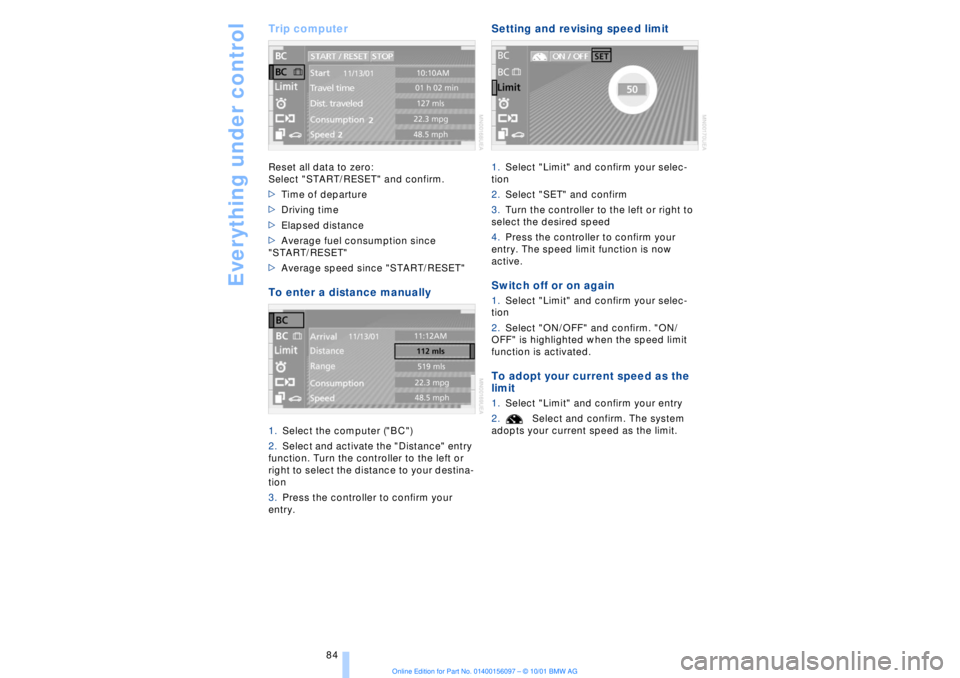
Trip computer Reset all data to zero:
Select "START/RESET" and confirm.
>Time of departure
>Driving time
>Elapsed distance
>Average fuel consumption since
"START/RESET"
>Average speed since "START/RESET" To enter a distance manually 1.Select the computer ("BC")
2.Select and activate the "Distance" entry
function. Turn the controller to the left or
right to select the distance to your destina-
tion
3.Press the controller to confirm your
entry.
Setting and revising speed limit 1.Select "Limit" and confirm your selec-
tion
2.Select "SET" and confirm
3.Turn the controller to the left or right to
select the desired speed
4.Press the controller to confirm your
entry. The speed limit function is now
active. Switch off or on again 1.Select "Limit" and confirm your selec-
tion
2.Select "ON/OFF" and confirm. "ON/
OFF" is highlighted when the speed limit
function is activated. To adopt your current speed as the
limit 1.Select "Limit" and confirm your entry
2.Select and confirm. The system
adopts your current speed as the limit.
Page 86 of 208
At a glanceControlsDriving tipsCommunicationsNavigationEntertainmentMobilityReference
85
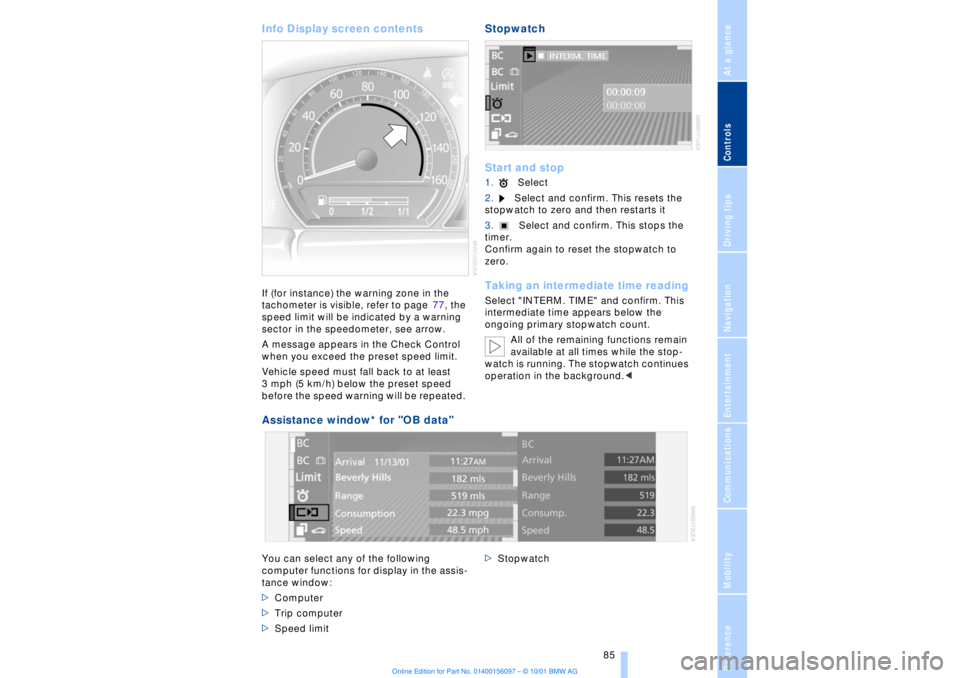
Info Display screen contents If (for instance) the warning zone in the
tachometer is visible, refer to page 77, the
speed limit will be indicated by a warning
sector in the speedometer, see arrow.
A message appears in the Check Control
when you exceed the preset speed limit.
Vehicle speed must fall back to at least
3 mph (5 km/h) below the preset speed
before the speed warning will be repeated.
Stopwatch
Start and stop1.Select
2.Select and confirm. This resets the
stopwatch to zero and then restarts it
3.Select and confirm. This stops the
timer.
Confirm again to reset the stopwatch to
zero. Taking an intermediate time readingSelect "INTERM. TIME" and confirm. This
intermediate time appears below the
ongoing primary stopwatch count.
All of the remaining functions remain
available at all times while the stop-
watch is running. The stopwatch continues
operation in the background.<
Assistance window* for "OB data"
You can select any of the following
computer functions for display in the assis-
tance window:
>Computer
>Trip computer
>Speed limit >Stopwatch
Page 87 of 208
Everything under control
86
To import display 1.Select and confirm the desired function
Ð here: computer
2.Select and confirm. The function
appears in the assistance window.
The symbol is highlighted if
the function shown in the assistance
window has been selected in the Control
Display.
You can also choose to view brief "Help"
texts explaining selected menu entries,
refer to page 24, or the travel route on vehi-
cles equipped with a GPS navigation
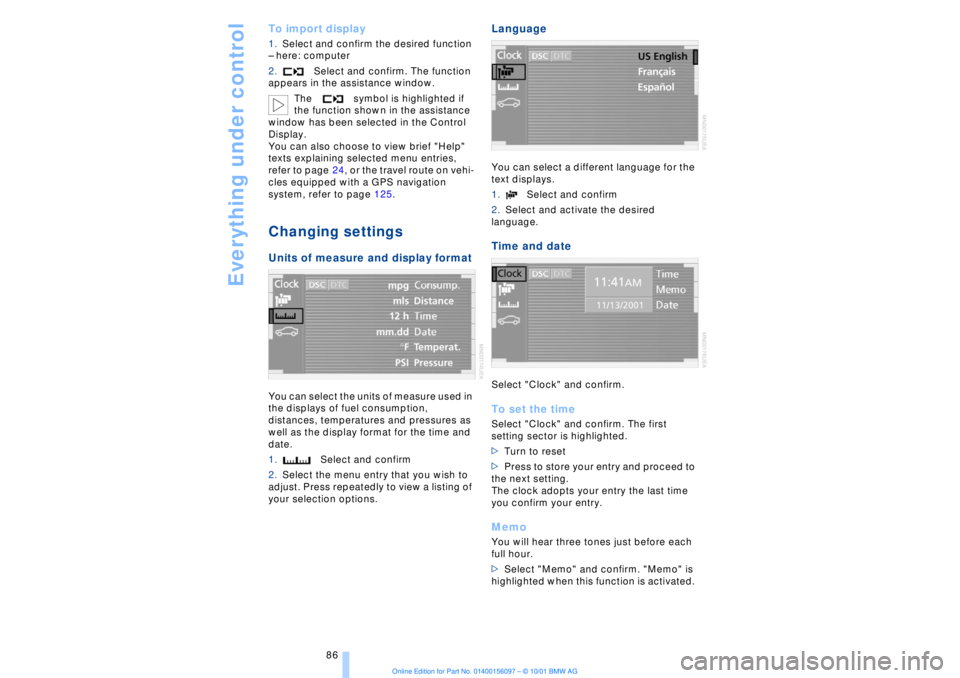
system, refer to page 125. Changing settings Units of measure and display format You can select the units of measure used in
the displays of fuel consumption,
distances, temperatures and pressures as
well as the display format for the time and
date.
1.Select and confirm
2.Select the menu entry that you wish to
adjust. Press repeatedly to view a listing of
your selection options.
Language You can select a different language for the
text displays.
1.Select and confirm
2.Select and activate the desired
language. Time and date Select "Clock" and confirm. To set the timeSelect "Clock" and confirm. The first
setting sector is highlighted.
>Turn to reset
>Press to store your entry and proceed to
the next setting.
The clock adopts your entry the last time
you confirm your entry. MemoYou will hear three tones just before each
full hour.
>Select "Memo" and confirm. "Memo" is
highlighted when this function is activated.
Page 88 of 208
At a glanceControlsDriving tipsCommunicationsNavigationEntertainmentMobilityReference
87
Setting the dateSelect "Date" and confirm. The first section
of the date display is highlighted Ð
here day.
>Turn to reset
>Press to store and highlight the next
entry Ð here month and year.
Your date is adopted by the system the last
time you store your entry.
Page 105 of 208
A congenial climate
104
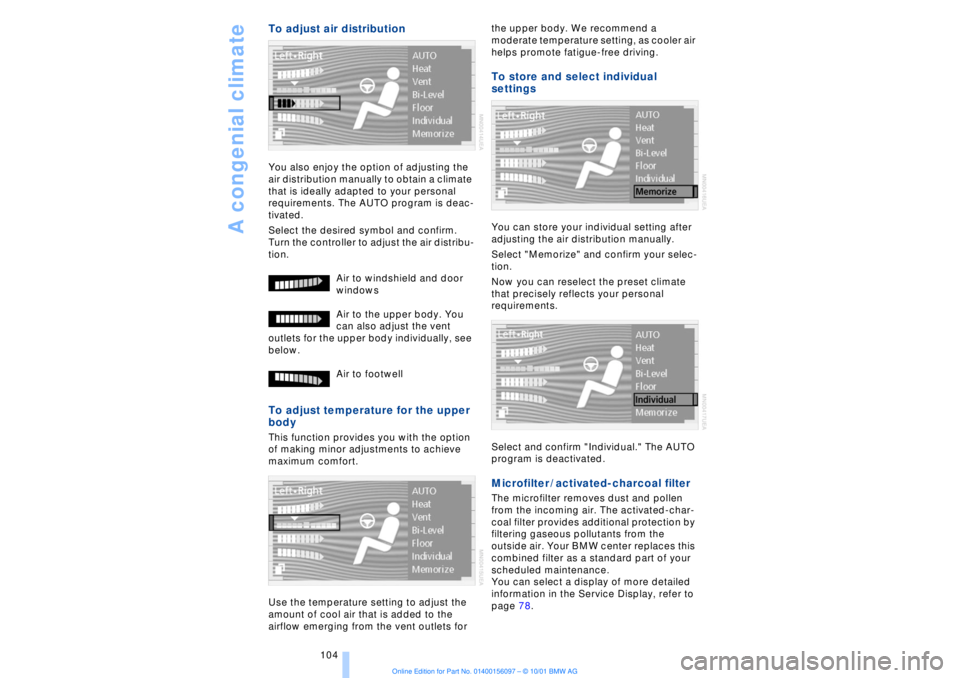
To adjust air distribution You also enjoy the option of adjusting the
air distribution manually to obtain a climate
that is ideally adapted to your personal
requirements. The AUTO program is deac-
tivated.
Select the desired symbol and confirm.
Turn the controller to adjust the air distribu-
tion.
Air to windshield and door
windows
Air to the upper body. You
can also adjust the vent
outlets for the upper body individually, see
below.
Air to footwell To adjust temperature for the upper
body This function provides you with the option
of making minor adjustments to achieve
maximum comfort.
Use the temperature setting to adjust the
amount of cool air that is added to the
airflow emerging from the vent outlets for the upper body. We recommend a
moderate temperature setting, as cooler air
helps promote fatigue-free driving.
To store and select individual
settings You can store your individual setting after
adjusting the air distribution manually.
Select "Memorize" and confirm your selec-
tion.
Now you can reselect the preset climate
that precisely reflects your personal
requirements.
Select and confirm "Individual." The AUTO
program is deactivated. Microfilter / activated-charcoal filter The microfilter removes dust and pollen
from the incoming air. The activated-char-
coal filter provides additional protection by
filtering gaseous pollutants from the
outside air. Your BMW center replaces this
combined filter as a standard part of your
scheduled maintenance.
You can select a display of more detailed
information in the Service Display, refer to
page 78.
Page 142 of 208
At a glanceControlsDriving tipsCommunicationsNavigationEntertainmentMobilityReference
141
It is not possible to operate the
system using the control buttons in
the steering wheel when the ignition is off.
To avoid discharging the battery you
should always switch off the sound system
when leaving the vehicle.<
Volume adjustmentAdjusting volumeTurn adjust the desired volume level.
The sound system automatically
reverts to its mute mode whenever
you use your mobile phone.
>Treble:
To amplify or reduce high frequencies
>Bass:
To amplify or reduce low frequencies
>Balance:
Left-to-right balance
>Fader:
Front-to-rear adjustment, high/low volume
>Reset:
This feature resets the tone settings to their
standard, default settings
>Speed vol.:
Speed-sensitive volume adjustment. Tone settings can be made separately
for each sound system, i. e., radio,
CD, MD and cassette. When you then
select a new sound system the system
automatically adopts the stored settings.<
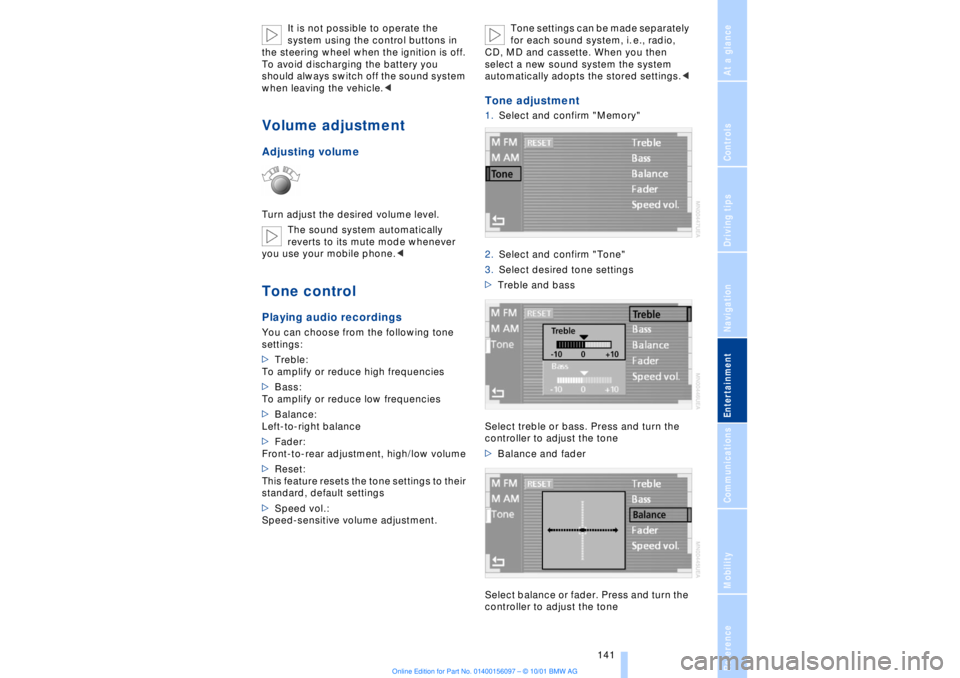
Tone adjustment1.Select and confirm "Memory"
2.Select and confirm "Tone"
3.Select desired tone settings
>Treble and bass
Select treble or bass. Press and turn the
controller to adjust the tone
>Balance and fader
Select balance or fader. Press and turn the
controller to adjust the tone
Page 143 of 208
Sound system
142 >"Speed vol."
Raises volume as vehicle speed increases.
Press and turn the controller to select a
response level of between 1 and 6
Resetting the tone settingsYou can reset all tone settings for all sound
systems Ð radio, CD, MD or cassette Ð to
the standard default settings.
Select and confirm "RESET."
Page 202 of 208
201
At a glanceControlsDriving tipsCommunicationsNavigationEntertainmentMobilityReference
Parking brake 62
Ð Automatic Hold 63
Ð manual operation 65
Parking brake lockout, refer
to Transmission
lockout 67, 70
Parking lamps 96
Ð bulb replacement 182
Parking with
Automatic Hold 64
Passenger-side mirror tilt
function 54
PDC (Park Distance
Control) 88
"PDC pic." 88
Phone directory 162
Ð deleting all entries 163
Ð dialing numbers using
voice command
system 163
Ð entering numbers in voice
command directory 163
Ð entry deletion 163
Ð viewing entries 163
Phone number, see Mobile
phone 162
Please fasten safety belts
warning lamp 50
Pollen 104
Power electric seat 47
Power rating 192
Power socket 113
Pressure, tires 170
Pressure control, tires 92
Programmable cruise
control 73
Programming settings,
refer to Car Memory, Key
Memory 59
Publishers 2
RRadio
Ð autostore 144
Ð memory locations 144
Ð search 144
Ð station search 144
Ð station selection 145
Ð switching on and off 140
Ð waveband selection 143
Ð Weather Band 145
Radio "Autostore"
feature 144
Radio mode 61
Radio "SCAN"
feature 143, 144
Rain sensor 72
"RDC" 93
RDC (Tire Pressure
Monitor) 92
Reading lamps 98
Rear air conditioner 105
Ð activation and deactiva-
tion in Control
Display 105
Ð air supply 105
Ð cooling adjustment 105
Ð deactivating 105
Rear armrest, see Center
armrest 113
Rear cooler 110
Rear seat heaters 51
Rear seats
Ð adjusting passenger seat
from the rear 47
Ð comfort seat
adjustments 47
Ð head restraint
adjustment 48
Rearview mirror 52
Rear window blind, see Sun
blind 109
Rear window defroster 16
Rear window safety
switch 13
"Recirc. air" 53
Reclining seat 45
Redialing with mobile
phone 164
Redial list 164Refrigerator box, refer to
Rear cooler 110
Refueling 168
Releasing the hood 175
Remaining distance 83
Remote control 34, 35
Remote-control unit 34
Removing condensation
from windows 101
Replacement fuses 186
Replacement keys 35
Replacing tires 172
Reserve warning 82
Reservoir, washer
system 73
Reset 141
Residual heat 101
"Right"
Ð for heated seats 51
Ð with automatic climate
control 103
"RND" with CD
changer 150
"RND" with CD player 147
"RND" with MD player 152
Roadside assistance calls
Ð manual activation 161
Roof-mounted luggage
rack 120
Route
Ð display 132
Ð list 132
Ð map cancelation 132
Ð map display 132
Ð selection 130
"Route guide" 131, 134
"Route select" 131
SSafety belts 50
Safety belt tensioners, see
Safety belts 50
Safety lock buttons 38
Safety precautions to
observe when using your
phone 158
Safety switch for rear
windows 42
Page 203 of 208
Everything from A to Z
202 Sampling
Ð CD changer 149
Ð MD player 152
Satellite 124
Scan
Ð CD player 147
Ð MiniDisc 152
Ð radio 143
Scan, station sampling
Ð radio 143
Scan audio sampling
Ð CD 147
Scan mode
Ð radio 144
"SCAN" with CD
changer 149
"SCAN" with CD player 147
"SCAN" with MD
player 152
Seat heating 50
Seat memory 54
Seats
Ð adjusting 45
Ð correct position 45
"Seat temp." 51, 103
Seat ventilation, see Active
seat ventilation 51
Securing cargo, see
Cargo 120
Securing the load 114
Selecting new route with
navigation system 133
Selecting new scale for
navigation system
display 132
Selecting stored radio
stations 145
Selector lever, automatic
transmission 67
Select "Route" 133
"Service" 78, 179
Ð "Emissions inspection" 79
Ð "Spark plugs" 78
Ð "State inspection" 79
Service and Warranty Infor-
mation Booklet (US
models) 179
Service brakes 119
Service Guide Booklet
(Canadian models) 179Service Interval
Display 78, 179
Service Requirement Dis-
play, see Service Interval
Display 179
"SET", refer to Setting
speed limit 84
Set time 106
"Settings" 19, 22
Setting time and date 86
Shifting, refer to Automatic
transmission with
Steptronic 69
Shiftlock 67
"Shortest route" 131
Shortest travel
distance 131
Shoulder support 46
"Side" in sound system
operation 153
Side window blind, see Sun
blinds 109
Sitting correctly 45
Ski bag 114
Sliding/tilt sunroof 43
Ð closing in the event of an
electrical defect 44
Ð convenience mode 37
Snow chains 173, 174
Soft Close Automatic
Ð doors 38
Ð luggage compartment
lid 39
SOS call
Ð using SOS button 161
Sound system
Ð switching on and off 140
Ð volume 141
Sound system adjustments
Ð balance 141
Ð bass 141
Ð default settings 142
Ð fader, front/rear 141
Ð left/right 141
Ð treble 141
Sound system "AUTO"
function 145
Sound system "Balance"
adjustment 141
Sound system "Bass"
adjustment 141Sound system "Dolby..."
feature 153
Sound system "Fader"
adjustment 141
Sound system "MANUAL"
selection mode 144
Sound system "Memorize"
feature 144
Sound system "Memory"
feature 141, 144
Sound system "Reset"
function 142
Sound system "Speed Vol."
feature 142
Spare fuses 186
Spare key 34
Ð adapter 34
Spare tire 184
"Spark plugs" 78, 179
Specifications for engine
oil 177
Speed limit
Ð "Limit" 84
Speed limit selection,
revision 84
Speedometer 14
"Sport"
Ð "EDC" 92
Stability control, refer to
Driving stability control 89
Standing lamps 97
Start/stop button 61
Starting 62
Starting assistance 187
Starting problems 62, 188
Starting the engine 62
"State inspection" 79
Station
Ð sample 143
Ð scan mode 144
Status lines in Control
Center 24
Steering column
Ð adjustment 53
Steering wheel 18
Ð individual button assign-
ment options 53
Steering wheel adjustment,
automatic 53
Steering wheel heater 53
Steering wheel memory 54
Page 204 of 208
203
At a glanceControlsDriving tipsCommunicationsNavigationEntertainmentMobilityReference
Steptronic 69
Stopwatch 85
Storage, refer to Car care
manual
Storage compartments 111
Storing preset speeds,
refer to Programmable
cruise control 75
Straps, refer to
Loading 120
Summer tires 173
Sun blinds 109
Switch for battery 185
Switching air conditioner
on and off 101
Switching off the engine 62
Switching off with mobile
phone 162
Switching on
Ð audio 140
Ð cassette deck 153
Ð CD changer 149
Ð CD player 146
Ð MD player 151
Ð radio 140
Symbols 6
Ð Control Center 20
System failure reports, refer
to Check Control 80TTachometer 77
Tail lamps 183
Ð bulb replacement 183
"Tape" 140, 153
Technical
modifications 8, 98
Telephone, refer to Mobile
phone 158
Telephone directory
Ð creating voice command
telephone directory 162
Ð dialing numbers 163
Ð updating voice command
telephone directory 162
"Temp. distribution" 51
Temperature
adjustment 101
Temperature display, out-
side temperature 77Third brake lamp 183
Tilt function, passenger-
side mirror 54
Time
Ð of arrival, estimated 83
Timing 85
Tire change 184
Tire inflation pressures 170
Tire pressure monitor 92
Tire Quality Grading 172
Tires
Ð flat tire 184
Ð tire changes 184
Ð tire damage 171
Ð tire inflation
pressures 170
Ð tire pressure monitoring
system 92
Ð tire replacement 172
Ð tire size, refer to Wheel
and tire
combinations 173
Ð tire tread 171
Ð tire tread wear
indicators 171
Title search
Ð cassette deck 154
Tone in audio operation
Ð adjusting 141
"Tone" in sound system
operation 141
Tools 181
"TOP 8" 163
Torque 192
Tow fittings 188
Towing 188
Track 193
Traction Control System,
refer to DSC 89
Traffic congestion, refer to
Selecting new route 133
Transmission
Ð automatic transmission
with L mode 66
Ð automatic transmission
with Steptronic 69
Transmission
lockout 67, 70
Ð manual release 70
Travel route, see Route 132
Tread depth, tires 171"Treble" in sound system
operation 141
Trip odometer 77
Trunk lid
Ð emergency release 40
Ð refer to luggage compart-
ment lid 38
Turning circle 193
Turn signal indicators 71
Ð bulb
replacement 182, 183
UUndercoating, refer to Car
care manual
Uniform Tire Quality Gra-
ding (UTQR) 172
Universal garage door
opener 108
Upholstery care, refer
to Car Care
Used batteries 186
User controls 16
"Using motorway" 130VVacuum cleaner
connection 113
Valve caps 185
Vanity mirror 53
Vehicle battery 185
Vehicle dimensions 193
Vehicle keys 34
Vehicle stability control 89
Ventilation 102
Ventilation, draft-free 102
Ventilation while
parked 106
Vents, ventilation 99
"View" with navigation
system 132, 133
Viscosity 177
Voice command
system 18, 25
Voice command system
notebook 27