ECU BMW 745LI SEDAN 2002 Owner's Manual
[x] Cancel search | Manufacturer: BMW, Model Year: 2002, Model line: 745LI SEDAN, Model: BMW 745LI SEDAN 2002Pages: 208, PDF Size: 6.33 MB
Page 176 of 208
At a glanceControlsDriving tipsCommunicationsNavigationEntertainmentMobilityReference
175
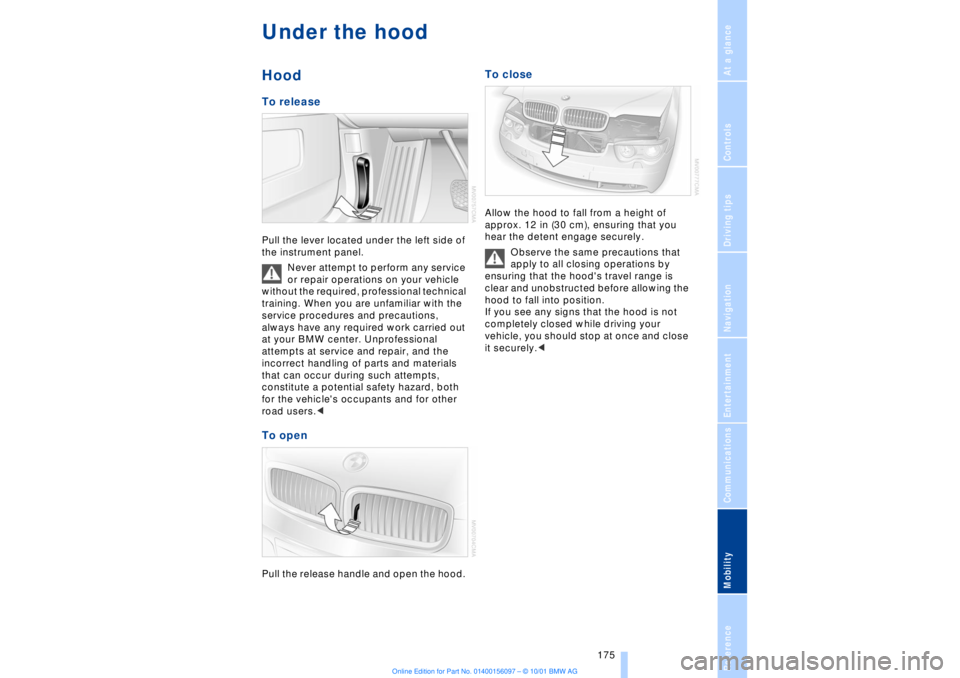
Under the hood Hood To release Pull the lever located under the left side of
the instrument panel.
Never attempt to perform any service
or repair operations on your vehicle
without the required, professional technical
training. When you are unfamiliar with the
service procedures and precautions,
always have any required work carried out
at your BMW center. Unprofessional
attempts at service and repair, and the
incorrect handling of parts and materials
that can occur during such attempts,
constitute a potential safety hazard, both
for the vehicle's occupants and for other
road users.< To open Pull the release handle and open the hood.
To close Allow the hood to fall from a height of
approx. 12 in (30 cm), ensuring that you
hear the detent engage securely.
Observe the same precautions that
apply to all closing operations by
ensuring that the hood's travel range is
clear and unobstructed before allowing the
hood to fall into position.
If you see any signs that the hood is not
completely closed while driving your
vehicle, you should stop at once and close
it securely.<
Page 185 of 208
Replacing components
184 the jack could slip to the side if you attempt
to raise the vehicle on a soft or slippery
surface such as snow, ice, tiles, etc.
Position the jack on a firm support surface.
Do not use a wooden block or similar
object as a support base for the jack, as
this would prevent it from extending to its
full support height and reduce its load-
carrying capacity .
To avoid serious or fatal injury: never lie
under the vehicle, and never start the
engine while it is supported by the jack.<
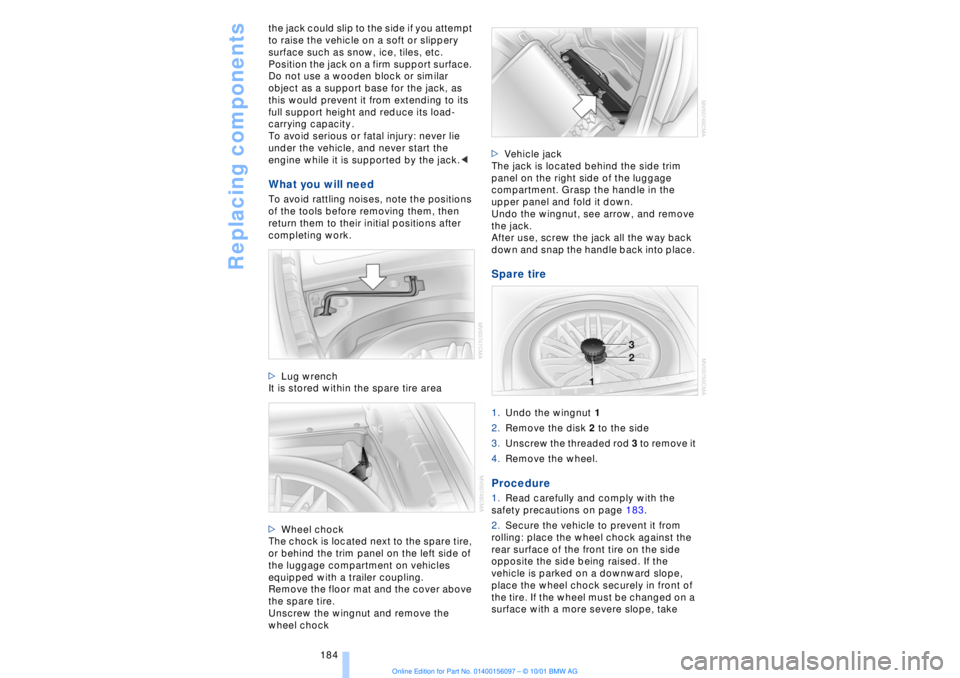
What you will need To avoid rattling noises, note the positions
of the tools before removing them, then
return them to their initial positions after
completing work.
>Lug wrench
It is stored within the spare tire area
>Wheel chock
The chock is located next to the spare tire,
or behind the trim panel on the left side of
the luggage compartment on vehicles
equipped with a trailer coupling.
Remove the floor mat and the cover above
the spare tire.
Unscrew the wingnut and remove the
wheel chock >Vehicle jack
The jack is located behind the side trim
panel on the right side of the luggage
compartment. Grasp the handle in the
upper panel and fold it down.
Undo the wingnut, see arrow, and remove
the jack.
After use, screw the jack all the way back
down and snap the handle back into place.
Spare tire 1.Undo the wingnut 1
2.Remove the disk 2 to the side
3.Unscrew the threaded rod 3 to remove it
4.Remove the wheel. Procedure 1.Read carefully and comply with the
safety precautions on page 183.
2.Secure the vehicle to prevent it from
rolling: place the wheel chock against the
rear surface of the front tire on the side
opposite the side being raised. If the
vehicle is parked on a downward slope,
place the wheel chock securely in front of
the tire. If the wheel must be changed on a
surface with a more severe slope, take
Page 186 of 208
OverviewControlsDriving tipsCommunicationsNavigationEntertainmentMobilityReference
185
additional precautions to secure the
vehicle from rolling.
3.Loosen the lug bolts 1/2 a turn
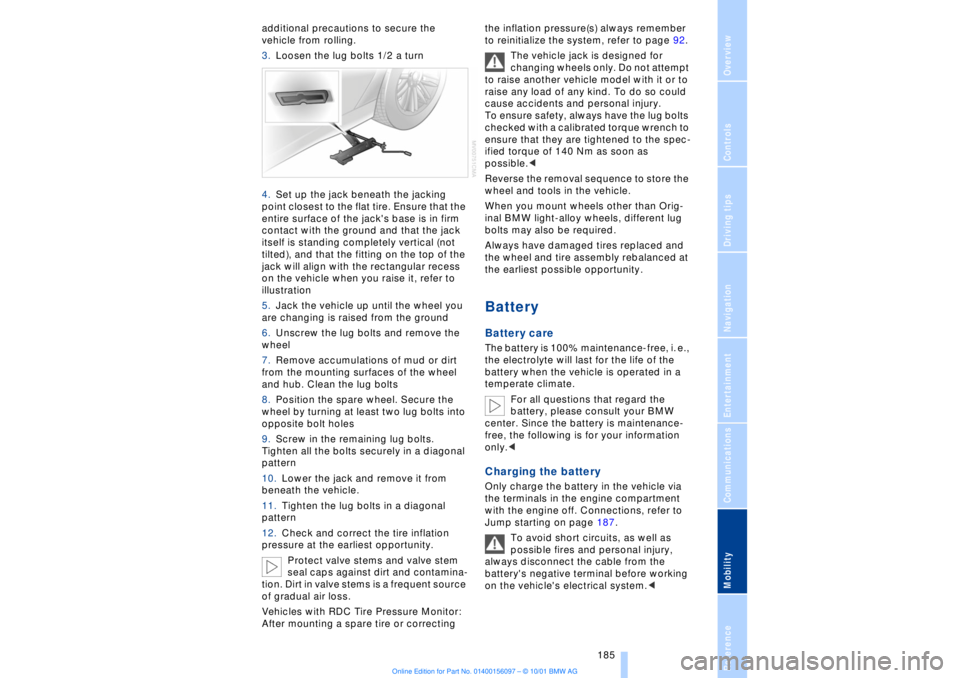
4.Set up the jack beneath the jacking
point closest to the flat tire. Ensure that the
entire surface of the jack's base is in firm
contact with the ground and that the jack
itself is standing completely vertical (not
tilted), and that the fitting on the top of the
jack will align with the rectangular recess
on the vehicle when you raise it, refer to
illustration
5.Jack the vehicle up until the wheel you
are changing is raised from the ground
6.Unscrew the lug bolts and remove the
wheel
7.Remove accumulations of mud or dirt
from the mounting surfaces of the wheel
and hub. Clean the lug bolts
8.Position the spare wheel. Secure the
wheel by turning at least two lug bolts into
opposite bolt holes
9.Screw in the remaining lug bolts.
Tighten all the bolts securely in a diagonal
pattern
10.Lower the jack and remove it from
beneath the vehicle.
11.Tighten the lug bolts in a diagonal
pattern
12.Check and correct the tire inflation
pressure at the earliest opportunity.
Protect valve stems and valve stem
seal caps against dirt and contamina-
tion. Dirt in valve stems is a frequent source
of gradual air loss.
Vehicles with RDC Tire Pressure Monitor:
After mounting a spare tire or correcting the inflation pressure(s) always remember
to reinitialize the system, refer to page 92.
The vehicle jack is designed for
changing wheels only. Do not attempt
to raise another vehicle model with it or to
raise any load of any kind. To do so could
cause accidents and personal injury.
To ensure safety, always have the lug bolts
checked with a calibrated torque wrench to
ensure that they are tightened to the spec-
ified torque of 140 Nm as soon as
possible.<
Reverse the removal sequence to store the
wheel and tools in the vehicle.
When you mount wheels other than Orig-
inal BMW light-alloy wheels, different lug
bolts may also be required.
Always have damaged tires replaced and
the wheel and tire assembly rebalanced at
the earliest possible opportunity.
Battery Battery care The battery is 100% maintenance-free, i. e.,
the electrolyte will last for the life of the
battery when the vehicle is operated in a
temperate climate.
For all questions that regard the
battery, please consult your BMW
center. Since the battery is maintenance-
free, the following is for your information
only.< Charging the battery Only charge the battery in the vehicle via
the terminals in the engine compartment
with the engine off. Connections, refer to
Jump starting on page 187.
To avoid short circuits, as well as
possible fires and personal injury,
always disconnect the cable from the
battery's negative terminal before working
on the vehicle's electrical system.<
Page 197 of 208

Everything from A to Z
196 Backup lamp, bulb
replacement 183
Bass 141
Battery 185
Ð discharged 187
Battery switch 185, 186
"BC," refer to Computer 83
Belts 50
Beverage holders 112
Blinds 109
Blower 101
BMW active seat 52
"BMW ASSIST" 19, 22
BMW comfort seat 46
"Booktape" 153
Brake, malfunctions 178
Brake lamp, adaptive 94
Brake lamps, bulb
replacement 183
"Brake pads" 179
Brake pads 119
Brakes 119
Brake system
Ð brake fluid 178
Break-in procedures 118
Brief commands for voice
command system 29
"Brief info" 23
Bulb changes 181
Buttons in steering
wheel 18
CCalifornia Proposition
65 Warning 180
Call
Ð terminating 162
Calling 162
Ð from telephone
directory 163
Ð from the redial list 164
Ð from the Top 8 list 163
Ð redialing 164
Can holders, refer to Bever-
age holders 112
Capacities 194
Car care, refer to Car care
manual
Cargo, securing 120Cargo area
Ð capacity 194
Ð opening from the
inside 39
Car Memory 59
"Car parked" 103, 106
Car radio, see Radio 140
Car wash, refer to separate
Car care manual
Cassette 153
Cassette deck 153
Ð booktape 153
Ð fast-forward mode 154
Ð music search 154
Ð reverse 154
Ð selecting tape side 153
Ð skipping pauses 154
Ð switching on 153
CBC (Cornering Brake
Control) 91
CBS (Condition Based
Service) 179
"CD" 140, 146
CD changer 148
Ð fast forward 150
Ð humidity 148
Ð operating
temperatures 148
Ð random play 150
Ð reverse 150
Ð safety 148
Ð scan function 149
Ð skipping tracks 150
Ð switching on 149
Ð temperature range 148
CD player 146
Ð activation 146
Ð fast forward 146
Ð random selection 147
Ð reverse 146
Ð sampling 147
Ð scan 147
Ð skip track 146
Cell phone, refer to sepa-
rate Mobile phone
manual 158
Center (high-mount) brake
lamp 183
Center armrest 113
Center console, refer to
Comfort features 16Central locking
system 35, 38
"CHANGE" for
navigation 130
Changing bulbs 181
Changing bulbs, refer to
Lamps and bulbs 181
Changing language 86
Changing settings in Con-
trol Display 86
Changing units of measure
in Control Display 86
Check Control 80
Ð "Check" 81
Checking engine oil
level 176, 176
Checking tire
pressures 170
Child-restraint systems 57
Ð refer also to LATCH child-
restraint system 58
Child-safety locks 59
Child seats 57
Cigarette lighter 113
Cleaning, refer to Car care
manual
"Climate" 19, 22
"Clock" 86
Clock 77
Ð setting time and date 86
Closing
Ð from the inside 37
Closing assist
Ð doors 38
Ð luggage compartment
lid 39
Cockpit 12, 16
Coin box, see
Compartments 111
Cold start 62
Combination switch 71
"Comfort"
Ð "EDC" 92
Comfort features 16
Comfort seat 46
Ð in rear 47
"Communication" 19, 22
Compact Disc, see CD 146
Compartments 111
Page 203 of 208
Everything from A to Z
202 Sampling
Ð CD changer 149
Ð MD player 152
Satellite 124
Scan
Ð CD player 147
Ð MiniDisc 152
Ð radio 143
Scan, station sampling
Ð radio 143
Scan audio sampling
Ð CD 147
Scan mode
Ð radio 144
"SCAN" with CD
changer 149
"SCAN" with CD player 147
"SCAN" with MD
player 152
Seat heating 50
Seat memory 54
Seats
Ð adjusting 45
Ð correct position 45
"Seat temp." 51, 103
Seat ventilation, see Active
seat ventilation 51
Securing cargo, see
Cargo 120
Securing the load 114
Selecting new route with
navigation system 133
Selecting new scale for
navigation system
display 132
Selecting stored radio
stations 145
Selector lever, automatic
transmission 67
Select "Route" 133
"Service" 78, 179
Ð "Emissions inspection" 79
Ð "Spark plugs" 78
Ð "State inspection" 79
Service and Warranty Infor-
mation Booklet (US
models) 179
Service brakes 119
Service Guide Booklet
(Canadian models) 179Service Interval
Display 78, 179
Service Requirement Dis-
play, see Service Interval
Display 179
"SET", refer to Setting
speed limit 84
Set time 106
"Settings" 19, 22
Setting time and date 86
Shifting, refer to Automatic
transmission with
Steptronic 69
Shiftlock 67
"Shortest route" 131
Shortest travel
distance 131
Shoulder support 46
"Side" in sound system
operation 153
Side window blind, see Sun
blinds 109
Sitting correctly 45
Ski bag 114
Sliding/tilt sunroof 43
Ð closing in the event of an
electrical defect 44
Ð convenience mode 37
Snow chains 173, 174
Soft Close Automatic
Ð doors 38
Ð luggage compartment
lid 39
SOS call
Ð using SOS button 161
Sound system
Ð switching on and off 140
Ð volume 141
Sound system adjustments
Ð balance 141
Ð bass 141
Ð default settings 142
Ð fader, front/rear 141
Ð left/right 141
Ð treble 141
Sound system "AUTO"
function 145
Sound system "Balance"
adjustment 141
Sound system "Bass"
adjustment 141Sound system "Dolby..."
feature 153
Sound system "Fader"
adjustment 141
Sound system "MANUAL"
selection mode 144
Sound system "Memorize"
feature 144
Sound system "Memory"
feature 141, 144
Sound system "Reset"
function 142
Sound system "Speed Vol."
feature 142
Spare fuses 186
Spare key 34
Ð adapter 34
Spare tire 184
"Spark plugs" 78, 179
Specifications for engine
oil 177
Speed limit
Ð "Limit" 84
Speed limit selection,
revision 84
Speedometer 14
"Sport"
Ð "EDC" 92
Stability control, refer to
Driving stability control 89
Standing lamps 97
Start/stop button 61
Starting 62
Starting assistance 187
Starting problems 62, 188
Starting the engine 62
"State inspection" 79
Station
Ð sample 143
Ð scan mode 144
Status lines in Control
Center 24
Steering column
Ð adjustment 53
Steering wheel 18
Ð individual button assign-
ment options 53
Steering wheel adjustment,
automatic 53
Steering wheel heater 53
Steering wheel memory 54