remote control BMW 745LI SEDAN 2002 Owner's Manual
[x] Cancel search | Manufacturer: BMW, Model Year: 2002, Model line: 745LI SEDAN, Model: BMW 745LI SEDAN 2002Pages: 208, PDF Size: 6.33 MB
Page 73 of 208
Driving
72
1 Standard wiper speed The system automatically reverts to opera-
tion in the intermittent mode whenever the
vehicle stops. Fast wiper speed You can also select this position by
pressing the lever upward past the detent.
The system automatically reverts to opera-
tion in the standard wipe mode whenever
the vehicle stops. 4 Clean windshield The system sprays washer fluid against the
windshield and activates the wipers for a
brief period. Cleaning headlamps >Each fifth time you press into position 4
to wash the windshield while the head-
lamps are on.
Do not use the washers if there is any
danger that the fluid will freeze on the
windshield. If you do so, your vision could
be obscured. To avoid freezing, use a
washer fluid antifreeze, refer to page 73.
Avoid activating the washer when the
reservoir is empty, as damage to the pump
could result.< Windshield washer nozzles The windshield washer nozzles and the
windshield itself in the area around the
wipers are heated automatically when the
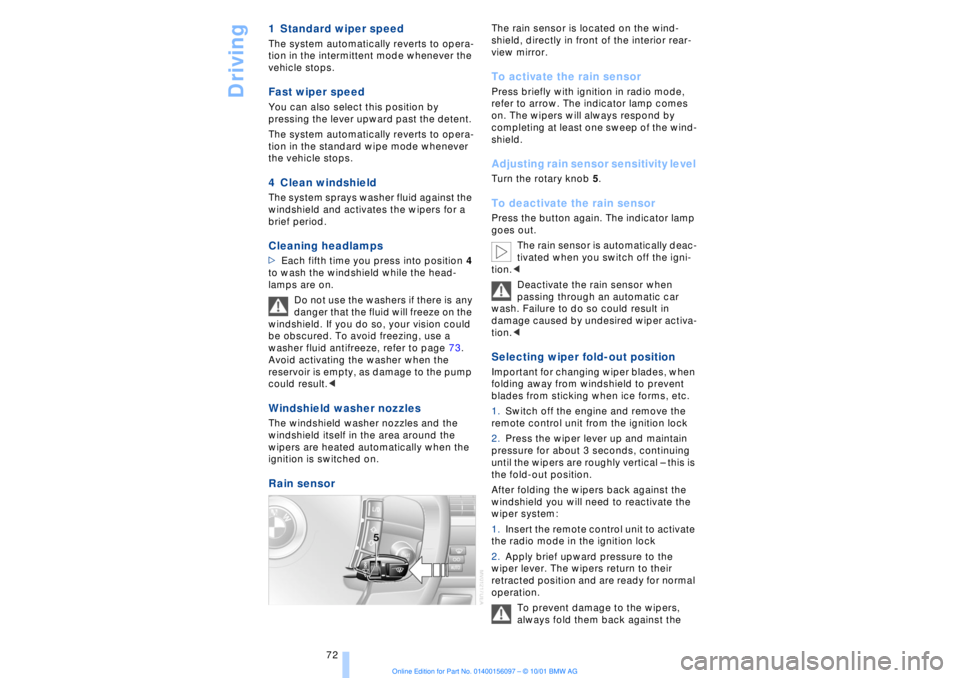
ignition is switched on. Rain sensor
The rain sensor is located on the wind-
shield, directly in front of the interior rear-
view mirror. To activate the rain sensor Press briefly with ignition in radio mode,
refer to arrow. The indicator lamp comes
on. The wipers will always respond by
completing at least one sweep of the wind-
shield. Adjusting rain sensor sensitivity level Turn the rotary knob 5. To deactivate the rain sensor Press the button again. The indicator lamp
goes out.
The rain sensor is automatically deac-
tivated when you switch off the igni-
tion.<
Deactivate the rain sensor when
passing through an automatic car
wash. Failure to do so could result in
damage caused by undesired wiper activa-
tion.< Selecting wiper fold-out position Important for changing wiper blades, when
folding away from windshield to prevent
blades from sticking when ice forms, etc.
1.Switch off the engine and remove the
remote control unit from the ignition lock
2.Press the wiper lever up and maintain
pressure for about 3 seconds, continuing
until the wipers are roughly vertical Ð this is
the fold-out position.
After folding the wipers back against the
windshield you will need to reactivate the
wiper system:
1.Insert the remote control unit to activate
the radio mode in the ignition lock
2.Apply brief upward pressure to the
wiper lever. The wipers return to their
retracted position and are ready for normal
operation.
To prevent damage to the wipers,
always fold them back against the
Page 101 of 208
A congenial climate
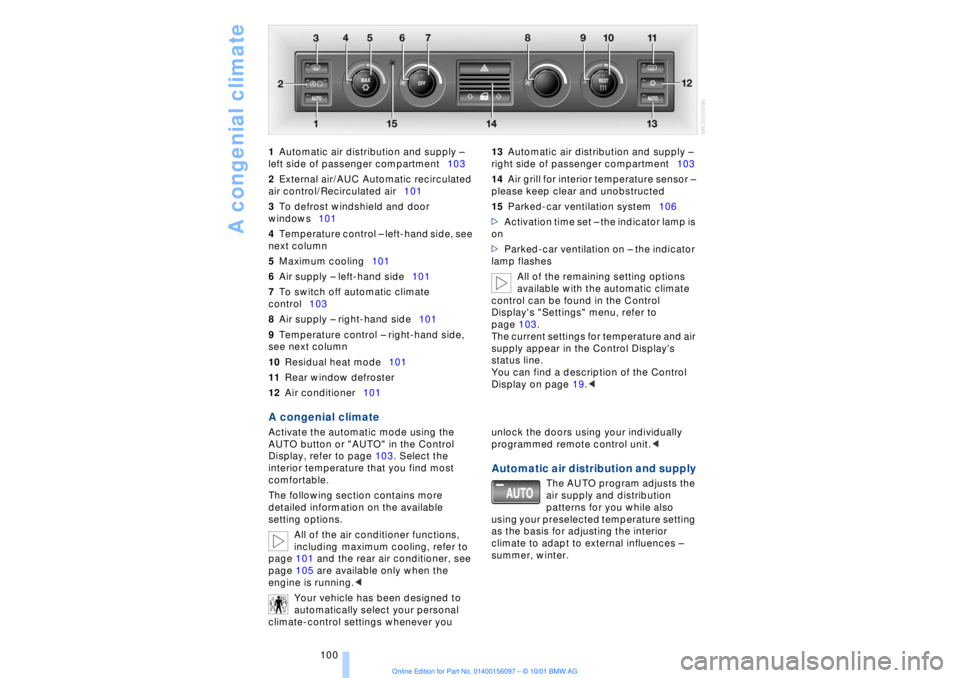
100 1Automatic air distribution and supply Ð
left side of passenger compartment103
2External air/AUC Automatic recirculated
air control/Recirculated air101
3To defrost windshield and door
windows101
4Temperature control Ð left-hand side, see
next column
5Maximum cooling101
6Air supply Ð left-hand side101
7To switch off automatic climate
control103
8Air supply Ð right-hand side101
9Temperature control Ð right-hand side,
see next column
10Residual heat mode101
11Rear window defroster
12Air conditioner101 13Automatic air distribution and supply Ð
right side of passenger compartment103
14Air grill for interior temperature sensor Ð
please keep clear and unobstructed
15Parked-car ventilation system106
>Activation time set Ð the indicator lamp is
on
>Parked-car ventilation on Ð the indicator
lamp flashes
All of the remaining setting options
available with the automatic climate
control can be found in the Control
Display's "Settings" menu, refer to
page 103.
The current settings for temperature and air
supply appear in the Control Display's
status line.
You can find a description of the Control
Display on page 19.<
A congenial climate Activate the automatic mode using the
AUTO button or "AUTO" in the Control
Display, refer to page 103. Select the
interior temperature that you find most
comfortable.
The following section contains more
detailed information on the available
setting options.
All of the air conditioner functions,
including maximum cooling, refer to
page 101 and the rear air conditioner, see
page 105 are available only when the
engine is running.<
Your vehicle has been designed to
automatically select your personal
climate-control settings whenever you unlock the doors using your individually
programmed remote control unit.<
Automatic air distribution and supply
The AUTO program adjusts the
air supply and distribution
patterns for you while also
using your preselected temperature setting
as the basis for adjusting the interior
climate to adapt to external influences Ð
summer, winter.
Page 109 of 208
Practical interior accessories
108
Practical interior accessoriesUniversal Garage Door
Opener*
The concept The Universal Garage Door Opener can
replace as many as three hand-held trans-
mitters for various accessories, such as
door openers, alarms and door-locking
systems. The Universal Garage Door
Opener registers and stores signals from
the original hand-held transmitters.
The signal of an original hand-held trans-
mitter can be programmed on one of the
three channel keys. Following that, each of
the devices can be actuated with the
appropriately-programmed channel key.
The indicator lamp flashes to confirm trans-
mission of the signal.
If the vehicle is sold, the memory of the
channel keys should be cleared as
described on page 109.
To prevent possible damage or injury,
before programming or using the
Universal Garage Door Opener always
inspect the immediate area to make certain
that no people, animals or objects are
within the travel range of the device. Also,
comply with the safety precautions of the
original hand-held transmitter.< Original hand-held transmitter
If you see this symbol on the pack-
aging or in the manual supplied with
the original remote control unit, it is
safe to assume that it is compatible with
the Universal Garage Door Opener.
To check for alternating codes To determine whether the original hand-
held transmitter operates using an alter-
nating code, you should either consult the
manual enclosed with it or program a
channel key as described in the Program-
ming section. After programming, press and hold down
the key on the Universal Garage Door
Opener. If the indicator lamp on the
Universal Garage Door Opener flashes for
two seconds before remaining on continu-
ously, this indicates that the original hand-
held transmitter uses an alernating code. In
this case, you can program the channel
keys using the procedure described on the
next page in the section on programming
alternating-code transmitters.
If you have additional questions,
please consult your BMW center or
call 1-800-355-3515.
You can also visit these websites:
www.bmwusa.com or
www.homelink.com.
HomeLink is a registered trademark owned
by Johnson Controls, Inc.<
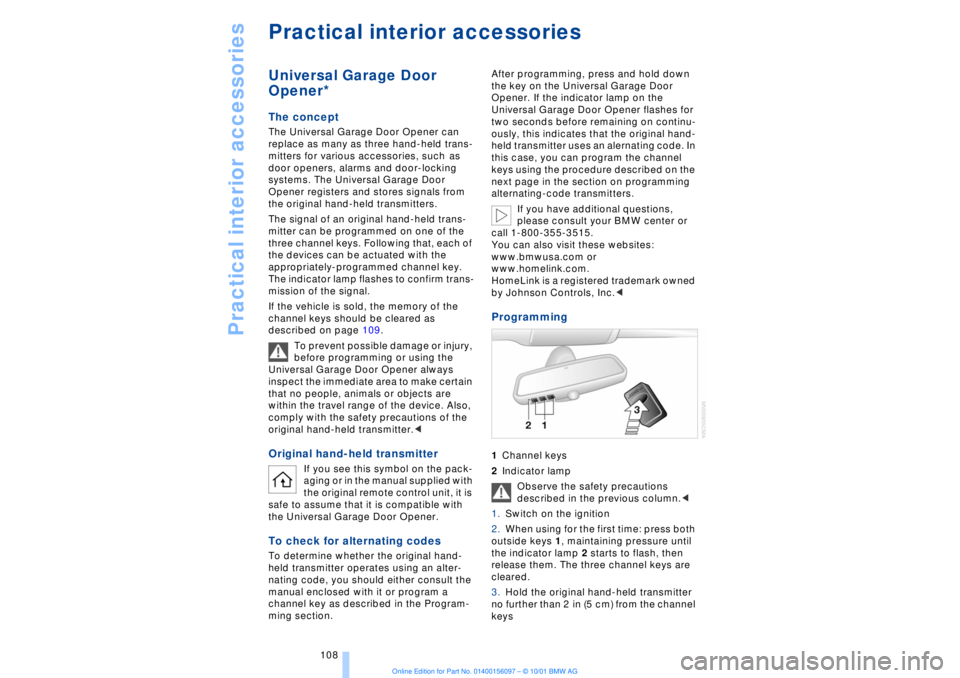
Programming 1Channel keys
2Indicator lamp
Observe the safety precautions
described in the previous column.<
1.Switch on the ignition
2.When using for the first time: press both
outside keys 1, maintaining pressure until
the indicator lamp 2 starts to flash, then
release them. The three channel keys are
cleared.
3.Hold the original hand-held transmitter
no further than 2 in (5 cm) from the channel
keys
Page 110 of 208
At a glanceControlsDriving tipsCommunicationsNavigationEntertainmentMobilityReference
109
4.Simultaneously press the transmit key
on the original hand-held transmitter,
arrow 3 and the selected channel key 1
on the Universal Garage Door Opener.
Release both keys as soon as the indicator
lamp flashes rapidly
5.To program other original hand-held
transmitters, repeat steps 3 and 4.
The corresponding channel key is now
programmed with the signal of the original
hand-held transmitter. Programming alternating-code
transmitters
Observe all of the safety precautions
described on the previous page.<
Consult the unit's operating instructions
when programming the Universal Garage
Door Opener.
When programming hand-held transmitters
that employ an alternating code, please
observe the following supplementary
instructions:
Programming will be easier with the
aid of a second person.<
1.Program the Universal Garage Door
Opener by following the instructions given
above under Programming.
2.Maintain pressure on the alternating-
code transmitter for roughly two seconds,
continuing until the program lamp lights up.
3.Press the selected channel key on the
Universal Garage Door Opener three times.
If you have any additional questions,
please contact your BMW center.<
To clear channel keys
Observe all of the safety precautions
described on the previous page.<
The memory of individual channel keys
cannot be deleted. However, the three
channel keys can be cleared together as
follows:
>Press both outside keys on the Universal
Garage Door Opener; maintain pressure
until the indicator lamp starts to flash, then
release the key.
Sun blinds*
Rear window sun blind Activate by pressing the button with the
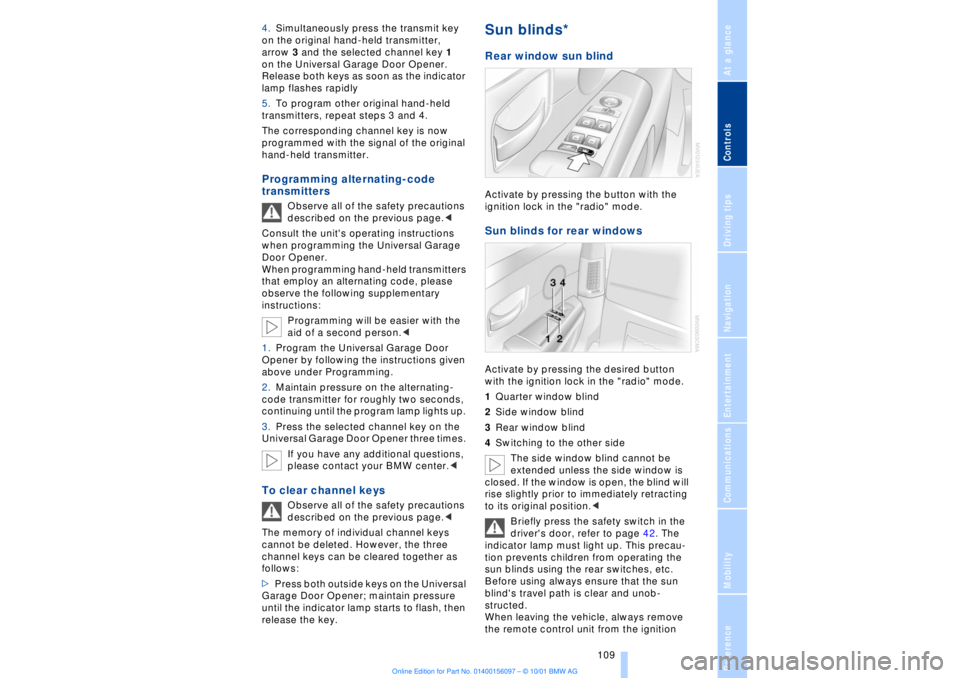
ignition lock in the "radio" mode. Sun blinds for rear windows Activate by pressing the desired button
with the ignition lock in the "radio" mode.
1Quarter window blind
2Side window blind
3Rear window blind
4Switching to the other side
The side window blind cannot be
extended unless the side window is
closed. If the window is open, the blind will
rise slightly prior to immediately retracting
to its original position.<
Briefly press the safety switch in the
driver's door, refer to page 42. The
indicator lamp must light up. This precau-
tion prevents children from operating the
sun blinds using the rear switches, etc.
Before using always ensure that the sun
blind's travel path is clear and unob-
structed.
When leaving the vehicle, always remove
the remote control unit from the ignition
Page 112 of 208
At a glanceControlsDriving tipsCommunicationsNavigationEntertainmentMobilityReference
111
Rechargeable flashlight The flashlight is located on the left-hand
side of the glove compartment.
It features integral overload protection, so
it can be left in its holder continuously.
Be sure that the flashlight is switched
off when it is inserted into its holder.
Failure to comply with this precaution
could lead to overcharging and damage.< Storage compartments A storage compartment is located in the
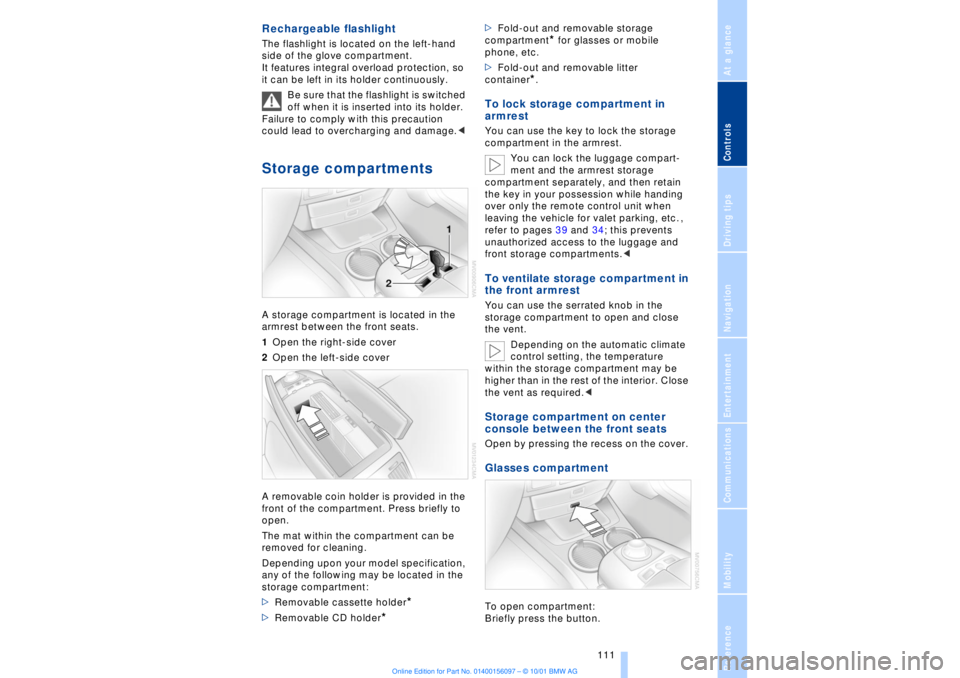
armrest between the front seats.
1Open the right-side cover
2Open the left-side cover
A removable coin holder is provided in the
front of the compartment. Press briefly to
open.
The mat within the compartment can be
removed for cleaning.
Depending upon your model specification,
any of the following may be located in the
storage compartment:
>Removable cassette holder
*
>Removable CD holder
* >Fold-out and removable storage
compartment
* for glasses or mobile
phone, etc.
>Fold-out and removable litter
container
*.
To lock storage compartment in
armrest You can use the key to lock the storage
compartment in the armrest.
You can lock the luggage compart-
ment and the armrest storage
compartment separately, and then retain
the key in your possession while handing
over only the remote control unit when
leaving the vehicle for valet parking, etc. ,
refer to pages 39 and 34; this prevents
unauthorized access to the luggage and
front storage compartments.< To ventilate storage compartment in
the front armrest You can use the serrated knob in the
storage compartment to open and close
the vent.
Depending on the automatic climate
control setting, the temperature
within the storage compartment may be
higher than in the rest of the interior. Close
the vent as required.< Storage compartment on center
console between the front seats Open by pressing the recess on the cover. Glasses compartment To open compartment:
Briefly press the button.
Page 114 of 208
At a glanceControlsDriving tipsCommunicationsNavigationEntertainmentMobilityReference
113
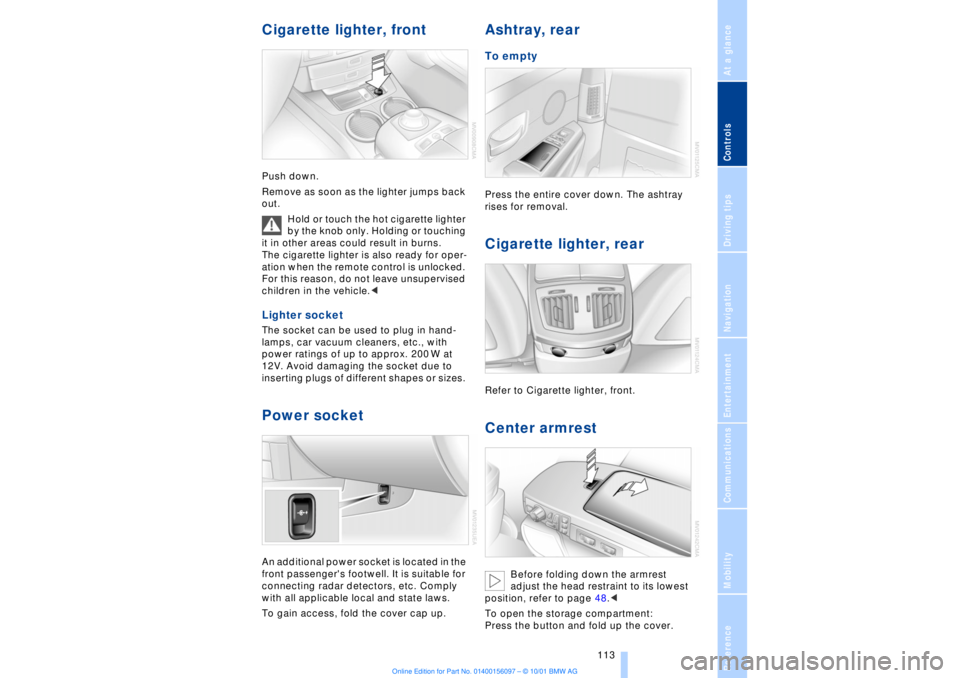
Cigarette lighter, frontPush down.
Remove as soon as the lighter jumps back
out.
Hold or touch the hot cigarette lighter
by the knob only. Holding or touching
it in other areas could result in burns.
The cigarette lighter is also ready for oper-
ation when the remote control is unlocked.
For this reason, do not leave unsupervised
children in the vehicle.< Lighter socket The socket can be used to plug in hand-
lamps, car vacuum cleaners, etc., with
power ratings of up to approx. 200 W at
12V. Avoid damaging the socket due to
inserting plugs of different shapes or sizes. Power socket An additional power socket is located in the
front passenger's footwell. It is suitable for
connecting radar detectors, etc. Comply
with all applicable local and state laws.
To gain access, fold the cover cap up.
Ashtray, rear To empty Press the entire cover down. The ashtray
rises for removal. Cigarette lighter, rear Refer to Cigarette lighter, front. Center armrest
Before folding down the armrest
adjust the head restraint to its lowest
position, refer to page 48.<
To open the storage compartment:
Press the button and fold up the cover.
Page 198 of 208
197
At a glanceControlsDriving tipsCommunicationsNavigationEntertainmentMobilityReference
Computer 81
Ð automatic climate
control 103
Ð "BC" 84
Ð changing settings 86
Ð changing time and
date 86
Ð Control Display screen
contents 83
Ð displays, menus 22
Ð language selection 86
Ð status lines 24
Ð symbols 20
Computer, refer to Control
Center 19
Condition Based Service
(CBS) 179
Connecting car vacuum
cleaner 113
Consumption display 82
Control Center 19
Ð assistance window 23
Ð automatic climate
control 103
Ð changing menu page 20
Ð changing settings 86
Ð confirm selection or
entry 20
Ð display help texts 23
Ð displays, menus 22
Ð language selection 86
Ð lists 20
Ð menu entry selection 19
Ð selecting units of measure
and display format 86
Ð setting time and date 86
Ð status lines 24
Ð symbols 20
Ð symbols and lists 20
Control Display 19
Controller, refer to Control
Center 19
Convenience operation of
windows and sliding/tilt
sunroof 36, 37
Convenience starting
feature 62
"Coolant" 179
Coolant 176, 177
Cooler, refer to Rear
cooler 110Cooling adjustment
Ð rear air conditioner 105
Copyright 2
Cornering Brake Control
(CBC) 91
Courtesy lamps 98
Cruise control 73
Cruise control, see Pro-
grammable cruise
control 73
Cruising range 82
Cup holder, refer to Bever-
age holder 112
Curb lamp
Ð bulb replacement 182
Curb weight 194
Current fuel
consumption 83
D"Date" 86
Daytime driving lamp
mode 96
DBC (Dynamic Brake
Control) 91
Deactivating
Ð tilt alarm sensor 36, 41
Defrosting, windows 101
Defrost setting 101
"DELETE" for
navigation 130
Destination entry 126
Destination for navigation
system
Ð selecting in
"Information" 129
Destination memory 129
"Destinations" 126
"Dest. input" 126
Dialed numbers 164
Dimensions 193
Dimming mirrors 52
Dipstick, engine oil 176
Direction
Ð arrow 132
Ð to destination 131
Ð voice instructions 133
Directional indicators, see
Turn signal indicators 71Directory creation
Ð with navigation
system 134
"Dir. of travel" with naviga-
tion system 132
"Dir. to north" with naviga-
tion system 132
Disc brakes 119
Displacement 192
Display, refer to Control
Display 19
Display format and units of
measure in Control
Display, changing 86
Display illumination, refer to
Instrument lighting 97
Displays 14
Ð computer 22
Ð Control Center 22
Distance 83
Distance to destination 83
Distance warning 88
Door keys 34
Doors
Ð locking and unlocking 35
Ð manual operation 37
Ð remote control 35
DOT Quality Grades 172
Draft-free ventilation 102
Drink holders, refer to
Beverage holders 112
Driving stability control 89
Driving tips 118
"DSC" 90
DSC (Dynamic Stability
Control) 89
"DTC" 90
DTC (Dynamic Traction
Control) 15, 90
Dynamic Brake Control
(DBC) 91
Dynamic Drive 91
Dynamic Stability Control
(DSC) 89
Dynamic Traction Control
(DTC) 15, 90
EEBV (Electronic Brake-
force Distribution) 91
Page 200 of 208
199
At a glanceControlsDriving tipsCommunicationsNavigationEntertainmentMobilityReference
HHandbrake, refer to Parking
brake 62
Hand lamp 111
Hands-free
microphone 161
Hands-free system 161
Hazard warning flashers 16
Headlamp control 96
Headlamp flasher 71
Headlamps, low beam 96
Headlamp washers 72, 73
Head restraints 48
Ð front head restraints,
active 48
Heated steering wheel 53
Heating and ventilation 99
Heating while stopped 101
Height 193
Height adjustment
Ð seats 46
Ð steering column 53
"Help" 19, 22
Help texts in Control
Display 23
High beams 97
Ð bulb replacement 182
High-mount brake
lamp 183
Home address 135
Hood release 175
Horn 13
Hydraulic Brake Assistant,
refer to DBC 91IIce warning 77
Ignition key 34
Ignition lock 61
"Indep. ventil." 106
Indicator lamps 15
"Individual" 104
Individual button assign-
ments on steering
wheel 53
Inflation pressure 170
Inflation pressure control,
tires 92
Info Display 14"Information" for
navigation 129
Instrument cluster, refer to
Info Display 14
Instrument lighting 97
Instrument panel 12, 16
Instrument panel switch 71
Interior lamps 97
Ð remote control 36
Interior motion sensor 41
Interior protection
Ð deactivating 36, 41
Interior rearview mirror 52
Ð automatic dimming 52
Intermittent wipe 71
JJack 184
Jump-starting 187KKey Memory 59
Key Pad control
buttons 160
Key Pad digit buttons 160
Key Pad with mobile
phone 160
Keys 34
Ð adapter for spare key 34
Kickdown 68L"Last" 164
"Last destin." 130
LATCH, refer to LATCH
child-restraint system 58
"Left"
Ð for heated seats 51
Ð with automatic climate
control 103
Length 193
Level control system 94
License plate lamp, bulb
replacement 183
Lighter 113
Lights on warning 96
Light switch 96
"Limit" 84Limit selection,
adjustment 84
Litter container 111
L mode on automatic
transmission 66
Loading 120
Loading the vehicle 120
"LOCATION" 135
"Location" 129, 135
Lock Code 162
Locking
Ð from the outside 35
Louvers 99
Low beams
Ð automatic 96
Lower back support, refer
to lumbar support 46
Lug bolts 185
Luggage compartment
capacity 194
Luggage compartment lid
Ð emergency release 40
Ð locking separately 39
Ð opening from the
inside 39
Ð opening from the
outside 38
Ð operating via remote
control 36
Luggage compartment lid
operation,
automatic 36, 39
Luggage compartment
net 40
Luggage rack, refer to
Roof-mounted luggage
rack 120
Lug wrench 184
Lumbar support 46
MM+S tires 173
Maintenance 179
Make-up mirror 53
Malfunction displays 80
"M AM" 144, 145
Manually controlled recir-
culated air 101
Page 202 of 208
201
At a glanceControlsDriving tipsCommunicationsNavigationEntertainmentMobilityReference
Parking brake 62
Ð Automatic Hold 63
Ð manual operation 65
Parking brake lockout, refer
to Transmission
lockout 67, 70
Parking lamps 96
Ð bulb replacement 182
Parking with
Automatic Hold 64
Passenger-side mirror tilt
function 54
PDC (Park Distance
Control) 88
"PDC pic." 88
Phone directory 162
Ð deleting all entries 163
Ð dialing numbers using
voice command
system 163
Ð entering numbers in voice
command directory 163
Ð entry deletion 163
Ð viewing entries 163
Phone number, see Mobile
phone 162
Please fasten safety belts
warning lamp 50
Pollen 104
Power electric seat 47
Power rating 192
Power socket 113
Pressure, tires 170
Pressure control, tires 92
Programmable cruise
control 73
Programming settings,
refer to Car Memory, Key
Memory 59
Publishers 2
RRadio
Ð autostore 144
Ð memory locations 144
Ð search 144
Ð station search 144
Ð station selection 145
Ð switching on and off 140
Ð waveband selection 143
Ð Weather Band 145
Radio "Autostore"
feature 144
Radio mode 61
Radio "SCAN"
feature 143, 144
Rain sensor 72
"RDC" 93
RDC (Tire Pressure
Monitor) 92
Reading lamps 98
Rear air conditioner 105
Ð activation and deactiva-
tion in Control
Display 105
Ð air supply 105
Ð cooling adjustment 105
Ð deactivating 105
Rear armrest, see Center
armrest 113
Rear cooler 110
Rear seat heaters 51
Rear seats
Ð adjusting passenger seat
from the rear 47
Ð comfort seat
adjustments 47
Ð head restraint
adjustment 48
Rearview mirror 52
Rear window blind, see Sun
blind 109
Rear window defroster 16
Rear window safety
switch 13
"Recirc. air" 53
Reclining seat 45
Redialing with mobile
phone 164
Redial list 164Refrigerator box, refer to
Rear cooler 110
Refueling 168
Releasing the hood 175
Remaining distance 83
Remote control 34, 35
Remote-control unit 34
Removing condensation
from windows 101
Replacement fuses 186
Replacement keys 35
Replacing tires 172
Reserve warning 82
Reservoir, washer
system 73
Reset 141
Residual heat 101
"Right"
Ð for heated seats 51
Ð with automatic climate
control 103
"RND" with CD
changer 150
"RND" with CD player 147
"RND" with MD player 152
Roadside assistance calls
Ð manual activation 161
Roof-mounted luggage
rack 120
Route
Ð display 132
Ð list 132
Ð map cancelation 132
Ð map display 132
Ð selection 130
"Route guide" 131, 134
"Route select" 131
SSafety belts 50
Safety belt tensioners, see
Safety belts 50
Safety lock buttons 38
Safety precautions to
observe when using your
phone 158
Safety switch for rear
windows 42