park assist BMW 750I XDRIVE SEDAN 2016 Owner's Manual
[x] Cancel search | Manufacturer: BMW, Model Year: 2016, Model line: 750I XDRIVE SEDAN, Model: BMW 750I XDRIVE SEDAN 2016Pages: 314, PDF Size: 7.9 MB
Page 195 of 314
▷Width of gap between two objects: your
vehicle's width plus approx. 2.3 ft/0.7 m up
to maximum 16 ft/5 m.▷Minimum depth: your vehicle's length.
The depth of diagonal parking spaces must
be estimated by the driver. Dur to technical
limitations, the system can approximate
the depth of diagonal parking spaces only.
Regarding the parking procedure
▷Doors and trunk lid closed.▷Parking brake released.▷Driver's safety belt fastened.
Switching on/off
Switching on with the button Press button.
The LED lights up.
The current status of the parking space search
is indicated on the Control Display.
Parking assistant is activated automatically.
Switching on with reverse gear
Shift into reverse.
The current status of the parking space search
is indicated on the Control Display.
To activate:
"Parking Assistant"
Switch off
The system can be deactivated as follows:
▷Press button.
Signal tone for switching suitable
parking spaces on/off
About iDrive:
1."My Vehicle"2."Vehicle settings"3."Parking"4."Parking Assistant"5."Sound if parking space detected"
Settings are stored.
Display on the Control Display
System activated/deactivated
SymbolMeaning Gray: the system is not available.
White: the system is available but
not activated. The system is activated.
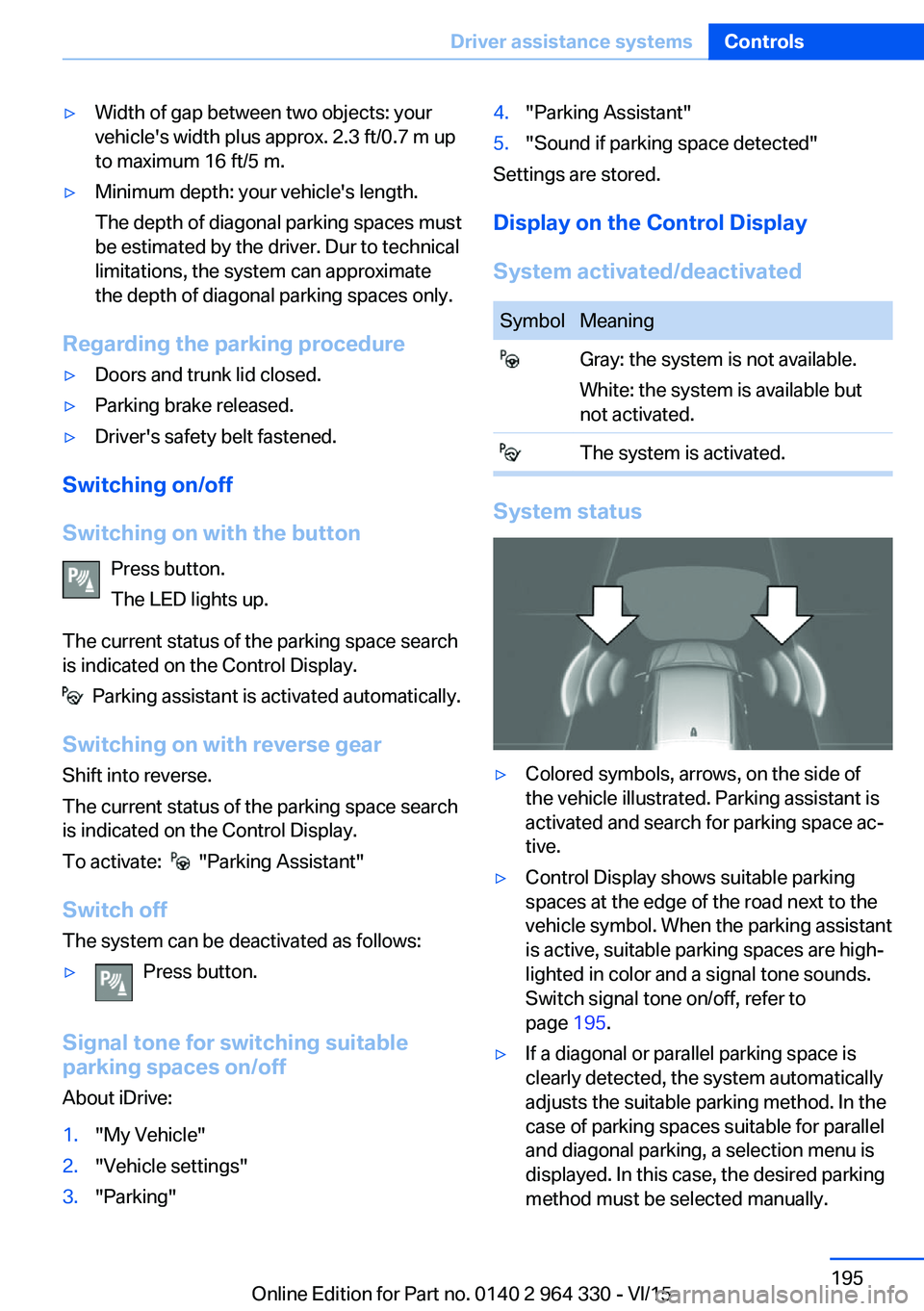
System status
▷Colored symbols, arrows, on the side of
the vehicle illustrated. Parking assistant is
activated and search for parking space ac‐
tive.▷Control Display shows suitable parking
spaces at the edge of the road next to the
vehicle symbol. When the parking assistant
is active, suitable parking spaces are high‐
lighted in color and a signal tone sounds.
Switch signal tone on/off, refer to
page 195.▷If a diagonal or parallel parking space is
clearly detected, the system automatically
adjusts the suitable parking method. In the
case of parking spaces suitable for parallel
and diagonal parking, a selection menu is
displayed. In this case, the desired parking
method must be selected manually.Seite 195Driver assistance systemsControls195
Online Edition for Part no. 0140 2 964 330 - VI/15
Page 196 of 314
▷The parking procedure is ac‐
tive. Steering control has
been taken over by system.▷Parking space search is always active
whenever the vehicle is moving forward
slow and straight, even if the system is de‐
activated. When the system is deactivated,
the displays on the Control Display are
shown in gray.
Parking using the parking assistant
1. Press the button or shift into reverse
to switch on the parking assistant. Activate
parking assistant if necessary.
The parking assistant is activated.
2.Drive by the row of parked vehicles at a
speed of up to approx. 22 mph/35 km/h
and at a distance of maximum 5 ft/1.5 m.
The status of the parking space search and
possible parking spaces are displayed on
the Control Display.3.Follow the instructions on the Control Dis‐
play.
Hold down the parking assistant button for
the duration of the parking procedure. At
the end of the parking procedure, the P se‐
lector lever position is set.
The end of the parking procedure is indi‐
cated on the Control Display.4.Adjust the parking position yourself if
needed.
Interrupting manually
The parking assistant can be interrupted at any
time:
▷ "Parking Assistant" Select the symbol
on the Control Display.▷Release button during the parking
procedure.Interrupting automatically
The system is interrupted automatically in the
following situations:▷If the driver grasps the steering wheel or if
he takes over steering.▷Possible on snow-covered or slippery road
surfaces.▷When there are obstacles that are hard to
overcome, such as curbs.▷When there are obstacles that suddenly
arise.▷If the Park Distance Control PDC displays
clearances that are too small.▷If a maximum number of parking attempts
or the time taken for parking is exceeded.▷When switching to another function on the
Control Display.▷When the button is released.▷If the tailgate is open.▷If doors are open.▷When setting the parking brake.▷During acceleration.▷When the brake pedal remains pressed for
an extended period while the vehicle is sta‐
tionary.▷When unfastening the driver's safety belt.
A Check Control message is displayed.
Resume An interrupted parking procedure can be con‐
tinued if needed.
Follow the instructions on the Control Display.
System limits
No parking assistance
The parking assistant does not offer assis‐
tance in the following situations:
▷In tight curves.Seite 196ControlsDriver assistance systems196
Online Edition for Part no. 0140 2 964 330 - VI/15
Page 197 of 314
Functional limitations
The system may not be fully functional in the
following situations:▷On bumpy road surfaces such as gravel
roads.▷On slippery ground.▷On steep uphill or downhill grades.▷With accumulations of leaves/snow in the
parking space.▷With a mounted emergency wheel.▷In case of changes to an already-measured
parking space.
Limits of ultrasonic measurement
Ultrasonic measuring might not function under
the following circumstances:
▷For small children and animals.▷For persons with certain clothing, e.g.
coats.▷With external interference of the ultra‐
sound, e.g. from passing vehicles or loud
machines.▷When sensors are dirty, iced over, dam‐
aged or out of position.▷Under certain weather conditions such as
high relative humidity, rain, snowfall, ex‐
treme heat or strong wind.▷With tow bars and trailer couplings of other
vehicles.▷With thin or wedge-shaped objects.▷With moving objects.▷With elevated, protruding objects such as
ledges or cargo.▷With objects with corners and sharp edges.▷With objects with a fine surface structure
such as fences.▷For objects with porous surfaces.
Low objects already displayed, e.g., curbs, can
move into the blind area of the sensors before
or after a continuous tone sounds.
Cargo that extends beyond the perimeter of
the vehicle is not taken into account by the
system.
It can happen that parking spaces are detected
that are not suitable or suitable parking spaces
are not detected.
Malfunction
A Check Control message is displayed.
The parking assistant failed. Have the system
checked.
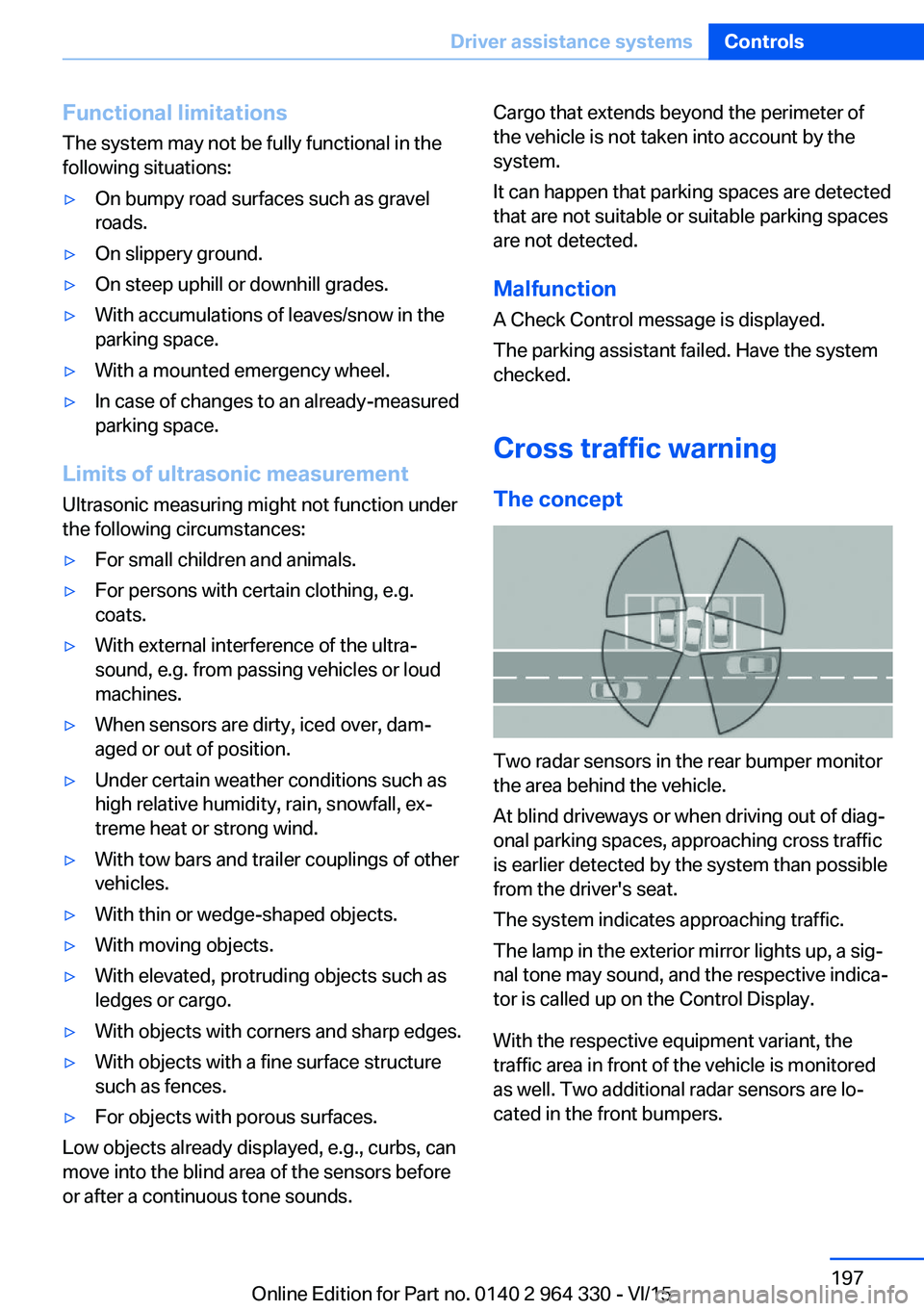
Cross traffic warning The concept
Two radar sensors in the rear bumper monitor
the area behind the vehicle.
At blind driveways or when driving out of diag‐
onal parking spaces, approaching cross traffic
is earlier detected by the system than possible
from the driver's seat.
The system indicates approaching traffic.
The lamp in the exterior mirror lights up, a sig‐
nal tone may sound, and the respective indica‐
tor is called up on the Control Display.
With the respective equipment variant, the
traffic area in front of the vehicle is monitored
as well. Two additional radar sensors are lo‐
cated in the front bumpers.
Seite 197Driver assistance systemsControls197
Online Edition for Part no. 0140 2 964 330 - VI/15
Page 198 of 314
InformationWARNING
The system does not relieve from the
personal responsibility to correctly assess visi‐
bility and traffic situation. There is risk of an ac‐
cident. Adjust the driving style to the traffic
conditions. Watch traffic closely and actively
interfere in the respective situations.◀
Overview
Button in the vehicle
Parking assistance systems
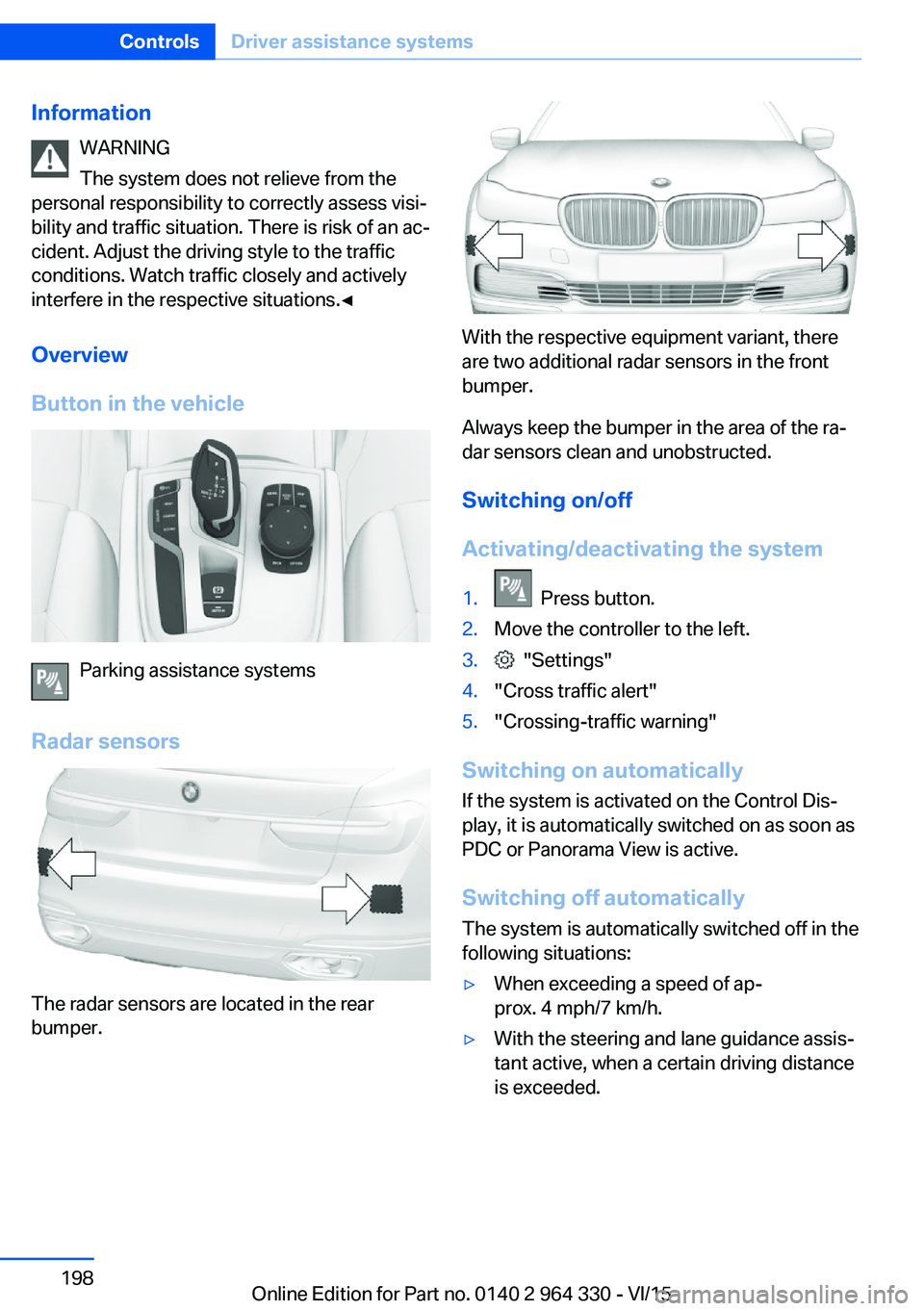
Radar sensors
The radar sensors are located in the rear
bumper.
With the respective equipment variant, there
are two additional radar sensors in the front
bumper.
Always keep the bumper in the area of the ra‐
dar sensors clean and unobstructed.
Switching on/off
Activating/deactivating the system
1. Press button.2.Move the controller to the left.3. "Settings"4."Cross traffic alert"5."Crossing-traffic warning"
Switching on automatically If the system is activated on the Control Dis‐
play, it is automatically switched on as soon as PDC or Panorama View is active.
Switching off automatically The system is automatically switched off in the
following situations:
▷When exceeding a speed of ap‐
prox. 4 mph/7 km/h.▷With the steering and lane guidance assis‐
tant active, when a certain driving distance
is exceeded.Seite 198ControlsDriver assistance systems198
Online Edition for Part no. 0140 2 964 330 - VI/15
Page 288 of 314
PreparationCAUTION
In the case of body contact between the
two vehicles, a short circuit can occur during
jump-starting. There is risk of property dam‐
age. Make sure that no body contact occurs.◀1.Check whether the battery of the other ve‐
hicle has a voltage of 12 volts. This infor‐
mation can be found on the battery.2.Switch off the engine of the assisting vehi‐
cle.3.Switch off any electronic systems/power
consumers in both vehicles.
Starting aid terminals
WARNING
If the jumper cables are connected in the
incorrect order, sparks formation can occur.
There is risk of injuries. Pay attention to the
correct order during connection.◀
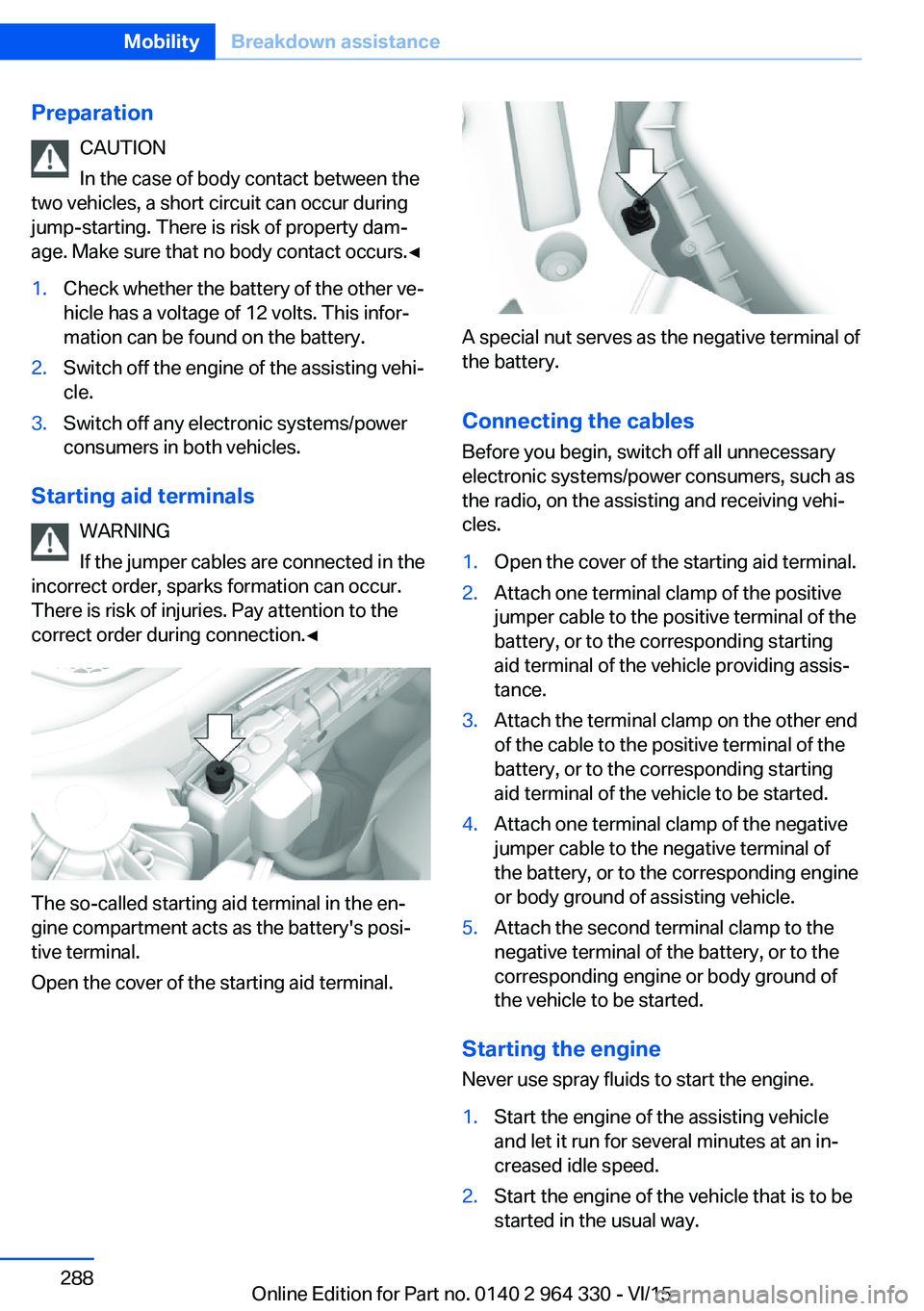
The so-called starting aid terminal in the en‐
gine compartment acts as the battery's posi‐
tive terminal.
Open the cover of the starting aid terminal.
A special nut serves as the negative terminal of
the battery.
Connecting the cables
Before you begin, switch off all unnecessary
electronic systems/power consumers, such as
the radio, on the assisting and receiving vehi‐
cles.
1.Open the cover of the starting aid terminal.2.Attach one terminal clamp of the positive
jumper cable to the positive terminal of the
battery, or to the corresponding starting
aid terminal of the vehicle providing assis‐
tance.3.Attach the terminal clamp on the other end
of the cable to the positive terminal of the
battery, or to the corresponding starting
aid terminal of the vehicle to be started.4.Attach one terminal clamp of the negative
jumper cable to the negative terminal of
the battery, or to the corresponding engine
or body ground of assisting vehicle.5.Attach the second terminal clamp to the
negative terminal of the battery, or to the
corresponding engine or body ground of
the vehicle to be started.
Starting the engine
Never use spray fluids to start the engine.
1.Start the engine of the assisting vehicle
and let it run for several minutes at an in‐
creased idle speed.2.Start the engine of the vehicle that is to be
started in the usual way.Seite 288MobilityBreakdown assistance288
Online Edition for Part no. 0140 2 964 330 - VI/15
Page 304 of 314
Closing via door lock 62
Closing without remote con‐ trol 62
Clothes hooks 229
Coasting 245
Coasting with engine decou‐ pled, coasting 245
Coasting with idling en‐ gine 245
Collision warning with braking function 140
Collision warning with City braking function 140
Combination switch, see Turn signals 103
Combination switch, see Wiper system 103
Comfort Access 65
COMFORT drive mode, see Driving Dynamics Con‐
trol 110
COMFORT PLUS drive mode, see Driving Dynamics
Control 110
COMFORT PLUS, see Driv‐ ing Dynamics Control 110
COMFORT, see Driving Dy‐ namics Control 110
Communication 6
Compact wheel, see Emer‐ gency wheel 282
Compartments in the doors 226
Compatible devices 42
Compatible mobile phones 42
Compressor 260
Computer, see on-board computer 122
Condensation on win‐ dows 206
Condensation under the vehi‐ cle 236
Condition Based Service CBS 279
Confirmation signal 68 ConnectedDrive 6
ConnectedDrive Services 6
Connecting device 41
Connecting electrical devi‐ ces 219
Connecting mobile phone 41
Connecting smartphone 41
Connecting telephone 41
Connections 41
Continued driving with a flat tire 267 , 270
Control Display 21
Control Display, settings 38
Controller 22
Control systems, driving sta‐ bility 163
Convenient opening with the remote control 61
Coolant 277
Coolant level 277
Coolant temperature 118
Cooler 223
Cooling function 204
Cooling, maximum 204
Cooling system 277
Corrosion on brake discs 236
Cosmetic mirror 217
Courtesy lamps with the vehi‐ cle locked 61
Cross traffic warning 197
Cruise control 175
Cruise control, active with Stop & Go 168
Cruising range 123
Cupholder 228
Current fuel consump‐ tion 123
D
Damage, tires 258
Damping control, dy‐ namic 201
Data, technical 298
Daytime running lights 131 Defrosting, see Windows, de‐
frosting 206
Dehumidifying, air 204
Deleting personal data 40
Deletion of personal data 40
Departure time, parked-car heating 211
Departure time, parked-car ventilation 211
Destination distance 124
Device list 41
Digital clock 118
Dimensions 298
Dimmable exterior mirrors 86
Dimmable interior rearview mirror 86
Direction indicator, see Turn signals 103
Display in windshield 126
Display lighting, see Instru‐ ment lighting 133
Displays 113
Displays, cleaning 294
Disposal, coolant 278
Disposal, vehicle battery 285
Distance control, see PDC 180
Distance to destination 124
Divided screen view, split screen 27
Door handle lighting, see wel‐ come lights 130
Door lock 62
Door lock, see Remote con‐ trol 54
Doors, Automatic Soft Clos‐ ing 63
Downhill control 165
Drive mode 110
Drive-off assistant 163
Drive-off assistant, see DSC 163
Drive readiness, see starting the engine 97
Driving Dynamics Con‐ trol 110 Seite 304ReferenceEverything from A to Z304
Online Edition for Part no. 0140 2 964 330 - VI/15
Page 306 of 314
Fragrance, see Ambient airpackage 211
Fragrancing, see Ambient air package 211
Front airbags 136
Front center armrest 227
Front cupholder 228
Front fog lights 132
Front passenger seat, adjust‐ ing 78
Front-seat passenger airbags, automatic deactivation 138
Front-seat passenger airbags, indicator lamp 138
Front seats 76
FTM Flat Tire Monitor 268
Fuel 252
Fuel consumption, see Aver‐ age fuel consumption 124
Fuel filler flap 250
Fuel gauge 118
Fuel lid 250
Fuel quality 252
Fuel recommendation 252
Fuel, tank capacity 300
Fuse 285
G
Garage door opener, see Uni‐ versal Integrated Remote
Control 215
Gasoline 252
Gear change, Steptronic transmission 106
Gear shift indicator 120
General driving notes 234
General settings 38
Gentleman function 78
Gesture 30
Gesture control 30
Gesture operation 30
Glare shield 217
Glass sunroof, powered 73
Glove compartment 225 Gross vehicle weight, ap‐
proved 299
H
Handbrake, see Parking brake 100
Hand-held transmitter, alter‐ nating code 216
Hand movement 30
Hazard warning flashers 286
HDC Hill Descent Con‐ trol 165
Head airbags 136
Headlight control, auto‐ matic 130
Headlight courtesy delay fea‐ ture 130
Headlight courtesy delay fea‐ ture via remote control 61
Headlight flasher 103
Headlight glass 282
Headlights, care 292
Head restraint pillows 84
Head restraints 76
Head restraints, front 82
Head restraints, rear 83
Head-up Display 126
Head-up Display, care 294
Heating, see Parked-car heat‐ ing 209
Heavy cargo, stowing 238
High-beam Assistant 132
High beams 103
High beams/low beams, see High-beam Assistant 132
Hill Descent Control HDC 165
Hills 236
Hill start assistant, see Drive- off assistant 163
Holder for beverages 228
Homepage 6
Hood 272
Horn 14
Hotel function, trunk lid 65 Hot exhaust system 235
HUD Head-up Display 126
Hydroplaning 235
I iBrake — Post Crash 161
Ice warning, see External temperature warning 118
Icy roads, see External tem‐ perature warning 118
Identification marks, tires 256
Identification number, see ve‐ hicle identification num‐
ber 10
Idle state, operating and drive readiness 19
iDrive 21
Ignition key, see Remote con‐ trol 54
Indication of a flat tire 266 , 269
Indicator and alarm lamps, see Check Control 114
Indicator lamp, see Check Control 114
Individual air distribution 205
Individual settings, see pro‐ files 58
Inflation pressure, tires 254
Inflation pressure warning FTM, tires 268
Information 6
Initialize, Tire Pressure Moni‐ tor TPM 265
Initializing, Flat Tire Monitor FTM 269
Instrument cluster 113
Instrument lighting 133
Integral Active Steering 166
Integrated key 54
Integrated Owner's Manual in the vehicle 49
Intelligent Emergency Re‐ quest 286
Intelligent Safety 139 Seite 306ReferenceEverything from A to Z306
Online Edition for Part no. 0140 2 964 330 - VI/15
Page 307 of 314
Intensity, AUTO pro‐gram 204
Interior equipment 215
Interior lights 133
Interior lights during unlock‐ ing 60
Interior lights with the vehicle locked 61
Interior motion sensor 70
Interior rearview mirror, auto‐ matic dimming feature 86
Internet page 6
Interval display, service re‐ quirements 119
Ionization, see Ambient air package 211
J Jacking points for the vehicle jack 282
Joystick, Steptronic transmis‐ sion 106
Jump-starting 287
K Key/remote control 54
Keyless Go, see Comfort Ac‐ cess 65
Kickdown, Steptronic trans‐ mission 106
Knee airbag 137
L Label on recommended tires 259
Lamp in the exterior mirror, see Active Blind Spot De‐
tection 153
Lamp in the exterior mirror, see crossing traffic warn‐
ing 197
Lamp replacement 282
Lamp replacement, front 282 Lamp replacement, rear 282
Lane departure warning 150
Lane margin, warning 150
Language, on the Control Display 38
Lashing eyes, securing cargo 238
LATCH child restraint sys‐ tem 95
Launch Control 106
Leather, care 292
LEDs, replace light-emitting diodes 282
Light alloy wheels, care 293
Light control 131
Lighting 129
Lights 129
Lights and bulbs 282
Light switch 129
List of all messages 40
Load 238
Loading 237
Lock, door 62
Locking, automatic 68
Locking, settings 67
Locking via door lock 62
Locking with remote con‐ trol 60
Lock, power window 71
Locks, doors, and win‐ dows 96
Low beams 129
Low beams, automatic, see High-beam Assistant 132
Lower back support 77
Luggage rack, see Roof- mounted luggage rack 238
Lumbar support 77
M
Maintenance 279
Maintenance require‐ ments 279
Maintenance, service require‐ ments 119 Maintenance system,
BMW 279
Make-up mirror 217
Malfunction displays, see Check Control 114
Manual air distribution 205
Manual air flow 205
Manual brake, see Parking brake 100
Manual mode, Steptronic transmission 106
Manual operation, door lock 62
Manual operation, exterior mirrors 85
Manual operation, fuel filler flap 250
Marking, run-flat tires 260
Massage seat, front 88
Massage seat, rear 88
Master key, see Remote con‐ trol 54
Maximum cooling 204
Maximum speed, display 120
Maximum speed, winter tires 259
Measurement, units of 39
Medical kit 287
Memory for seat, mirrors, steering wheel 87
Menu in instrument clus‐ ter 121
Menus 22
Menus, operating, iDrive 21
Messages 40
Messages, see Check Con‐ trol 114
Microfilter 206
Minimum tread, tires 258
Mirror 85
Mirror memory 87
Mobile communication devi‐ ces in the vehicle 235
Mobility System 260
Modifications, technical, see Own Safety 7 Seite 307Everything from A to ZReference307
Online Edition for Part no. 0140 2 964 330 - VI/15
Page 308 of 314
Moisture in headlight 282
Monitor, see Control Dis‐ play 21
Mounting of child restraint systems 94
Moving sun visor 217
Multifunction steering wheel, buttons 14
Multimedia 6
N
Navigation 6
Near-field communication 42
Neck restraints, front, see Head restraints 82
Neck restraints, rear, see Head restraints 83
Neutral cleaner, see wheel cleaner 293
New wheels and tires 258
NFC, see near-field commu‐ nication 42
Night Vision 147
Night Vision device, see Night Vision 147
Nylon rope for tow-starting/ towing 289
O OBD Onboard Diagnosis 280
OBD, see OBD Onboard Di‐ agnosis 280
Object detection, see Night Vision 147
Octane rating, see Recom‐ mended fuel grade 252
Odometer 123
Oil 273
Oil, adding 274
Oil additives 275
Oil change 275
Oil change interval, service requirements 119
Oil filler neck 274 Oil types, alternative 275
Oil types, suitable 275
Old batteries, disposal 285
Onboard computer, Control Display 125
On-board computer, instru‐ ment cluster 122
Onboard monitor, see Control Display 21
Onboard vehicle tool kit 281
Opening and closing 54
Opening the trunk lid with no- touch activation 66
Opening via door lock 62
Opening without remote con‐ trol 62
Opening with remote control, closing with remote control,
unlocking with remote con‐
trol 60
Operating concept, iDrive 21
Operating readiness 19
Operating via iDrive 22
Operating with the control‐ ler 22
Operation via touchscreen 25
Optional equipment, standard equipment 7
Outside air, see AUC 205
Overheating of engine, see Coolant temperature 118
Own Safety 7
P Paint, vehicle 292
Pairing device 41
Pairing mobile phone 41
Pairing smartphone 41
Pairing telephone 41
Panorama View, see Sur‐ round View 187
Panoramic glass sunroof 73
Parallel parking assistant 193
Park Distance Control PDC 180 Parked vehicle, condensa‐
tion 236
Parking aid, see PDC 180
Parking assistant 193
Parking brake 100
Parking lights 129
Parking with Automatic Hold 100
Parts and accessories 7
Passenger side mirror, tilting downward 85
PDC Park Distance Con‐ trol 180
Pedestrian detection, see Night Vision 147
Pedestrian warning with City braking function 144
Personal profile, see pro‐ files 58
Pillows 84
Pinch protection system, glass sunroof 75
Pinch protection system, win‐ dows 71
Plastic, care 293
Post Crash — iBrake 161
Power failure 285
Power sunroof, glass 73
Power windows 70
Prescribed engine oil types 275
Pressure, tire air pres‐ sure 254
Pressure warning FTM, tires 268
Profiles 58
Profiles, see profiles 58
Programmable memory but‐ tons, iDrive 28
Protective function, glass sunroof 75
Protective function, win‐ dows 71
Push-and-turn switch, see Controller 22 Seite 308ReferenceEverything from A to Z308
Online Edition for Part no. 0140 2 964 330 - VI/15
Page 309 of 314
QQueuing Assistant, see Steering and lane guidance
assistant including Traffic
Jam Assist 177
R Radiator fluid 277
Radio 6
Radio-operated key, see Re‐ mote control 54
Rain sensor 104
Rear automatic climate con‐ trol 207
Rear axle steering 166
Rear center armrest 227
Rear collision prevention 159
Rear collision warning 159
Rear cooler 223
Rear drink holder 228
Rear seats 78
Rear seats, basic position 80
Rear vanity mirror 86
Rearview camera, see Sur‐ round View 187
Rearview camera, without Surround View 184
Rearview mirror 85
Rear window defroster 206
Recirculated-air mode 205
Recommended fuel grade 252
Recommended tire brands 259
Refueling 250
Remaining range 123
Remote control/key 54
Remote control, malfunc‐ tion 62
Remote control, univer‐ sal 215
Remote control with dis‐ play 55
Replace front fog lamps 282 Replace front lamps 282
Replace headlamps 282
Replace key lights 282
Replace LED front fog lamps 282
Replace LED headlights 282
Replace light-emitting diodes, LEDs 282
Replacement fuse 285
Replace tail lamps 282
Replacing parts 281
Replacing wheels/tires 258
Reporting safety malfunc‐ tions 10
RES CNCL button, see Active Cruise Control, ACC 168
RES CNCL button, see Cruise control 175
Reserve warning, see Range 123
Reset, Tire Pressure Monitor TPM 265
Retaining straps, securing cargo 238
Retreaded tires 259
Roadside parking lights 130
Roller sunblinds 72
RON recommended fuel grade 252
Roofliner 18
Roof load capacity 299
Roof-mounted luggage rack 238
Rope for tow-starting/ towing 289
Route-ahead assistant 244
RSC Run Flat System Com‐ ponent, see Run-flat
tires 260
Rubber components, care 293
Run-flat tires 260
S Safe braking 235 Safety belt reminder for driv‐
er's seat and front passen‐
ger seat 81
Safety belts 80
Safety belts, care 293
Safety package, see Active Protection 160
Safety switch, windows 71
Safety systems, airbags 136
Safety systems, see Intelli‐ gent Safety 139
Saving fuel 240
Screen, see Control Dis‐ play 21
Screwdriver, see Onboard ve‐ hicle tool kit 281
Screw thread for tow fitting, see tow-starting/towing,
thread for tow fitting, see
tow-starting/towing 289
Sealant 260
Seat belts, see Safety belts 80
Seat cushion heating 91
Seat heating 91
Seating position for chil‐ dren 93
Seat, mirror, and steering wheel memory 87
Seats 76
Seats, front 76
Seats, rear 78
Seat ventilation 92
Selection list in instrument cluster 121
Selector lever, Steptronic transmission 106
Self-leveling suspension 200
Sensors, care 294
Service and warranty 8
Service requirements, Condi‐ tion Based Service
CBS 279
Service requirements, dis‐ play 119
Services, ConnectedDrive 6 Seite 309Everything from A to ZReference309
Online Edition for Part no. 0140 2 964 330 - VI/15