air condition BMW 760i 2004 E65 User Guide
[x] Cancel search | Manufacturer: BMW, Model Year: 2004, Model line: 760i, Model: BMW 760i 2004 E65Pages: 232, PDF Size: 5.27 MB
Page 110 of 232
A congenial climate
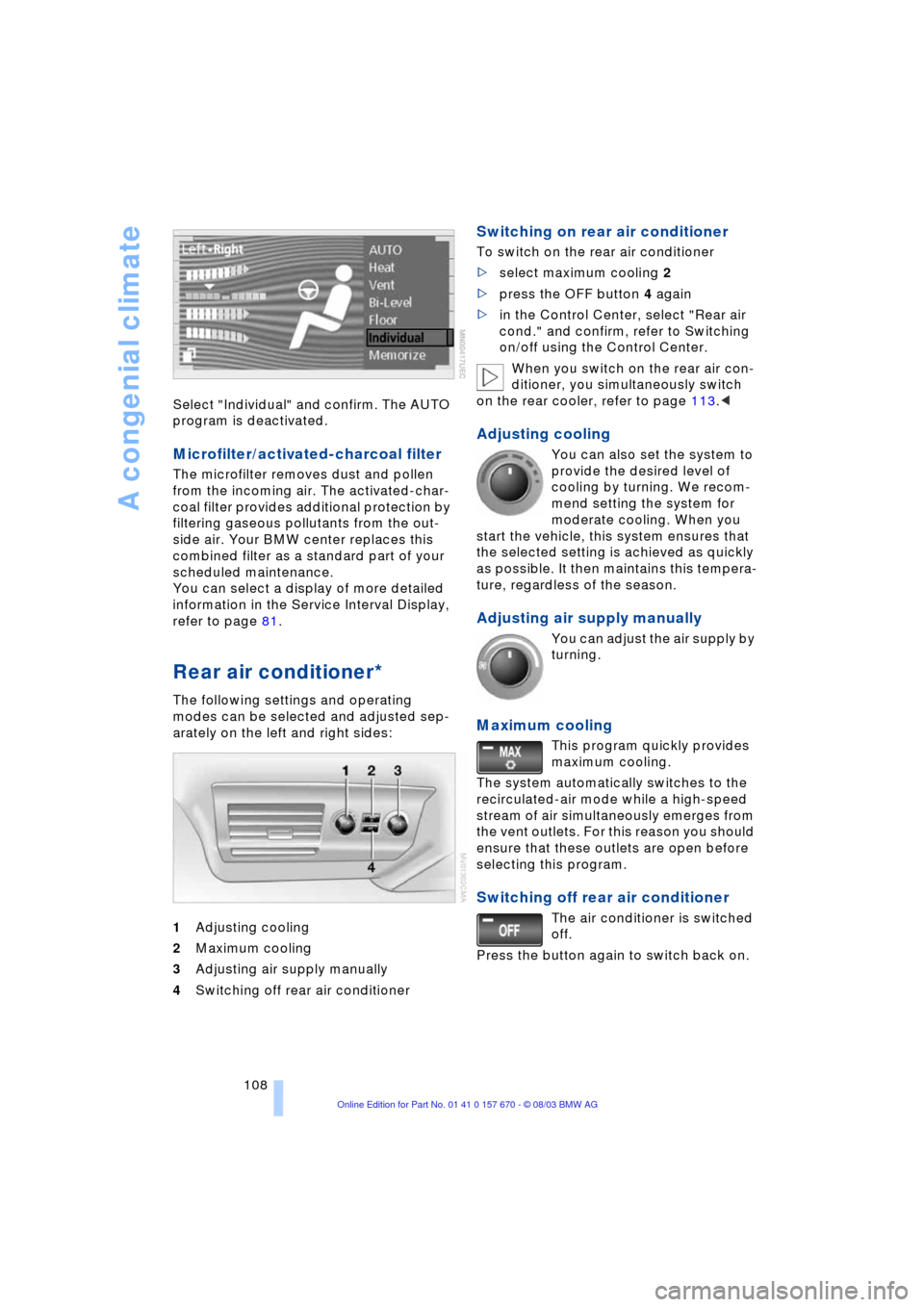
108 Select "Individual" and confirm. The AUTO
program is deactivated.
Microfilter/activated-charcoal filter
The microfilter removes dust and pollen
from the incoming air. The activated-char-
coal filter provides additional protection by
filtering gaseous pollutants from the out-
side air. Your BMW center replaces this
combined filter as a standard part of your
scheduled maintenance.
You can select a display of more detailed
information in the Service Interval Display,
refer to page 81.
Rear air conditioner*
The following settings and operating
modes can be selected and adjusted sep-
arately on the left and right sides:
1Adjusting cooling
2Maximum cooling
3Adjusting air supply manually
4Switching off rear air conditioner
Switching on rear air conditioner
To switch on the rear air conditioner
>select maximum cooling 2
>press the OFF button 4 again
>in the Control Center, select "Rear air
cond." and confirm, refer to Switching
on/off using the Control Center.
When you switch on the rear air con-
ditioner, you simultaneously switch
on the rear cooler, refer to page 113.<
Adjusting cooling
You can also set the system to
provide the desired level of
cooling by turning. We recom-
mend setting the system for
moderate cooling. When you
start the vehicle, this system ensures that
the selected setting is achieved as quickly
as possible. It then maintains this tempera-
ture, regardless of the season.
Adjusting air supply manually
You can adjust the air supply by
turning.
Maximum cooling
This program quickly provides
maximum cooling.
The system automatically switches to the
recirculated-air mode while a high-speed
stream of air simultaneously emerges from
the vent outlets. For this reason you should
ensure that these outlets are open before
selecting this program.
Switching off rear air conditioner
The air conditioner is switched
off.
Press the button again to switch back on.
Page 111 of 232
Controls
109Reference
At a glance
Driving tips
Communications
Navigation
Entertainment
Mobility
Switching on/off using the Control
Center
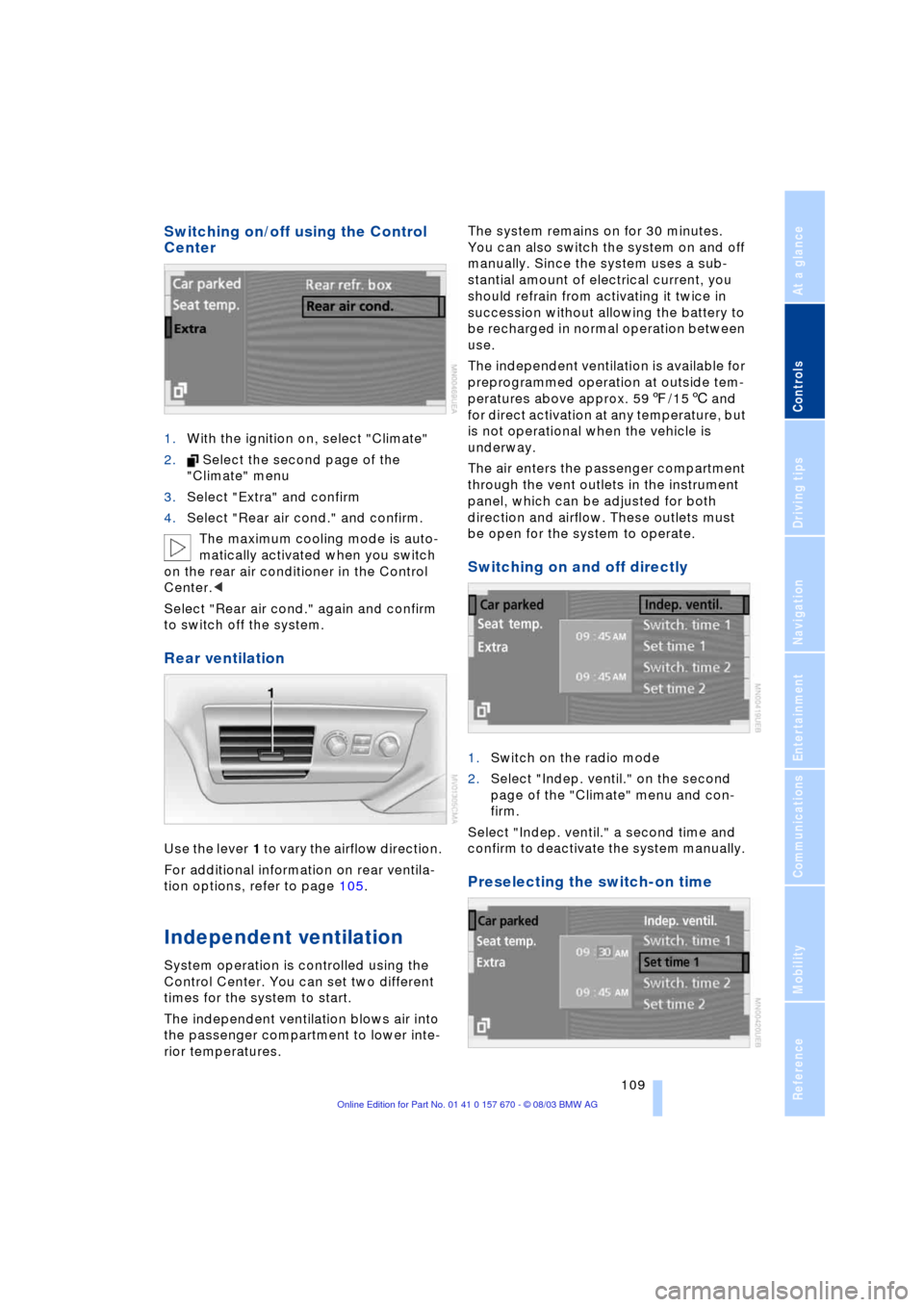
1.With the ignition on, select "Climate"
2. Select the second page of the
"Climate" menu
3.Select "Extra" and confirm
4.Select "Rear air cond." and confirm.
The maximum cooling mode is auto-
matically activated when you switch
on the rear air conditioner in the Control
Center.<
Select "Rear air cond." again and confirm
to switch off the system.
Rear ventilation
Use the lever 1 to vary the airflow direction.
For additional information on rear ventila-
tion options, refer to page 105.
Independent ventilation
System operation is controlled using the
Control Center. You can set two different
times for the system to start.
The independent ventilation blows air into
the passenger compartment to lower inte-
rior temperatures.The system remains on for 30 minutes.
You can also switch the system on and off
manually. Since the system uses a sub-
stantial amount of electrical current, you
should refrain from activating it twice in
succession without allowing the battery to
be recharged in normal operation between
use.
The independent ventilation is available for
preprogrammed operation at outside tem-
peratures above approx. 597/156 and
for direct activation at any temperature, but
is not operational when the vehicle is
underway.
The air enters the passenger compartment
through the vent outlets in the instrument
panel, which can be adjusted for both
direction and airflow. These outlets must
be open for the system to operate.
Switching on and off directly
1.Switch on the radio mode
2.Select "Indep. ventil." on the second
page of the "Climate" menu and con-
firm.
Select "Indep. ventil." a second time and
confirm to deactivate the system manually.
Preselecting the switch-on time
Page 115 of 232
Controls
113Reference
At a glance
Driving tips
Communications
Navigation
Entertainment
Mobility
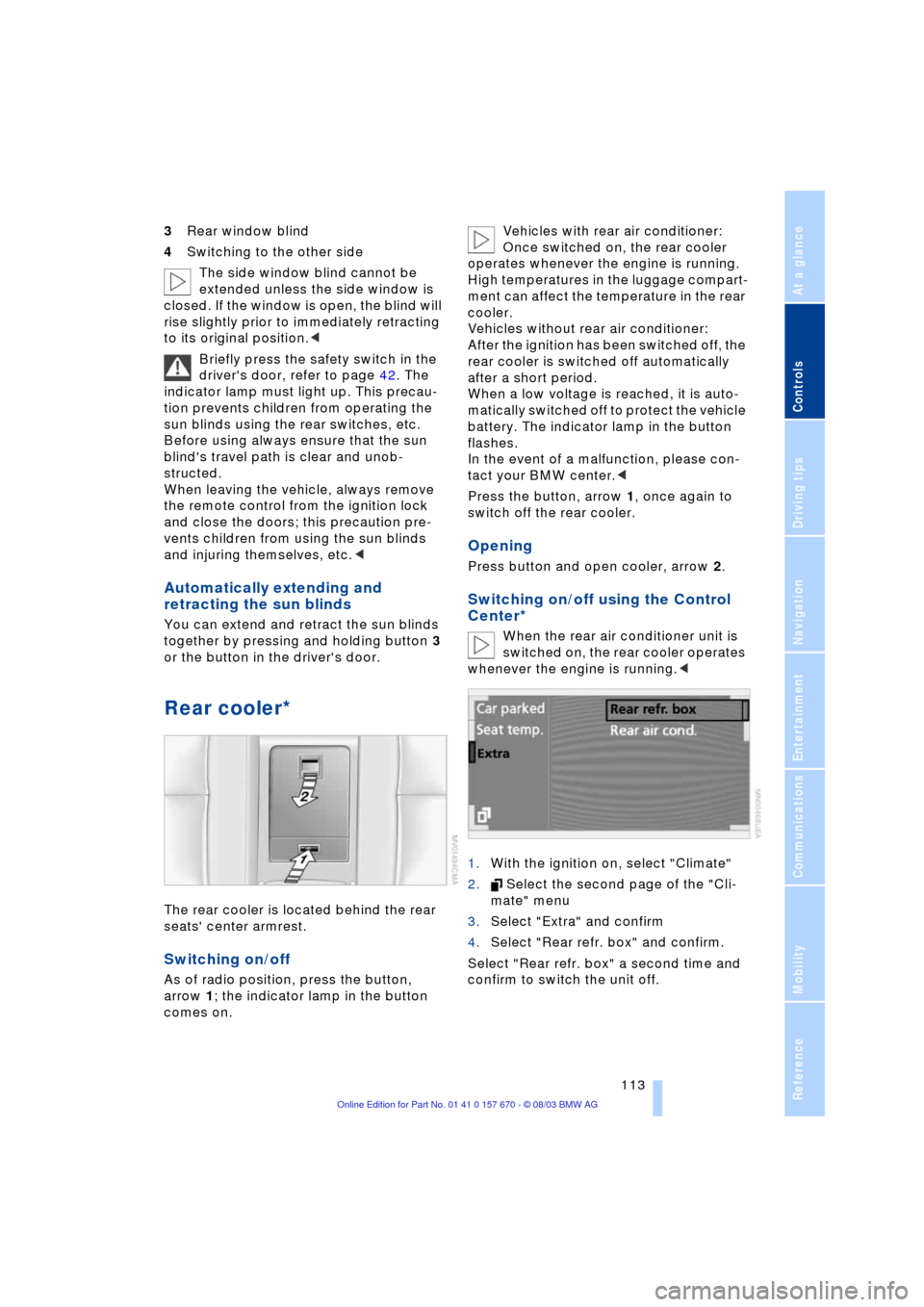
3Rear window blind
4Switching to the other side
The side window blind cannot be
extended unless the side window is
closed. If the window is open, the blind will
rise slightly prior to immediately retracting
to its original position.<
Briefly press the safety switch in the
driver's door, refer to page 42. The
indicator lamp must light up. This precau-
tion prevents children from operating the
sun blinds using the rear switches, etc.
Before using always ensure that the sun
blind's travel path is clear and unob-
structed.
When leaving the vehicle, always remove
the remote control from the ignition lock
and close the doors; this precaution pre-
vents children from using the sun blinds
and injuring themselves, etc.<
Automatically extending and
retracting the sun blinds
You can extend and retract the sun blinds
together by pressing and holding button 3
or the button in the driver's door.
Rear cooler*
The rear cooler is located behind the rear
seats' center armrest.
Switching on/off
As of radio position, press the button,
arrow 1; the indicator lamp in the button
comes on. Vehicles with rear air conditioner:
Once switched on, the rear cooler
operates whenever the engine is running.
High temperatures in the luggage compart-
ment can affect the temperature in the rear
cooler.
Vehicles without rear air conditioner:
After the ignition has been switched off, the
rear cooler is switched off automatically
after a short period.
When a low voltage is reached, it is auto-
matically switched off to protect the vehicle
battery. The indicator lamp in the button
flashes.
In the event of a malfunction, please con-
tact your BMW center.<
Press the button, arrow 1, once again to
switch off the rear cooler.
Opening
Press button and open cooler, arrow 2.
Switching on/off using the Control
Center*
When the rear air conditioner unit is
switched on, the rear cooler operates
whenever the engine is running.<
1.With the ignition on, select "Climate"
2. Select the second page of the "Cli-
mate" menu
3.Select "Extra" and confirm
4.Select "Rear refr. box" and confirm.
Select "Rear refr. box" a second time and
confirm to switch the unit off.
Page 124 of 232
Things to remember when driving
122
Things to remember when driving
Break-in procedures
To ensure that your vehicle continues to
furnish optimized economy of operation
throughout an extended service life, we
request that you devote careful attention
to the following section.
Engine and differential
Up to 1,200 miles/2,000 km:
During this initial period you should attempt
to avoid constant, steady-state operation
and vary both vehicle and engine speeds
as often as possible. Until the break-in
period has been completed you should
also refrain from exceeding the following:
>4,500 rpm or 105 mph/170 km/h.
Always obey all official speed limits.
Avoid full-throttle operation and use of the
transmission's kickdown mode during
these initial miles.
Once you have driven 1,200 miles/
2,000 km, the engine or vehicle speeds
can be gradually increased.
You should also comply with these break-in
procedures should the engine or differen-
tial need to be replaced at a later point.
Tires
Due to technical factors associated with
their manufacture, tires do not achieve their
full traction potential until after an initial
break-in period.Therefore, drive reservedly
during the first 200 miles/300 km.
Brake system
Brakes require an initial break-in period of
approx. 300 miles/500 km to achieve opti-
mized contact and wear patterns between
brake pads and rotors.
General driving notes
High temperatures
Extreme temperatures occur at the
catalytic converter on this and every
catalyst-equipped vehicle. Do not remove
the heat shields installed adjacent to vari-
ous sections of the exhaust system, and
never apply undercoating to them.
When driving, standing at idle and while
parking take care to avoid possible contact
between the hot exhaust system and any
highly flammable materials such as hay,
leaves, grass, etc. Such contact could lead
to a fire, accompanied by the risk of serious
property damage as well as personal
injury.<
Parking the vehicle
Condensation forms in the air conditioner
system during operation, and then exits
under the vehicle. Traces of condensed
water under the vehicle are thus normal.
Before driving into the car wash
1.Fold in the exterior mirrors, refer to
page 51, as otherwise they could be
damaged due to the width of the vehicle
2.Leave the remote control in the ignition
lock, as otherwise the position P of the
automatic transmission will automati-
cally be selected when the remote con-
trol is removed, refer to pages 61
and 67.
With Comfort Access, be sure to
observe the instructions on page 61
3.Release the parking brake, especially
when you have activated Automatic
Hold, refer to pages 62 and 63.
Hydroplaning
When driving on wet or slushy roads,
reduce road speed. If you do not, a
wedge of water can form between tires and
road surface. This phenomenon is referred
Page 125 of 232
Driving tips
123Reference
At a glance
Controls
Communications
Navigation
Entertainment
Mobility
to as hydroplaning, and is characterized
by a partial or complete loss of contact
between tires and road surface, ultimately
undermining your ability to steer and brake
the vehicle.<
Driving through water
Do not drive through water on the
road if it is deeper than 1 ft/30 cm,
and then only at walking speed at the most.
Otherwise, the vehicle's engine, the electri-
cal systems and the transmission may be
damaged.<
Brake system
Braking with ABS
The best way to achieve the best response
from the ABS is to apply maximum pres-
sure to the brake pedal Ð panic stop. Since
the vehicle maintains steering responsive-
ness, you can nevertheless avoid possible
obstacles with a minimum of steering
effort.
Pulsation at the brake pedal combines with
sounds from the hydraulic circuits to indi-
cate to the driver that ABS is in its active
mode.
Do not drive with your foot resting on
the brake pedal. Otherwise, even light
but consistent pedal pressure can lead to
high temperatures, brake wear and possi-
bly even brake failure.<
Disc brakes
Driving in wet conditions
While driving in wet conditions and in
heavy rain, it is a good idea to apply light
pressure to the brake pedal every few
miles. Monitor traffic conditions to ensure
that this maneuver does not endanger
other road users. The heat generated in this
process helps dry the pads and rotors to
ensure that full braking efficiency will then
be available when you need it.
Hills
You can retain full and unimpaired braking
efficiency by downshifting to a gear in
which only minimal brake applications are
needed when descending long or steep
downhill stretches.
You can further enhance the engine's
braking effect by selecting a lower gear
in the automatic transmission's manual
mode, downshifting as far as first gear
on extremely steep stretches, refer to
page 67. This strategy helps you avoid
placing excessive loads on the brake sys-
tem.
Never allow the vehicle to coast with
the transmission in Neutral Ð or with
the engine switched off Ð as there is no
engine braking when the transmission is in
Neutral, and no power-assist for brakes
and steering when the engine is not run-
ning.
Never allow floor mats, carpets or any other
objects to protrude into the area around the
accelerator and brake pedals and obstruct
their movement.<
Corrosion
When the vehicle is driven only occasion-
ally, during extended periods when the
vehicle is not used at all, and in operating
conditions where brake applications are
less frequent, there is an increased ten-
dency for corrosion to form on rotors, while
contaminants accumulate on the brake
pads. This occurs because the minimal
pressure which must be exerted by the
pads during brake applications to clean the
rotors is not reached.
Should corrosion form on the brake rotors,
the brakes will tend to respond with a pul-
sating effect that even extended applica-
tion will fail to cure.
Brake pads
If the brake pad wear warning lamp
appears in the Check Control,
accompanied by a text. Please take
careful note of the additional information on
the Control Display.
Page 126 of 232
Things to remember when driving
124 Warning lamp for Canadian models.
The brake pads have reached their mini-
mum pad thickness. Have them replaced
at your BMW center as soon as possible.
For your own safety: use only brake
pads that BMW has released for your
particular vehicle model. As BMW cannot
assess the suitability of other brake pads
for use on your vehicle, we are unable to
assume continued responsibility for the
vehicle's operating safety if non-approved
pads are installed.<
Cargo loading
To avoid loading the tires beyond
their approved carrying capacity,
never overload the vehicle. Overloading
can lead to overheating and increases the
rate at which damage develops inside the
tires. The ultimate result can assume the
form of a sudden air loss.<
Determining loading limit
1.Locate the following statement on your
vehicle's door pillar
*:
The combined weight of occu-
pants and cargo should never
exceed XXX lbs. or YYY kg, as other-
wise the vehicle may be damaged and
unstable driving conditions may
result.<
2.Determine the combined weight of the
driver and passenger that will be riding
in your vehicle3.Subtract the combined weight of the
driver and passenger from XXX lbs. or
YYY kg
4.The resulting figure equals the available
amount of cargo and luggage load
capacity.
For example, if the XXX amount equals
1,400 lbs. and there will be five 150-
pound passengers in your vehicle, the
amount of available cargo and luggage
load capacity is 650 lbs.:
1,400 Ibs. minus 750 Ibs. = 650 Ibs.
5.Determine the combined weight of lug-
gage and cargo being loaded on the
vehicle. That weight should not exceed
the available cargo and luggage load
capacity calculated in step 4
6.If your vehicle will be towing a trailer,
part of the load from your trailer will be
transferred to your vehicle. Consult the
manual for transporting a trailer to
determine how this may reduce the
available cargo and luggage load
capacity of your vehicle.
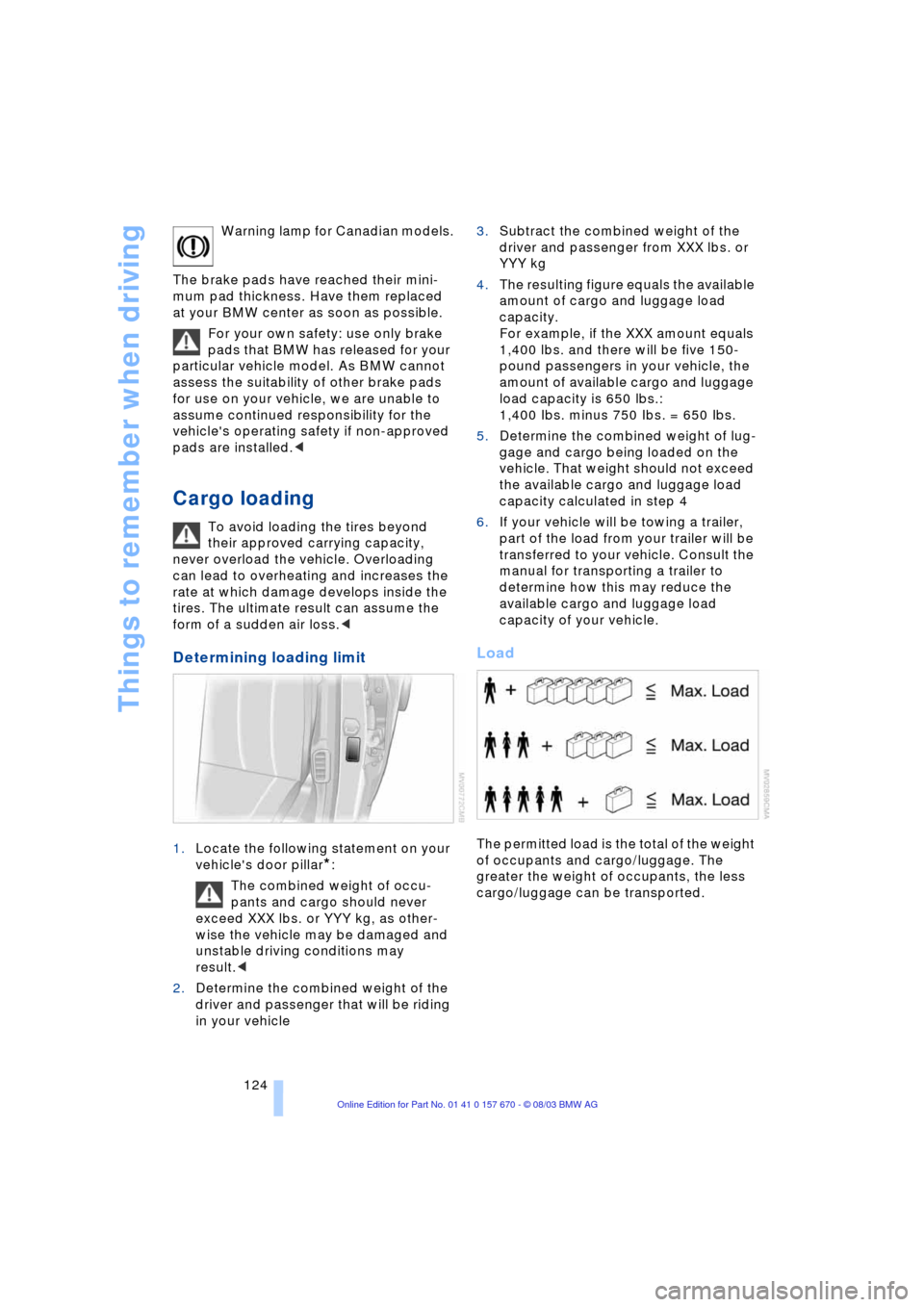
Load
The permitted load is the total of the weight
of occupants and cargo/luggage. The
greater the weight of occupants, the less
cargo/luggage can be transported.
Page 138 of 232
Destination entry
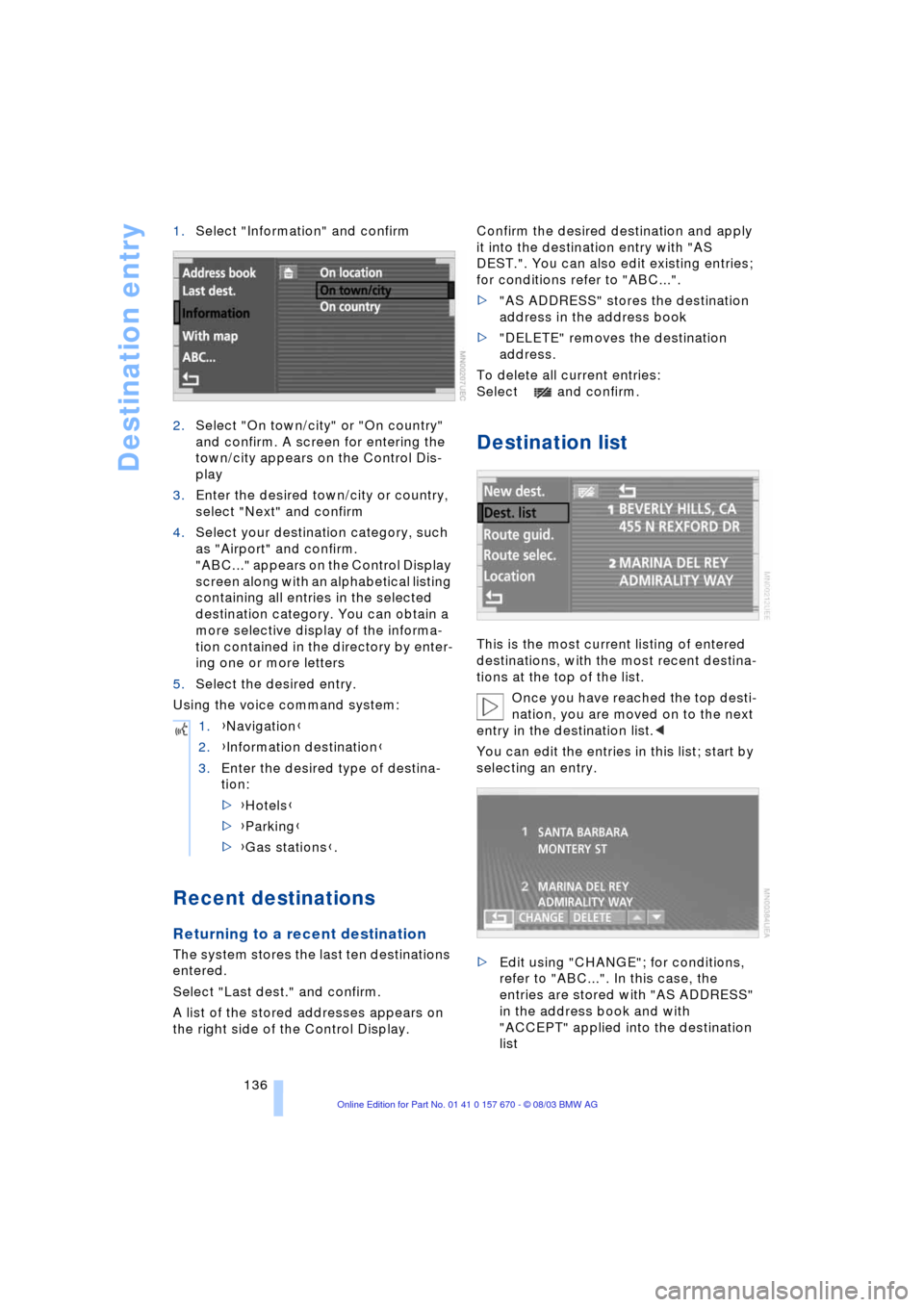
136 1.Select "Information" and confirm
2.Select "On town/city" or "On country"
and confirm. A screen for entering the
town/city appears on the Control Dis-
play
3.Enter the desired town/city or country,
select "Next" and confirm
4.Select your destination category, such
as "Airport" and confirm.
"ABC..." appears on the Control Display
screen along with an alphabetical listing
containing all entries in the selected
destination category. You can obtain a
more selective display of the informa-
tion contained in the directory by enter-
ing one or more letters
5.Select the desired entry.
Using the voice command system:
Recent destinations
Returning to a recent destination
The system stores the last ten destinations
entered.
Select "Last dest." and confirm.
A list of the stored addresses appears on
the right side of the Control Display.Confirm the desired destination and apply
it into the destination entry with "AS
DEST.". You can also edit existing entries;
for conditions refer to "ABC...".
>"AS ADDRESS" stores the destination
address in the address book
>"DELETE" removes the destination
address.
To delete all current entries:
Select and confirm.
Destination list
This is the most current listing of entered
destinations, with the most recent destina-
tions at the top of the list.
Once you have reached the top desti-
nation, you are moved on to the next
entry in the destination list.<
You can edit the entries in this list; start by
selecting an entry.
>Edit using "CHANGE"; for conditions,
refer to "ABC...". In this case, the
entries are stored with "AS ADDRESS"
in the address book and with
"ACCEPT" applied into the destination
list 1.{Navigation}
2.{Information destination}
3.Enter the desired type of destina-
tion:
>{Hotels}
>{Parking}
>{Gas stations}.
Page 176 of 232
Using the phone in your vehicle
174
Using the phone in your vehicle
Safety notes
A car phone can provide many services, in
an emergency even initiating a lifesaving
rescue. However, bear the following in
mind:
Adjustments
To avoid posing an unnecessary haz-
ard due to inattention, both to your
own vehicle's occupants and to other road
users: never attempt to use the controls or
make entries unless traffic and road condi-
tions allow.<
Using the phone in your vehicle
Using a portable phone to make and
receive calls while driving is now ille-
gal in virtually every country in the world.
Always use your hands-free system, or
stop your vehicle in an area where you will
not pose a safety hazard to other road
users and switch the engine off.<
Antenna
When using the phone, ensure that
all persons in the area are at least
20 in/50 cm from the antenna. Never use
your BMW portable phone if the antenna is
damaged. Contact between your skin and
a damaged antenna can result in minor
burns.
If the antenna is damaged, have it replaced
immediately.<
Special environmental conditions
Do not use your phone from within a
garage, or near an open hood. The air
in these areas could contain fuel vapors,
and the phone might generate sparks that
could result in burns.
This same precaution applies to opening
luggage compartment lids on vehicles
equipped for operation using natural gas or
hydrogen, and to all vehicles with luggage
compartment-mounted batteries.Always switch off your BMW portable
phone in areas where blasting work is
being conducted with explosives. The
phone signals could potentially act as a
high-frequency transmitter and set off
explosions.
Always switch off your BMW portable
phone in areas where an increased explo-
sion danger is present. This category
includes filling stations along with fuel and
chemical storage depots, etc., and all
areas in which the air can contain fuel,
chemicals or metal particles. Under these
conditions, your BMW portable phone
could conceivably generate sparks that
could lead to a fire or explosion. Always
observe all legal regulations governing the
use of portable phones in the vicinity of fill-
ing stations, chemical factories and other
areas where an explosion potential exists.
Never use the BMW portable phone in hos-
pitals, care centers or at other locations
where medical equipment may be in oper-
ation, such as accident sites, etc.
Your service provider can furnish you with
more detailed information on legal regula-
tions governing the use of your phone.<
Medical equipment
Portable phones can generate inter-
ference capable of preventing hearing
aids and cardiac pacemakers from operat-
ing correctly. If you or any occupant of the
vehicle will be using such equipment, con-
sult a physician or the manufacturer of the
equipment to determine whether it is ade-
quately shielded against high-frequency
energy.
Persons with cardiac pacemakers should
bear the following in mind:
Always hold the switched-on BMW porta-
ble phone more than 15 cm away from the
cardiac pacemaker.
Do not carry the BMW portable phone in
your breast pocket.
Use the ear on the opposite side of the car-
diac pacemaker to reduce the likelihood of
Page 190 of 232
Wheels and tires
188
Wheels and tires
Tire inflation pressure
Information for your safety
It is not merely the tire's service life, but
also driving comfort and Ð to a great extent
Ð driving safety that depend on the condi-
tion of the tires and the maintenance of the
specified tire pressure.
Check the tire inflation pressure regu-
larly and correct it if necessary,
including the spare wheel: at least every
two weeks and before beginning a longer
trip. If you fail to observe this precaution
you may be driving on tires with incorrect
tire pressures, a condition that can not only
compromise your vehicle's stability, but
also lead to tire damage and the risk of an
accident.
Do not drive with deflated, i.e. flat tires,
except run-flat tires. A flat tire will seriously
impair your vehicle's handling and braking
response. Attempts to drive on a flat tire
can lead to loss of control over the vehi-
cle.<
Checking inflation pressure
Only check tire inflation pressure when
the tires are cold. i.e. after a maximum of
2 hours' driving or when the vehicle has
been parked for at least 2 hours. When tires
are warm, the tire inflation pressure
increases.
After correcting the inflation pressure(s),
always reinitialize the Flat Tire Monitor,
refer to page 95.
Inflation pressure for original tires
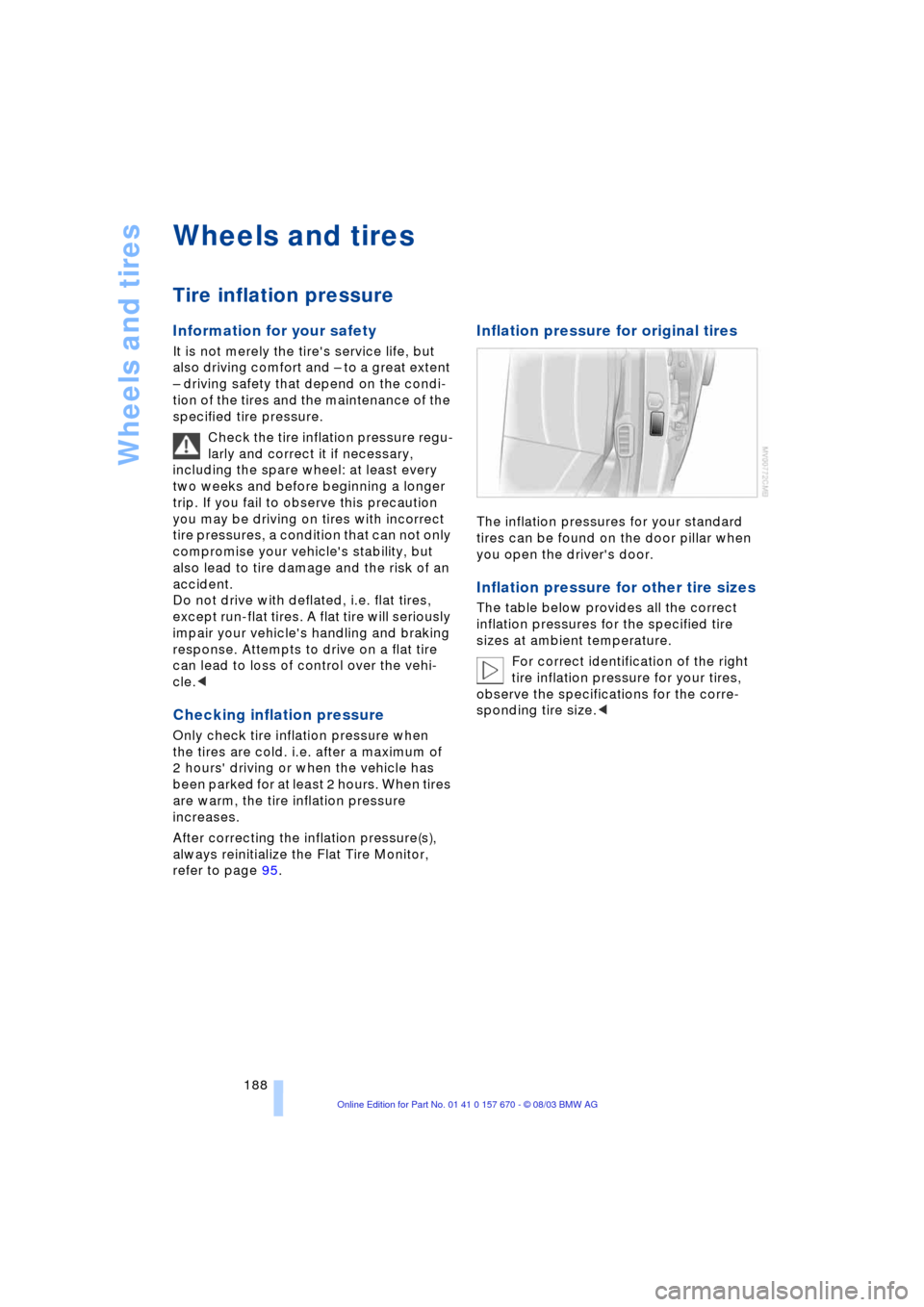
The inflation pressures for your standard
tires can be found on the door pillar when
you open the driver's door.
Inflation pressure for other tire sizes
The table below provides all the correct
inflation pressures for the specified tire
sizes at ambient temperature.
For correct identification of the right
tire inflation pressure for your tires,
observe the specifications for the corre-
sponding tire size.<
Page 194 of 232
Wheels and tires
192
Replacing wheels/tires
Unprofessional attempts by laymen to
service tires can lead to damage and
accidents.
Have this work performed by skilled pro-
fessionals only. The technicians at your
BMW center will be glad to assist you with
the required professional knowledge and
specialized equipment.<
The correct wheel and tire combination
affects various systems whose function
would otherwise be impaired, e.g. ABS or
DSC.
Have the wheel and tire assemblies bal-
anced every time either a wheel or a tire is
replaced.
BMW does not recommend the use
of retreaded tires, as otherwise driv-
ing safety may be reduced. Possible varia-
tions in the design and the age Ð which
could be substantial Ð of the carcasses can
lead to unusually rapid wear.<
The right wheels and tires
BMW recommends that you use only
wheel and tire combinations that
BMW has tested and approved for your
particular vehicle. Variations in factors such
as manufacturing tolerances mean that
even wheels and tires with identical official
size ratings could actually have different
dimensions than the approved units Ð these
differences could lead to body contact, and
with it the risk of severe accidents. If non-
approved wheels and tires are used, BMW
cannot evaluate their suitability, and there-
fore cannot be held liable for driving
safety.<
To maintain good handling and vehicle
response, use only tires of a single tread
configuration from a single manufacturer.
After a flat tire, always remember to have
the original wheel and tire combination
remounted on the vehicle as soon as pos-
sible.
Recommended tire brands
BMW tests certain tire brands for each tire
size, classifies them as road-safe and
approves them. You can find out about
these at specialized dealers or at your
BMW center. Observe any country-specific
regulations, e.g. on making a correspond-
ing entry in the vehicle documents.
The factory-mounted tires have been spe-
cially selected to provide optimized perfor-
mance when installed on your vehicle; if
properly cared for, they will provide a com-
bination of safety and excellent ride com-
fort.
Run-flat tires
If your BMW is equipped with run-flat tires,
refer to Run-flat tires, only use these tires,
as in the event of a breakdown there is no
spare wheel available.
Special characteristics of winter
tires
BMW recommends winter tires for use in
cold winter driving conditions. Although
so-called all-season M+S tires provide bet-
ter winter traction than summer tires, they
generally fail to provide the same levels of
cold-weather performance as winter tires.
When switching to winter tires, observe the
description at Tire condition, and Replac-
ing wheels/tires, refer to page 191.
Run-flat tires
If your BMW is equipped with run-flat tires,
refer to Run-flat tires, only use these tires,
as in the event of a breakdown there is no
spare wheel available.
Observing speed ratings
Never exceed the maximum speed
for which the winter tires are rated.
Unprofessional attempts by laymen to ser-
vice tires can lead to damage and acci-
dents. Have this work performed by skilled
professionals only. The technicians at your
BMW center will be glad to assist you with
the required professional knowledge and
specialized equipment.<