seats BMW 760i 2004 E65 User Guide
[x] Cancel search | Manufacturer: BMW, Model Year: 2004, Model line: 760i, Model: BMW 760i 2004 E65Pages: 232, PDF Size: 5.27 MB
Page 52 of 232
Adjustments
50 The temperature setting progresses one
step through its control sequence each
time you press the button.
To switch off:
Maintain pressure on the button for several
seconds.
Rear
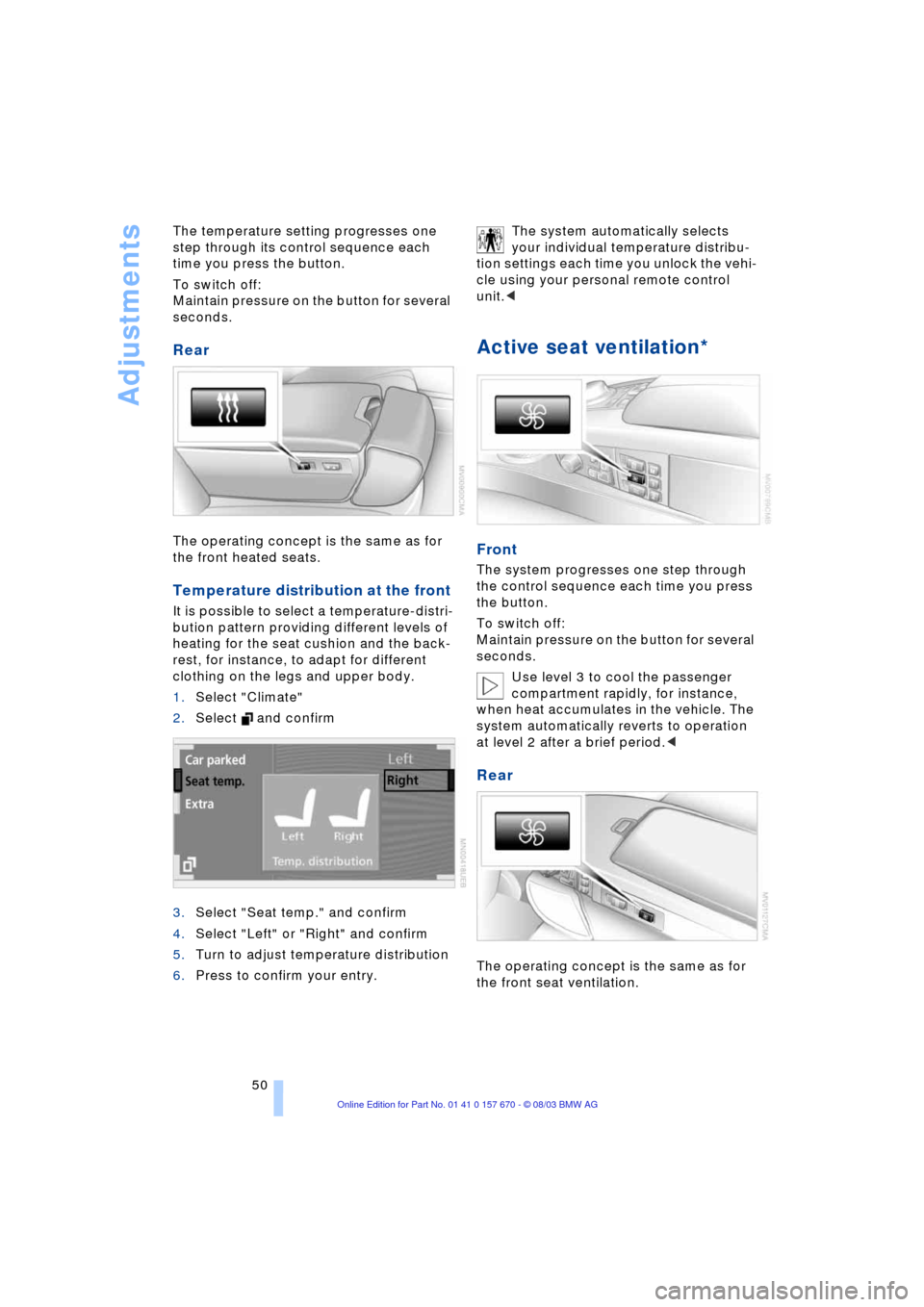
The operating concept is the same as for
the front heated seats.
Temperature distribution at the front
It is possible to select a temperature-distri-
bution pattern providing different levels of
heating for the seat cushion and the back-
rest, for instance, to adapt for different
clothing on the legs and upper body.
1.Select "Climate"
2.Select and confirm
3.Select "Seat temp." and confirm
4.Select "Left" or "Right" and confirm
5.Turn to adjust temperature distribution
6.Press to confirm your entry. The system automatically selects
your individual temperature distribu-
tion settings each time you unlock the vehi-
cle using your personal remote control
unit.<
Active seat ventilation*
Front
The system progresses one step through
the control sequence each time you press
the button.
To switch off:
Maintain pressure on the button for several
seconds.
Use level 3 to cool the passenger
compartment rapidly, for instance,
when heat accumulates in the vehicle. The
system automatically reverts to operation
at level 2 after a brief period.<
Rear
The operating concept is the same as for
the front seat ventilation.
Page 55 of 232
Controls
53Reference
At a glance
Driving tips
Communications
Navigation
Entertainment
Mobility
matic recirculated-air control on
page 104
>"Navi info"
To repeat the most recent message
from the navigation system, refer to
page 141
>"AUTO P"
To activate/deactivate Automatic Hold
refer to Automatic Hold on page 63.
You can select the displayed function using
the button on the steering wheel.
If you have activated Automatic Hold,
refer to page 63, you can use the but-
ton on the steering wheel to deactivate the
system for parking maneuvers etc.<
Seat, mirror and steering
wheel memory
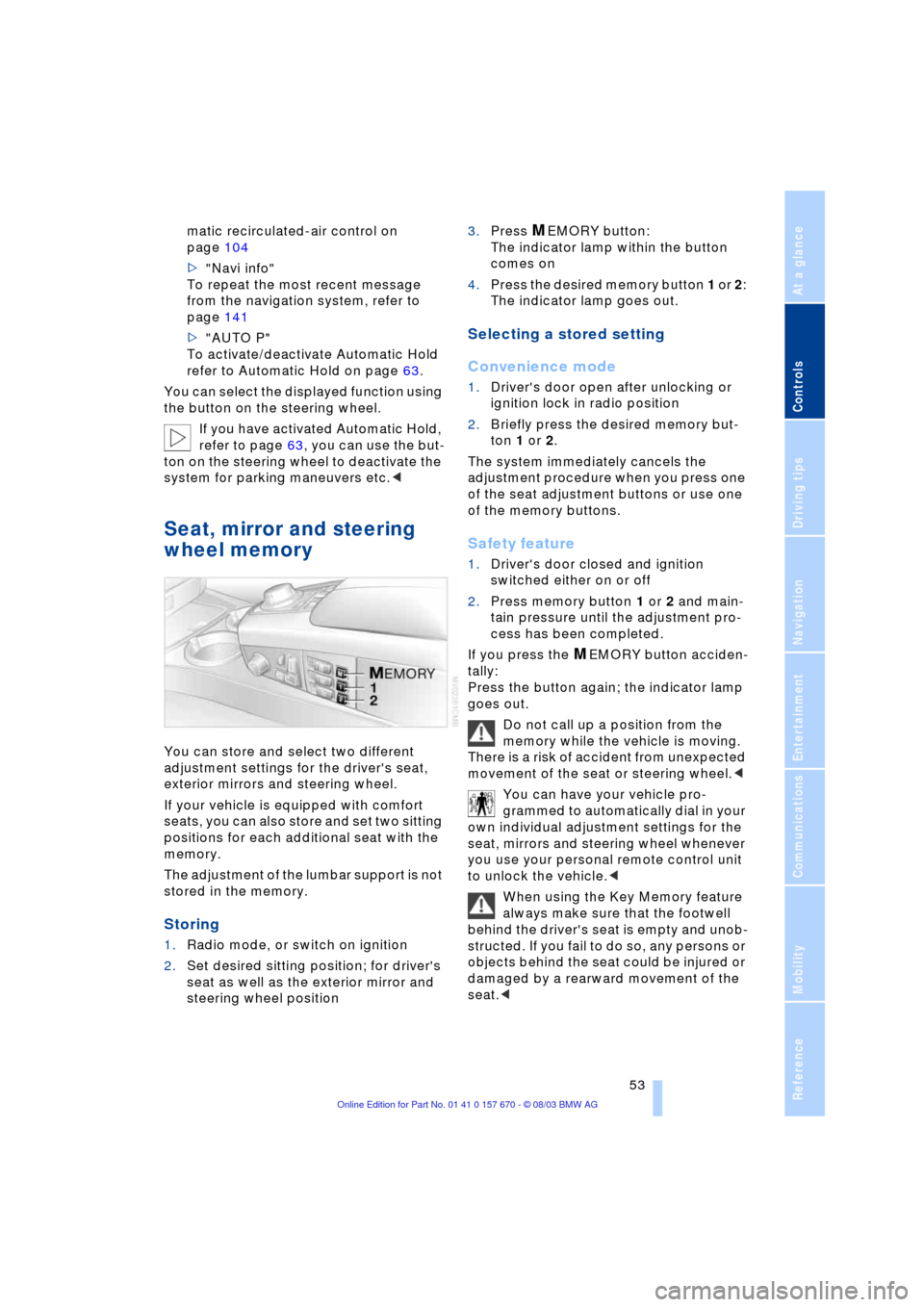
You can store and select two different
adjustment settings for the driver's seat,
exterior mirrors and steering wheel.
If your vehicle is equipped with comfort
seats, you can also store and set two sitting
positions for each additional seat with the
memory.
The adjustment of the lumbar support is not
stored in the memory.
Storing
1.Radio mode, or switch on ignition
2.Set desired sitting position; for driver's
seat as well as the exterior mirror and
steering wheel position 3.Press
MEMORY button:
The indicator lamp within the button
comes on
4.Press the desired memory button 1 or 2:
The indicator lamp goes out.
Selecting a stored setting
Convenience mode
1.Driver's door open after unlocking or
ignition lock in radio position
2.Briefly press the desired memory but-
ton 1 or 2.
The system immediately cancels the
adjustment procedure when you press one
of the seat adjustment buttons or use one
of the memory buttons.
Safety feature
1.Driver's door closed and ignition
switched either on or off
2.Press memory button 1 or 2 and main-
tain pressure until the adjustment pro-
cess has been completed.
If you press the
MEMORY button acciden-
tally:
Press the button again; the indicator lamp
goes out.
Do not call up a position from the
memory while the vehicle is moving.
There is a risk of accident from unexpected
movement of the seat or steering wheel.<
You can have your vehicle pro-
grammed to automatically dial in your
own individual adjustment settings for the
seat, mirrors and steering wheel whenever
you use your personal remote control unit
to unlock the vehicle.<
When using the Key Memory feature
always make sure that the footwell
behind the driver's seat is empty and unob-
structed. If you fail to do so, any persons or
objects behind the seat could be injured or
damaged by a rearward movement of the
seat.<
Page 59 of 232
Controls
57Reference
At a glance
Driving tips
Communications
Navigation
Entertainment
Mobility
Always read and follow the instructions that
come with the system.
Child seat security
All of the rear belt retractors and the front
passenger's safety belt can be locked for
mounting and securing child-restraint sys-
tems.
Information regarding this is located near
the buckle latch of each safety belt.
To lock the safety belt
Pull the entire length of the belt from the
belt retractor. Allow the reel to retract the
belt somewhat and engage the buckle,
then tighten the belt against the child-
restraint system. The retraction mechanism
is now locked.
To unlock the safety belt
Release the buckle, remove the child-
restraint system and allow the belt retractor
to reel the belt completely in.
Child-restraint system with tether
strap
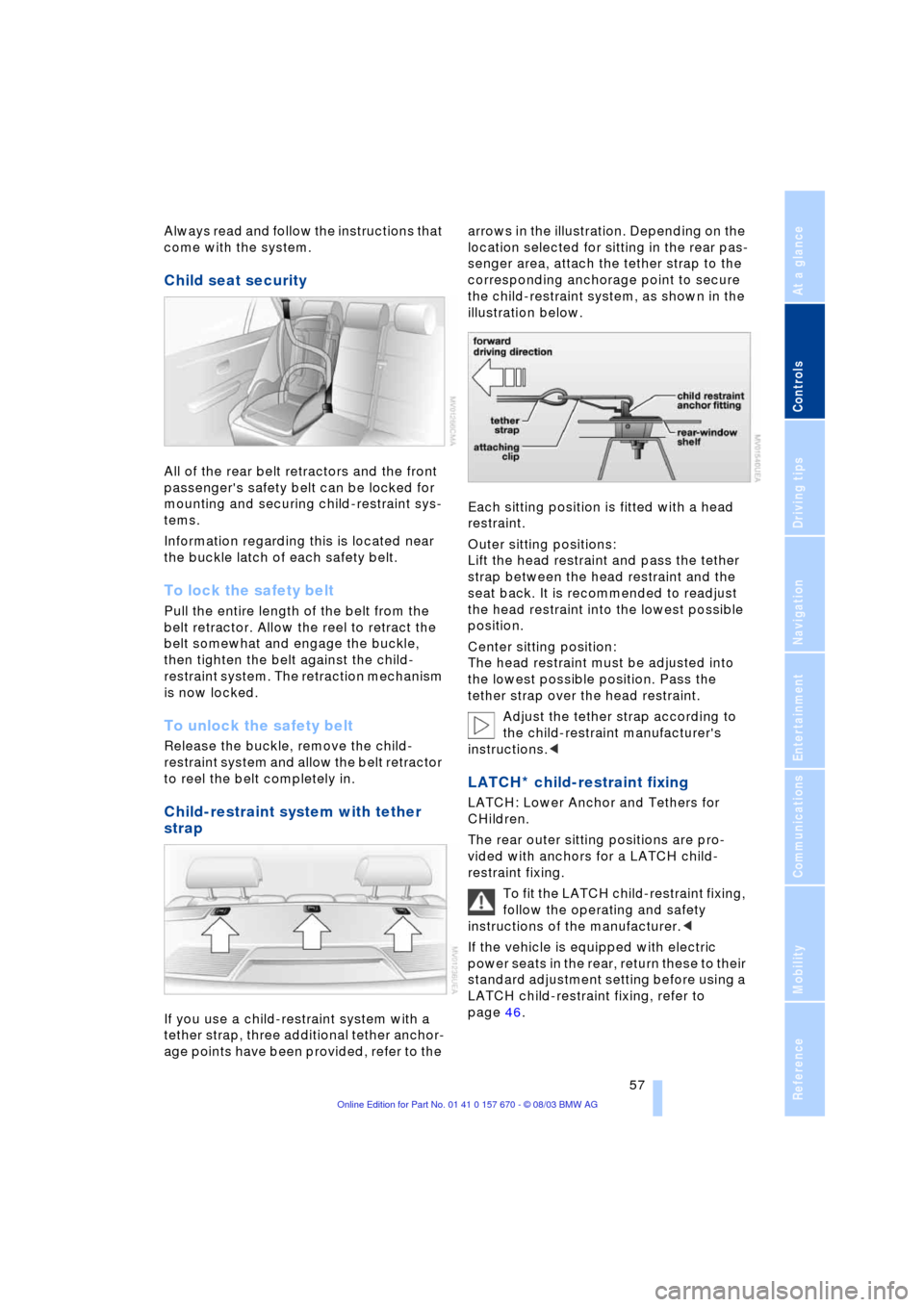
If you use a child-restraint system with a
tether strap, three additional tether anchor-
age points have been provided, refer to the arrows in the illustration. Depending on the
location selected for sitting in the rear pas-
senger area, attach the tether strap to the
corresponding anchorage point to secure
the child-restraint system, as shown in the
illustration below.
Each sitting position is fitted with a head
restraint.
Outer sitting positions:
Lift the head restraint and pass the tether
strap between the head restraint and the
seat back. It is recommended to readjust
the head restraint into the lowest possible
position.
Center sitting position:
The head restraint must be adjusted into
the lowest possible position. Pass the
tether strap over the head restraint.
Adjust the tether strap according to
the child-restraint manufacturer's
instructions.<
LATCH* child-restraint fixing
LATCH: Lower Anchor and Tethers for
CHildren.
The rear outer sitting positions are pro-
vided with anchors for a LATCH child-
restraint fixing.
To fit the LATCH child-restraint fixing,
follow the operating and safety
instructions of the manufacturer.<
If the vehicle is equipped with electric
power seats in the rear, return these to their
standard adjustment setting before using a
LATCH child-restraint fixing, refer to
page 46.
Page 60 of 232
Transporting children safely
58
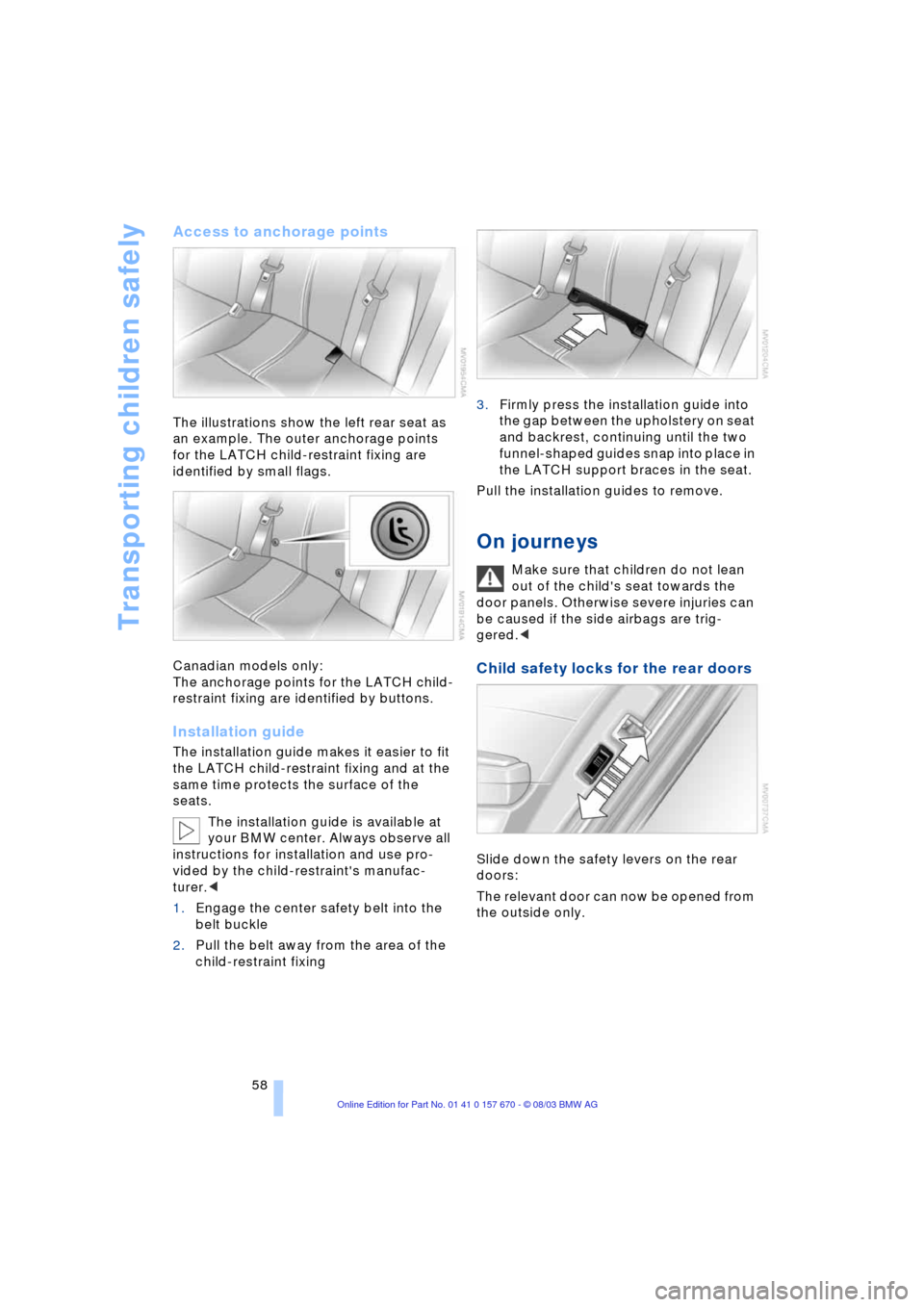
Access to anchorage points
The illustrations show the left rear seat as
an example. The outer anchorage points
for the LATCH child-restraint fixing are
identified by small flags.
Canadian models only:
The anchorage points for the LATCH child-
restraint fixing are identified by buttons.
Installation guide
The installation guide makes it easier to fit
the LATCH child-restraint fixing and at the
same time protects the surface of the
seats.
The installation guide is available at
your BMW center. Always observe all
instructions for installation and use pro-
vided by the child-restraint's manufac-
turer.<
1.Engage the center safety belt into the
belt buckle
2.Pull the belt away from the area of the
child-restraint fixing3.Firmly press the installation guide into
the gap between the upholstery on seat
and backrest, continuing until the two
funnel-shaped guides snap into place in
the LATCH support braces in the seat.
Pull the installation guides to remove.
On journeys
Make sure that children do not lean
out of the child's seat towards the
door panels. Otherwise severe injuries can
be caused if the side airbags are trig-
gered.<
Child safety locks for the rear doors
Slide down the safety levers on the rear
doors:
The relevant door can now be opened from
the outside only.
Page 61 of 232
Controls
59Reference
At a glance
Driving tips
Communications
Navigation
Entertainment
Mobility
Safety switch for power windows and
rear seats
If the vehicle is equipped with electric
power seats in the rear, return these to their
standard adjustment setting before using a
child-restraint system, refer to page 46.
Always press the safety switch for the
electric power windows, refer to page 42,
when children are in the rear of the vehicle.
This switch also disables the power rear
seat adjustment.
Incorrect or unsupervised adjustment
of the electric power seats in the rear
could lead to injuries or damage to the
child-restraint system.<
Page 115 of 232
Controls
113Reference
At a glance
Driving tips
Communications
Navigation
Entertainment
Mobility
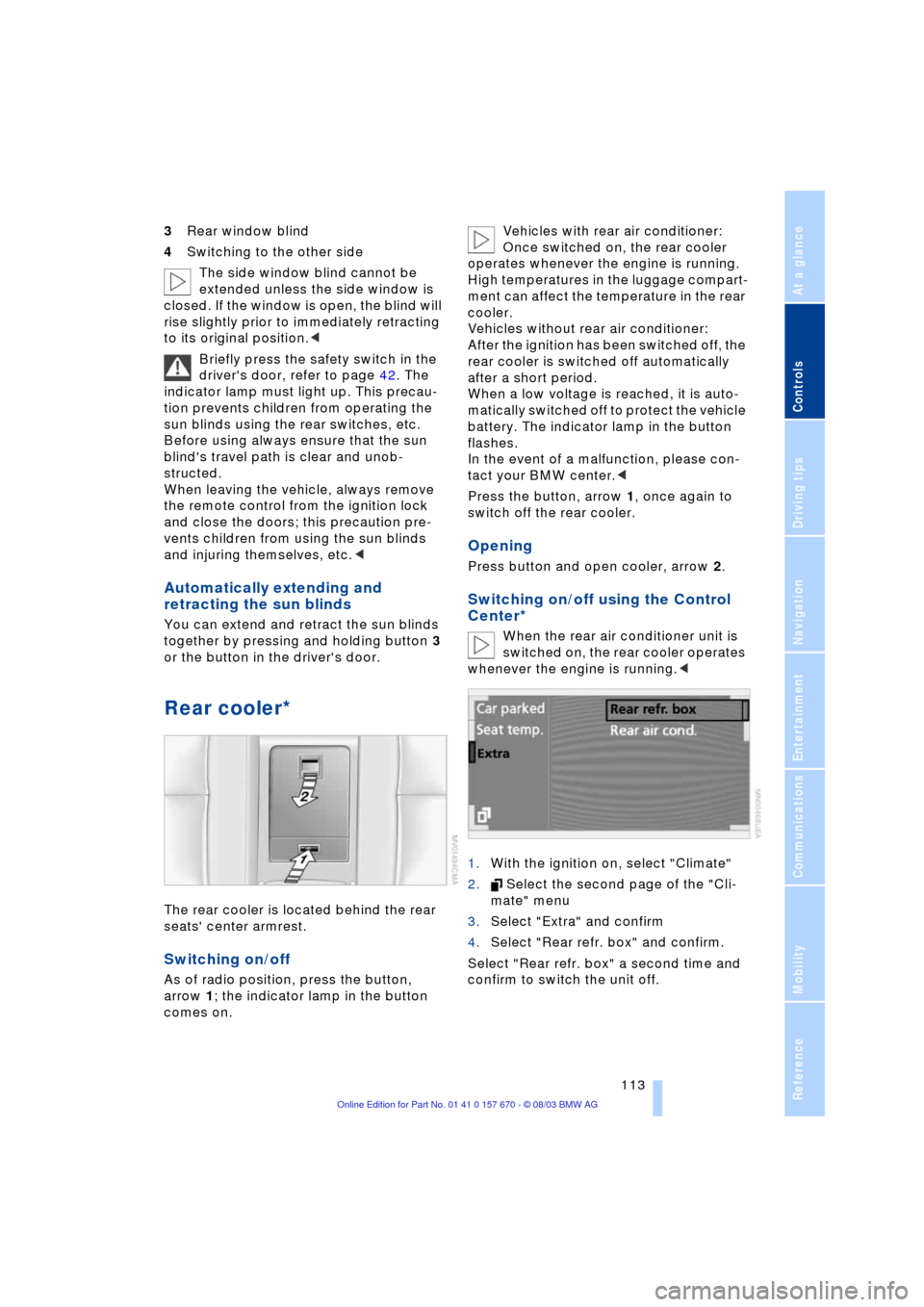
3Rear window blind
4Switching to the other side
The side window blind cannot be
extended unless the side window is
closed. If the window is open, the blind will
rise slightly prior to immediately retracting
to its original position.<
Briefly press the safety switch in the
driver's door, refer to page 42. The
indicator lamp must light up. This precau-
tion prevents children from operating the
sun blinds using the rear switches, etc.
Before using always ensure that the sun
blind's travel path is clear and unob-
structed.
When leaving the vehicle, always remove
the remote control from the ignition lock
and close the doors; this precaution pre-
vents children from using the sun blinds
and injuring themselves, etc.<
Automatically extending and
retracting the sun blinds
You can extend and retract the sun blinds
together by pressing and holding button 3
or the button in the driver's door.
Rear cooler*
The rear cooler is located behind the rear
seats' center armrest.
Switching on/off
As of radio position, press the button,
arrow 1; the indicator lamp in the button
comes on. Vehicles with rear air conditioner:
Once switched on, the rear cooler
operates whenever the engine is running.
High temperatures in the luggage compart-
ment can affect the temperature in the rear
cooler.
Vehicles without rear air conditioner:
After the ignition has been switched off, the
rear cooler is switched off automatically
after a short period.
When a low voltage is reached, it is auto-
matically switched off to protect the vehicle
battery. The indicator lamp in the button
flashes.
In the event of a malfunction, please con-
tact your BMW center.<
Press the button, arrow 1, once again to
switch off the rear cooler.
Opening
Press button and open cooler, arrow 2.
Switching on/off using the Control
Center*
When the rear air conditioner unit is
switched on, the rear cooler operates
whenever the engine is running.<
1.With the ignition on, select "Climate"
2. Select the second page of the "Cli-
mate" menu
3.Select "Extra" and confirm
4.Select "Rear refr. box" and confirm.
Select "Rear refr. box" a second time and
confirm to switch the unit off.
Page 116 of 232
Practical interior accessories
114
Glove compartment
Opening
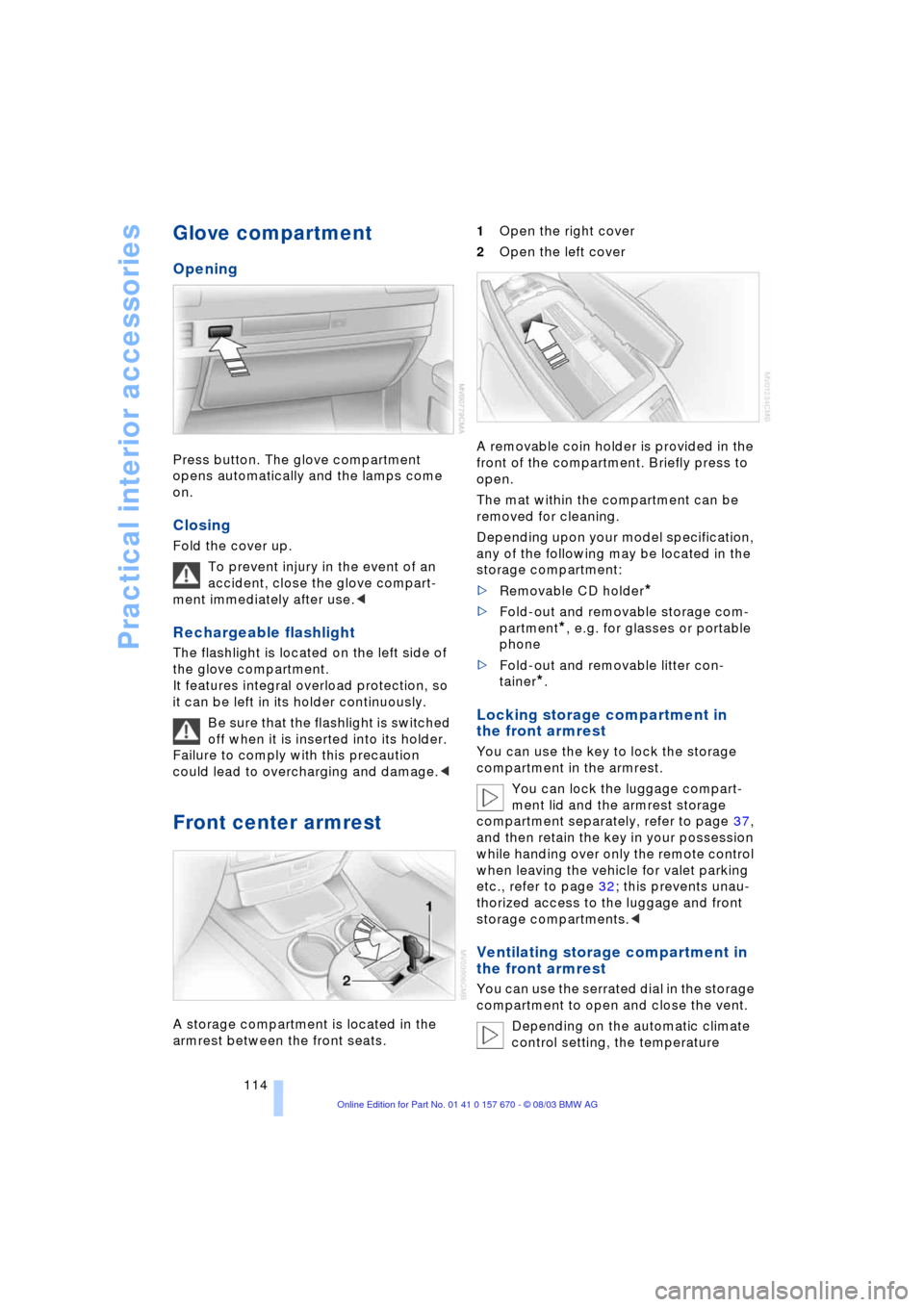
Press button. The glove compartment
opens automatically and the lamps come
on.
Closing
Fold the cover up.
To prevent injury in the event of an
accident, close the glove compart-
ment immediately after use.<
Rechargeable flashlight
The flashlight is located on the left side of
the glove compartment.
It features integral overload protection, so
it can be left in its holder continuously.
Be sure that the flashlight is switched
off when it is inserted into its holder.
Failure to comply with this precaution
could lead to overcharging and damage.<
Front center armrest
A storage compartment is located in the
armrest between the front seats. 1Open the right cover
2Open the left cover
A removable coin holder is provided in the
front of the compartment. Briefly press to
open.
The mat within the compartment can be
removed for cleaning.
Depending upon your model specification,
any of the following may be located in the
storage compartment:
>Removable CD holder
*
>Fold-out and removable storage com-
partment
*, e.g. for glasses or portable
phone
>Fold-out and removable litter con-
tainer
*.
Locking storage compartment in
the front armrest
You can use the key to lock the storage
compartment in the armrest.
You can lock the luggage compart-
ment lid and the armrest storage
compartment separately, refer to page 37,
and then retain the key in your possession
while handing over only the remote control
when leaving the vehicle for valet parking
etc., refer to page 32; this prevents unau-
thorized access to the luggage and front
storage compartments.<
Ventilating storage compartment in
the front armrest
You can use the serrated dial in the storage
compartment to open and close the vent.
Depending on the automatic climate
control setting, the temperature
Page 119 of 232
Controls
117Reference
At a glance
Driving tips
Communications
Navigation
Entertainment
Mobility
Rear center armrest
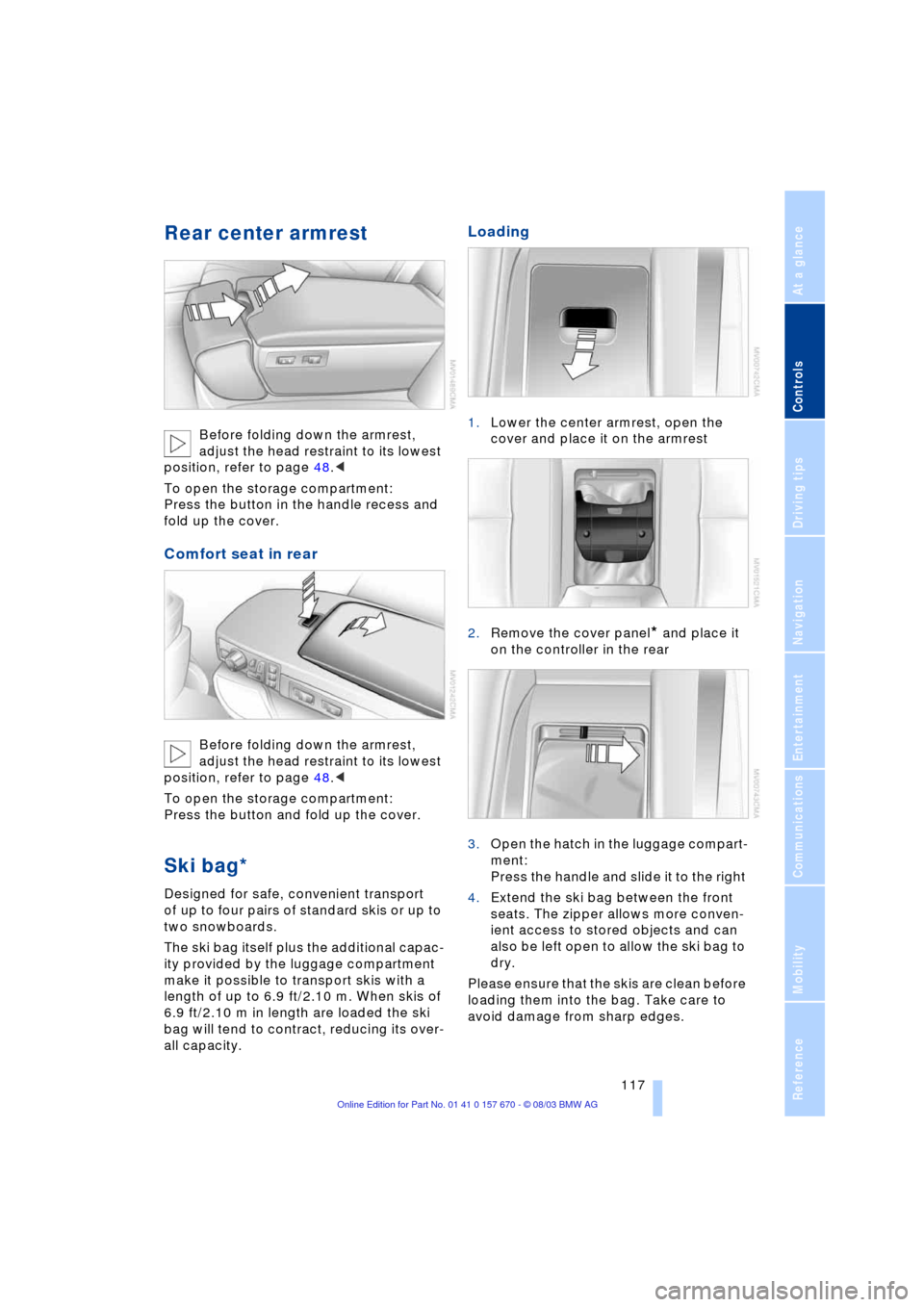
Before folding down the armrest,
adjust the head restraint to its lowest
position, refer to page 48.<
To open the storage compartment:
Press the button in the handle recess and
fold up the cover.
Comfort seat in rear
Before folding down the armrest,
adjust the head restraint to its lowest
position, refer to page 48.<
To open the storage compartment:
Press the button and fold up the cover.
Ski bag*
Designed for safe, convenient transport
of up to four pairs of standard skis or up to
two snowboards.
The ski bag itself plus the additional capac-
ity provided by the luggage compartment
make it possible to transport skis with a
length of up to 6.9 ft/2.10 m. When skis of
6.9 ft/2.10 m in length are loaded the ski
bag will tend to contract, reducing its over-
all capacity.
Loading
1.Lower the center armrest, open the
cover and place it on the armrest
2.Remove the cover panel
* and place it
on the controller in the rear
3.Open the hatch in the luggage compart-
ment:
Press the handle and slide it to the right
4.Extend the ski bag between the front
seats. The zipper allows more conven-
ient access to stored objects and can
also be left open to allow the ski bag to
dry.
Please ensure that the skis are clean before
loading them into the bag. Take care to
avoid damage from sharp edges.
Page 127 of 232
Driving tips
125Reference
At a glance
Controls
Communications
Navigation
Entertainment
Mobility
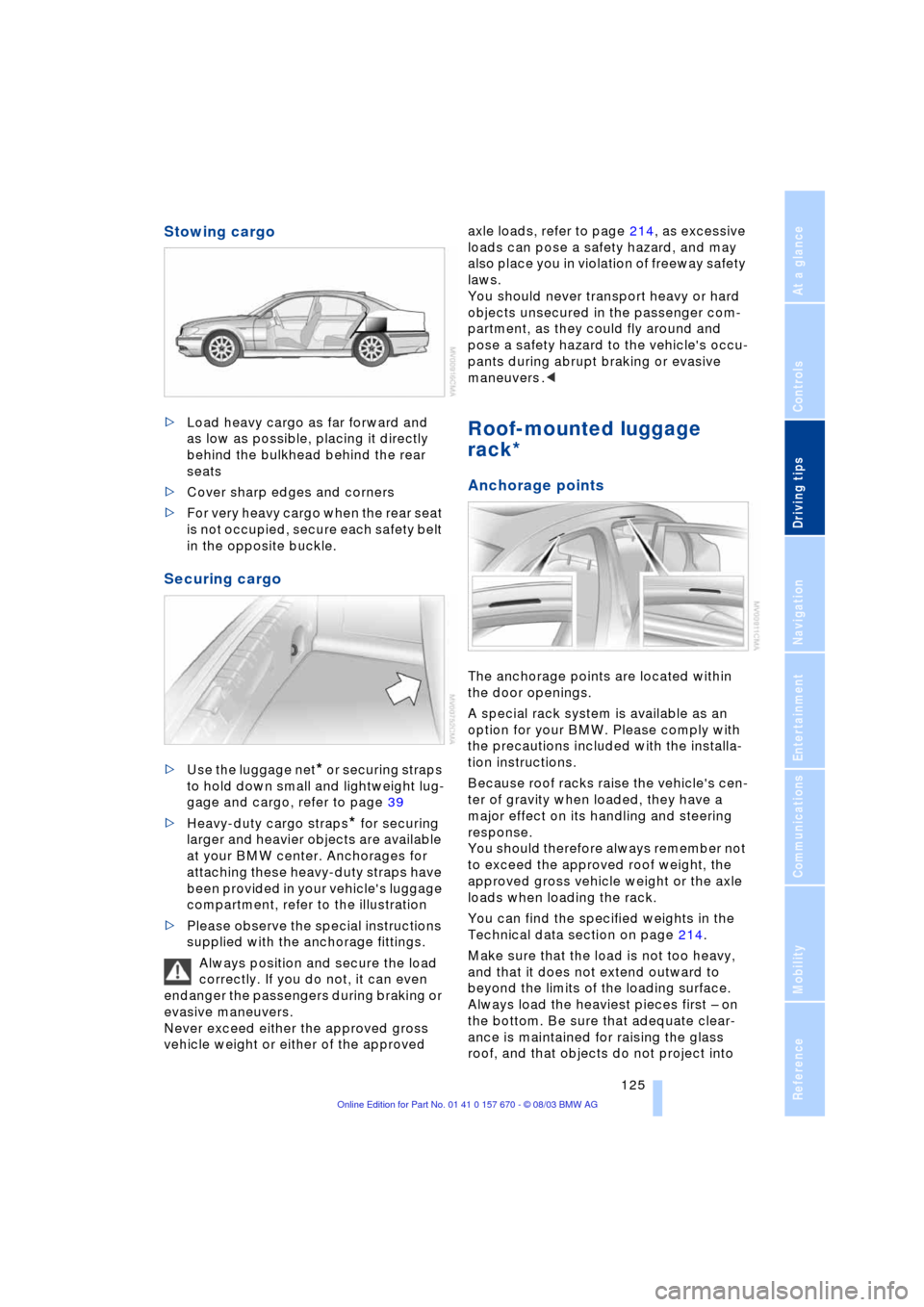
Stowing cargo
>Load heavy cargo as far forward and
as low as possible, placing it directly
behind the bulkhead behind the rear
seats
>Cover sharp edges and corners
>For very heavy cargo when the rear seat
is not occupied, secure each safety belt
in the opposite buckle.
Securing cargo
>Use the luggage net* or securing straps
to hold down small and lightweight lug-
gage and cargo, refer to page 39
>Heavy-duty cargo straps
* for securing
larger and heavier objects are available
at your BMW center. Anchorages for
attaching these heavy-duty straps have
been provided in your vehicle's luggage
compartment, refer to the illustration
>Please observe the special instructions
supplied with the anchorage fittings.
Always position and secure the load
correctly. If you do not, it can even
endanger the passengers during braking or
evasive maneuvers.
Never exceed either the approved gross
vehicle weight or either of the approved axle loads, refer to page 214, as excessive
loads can pose a safety hazard, and may
also place you in violation of freeway safety
laws.
You should never transport heavy or hard
objects unsecured in the passenger com-
partment, as they could fly around and
pose a safety hazard to the vehicle's occu-
pants during abrupt braking or evasive
maneuvers .<
Roof-mounted luggage
rack*
Anchorage points
The anchorage points are located within
the door openings.
A special rack system is available as an
option for your BMW. Please comply with
the precautions included with the installa-
tion instructions.
Because roof racks raise the vehicle's cen-
ter of gravity when loaded, they have a
major effect on its handling and steering
response.
You should therefore always remember not
to exceed the approved roof weight, the
approved gross vehicle weight or the axle
loads when loading the rack.
You can find the specified weights in the
Technical data section on page 214.
Make sure that the load is not too heavy,
and that it does not extend outward to
beyond the limits of the loading surface.
Always load the heaviest pieces first Ð on
the bottom. Be sure that adequate clear-
ance is maintained for raising the glass
roof, and that objects do not project into
Page 219 of 232
Reference 217
At a glance
Controls
Driving tips
Communications
Navigation
Entertainment
Mobility
"AUTOSTOR" 163
"Autostore" for radio
mode 154
Average fuel
consumption 85
Average speed 85
"Avoid highway" 137
Avoiding unintentional
alarms 40
"Avoid route" 141
"Avoid sect." 140
"Avoid tolls" 137
"A-Z", telephone 179
B
Backrest adjustment 45, 46
Backrests, refer to
Seats 44
Backup lamps, replacing
bulbs 202
Balance 149
"Balance" for audio
mode 150
Bass 149
"Bass" for audio mode 150
Battery 205
Ð flat 207
Battery switch 205, 206
"BC", refer to Computer 86
Belts 49
Beverage holders 115
Blinds 112
"BMW Assist" 21, 182
BMW Assist 182
"BMW Services" 182
Brake Assistant, refer to
DBC Dynamic Brake
Control 93
Brake fluid 197
Brake force display 96
Brake hydraulic
systems 197
Brake lamps, replacing
bulbs 202
Brake pads 123
Brakes 123
Ð malfunctions 197
Breaking in the vehicle 122Break-in procedures 122
"Brief info" 22
"Brightness"
Ð for TV mode 164
Ð in the Control Center 89
Buttons on the steering
wheel 16
Ð automatic transmission
with Steptronic 66
C
California Proposition 65
Warning 199
Call
Ð ending 179
Calling 179
Ð from phone book 179
Ð from the redial list 180
Ð from the Top 8 list 180
Ð redialing 180
Can holder, refer to
Beverage holders 115
Capacities 215
"Car data" 18, 21
Care, refer to the Caring for
your vehicle brochure
Cargo, securing 125
Cargo area
Ð locking separately 37
Cargo loading 125
Caring for the vehicle finish,
refer to the Caring for
your vehicle brochure
Car phone 175, 178
Ð refer to separate Owner's
Manual
Car radio, refer to
Radio 148
Car wash 122
Ð refer to the Caring for your
vehicle brochure
CBC Cornering Brake
Control 91
CBS Condition Based
Service 198
"CD" 148, 158CD changer 160
Ð adjusting the tone 149
Ð controls 148
Ð fast forward 161
Ð random play 161
Ð reverse 161
Ð sampling 161
Ð Scan 161
Ð selecting CD 161
Ð selecting track 162
Ð skipping tracks 161
Ð switching on 160
Ð volume 149
CD player 158
Ð adjusting the tone 149
Ð controls 148
Ð fast forward 159
Ð random play 158
Ð reverse 159
Ð sampling 158
Ð Scan 158
Ð selecting tracks 158
Ð skipping tracks 158
Ð switching on 158
Ð volume 149
"Center" 107
Center armrest
Ð individual button
assignment 17
Center brake lamp, refer to
Brake lamps 202
Center console, refer to
Comfort features 14
Central locking system 33
Ð button 37
Ð Comfort Access 34
Ð keys 36
Ð remote control 33
"CHANGE" for
navigation 136
Changing a tire 203
Changing language 88
Changing settings on the
Control Display 88
Changing the display
format on the Control
Display 88
Changing units of measure
on the Control Display 88