tow BMW 760i 2005 E65 User Guide
[x] Cancel search | Manufacturer: BMW, Model Year: 2005, Model line: 760i, Model: BMW 760i 2005 E65Pages: 239, PDF Size: 8.03 MB
Page 94 of 239
Technology for comfort, convenience and safety
92
PDC with visual warning
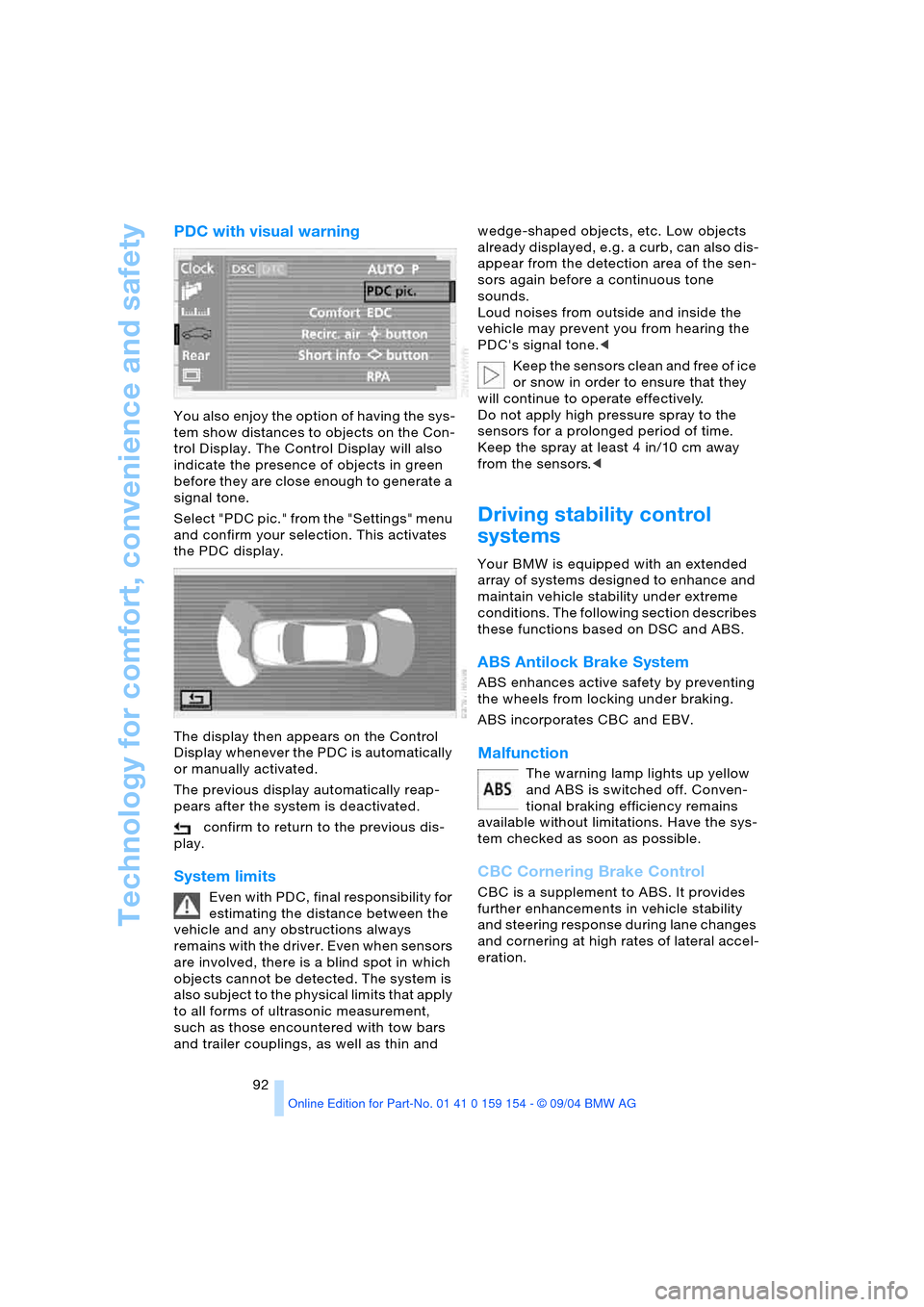
You also enjoy the option of having the sys-
tem show distances to objects on the Con-
trol Display. The Control Display will also
indicate the presence of objects in green
before they are close enough to generate a
signal tone.
Select "PDC pic." from the "Settings" menu
and confirm your selection. This activates
the PDC display.
The display then appears on the Control
Display whenever the PDC is automatically
or manually activated.
The previous display automatically reap-
pears after the system is deactivated.
confirm to return to the previous dis-
play.
System limits
Even with PDC, final responsibility for
estimating the distance between the
vehicle and any obstructions always
remains with the driver. Even when sensors
are involved, there is a blind spot in which
objects cannot be detected. The system is
also subject to the physical limits that apply
to all forms of ultrasonic measurement,
such as those encountered with tow bars
and trailer couplings, as well as thin and wedge-shaped objects, etc. Low objects
already displayed, e.g. a curb, can also dis-
appear from the detection area of the sen-
sors again before a continuous tone
sounds.
Loud noises from outside and inside the
vehicle may prevent you from hearing the
PDC's signal tone.<
Keep the sensors clean and free of ice
or snow in order to ensure that they
will continue to operate effectively.
Do not apply high pressure spray to the
sensors for a prolonged period of time.
Keep the spray at least 4 in/10 cm away
from the sensors.<
Driving stability control
systems
Your BMW is equipped with an extended
array of systems designed to enhance and
maintain vehicle stability under extreme
conditions. The following section describes
these functions based on DSC and ABS.
ABS Antilock Brake System
ABS enhances active safety by preventing
the wheels from locking under braking.
ABS incorporates CBC and EBV.
Malfunction
The warning lamp lights up yellow
and ABS is switched off. Conven-
tional braking efficiency remains
available without limitations. Have the sys-
tem checked as soon as possible.
CBC Cornering Brake Control
CBC is a supplement to ABS. It provides
further enhancements in vehicle stability
and steering response during lane changes
and cornering at high rates of lateral accel-
eration.
Page 103 of 239
Controls
101Reference
At a glance
Driving tips
Communications
Navigation
Entertainment
Mobility
Adaptive Head Light*
The concept
Adaptive Head Light is a variable headlamp
control system that enables dynamic illumi-
nation of the road surface. Depending on
the steering angle and other assumptions,
the light from the headlamp follows the
course of the road.
Activating Adaptive Head Light
With the ignition on, refer to
page62, turn the light switch to the
position 'Automatic headlamp con-
trol', refer to page100.
To avoid blinding oncoming traffic, the
Adaptive Head Light:
>Is not active when driving in reverse
>Is only active toward the passenger's
side with the vehicle stationary.
Malfunction
The LED above the symbol for automatic
headlamp control flashes. Adaptive Head
Light is faulty or has failed. Have the system
checked as soon as possible.
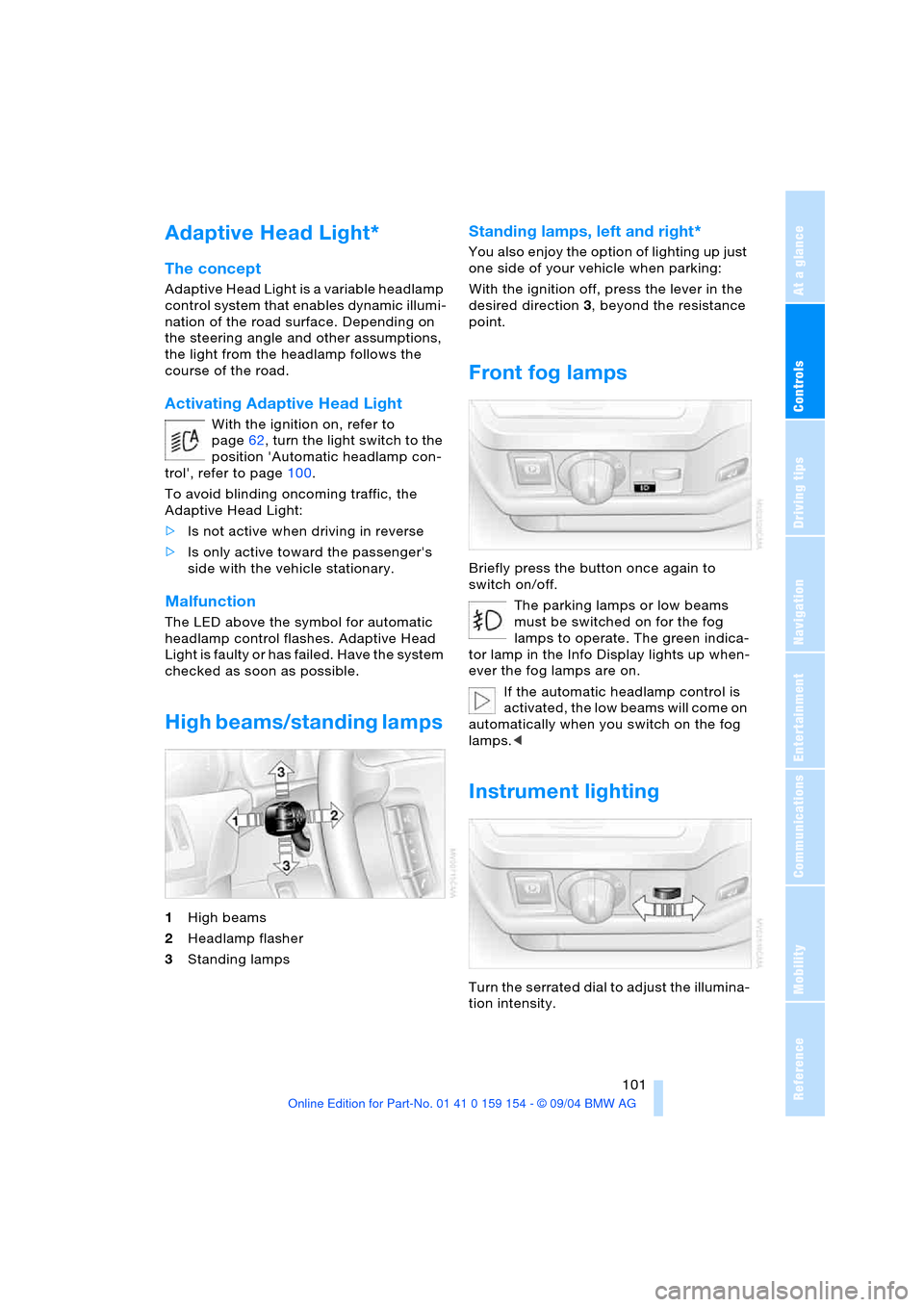
High beams/standing lamps
1High beams
2Headlamp flasher
3Standing lamps
Standing lamps, left and right*
You also enjoy the option of lighting up just
one side of your vehicle when parking:
With the ignition off, press the lever in the
desired direction3, beyond the resistance
point.
Front fog lamps
Briefly press the button once again to
switch on/off.
The parking lamps or low beams
must be switched on for the fog
lamps to operate. The green indica-
tor lamp in the Info Display lights up when-
ever the fog lamps are on.
If the automatic headlamp control is
activated, the low beams will come on
automatically when you switch on the fog
lamps.<
Instrument lighting
Turn the serrated dial to adjust the illumina-
tion intensity.
Page 105 of 239
Controls
103Reference
At a glance
Driving tips
Communications
Navigation
Entertainment
Mobility
A congenial climate
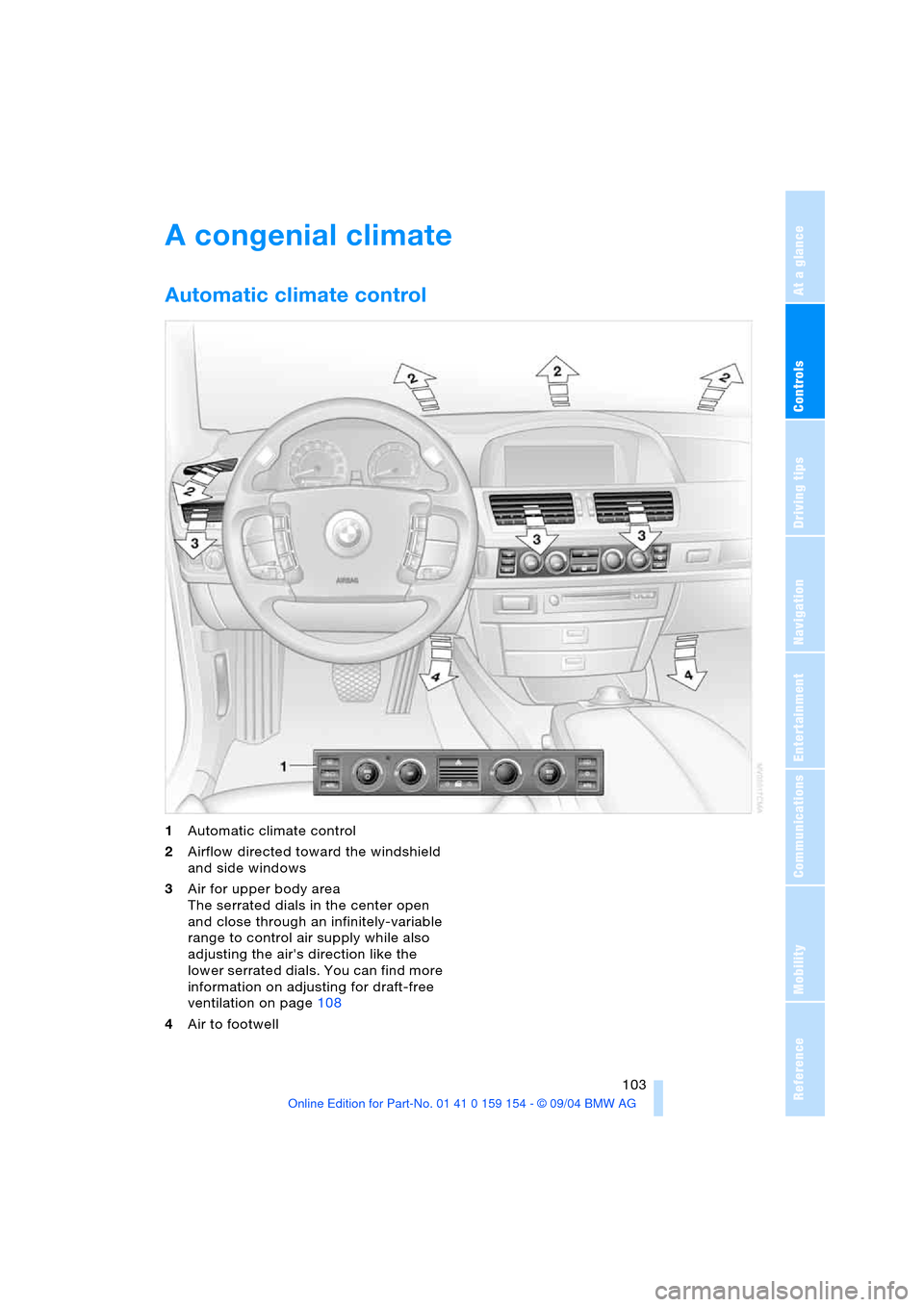
Automatic climate control
1Automatic climate control
2Airflow directed toward the windshield
and side windows
3Air for upper body area
The serrated dials in the center open
and close through an infinitely-variable
range to control air supply while also
adjusting the air's direction like the
lower serrated dials. You can find more
information on adjusting for draft-free
ventilation on page108
4Air to footwell
Page 108 of 239
A congenial climate
106 air into the interior in accordance with the
selected distribution pattern while the igni-
tion is off.
Provided that the engine has warmed
to its normal operating temperature
and the battery is charged, you can use this
function for up to 15 minutes after switch-
ing off the ignition. The LED within the but-
ton lights up to confirm compliance with
both of these conditions.<
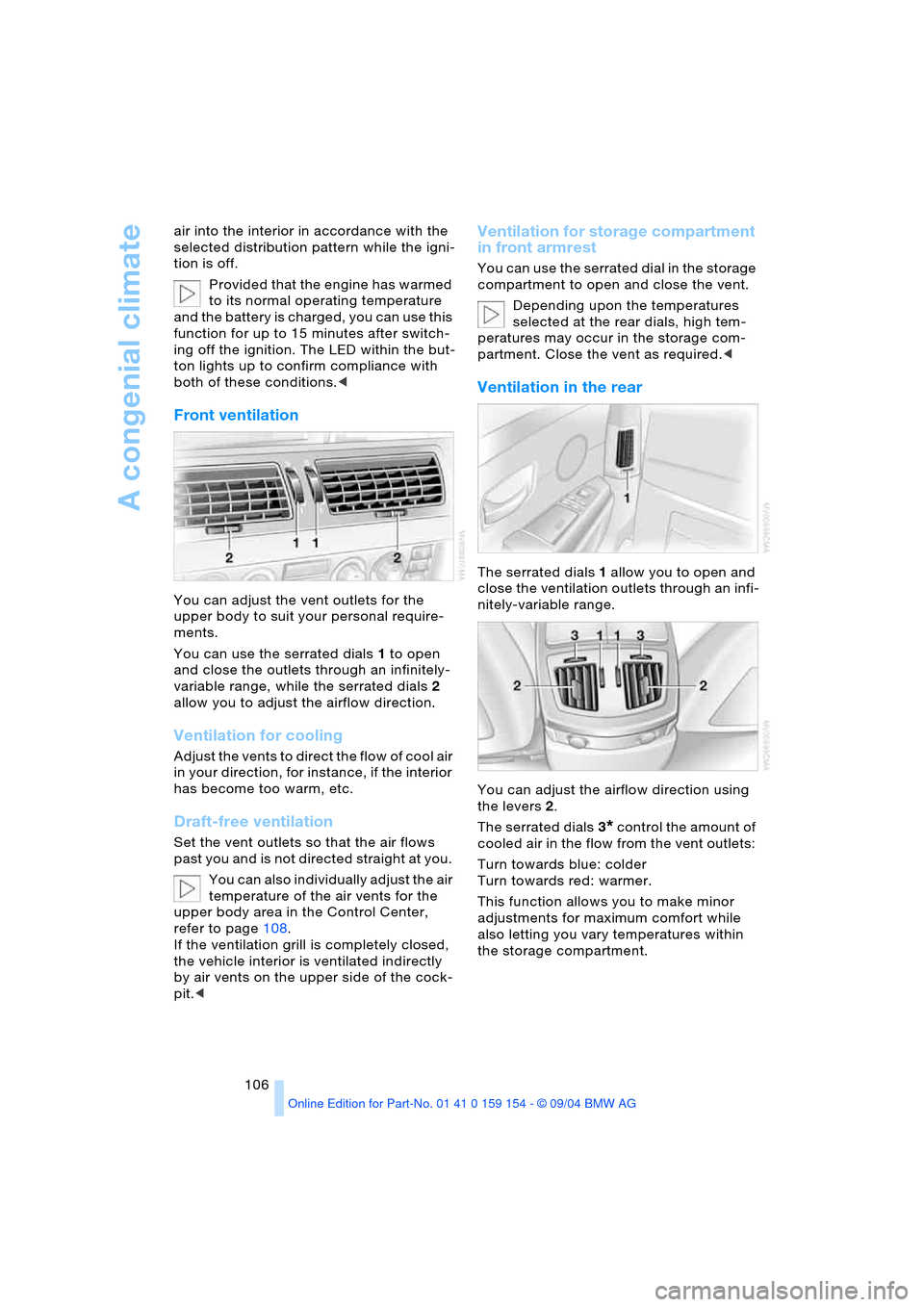
Front ventilation
You can adjust the vent outlets for the
upper body to suit your personal require-
ments.
You can use the serrated dials 1 to open
and close the outlets through an infinitely-
variable range, while the serrated dials 2
allow you to adjust the airflow direction.
Ventilation for cooling
A d j u s t t h e v e n t s t o d i r e c t t h e f l o w o f c o o l a i r
in your direction, for instance, if the interior
has become too warm, etc.
Draft-free ventilation
Set the vent outlets so that the air flows
past you and is not directed straight at you.
You can also individually adjust the air
temperature of the air vents for the
upper body area in the Control Center,
refer to page108.
If the ventilation grill is completely closed,
the vehicle interior is ventilated indirectly
by air vents on the upper side of the cock-
pit.<
Ventilation for storage compartment
in front armrest
You can use the serrated dial in the storage
compartment to open and close the vent.
Depending upon the temperatures
selected at the rear dials, high tem-
peratures may occur in the storage com-
partment. Close the vent as required.<
Ventilation in the rear
The serrated dials 1 allow you to open and
close the ventilation outlets through an infi-
nitely-variable range.
You can adjust the airflow direction using
the levers 2.
The serrated dials3
* control the amount of
cooled air in the flow from the vent outlets:
Turn towards blue: colder
Turn towards red: warmer.
This function allows you to make minor
adjustments for maximum comfort while
also letting you vary temperatures within
the storage compartment.
Page 109 of 239
Controls
107Reference
At a glance
Driving tips
Communications
Navigation
Entertainment
Mobility
Switching off automatic climate
control*
The air supply, the heater and
the air conditioner are all
switched off. You can restart
the automatic climate control
by pressing any of its buttons
except the REST button.
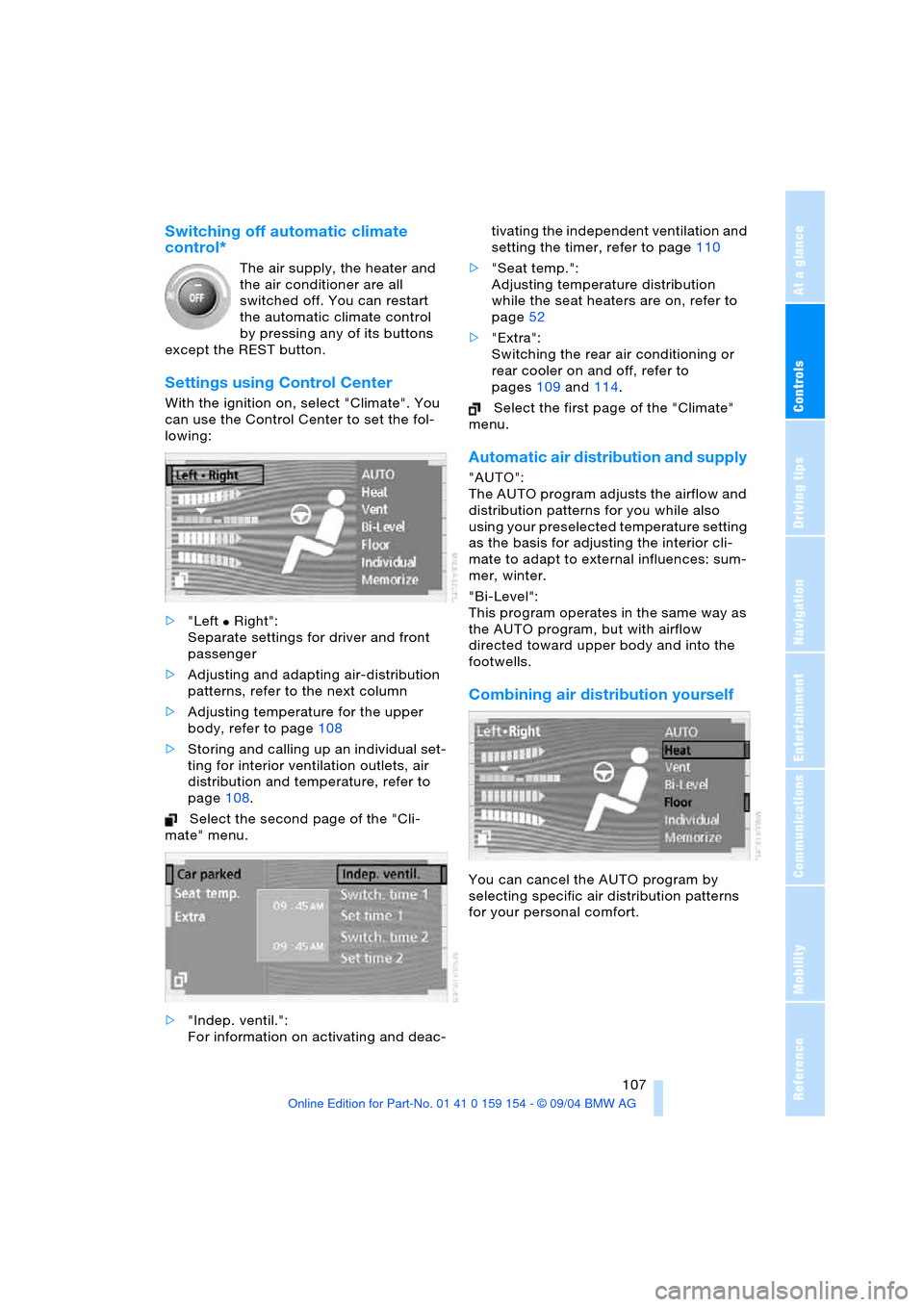
Settings using Control Center
With the ignition on, select "Climate". You
can use the Control Center to set the fol-
lowing:
>"Left
Χ Right":
Separate settings for driver and front
passenger
>Adjusting and adapting air-distribution
patterns, refer to the next column
>Adjusting temperature for the upper
body, refer to page108
>Storing and calling up an individual set-
ting for interior ventilation outlets, air
distribution and temperature, refer to
page108.
Select the second page of the "Cli-
mate" menu.
>"Indep. ventil.":
For information on activating and deac-tivating the independent ventilation and
setting the timer, refer to page110
>"Seat temp.":
Adjusting temperature distribution
while the seat heaters are on, refer to
page52
>"Extra":
Switching the rear air conditioning or
rear cooler on and off, refer to
pages109 and114.
Select the first page of the "Climate"
menu.
Automatic air distribution and supply
"AUTO":
The AUTO program adjusts the airflow and
distribution patterns for you while also
using your preselected temperature setting
as the basis for adjusting the interior cli-
mate to adapt to external influences: sum-
mer, winter.
"Bi-Level":
This program operates in the same way as
the AUTO program, but with airflow
directed toward upper body and into the
footwells.
Combining air distribution yourself
You can cancel the AUTO program by
selecting specific air distribution patterns
for your personal comfort.
Page 121 of 239
Controls
119Reference
At a glance
Driving tips
Communications
Navigation
Entertainment
Mobility
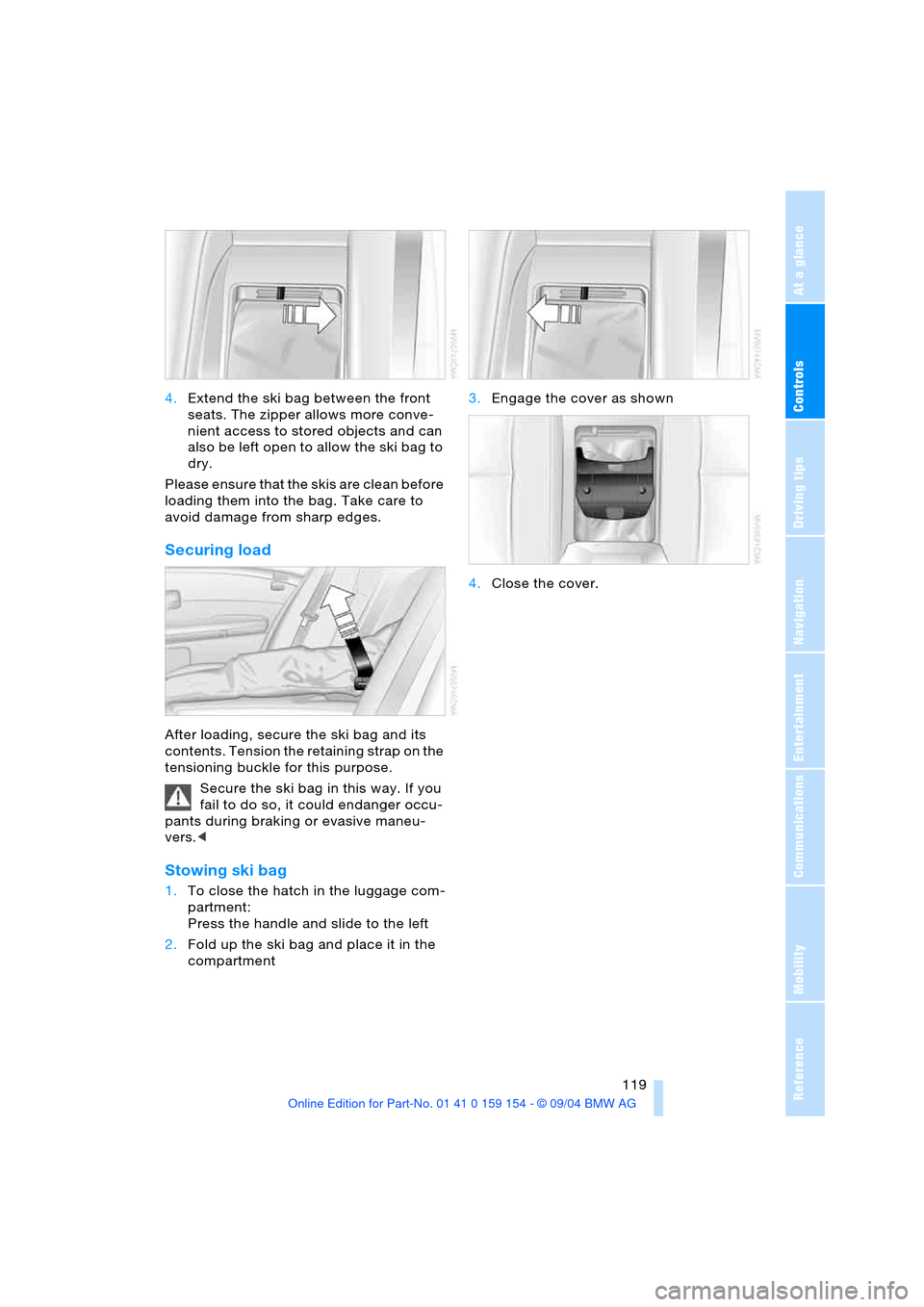
4.Extend the ski bag between the front
seats. The zipper allows more conve-
nient access to stored objects and can
also be left open to allow the ski bag to
dry.
Please ensure that the skis are clean before
loading them into the bag. Take care to
avoid damage from sharp edges.
Securing load
After loading, secure the ski bag and its
contents. Tension the retaining strap on the
tensioning buckle for this purpose.
Secure the ski bag in this way. If you
fail to do so, it could endanger occu-
pants during braking or evasive maneu-
vers.<
Stowing ski bag
1.To close the hatch in the luggage com-
partment:
Press the handle and slide to the left
2.Fold up the ski bag and place it in the
compartment 3.Engage the cover as shown
4.Close the cover.
Page 126 of 239
Things to remember when driving
124 ensured that the radiation which results
during transmission will be discharged
from the vehicle interior.<
Cargo loading
To avoid loading the tires beyond
their approved carrying capacity,
never overload the vehicle. Overloading
can lead to overheating and increases the
rate at which damage develops inside the
tires. The ultimate result can assume the
form of a sudden air loss.<
Determine loading limit
1.Locate the following statement on your
vehicle's door pillar
*:
The combined weight of occu-
pants and cargo should never
exceed XXX lbs. or YYY kg, as other-
wise the vehicle may be damaged and
unstable driving conditions may
result.<
2.Determine the combined weight of the
driver and passenger that will be riding
in your vehicle
3.Subtract the combined weight of the
driver and passenger from XXX lbs. or
YYY kg
4.The resulting figure equals the available
amount of cargo and luggage load
capacity.
For example, if the XXX amount equals
1,400 lbs. and there will be five 150-lbs.
passengers in your vehicle, the amount
of available cargo and luggage load
capacity is 650 lbs.:
1,400 Ibs. minus 750 Ibs. = 650 Ibs.5.Determine the combined weight of lug-
gage and cargo being loaded on the
vehicle. That weight should not exceed
the available cargo and luggage load
capacity calculated in step 4
6.If your vehicle will be towing a trailer,
part of the load from your trailer will be
transferred to your vehicle. Consult the
manual for transporting a trailer to
determine how this may reduce the
available cargo and luggage load
capacity of your vehicle.
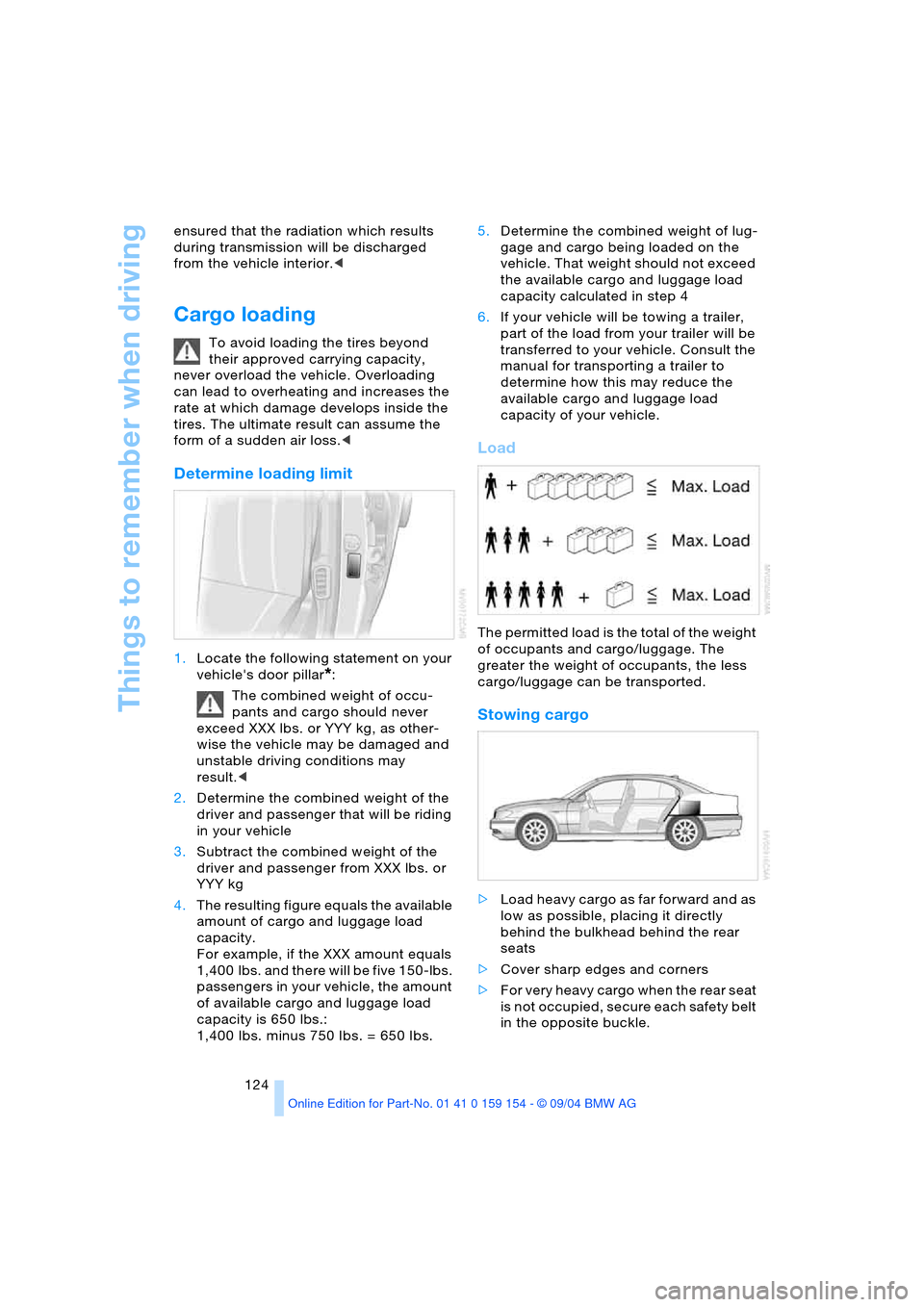
Load
The permitted load is the total of the weight
of occupants and cargo/luggage. The
greater the weight of occupants, the less
cargo/luggage can be transported.
Stowing cargo
>Load heavy cargo as far forward and as
low as possible, placing it directly
behind the bulkhead behind the rear
seats
>Cover sharp edges and corners
>For very heavy cargo when the rear seat
is not occupied, secure each safety belt
in the opposite buckle.
Page 134 of 239
Destination entry
132
Destination entry
In entering your destination you can select
from among the following options:
>Manual entry of destination address,
see below
>To select town/city and street from the
directory, refer to page134
>To select destination with map, refer to
page135
>To select destination with "Informa-
tion", refer to page135
>To select from among recent destina-
tions, refer to page136
>To select destination from address
book, refer to page142.
After selecting your destination you can
proceed to start the destination guidance,
refer to page139.
Enter data only when the vehicle is
stationary, and always obey the traffic
regulations and road signs in the event of
any contradiction between traffic and road
conditions and the instructions issued by
the navigation system. If you do not
observe this precaution, you may be in vio-
lation of the law, and can endanger vehicle
occupants and other road users.<
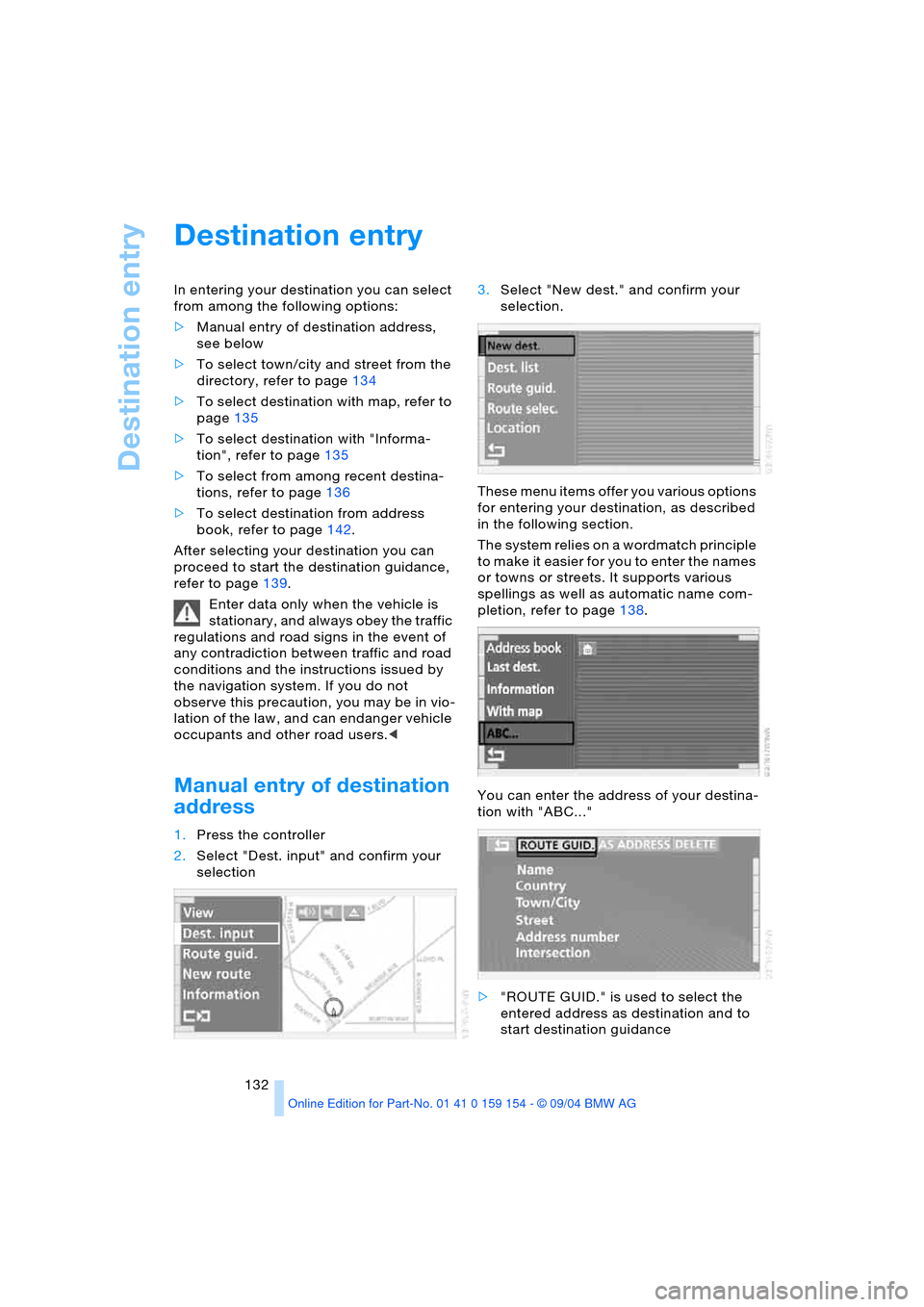
Manual entry of destination
address
1.Press the controller
2.Select "Dest. input" and confirm your
selection 3.Select "New dest." and confirm your
selection.
These menu items offer you various options
for entering your destination, as described
in the following section.
The system relies on a wordmatch principle
to make it easier for you to enter the names
or towns or streets. It supports various
spellings as well as automatic name com-
pletion, refer to page138.
You can enter the address of your destina-
tion with "ABC..."
>"ROUTE GUID." is used to select the
entered address as destination and to
start destination guidance
Page 135 of 239
Navigation
Driving tips
133Reference
At a glance
Controls
Communications
Entertainment
Mobility
>The "AS ADDRESS" command can be
used to store the entered address in the
address book.
You can store approx. 50 addresses
and then import them directly from your
address book to the navigation system
as travel destinations, refer to page142
>"DELETE" deletes the entered address.
The following features must be borne in
mind for destination entry:
>If you do not enter a street, the system
will guide you as far as the city limits
>Depending on the data stored on your
navigation CD/DVD, you can also enter
the house or building number on some
streets
>You can skip the entry of country and
locality if the current entries are being
retained for your new destination
>You can overwrite street names if you
would like to proceed to another street
within the same locality.
The example shows how to use the naviga-
tion system to find the following destina-
tion:
United States
Beverly Hills, Ca
455 N Rexford Drive
To enter the destination address:
Select "ABC..." and confirm your selection.
Entering name
The name is not required for the destination
guidance or storage in the list, however can
simplify the assignment of addresses.
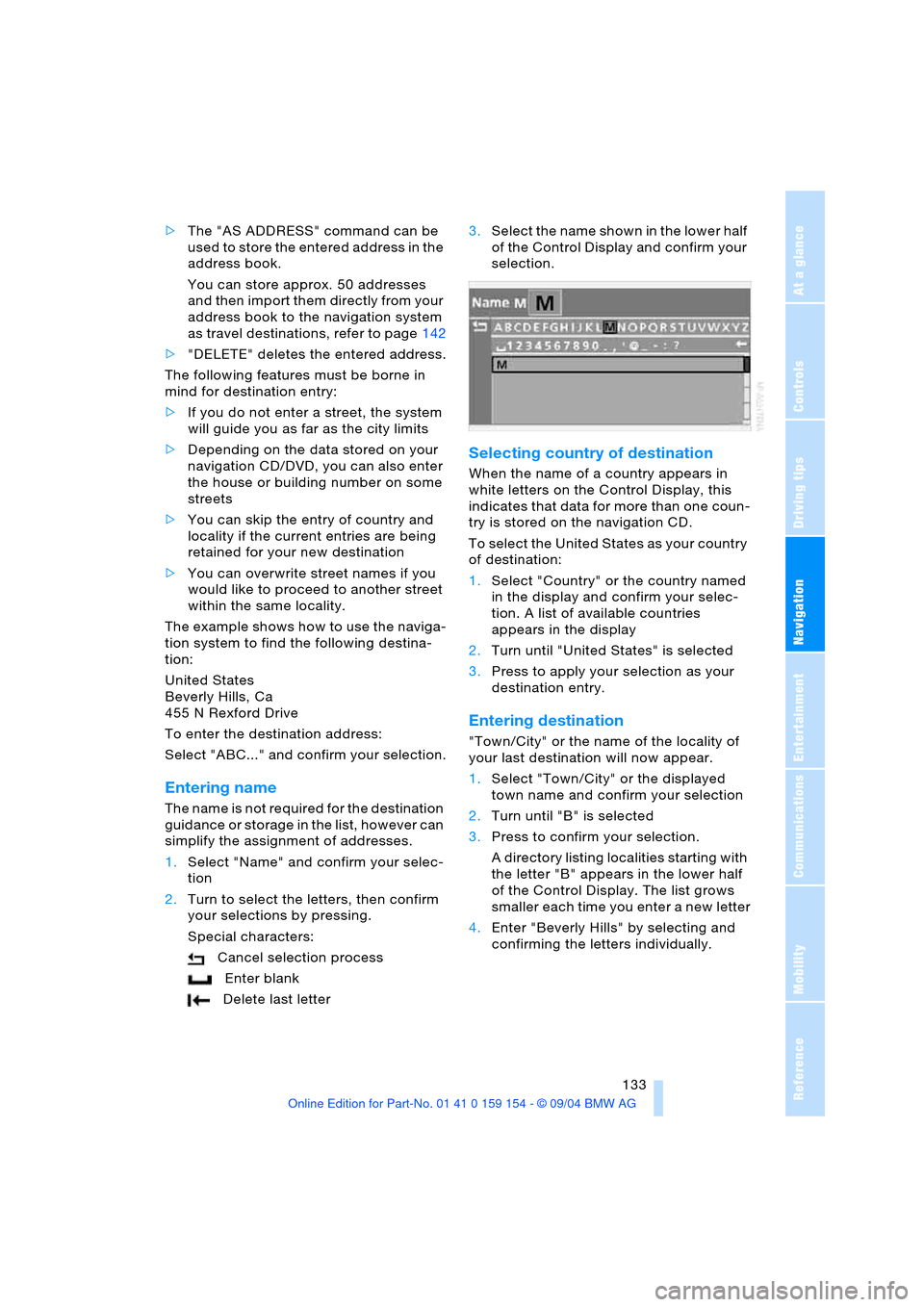
1.Select "Name" and confirm your selec-
tion
2.Turn to select the letters, then confirm
your selections by pressing.
Special characters:
Cancel selection process
Enter blank
Delete last letter3.Select the name shown in the lower half
of the Control Display and confirm your
selection.
Selecting country of destination
When the name of a country appears in
white letters on the Control Display, this
indicates that data for more than one coun-
try is stored on the navigation CD.
To select the United States as your country
of destination:
1.Select "Country" or the country named
in the display and confirm your selec-
tion. A list of available countries
appears in the display
2.Turn until "United States" is selected
3.Press to apply your selection as your
destination entry.
Entering destination
"Town/City" or the name of the locality of
your last destination will now appear.
1.Select "Town/City" or the displayed
town name and confirm your selection
2.Turn until "B" is selected
3.Press to confirm your selection.
A directory listing localities starting with
the letter "B" appears in the lower half
of the Control Display. The list grows
smaller each time you enter a new letter
4.Enter "Beverly Hills" by selecting and
confirming the letters individually.
Page 136 of 239
Destination entry
134 Special characters:
Cancel selection process
Enter blank
Delete last letter
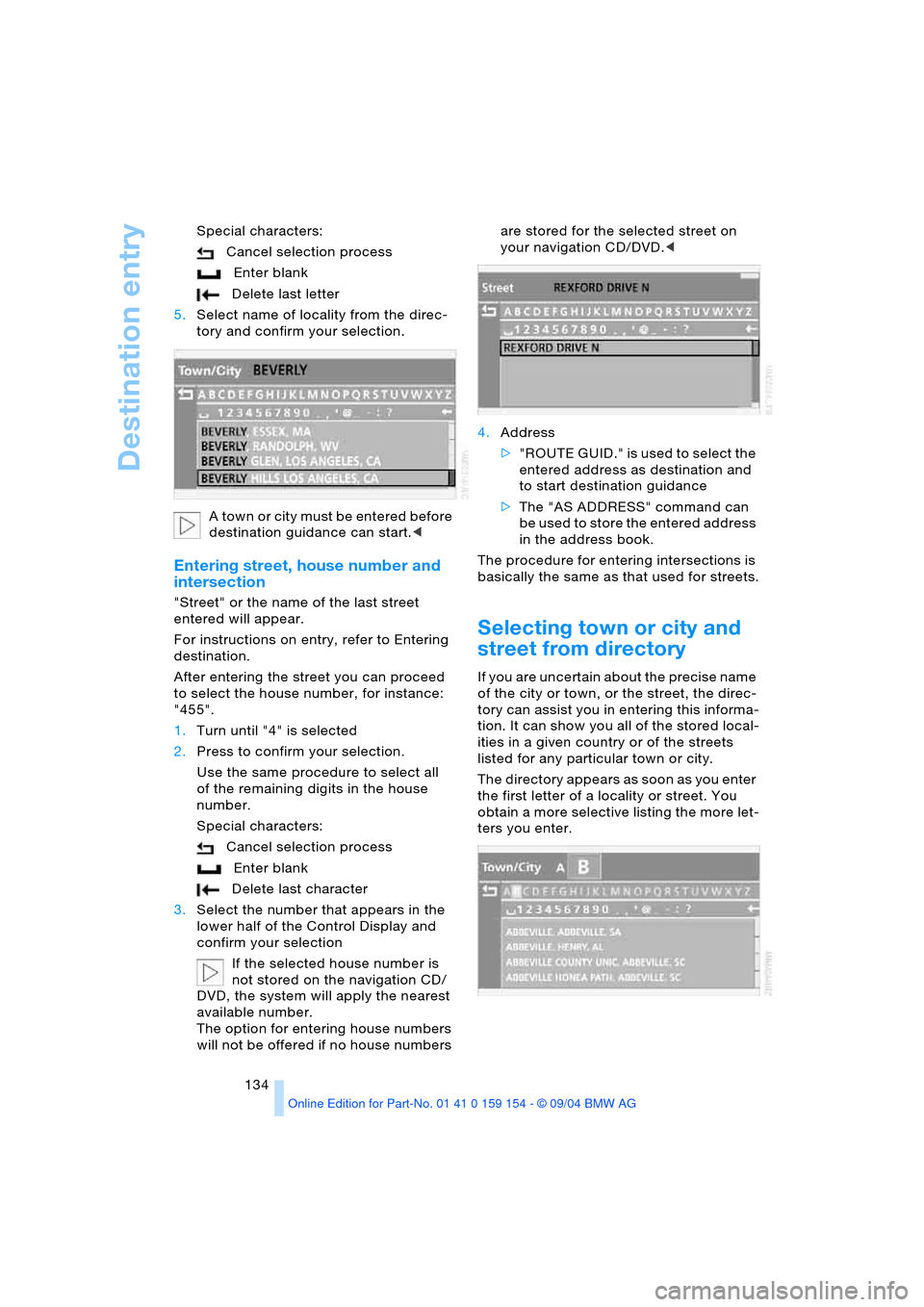
5.Select name of locality from the direc-
tory and confirm your selection.
A t o w n o r c i t y m u s t b e e n t e r e d b e f o r e
destination guidance can start.<
Entering street, house number and
intersection
"Street" or the name of the last street
entered will appear.
For instructions on entry, refer to Entering
destination.
After entering the street you can proceed
to select the house number, for instance:
"455".
1.Turn until "4" is selected
2.Press to confirm your selection.
Use the same procedure to select all
of the remaining digits in the house
number.
Special characters:
Cancel selection process
Enter blank
Delete last character
3.Select the number that appears in the
lower half of the Control Display and
confirm your selection
If the selected house number is
not stored on the navigation CD/
DVD, the system will apply the nearest
available number.
The option for entering house numbers
will not be offered if no house numbers are stored for the selected street on
your navigation CD/DVD.<
4.Address
>" R O U T E G U I D . " i s u s e d t o s e l e c t t h e
entered address as destination and
to start destination guidance
>The "AS ADDRESS" command can
be used to store the entered address
in the address book.
The procedure for entering intersections is
basically the same as that used for streets.
Selecting town or city and
street from directory
If you are uncertain about the precise name
of the city or town, or the street, the direc-
tory can assist you in entering this informa-
tion. It can show you all of the stored local-
ities in a given country or of the streets
listed for any particular town or city.
The directory appears as soon as you enter
the first letter of a locality or street. You
obtain a more selective listing the more let-
ters you enter.