battery BMW 760I 2007 E65 Owner's Guide
[x] Cancel search | Manufacturer: BMW, Model Year: 2007, Model line: 760I, Model: BMW 760I 2007 E65Pages: 254, PDF Size: 7.98 MB
Page 219 of 254
Mobility
217Reference
At a glance
Controls
Driving tips
Communications
Navigation
Entertainment
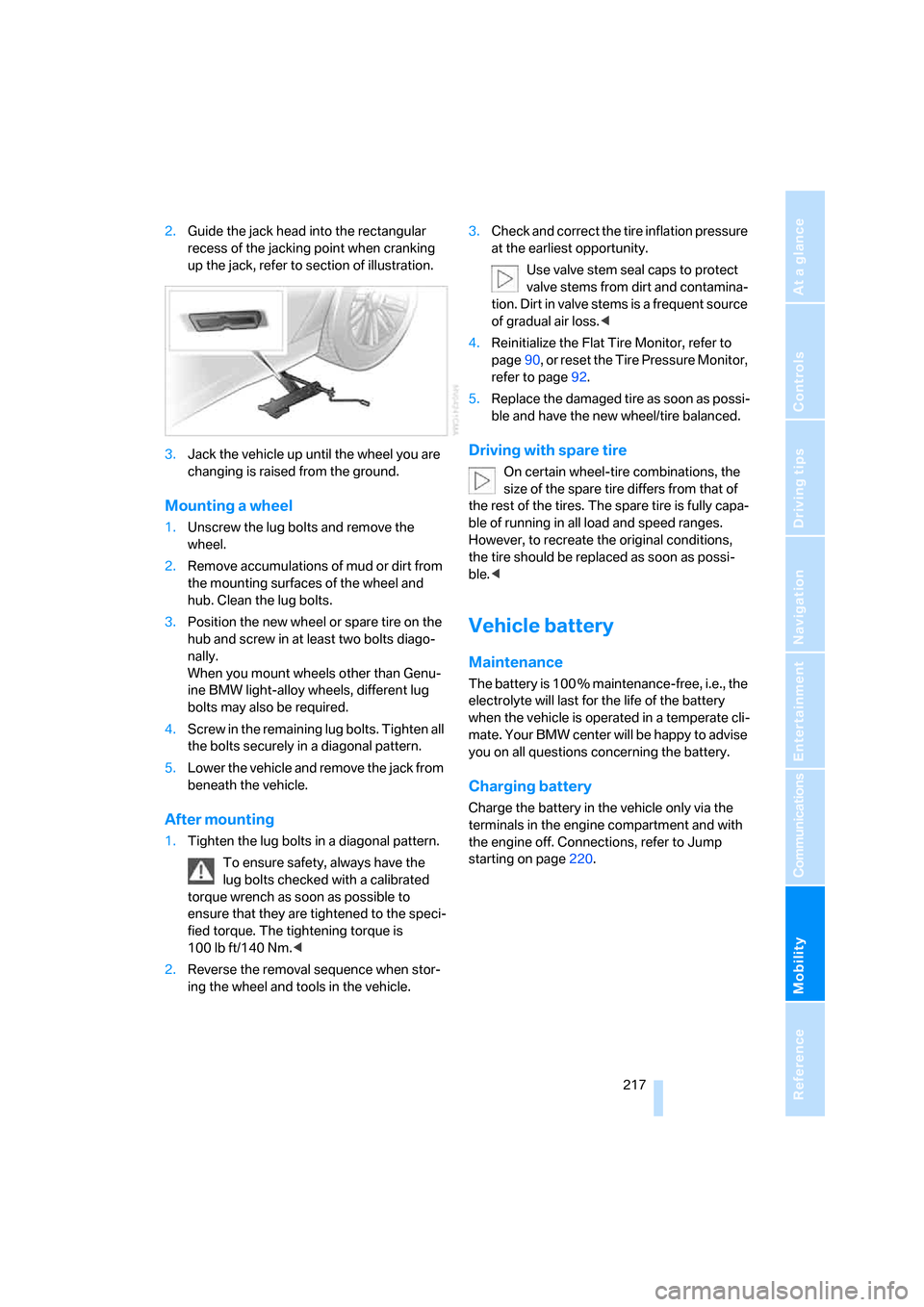
2.Guide the jack head into the rectangular
recess of the jacking point when cranking
up the jack, refer to section of illustration.
3.Jack the vehicle up until the wheel you are
changing is raised from the ground.
Mounting a wheel
1.Unscrew the lug bolts and remove the
wheel.
2.Remove accumulations of mud or dirt from
the mounting surfaces of the wheel and
hub. Clean the lug bolts.
3.Position the new wheel or spare tire on the
hub and screw in at least two bolts diago-
nally.
When you mount wheels other than Genu-
ine BMW light-alloy wheels, different lug
bolts may also be required.
4.Screw in the remaining lug bolts. Tighten all
the bolts securely in a diagonal pattern.
5.Lower the vehicle and remove the jack from
beneath the vehicle.
After mounting
1.Tighten the lug bolts in a diagonal pattern.
To ensure safety, always have the
lug bolts checked with a calibrated
torque wrench as soon as possible to
ensure that they are tightened to the speci-
fied torque. The tightening torque is
100lbft/140Nm.<
2.Reverse the removal sequence when stor-
ing the wheel and tools in the vehicle.3.Check and correct the tire inflation pressure
at the earliest opportunity.
Use valve stem seal caps to protect
valve stems from dirt and contamina-
tion. Dirt in valve stems is a frequent source
of gradual air loss.<
4.Reinitialize the Flat Tire Monitor, refer to
page90, or reset the Tire Pressure Monitor,
refer to page92.
5.Replace the damaged tire as soon as possi-
ble and have the new wheel/tire balanced.
Driving with spare tire
On certain wheel-tire combinations, the
size of the spare tire differs from that of
the rest of the tires. The spare tire is fully capa-
ble of running in all load and speed ranges.
However, to recreate the original conditions,
the tire should be replaced as soon as possi-
ble.<
Vehicle battery
Maintenance
The battery is 100 % maintenance-free, i.e., the
electrolyte will last for the life of the battery
when the vehicle is operated in a temperate cli-
mate. Your BMW center will be happy to advise
you on all questions concerning the battery.
Charging battery
Charge the battery in the vehicle only via the
terminals in the engine compartment and with
the engine off. Connections, refer to Jump
starting on page220.
Page 220 of 254
Replacing components
218
Battery switch
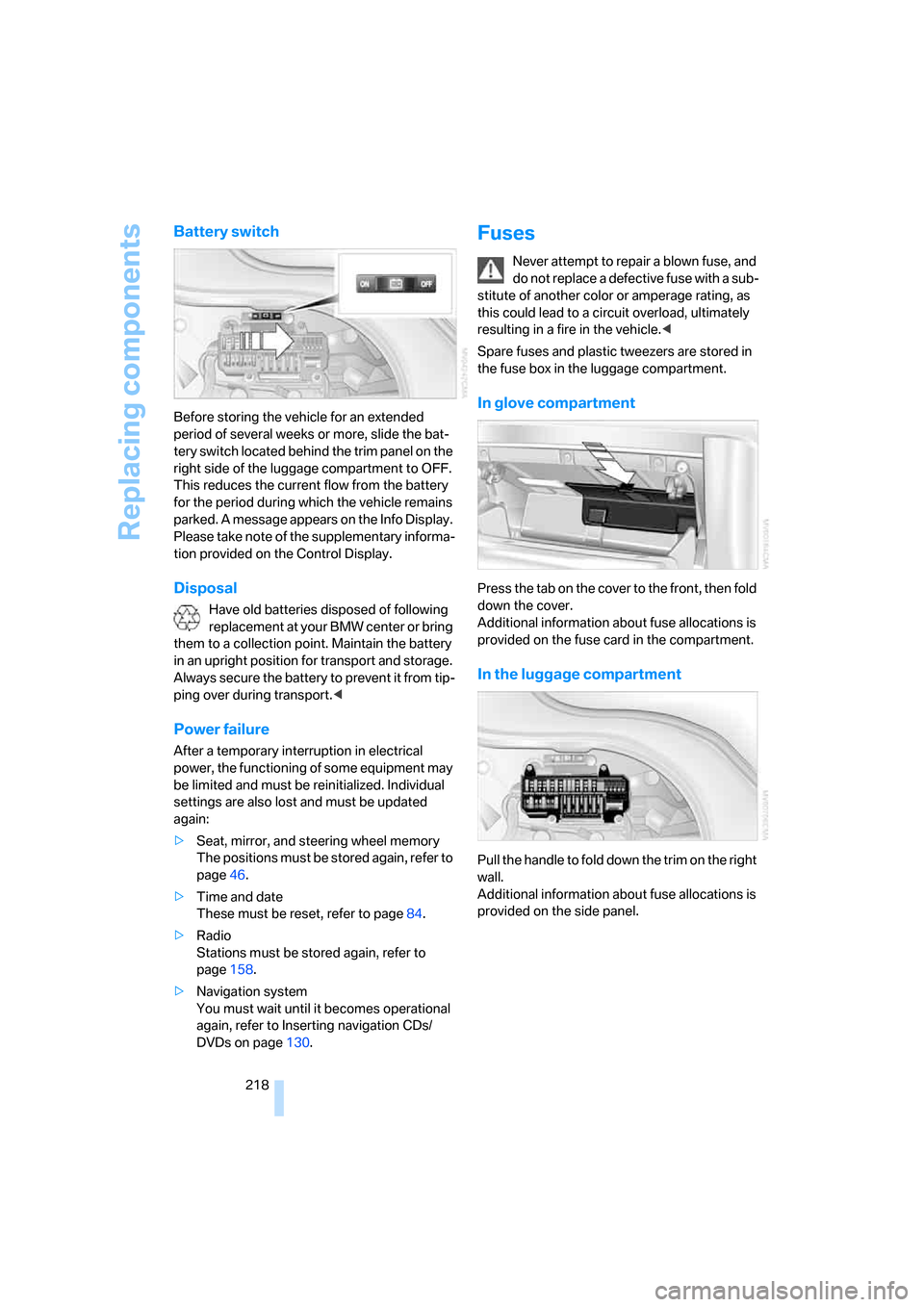
Before storing the vehicle for an extended
period of several weeks or more, slide the bat-
tery switch located behind the trim panel on the
right side of the luggage compartment to OFF.
This reduces the current flow from the battery
for the period during which the vehicle remains
parked. A message appears on the Info Display.
Please take note of the supplementary informa-
tion provided on the Control Display.
Disposal
Have old batteries disposed of following
replacement at your BMW center or bring
them to a collection point. Maintain the battery
in an upright position for transport and storage.
Always secure the battery to prevent it from tip-
ping over during transport.<
Power failure
After a temporary interruption in electrical
power, the functioning of some equipment may
be limited and must be reinitialized. Individual
settings are also lost and must be updated
again:
>Seat, mirror, and steering wheel memory
The positions must be stored again, refer to
page46.
>Time and date
These must be reset, refer to page84.
>Radio
Stations must be stored again, refer to
page158.
>Navigation system
You must wait until it becomes operational
again, refer to Inserting navigation CDs/
DVDs on page130.
Fuses
Never attempt to repair a blown fuse, and
do not replace a defective fuse with a sub-
stitute of another color or amperage rating, as
this could lead to a circuit overload, ultimately
resulting in a fire in the vehicle.<
Spare fuses and plastic tweezers are stored in
the fuse box in the luggage compartment.
In glove compartment
Press the tab on the cover to the front, then fold
down the cover.
Additional information about fuse allocations is
provided on the fuse card in the compartment.
In the luggage compartment
Pull the handle to fold down the trim on the right
wall.
Additional information about fuse allocations is
provided on the side panel.
Page 222 of 254
Giving and receiving assistance
220 Select "BMW Assist" if you have applied for this
information service, refer to Roadside Assis-
tance on page190.
Warning triangle*
The warning triangle is conveniently stored in
the onboard tool kit mounted on the inside of
the luggage compartment lid.
First-aid kit*
The first-aid kit is also located in the container
of the onboard tool kit.
Some of the articles contained in the first-aid kit
have a limited service life. Check the expiration
dates of the contents regularly and replace the
contents concerned in a timely fashion as
needed.
Jump starting
When your battery is discharged, you can use
two jumper cables to start your vehicle with
power from the battery in a second vehicle. You
can also use the same method to help start
another vehicle. Use only jumper cables with
fully-insulated terminal clamps.
To avoid the risk of potentially fatal injury,
always avoid all contact with electrical
components while the engine is running. Care-
fully adhere to the following sequence, both to
prevent damage to one or both vehicles, and to
guard against possible personal injury.<
Preparing
1.Check whether the battery of the other
vehicle has a voltage of 12 Volts and
approximately the same capacitance in Ah.
This information is listed on the battery.
2.Switch off the engine of the assisting vehi-
cle.
3.Switch off any electrical systems and com-
ponents in both vehicles.
Make sure that there is no contact
between the bodywork of the two vehi-
cles; otherwise, there is a danger of short cir-
cuits.<
Connecting jumper cables
To avoid personal injury from sparks, fol-
low this sequence when connecting jum-
per cables.<
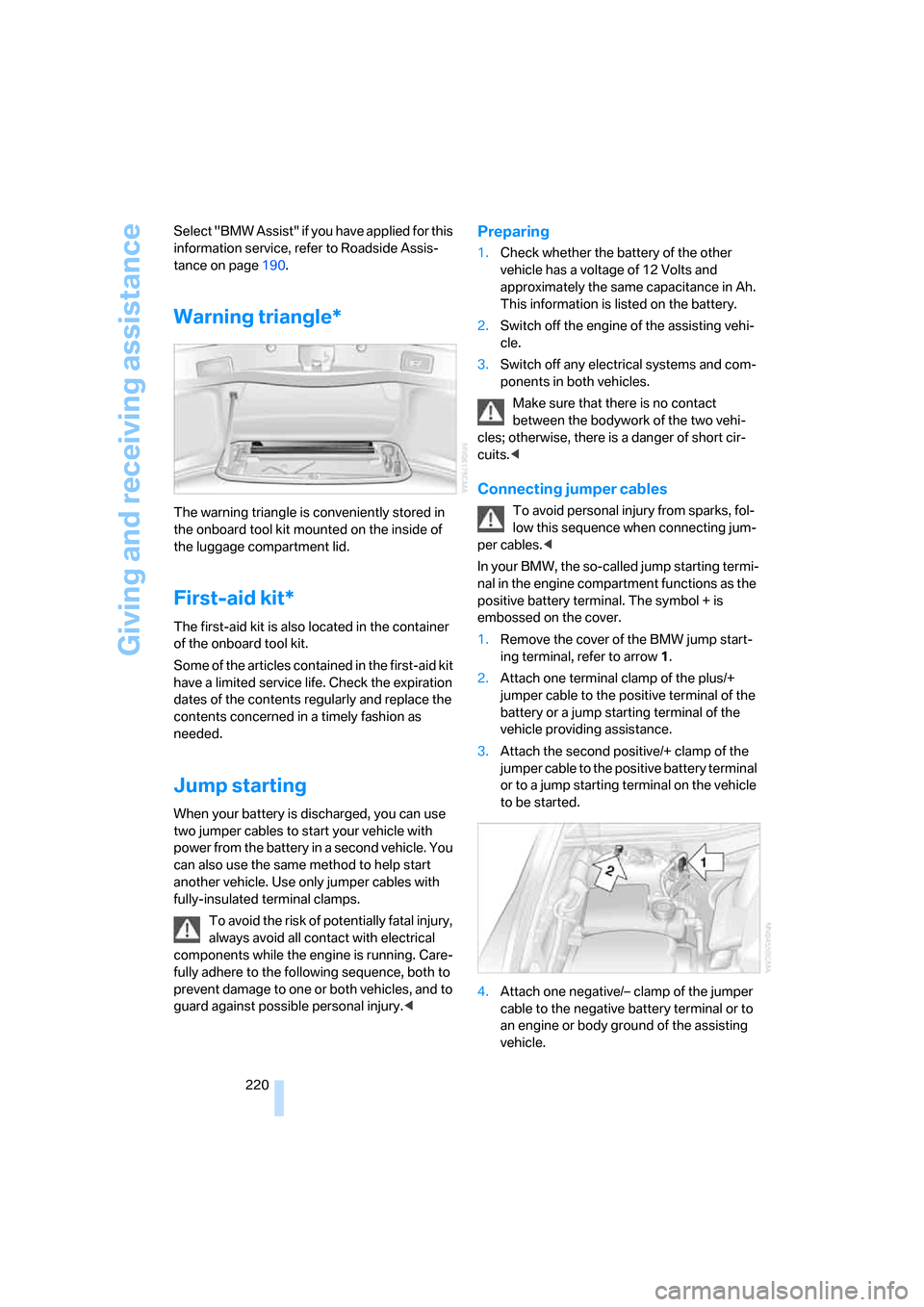
In your BMW, the so-called jump starting termi-
nal in the engine compartment functions as the
positive battery terminal. The symbol + is
embossed on the cover.
1.Remove the cover of the BMW jump start-
ing terminal, refer to arrow1.
2.Attach one terminal clamp of the plus/+
jumper cable to the positive terminal of the
battery or a jump starting terminal of the
vehicle providing assistance.
3.Attach the second positive/+ clamp of the
jumper cable to the positive battery terminal
or to a jump starting terminal on the vehicle
to be started.
4.Attach one negative/– clamp of the jumper
cable to the negative battery terminal or to
an engine or body ground of the assisting
vehicle.
Page 223 of 254
Mobility
221Reference
At a glance
Controls
Driving tips
Communications
Navigation
Entertainment
Your BMW has a special nut that serves as a
body ground or negative terminal, refer to
arrow2.
5.Attach the second negative/– clamp of the
jumper cable to the negative battery termi-
nal or to an engine or body ground on the
vehicle to be started.
Starting engine
1.Start the engine of the assisting vehicle and
allow it to run for several minutes at a fast
idle.
2.Start the engine on the other vehicle in the
usual way.
If the first start attempt is not successful,
wait a few minutes before another attempt
in order to allow the discharged battery to
recharge.
3.Allow the engines to run for several min-
utes.
4.Disconnect the jumper cables again in the
reverse sequence.
If need be, have the battery checked and
recharged.
Never use spray fluids to start the
engine.<
Towing and tow starting
Observe applicable laws and regulations
for tow starting and towing.<
Do not transport any passengers other
than the driver in a vehicle that is being
towed.<
Using tow fitting
The threaded tow fitting is stored in the
onboard tool kit and must always remain in the
vehicle. It can be screwed in at the front or rear
of the BMW.
Only use the tow fitting that comes with
the vehicle and screw it in as far as it will
go. Use the tow fitting for towing only on roads.
Avoid lateral loading of the tow fitting, e.g. do not lift the vehicle by the tow fitting. Otherwise,
damage to the tow fitting and the vehicle can
occur.<
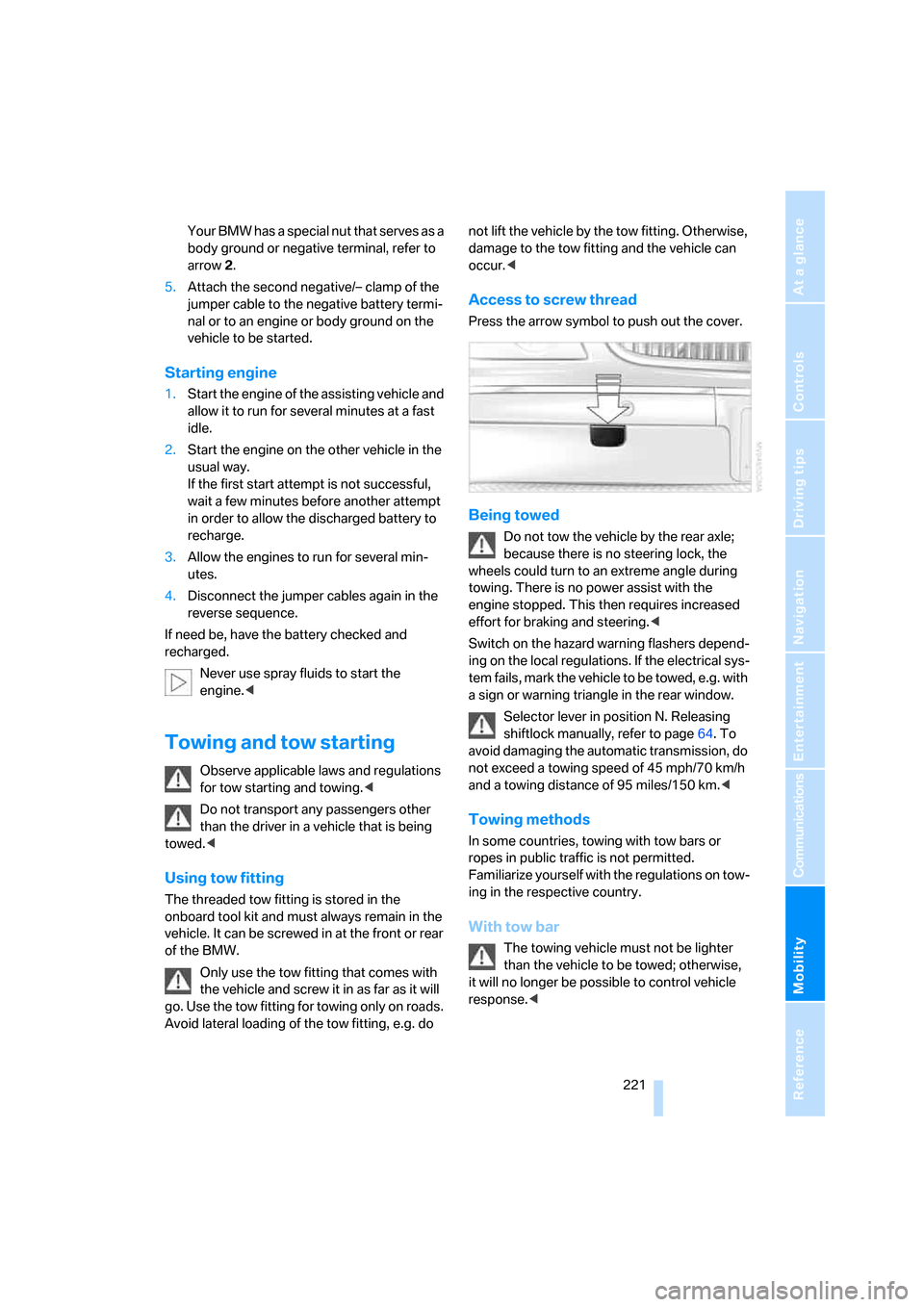
Access to screw thread
Press the arrow symbol to push out the cover.
Being towed
Do not tow the vehicle by the rear axle;
because there is no steering lock, the
wheels could turn to an extreme angle during
towing. There is no power assist with the
engine stopped. This then requires increased
effort for braking and steering.<
Switch on the hazard warning flashers depend-
ing on the local regulations. If the electrical sys-
tem fails, mark the vehicle to be towed, e.g. with
a sign or warning triangle in the rear window.
Selector lever in position N. Releasing
shiftlock manually, refer to page64. To
avoid damaging the automatic transmission, do
not exceed a towing speed of 45 mph/70 km/h
and a towing distance of 95 miles/150 km.<
Towing methods
In some countries, towing with tow bars or
ropes in public traffic is not permitted.
Familiarize yourself with the regulations on tow-
ing in the respective country.
With tow bar
The towing vehicle must not be lighter
than the vehicle to be towed; otherwise,
it will no longer be possible to control vehicle
response.<
Page 235 of 254
Reference 233
At a glance
Controls
Driving tips
Communications
Navigation
Entertainment
Mobility
Audio152
– controls152
– switching on/off153
– tone control153
– volume153
"AUDIO", DVD changer173
Audio device, external114
Audio mode152
Automatic
– air distribution104
– air volume104
– cruise control67,69
– headlamp control100
– luggage compartment lid
operation33,36
– service notification190
– station storage158
– steering wheel adjustment,
refer to Assistance getting in
and out52
Automatic car wash, refer to
Caring for your vehicle
brochure
Automatic climate control
– adjusting temperature105
– AUTO program104
– defrosting windows and
removing condensation106
– maximum cooling106
– rear climate control108
– rear refrigerator117
– residual heat106
– settings on Control
Display104
– switching cooling function
on and off manually107
– switching on and off105
Automatic closing of doors
and luggage compartment
lid, refer to Automatic Soft
Close35
Automatic curb monitor51
Automatic garage door
opener111
Automatic Hold59
– activation/deactivation59
– parking60
– programmable buttons52Automatic lighting
– refer to Automatic headlamp
control100
– refer to Daytime running
lamps100
– refer to Interior lamps101
– refer to Pathway lighting100
Automatic recirculated-air
control AUC105
Automatic soft closing
– doors
35
– luggage compartment lid36
Automatic station search157
Automatic transmission with
Steptronic62
– buttons on steering
wheel63
– interlock62
– manually unlocking and
locking transmission lock64
– shiftlock62
– towing221
– tow starting222
"AUTO P"
– activating/deactivating
Automatic Hold59
– programmable buttons52
AUTO program, automatic
climate control104
– adjusting intensity104
"Autostore list", radio156
"AUX", external audio
device169
AUX-In
– port114
– refer to External audio
device169
"AUX level", external audio
device169
Average fuel consumption77
– setting units84
Average speed77
– setting units84
"Avoid ferries",
navigation142
"Avoid highway",
navigation142
Avoiding unintentional
alarms38"Avoid route", navigation147
"Avoid sect.", navigation147
"Avoid tolls", navigation142
Avoid tolls, navigation142
Axle loads, refer to
Weights228
"A-Z", telephone185
B
Backrest contour, refer to
Lumbar support
adjustment44
Backrests, refer to Seat
adjustment44
Backrest width adjustment,
refer to Front comfort seat
adjustment44
Backup lamp, replacing
bulbs215
"Balance", balance and
fader154
Bar, refer to Tow bar221
Bass, refer to Tone
control154
"Bass", treble and bass154
Battery217
– jump starting220
– switch218
Battery change, remote
control in Comfort
Access39
"BC", computer77
Belts, refer to Safety belts48
Beverage holder, refer to Cup
holders115
Blower, refer to Air
volume106,108
"BLUETOOTH"183
Bluetooth link, activating/
deactivating183
BMW Assist189
– activating193
– "BMW Assist"193
– "BMW center"190
– "Concierge"192
– info service192
– "Roadside Assistance"190
– services offered189
Page 236 of 254
Everything from A to Z
234 BMW homepage4
BMW Maintenance
System211
BMW Night Vision97
– activating/deactivating98
– cleaning camera99
– making settings98
Boot, refer to Luggage
compartment119
Bottle holder, refer to Cup
holders115
Brake assistant87
Brake force display94
Brake lamp, adaptive, refer to
Brake force display94
Brake lamps
– brake force display94
– replacing bulbs214
Brake rotors, refer to
Corrosion on brake
rotors123
Brakes123
– ABS87
– brake force display94
– breaking-in122
– parking brake58
Brake system
– BMW Maintenance
System211
– breaking-in122
– refer to Braking safely123
Breakdown service, refer to
Roadside
Assistance190,219
Breaking-in122
Breaking-in differential, refer
to Engine and
differential122
"Brightness"
– BMW Night Vision99
– DVD changer172
– on Control Display85
Bulbs, replacing213
"button", programmable
buttons52
Buttons
– next to the controller16
– on steering wheel11
C
"Calculate", refer to
Bypassing route
sections147
Calculating distance to
destination77
California Proposition 65
Warning6
"CALL"192
Call
– accepting184
– automatically accepting,
refer to Hands-free
system179
– rejecting184
– touch tone dialing180
– while away, refer to Dialing
numbers stored in a list186
Call back list, refer to Dialing a
number from phone book or
from numbers stored in a
list185
Calling
– from phone book185
– from Top 8 list186
– redialing185
– with retracting telephone
keypad179
Can holder, refer to Cup
holders115
Capacities229
– luggage compartment228
Car battery, refer to Vehicle
battery217
Car care, refer to Caring for
your vehicle brochure
Car-care products, refer to
Caring for your vehicle
brochure
"Car Data"79,81
Care, refer to Caring for your
vehicle brochure
Caring for the upholstery, refer
to Caring for your vehicle
brochure
Caring for the vehicle finish,
refer to Caring for your
vehicle brochureCar key, refer to Remote
control/key30
Carpet care, refer to Caring for
your vehicle brochure
Car radio, refer to Radio156
Car wash123
– also refer to Caring for your
vehicle brochure
– with Comfort Access39
Catalytic converter, refer to
Hot exhaust system122
"Categories", radio161
CBC Cornering Brake
Control87
CBS Condition Based
Service211
"CD", CD player163
"CDC", CD changer166
CD changer165
– compressed audio files166
– controls152
– fast forward, reverse
167
– installation location165
– random sequence167
– sampling167
– selecting a CD166
– selecting track166
– starting165
– tone control153
– volume153
CD player163
– controls152
– fast forward, reverse164
– random sequence164
– sampling163
– selecting tracks163
– starting163
– tone control153
– volume153
Center armrest
– front113
– rear114
Center console, refer to
Comfort features14
Central locking system31
– Comfort Access38
– from the inside34
"CHANGE", navigation138
Page 237 of 254
Reference 235
At a glance
Controls
Driving tips
Communications
Navigation
Entertainment
Mobility
Changes, technical, refer to
For your own safety5
Changing scale, map view in
navigation145
Changing settings on Control
Display84
Changing time display84
Changing units of measure on
Control Display84
Changing wheels215
– run-flat tires205
"Channels", radio160
Check Control80
– "CHECK"81
– CHECK button81
Child's seats, refer to
Installing child restraint
systems54
Child restraint fixing system
LATCH55
Child restraint systems54
Child-safety lock56
Chrome parts, refer to Caring
for your vehicle brochure
Chrome-plated parts, care,
refer to Caring for your
vehicle brochure
Cigarette lighter116
"City / Postal Code",
navigation133
Cleaning, vehicle, refer to
Caring for your vehicle
brochure
Cleaning headlamps, tank
capacity, refer to Wiper fluid
filler neck66
Cleaning windshield65
"Climate"
– activating activation time for
parked car ventilation110
– preselecting activation time
for parked car
ventilation109
– rear climate control108
– rear refrigerator117
– switching parked car
ventilation on and off
directly109Climate comfort
windshield126
Clock75
– 12/24-hour mode84
– also refer to Assistance
window21
– display format84
– setting84
"Clock", settings84
Closing
– from inside34
– from outside32
Clothes hooks114
Cockpit10
Cold start, refer to Starting
engine57
"Color", DVD changer172
Combined instrument, refer to
Info Display12
"Comfort", EDC Electronic
Damper Control
90
Comfort Access38
– before driving into a car
wash39
– changing battery39
Comfort features14
Comfort program, EDC
Electronic Damper
Control90
Comfort seat44
– in rear45
"Communication", phone184
Compact Disc
– refer to CD changer165
– refer to CD player163
Compartments, refer to
Storage compartments113
Compressed audio files,
CD changer166
Computer76
– displays on Control
Display77
– units of measure and display
format84
"Concierge", BMW Assist192
Condensation, refer to When
vehicle is parked123Condition Based Service
CBS211
Connecting car vacuum
cleaner, refer to Power
socket116
Consumption, refer to
Average fuel
consumption77
Consumption statistics, refer
to Average fuel
consumption77
"Continue route guidance?",
navigation144
"Contrast"
– BMW Night Vision98
– DVD changer172
Control Center, refer to
iDrive16
Control Display
– rear seat screen21
– refer to iDrive16
– setting brightness85
Controller
– programmable button52
– rear seat screen21
– refer to iDrive16
Controls and displays10,14
Coolant210
– level210
– temperature76
Cooler, refer to Rear
refrigerator117
Cooling
– maximum106,108
– refer to AUTO program
104
– refer to Rear climate
control108
– refer to Rear refrigerator117
– refer to Switching cooling
function on and off
manually107
Copyright2
Cornering Brake Control
CBC87
Cradle for mobile phone, refer
to Using snap-in
adapter178
Page 238 of 254
Everything from A to Z
236 Creating voice address
book141
Cruise control67,69
– refer to Active cruise
control69
– refer to Programmable
cruise control67
Cruising range77
Cup holders115
Curb weight, refer to
Weights228
Current consumption, refer to
Energy Control77
Currentness of Owner's
Manual5
Current position
– displaying147
– storing139
Cursor for navigation, refer to
Selecting destination via
map135
"Curve mode", BMW Night
Vision98
Customizing settings, refer to
Key Memory31
D
Dashboard, refer to
Cockpit10
Data226
– dimensions227
– engine226
– filling capacities229
– weights228
Date, refer to Assistance
window20
– display format84
– setting84
"Date", setting84
Daytime running lamps100
"DEACTIV.", BMW Assist193
Deactivating front passenger
airbags54
Defroster, rear window107
Defrosting windows106Defrosting windows and
removing condensation106
Dehumidifying air, refer to
Cooling function, switching
on and off manually107
"DELETE", navigation140
Deleting address book140
Deleting entire list, refer to
Deleting entries in lists186
Deleting entries in lists186
Destination for navigation131
– selecting using voice141
– selecting via information135
Destination list in navigation
system, deleting138
"Dest. input", navigation131
"Dest. list", navigation138
Dialed numbers, refer to
Redialing185
Diamond button52
Digital clock75
Dimensions227
Directional indicators, refer to
Turn signals65
Direction announcements,
refer to Route guidance by
voice instructions146
Direction instructions, refer to
Voice instructions146
Directory, refer to
– Address book139
– Phone book186
Displacement, refer to Engine
specifications226
Display, refer to
– iDrive16
– Info Display12
Display illumination, refer to
Instrument lighting101
Displaying track information,
CD changer167
Display lighting, refer to
Instrument lighting101
Display of malfunctions, refer
to Check Control80Disposal
– remote control battery39
– vehicle battery218
Distance to destination77
– refer to Remaining
distance77
– units of measure84
Distance warning, refer to
PDC Park Distance
Control86
Door entry lighting, refer to
Interior lamps101
Door key, refer to Remote
control/key30
Door lock34
Doors
– unlocking and locking from
inside34
– unlocking and locking from
outside32
DOT Quality Grades203
Draft-free ventilation107
Driving lamps, refer to Parking
lamps/low beams100
Driving notes122
Driving route, refer to
Displaying route145
Driving stability control87
Driving tips, refer to Driving
notes122
Dry air, refer to Cooling
function107
DSC Dynamic Stability
Control87
– indicator lamp13
"DTC"88
DTC Dynamic Traction
Control88
– indicator lamp13
"DVD", DVD changer171
Page 246 of 254
Everything from A to Z
244 Radio key, refer to Remote
control/key30
Radio ready state57
– with Comfort Access39
Rain sensor65
"RDS", radio159
RDS Radio Data System159
Reading lamps102
"Rear", rear screen22
Rear air conditioner
– cooling adjustment108
– switching off108
– switching on/off via
iDrive108
Rear armrest, refer to Center
armrest114
Rear climate control108
– rear refrigerator117
"Rear climate control", rear
climate control108
Rear lamps
– refer to Tail lamps214
– replacing bulbs214
Rear lock, rear seat screen22
"Rear refrigerator"117
Rear refrigerator117
Rear-seat area ventilation107
Rear seat backrests, electric,
refer to Rear comfort seat
adjustment45
Rear seats
– adjusting45
– adjusting passenger seat
from rear45
– head restraint adjustment47
– heating49
Rear seat screen21
Rearview mirror50
Rear window blind, refer to
Sun blinds112
Rear window defroster107
Rear window safety switch40
Reception, radio
– refer to Changing
station156
– refer to Updating stations in
receiving range158
Rechargeable flashlight113"Recirc. air", programmable
buttons52
Recirculated-air mode,
automatic climate
control105
Reclining seat, refer to Seat
adjustment44
Recording time, refer to
Stopwatch83
Reflectors, refer to Tail
lamps214
Refueling198
Remaining distance
– for service required78
– refer to Cruising range77
Remaining distance to
destination77
Remote control30
– changing battery39
– Comfort Access38
– garage door opener111
– luggage compartment lid33
– malfunction33
Removing fog on the
windows106
Removing head restraints,
rear seats47
Replacement fuses218
Replacement key, refer to
New remote controls30
Replacement of tires205
– changing wheels215
– tire replacement205
Replacing bulbs, refer to
Lamps and bulbs213
Reporting an accident, refer
Initiating an emergency
call219
Reserve, fuel, refer to Fuel
gauge76
"RESET"
– Tire Pressure Monitor92
– tone control155
Resetting tone settings155
"Reset tire pressure", Flat Tire
Monitor90
Residual heat106Restraint systems
– for children54
– refer to Safety belts48
Retaining straps, refer to
Securing cargo125
Retracting telephone
keypad179
Reverse
– CD changer167
– CD player164
– DVD changer172
Reverse gear, automatic
transmission with
Steptronic63
"Right", seat heating49
"RND"
– CD changer167
– CD player164
Road map135
Roadside Assistance219
Roadside parking lamps101
Roadside service, refer to
Roadside Assistance190
Roaming display, refer to
Status lines20
Roller sun blind, refer to Sun
blinds112
Roof load capacity
228
Roof-mounted luggage
rack125
Rope, refer to Towing
methods221
Rotary pushbutton, refer to
iDrive16
Route
– bypassing sections147
– changing criteria142
– changing route146
– displaying145
– displaying streets or towns/
cities146
– selecting141
– selecting arrow display145
– selecting map view145
"Route guid.", navigation144
Page 249 of 254
Reference 247
At a glance
Controls
Driving tips
Communications
Navigation
Entertainment
Mobility
Storing vehicle, refer to Caring
for your vehicle brochure
Straps, refer to Loading124
"Street", navigation133
"SUBTITLE", DVD
changer173
Summer tires, refer to Wheels
and tires200
Sun blinds112
Sunglasses compartment115
"SVS active", voice command
system23
Switches
– all around the steering
wheel10
– in the comfort area14
Switch for battery218
Switching cooling function on
and off manually107
Switching ignition on and
off57
Switching off engine58
Switching off tilt alarm
sensor38
Switching on
– audio153
– CD changer165
– CD player163
– DVD changer171
– radio156
Symbols4
– indicator and warning
lamps13
T
Tachometer75
Tail lamps214
– replacing bulbs215
Tank capacity198
– also refer to Capacities229
Technical changes, refer to
For your own safety5
Technical data226
Telematics, refer to
BMW Assist189Telephone
– accepting calls184
– refer to Telephone
overview178
Telephoning,
requirements184
Temperature
– adjusting with automatic
climate control105
– changing units of
measure84
– outside temperature
warning75
– refer to Hot exhaust
system122
Temperature display
– interior temperature105
– outside temperature75
– setting units84
Temperature distribution,
seat heating49
Temperature of coolant, refer
to Coolant temperature76
Thawing windows, refer to
Defrosting windows and
removing condensation106
The right tires205
Thigh support adjustment,
refer to Seat adjustment44
Third brake lamp, refer to Tail
and brake lamps214
Three-point belt48
Through loading system117
Tightening torque for lug
bolts, refer to After
mounting217
Tilting down passenger-side
exterior mirror51
"Time", setting84
Time of arrival77
Timer, refer to Preselecting
switch-on times109
Tire inflation pressure200
– loss, refer to Indication of a
flat tire91
– loss, refer to Low tire
pressure message93Tire Pressure Monitor91
– resetting system92
– system limits92
– warning light93
Tire Quality Grading203
Tires
– age203
– breaking-in122
– changing215
– condition204
– damage204
– flat tire215
– inflation pressure200
– pressure monitoring, refer to
Flat Tire Monitor90
– pressure monitoring, refer to
TPM Tire Pressure
Monitor91
– replacing205
– run-flat tires205
– size203
– size, refer to New wheels and
tires205
– storage206
– tread204
– winter tires206
"Tires: FTM", Flat Tire
Monitor90
"Tires: TPM", Tire Pressure
Monitor92
"TITLE", DVD changer173
Tone153
– adjusting153
– resetting settings155
"Tone", tone control153
Tools, refer to Onboard tool
kit213
"TOP", DVD changer174
"TOP 8", telephone186
Top 8 on phone186
– deleting entire list186
– dialing phone number186
Torque
– engine226
– lug bolts, refer to After
mounting217
Touch tone dialing180
Tow fitting221