climate control BMW 760Li 2004 E66 User Guide
[x] Cancel search | Manufacturer: BMW, Model Year: 2004, Model line: 760Li, Model: BMW 760Li 2004 E66Pages: 232, PDF Size: 5.27 MB
Page 106 of 232
A congenial climate
104 The air conditioner comes on automatically
when you select the AUTO program.
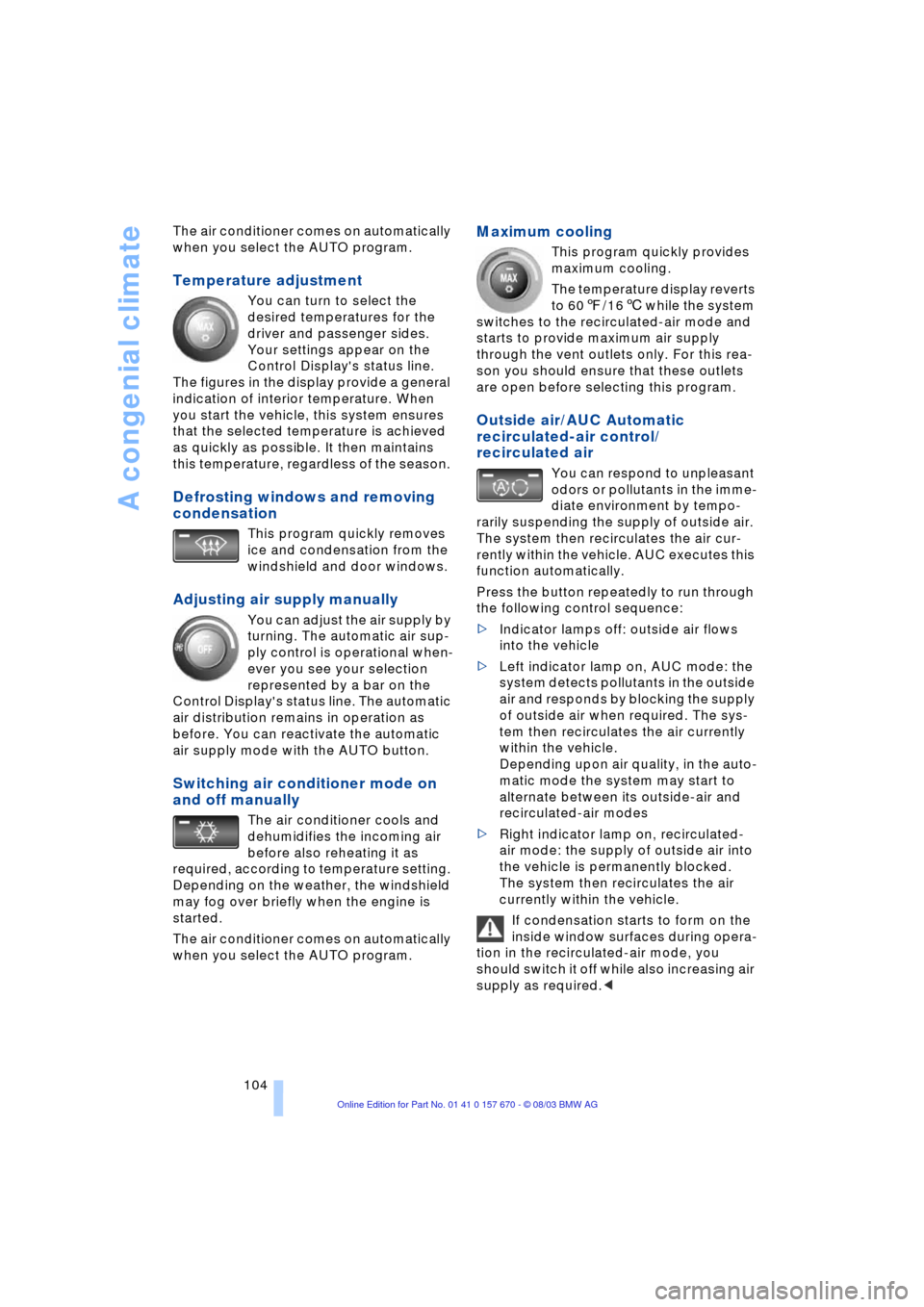
Temperature adjustment
You can turn to select the
desired temperatures for the
driver and passenger sides.
Your settings appear on the
Control Display's status line.
The figures in the display provide a general
indication of interior temperature. When
you start the vehicle, this system ensures
that the selected temperature is achieved
as quickly as possible. It then maintains
this temperature, regardless of the season.
Defrosting windows and removing
condensation
This program quickly removes
ice and condensation from the
windshield and door windows.
Adjusting air supply manually
You can adjust the air supply by
turning. The automatic air sup-
ply control is operational when-
ever you see your selection
represented by a bar on the
Control Display's status line. The automatic
air distribution remains in operation as
before. You can reactivate the automatic
air supply mode with the AUTO button.
Switching air conditioner mode on
and off manually
The air conditioner cools and
dehumidifies the incoming air
before also reheating it as
required, according to temperature setting.
Depending on the weather, the windshield
may fog over briefly when the engine is
started.
The air conditioner comes on automatically
when you select the AUTO program.
Maximum cooling
This program quickly provides
maximum cooling.
The temperature display reverts
to 607/166 while the system
switches to the recirculated-air mode and
starts to provide maximum air supply
through the vent outlets only. For this rea-
son you should ensure that these outlets
are open before selecting this program.
Outside air/AUC Automatic
recirculated-air control/
recirculated air
You can respond to unpleasant
odors or pollutants in the imme-
diate environment by tempo-
rarily suspending the supply of outside air.
The system then recirculates the air cur-
rently within the vehicle. AUC executes this
function automatically.
Press the button repeatedly to run through
the following control sequence:
>Indicator lamps off: outside air flows
into the vehicle
>Left indicator lamp on, AUC mode: the
system detects pollutants in the outside
air and responds by blocking the supply
of outside air when required. The sys-
tem then recirculates the air currently
within the vehicle.
Depending upon air quality, in the auto-
matic mode the system may start to
alternate between its outside-air and
recirculated-air modes
>Right indicator lamp on, recirculated-
air mode: the supply of outside air into
the vehicle is permanently blocked.
The system then recirculates the air
currently within the vehicle.
If condensation starts to form on the
inside window surfaces during opera-
tion in the recirculated-air mode, you
should switch it off while also increasing air
supply as required.<
Page 107 of 232
Controls
105Reference
At a glance
Driving tips
Communications
Navigation
Entertainment
Mobility
Residual heat mode
The system uses the warmth
stored in the engine to heat the
interior when the ignition is off,
for instance, while the vehicle
is stopped at a school to pick
up a child.
You can adjust the automatic climate con-
trol's settings when the ignition lock is in
the radio mode. The system blows heated
air into the interior in accordance with the
selected distribution pattern while the igni-
tion is off.
Provided that the engine has warmed
to its normal operating temperature
and the battery is charged, you can use this
function for up to 15 minutes after switch-
ing off the ignition. The LED within the but-
ton lights up to confirm compliance with
both of these conditions.<
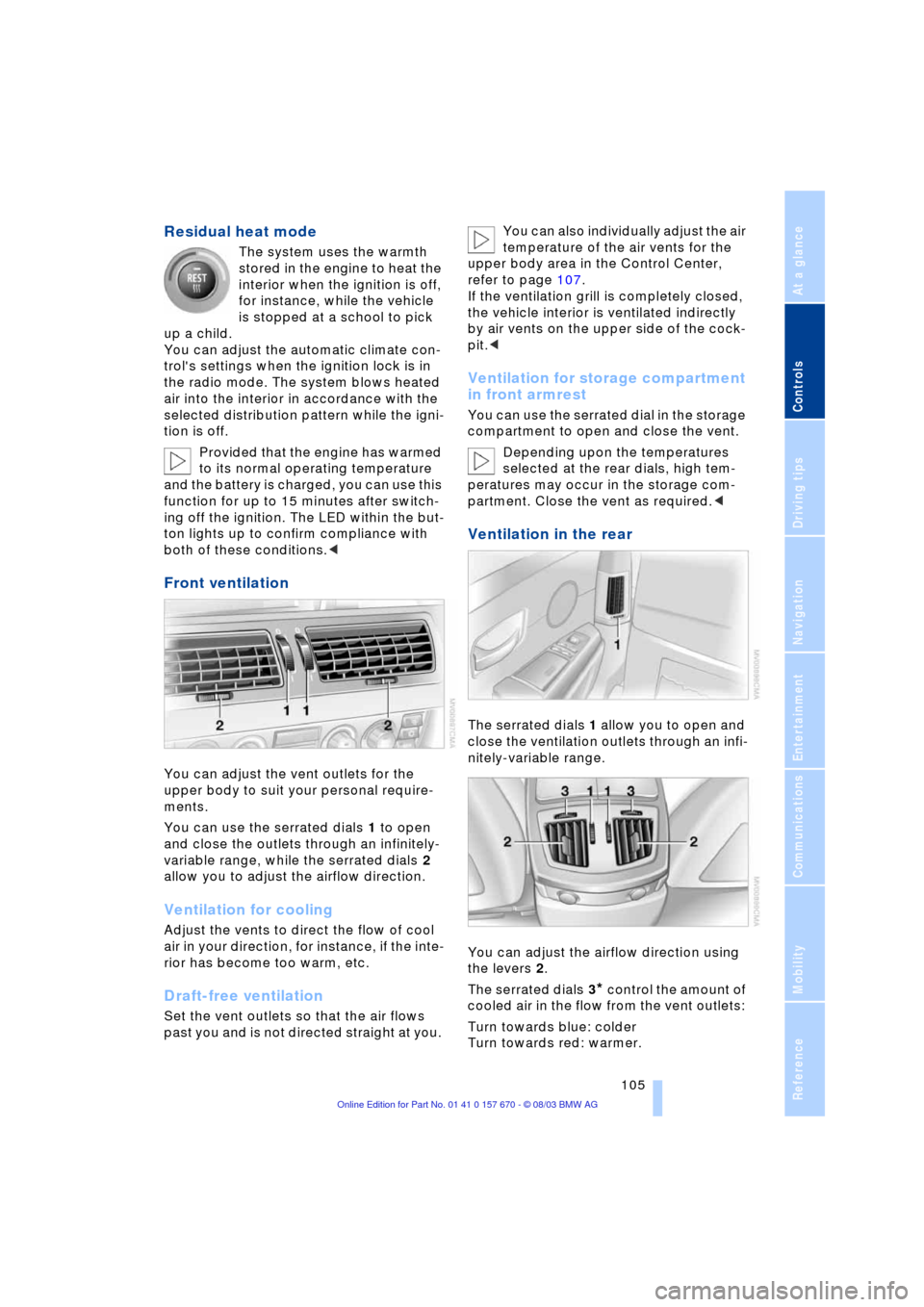
Front ventilation
You can adjust the vent outlets for the
upper body to suit your personal require-
ments.
You can use the serrated dials 1 to open
and close the outlets through an infinitely-
variable range, while the serrated dials 2
allow you to adjust the airflow direction.
Ventilation for cooling
Adjust the vents to direct the flow of cool
air in your direction, for instance, if the inte-
rior has become too warm, etc.
Draft-free ventilation
Set the vent outlets so that the air flows
past you and is not directed straight at you. You can also individually adjust the air
temperature of the air vents for the
upper body area in the Control Center,
refer to page 107.
If the ventilation grill is completely closed,
the vehicle interior is ventilated indirectly
by air vents on the upper side of the cock-
pit.<
Ventilation for storage compartment
in front armrest
You can use the serrated dial in the storage
compartment to open and close the vent.
Depending upon the temperatures
selected at the rear dials, high tem-
peratures may occur in the storage com-
partment. Close the vent as required.<
Ventilation in the rear
The serrated dials 1 allow you to open and
close the ventilation outlets through an infi-
nitely-variable range.
You can adjust the airflow direction using
the levers 2.
The serrated dials 3
* control the amount of
cooled air in the flow from the vent outlets:
Turn towards blue: colder
Turn towards red: warmer.
Page 108 of 232
A congenial climate
106 This function allows you to make minor
adjustments for maximum comfort while
also letting you vary temperatures within
the storage compartment.
Switching off automatic climate
control*
The air supply, the heater and
the air conditioner are all
switched off. You can restart
the automatic climate control
by pressing any of its buttons
except the REST button.
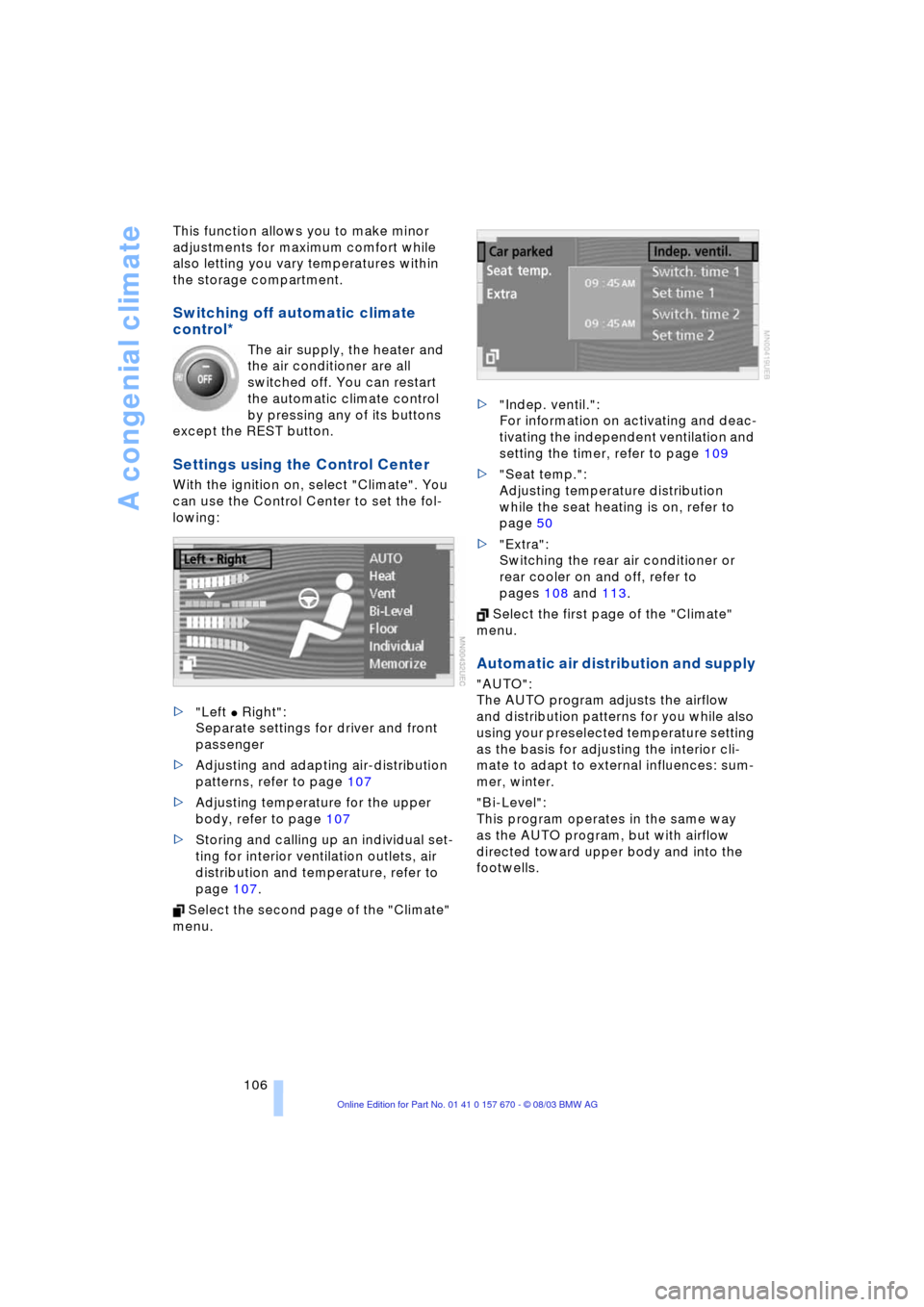
Settings using the Control Center
With the ignition on, select "Climate". You
can use the Control Center to set the fol-
lowing:
>"Left
C Right":
Separate settings for driver and front
passenger
>Adjusting and adapting air-distribution
patterns, refer to page 107
>Adjusting temperature for the upper
body, refer to page 107
>Storing and calling up an individual set-
ting for interior ventilation outlets, air
distribution and temperature, refer to
page 107.
Select the second page of the "Climate"
menu. >"Indep. ventil.":
For information on activating and deac-
tivating the independent ventilation and
setting the timer, refer to page 109
>"Seat temp.":
Adjusting temperature distribution
while the seat heating is on, refer to
page 50
>"Extra":
Switching the rear air conditioner or
rear cooler on and off, refer to
pages 108 and 113.
Select the first page of the "Climate"
menu.
Automatic air distribution and supply
"AUTO":
The AUTO program adjusts the airflow
and distribution patterns for you while also
using your preselected temperature setting
as the basis for adjusting the interior cli-
mate to adapt to external influences: sum-
mer, winter.
"Bi-Level":
This program operates in the same way
as the AUTO program, but with airflow
directed toward upper body and into the
footwells.
Page 109 of 232
Controls
107Reference
At a glance
Driving tips
Communications
Navigation
Entertainment
Mobility
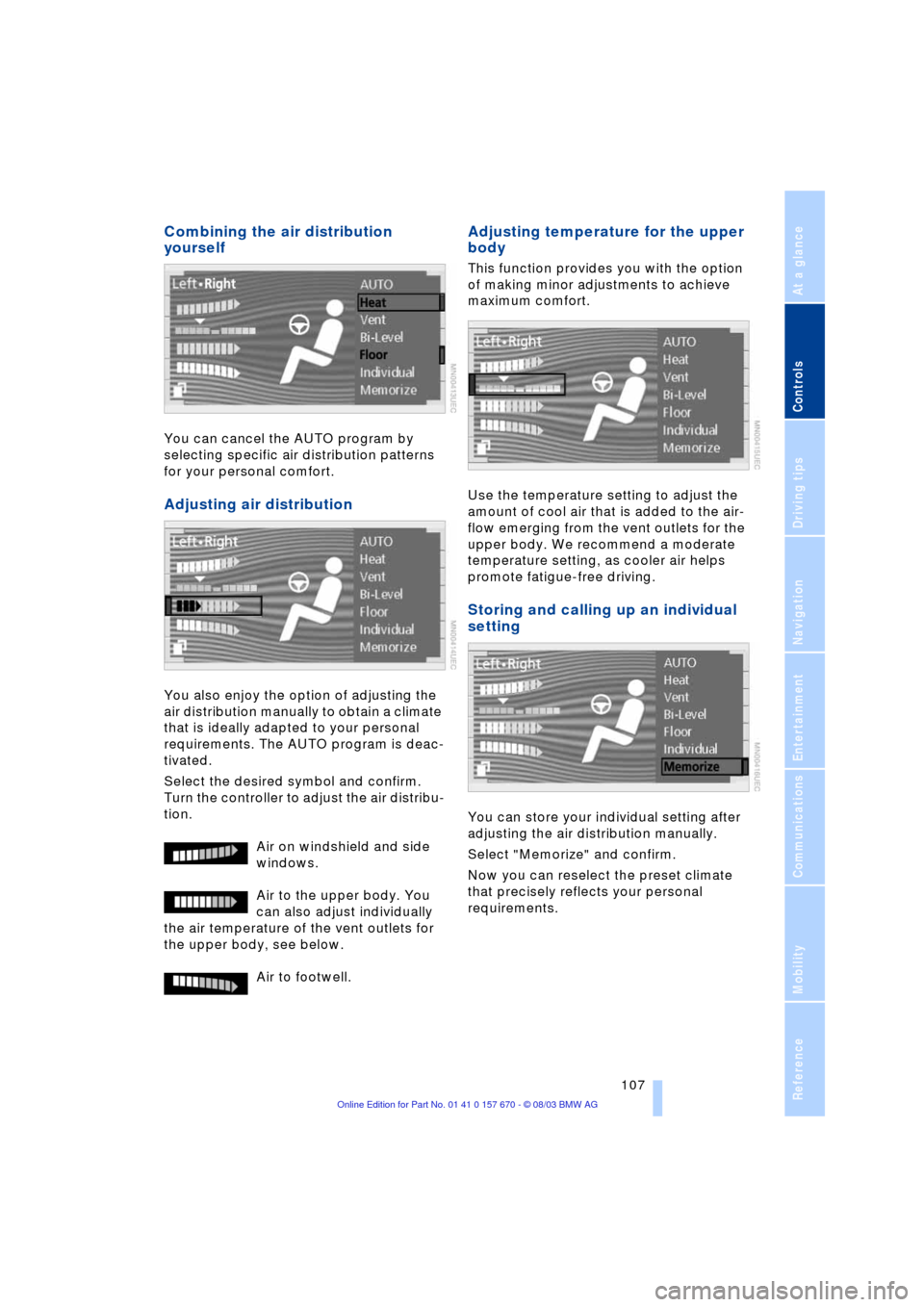
Combining the air distribution
yourself
You can cancel the AUTO program by
selecting specific air distribution patterns
for your personal comfort.
Adjusting air distribution
You also enjoy the option of adjusting the
air distribution manually to obtain a climate
that is ideally adapted to your personal
requirements. The AUTO program is deac-
tivated.
Select the desired symbol and confirm.
Turn the controller to adjust the air distribu-
tion.
Air on windshield and side
windows.
Air to the upper body. You
can also adjust individually
the air temperature of the vent outlets for
the upper body, see below.
Air to footwell.
Adjusting temperature for the upper
body
This function provides you with the option
of making minor adjustments to achieve
maximum comfort.
Use the temperature setting to adjust the
amount of cool air that is added to the air-
flow emerging from the vent outlets for the
upper body. We recommend a moderate
temperature setting, as cooler air helps
promote fatigue-free driving.
Storing and calling up an individual
setting
You can store your individual setting after
adjusting the air distribution manually.
Select "Memorize" and confirm.
Now you can reselect the preset climate
that precisely reflects your personal
requirements.
Page 110 of 232
A congenial climate
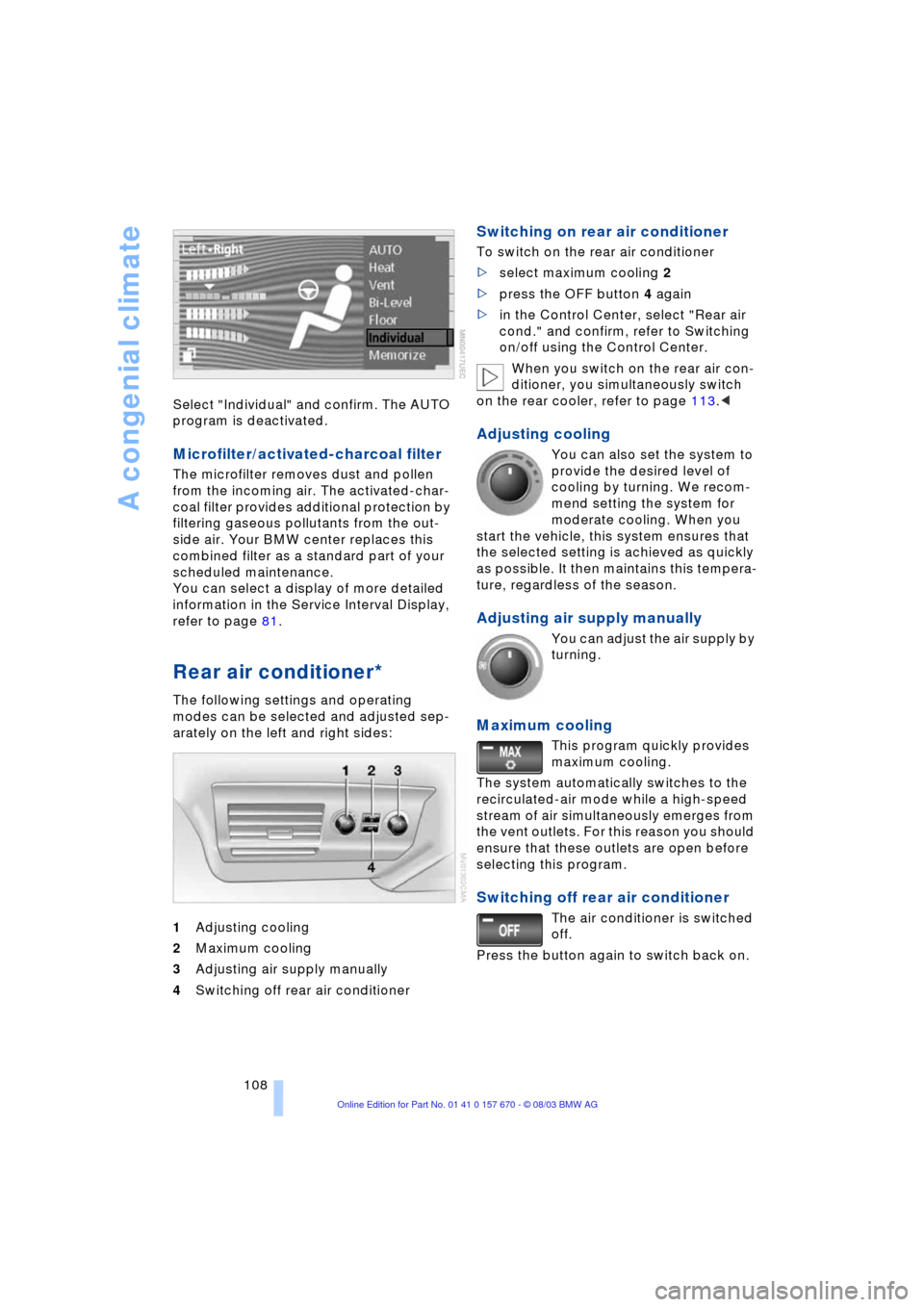
108 Select "Individual" and confirm. The AUTO
program is deactivated.
Microfilter/activated-charcoal filter
The microfilter removes dust and pollen
from the incoming air. The activated-char-
coal filter provides additional protection by
filtering gaseous pollutants from the out-
side air. Your BMW center replaces this
combined filter as a standard part of your
scheduled maintenance.
You can select a display of more detailed
information in the Service Interval Display,
refer to page 81.
Rear air conditioner*
The following settings and operating
modes can be selected and adjusted sep-
arately on the left and right sides:
1Adjusting cooling
2Maximum cooling
3Adjusting air supply manually
4Switching off rear air conditioner
Switching on rear air conditioner
To switch on the rear air conditioner
>select maximum cooling 2
>press the OFF button 4 again
>in the Control Center, select "Rear air
cond." and confirm, refer to Switching
on/off using the Control Center.
When you switch on the rear air con-
ditioner, you simultaneously switch
on the rear cooler, refer to page 113.<
Adjusting cooling
You can also set the system to
provide the desired level of
cooling by turning. We recom-
mend setting the system for
moderate cooling. When you
start the vehicle, this system ensures that
the selected setting is achieved as quickly
as possible. It then maintains this tempera-
ture, regardless of the season.
Adjusting air supply manually
You can adjust the air supply by
turning.
Maximum cooling
This program quickly provides
maximum cooling.
The system automatically switches to the
recirculated-air mode while a high-speed
stream of air simultaneously emerges from
the vent outlets. For this reason you should
ensure that these outlets are open before
selecting this program.
Switching off rear air conditioner
The air conditioner is switched
off.
Press the button again to switch back on.
Page 111 of 232
Controls
109Reference
At a glance
Driving tips
Communications
Navigation
Entertainment
Mobility
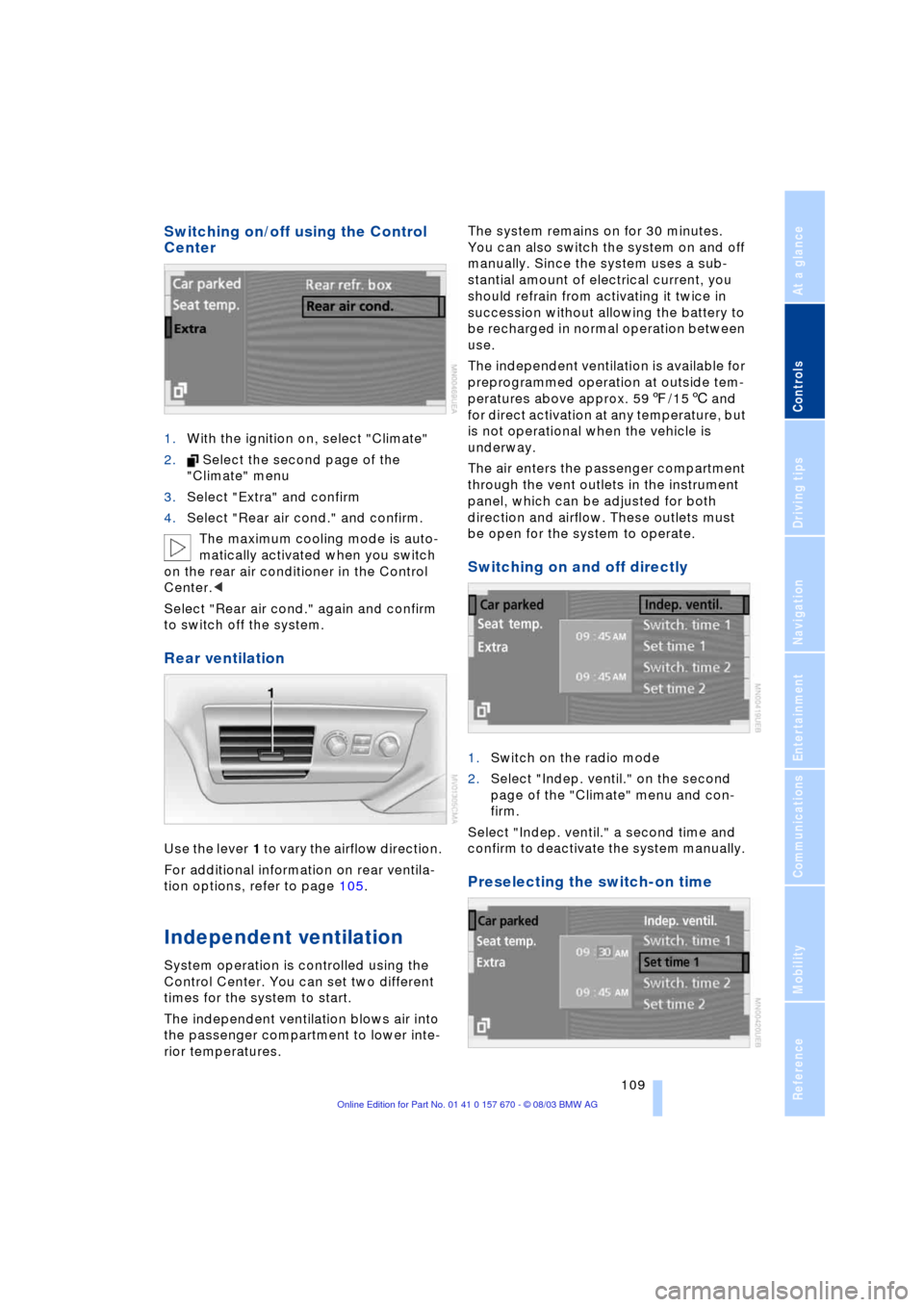
Switching on/off using the Control
Center
1.With the ignition on, select "Climate"
2. Select the second page of the
"Climate" menu
3.Select "Extra" and confirm
4.Select "Rear air cond." and confirm.
The maximum cooling mode is auto-
matically activated when you switch
on the rear air conditioner in the Control
Center.<
Select "Rear air cond." again and confirm
to switch off the system.
Rear ventilation
Use the lever 1 to vary the airflow direction.
For additional information on rear ventila-
tion options, refer to page 105.
Independent ventilation
System operation is controlled using the
Control Center. You can set two different
times for the system to start.
The independent ventilation blows air into
the passenger compartment to lower inte-
rior temperatures.The system remains on for 30 minutes.
You can also switch the system on and off
manually. Since the system uses a sub-
stantial amount of electrical current, you
should refrain from activating it twice in
succession without allowing the battery to
be recharged in normal operation between
use.
The independent ventilation is available for
preprogrammed operation at outside tem-
peratures above approx. 597/156 and
for direct activation at any temperature, but
is not operational when the vehicle is
underway.
The air enters the passenger compartment
through the vent outlets in the instrument
panel, which can be adjusted for both
direction and airflow. These outlets must
be open for the system to operate.
Switching on and off directly
1.Switch on the radio mode
2.Select "Indep. ventil." on the second
page of the "Climate" menu and con-
firm.
Select "Indep. ventil." a second time and
confirm to deactivate the system manually.
Preselecting the switch-on time
Page 115 of 232
Controls
113Reference
At a glance
Driving tips
Communications
Navigation
Entertainment
Mobility
3Rear window blind
4Switching to the other side
The side window blind cannot be
extended unless the side window is
closed. If the window is open, the blind will
rise slightly prior to immediately retracting
to its original position.<
Briefly press the safety switch in the
driver's door, refer to page 42. The
indicator lamp must light up. This precau-
tion prevents children from operating the
sun blinds using the rear switches, etc.
Before using always ensure that the sun
blind's travel path is clear and unob-
structed.
When leaving the vehicle, always remove
the remote control from the ignition lock
and close the doors; this precaution pre-
vents children from using the sun blinds
and injuring themselves, etc.<
Automatically extending and
retracting the sun blinds
You can extend and retract the sun blinds
together by pressing and holding button 3
or the button in the driver's door.
Rear cooler*
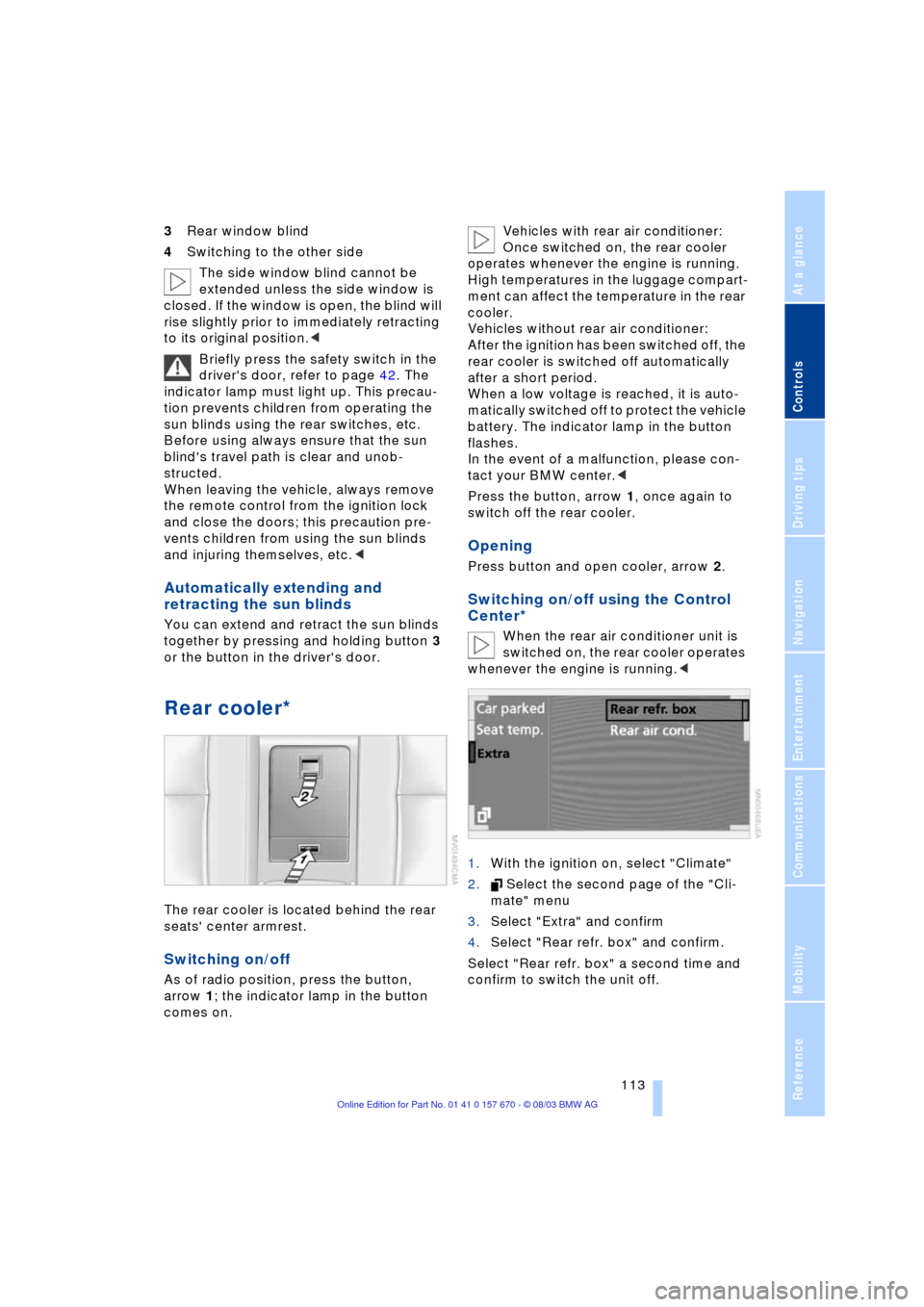
The rear cooler is located behind the rear
seats' center armrest.
Switching on/off
As of radio position, press the button,
arrow 1; the indicator lamp in the button
comes on. Vehicles with rear air conditioner:
Once switched on, the rear cooler
operates whenever the engine is running.
High temperatures in the luggage compart-
ment can affect the temperature in the rear
cooler.
Vehicles without rear air conditioner:
After the ignition has been switched off, the
rear cooler is switched off automatically
after a short period.
When a low voltage is reached, it is auto-
matically switched off to protect the vehicle
battery. The indicator lamp in the button
flashes.
In the event of a malfunction, please con-
tact your BMW center.<
Press the button, arrow 1, once again to
switch off the rear cooler.
Opening
Press button and open cooler, arrow 2.
Switching on/off using the Control
Center*
When the rear air conditioner unit is
switched on, the rear cooler operates
whenever the engine is running.<
1.With the ignition on, select "Climate"
2. Select the second page of the "Cli-
mate" menu
3.Select "Extra" and confirm
4.Select "Rear refr. box" and confirm.
Select "Rear refr. box" a second time and
confirm to switch the unit off.
Page 116 of 232
Practical interior accessories
114
Glove compartment
Opening
Press button. The glove compartment
opens automatically and the lamps come
on.
Closing
Fold the cover up.
To prevent injury in the event of an
accident, close the glove compart-
ment immediately after use.<
Rechargeable flashlight
The flashlight is located on the left side of
the glove compartment.
It features integral overload protection, so
it can be left in its holder continuously.
Be sure that the flashlight is switched
off when it is inserted into its holder.
Failure to comply with this precaution
could lead to overcharging and damage.<
Front center armrest
A storage compartment is located in the
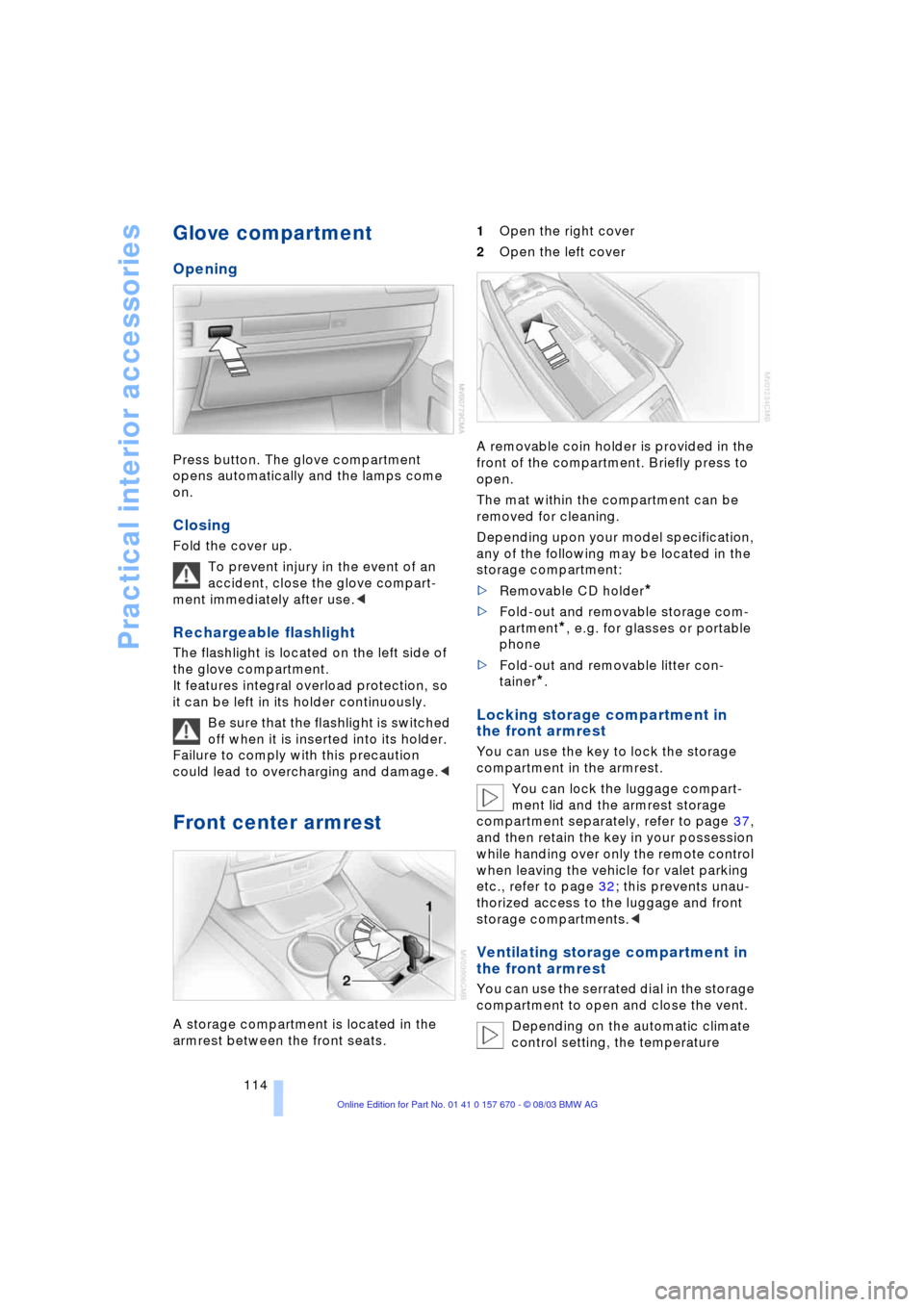
armrest between the front seats. 1Open the right cover
2Open the left cover
A removable coin holder is provided in the
front of the compartment. Briefly press to
open.
The mat within the compartment can be
removed for cleaning.
Depending upon your model specification,
any of the following may be located in the
storage compartment:
>Removable CD holder
*
>Fold-out and removable storage com-
partment
*, e.g. for glasses or portable
phone
>Fold-out and removable litter con-
tainer
*.
Locking storage compartment in
the front armrest
You can use the key to lock the storage
compartment in the armrest.
You can lock the luggage compart-
ment lid and the armrest storage
compartment separately, refer to page 37,
and then retain the key in your possession
while handing over only the remote control
when leaving the vehicle for valet parking
etc., refer to page 32; this prevents unau-
thorized access to the luggage and front
storage compartments.<
Ventilating storage compartment in
the front armrest
You can use the serrated dial in the storage
compartment to open and close the vent.
Depending on the automatic climate
control setting, the temperature
Page 141 of 232
Navigation
Driving tips
139Reference
At a glance
Controls
Communications
Entertainment
Mobility
Destination guidance
Starting the destination
guidance
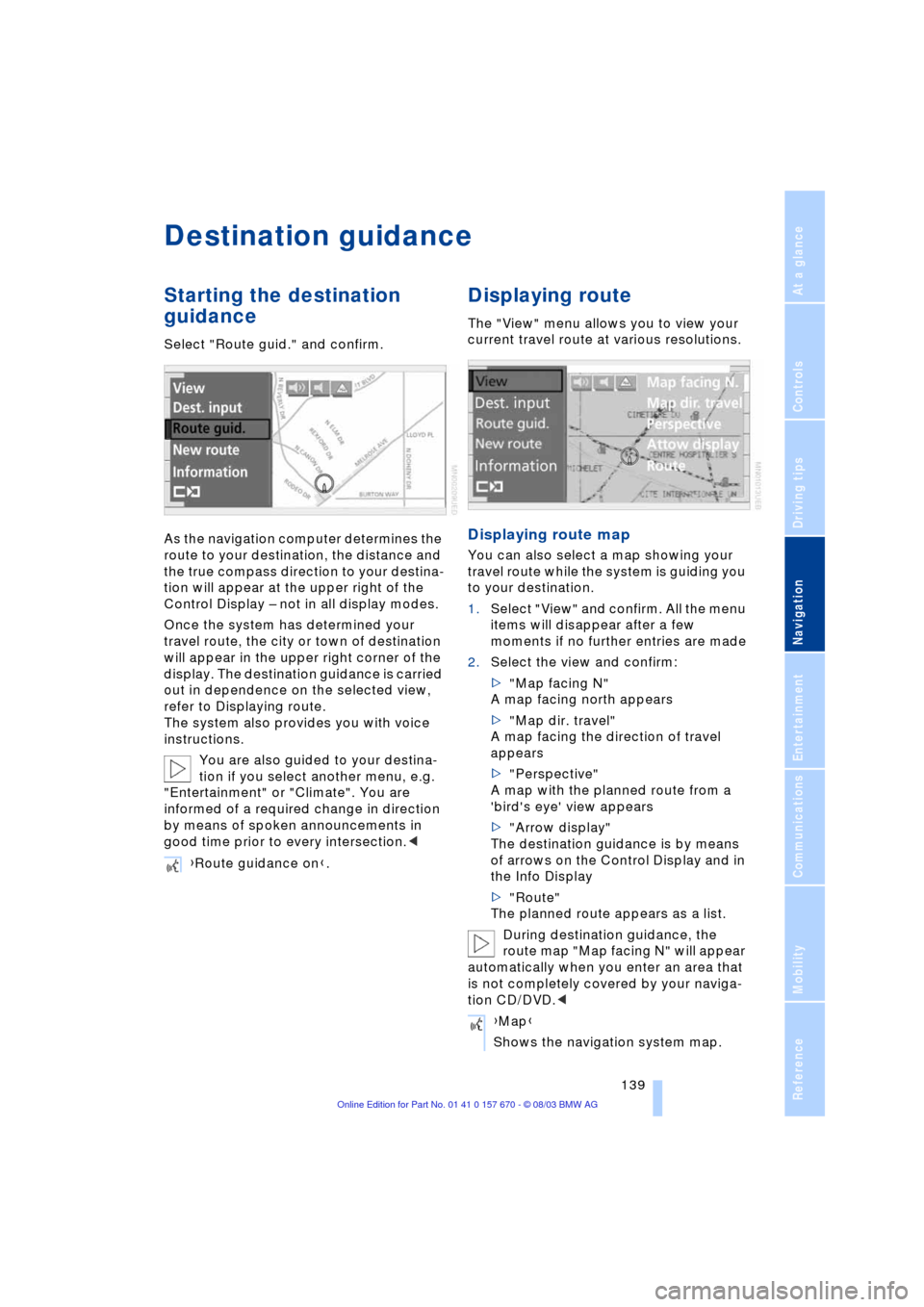
Select "Route guid." and confirm.
As the navigation computer determines the
route to your destination, the distance and
the true compass direction to your destina-
tion will appear at the upper right of the
Control Display Ð not in all display modes.
Once the system has determined your
travel route, the city or town of destination
will appear in the upper right corner of the
display. The destination guidance is carried
out in dependence on the selected view,
refer to Displaying route.
The system also provides you with voice
instructions.
You are also guided to your destina-
tion if you select another menu, e.g.
"Entertainment" or "Climate". You are
informed of a required change in direction
by means of spoken announcements in
good time prior to every intersection.<
Displaying route
The "View" menu allows you to view your
current travel route at various resolutions.
Displaying route map
You can also select a map showing your
travel route while the system is guiding you
to your destination.
1.Select "View" and confirm. All the menu
items will disappear after a few
moments if no further entries are made
2.Select the view and confirm:
>"Map facing N"
A map facing north appears
>"Map dir. travel"
A map facing the direction of travel
appears
>"Perspective"
A map with the planned route from a
'bird's eye' view appears
>"Arrow display"
The destination guidance is by means
of arrows on the Control Display and in
the Info Display
>"Route"
The planned route appears as a list.
During destination guidance, the
route map "Map facing N" will appear
automatically when you enter an area that
is not completely covered by your naviga-
tion CD/DVD.< {Route guidance on}.
{Map}
Shows the navigation system map.
Page 192 of 232
Wheels and tires
190
Tire identification marks
Knowledge of the labeling on the side of
the tire makes it easier to identify and
choose the right tires.
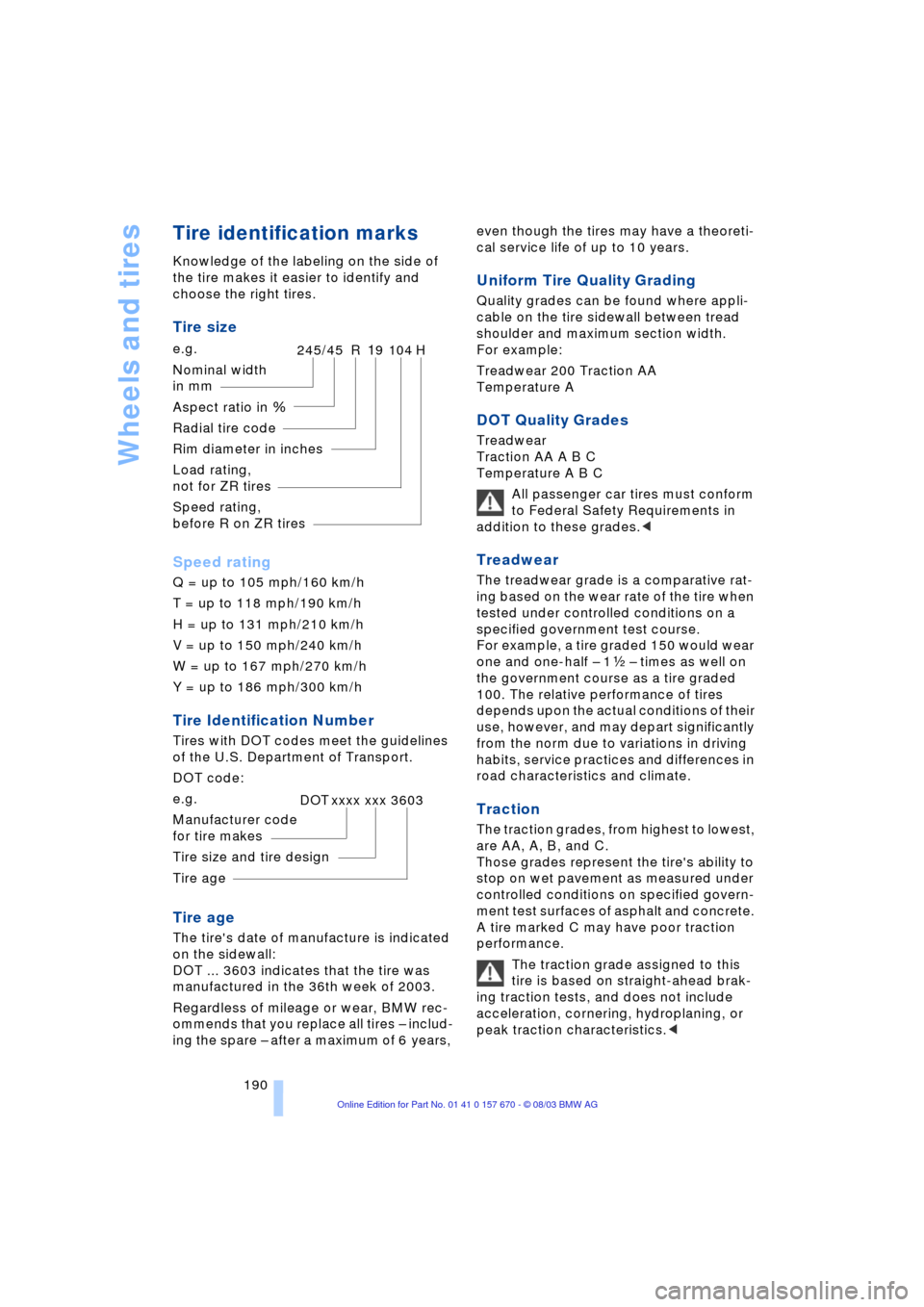
Tire size
Speed rating
Q = up to 105 mph/160 km/h
T = up to 118 mph/190 km/h
H = up to 131 mph/210 km/h
V = up to 150 mph/240 km/h
W = up to 167 mph/270 km/h
Y = up to 186 mph/300 km/h
Tire Identification Number
Tires with DOT codes meet the guidelines
of the U.S. Department of Transport.
DOT code:
Tire age
The tire's date of manufacture is indicated
on the sidewall:
DOT ... 3603 indicates that the tire was
manufactured in the 36th week of 2003.
Regardless of mileage or wear, BMW rec-
ommends that you replace all tires Ð includ-
ing the spare Ð after a maximum of 6 years, even though the tires may have a theoreti-
cal service life of up to 10 years.
Uniform Tire Quality Grading
Quality grades can be found where appli-
cable on the tire sidewall between tread
shoulder and maximum section width.
For example:
Treadwear 200 Traction AA
Temperature A
DOT Quality Grades
Treadwear
Traction AA A B C
Temperature A B C
All passenger car tires must conform
to Federal Safety Requirements in
addition to these grades.<
Treadwear
The treadwear grade is a comparative rat-
ing based on the wear rate of the tire when
tested under controlled conditions on a
specified government test course.
For example, a tire graded 150 would wear
one and one-half Ð 1g Ð times as well on
the government course as a tire graded
100. The relative performance of tires
depends upon the actual conditions of their
use, however, and may depart significantly
from the norm due to variations in driving
habits, service practices and differences in
road characteristics and climate.
Traction
The traction grades, from highest to lowest,
are AA, A, B, and C.
Those grades represent the tire's ability to
stop on wet pavement as measured under
controlled conditions on specified govern-
ment test surfaces of asphalt and concrete.
A tire marked C may have poor traction
performance.
The traction grade assigned to this
tire is based on straight-ahead brak-
ing traction tests, and does not include
acceleration, cornering, hydroplaning, or
peak traction characteristics.< e.g.
Nominal width
in mm
Aspect ratio in X
Radial tire code
Rim diameter in inches
Load rating,
not for ZR tires
Speed rating,
before R on ZR tires
245/45 R19 104 H
e.g.
Manufacturer code
for tire makes
Tire size and tire design
Tire ageDOT xxxx xxx 3603