seat adjustment BMW 760LI 2006 User Guide
[x] Cancel search | Manufacturer: BMW, Model Year: 2006, Model line: 760LI, Model: BMW 760LI 2006Pages: 247, PDF Size: 8.66 MB
Page 58 of 247
Transporting children safely
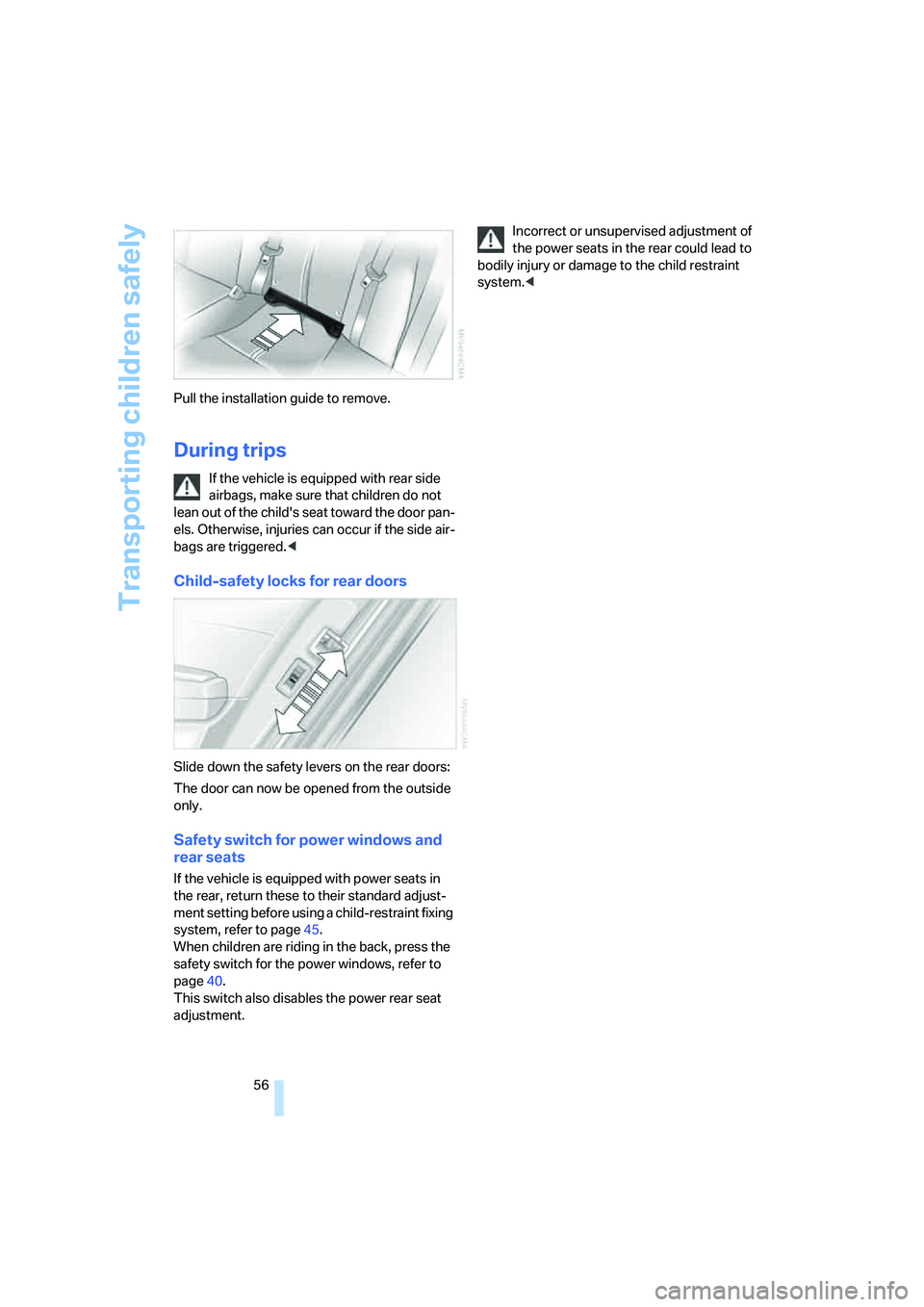
56 Pull the installation guide to remove.
During trips
If the vehicle is equipped with rear side
airbags, make sure that children do not
lean out of the child's seat toward the door pan-
els. Otherwise, injuries can occur if the side air-
bags are triggered.<
Child-safety locks for rear doors
Slide down the safety levers on the rear doors:
The door can now be opened from the outside
only.
Safety switch for power windows and
rear seats
If the vehicle is equipped with power seats in
the rear, return these to their standard adjust-
ment setting before using a child-restraint fixing
system, refer to page45.
When children are riding in the back, press the
safety switch for the power windows, refer to
page40.
This switch also disables the power rear seat
adjustment.Incorrect or unsupervised adjustment of
the power seats in the rear could lead to
bodily injury or damage to the child restraint
system.<
Page 155 of 247
Navigation
Entertainment
Driving tips
153Reference
At a glance
Controls
Communications
Mobility
Switching on/off
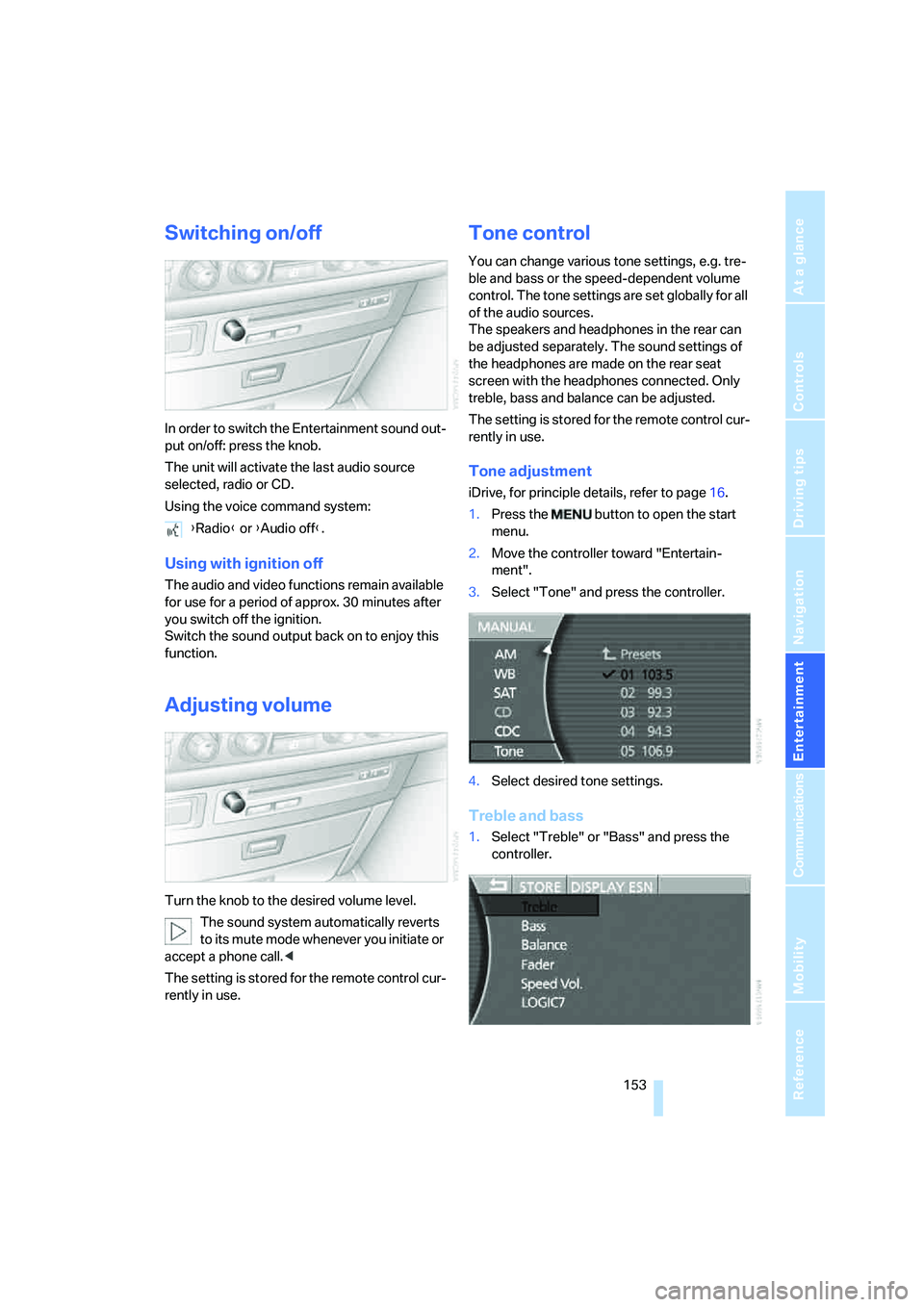
In order to switch the Entertainment sound out-
put on/off: press the knob.
The unit will activate the last audio source
selected, radio or CD.
Using the voice command system:
Using with ignition off
The audio and video functions remain available
for use for a period of approx. 30 minutes after
you switch off the ignition.
Switch the sound output back on to enjoy this
function.
Adjusting volume
Turn the knob to the desired volume level.
The sound system automatically reverts
to its mute mode whenever you initiate or
accept a phone call.<
The setting is stored for the remote control cur-
rently in use.
Tone control
You can change various tone settings, e.g. tre-
ble and bass or the speed-dependent volume
control. The tone settings are set globally for all
of the audio sources.
The speakers and headphones in the rear can
be adjusted separately. The sound settings of
the headphones are made on the rear seat
screen with the headphones connected. Only
treble, bass and balance can be adjusted.
The setting is stored for the remote control cur-
rently in use.
Tone adjustment
iDrive, for principle details, refer to page16.
1.Press the button to open the start
menu.
2.Move the controller toward "Entertain-
ment".
3.Select "Tone" and press the controller.
4.Select desired tone settings.
Treble and bass
1.Select "Treble" or "Bass" and press the
controller. {Radio} or {Audio off}.
Page 227 of 247
Reference 225
At a glance
Controls
Driving tips
Communications
Navigation
Entertainment
Mobility
Audio152
– controls152
– switching on/off153
– tone control153
– volume153
"AUDIO", DVD changer171
Audio mode152
Automatic
– air distribution104
– air volume104
– cruise control67,69
– headlamp control99
– service notification187
– station storage157
– steering wheel adjustment,
refer to Assistance getting in
and out52
– tailgate operation33,36
Automatically switching
between high beams and
low beams, refer to High-
beam assistant100
Automatic car wash, refer to
Caring for your vehicle
brochure
Automatic climate control
– adjusting temperature105
– AUTO program104
– defrosting windows and
removing condensation106
– maximum cooling106
– rear air conditioner108
– rear refrigerator117
– residual heat106
– settings on Control
Display104
– switching cooling function
on and off manually107
– switching off105
Automatic closing of doors
and trunk lid, refer to
Automatic Soft Close35,36
Automatic curb monitor51
Automatic garage door
opener111
Automatic Hold59
– activation/deactivation59
– parking60Automatic lighting
– refer to Automatic headlamp
control99
– refer to Daytime running
lamps99
– refer to High-beam
assistant100
– refer to Interior lamps102
– refer to Pathway lighting99
Automatic recirculated-air
control AUC105
Automatic soft closing
– doors
35
– luggage compartment lid36
Automatic station search156
Automatic transmission with
Steptronic62
– buttons on steering
wheel63
– interlock62
– manually releasing trans-
mission lock64
– shiftlock62
– towing214
– tow-starting215
Automatic windshield washer
system65
"AUTO P"
– Automatic Hold activation/
deactivation59
– programmable buttons52
AUTO program, automatic
climate control104
– adjusting intensity104
"Autostore list", radio155
Average fuel consumption77
– setting units84
Average speed77
– setting units84
"Avoid ferries",
navigation142
"Avoid highway",
navigation142
Avoiding tolls142
Avoiding unintentional
alarms38
"Avoid route", navigation146
"Avoid sect.", navigation146
"Avoid tolls", navigation142Axle loads, refer to
Weights220
"A-Z", telephone183
B
Backrest contour, refer to
Lumbar support
adjustment45
Backrests, refer to Seats,
adjusting44
Backrest width adjustment,
refer to Front comfort seat
adjustment44
Backup lamps, replacing
bulbs209
"Balance", balance and
fader154
Bar, refer to Tow bar215
"Bass", Treble and bass153
Battery211
– jump starting213
– switch211
Battery change, remote
control in Comfort
Access39
"BC", computer77
Belts, refer to Safety belts48
Beverage holder, refer to Cup
holders115
Blower
– refer to Air volume106
– refer to Manually adjusting
air volume108
"BLUETOOTH"181
Bluetooth link, activating/
deactivating180
BMW Assist186
– "BMW Assist"186
– "BMW center"187
– "Customer Relations"188
– "Roadside Assistance"187
BMW Maintenance
System205
BMW Night Vision96
– cleaning camera98
– deactivating97
– making settings97
Page 233 of 247
Reference 231
At a glance
Controls
Driving tips
Communications
Navigation
Entertainment
Mobility
Head light, refer to Adaptive
Head Light100
Headphones22
Head restraints46
– front head restraints,
active47
– sitting safely43
Heated
– mirrors51
– seats49
Heated rear window, refer to
Rear window defroster107
Heated steering wheel52
Heater, windshield, refer to
Defrosting windows and
removing condensation106
Heating103
– exterior mirrors51
– residual heat106
– seats49
– steering wheel52
– windshield washer
nozzles66
Heating and ventilation103
Heating when parked, refer to
Residual heat106
Heavy cargo, refer to Stowing
cargo125
Height, refer to
Dimensions219
Height adjustment
– seats44
– steering wheel52
"Help"
– assistance window20
– menu navigation19
"Help text", assistance
window20
Help text on Control
Display20
"Hide map icons",
navigation137
"high", automatic climate
control105
High-beam assistant100
High beams100
– headlamp flasher100
– indicator lamp11High Definition Radio161
High temperatures122
Hills123
Holder for cups115
Home address
– selecting140
– storing140
Hood201
Horn11
Hour signal activation85
"House Number",
navigation134
Hydraulic brake assistant,
refer to DBC87
Hydroplaning123
I
ID3 tag, refer to Displaying
information on track166
iDrive16
– assistance window20
– automatic climate
control104
– changing date and time84
– changing language84
– changing settings84
– changing units of measure
and display format84
– confirming selection or
entry19
– controller16
– controls16
– displays, menus17
– menus17
– rear seat screen21
– selecting menu item19
– setting brightness85
– showing help text20
– start menu18
– status lines20
– symbols20
Ignition key30
Ignition lock57
Illuminated vanity mirror51
Imitation leather, refer to
Caring for your vehicle
brochure"Indep. ventil.", automatic
climate control109
Indicator/warning lamps12
– airbags95
– alarm system37
– DSC88
– DTC88
– Flat Tire Monitor91
– fog lamps101
– safety belt warning49
– Tire Pressure Monitor93
Individually programmable
buttons11,52
Individual settings, refer to
Key Memory31
Inflation pressure, refer to Tire
inflation pressure194
Inflation pressure monitoring,
refer to Flat Tire Monitor90
Inflation pressure monitoring,
refer to Tire Pressure
Monitor91
Info Display12
Info menu, refer to Assistance
window20
"Information",
navigation135,136
Information, navigation
– "On country"135
– "On dest."135
– "On location"135
– "On town/city"135
Information on travel direction,
refer to Voice
instructions145
Infrared windshield, refer to
Entry/pass tags126
"INITIALIZE", BMW
Assist186
Initializing BMW Assist186
Inserting navigation CD/
DVD130
Installation location
– CD changer164
– DVD changer168
– mobile phone, refer to
Inserting mobile phone179
– navigation drive130
Page 234 of 247
Everything from A to Z
232 Instructions, navigation
system, refer to Route
guidance by voice
instructions145
Instrument cluster, refer to
Info Display12
Instrument lighting101
Instrument panel, refer to
Cockpit10
– all around the steering
wheel10
– comfort features14
Integrated universal remote
control111
Interior lamps102
– switching on with remote
control33
Interior motion sensor38
– switching off38
Interior rearview mirror,
automatic dimming
feature123
Interlock, refer to Switching
off engine58
"INTERM. TIME",
stopwatch83
Interval Display, refer to
Service requirements78
J
Joystick, refer to iDrive16
Jump starting213
K
Keyless-Go, refer to Comfort
Access38
Keyless opening and closing,
refer to Comfort Access38
Key Memory31
Keys30
– adapter for spare key30
– key-related settings, refer to
Key Memory31
Kick-down63
Knock control193
L
Lamps and bulbs207
"Language", settings84
Lashing eyes, refer to
Securing cargo125
"Last", telephone184
"Last dest.", navigation137
LATCH child-restraint fixing
system55
Leather care, refer to Caring
for your vehicle brochure
LEDs light-emitting
diodes207
"Left", seat heating49
Length, refer to
Dimensions219
Level control system89
Light
– refer to High-beam
assistant100
– refer to Parking lamps/low
beams99
– refer to Roadside parking
lamps/low beams100
Light alloy wheels, care and
maintenance, refer to Caring
for your vehicle brochure
Light-emitting diodes
LEDs207
Lighter116
Lighter socket, refer to Power
socket116
Lighting
– of instruments101
– of vehicle99
Light switch99
"Limit"82
Limit, refer to Speed limit82
"Limited", rear seat screen22
Load, refer to Loading124
Loading
– securing cargo125
– vehicle124
"LOC.", navigation140
"Location",
navigation139,146,147Lock buttons in the doors,
refer to Locking34
Locking
– from inside34
– from outside33
Locking without key, refer to
Comfort Access38
Locking without remote
control, refer to Comfort
Access38
"LOGIC7", tone control154
Longlife oils, approved
oils203
Long wave, LW155
– High Definition Radio161
"low", automatic climate
control105
Low beams99
– automatic99
– indicator lamp, defective
lamp80
Lower back support, refer to
Lumbar support
adjustment45
Low-fuel warning light, refer to
Fuel gauge76
Lows, refer to Tone
adjustment153
Lug bolts
– refer to Preparing for a wheel
change210
– tightening torque, refer to
After mounting211
– wrench, refer to What you
will need209
Luggage compartment119
– capacity220
– Comfort Access39
– opening/closing, refer to
Luggage compartment
lid35
– opening from inside36
– opening from outside35
– opening with remote
control33
Page 235 of 247
Reference 233
At a glance
Controls
Driving tips
Communications
Navigation
Entertainment
Mobility
Luggage compartment lid
– Comfort Access39
– emergency actuation, refer
to Manual operation36
– emergency release37
– locking separately35
– opening from inside36
– opening from outside35
– opening separately35
– opening with remote
control33
– remote control33
– unlocking manually35
Luggage rack, refer to Roof-
mounted luggage rack125
Lumbar support44,45
M
M+S tires, refer to Winter
tires200
Maintenance205
– refer to Service required78
Maintenance System205
Make-up mirror, refer to Illumi-
nated vanity mirror51
Malfunction
– door lock34
– fuel filler door192
– glass sunroof42
– luggage compartment lid37
Malfunction displays, refer to
Check Control80
"MANUAL",
radio156,159,161
Manual operation
– door lock34
– driver's door34
– fuel filler door192
– glass sunroof42
– luggage compartment lid36
– parking brake60
– transmission lock for
automatic transmission with
Steptronic64
Manual station scan156Map CD, refer to Navigation
CD/DVD130
"Map dir. travel",
navigation144
"Map facing N.",
navigation144
Map for navigation
– changing scale24,144
– destination entry134
Map view facing north144
Master key, refer to Remote
control/key30
Maximum cooling106
"medium", automatic climate
control105
Medium wave, MW
– High Definition Radio161
"Memo", hour signal85
Memory, refer to
– Key Memory31
– Seat, mirror and steering
wheel memory46
"MENU", DVD changer171
"menu", rear seat screen22
"Menu name"19
Menus, Control Display17
Microfilter, automatic climate
control107
Microphone for voice
command177
Middle wave, MW
155
Mirror dimming feature123
Mirrors50
– automatic curb monitor51
– folding in and out51
– heating51
– memory, refer to Seat, mirror
and steering wheel
memory46
"Missed", Telephone184
Missed calls184Mobile phone
– changing between mobile
phone and hands-free
system185
– changing from hands-free
system to mobile phone185
– changing from mobile phone
to hands-free system185
– dialing a number from Top 8
list184
– hands-free system177
– initiating an emergency
call178
– inserting179
– inserting phone cradle181
– logging off from vehicle180
– logging onto vehicle179
– missed calls184
– operating179
– operating via retracting
telephone keypad177
– operating with buttons on
steering wheel11
– overview176
– phone book183
– redialing183
– refer to Telephone
overview176
– removing179
– removing phone cradle181
– snap-in adapter176
– volume adjustment177
Modifications, technical, refer
to For your own safety5
Monitor, refer to
– iDrive16
– rear seat screen21
Monitor, refer to iDrive16
Mounting for vehicle jack,
refer to Lifting vehicle210
MP3, refer to Compressed
audio files165
Multi-function steering wheel,
refer to Buttons on steering
wheel11
Page 238 of 247
Everything from A to Z
236 "RDS", Radio159
RDS Radio Data System158
Reading lamps102
"Rear", rear seat screen22
Rear air conditioner108
– cooling adjustment108
– switching off108
– switching on108
– switching on/off via
iDrive108
Rear armrest, refer to Center
armrest114
"Rear climate control", rear
compartment air
conditioning108
Rear-compartment air condi-
tioning, rear refrigerator117
Rear lamps208
– refer to Tail lamps208
– replacing bulbs208
Rear lock, rear seat screen22
"Rear refrigerator"117
Rear refrigerator117
Rear-seat area ventilation107
Rear seat backrests, electric,
refer to Rear comfort seat
adjustment45
Rear seats
– adjusting45
– adjusting passenger seat
from rear45
– head restraint adjustment47
– heating50
Rear seat screen21
Rearview mirror50
Rear window blind, refer to
Sun blinds112
Rear window defroster107
Rear window safety switch40
Recent numbers in mobile
phone184
Reception, radio
– refer to Changing
station155
– refer to Updating stations in
receiving range157
Rechargeable flashlight113"Recirc. air", programmable
buttons52
Recirculated-air mode105
– automatic climate
control105
Reclining seat
– refer to Comfort seat
adjustment44
– refer to Power seat
adjustment44
Redialing list, displaying
persons not reached184
Reflectors, refer to Tail
lamps208
Refueling
192
Remaining distance
– for service required78
– refer to Cruising range77
– to destination77
Remote control30
– changing battery39
– Comfort Access38
– garage door opener111
– luggage compartment lid33
– malfunction33
Removing fog on the
windows106
Removing head restraints,
rear seats47
Replacement fuses212
Replacement key, refer to
New remote controls30
Replacement of tires199
– changing wheels209
– tire replacement199
Replacing bulbs, refer to
Lamps and bulbs207
Replacing windshield
wipers207
Reporting an accident, refer
Initiating an emergency
call178
Reservoir for washer
systems67
"RESET"
– Tire Pressure Monitor92
– tone control154Reset, resetting tone
settings154
Residual heat106
Restraint systems
– for children54
– refer to Safety belts48
Retaining straps, refer to
Securing cargo125
Retracting telephone
keypad177
Reverse
– CD changer166
– CD player163
– DVD changer169
Reverse gear, automatic
transmission with
Steptronic63
"Right", seat heating49
"RND"
– CD changer166
– CD player163
Road map134
Roadside Assistance187
Roadside parking lamps100
Roadside service, refer to
Roadside Assistance187
Roller sun blind, refer to Sun
blinds112
Roof load capacity220
Roof-mounted luggage
rack125
Rope, refer to Towing
methods215
Rotary pushbutton, refer to
iDrive16
Route
– altering145
– bypassing sections146
– changing145
– displaying143
– displaying arrow display143
– displaying map143
– displaying town144
– list144
– selecting141
– selecting criteria141
"Route guid.",
navigation138,143
Page 239 of 247
Reference 237
At a glance
Controls
Driving tips
Communications
Navigation
Entertainment
Mobility
Route guidance143
– changing route
specifications141
– continuing143
– displaying driving route130
– distance and arrival77
– interrupting143
– interrupting voice
instructions145
– selecting new route145
– starting143
– terminating143
– volume of voice
instructions145
"ROUTE GUIDE",
navigation134,139
"Route preference",
navigation141
RSC Run-flat System
Component, refer to Run-
flat tires199
Run-flat tires
– flat tire91,93
– tire inflation pressure194
– tire replacement199,200
– winter tires200
run-flat tires199
S
Safe braking123
Safety5
Safety belts48
– care, refer to Caring for your
vehicle brochure
– sitting safely43
– warning lamp49
Safety belt tensioners
– refer to Airbags94
– refer to Safety belts48
Safety systems, refer to
– ABS Antilock Brake
System87
– Airbags94
– Brake system87
– DSC Dynamic Stability
Control87
– Safety belts48Safety tires, refer to Run-flat
tires199
Sampling, Scan
– CD changer166
– CD player162
– radio156
Sampling a music track, Scan
– CD changer166
– CD player162
"SAT", radio159
SAT, waveband159
"SCAN"
– CD changer166
– CD player162
– radio156
Scan, sampling
– CD changer166
– CD player162
– radio156
"Screen", settings85
Screw thread for tow
fitting214
Seat adjustment44
Seats44
– adjusting44
– automatic backrest width
adjustment44
– comfort seat44
– heating49
– in rear45
– lumbar support45
– memory, refer to Seat, mirror
and steering wheel
memory46
– shoulder support45
– storing adjustments46
– thigh support44
– ventilation, refer to Active
seat ventilation50
"Seat temp.", seat heating49
Seat ventilation, refer to
Active seat ventilation50
Securing for transport, refer to
Securing cargo125
Securing load, refer to
Securing cargo125
Selecting
– menu items with iDrive19
– route for navigation141Selecting audio source152
Selecting country132
Selecting functions, refer to
iDrive16
Selecting menu17
Selecting roaming, refer to
Top and bottom status
line21
Selector lever, automatic
transmission with
Steptronic62
Selector lever interlock, refer
to Selecting transmission
range62
Service, refer to Roadside
Assistance187
Service and Warranty Infor-
mation Booklet for US
models and Warranty and
Service Guide Booklet for
Canadian models205
Service car, refer to Roadside
Assistance187
Service required78
Service requirement
display205
"Services", BMW Assist188
"Service Status", BMW
Assist187
"SET"
– Flat Tire Monitor90
– setting speed limit82
Set language84
"Set time 1", parked car
ventilation109
"Set time 2", parked car
ventilation109
Setting button, refer to
iDrive16
Settings
– assistance window20
– BMW Night Vision97
– data and time84
– Entertainment152
– Key Memory31
– language84
– units of measure84
Page 241 of 247
Reference 239
At a glance
Controls
Driving tips
Communications
Navigation
Entertainment
Mobility
"STORE DATE", deadlines for
exhaust and vehicle
inspections79
Storing current position146
Storing desired speeds, refer
to Programmable cruise
control68
Storing destination per
voice141
Storing numbers, refer to
Phone book184
Storing sitting position, refer
to Seat, mirror and steering
wheel memory46
Storing vehicle, refer to Caring
for your vehicle brochure
Straps, refer to Loading124
"Street", navigation133
"SUBTITLE", DVD
changer171
Summer tires, refer to Wheels
and tires194
Sun blinds112
"SVS active", voice command
system23
Switches
– all around the steering
wheel10
– comfort features14
Switch for battery211
Switching between high
beams and low beams,
automatic, refer to High-
beam assistant100
Switching cooling function on
and off manually107
Switching ignition on and
off57
Switching navigation voice
instructions on/off145
Switching off engine58
Switching off tilt alarm
sensor38Switching on
– audio153
– CD changer164
– CD player162
– DVD changer168
– radio155
Symbols4
– indicator and warning
lamps13
T
Tachometer75
Tailgate
– automatic operation33,36
– refer to Luggage
compartment lid35
Tail lamps208
– replacing bulbs209
Taking time, refer to
Stopwatch83
Tank contents, refer to
Capacities221
Technical changes, refer to
For your own safety5
Technical data218
Telematics, refer to
BMW Assist186
Telephone
– accepting calls177
– refer to Telephone
overview176
– switching off177
Telephoning,
requirements182
TeleService, services
offered187
Temperature
– adjusting with automatic
climate control105
– changing units of
measure84
– outside temperature
warning75
– refer to Hot exhaust
system122Temperature display
– interior temperature105
– outside temperature75
– setting units84
Temperature distribution,
seat heating49
Temperature of coolant, refer
to Coolant temperature76
Tempomat, refer to Active
cruise control69
Thawing windows, refer to
Defrosting windows and
removing condensation106
Thawing windshield, refer to
Defrosting windows and
removing condensation106
The right tires199
Thigh support adjustment44
Third brake lamp, refer to Tail
and brake lamps208
Three-point belt48
Through loading system118
Tightening torque for lug
bolts, refer to After
mounting211
Tilting down passenger-side
exterior mirror51
Time
– display format84
– setting84
"Time", settings84
Time and date84
Time of arrival77
Timer77
Tire identification marks197
Tire inflation pressure194
– loss, refer to Indication of a
flat tire91
– loss, refer to Low tire
pressure message93
Tire Pressure Monitor91
– resetting system92
– system limits91
– warning light93
Tire pressure monitoring,
refer to Flat Tire Monitor90