check engine BMW 760LI SEDAN 2003 Owner's Manual
[x] Cancel search | Manufacturer: BMW, Model Year: 2003, Model line: 760LI SEDAN, Model: BMW 760LI SEDAN 2003Pages: 229, PDF Size: 4.35 MB
Page 204 of 229
Giving and receiving assistance
202
Giving and receiving assistance
Warning triangle*
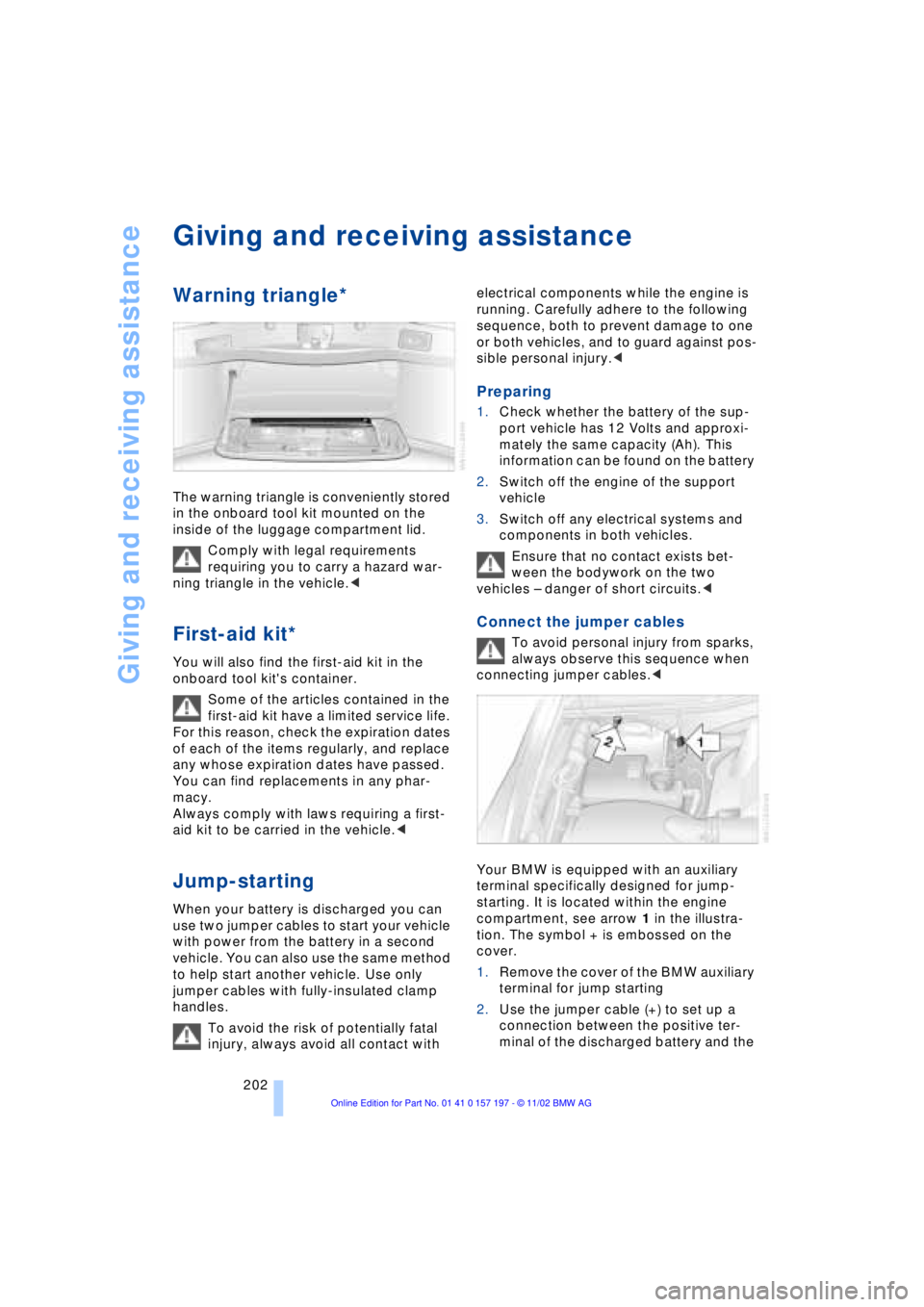
The warning triangle is conveniently stored
in the onboard tool kit mounted on the
inside of the luggage compartment lid.
Comply with legal requirements
requiring you to carry a hazard war-
ning triangle in the vehicle.<
First-aid kit*
You will also find the first-aid kit in the
onboard tool kit's container.
Some of the articles contained in the
first-aid kit have a limited service life.
For this reason, check the expiration dates
of each of the items regularly, and replace
any whose expiration dates have passed.
You can find replacements in any phar-
macy.
Always comply with laws requiring a first-
aid kit to be carried in the vehicle.<
Jump-starting
When your battery is discharged you can
use two jumper cables to start your vehicle
with power from the battery in a second
vehicle. You can also use the same method
to help start another vehicle. Use only
jumper cables with fully-insulated clamp
handles.
To avoid the risk of potentially fatal
injury, always avoid all contact with electrical components while the engine is
running. Carefully adhere to the following
sequence, both to prevent damage to one
or both vehicles, and to guard against pos-
sible personal injury.<
Preparing
1.Check whether the battery of the sup-
port vehicle has 12 Volts and approxi-
mately the same capacity (Ah). This
information can be found on the battery
2.Switch off the engine of the support
vehicle
3.Switch off any electrical systems and
components in both vehicles.
Ensure that no contact exists bet-
ween the bodywork on the two
vehicles Ð danger of short circuits.<
Connect the jumper cables
To avoid personal injury from sparks,
always observe this sequence when
connecting jumper cables.<
Your BMW is equipped with an auxiliary
terminal specifically designed for jump-
starting. It is located within the engine
compartment, see arrow 1 in the illustra-
tion. The symbol + is embossed on the
cover.
1.Remove the cover of the BMW auxiliary
terminal for jump starting
2.Use the jumper cable (+) to set up a
connection between the positive ter-
minal of the discharged battery and the
Page 216 of 229
Everything from A to Z
214 CD changer 155, 156
Ð adjusting the tone 147
Ð controls 146
Ð copy protection 155
Ð fast forward 157
Ð humidity 156
Ð operating
temperatures 156
Ð random play 157
Ð reverse 157
Ð safety 155
Ð sampling 157
Ð scan 157
Ð selecting CD 157
Ð selecting track 157
Ð skipping tracks 157
Ð switching on 156
Ð temperature range 156
Ð track search 157
Ð volume 147
CD player 153
Ð adjusting the tone 147
Ð atmospheric humidity 153
Ð controls 146
Ð fast forward 154
Ð operating
temperatures 153
Ð random play 154
Ð reverse 154
Ð sampling 154
Ð scan 154
Ð selecting track 154
Ð skipping tracks 154
Ð switching on 153
Ð temperature range 153
Ð track search 154
Ð volume 147
Cell phone, refer to
separate Portable phone
manual 170
"Center" 110
Center armrest 120
Center console, refer to
Comfort features 16
Central locking system 35
Ð button 38
Ð remote control 35"CHANGE" for
navigation 136
Changing bulbs, refer to
Lamps and bulbs 195
Changing language 91
Changing settings in the
Control Display 91
Changing units of measure
in Control Display 91
Check Control 85
Ð "Check" 86
Checking engine oil
level 190, 190
Checking tire
pressures 184
Child's seat 57
Child-restraint system 57
Child-safety lock 59
Cigarette lighter 119
Cleaning, refer to Care
manual
Cleaning windshield 72, 73
"Climate" 19, 22
Climate control
Ð automatic air
distribution 107
"Clock" 91
Clock 82
Ð setting time and date 91
Closing
Ð from inside 37
Ð from outside 35
Closing assist
Ð doors 38
Ð luggage compartment
lid 39
Cockpit 12, 16
Coin holder, refer to
Storage
compartments 117
Coin tray, refer to Storage
compartments 117
Cold start 62
"Color" during
TV operation 161
"Comfort"
Ð "EDC" 97
Comfort features 16Comfort seat 46
Ð in rear 47
"Communication"
19, 22, 171
Compact Disc, refer to
CD 153
Compartments, refer to
Storage
compartments 117
Computer 86
Computer, refer to Control
Center 19
Ð automatic climate
control 109
Ð "BC" 89
Ð changing settings 91
Ð display, menus 22
Ð displays in the Control
Display 88
Ð language selection 91
Ð setting time and date 91
Ð status lines 24
Ð symbols 21
Condition Based Service
CBS 193
Confirming a menu item in
the Control Display 20
Connecting car vacuum
cleaner 119
Consumption display 87
"Contrast" during
TV operation 161
Page 224 of 229
Everything from A to Z
222 "Sport"
Ð "EDC" 97
Stability control,
refer to Driving stability
control 94
Standard during TV
operation 161
Standing lamps 103
Start/stop button 61
Starting 62
Starting and stopping
Ð cassette deck 158
Ð CD changer 156
Ð CD player 153
Ð DVD changer 164
Ð radio 149
Ð TV 160
Starting
problems 62, 203, 204
Starting the engine 62
"State inspection" 84
Station, refer to Radio 150
Status lines in Control
Center 24
Steering wheel 18
Ð adjustment 53
Ð individual button
assignment options 53
Steering wheel adjustment,
automatic 53
Steering wheel heater 53
Steering wheel memory 54
Steptronic 69
Stopwatch 90
Ð "INTERM. TIME" 90
Storage, refer to Care
manual
Storage compartments 117
Storing desired speeds,
refer to Programmable
cruise control 75
Storing destination per
voice 141
Storing seating position,
refer to Seat, mirror and
steering wheel
memory 54
Straps, refer to Cargo
loading 126
"Street" for navigation 134"SUBTITLE" in DVD
mode 167
Summer tires 187
Sun blinds 115
Switch for battery 201
Switching audio sources
on/off 147
Switching off the engine 62
Switching on and off
portable phone 174
"Switch. time1" 113
"Switch. time 2" 113
Symbols 6
Ð Control Center 20
System failure reports, refer
to Check Control 85
T
Tachometer 82
Tail lamps 197
Ð bulb replacement 197
"Tape" 146, 158, 159
Target cursor for
navigation 134, 135
Technical data 208
Technical modifications 8
Telephone 170
Ð operation with the
telephone keypad,
folding 172
Telephone directory 175
Ð creating voice command
telephone directory 175
Ð deleting all entries 176
Ð dialing numbers 175
Ð dialing numbers
using voice command
system 175
Ð entering numbers in voice
command directory 175
Ð entry deletion 176
Ð updating voice command
telephone directory 175
Ð viewing entries 176
Telephone keypad,
folding 172
Television, refer to TV 160
"Temp. distribution" 51
Temperature
adjustment 107Temperature display,
outside temperature 82
Tilt function, passenger-
side mirror 55
Time of arrival,
estimated 88
Timing 90
"Tint" during
TV operation 161
Tire change 197
Tire inflation pressures 184
Ð checking 184
Tire-pressure
monitoring 98, 99
Tire Pressure Monitor
TPM 99
Tire Quality Grading 187
Tires
Ð flat tire 197
Ð tire changes 197
Ð tire damage 186
Ð tire inflation
pressures 184
Ð tire pressure control 99
Ð tire replacement 186
Ð tire size, refer to Wheel
and tire
combinations 187
Ð tire tread 186
Ð treadwear indicators 186
"TITLE" 165
Title search
Ð cassette deck 159
"Tone" for audio
operation 146
Tone for audio operation
Ð adjusting 147
"Tone" in sound system
operation 148
Tools 195
"TOP 8" 176
"TOP" in DVD mode 167
Torque 208
Tow fittings 203
Towing 203, 204
Tow-starting 204
"TPM" 99
Ð "INITIALIZE" 99
TPM Tire Pressure
Monitor 99
Ð "INITIALIZE" 99
Page 225 of 229
223
At a glance
Controls
Driving tips
Communications
Navigation
Entertainment
Mobility
Reference
Track 209
Traction Control System
Ð refer to DSC 94
Traffic congestion, refer to
Selecting new route 139
Transmission
Ð automatic transmission
with L mode 67
Ð automatic transmission
with Steptronic 69
Transmission lockout 68
Ð manual release 70
Transporting children
safely 57
Travel route, refer to
Route 138
Tread depth, tires 186
Treble 147
"Treble" in sound system
operation 148
Trip odometer 82
Trunk lid
Ð refer to luggage
compartment lid 38
Turning circle 209
Turn signal indicators 71
Ð bulb
replacement 196, 197
"TV" 146, 160, 161
TV 160
Ð adjusting picture 161
Ð adjusting the tone 147
Ð controls 146
Ð NTSC 161
Ð PAL 161
Ð SECAM 161
Ð selecting programs 160
Ð selecting standard 161
Ð storing programs 160
Ð switching on 160
Ð volume 147
"TV format" 161
U
Undercoating, refer to Care
manual
Uniform Tire Quality
Grading UTQR 187Universal garage door
opener, refer to
Integrated universal
remote control 114
Upholstery care, refer to
Care manual
Used batteries 201
V
Vacuum cleaner
connection 119
Valve caps 199
Vehicle battery 200
Vehicle
dimensions 209
Vehicle keys 34
Vehicle Memory 60
Ventilation 108
Ventilation, draft-free 108
Ventilation while
parked 112
Vents, ventilation 105
"Video" 146
"View" for
navigation 138, 139
Viscosity 191
Voice command
system 18, 26
Voice guidance for
navigation 139
Volume
Ð audio 147
Ð cassette deck 147
Ð CD changer 147
Ð CD player 147
Ð DVD changer 147
Ð navigation 140
Ð portable phone 173
Ð radio 147
Ð TV 147
Ð voice command
system 27
W
Warm feet and a cool
head 108
Warning lamps 15
Warnings in Check
Control 85Warning triangle 202
Washer nozzles,
windshield 72
"WB" 146
Wear indicators in the
tires 186
Weather Band 151
Weights 210
Wheel and tire
combinations 187
Wheelbase 209
Wheels and tires 184
Width 209
"Window" 110
Windows 42
Ð convenience mode 37
Ð convenience operation 36
Ð safety switch 43
Windshield and headlamp
washer system
Ð washer fluid 73
Windshield wiper blade
replacement 195
Windshield wiper
system 72
Ð washer nozzles 72
Winter tires 188
Wiper blade
replacement 195
Wiper system 72
"With highway" 137
"With map" for
navigation 134, 135
Wordmatch principle for
navigation 142
Working in the engine
compartment 189
X
Xenon lamps 196