remote control BMW 760LI SEDAN 2003 Owners Manual
[x] Cancel search | Manufacturer: BMW, Model Year: 2003, Model line: 760LI SEDAN, Model: BMW 760LI SEDAN 2003Pages: 229, PDF Size: 4.35 MB
Page 4 of 229
Contents
Contents
Notes
6Using this Owner's Manual
6Symbols used
7The individual vehicle
7Editorial notice
8For your own safety
9Service and warranty
9Reporting safety defects
Cockpit
12Driver's side Ð controls and displays
16Comfort and convenience Ð controls
and displays
18Buttons in steering wheel
Control Center
19The concept
19Controller
19Control Display
20Symbols and lists
22Menus in Control Display
23Assistance window
*
24Top and bottom status lines
24Control Center in rear
*
Voice command
26Voice command system
26Voice commands
28Notices
28The notebook
29Short commands
Opening and closing
34Key/remote control
35Central locking system
35Opening and closing Ð from outside 37Opening and closing Ð from inside
38Doors
38Luggage compartment lid
40Luggage compartment
41Alarm system
42Electric power windows
43Sliding/tilt sunroof
*
Adjustments
45Sit safely
45Seats
47Head restraints
50Safety belts
51Heated seats
*
51Active seat ventilation
*
52Active seat
*
52Mirrors
53Steering wheel adjustment
54Seat, mirror and steering wheel
memory
55Airbags
57Transporting children safely
59LATCH
*
child-restraint system
59Child-safety locks
60Vehicle Memory, Key Memory
Driving
61Ignition lock
62Starting the engine
62Switching off the engine
62Parking brake
67Automatic transmission with L mode
69Automatic transmission with
Steptronic
*
© 2002 Bayerische Motoren Werke
Aktiengesellschaft
Munich, Germany
Reprinting, including excerpts, only with
the written consent of BMW AG, Munich.
Order No. 01 41 0 157 197
US English XII/2002, 6 096
Printed in Germany
Printed on environmentally friendly paper
Ð bleached without chlorine, suitable for
recycling.
Page 5 of 229
At a glance
Operation
Driving tips
Communications
Navigation
Entertainment
Mobility
Reference
71Turn signal indicators/headlamp
flasher
72Wiper system
73Washer fluid
73Programmable cruise control
75Active cruise control
*
Everything under control
82Odometer, outside temperature
display, clock
82Tachometer
83Service Interval Display
85Check Control
86Computer
91Changing settings
Technology for comfort,
convenience and safety
93PDC Park Distance Control
*
94Driving stability control/
DSC Dynamic Stability Control
96Driving stability control/ABS Antilock
Braking System
97Dynamic Drive
97EDC Electronic Damping Control
*
98Flat Tire Monitor
*
99TPM Tire Pressure Monitor
*
101Self-leveling suspension
*
101Adaptive brake lamp
Lamps
102Parking lamps/low beams
103Instrument lighting
103High beams/standing lamps
103Front fog lamps
103Interior lamps
A congenial climate
105Automatic climate control
111Rear air conditioner
*
112Parked-car ventilation system
Practical interior accessories
114Integrated universal remote control
*
115Sun blinds
*
116Rear cooler
*
117Glove compartment
117Storage compartments118Beverage holders
118Ashtray, front
119Cigarette lighter, front
119Power socket
119Ashtray, rear
119Cigarette lighter, rear
120Center armrest
120Ski bag
*
Things to remember when driving
124Break-in procedures
124General driving notes
125Brake system
126Cargo loading
127Roof-mounted luggage rack
*
127Entry/pass tags
Navigation
130GPS
130Map CD
131Starting the navigation system
131Display in assistance window
*
131Selection options
132Destination entry
132Manual entry of destination address
134Selecting the town or city and the
street from the directory
134Map-guided destination selection
135Selecting destination in "Information"
135Selecting interesting destinations
136Recent destinations
136Destination list
137Selecting route
137Starting the destination guidance
system
138Displaying route
139Selecting new route
139Voice guidance
140Terminating/interrupting active
destination guidance
140Address book
142Location
142Wordmatch principle
143What to do if É
Page 29 of 229
At a glance
Controls
Driving tips
Communications
Navigation
Entertainment
Mobility
Reference
27
scale} instead of {Scale} are also often
possible.
Short commands
With the {Main menu} level, you can run
certain functions directly with short com-
mands, refer to page 29, without having to
open an equipment level.
For example, if you want to dial a phone
number, you do not have to say
rather you can say directly
Special commands
Special commands are available for spe-
cific systems. In this Owner's Manual you will find these commands in the sections
describing the individual systems.
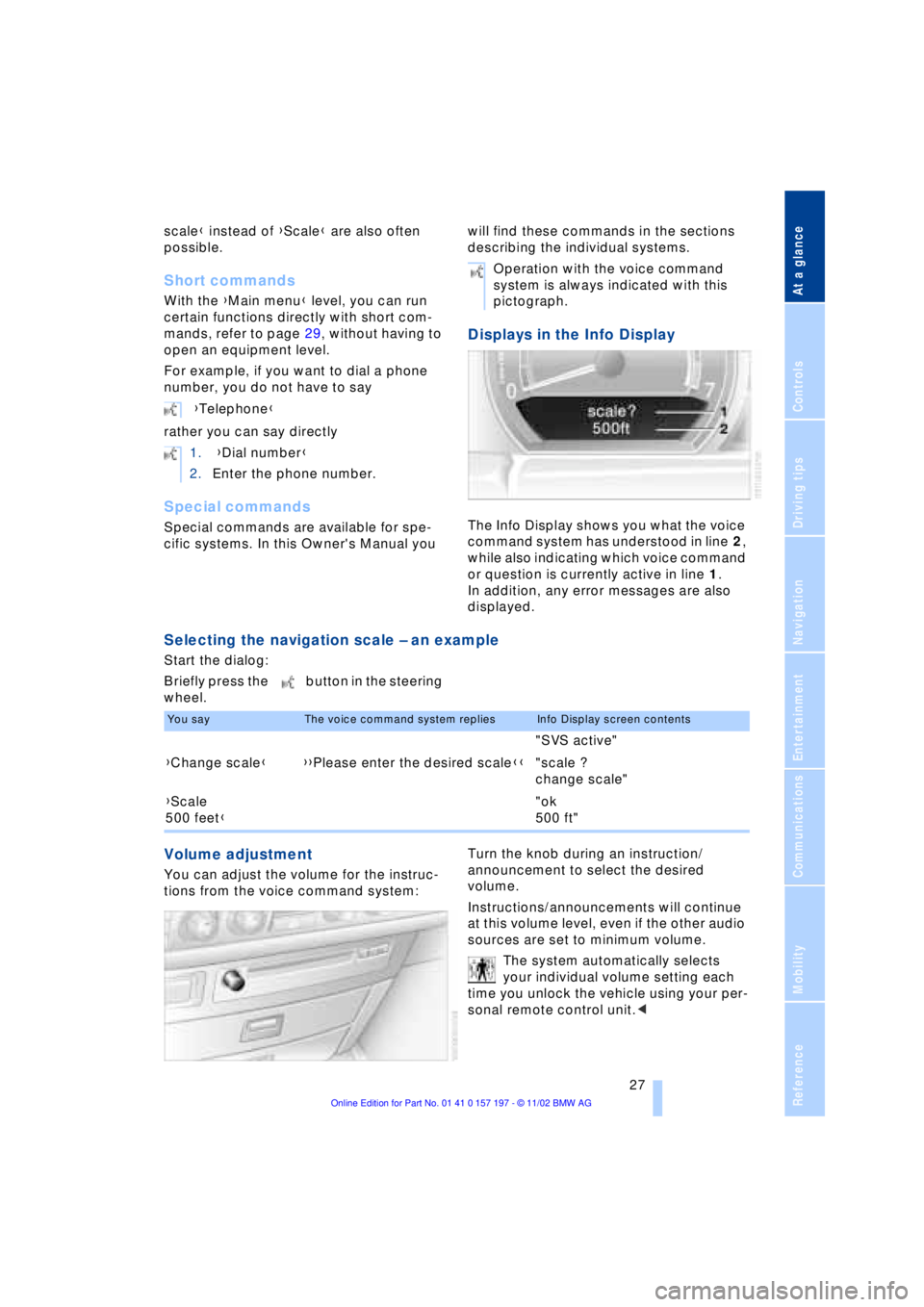
Displays in the Info Display
The Info Display shows you what the voice
command system has understood in line 2,
while also indicating which voice command
or question is currently active in line 1.
In addition, any error messages are also
displayed.
Selecting the navigation scale Ð an example
Start the dialog:
Briefly press the button in the steering
wheel.
Volume adjustment
You can adjust the volume for the instruc-
tions from the voice command system:Turn the knob during an instruction/
announcement to select the desired
volume.
Instructions/announcements will continue
at this volume level, even if the other audio
sources are set to minimum volume.
The system automatically selects
your individual volume setting each
time you unlock the vehicle using your per-
sonal remote control unit.< {Telephone}
1. {Dial number}
2.Enter the phone number.
Operation with the voice command
system is always indicated with this
pictograph.
You sayThe voice command system repliesInfo Display screen contents
"SVS active"
{Change scale}{{Please enter the desired scale}}"scale ?
change scale"
{Scale
500 feet}"ok
500 ft"
Page 36 of 229
Opening and closing
34
Opening and closing
Key/remote control
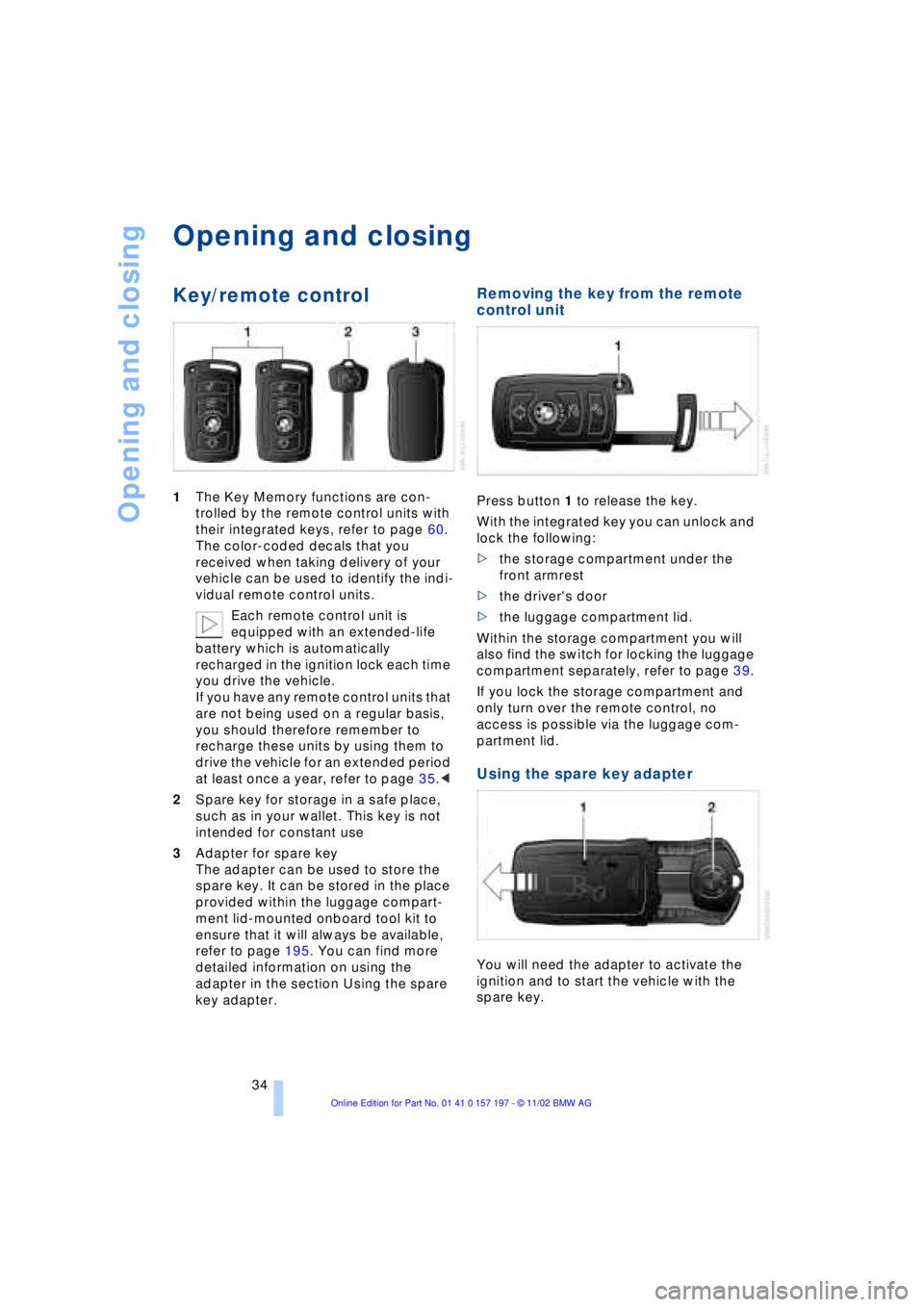
1The Key Memory functions are con-
trolled by the remote control units with
their integrated keys, refer to page 60.
The color-coded decals that you
received when taking delivery of your
vehicle can be used to identify the indi-
vidual remote control units.
Each remote control unit is
equipped with an extended-life
battery which is automatically
recharged in the ignition lock each time
you drive the vehicle.
If you have any remote control units that
are not being used on a regular basis,
you should therefore remember to
recharge these units by using them to
drive the vehicle for an extended period
at least once a year, refer to page 35.<
2Spare key for storage in a safe place,
such as in your wallet. This key is not
intended for constant use
3Adapter for spare key
The adapter can be used to store the
spare key. It can be stored in the place
provided within the luggage compart-
ment lid-mounted onboard tool kit to
ensure that it will always be available,
refer to page 195. You can find more
detailed information on using the
adapter in the section Using the spare
key adapter.
Removing the key from the remote
control unit
Press button 1 to release the key.
With the integrated key you can unlock and
lock the following:
>the storage compartment under the
front armrest
>the driver's door
>the luggage compartment lid.
Within the storage compartment you will
also find the switch for locking the luggage
compartment separately, refer to page 39.
If you lock the storage compartment and
only turn over the remote control, no
access is possible via the luggage com-
partment lid.
Using the spare key adapter
You will need the adapter to activate the
ignition and to start the vehicle with the
spare key.
Page 37 of 229
At a glance
Controls
Driving tips
Communications
Navigation
Entertainment
Mobility
Reference
35
Press lock button 1, slide up the cover and
insert the spare key 2 in the adapter. Close
the cover and insert the adapter in the igni-
tion lock.
Central locking system
The concept
The central locking system is ready for
operation whenever the driver's door is
closed. This simultaneously engages and
releases the locks on the following:
>Doors
>Luggage compartment lid
>Fuel filler door.
The central locking system can be oper-
ated from the outside
>via the remote control
>via the driver's door lock
and from inside via the button for the
central locking system.
When the system is locked from inside, the
fuel filler door remains unlocked. Refer to
page 37.
The anti-theft system is automatically acti-
vated whenever you activate the central
locking system from outside the vehicle.
The alarm system is armed/disarmed at the
same time.
In the event of an accident, the central
locking system unlocks automatically Ð only
those doors which were not locked sepa-
rately with the safety lock buttons, refer to
page 38. In addition, the hazard warning
flashers and interior lamps come on.
Opening and closing Ð from
outside
Using the remote control
When you engage/release the vehicle's
locks, you simultaneously activate/deacti-
vate the anti-theft system, arm/disarm the
alarm system
and switch the interior lamps
on/off. In addition, the remote control offers you
another function:
>Panic mode
In case of danger, you can trigger an
alarm.
You can have various confirmation
signals programmed into the system
to verify that the vehicle has been locked
securely.<
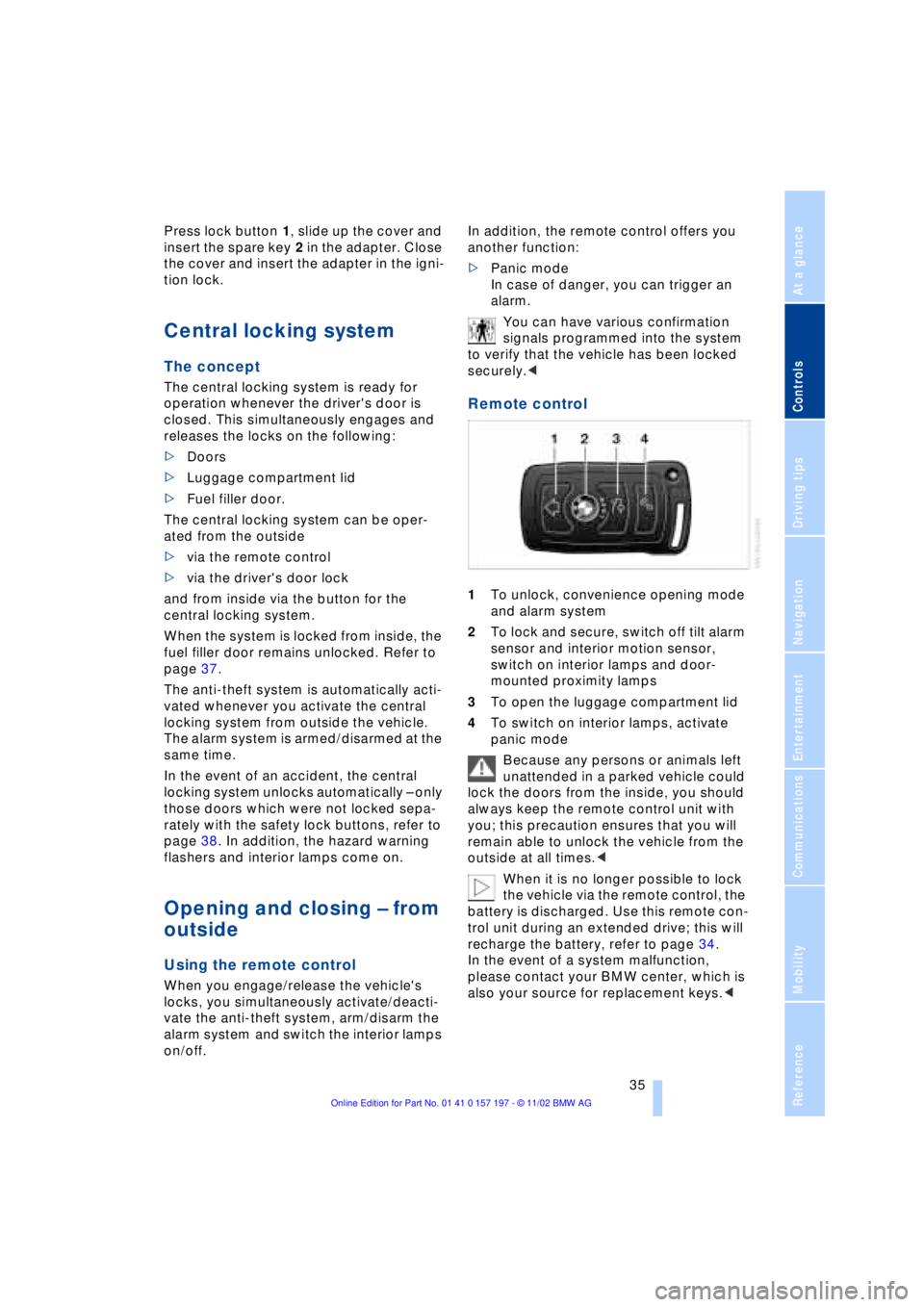
Remote control
1To unlock, convenience opening mode
and alarm system
2To lock and secure, switch off tilt alarm
sensor and interior motion sensor,
switch on interior lamps and door-
mounted proximity lamps
3To open the luggage compartment lid
4To switch on interior lamps, activate
panic mode
Because any persons or animals left
unattended in a parked vehicle could
lock the doors from the inside, you should
always keep the remote control unit with
you; this precaution ensures that you will
remain able to unlock the vehicle from the
outside at all times.<
When it is no longer possible to lock
the vehicle via the remote control, the
battery is discharged. Use this remote con-
trol unit during an extended drive; this will
recharge the battery, refer to page 34.
In the event of a system malfunction,
please contact your BMW center, which is
also your source for replacement keys.<
Page 38 of 229
Opening and closing
36
Unlocking the vehicle
Press button 1.
The interior lamps and the door-mounted
proximity lamps come on.
Press the button once to unlock the driver's
door only; press a second time to unlock all
remaining doors as well as the luggage
compartment lid and the fuel filler door.
Convenience opening mode
Hold button 1pressed. The windows
and the sliding/tilt sunroof open. The
sliding/tilt sunroof will not be retracted if it
is already in its raised position.
Locking and securing
Press button 2.
Switching off the tilt alarm sensor
and interior motion sensor
Press button 2once again
directly after locking. For more detailed
information, refer to page 41.
Switching on interior lamps and
door-mounted proximity lamps
If the vehicle is locked, press
button 2.
Switching on the interior lamps
Press button 4.
You can also use this function to locate
your vehicle in parking garages etc.
Panic mode
By pressing and holding button 4for
more than approx. two seconds, you can
trigger the alarm system in response to any
impending danger.
To switch off the alarm: press any of the
buttons.
Opening the luggage compartment
lid
Maintain pressure on button 3for
approx. 1 second. The luggage compartment lid opens,
regardless of whether it was previously
locked or unlocked.
During opening the luggage compart-
ment lid pivots upward and to the
rear. Ensure that adequate clearance is
available before opening.
To avoid being inadvertently locked out,
never lay the remote control unit down in
the luggage compartment. If the luggage
compartment lid was locked earlier, it will
relock automatically when closed.<
Automatic luggage compartment lid
operation*
Opening the luggage compartment
lid
Maintain pressure on button 3for
approx. 1 second.
The luggage compartment lid opens all the
way, regardless of whether it was previ-
ously locked or unlocked.
To interrupt the opening process:
Press the button again while opening is in
progress.
During opening the luggage compart-
ment lid pivots upward and to the
rear. Ensure that adequate clearance is
available before opening.
To avoid being inadvertently locked out,
never lay the remote control unit down in
the luggage compartment. If the vehicle is
locked, the luggage compartment lid is also
locked again when closed.<
External systems
External systems or devices may cause
local interference in the functions of the
remote control.
Should the remote control unit fail to
operate owing to interference of this kind,
you can respond by using the key to unlock
your vehicle at one of the doors.
Page 39 of 229
At a glance
Controls
Driving tips
Communications
Navigation
Entertainment
Mobility
Reference
37
For US owners only
The transmitter and receiver units comply
with part 15 of the FCC/Federal Communi-
cation Commission regulations. Operation
is governed by the following:
FCC ID: LX8766S
LX8766E
LX8CAS
Compliance statement:
This device complies with part 15 of the
FCC Rules. Operation is subject to the fol-
lowing two conditions:
>This device may not cause harmful
interference, and
>this device must accept any interfer-
ence received, including interference
that may cause undesired operation.
Any unauthorized modifications or
changes to these devices could void
the user's authority to operate this equip-
ment.<
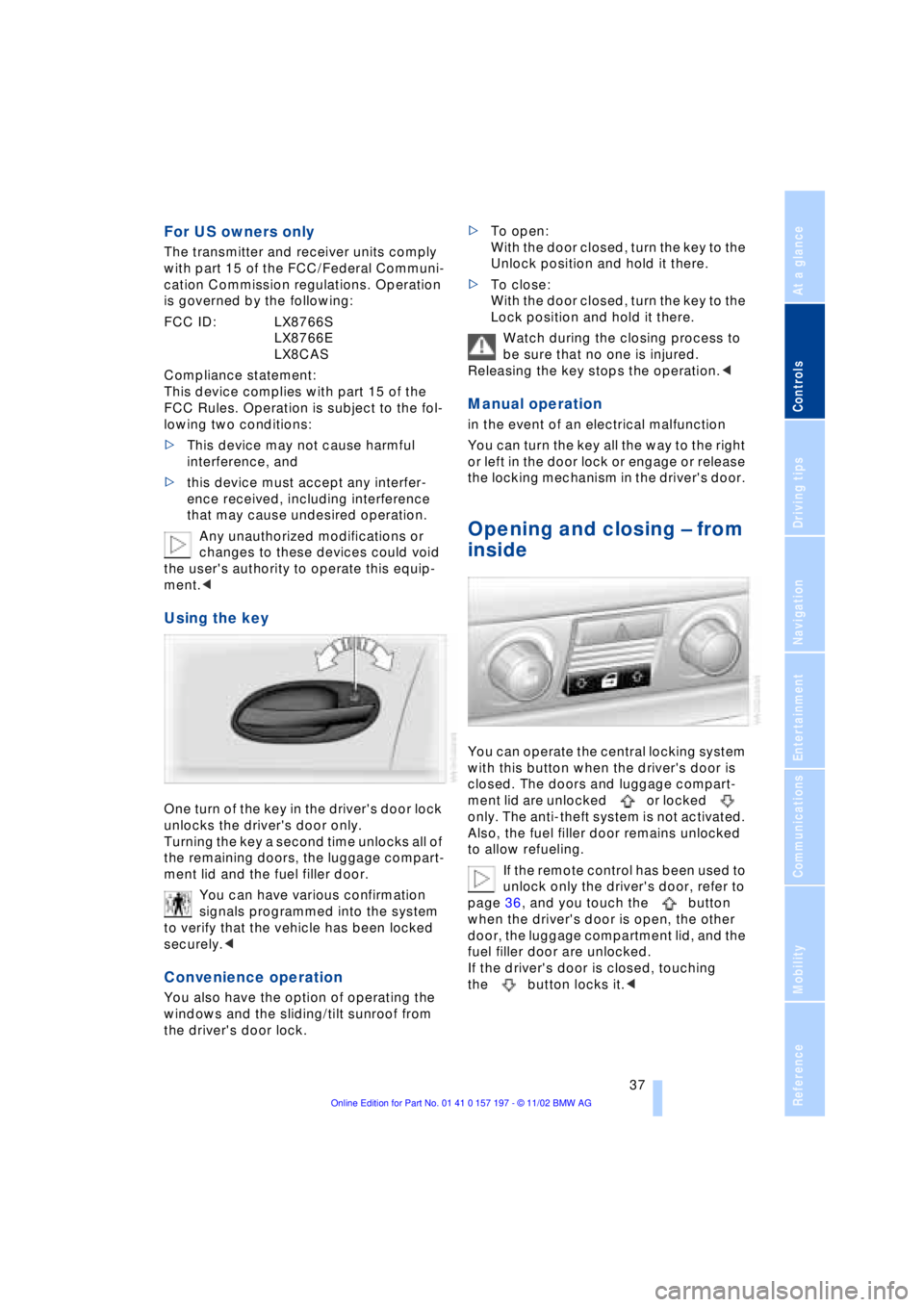
Using the key
One turn of the key in the driver's door lock
unlocks the driver's door only.
Turning the key a second time unlocks all of
the remaining doors, the luggage compart-
ment lid and the fuel filler door.
You can have various confirmation
signals programmed into the system
to verify that the vehicle has been locked
securely.<
Convenience operation
You also have the option of operating the
windows and the sliding/tilt sunroof from
the driver's door lock.>To open:
With the door closed, turn the key to the
Unlock position and hold it there.
>To close:
With the door closed, turn the key to the
Lock position and hold it there.
Watch during the closing process to
be sure that no one is injured.
Releasing the key stops the operation.<
Manual operation
in the event of an electrical malfunction
You can turn the key all the way to the right
or left in the door lock or engage or release
the locking mechanism in the driver's door.
Opening and closing Ð from
inside
You can operate the central locking system
with this button when the driver's door is
closed. The doors and luggage compart-
ment lid are unlocked or locked
only. The anti-theft system is not activated.
Also, the fuel filler door remains unlocked
to allow refueling.
If the remote control has been used to
unlock only the driver's door, refer to
page 36, and you touch the button
when the driver's door is open, the other
door, the luggage compartment lid, and the
fuel filler door are unlocked.
If the driver's door is closed, touching
the button locks it.<
Page 40 of 229
Opening and closing
38 You can also have the system pro-
grammed to activate the central
locking system automatically whenever the
vehicle is set in motion, or when a specific
interval elapses after it is unlocked, pro-
vided that neither the doors nor the lug-
gage compartment lid are opened in the
meantime. This can be adjusted to be key-
specific.<
Unlocking and opening the doors
>Either unlock the doors together with
the button for the central locking
system and then pull the release handle
above the armrest or
>pull the release handle for each door
twice: the first pull unlocks the door,
and the second one opens it.
When the low beams are switched on,
the interior door handles are also
lighted. The intensity of the lighting is
adjusted using the instrument lighting, refer
to page 103.<
Engaging the locks
>Use the central locking button to lock all
of the doors simultaneously,
or
>press the individual safety lock buttons
down. To prevent the driver from being
inadvertently locked out of the vehicle,
the lock button on the driver's door
automatically extends again after a brief
period if the door remains open.
Do not use the safety lock buttons to
engage the locks during driving, as
they would then fail to disengage automat-
ically in the event of an accident.
Because any persons or animals left unat-
tended in a parked vehicle could lock the
doors from the inside, you should always
keep the remote control unit with you; this
precaution ensures that you will remain
able to unlock the vehicle from the outside
at all times. <
Doors
Soft Close Automatic*
Apply gentle pressure to the door to close
it. The closing process will then be carried
out automatically.
To avoid injuries, ensure that the
door's travel path is completely free
and clear before closing.<
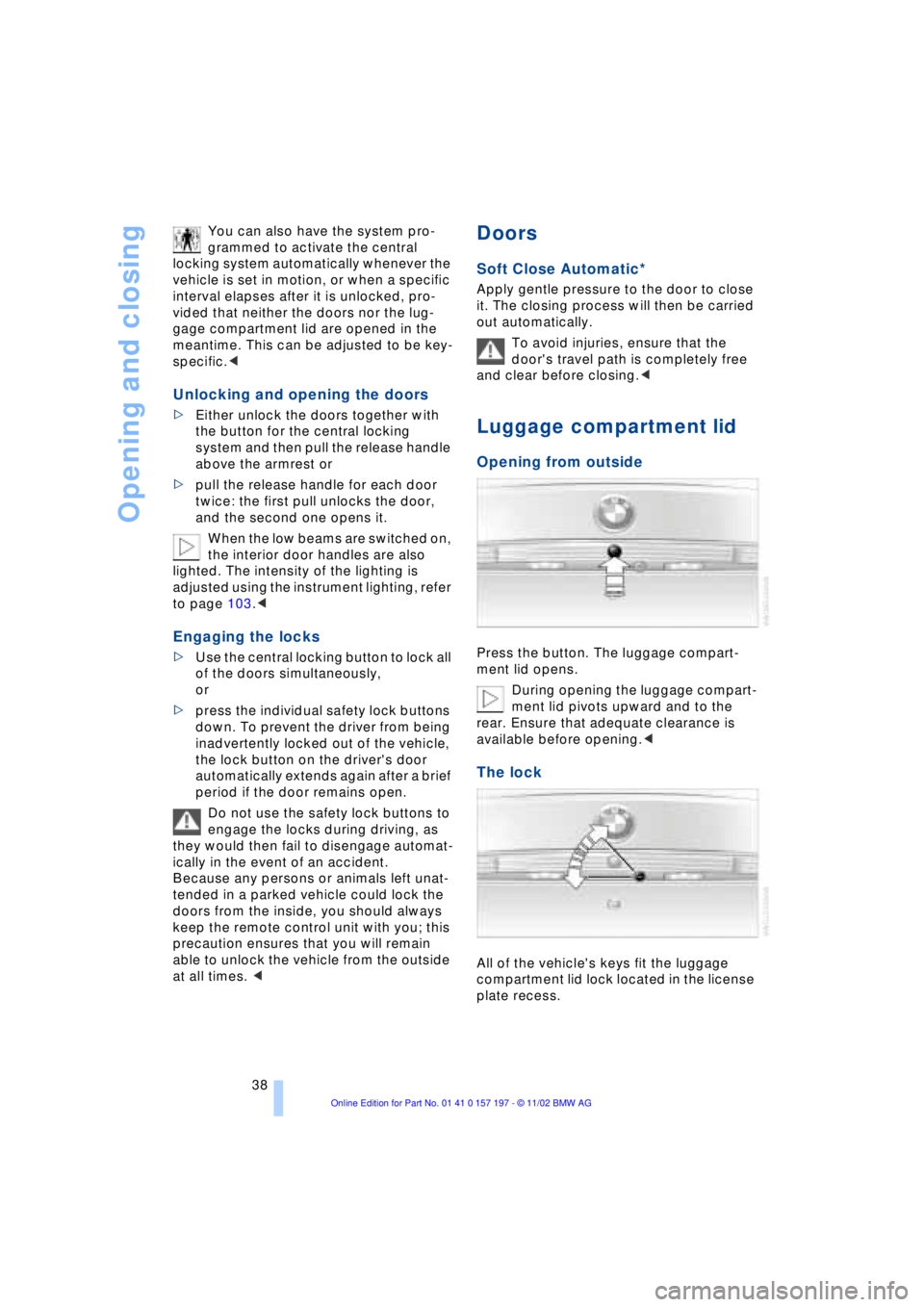
Luggage compartment lid
Opening from outside
Press the button. The luggage compart-
ment lid opens.
During opening the luggage compart-
ment lid pivots upward and to the
rear. Ensure that adequate clearance is
available before opening.<
The lock
All of the vehicle's keys fit the luggage
compartment lid lock located in the license
plate recess.
Page 41 of 229
At a glance
Controls
Driving tips
Communications
Navigation
Entertainment
Mobility
Reference
39
Opening separately
Insert the key in the luggage compartment
lid's lock and turn it all the way to the right
Ð the lid opens.
To avoid being locked out inadvert-
ently, avoid laying the remote control
unit down in the luggage compartment. The
luggage compartment is locked again as
soon as you close the lid.
If you use the key to unlock the luggage
compartment lid while the alarm system is
armed, the alarm will be triggered. To
deactivate the alarm,
>unlock the vehicle using the remote
control, refer to page 36, or
>insert the remote control all the way into
the ignition lock, engaging the detent.<
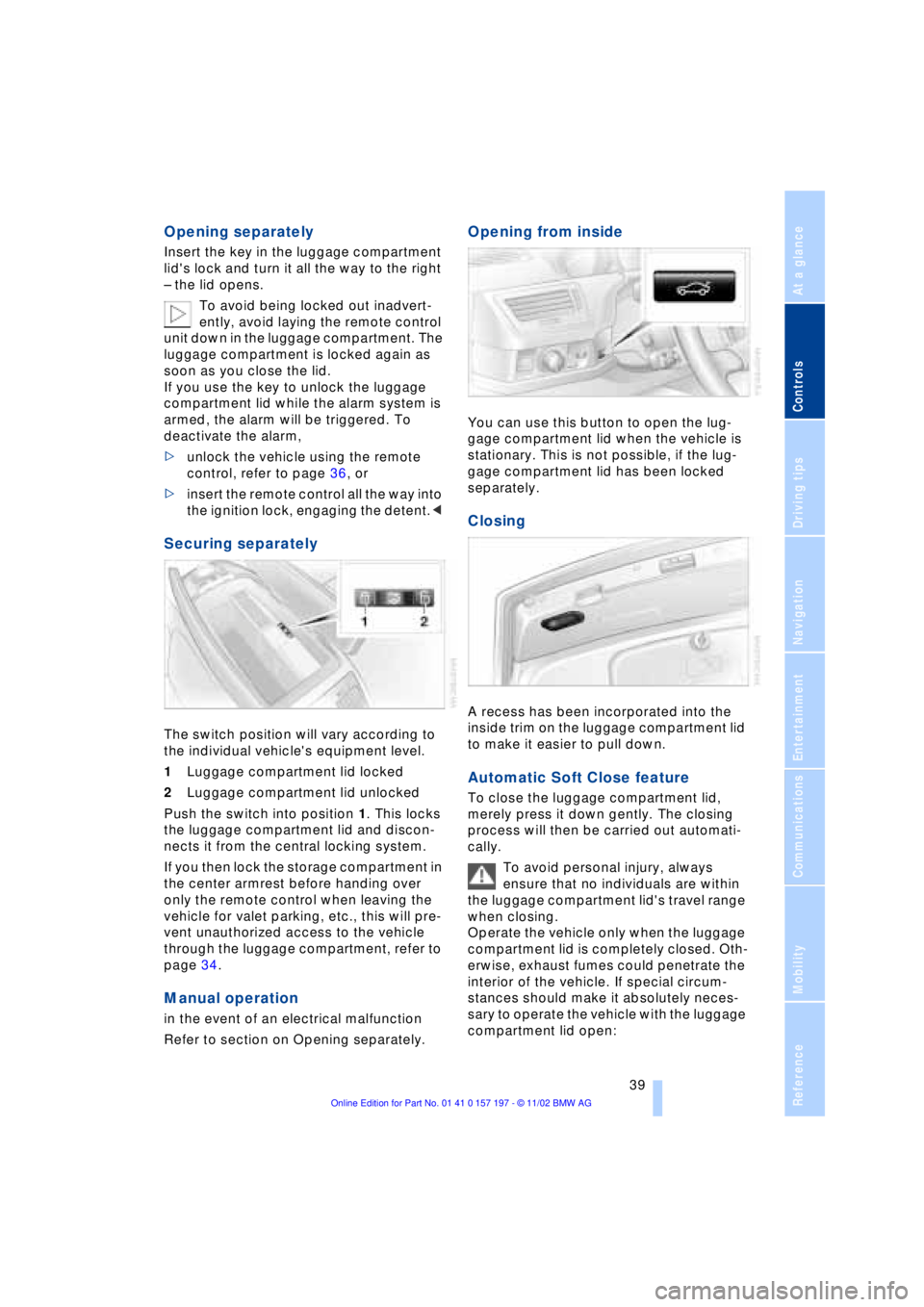
Securing separately
The switch position will vary according to
the individual vehicle's equipment level.
1Luggage compartment lid locked
2Luggage compartment lid unlocked
Push the switch into position 1. This locks
the luggage compartment lid and discon-
nects it from the central locking system.
If you then lock the storage compartment in
the center armrest before handing over
only the remote control when leaving the
vehicle for valet parking, etc., this will pre-
vent unauthorized access to the vehicle
through the luggage compartment, refer to
page 34.
Manual operation
in the event of an electrical malfunction
Refer to section on Opening separately.
Opening from inside
You can use this button to open the lug-
gage compartment lid when the vehicle is
stationary. This is not possible, if the lug-
gage compartment lid has been locked
separately.
Closing
A recess has been incorporated into the
inside trim on the luggage compartment lid
to make it easier to pull down.
Automatic Soft Close feature
To close the luggage compartment lid,
merely press it down gently. The closing
process will then be carried out automati-
cally.
To avoid personal injury, always
ensure that no individuals are within
the luggage compartment lid's travel range
when closing.
Operate the vehicle only when the luggage
compartment lid is completely closed. Oth-
erwise, exhaust fumes could penetrate the
interior of the vehicle. If special circum-
stances should make it absolutely neces-
sary to operate the vehicle with the luggage
compartment lid open:
Page 42 of 229
Opening and closing
40 >Close all windows. Shut the sliding/tilt
sunroof
>Adjust the automatic climate control's
blower to supply a high rate of airflow,
refer to page 107.<
Automatic luggage compartment lid
operation*
Opening
The luggage compartment lid opens all the
way, when you
>press the button next to the steering
column
>press the button on the outside of the
luggage compartment lid, refer to
page 38
>press button 3on the remote
control unit, refer to page 36.
During opening the luggage compart-
ment lid pivots upward and to the
rear. Ensure that adequate clearance is
available before opening.<
Closing
The luggage compartment lid closes auto-
matically when you
>press the button or
>press the button on the outside of the
luggage compartment lid, refer to
page 38.
The luggage compartment lid imme-
diately stops opening or closing if you
hold it in place by hand.<
To avoid injuries, be sure that the
travel path of the luggage compart-
ment lid is clear when it is closed, as with all closing procedures.
Operate the vehicle only when the luggage
compartment lid is completely closed.
Otherwise, exhaust fumes could penetrate
the interior of the vehicle. If special circum-
stances should make it absolutely neces-
sary to operate the vehicle with the luggage
compartment lid open:
>Close all windows. Shut the sliding/tilt
sunroof
>Adjust the automatic climate control's
blower to supply a high rate of airflow,
refer to page 107.<
Manual operation
in the event of an electrical malfunction
Use the key to unlock the luggage com-
partment lid, refer to page 38, and then
slowly open or close it, taking care to avoid
abrupt motion in the process.
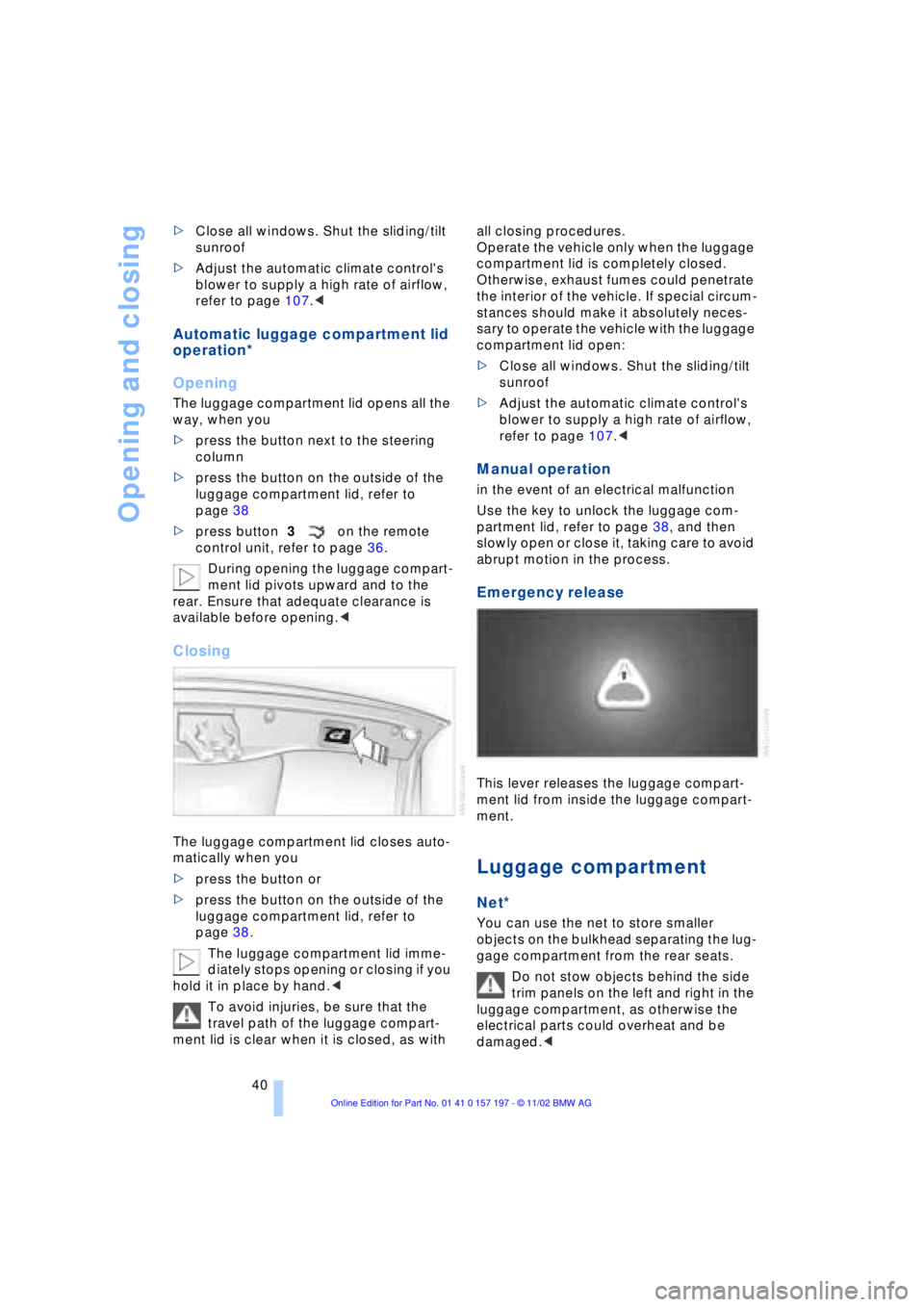
Emergency release
This lever releases the luggage compart-
ment lid from inside the luggage compart-
ment.
Luggage compartment
Net*
You can use the net to store smaller
objects on the bulkhead separating the lug-
gage compartment from the rear seats.
Do not stow objects behind the side
trim panels on the left and right in the
luggage compartment, as otherwise the
electrical parts could overheat and be
damaged.<