ESP BMW 760LI SEDAN 2007 Repair Manual
[x] Cancel search | Manufacturer: BMW, Model Year: 2007, Model line: 760LI SEDAN, Model: BMW 760LI SEDAN 2007Pages: 253, PDF Size: 8.59 MB
Page 220 of 253
Giving and receiving assistance
218
Giving and receiving assistance
Emergency call*
Conditions for an emergency call:
>Full preparation package mobile phone.
This equipment package makes it possible
to initiate an emergency call even if no
mobile phone is logged onto the vehicle.
>BMW Assist is activated. BMW Assist acti-
vation, refer to page192.
>Radio ready state or ignition must be
switched on.
>The BMW Assist system is logged on to a
mobile phone network.
>The emergency call system is operable.
Once your service contract for BMW Assist
expires, the BMW Assist system can be deacti-
vated by a BMW center without you having to
visit a workshop. Once the BMW Assist system
has been deactivated, emergency calls are not
possible. The BMW Assist system can be reac-
tivated by a BMW center after a new contract
has been signed.
Initiating an emergency call
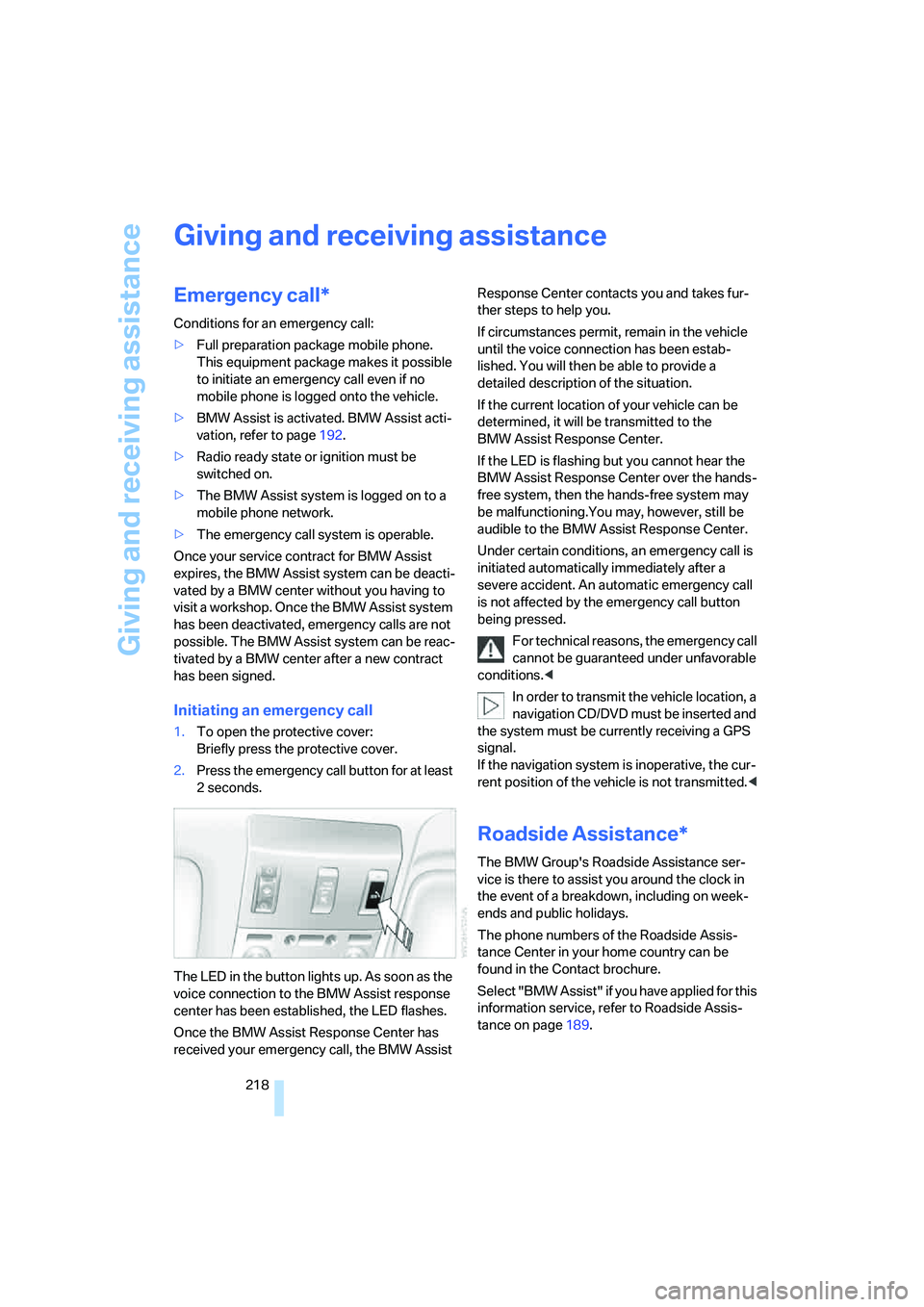
1.To open the protective cover:
Briefly press the protective cover.
2.Press the emergency call button for at least
2seconds.
The LED in the button lights up. As soon as the
voice connection to the BMW Assist response
center has been established, the LED flashes.
Once the BMW Assist Response Center has
received your emergency call, the BMW Assist Response Center contacts you and takes fur-
ther steps to help you.
If circumstances permit, remain in the vehicle
until the voice connection has been estab-
lished. You will then be able to provide a
detailed description of the situation.
If the current location of your vehicle can be
determined, it will be transmitted to the
BMW Assist Response Center.
If the LED is flashing but you cannot hear the
BMW Assist Response Center over the hands-
free system, then the hands-free system may
be malfunctioning.You may, however, still be
audible to the BMW Assist Response Center.
Under certain conditions, an emergency call is
initiated automatically immediately after a
severe accident. An automatic emergency call
is not affected by the emergency call button
being pressed.
For technical reasons, the emergency call
cannot be guaranteed under unfavorable
conditions.<
In order to transmit the vehicle location, a
navigation CD/DVD must be inserted and
the system must be currently receiving a GPS
signal.
If the navigation system is inoperative, the cur-
rent position of the vehicle is not transmitted.<
Roadside Assistance*
The BMW Group's Roadside Assistance ser-
vice is there to assist you around the clock in
the event of a breakdown, including on week-
ends and public holidays.
The phone numbers of the Roadside Assis-
tance Center in your home country can be
found in the Contact brochure.
Select "BMW Assist" if you have applied for this
information service, refer to Roadside Assis-
tance on page189.
Page 222 of 253
Giving and receiving assistance
220 5.Attach the second negative/– clamp of the
jumper cable to the negative battery termi-
nal or to an engine or body ground on the
vehicle to be started.
Starting engine
1.Start the engine of the assisting vehicle and
allow it to run for several minutes at a fast
idle.
2.Start the engine on the other vehicle in the
usual way.
If the first start attempt is not successful,
wait a few minutes before another attempt
in order to allow the discharged battery to
recharge.
3.Allow the engines to run for several min-
utes.
4.Disconnect the jumper cables again in the
reverse sequence.
If need be, have the battery checked and
recharged.
Never use spray fluids to start the
engine.<
Towing and tow starting
Observe applicable laws and regulations
for tow-starting and towing.<
Do not transport any passengers other
than the driver in a vehicle that is being
towed.<
Using tow fitting
The threaded tow fitting is stored in the
onboard tool kit and must always remain in the
vehicle. It can be screwed in at the front or rear
of the BMW.
Only use the tow fitting that comes with
the vehicle and screw it in as far as it will
go. Use the tow fitting for towing only on roads.
Avoid lateral loading of the tow fitting, e.g. do
not lift the vehicle by the tow fitting. Otherwise,
damage to the tow fitting and the vehicle can
occur.<
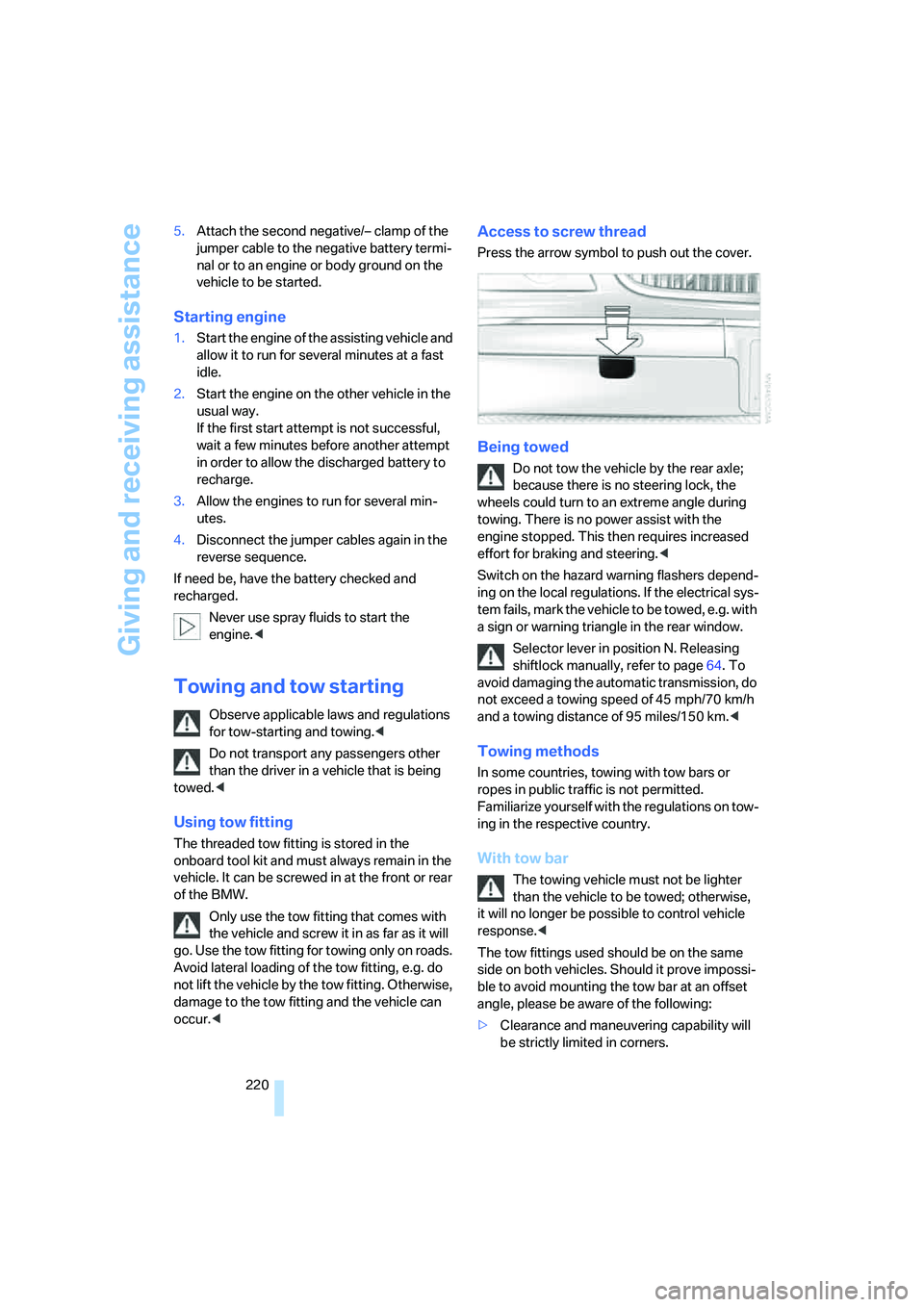
Access to screw thread
Press the arrow symbol to push out the cover.
Being towed
Do not tow the vehicle by the rear axle;
because there is no steering lock, the
wheels could turn to an extreme angle during
towing. There is no power assist with the
engine stopped. This then requires increased
effort for braking and steering.<
Switch on the hazard warning flashers depend-
ing on the local regulations. If the electrical sys-
tem fails, mark the vehicle to be towed, e.g. with
a sign or warning triangle in the rear window.
Selector lever in position N. Releasing
shiftlock manually, refer to page64. To
avoid damaging the automatic transmission, do
not exceed a towing speed of 45 mph/70 km/h
and a towing distance of 95 miles/150 km.<
Towing methods
In some countries, towing with tow bars or
ropes in public traffic is not permitted.
Familiarize yourself with the regulations on tow-
ing in the respective country.
With tow bar
The towing vehicle must not be lighter
than the vehicle to be towed; otherwise,
it will no longer be possible to control vehicle
response.<
The tow fittings used should be on the same
side on both vehicles. Should it prove impossi-
ble to avoid mounting the tow bar at an offset
angle, please be aware of the following:
>Clearance and maneuvering capability will
be strictly limited in corners.
Page 237 of 253
Reference 235
At a glance
Controls
Driving tips
Communications
Navigation
Entertainment
Mobility
DVD changer170
– adjusting picture172
– adjusting volume153
– controls152
– country codes171
– DVD controller171
– fast forward172
– freeze frame173
– opening specific menu174
– playing DVD171
– reverse172
– searching for chapter172
– selecting language173
– selecting picture format173
– selecting subtitles173
– starting171
– tone control153
DVD multimedia changer,
refer to DVD changer170
Dynamic Brake Control
DBC87
Dynamic Drive89
Dynamic Stability Control
DSC87
– indicator lamp13
Dynamic Traction Control
DTC88
– indicator lamp13
E
"EDC"89
EDC Electronic Damping
Control89
Eject button, refer to Buttons
on CD player152
Electrical malfunction
– door lock34
– driver's door34
– fuel filler door196
– glass sunroof, electric42
– luggage compartment lid36
– parking brake60
Electric steering wheel
adjustment52
Electronic brake-force
distribution87Electronic Damping Control
EDC89
Electronic Stability Program
ESP, refer to DSC Dynamic
Stability Control87
Electronic toll collection
device, refer to Entry/pass
tags126
Emergency actuation, refer to
Manual operation
– door lock34
– driver's door34
– fuel filler door196
– glass sunroof42
– luggage compartment lid36
– parking brake60
– transmission lock for
automatic transmission with
Steptronic64
Emergency call218
Emergency release of luggage
compartment lid from inside
the luggage
compartment37
Emergency services, refer to
Roadside
Assistance189,218
Energy-conscious driving,
refer to Energy Control/
current fuel consumption77
Energy Control77
Engine
– breaking-in122
– data224
– overheated, refer to Coolant
temperature76
– speed75,224
– starting57
– starting difficulties58
– switching off58
Engine compartment207
Engine coolant208Engine oil
– additives, refer to Approved
engine oils208
– approved oils208
– checking oil level207
– electronic oil level check207
– oil types, also refer to
Approved engine oils208
– possible displays of oil level
check208
"Engine oil level O.K."208
"Engine oil level too high"208
Engine output, refer to Engine
specifications224
Engine overheating, refer to
Coolant temperature76
Engine speed224
"Enter", navigation134
Entering activation time of
parked car ventilation109
– "Time 1"110
– "Time 2"110
Entering destination
address133
Entering destination town/
city132
Entering house number or
intersection, navigation133
Entering intersection,
navigation133
Entering name, destination in
navigation132
Entering street,
navigation133
"Entertainment", tone
control153
Entertainment sound output
on/off153
Entry/pass tags126
Entry for current position and
destination, refer to Entering
destination manually131
Environmentally friendly
driving, refer to Energy
Control77
Erasing entire list, refer to
Deleting entries in lists186
Page 238 of 253
Everything from A to Z
236 ESP Electronic Stability
Program, refer to DSC
Dynamic Stability
Control87
Event Data Recorders211
Exhaust system, refer to Hot
exhaust system122
Exterior mirrors50
– adjusting50
– automatic dimming
feature51
– automatic heating51
– folding in and out51
– tilting down passenger-side
mirror51
External audio
device114,169
"Extra"
– rear air conditioner108
– rear refrigerator117
Eyes for lashing, refer to
Securing cargo125
F
"Fader", balance and
fader154
Failure messages, refer to
Check Control80
Failure of an electrical device,
refer to Fuses217
False alarm, refer to Avoiding
unintentional alarms38
Fastening safety belts48
"Fastest route",
navigation141
Fast forward
– CD changer167
– CD player164
– DVD changer172
Filter, refer to Microfilter/
activated-charcoal filter107
First-aid kit219
Fittings for towing and tow
starting220
Flashlight, refer to
Rechargeable flashlight113Flat tire
– Flat Tire Monitor90
– refer to Changing
wheels214
– refer to Tire condition203
– run-flat tires91,93,204
– spare tire215
– Tire Pressure Monitor91
Flat Tire Monitor90
– initializing system90
– limits of system90
– show chains205
– warning lamp91
Flooding, refer to Driving
through water123
Floor coverings, carpet, refer
to Caring for your vehicle
brochure
Floor mat, refer to Caring for
your vehicle brochure
"FM", radio156
FM, refer to Radio156
Fog lamps, refer to Front fog
lamps101
Footbrake, refer to Braking
safely123
Footwell lamps, refer to
Interior lamps102
For specified oil grades, refer
to Approved engine oils208
Fresh air vents, refer to
Ventilation107
Front airbags95
Front fog lamps, indicator
lamp11,13
Fuel197
– average fuel
consumption77
– gauge76
– quality197
– refer to Average fuel
consumption77
– reserve, refer to Fuel
gauge76
– tank capacity227
Fuel consumption display,
refer to Energy control/
current consumption77Fuel filler door196
– manually unlocking196
Fuel level, refer to Fuel
gauge76
Fuel-saving driving, refer to
Energy Control77
"Full", rear seat screen22
"FULL MENU", DVD
changer173
"Full screen", BMW Night
Vision98
Fuses217
G
Garage door opener, refer to
Integrated universal remote
control111
Gas
– display, refer to Fuel
gauge76
– fuel quality197
Gear changes, refer to
Automatic transmission with
Steptronic62
Gear display, refer to Displays
on Info Display62
"General destination",
navigation135
General driving notes122
Glasses compartment115
Glass sunroof, electric41
– convenience operation32
– moving manually42
Glove compartment113
Grilles, refer to Ventilation107
Gross weight, refer to
Weights226